



Summarize this blog post with:


In this article, you’ll get an honest breakdown of Keyword.com’s AI Tracker after running 50 prompts across four AI engines for eight weeks. You’ll see exactly where the tool delivers (rank tracking accuracy, SERP snapshots, white-label reporting), where it breaks down (credit costs, missing attribution, no content execution), and how its pricing stacks up against flat-rate alternatives. You’ll also learn how to close the gap between “knowing your AI visibility score” and actually improving it, with a full walkthrough of Analyze AI as the platform that connects tracking to traffic, content, and revenue.
Table of Contents
What Keyword.com Gets Right
Keyword.com started as a rank tracker in 2011 and built its reputation on accurate, verifiable SERP data. That foundation still holds. Here are the three areas where it earns its spot in an SEO stack.
Rank Tracking Accuracy You Can Actually Verify
Most rank trackers show you a position number and ask you to trust it. Keyword.com takes a different approach with its Spyglass verification system. Every tracked keyword comes with a screenshot of the actual SERP that was captured, so you can confirm the ranking yourself and show it to a client.
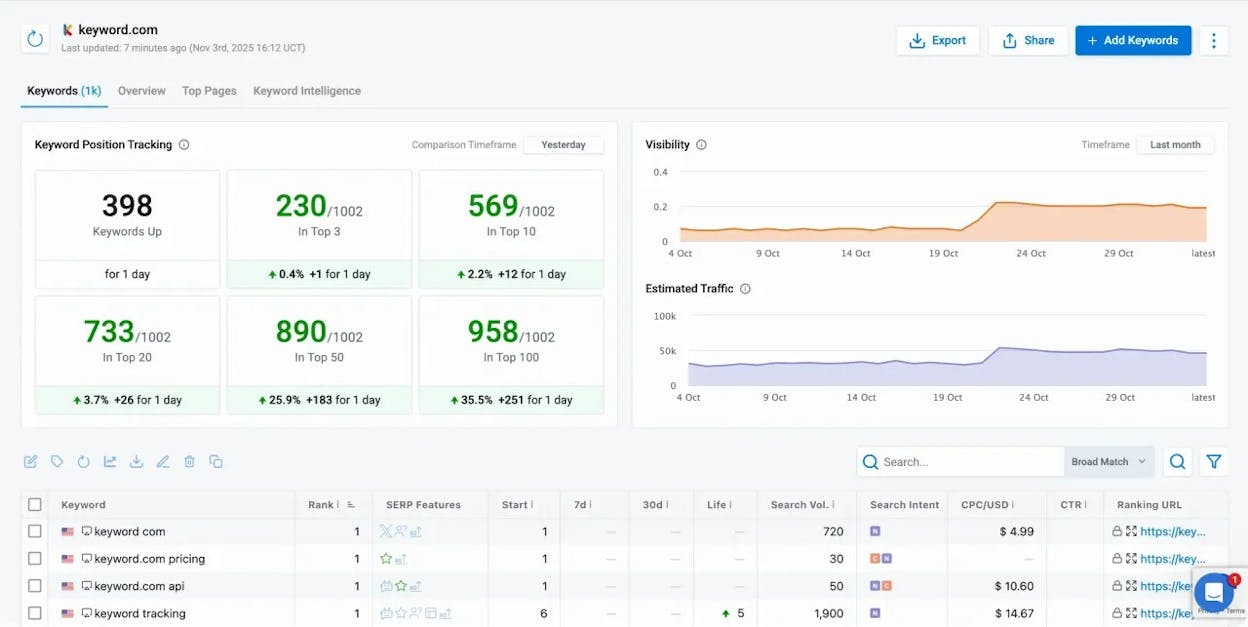
The platform reports 96.8% accuracy across desktop and mobile, verified by third-party audits. It tracks rankings down to the ZIP code level, updates daily or on-demand, and records every SERP feature (featured snippets, People Also Ask, AI Overviews) that appears alongside your result.
For agencies, this matters because it eliminates the “your tool says one thing, my tool says another” conversation. You pull up the Spyglass screenshot, and the client sees the same SERP you do.
AI Visibility Tracking Across Multiple Engines
Keyword.com expanded into AI search visibility tracking in late 2024, covering ChatGPT, Perplexity, Gemini, Google AI Overviews, AI Mode, Claude, Copilot, Mistral, and DeepSeek.
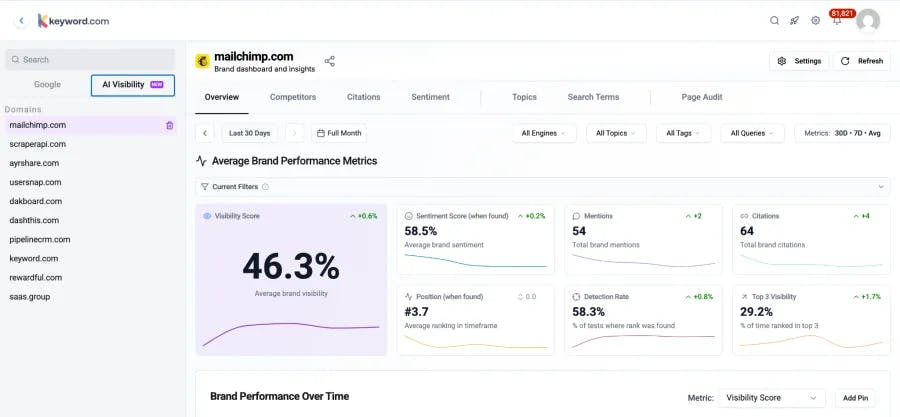
For each tracked prompt, the platform stores a full response snapshot that includes the text excerpt, source citations, and your brand’s position relative to competitors. These snapshots are timestamped, so you can compare how AI engines treat your brand over weeks or months.
The coverage is broad. If your primary need is monitoring whether AI engines mention your brand at all and how often that changes, Keyword.com gives you a defensible record.
API, Integrations, and White-Label Reporting
Keyword.com connects to Google Analytics 4, Search Console, and Looker Studio. Its API delivers raw ranking and AI visibility data directly into internal dashboards, and its white-label reporting lets agencies present results under their own brand.
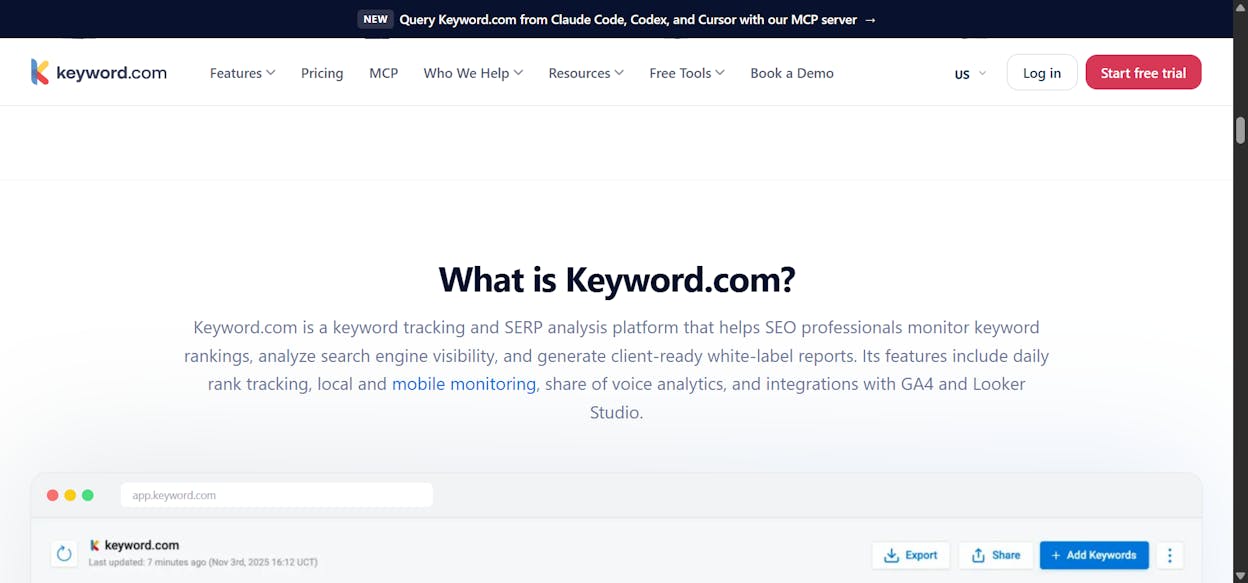
Scheduled email reports (CSV and PDF), shareable live dashboards, and custom ViewKey domains round out the reporting layer. For teams that need to automate recurring rank reports across many clients, this is well built and reliable.
Where Keyword.com Falls Short
The tool’s tight focus creates three gaps that grow wider the more you depend on it.
It Is Not an All-in-One SEO or AI Search Platform
Keyword.com tracks rankings and AI visibility. It does not do keyword research at scale, site audits, backlink analysis, content creation, or content optimization. The moment you need to discover new opportunities, audit technical SEO issues, or write content based on your findings, you leave the tool and open something else.
That context switch is not just inconvenient. It creates a workflow where your insights live in one tool and your actions live in another. Findings from a rank drop don’t connect to the page that needs rewriting. AI visibility data doesn’t feed into a content brief. You end up copying data between tabs and hoping nothing falls through.
For a solo SEO running one site, this is manageable. For an agency with 20 clients or a content team shipping weekly, the “one-login” promise of a platform matters more than the precision of a point solution.
Credit-Based AI Tracking Gets Expensive Fast
This is where the pricing model creates real friction. Keyword.com charges for AI visibility using a credit system. Every prompt refresh across every engine consumes credits, and credits do not roll over.
Here is how the costs add up in practice:
|
Scenario |
Prompts |
Engines |
Refresh |
Credits/Month |
Monthly Cost (Annual) |
|---|---|---|---|---|---|
|
Solo marketer, light tracking |
10 |
3 (ChatGPT, Perplexity, Gemini) |
Weekly |
~30 |
~$31 |
|
In-house team, moderate tracking |
50 |
4 engines |
Weekly |
~200 |
~$79+ |
|
Agency, multi-brand tracking |
100 |
5 engines |
Daily |
~2,500+ |
~$300+ |
Credit costs per engine also vary. ChatGPT, Perplexity, Gemini, AI Mode, and AI Overviews each cost 0.25 credits per check. Copilot costs 0.25. But Claude costs 3.0 credits per check, and Mistral costs 2.0. Track 50 prompts weekly across all nine engines and your monthly credit consumption jumps to levels that rival the cost of a full SEO platform.
During algorithm updates or campaign launches, when you want to check more frequently, the credit burn accelerates. Teams either ration their checks or buy more mid-month. Neither outcome feels like a tool that is working for you.
No Way to Act on What You Find
This is the deepest limitation and the one that shows up in every workflow eventually. Keyword.com tells you your visibility dropped on a prompt. It does not tell you why, and it gives you no path to fix it.
There is no content writer to create content that targets the prompts you are losing. No content optimizer to improve the pages that AI engines currently ignore. No way to see which AI mentions actually drove traffic to your site. No way to see whether that traffic converted.
You get a visibility score. You do not get an outcome.
For most teams, the bottleneck in AI search is not the intelligence. It is the execution. Keyword.com gives you the intelligence and then leaves you to build the execution layer yourself, usually with two or three additional tools and a lot of manual work.
Keyword.com Pricing: The Full Picture
Keyword.com structures its pricing across three plan types:
|
Plan |
Starting Price (Annual) |
What You Get |
|---|---|---|
|
Search Visibility |
$6/mo (50 keywords) |
Google SERP tracking only. Weekly or daily updates. Spyglass, Share of Voice, API, Looker Studio. No AI tracking. |
|
360° Visibility |
$26/mo (1,000 keywords + 15 AI credits) |
Everything in Search Visibility plus AI visibility tracking across 9 engines. Credits included, but limited. |
|
AI Visibility Only |
$31.17/mo (50 credits) |
AI tracking only. No Google SERP tracking. Competitor benchmarking, citation analysis, sentiment, prompt research. |
|
API-Only |
$46/mo |
Programmatic access for custom dashboards and integrations. |
|
Custom |
From $490/mo |
Unlimited keywords and credits, tailored support. |
The entry prices are low. The real cost depends entirely on how many prompts you track, how many engines you include, and how often you refresh. A team that tracks 100 prompts across five engines with daily updates will spend significantly more than the base price suggests.
There is a 14-day free trial with 100 keywords and 20 AI credits included. No credit card required.
The Bigger Question: What Happens After You See the Score?
Every AI visibility tool answers the same first question: “Does my brand show up in AI answers?” Keyword.com answers it well.
But the question that actually drives budget decisions is different: “Does that AI visibility produce anything we can measure?”
A brand mention in ChatGPT that sends zero sessions to your site has a different value than a citation in Perplexity that drives 50 qualified visits to your pricing page. A positive sentiment score in Gemini means less if you cannot connect it to pipeline.
Most visibility-only tools stop at the mention. They treat every AI appearance as equal, regardless of whether it sends traffic, influences a purchase decision, or goes completely unnoticed. This creates a reporting problem. You can show leadership that your visibility score went up, but you cannot show them what that score produced.
The teams that are getting budget for AI search optimization in 2026 are not the ones with the highest visibility scores. They are the ones who can tie AI answers to sessions, sessions to conversions, and conversions to revenue.
How Analyze AI Closes the Loop From Visibility to Revenue
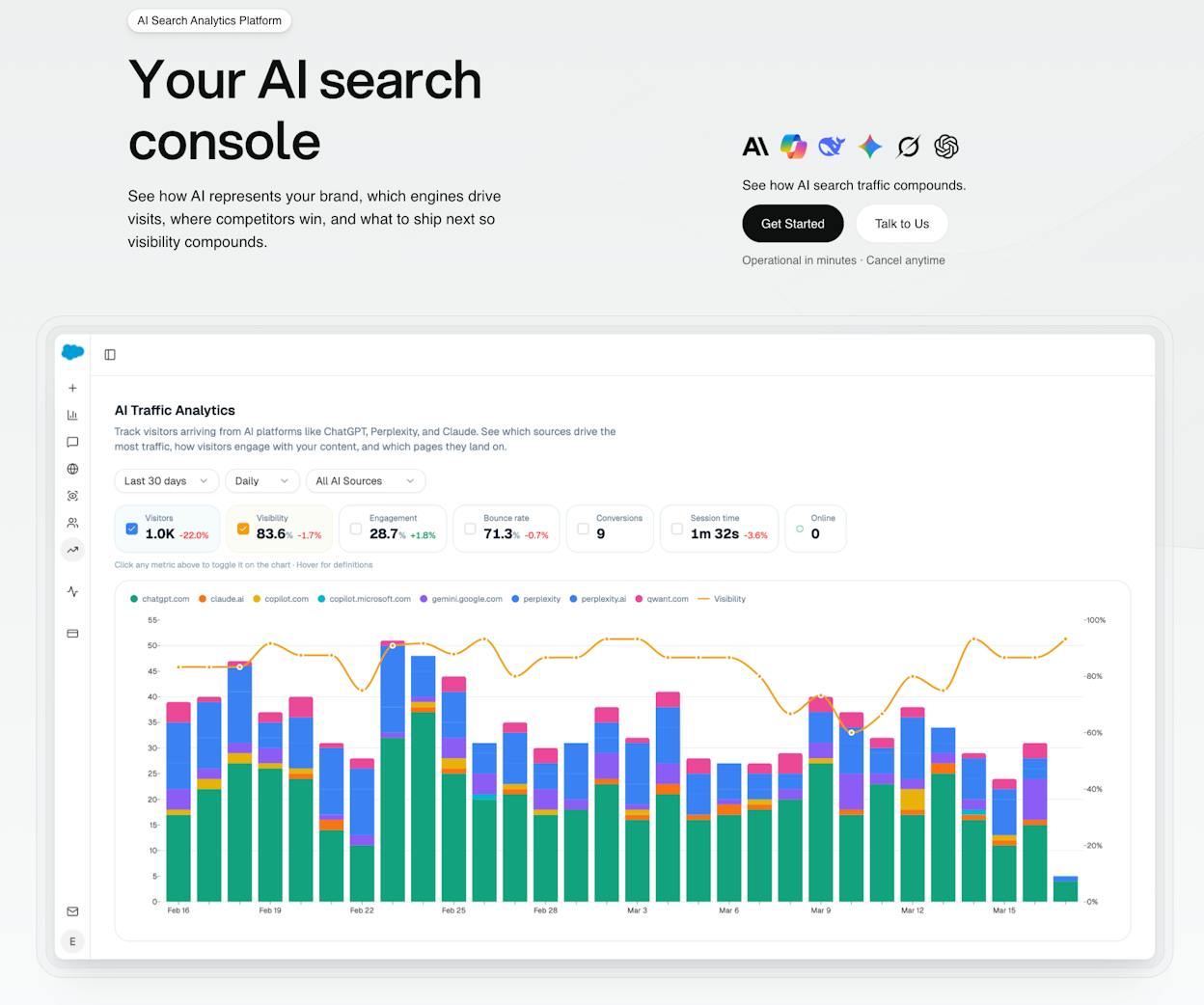
Analyze AI is not just another AI visibility tracker. It is an agentic platform for SEO, AEO, content, and GTM ops that connects every layer from tracking to creation to execution.
See Which AI Engines Actually Send You Traffic
Most tools show you a mention count. Analyze AI shows you real sessions from each AI engine, broken down by source (ChatGPT, Perplexity, Claude, Copilot, Gemini), trend over time, and percentage of total traffic.
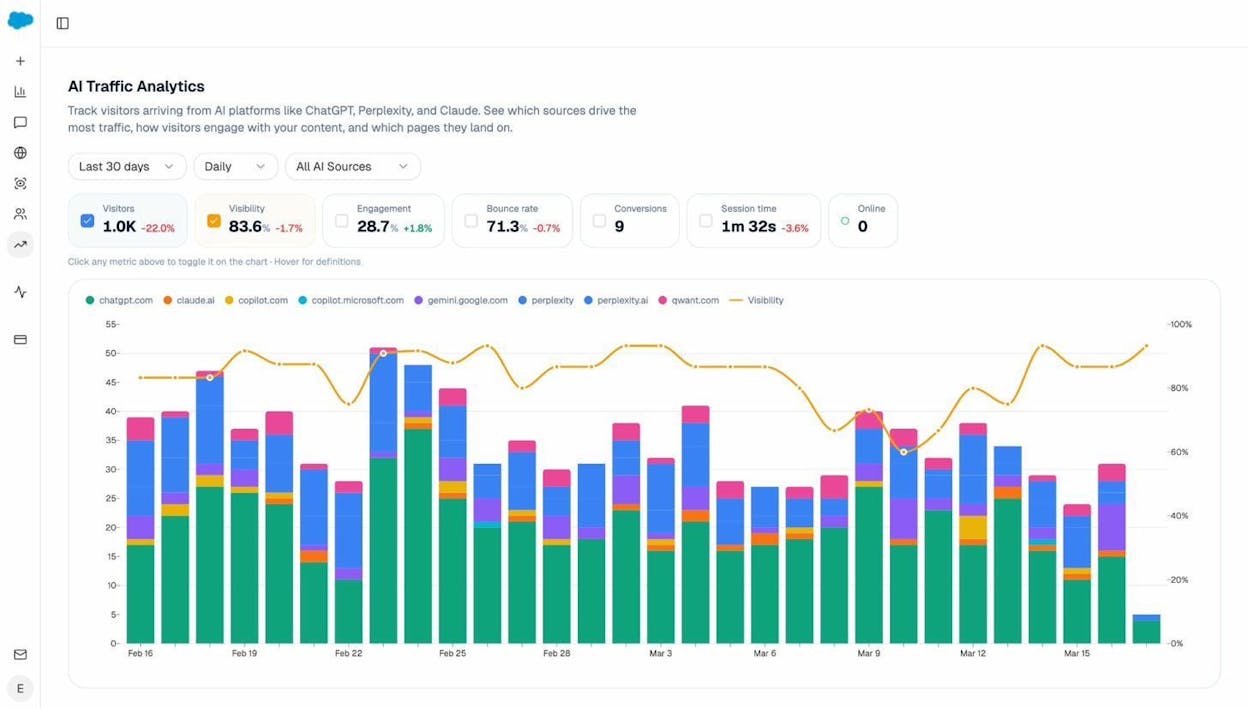
When ChatGPT sends 248 sessions and Perplexity sends 142, you know exactly where to invest optimization effort. When Claude sends 12, you know it is not worth the same attention this quarter.
The platform also shows you which landing pages receive AI referral traffic, which engine sent each visit, and what conversion events those visits trigger.
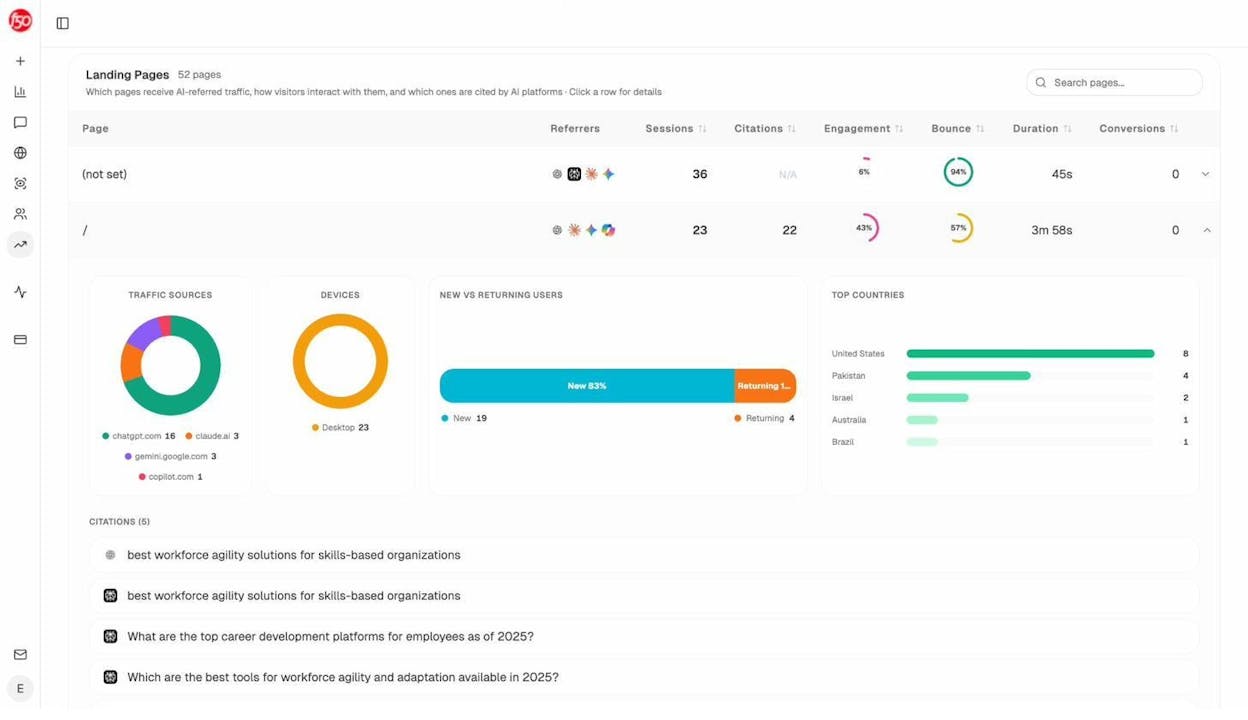
This is the data that earns budget. A product comparison page getting 50 sessions from Perplexity with a 12% trial conversion rate is worth more than a blog post getting 200 sessions with zero conversions. Analyze AI surfaces both so you prioritize correctly.
Track Prompts, Visibility, and Sentiment Across Every Engine
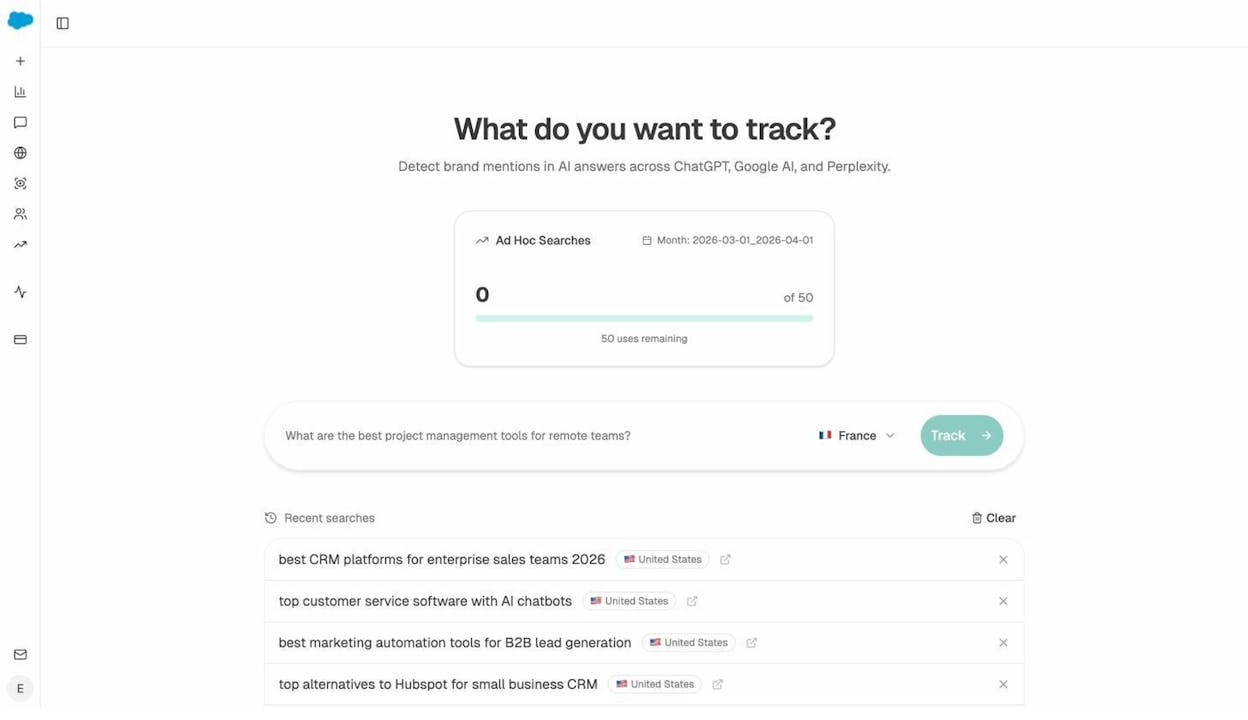
Analyze AI monitors specific prompts across all major LLMs. For each prompt, you see your visibility percentage, your position relative to competitors, and your sentiment score.
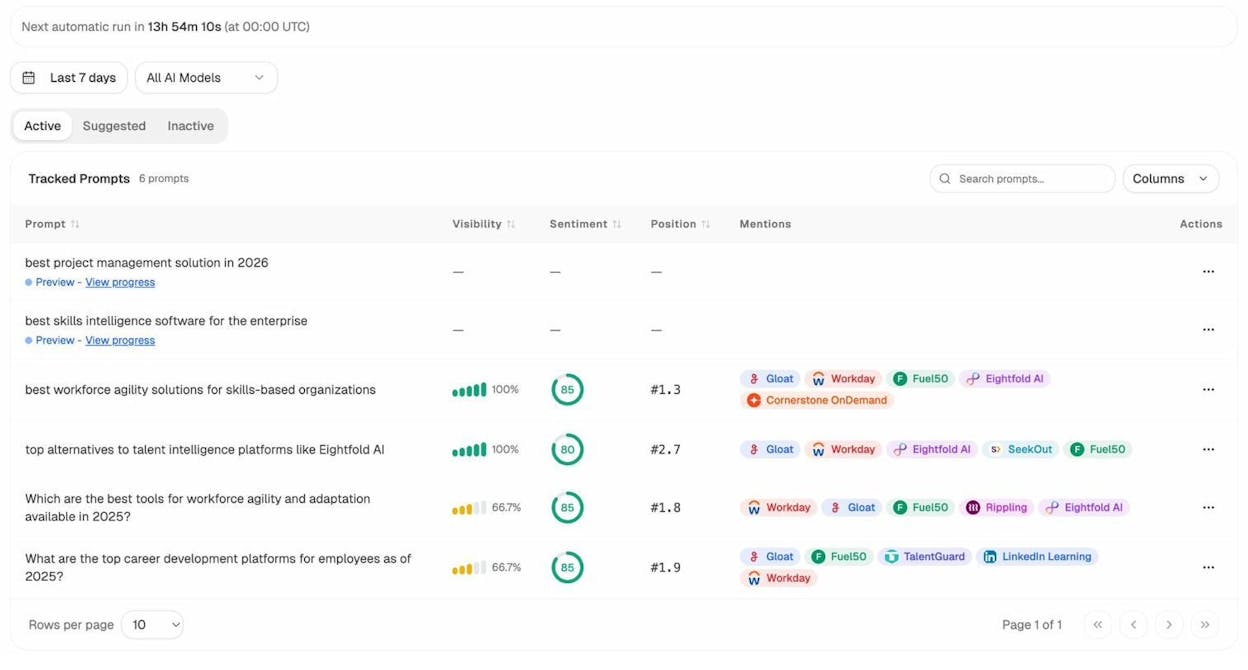
You can also see which competitors appear alongside you, how your position changes daily, and whether sentiment is improving or declining.
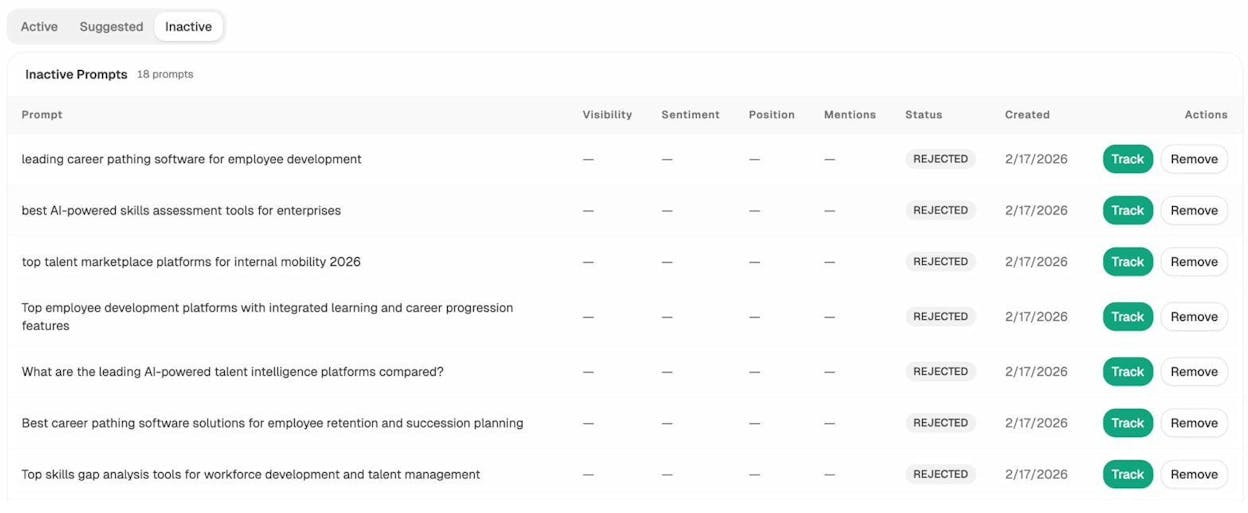
Don’t know which prompts to track? Analyze AI has a prompt suggestion feature that surfaces the actual bottom-of-funnel prompts your buyers are using.
Audit the Sources AI Models Trust
Citation analytics shows you exactly which domains and URLs models cite when answering questions in your category. You see usage count per source, which models reference each domain, and when citations first appeared.
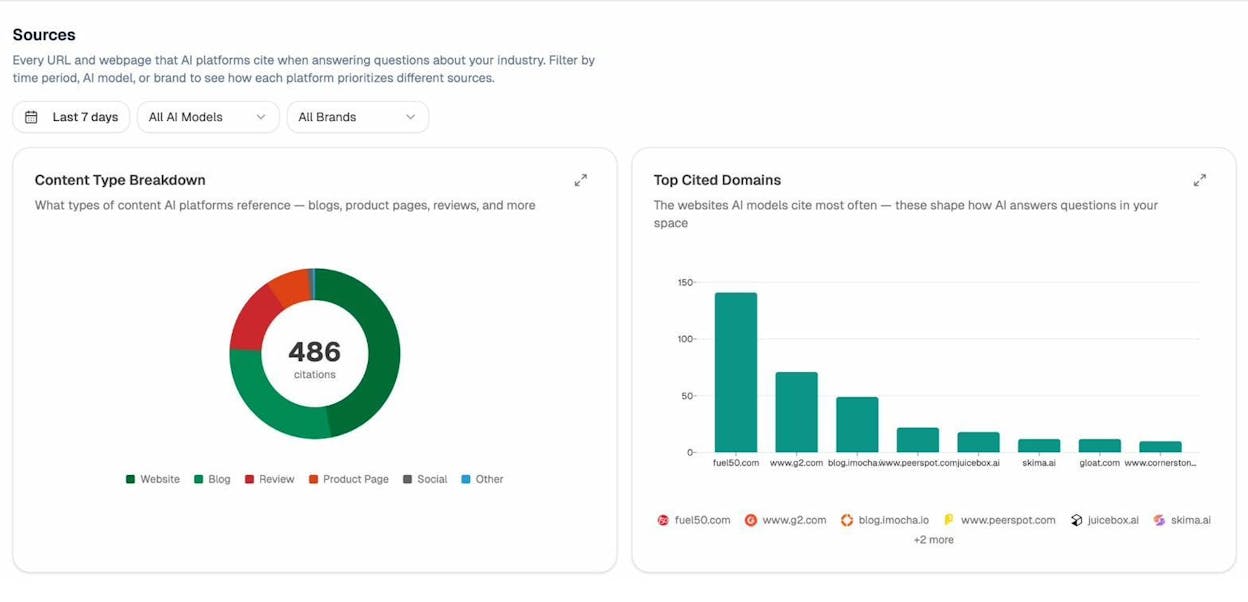
This turns vague “improve your AI visibility” advice into a specific action plan. Instead of generic link building, you target the exact sources that shape AI answers in your niche. You strengthen relationships with domains models already trust, create content that fills gaps in their coverage, and track whether your citation frequency increases after each initiative.
Spot Competitive Gaps and Prioritize Actions
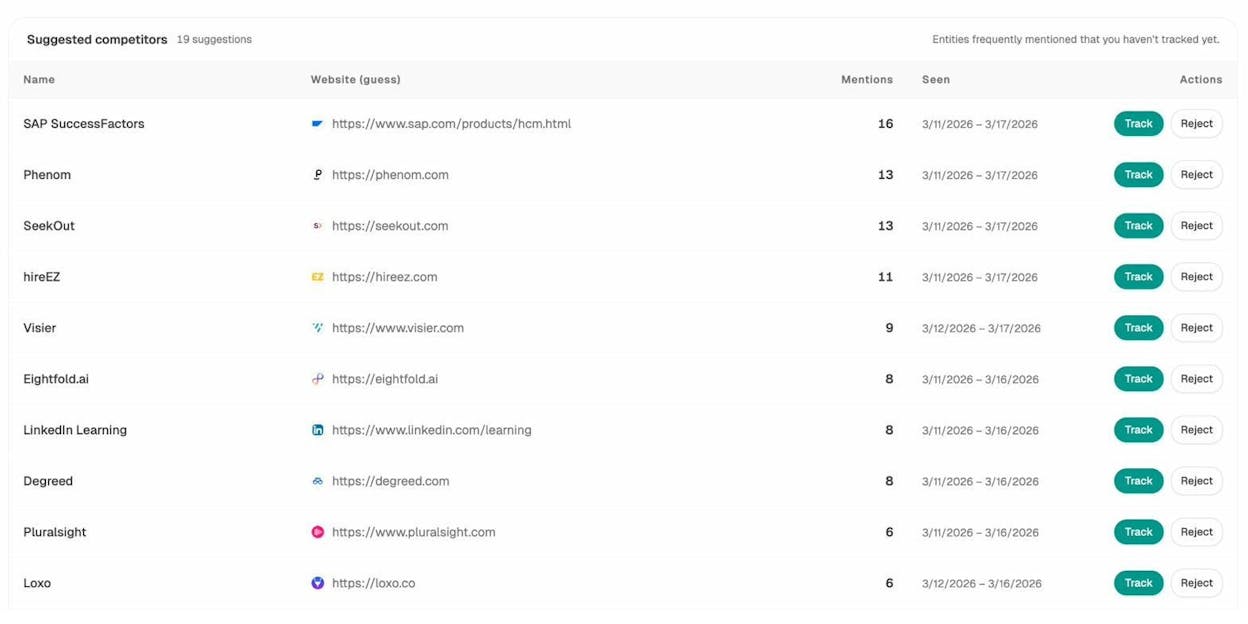
Competitor Intelligence shows where competitors outrank you in AI answers, which prompts they win that you don’t appear in, and where your brand sentiment lags behind theirs.
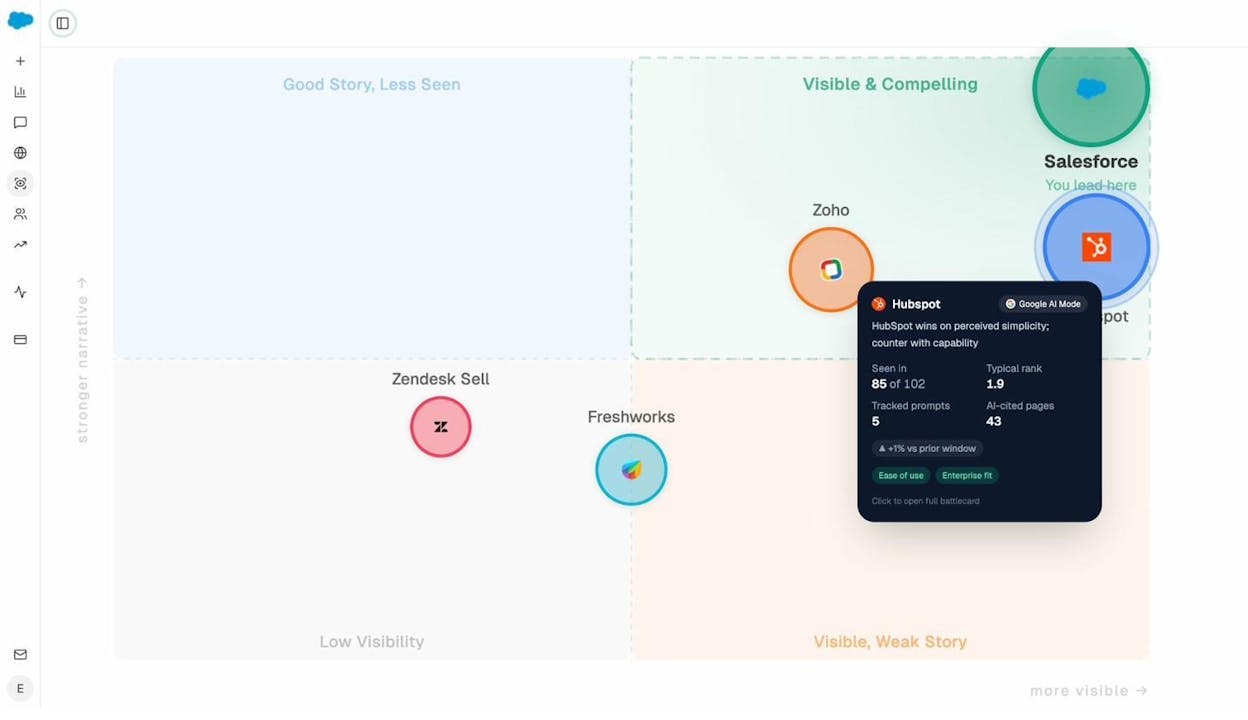
Combined with the Perception Map, which plots every tracked brand on a quadrant of presence vs. narrative strength, you get a visual read on where your brand stands in the AI landscape relative to every competitor.
Create and Optimize Content That Wins AI Answers
This is where Analyze AI separates from every visibility-only tracker, including Keyword.com.
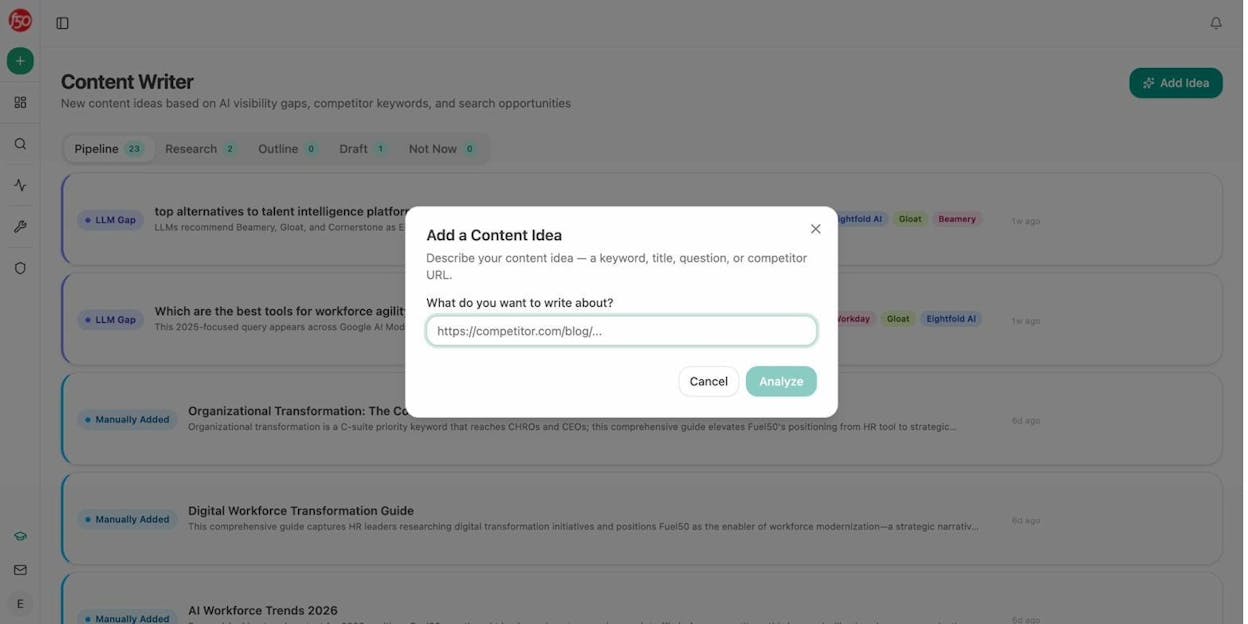
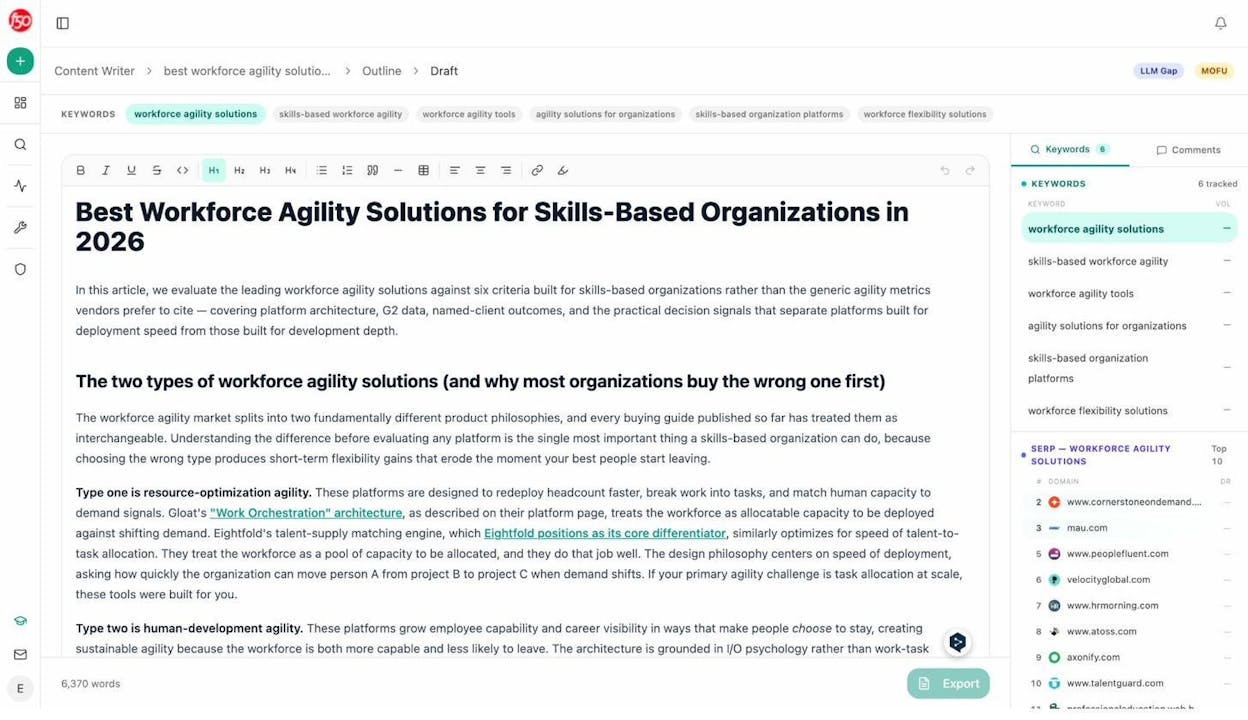
The AI Content Writer takes a topic or keyword through a full pipeline. It runs research, builds an outline, and generates a draft, with your brand voice injected at every stage via the Knowledge Base. The draft is informed by what AI engines are actually citing in your category, the SERP landscape, and the competitive gaps the platform already identified.
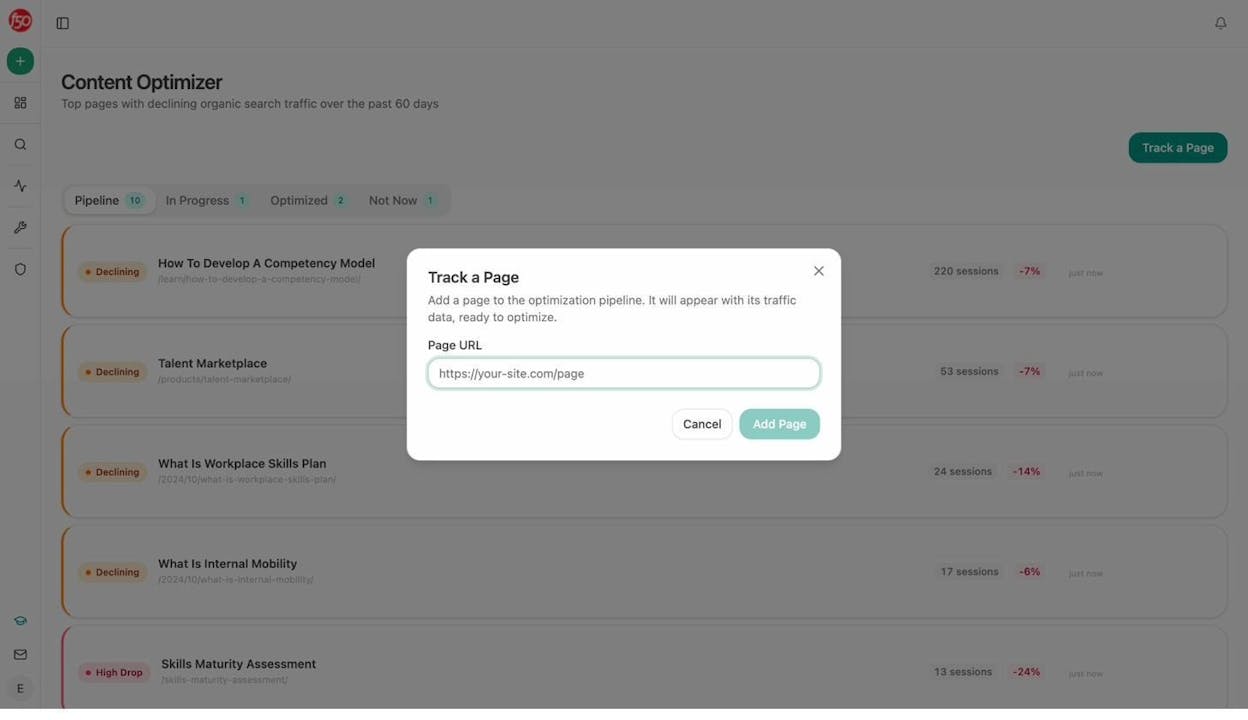
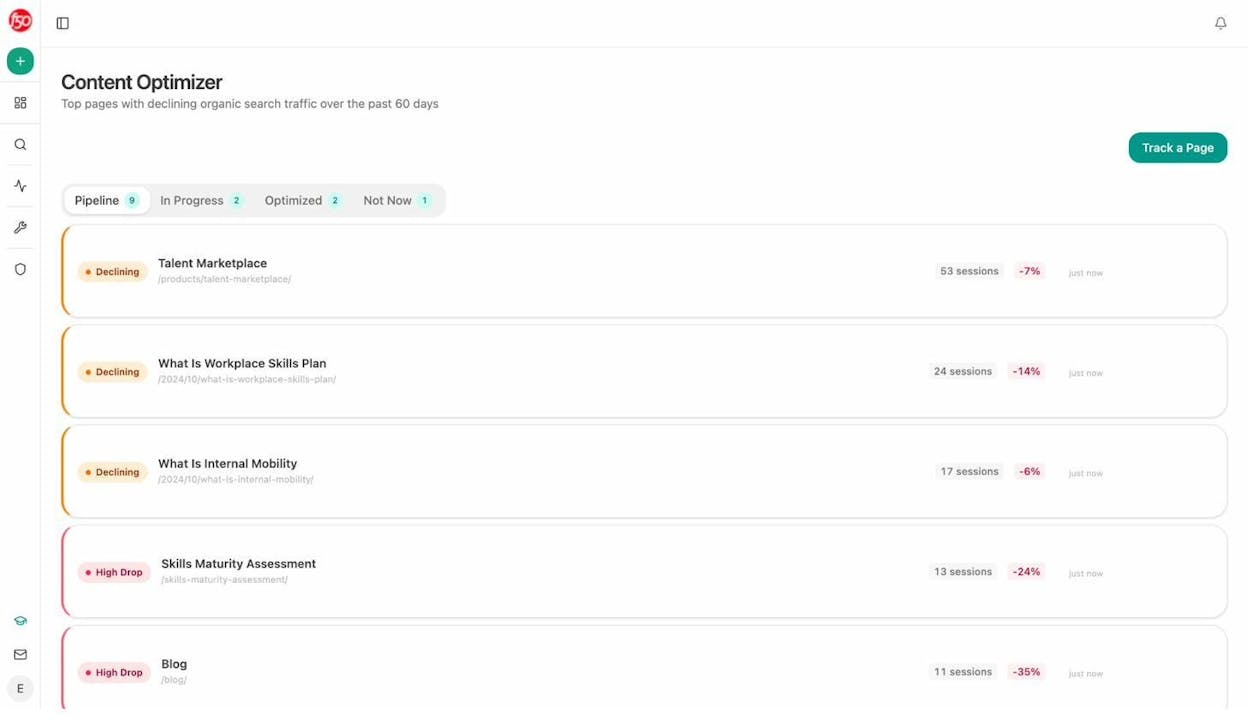
The AI Content Optimizer takes your existing pages and scores them against AI search readiness. It audits structure, freshness, claim density, and proof integration, then surfaces specific optimization ideas based on gaps.
The result is a closed loop. You find a visibility gap (Monitor), create or optimize the content to address it (Improve), and then measure whether the fix worked (Monitor again). Keyword.com gives you step one. Analyze AI gives you all three.
Automate Any Workflow With the Agent Builder
The Agent Builder is where Analyze AI’s scope expands beyond anything a rank tracker can offer. It is a programmable automation layer with 180+ nodes, 34 pre-built data recipes, 13 input primitives, and three trigger modes (manual, scheduled, webhook).
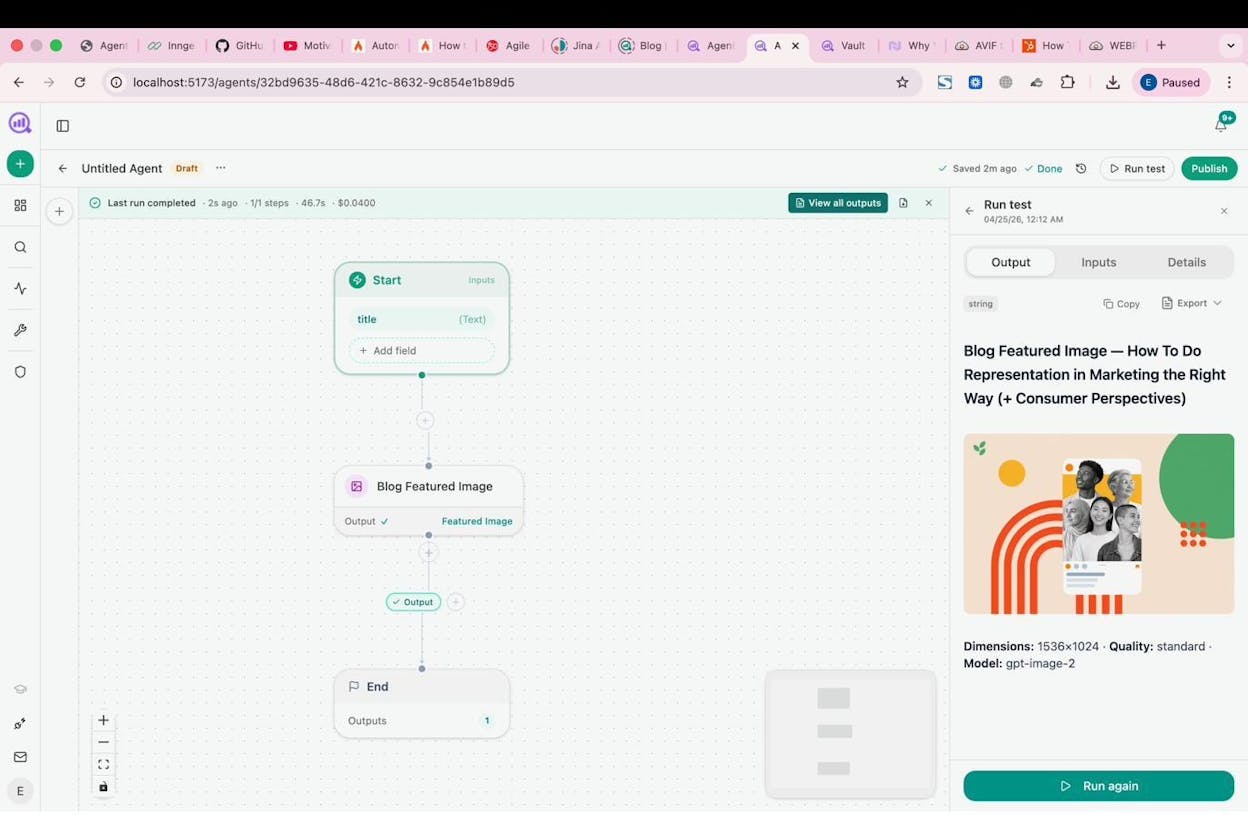
This is not a collection of preset templates. It is a composable substrate with direct integrations to GA4, Google Search Console, DataForSEO, Semrush, HubSpot, Notion, WordPress, Slack, Mailchimp, and every major LLM.
Here is what teams actually build with it:
For agencies: A Monday board prep agent runs at 7am, pulls the exec one-pager, share of voice, GA4 traffic, and new HubSpot deals for every client, assembles them into a branded DOCX, and emails each account team. Reporting day stops existing.
For content teams: A brief-to-publish pipeline triggers when a brief moves to “approved” in Notion, runs research, generates an outline, writes a full draft with brand voice injected, scores it against an AEO scorecard, and publishes to WordPress if it passes the quality gate. If it doesn’t, it Slacks the writer with specific gaps.
For CMOs: A daily narrative drift watch monitors competitor messaging shifts and Slacks the brand team when a new competitive narrative scores above a threshold, along with the source URLs and a draft response.
For sales teams: An inbound-form enrichment agent fires on every Typeform submission, verifies the email, researches the prospect’s domain and recent news, upserts the contact to HubSpot with a full brief, and Slacks the AE. The lead arrives fully enriched before the rep sees it.
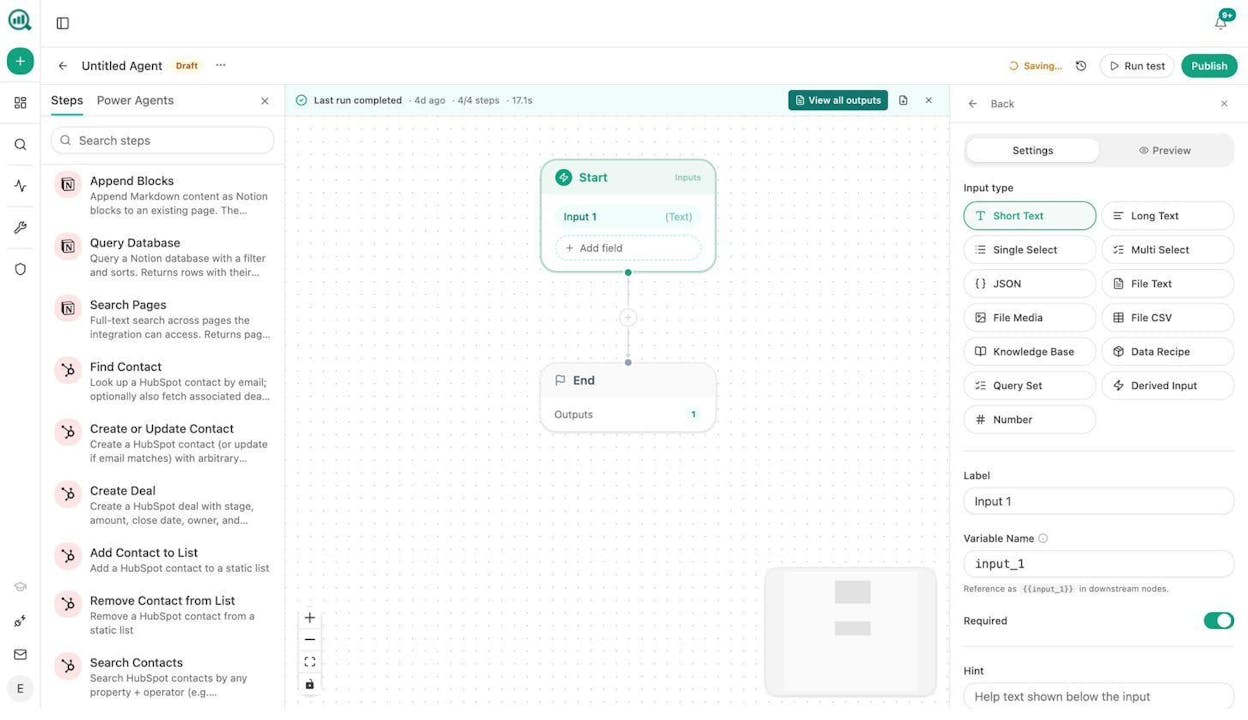
The point is not that you use every node. The point is that the data you already track in Analyze AI (visibility, citations, traffic, sentiment, competitors) becomes an input to any workflow you design. The platform does not just tell you what is happening. It does something about it while you sleep.
Stay Informed Without Logging In
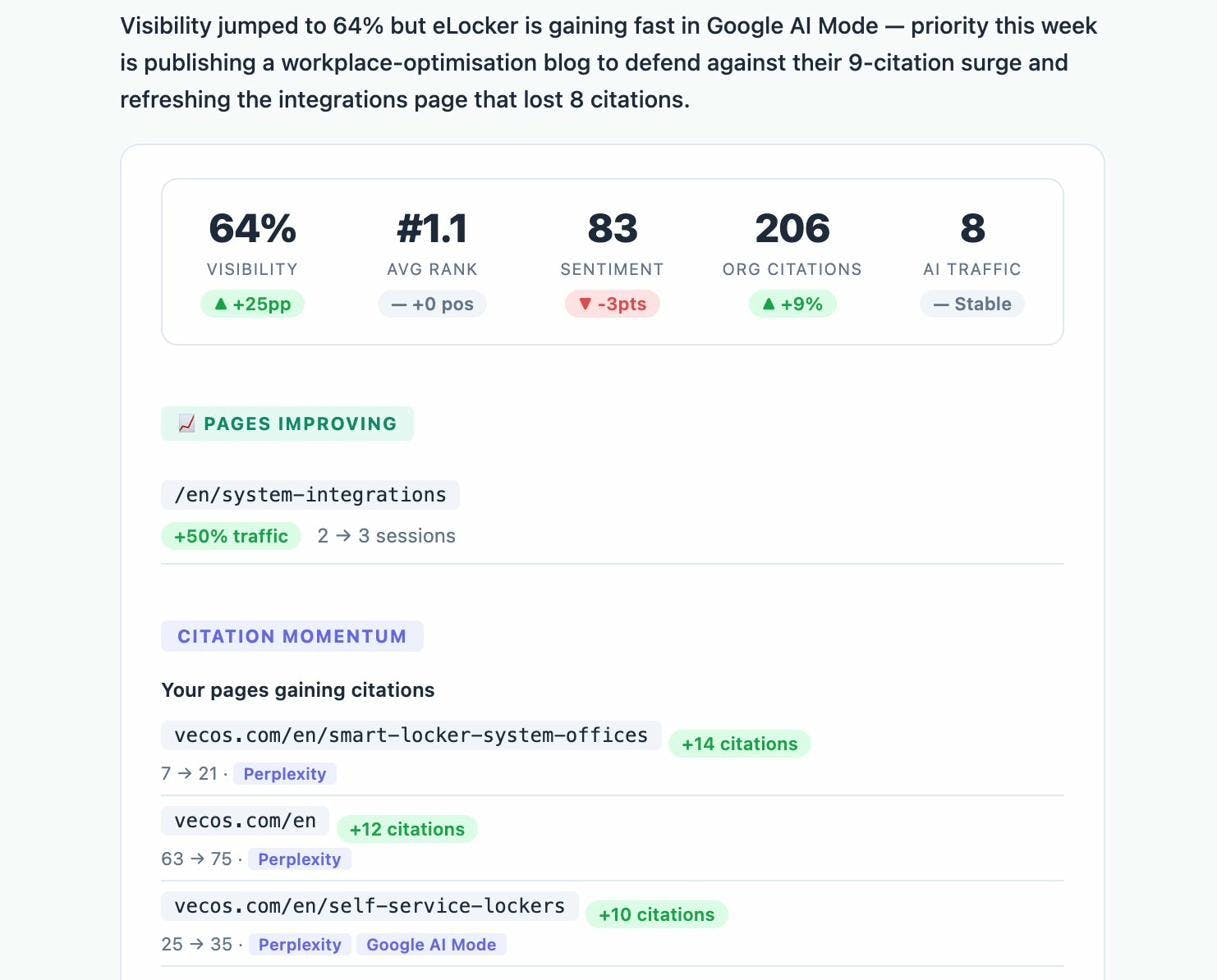
Weekly email digests summarize your AI visibility movements, competitive shifts, and key metrics, delivered to your inbox every week. You stay informed without opening the platform every morning.
The Verdict
Keyword.com is a precise, reliable rank tracker with a solid AI visibility add-on. If your only need is knowing where your keywords rank in Google and whether AI engines mention your brand, it does that job well.
But precision alone does not produce outcomes. The credit-based pricing creates unpredictable costs for teams that track at scale. The lack of content tools means every insight requires manual action in a separate product. And the absence of traffic attribution means you can never prove whether the visibility you measured actually mattered to the business.
Analyze AI connects the entire chain. You track AI visibility, attribute it to real sessions and conversions, create and optimize content to close gaps, automate workflows with agents, and monitor competitive positioning, all inside one platform. The AI Visibility Checker is free to try, and the platform gives you a baseline read in under a minute.
If you want a rank tracker with an AI visibility add-on, Keyword.com works. If you want a platform that turns AI visibility into a channel you can measure, optimize, and grow, start with Analyze AI.

Ernest

Ibrahim


