Analyze AI - AI Search Analytics Platform
Broken Link Checker

Free Broken Link & Page Health Checker

Check any webpage for broken links and SEO issues for free. Get page health scores, internal/external link counts, and fix recommendations.

Get Ahead Now

Start winning the prompts that drive pipeline

See where you rank, where competitors beat you, and what to do about it — across every AI engine.

Operational in minutesCancel anytime

0 new citations

found this week

#3

on ChatGPT

↑ from #7 last week

+0% visibility

month-over-month

Competitor alert

Hubspot overtook you

Hey Salesforce team,

In the last 7 days, Perplexity is your top AI channel — mentioned in 0% of responses, cited in 0%. Hubspot leads at #1 with 0.2% visibility.

Last 7 daysAll AI ModelsAll Brands
Visibility

% mentioned in AI results

Mar 11Mar 14Mar 17
Sentiment

Avg sentiment (0–100)

Mar 11Mar 14Mar 17
SalesforceHubspotZohoFreshworksZendesk
Use Cases

Use cases of Analyze AI's Broken Link Checker

Audit Any Page for Broken Links and Technical SEO Health

Audit Any Page for Broken Links and Technical SEO Health

Broken links silently destroy user experience and SEO performance. Enter any URL into the checker, click "Check Page," and get an instant audit of that page's link health and technical SEO status. This replaces manual link-by-link checking with an automated scan that catches 404 errors, redirect chains, and dead outbound links. Website owners, SEO professionals, and webmasters use this before launching new pages, after site migrations, and as part of regular monthly health checks to prevent link rot from accumulating.
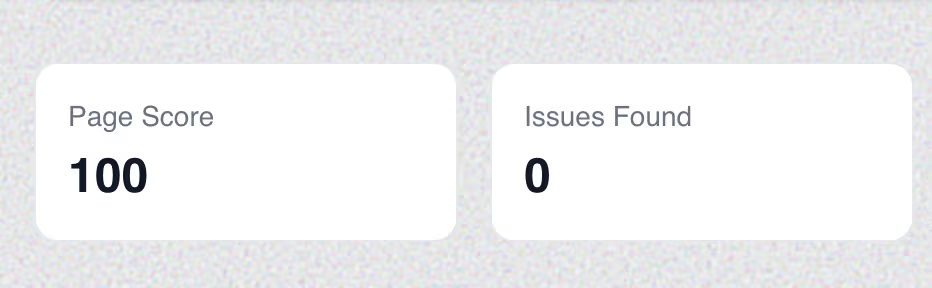
Monitor Your Technical SEO Score and Critical Issues

Monitor Your Technical SEO Score and Critical Issues

Beyond broken links, the tool returns a Page Score (0–100) and the total number of Issues Found. A Page Score of 100 with 0 issues means the page is technically healthy. Anything below 80 signals problems that need attention. This scoring system gives you a quick pass/fail metric for any page on your site, making it easy to prioritize which pages need immediate technical SEO fixes versus which ones are performing well. Use it to benchmark your pages against competitors — if their Page Score is higher, their technical foundation is stronger.

Analyze Internal and External Link Distribution

Analyze Internal and External Link Distribution

The tool counts and categorizes Internal Links (links pointing to other pages on the same domain) and External Links (links pointing to other websites). This data is critical for two reasons: (1) Internal link distribution affects how search engines crawl and index your site — pages with too few internal links get crawled less frequently, and (2) External link quality affects your page's trustworthiness — linking out to authoritative sources signals content quality, while links to spammy sites can harm your SEO.

Identify and Prioritize Specific Technical Issues to Fix

Identify and Prioritize Specific Technical Issues to Fix

The issues table lists each problem found, its severity level (info, warning, critical), and a description. Issues like "Render-Blocking Resources" and "Low Content Rate" directly impact Core Web Vitals and content quality signals. Each issue comes with actionable context — you know exactly what's wrong and can triage based on severity. This transforms a vague sense of "something is off with my SEO" into a concrete fix list that developers and webmasters can work through systematically.

questions & answers

Frequently Asked Questions

Common questions about our Broken Link Checker tool.

What is a broken link and how does it affect SEO?

A broken link (also called a dead link or 404 error) is a hyperlink that points to a page that no longer exists or returns an error. Broken links affect SEO in three ways: (1) They waste crawl budget — search engine bots spend time on dead ends instead of indexing useful pages, (2) They break link equity flow — if external sites are linking to a page on your site that returns a 404, you lose the ranking value of those backlinks, and (3) They harm user experience — visitors who encounter broken links lose trust in your site, increasing bounce rate.

What is a Page Score and how is it calculated?

The Page Score is a 0–100 metric that evaluates the overall technical health of a webpage. It factors in broken links (internal and external), page loading performance, meta tag completeness, content-to-HTML ratio, render-blocking resources, mobile-friendliness indicators, and other technical SEO signals. A score of 90–100 indicates excellent health, 70–89 is good but has room for improvement, 50–69 needs attention, and below 50 suggests serious technical issues that are likely hurting search performance.

What is the difference between internal links and external links in SEO?

Internal links connect pages within the same domain (e.g., your homepage linking to your blog). They help search engines discover and crawl your content, distribute link equity (ranking power) across your site, and establish content hierarchies. External links (also called outbound links) point from your site to other domains. They signal content quality and topical relevance to search engines when they link to authoritative sources. Both types of links are essential for SEO — a healthy page typically has a strong internal link structure and a few relevant external links to trusted sources.

How often should I check my website for broken links?

Check your most important pages (homepage, top landing pages, highest-traffic blog posts) monthly. Run a full site-wide broken link audit quarterly. Additionally, always run a check after site migrations, CMS updates, URL structure changes, or content deletions — these are the most common events that create broken links. For large sites with thousands of pages, consider scheduling weekly automated crawls to catch new broken links before they accumulate.

What are render-blocking resources and why do they matter?

Render-blocking resources are CSS stylesheets and JavaScript files that prevent a browser from displaying the page until they are fully loaded. They slow down the time to first meaningful paint — the moment a user sees actual content. This directly impacts Core Web Vitals metrics like Largest Contentful Paint (LCP) and First Contentful Paint (FCP), which Google uses as ranking factors. Fixes include deferring non-critical JavaScript, inlining critical CSS, and using async loading for non-essential scripts.

What does "Low Content Rate" mean in the issues report?

Low Content Rate (also called low text-to-HTML ratio) means the page has very little readable text content relative to its HTML code. Search engines may interpret this as a thin content page that provides limited value to users. The typical healthy ratio is above 25% text to HTML. Pages heavy on JavaScript frameworks, large navigation menus, or excessive ads can trigger this issue. The fix is to ensure each page has substantial, unique, informative text content that serves the user's search intent.

Can broken links on my site affect pages that don't have broken links themselves?

Yes, through a concept called crawl budget waste. Search engines allocate a limited crawl budget to each site — the number of pages they will crawl per visit. When bots encounter broken links, they follow them to dead ends, using up crawl budget that could have been spent indexing your good pages. On large sites (10,000+ pages), excessive broken links can cause important new content to be discovered and indexed more slowly, indirectly harming the rankings of perfectly healthy pages.

Should I fix internal broken links or external broken links first?

Fix internal broken links first. Internal broken links directly impact your site's crawlability, user navigation, and internal link equity distribution — all of which you fully control. External broken links (links from your page to other sites that have gone down) matter too, but their impact is less severe. For external broken links, either remove the link, replace it with a link to an updated source, or use the Wayback Machine to find archived versions of the content.

What is link equity and how do broken links affect it?

Link equity (formerly called "link juice") is the ranking value passed from one page to another through hyperlinks. When an authoritative site links to your page, it passes link equity that helps your page rank higher. If that link points to a page on your site that returns a 404 error, the link equity is wasted — it flows into a dead end. By finding broken inbound links and setting up 301 redirects to relevant live pages, you can reclaim this lost link equity and improve your rankings.

How do I use broken link data for link building?

Broken link building is a proven link acquisition strategy. Find broken pages on competitor or industry sites using a broken link checker. Then create content on your own site that covers the same topic as the dead page. Finally, reach out to the websites that were linking to the broken page and suggest they replace the dead link with a link to your live, relevant content. This strategy works because you're helping webmasters fix a real problem while earning a backlink.

What HTTP status codes indicate broken links?

The most common broken link status codes are: 404 (Not Found — the page doesn't exist), 410 (Gone — the page was intentionally removed), 500 (Internal Server Error — the server failed), 502 (Bad Gateway), and 503 (Service Unavailable). Additionally, 301 (Permanent Redirect) and 302 (Temporary Redirect) aren't "broken" per se, but redirect chains (multiple redirects in sequence) waste link equity and slow page loads. This tool detects all of these status codes and categorizes them by severity.

Can broken links cause Google to de-index my pages?

A few broken links won't cause de-indexing. However, if a significant percentage of your site's URLs return 404 errors, or if critical pages linked from your navigation consistently fail, Google may reduce its crawl rate for your domain and flag your site as poorly maintained. In extreme cases where broken links create orphaned pages (pages with no valid links pointing to them), those specific pages may be dropped from the index. Regular broken link auditing prevents this degradation.

Related SEO Tools

Keyword Generator

Find thousands of keyword ideas for your SEO and content marketing campaigns. Get search volume, keyword difficulty, and CPC data.

Try it free

Keyword Difficulty Checker

Check how hard it is to rank for any keyword. Get a difficulty score from 0-100 along with search volume and competition data.

Try it free

Website Authority Checker

Check any website's organic search authority for free. See estimated organic traffic, ranked keywords, top-10 positions, and keyword ranking distribution.

Try it free

SERP Checker

Check Google search results for any keyword. See who ranks in the top 10 organic positions with titles, URLs, and domains.

Try it free

Keyword Rank Checker

Check what keywords any website ranks for in Google. See ranking positions, search volumes, and estimated traffic for each keyword.

Try it free

YouTube Keyword Tool

Find the best keywords for your YouTube videos. Get search volume, difficulty, and CPC data to optimize your video titles, descriptions, and tags.

Try it free

Amazon Keyword Tool

Research keywords for Amazon product listings. Find high-volume search terms with difficulty and CPC data to optimize your product titles and descriptions.

Try it free

Bing Keyword Tool

Research keywords for Bing search engine. Get Bing-specific search volume, CPC, and competition data to optimize your content for Microsoft's search engine.

Try it free

Website Traffic Checker

Check any website's estimated organic and paid traffic. See total keywords, traffic value, and ranking movement data.

Try it free

AI Visibility Checker

See how Google AI Overviews affect your website. Find out what percentage of your keywords trigger AI Overviews, how much traffic is at risk, and get an AI Visibility Score.

Try it free
Get Ahead Now

Start winning the prompts that drive pipeline

See where you rank, where competitors beat you, and what to do about it — across every AI engine.

Operational in minutesCancel anytime

0 new citations

found this week

#3

on ChatGPT

↑ from #7 last week

+0% visibility

month-over-month

Competitor alert

Hubspot overtook you

Hey Salesforce team,

In the last 7 days, Perplexity is your top AI channel — mentioned in 0% of responses, cited in 0%. Hubspot leads at #1 with 0.2% visibility.

Last 7 daysAll AI ModelsAll Brands
Visibility

% mentioned in AI results

Mar 11Mar 14Mar 17
Sentiment

Avg sentiment (0–100)

Mar 11Mar 14Mar 17
SalesforceHubspotZohoFreshworksZendesk