
How do I attribute a purchase completed inside an AI chat, with no website session?
Short answer
Stop trying to attribute a session that doesn't exist and instrument the two things that do: the order record arriving through the commerce integration, and your brand's presence in the answers where those purchases originate. Tag agentic orders at the point of creation so they never enter your web-analytics reconciliation, then measure the upstream cause as recommendation rate on the prompts that drive purchases in your category.
Why standard attribution has nothing to work with
Web analytics attributes a conversion by tying it to a session. In an agentic purchase, the buyer describes what they want, the assistant surfaces options, and the transaction completes inside the assistant. No page load, no tag fire, no referrer, no session.
This isn't a tracking gap you can close with configuration. There is no browser event to capture, so no GA4 setting, UTM parameter, or cookie reaches it.
What you do receive is an order. It arrives through whatever commerce integration the assistant uses, and it carries structured data. That order is your attribution anchor, and it's a better one than a session because it's a confirmed transaction rather than an inferred path.
Step 1: tag agentic orders at creation
The most common failure is silent contamination. Agentic orders flow into the same order table as web orders, nobody flags them, and every conversion-rate calculation you run quietly breaks because you have conversions with no matching sessions.
Add a source field to the order record at the point of creation, populated from the integration rather than inferred later. Then:
- Exclude agentic orders from any web conversion-rate denominator
- Report them as their own revenue line, never merged into ecommerce reporting
- Track their share of total orders monthly, because that trend is the real story
If you skip this, your site conversion rate will appear to rise for reasons nobody can explain, and someone will eventually attribute it to a CRO change that did nothing.
Step 2: measure the upstream cause
The order tells you a purchase happened. It doesn't tell you why the assistant chose you, and that's the part you can actually influence.
The measurable upstream signal is whether your brand appears in the answers where purchase decisions get made. Track a prompt set built specifically around purchase-intent language in your category, and measure three things per prompt: whether you're mentioned, whether you're recommended as a primary option, and which competitors appear alongside you.
Our own state of AI search research, covering more than 22,000 answers, found that being mentioned is stickier than most teams assume. Once a brand is mentioned in an AI answer for a specific prompt, the next-observation mention probability is 83.2% on ChatGPT, 83.3% on Perplexity, and 84.2% on Google AI Mode, against roughly 10% after a miss.
For agentic commerce that path-dependence is the whole game. Winning the recommendation on a purchase prompt tends to persist, so the work compounds in a way session-based channels don't. It also means a single reading proves nothing, which is why researchers argue that visibility should be measured as a distribution across runs, prompts, and time rather than as one snapshot.
Step 3: correlate orders against recommendation rate
With orders tagged and prompts tracked, you can run the only causal-ish analysis available: does recommendation rate on purchase prompts move ahead of agentic order volume?
Track both monthly and look for the lag. If recommendation rate on your purchase-intent prompt set rises in one month and agentic orders rise the next, that co-movement is your evidence. It isn't proof, and you should present it as correlation with the method stated, but it's considerably stronger than anything session-based attribution offers here.
For the general version of this triangulation approach, see How can I build credible evidence that AI search is sending customers when there is no referrer?.
What to report, and what not to claim
| Metric | Source | Confidence |
|---|---|---|
| Agentic order count and revenue | Commerce integration | High, it's a transaction |
| Recommendation rate on purchase prompts | Prompt tracking | High, directly observed |
| Competitors appearing alongside you | Prompt tracking | High |
| Recommendation rate driving order volume | Lagged correlation | Correlational, state it |
Never claim a specific conversion rate for agentic commerce. You have no denominator, because you cannot count the buyers who asked and were shown a competitor instead. Recommendation rate is your closest proxy, and it should be labelled as such.
How Analyze AI handles the upstream half
The order half lives in your commerce stack. The recommendation half is what Analyze AI is built to measure, and there are three surfaces that matter for this specific problem.
Prompt tracking is where you build the purchase-intent set. You add prompts phrased the way buyers actually ask when they're ready to transact, then track mention and recommendation across ChatGPT, Perplexity, and Google AI Mode separately, because the surfaces diverge sharply.
Brand Battlecards and tracked competitors answer the question that matters most in agentic commerce: when the assistant doesn't pick you, who does it pick? The competitive layer surfaces which brands appear on your purchase prompts, which is the input to your positioning work.
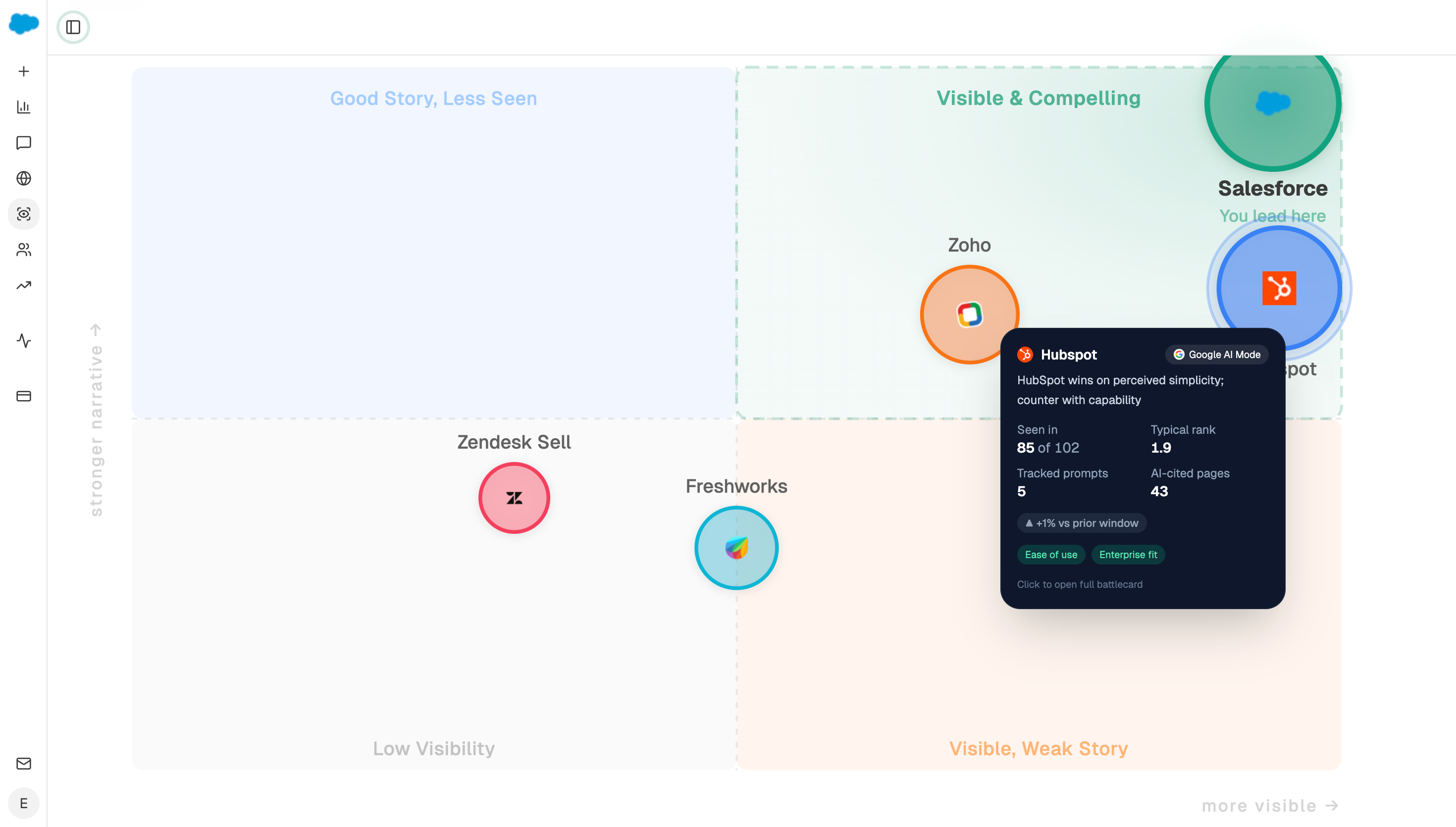
The Perception Quadrant plots every tracked brand on presence against narrative strength, using visibility, rank, sentiment, and proof signals. For agentic commerce this is more useful than a flat visibility percentage, because assistants making purchase recommendations weight how confidently a brand is described, not just whether it's named.
To connect the two halves, an agent can pull both sides monthly and flag the lag. A workable chain:
Start (schedule, 1st of month) → share-of-voice recipe (purchase-prompt set, 30d) → brand-vs-competitor recipe → Get Perception Quadrant → HubSpot Get CRM Objects (orders tagged agentic, 90d) → Prompt LLM (correlate recommendation rate against agentic order volume, note the lag, state confidence) → Excel export → Send Email to the commerce and marketing leads.
The Excel export matters here more than the email. Agentic order data usually needs to be reconciled against finance's own numbers, and handing them a spreadsheet artifact attached to the run is what stops the analysis becoming a screenshot nobody can verify.
FAQ
Related answers
- How can I build credible evidence that AI search is sending customers when there is no referrer?
- How can I value zero-click exposure when the buyer never visits our website?
- Should AI traffic count as organic, referral, or its own channel?
Want to track which purchase prompts recommend you and which recommend a competitor? Start a free Analyze AI trial and build your purchase-intent prompt set.