
How do I prove SEO is generating revenue and not just traffic?
Short answer
You prove it by passing the landing page into your CRM as a hidden field on every form, then grouping closed-won revenue by that field. Most teams can't prove it because this one field is missing, which means their CRM has no idea which page earned the deal. Once the field exists, report revenue by intent bucket rather than by URL, and add a signup survey question to catch the AI-search buyers who arrive as Direct traffic.
The one broken field behind most unprovable SEO
Before you build any dashboard, check whether your signup or demo form passes the landing page into the CRM. In most B2B stacks it doesn't, and that single gap is why organic revenue looks unprovable.
The chain runs: query in Search Console, landing page receives the click, GA4 logs the session, the form captures the lead with the landing page attached, and the CRM opportunity inherits it. Break the fourth link and everything downstream becomes attribution guesswork that collapses the first time someone audits it.
The fix is a hidden field called first_landing_page, populated from the session and synced to the contact record. Add first_source alongside it so organic, direct, paid, and AI-referral all get tagged at entry. This is a one-hour ticket, not a platform migration, and it's the highest-leverage change available to you before touching anything else.
For the full wiring, see How do I connect Search Console data to CRM opportunities and revenue?.
Report by intent bucket, not by URL
Once the field exists, resist the urge to hand your CFO a list of 200 URLs with revenue next to each. Page-level data is for your team. Leadership needs the pattern, and the pattern lives in intent buckets.
| Intent bucket | Example query | Expected outcome | Typical share of organic revenue |
|---|---|---|---|
| Bottom-funnel commercial | "best CRM for agencies" | Pipeline within 30 to 60 days | 45 to 60% |
| Comparison and alternative | "notion vs asana" | Trial signups, product page views | 20 to 30% |
| Product-adjacent JTBD | "how to attribute AI search traffic" | Qualified leads, mid-funnel touches | 10 to 20% |
| Top-funnel educational | "what is CRM" | Assisted revenue, brand recall | 5 to 10% |
When those four numbers land in front of leadership, the conversation stops being "is SEO working" and becomes "why is 70% of production going to the bucket earning 8% of the revenue." That reframe is the entire point of the report.
Catch the AI-search revenue hiding in Direct
Here's what your bucket report will still miss. A buyer discovers you inside an AI answer, never clicks, then searches your brand a week later. GA4 credits Direct or Branded, and your organic line looks flat while the channel that actually created the demand gets nothing.
According to our own state of AI search research, covering more than 22,000 answers, the three major surfaces cite almost entirely different domain sets. Mean domain overlap between ChatGPT and Perplexity is 0.05, and only 25.3% of matched prompt-days share even one cited domain. A buyer researching your category can see three different source lists across three sessions before ever landing on your site. Pew Research found that when an AI summary appears, users click a source link in only about 1% of visits, so the exposure vastly exceeds the traffic it produces.
The fix isn't more analytics tooling. It's one question at signup, "how did you hear about us," with AI surfaces as explicit options. When 20 to 30% of your Direct customers name ChatGPT or Perplexity, that's your evidence, and it belongs on the dashboard as its own column. See How can I estimate how much AI-influenced traffic is hidden in my Direct channel?.
Build the report in five steps
1. Add the hidden fields. first_landing_page and first_source on every form, synced to the CRM contact record.
2. Add the signup survey question. "How did you hear about us," with ChatGPT, Perplexity, and Google AI Mode as named options.
3. Export 12 months of closed-won grouped by landing page. Repeat for open pipeline value.
4. Roll pages up into the four intent buckets. Report revenue and share per bucket.
5. Report four channels separately. Traditional organic, AI referral, branded search, and AI-influenced from the survey.
Give it a full quarter before you trust the trend, because a single large deal will distort anything shorter.
Automate the weekly version in Analyze AI
Analyze AI reads your GA4 property through five nodes, and two of them carry this report. AI Landing Pages shows AI-referred sessions with engagement and conversions against each URL, alongside the citation count for that same page. Page Breakdown then splits a single page's performance across AI sources, so you can see whether a Perplexity visitor behaves differently from a ChatGPT one on identical content.
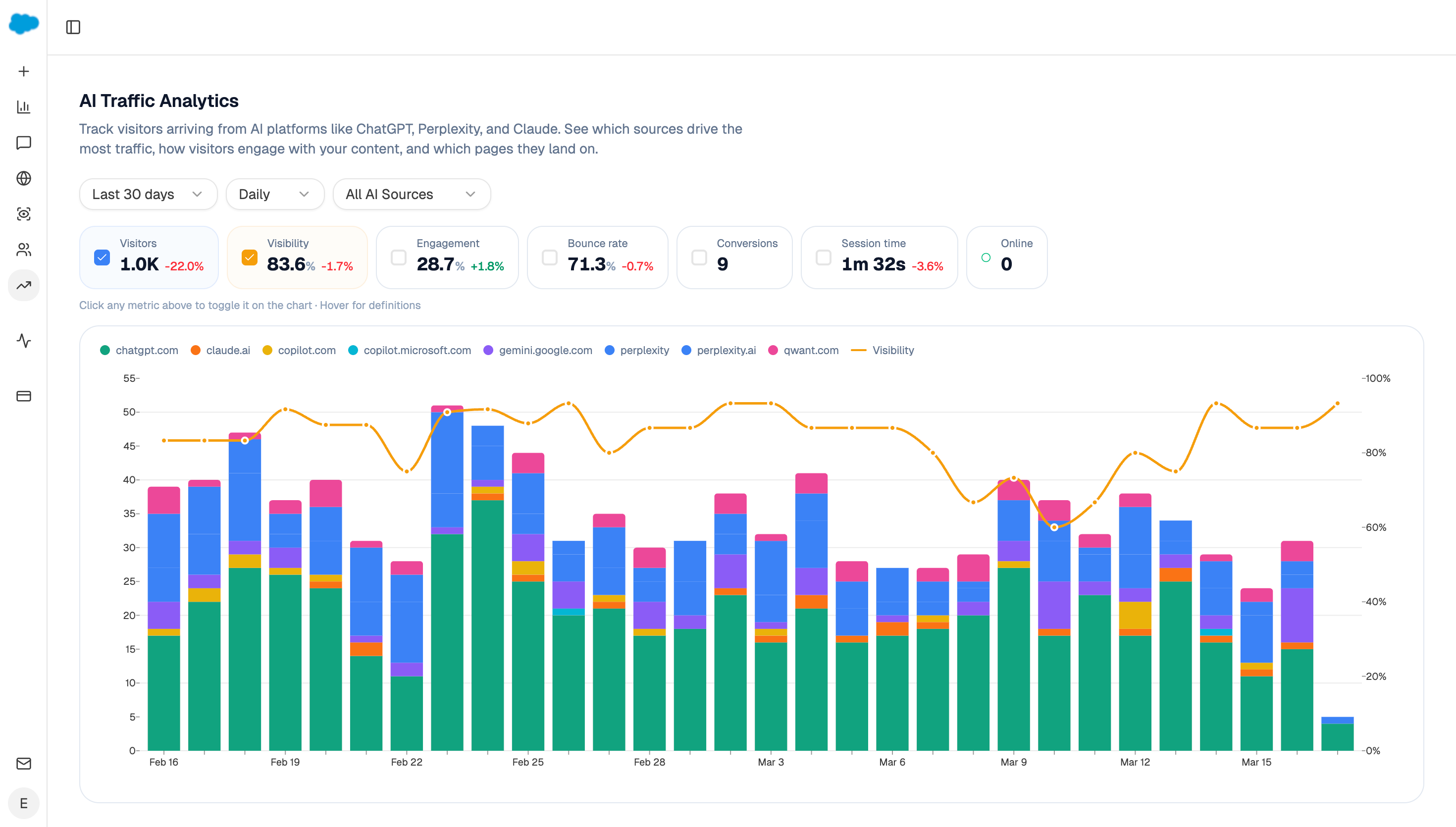
For the CRM join and the leadership email, wire it as an agent:
Start (schedule, Monday 7am) → GSC Top Pages for Site → GA4 AI Traffic Overview and AI Landing Pages → HubSpot Get CRM Objects (deals last 90 days with first_landing_page) → Code (roll pages into the four intent buckets, compute revenue and share per bucket, and flag pages with revenue but no citations) → Excel export → Send Email to leadership.
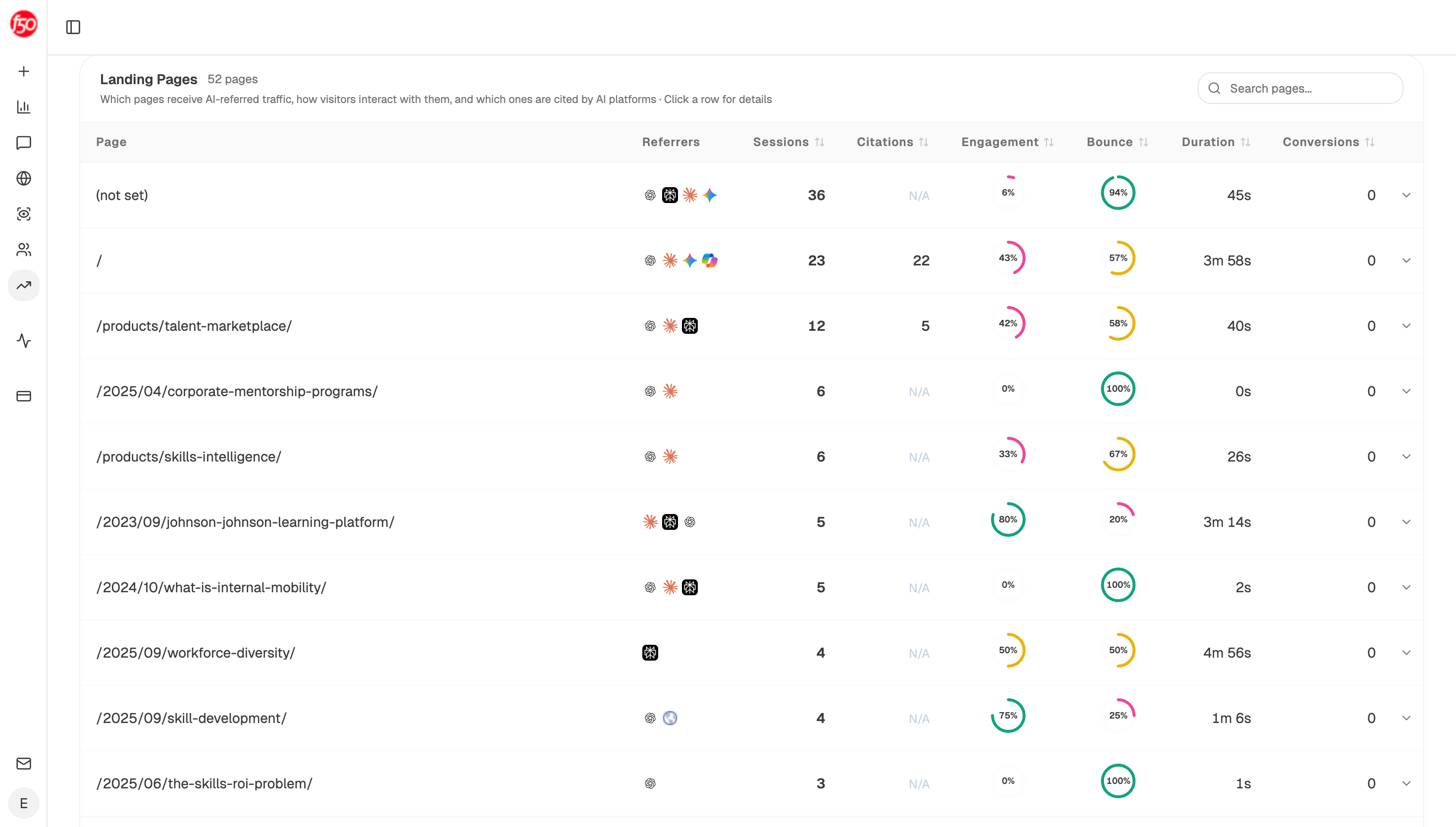
Putting the bucket arithmetic in a Code node rather than prompt instructions matters here, because the classification rule then lives in one reviewable place. When someone asks in Q3 why the comparison bucket shrank, you can point at the rule rather than re-deriving it.
The Excel export attaches to the run as an artifact, which is what finance will want when they reconcile your revenue figures against theirs.
FAQ
Related answers
- Which organic and AI-search metrics belong on an executive dashboard?
- How do I defend my SEO and content budget to a CFO who wants a revenue forecast?
- Why is my SEO traffic growing while revenue stays flat?
- How do I map organic landing pages to the customers they eventually produce?
Ready to attribute organic and AI-search revenue in one place? Start a free Analyze AI trial and connect GA4, GSC, and your CRM in under 20 minutes.