
How do I report direct versus assisted value from AI search?
Short answer
Direct value is what you can count: sessions from identified AI referrers and the revenue attributed to them. Assisted value is what you have to infer: citation exposure that produced no click but shows up later as branded search or a survey answer. Report them as two columns with different evidence standards printed against each, and never add them together, because one is a measurement and the other is an estimate.
The two columns, and why the split is not optional
AI search produces value through two mechanisms that need different instruments.
Direct value. Someone sees you cited, clicks, arrives, converts. This is countable in GA4, attributable to a landing page, and joinable to CRM revenue like any other channel.
Assisted value. Someone sees you cited, doesn't click, and comes back three weeks later through branded search or types your domain. No session exists at the moment of influence.
Reporting only the first tells leadership AI search is a rounding error. Reporting a blended figure invites an audit the estimated half can't survive. Two columns is the only structure that holds.
Sizing the direct column
Straightforward, with one caveat.
Pull AI-referred sessions, join them to landing pages, and attribute revenue through your existing first-touch chain. The caveat is that this column undercounts badly, because identified AI referrals are only the portion that arrived with a referrer intact. Mobile app taps, strict referrer policies, and copy-pasted URLs all land in Direct.
So label the direct column as a floor rather than a total. See What does GA4's AI Assistant channel measure — and what does it miss?.
Sizing the assisted column
Three inputs, triangulated, none sufficient alone.
Citation exposure. How many tracked commercial prompts cite you, on which surfaces, and how that moved this month. This is the volume of the assisted opportunity.
Lagged branded search. Citation gains followed by branded-search gains 4 to 12 weeks later. Discount the observed lift by 30 to 50% for PR, launches, and category growth.
Survey attribution. The share of new customers naming an AI surface whose recorded channel was Direct or branded organic. This is your only ground truth and it needs 100 responses minimum.
The reason exposure converts to later branded search rather than immediate clicks: our own state of AI search research, covering more than 22,000 answers, found Google AI Mode returns a citation-rich answer in 97.4% of matched B2B queries and Perplexity in 93.2%, while Pew Research found that when an AI summary appears, users click a source link in only about 1% of visits. High exposure, minimal click-through, delayed return.
The report format
| Column | Basis | Metric | How to present |
|---|---|---|---|
| Direct | Counted sessions | Revenue from AI-referred landing pages | Exact figure, labelled a floor |
| Assisted | Inferred | Estimated revenue from citation exposure | Range, method stated |
Print the evidence standard beside each. A CFO who sees "counted" and "estimated" as explicit labels engages with both. One who discovers the distinction later discounts everything.
The mistake that makes assisted look fake
Teams report assisted value as a single confident number and lose the argument the first time someone asks how it was derived.
Report the range and the method in the same breath. Something like: assisted value is estimated at $180K to $260K, derived from a 22% survey-attributed share of branded-search revenue, discounted 40% for competing causes. That survives scrutiny. A precise-looking $214,000 does not.
How Analyze AI separates the two halves
The two columns map onto two different parts of the platform, which is what makes the split practical rather than theoretical.
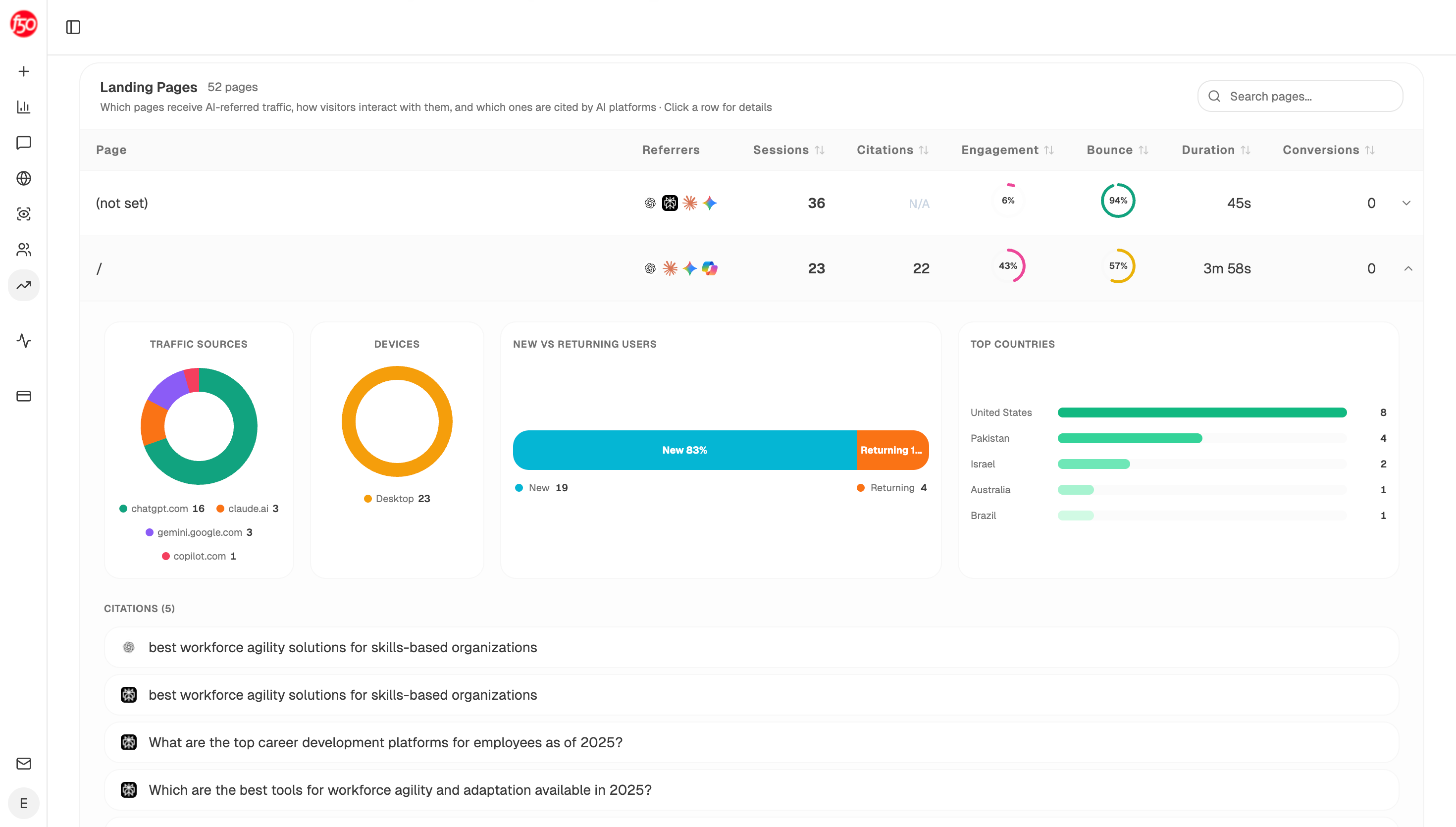
The direct half comes from the GA4 AI traffic suite, which exposes five nodes: AI Traffic Overview, AI Landing Pages, Realtime AI Users, Recent AI Visitors, and Page Breakdown. Landing Pages is the one that carries this report, because it shows AI-referred sessions and citation counts against the same URL, so you can see a page's direct contribution and its assisted exposure in one row.
The assisted half comes from the citation layer. The citation-magnets recipe returns your most frequently cited pages, and uncited-pages returns pages AI never cites, which together tell you where assisted value is concentrating and where it isn't. The Citation Share node gives the percentage of citations across tracked prompts pointing to your domain versus competitors.
A monthly agent that produces both columns with the evidence labels intact:
Start (schedule, 1st of month) → GA4 AI Traffic Overview and AI Landing Pages → HubSpot Get CRM Objects (revenue by landing page, plus survey answers) → citation-magnets recipe → Citation Share → GSC Top Keywords for Site (branded regex, 24 months) → Code (compute direct revenue, then lagged correlation at 4, 8, and 12 weeks, apply the discount, produce a range) → Prompt LLM (write the two-column report with evidence standards stated per column) → Excel export → Send Email to CMO and CFO.
Putting the lag arithmetic in a Code node rather than prompt instructions matters because it produces the same range every month from the same inputs, which is the property that keeps an estimate credible over four quarters.
FAQ
Related answers
- How can I value zero-click exposure when the buyer never visits our website?
- How can I build credible evidence that AI search is sending customers when there is no referrer?
- Should AI traffic count as organic, referral, or its own channel?
Want direct and assisted AI value in one monthly report? Start a free Analyze AI trial and connect GA4, GSC, and your CRM.