
How do I track ChatGPT traffic in GA4?
Short answer
Open Reports → Acquisition → Traffic acquisition and set the primary dimension to Session default channel group. Since May 2026, GA4 has a native AI Assistant channel that captures recognised chatbot referrers automatically with no setup. It's a floor rather than a ceiling, because it isn't retroactive, it misses sources Google hasn't added, and it can't see AI visits that arrive without a referrer.
Find the traffic that's already there
The native channel arrived on 13 May 2026 and needs no configuration. When GA4 detects a referrer matching a recognised AI assistant, it assigns ai-assistant as the medium, (ai-assistant) as the campaign, and files the session under the AI Assistant channel.
To see it:
- Go to Reports → Acquisition → Traffic acquisition
- Set the primary dimension to Session default channel group
- Look for the AI Assistant row
If the row is missing, the rollout may not have reached your property, or you may be on a custom channel group, which does not inherit the new channel automatically.
Add Session source / medium as a secondary dimension to see which assistants are actually sending the traffic rather than one blended total.
Why the native number is a floor
Four gaps sit between the AI Assistant row and your real AI traffic. Each one costs you sessions in a different way.
| Gap | What happens | Where the traffic lands instead |
|---|---|---|
| Not retroactive | Forward-only from the rollout date | Historical AI traffic stays in Referral or Direct |
| Incomplete source list | Google's published list has shifted since launch and doesn't cover every assistant | Referral |
| Google's own AI | AI Overviews and AI Mode clicks are treated as search | Organic Search |
| No referrer | In-app browsers, mobile apps, and copy-pasted links send nothing | Direct |
The last one is usually the largest. See Why does AI traffic show up as Direct in Google Analytics?.
Because Google's recognised-referrer list has changed since launch, check the current definition in Google's channel group documentation rather than trusting any list you read in a blog post, including this one.
Build a custom channel group to close the gaps
A custom channel group catches the assistants Google omits and applies retroactively, so you get history the native channel can't give you.
- Go to Admin → Data display → Channel groups
- Create a new group based on the default
- Add a channel named AI Assistants
- Add a condition on Source using matches regex
- Reorder it above Referral, or the traffic falls through into the generic bucket before your rule sees it
Step 5 is where most setups quietly fail. Channel rules evaluate in order, so a rule sitting below Referral never fires.
Google publishes a working regex example in its own documentation, covering assistants like ChatGPT, Gemini, Copilot, Claude, and Perplexity. Start from theirs rather than writing your own, then extend it as new referrers appear in your Referral report.
One refinement worth adding: include OR Session default channel group exactly matches AI Assistant in your custom rule. That way you capture both Google's definition and your own, and you don't lose sessions when Google adds a source you already had covered.
Verify it's working
Pull a Free-form Exploration with Session source / medium as the dimension and Sessions as the metric, filtered to the last 30 days. Scan the Referral rows for AI hostnames that aren't being caught yet. Anything you find goes into the regex.
Re-run this monthly. New assistants appear, existing ones change domains, and a regex written once decays quietly.
Close the last gap with Analyze AI
Even a perfect GA4 setup measures clicks only. It cannot tell you whether an AI answer named your brand and sent nobody, which is the majority of AI-search exposure.
Our own state of AI search research, covering more than 22,000 answers, found Google AI Mode returns a citation-rich answer in 97.4% of matched B2B queries and Perplexity in 93.2%. Most of those resolve without a click, so they never reach GA4 in any channel.
Analyze AI reads your GA4 property through a suite of five nodes, each answering a different question:
| Node | What it answers |
|---|---|
| AI Traffic Overview | Total AI sessions and how they trend against other channels |
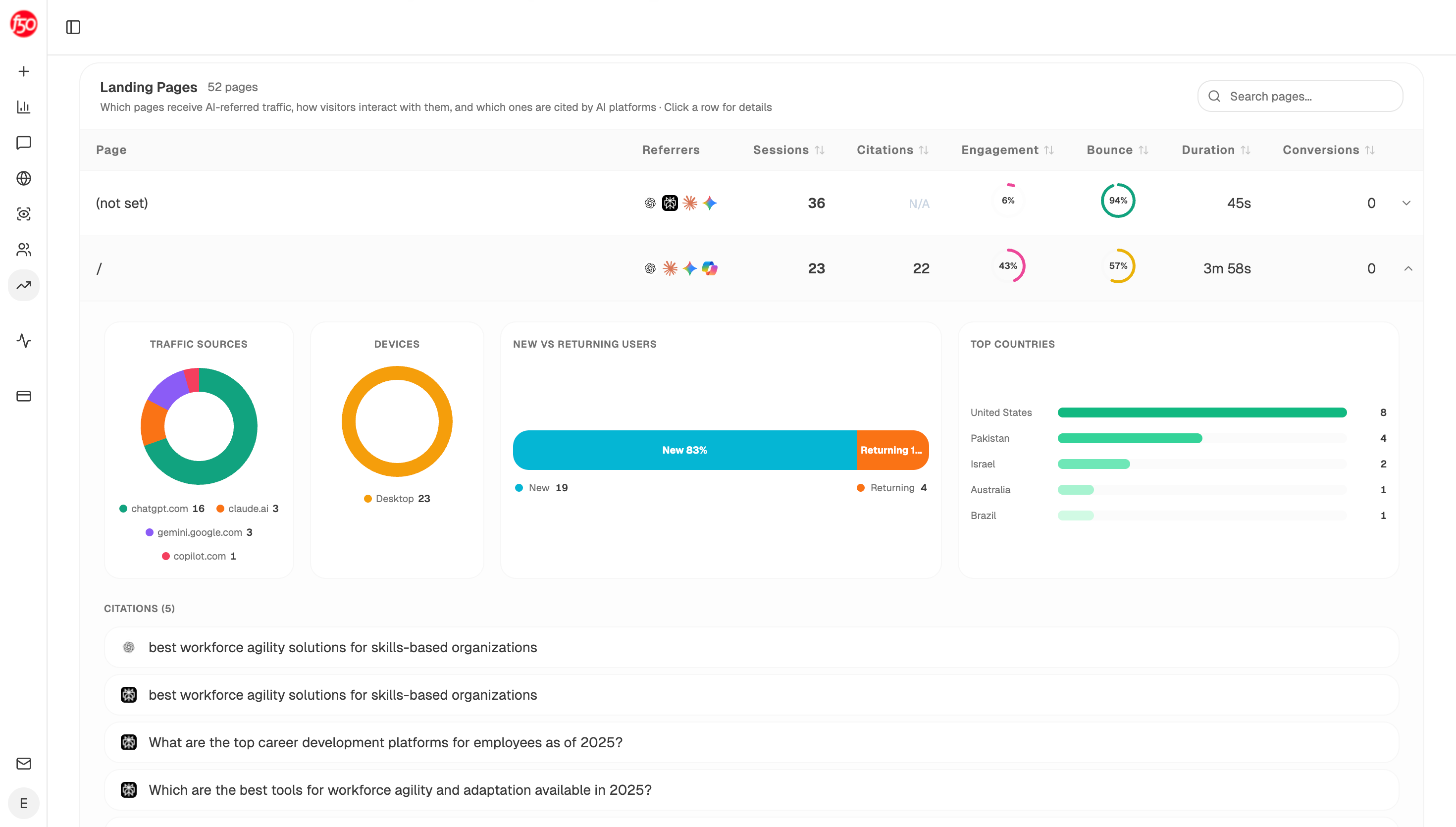
| AI Landing Pages | Which pages receive AI-referred sessions, with engagement and conversions |
| Page Breakdown | How a single page performs across AI sources |
| Recent AI Visitors | Individual sessions with source, landing page, and engagement status |
| Realtime AI Users | Live AI traffic, useful for catching a surge while it's happening |
Landing Pages is the one that changes the reporting conversation, because it shows AI-referred sessions and citation counts against the same URL. A page sending four sessions while being cited on twelve prompts reads as a win rather than as underperformance.
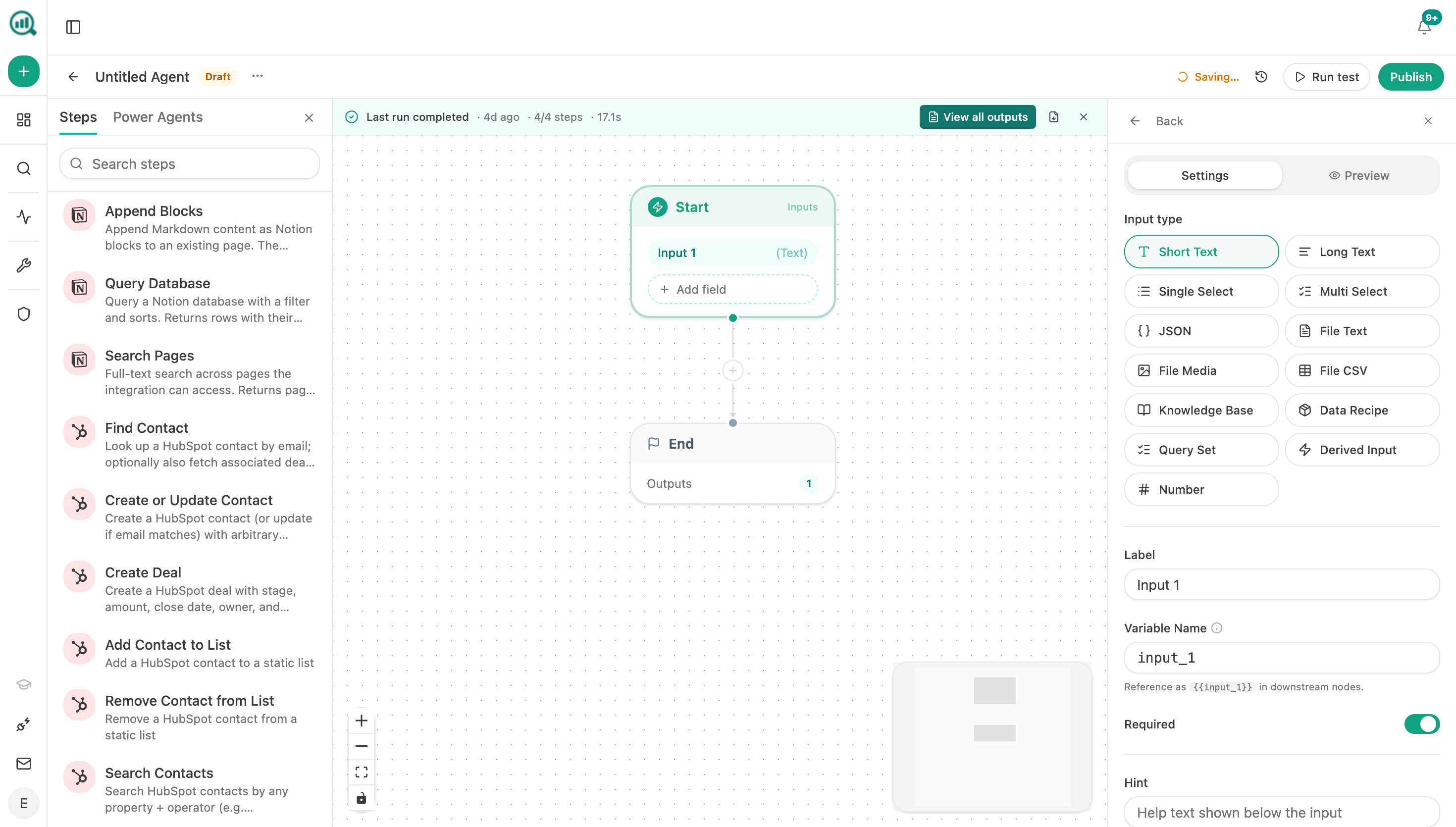
To keep both halves current, build it as a scheduled agent rather than a weekly export:
Start (schedule, Monday 7am) → GA4 AI Traffic Overview → AI Landing Pages → citation-magnets recipe → uncited-pages recipe → Code (join sessions to citations per URL, compute a citations-per-session ratio) → Prompt LLM (flag pages cited heavily but sending nothing, and pages sending traffic with no citation) → Excel export → Send Email to the SEO lead.
The two flagged lists are the actionable output. Heavily cited with no sessions means the answer is satisfying the user without a click, which is an AEO and positioning question. Sessions with no citations means you're being found some other way and have citation headroom left.
If you want a faster loop than weekly, Realtime AI Users in a scheduled agent running every 30 minutes can alert you when AI sessions spike, along with which prompt most likely caused it.
FAQ
Related answers
- Why does AI traffic show up as Direct in Google Analytics?
- What does GA4's AI Assistant channel measure — and what does it miss?
- Why do some AI referrals show up in GA4 while others don't?
- How can I estimate how much AI-influenced traffic is hidden in my Direct channel?
Want AI clicks and AI citations in one view instead of two tools? Start a free Analyze AI trial and connect GA4 in about ten minutes.