
Why does AI traffic show up as Direct in Google Analytics?
Short answer
Because GA4 classifies a session by its referrer header, and AI assistants frequently send visitors without one. Three things strip it: native mobile apps and in-app browsers that don't pass a referrer, referrer policies on the assistant's side, and users copying a URL out of an answer and pasting it into a new tab. With no referrer, GA4 has nothing to classify, so the session falls to Direct by default.
Direct is a fallback, not a channel
The first thing to correct is the mental model. Direct isn't a description of how someone found you. It's what GA4 writes down when it can't tell.
A session lands in Direct when the referrer header is empty and there are no campaign parameters on the URL. Someone typing your domain produces that. So does someone clicking a link inside a mobile app that doesn't pass a referrer. GA4 cannot distinguish the two, so both get the same label.
This is why "our Direct traffic grew" is almost never a real finding on its own. It usually means a source you can't see grew.
The three mechanisms that strip the referrer
Native apps and in-app browsers. When someone taps a link inside the ChatGPT mobile app, the request often arrives with no referrer header. The same applies to other assistants' apps and to links opened inside social or messaging apps. This is the largest share for most B2B sites, because assistant usage skews heavily mobile.
Referrer policy on the assistant's side. A site can instruct browsers how much referrer information to pass using the Referrer-Policy header. Under a strict policy such as no-referrer, the browser sends nothing at all. You have no control over what another platform sets, and platforms change these settings without notice.
Copy and paste. An assistant shows a URL in its answer, the user copies it into a fresh tab, and the visit arrives with no referrer because there was no click. This behaviour is common precisely on the assistants that display full URLs, which are often the highest-intent ones.
Only the third has a partial workaround, and it isn't a GA4 setting. It's making sure the URLs assistants surface are short and memorable enough that a pasted visit still lands on the right page.
Why the native AI Assistant channel doesn't fix it
GA4 added an AI Assistant channel in May 2026 that classifies recognised chatbot referrers automatically. It helps, but it operates on the referrer, so it cannot rescue a session that never had one. AI assistant traffic arriving without a referrer header still lands in Direct.
Google's own AI surfaces add a second complication. AI Overviews and AI Mode clicks are filed under Organic Search rather than AI Assistant, so they're neither in Direct nor in your AI number.
For the full inventory of what the channel covers, see What does GA4's AI Assistant channel measure — and what does it miss?.
How to tell AI-influenced Direct from typed-in Direct
You can't separate them per session, but you can in aggregate using landing page depth. Typed visits land on your homepage. Pasted URLs land on deep pages nobody reproduces from memory.
Build a Free-form Exploration with Landing page + query string as the dimension, Sessions as the metric, filtered to Direct. Sort by sessions and read the non-homepage rows. Direct sessions arriving on /blog/some-long-article-slug did not come from memory, and that total is your AI-influenced floor.
For the full estimation method, see How can I estimate how much AI-influenced traffic is hidden in my Direct channel?.
Add the one signal analytics can't infer
Deep-page Direct tells you a hidden source exists. It doesn't tell you which one. The only reliable way to name it is to ask.
Add a "how did you hear about us" question at signup with ChatGPT, Perplexity, Gemini, and Claude as explicit named options rather than hidden behind "other." When 20 to 30% of your Direct customers name an AI surface, you have evidence that survives a CFO conversation, and it required no tagging at all.
See which referrers actually survive, in Analyze AI
The frustrating part of this problem is that it's invisible in aggregate. A channel report tells you Direct grew. It can't tell you that ChatGPT desktop passes a referrer while the mobile app doesn't.
Recent AI Visitors makes that visible at session level. Each row shows the AI source, the landing page, location, browser, pages viewed, duration, and whether the session engaged or bounced. Scanning a few hundred rows tells you in minutes which sources are surviving the trip and on which devices, which is the diagnosis no channel report will give you.
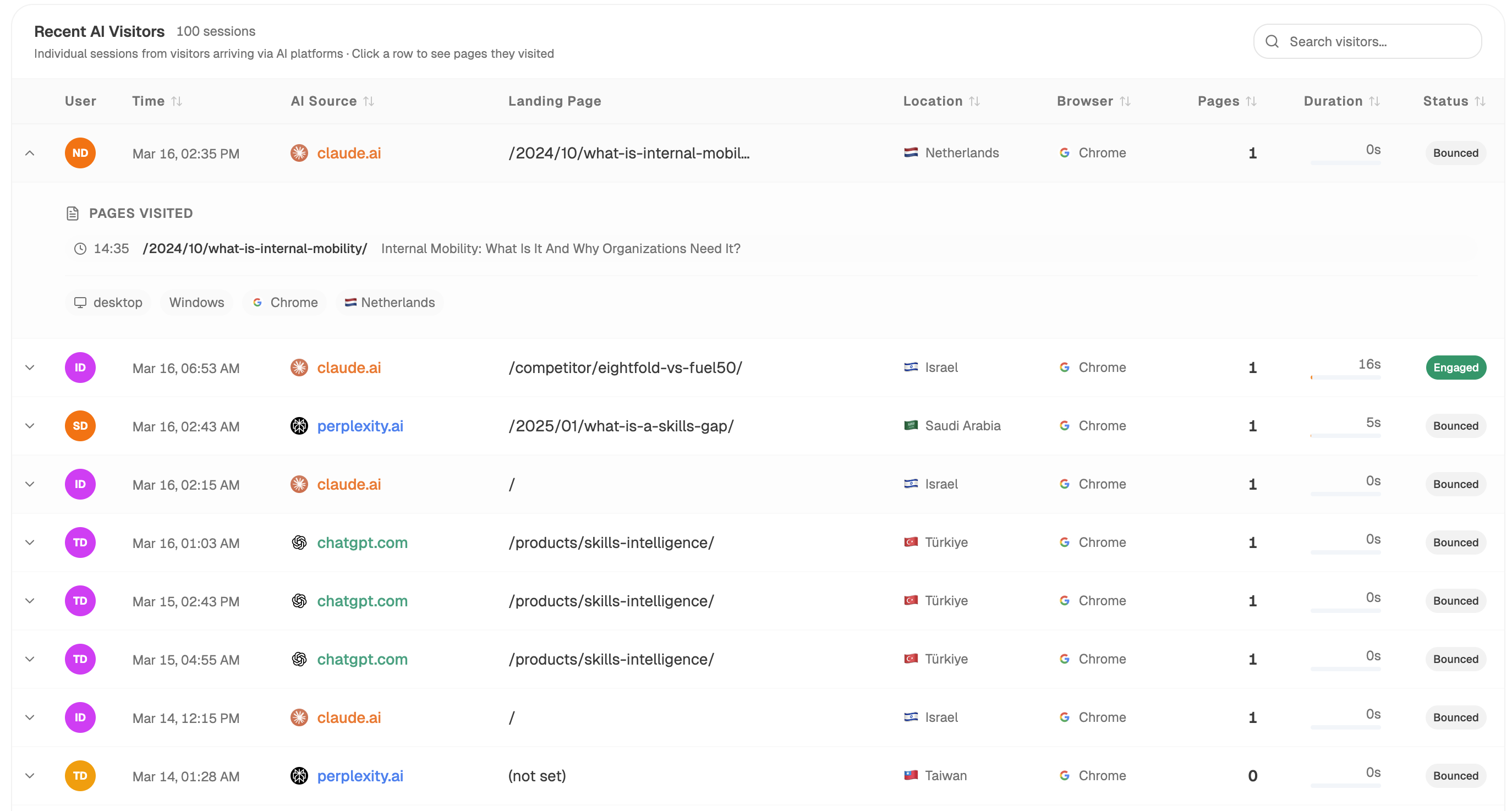
It also does something a Direct-channel analysis can't: it shows you the sessions that did carry a referrer landing on the same deep pages as your unattributed Direct traffic. When claude.ai and perplexity.ai both appear against /2024/10/what-is-internal-mobility/, and that page also carries unexplained Direct sessions, you have a strong case that the Direct portion came from the same sources with the header stripped.
To turn that into a running estimate rather than a manual scan:
Start (schedule, weekly) → GA4 AI Traffic Overview → AI Landing Pages → Page Breakdown (on pages with both AI referrals and high Direct) → citation-magnets recipe → Code (compute the deep-page Direct share, and the ratio of attributed AI sessions to Direct sessions per URL) → Prompt LLM (flag pages where attributed AI traffic and Direct move together) → Send Notification to the SEO lead.
The pages where both series move together are your best evidence. A page whose identified AI sessions rose 40% while its Direct sessions rose 35% in the same window is almost certainly receiving the same traffic through two paths, one labelled and one not.
For the exposure that produced no visit at all, prompt-level tracking runs alongside and tells you how often you were cited on the questions those pages answer.
FAQ
Related answers
- How do I track ChatGPT traffic in GA4?
- How can I estimate how much AI-influenced traffic is hidden in my Direct channel?
- Why do some AI referrals show up in GA4 while others don't?
- How can I build credible evidence that AI search is sending customers when there is no referrer?
Want to see the AI traffic your Direct channel is hiding? Start a free Analyze AI trial and connect GA4 to split AI referrals from Direct.