



Summarize this blog post with:


In this article, you’ll get a working review of Ahrefs in 2026. You’ll see where it still earns its price, where it quietly slows you down, what changed with the launch of Agent A, and what you actually need to bolt on once you’re trying to win in both Google and AI search. The goal is to give you a buyer’s view, not a feature dump, so you can decide whether Ahrefs alone is enough, or whether you need an agentic SEO and content platform running on top of it.
Table of Contents
Quick verdict
You should keep Ahrefs if your team relies on backlink data, SERP-level competitor analysis, or content gap research at scale. There is no cleaner data warehouse for those jobs.
You will outgrow Ahrefs alone if any of the following is true for you. You need attribution from AI engines like ChatGPT, Perplexity, Claude, Copilot, or Gemini. You need a content workflow that goes from research to outline to publish without copy-pasting between tabs. You need automation that pulls from Ahrefs and GSC, GA4, HubSpot, and your CMS in one place.
Most teams in 2026 are in the second bucket. The smart move is not to replace Ahrefs. It is to layer an agentic platform on top so the data you pay for actually gets used.
Three things Ahrefs still does better than almost anyone
Before getting to the friction, it is worth grounding the review in what Ahrefs has genuinely earned over the last fourteen years.
1. Site Explorer remains the cleanest competitor X-ray on the market
![[Description of screenshot to use: Ahrefs Site Explorer Overview 2.0 dashboard showing organic traffic, backlinks, and ranking timeline merged into one view]](https://www.datocms-assets.com/164164/1778585291-blobid1.jpg?auto=format,compress&w=1248&fit=max)
Site Explorer is the tool you still open first when you want to understand how a domain earns its traffic. The Overview 2.0 dashboard merges organic sessions, backlinks, and ranking trends into one timeline, so you can spot the moment a competitor’s growth started and trace it back to the page or campaign that triggered it.
From there you can drill into Top Pages to see which URLs do the heavy lifting, into Subfolders to understand where they concentrate authority, and into Content Gap to see which queries you are missing. The data is fast, the filters are sensible, and the reports rarely break. This is what a fourteen-year head start looks like.
If you want to test the same kind of analysis at zero cost on a single domain, you can run a quick check with the Website Authority Checker or the Website Traffic Checker before you commit to a full subscription.
2. Backlink data refreshed daily with the Inspect Tool for proof
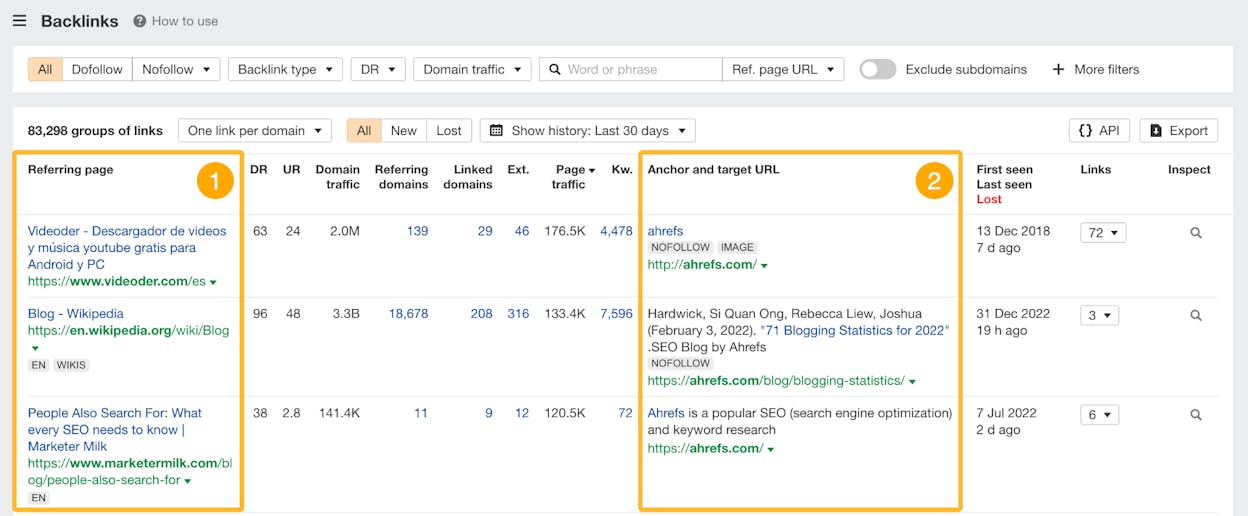
The other place where Ahrefs has no real peer is the backlink index. AhrefsBot is the second-most-active crawler on the open web, and the index updates daily. New links, lost links, anchor velocity, and referring domain growth all populate fast enough to support outreach decisions in real time.
The Inspect Tool is the underrated piece here. It opens the HTML snapshot of any backlink, shows you exactly where the link sits on the page, and lets you compare historical versions to see when something was edited or removed. For disavow work, broken-link recovery, or PR confirmation, it removes guesswork. If you also want a quick health check on your own outbound links, the Broken Link Checker covers that side of the house.
3. Brand Radar and AI features are catching up to the AI search shift
Ahrefs has been honest about the shift toward AI search and has shipped features in response. Brand Radar tracks how often your brand appears across LLM responses. The Keyword Explorer now layers AI-derived intent and clustering on top of volume and difficulty, so you can group thousands of keywords into pages instead of sorting them by hand. The Parent Topic view stops your content map from fragmenting into ten posts that could have been one.
These additions are real. They make Ahrefs feel less like a 2018 SEO suite and more like a tool that knows the SERP is changing. They are also, as you will see in a minute, locked inside the Ahrefs world.
Three things that quietly cost you with Ahrefs
![[Description of screenshot to use: Ahrefs pricing page showing Starter, Lite, Standard, Advanced, and Enterprise plans side by side]](https://www.datocms-assets.com/164164/1778585300-blobid3.png?auto=format,compress&w=1248&fit=max)
Now the friction. None of these are deal-breakers in isolation. Stack them and they shape how your team uses the product day to day.
1. Pricing tiers and credit caps that punish exploration
The current Ahrefs lineup runs from $29 per month for Starter to $1,499 per month for Enterprise. On paper that looks flexible. In practice, most agency and in-house workflows only become usable from Standard ($249) upward, where you get full Content Explorer access, deeper historical data, and 20 projects.
Lite and Starter come with a monthly credit pool. Each report, filter, and bulk export draws from it. That seems efficient until you realize that the experimentation a senior SEO needs in order to find a good idea is exactly what eats credits the fastest. Teams quickly start budgeting their curiosity, which is the opposite of what a research tool should do. The 2024 price hike (Lite went from $99 to $129, Standard from $179 to $249, Enterprise from $999 to $1,499) made this worse.
2. No real free trial, so first impressions cost money
Ahrefs Webmaster Tools gives you a thin slice of Site Explorer and Site Audit for verified domains. That is useful, but it does not let you evaluate competitor research, content workflows, or rank tracking before you hand over a credit card. The $29 Starter plan is the closest thing to a trial, and it is monthly only.
Compare that to Semrush, SE Ranking, or Search Atlas, all of which let you build real reports during a multi-day trial. For a freelancer or a small agency, that gap is the difference between a confident purchase and a hesitant one.
3. Agent A is real, but it lives inside one product
This is the most important new development of 2026. Ahrefs launched Agent A as their AI marketing agent. It can build content calendars, find keyword cannibalization, plan link building, audit technical health, and run competitor analyses. It is a real agent, built on top of 170 trillion indexed pages.
The honest limit is in the name. Agent A operates on Ahrefs data. It does not natively pull GA4 sessions, GSC clicks, HubSpot deals, or your CMS publish pipeline. It does not script a workflow that scrapes a competitor article, rewrites it to your brand voice, scores it for AI search, and pushes it to WordPress. It is a smart copilot inside the Ahrefs walls, not a substrate that connects everything in your stack.
For a small team that lives inside Ahrefs, that is fine. For anyone who has paid for Ahrefs, GSC, GA4, Semrush, and a CMS in the same quarter, the data is in the room. The question is which platform actually composes it into work.
Ahrefs 2026 pricing at a glance
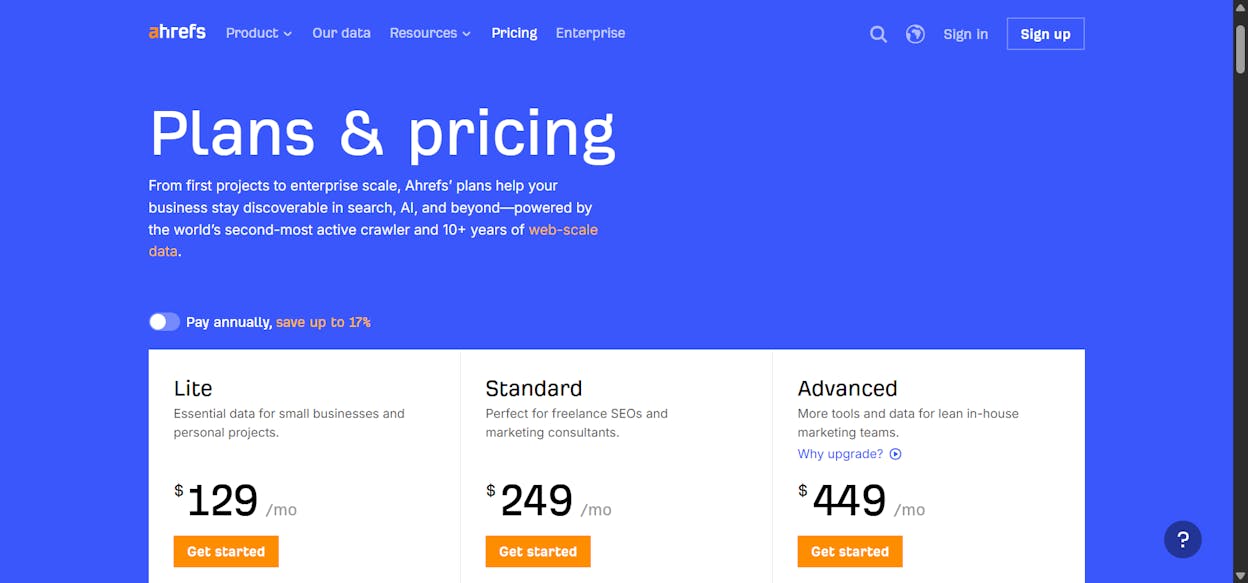
To put the costs in one view before we get to the alternative.
|
Plan |
Monthly price (annual billing) |
Best for |
Notable limits |
|---|---|---|---|
|
Starter |
$29 |
Solo testing, single project |
Credit-capped, no rank tracking |
|
Lite |
~$108 ($129 monthly) |
Solo SEO, 5 projects |
1 seat, 750 keywords tracked |
|
Standard |
~$208 ($249 monthly) |
In-house teams, 20 projects |
1 seat, 2,000 keywords tracked |
|
Advanced |
~$374 ($449 monthly) |
Agencies, 50 projects |
5 seats, larger crawl quota |
|
Enterprise |
from $1,499 |
Large orgs, 100+ projects |
Custom seats, full API |
Add-ons such as additional users (commonly $40 to $60 per seat per month), Project Boost, Report Builder, and API Plus stack on top. If you want a like-for-like comparison against the other big SEO suite, this Ahrefs vs Semrush breakdown covers the trade-offs in detail. If you are specifically evaluating the AI search side, the Ahrefs Brand Radar alternatives post is the right next read.
Where Ahrefs leaves a gap (and what you put on top of it)
There are now two jobs Ahrefs alone struggles to finish for a modern marketing team. Closing them is where the real ROI sits.
The first is AI search visibility tied to actual revenue. Brand Radar tells you when your brand shows up in an LLM answer. It does not connect that mention to a session, a landing page, a conversion, or a dollar of pipeline. So you know you appeared. You do not know if it mattered.
The second is end-to-end agentic execution across your whole stack. Agent A runs on Ahrefs data. Most SEO and content work runs on Ahrefs plus GA4, GSC, Semrush, DataForSEO, HubSpot, your CMS, and your brand voice rules. You need an automation substrate that holds all of that in one room and runs the workflow.
This is exactly the gap Analyze AI was built for.
Analyze AI: the agentic SEO and content platform you build around Ahrefs
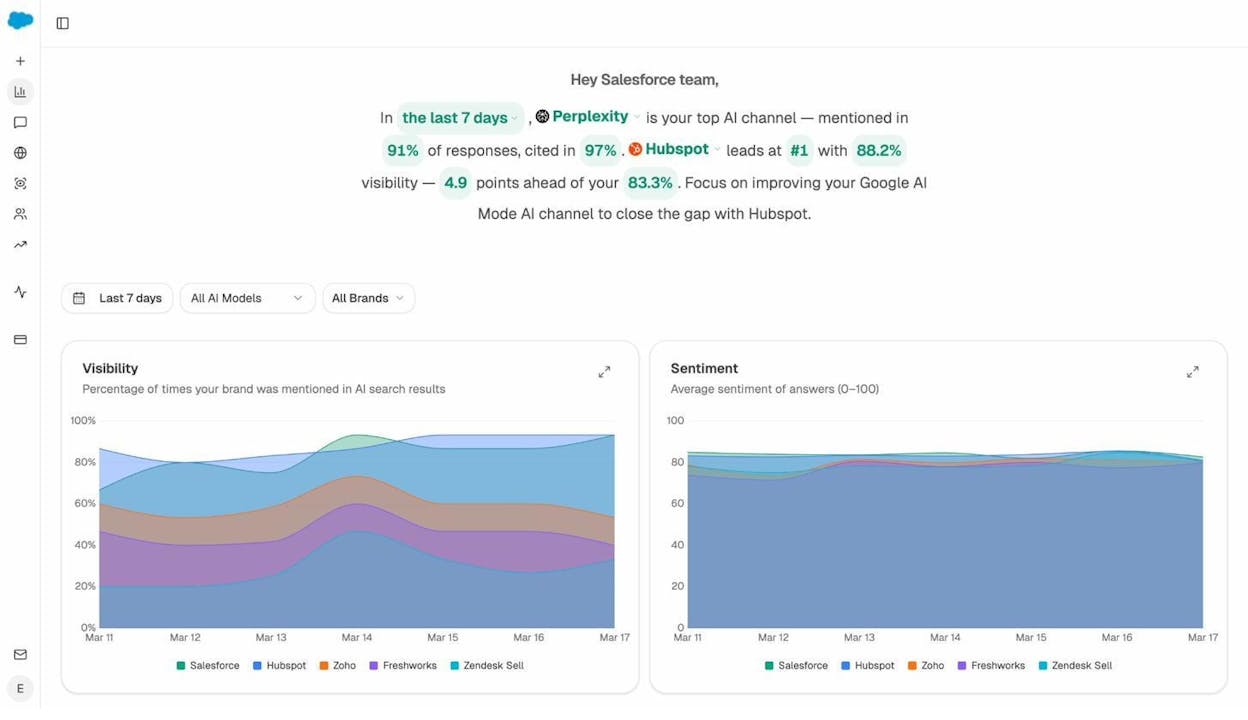
Analyze AI is not a visibility dashboard with a pricing page. It is a programmable platform with 180+ nodes, 34 pre-built data recipes, and three trigger modes (manual, scheduled, webhook). It pulls from Ahrefs, Semrush, DataForSEO, GSC, GA4, HubSpot, Notion, WordPress, Mailchimp, and your own brand vault, then composes that data into agents that actually do the work.
The same platform comes with the AI search layer baked in. Visibility, sentiment, citation share, perception mapping, and AI traffic attribution are all native, not bolt-ons. So you get the agentic substrate and the AI search data inside one workspace, instead of stitching three subscriptions together.
Here is what that looks like in practice.
Agent Builder: the layer Ahrefs does not have
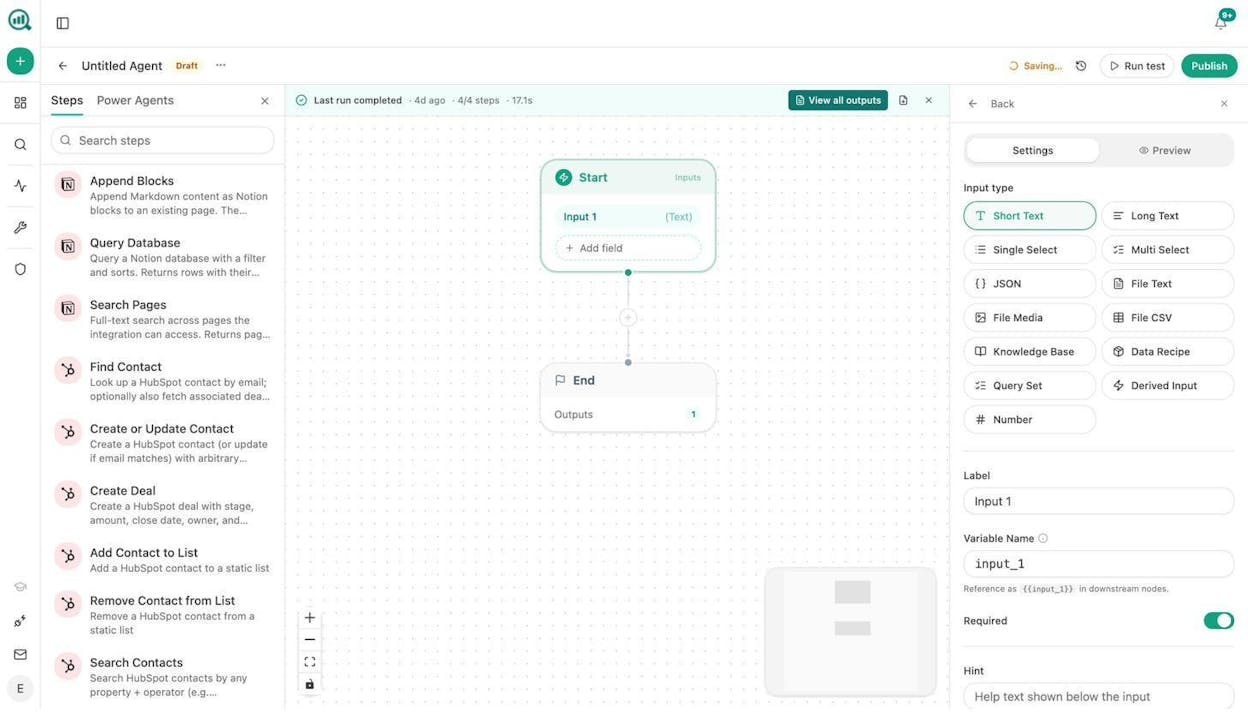
The Agent Builder is the heart of the platform. Each agent is a workflow you compose from primitives. A “Start” node collects inputs. Then you chain together research nodes (Ahrefs via API, GSC, DataForSEO Brand Mentions, Web Page Scrape, Perplexity Search), reasoning nodes (Prompt LLM with Claude, GPT, Gemini, or Sonar), brand context nodes (Inject Brand Vault), and distribution nodes (WordPress Create Post, Send Email, Slack, HubSpot Upsert).
A few examples of what teams ship in a single agent today.
A content director runs a brief-to-publish pipeline that triggers from Notion. It generates research, generates an outline, drafts the article with brand voice injected, runs an AEO scorecard, and publishes to WordPress only if the score clears 80. Anything below 80 routes back to the writer in Slack with the gap notes.
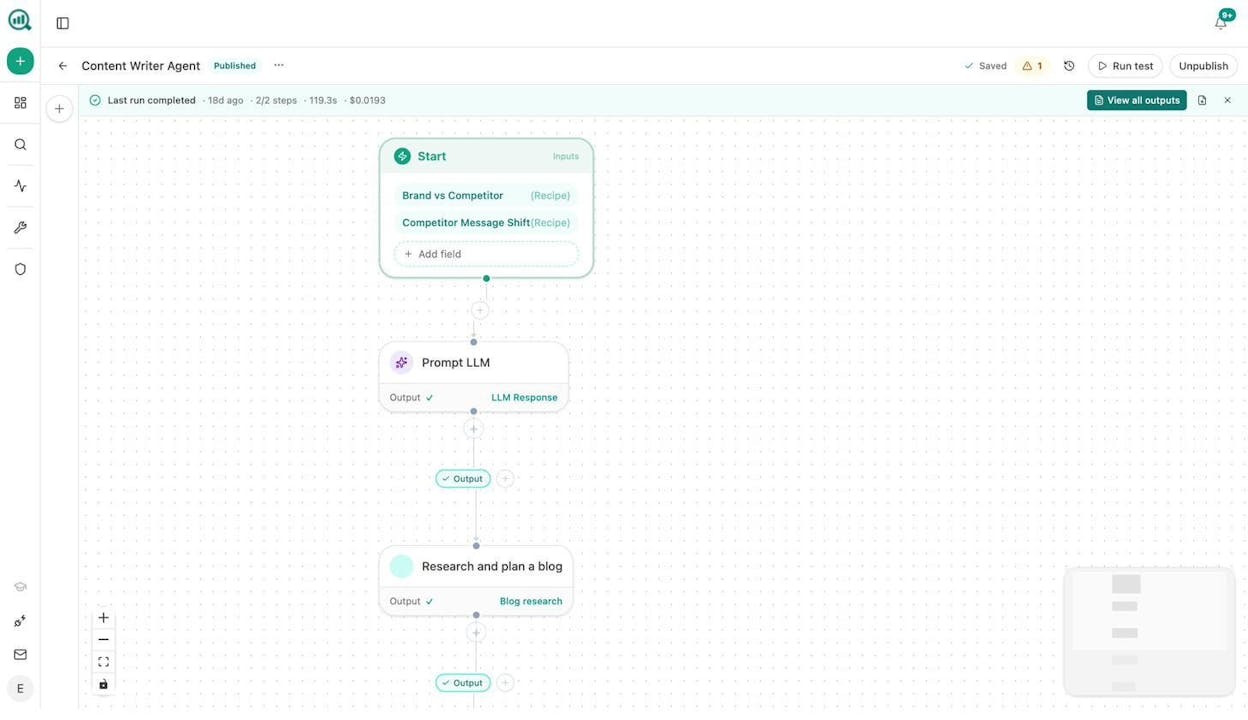
A CMO runs a Monday board prep agent on a cron at 7am. It pulls AI share of voice, GA4 highlights, GSC top pages, new HubSpot deals, and competitor narrative shifts, drafts the executive summary in brand voice, exports it as a DOCX, and emails leadership before they start their week.
A PR head runs a webhook-triggered crisis playbook. When a media monitoring tool flags negative coverage, the agent identifies the journalist with Tomba, drafts three response options, and posts them to the agency’s crisis channel within seconds.
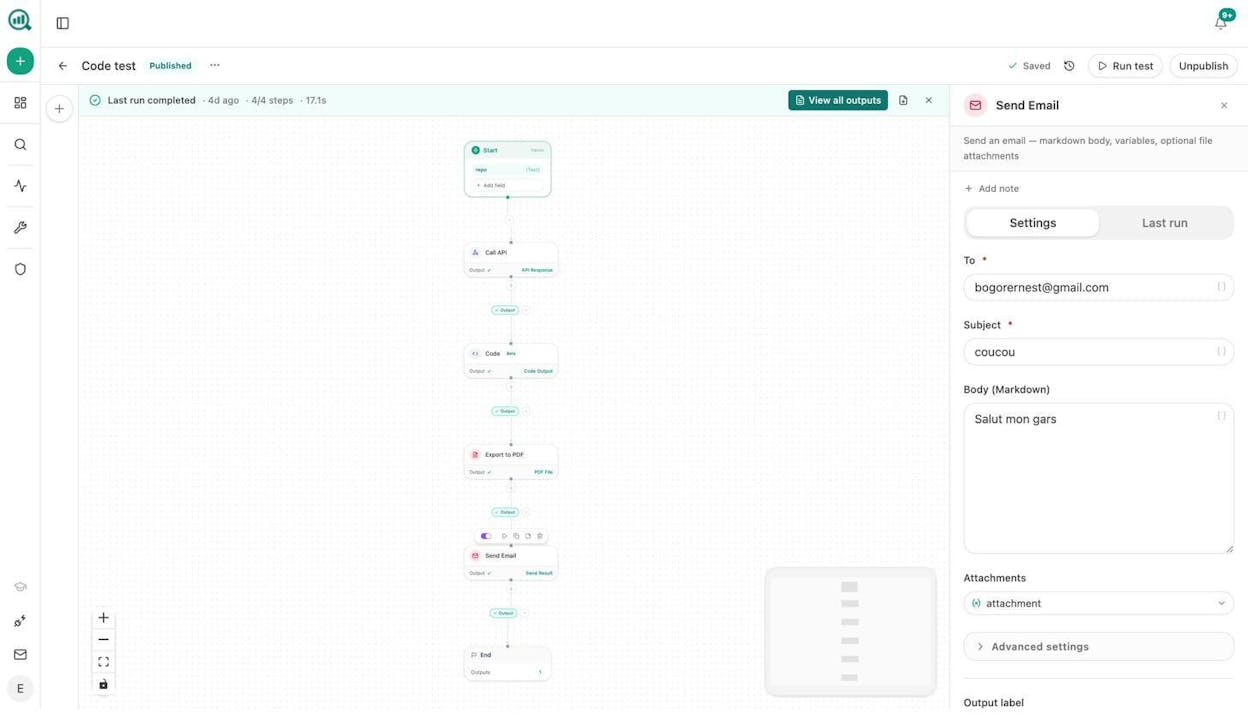
These are not templates. They are workflows your team composes from real nodes against your real data. And yes, you can still use Ahrefs. The platform pulls Ahrefs data through the API, so the index you pay for shows up inside an agent step rather than as a tab you switch to.
If you want a deeper read on what agentic execution looks like on the SEO side, the post on SEO automation tools and the breakdown of content automations real pros use are good starting points.
Content Writer that researches before it writes
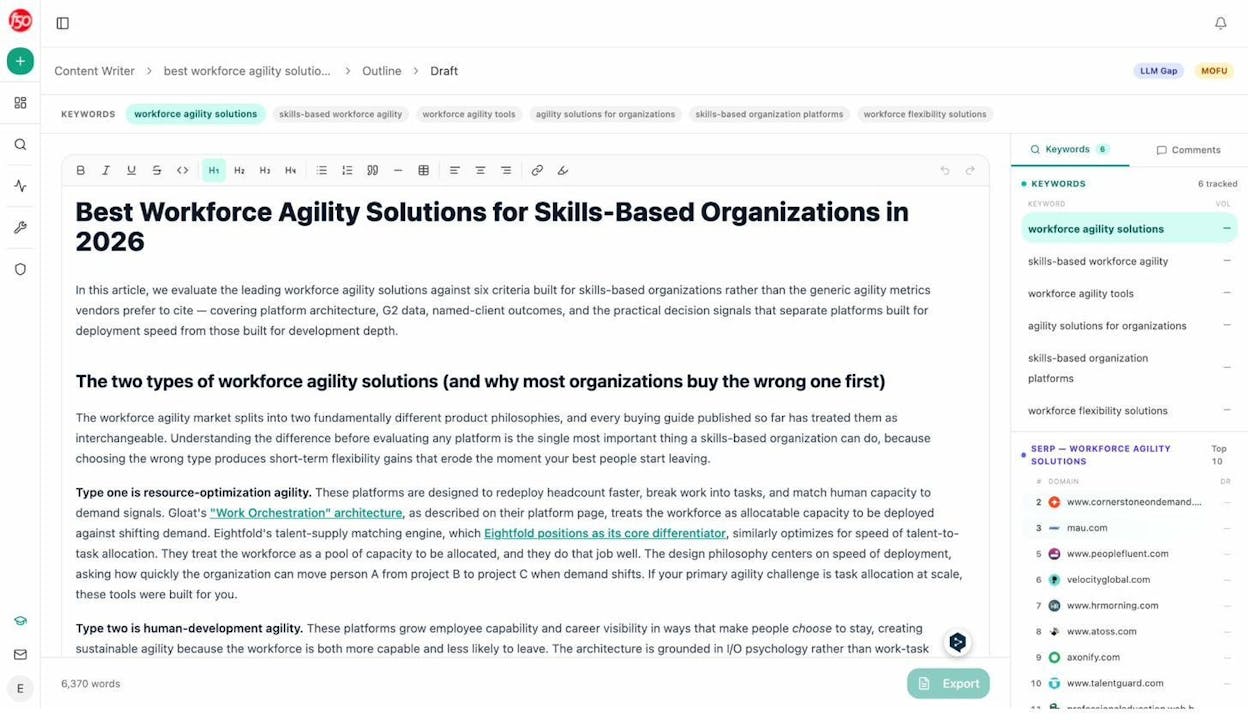
Most AI writers start at the draft. The Content Writer in Analyze AI starts at the brief.
You drop in a keyword, a competitor URL, or an LLM gap, and the agent runs its own research pass first. It pulls top SERP results, AI-cited sources for the topic, your own brand vault, and live citation patterns. Then it builds an outline you can edit before any writing happens. Only after you sign off on the outline does it draft the full piece, with brand voice rules and required phrases injected at write time.
That ordering matters. The output is not generic AI prose. It carries your structure, your evidence, your tone, and your differentiators, because all of those went in upstream. You can read more about how the system works on the AI Content Writer page.
Content Optimizer that ranks ideas by gap, not by surface score
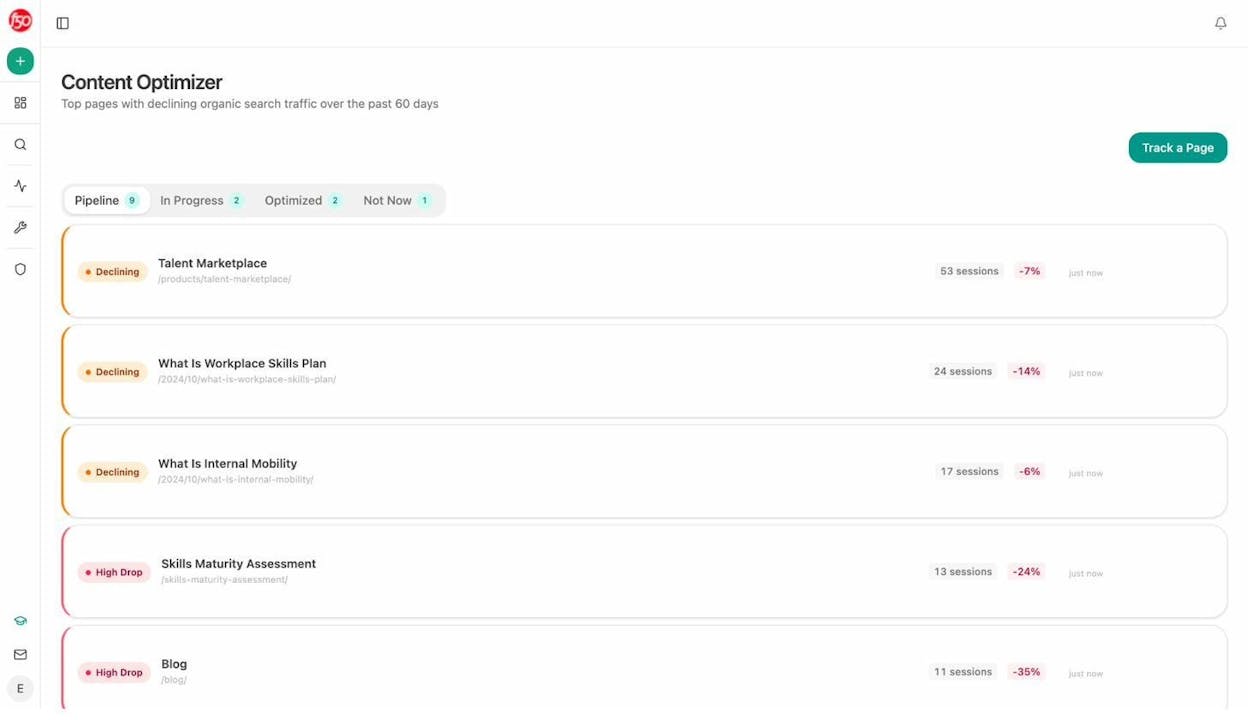
Most optimization tools score what is already on the page. The Content Optimizer scores what is missing.
You point it at a URL. It fetches the live content, compares it to top SERP and AI-cited competitors, and surfaces the specific gaps that are costing you visibility. Then it generates the rewrite, page by page, with the gap closed and the brand voice preserved. Pages move through a pipeline (Pipeline, In Progress, Optimized) so you always know what is queued and what shipped.
If you want to see the rewrite quality before committing, the AI Content Optimizer page walks through a full before-and-after.
AI traffic attribution that goes past the mention
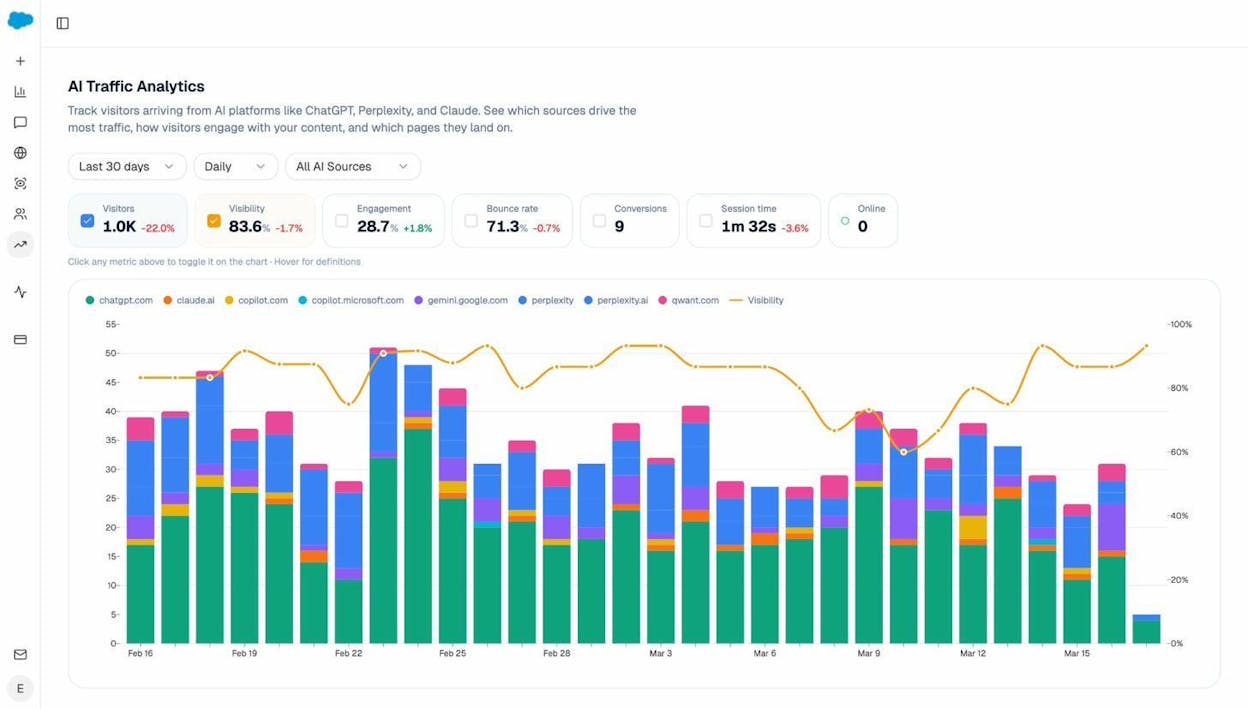
This is the layer Brand Radar does not give you. Analyze AI attributes every session from an answer engine to its specific source (ChatGPT, Perplexity, Claude, Copilot, Gemini, and others). You see session volume by engine over time, alongside engagement, bounce, conversion count, and average session time.
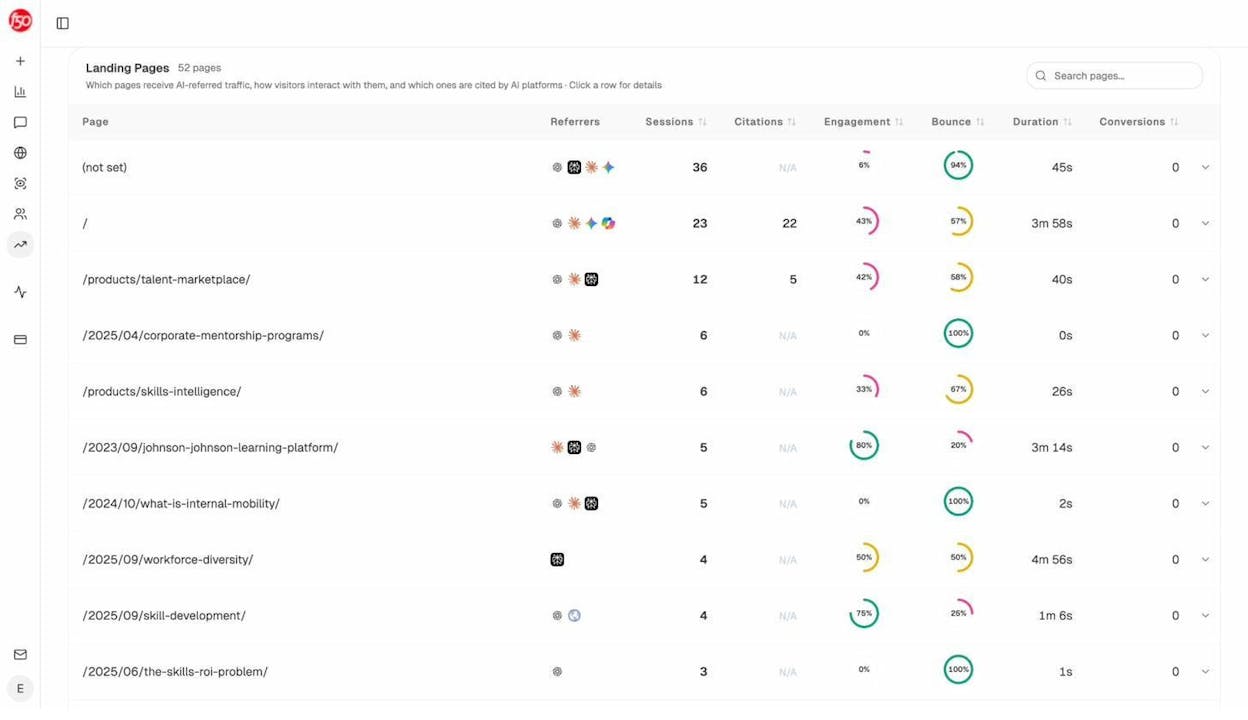
The Landing Pages report ties that traffic to the URLs that received it. You see which pages convert AI sessions, which ones drain them, and which patterns to double down on. This is how you stop optimizing for visibility that goes nowhere and start optimizing for the prompts and pages that actually drive pipeline. The full feature lives on AI Traffic Analytics.
Prompt tracking and competitor intelligence at the prompt level
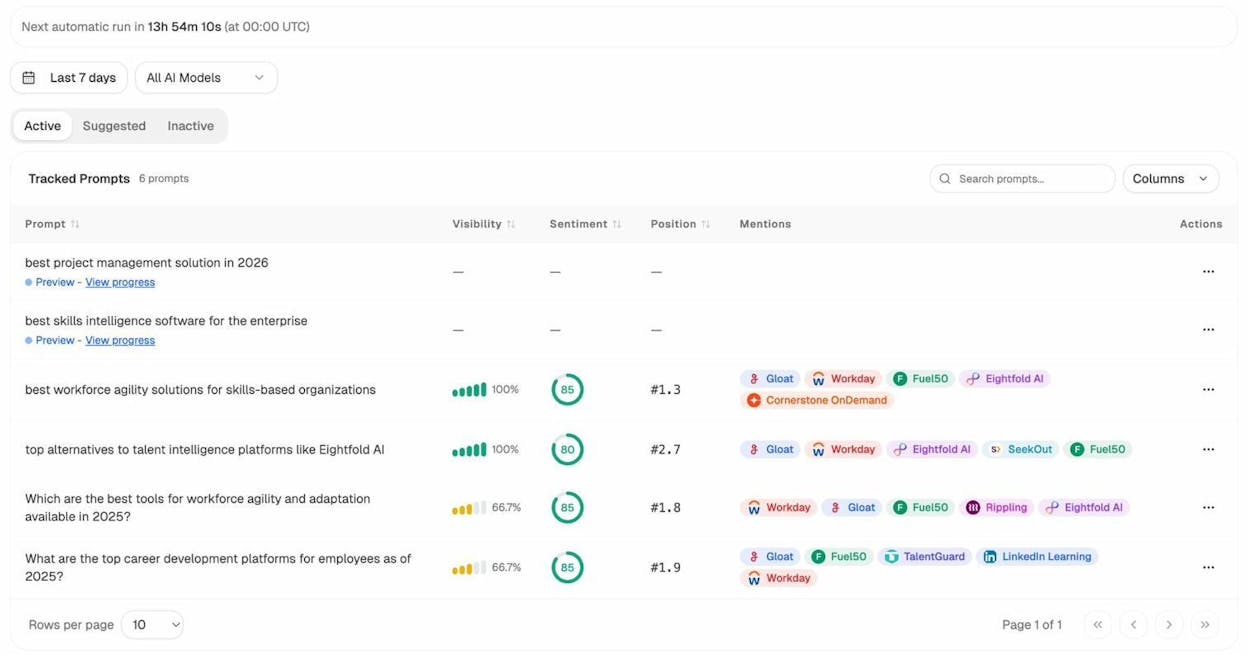
You track the actual prompts buyers use. For each tracked prompt you get visibility percentage, sentiment, your position relative to competitors, and which competitors appear alongside you across ChatGPT, Perplexity, Claude, Copilot, Gemini, Google AI Mode, and others.
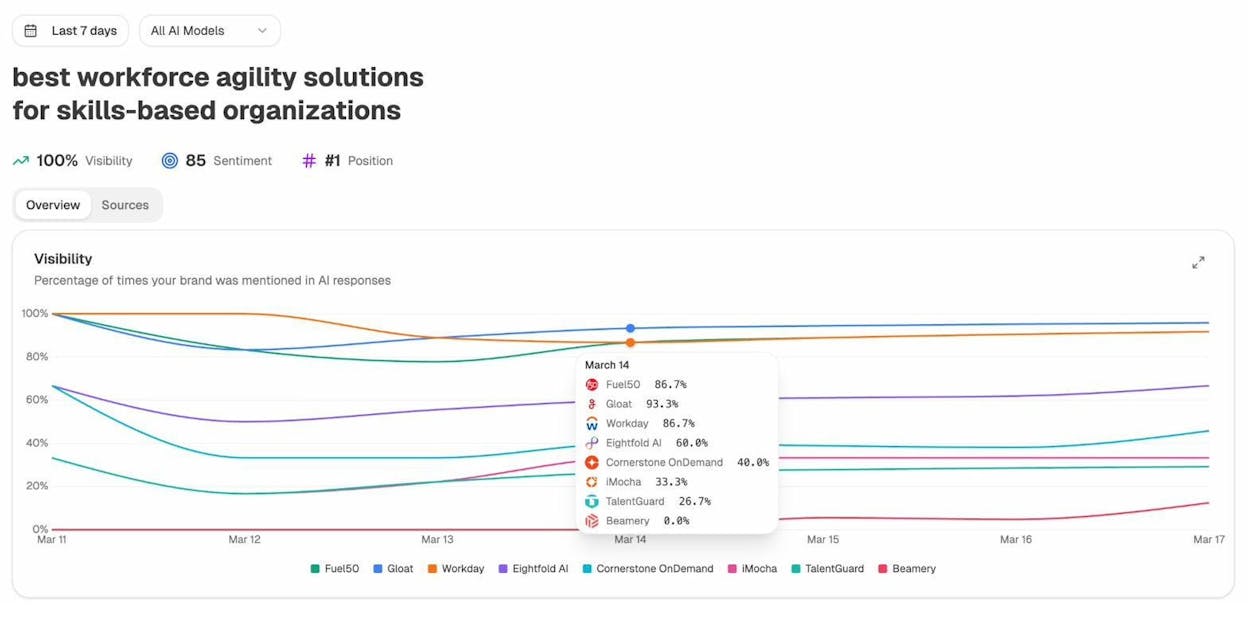
If you do not know which prompts to track, the Prompt Discovery feature surfaces the bottom-of-funnel prompts already being asked in your category, so you start with the queries that move pipeline rather than guessing. Suggested competitors get the same treatment. The platform watches who keeps appearing alongside you and tells you who to add to tracking.
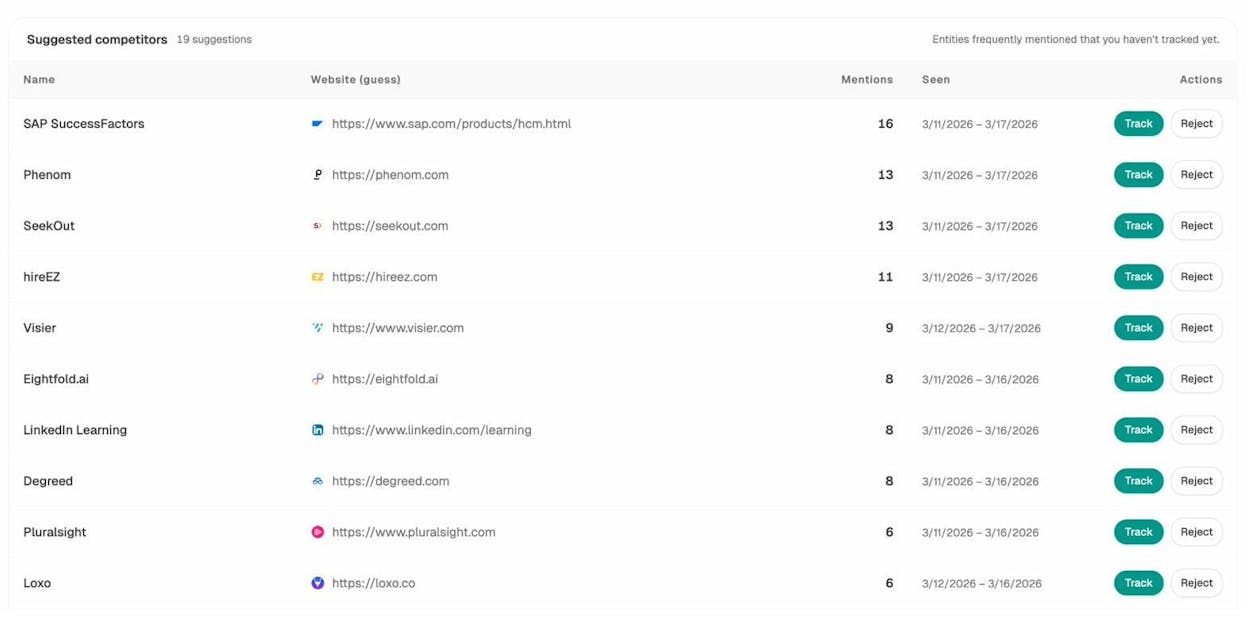
If you want a broader view of how to compare against rivals, the post on comparing your AI visibility against competitors walks through the workflow.
Citation analytics that show you which sources to influence
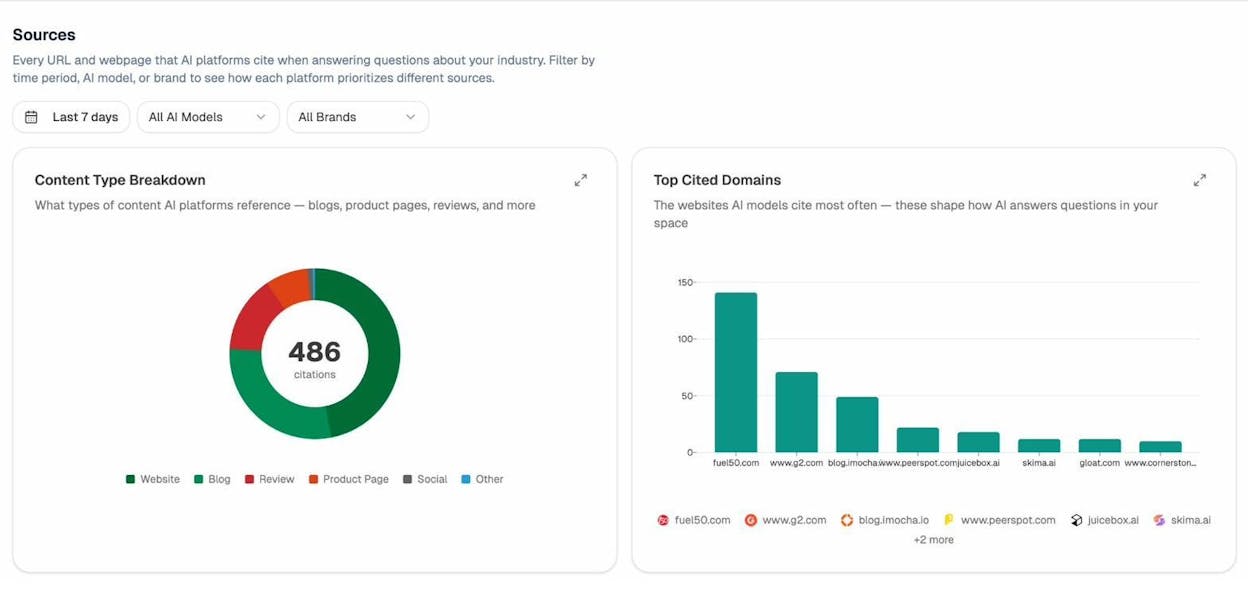
For every prompt and every model, you see which domains and URLs the model cited. That gives you a target list. Instead of a generic outreach plan, you know that Reddit threads, a specific G2 category page, or a niche review site shapes 60 percent of the answers in your space, and you go work on those. The full surface lives on Citation Analytics.
Perception Map that shows you the narrative, not just the volume
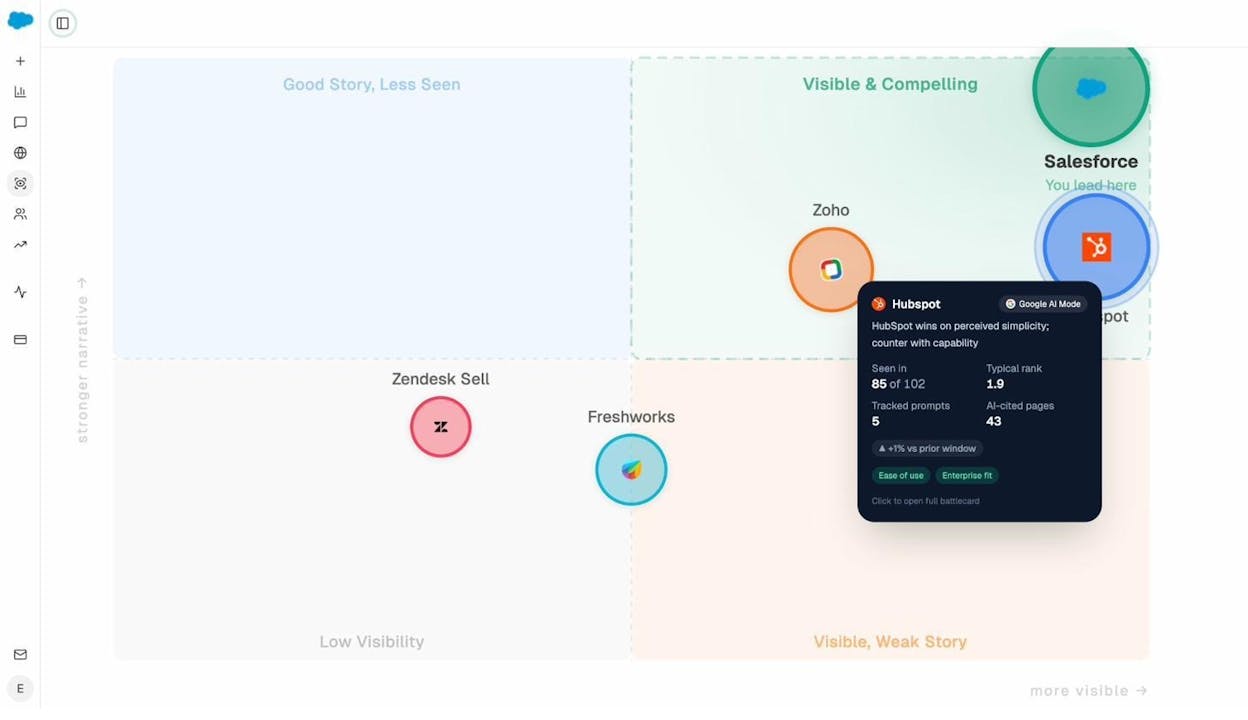
Visibility is one axis. Narrative strength is the other. The Perception Map plots every tracked brand on both, so you immediately see who has volume but a weak story (vulnerable), who has a strong story but low volume (an opportunity to amplify), and who actually leads. The detail lives on the Perception Map feature page.
Ahrefs vs Analyze AI: a side-by-side view
|
Capability |
Ahrefs alone |
Ahrefs + Analyze AI |
|---|---|---|
|
Backlink index and SERP data |
Deep, daily-refreshed |
Same (pulls Ahrefs via API into agents) |
|
Keyword research and clustering |
Strong |
Strong, plus AI search prompt research |
|
AI search visibility tracking |
Brand Radar (mention-level) |
Native, prompt-level, multi-engine, with sentiment |
|
AI traffic attribution to revenue |
None |
Engine, page, conversion, and session-time |
|
Content briefing and drafting |
AI Content Helper |
Research-first writer with brand vault injection |
|
Content optimization |
AI Content Helper |
Gap-based optimizer with QA pipeline |
|
Citation source analytics |
Limited |
Per-prompt, per-model, with usage trends |
|
Workflow automation across stack |
Agent A (Ahrefs data only) |
180+ nodes across Ahrefs, GSC, GA4, Semrush, HubSpot, CMS, brand vault |
|
Trigger modes |
Manual |
Manual, scheduled, webhook |
|
Brand voice in outputs |
Manual prompt |
Brand vault injected automatically |
If you want to dig deeper, the dedicated Analyze AI vs Ahrefs Brand Radar comparison breaks down each feature.
So is Ahrefs still worth it in 2026?
Yes, with conditions.
Keep Ahrefs if your work depends on backlink data, SERP analysis, or competitor content research at scale. The Standard plan upward is a sound investment for any team where SEO is a real revenue driver, and the 2026 features keep it relevant inside its own walls.
Outgrow Ahrefs alone the moment you need three things at once. Attribution from AI engines to revenue. A content workflow that goes from research to publish without a tab graveyard. Automation that pulls from your full stack, not just one product.
The clean answer for most teams in 2026 is to keep Ahrefs for what it does well, and put an agentic platform on top to do the rest. You close the AI search gap that Brand Radar leaves open, and you give your team agents that finish work instead of producing reports.
To see this on your own data, you can start with Analyze AI and connect Ahrefs in minutes. Once it is in, every agent you build can pull from it.

Ernest

Ibrahim


