



Summarize this blog post with:


In this article, you’ll learn what each of the seven most popular LLM tracking tools actually does, where each one stops being useful, how their pricing compares when you move past the entry tier, and which one ties AI visibility data back to traffic and conversions so you can prove ROI to your CMO.
Table of Contents
Quick comparison: pricing, strengths, and trade-offs
|
Tool |
Starting price |
Engines covered |
GA4 attribution |
Content creation |
Agent/workflow builder |
|---|---|---|---|---|---|
|
$99/mo |
ChatGPT, Perplexity, Gemini, Claude, Copilot, Grok, DeepSeek |
Yes |
Writer + Optimizer |
180+ node Agent Builder |
|
|
Profound |
$99/mo (ChatGPT only); $399/mo for 3 engines |
ChatGPT, Perplexity, Gemini, AI Mode |
No |
Agents (templates) |
Limited |
|
Otterly AI |
$29/mo (15 prompts) |
ChatGPT, Perplexity, AI Overviews, Copilot |
No |
No |
No |
|
SE Ranking |
~$119/mo add-on |
AI Overviews, AI Mode |
No |
No |
No |
|
Semrush AI Toolkit |
~$745/mo (bundle) |
ChatGPT, Perplexity, AI Overviews |
No |
Limited |
No |
|
Knowatoa AI |
Free tier; paid from ~$49/mo |
ChatGPT, Claude, Perplexity |
No |
No |
No |
|
Gumshoe AI |
Pay-per-report |
ChatGPT, Gemini, Perplexity, Claude |
No |
Basic optimization |
No |
Analyze AI: the agentic platform for SEO, AEO, content, and GTM ops
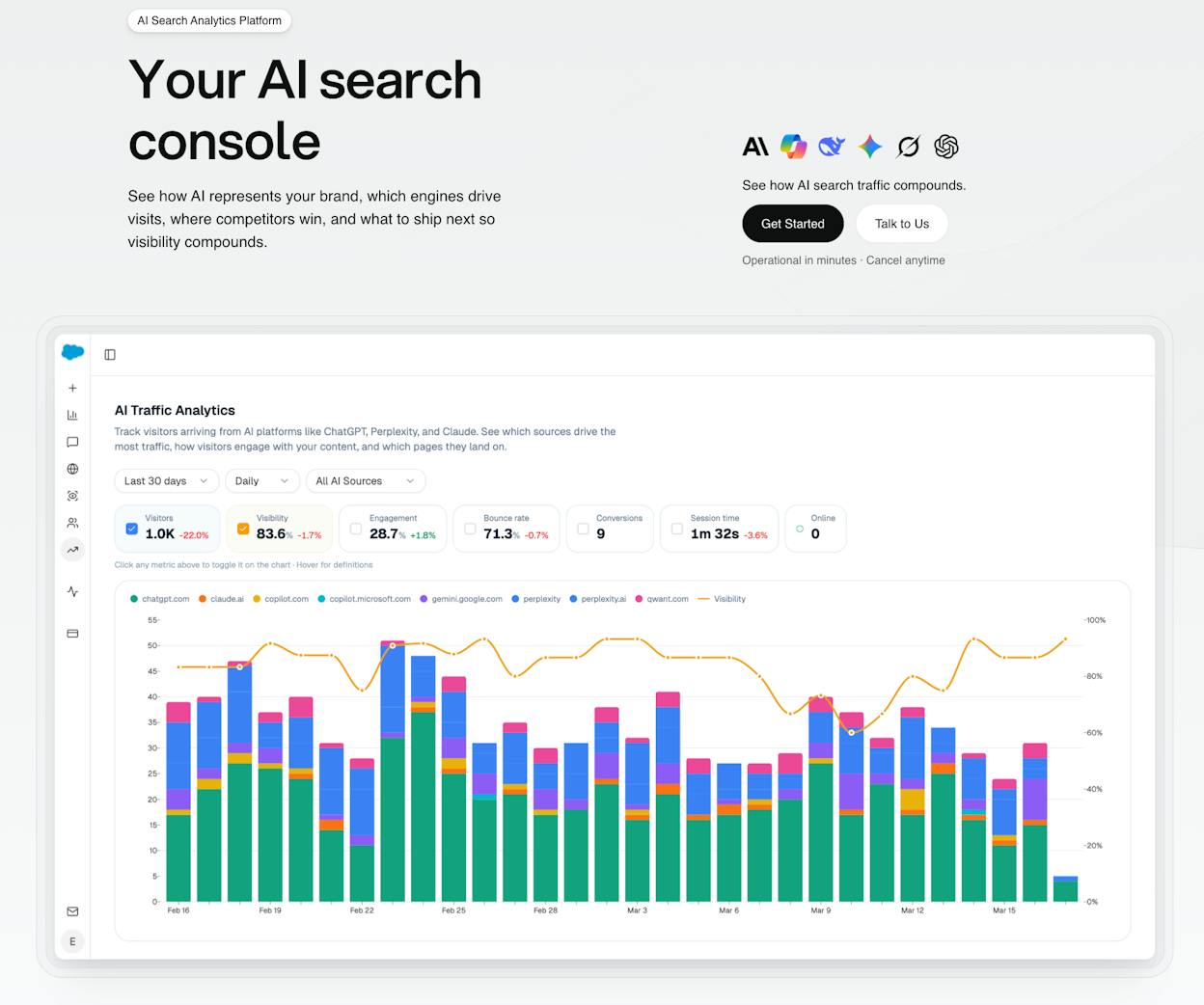
Most tools in this category are dashboards. You look at data, then you leave and figure out what to do somewhere else. Analyze AI works differently. It covers the full loop from discovery to monitoring to content creation to competitive governance, and it connects every layer to GA4 so you can tie AI visibility to sessions, landing pages, and conversions.
Here is why that matters if you run content, manage clients, or report to a CMO.
See where you stand across every AI engine
The overview dashboard gives you a single view of your AI visibility across all major engines. You see the percentage of prompts where your brand gets mentioned, which competitor leads, and what your sentiment looks like over time.
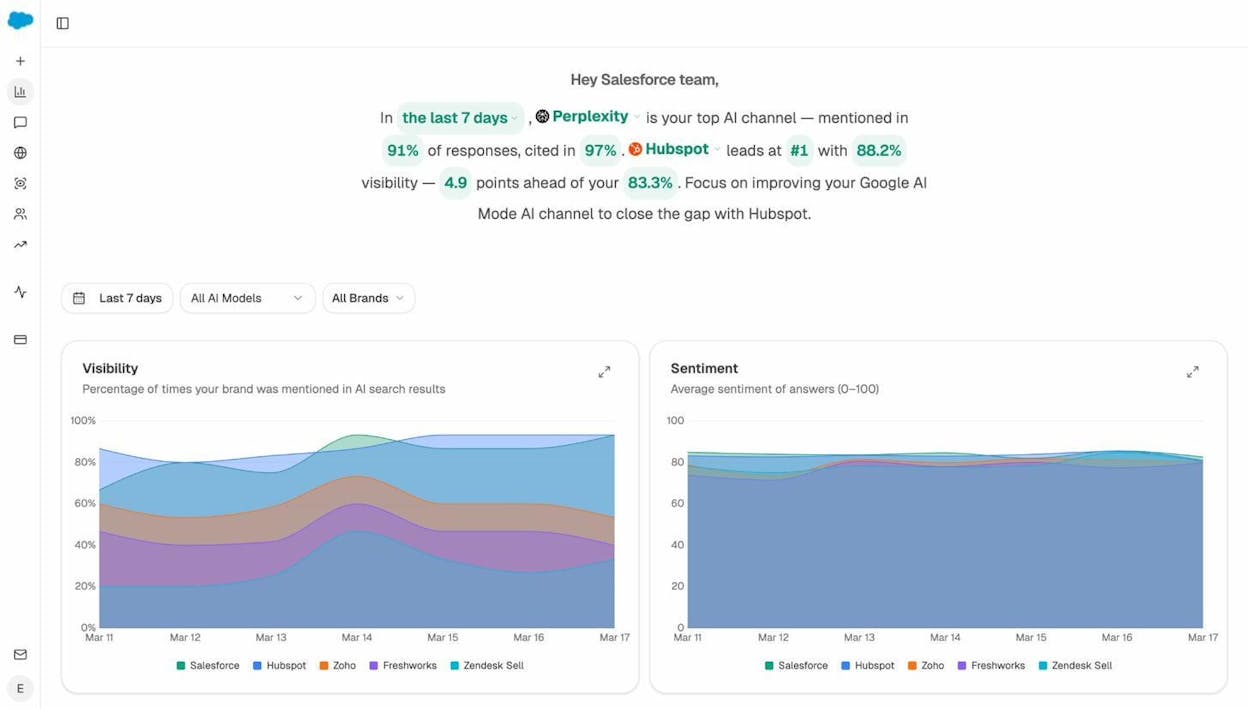
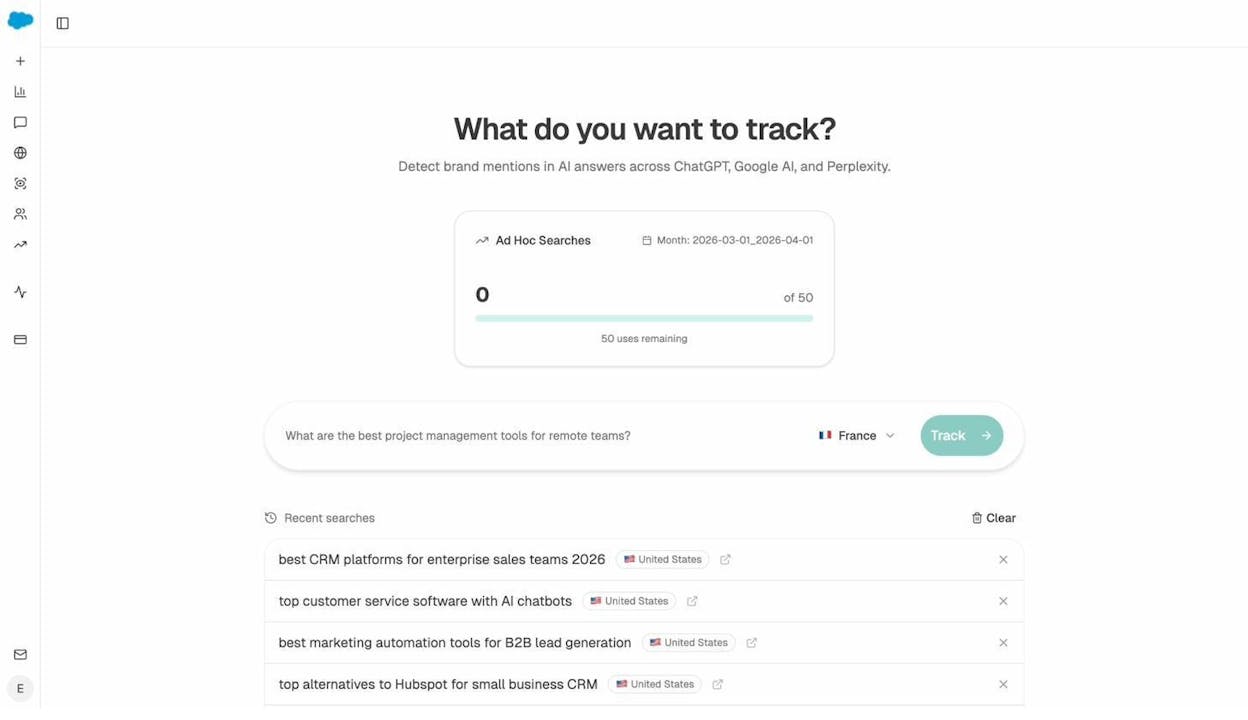
Instead of checking ChatGPT manually and hoping you spot a mention, you get a running scoreboard filtered by time range, engine, and brand. You can also run instant ad hoc prompt searches to test any query across all engines before adding it to your tracked set.
Track the prompts that matter to your business
Every tracked prompt captures the full answer text, your brand’s position, which URLs get cited, sentiment, and which competitors appear alongside you. This is not a binary “mentioned or not” report. You see exactly how AI frames your brand and where rivals are setting the narrative.
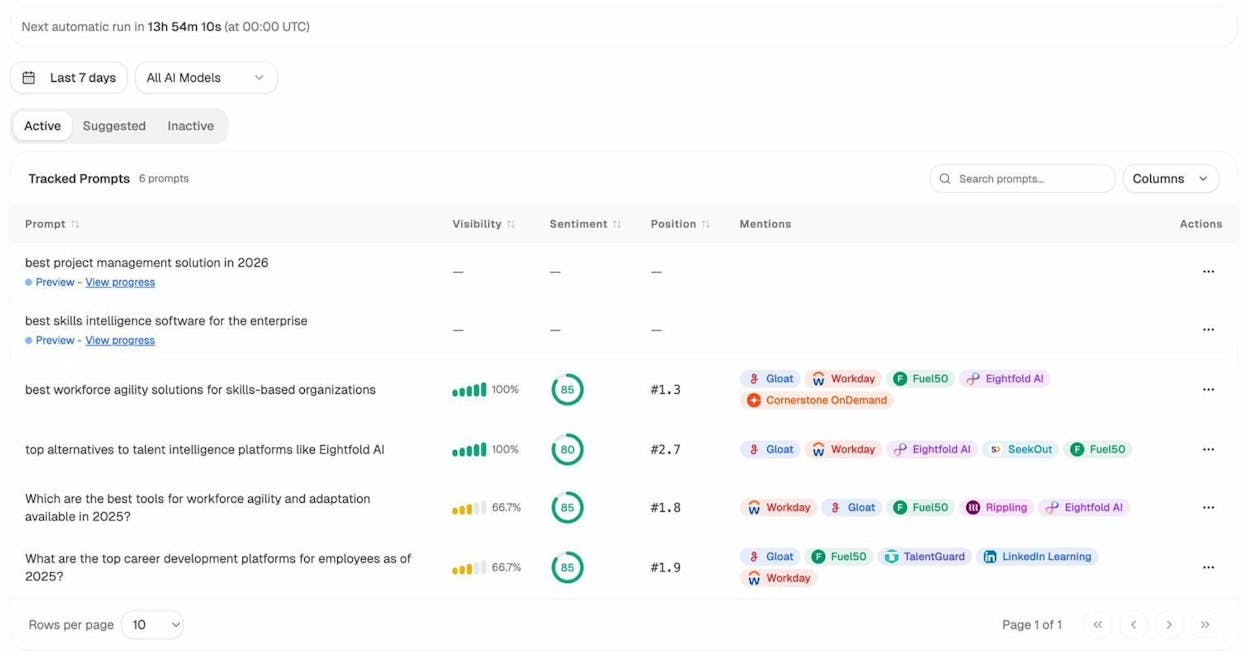
For agencies managing multiple clients, this means you can build separate prompt sets per brand and benchmark them against their specific competitive set. For in-house teams, you can align prompts with your product categories and measure coverage per business line.
Know who you are losing to and why
The competitor intelligence module does not just show you that competitors exist. It shows you exactly where they win and you do not. It surfaces suggested competitors you may not be tracking yet, based on which brands AI engines mention alongside yours.
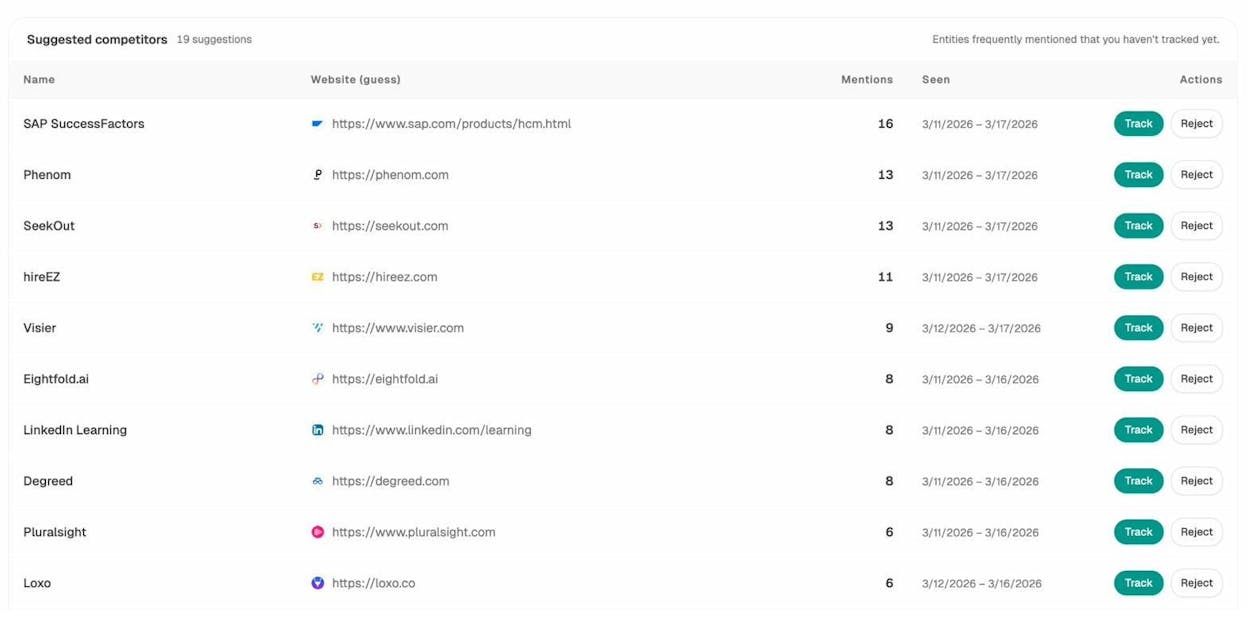
This feeds directly into your content strategy. If a competitor consistently wins prompts about “enterprise CRM integrations” and you do not, you know what to write next. Pair this with the citation analytics view and you can see which third-party sources AI engines trust most in your category.
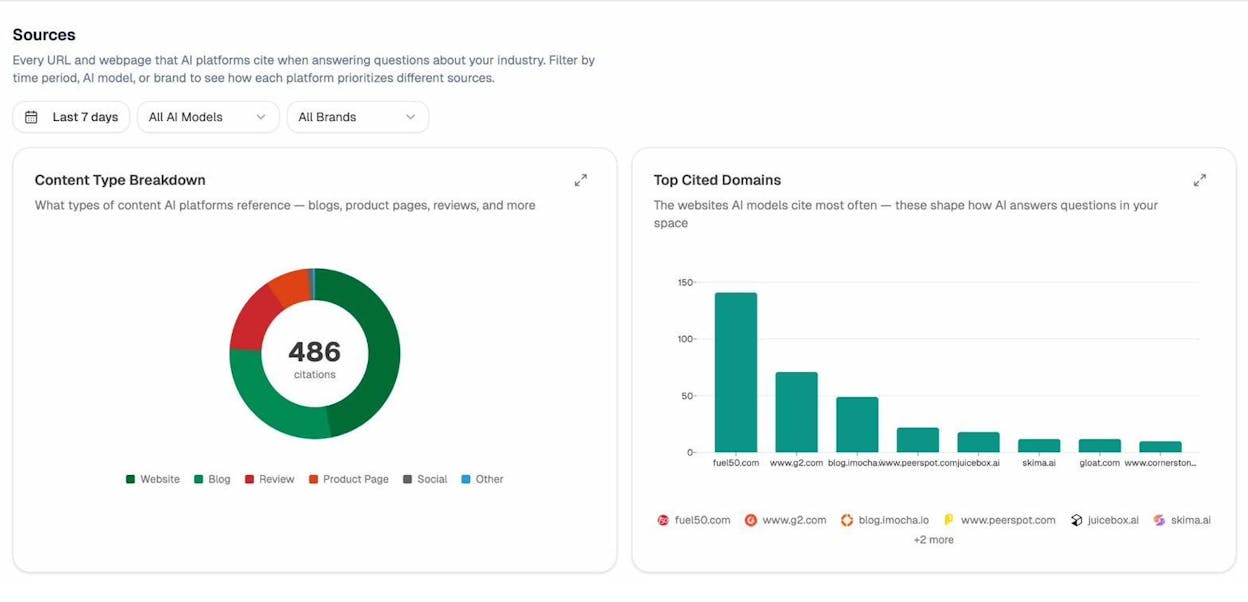
Prove AI search drives pipeline with GA4 attribution
This is the feature that separates Analyze AI from every other tool on this list. The AI Traffic Analytics module connects to your GA4 account and shows you how many visitors arrive from ChatGPT, Perplexity, Claude, Gemini, and Copilot. You see which pages they land on, how they engage, and whether they convert.
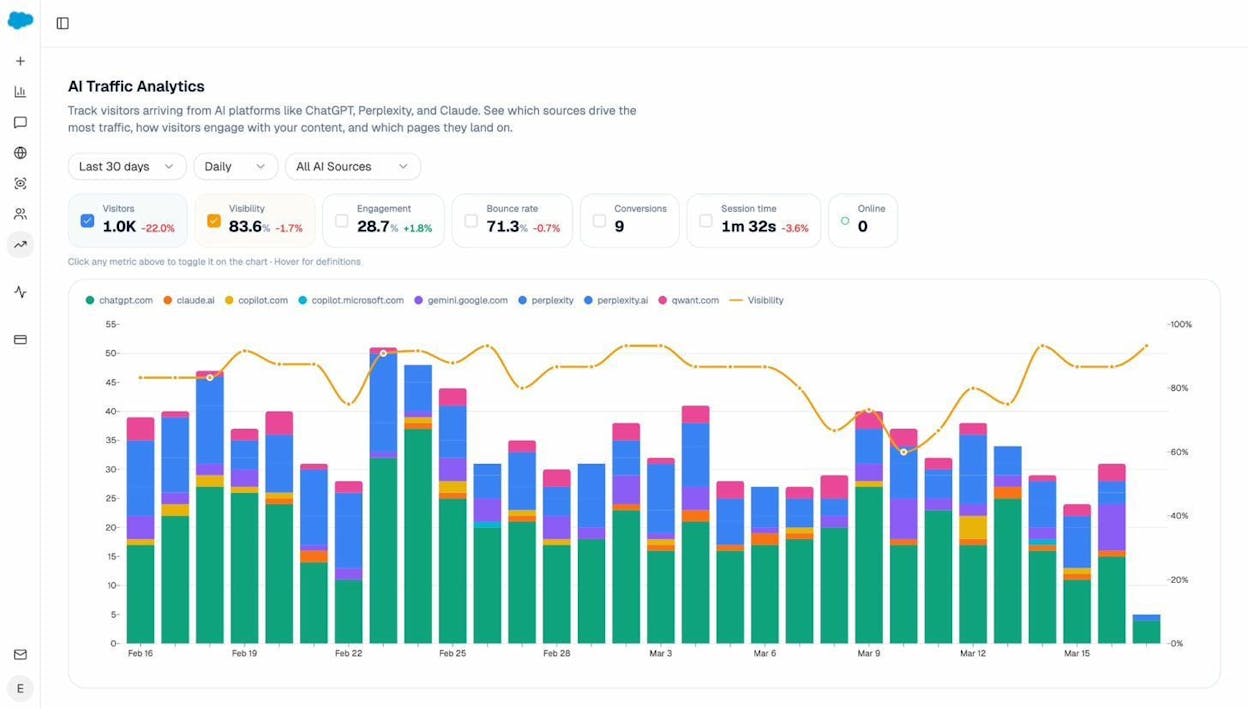
No other tool in this comparison does this. Profound tells you where your brand appears. It cannot tell you that 47 sessions came from ChatGPT to your comparison page and 6 of them started a trial. Otterly shows visibility scores. It cannot show you that your “best CRM alternatives” post drives 3x more AI traffic than your homepage.
For a CMO justifying AI visibility spend, this is the difference between “we appear in 31% of relevant prompts” and “AI search drove $43,000 in pipeline this quarter.” The second one gets budget approved.
Fix invisible content with the Writer and Optimizer
Tracking visibility is only useful if you can act on it. Analyze AI includes a full AI Content Writer that takes you from idea to research to outline to draft, with AI visibility gaps and competitor analysis built into every step.
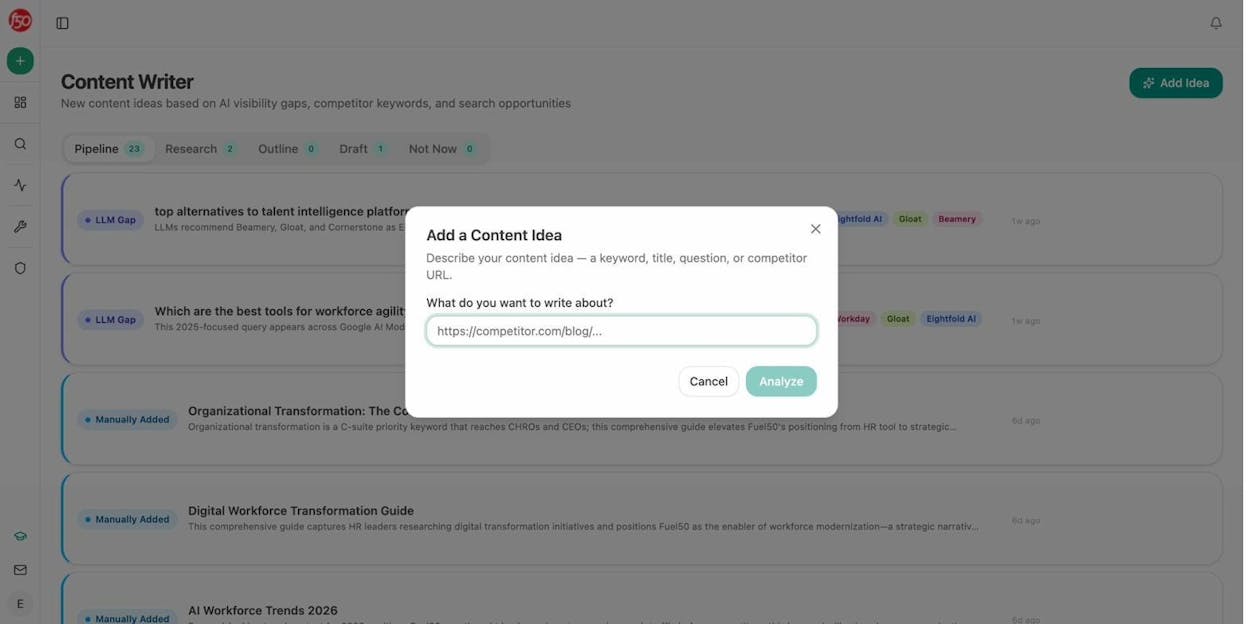
The AI Content Optimizer works on existing pages. Paste a URL, get an AEO content score, and see line-by-line suggestions for improving structure, entity coverage, and citation-worthiness.
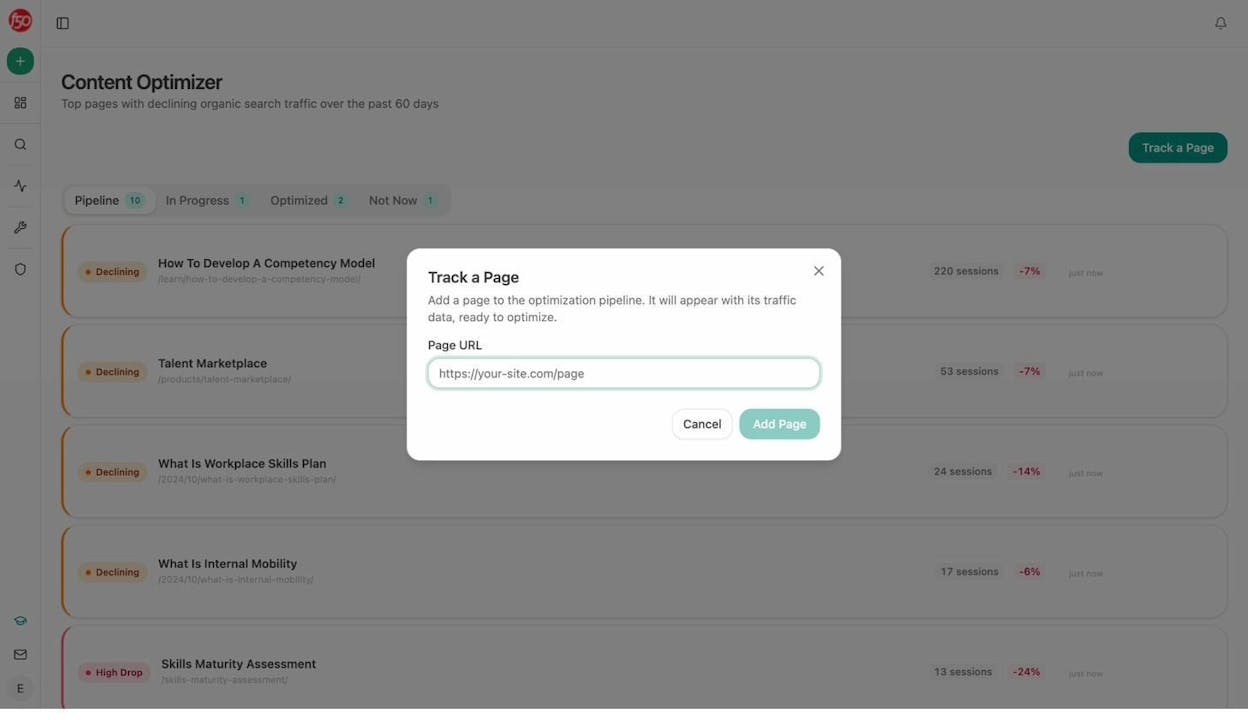
Both tools pull from your Knowledge Base, which stores your brand voice, messaging rules, proof points, and disallowed phrases. Every draft stays on-brand without copy-pasting your style guide into a prompt.
Automate everything with the Agent Builder
This is where Analyze AI stops being a dashboard and becomes the operating system for your marketing team. The Agent Builder gives you 180+ nodes across 16 categories, 34 pre-built data recipes, and three trigger modes (manual, scheduled, and webhook).
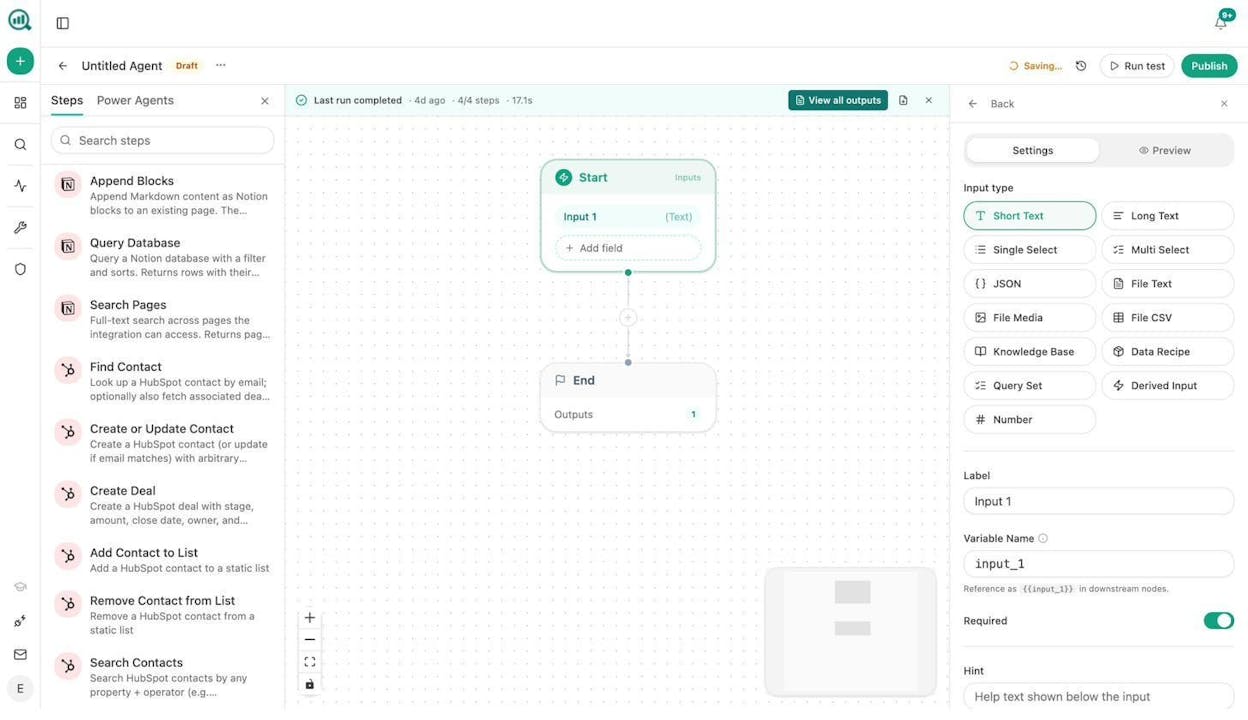
You are not limited to AI visibility workflows. The Agent Builder has direct integrations with GA4, Google Search Console, DataForSEO (27 nodes), Semrush (7 nodes), HubSpot (26 nodes), Notion, WordPress, Contentful, Mailchimp, and multiple LLMs including Claude, GPT, Gemini, and Perplexity Sonar.
Here is what that means in practice. An agency can build a single agent that runs every Monday at 7am, pulls each client’s AI visibility data, cross-references it with GSC performance, drafts a personalized report, and emails it to the account team. A content team can wire up a pipeline where a brief moving to “approved” in Notion triggers research, outline, draft, AEO scoring, and auto-publishing to WordPress if the score passes a threshold. A PR team can set up a webhook that fires when negative brand mentions cross a sentiment threshold, automatically researches the source, and drafts three response options in Slack.
These are not hypothetical templates. They run on the same substrate that powers the rest of the platform. If you came to Analyze AI for LLM visibility, the Agent Builder is where the compounding value lives.
Governance: monitor brand narrative and risk
The Perception Map positions your brand and competitors on a 2D quadrant based on visibility and narrative strength. AI Battlecards give you head-to-head positioning notes. Weekly Email Digests deliver prioritized actions to your inbox every Monday without logging in.
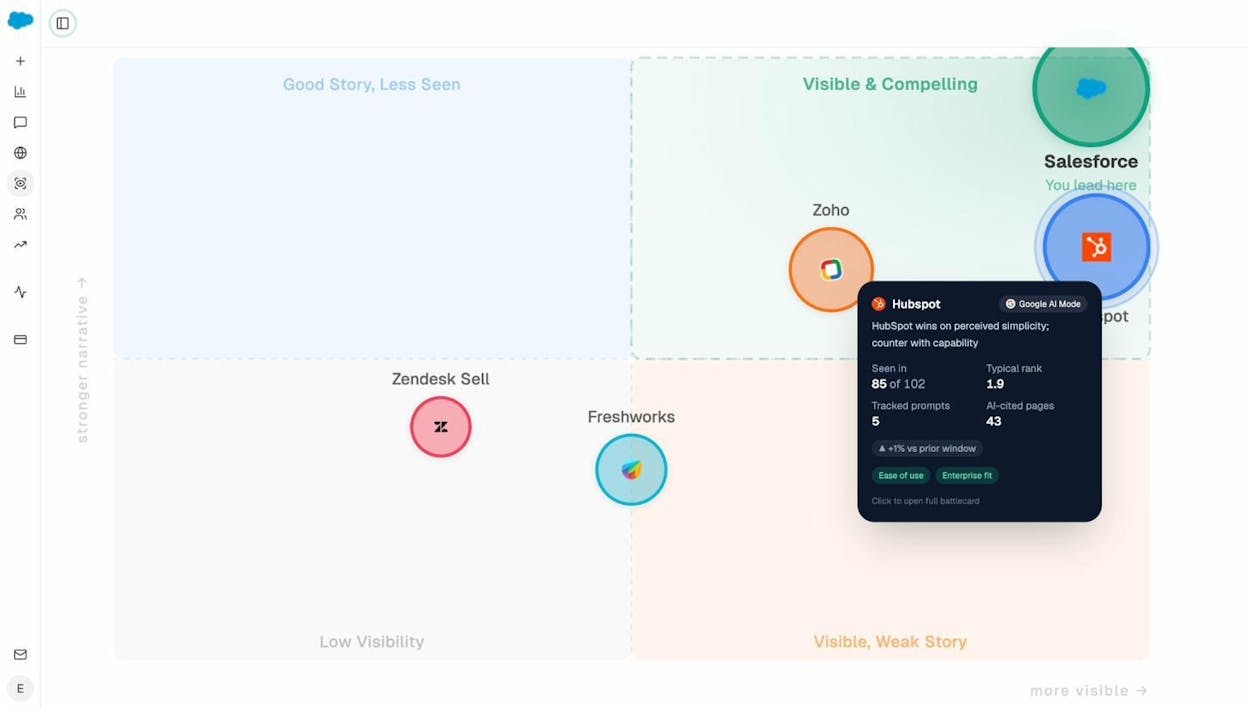
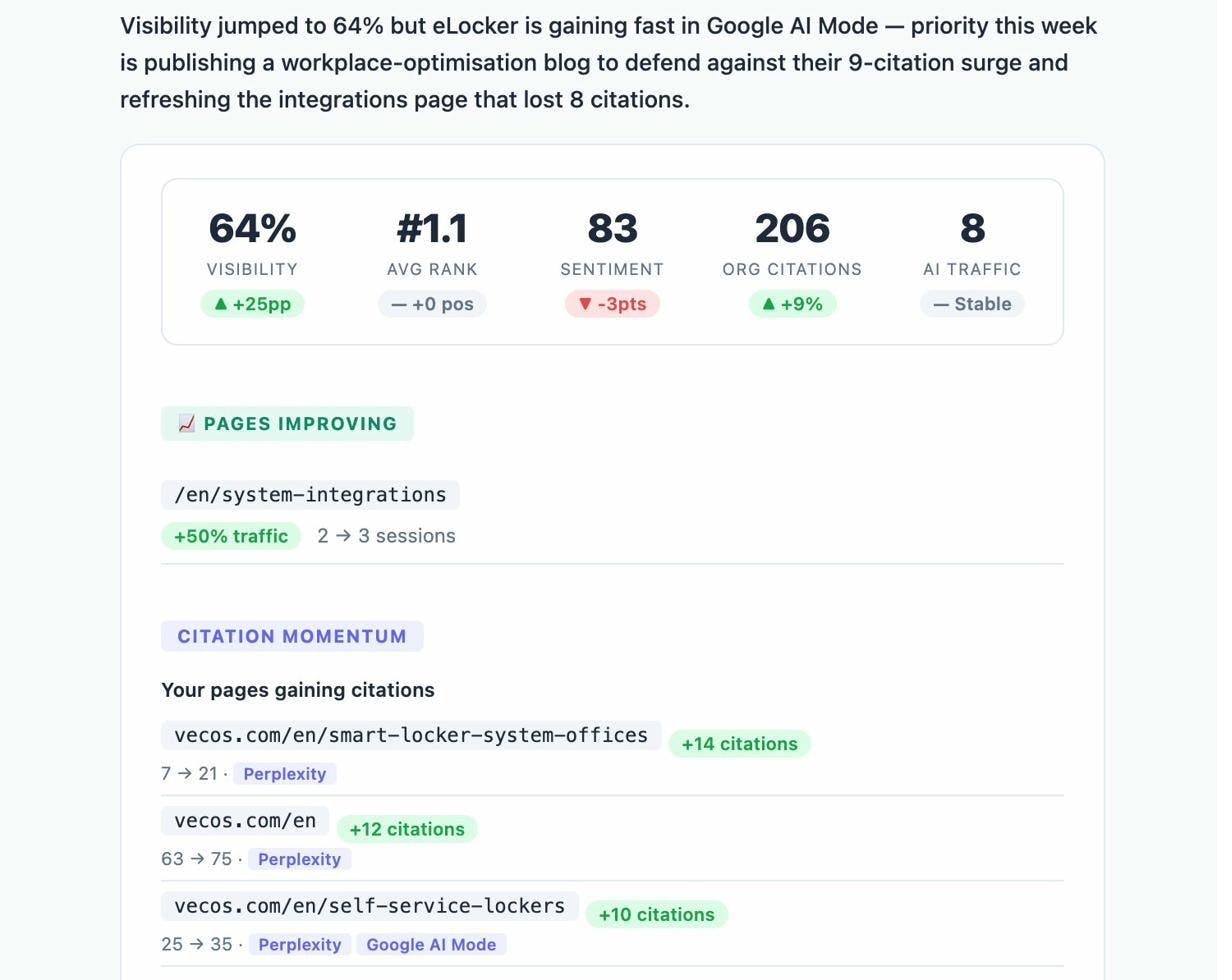
For comms teams, this is where you catch a negative pricing narrative on Gemini before it spreads. For growth teams, this is where you see that a competitor overtook you on three prompts last week and decide what to do about it.
6 other LLM tracking tools worth evaluating
Every tool below solves a real problem. The question is whether it solves enough of yours to justify the cost and the fragmentation of adding another dashboard.
Profound: deep analytics, enterprise pricing
Profound raised $96M at a $1B valuation and counts Ramp, DocuSign, and Figma among its customers. Its strongest feature is Prompt Volumes, which shows actual AI search demand using panel data from opted-in consumers. Nobody else ships this dataset.
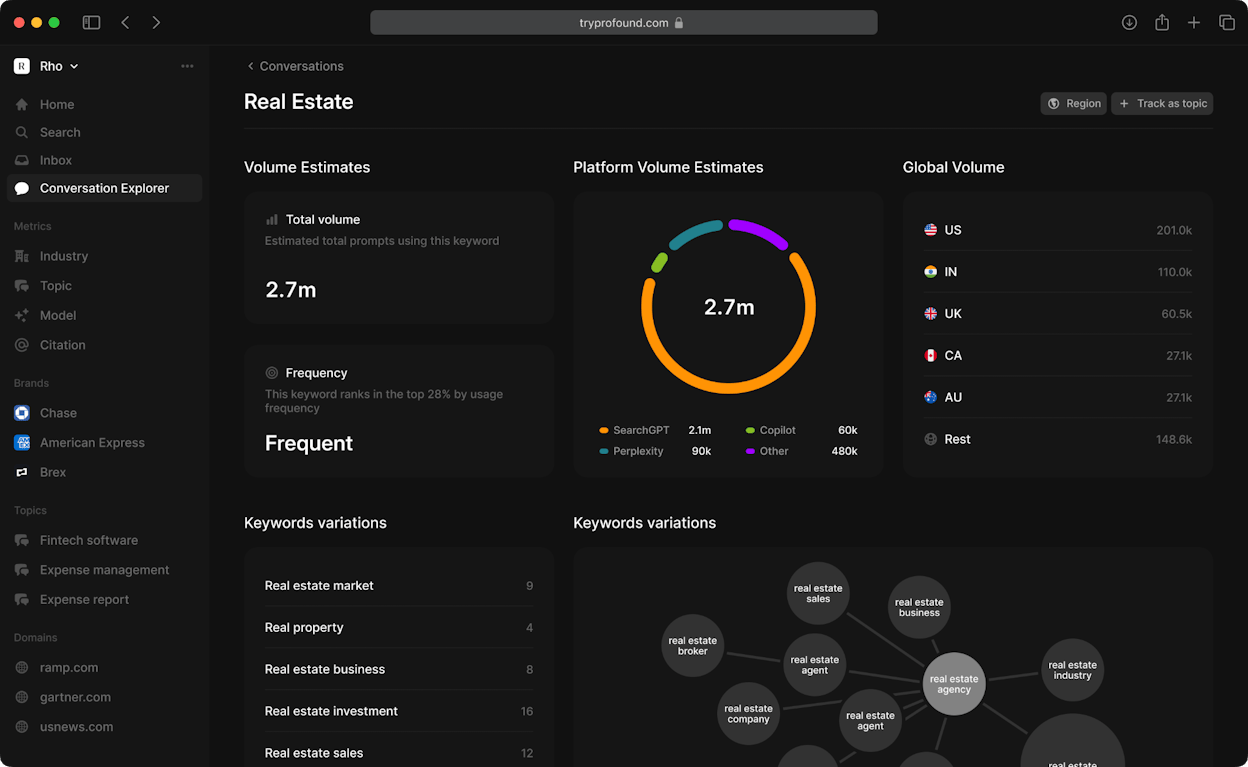
The platform also includes a drag-and-drop Agents builder for generating AEO content and publishing to a CMS. Its enterprise-grade compliance (SOC 2 Type II, SSO) makes it a natural fit for Fortune 500 marketing teams.
The trade-offs. The Starter plan costs $99/month but only covers ChatGPT with 50 prompts. The Growth plan at $399/month unlocks three engines and 100 prompts. Enterprise is custom. Profound does not connect to GA4 for traffic attribution. You can see where your brand appears in AI answers, but you cannot trace those appearances to sessions, landing pages, or conversions. For a CMO who needs to justify spend, this is a significant gap. For a detailed breakdown, read our Profound AI review.
Otterly AI: affordable entry point for prompt monitoring
Otterly is the easiest on-ramp into AI search visibility. The Lite plan starts at $29/month for 15 tracked prompts across ChatGPT, Perplexity, AI Overviews, and Copilot. Setup takes under 30 minutes, and the Brand Visibility Index gives you a clean summary of where you stand.
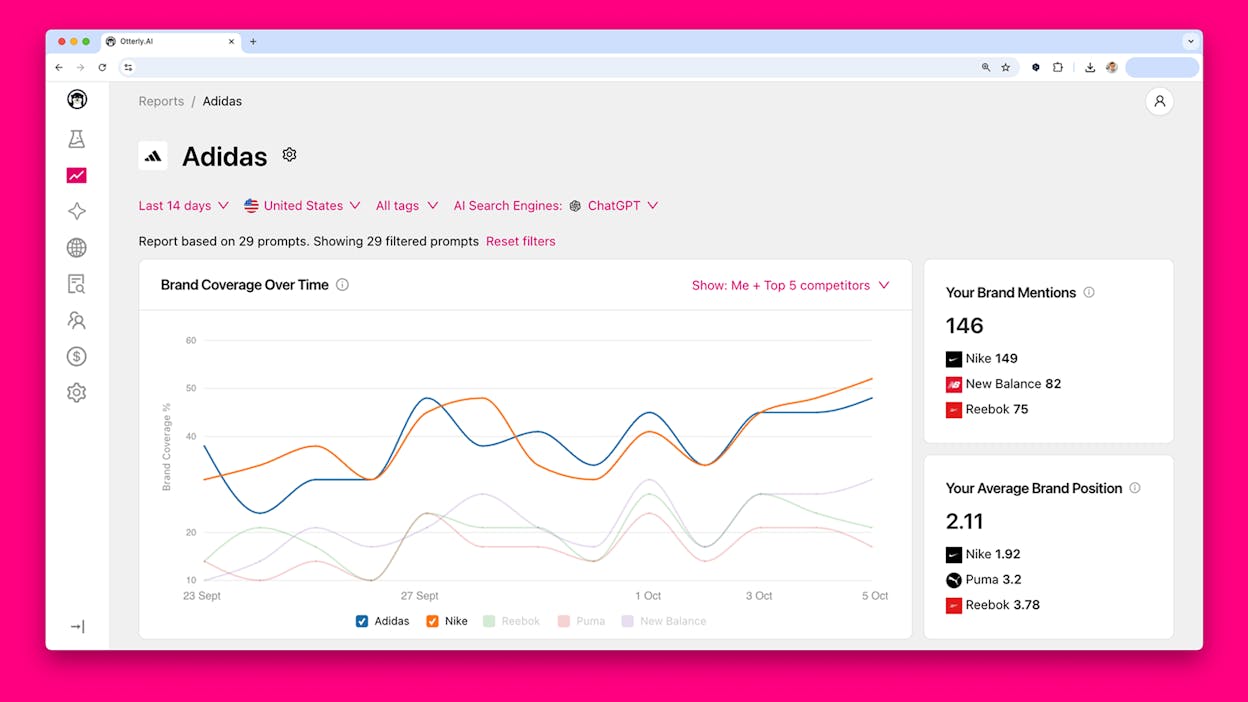
The GEO Audit with SWOT analysis is a useful add-on that gives you page-level recommendations for improving citation-worthiness. The Semrush integration is unique in this category, letting you combine GEO data with traditional SEO metrics.
The trade-offs. Google AI Mode and Gemini are paid add-ons ($9 to $149/month depending on tier), so the six-engine coverage claim only applies after you pay extra. The Standard plan at $189/month gives you 100 prompts, which fills up fast if you track multiple brands or markets. There is no content creation, no workflow builder, and no GA4 attribution. For a detailed breakdown, read our Otterly AI review.
SE Ranking: AI visibility layered on top of SEO workflows
If your team already uses SE Ranking for traditional rank tracking, the AI Visibility module is a natural add-on at roughly $119/month. It tracks AI Overview appearances and source URLs for your monitored keywords, so you can see where AI answers pull from your content.
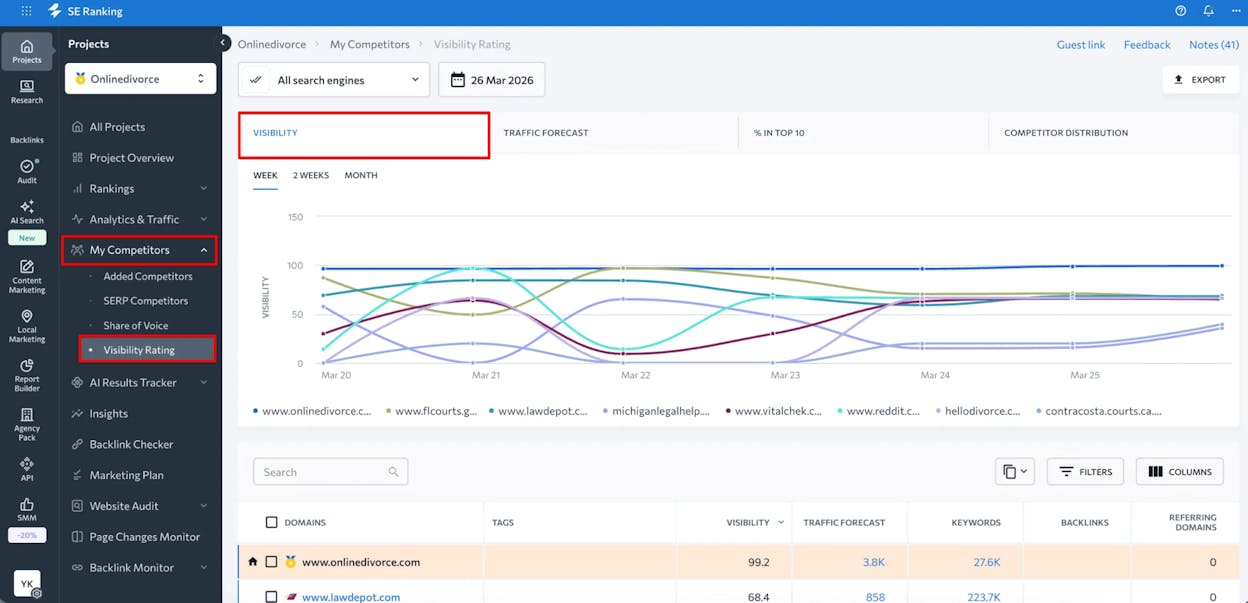
The biggest advantage is continuity. You do not need a separate tool, a separate login, or a separate reporting workflow. AI visibility data sits next to your organic rankings in the same dashboard.
The trade-offs. Coverage is limited to AI Overviews and AI Mode. If you need to track ChatGPT, Perplexity, Claude, or Copilot, you will need another tool. Prompt-level insights and model-specific analysis are shallow compared to dedicated platforms. SE Ranking has to balance priorities across its entire suite, which means AI features move slower than tools whose entire business is AI visibility. For a deeper look, see our SE Ranking AI Visibility Tracker review.
Semrush AI Toolkit: power, but at a price
Semrush’s AI Toolkit connects AI visibility data to its existing backlink, keyword, and site audit infrastructure. If you already run your SEO program in Semrush, AI prompt tracking integrates into your existing reporting without tool fragmentation.
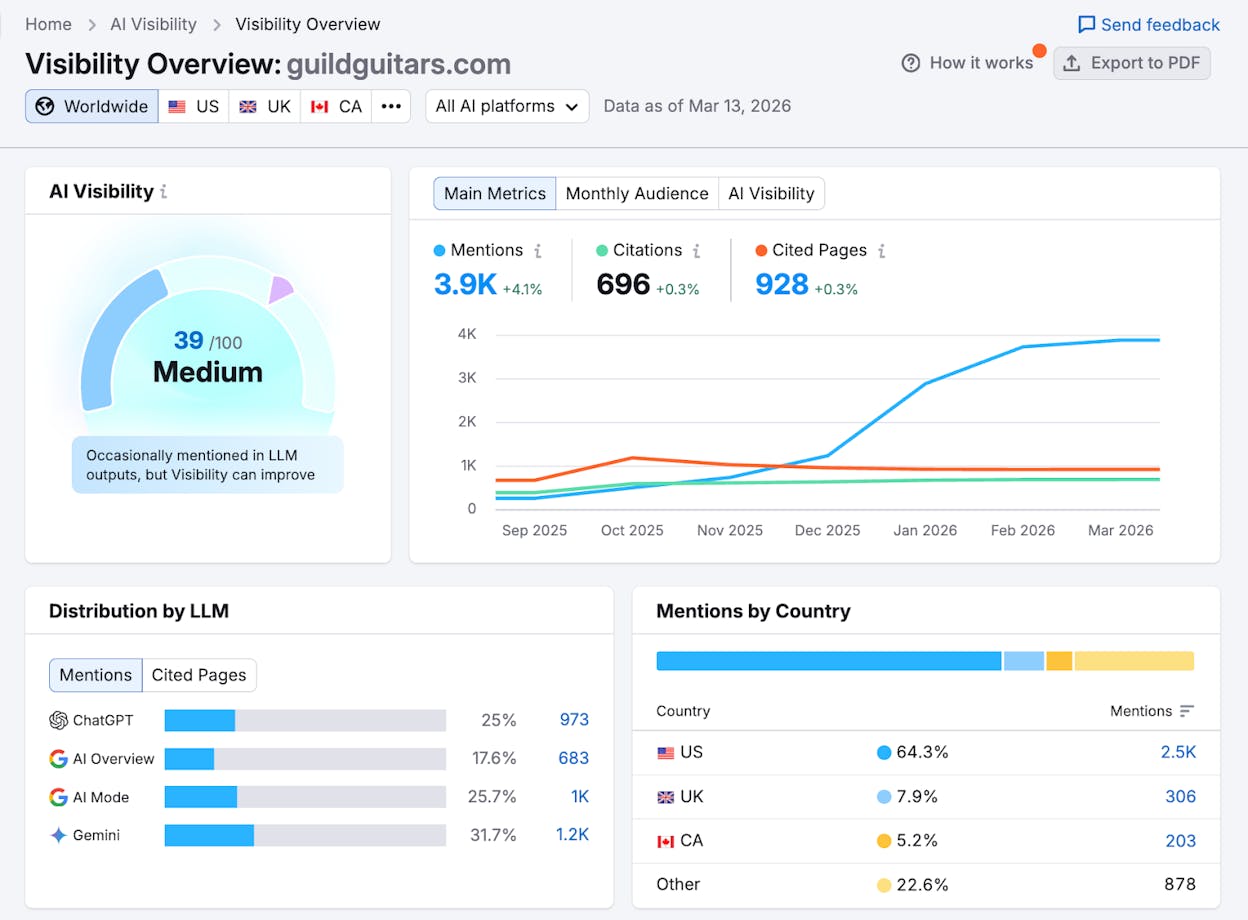
The platform tracks AI mentions, citations, and sentiment, and provides competitive benchmarking at the prompt level. The site audit integration also checks AI crawlability, which helps technical SEO teams ensure their content is accessible to AI bots.
The trade-offs. The AI Toolkit runs around $745/month when bundled with the core Semrush subscription. Users have flagged volatility in visibility metrics, with swings that raise questions about data stability. Methodologies for scores like “market share” are not always transparent. For smaller teams, the pricing makes adoption hard to justify, especially when the AI features are one piece of a much larger (and more expensive) platform. Read our Semrush AI Toolkit review for a full breakdown.
Knowatoa AI: simple monitoring for getting started
Knowatoa offers one of the simplest entry points in AI visibility. The interface is clean, bulk prompt input across ChatGPT, Claude, and Perplexity is straightforward, and the free tier lets you test before committing. It also flags brand misrepresentation in AI answers, which is valuable for companies in regulated industries.
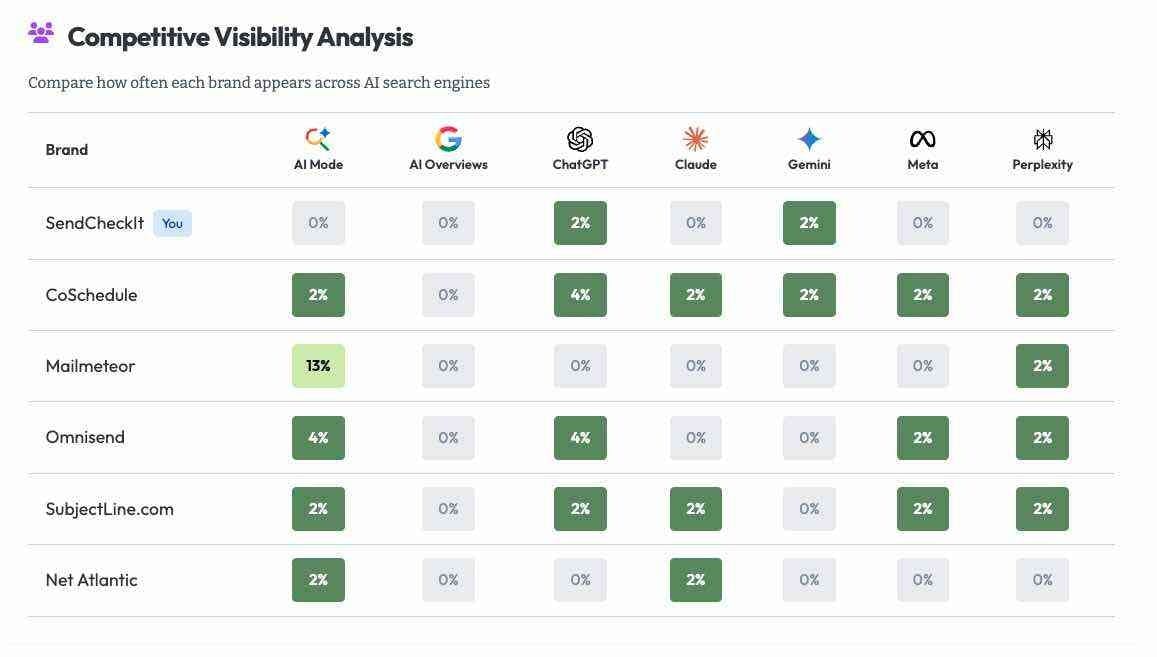
The trade-offs. Knowatoa does not offer deep analytics, sentiment modeling at scale, content creation, or traffic attribution. Coverage depth may leave blind spots in competitive verticals, and advanced LLM coverage is locked behind higher tiers. It works best as a starter tool for teams validating that AI search matters before investing in a more complete platform. Read our Knowatoa AI review for more detail.
Gumshoe AI: persona-driven visibility in beta
Gumshoe takes a different approach. Instead of asking you to type prompts, it starts from buyer personas and generates the kinds of queries those personas would realistically ask. This reframes AI visibility from a keyword exercise into a customer-first diagnostic.
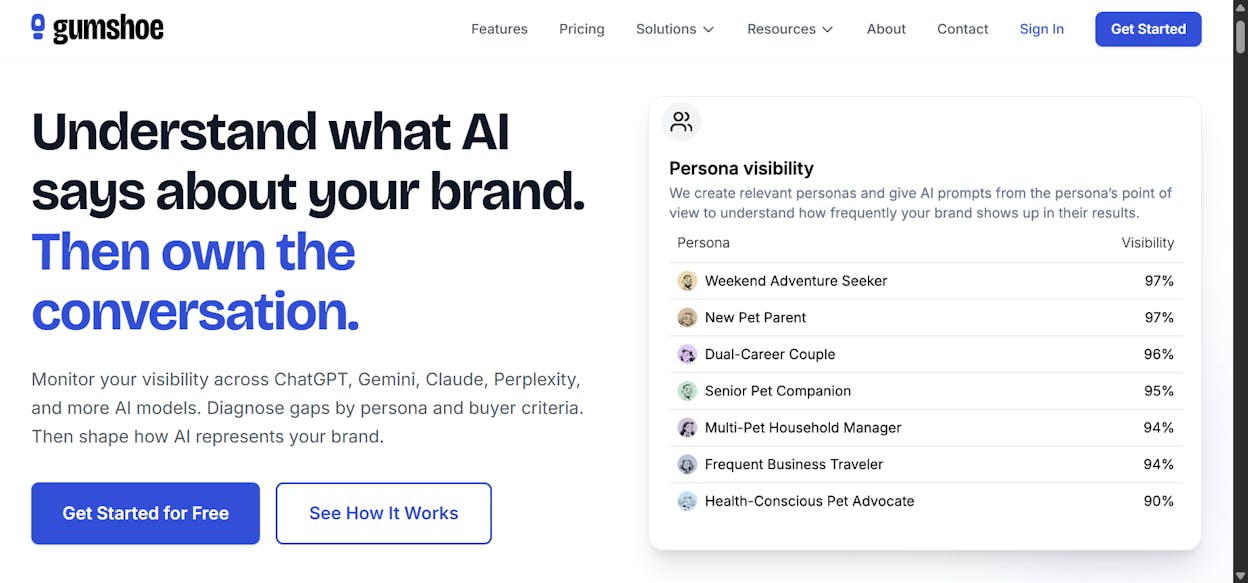
The pay-per-report pricing model means you do not commit to a monthly subscription. For teams that need occasional visibility checks without ongoing monitoring costs, this is appealing.
The trade-offs. Gumshoe is still in beta. It cannot access real-world prompt logs, so results are diagnostic snapshots rather than historical data. If your personas are poorly defined, your visibility map will be off. Coverage and stability are still maturing, and costs can climb if you scale across many personas and prompt sets.
How to choose the right LLM tracking tool
The right tool depends on what you need after you see the data.
If you only need to check whether your brand shows up in AI answers a few times a month, Knowatoa or Gumshoe will do the job at minimal cost.
If you want ongoing prompt monitoring with clean dashboards and you are budget-conscious, Otterly is a solid starting point. If you already use SE Ranking for SEO, its AI module saves you from adding another tool.
If you are an enterprise brand with dedicated analysts and you need prompt volume research data that nobody else offers, Profound is worth evaluating despite the pricing.
If you need the full picture (tracking where you appear, connecting it to traffic and revenue, creating content that fixes your gaps, and automating the workflows that hold it all together), Analyze AI is the platform built for that. It is the only tool in this comparison that connects AI visibility to GA4 attribution, ships a full content writer and optimizer, and includes an Agent Builder with 180+ nodes that can run your entire marketing ops layer.
AI search is not replacing SEO. It is adding another organic channel. The brands that treat it as a measurable, actionable channel today will compound their advantage while competitors are still manually screenshotting ChatGPT answers. The right LLM tracking tool is the one that helps you do that.

Ernest

Ibrahim


![6 AthenaHQ Alternatives That Skip the Credit Math [2026]](/_next/image?url=https%3A%2F%2Fwww.datocms-assets.com%2F164164%2F1778742681-blobid0.png&w=3840&q=75)


