



Summarize this blog post with:


In this article, you’ll learn what featured snippets are, the different types Google uses, and a step-by-step process to find snippet opportunities, win them from competitors, and track their performance. You’ll also learn why featured snippet optimization matters more than ever now that AI search engines like ChatGPT, Perplexity, and Gemini pull from the same top-ranking content that earns snippets—and how to make sure your content shows up in both places.
Table of Contents
What Is a Featured Snippet?
A featured snippet is a highlighted block of content that Google pulls from a webpage and displays above the standard organic results. Marketers sometimes call this “position zero” because it sits ahead of the first blue link.
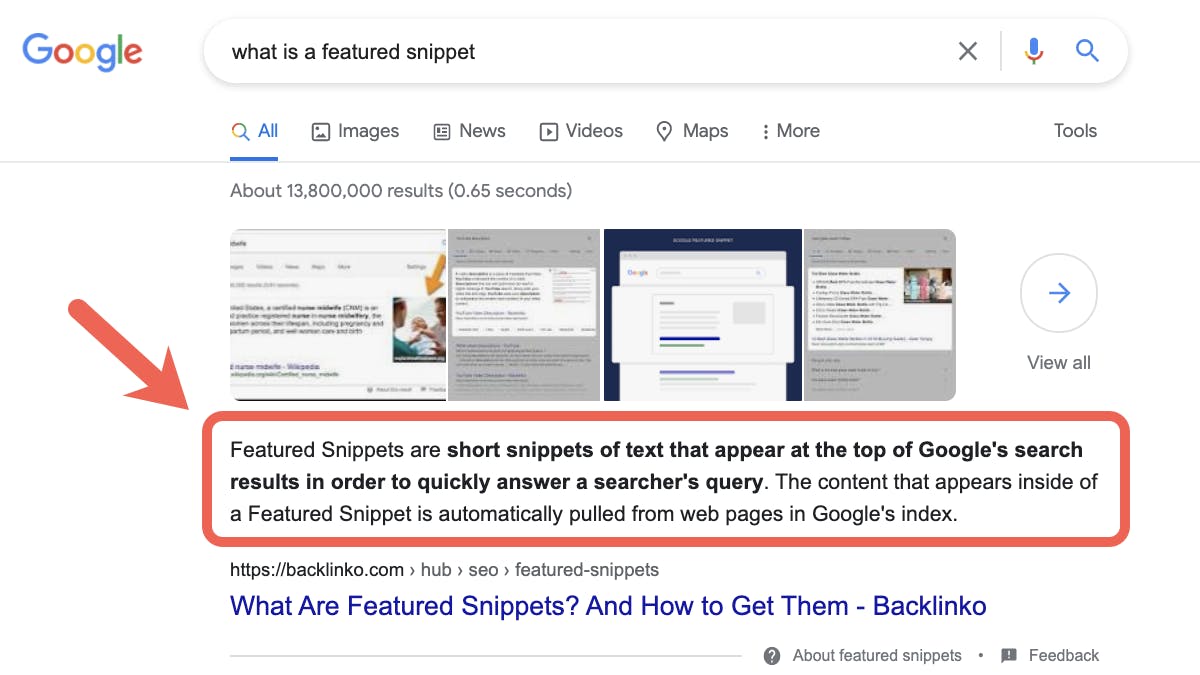
Google selects featured snippets when it determines that a particular format—a definition, a list, a table, or a video—will help a searcher find an answer faster. The content comes directly from a page that already ranks on page one, meaning the website owner didn’t pay for the placement. Google extracted it automatically.
Here’s what makes that important: if your page already ranks in the top ten for a keyword, you have a real shot at jumping to position zero without building a single new link or publishing a new page. You just need to structure your content in a way Google can easily extract.
That’s the shortcut. And it works even if you’re not a large, well-known brand.
Why Featured Snippets Are Worth Chasing
There are not many cheat codes in SEO. Featured snippets are one of the few.
You skip past the number one result. Featured snippets appear above the first organic result. That means a page ranking in position three or four can leapfrog the top result if Google chooses its content for the snippet. Ahrefs’ study of 2 million featured snippets found that 30.9% of featured snippets come from the page that also holds position one—which means about 69% of the time, the snippet goes to a page that is not the top organic result.
You take up more visual real estate. A standard blue link gets a title, a URL, and a meta description. A featured snippet gets all of that plus a large, formatted block of text, a list, a table, or a video thumbnail. More screen space means more eyes on your content, especially on mobile where the snippet can fill the entire above-the-fold area.
Google quoting you signals trust. When Google selects your content as the definitive answer to a question, it functions as an implied endorsement. Searchers see your brand name attached to what Google considers the best answer. That kind of trust is difficult to build through paid ads or social media alone.
The click-through rate payoff is real. Ahrefs found that 8.6% of all clicks on a search results page go to the featured snippet. That might sound modest until you consider that 12.3% of all search queries trigger a featured snippet. So for any keyword where a snippet exists, nearly one in ten clicks goes to the snippet holder.
Featured snippets also feed AI search
Here’s a detail most SEO articles skip: the same content that wins featured snippets tends to perform well in AI search engines like ChatGPT, Perplexity, Claude, and Gemini.
Why? Because AI search engines use retrieval-augmented generation (RAG) to pull fresh information from search indexes. When your content is structured clearly enough for Google to extract a featured snippet, it’s also structured clearly enough for an LLM to cite.
Our analysis of 83,670 AI citations across ChatGPT, Claude, and Perplexity found that pages ranking in the top positions on Google are cited significantly more often in AI responses. Benji Hyam of Grow & Convert found a similar pattern: clients ranking on page one were mentioned 67% of the time in ChatGPT and 77% of the time in Perplexity.
So when you optimize a page for featured snippets, you’re not just chasing one Google SERP feature. You’re also increasing the likelihood that AI engines cite your content when users ask similar questions through ChatGPT or Perplexity.
This is why we believe SEO is not dead—it’s expanding. Featured snippet optimization is traditional SEO and AI search optimization rolled into one.
5 Types of Featured Snippets
Google uses five main featured snippet formats. Knowing which format applies to your target keyword is the first step toward winning the snippet, because you need to match the format Google already prefers.
1. Paragraph Snippets
Paragraph snippets display a short block of text—usually 40 to 60 words—that directly answers a question. They’re the most common type you’ll see.
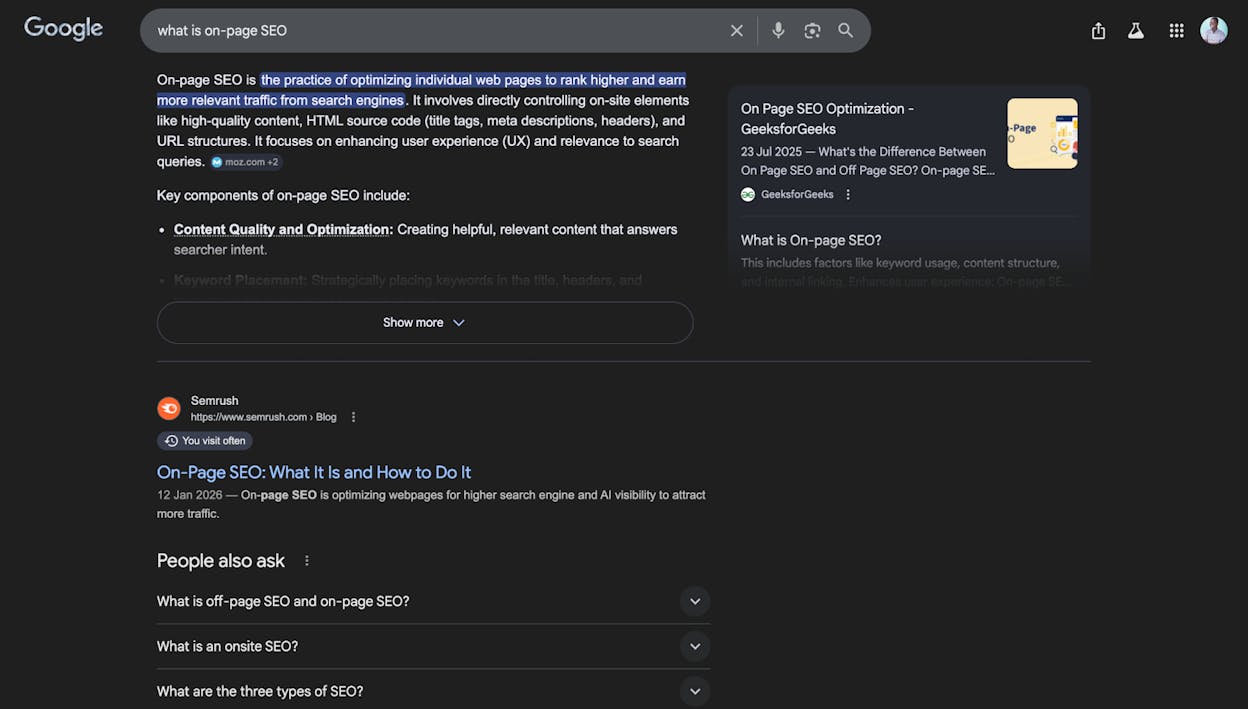
Google often highlights key phrases in blue within the paragraph to draw attention to the most critical part of the answer. These snippets typically appear for “what is,” “why does,” and “who is” queries.
How to format your content for paragraph snippets:
Write a two-to-three sentence definition directly below the relevant H2 or H3 heading. Keep it concise and factual. Avoid first-person language (“I think” or “in my experience”) in the snippet-target paragraph itself—Google prefers objective phrasing for these. You can add opinion and examples in the paragraphs that follow.
2. List Snippets (Ordered and Unordered)
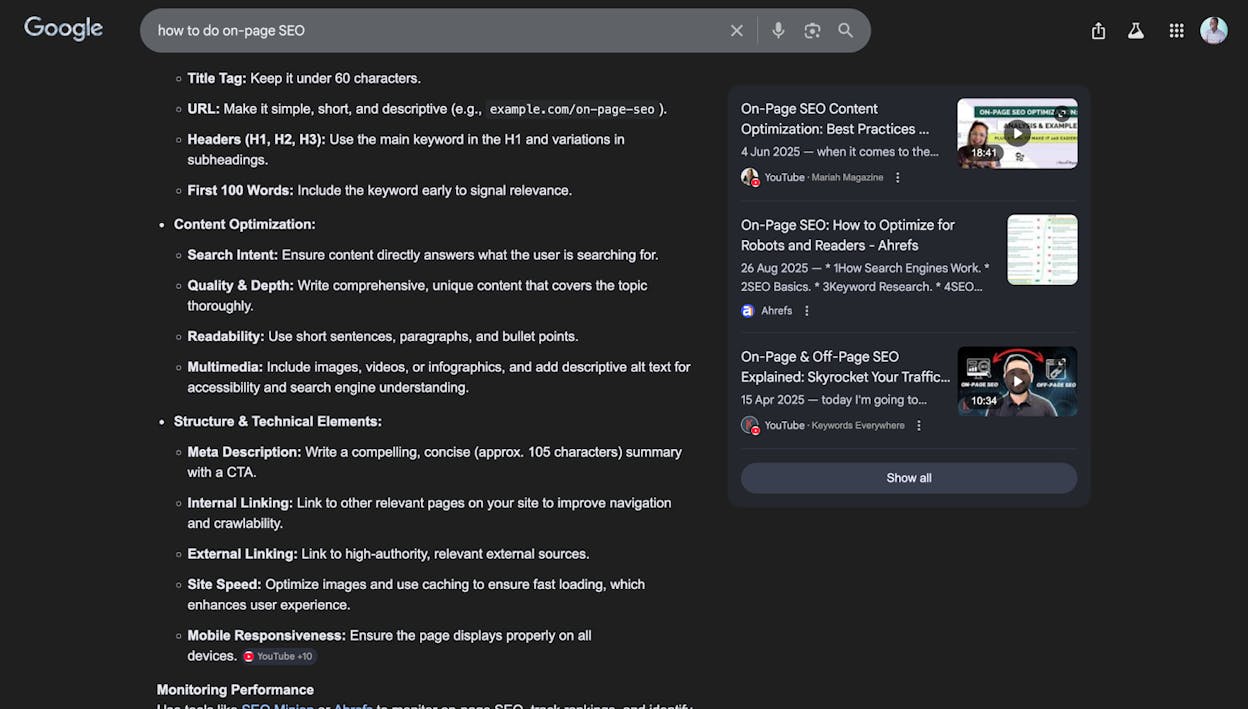
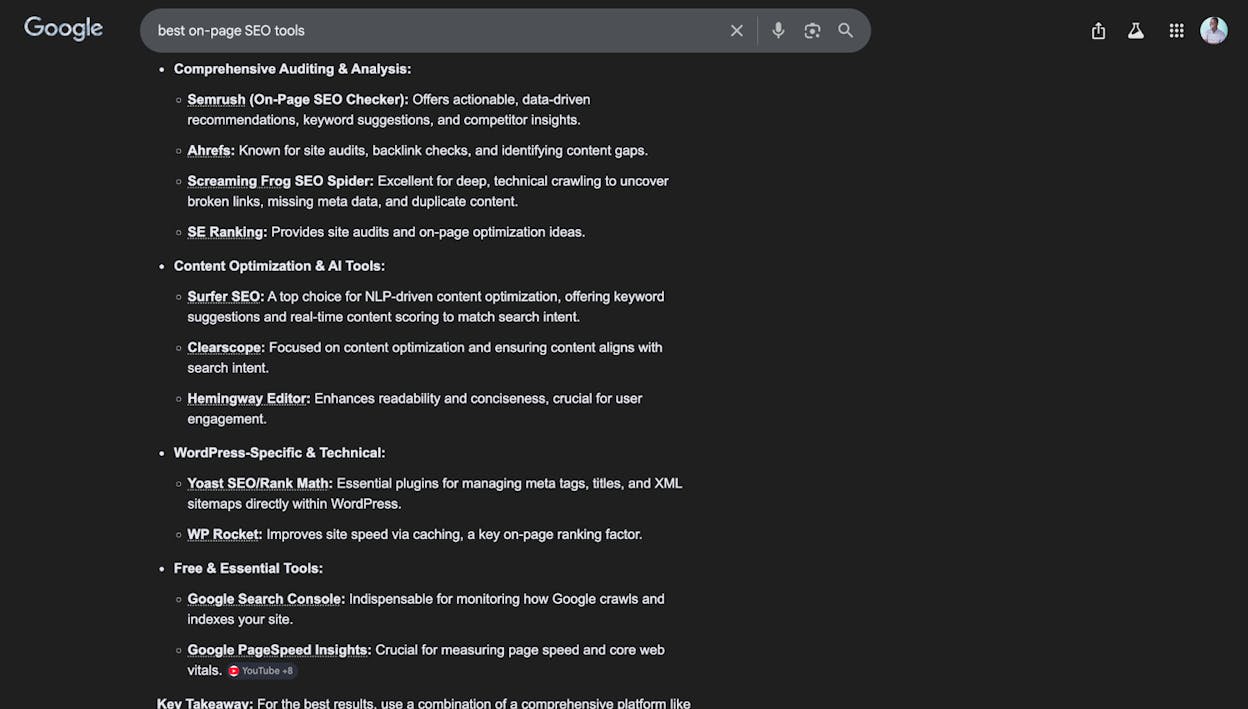
List snippets appear as either numbered lists or bulleted lists. Ordered lists are common for step-by-step processes (“how to create a content strategy”), while unordered lists appear for non-sequential items (“types of keyword research tools”).
How to format your content for list snippets:
Use proper HTML heading tags (H2, H3) for each item in the list. Google often pulls list snippets from subheadings rather than inline bullet points. For example, if you’re writing “7 ways to improve your site speed,” make each way an H3 under the main H2. Google will then extract those subheadings as a numbered list in the snippet.
For unordered lists, standard bullet points formatted with proper HTML (<ul><li>) work. Just make sure the list appears directly under a heading that matches the query.
3. Table Snippets
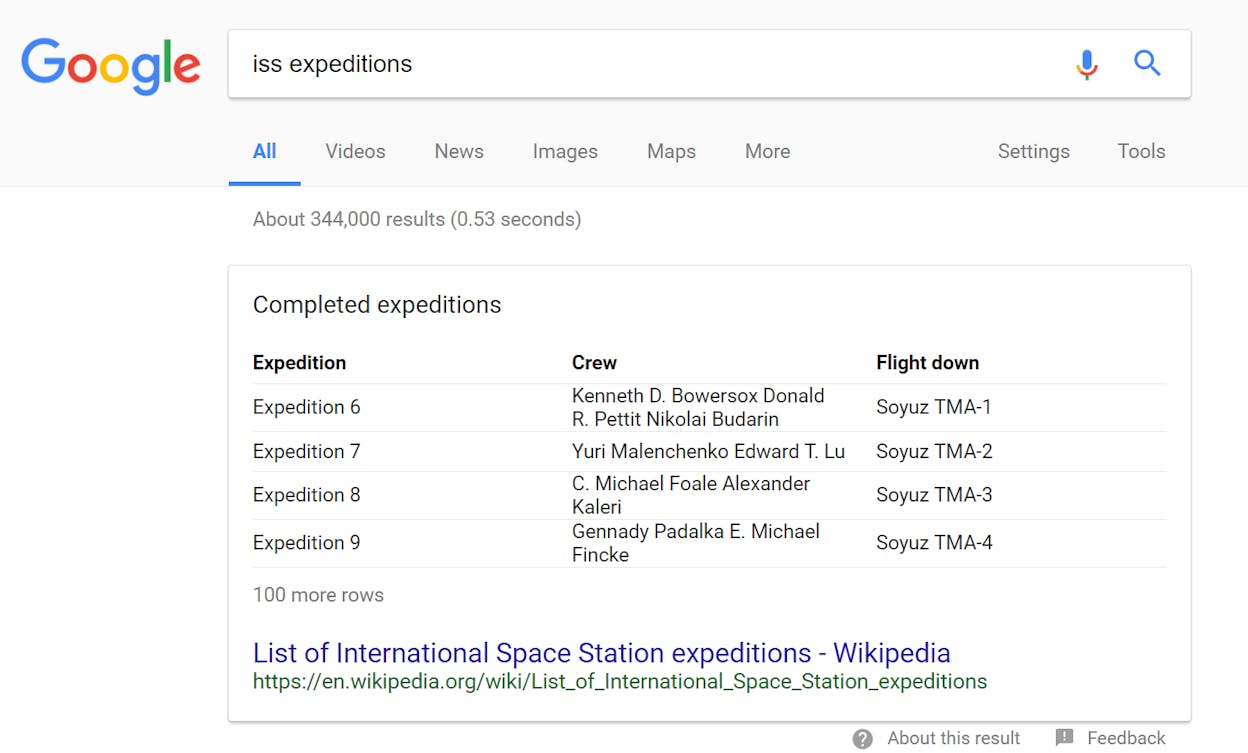
Table snippets show structured data in rows and columns. You’ll see these for comparison queries, pricing information, specifications, and statistics.
How to format your content for table snippets:
Use proper HTML <table> markup with clear column headers. Keep the table focused—three to four columns and up to eight rows tends to work best. Google sometimes reformats your table data (it may drop columns or reorder rows), but having a clean, well-labeled table gives it the raw material it needs.
Here is an example of the kind of table that tends to win table snippets:
|
Snippet Type |
Best For |
Typical Query Pattern |
|---|---|---|
|
Paragraph |
Definitions, explanations |
“what is,” “why does,” “who is” |
|
Ordered list |
Step-by-step processes |
“how to,” “steps to,” “process for” |
|
Unordered list |
Collections, categories |
“types of,” “best,” “examples of” |
|
Table |
Comparisons, data, specs |
“vs,” “comparison,” “pricing,” sizes |
|
Video |
Tutorials, demonstrations |
“how to” + visual/physical activity |
4. Video Snippets
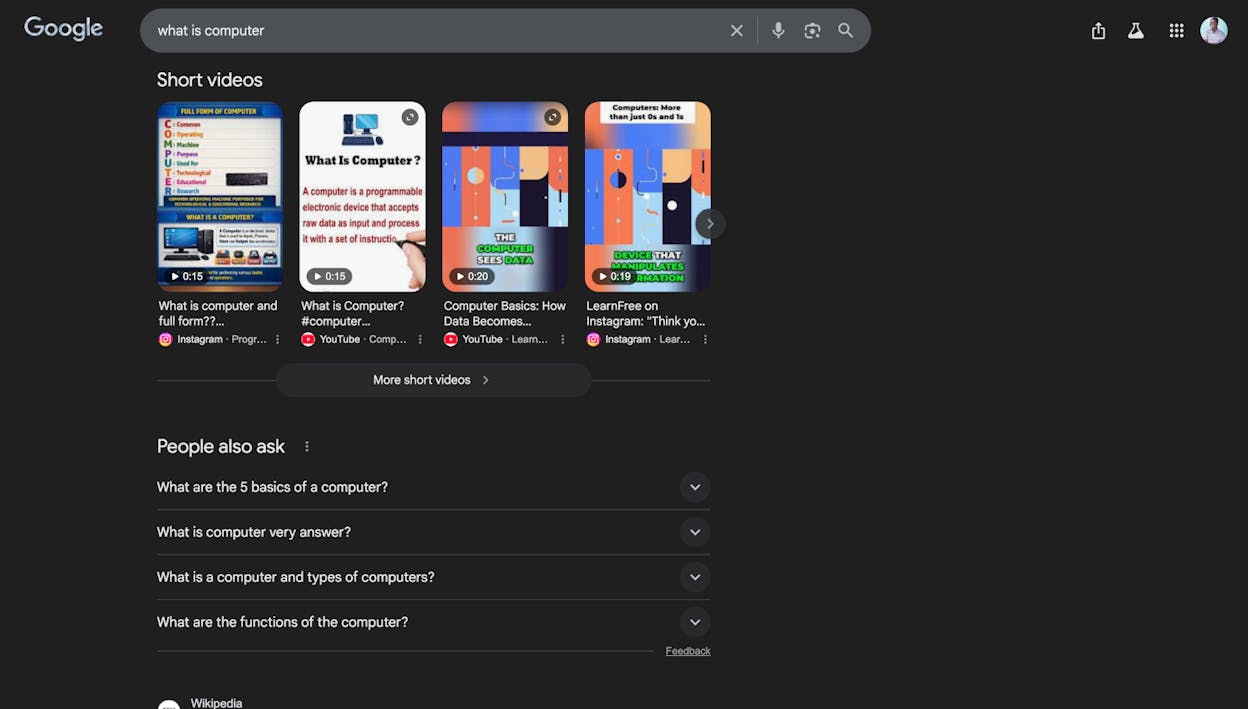
Video snippets pull a thumbnail from a YouTube video and display it directly in the search results, sometimes with a “key moment” timestamp. These appear most often for queries where a visual demonstration is more helpful than text—think “how to tie a tie” or “yoga poses for beginners.”
How to format your content for video snippets:
Upload your video to YouTube with a descriptive title that matches the target query. Add timestamps in the video description (e.g., “0:00 Introduction, 1:23 Step 1: Gather materials”). Google uses these timestamps to create “key moments” within the snippet. Adding chapters to your video through YouTube Studio increases your chances further.
5. Double Featured Snippets
This one gets overlooked. Google sometimes displays two featured snippets for the same query—one at the top and one further down the results page, or two stacked snippets with different formats.
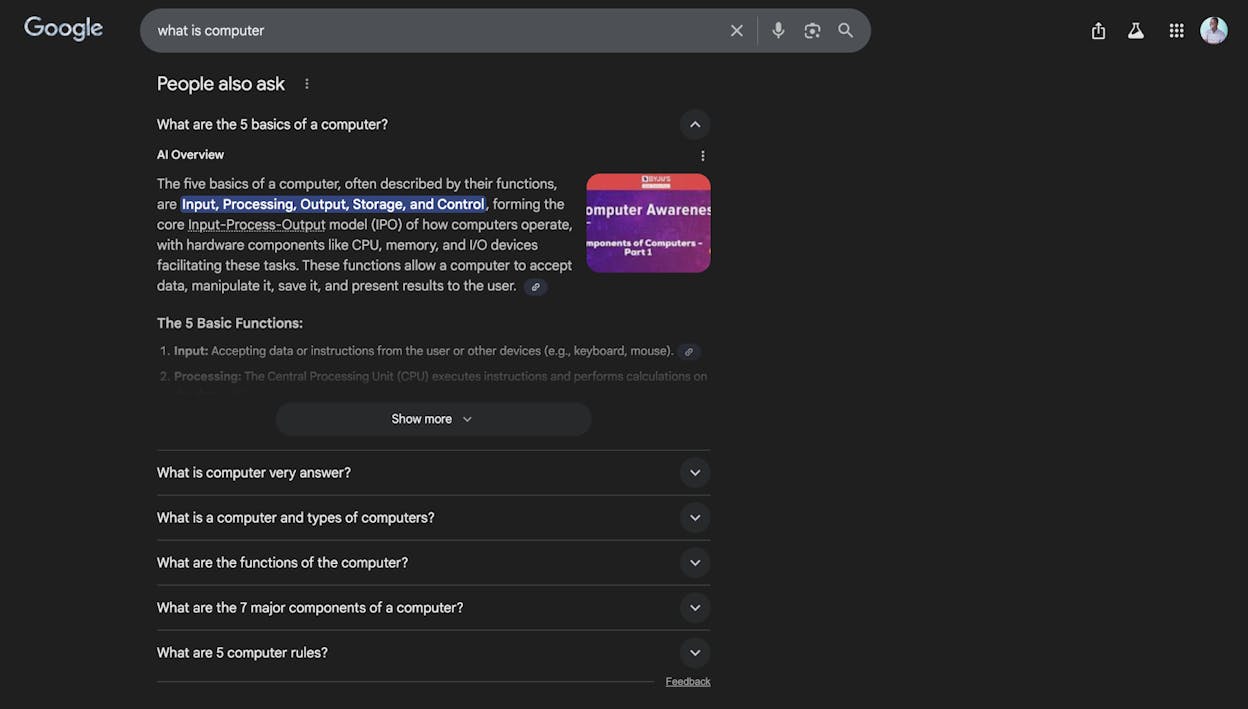
This is common for broad informational queries where Google detects multiple intents. For example, a search for “featured snippets” might show a paragraph snippet defining the term and a list snippet showing the types.
The takeaway: don’t only optimize one section of your page for the snippet. Structure your entire article so that multiple sections could independently qualify as snippet candidates.
How to Find Featured Snippet Opportunities
You can find featured snippet opportunities by mining your own site data and spying on competitors. Here’s how to do both.
Step 1: Find Snippets You Already Own
Start with what you already have. If you rank in the top ten for keywords that trigger featured snippets, some of those snippets might already be yours.
Using Ahrefs Site Explorer:
-
Enter your domain in Ahrefs’ Site Explorer.
-
Navigate to the Organic Keywords report.
-
Click the SERP Features filter.
-
Select Featured Snippet from the dropdown and hit Apply.
-
Add a Position filter set to 1 to see only the snippets you currently hold.
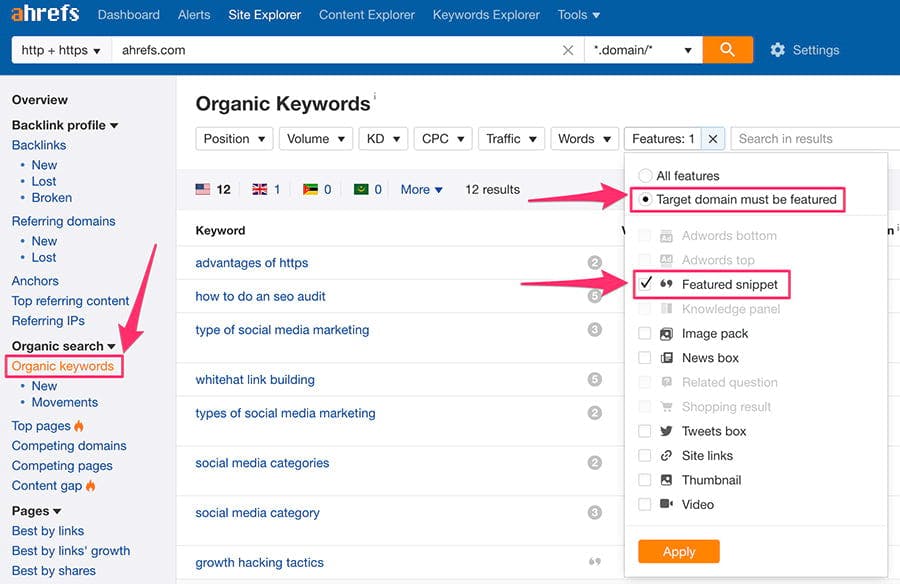
This gives you a list of every featured snippet your site currently owns. Save these URLs—you’ll want to protect these positions and track their performance.
Using Google Search Console:
-
Go to the Performance report.
-
Click on the Search Appearance filter.
-
Look for queries where your page appears as a “Featured Snippet” (note: GSC groups these under specific appearance types).
-
Sort by impressions to find your highest-visibility snippets.
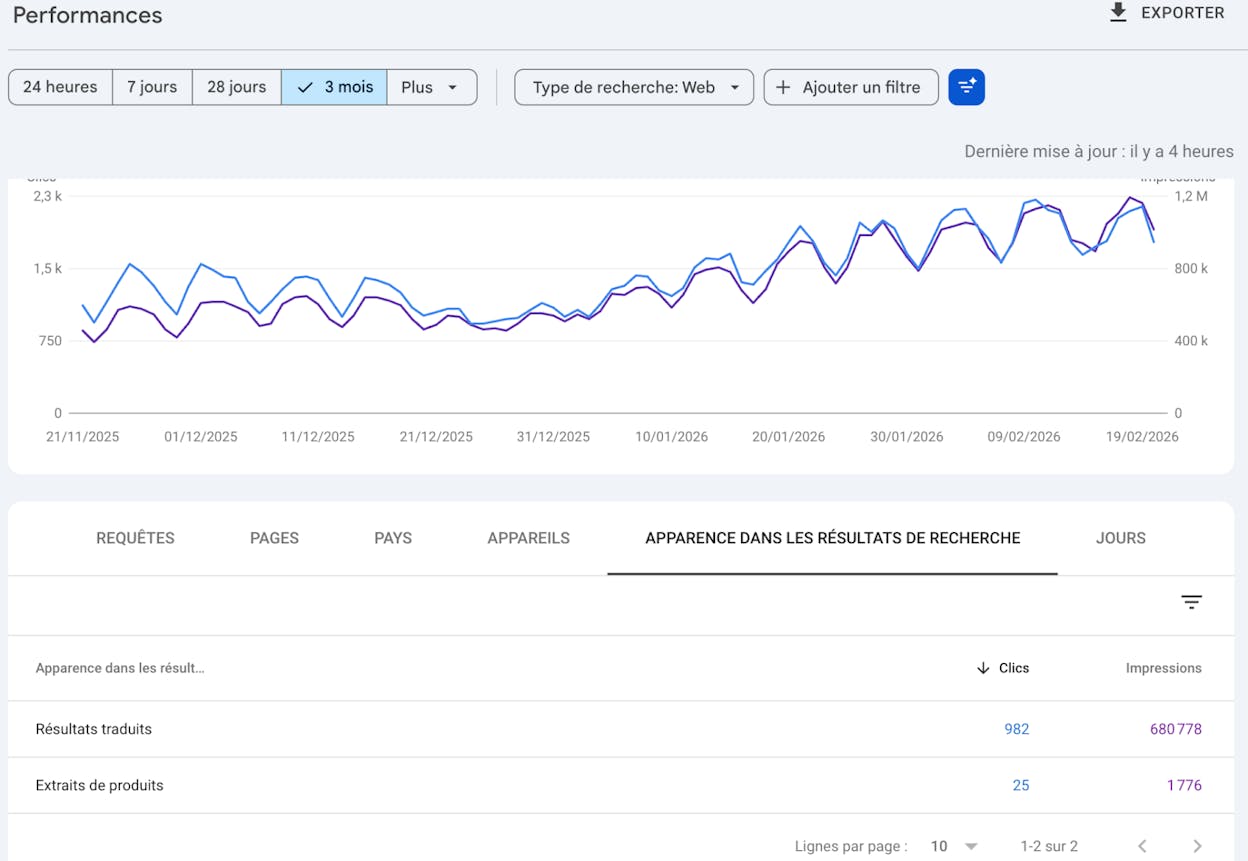
Google Search Console won’t show you competitor snippets, but it’s the most accurate source for your own snippet performance because it uses Google’s actual data rather than estimates.
Step 2: Find Snippets You Can Steal from Competitors
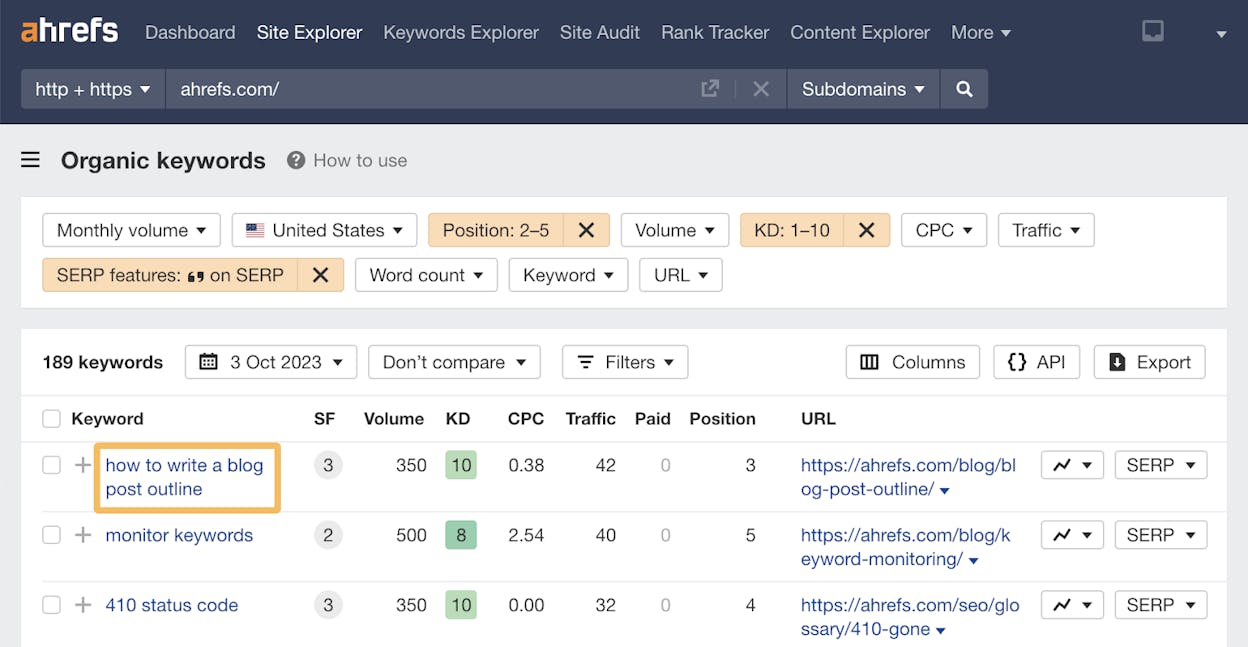
This is where the real opportunity lives. If your page ranks in positions two through five for a keyword where a competitor holds the featured snippet, you’re in striking distance.
Using Ahrefs Site Explorer:
-
Enter your domain in Site Explorer.
-
Go to the Organic Keywords report.
-
Apply the SERP Features filter and select Featured Snippet.
-
Change the Position filter to 2–5 (these are keywords where you rank near the top but don’t own the snippet).
-
Sort by Traffic Potential to prioritize keywords that will drive the most visits if you win the snippet.
-
Add a Keyword Difficulty (KD) filter of 0–20 if you want to start with the easiest wins.
For each opportunity, click through to the SERP overview to see which competitor currently holds the snippet and what format they’re using (paragraph, list, or table). This tells you exactly what you need to create.
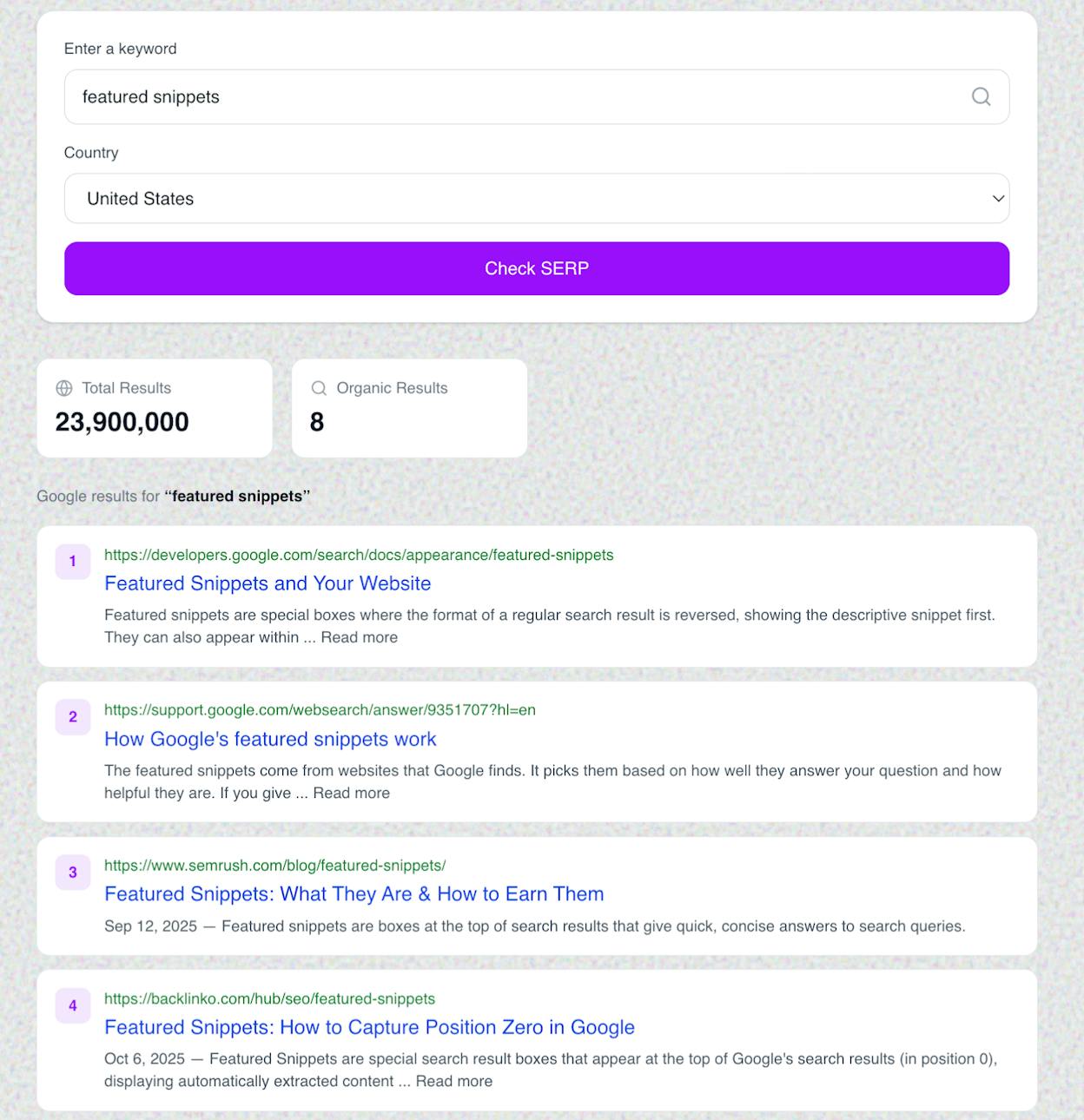
Using Analyze AI’s SERP Checker:
You can also use Analyze AI’s free SERP Checker tool to quickly examine the search results for any keyword. Enter the keyword, and the tool shows you the full SERP layout including which positions hold featured snippets, People Also Ask boxes, and other SERP features.
Step 3: Find Snippet Opportunities Through Keyword Research
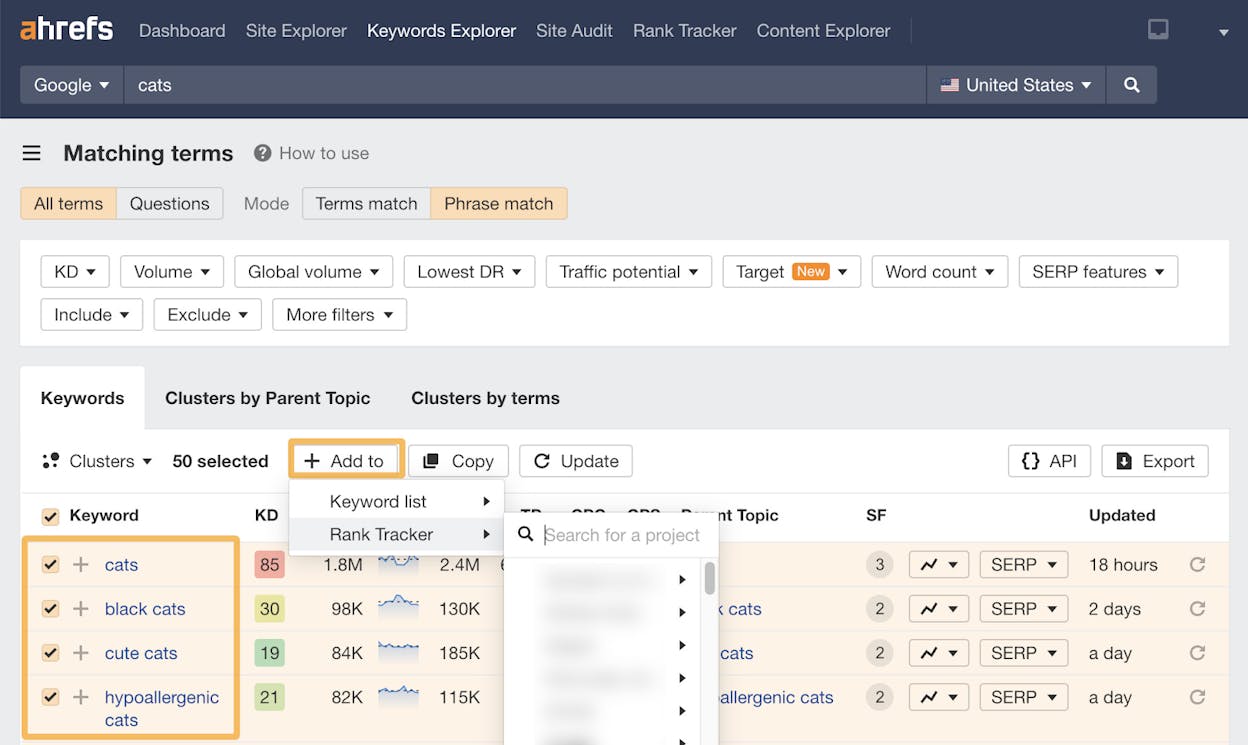
If you’re starting from scratch—or expanding into new topics—use keyword research tools to find queries that trigger featured snippets before you even write the content.
Using Ahrefs Keywords Explorer:
-
Enter a broad seed keyword related to your topic (e.g., “content marketing”).
-
Go to the Matching Terms or Questions report.
-
Apply the SERP Features filter for Featured Snippet.
-
Filter by KD to find achievable targets.
The Questions report is especially useful because question-based queries are the most likely to trigger paragraph and list snippets.
Using Analyze AI’s Keyword Generator:
For quick keyword ideation, Analyze AI’s free Keyword Generator can surface related queries around your seed term. Pair this with the Keyword Difficulty Checker to estimate how competitive each keyword is before committing resources.
Step 4: Find What AI Search Engines Are Already Answering
Here’s the step most guides skip entirely.
Featured snippet keywords have huge overlap with the kinds of questions people ask AI search engines. If someone is searching “what is a featured snippet” on Google, they’re also asking ChatGPT and Perplexity the same question.
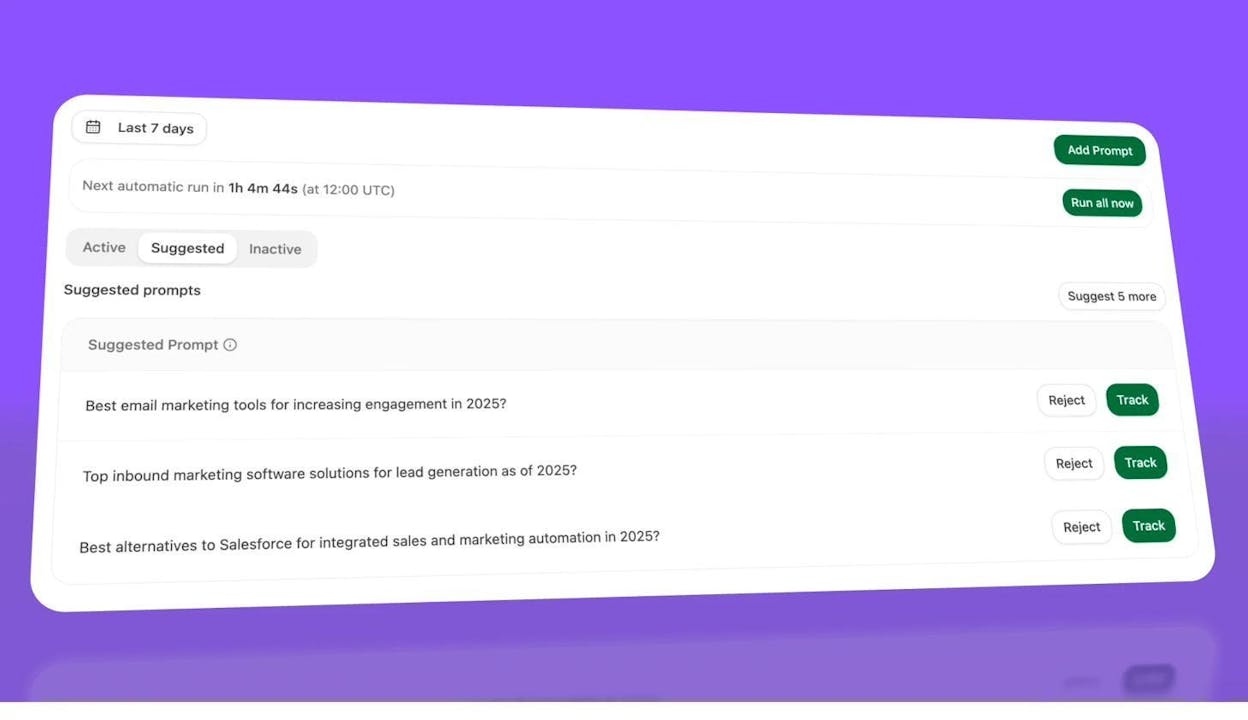
You can use Analyze AI to discover which prompts in your topic area AI engines are answering—and whether your brand or your competitors are being cited.
Here’s how:
-
In Analyze AI, go to the Prompt Suggestions tab within your cluster.
-
Review the suggested prompts that the platform recommends based on your tracked topics.
-
Click Track on any prompt that’s relevant to your featured snippet targets.
-
Then check the Opportunities dashboard to see prompts where your competitors are mentioned but your brand is not.
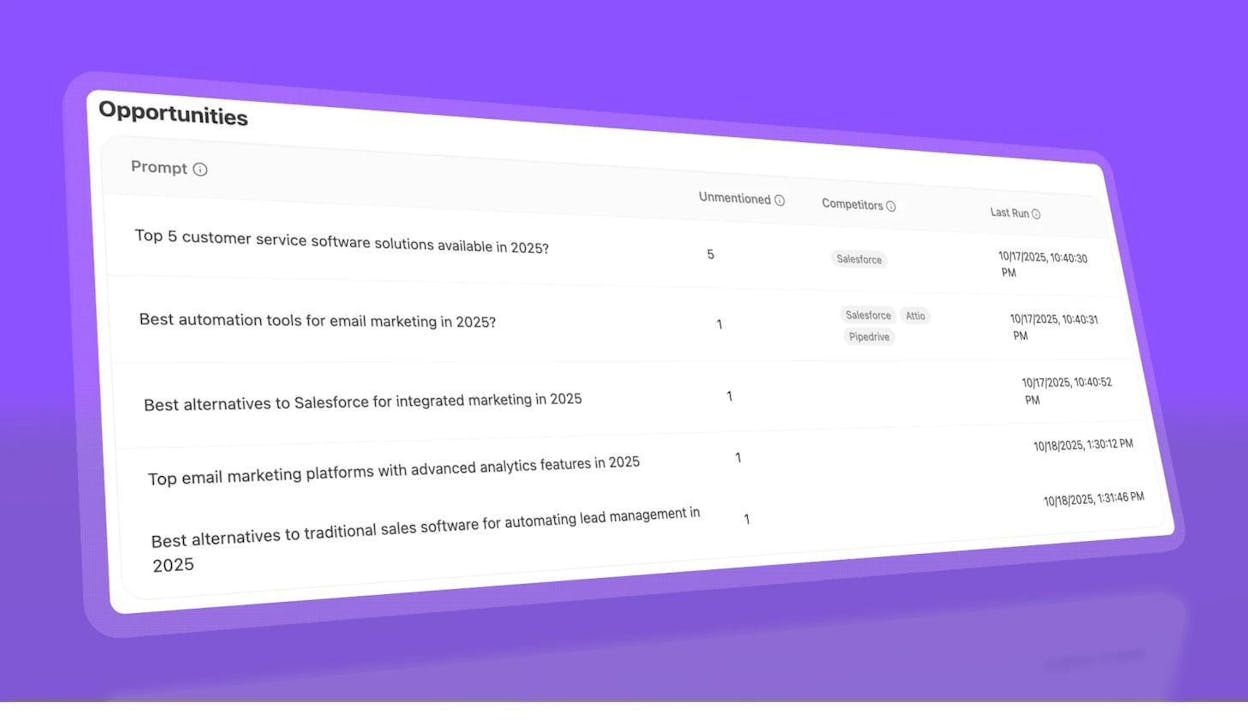
This gives you a two-channel view of each keyword: you can see the featured snippet opportunity on Google and the AI citation opportunity across ChatGPT, Claude, and Perplexity. Targeting keywords where you can win both is the highest-leverage play.
How to Win (Steal) Featured Snippets
Finding opportunities is the easy part. Winning the snippet requires deliberate content optimization. Here’s a practical framework.
Match the Existing Snippet Format
Before you touch your content, check what format Google is currently using for that snippet. If the current snippet is a list, don’t try to win it with a paragraph. If it’s a table, build a table.
To check the current format:
-
Search the target keyword on Google.
-
Note the snippet format (paragraph, list, table, video).
-
Visit the page currently holding the snippet to see exactly which section Google is extracting.
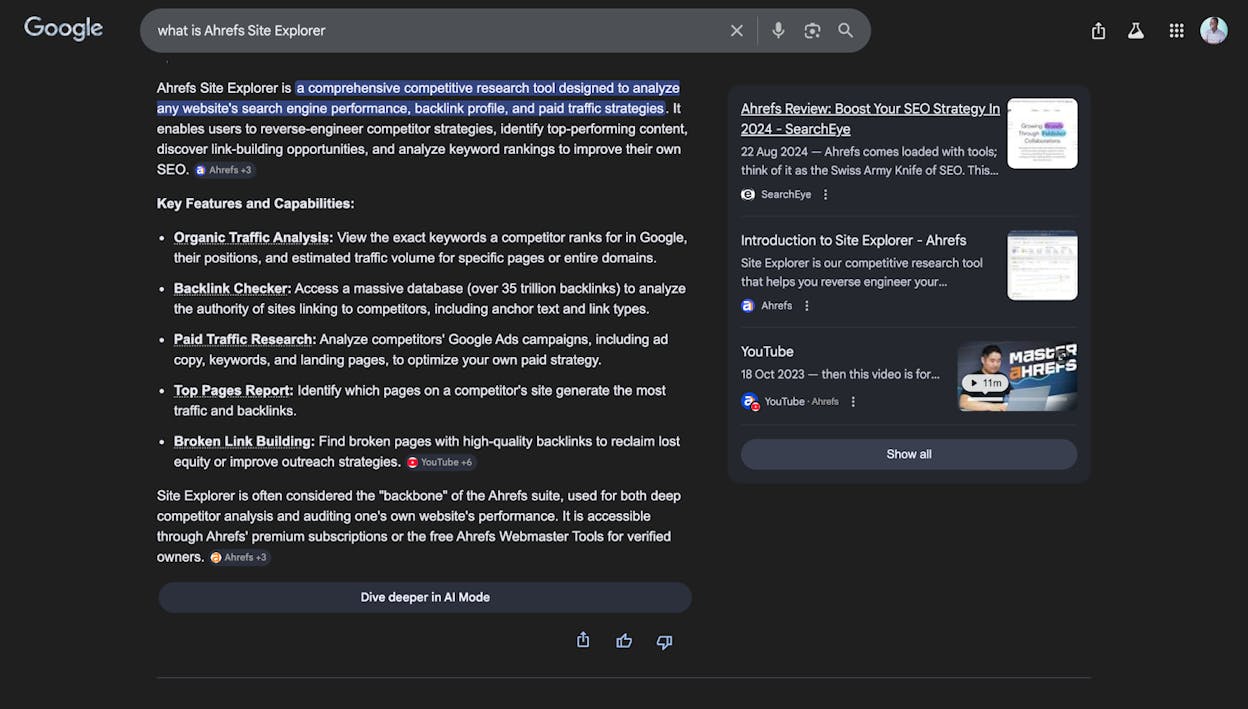
This last step is critical. You want to see the exact HTML structure—is Google pulling from an H2 followed by a <p> tag? From a <ul> list? From a <table>? Replicate that structure in your own content.
Understand the Search Intent
Not every featured snippet serves the same intent. A snippet for “what is SEO” serves a definitional intent. A snippet for “how to do keyword research” serves a procedural intent. A snippet for “best SEO tools” serves a comparison intent.
Your content needs to match the intent, not just the format. If the snippet is answering “what is X,” write a clear two-to-three sentence definition. If it’s answering “how to do X,” write a step-by-step process with numbered subheadings.
Check the search intent by looking at what’s currently ranking. If all ten results on page one are how-to guides, the intent is procedural. If they’re all definitions and explainers, the intent is informational.
Structure Your Content for Extraction
Google’s snippet extraction is mechanical. It follows heading hierarchy and pulls content from the section most relevant to the query. Help Google by structuring your content clearly:
Use heading tags that echo the query. If the target keyword is “what are featured snippets,” include an H2 that says “What Are Featured Snippets?” and place your snippet-target paragraph directly below it.
Keep your snippet-target paragraph concise. For paragraph snippets, aim for 40–60 words. For list snippets, aim for 5–8 items. Google has limited space in the snippet box, so overly long answers get truncated or skipped entirely.
Use the inverted pyramid. Put the most important information first, then add detail. This is a journalism technique: lead with the answer, then explain it. Google tends to extract the first paragraph under a heading, so make that first paragraph count.
Avoid first-person language in the snippet target. “I think featured snippets are…” won’t win a snippet. “Featured snippets are…” will. Keep the snippet-target section objective and factual. You can add personal perspective and examples in the content that follows.
Use proper HTML hierarchy. H1 for the page title, H2 for major sections, H3 for subsections. Don’t skip heading levels (going from H2 to H4, for example). You can check your heading structure quickly using the Ahrefs SEO Toolbar by opening the Content tab on any page.
Optimize Beyond the Snippet
Winning the snippet isn’t just about the snippet-target paragraph. Google considers the overall quality of the page when selecting featured snippet content. Here are additional factors:
Make sure you rank in the top ten first. Google almost exclusively pulls featured snippets from pages that already rank on page one. If your page is on page two, focus on improving its overall ranking before worrying about snippet optimization.
Don’t block featured snippets accidentally. Check that your page doesn’t have a nosnippet meta tag or data-nosnippet attribute. These tell Google not to extract any snippet content from the page. Review Google’s documentation on controlling snippets to make sure you haven’t inadvertently opted out.
Focus on the full reader experience. Google tracks user engagement signals. If people click your snippet and immediately bounce back to the search results, that’s a negative signal. Make sure the rest of your page delivers on the promise the snippet makes—give readers depth, examples, and actionable detail beyond the snippet answer.
Write in simple language. Google uses featured snippets in voice search results. If your content reads like it would sound natural spoken aloud, it’s more likely to be selected. Avoid jargon where plain English works.
How to Track Featured Snippets
Winning a featured snippet is not a one-time event. Snippets are volatile—Google regularly tests different pages in the snippet position, and competitors are constantly optimizing to take your spot. You need a tracking system.
Track with SEO Tools
Most major SEO platforms let you filter for featured snippets in their rank tracking features.
Using Ahrefs Rank Tracker:
-
Add your target keywords to an Ahrefs Rank Tracker project.
-
In the project dashboard, click SERP Features.
-
Select Featured Snippet.
-
Hit Apply.
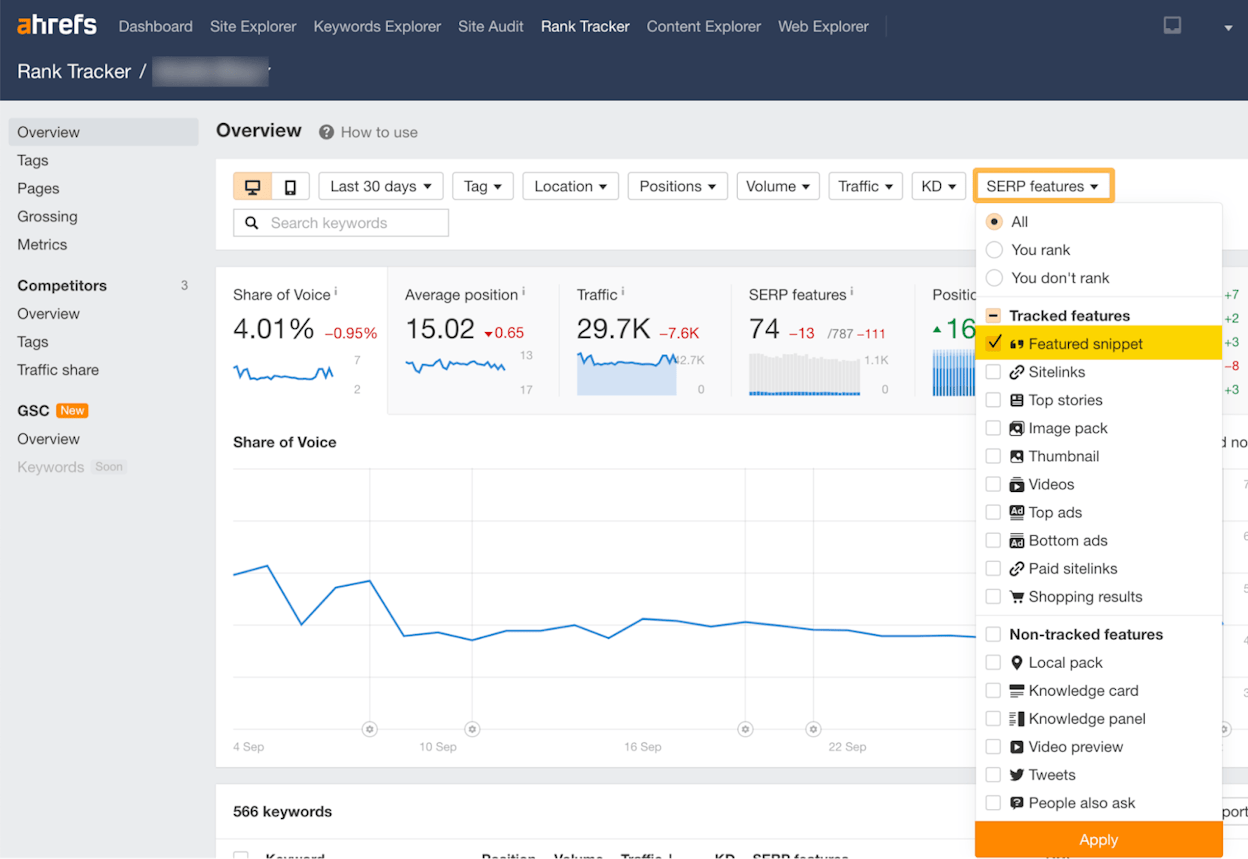
Source: Ahrefs
This view shows you which of your tracked keywords have featured snippets, whether you own them, and how your snippet ownership changes over time. You’ll get alerts when you win or lose a snippet.
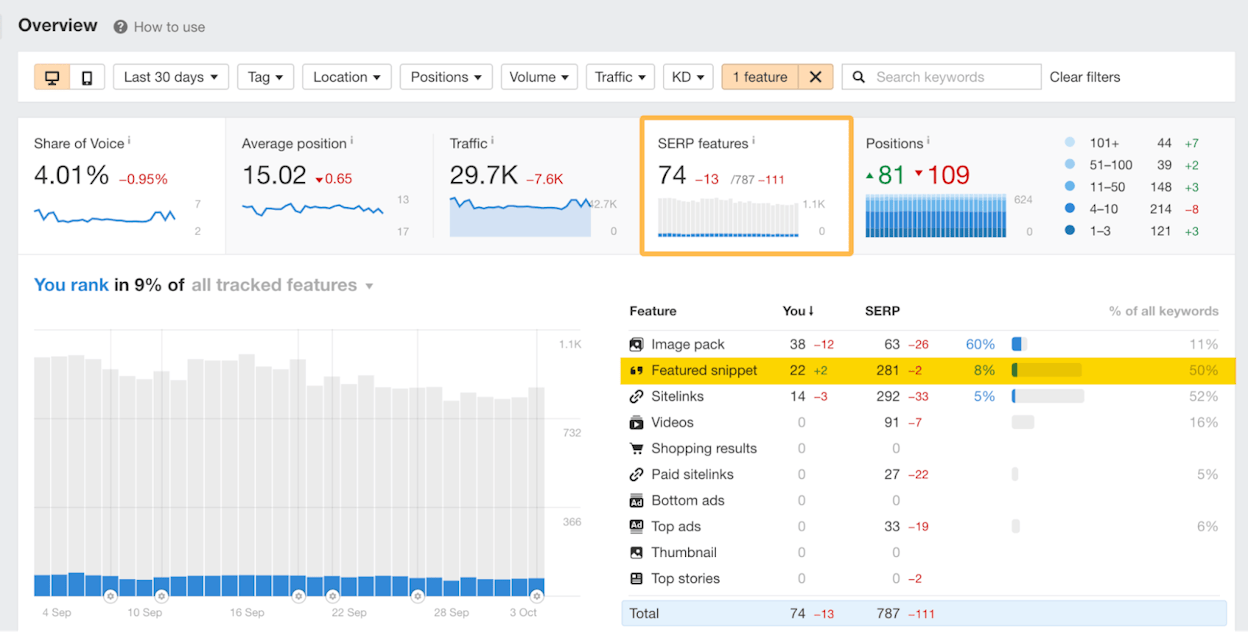
Source: Ahrefs
Using Ahrefs Portfolios (for smaller tracking):
If you’re just starting out and only want to track a handful of snippet URLs, Portfolios is a lighter-weight option:
-
Go to Portfolios in the Ahrefs dashboard.
-
Click + Create.
-
Paste the URLs of pages where you hold (or want to hold) featured snippets.
Source: Ahrefs
Portfolios let you track up to 1,000 URLs across 10 domains in a single group, depending on your plan.
Track with Google Search Console
For free tracking, Google Search Console shows featured snippet performance in the Performance report. Filter by Search Appearance to isolate snippet queries, then monitor clicks, impressions, CTR, and average position over time.
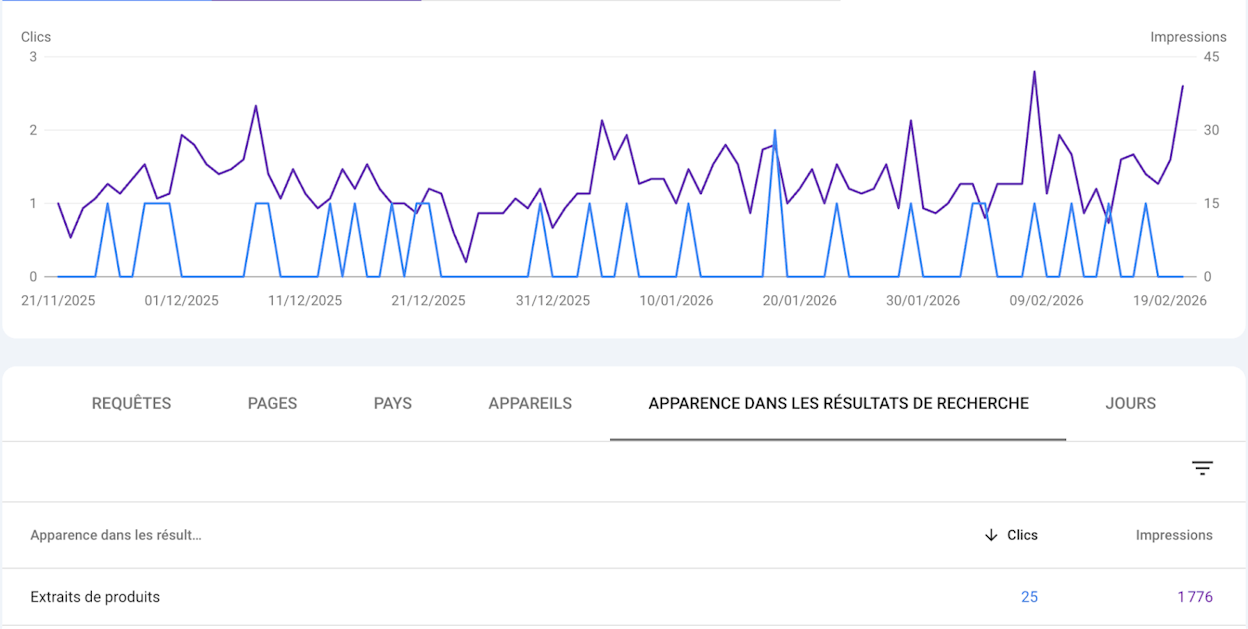
The advantage of GSC is accuracy—it uses Google’s real data. The limitation is that you can only see your own performance, not your competitors’.
Track Featured Snippet Content in AI Search
Here’s the layer most marketers miss: your featured snippet content isn’t just showing up on Google. It’s also being consumed by AI search engines that pull from the same search indexes.
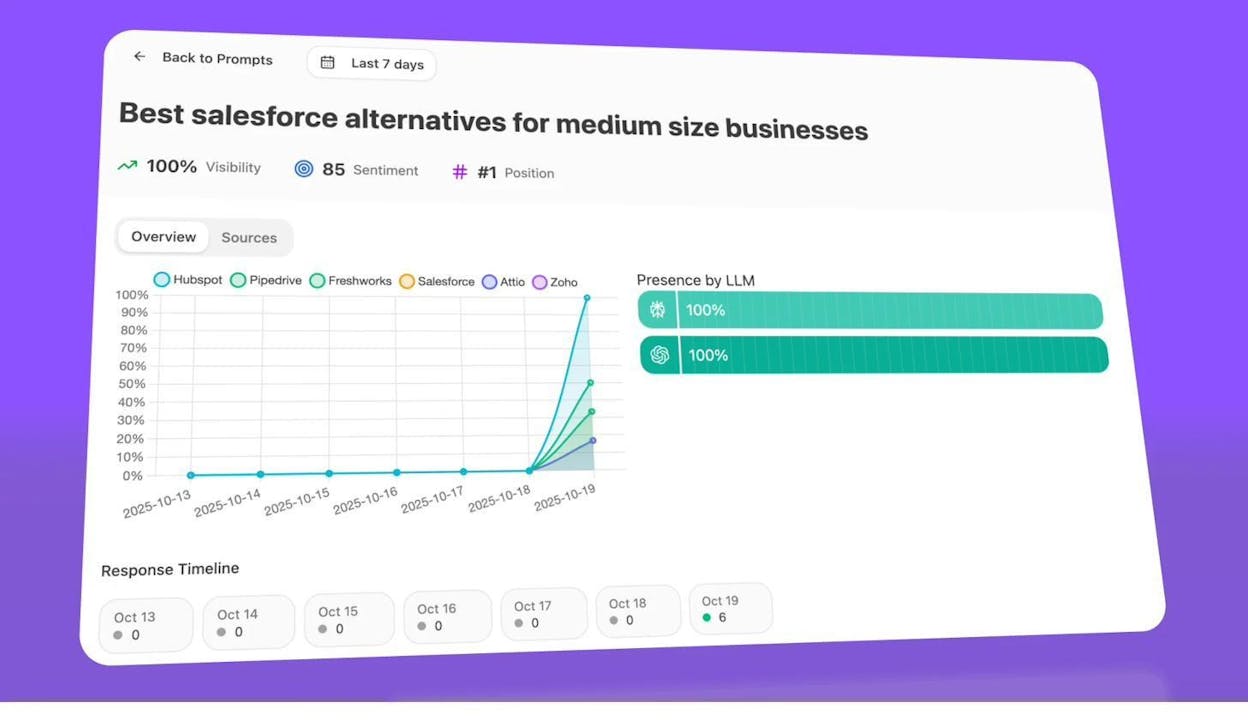
With Analyze AI, you can track whether the same content that wins your featured snippets is also getting cited across ChatGPT, Perplexity, Claude, Copilot, and Gemini.
Here’s how to set this up:
-
In Analyze AI, add the keywords associated with your featured snippets as tracked prompts.
-
The platform runs these prompts daily across multiple AI engines and logs whether your brand is mentioned and cited.
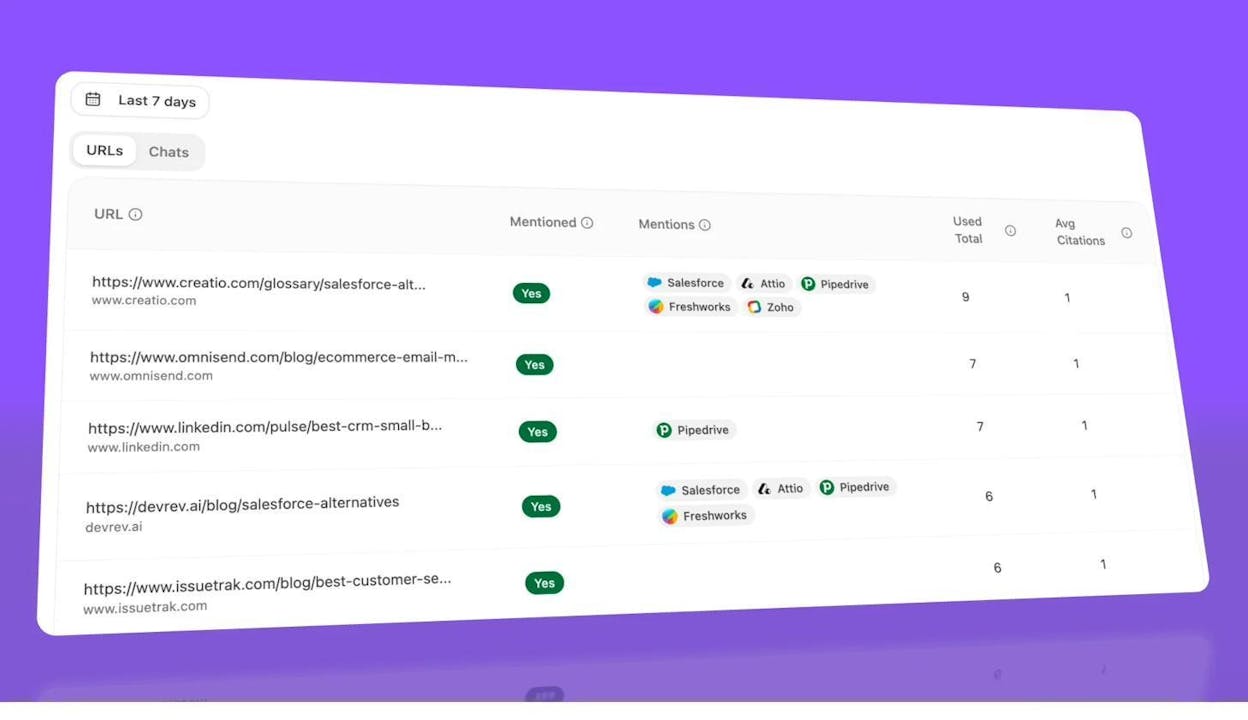
3. Check the Citation Analytics dashboard to see which of your URLs are being cited and by which AI engines.
4. View the AI Referral Traffic dashboard to see how many actual sessions your site gets from AI search engines.
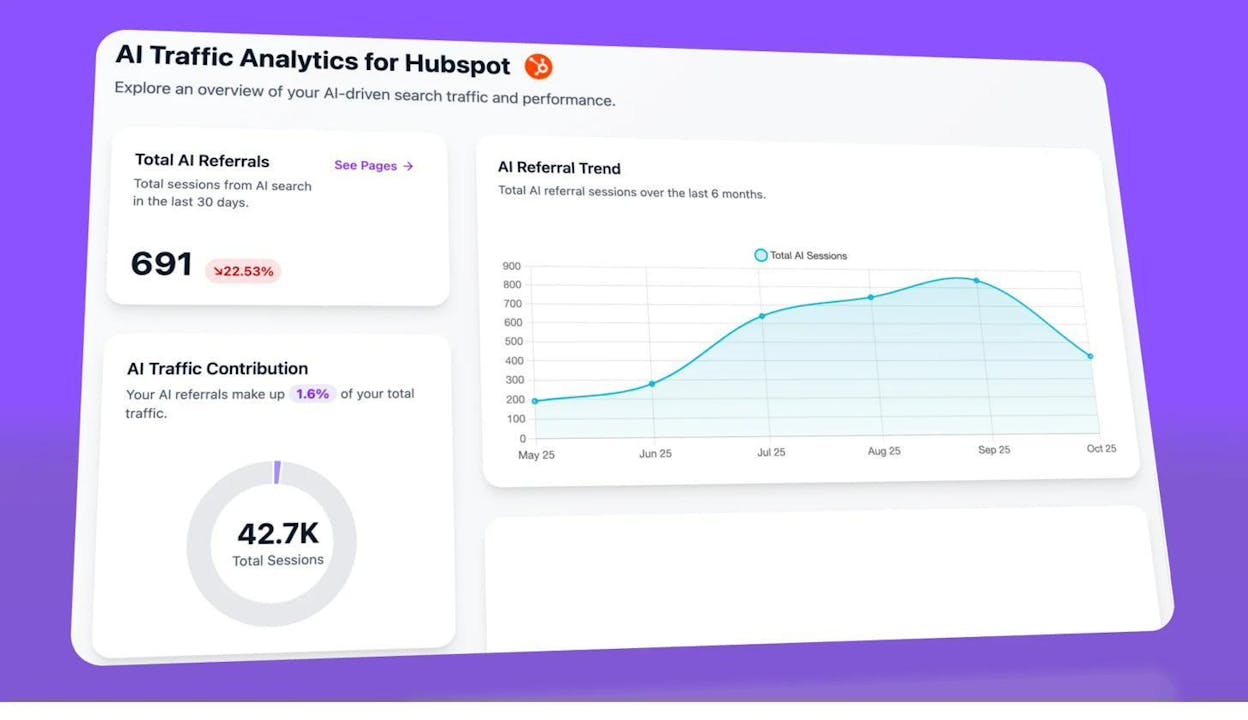
5. Drill down to the Landing Pages from AI Search report to see exactly which pages receive AI-driven traffic, matched with the referring engine.
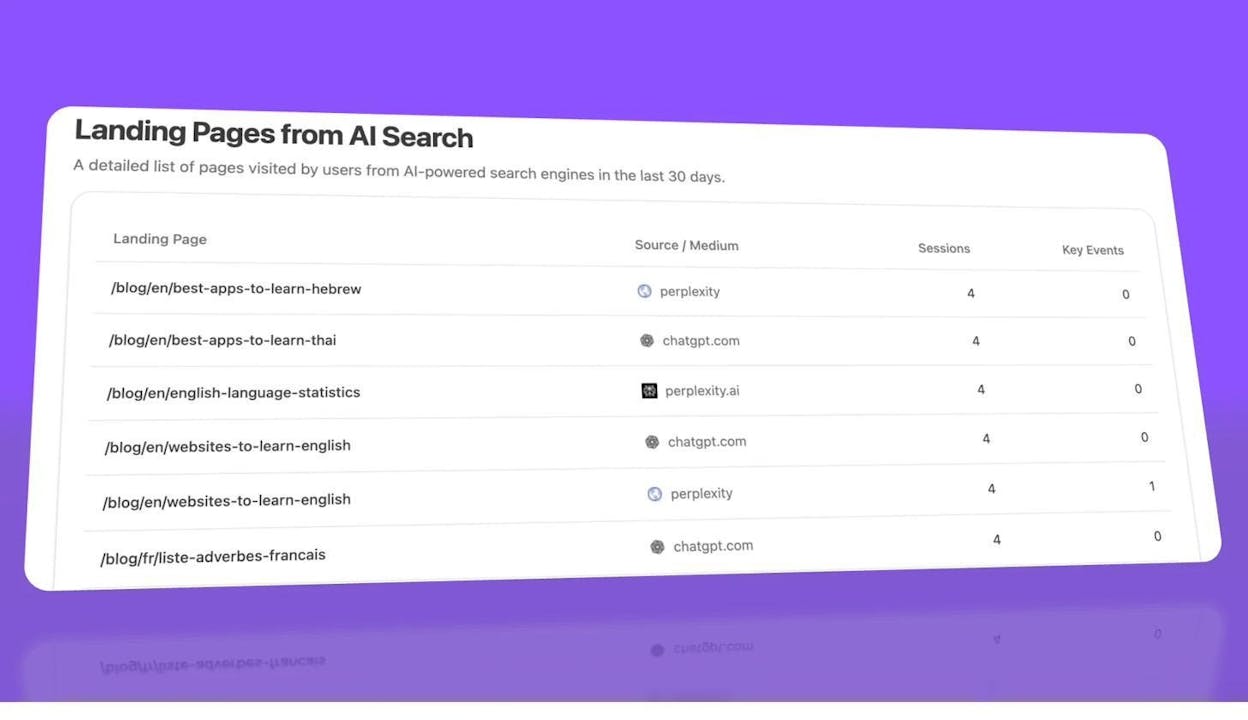
This creates a complete picture: you can see a keyword’s featured snippet performance on Google and its AI citation performance across multiple engines—all in one place. If a page wins a featured snippet but isn’t getting cited by AI engines, you know there’s an additional optimization opportunity. If a page is getting AI citations but losing the featured snippet, you know where to focus your Google optimization efforts.
You can also compare performance by AI engine using the Analytics by Engine view:
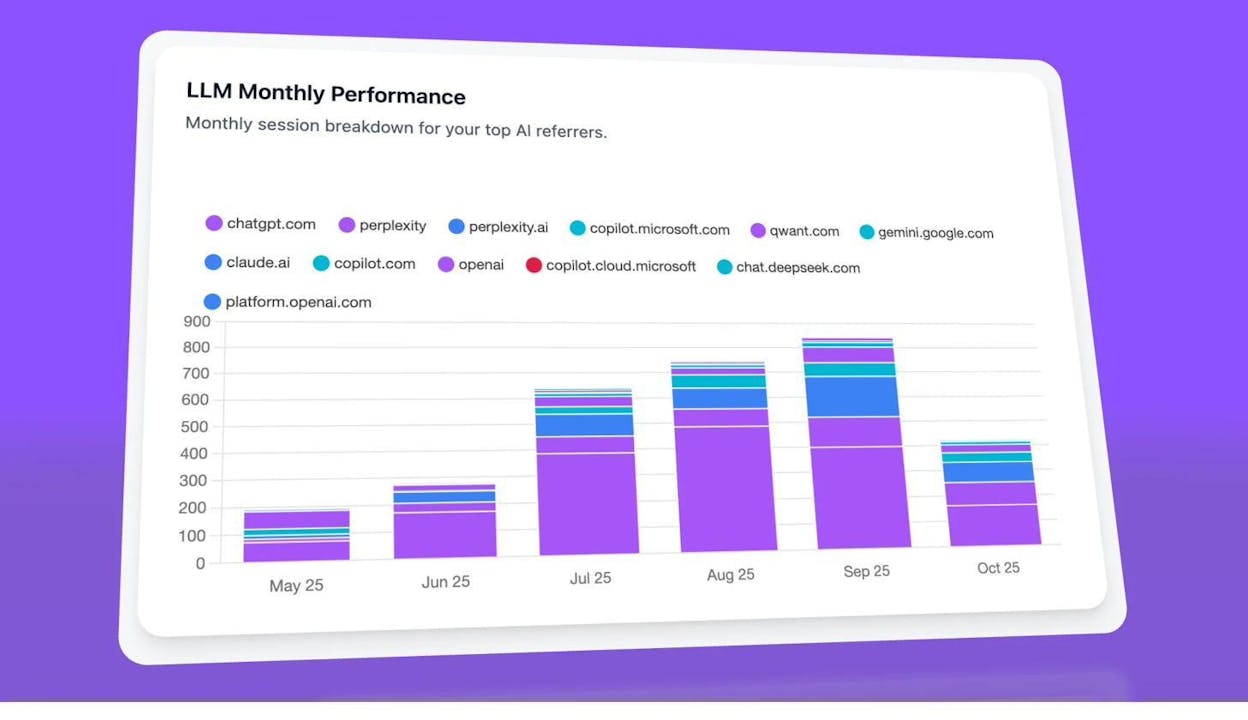
This matters because different engines behave differently. Our research found that ChatGPT, Claude, and Perplexity each have distinct citation preferences—Claude favors blog content (43.8% of citations), while ChatGPT and Perplexity lean toward product and feature pages. Knowing which engine drives your traffic lets you tailor your content accordingly.
Featured Snippets and AI Search: What’s Changing
Featured snippets have been a stable part of Google’s search results for years. But the search landscape is shifting, and you need to understand what that means for your snippet strategy.
AI Overviews Are Competing with Featured Snippets
Google’s AI Overviews (formerly called Search Generative Experience) are now appearing for a growing number of queries. When an AI Overview appears, it often displaces or reduces the visibility of the featured snippet.
An Ahrefs study analyzing 146 million SERPs identified 86 factors that trigger AI Overviews. Many of these factors overlap with the same informational queries that trigger featured snippets.
This doesn’t mean featured snippets are going away. It means the value of a featured snippet may vary depending on whether an AI Overview also appears for that query. Check the SERP before you invest heavy effort into a snippet target—if the query already triggers an AI Overview that pushes the snippet below the fold, the traffic payoff from winning the snippet may be lower than expected.
The Content That Wins Snippets Also Wins AI Citations
Here’s the silver lining: the same structural principles that win featured snippets—clear headings, concise answers, well-formatted lists and tables, objective language—are exactly what AI search engines prefer to cite.
When you optimize a page for a featured snippet, you’re also optimizing it for generative engine optimization (GEO). The work overlaps significantly.
This is consistent with the data. Pages that rank well on Google and have strong E-E-A-T signals tend to be cited more often by AI engines. Our citation analysis found that about 83% of AI citations come from third-party sources (review sites, news outlets, industry blogs), but the remaining 17% of first-party citations overwhelmingly go to well-structured, authoritative pages—the same kind that win featured snippets.
How to Optimize for Both Channels
Rather than treating featured snippets and AI search as separate projects, integrate them:
-
Identify keywords that trigger both featured snippets and AI answers. Use Ahrefs to find snippet opportunities, then cross-reference with Analyze AI to check whether those same keywords generate AI responses that cite competitors.
-
Build content that serves both formats. Clear definitions under descriptive H2 headings serve Google’s snippet extraction and help LLMs understand and cite your content. Structured data (tables, numbered lists, FAQ schema) works for both channels.
-
Track both channels from one workflow. Use your SEO rank tracker for Google snippet monitoring and Analyze AI for AI engine citation tracking. When you see a page winning a snippet but losing AI citations (or vice versa), you know exactly where to adjust.
-
Monitor competitors across both channels. In Analyze AI, the Competitor Overview shows you which brands are getting mentioned in AI responses for your tracked topics:
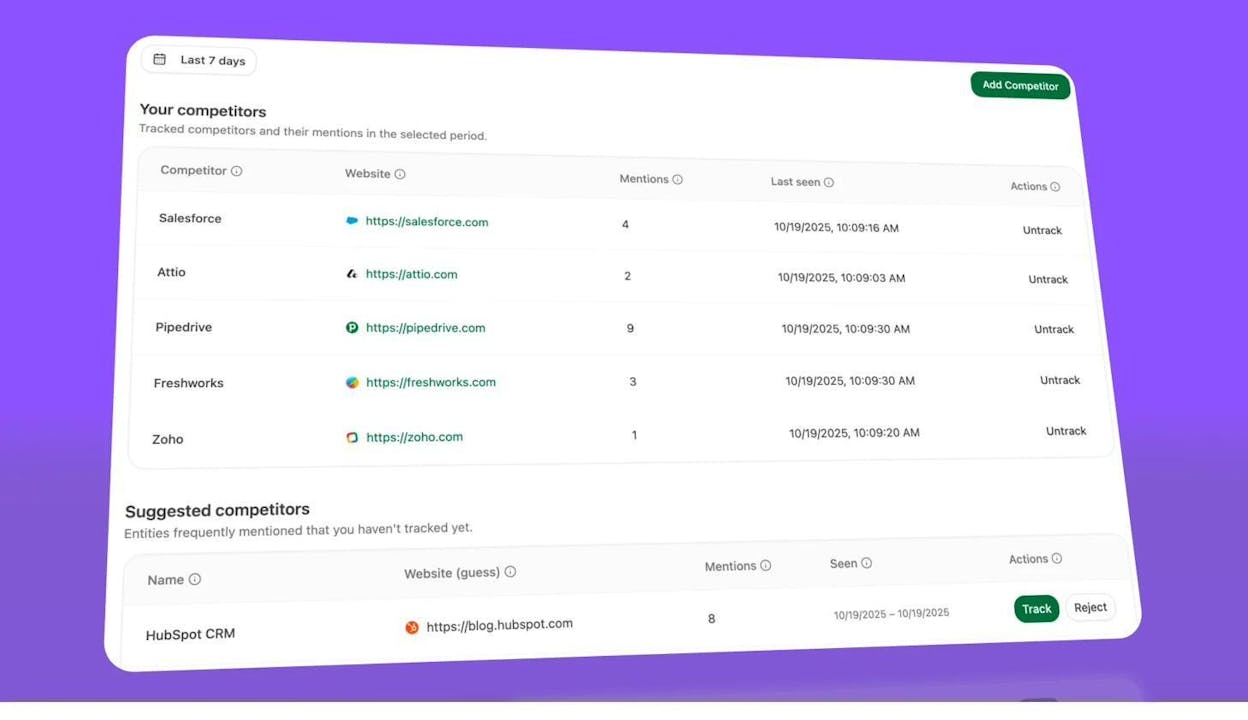
If a competitor is getting cited by AI engines for a query where you hold the featured snippet on Google, your content strategy should address both positions. And if a competitor is winning the featured snippet and getting AI citations, you need to outperform them on content quality across the board.
-
Use sentiment tracking to understand how AI presents your brand. A featured snippet shows your content neutrally—it’s just an excerpt. But AI engines add context, comparisons, and sometimes sentiment. Analyze AI’s Sentiment Analysis shows how each engine frames your brand when it cites you:
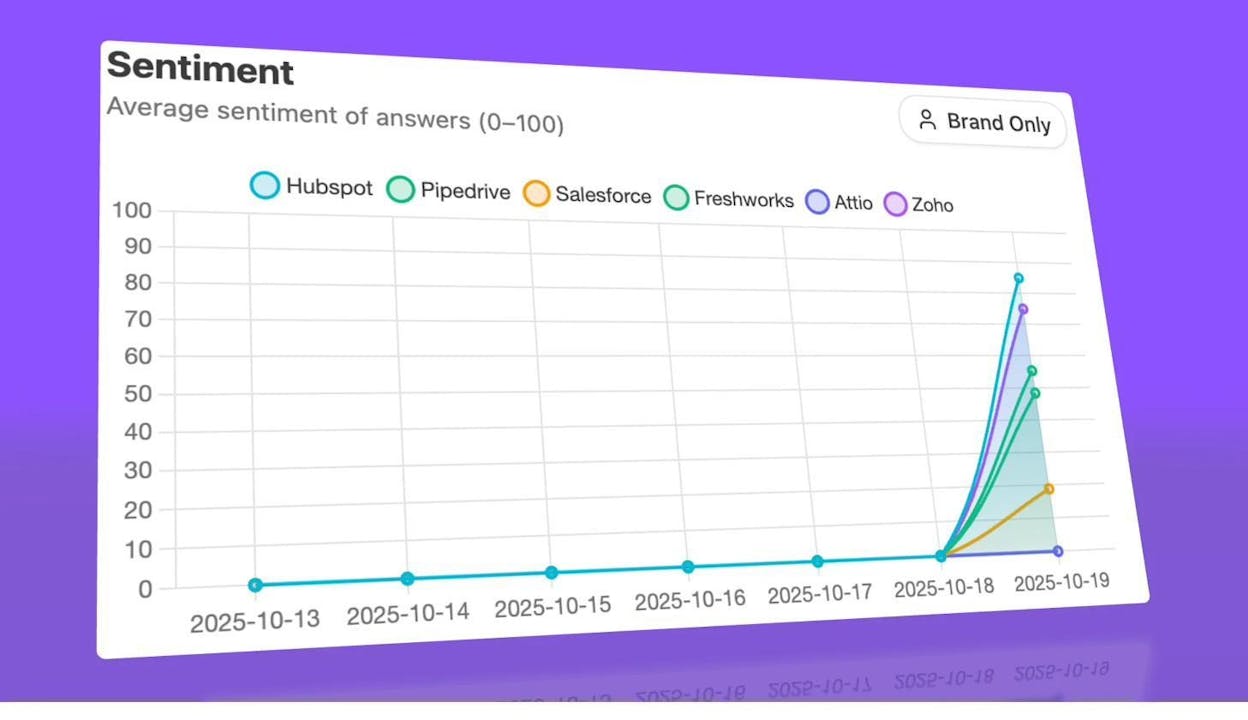
Our research found that the same brand can receive sentiment scores that vary by up to 79 points across different AI engines, depending on which sources each engine cites. Monitoring sentiment helps you catch negative narratives early and adjust your content to improve how AI engines perceive and present your brand.
Common Mistakes to Avoid
After optimizing dozens of pages for featured snippets, here are the patterns that consistently lead to failure:
-
Targeting snippets for keywords where you don’t rank on page one. This is the most common mistake. Google almost never pulls a snippet from a page ranking below position ten. Fix your ranking first, then optimize for the snippet.
-
Writing too much in the snippet-target section. Paragraph snippets are typically 40–60 words. If your definition paragraph is 150 words, Google will skip it in favor of a more concise competitor. Be ruthless about brevity in the snippet-target section. Add depth and detail after that section.
-
Ignoring the format. If the current snippet is a table and you write a paragraph, you won’t win. Always match the existing snippet format before trying anything creative.
-
Using first-person language. Sentences like “I believe content marketing is…” or “In my experience…” don’t win snippets. Google prefers objective, encyclopedic phrasing for the snippet itself.
-
Forgetting to check for AI Overviews. Some keywords that used to trigger featured snippets now trigger AI Overviews instead. If the SERP has changed, your traffic projections for that snippet may be off. Always check the live SERP before investing optimization effort.
-
Not tracking snippet volatility. Featured snippets change hands frequently. If you win a snippet and stop monitoring it, a competitor can take it back within weeks. Set up tracking (see the section above) and review it monthly.
Quick Reference: Featured Snippet Optimization Checklist
|
Step |
Action |
Tool |
|---|---|---|
|
1. Audit existing snippets |
Filter organic keywords for “Featured Snippet” SERP feature, Position 1 |
Ahrefs Site Explorer, Google Search Console |
|
2. Find steal opportunities |
Filter for positions 2–5 with Featured Snippet present |
Ahrefs Site Explorer |
|
3. Research new targets |
Use Questions report filtered for Featured Snippets |
Ahrefs Keywords Explorer, Analyze AI Keyword Generator |
|
4. Check AI overlap |
See if the same keywords trigger AI citations |
|
|
5. Match snippet format |
Check current snippet format (paragraph, list, table, video) |
Google SERP, Analyze AI SERP Checker |
|
6. Optimize content structure |
Use proper heading hierarchy, concise definitions, inverted pyramid |
|
|
7. Track snippet performance |
Monitor snippet wins/losses over time |
Ahrefs Rank Tracker, Google Search Console |
|
8. Track AI citations |
Monitor if snippet content is cited by AI engines |
|
|
9. Monitor competitors |
Track competitor snippet and AI citation activity |
Ahrefs Site Explorer, Analyze AI Competitor Overview |
|
10. Review and adjust monthly |
Check for AI Overview displacement, snippet volatility, new opportunities |
All of the above |
Featured Snippets Are Just the Start
Featured snippet optimization is one of the highest-ROI activities in SEO. You’re not creating new content—you’re restructuring existing content that already ranks to capture a position that drives disproportionate traffic.
But the game has expanded. Google is no longer the only place where concise, well-structured answers earn visibility. ChatGPT, Perplexity, Claude, Copilot, and Gemini all rely on similar signals to decide which content to cite.
The smartest approach is to treat featured snippets and AI search visibility as two outcomes of the same work. Write clear, concise, well-structured content. Track your performance across both channels. Double down on pages that win in both places, and fix the gaps where you only win in one.
If you want to see how your featured snippet content is performing across AI search engines, Analyze AI shows you exactly which prompts cite your brand, which engines drive actual traffic to your site, and where competitors are winning AI citations that you’re missing.

Ernest

Ibrahim


![The Only SEO Checklist You Need in 2026 [With Template]](/_next/image?url=https%3A%2F%2Fwww.datocms-assets.com%2F164164%2F1774288228-image7.png&w=3840&q=75)


