



Summarize this blog post with:


In this article, you’ll learn how to run AI keyword research with five free chatbots without ending up with lists of made-up keywords nobody searches. You’ll see how to prompt ChatGPT, Perplexity, Claude, Gemini, and Bing Copilot to surface the language buyers use, how to validate every output against real search data, and how to extend the workflow to the prompts people now type into AI engines. By the end, you’ll have a repeatable process that pulls volume-backed seed keywords out of conversational AI, plus a way to track which keywords drive traffic and pipeline.
Table of Contents
TL;DR
|
Tool |
Best for |
Search metrics |
Live web |
What to watch for |
|---|---|---|---|---|
|
ChatGPT |
Fast long-tail brainstorming and clustering |
No |
Browsing only |
Hallucinated keywords with zero search volume |
|
Perplexity |
Web-anchored keyword phrasing pulled from real sources |
No |
Yes |
Summary errors, always click the citation |
|
Claude |
Structured clusters and content trees from long inputs |
No |
Limited |
Output quality depends on what you paste in |
|
Gemini |
Question-style queries and topic expansion |
No |
Yes |
Suggestions come from patterns, not telemetry |
|
Bing Copilot |
Trend-driven angles tied to live Bing results |
No |
Yes |
Strong for ideation, weak for prioritization |
|
Analyze AI |
Closing the loop with AI search prompt research, agents, writer, optimizer |
Yes |
Yes (5 engines) |
Use it after brainstorming to find out which prompts and pages convert |
Chatbots brainstorm. A data tool validates. Analyze AI extends the workflow into the AI engines that now sit between buyers and your site.
Three habits that separate useful AI keyword research from a list of hallucinations
Three habits decide whether your output is usable or trash.
Prompt for buyer language, not “keywords.” Ask any chatbot for “keywords about CRM software” and you get generic phrases nobody types. Ask for “the exact phrases a head of sales uses when frustrated with their CRM and looking for an alternative” and you get phrasing that maps to real searches. Treat the chatbot like the language model it is.
Validate every output against real data. Chatbots invent keywords that sound right. “Best mid-market CRM for revenue ops” might feel natural and have zero monthly searches. You need a volume check before any of these ideas enter your editorial calendar. The free keyword difficulty checker, SERP checker, and keyword generator all work for this.
Treat AI engines as a parallel keyword surface. ChatGPT, Perplexity, Claude, Gemini, and Copilot now intercept buyer questions before Google ever sees them. Those questions are a keyword category in their own right, and they need their own discovery and tracking process. That is where the back half of this article goes.
ChatGPT: long-tail and question mining at speed
ChatGPT goes from one topic to a wide field of long-tail ideas in under five minutes. It cannot see volume, difficulty, or competition. What it does well is turn a vague topic into the phrases a real buyer uses to describe a real problem.
How to use ChatGPT for keyword research
Step 1. Prime the model with audience and pain, not just topic. Instead of “give me keywords for email marketing software,” try:
Act as an SEO strategist. List 25 long-tail keywords and questions that a B2B marketing operations lead might search when their current email platform has poor deliverability and they’re looking for an alternative. Group the results into problem-aware, comparison, and replacement-intent searches.
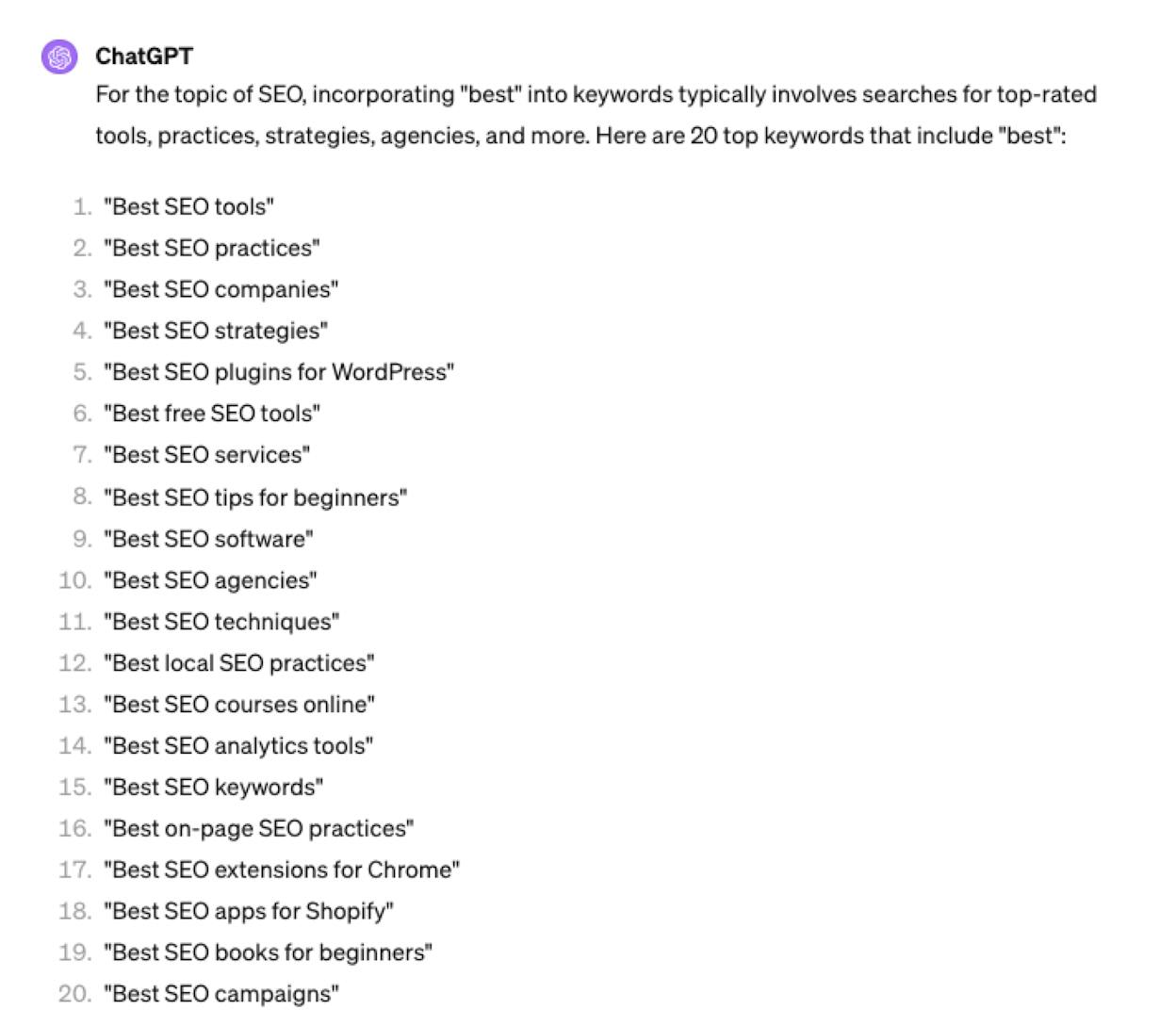
Grouping forces the model to think about funnel stage instead of dumping everything into one undifferentiated list.
Step 2. Ask for the missing question variants. Follow up with:
For each cluster above, list five questions that map to a People Also Ask pattern.
This typically produces 30 to 40 question-style queries for FAQ blocks, H2s, and answer sections. The People Also Ask guide covers ranking inside those boxes.
Step 3. Push the model into competitor language. Paste the H1 and H2s from the top three ranking pages for your seed topic and ask:
Read these headings. List the themes covered, the themes missing, and five long-tail angles that would let me beat these pages on information gain.
ChatGPT reads competitive structure and gives you the gap.
Step 4. Run every term through a data tool before you commit. A list from ChatGPT is a hypothesis, not a strategy. Drop the terms into a volume tool. Cut anything with zero searches. Cut anything where the keyword difficulty score is out of reach. What remains is your real working list.
Perplexity: keyword discovery anchored to live web language
Perplexity searches the open web in real time and cites its sources. Where ChatGPT pattern-matches against training data, Perplexity reads current pages and pulls language out of them. That makes it the best of the five for surfacing phrasing publishers and experts are using right now.
How to use Perplexity for keyword research
Step 1. Prompt like a buyer, not a researcher.
What questions are mid-market HR leaders asking right now about replacing their HRIS, and what trade-offs do current articles say they should weigh?
Step 2. Click every citation. The synthesized answer is useful. The citations are where the keyword work happens. Open each cited page, scan the H2s, and capture the recurring noun phrases. Those phrases are how the people writing for that audience already talk about the problem.
Step 3. Run a phrasing scan across competitors.
Compare how the top five articles on [your topic] frame the problem. List the noun phrases that appear in three or more of them.
Those are the semantic SEO anchors your article needs to cover.
Step 4. Use Pro features for deeper passes. Deep Research mode runs a multi-source report on the topic and surfaces niche vocabulary you would not find in a single-pass search. The Perplexity ranking guide covers what to do with those terms.
Claude: structure-first keyword work for big inputs
Claude is the right tool when you have a lot of raw input and need it organized. Long competitor pages, transcripts, customer interview notes, sales call summaries. Paste them in, and Claude turns the mess into a clean cluster map you can build content against.
How to use Claude for keyword research
Step 1. Build a single long input. Paste the full text of your top two competitor articles, the transcripts of two recent sales discovery calls, and your existing content list into one prompt.
Step 2. Ask for structure, not lists.
Read all of this content. Identify the five biggest topic clusters my audience cares about, the long-tail keywords inside each, and the intent type of each (informational, comparison, transactional). Output as a table.
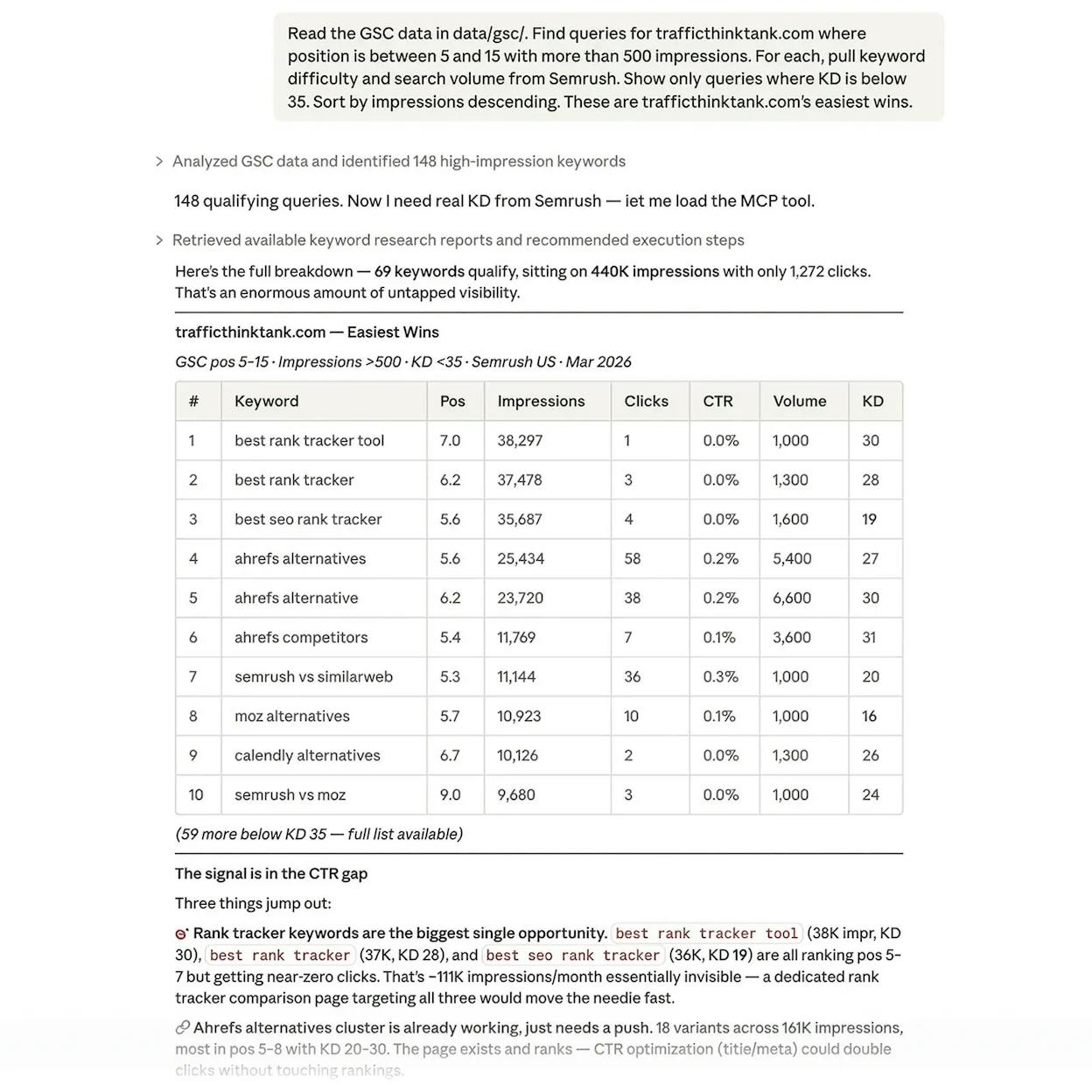
The table format is the unlock. Paste it directly into a sheet and start mapping to pages.
Step 3. Generate a content tree.
Turn this into a hub-and-spoke content map. Show one pillar page per cluster, three to five supporting articles per pillar, and the keyword target for each.
That output replaces an afternoon of manual clustering. The keyword clustering guide walks through doing it without AI.
Step 4. Use long context for competitive audits. Paste a competitor’s sitemap export. Ask Claude which clusters they cover deeply, which shallowly, and where you have permission to win. The output is a ranked list of editorial bets.
Claude has no native connection to search volume or SERPs, so prioritization still needs a metrics tool.
Gemini: question discovery shaped by Google’s ecosystem
Gemini’s phrasing tilts toward the way Google models question intent, which makes it useful for featured snippets, FAQ schema, and buyer intent keywords.
How to use Gemini for keyword research
Step 1. Lean into the question format.
List 30 natural-language questions a CFO at a 200-person company might ask when evaluating fractional finance services. Group them into early-stage, mid-stage, and late-stage buying questions.
Step 2. Expand into adjacent topics.
For each question above, list two adjacent topics the same buyer would research within a week.
This pass surfaces the supporting content for the broader buying journey.
Step 3. Cross-check with autocomplete. Drop Gemini’s top 10 questions into Google search and capture the autocomplete suggestions. The overlap is your highest-confidence list. The mismatches are where Gemini hallucinated or surfaced something genuinely new.
Step 4. Pull related topics from the answer body. Highlight every noun phrase that appears more than once. Those phrases are usually subtopics worth covering.
Bing Copilot: trend spotting backed by live search
Copilot pulls from current Bing results, which makes it the best of the five for keywords that just started getting attention. Trending news, fresh launches, new regulations. If a topic is moving this week, Copilot sees it first.
How to use Bing Copilot for keyword research
Step 1. Anchor the prompt in current behavior.
What questions are people asking this month about [your topic], and which are getting the most coverage in recent articles?
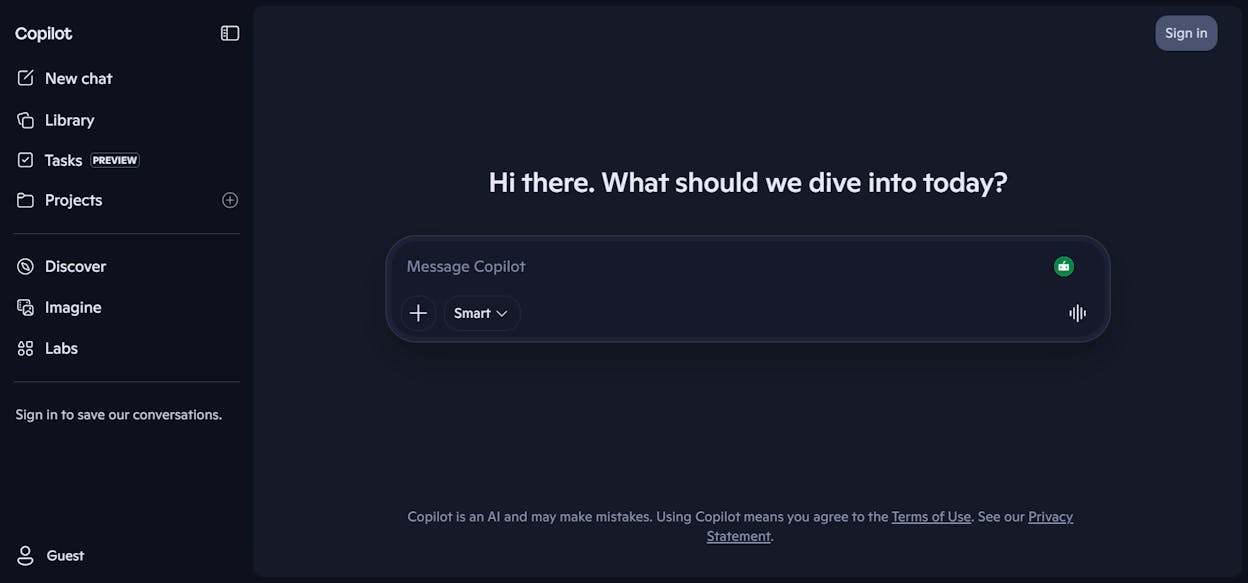
Step 2. Follow up to refine. Copilot’s strongest feature is conversational refinement.
Of those questions, which would a procurement lead at an enterprise company care about most?
You can narrow by audience, industry, region, or recency without restarting the search.
Step 3. Capture timing signals. Ask Copilot which cited sources are dated within the last 30 days. The recent ones tell you which angles are trending. The older ones tell you what is saturated.
Step 4. Use it for content refresh ideas. For a piece losing traffic, paste the URL into Copilot and ask which recent developments would justify a refresh. The republishing content guide covers what to change.
Validate every chatbot output before you commit to it
None of these tools tells you whether a keyword has 50 searches a month or 50,000. Run a validation pass on the working list:
-
Drop every term into a volume tool. The free keyword generator handles this without a paid subscription.
-
Filter out anything with under 50 monthly searches unless it has obvious buyer intent.
-
Check the keyword difficulty score for everything that passes. Anything above your domain authority’s reach goes into a parking lot list.
-
Run the survivors through a SERP check to confirm the existing top results match the intent you assumed. If a “best CRM” query shows tutorials instead of comparison posts, your angle needs to change.
What remains is your real keyword list. The chatbots gave you the language. The validation pass gave you the strategy.
The keyword surface AI engines created, and how to research it
Here is the part almost no other guide covers. ChatGPT, Perplexity, Claude, Gemini, and Copilot are no longer just keyword research tools. They are search engines themselves. The buyer who used to type “best marketing automation tool” into Google now types the full question into ChatGPT.
Those prompts are a keyword category with intent, volume patterns, and competitive structure. Traditional keyword tools cannot research them because the data does not exist in a SERP dataset. You need a tool that watches the engines directly.
Analyze AI runs your tracked prompts across ChatGPT, Perplexity, Claude, Copilot, and Gemini on a schedule, captures every response, and tells you who appears, who gets cited, and what sentiment looks like.
Find your seed prompts the way you’d find seed keywords
Inside the Prompts dashboard, Suggested Prompts surfaces the bottom-of-funnel prompts buyers actually run in your category. The system reads your domain, your competitors, and your category, then suggests prompts most likely to drive pipeline.
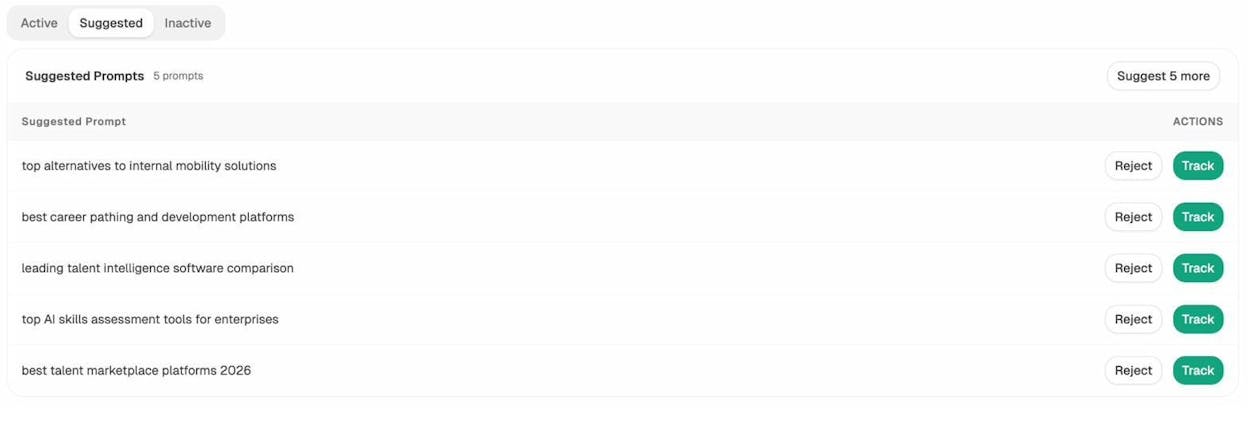
These are your AI search seed keywords. Accept the ones worth tracking, reject the ones that miss, and the platform runs them daily across every engine. Method on the prompt discovery feature page.
Test a prompt before you decide to track it
Ad Hoc Prompt Searches runs any prompt across ChatGPT, Google AI, and Perplexity in one shot and shows you who gets mentioned.
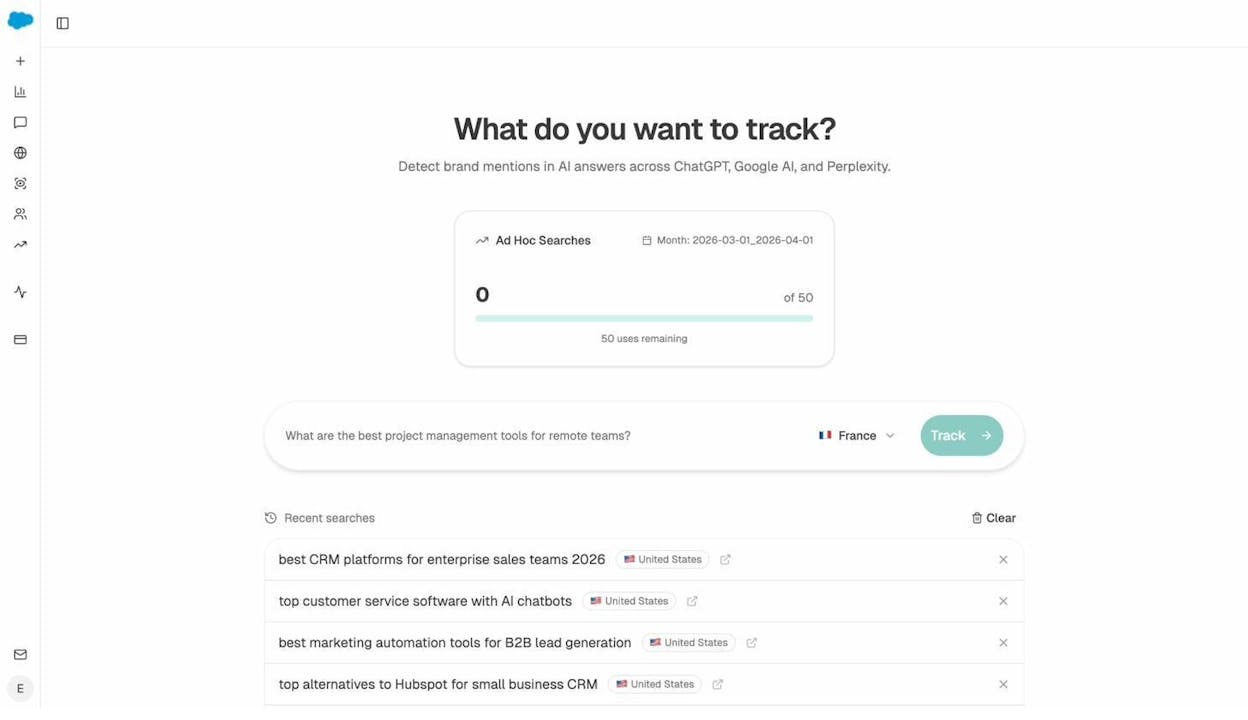
This is the AI search version of plugging a keyword into Google to check the SERP. If you aren’t in the answer, you have a content gap. If you are but third behind two competitors, you have a positioning gap.### See which prompts and pages already drive AI traffic
AI Traffic Analytics shows which pages catch AI referrals, which engines sent them, and what those visitors did once they landed.
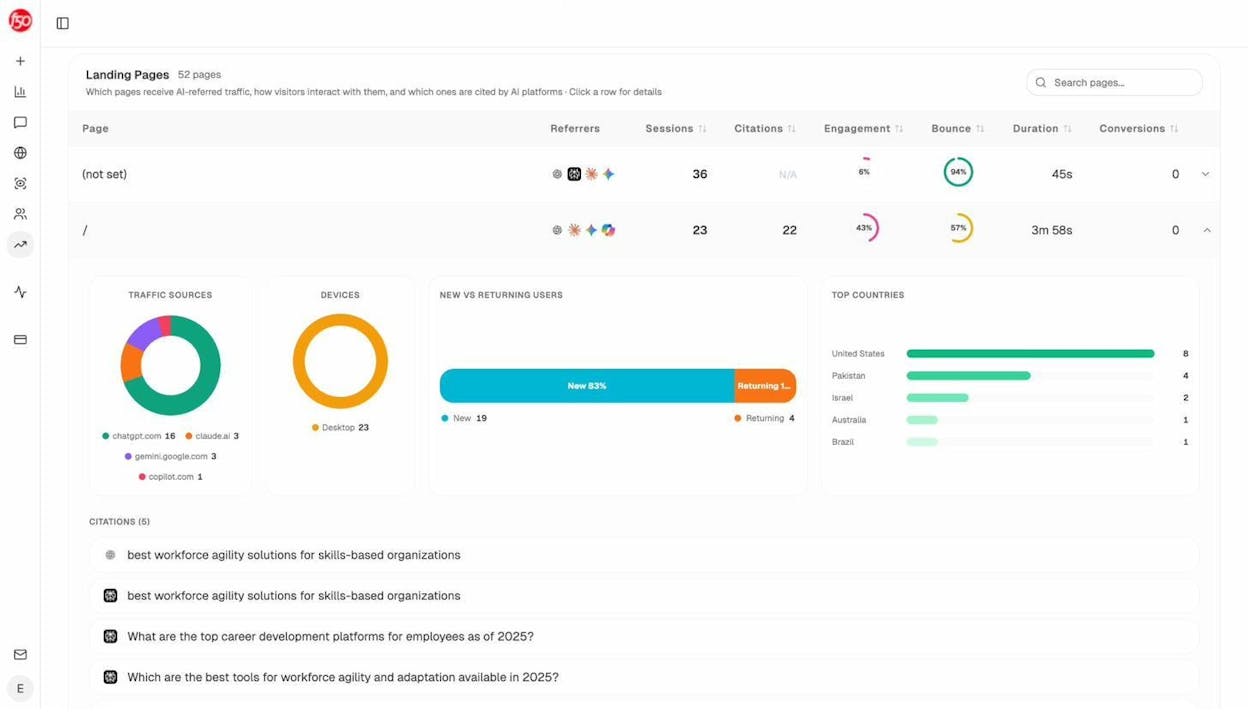
If your CRM comparison page pulled 23 sessions from ChatGPT with 43% engagement and an older blog post pulled 36 sessions but bounced at 94%, you know which patterns to double down on and which pages catch traffic that won’t convert.
Find the competitor gaps your AI keyword list is hiding
The Competitors dashboard surfaces the brands AI engines mention alongside you and the brands they mention without you.
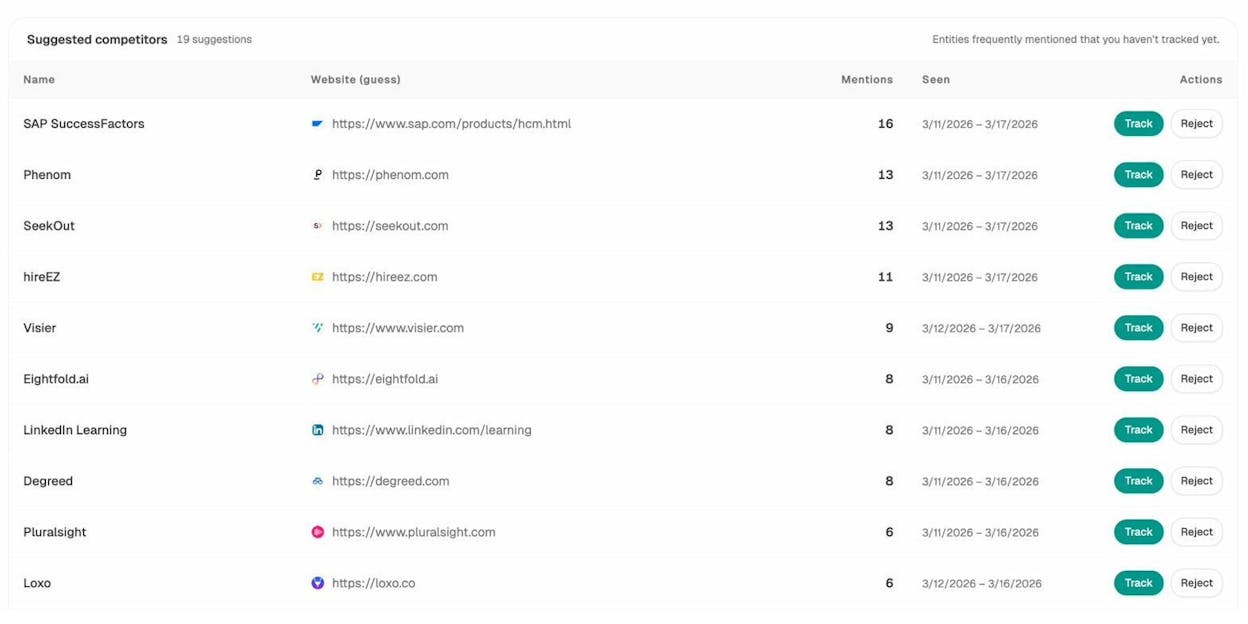
Suggested Competitors lists brands AI engines reference in your category that you may not be tracking yet. Add them, the platform tracks the prompts where they win, and that becomes a working list of where to invest content. The competitor intelligence feature page covers this in depth.
Audit which sources AI engines trust
Citations are the AI search equivalent of backlinks. Sources shows which domains AI engines cite most often when answering questions in your space.
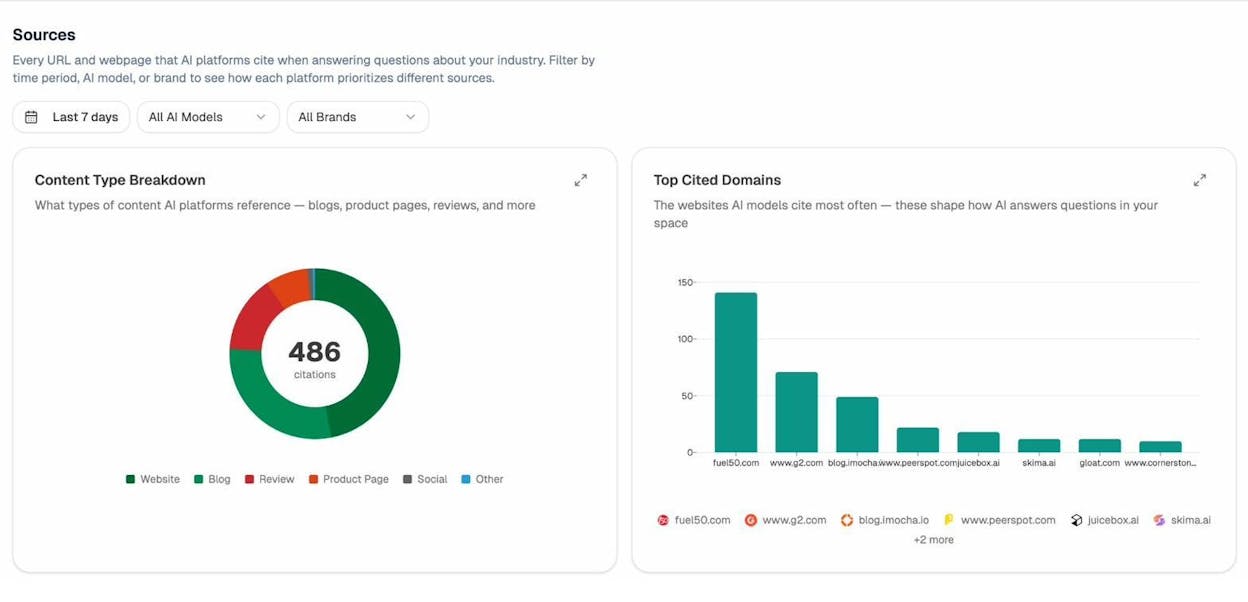
If three review sites get cited 80% of the time, your work is to get on those review sites. If a competitor’s comparison page is cited repeatedly for a prompt you care about, you know what content shape to publish. This is targeted, evidence-based citation strategy.
Build the whole pipeline as an always-on agent
Workflows you have to remember to run quietly stop getting run. The Analyze AI Agent Builder is the substrate underneath the dashboards. 180+ nodes, 34 pre-built data recipes, and direct integrations with GA4, Google Search Console, DataForSEO, Semrush, HubSpot, Notion, WordPress, Slack, and every major LLM. Almost any keyword or content workflow you do manually today can be turned into an agent that runs on a schedule or fires on an event.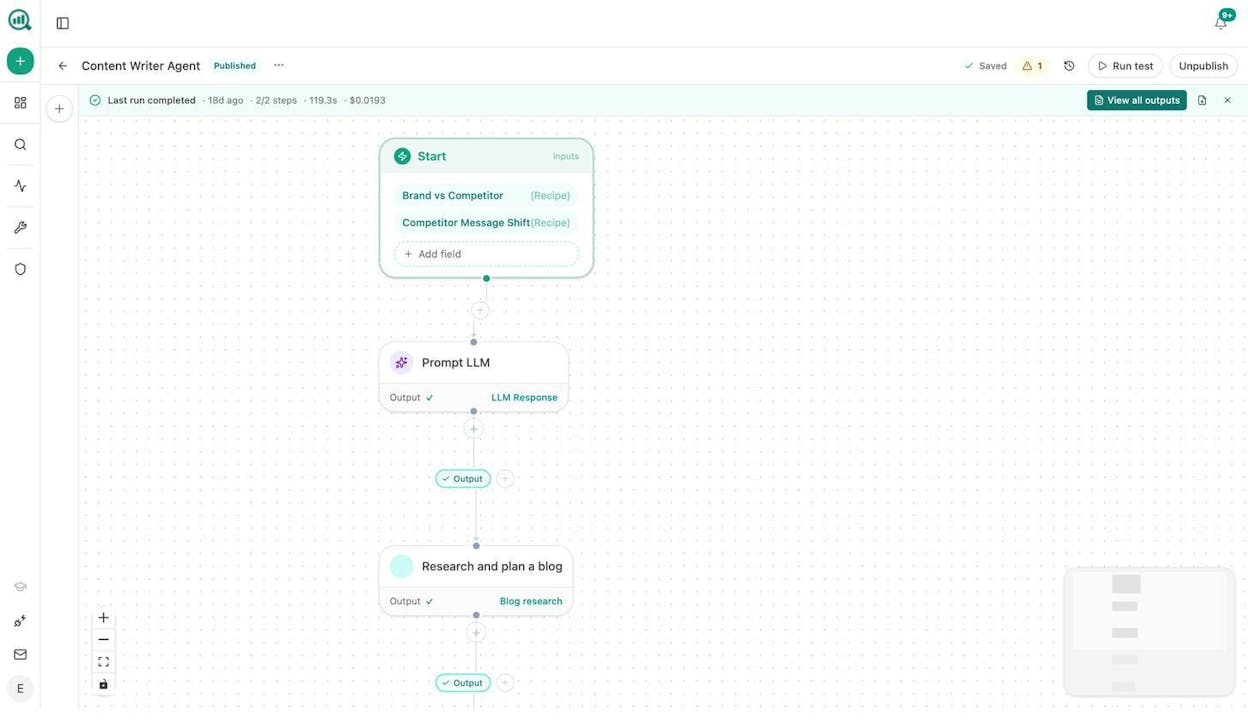
A few examples that map to AI keyword research.
|
Agent |
Trigger |
What it does |
|---|---|---|
|
Weekly keyword opportunity brief |
Monday 7am |
Pulls keyword-opportunities from DataForSEO, competitor-topics from your AI visibility data, and prompt-cluster-brief from uncovered prompts. Outputs a one-page brief to Notion. |
|
Citation magnet finder |
Daily |
Runs the citation graph, flags any domain newly citing a competitor more than three times, sends a Slack alert with the URL and prompts. |
|
Brief-to-publish pipeline |
When a brief moves to “approved” in Notion |
Generates research, outline, full draft using brand voice from the Vault, runs the AEO Content Scorecard, publishes to WordPress only if score passes. |
|
Content refresh fleet |
Weekly |
Pulls stale-content and declining-pages from GA4, rewrites them for AI engine optimization, opens a draft for review. |
These are not templates. They are compositions you build out of primitives, so the surface area is whatever your team can imagine.
From keywords to publishable content
The last gap in most keyword workflows sits between “I have a validated list” and “I have a published page that ranks.” Two parts of Analyze AI close it.
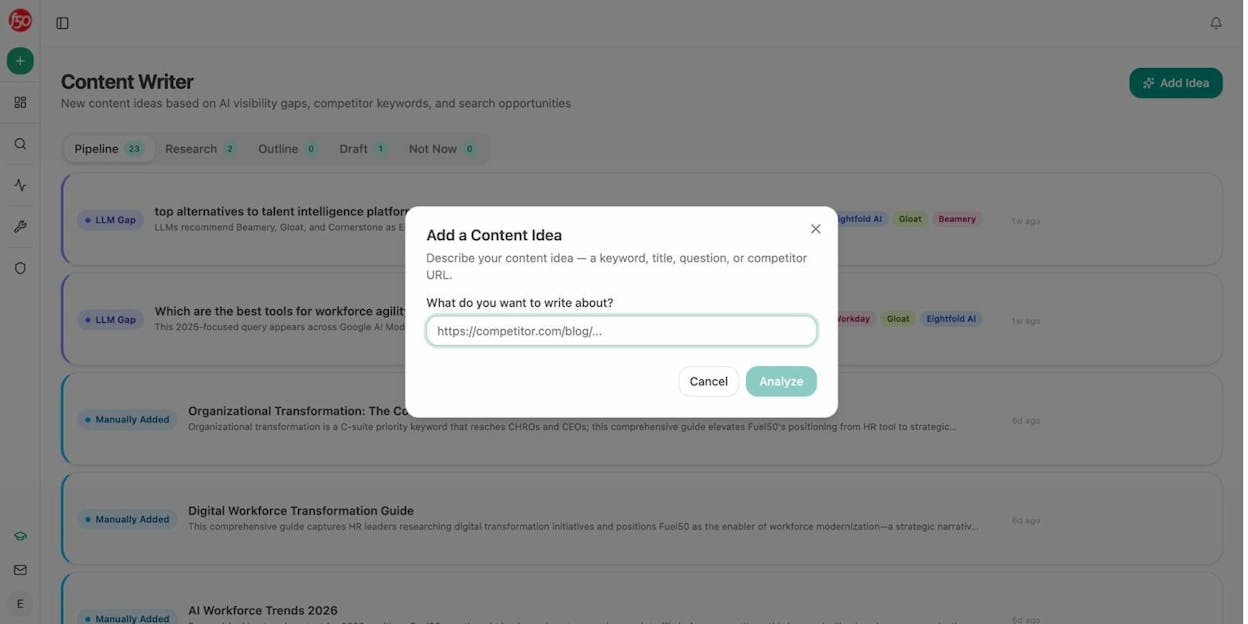
The Content Writer takes a keyword, a competitor URL, or just a topic, runs research against your AI visibility data and the SERP, and produces a brief, an outline, and a full draft in one pipeline. Brand voice is injected from your Vault.
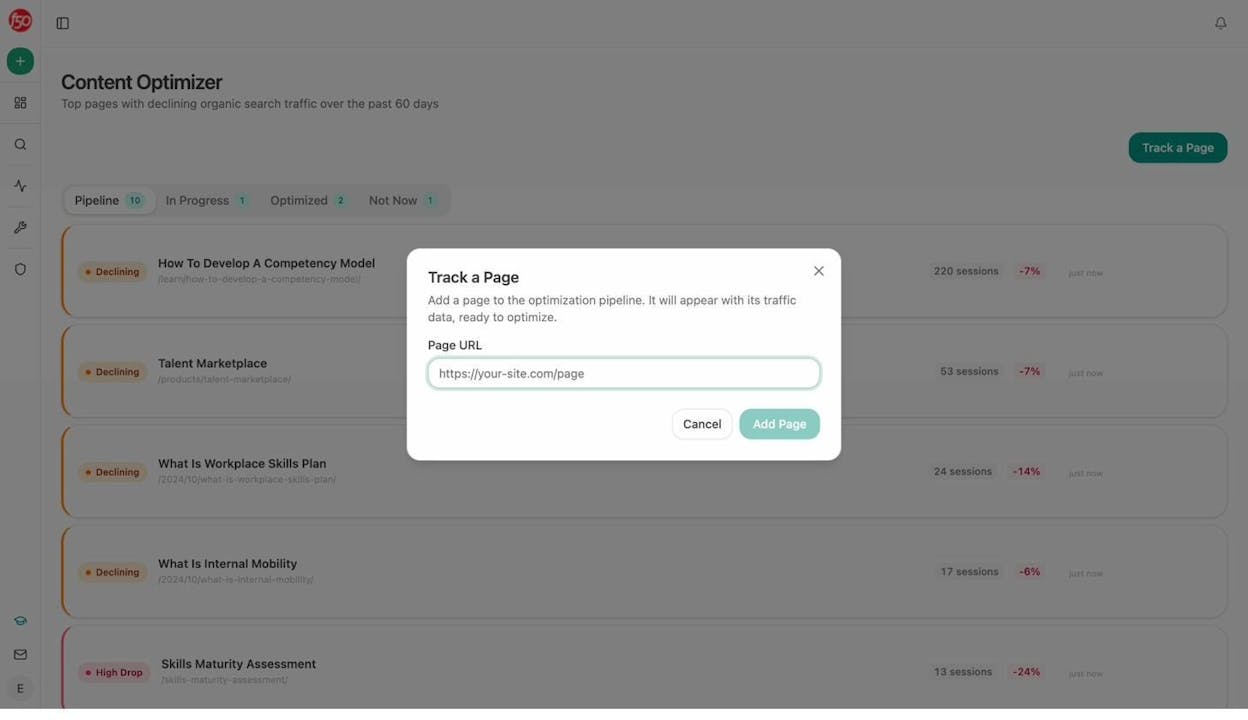
The Content Optimizer does the same for existing pages. Point it at a URL, it audits against AEO criteria, generates a rewrite brief from the gaps, produces an updated draft, and runs a QA pass before anything ships.
The chatbots in this article are upstream tools. They generate the language. Analyze AI is what you use to turn that language into pages that rank in both Google and the AI engines on top of it.
Takeaway
AI keyword research with free chatbots works when you treat each tool as a specialist. ChatGPT is your long-tail engine. Perplexity is your live-language anchor. Claude is your structure tool. Gemini is your question miner. Copilot is your trend spotter. None of them give you volume, so every output runs through a validation pass.
The piece almost no other guide covers is the second keyword surface those chatbots created when they became search engines. Prompt research, citation analysis, and AI traffic attribution are now part of keyword research. Analyze AI is built for that part of the workflow, and the Agent Builder, Content Writer, and Content Optimizer turn the whole pipeline into something that runs itself.
If your keyword list is already strong and your AI search visibility is the gap, that is the part to fix next.

Ernest

Moïse


