



Summarize this blog post with:


In this article, you’ll get an honest breakdown of what Hall AI does well, where it falls short, what its pricing actually looks like once you outgrow the free tier, and how it compares to Analyze AI when you need more than visibility scores to justify your AI search investment.
Table of Contents
What Hall AI Does
Hall AI is a generative engine optimization platform that tracks how your brand appears across AI-generated answers from ChatGPT, Gemini, Claude, Perplexity, Copilot, and others. It monitors brand mentions, sentiment, website citations, and AI agent behavior patterns.
The platform focuses on three surfaces. What AI engines say about you, which of your pages they cite, and how AI crawlers interact with your site. It does not write or optimize content. It does not connect visibility to actual traffic or conversions. It is a monitoring tool.
Hall AI Pros: Three Features Worth Noting
Generative Answer Insights
Hall harvests real answers from supported AI engines and organizes them into a comparable dataset. You can filter by engine, geography, and time window to see where your brand appears, how often, and with what sentiment. Share-of-voice tracking lets you compare your prominence against competitors across models.
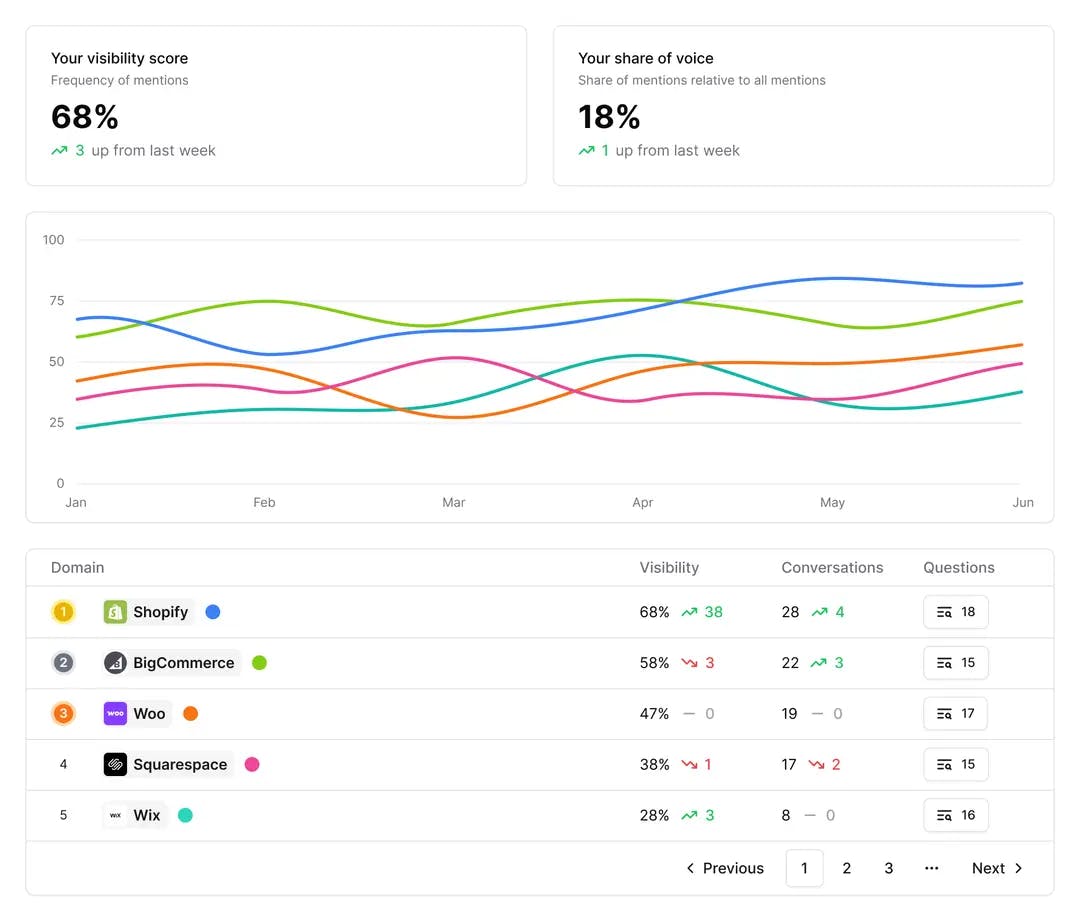
The placement-weight system is a smart touch. Instead of treating every mention as equal, Hall assigns weights based on position and context. A featured recommendation carries more weight than a passing mention in a list. This helps you focus on the mentions that actually shape buyer perception.
Website Citation Insights
Once you know what engines said, Hall traces why by resolving each reference back to a specific URL on your site. It groups citations by content type (documentation, comparison pages, blog posts) and shows which assets travel well across engines versus which ones only get picked up by a single model.
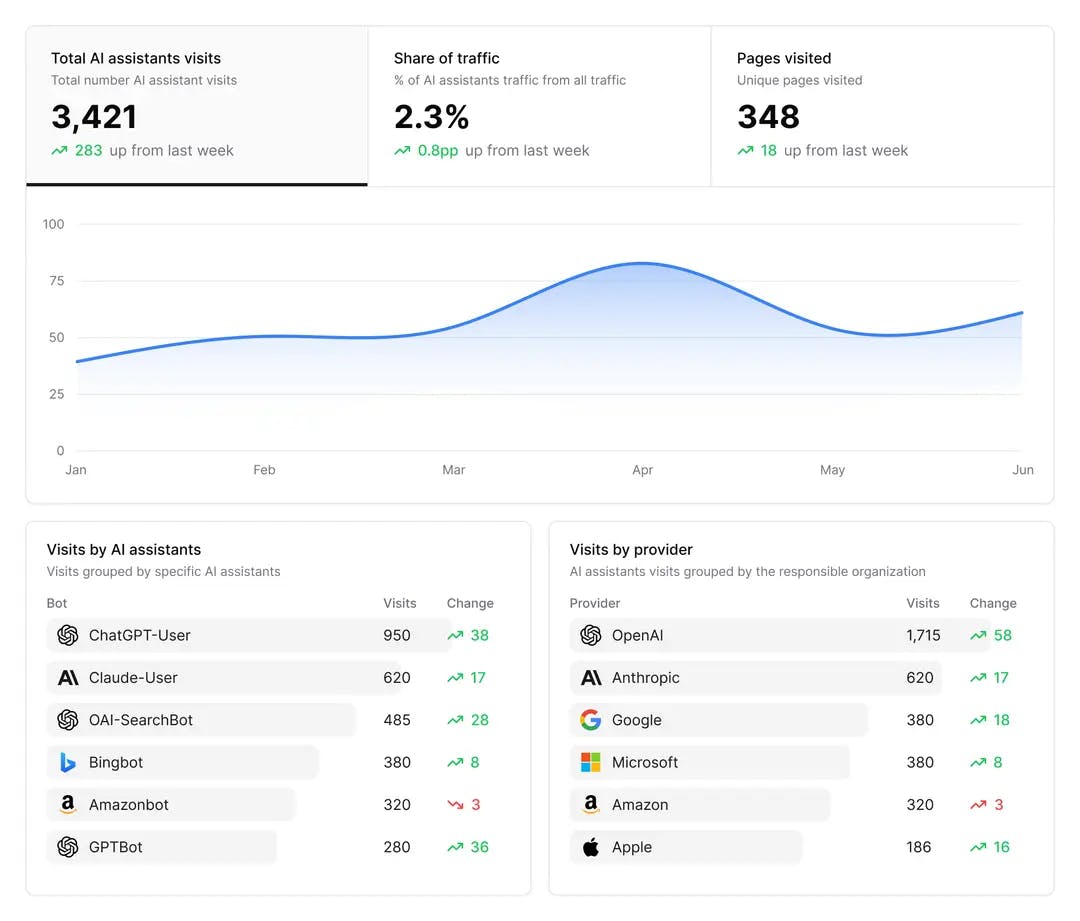
This is where Hall earns its keep for content teams. If your product documentation gets cited by ChatGPT but ignored by Perplexity, you know exactly where to focus your structured data and internal linking improvements.
Agent Analytics
Hall’s agent analytics tracks how autonomous AI agents crawl your site at the session level. You see entry points, crawl depth, and exit routes for identifiable agent families. The platform then correlates these crawl patterns with the answer and citation data, so you can distinguish routine indexing from crawl activity that actually precedes new citations.
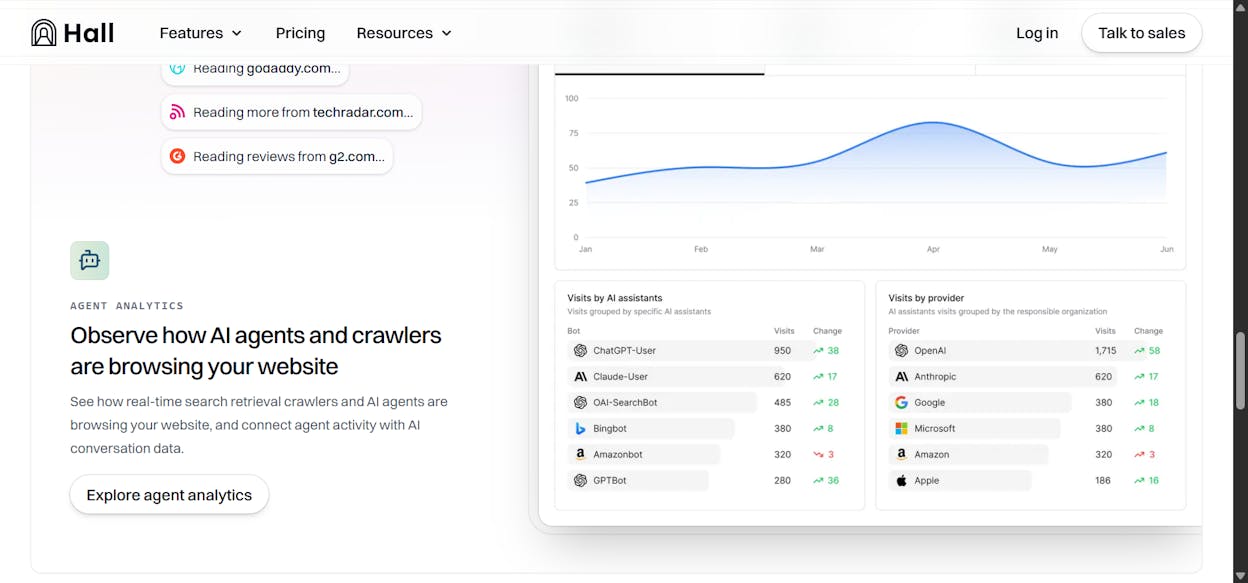
For technical SEO teams, this closes a loop that most AI search monitoring tools leave open. You can adjust robots directives, update sitemaps, or change rendering approaches and then watch whether agent behavior shifts in the next tracking cycle.
Hall AI Cons: Three Limitations That Show Up Fast
Data Coverage Varies by Engine
Hall tracks major engines well. ChatGPT, Gemini, and Perplexity coverage is solid. But visibility drops off for smaller or regional AI systems. Reports can feel patchy when you are trying to benchmark across all engines, and what looks like a visibility gain may just reflect better data collection on one model. Historical data depth is still growing, which makes long-term trend analysis unreliable in some categories.
Most Useful Features Sit Behind Expensive Tiers
Hall’s free plan shows where your brand is mentioned. But full conversation history, competitive benchmarks, and API access require the Business plan ($499/month) or higher. Smaller teams can spot signals but cannot verify what caused them. That gap between “I see something” and “I can act on it” pushes you toward an upgrade before you have enough data to justify the cost.
Usage Caps Break Tracking Continuity
Each plan caps tracked prompts and projects. A single product launch can burn through dozens of prompt slots, and once you hit the ceiling, Hall stops collecting data until you delete old prompts or upgrade. For agencies managing multiple brands, this forces constant trade-offs between keeping historical data for trend analysis and freeing slots for new campaigns.
Hall AI Pricing: What You Actually Pay
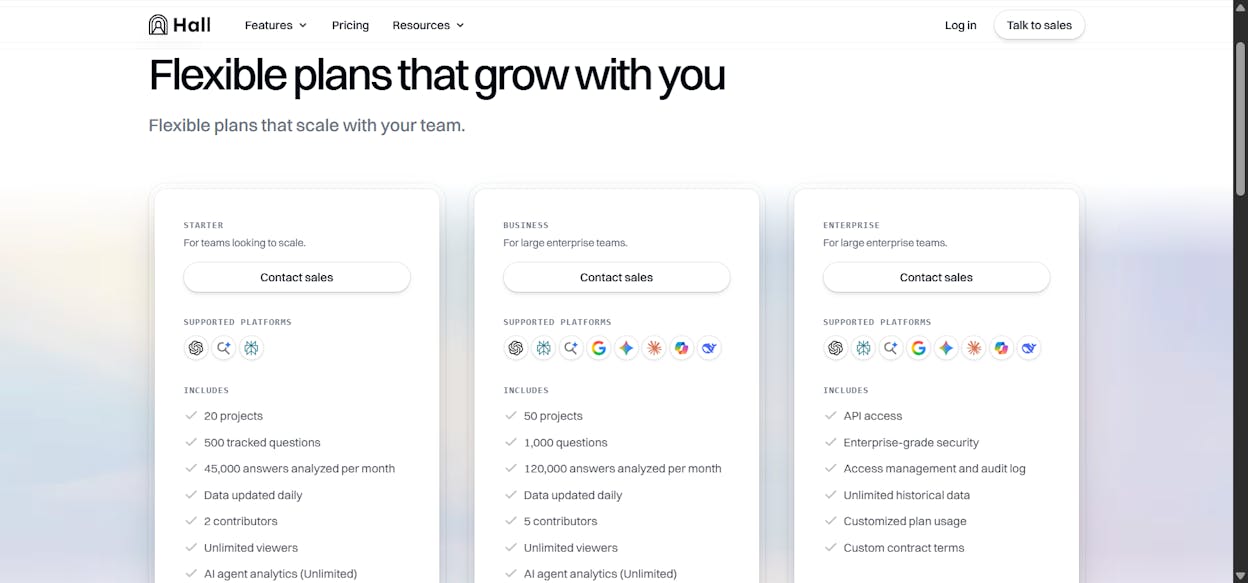
Hall recently moved to a “Contact Sales” model for all paid plans. Based on publicly available data and third-party reviews, here is how pricing has been structured.
|
Plan |
Price |
Projects |
Tracked Questions |
Answers/Month |
Key Limits |
|---|---|---|---|---|---|
|
Lite |
Free |
1 |
25 |
300 |
Weekly updates, 60-day agent data |
|
Starter |
$199/mo |
20 |
500 |
45,000 |
2 contributors, daily updates |
|
Business |
$499/mo |
50 |
1,000 |
120,000 |
5 contributors, full agent analytics |
|
Enterprise |
$1,499+/mo |
Custom |
Custom |
Custom |
API access, SSO, unlimited history |
The free tier is genuinely useful as a test drive. You can confirm whether Hall detects your brand across engines without entering a credit card. But the jump from free to $199/month is steep for small teams, and the features that deliver real operational value (competitive benchmarks, full citation data, API access) live at $499 and above.
For context, Analyze AI’s Growth plan starts lower and includes features like AI Traffic Analytics with GA4 integration, a Content Writer, and a Content Optimizer that Hall does not offer at any tier.
Who Hall AI Is Best For (and Who Should Look Elsewhere)
Hall AI is a good fit if your primary need is monitoring how AI engines talk about your brand and you already have separate tools for content production, SEO research, and traffic attribution. Enterprise brand teams with dedicated analysts who can export data and build reports in external tools will get the most from it.
Hall AI is not a good fit if you need to connect AI visibility to actual website traffic and conversions, if you need to produce or optimize content based on AI search gaps, or if you run an agency managing multiple clients on a budget. In those cases, you need a platform that goes beyond monitoring.
Analyze AI: When You Need More Than Monitoring
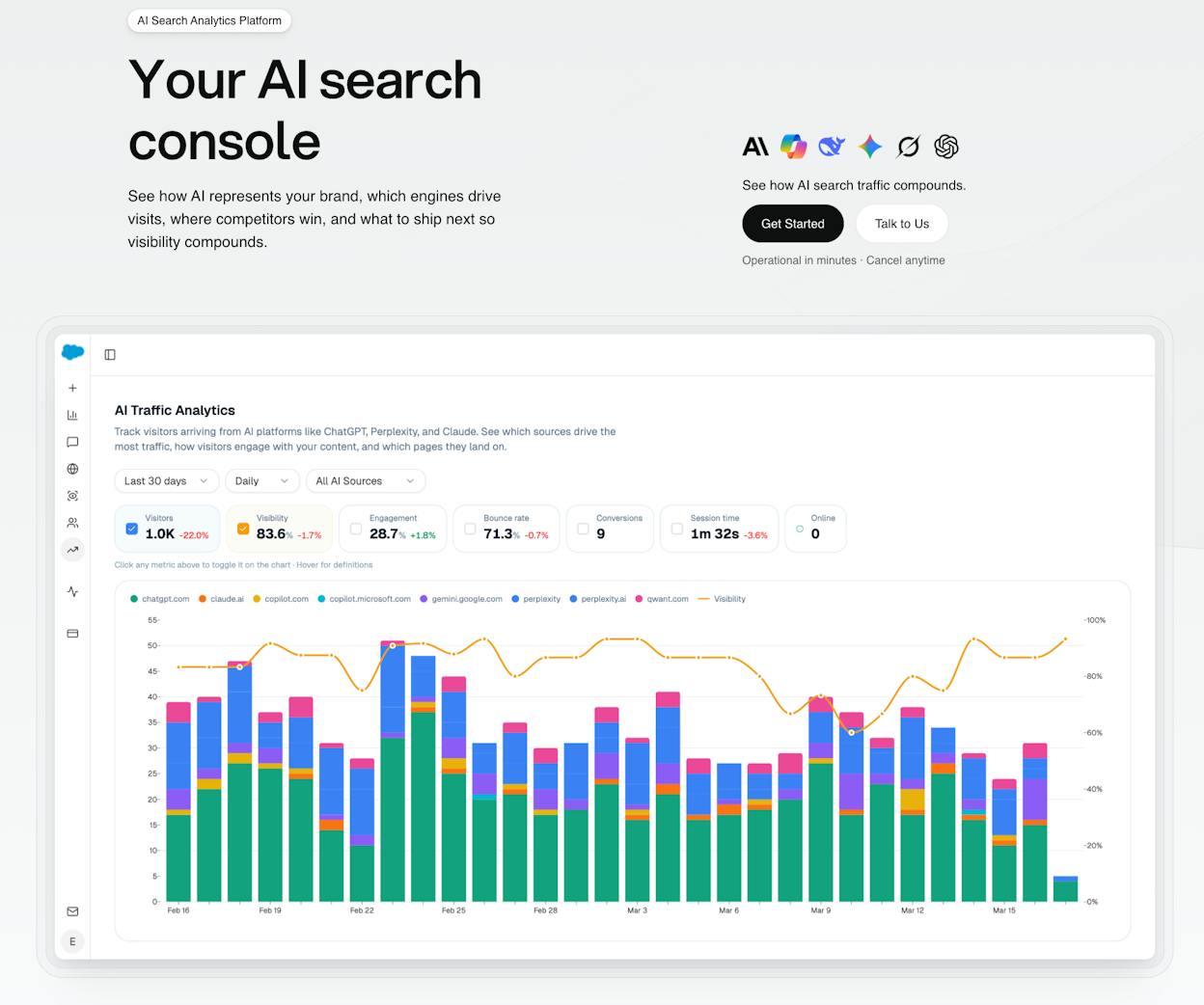
Most GEO tools stop at visibility scores. Analyze AI is an agentic platform for SEO, AEO, content, and GTM operations. It starts with AI visibility tracking and extends into traffic attribution, content production, content optimization, competitive intelligence, and workflow automation through a programmable agent layer.
The distinction matters. Hall AI tells you that your brand was mentioned in a ChatGPT response. Analyze AI tells you that the mention drove 48 sessions to your comparison page, 6 of those sessions converted to trials, and Perplexity outperformed ChatGPT as a referral source by 3x. That is the difference between a monitoring tool and an operations platform.
See Actual AI Referral Traffic, Not Just Mentions
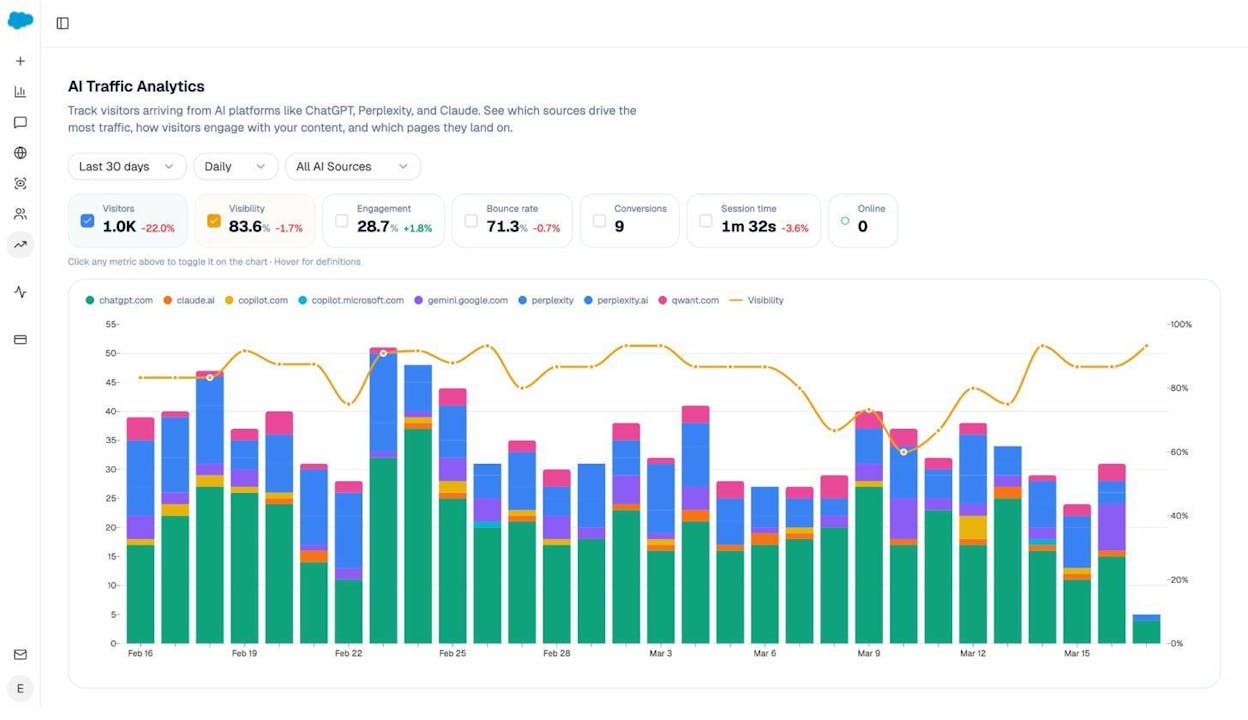
Analyze AI connects to your Google Analytics 4 property and attributes every session from AI engines to its specific source. You see session volume by engine, trends over time, and what percentage of your total traffic comes from AI referrers.
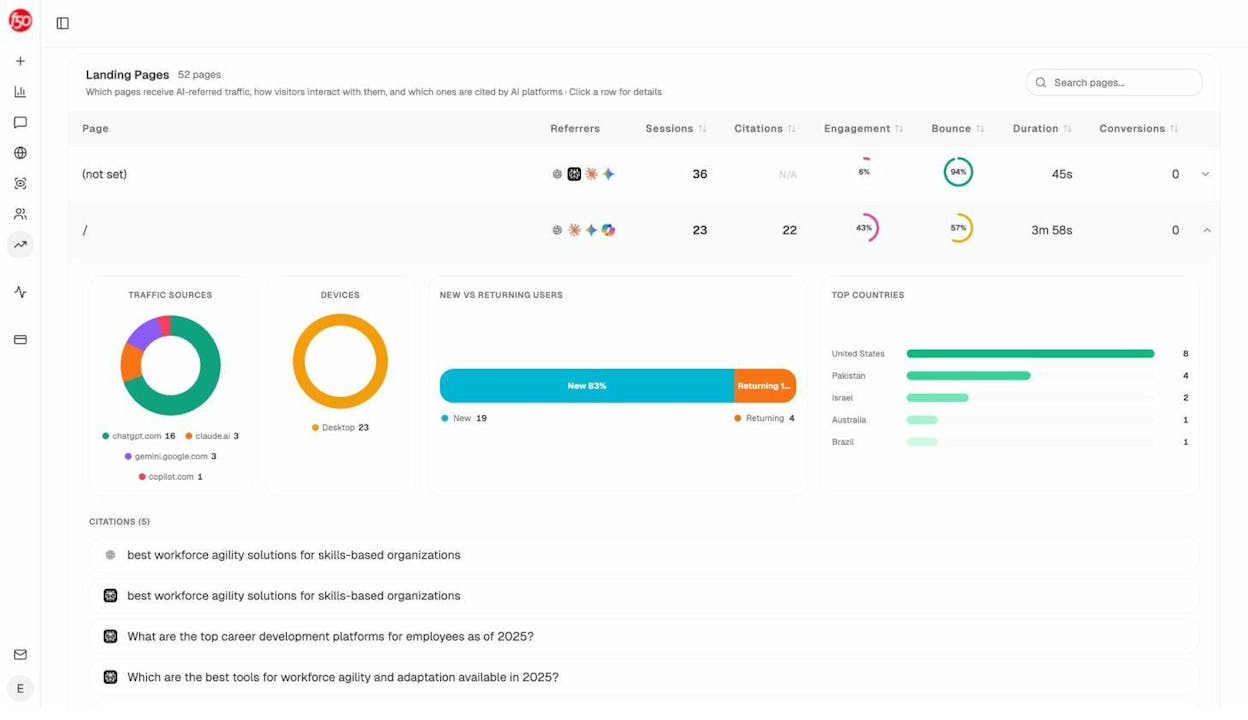
The Landing Pages report shows which pages receive AI referral traffic, which engine sent each session, and what conversion events those visits trigger. When your product comparison page gets 50 sessions from Perplexity and converts 12% to trials, while an old blog post gets 40 sessions from ChatGPT with zero conversions, you know exactly where to invest.
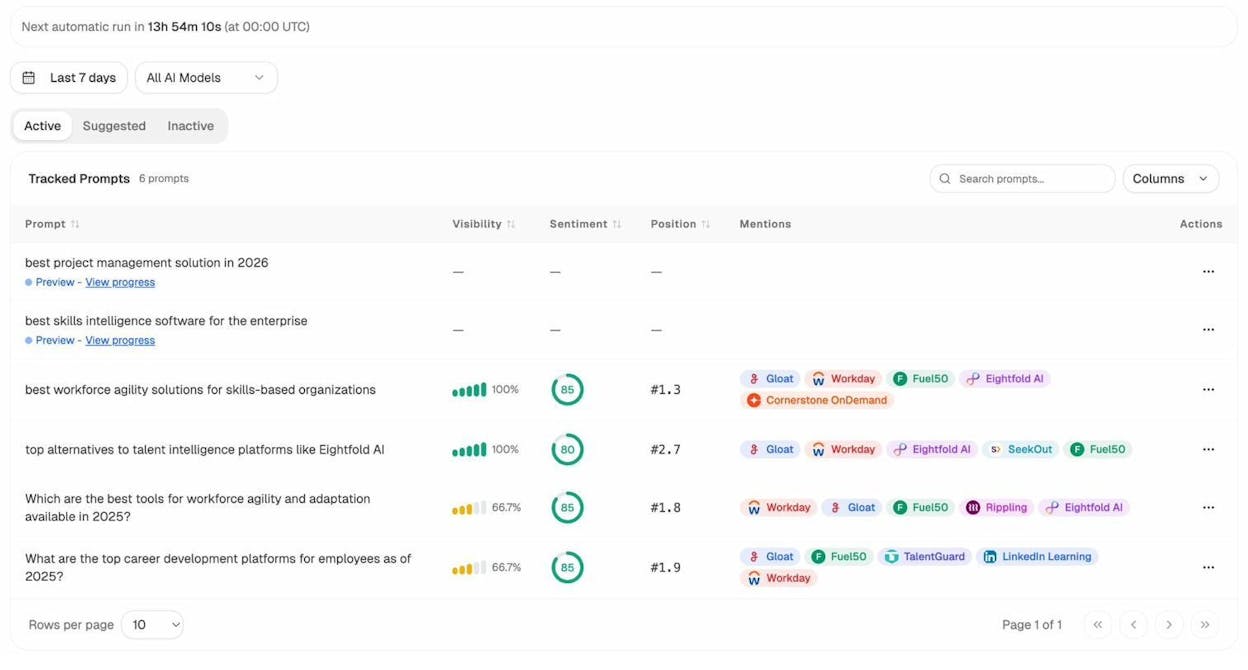
Track the Prompts Your Buyers Actually Use
Analyze AI monitors specific prompts across all major LLMs. For each prompt, you see your brand’s visibility percentage, position relative to competitors, and sentiment score. You can track shifts daily and spot when a competitor overtakes you on a high-value prompt.
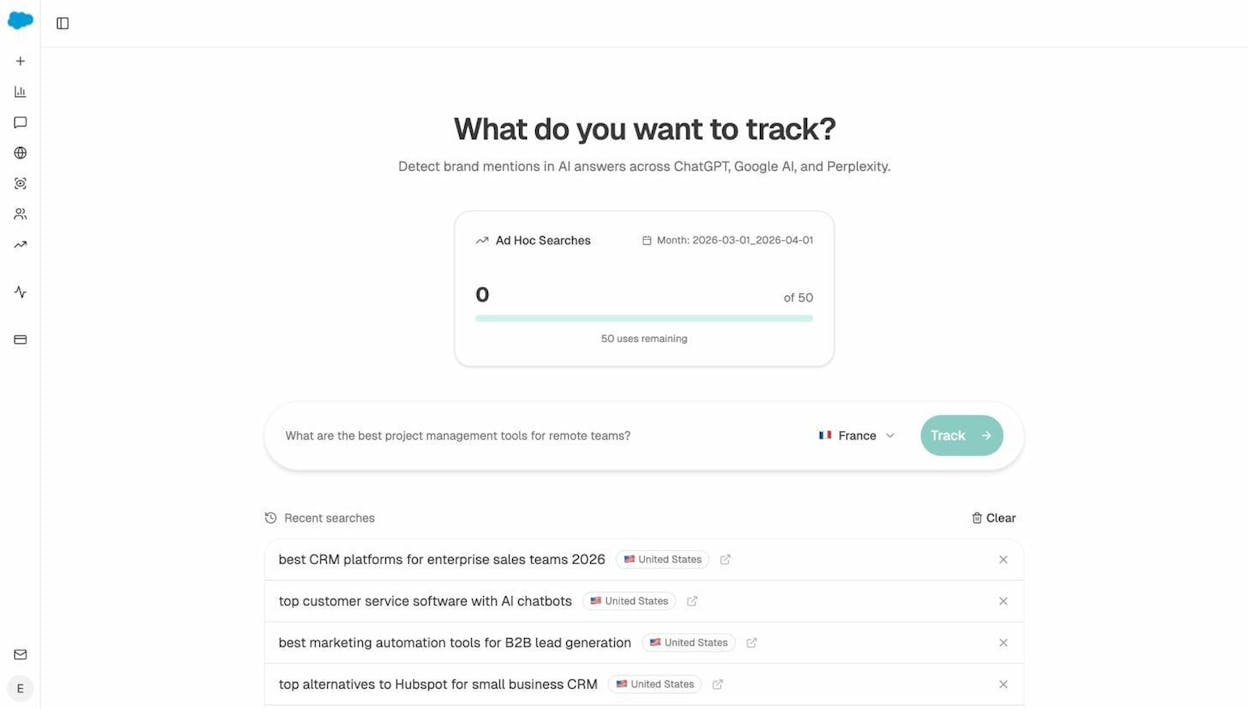
Not sure which prompts to track? The Prompt Discovery feature suggests bottom-of-funnel prompts based on your domain and competitive set. Review them and one-click any that fit. Need to test a phrasing without committing a tracking slot? Ad Hoc Prompt Searches run a one-time check across all engines.
Audit the Sources AI Models Actually Trust
The Sources dashboard reveals which domains and URLs models cite when answering questions in your category. You see usage count per source, which models reference each domain, and when citations first appeared.
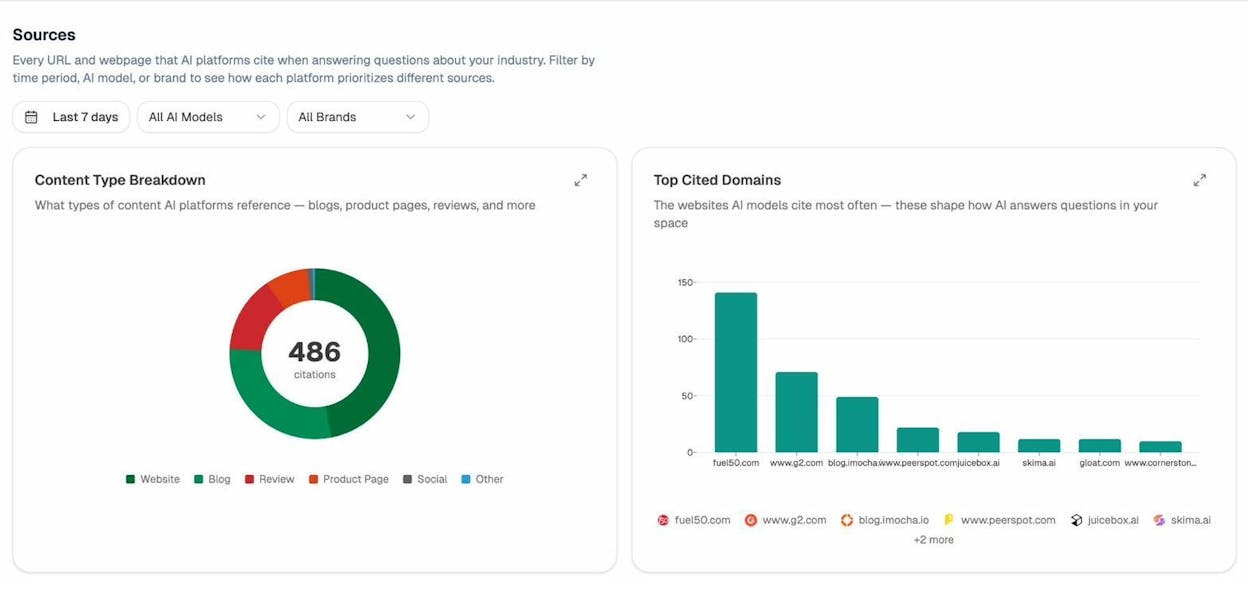
This turns link building from guesswork into targeting. Instead of chasing generic backlinks, you go after the 8 to 12 domains that shape AI answers in your category. You strengthen relationships with publications models already trust, create content that fills gaps in their coverage, and track whether your citation frequency moves after each initiative.
Find Where Competitors Win and You Don’t
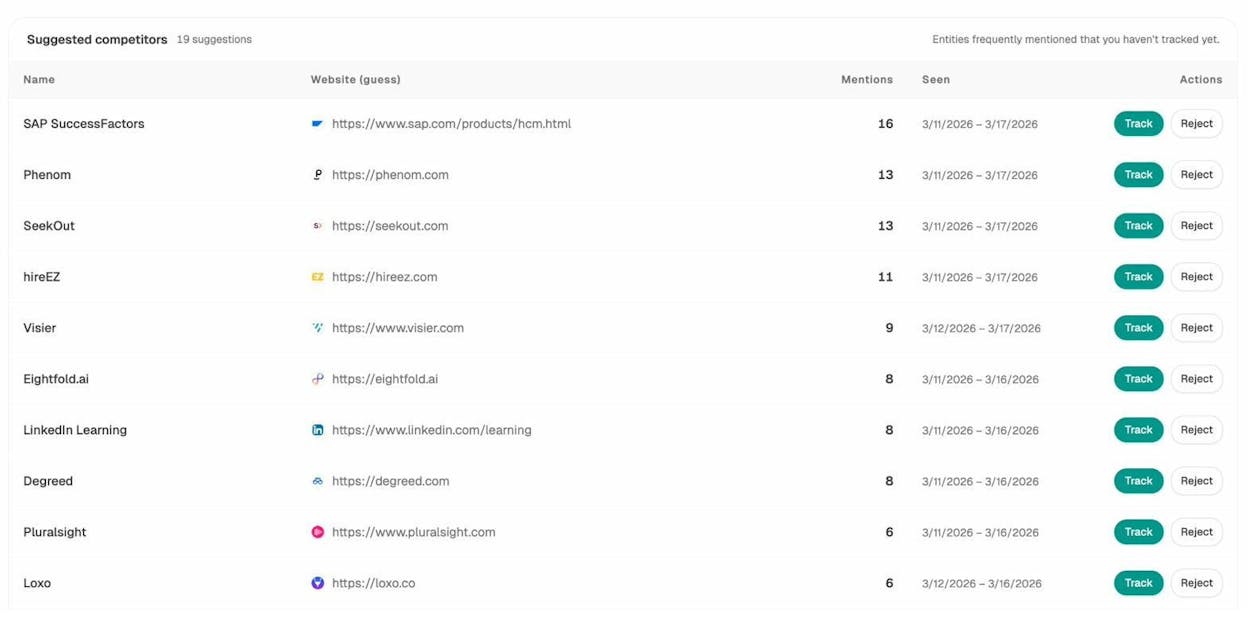
The Competitor Intelligence module shows exactly where competitors appear and you do not, across every tracked prompt and engine. You see head-to-head visibility comparisons, sentiment differences, and the specific prompts where you are losing ground.
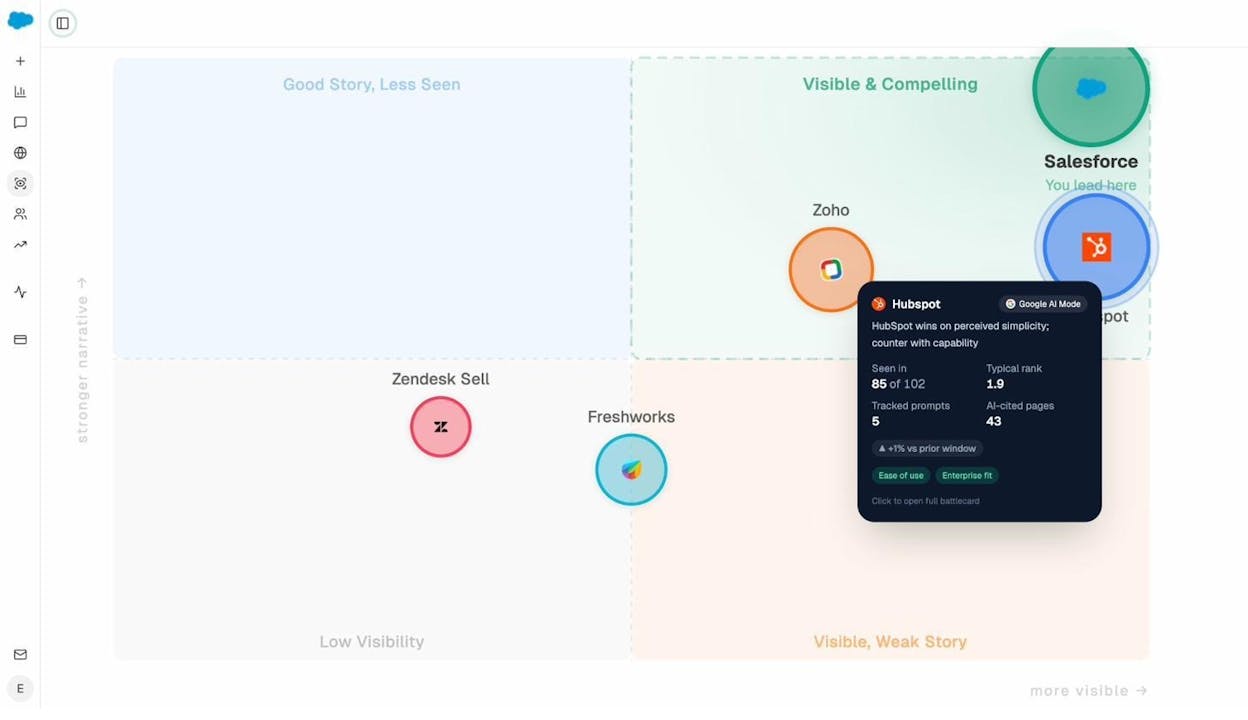
Pair this with AI Battlecards and the Perception Map to see how AI models position your brand relative to competitors on presence and narrative strength. When models consistently describe a competitor as “best for enterprise” but only mention you in lists, you know the narrative needs work, and you know exactly which prompts to target.
Write and Optimize Content That Ranks in AI Search
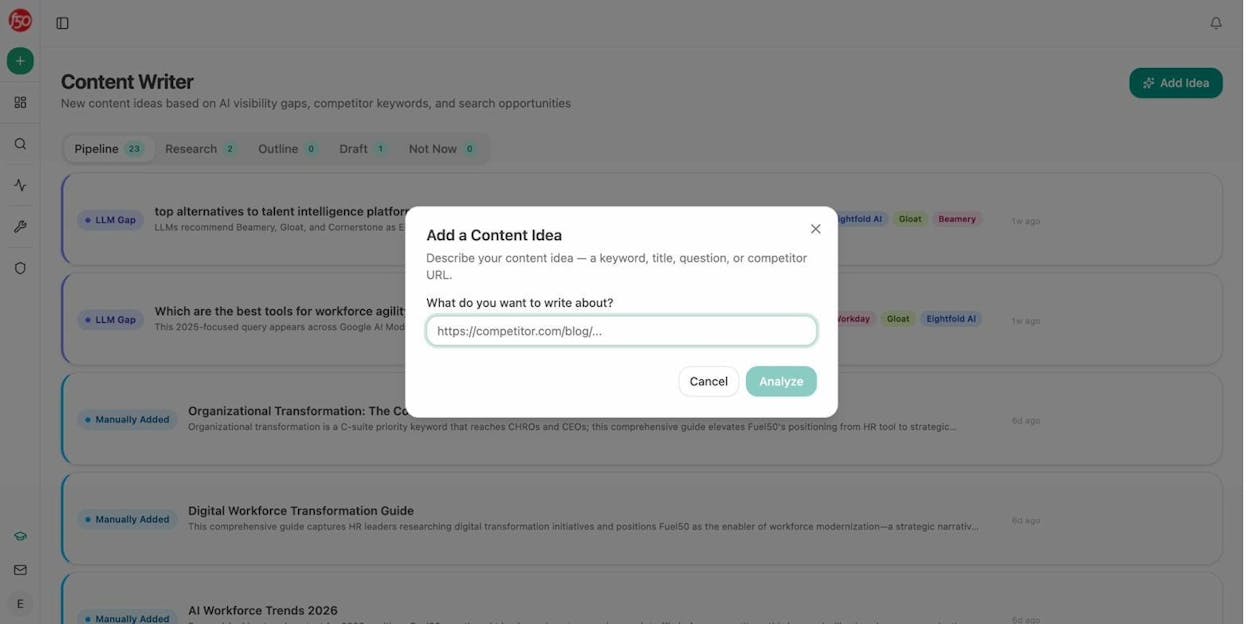
Hall AI does not produce content. Analyze AI includes a full Content Writer and Content Optimizer pipeline.
The Content Writer runs a four-step process. Idea capture, research with inline editorial comments, outline generation, and full draft production. Every step is a discrete artifact you review before the next one starts. The system pulls source material, competitor coverage, and prompt-level performance data so your content is grounded in real AI search gaps.
The Content Optimizer scores your existing content across argument, flow, clarity, and polish, then leaves line-by-line comments that read like a senior editor reviewed the page. Each comment is specific and actionable, not generic suggestions.
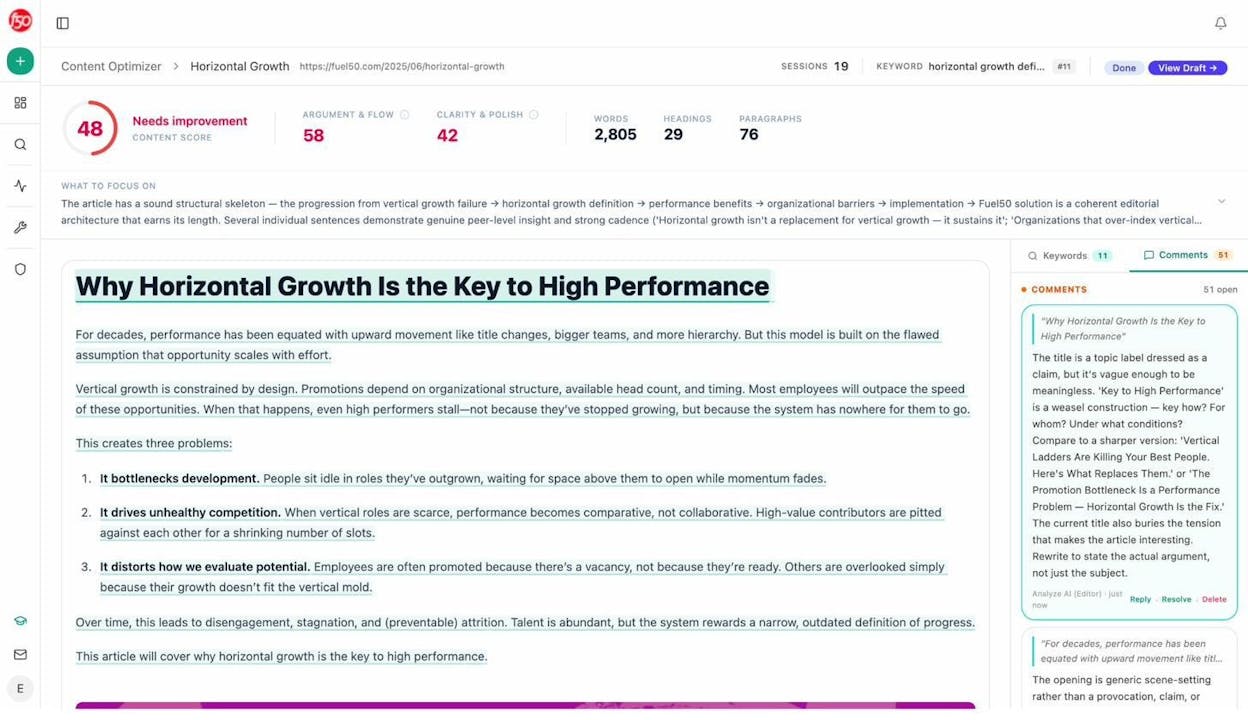
Both tools produce measurably better outputs because they ground every recommendation in your tracked AI search data, your brand voice (via the Knowledge Base), and competitive gaps. This is not a generic AI writer. It is a writer that knows your market.
Automate Everything Else with Agent Builder
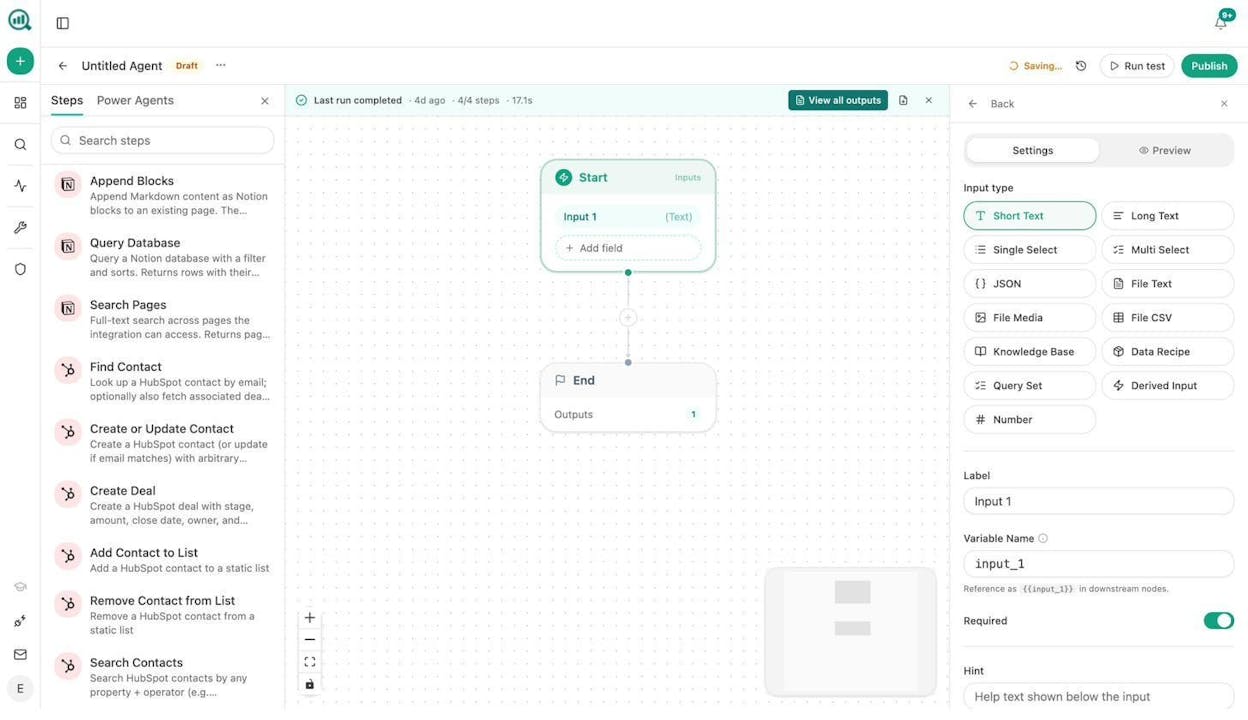
This is where Analyze AI pulls away from every tool in the category. The Agent Builder is a programmable substrate with 180+ nodes, 34 pre-built data recipes, 13 input primitives, and three trigger modes (manual, scheduled, webhook).
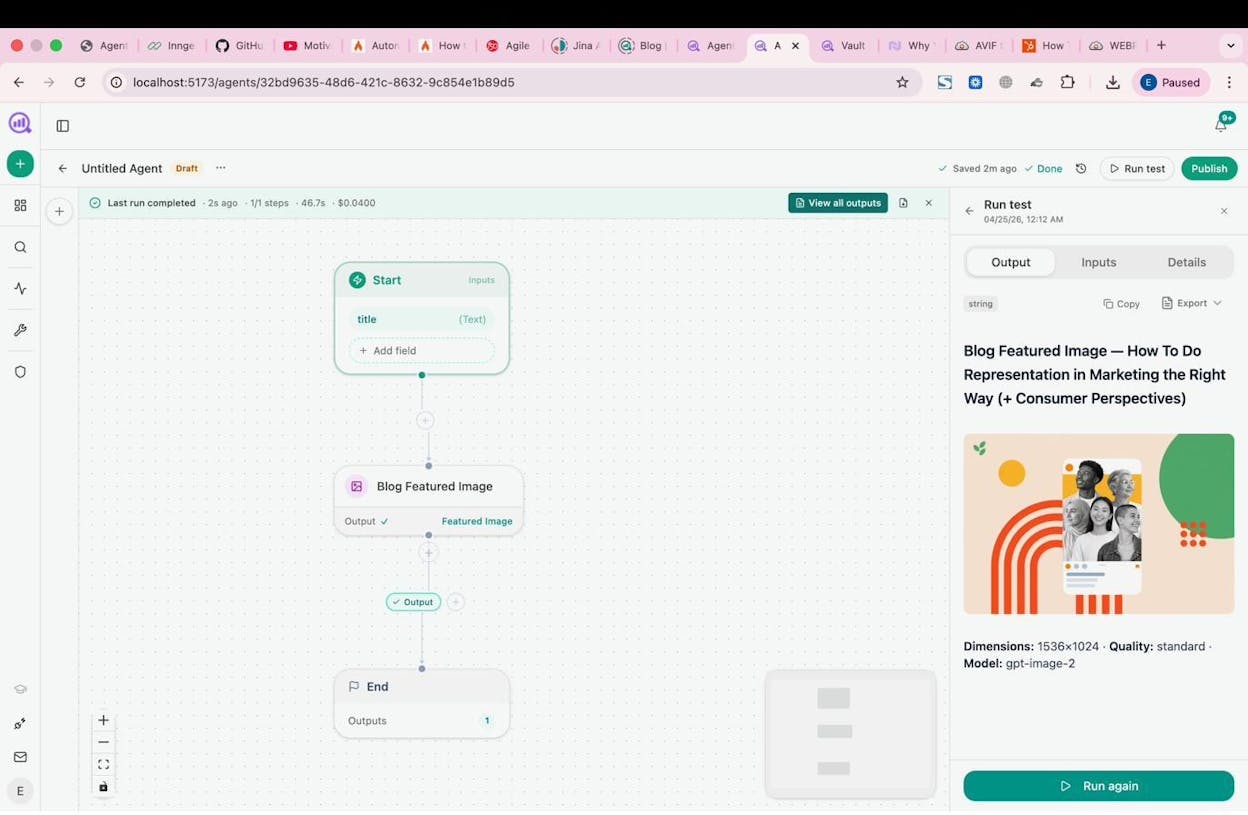
It is not just an automation layer. It has direct integrations with GA4, Google Search Console, DataForSEO, Semrush, HubSpot, Notion, WordPress, Contentful, Mailchimp, and every major LLM. That means you can build workflows that connect AI visibility data to content production, CRM updates, Slack alerts, email campaigns, and competitive monitoring in a single flow.
Here is what teams actually build with it:
CMOs set up a Monday morning agent that pulls share-of-voice data, GA4 traffic, new HubSpot deals, and AI visibility trends, assembles an executive summary in the brand’s voice, exports it as a DOCX, and emails it to leadership before anyone asks for it.
Agencies build a single workflow that generates client-ready reports for every account on the roster. One agent, looped over a client list, replaces the “Sarah, do the Acme report” production line entirely.
Content teams wire a brief-to-publish pipeline that triggers when a brief moves to “approved” in Notion. The agent generates research, outline, and full draft with brand voice injected, runs an AEO content scorecard, and publishes to WordPress if the score passes. If it fails, it sends the gaps to Slack.
PR teams set up a crisis early-warning agent that runs every 15 minutes, checks brand mentions and news, and alerts the team the moment negative coverage appears. The response brief is already drafted by the time the team reads the Slack message.
These are not templates you pick from a menu. You compose from primitives. The practical surface area is in the millions of possible configurations. If a task involves data that exists in your marketing stack, you can build an agent to handle it.
Weekly Email Digests Keep You Informed Without Logging In
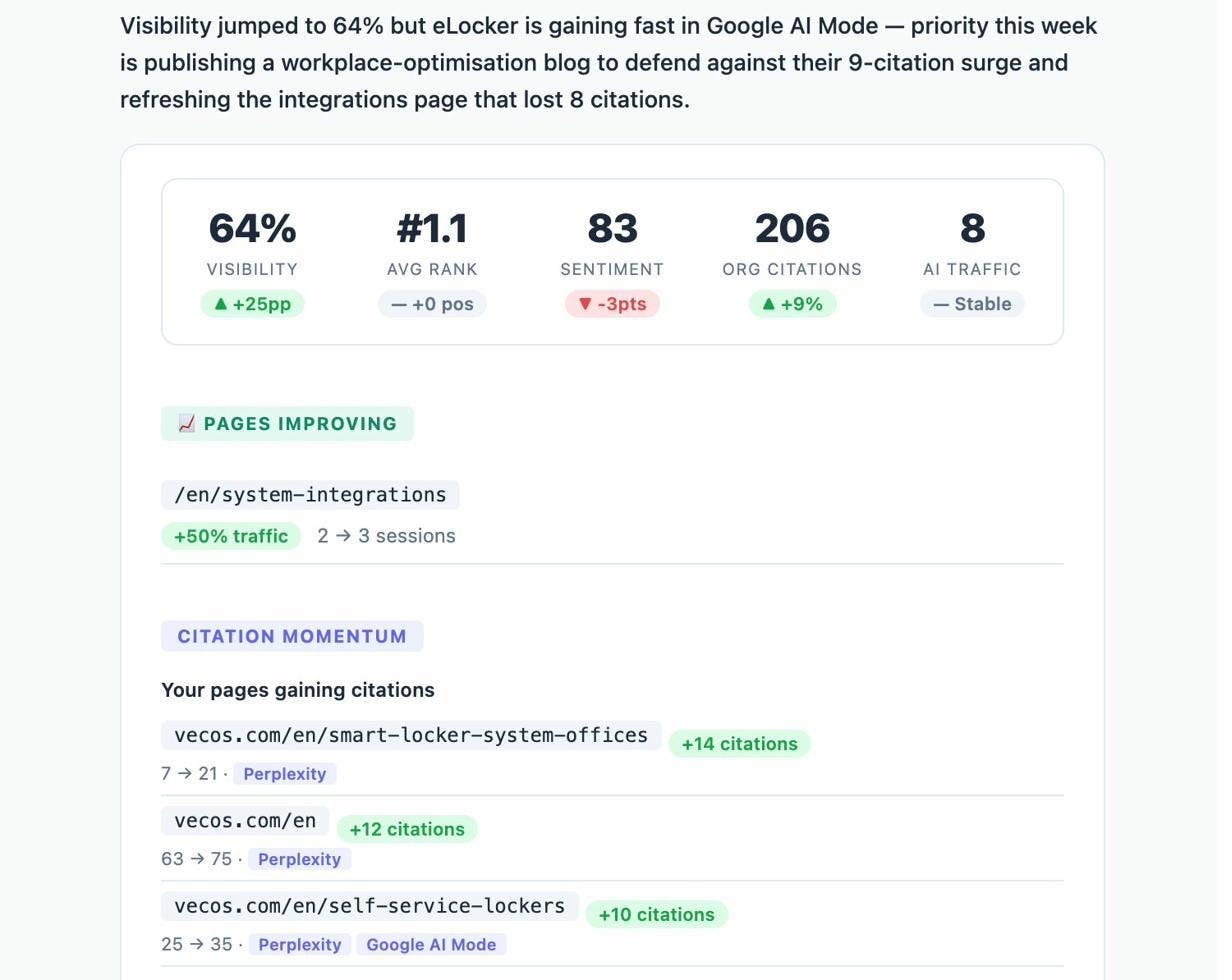
Analyze AI sends Weekly Email Digests that summarize your AI visibility changes, top-performing prompts, competitor movements, and citation shifts. You stay informed without opening the dashboard.
Hall AI vs. Analyze AI: Side-by-Side Comparison
|
Capability |
Hall AI |
Analyze AI |
|---|---|---|
|
AI visibility tracking |
Yes (5+ engines) |
Yes (ChatGPT, Google AI Mode, Perplexity + add-ons) |
|
Sentiment monitoring |
Yes |
Yes (AI Sentiment Monitoring) |
|
Citation analytics |
Yes |
Yes (Citation Analytics) |
|
AI agent/crawler analytics |
Yes |
No |
|
AI traffic attribution (GA4) |
No |
Yes |
|
Landing page conversion tracking |
No |
Yes |
|
Content Writer |
No |
Yes (4-step pipeline) |
|
Content Optimizer |
No |
Yes (line-by-line editorial) |
|
Agent Builder / workflow automation |
No |
Yes (180+ nodes, 34 data recipes) |
|
CRM integration (HubSpot) |
No |
Yes (26 nodes) |
|
SEO research (DataForSEO, Semrush) |
No |
Yes (34+ nodes) |
|
Prompt suggestion engine |
No |
Yes |
|
Ad hoc prompt searches |
No |
Yes |
|
Perception Map / Battlecards |
No |
Yes |
|
Weekly email digests |
No |
Yes |
|
Free tools (Keyword Generator, SERP Checker, etc.) |
No |
Yes (10+ free tools) |
|
Unlimited seats |
Yes (all plans) |
Yes (all plans) |
|
Starting price |
$199/mo (Starter) |
Lower entry point with more features included |
The Bottom Line
Hall AI is a solid monitoring tool for teams that need to track how AI engines talk about their brand. Its citation insights and agent analytics are genuinely useful, and the free tier gives you a meaningful preview. But it stops at monitoring. It does not connect visibility to traffic. It does not help you create or optimize content. And it does not automate the workflows that turn AI search data into action.
If AI visibility monitoring is one piece of a stack you already have, Hall AI fills that gap. If you need a platform that covers the full loop from visibility to traffic to content to action, and you need an agent layer that can replace half the manual processes in your marketing org, Analyze AI is built for that.
You can also check out our detailed comparison of the best Hall AI alternatives if you want to evaluate more options in this space.

Ernest

Ibrahim


![7 LLMrefs Alternatives That Do More Than Track Mentions [2026]](/_next/image?url=https%3A%2F%2Fwww.datocms-assets.com%2F164164%2F1779313840-blobid0.png&w=3840&q=75)


