



Summarize this blog post with:


In this article, you’ll get an honest breakdown of Otterly AI’s features, pricing, and real limitations after extended use. You’ll see exactly where the tool delivers value, where it stops short, and why tracking AI visibility is only useful if you can connect it to traffic, revenue, and action. You’ll also learn how Analyze AI fills the gaps Otterly leaves open, from AI traffic attribution to agentic workflows that automate the work most visibility tools leave on your plate.
Table of Contents
What Otterly AI Actually Does
Otterly AI is a GEO (Generative Engine Optimization) monitoring platform. You give it prompts, and it runs them across ChatGPT, Perplexity, Google AI Overviews, Gemini, and Microsoft Copilot. For each prompt, the tool captures the full AI-generated response, logs which domains were cited, and tracks whether your brand appeared.
Over time, Otterly builds a history of those responses so you can see how your visibility changes. It also offers a GEO Audit feature that evaluates your pages for AI-readiness, plus reporting dashboards you can export to Looker Studio.
That is genuinely useful. But the question every team eventually asks is not “are we visible?” It is “what do we do about it?”
That is where the story gets more complicated.
Otterly AI Pros: Three Features That Work
Prompt Monitoring Across AI Engines
Otterly’s core strength is structured prompt tracking. You define the queries that matter to your brand, and the platform runs them daily across multiple engines.
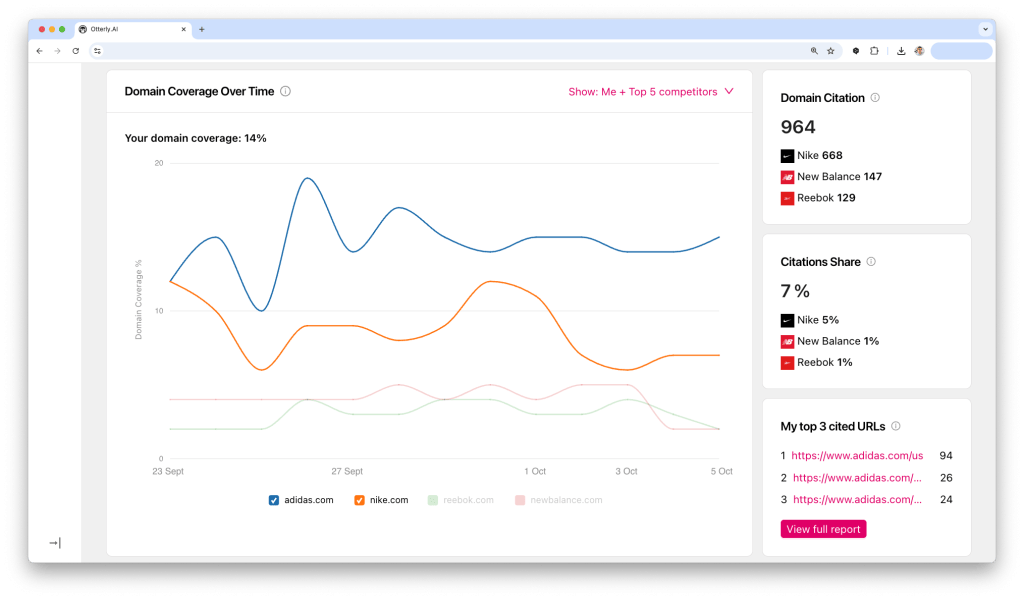
Each run captures the full text of the AI response, not just a snippet. That means you can examine exactly what a buyer would see when they ask ChatGPT “best CRM for mid-market companies” and whether your brand showed up. The historical record lets you trace changes over time, which is useful for spotting when a competitor starts appearing or when an algorithm update shifts results.
For teams new to AI search visibility tracking, this is a solid starting point. You go from “we have no idea what AI engines say about us” to structured, repeatable data in about 15 minutes.
Citation and Source Analysis
The second layer is Otterly’s citation tracking. For every captured response, the tool parses which URLs the AI model referenced and ranks domains by frequency.
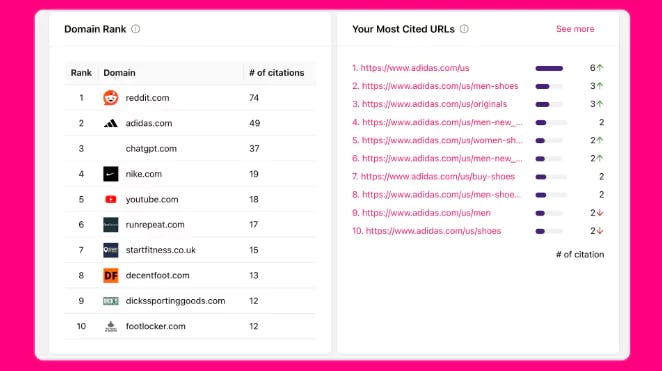
This turns opaque AI responses into a competitive map. You can see which domains ChatGPT trusts most in your category, which competitors consistently earn citations, and which of your own pages show up. The tool also flags unlinked mentions and hallucinated claims, giving PR and comms teams an early warning system for brand misinformation.
If you want to understand the sources that shape AI answers in your space, this feature delivers.
GEO Audits
Otterly’s GEO Audit tool evaluates individual pages for factors correlated with AI citation. It checks content depth, structure, freshness, and relevance to the prompts you are tracking. When certain prompts consistently skip your brand, the audit helps identify whether the gap is topical coverage, content structure, or weaker authority signals compared to competitors.
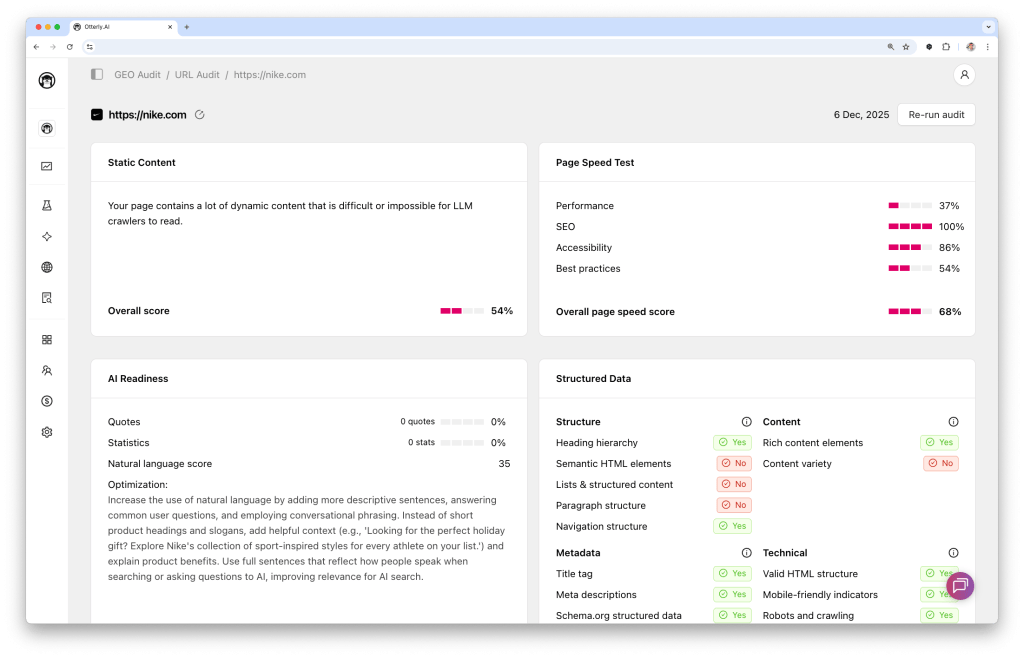
The audit output is clear enough to hand directly to a content team with a brief like “this page needs more structured data and a clearer answer to the query in the first 200 words.” For content teams optimizing for both SEO and AI search, this bridges the gap between “we know we’re invisible” and “here’s what to fix first.”
Otterly AI Cons: Three Limitations That Matter
Data Refresh Delays Slow Down Decision-Making
Otterly’s monitoring runs on scheduled crawl cycles. Each cycle queries multiple engines, stores full responses, extracts citations, and rebuilds dashboards. That process ensures accuracy but introduces lag.
Users report waiting hours or sometimes days for updates after editing prompts or after a major model change. If you just launched a campaign and want to check whether ChatGPT started mentioning you, you may still see last week’s data. For strategic, monthly reporting, the delay is tolerable. For tactical decisions (“should we push this content live today?”), it forces you to work with stale information.
Prompt-Based Pricing Gets Expensive Fast
This is the limitation most teams underestimate. Otterly charges per prompt, per engine. Track 100 prompts across five engines, and you have consumed 500 capture events. The Standard plan at $189/month includes 100 prompts, but that ceiling arrives quickly once you start covering multiple product lines, regions, or competitor sets.
Add-ons compound the issue. Gemini and Google AI Mode are not included in base plans. They cost $9 to $149 per month extra, depending on your tier. So the headline price of $189/month can realistically become $300+ before you have full engine coverage.
|
Plan |
Monthly Price |
Prompts Included |
Key Limitation |
|---|---|---|---|
|
Lite |
$29 |
15 |
Too few for real monitoring |
|
Standard |
$189 |
100 |
Gemini and AI Mode cost extra |
|
Premium |
$489 |
400 |
Still no Gemini/AI Mode in base |
|
Enterprise |
Custom |
Custom |
Requires sales call |
For agencies managing multiple clients, this math becomes a serious budget conversation. Each client needs its own prompt set, and 100 prompts spread across five clients means 20 per client. That is barely enough to cover one product category.
It Tracks Visibility but Doesn’t Connect It to Revenue
This is the fundamental gap. Otterly tells you that your brand appeared in a Perplexity answer. It does not tell you whether anyone clicked through. It does not show you which landing pages receive AI-referred traffic, what those visitors did next, or whether any of it converted.
You end up with a visibility score that looks good in a slide deck but cannot answer the CFO’s question: “Is this channel generating pipeline?”
Otterly is also not an SEO tool. There are no site crawlers, no backlink analysis, no keyword tracking for traditional search. You need to run Otterly alongside your existing SEO stack, which means another dashboard, another login, and manual work to reconcile AI visibility data with organic performance. For teams building an AI visibility strategy alongside SEO (as they should), that fragmentation creates blind spots.
Otterly AI Pricing: Is the Investment Justified?
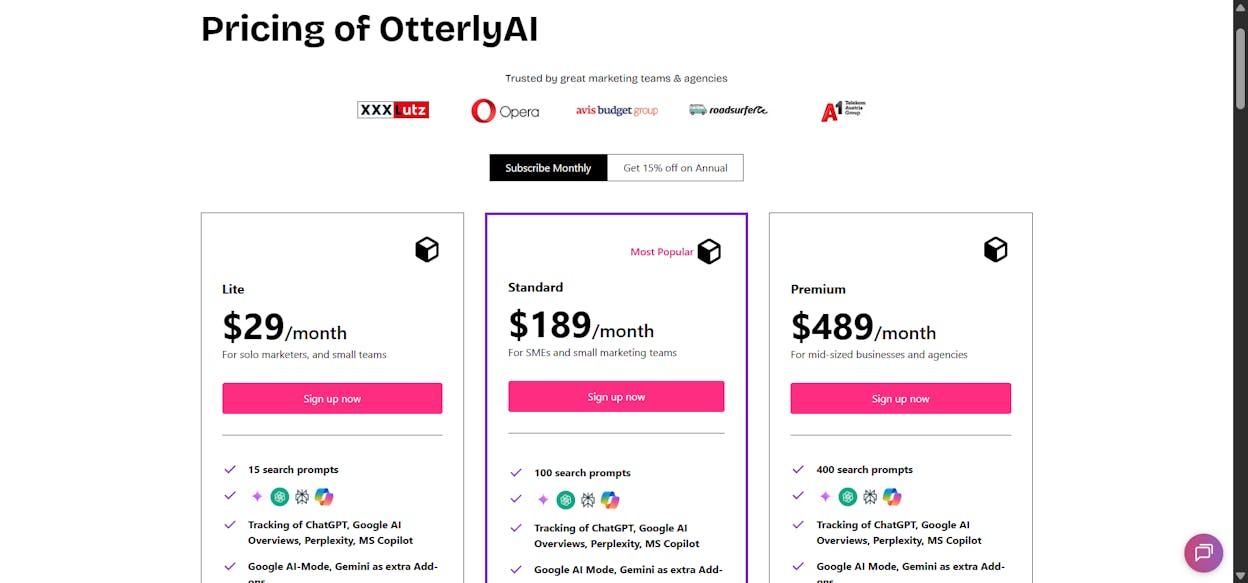
Otterly’s pricing is transparent, which is genuinely refreshing in this category. Every tier gets the full feature set. The only variable is prompt volume. That simplicity is the good part.
The bad part is the math we outlined above. Per-prompt pricing rewards discipline but punishes exploration. Teams that want to test broadly across categories, markets, or competitor sets run into budget pressure within the first month. There are no rollovers on unused prompts, no credit pooling, and no discount for prompts that return zero results. You pay the same whether an engine returns ten citations or none.
For solo marketers testing AI visibility for the first time, the $29 Lite plan is a reasonable entry point. For teams doing serious monitoring across multiple engines, expect to spend $300 to $600/month after add-ons. And for agencies, multiply that by the number of clients.
The question is not whether Otterly is expensive. It is whether a tool that only tracks visibility, without connecting it to traffic, content action, or revenue, justifies that spend when alternatives cover more ground.
Analyze AI: What Happens When Visibility Connects to Revenue and Action
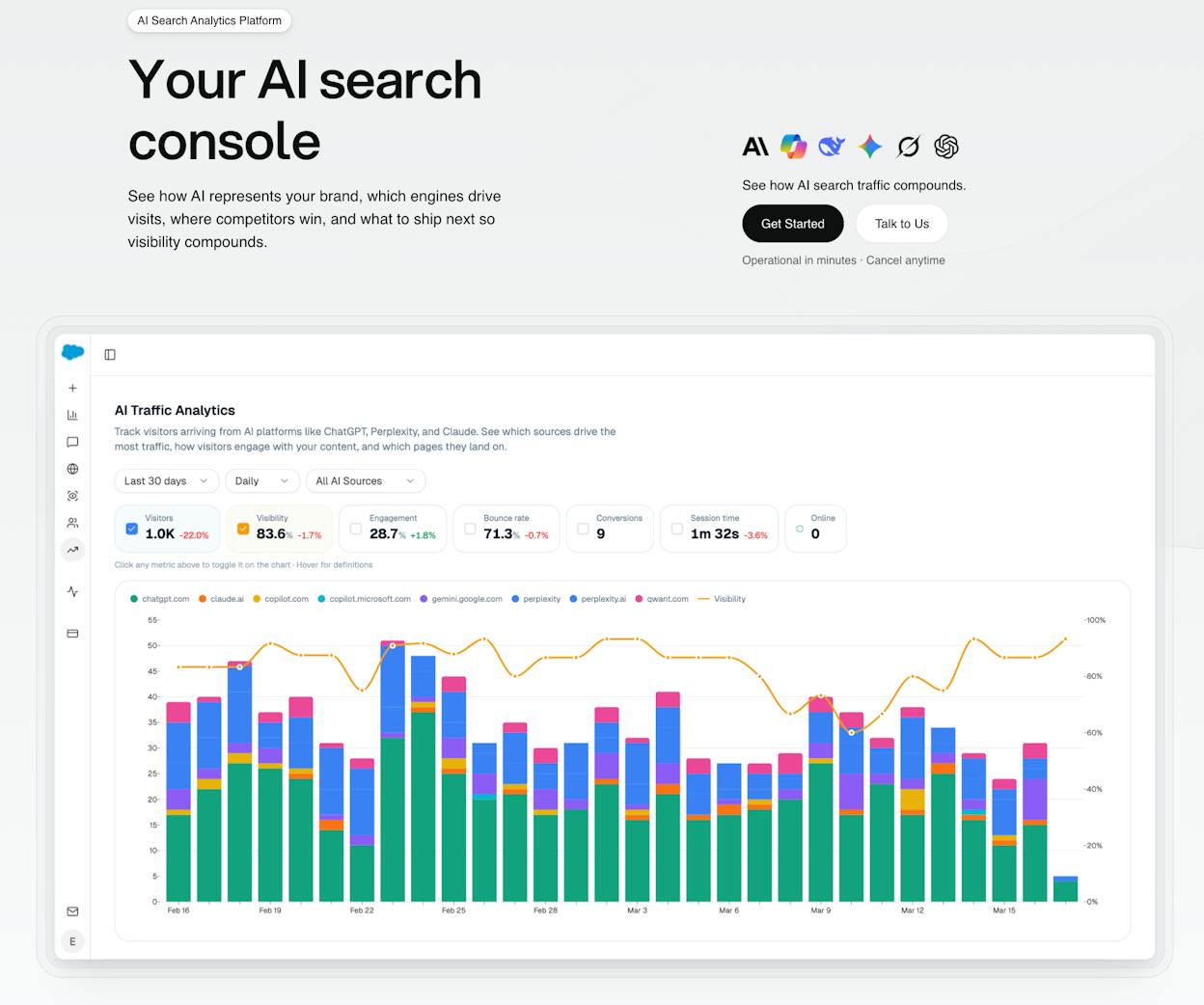
Most AI visibility tools stop at the dashboard. They show you a mention score and leave you to figure out the rest. Analyze AI is built on a different premise. Visibility data is only useful if it drives decisions and connects to business outcomes.
Analyze AI is an agentic platform for SEO, AEO, content, and GTM operations. It tracks your AI visibility across ChatGPT, Perplexity, Claude, Copilot, Gemini, Google AI Mode, DeepSeek, and Meta AI. But it also shows the actual traffic those engines send, the pages visitors land on, the conversions they trigger, and the revenue they influence. Then it gives you the tools to act on all of it.
See Real AI Traffic, Not Just Mentions
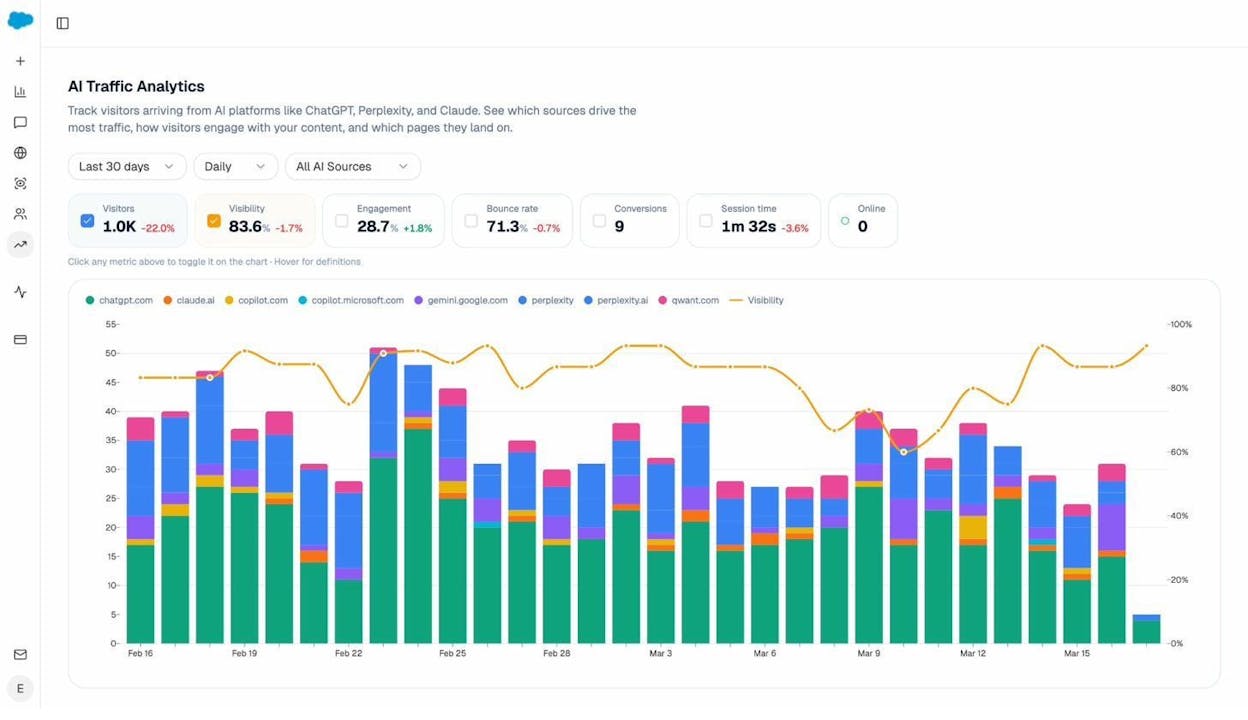
Analyze AI connects to your GA4 data and attributes every session from answer engines to its specific source. You see daily visitor counts by engine, engagement rates, bounce rates, session duration, and conversions. When Perplexity sends 142 sessions but ChatGPT sends 248, you know where to focus.
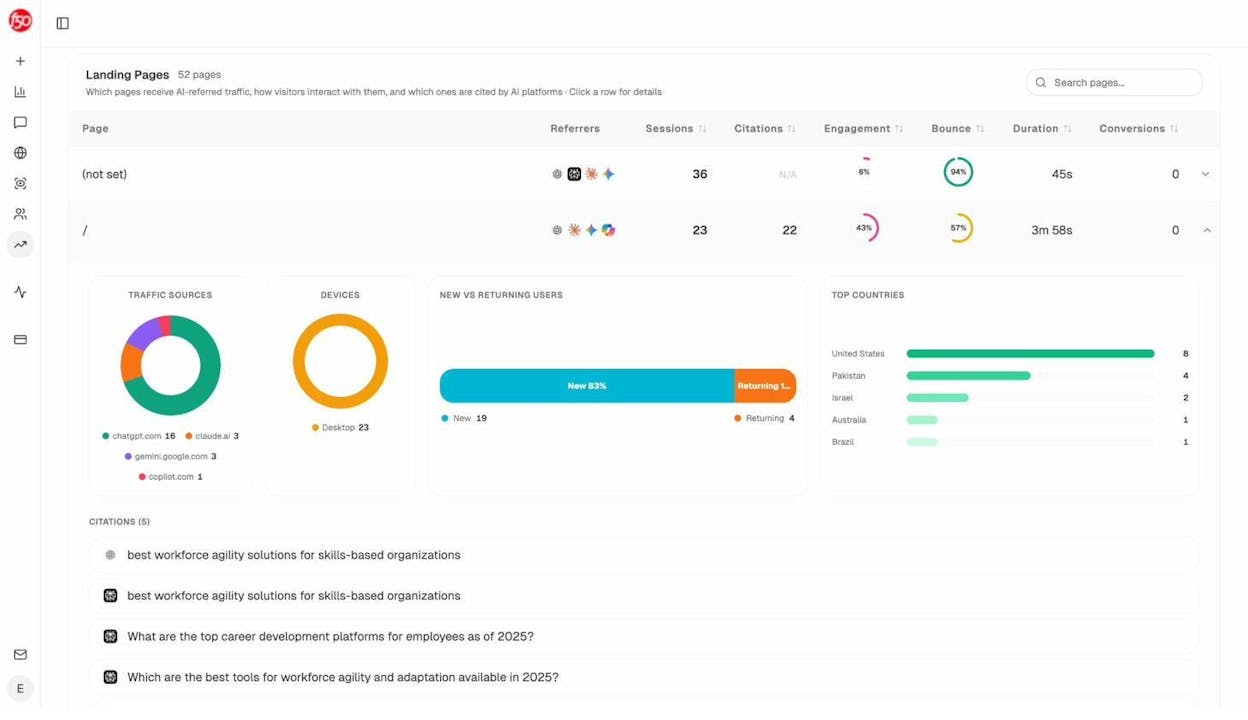
The Landing Pages report goes deeper. It shows exactly which pages receive AI referrals, which engine sent each session, and what conversion events those visits trigger. When your product comparison page converts at 12% from Perplexity while an old blog post converts at 0% from ChatGPT, you know what to strengthen and what to deprioritize.
This is the data gap Otterly cannot fill. Visibility without traffic attribution is guesswork.
Track Prompts with Competitive Context
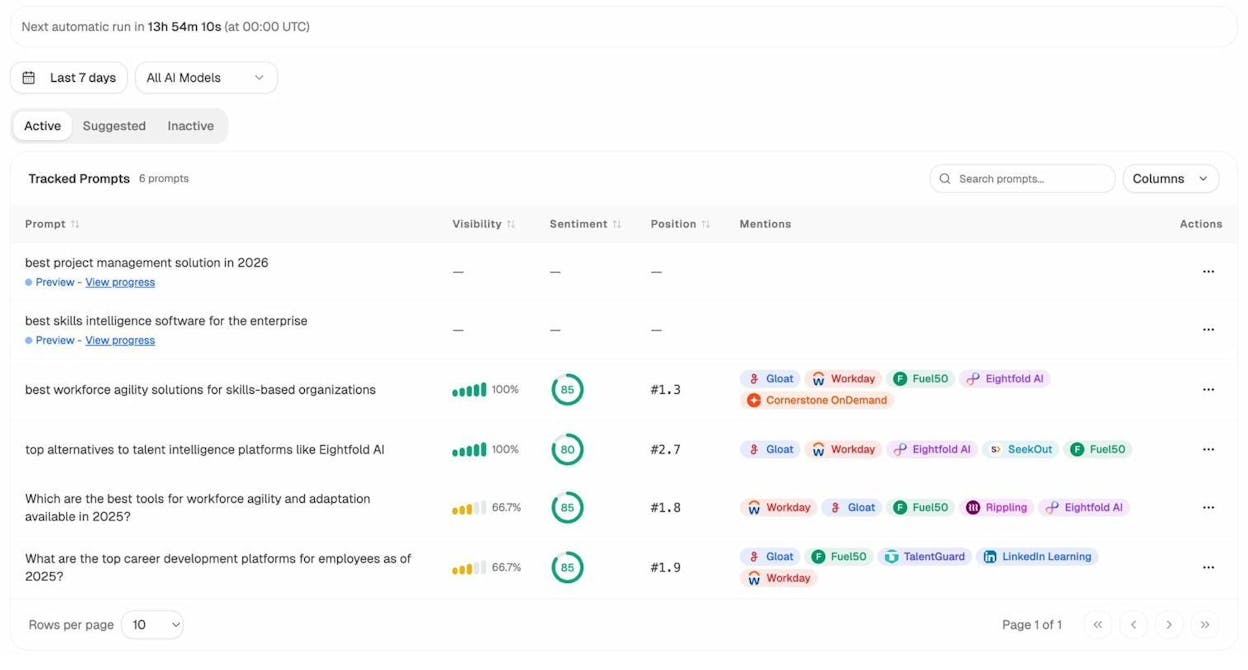
Analyze AI’s Prompt Tracking shows your visibility percentage, sentiment score, position, and the competitors that appear alongside you for every tracked prompt. You see trends daily and can filter by AI model, time range, and brand.
Not sure which prompts to track? The Prompt Discovery feature suggests bottom-of-funnel prompts based on your industry, competitors, and existing content. You start monitoring the queries that actually drive purchase decisions instead of guessing.
Understand What Sources AI Models Trust
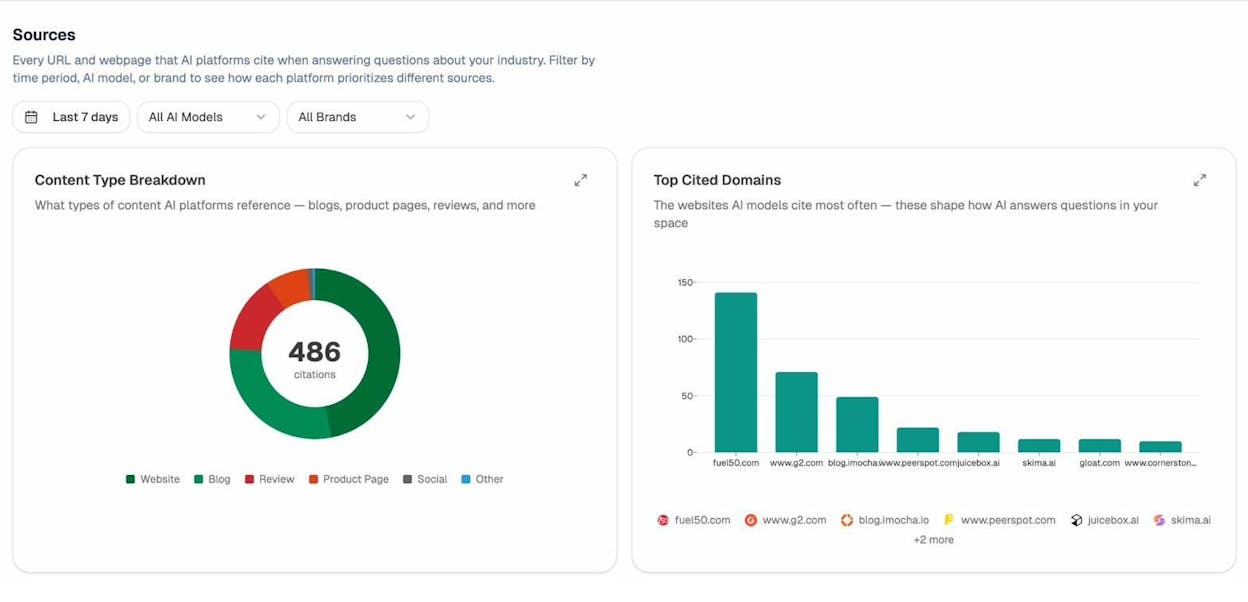
The Citation Analytics dashboard shows every URL and domain that AI platforms cite when answering questions in your category. You can filter by time period, AI model, or brand to see how each engine prioritizes different sources.
This tells you where to invest. Instead of generic link building, you target the specific sources that shape AI answers. You strengthen relationships with domains that models already trust, create content that fills gaps in their coverage, and track whether your citation frequency increases over time.
Map Your Competitive Position in AI Search
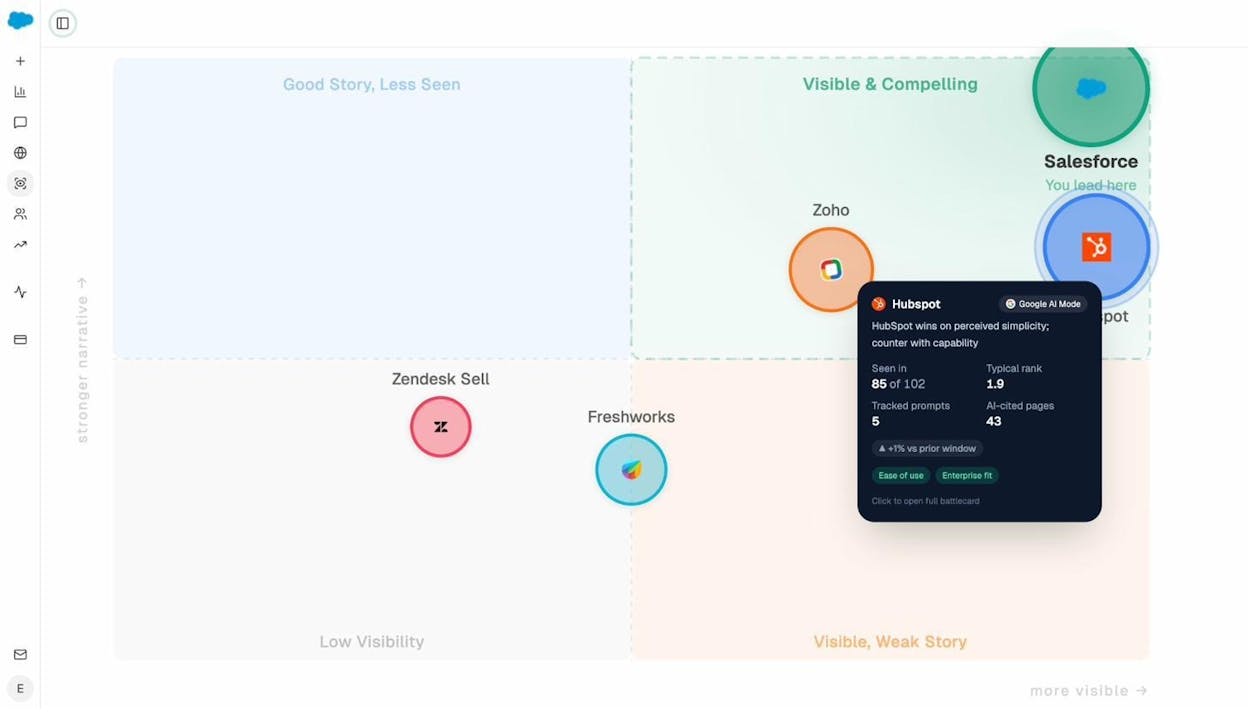
The Perception Map plots every tracked brand on a quadrant of visibility versus narrative strength. You see at a glance whether you are “Visible and Compelling,” “Good Story but Less Seen,” or “Visible with a Weak Story.” Click any competitor for a battlecard with their rank, sentiment, cited pages, and strategic recommendations.
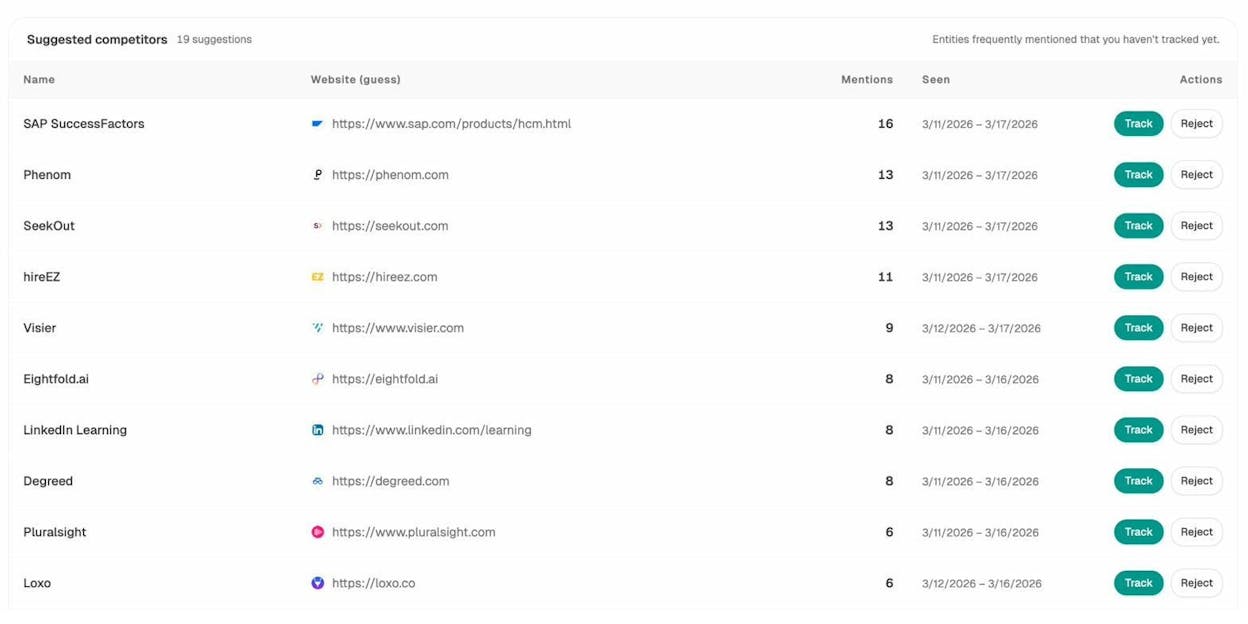
The Competitor Intelligence module surfaces competitors you may not be tracking yet, ranked by how often AI models mention them in your space.
Write and Optimize Content That AI Models Actually Cite
Otterly audits content but does not help you create or rewrite it. Analyze AI includes a full AI Content Writer and AI Content Optimizer built into the platform.
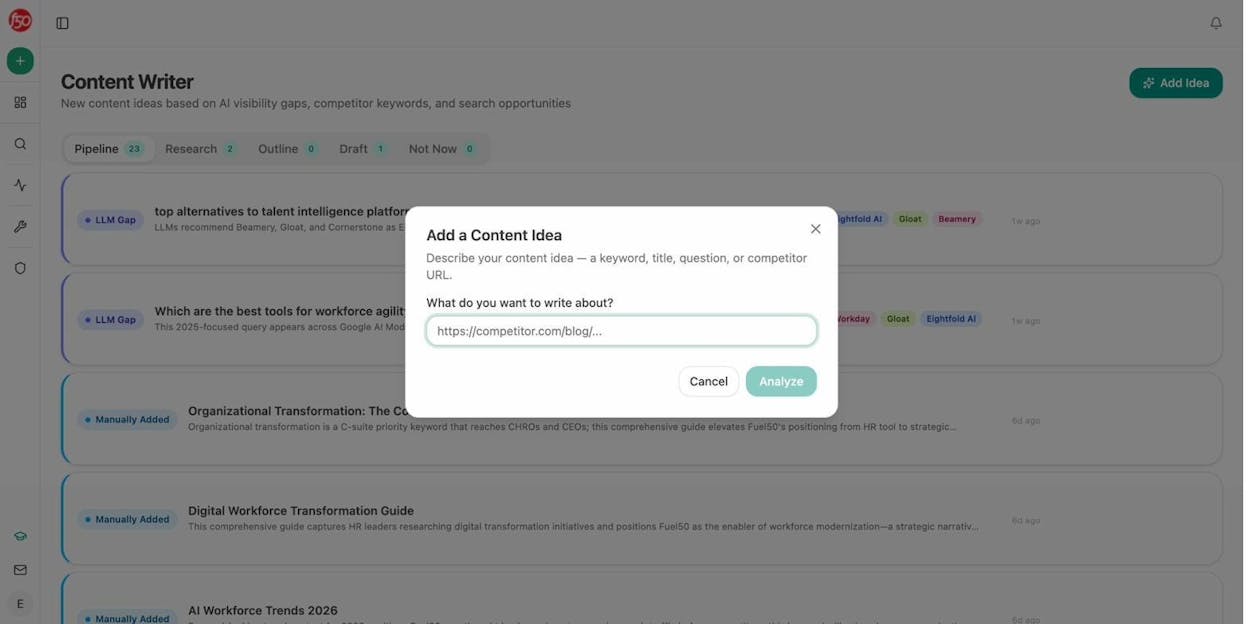
The Content Writer generates ideas based on AI visibility gaps, competitor keywords, and search opportunities. Each idea moves through a pipeline: Research, Outline, Draft, and Publish. The system researches your topic using real SERP data and AI prompt data, builds an outline with strategic positioning comments, and generates a full draft that incorporates your brand voice from the Knowledge Base.
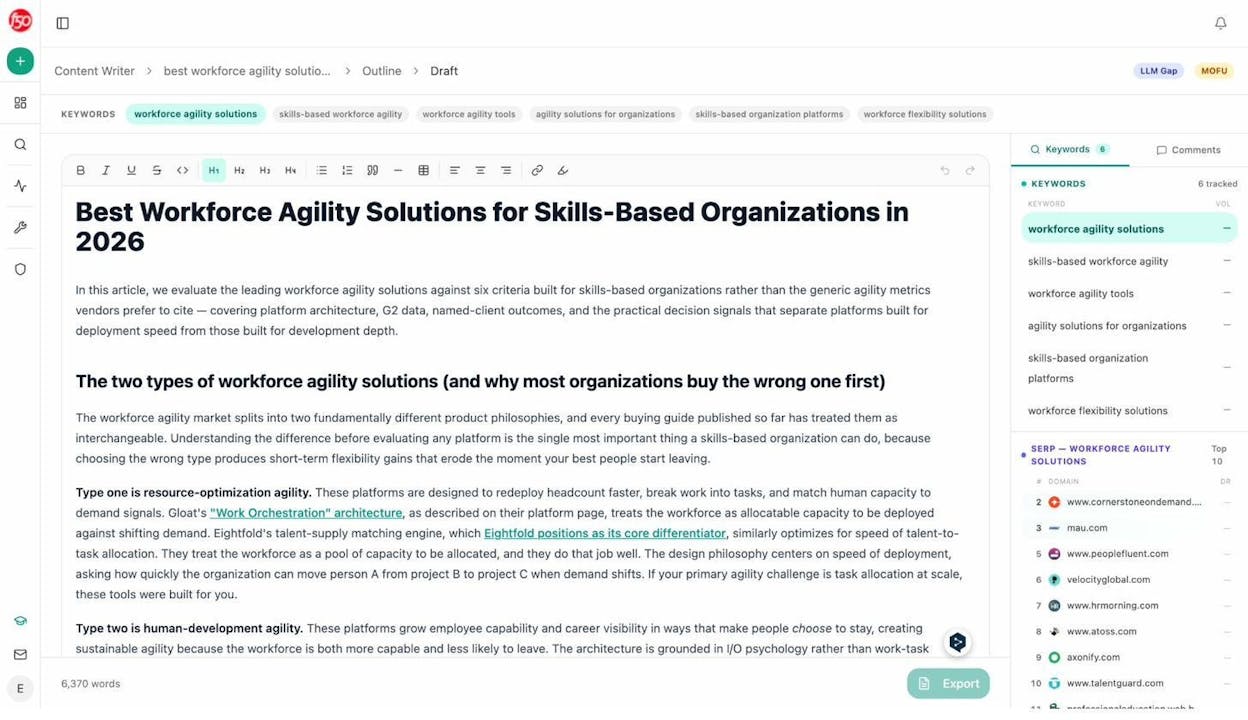
The Content Optimizer works the other direction. Give it a URL, and it audits the existing page against AI visibility criteria, highlights gaps, and generates an optimized version that addresses missing topical coverage, weak proof points, and structural issues that reduce citation potential.
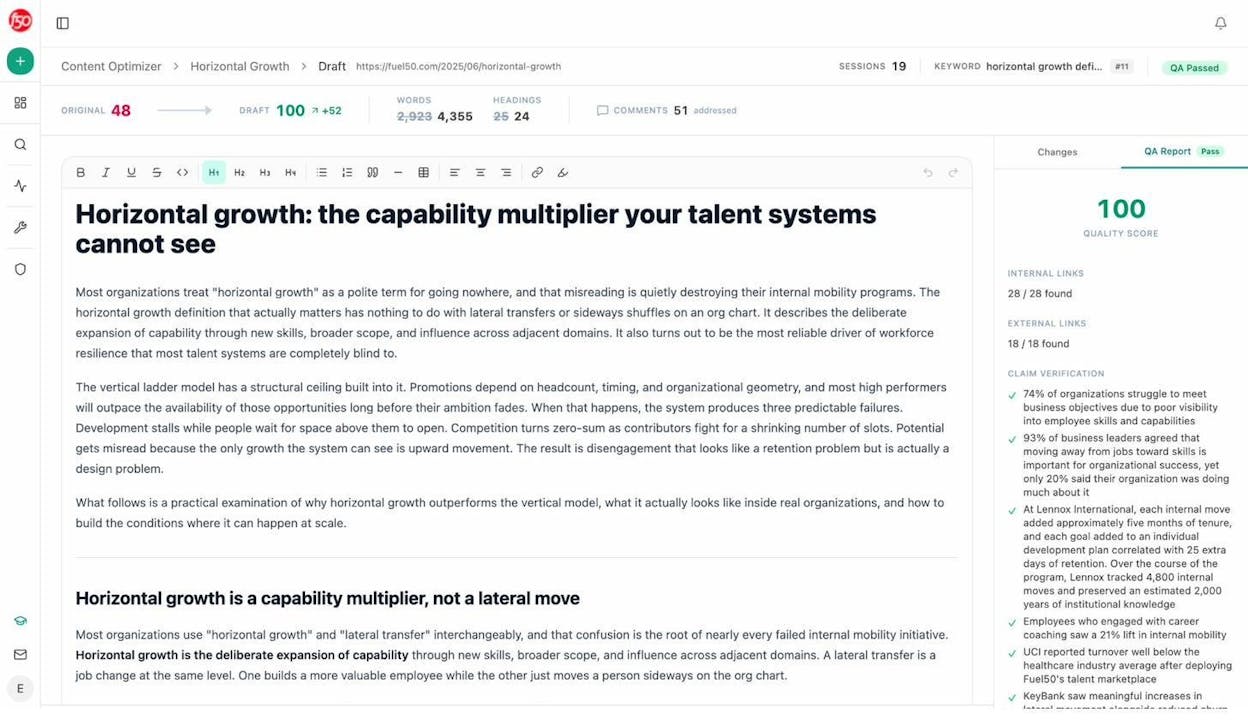
Both tools inject your brand vault (tone, style, differentiators, claims rules, and proof points) so the output is on-brand without manual editing. This is not a generic AI writing tool. It is a content system designed to produce pages that both traditional search engines and AI models trust.
Automate Everything with the Agent Builder
This is where Analyze AI separates from every other tool in the category. The Agent Builder is a programmable substrate with 180+ nodes, 34 pre-built data recipes, 13 input primitives, and three trigger modes (manual, scheduled, webhook).
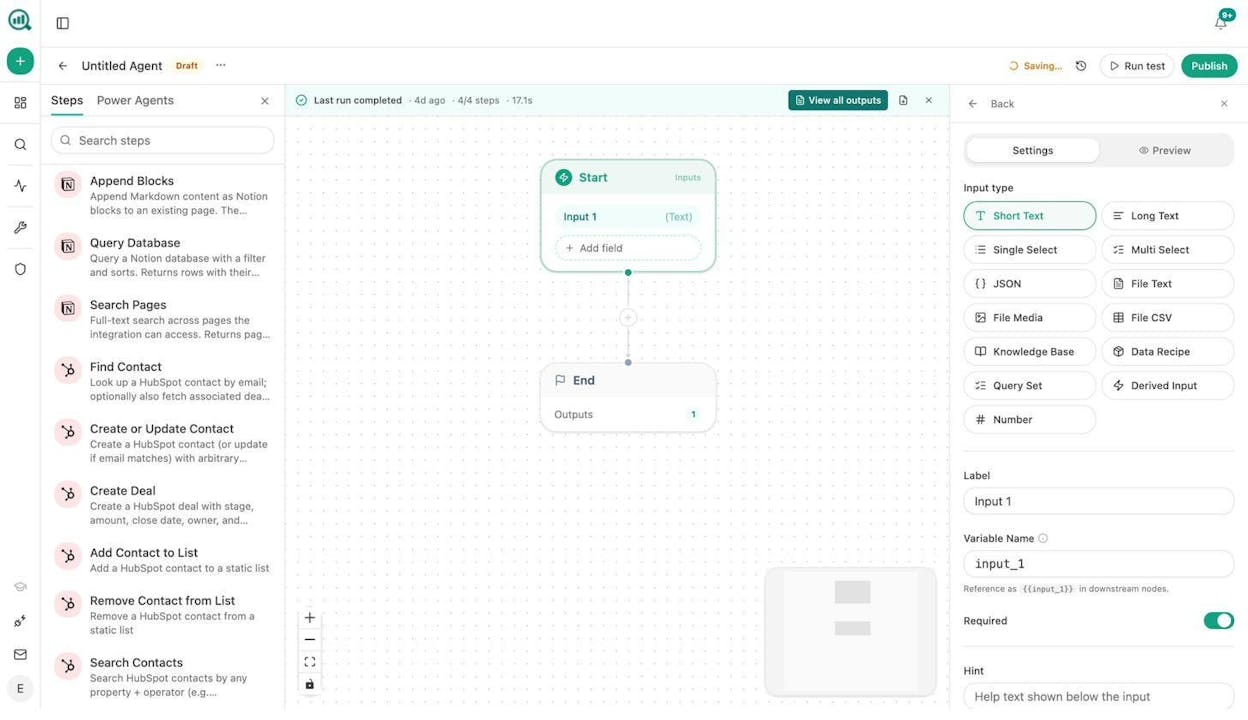
Think of it this way. Any task you currently do manually, the Agent Builder can run on autopilot. It connects directly to GA4, Google Search Console, DataForSEO, Semrush, HubSpot, Notion, WordPress, Mailchimp, and every major LLM. Here are real examples teams build in minutes:
For CMOs: A Monday morning agent that pulls your AI visibility share-of-voice, GA4 traffic data, new HubSpot deals, and competitive shifts into a board-ready DOCX report and emails it to leadership before 8am. No analyst needed.
For agencies: A single workflow that loops over your entire client list, generates a custom weekly report for each account, and delivers it to the right account manager. Reporting day stops existing.
For content teams: A webhook-triggered pipeline that fires when a brief moves to “approved” in Notion, generates research, builds an outline, writes a full draft with brand voice injected, scores it against AI visibility criteria, and publishes to WordPress if it passes. If it does not, it sends the gaps to Slack for the writer to address.
For PR teams: A scheduled agent that monitors brand mentions every 15 minutes, filters by sentiment and reach thresholds, and Slacks the crisis team with a draft response before your CEO sees the headline.
These are not templates. You compose from primitives. The 168 production-ready nodes across 16 categories give you enough combinations to automate nearly any marketing, content, SEO, or GTM operation.
Learn more about the Agent Builder or explore how teams use it for content marketing, revenue ops, digital PR, and brand marketing.
Weekly Digests Keep Your Team Aligned Without Login Fatigue
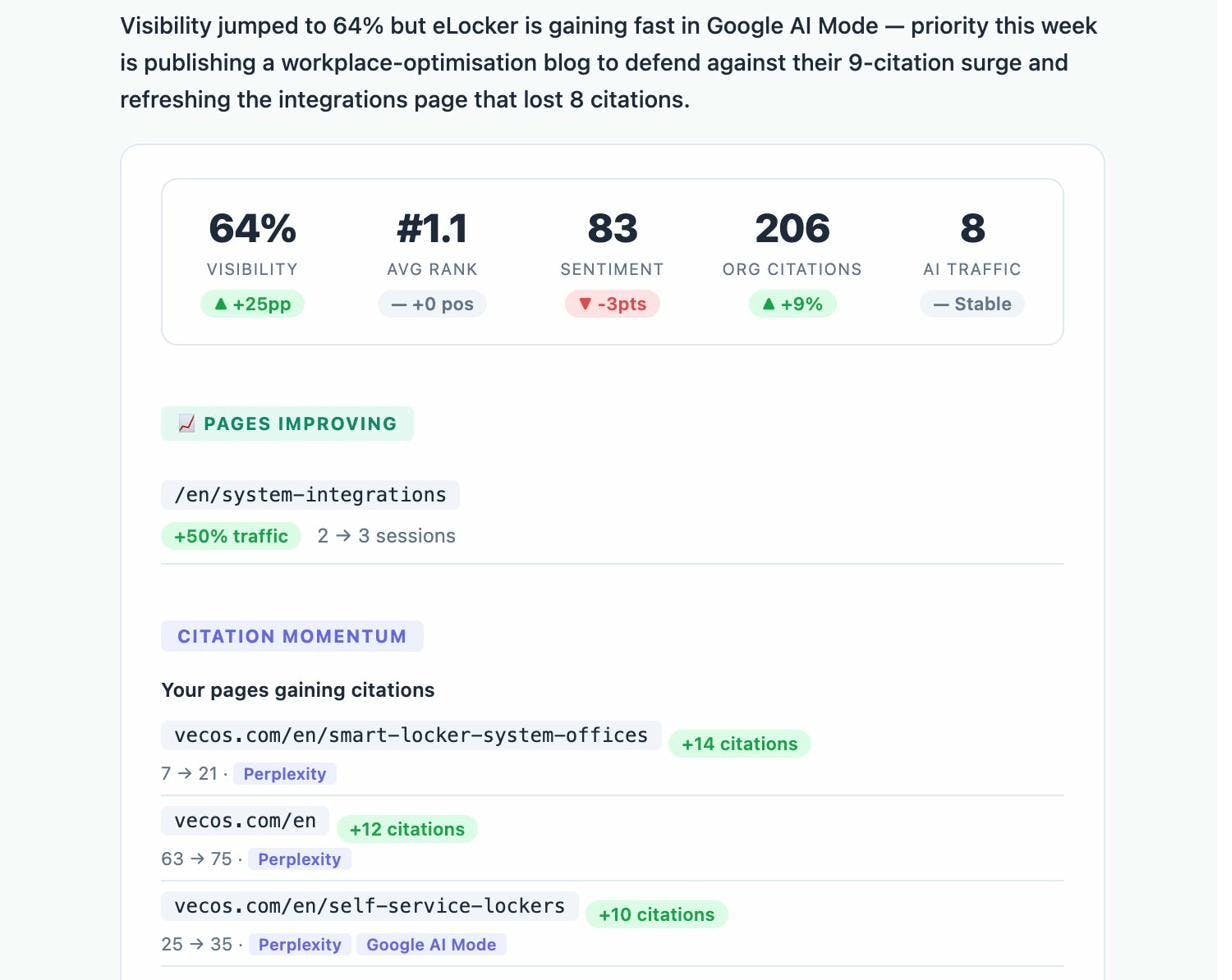
Not everyone on your team needs to log into a dashboard. Analyze AI sends weekly email digests that summarize your AI visibility, sentiment trends, competitive position, and top-performing content. Stakeholders stay informed without creating another login habit.
The Verdict: Otterly AI vs. Analyze AI
Otterly AI is a competent visibility tracker. If all you need is to know whether ChatGPT mentioned your brand this week, it does that job. But the teams that succeed with AI search are the ones that connect visibility to traffic, traffic to revenue, and insight to action.
|
Capability |
Otterly AI |
Analyze AI |
|---|---|---|
|
Prompt tracking across AI engines |
Yes (6 engines, 2 are paid add-ons) |
Yes (8 engines, all included) |
|
AI traffic attribution (GA4) |
No |
Yes |
|
Landing page conversion tracking |
No |
Yes |
|
Citation and source analytics |
Yes |
Yes |
|
Sentiment monitoring |
Yes |
Yes |
|
Perception Map / Competitive quadrant |
No |
Yes |
|
AI Battlecards |
No |
Yes |
|
Content Writer (research to draft) |
No |
Yes |
|
Content Optimizer (audit to rewrite) |
No |
Yes |
|
Agent Builder (180+ nodes, scheduling, webhooks) |
No |
Yes |
|
HubSpot, GA4, GSC, Semrush, WordPress integrations |
Looker Studio export only |
Direct integrations |
|
Weekly email digests |
Yes |
Yes |
|
Free SEO tools included |
Limited |
10+ free tools (keyword generator, SERP checker, rank checker, and more) |
Otterly built a good visibility layer. Analyze AI built the platform that sits on top of your entire organic operation, connecting AI search to traditional SEO, content creation, competitive intelligence, and GTM execution.
Because SEO is not dead. AI search is an additional organic channel. The brands that win are the ones treating both channels as one connected system, not running a separate dashboard for each.
See your AI visibility in Analyze AI or book a demo to see the full platform.

Ernest

Ibrahim


