



Summarize this blog post with:


In this article, you’ll learn seven practical SEO tips that help small businesses rank higher on Google — and how to extend that same visibility to AI search engines like ChatGPT, Perplexity, and Gemini. Each tip is actionable, beginner-friendly, and designed so you can start seeing results without a big budget or a dedicated marketing team.
Table of Contents
1. Claim and Optimize Your Google Business Profile
If you do only one thing after reading this article, make it this.
A Google Business Profile (GBP) is a free listing that helps people find and learn about your business in Google Search and Maps. It lets you share your phone number, opening hours, photos, and services — all the details a potential customer needs to decide whether to call you.
The real power of a Business Profile is that you don’t need people to search for your business by name. Your profile can appear for broader searches like “plumber near me” or “coffee shop downtown” through the map pack — the cluster of local results Google shows at the top of local queries.
![[Screenshot: Google map pack results showing three local businesses for a “near me” query]](https://www.datocms-assets.com/164164/1776701647-blobid1.png?auto=format,compress&w=1248&fit=max)
Here’s how to optimize your profile so it actually works:
-
Go to Google Business Profile and claim your listing. If your business already appears on Google Maps, you’ll need to verify ownership.
-
Set the right business category. This is the single most important ranking factor for the map pack. Pick the category that most precisely describes what you do. A bakery that also sells coffee should choose “Bakery,” not “Coffee Shop.”
-
Add complete business information. Fill out your address, phone number, website URL, and service area. Incomplete profiles rank lower.
-
Add opening hours and keep them updated. Nothing frustrates a customer more than showing up to a closed business. Update hours for holidays, too.
-
Upload high-quality photos. Businesses with photos get 42% more requests for directions on Google Maps. Show your storefront, your team, your products.
-
List your products or services. Google lets you add individual offerings with descriptions and prices. This helps you show up for more specific searches.
-
Write a clear business description. Use natural language. Mention your location, your specialty, and what makes you different. Skip the keyword stuffing.
![[Screenshot: The Google Business Profile editor showing the fields for category, hours, and services]](https://www.datocms-assets.com/164164/1776701653-blobid2.png?auto=format,compress&w=1248&fit=max)
Why your Google Business Profile matters for AI search too
Here’s something most small business owners don’t realize: AI search engines pull information from the same places Google does. When ChatGPT or Perplexity answers a question like “best Italian restaurant in Austin,” they often reference Google Business Profile data, review sites, and local directories.
A complete, accurate GBP means AI engines have the right information to work with when someone asks about businesses like yours. If your profile is incomplete or outdated, you’re invisible in both channels.
2. Get Listed on Relevant Directories
People don’t always start their search on Google. Many go directly to trusted directories like Yelp, TripAdvisor, Angi, or niche platforms for their industry. And even when they do start on Google, directories often dominate the first page of results.
Here’s a real example. If you search “cat sitter near me,” the top results aren’t individual cat sitters’ websites — they’re directories like Rover, Care.com, and Meowtel. If you’re a cat sitter and you’re not listed on those platforms, you’re missing traffic from both Google and from people who search those platforms directly.
![[Screenshot: Google search results for “cat sitter near me” showing directory sites ranking on the first page]](https://www.datocms-assets.com/164164/1776701657-blobid3.png?auto=format,compress&w=1248&fit=max)
Getting listed is simple. The hard part is knowing which directories matter for your specific business.
How to find the right directories
Search Google for what you do + your location. Type “[your service] in [your city]” into Google and note which directories appear on the first page. Those are the ones worth joining.
For example, a cat sitter in Seattle would want to get listed on Rover, Meowtel, Yelp, and Care.com based on what ranks.
![[Screenshot: Google search results for a local service query, with directory sites highlighted]](https://www.datocms-assets.com/164164/1776701659-blobid4.png?auto=format,compress&w=1248&fit=max)
Check where your competitors are listed. If a competing business shows up on a directory you’re not on, that’s a gap you can close quickly. You can find these by using a backlink checker tool — most directories link back to your website, so your competitors’ backlinks reveal the directories they’ve joined.
Here’s how to do it:
-
Identify two or three competitors in your area (search Google Maps for your service to find them)
-
Enter their website URLs into a backlink analysis tool
-
Look for referring domains that are clearly directories or listing sites
-
Sign up for the ones you’re missing
![[Screenshot: A backlink analysis tool showing referring domains for a competitor, with directory sites visible]](https://www.datocms-assets.com/164164/1776701664-blobid5.png?auto=format,compress&w=1248&fit=max)
You can use Analyze AI’s Website Authority Checker to quickly evaluate which competitor sites are worth analyzing first — start with the ones that have the highest authority scores.
Don’t stop at general directories. Every industry has niche platforms. Lawyers have Avvo and FindLaw. Restaurants have TripAdvisor and OpenTable. Contractors have Angi and Houzz. These niche directories often convert better because the people using them have stronger purchase intent.
How directories help you in AI search
Directories and review sites are among the most frequently cited sources in AI search results. When someone asks ChatGPT “What’s the best plumber in Denver?”, the AI doesn’t invent an answer — it pulls from directory listings, review aggregators, and business profiles.
The more places your business appears with consistent, accurate information, the more likely AI engines are to mention you. Think of each directory listing as another vote of confidence in your business’s legitimacy.
3. Fix Basic Technical SEO Issues on Your Website
Technical SEO problems can prevent Google from properly crawling, indexing, and ranking your site. The good news is that the most common issues are straightforward to find and fix — even if you’re not technical.
The easiest way to check your site is to run a free SEO audit. Tools like Google Search Console, Ahrefs Webmaster Tools, or Screaming Frog will crawl your site and flag problems.
![[Screenshot: An SEO audit tool showing a list of errors found on a website, including broken links, missing meta descriptions, and slow pages]](https://www.datocms-assets.com/164164/1776701666-blobid6.png?auto=format,compress&w=1248&fit=max)
Here are the most common issues small business websites have and how to fix them:
Broken links (404 errors)
Broken links happen when you delete a page, change a URL, or link to an external page that no longer exists. They hurt user experience and waste the “link equity” those pages had built up.
How to find them: Run your site through Analyze AI’s Broken Link Checker. It will scan your pages and return every broken link it finds.
![[Screenshot: Analyze AI’s Broken Link Checker tool showing results for a website scan]](https://www.datocms-assets.com/164164/1776701672-blobid7.png?auto=format,compress&w=1248&fit=max)
How to fix them: For each broken link, you have three options: restore the page, redirect the old URL to a relevant new page (using a 301 redirect), or remove the link entirely.
Missing or duplicate title tags
Your title tag is what appears as the blue clickable link in Google search results. Every page on your site should have a unique, descriptive title tag that includes the main keyword for that page.
How to fix: Check that every page has a unique <title> tag. Keep titles under 60 characters. Include your primary keyword and your business name.
Slow page speed
Google uses page speed as a ranking factor, and slow pages drive visitors away. According to Google, 53% of mobile visitors leave a site that takes longer than three seconds to load.
How to fix: Run your site through Google PageSpeed Insights. It will give you a score and specific recommendations — usually around compressing images, enabling browser caching, and removing unused code.
Missing HTTPS
If your site URL starts with “http://” instead of “https://”, browsers mark it as “Not Secure.” This scares visitors and hurts rankings. Most hosting providers offer free SSL certificates through Let’s Encrypt.
No mobile-friendly design
More than half of all web traffic comes from mobile devices. If your site isn’t responsive (meaning it doesn’t adapt to different screen sizes), you’re losing visitors and rankings. Most modern website builders like WordPress, Squarespace, and Wix handle this automatically, but it’s worth testing with Google’s Mobile-Friendly Test.
Schedule regular checkups
Don’t treat a technical SEO audit as a one-time task. New issues pop up over time — you add pages, change plugins, or an external site you linked to goes down. Schedule a monthly crawl so you catch problems before they hurt your rankings.
4. Do Keyword Research and Create Pages for Your Products or Services
People often search for specific services rather than your type of business. For example, they might search “bathroom remodel near me” instead of “plumber near me.” When they do, Google shows pages about bathroom remodeling — not plumbers’ homepages.
If you don’t have a page specifically about bathroom remodeling, you’ll struggle to rank for that term. That’s why keyword research matters: it tells you exactly which services and products your customers are searching for, so you can prioritize which pages to create first.
How to do keyword research for your small business
Step 1: Brainstorm every product or service you offer. Don’t overthink this. Just list them out. A plumber might write down: drain cleaning, water heater installation, pipe repair, bathroom remodel, sewer line inspection, faucet replacement, toilet repair, garbage disposal installation.
Step 2: Check search volumes. Plug your list into a keyword research tool to see how often people search for each term. This tells you which pages to build first.
You can use Analyze AI’s Keyword Generator to expand your initial list with related terms you might have missed. Then use the Keyword Difficulty Checker to see how hard each keyword is to rank for.
![[Screenshot: A keyword research tool showing a list of plumbing service keywords sorted by monthly search volume]](https://www.datocms-assets.com/164164/1776701674-blobid8.png?auto=format,compress&w=1248&fit=max)
Step 3: Prioritize by volume and relevance. Focus on keywords that have decent search volume AND that represent services you actually offer and profit from. A keyword with 5,000 monthly searches doesn’t help if it’s for a service you’ve stopped offering.
Step 4: Create a dedicated page for each high-priority service. Each page should have a unique title tag, a clear H1 heading, and content that explains the service, your process, your pricing (if possible), and your service area.
Here’s a simple structure for a service page:
-
H1: [Service Name] in [City]
-
Intro paragraph: What the service is and who it’s for
-
What’s included: Break down what the customer gets
-
Process: Step-by-step of how it works
-
Pricing: At least a range, if not exact numbers
-
FAQ: Answer common questions
-
CTA: How to get in touch or book
How to find what your customers are asking AI engines
Here’s where AI search adds a new dimension. People don’t just type keywords into AI chatbots — they ask full questions. “What should I look for when hiring a plumber for a bathroom remodel?” or “How much does drain cleaning cost in Chicago?”
These conversational queries reveal what potential customers care about. And if your website answers those questions clearly, AI engines are more likely to cite your content in their responses.
You can use Analyze AI’s Ad Hoc Searches feature to test how AI engines currently answer questions related to your services. Type in a prompt like “best plumber in [your city]” or “how to choose a contractor for kitchen renovation” and see which businesses and sources get mentioned.
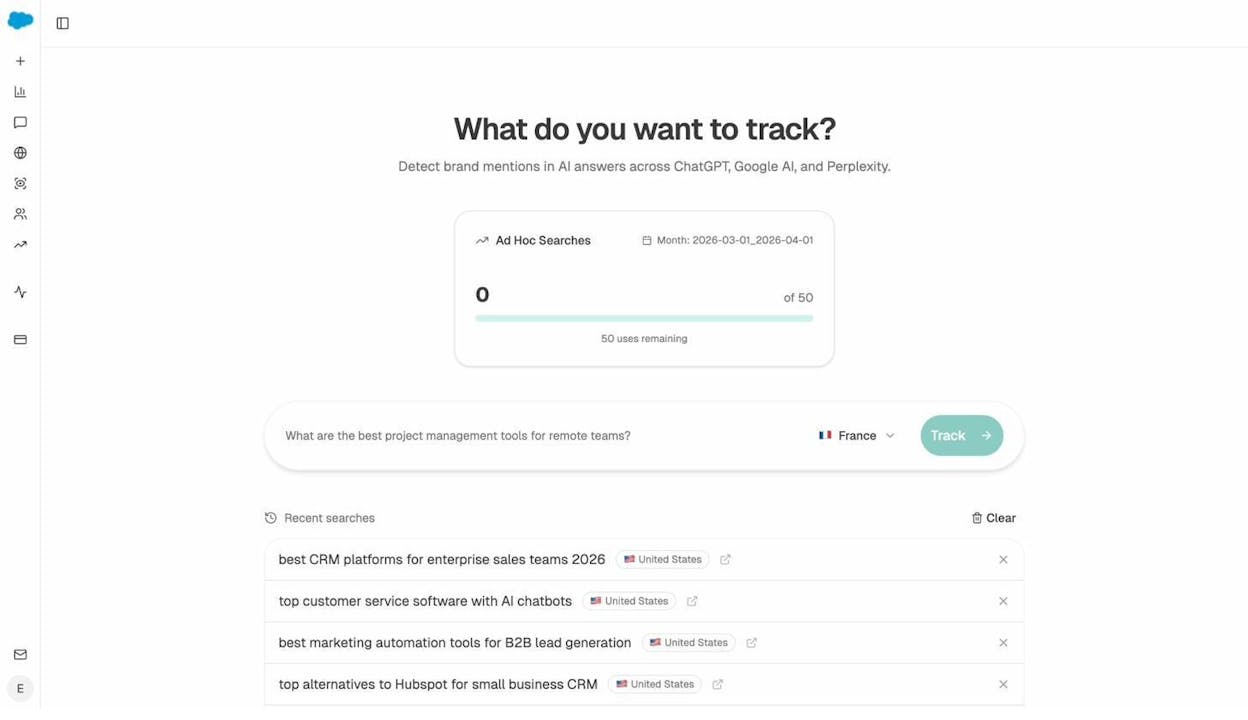
If your business doesn’t show up, that’s a clear signal that your content needs work — which brings us to the next tip.
5. Give Searchers Useful, Detailed Information on Your Pages
Having a page for each service is step one. Making that page genuinely helpful is what separates businesses that rank from businesses that don’t.
Most small business websites make the same mistake: they say “We offer bathroom remodeling” and leave it at that. No details about the process, no pricing guidance, no answers to common questions. This tells both Google and AI engines that your page has nothing unique to offer.
Here’s a real-world example. Imagine you’re searching for a boiler repair engineer. You find a dozen websites, but only one mentions that they work with your specific boiler brand. That’s the first company you call — because their website answered the question you actually had.
The other eleven engineers might be perfectly capable of repairing your boiler. But because they didn’t put that information on their website, you’ll never know.
How to find what information searchers want
Use keyword clustering to understand what matters. When you research a keyword like “boiler repair,” pay attention to the related terms that come up. You’ll see patterns — boiler brands, boiler types (gas, oil, electric), pricing terms, emergency service terms. Each cluster tells you something searchers care about.
![[Screenshot: A keyword research tool showing related terms for “boiler repair” clustered by topic, revealing that searchers care about specific boiler brands and types]](https://www.datocms-assets.com/164164/1776701680-blobid10.jpg?auto=format,compress&w=1248&fit=max)
Read the top-ranking pages. Open the first five results for your target keyword and note what they cover. What questions do they answer? What information do they include that you don’t? This isn’t about copying — it’s about understanding the minimum bar for what searchers expect.
Check “People Also Ask” on Google. These expandable questions on the search results page are goldmines for content ideas. They show you the exact follow-up questions real people have.
![[Screenshot: Google’s “People Also Ask” section for a local service query]](https://www.datocms-assets.com/164164/1776701684-blobid11.png?auto=format,compress&w=1248&fit=max)
Look at your reviews for patterns. Your Google and Yelp reviews often reveal what customers value most. If multiple reviews mention “fast response time” or “honest pricing,” those are signals to highlight prominently on your service pages.
Apply this thinking to AI search visibility
AI engines are even more sensitive to information depth than Google. When Perplexity or ChatGPT generates an answer about local services, they tend to favor sources that provide specific, structured, and comprehensive information.
Here’s the pattern: generic pages get ignored. Detailed pages get cited.
A page that says “We repair all types of boilers” is less useful to an AI engine than a page that lists the specific brands you service, explains your diagnostic process, provides price ranges, and answers common questions. The second page gives the AI engine concrete facts to include in its response.
With Analyze AI, you can track which of your pages are actually getting cited by AI engines. The Sources dashboard shows you every URL that AI platforms reference when answering questions in your industry — including yours and your competitors’.
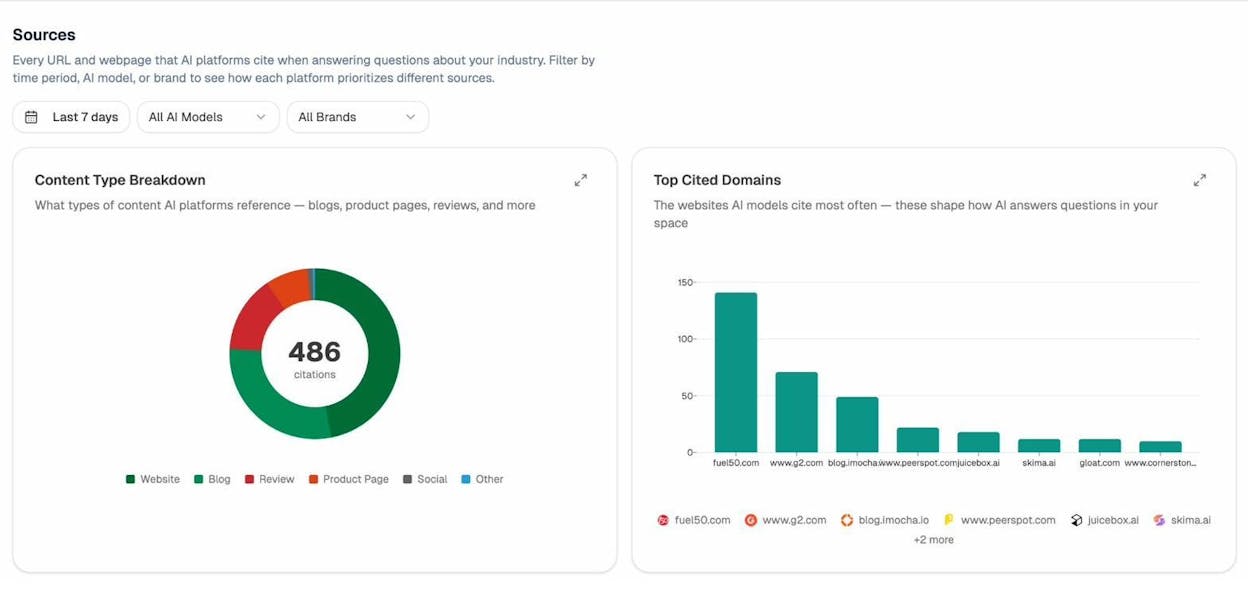
If your competitor’s service page is getting cited but yours isn’t, compare the two. The difference is almost always in the level of detail.
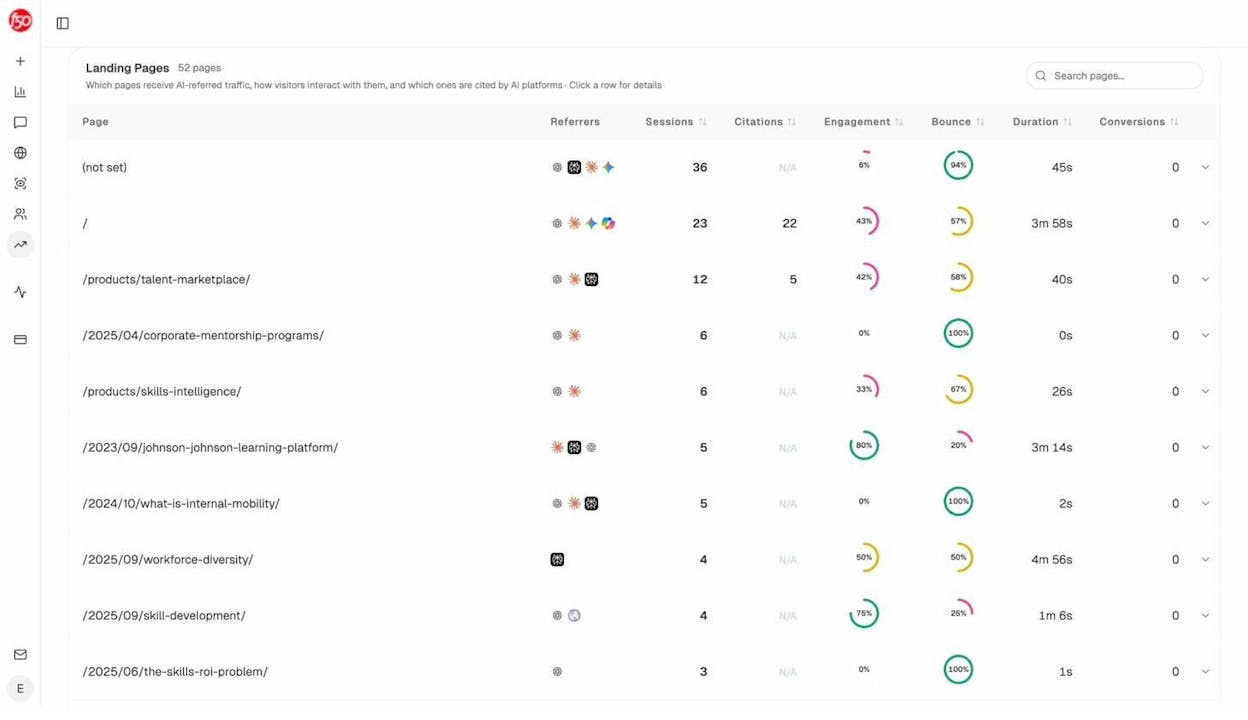
You can also use the AI Traffic Analytics landing pages report to see exactly which pages on your site receive traffic from AI platforms. This tells you which content is already working — so you can study those pages and replicate what makes them successful across the rest of your site.
6. Build a Few Backlinks
Backlinks — links from other websites to yours — are one of Google’s most important ranking factors. The logic is simple: if other reputable sites link to you, your site is probably trustworthy and useful.
For small businesses, the challenge is that high-quality backlinks are hard to earn. You’re not going to get links from The New York Times. But you don’t need to. A handful of relevant, local links can make a meaningful difference.
Practical ways to build backlinks as a small business
Give your suppliers testimonials. Many suppliers feature customer testimonials on their website, along with a link back to your business. Write a genuine testimonial for the products or services you use, then send it to the supplier and ask if they’d feature it.
Publish customer spotlights or case studies. If you recently completed a notable project — renovated a local church, catered a community event, redesigned a nonprofit’s website — write it up on your blog. Then let the organization know. They’ll often link to it from their site or share it on social media.
Get listed on “stockist” or “partner” pages. If your store sells products from local brands (craft beer, artisan goods, specialty foods), check if those brands maintain a “where to buy” or “stockist” page on their website. Getting listed usually just requires asking.
Join your local Chamber of Commerce. Most chambers maintain an online directory of member businesses with links to their websites. The membership fee is typically modest and the link comes from a high-authority local domain.
Sponsor local events or organizations. Little League teams, charity runs, school fundraisers — these events often have websites that list sponsors with links.
How to find your competitors’ backlinks (and replicate them)
The fastest way to find link opportunities is to see where your competitors already have links. Use a backlink analysis tool to pull up their link profile, then eyeball the list for links you could realistically get.
For example, if a competing plumber has links from two sites that list businesses offering discounts to healthcare workers, and you’re willing to offer a similar discount, those are easy links to replicate.
![[Screenshot: A backlink analysis tool showing a competitor’s referring domains, with directory and local organization links highlighted]](https://www.datocms-assets.com/164164/1776701692-blobid14.png?auto=format,compress&w=1248&fit=max)
You can check any website’s link profile quickly with Analyze AI’s Website Authority Checker to gauge how strong your competitor’s backlink profile is before diving deeper.
How backlinks influence AI search visibility
Backlinks don’t just help you rank on Google. They also influence how AI engines perceive your authority.
AI models learn from the web. When multiple reputable sources link to your content, it signals to these models that your business is an established, trustworthy entity in your space. This makes it more likely that AI engines will mention or recommend you when someone asks a relevant question.
Beyond direct backlinks, AI engines heavily rely on citations — mentions of your brand or URL in content across the web. You can track exactly how many citations your business receives across AI platforms using Analyze AI’s Sources dashboard. It shows the content type breakdown (blogs, reviews, product pages) and which domains AI engines cite most frequently in your industry.
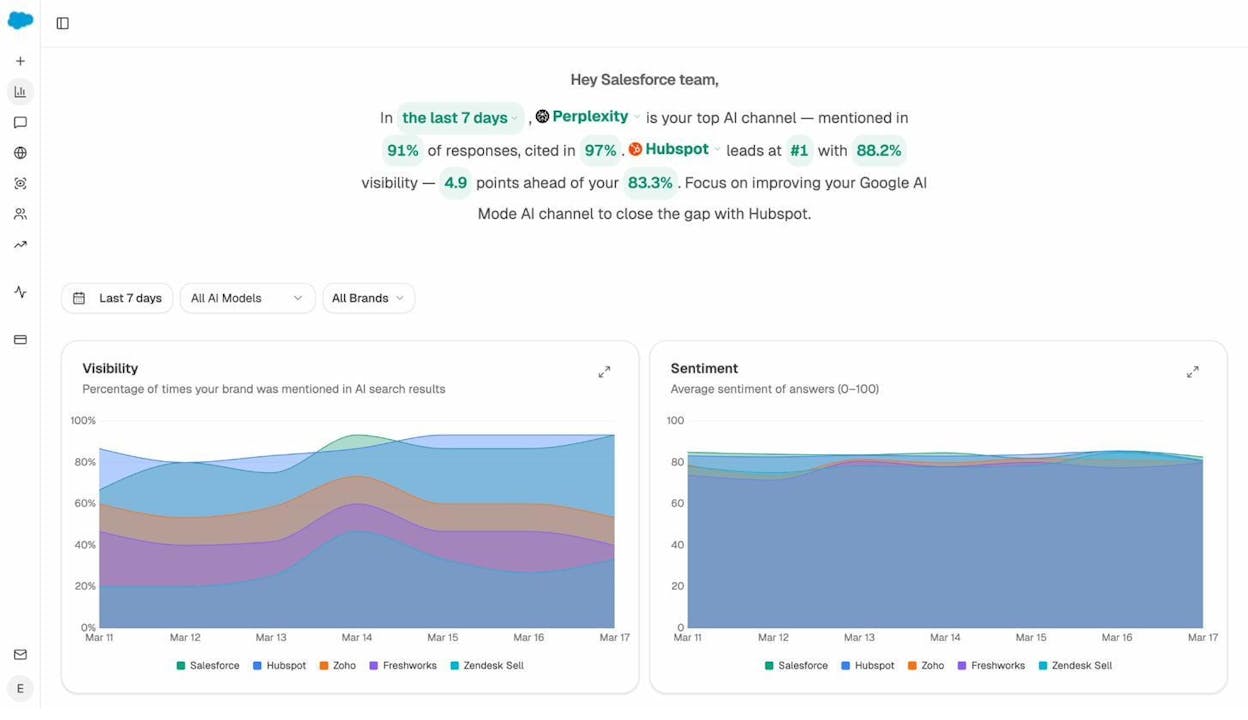
If you see that review sites and industry blogs are the most-cited sources in your space, that tells you exactly where to focus your link-building and citation-earning efforts.
7. Ask for Reviews and Respond to Them
Reviews do double duty: they build trust with potential customers AND they influence your search rankings.
Google explicitly advises business owners to encourage reviews and respond to them. According to BrightLocal’s annual survey, 17% of SEOs consider reviews the most important ranking factor for the Google map pack.
But beyond rankings, reviews shape buying decisions. A business with 150 reviews and a 4.7-star average is going to get more clicks than a business with 3 reviews and no responses — even if the second business is better at what it does.
How to get more reviews
Ask at the right moment. The best time to request a review is right after you’ve delivered value — after a successful repair, a great meal, a positive consultation. Don’t wait weeks.
Make it easy. Create a direct link to your Google review page. Google lets you generate this in your Business Profile dashboard. Send it via text or email after completing a service. The fewer clicks required, the more reviews you’ll get.
Include the link everywhere. Add it to your email signature, your receipts, your follow-up emails, and your thank-you cards. A QR code on printed materials works well too.
Don’t be shy about asking in person. If a customer tells you they’re happy with your work, say: “That’s great to hear — would you mind leaving us a quick Google review? It really helps.” Most people are willing; they just don’t think of it on their own.
How to respond to reviews (yes, all of them)
Respond to every review. Positive and negative. Responding shows future customers that you’re engaged and that you care about feedback.
For positive reviews: Thank the customer by name, reference something specific about their experience, and keep it short.
For negative reviews: Stay calm. Apologize for their experience (even if you disagree), explain what you’ll do to fix it, and take the conversation offline. Never argue publicly. Your response to a negative review is often more influential than the review itself — it shows future customers how you handle problems.
Where to collect reviews beyond Google
Don’t limit yourself to Google. Find out which review platforms matter most for your industry by searching your business name on Google and seeing which review sites appear.
For restaurants, TripAdvisor and Yelp are critical. For home services, Angi and HomeAdvisor. For B2B services, G2 and Clutch. For healthcare, Healthgrades and Zocdoc.
The rule of thumb: if a review platform ranks on the first page when someone Googles your business name, you need a presence there.
Why reviews are critical for AI search visibility
Reviews are one of the top content types that AI engines reference when answering questions about local businesses. When someone asks ChatGPT “What’s the best pizza place in Brooklyn?”, the AI doesn’t guess — it synthesizes information from review platforms, local directories, and Google Business Profiles.
The businesses with the most reviews, the highest ratings, and the most detailed review content are the ones that AI engines surface. This is because AI models are trained to identify consensus. If dozens of reviews on multiple platforms consistently praise your business, the AI treats that as a strong signal.
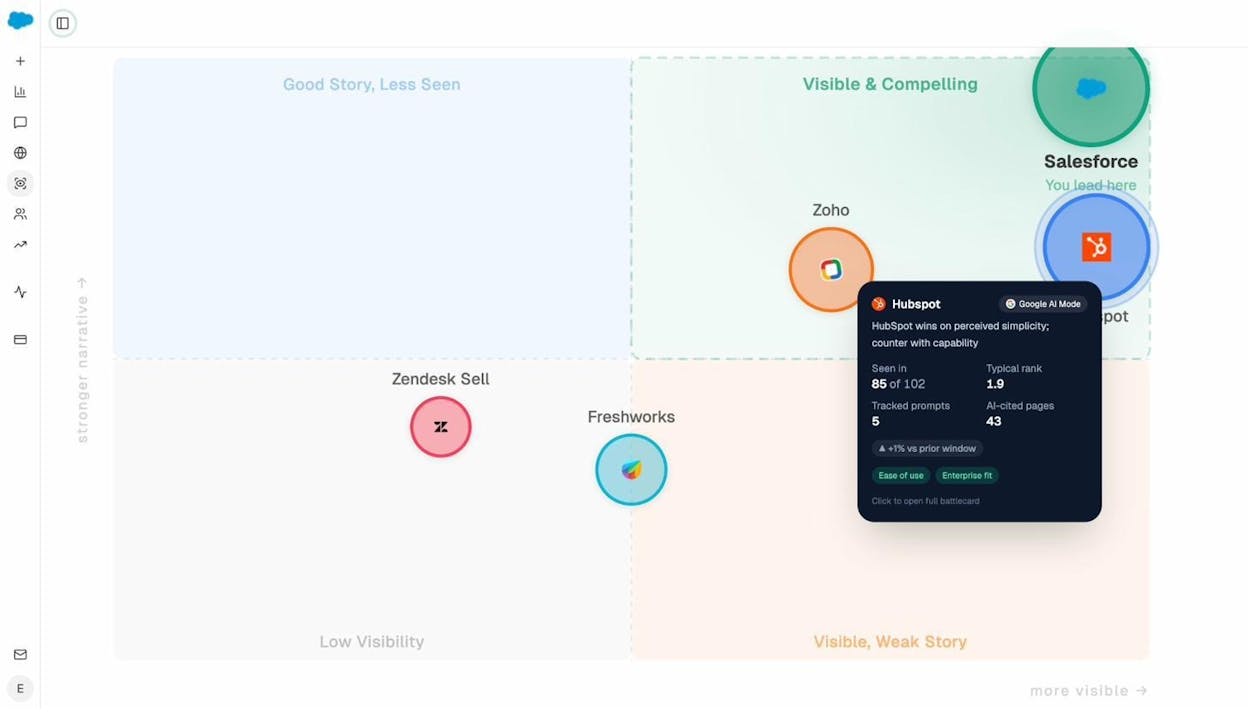
You can use Analyze AI’s Perception Map to see how AI engines currently portray your brand versus competitors. It plots each competitor on a grid based on visibility (how often they appear) and narrative strength (how positively they’re described). If your brand sits in the “Low Visibility” quadrant, it means AI engines aren’t seeing enough signal — and reviews are one of the fastest ways to change that.
How to Track Your AI Search Visibility (and Actually Improve It)
We’ve covered seven tips that improve your visibility on Google. Each of them also contributes to your AI search visibility — because AI engines rely on the same signals: accurate business information, strong directory presence, quality content, backlinks, and reviews.
But SEO and AI search are not identical. Google gives you Search Console to track your performance. AI search requires its own set of tools.
Here’s what you can do to actively track and improve your AI search presence:
Monitor which AI prompts mention your business
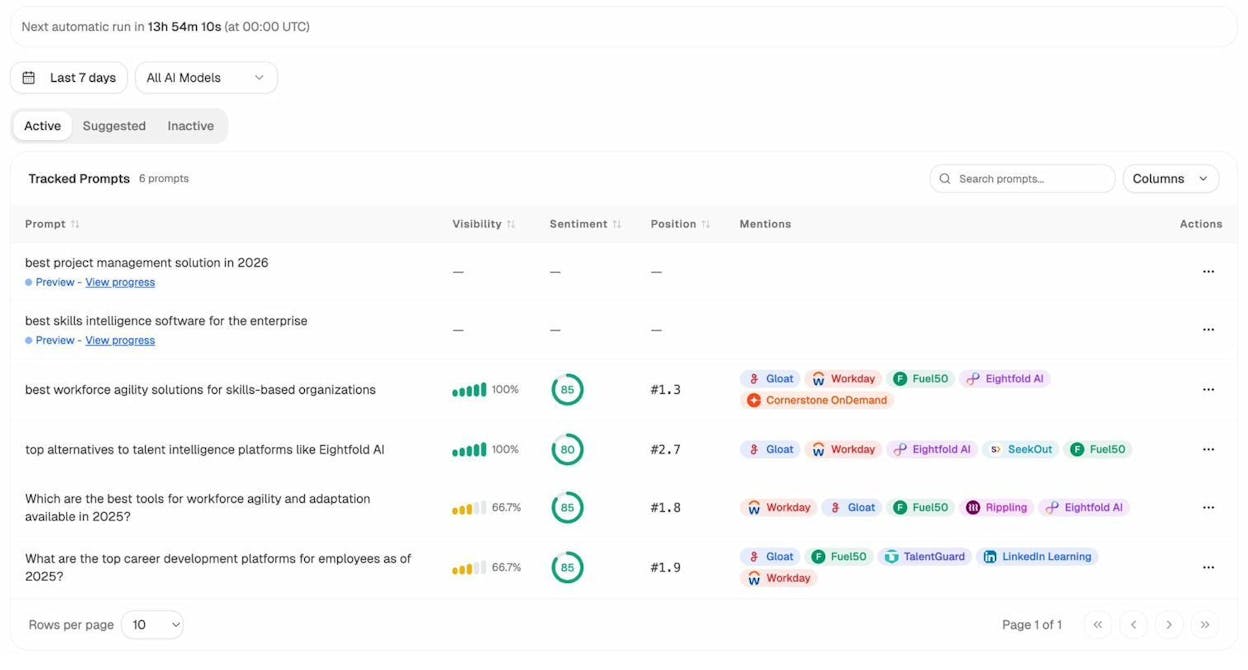
With Analyze AI, you can track specific prompts across ChatGPT, Perplexity, Gemini, Copilot, and other AI engines. For a small business, this means tracking prompts like “best [your service] in [your city]” or “top [your product category] for [use case].”
The Prompts dashboard shows your visibility percentage, sentiment score, average position, and which competitors appear alongside you for each tracked prompt.
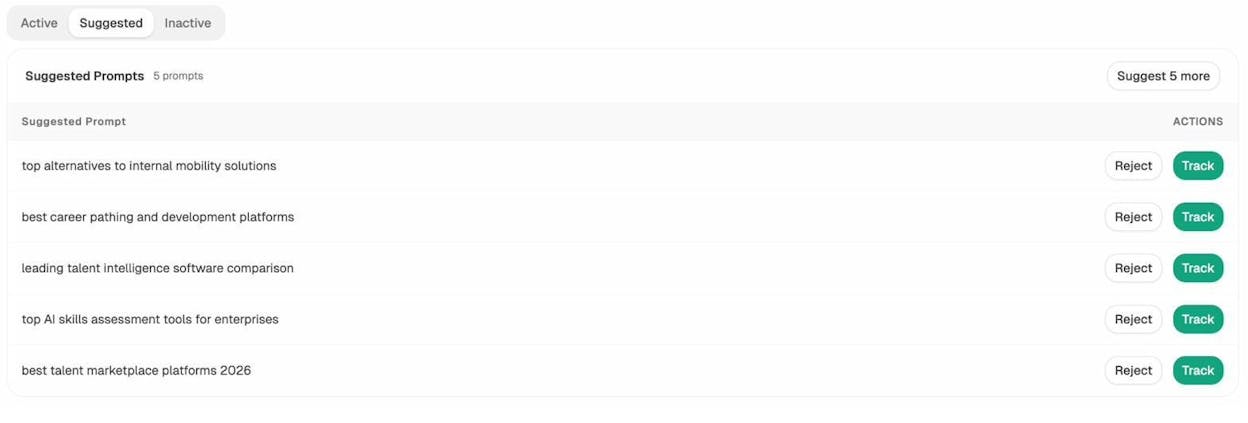
You can also use the Suggested Prompts tab to discover new prompts that Analyze AI recommends based on your industry. These are prompts where competitors are already showing up — and where you should be too.
Find where competitors beat you
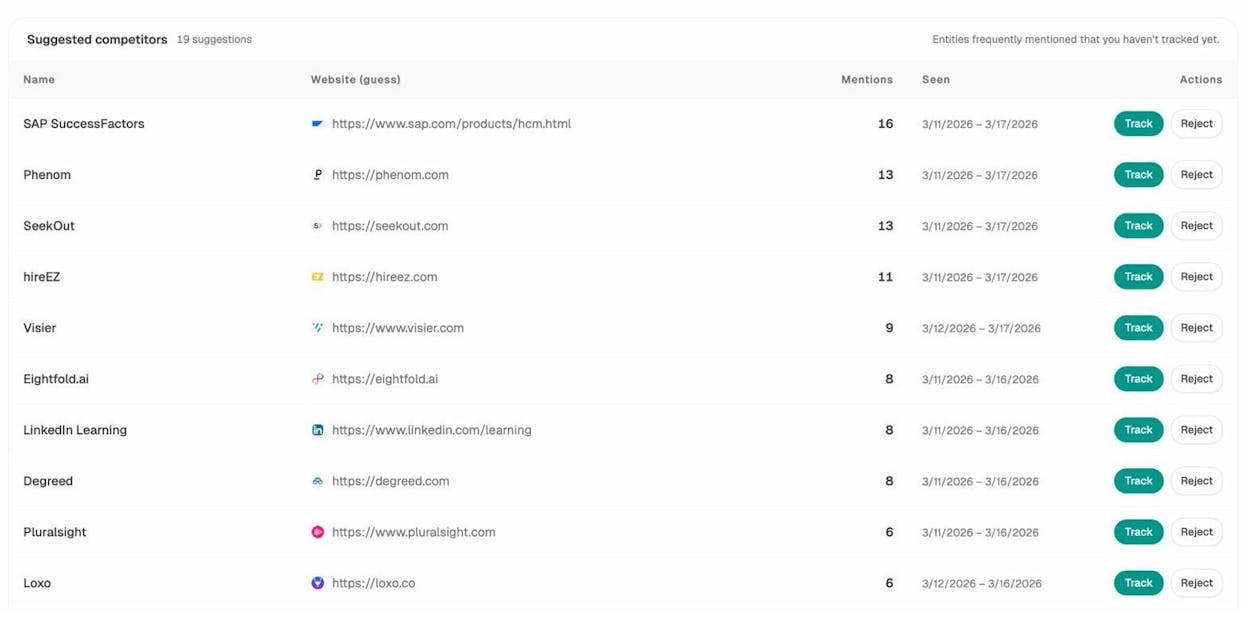
The Competitors view in Analyze AI shows you suggested competitors — brands that AI engines frequently mention in your space that you haven’t started tracking yet. This is like discovering businesses you didn’t even know you were competing with in AI search.
Track your AI traffic
Analyze AI’s AI Traffic Analytics dashboard shows how many visitors arrive at your site from AI platforms — broken down by source (ChatGPT, Perplexity, Claude, Gemini, Copilot). You can see visitors, engagement rates, bounce rates, and session duration.
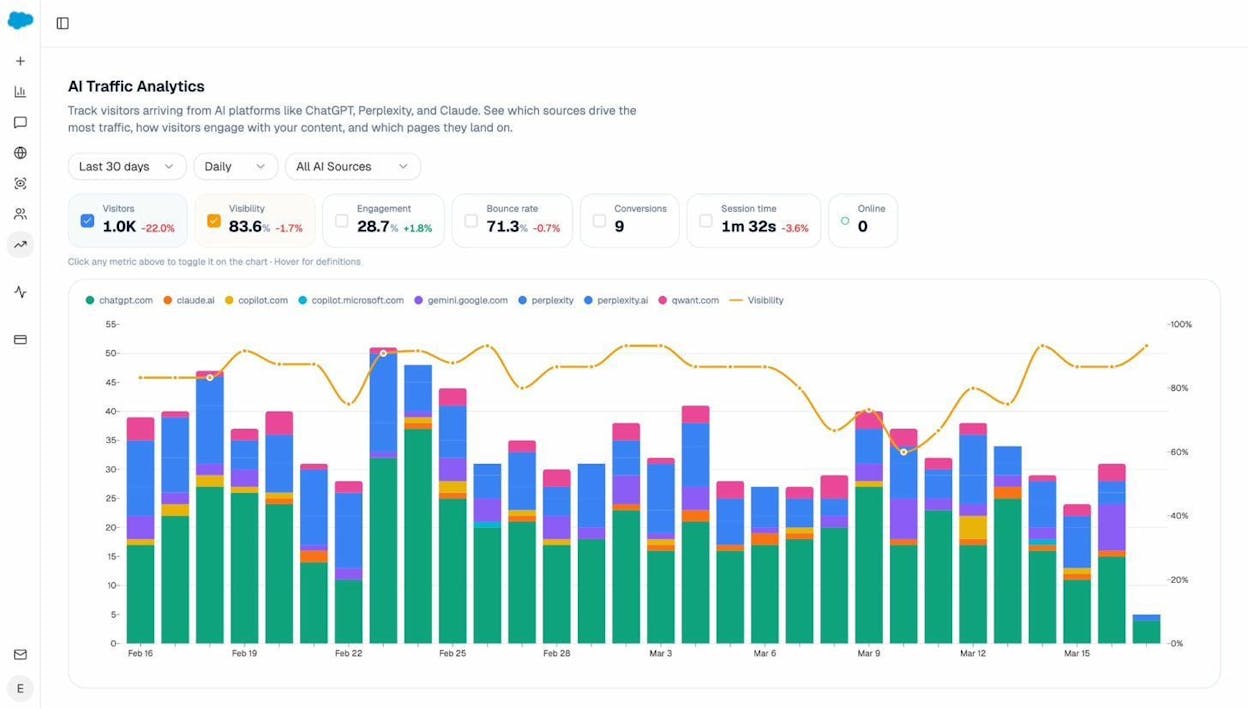
This is your AI search equivalent of Google Analytics. It tells you whether the content improvements you’re making are actually translating into traffic from AI engines.
Get a weekly briefing without logging in
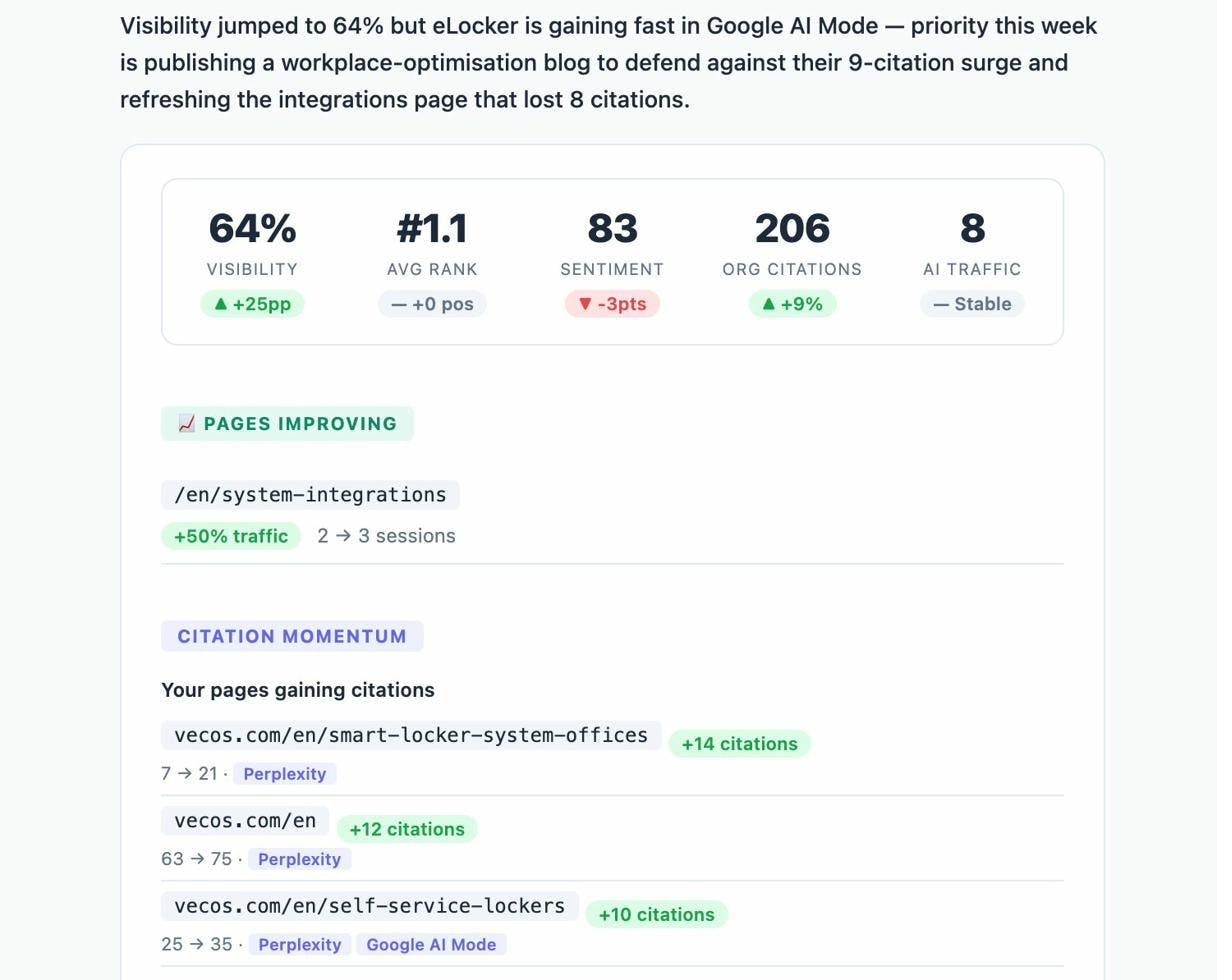
Analyze AI sends you a weekly email digest with your key metrics — visibility changes, competitor shifts, citation momentum, and pages that are improving or declining. It’s a Monday-morning summary that tells you exactly what to focus on that week.
FAQs
What is small business SEO?
Small business SEO is the process of improving your website and online presence so that more people find your business through search engines like Google. For most small businesses, this focuses heavily on local SEO — showing up when nearby customers search for the products or services you offer.
Is SEO dead because of AI search?
No. SEO is not dead. Google still processes billions of searches every day, and organic search remains the largest source of website traffic for most businesses. What’s changed is that AI search has emerged as an additional organic channel. The businesses that will win are the ones that optimize for both — not the ones that abandon what already works.
What’s the difference between SEO and AI search optimization?
SEO focuses on ranking your website in traditional search engine results (Google, Bing). AI search optimization — sometimes called Generative Engine Optimization (GEO) — focuses on getting your business mentioned in AI-generated answers from platforms like ChatGPT, Perplexity, and Gemini. The core principles overlap: quality content, authority, and accurate information. But AI search requires additional monitoring because you can’t simply check a SERP — you need to track what AI engines actually say about you.
How much does small business SEO cost?
It depends on whether you do it yourself or hire someone. Everything in this article can be done for free or at minimal cost. If you hire an SEO agency or consultant, expect to pay anywhere from $500 to $5,000 per month depending on scope and your market’s competitiveness. For AI search tracking, tools like Analyze AI offer affordable plans designed specifically for small and mid-sized businesses.
What’s the difference between small business SEO and local SEO?
For most small businesses, they’re the same thing. If your business serves customers in a specific geographic area — a city, a region, a neighborhood — then your SEO strategy is a local SEO strategy. The only exception is if you sell products or services nationally or internationally, in which case you’d need a broader ecommerce SEO or content marketing approach.
How long does SEO take to work for a small business?
Most small businesses start seeing measurable improvements within three to six months if they’re consistent with the basics: claiming their Google Business Profile, building directory listings, fixing technical issues, and publishing quality service pages. AI search visibility can move faster because it’s a less competitive channel — some businesses see mentions in AI answers within weeks of improving their content.
How do I know if AI search matters for my business?
If your customers use ChatGPT, Perplexity, or Google’s AI features to research products or services, AI search matters. You can test this right now: open ChatGPT or Perplexity and type a question a customer might ask, like “best [your service] in [your city].” If your competitors show up and you don’t, that’s your answer. Analyze AI lets you run these tests at scale and track results over time with its Ad Hoc Searches feature.

Ernest

Ibrahim


