The 6 Best SEO Tools for Small Businesses
Written by
Ernest Bogore
CEO
Reviewed by
Ibrahim Litinine
Content Marketing Expert

Small teams don’t lose momentum because they lack effort — they lose it because they can’t see which SEO work actually moves their traffic.
You ship pages, adjust headlines, and fix technical issues, yet the results feel unpredictable because nothing shows you which actions matter and which ones waste time.
You update pages that never had a chance to rank, while stronger opportunities sit untouched.
You run audits that list dozens of issues, but only a few have real impact on visibility.
You publish new content without knowing how your competitors earned their traffic or why Google favors their pages over yours.
We tested the tools built for teams in your position — small businesses that need clarity, not clutter. We looked at how each tool reveals opportunities, fixes the problems that block growth, and shows which actions lead to measurable results instead of surface-level improvements.
This guide breaks down the six SEO tools that give small businesses the highest return on effort — plus one more. Because SEO is shifting toward AI search (GEO), we added a bonus tool that shows how models talk about your brand and which prompts drive actual traffic. You’ll walk away knowing exactly which tools to use, when to use them, and how to turn limited time into meaningful organic growth.
Table of Contents
TL;DR
| Tool | Best for | What it focuses on | Biggest strengths for small businesses | Main watch-outs / limits |
|---|---|---|---|---|
| Google Search Console | Any small business that needs a foundational must-have SEO tool | Crawl indexing and search performance in Google | Free accurate data directly from Google; shows which pages are indexed which queries drive clicks and where technical issues block growth | No competitor analysis or deep backlink/keyword research; sampled data and limited history; only covers Google so you’ll need other tools as you grow |
| Surfer SEO | Content-heavy SMBs that want data-driven on-page optimization | Improving individual pages using SERP and competitor content analysis | Clear guidance on structure word count and keyword coverage; strong content audits; smooth integrations with Docs and WordPress | No technical SEO or backlink data; best as a content layer not the only tool |
| Ubersuggest | Beginners solo founders and very small teams starting SEO | Simple keyword research content ideas and basic audits | Very budget-friendly; easy interface; great for early keywords and finding obvious SEO issues | Limited data depth; not ideal for competitive niches; often outgrown as traffic grows |
| Ahrefs | SMBs ready to invest in deep backlink and competitive research | Backlink analysis keyword research site audits and content discovery | Extremely strong backlink index; powerful keyword/content gap analysis; excellent for long-term strategy | Higher price; steeper learning curve; best with some SEO experience |
| Moz Pro (+ Moz Local) | Small businesses needing combined rankings + local visibility | Keyword tracking audits content research and local listings | Balanced toolkit; strong education resources; great for businesses reliant on maps/local search | Not as deep as enterprise tools; may require extra tools in competitive markets |
| SE Ranking | SMBs and small agencies wanting affordable all-in-one tracking and audits | Rank tracking site audits keyword & competitor research backlink monitoring | Great value; daily keyword trends; practical audits; scales well without enterprise pricing | Broader but shallower than top-tier suites; backlink depth weaker; may need upgrades for very large sites |
| Analyze | Small businesses focused on AI search (GEO) and proving ROI | AI search visibility AI referrals prompt tracking revenue impact | Connects AI mentions to sessions conversions revenue; shows engines/prompts driving real pipeline; audits citations; prioritizes GEO opportunities by business impact | Focused on AI/LLM search not classic SEO; best used alongside GSC and traditional SEO stack |
Google Search Console: best small business SEO tool for seeing what Google sees

Key Google Search Console standout features
Shows if Google can crawl and index your pages and flags problems when it cannot
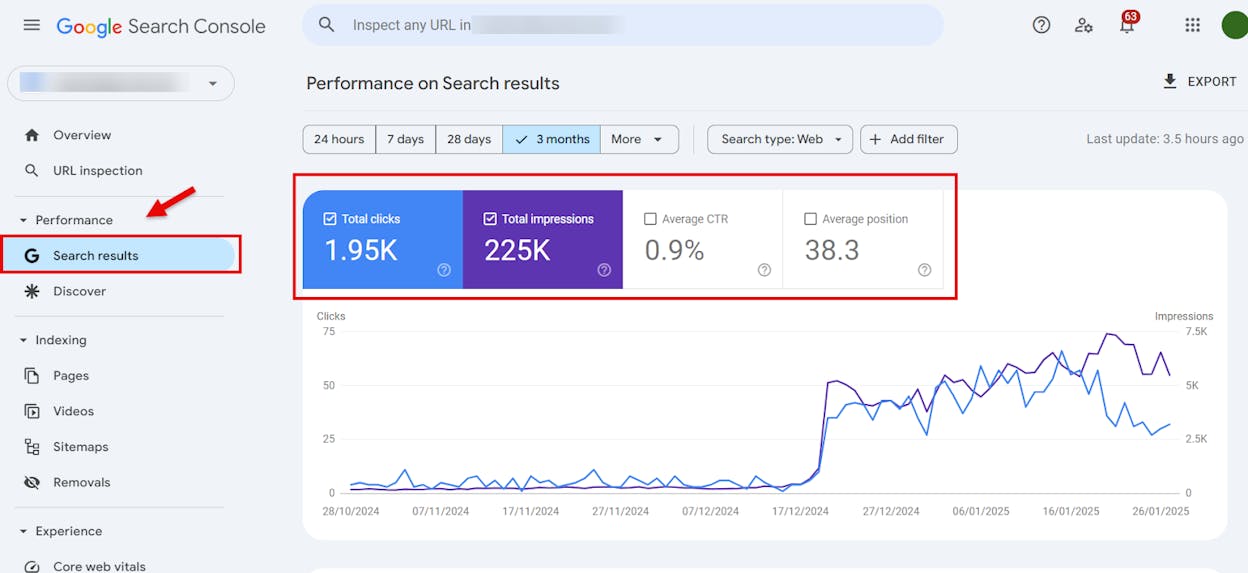
Performance report shows queries, clicks, impressions, click-through rate, and average position for each page
URL inspection and coverage reports explain why a page is indexed, blocked, or dropped and let you request re-indexing
Page experience and Core Web Vitals reports highlight mobile issues, speed problems, and structured data errors
Link reports list top internal and external links so you see which pages get the most link weight
Google Search Console works like a direct line into Google’s view of your site, which makes it very powerful for small teams that cannot guess why traffic moves up or down. It turns hidden crawl and index rules into clear messages, so you can see when Google hits blocked pages, finds broken links, or skips content that you thought was fine, and that view helps you fix the right problems first instead of chasing random tweaks.
The performance and enhancement reports also give you an honest look at how people find and use your pages, since you see real search queries, click-through rates, devices, and countries in one place. That means a small business can spot pages that get many views but few clicks, find search terms that deserve better content, and notice when a change on the site leads to a real impact inside search, without paying for a heavy analytics stack.
Still, Google Search Console does not act like a full all-in-one SEO platform, and that gap becomes clear once you start doing deeper work. It does not show rich competitor data, big backlink graphs, or full keyword landscapes, so you cannot build a full content or link strategy from it alone, and you will miss many insights that paid suites reveal.

The data inside Search Console also comes with some limits that matter once your program grows and your questions get more complex. Query data is sampled, historical data stops after a set window, link reports are partial, and every chart only covers Google Search traffic, which means you need other tools when you want long term trend lines, multi-engine views, or deep link audits for advanced campaigns.
Pricing plans
Google Search Console has a simple pricing plan that makes it easy for small businesses, because the tool itself is free and available to anyone who can verify a site. There are no paid tiers or usage fees, so the real cost lives in the time you spend learning the reports and turning the data into changes on your site, which still stays far cheaper than jumping straight into high priced SEO suites when your team is small.
| Aspect | What Google Search Console gives you | Why this matters for small businesses |
|---|---|---|
| Cost | Free to use with no monthly subscription | You keep your budget for content development or a single paid SEO tool when you really need it |
| Main focus | Crawl index and search performance for your own site | You fix blocking issues early before they waste spend or slow down your growth |
| Best at | Showing how Google sees your pages and which queries drive clicks | You base decisions on real search data instead of guesses or vanity metrics |
| Technical help | Clear reports for coverage mobile issues Core Web Vitals and structured data | You find and explain technical problems to developers without deep SEO jargon |
| Limits compared to SEO suites | No deep competitor analysis shallow backlink data and no full keyword research | You understand when to keep using Search Console alone and when to add a second more advanced tool |
Best use cases
Checking which pages are indexed and fixing ones that dropped or never appeared
Finding search queries that already bring visits and turning them into stronger pages
Spotting technical issues, like mobile problems or slow pages, before they hurt results
Tracking how site changes or new content affect clicks and positions over time
Giving clear, simple SEO tasks to developers or freelancers based on real warnings
Takeaway
Surfer SEO: best small business SEO tool for improving on-page content with data

Key Surfer SEO standout features
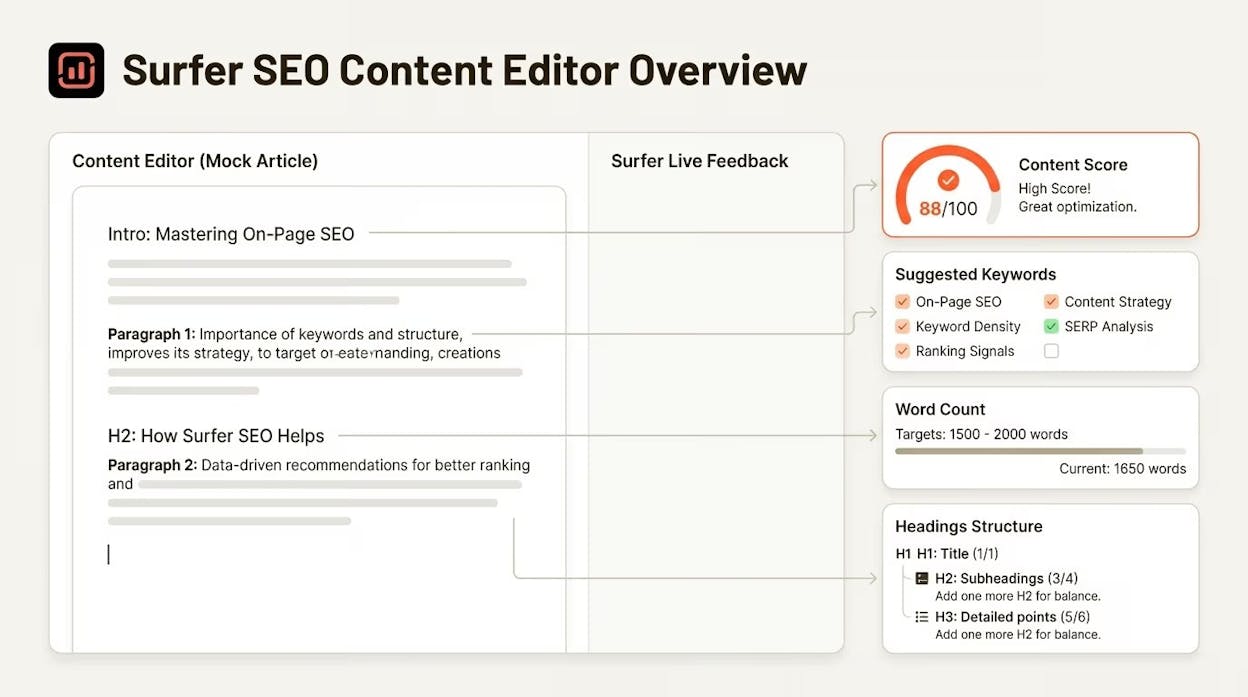
Analyzes top-ranking pages to show ideal structure, topics, and keyword coverage
Gives clear guidance on headings, word count, and content depth for each target keyword
Offers content audits that compare your pages with competitors and highlight gaps
Suggests internal and external linking improvements to strengthen relevance
Integrates with tools like Google Docs and WordPress to simplify team workflows
Surfer SEO helps small teams create stronger pages by turning on-page optimization into a simple, data-guided process. The tool studies what already performs well in search and converts those patterns into clear steps that show how to improve the structure, coverage, and clarity of your own content. This makes writing more predictable because you no longer guess which topics to include or how long a page needs to be, and you avoid publishing thin or incomplete pages that fail to match search intent.
The content audit features add another layer of support by scanning your existing pages and pointing out where content falls short compared to top competitors. These audits give small teams a simple list of updates that strengthen weak pages, help older content stay fresh, and reveal which articles need extra depth or better keyword alignment. When used regularly, these insights create a process that keeps pages healthy and prevents slow declines in traffic.

Surfer SEO does not replace technical SEO tools or backlink suites, and you will still need other platforms to manage crawling issues, link profiles, speed problems, and off-page authority. The tool limits itself to on-page signals, so it will not help when rankings fall due to site-level issues or weakened domain trust. These gaps matter when you work in competitive niches where external authority and strong backlink strategy drive most ranking movement.
Content-only optimization can also miss the bigger picture when your market is saturated or when your competitors win through domain strength rather than content depth. In those cases, Surfer becomes one piece of a broader SEO stack rather than the single solution. However, its focus on on-page quality still makes it a valuable starting point before investing in larger or more expensive SEO platforms.
Pricing plans
Surfer SEO offers three tiers that match how much content a team produces. The Essential plan starts at $79 per month when billed annually and gives small teams the core tools to publish ready-to-rank pages, stay on brand with templates, and keep content updated through monthly optimization prompts. The Scale plan starts at $175 per month when billed annually and adds up to five times higher limits, AI visibility tracking across major models, weekly performance monitoring, and stronger workflow customization for teams that publish often. Enterprise plans begin at $999 per month and expand into SSO, API access, long-term data, cannibalization analysis, priority support, and strategic advisory for agencies or brands with complex or high-volume needs.
| Aspect | What Surfer SEO gives you | Why this matters for small businesses |
|---|---|---|
| Main focus | On-page content optimization based on top-ranking pages | Helps small teams improve pages without deep SEO expertise |
| Content guidance | Clear structure keyword coverage and topic recommendations | Reduces guesswork and improves content quality |
| Content audit | Finds weak or outdated pages and gives simple fixes | Makes improving old content faster and more consistent |
| Integrations | Google Docs WordPress team collaboration tools | Fits workflows used by small teams and content writers |
| Limits | No backlink data no technical SEO auditing | Helps you know when to add other tools as you grow |
Best use cases
Improving blog posts and service pages with clear, simple on-page guidance
Refreshing older content to stay aligned with current ranking patterns
Supporting writers who need structure and topic clarity before drafting
Giving small teams a reliable optimization process without learning advanced SEO
Optimizing high-value pages before investing in backlink or technical tools
Takeaway
Ubersuggest: best small business SEO tool for simple keyword research and easy audits

Key Ubersuggest standout features
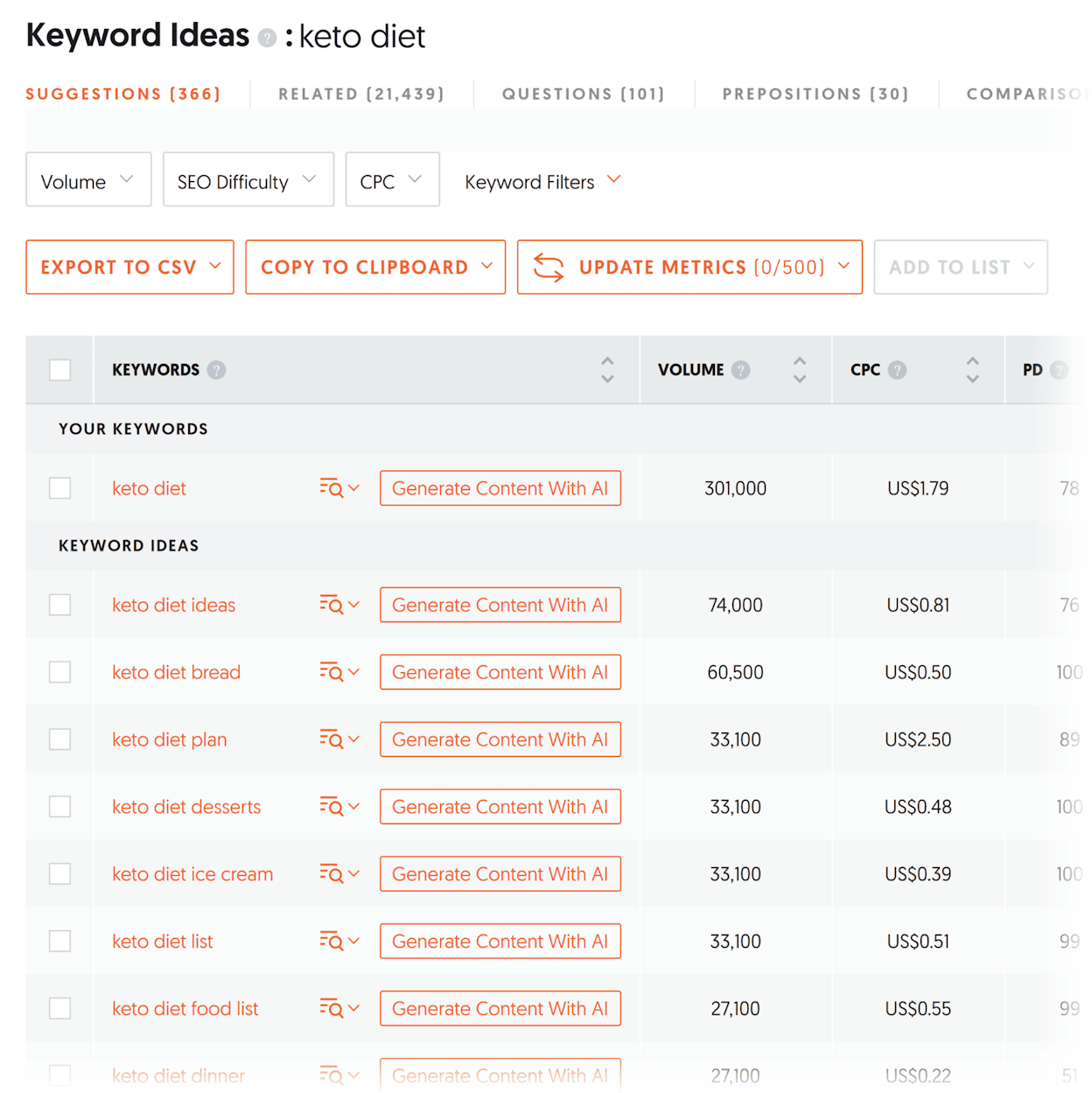
Helps you find keyword ideas, search volume, and related terms without complex setup
Runs basic SEO audits to flag common issues that new sites often miss
Suggests content topics based on what people search for and what already performs well
Shows simple competitor insights so beginners can understand who ranks and why
Offers an interface that is clear, friendly, and easy for non-experts to use
Ubersuggest gives small teams a simple way to begin SEO without feeling overwhelmed by large dashboards or advanced reporting. The tool focuses on the core tasks beginners need most: finding useful keywords, spotting easy content opportunities, and checking a site for basic mistakes that slow down early growth. These tasks often shape the first phase of SEO for small businesses, and Ubersuggest makes them easier by showing clean, straightforward data that does not require deep experience to understand.
Its strength comes from lowering the barrier to entry. Small business owners, solo creators, or new bloggers can use it to plan content, validate ideas, and fix simple issues before moving to more advanced SEO tools. This matters because early SEO success often depends on covering the basics well, and Ubersuggest helps you do that without big expense or long learning curves. It offers just enough guidance to help you build a habit of structured keyword research and regular site checks, which is a strong foundation for long-term growth.

Ubersuggest’s limits show up once your strategy becomes more complex. The tool’s data sources are lighter than those used by premium SEO platforms, so volume, difficulty scores, and backlink insights are not as deep or as precise. This matters when you begin competing for harder keywords, because shallow data can lead to poor choices or missed opportunities that a larger tool would catch. Its reporting options also stay simple, so teams that need deep audits or multi-layer insights will quickly outgrow what it can offer.
These gaps do not make Ubersuggest less useful for early-stage SEO, but they underline that the tool is a starter solution rather than an all-in-one SEO suite. When your site grows, when competition becomes stronger, or when you start needing backlink strategies, technical audits, or fine-grained keyword models, you will need to add more advanced tools to your stack. Ubersuggest remains helpful for simple research and quick checks, but it cannot cover heavy-duty SEO work on its own.
Pricing plans
Ubersuggest is known for being one of the most affordable SEO tools, and its low entry price makes it easy for beginners to start with keyword research and simple audits before committing to higher-cost platforms. Small teams can use it to handle early SEO tasks without straining their budget, which is often the biggest advantage for new sites or solo creators.
| Aspect | What Ubersuggest gives you | Why this matters for small businesses |
|---|---|---|
| Main focus | Keyword research content ideas simple audits | Gives beginners the basics without extra complexity |
| Ease of use | Clear interface and beginner-friendly layout | Saves time for owners who are new to SEO |
| Content ideas | Shows trends topics and related terms | Helps build a steady content plan with low effort |
| Budget | Very low price compared to full SEO suites | Makes SEO accessible for small teams and solo creators |
| Limits | Shallow data depth and fewer advanced insights | Useful at the start but not enough for competitive SEO |
Best use cases
Picking simple, winnable keywords for early-stage content
Getting topic ideas that match what people search for
Running quick SEO audits to fix obvious issues
Helping non-experts make better content decisions
Supporting solo creators or businesses with small budgets
Takeaway
Ahrefs: best small business SEO tool for deep backlink insights and competitive research

Key Ahrefs standout features
Tracks backlinks with one of the largest link databases available for SEO teams
Offers keyword research tools that reveal search volume, difficulty, clicks, and related terms
Runs detailed site audits that uncover technical issues and structural weaknesses
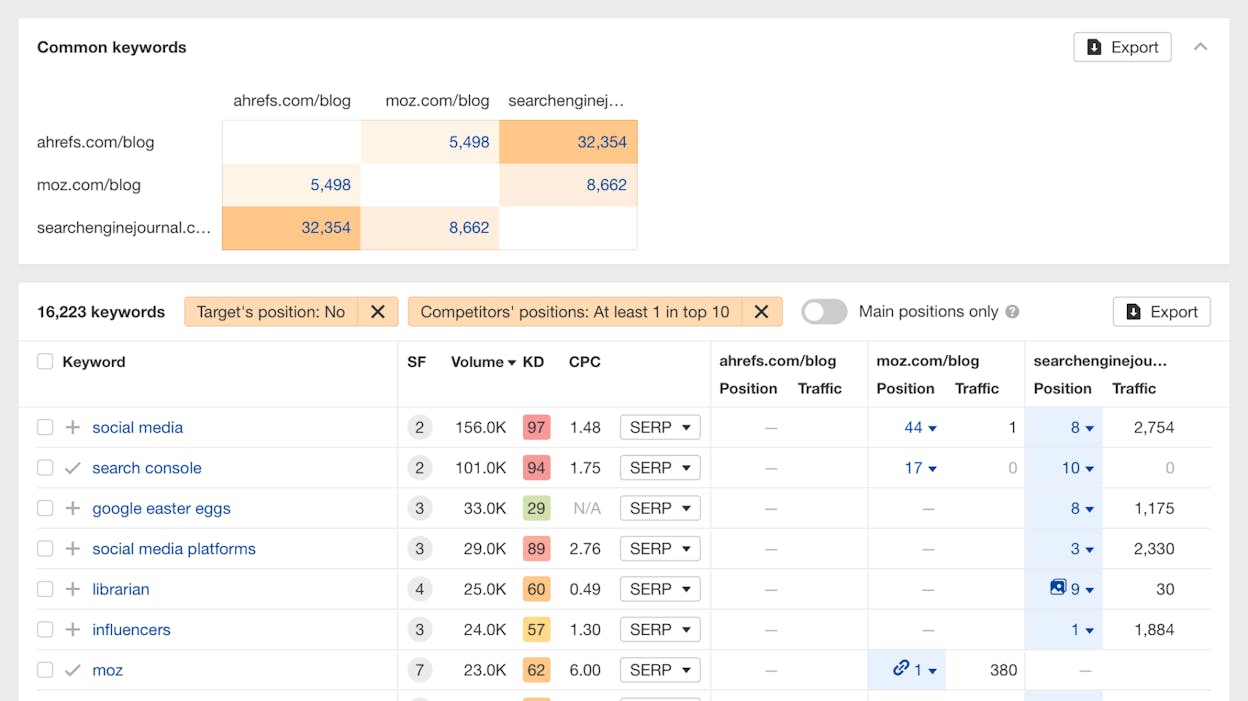
Includes competitive analysis tools that show keyword gaps, link gaps, and SERP patterns
Provides Content Explorer to find high-performing pages, link opportunities, and content ideas
Ahrefs helps small businesses understand why competitors rank higher and what they need to do to close the gap. Its backlink database gives teams a clear view of who links to competitors, which pages earn the most authority, and where openings exist for gaining new backlinks. This matters because backlinks remain one of the strongest ranking signals, and Ahrefs makes these insights accessible with reports that highlight link opportunities and risky gaps. The platform also offers deep keyword research that shows click metrics, search difficulty, and intent, which helps small teams choose keywords that can actually drive visits, not just impressions.
Its tools work together to reveal what drives search performance in a way that few platforms match. Ahrefs’ site audit can show structural issues, slow-loading pages, or broken links that hold rankings back. The Content Explorer tool helps find proven topics by scanning pages that already attract traffic and links, giving you a map for content that has the best chance to succeed. These features give small teams the clarity they need to make smarter decisions without depending on guesswork or luck.

Ahrefs can feel less friendly for beginners because it presents large amounts of data without strong hand-holding. The platform expects users to know how to interpret backlink profiles, keyword metrics, and audit warnings, which may overwhelm new site owners. This challenge grows when you try to compare competitors or deal with advanced reports like link intersections, SERP evolution, or keyword clusters, because these tools assume comfort with deeper SEO concepts.
It also lacks the step-by-step suggestions that beginner-focused tools offer, so teams that want clear instructions may struggle at first. You often have to decide on your own which issues matter most and what to fix first, which can be hard if you do not have a strong SEO workflow already. However, these limits appear only at the beginner stage; once your skill grows, the platform becomes one of the strongest investments you can make for long-term SEO.
Pricing plans
Ahrefs offers three main plans that scale with project size and data needs. The Lite plan starts at $129 per month and includes core features like Site Explorer, Keywords Explorer, Rank Tracker, and a site audit with enough crawl credits for smaller sites. The Standard plan starts at $249 per month and increases project limits, tracked keywords, historical data, and crawl capacity while adding tools like Content Explorer, Batch Analysis, and deeper SERP insights. The Advanced plan starts at $449 per month and expands the limits even further with more projects, long-term historical data, Looker Studio integration, and advanced segmentation, making it a better fit for growing in-house teams that need broader coverage.
| Aspect | What Ahrefs gives you | Why this matters for small businesses |
|---|---|---|
| Backlink data | One of the largest link databases | Helps identify link gaps and competitor advantages |
| Keyword research | Accurate difficulty clicks and intent metrics | Reduces wasted effort on keywords that will not rank |
| Competitive insights | Link gaps keyword gaps SERP history | Helps find opportunities competitors rely on |
| Site audit | Technical and structural checks | Fixes site issues that slow ranking growth |
| Limits | Less beginner-friendly requires interpretation | Better suited for teams ready to grow beyond basics |
Best use cases
Finding backlink opportunities and understanding competitor authority
Researching keywords with accurate difficulty and click metrics
Running full site audits to fix technical and structural SEO issues
Identifying content topics with strong link and traffic potential
Building long-term SEO strategies based on deep competitive data
Takeaway
Moz Pro: best small business SEO tool for managing rankings and local visibility together

Key Moz Pro standout features
Tracks keyword rankings to show how your pages move over time across markets and devices
Runs SEO audits that surface technical problems and site-health issues small teams often miss
Provides keyword and content research tools for finding topics and building pages that match search demand
Includes competitive visibility metrics so you can see how your rankings compare with others in your niche
Works alongside Moz Local to manage business listings, directory accuracy, and local search presence
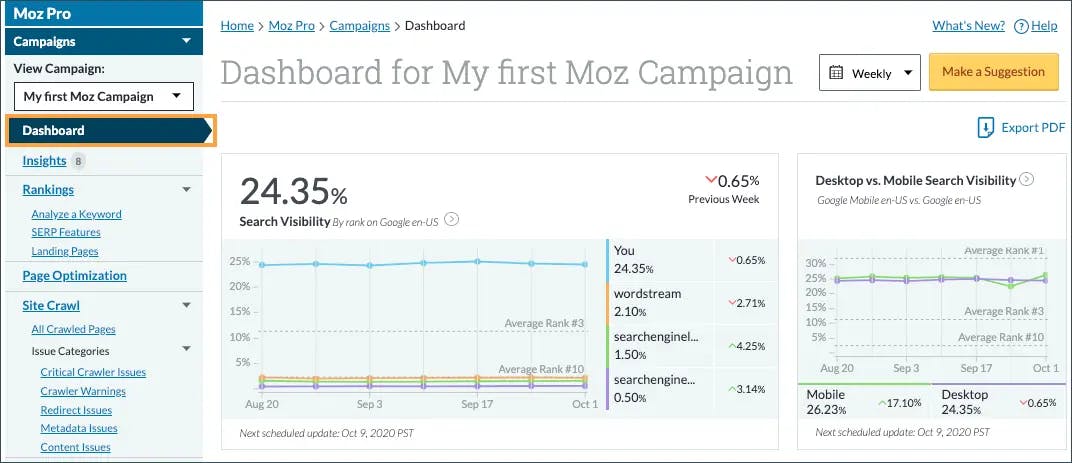
Understanding where your site stands in search is the first step toward reliable growth, and this is exactly where the toolkit shines. Keyword tracking, visibility monitoring, and content research come together to show you how your pages perform and which opportunities deserve attention. The interface stays easy to use, and the learning resources make SEO accessible even if you have never run audits or keyword research before.
Local visibility often requires a separate set of tools, and that gap is addressed through Moz Local. It handles directory listings, keeps your business information consistent across platforms, and helps you appear in map packs and location-based results. This combination gives small teams a unified workflow for improving both global and local presence, reducing the need to juggle separate dashboards or guess how different tools fit together.

Still, ease of use comes with trade-offs. The platform focuses on clarity rather than advanced technical depth, so you won’t find the same scale of backlink data or granular diagnostics offered by heavy enterprise tools. Small teams may appreciate the simplicity, but ambitious in-house marketers might outgrow the limits once their site becomes more complex or the competition escalates.
As your strategy matures, the lighter depth may require you to pair Moz with other tools for advanced link analysis or technical troubleshooting. This does not diminish its value for SMBs; rather, it signals that the tool excels as an approachable foundation rather than a one-size-fits-all solution for long-term enterprise growth.
Pricing plans
The SMB Solutions offering bundles Moz Pro with Moz Local to give small businesses an all-in-one setup for global SEO and local presence. Moz Pro handles ranking data, keyword insights, technical audits, and content research, while Moz Local manages directory accuracy and improves visibility for customers searching nearby. Together, they offer an approachable package that fits teams without deep SEO experience or large budgets.
| Aspect | What Moz Pro gives you | Why this matters for small businesses |
|---|---|---|
| Global SEO | Keyword tracking audits content research | Helps teams find issues and discover ranking opportunities |
| Local SEO | Directory management presence monitoring | Improves map visibility and local search results |
| Ease of use | Clear dashboards and strong learning resources | Reduces the learning curve for non-experts |
| Competitive data | Visibility comparisons and ranking snapshots | Shows how you stand against similar businesses |
| Limits | Not as deep as enterprise-level tools | Best suited for SMBs not heavy technical SEO |
Best use cases
Tracking rankings and visibility changes across search results
Running steady site audits to fix issues and improve health
Finding keyword opportunities for new pages and blog posts
Managing local listings and keeping directory data accurate
Supporting small teams that need easy-to-use SEO tools
Takeaway
SE Ranking: best small business SEO tool for affordable all-in-one tracking and audits

Key SE Ranking standout features
Tracks keyword rankings daily across Google’s Top 100 with clear visibility trends
Runs website audits to flag technical issues, site errors, and structural gaps
Includes competitive and keyword research tools to find new content and ranking opportunities
Monitors backlinks through a checker and ongoing link updates
Offers on-page and SERP analysis supported by AI data insights and an AI results tracker
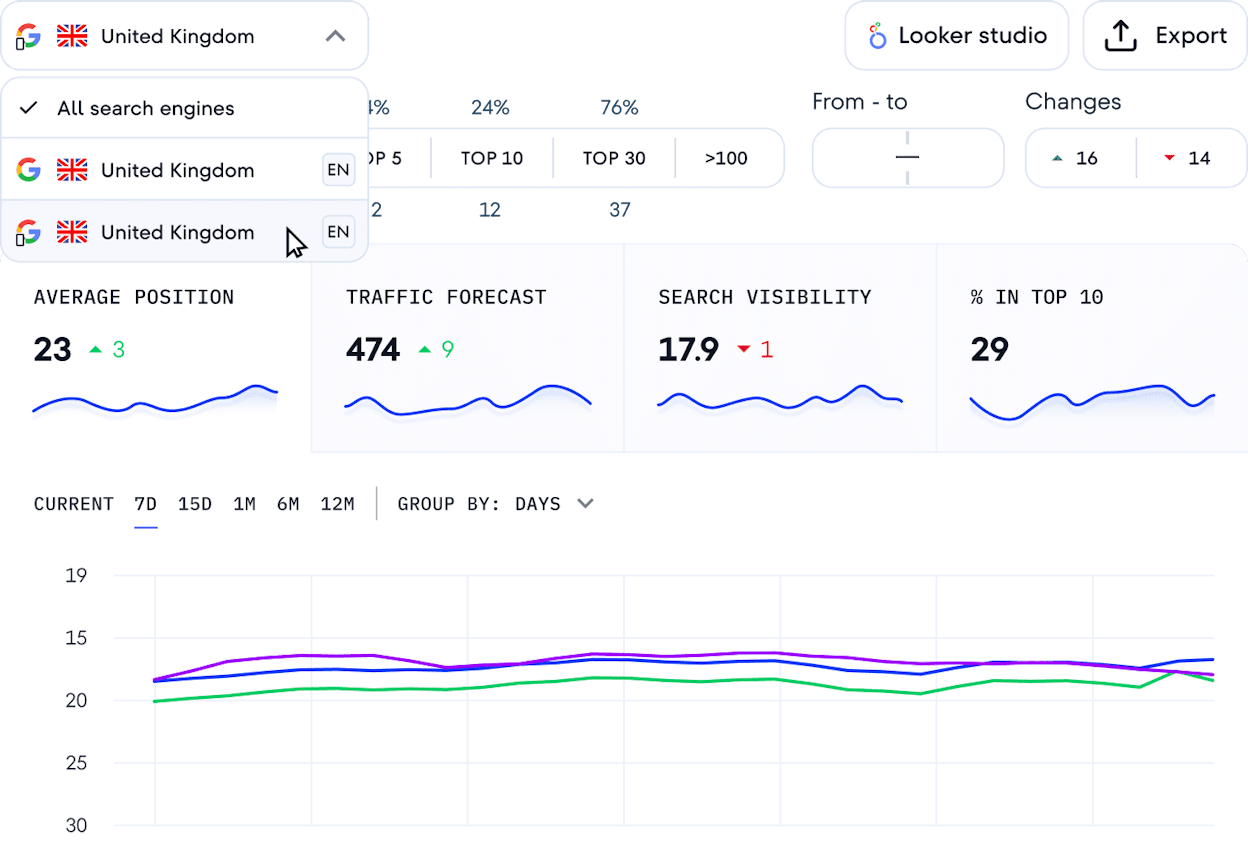
Improving rankings starts with understanding where you stand, and SE Ranking gives small teams a clean, simple way to track that progress every day. Its rank tracker, keyword research, and audit tools come together to show which pages are rising, which fall behind, and what issues hold them back. This clarity helps small businesses use SEO in a structured way without needing a specialist, and the interface stays easy to navigate even if you have limited experience. Competitive and keyword research add more depth by revealing which queries matter in your niche and where your content can quickly gain ground.
The platform also works well when you want to manage several parts of SEO within one system. Backlink monitoring, AI-assisted analysis, and SERP evaluation give a fuller picture of how your site competes against others. These features do not feel overwhelming because they stay practical and focused on actions small teams can take, making SE Ranking a strong fit for SMBs that want balanced capabilities without paying for enterprise-level tools. The mix of tracking, auditing, content research, and on-page support helps teams build a consistent workflow that catches issues early and drives steady improvement.

There are still trade-offs. SE Ranking offers breadth, but its data depth is lighter than platforms built for advanced link analysis or massive-scale competitive research. This matters when your niche becomes competitive or when you need very detailed backlink intelligence to move past established players. Large-site audits or complex enterprise structures may also require tools that specialize in crawling or technical diagnostics. For most small and medium-sized businesses, these limits stay in the background, but agencies with heavy technical demands may eventually need more depth.
As your SEO needs grow, you may notice the difference between SE Ranking and top-tier suites with deeper backlink databases, broader keyword indexes, and more granular reporting. Those tools can become necessary when you manage dozens of clients, run large content programs, or compete in challenging search markets. Even then, many teams still keep SE Ranking as a reliable tracking and auditing layer because it remains easy to use and cost-efficient.
Pricing plans
SE Ranking offers three core plans that scale with the number of projects, keywords, team seats, and data needs. The Essential plan starts at $52 per month and supports solo SEO professionals with one manager seat, five projects, 500 daily tracked keywords, and access to core tools like rank tracking, audits, keyword research, backlink monitoring, and AI insights. The Pro plan begins at $95.20 per month and expands to three manager seats, 30 projects, and 2,000 keywords per day while adding Looker Studio integration, Share of Voice metrics, and content and local marketing toolkits. The Business plan starts at $207.20 per month and offers five manager seats, unlimited projects, 5,000 keywords per day, expanded databases, all-time historical data, advanced auditing capacity, team training, and API access with 100,000 credits.
| Aspect | What SE Ranking gives you | Why this matters for small businesses |
|---|---|---|
| Daily rank tracking | Clear keyword trends and visibility changes | Helps teams see what works without manual checks |
| Full site audits | Technical and structural issue detection | Fixes problems that block or slow ranking growth |
| Competitive and keyword research | Shows new opportunities and gaps | Supports smarter content planning without guesswork |
| Backlink monitoring | Tracks link changes over time | Protects rankings by alerting you to lost or toxic links |
| Limits | Less depth than premium enterprise tools | Best fit for SMB budgets and mid-level SEO needs |
Best use cases
Tracking daily keyword movements across multiple projects
Running site audits to fix technical issues and improve health
Finding keyword and content opportunities with clear competitive data
Managing backlinks with simple monitoring and alerts
Supporting SMBs and agencies that need balanced tools at a fair price
Takeaway
Analyze: best small business tool for tracking how AI models talk about your brand

Most GEO tools tell you whether your brand appeared in a ChatGPT response. Then they stop. You get a visibility score, maybe a sentiment score, but no connection to what happened next. Did anyone click? Did they convert? Was it worth the effort?
These tools treat a brand mention in Perplexity the same as a citation in Claude, ignoring that one might drive qualified traffic while the other sends nothing.
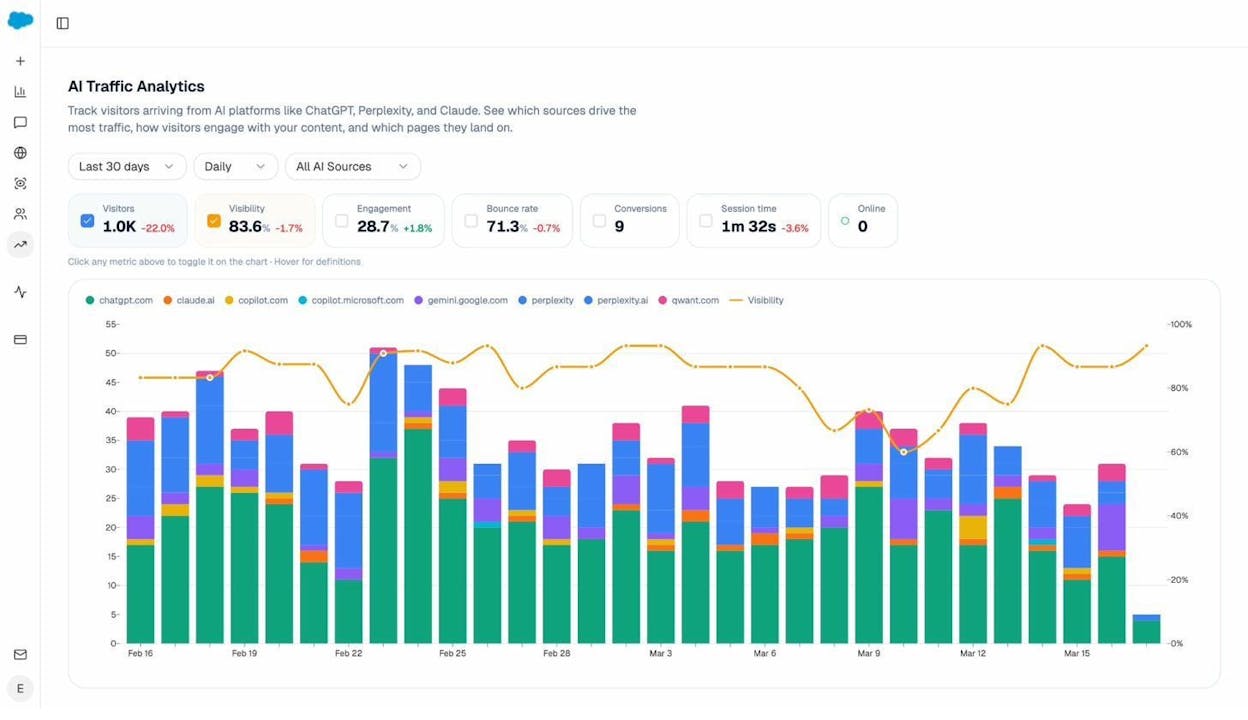
Analyze connects AI visibility to actual business outcomes. The platform tracks which answer engines send sessions to your site (Discover), which pages those visitors land on, what actions they take, and how much revenue they influence (Monitor). You see prompt-level performance across ChatGPT, Perplexity, Claude, Copilot, and Gemini, but unlike visibility-only tools, you also see conversion rates, assisted revenue, and ROI by referrer.
Analyze helps you act on these insights to improve your AI traffic (Improve), all while keeping an eye on the entire market, tracking how your brand sentiment and positioning fluctuates over time (Govern).
Your team then stops guessing whether AI visibility matters and starts proving which engines deserve investment and which prompts drive pipeline.
Key Analyze features
See actual AI referral traffic by engine and track trends that reveal where visibility grows and where it stalls.
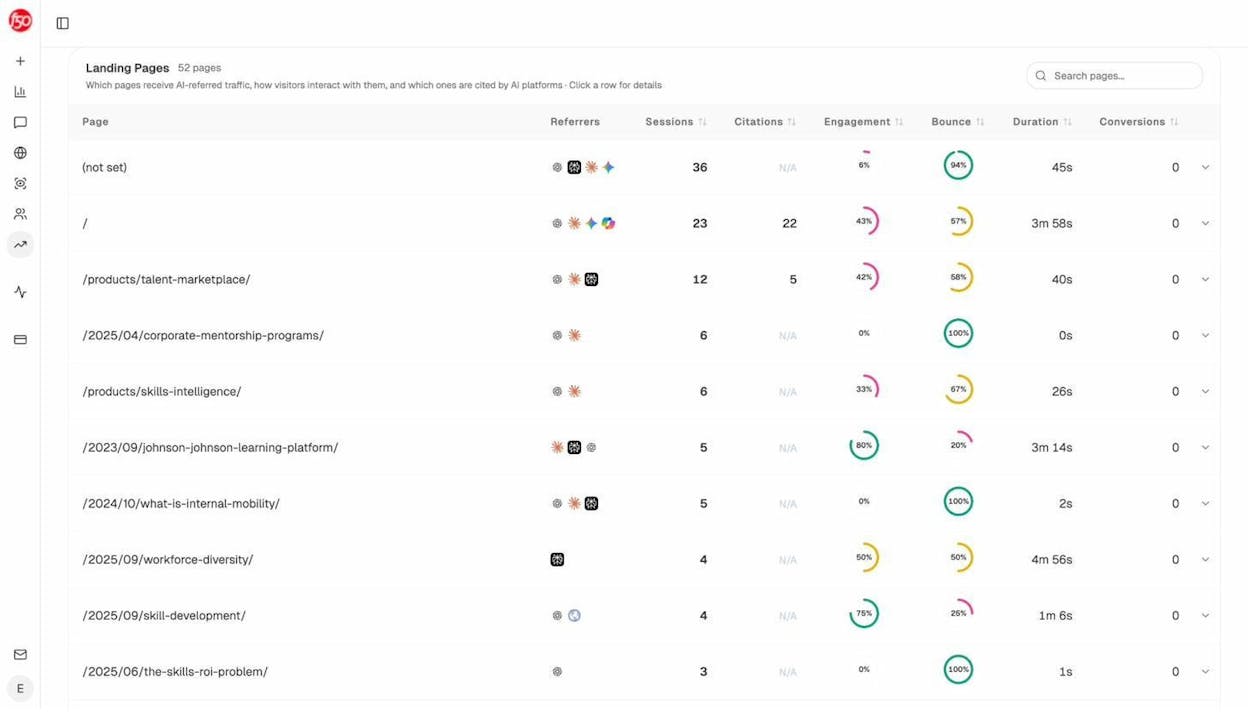
See the pages that receive that traffic with the originating model, the landing path, and the conversions those visits drive.
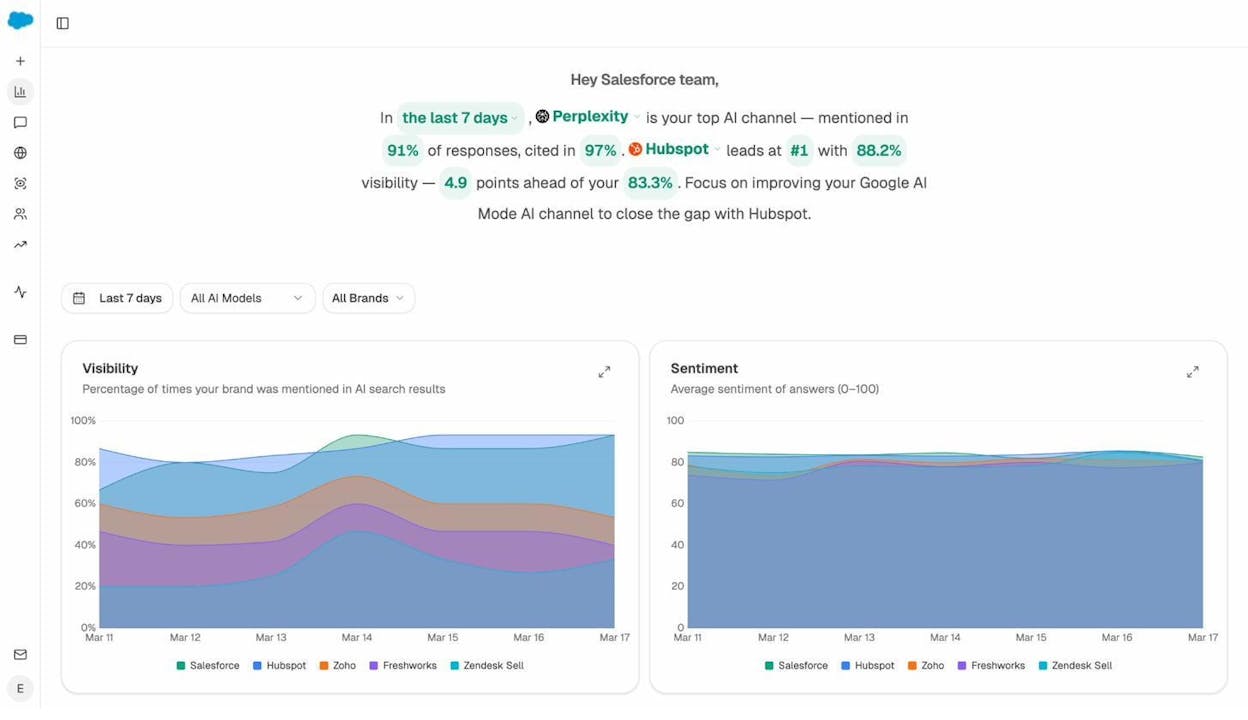
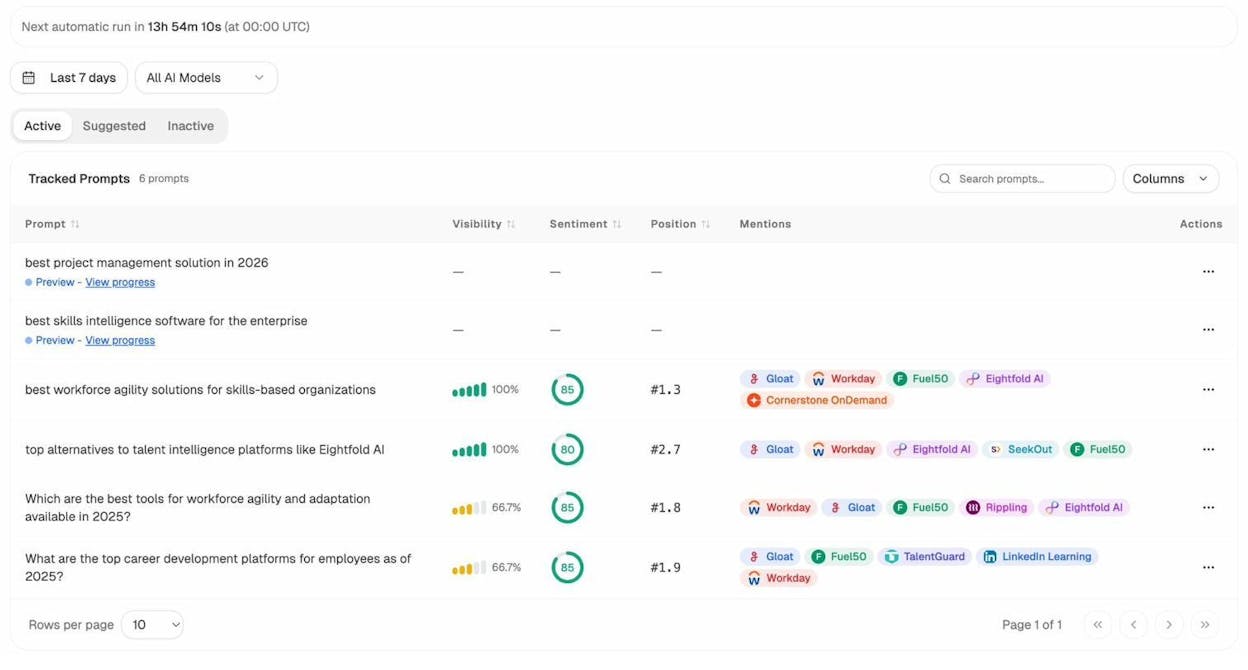
Track prompt-level visibility and sentiment across major LLMs to understand how models talk about your brand and competitors.
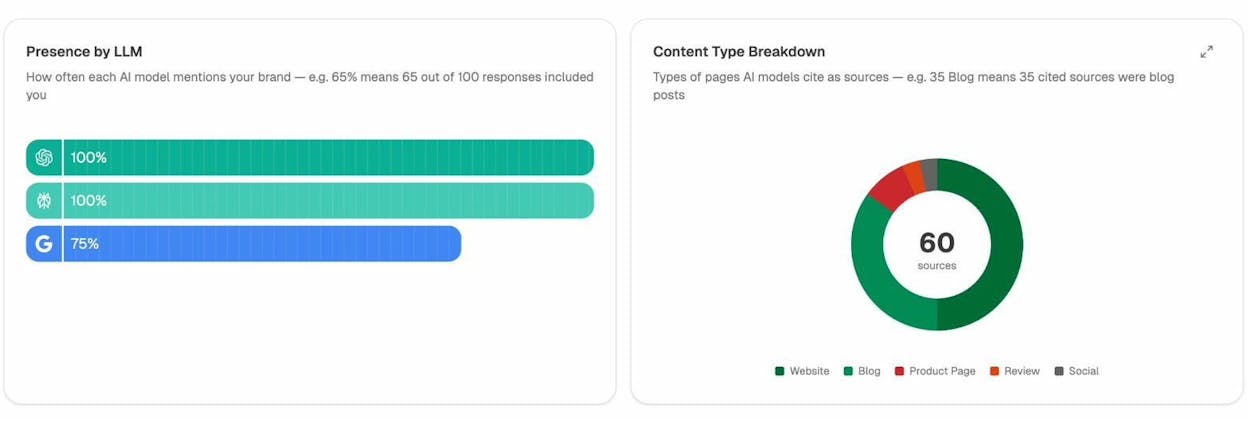
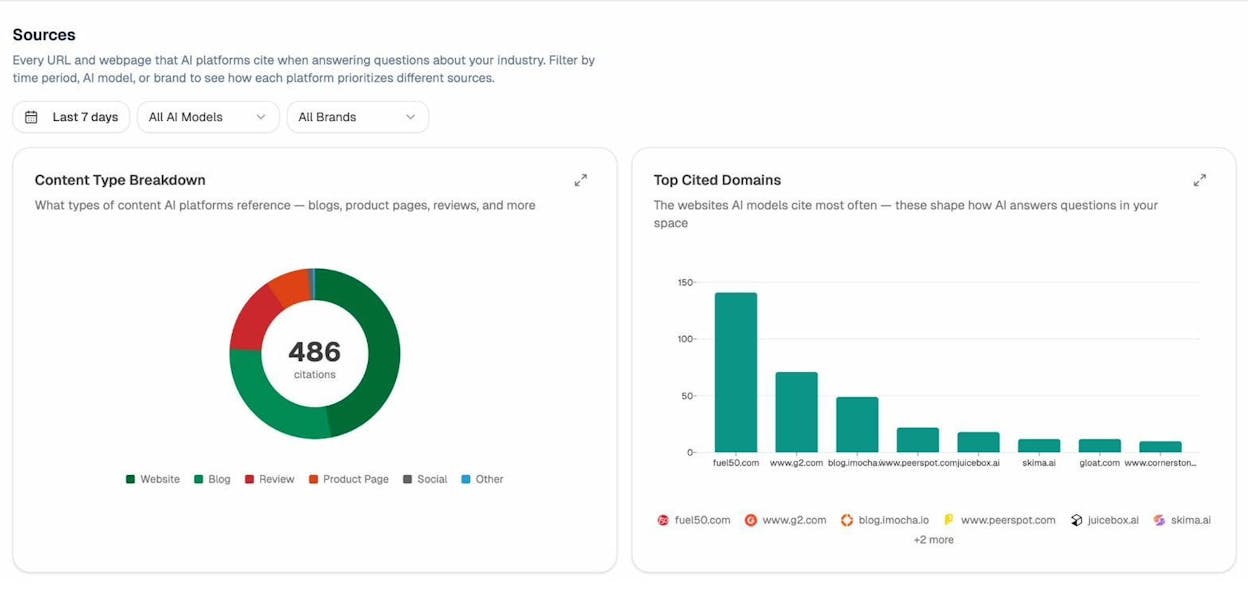
Audit model citations and sources to identify which domains shape answers and where your own coverage must improve.
Surface opportunities and competitive gaps that prioritize actions by potential impact, not vanity metrics.
Here are in more details how Analyze works:
See actual traffic from AI engines, not just mentions

Analyze attributes every session from answer engines to its specific source—Perplexity, Claude, ChatGPT, Copilot, or Gemini. You see session volume by engine, trends over six months, and what percentage of your total traffic comes from AI referrers. When ChatGPT sends 248 sessions but Perplexity sends 142, you know exactly where to focus optimization work.

Know which pages convert AI traffic and optimize where revenue moves

Most tools stop at "your brand was mentioned." Analyze shows you the complete journey from AI answer to landing page to conversion, so you optimize pages that drive revenue instead of chasing visibility that goes nowhere.
The platform shows which landing pages receive AI referrals, which engine sent each session, and what conversion events those visits trigger.
For instance, when your product comparison page gets 50 sessions from Perplexity and converts 12% to trials, while an old blog post gets 40 sessions from ChatGPT with zero conversions, you know exactly what to strengthen and what to deprioritize.
Track the exact prompts buyers use and see where you're winning or losing

Analyze monitors specific prompts across all major LLMs—"best Salesforce alternatives for medium businesses," "top customer service software for mid-sized companies in 2025," "marketing automation tools for e-commerce sites."

For each prompt, you see your brand's visibility percentage, position relative to competitors, and sentiment score.
You can also see which competitors appear alongside you, how your position changes daily, and whether sentiment is improving or declining.

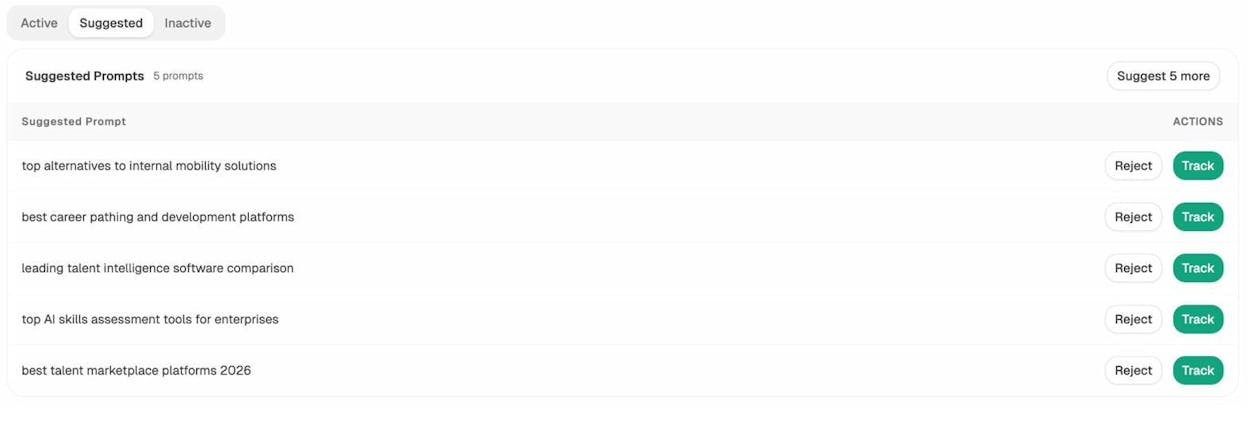
Don’t know which prompts to track? No worries. Analyze has a prompt suggestion feature that suggests the actual bottom of the funnel prompts you should keep your eyes on.
Audit which sources models trust and build authority where it matters

Analyze reveals exactly which domains and URLs models cite when answering questions in your category.
You can see, for instance, that Creatio gets mentioned because Salesforce.com's comparison pages rank consistently, or that IssueTrack appears because three specific review sites cite them repeatedly.

Analyze shows usage count per source, which models reference each domain, and when those citations first appeared.

Citation visibility matters because it shows you where to invest. Instead of generic link building, you target the specific sources that shape AI answers in your category. You strengthen relationships with domains that models already trust, create content that fills gaps in their coverage, and track whether your citation frequency increases after each initiative.
Prioritize opportunities and close competitive gaps

Analyze surfaces opportunities based on omissions, weak coverage, rising prompts, and unfavorable sentiment, then pairs each with recommended actions that reflect likely impact and required effort.
For instance, you can run a weekly triage that selects a small set of moves—reinforce a page that nearly wins an important prompt, publish a focused explainer to address a negative narrative, or execute a targeted citation plan for a stubborn head term.
Tie AI visibility toqualified demand.
Measure the prompts and engines that drive real traffic, conversions, and revenue.
Similar Content You Might Want To Read
Discover more insights and perspectives on related topics

6 Best Ad Intelligence Software to Outsmart the Competition

The Top 7 Alternatives to Peec AI for AI Search Visibility

I Tried the 7 Best AI Search Engines in 2025: Here’s What Works

What is Generative Engine Optimization?

I Tried AI SEO Tools for Small Businesses: Here Are the 6 Best