



Summarize this blog post with:


In this article, you’ll get a clear-eyed read on what SE Ranking’s AI Visibility Tracker actually delivers in 2026, what changed when SE Ranking spun out SE Visible as a separate product, the real cost once you stop reading the headline price, and what the alternative looks like if you need AI search visibility plus the SEO and content workflow attached to it.
Table of Contents
What SE Ranking’s AI Visibility Tracker actually includes in 2026
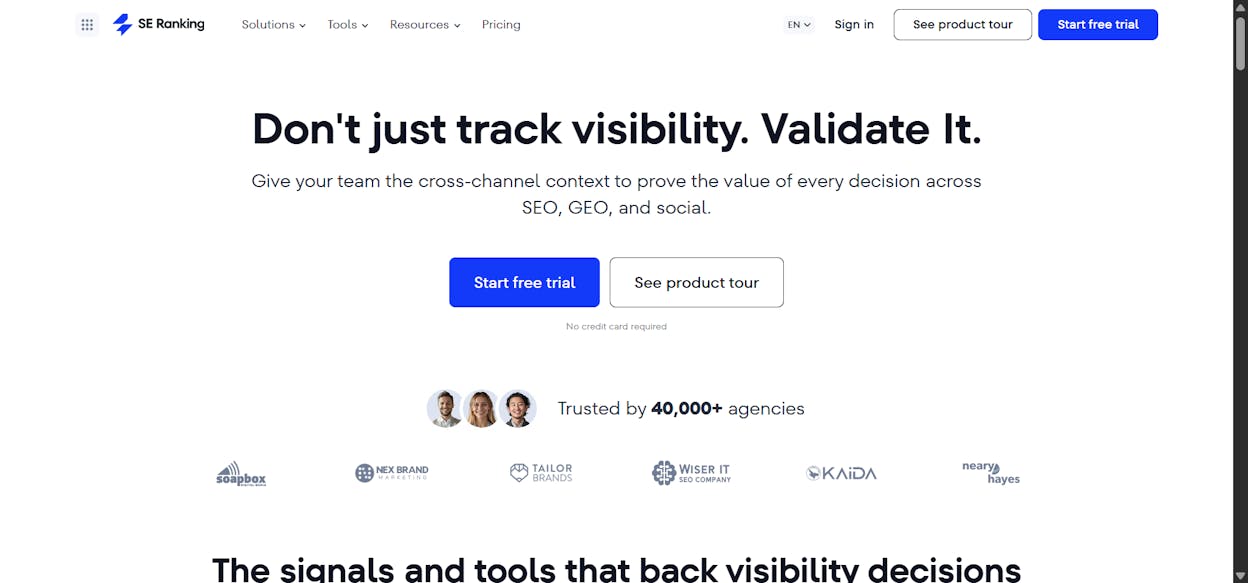
SE Ranking now sells AI search visibility two different ways. Both come from the same company. They are not the same product.
|
Product |
What it is |
Price entry |
Engine coverage |
|---|---|---|---|
|
AI Results Tracker (formerly “AI Visibility Tracker”) |
Add-on inside the SE Ranking SEO suite. Tracks AI Overviews and AI Mode appearances against your keyword set |
$52/mo (Essential) plus AI prompt cap. Meaningful coverage lands at ~$150 to $240/mo |
Google AI Overviews, AI Mode, ChatGPT (limited), with Gemini and Perplexity flagged as incoming |
|
SE Visible (standalone) |
New dedicated AI visibility platform launched late 2025 |
$189/mo entry, weekly refresh |
ChatGPT and Google AI Mode at launch. Perplexity, Gemini, Claude listed as “coming soon” |
This split is the most important thing to understand before you buy. SE Visible currently tracks only ChatGPT and Google’s AI Mode, with Perplexity, Gemini, and Claude listed as “coming soon.” Its $189 starting price is steep for that coverage. The in-suite AI Results Tracker is a prompt-capped add-on that scales by query volume.
You’re not picking one product. You’re picking which packaging fits your work.
Three things SE Ranking’s AI Visibility Tracker does well
1. AI Overview tracking inside a familiar rank-tracker UI
The Tracker plugs AI presence into SE Ranking’s classic rank tracker. AI Overview appearances and source URLs sit alongside your normal SERP positions for the same keyword. For teams already inside SE Ranking, the workflow doesn’t change, which lowers the cost of adopting AI search tracking to nearly zero.
2. Source URL detection mapped to specific keywords
When an AI Overview appears for a tracked keyword, the Tracker captures which URLs Google pulled into the answer. That mapping turns abstract AI visibility into a concrete page-level work item. Most AI visibility tools tell you a brand was “mentioned.” SE Ranking tells you which URL got the citation. That’s the difference between a metric and a task list.
3. Linked and unlinked brand mention tracking
The Tracker logs both linked citations and unlinked brand mentions inside AI answers. AI engines reference brands by name far more often than they hand out clickable links, so counting only links underestimates real brand presence by a wide margin. Mentions without links point to schema and citation outreach. Links signal pages worth defending.
Three places where SE Ranking’s AI Visibility Tracker falls short
These are the limits buyers hit in week three, not week one.
1. The product split makes the buying decision harder than it should be
SE Ranking is the SEO suite. SE Visible is the dedicated AI visibility platform. The AI Results Tracker is an add-on inside SE Ranking. They overlap in scope but not in price, refresh rate, or engine coverage. Other dedicated tools price as a single product. SE Ranking prices as a configuration problem.
2. AI engine coverage trails the dedicated category
The AI Results Tracker focuses on Google AI Overviews and AI Mode. SE Visible launched with ChatGPT and Google AI Mode, with Perplexity, Gemini, and Claude on the roadmap. In a category where buyers want their brand tracked across all five engines their customers use, a roadmap answer for three of those five is a real blind spot.
3. Modeled traffic, weekly refresh, and prompt caps that bite
Three smaller cuts that add up:
-
Traffic estimates are modeled, not measured. Google and the AI engines don’t expose click data, so any “traffic from AI” number is an estimate. It won’t reconcile with GA4.
-
SE Visible refreshes weekly. For a $189/mo tool, weekly is slow. AI answers shift faster.
-
Prompt caps in the AI Results Tracker compound. Smaller tiers include around 200 AI prompts. Mid-tiers stretch to 450 or 1,000. Track multiple competitors and engines and you hit the cap fast.
For more context, see how to compare your AI visibility against your competitors.
SE Ranking AI Visibility Tracker pricing in 2026, the add-on math
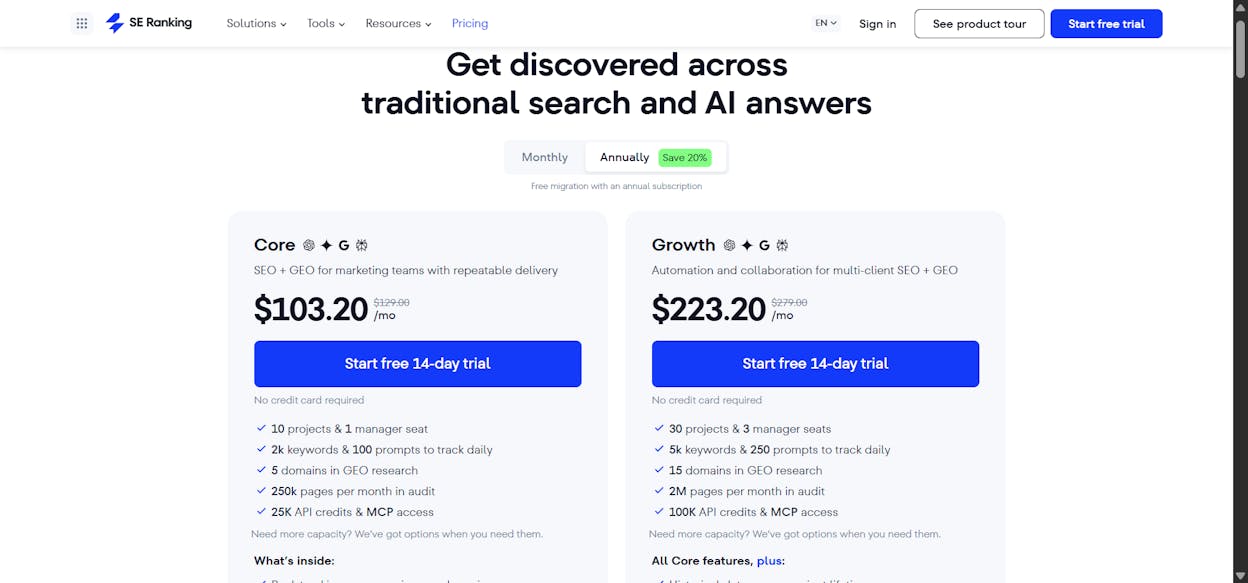
Most reviews quote SE Ranking’s $52/mo entry price and stop. That’s the number for the base SEO suite, billed annually. AI tracking sits on top, and the real number depends on prompt volume and engine coverage.
|
Tier |
Monthly cost |
What’s included for AI |
|---|---|---|
|
Essential (annual) |
$52 ($65 monthly) |
Base SEO suite, ~200 AI Results prompts |
|
Pro (annual) |
$95.20 ($119 monthly) |
Base SEO suite, ~450 AI Results prompts |
|
Business (annual) |
Custom, higher tier |
~1,000 AI Results prompts, deeper historical data |
|
SE Visible (standalone) |
$189/mo entry |
ChatGPT + Google AI Mode, weekly refresh, 450 prompts |
|
SE Visible Premium |
Up to ~$489/mo |
More prompts, additional features |
Here’s the key insight. SE Ranking’s $52/month entry price is misleading for AI visibility. Once you add the AI Search add-on for meaningful coverage, you’re at $150 to $240+/month.
For agencies inside SE Ranking already, layering AI tracking onto an existing seat usually pencils out. For teams shopping AI visibility on its own, the standalone SE Visible at $189/mo limits you to ChatGPT and Google AI Mode. That’s the two-engine tax for a category where buyers care about five.
To check your current baseline, run our free website traffic checker and keyword rank checker.
Bottom line. The Tracker fits if you’re already paying for SE Ranking, your AI work is mostly Google AI Overviews, and your prompt list stays under 200. It does not fit if you need ChatGPT, Perplexity, Gemini, and Claude coverage today, want daily refresh, or need visibility tied to actual sessions and conversions.
Analyze AI, the agentic SEO and content platform that covers AI search and SEO in one stack
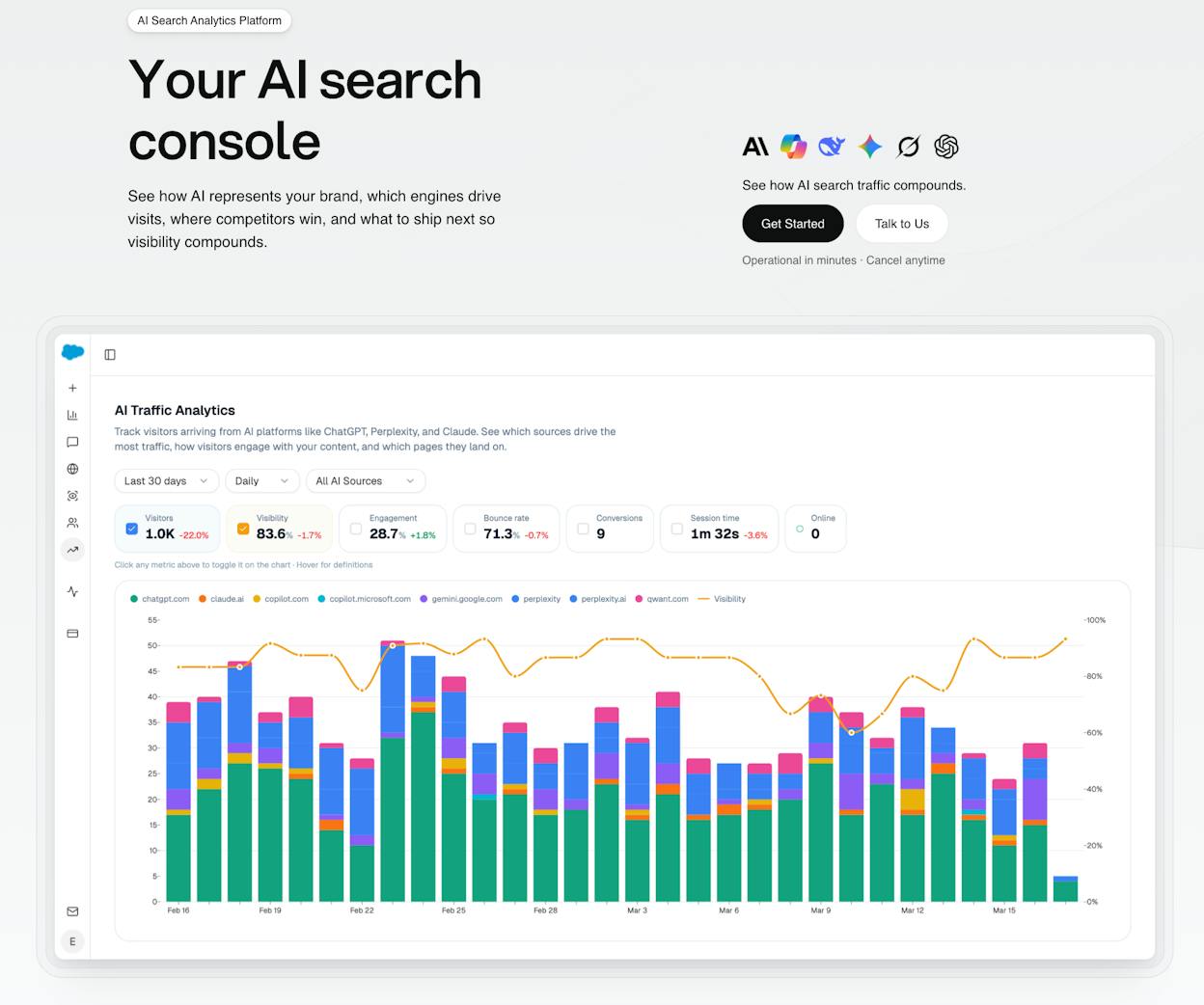
Most AI visibility tools, SE Ranking included, give you a number and stop. You learn that your brand appeared in 14% of ChatGPT answers, but you don’t learn whether anyone clicked, what they did when they landed, or which page to update next week. The actual SEO and content work that moves the metric still happens in five other tools.
Analyze AI is built differently. It’s the agentic SEO and content platform that covers your AI search visibility, your traditional SEO workflow, your content production, and your operational reporting from one stack. Visibility tracking is the front door. The depth is in the workflows that turn visibility into action.
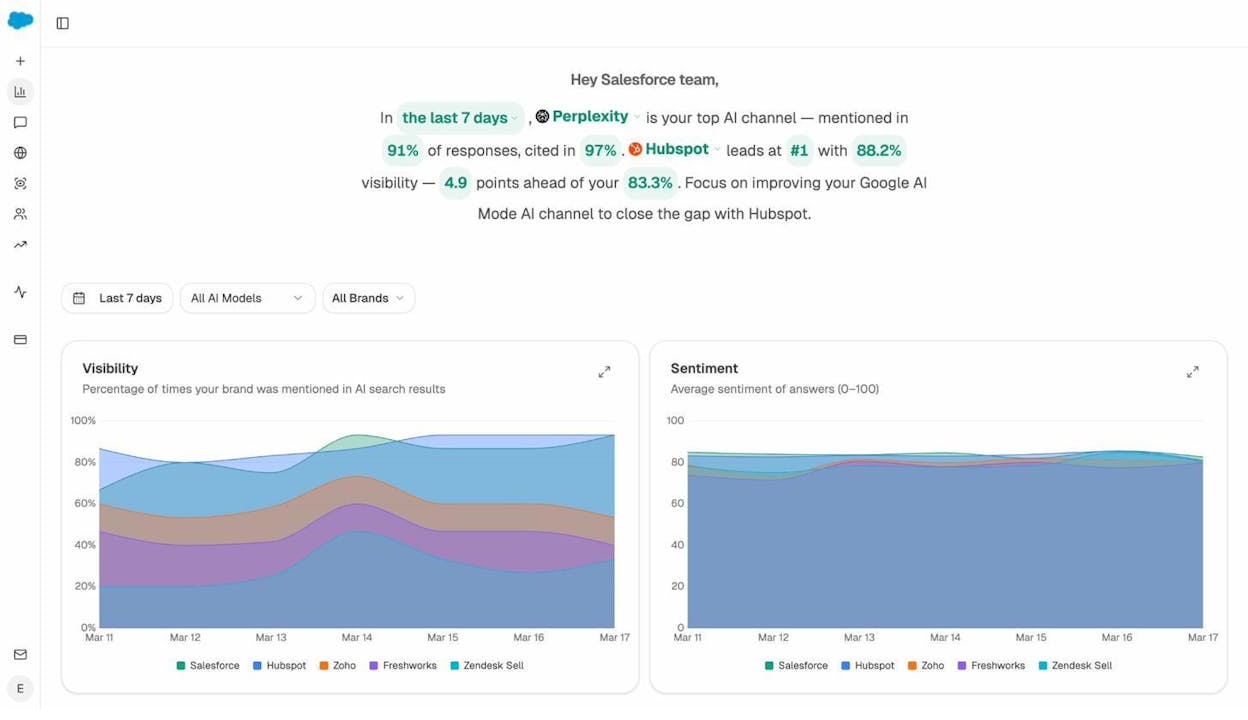
Seven things matter here.
1. Track real AI traffic, conversions, and revenue, not just mentions
AI Traffic Analytics attributes every session from answer engines to its specific source. ChatGPT, Perplexity, Claude, Copilot, Gemini, Qwant. Session volume, visibility trend, engagement, bounce rate, and conversions, all by engine, all by date range.
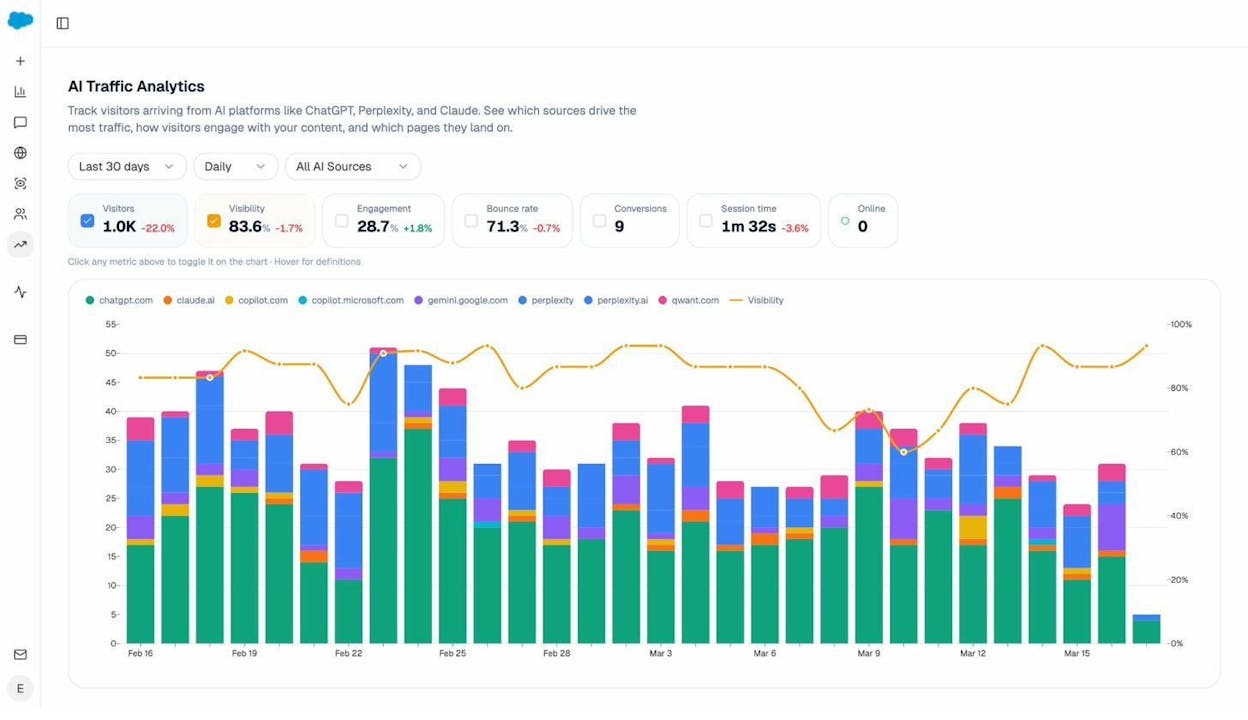
When ChatGPT sends 600 sessions and Perplexity sends 142, you know which engine to invest in. When the same 600 ChatGPT sessions convert at 12% but the Perplexity 142 convert at 0%, you optimize Perplexity-facing content instead of chasing more ChatGPT impressions. SE Ranking can’t tell you any of that because it doesn’t connect to your analytics. Analyze AI does, with a Landing Pages report that maps every AI referral to the page that received it and the conversion event that followed.
2. Find the prompts buyers actually use, and the competitors winning them
Prompt Tracking shows visibility, sentiment, position, and the competitor set for every prompt across all major LLMs. Not just “best CRM” but “best Salesforce alternatives for medium businesses,” the bottom-of-funnel queries that convert.
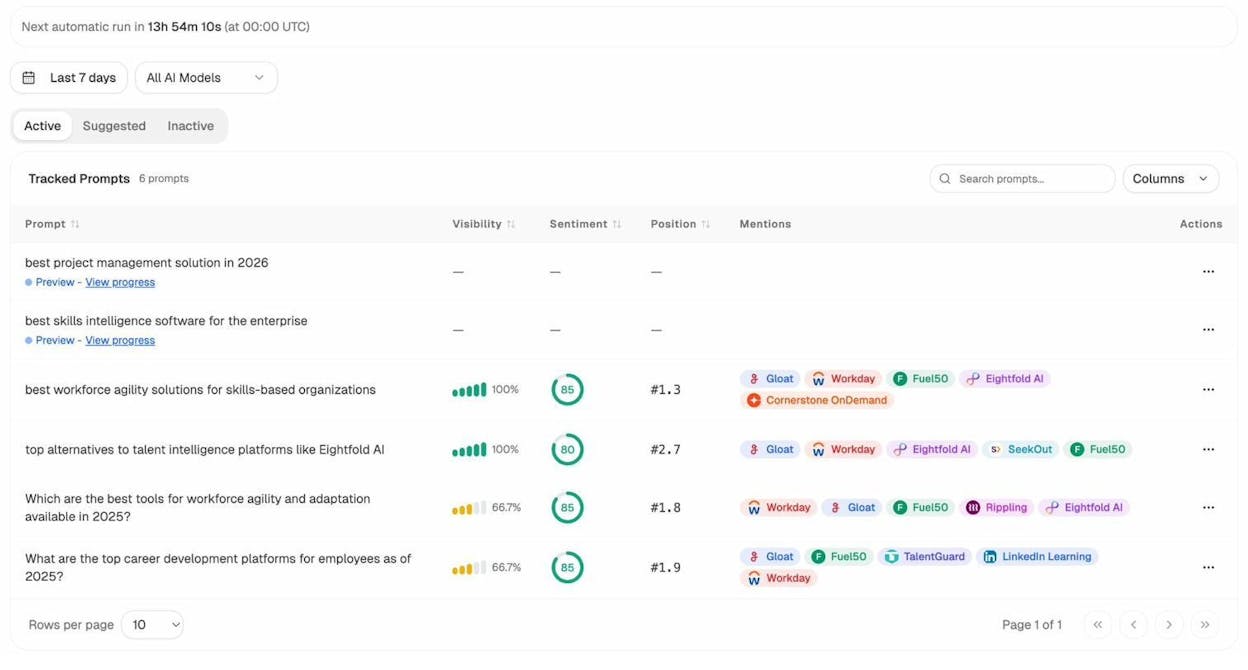
If you don’t know which prompts to track, the platform suggests them. The Suggested tab uses your domain, your competitors, and active queries in your category to surface bottom-of-funnel prompts you should be monitoring. New users typically find 30 to 50 high-intent prompts they hadn’t thought to track in the first week.
3. See which competitors AI engines actually surface, and on what
Competitor Intelligence tracks the brands that show up alongside you in AI answers. The Suggested Competitors panel surfaces brands you aren’t tracking but AI engines keep mentioning. You see mentions per competitor, which prompts each one wins, and where they appear that you don’t.
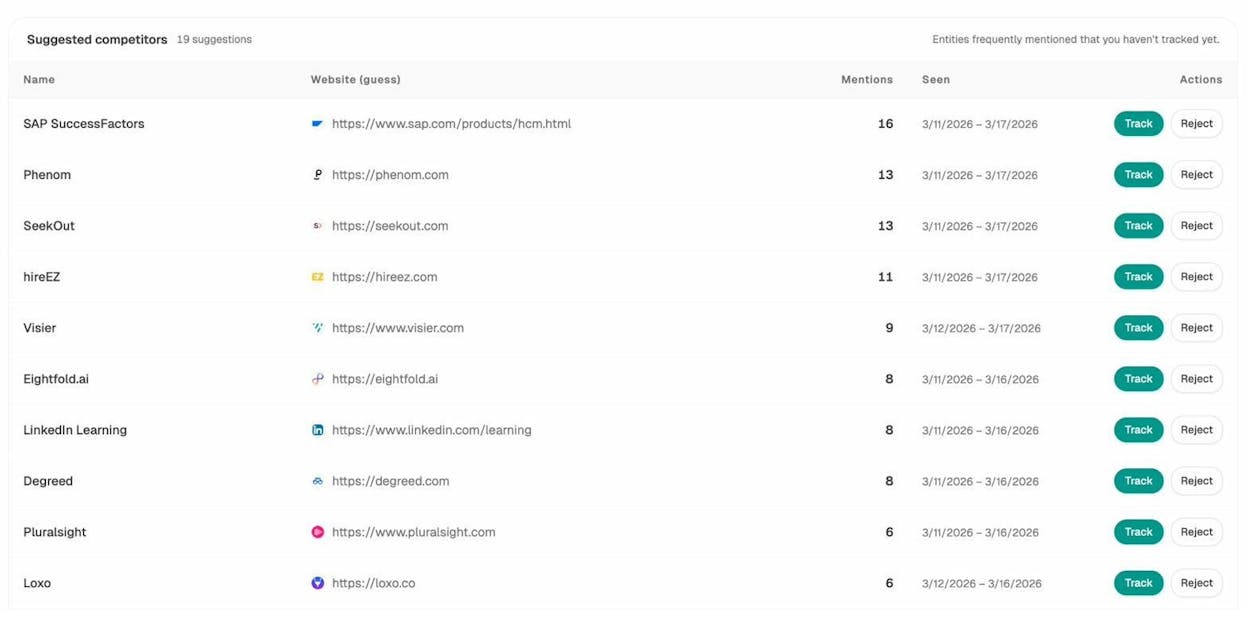
That last view, where competitors win and you don’t, is the most useful page in the platform for content teams. Every row is a brief.
4. Audit which sources AI engines trust, and turn that into a target list
Citation Analytics reveals every URL and domain AI engines cite in your category. You see content type breakdown (what percentage go to blog posts, product pages, reviews, social) and top cited domains sorted by volume.
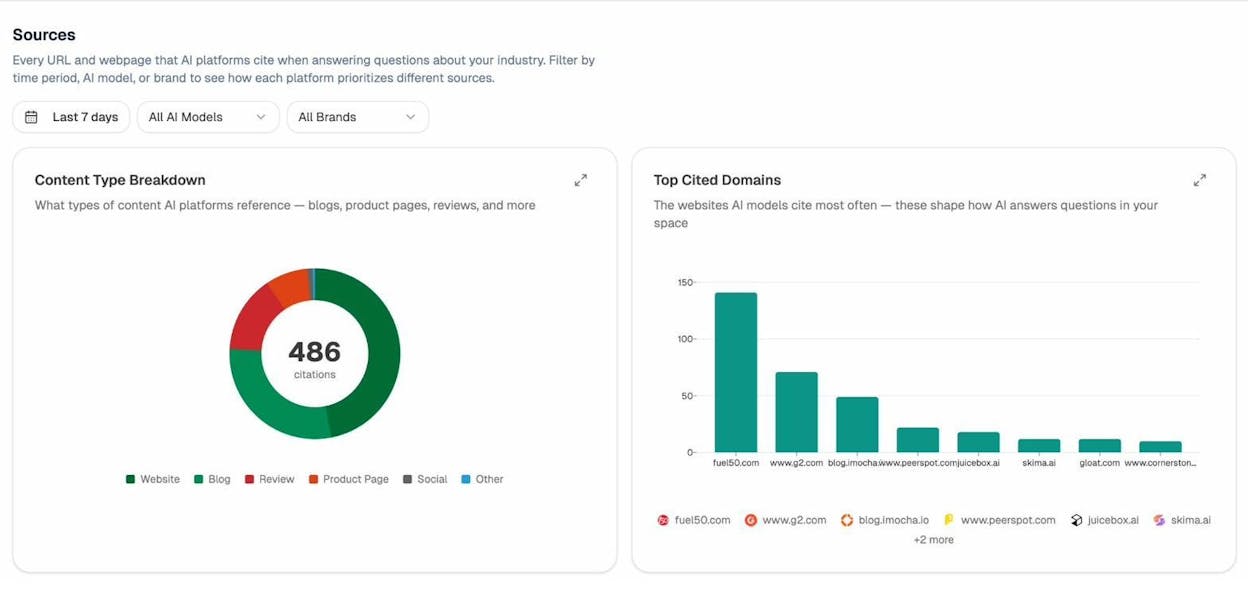
That’s how you stop “doing PR” and start picking targets. If three review sites drive 40% of citations in your category, those three are your link priority list. If product comparison pages on competitor domains pull more citations than blog posts, you build comparison pages.
Extend the same logic to the SEO side with our broken link checker and website authority checker.
5. Map your perception against competitors with the Perception Map
Perception Map plots every tracked brand on a 2D quadrant of visibility versus narrative strength. Each pin opens a panel with the themes AI engines associate with that brand, the prompts where it leads, and the AI-cited pages driving that perception.
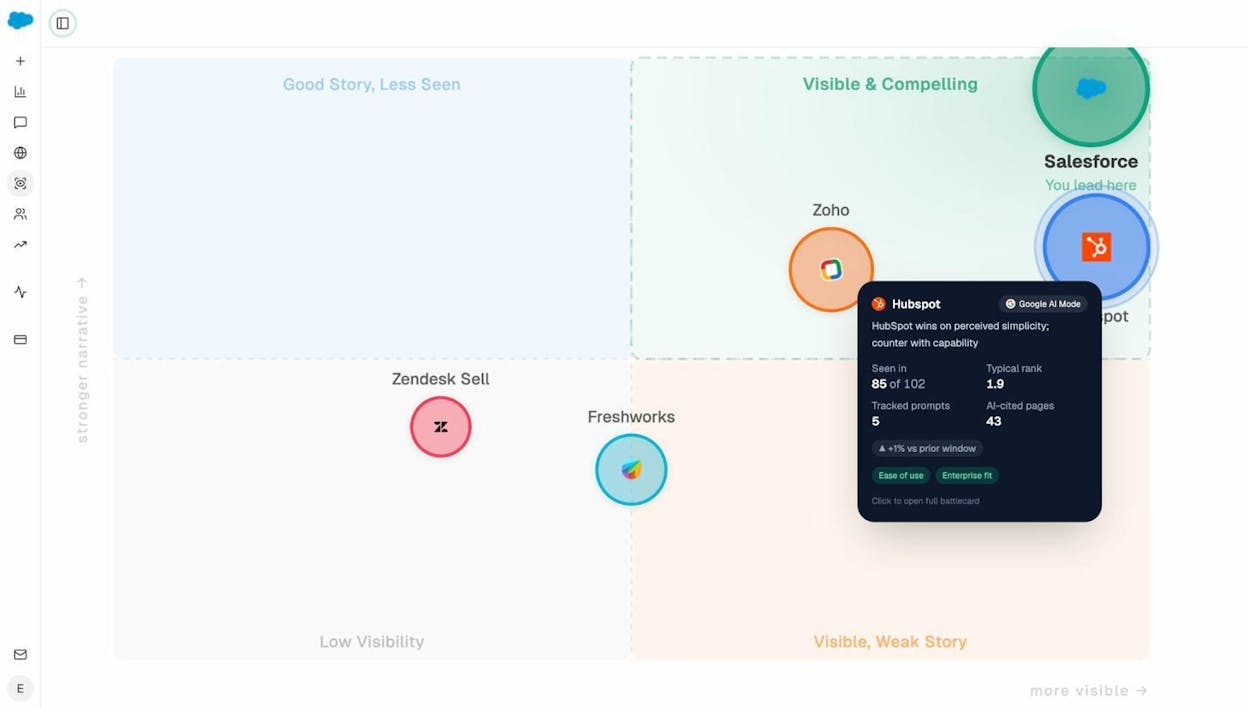
This is where strategy work happens. Knowing AI engines describe you as “complex,” “expensive,” and “enterprise-only” while describing your competitor as “easy” and “affordable” is a positioning brief. The Perception Map produces those briefs automatically. SE Ranking has nothing equivalent.
6. Move from insight to action with the Content Writer and Optimizer
This is the gap most AI visibility tools leave wide open. They tell you what to fix, then hand you a Google Doc.
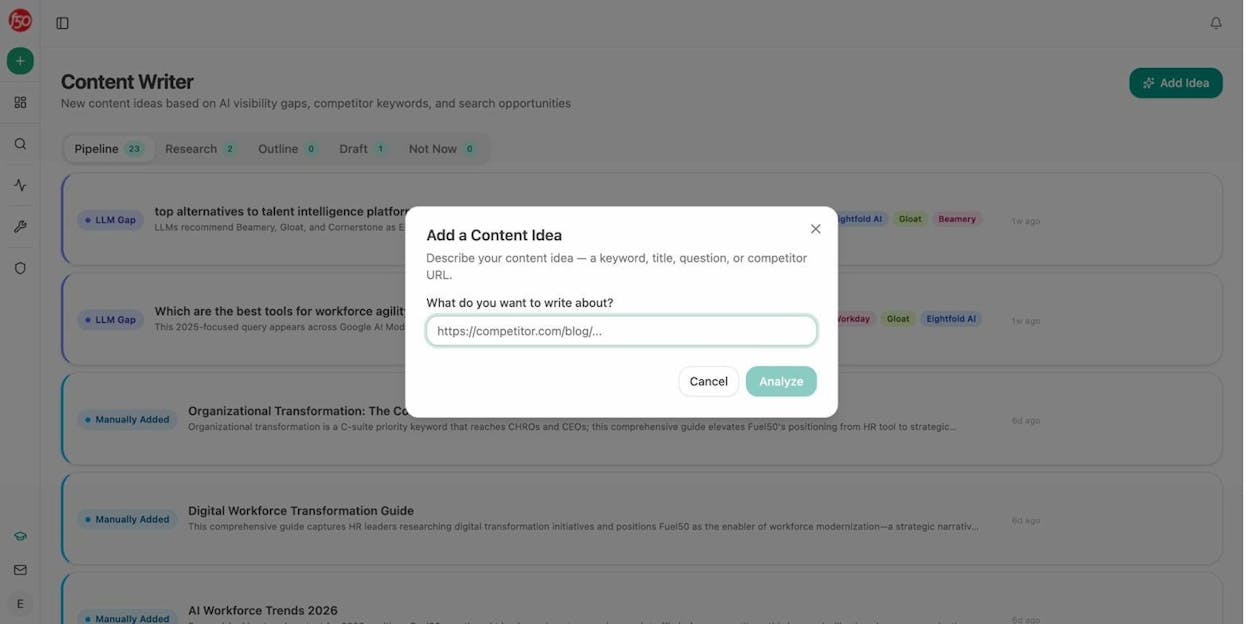
Content Writer takes a prompt or competitor URL and runs it through research, outline, and draft passes. Each step refines the prior step’s structured output, with brand voice rules and proof points injected from your Brand Vault.
Content Optimizer audits a published page against the queries it should rank for, the citation patterns AI engines reward, and the proof density of competing pages. It returns a prioritized list of edits.
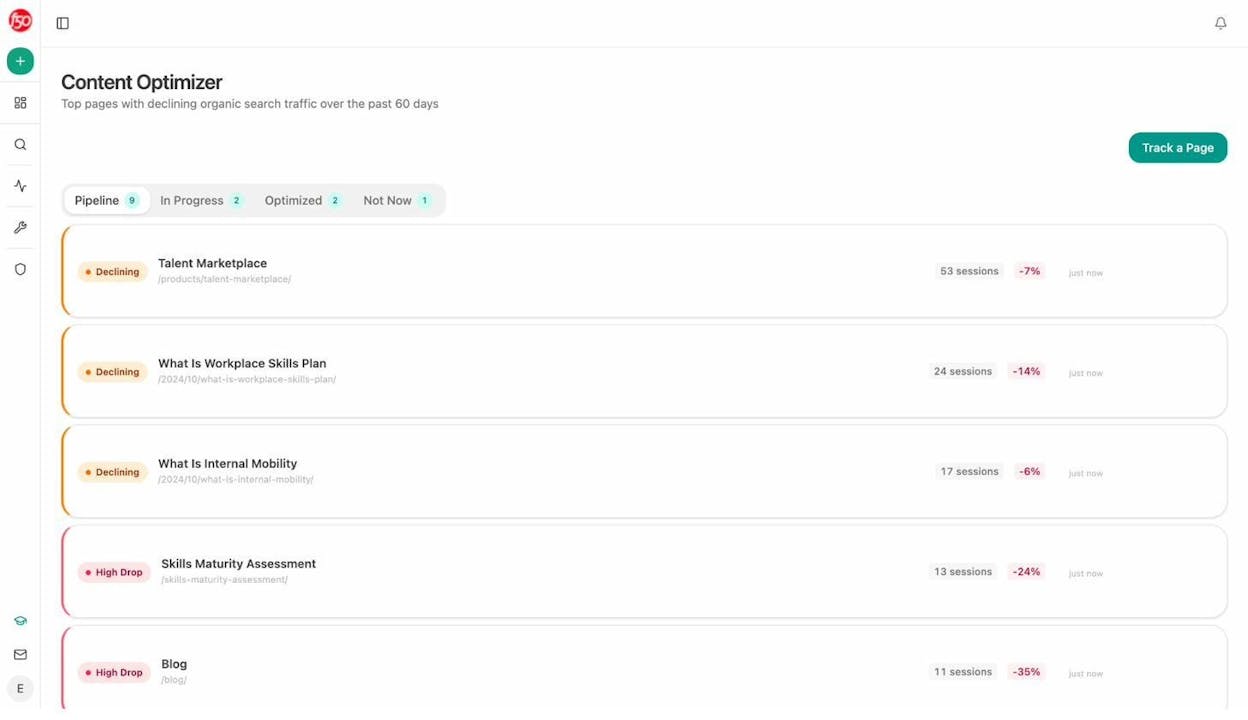
The work that creates content is in the same platform as the data that measures whether it moved the number. You close the loop.
7. Run the entire operations layer of your marketing org with Agents
This is where Analyze AI stops being an AI visibility tool and becomes the agentic platform that pulls from anything.
The Agent Builder is a programmable substrate with 180+ nodes, 34 pre-built data recipes, 13 input primitives, and 3 trigger modes (manual, schedule, webhook). The same surface area as Zapier, Retool, Make, and n8n combined, pre-wired to the SEO, content, GA4, GSC, DataForSEO, Semrush, HubSpot, and AI search data you already pay for.
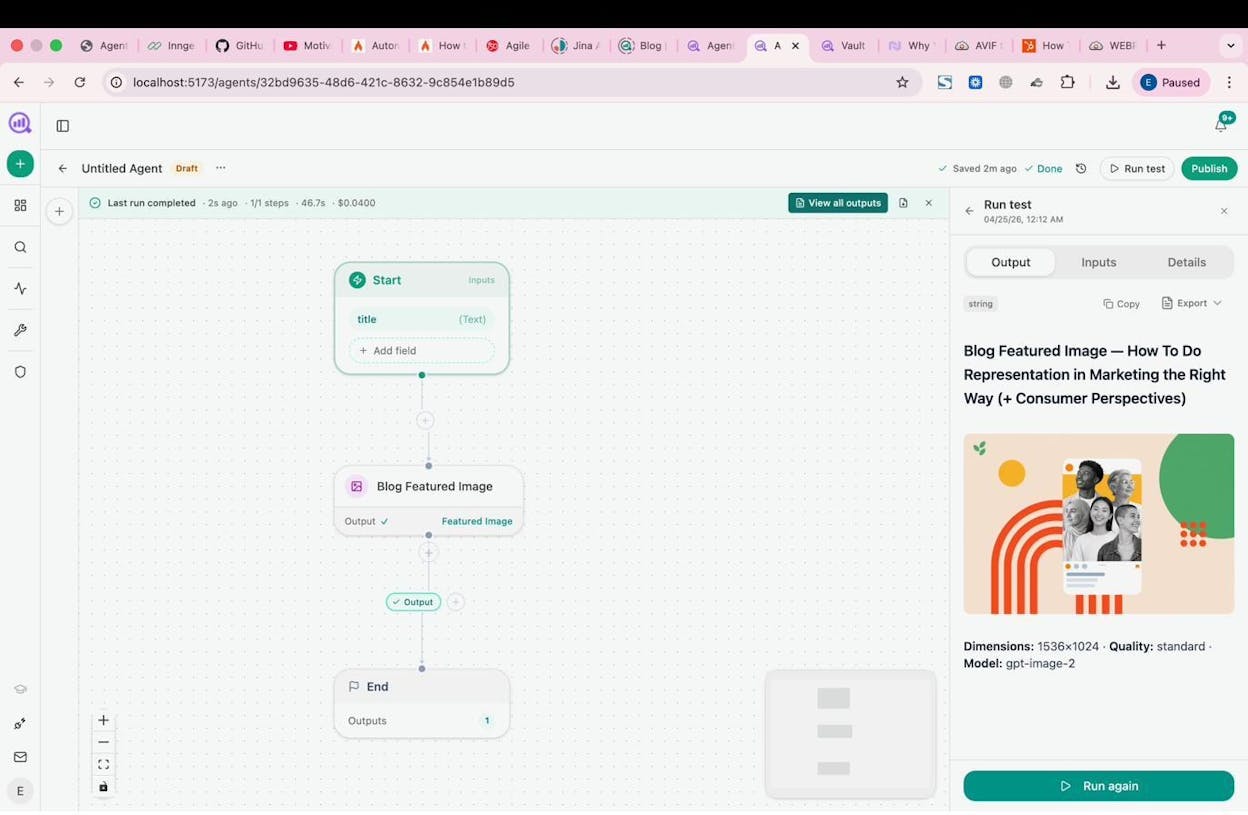
You can build agents that:
-
Run a Monday board prep every Monday at 7am. Pull AI visibility, GSC top pages, GA4 AI traffic, new HubSpot deals. Format as a DOCX. Email leadership. The 4-hour analyst chase becomes a scheduled job.
-
Run a competitor comparison in the background. Pull ranked keywords for both your domain and a competitor, send to an LLM, deliver to Slack.
-
Run a content refresh fleet weekly. Pull declining pages from GA4, scrape the page, run an AEO Content Scorecard, rewrite for freshness, push to WordPress.
-
Run a citation reclamation pipeline monthly. Pull every brand mention without a link, draft a personalized outreach email, send through HubSpot.
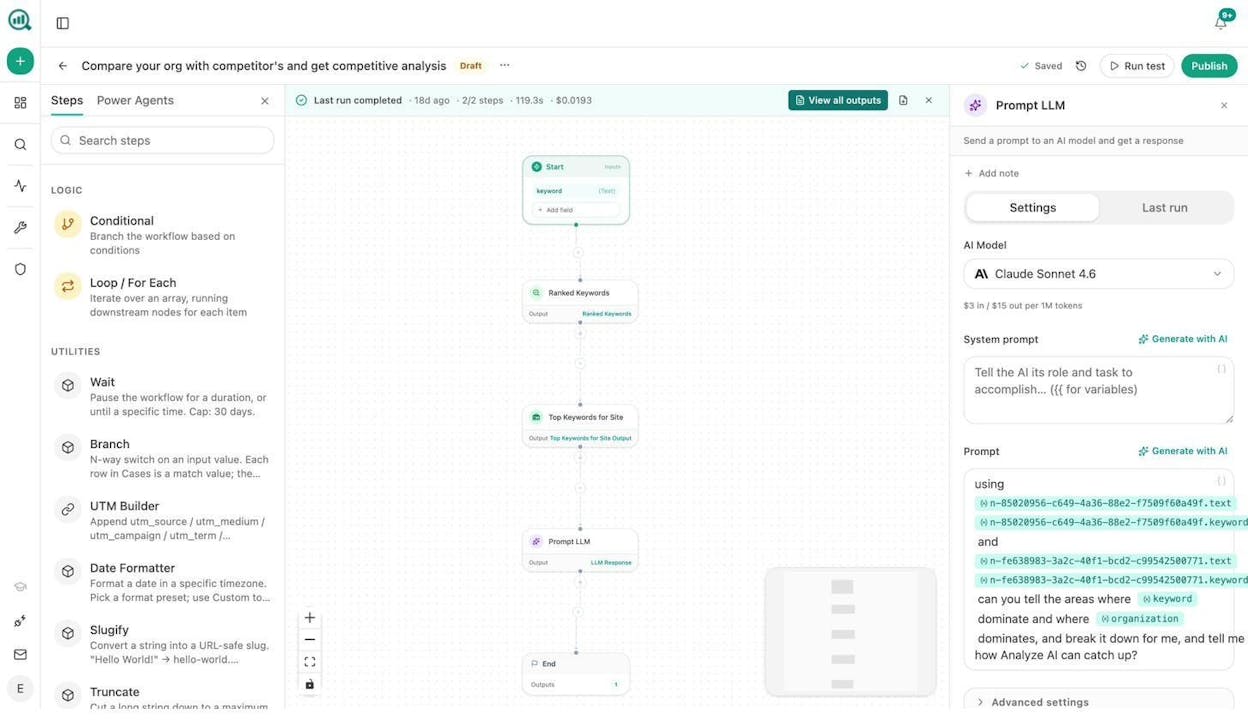
The 34 data recipes are the thing competitors can’t copy. Pre-baked queries against your AI visibility, GA4, GSC, DataForSEO, Semrush, and Brand Vault data. share-of-voice, competitor-gaps, unmentioned-prompts, citation-decay-alert, keyword-opportunities, and 29 others. One line to consume, parameterized, cached.
A scheduled agent is a virtual employee that does the same job every Monday at 7am, never forgets, costs cents. A webhook agent fires the moment reality changes. A press hit triggers a response brief. A deal closing triggers a case study draft. The lag from event to action collapses from days to seconds.
This is the layer SE Ranking can’t match. SE Ranking is an SEO suite with an AI visibility add-on. Analyze AI is the agentic platform that covers AI search visibility as one of dozens of things you can do with it.
For the full inventory of what teams build, read 10 Ways to Use Analyze AI and our piece on SEO automation tools.
Weekly digests so the data finds you
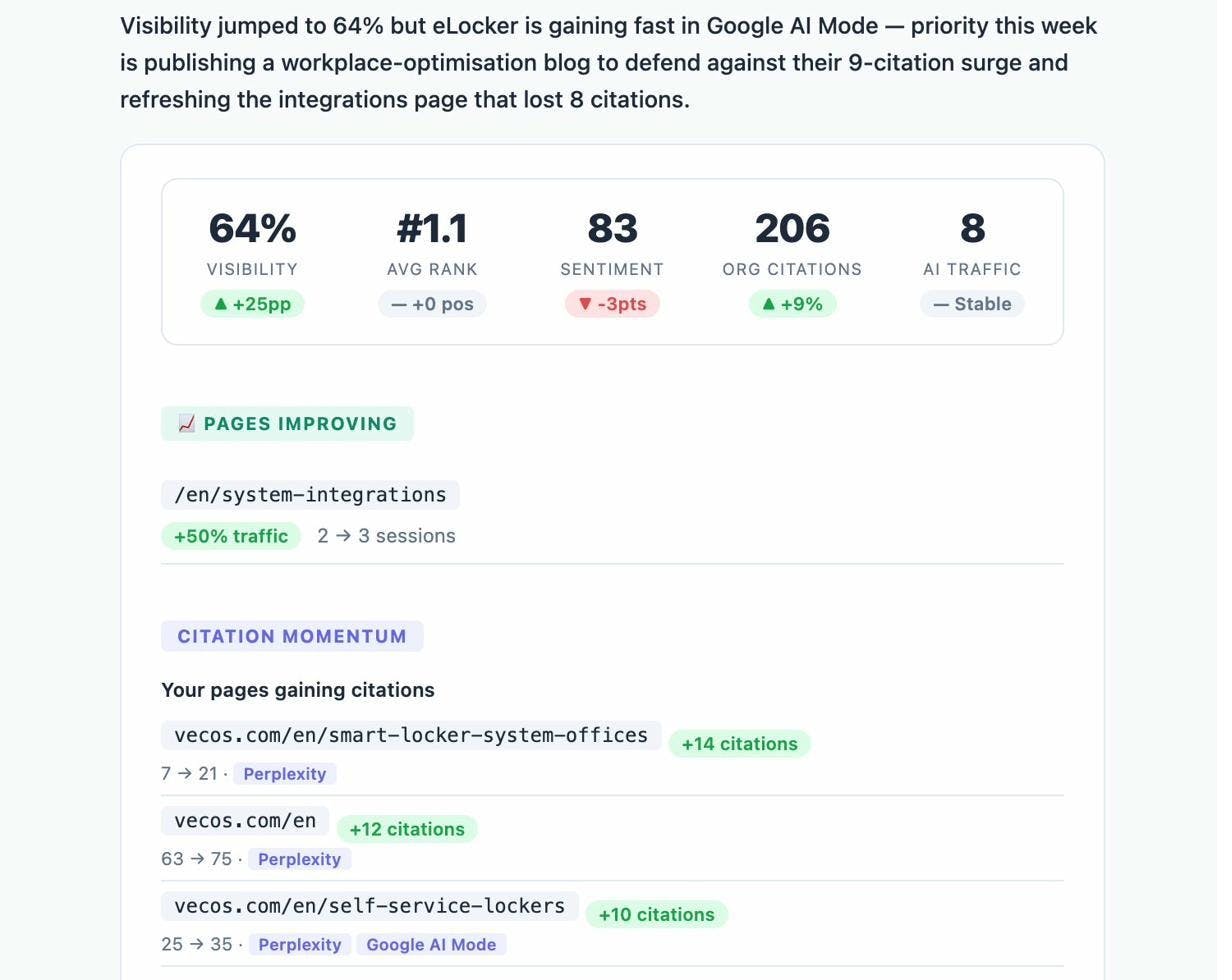
Weekly Email Digests summarize visibility shifts, new competitors, prompts where you slipped, and citations you gained, formatted for execs to scan in 90 seconds.
Analyze AI vs SE Ranking AI Visibility Tracker, side-by-side
|
Capability |
SE Ranking AI Visibility Tracker |
Analyze AI |
|---|---|---|
|
AI engine coverage at launch |
Google AI Overviews, AI Mode (ChatGPT, Perplexity, Gemini limited or “coming soon”) |
ChatGPT, Perplexity, Claude, Copilot, Gemini, Google AI Mode, DeepSeek, Meta AI |
|
Refresh rate |
Weekly (SE Visible) or scheduled in Tracker |
Daily |
|
Real AI traffic attribution |
No, modeled estimates only |
Yes, session-level by engine, tied to GA4 |
|
Conversion and revenue tracking |
No |
Yes, landing pages, conversions, assisted revenue |
|
Prompt suggestion |
Manual entry |
Suggested prompts based on your category |
|
Sentiment analysis |
Mentions only |
Sentiment per prompt, per engine |
|
Perception mapping |
No |
Yes, Perception Map with strategy briefs |
|
Citation analytics |
Source URL detection |
Full content-type breakdown, top cited domains, citation history |
|
Content production |
No |
Content Writer (research, outline, draft) |
|
Content optimization |
Separate Content Editor product |
Content Optimizer integrated with visibility data |
|
Automation and agents |
No |
180+ nodes, 34 data recipes, manual + scheduled + webhook triggers |
|
Pricing transparency |
Add-on math. SE Visible at $189/mo entry |
Single platform pricing |
How to migrate from SE Ranking’s AI Visibility Tracker to Analyze AI
If the verdict above lands, here’s how to switch in roughly 30 minutes.
Step 1. Export your tracked prompts from SE Ranking. Open your prompt list, click Export, choose CSV.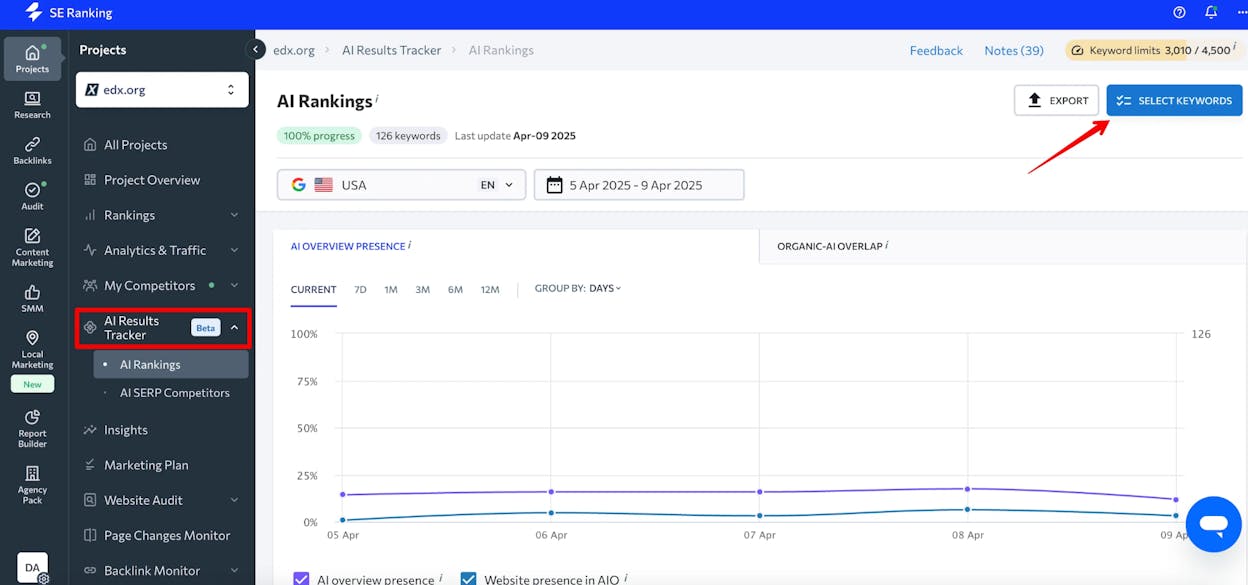
Step 2. Spin up an Analyze AI account, paste your domain, and use the Suggested Prompts panel to compare your existing prompts against what the platform surfaces. Most teams find that 30 to 50% of their SE Ranking list is suboptimal.
Step 3. Connect GA4 and Google Search Console. This is the step SE Ranking doesn’t have. The connection unlocks AI Traffic Analytics, the Landing Pages report, and agent recipes that pull from real session data.
Step 4. Add three to five competitors via the Suggested Competitors panel.
Step 5. Set up your first weekly digest. Most teams pick Monday 7am.
Step 6 (optional, big leverage). Build your first agent. Start with the Monday board prep recipe. The first one takes 20 minutes. The second takes five.
For more depth, read our LLM Visibility guide and our piece on outranking competitors in AI search.
A note on positioning
Every other vendor in this space is selling you the idea that SEO is dead and AI search is the only thing that matters. That framing is profitable for them. It’s not useful for you.
People are searching differently. The way buyers find you is changing. The reason they choose you is not. Quality content still wins. AI search is an additional organic channel alongside SEO. Don’t replace your SEO stack with an AI visibility tool. Don’t run two stacks in parallel either. Pick a platform that covers both, with the workflow attached.
Final word
SE Ranking’s AI Visibility Tracker is well-built, with a strong story for teams already inside the SE Ranking ecosystem. The cracks show when you push on engine coverage, refresh rate, the connection to actual traffic, and the gap between “I see the problem” and “the work to fix it is happening.”
If you want a focused AI Overview tracker bolted onto a familiar SEO suite, the AI Results Tracker add-on is a defensible buy.
If you want a single platform that tracks AI search across every major engine, ties visibility to conversions and revenue, surfaces opportunities, produces and optimizes content, and runs your marketing operations as scheduled and event-driven agents, start a free trial of Analyze AI or book a demo.
The category is moving fast. The tool you pick should move faster.

Ernest

Ibrahim


