


Summarize this blog post with:


In this article, you’ll see the 5 SEO audit tools we trust for diagnosing why a site stalls, what each one actually catches that the others miss, what they cost in 2026, and how to pick the right combination for your situation. You’ll also see the audit layer almost no team is running yet, the one that audits how AI engines like ChatGPT, Perplexity, Gemini, Claude, and Copilot perceive your brand and which of those answers send qualified traffic to your site.
Table of Contents
How we evaluated the tools
We judged each tool on three things. First, whether it surfaces issues that influence traffic, not just issues that exist. Every crawler finds missing meta descriptions. Few of them help you understand which ones actually matter. Second, whether it prioritizes work by impact. A tool that lists 4,000 issues without ranking them is a backlog generator, not an audit. Third, whether it exports cleanly to action, meaning tickets your dev team can open and pages your content team can rewrite without translation. We also looked at pricing honestly, including the seat add-ons that turn published prices into something very different in practice.
The 5 tools at a glance
|
Tool |
What it catches best |
Pricing in 2026 |
Best for |
Overkill when |
|---|---|---|---|---|
|
Semrush Site Audit |
140+ checks grouped by impact, internal link distribution |
$139.95 to $499.95/mo across Pro, Guru, Business |
One hub for audits, keywords, links, competitors |
You only need a crawler |
|
Screaming Frog SEO Spider |
Deep structural detail, redirect chains, custom extraction |
Free up to 500 URLs, then $259 per user per year |
Migrations and complex technical audits |
You want a clean dashboard and prioritized fixes |
|
Ahrefs Site Audit |
JavaScript rendering tied to backlink and keyword context |
$29 to $1,499/mo across Starter, Lite, Standard, Advanced, Enterprise |
Teams already using the Ahrefs suite |
You do not need backlink or keyword data |
|
Sitebulb |
Friendly visual reports with prioritized issue hints |
Roughly $18 to $245/mo |
Depth without the technical learning curve |
You need raw data or huge sites |
|
Moz Pro |
Basic crawl plus keyword and link data for smaller sites |
$49 to $299/mo across Starter, Standard, Medium, Large |
Small sites that want SEO hygiene with rank tracking |
You need deep technical audits |
A sixth audit layer most teams have not added yet is AI search visibility. We cover that at the end. It is not a replacement for the five above, it is the audit you run after them.
Semrush Site Audit
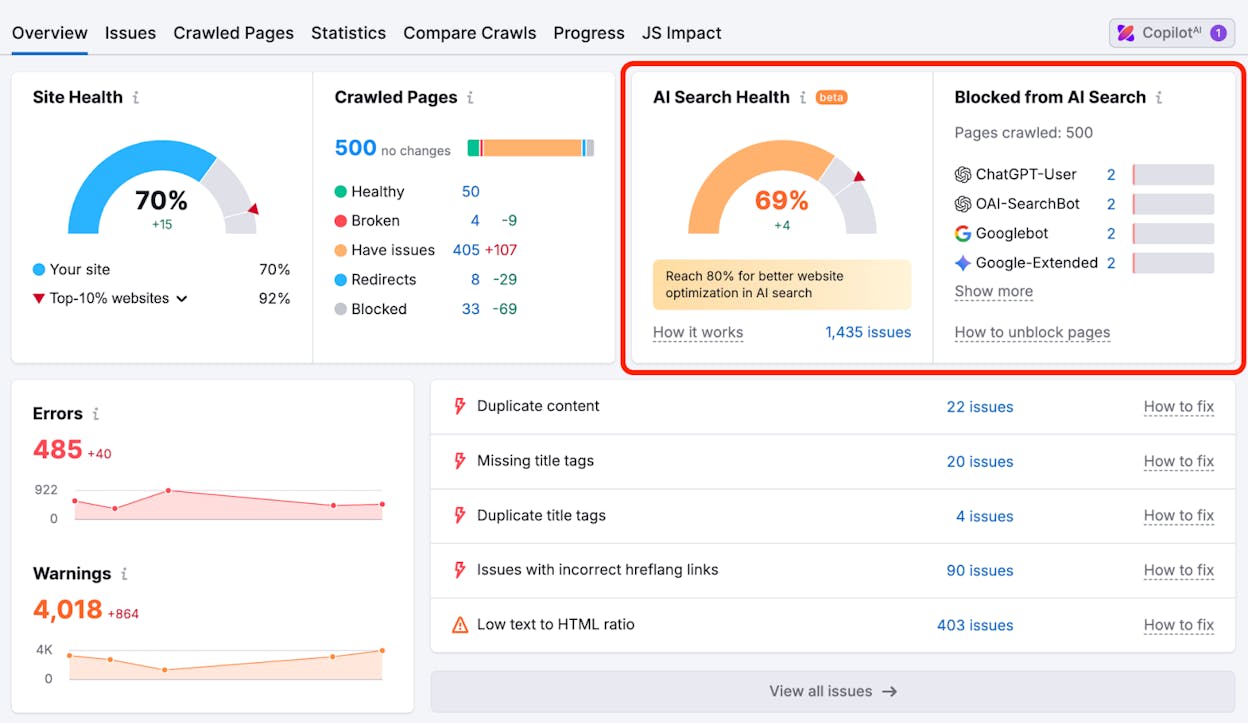
Semrush Site Audit is the audit module inside the Semrush platform. It runs full crawls, checks over 140 SEO factors, groups issues into errors, warnings, and notices, and ties results to a site health score so you can see whether your work is moving the needle over time.
What Semrush catches better than the others is the combination of breadth and grouping. The audit puts crawlability and indexing issues at the top, links and redirects in the middle, and cosmetic issues at the bottom. You stop guessing about what to fix this week.
The internal linking report is where the tool earns its price for content-heavy sites. It shows which strong pages fail to pass authority toward the URLs you want ranking, surfaces orphan pages no one links to, and flags pages with too few outgoing links. Fix a handful and you typically see ranking shifts on the receiving pages within a few weeks.
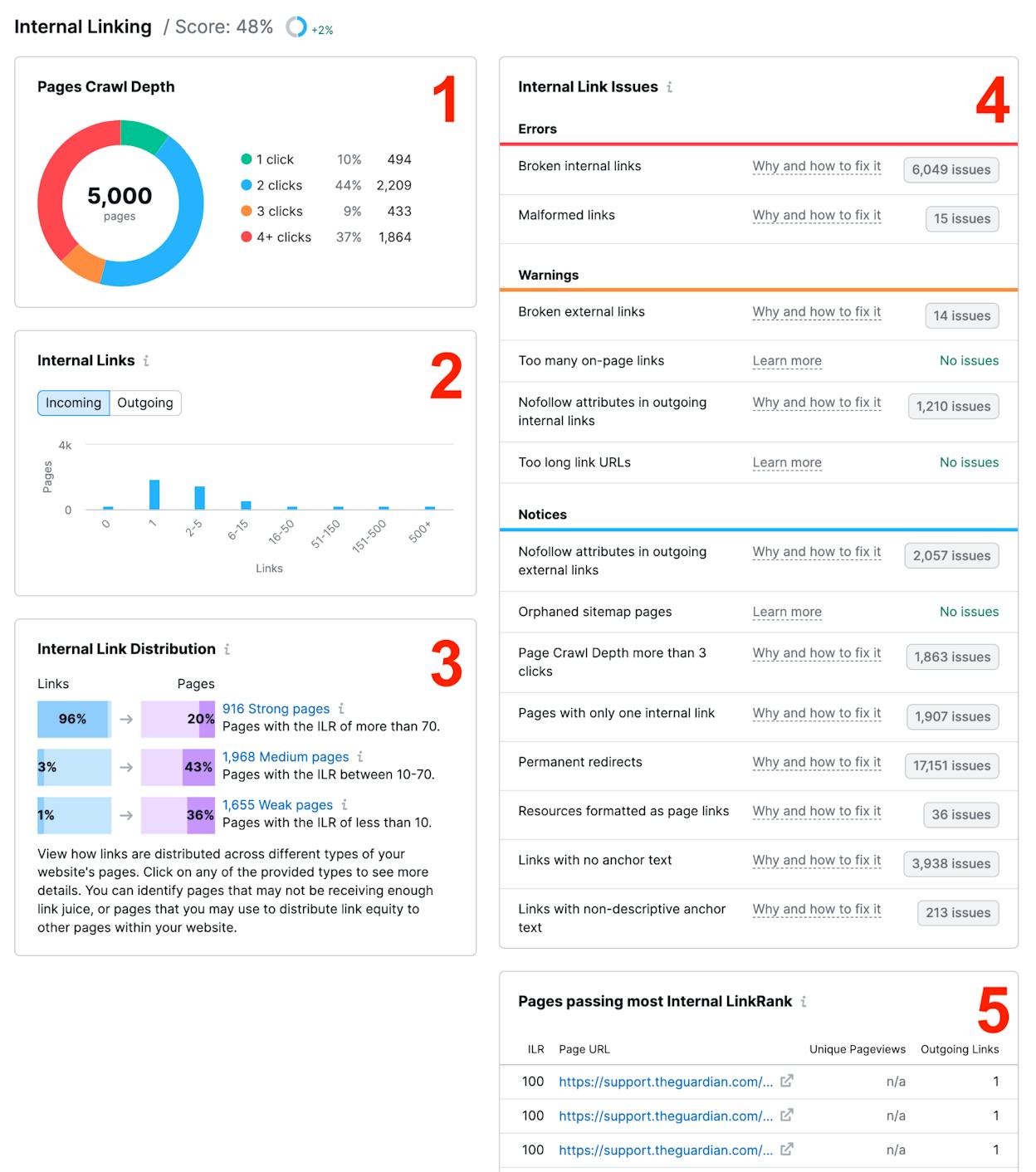
How to run a useful Semrush audit in 20 minutes. Set up the project and tell the crawler to focus on the directories that drive revenue. Most teams waste audit credits crawling tag pages and old archives. Run the audit, then filter to “crawlability” and “site performance” issues first. Fix those before touching meta descriptions or alt tags. Export the internal linking report and look at orphan pages. Decide which deserve internal links from your money pages. Schedule a weekly recurring audit so you catch regressions without thinking about it.
Pricing is where Semrush gets messy. Pro is $139.95/month, Guru is $249.95/month, and Business is $499.95/month. Extra seats run $45 to $100 per user per month, so a team of three on Guru can quietly run past $400/month in real spend. Semrush is worth this if you want one hub for audits, keywords, backlinks, and competitor work. If you only need a crawler, this is overkill.
Screaming Frog SEO Spider
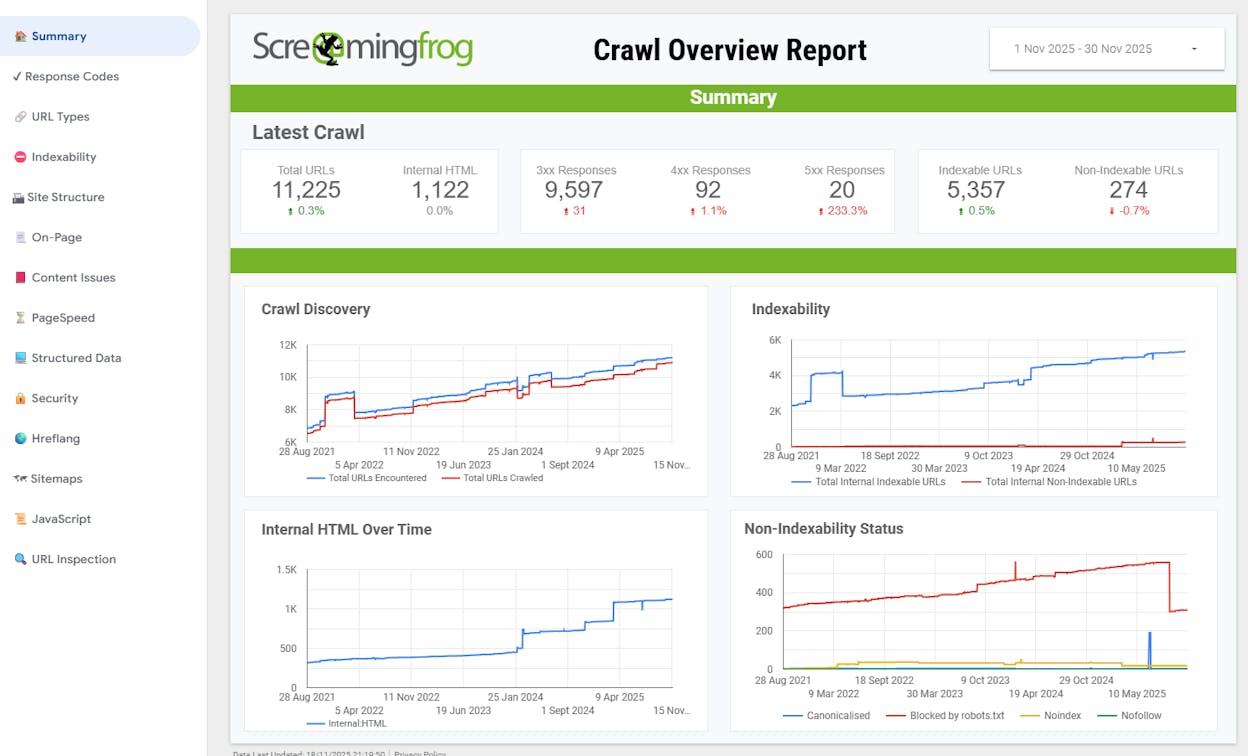
Screaming Frog is the desktop crawler most technical SEOs reach for first. It runs on your machine, crawls the way Googlebot does, and exposes the raw underlying detail that cloud audit tools simplify away.
What Screaming Frog catches better than anything else is structural depth. Redirect chains five hops deep, duplicate title tags across 3,000 pages, canonical tags pointing at the wrong URL, hreflang errors, JavaScript-rendered links that disappear when the page is fetched as a bot. These are the issues that quietly drain crawl budget and cause traffic to slip without explanation.
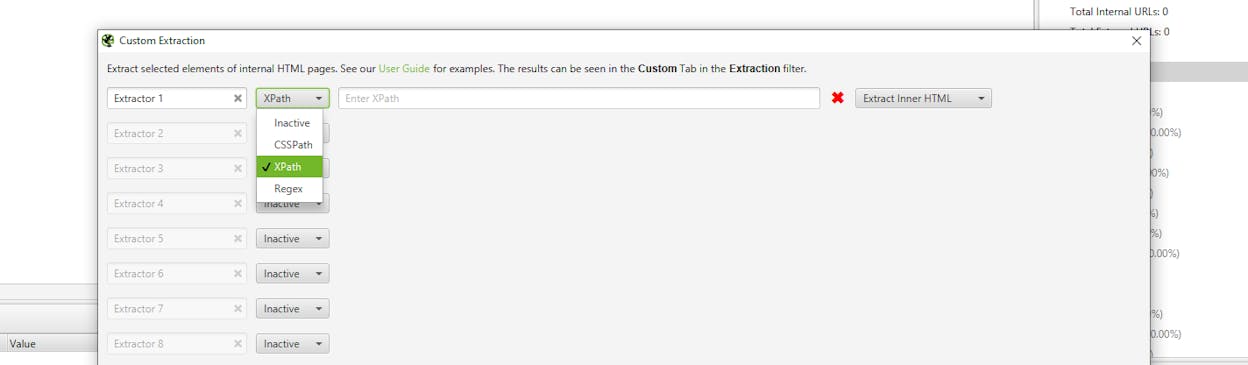
The other thing it does well is custom extraction. You write an XPath or CSS path to pull any data point from any page, which is how technical SEOs audit structured data, product attributes, or any patterned element across an entire site in one crawl.
How to run a useful Screaming Frog audit on a 5,000-page site. Install the free version and crawl up to the 500-URL limit. If your site is bigger, buy the $259 annual license. Configure JavaScript rendering if you run a modern framework. Crawl in segments by directory rather than the whole site. You waste less memory and the data is easier to act on. Sort response codes for 4xx and 5xx errors first, export each list, and send them to your dev team. Open the Redirects tab and look for chains. Two hops is tolerable. Three or more should be flattened.
The limit is that crawl speed depends on your hardware and the tool stays raw. It surfaces data, it does not summarize. Beginners get overwhelmed by the volume.
Ahrefs Site Audit
Ahrefs Site Audit lives inside the Ahrefs SEO suite. It crawls your full site, renders JavaScript, and pairs the audit with backlink and keyword context, which is where it pulls ahead of standalone crawlers.
What Ahrefs catches better than the others is the connection between structural problems and authority flow. The audit links each issue to the pages with the strongest backlink profiles, so you see when a redirect chain or a thin-content cluster is wasting the link equity that should be powering your rankings.
The JavaScript rendering is the other reason teams running modern frameworks pick Ahrefs over alternatives. If your pages are client-rendered, a crawler that fetches raw HTML will report half of your content as missing. Ahrefs renders the page the way Google does and audits what users and search engines actually see.
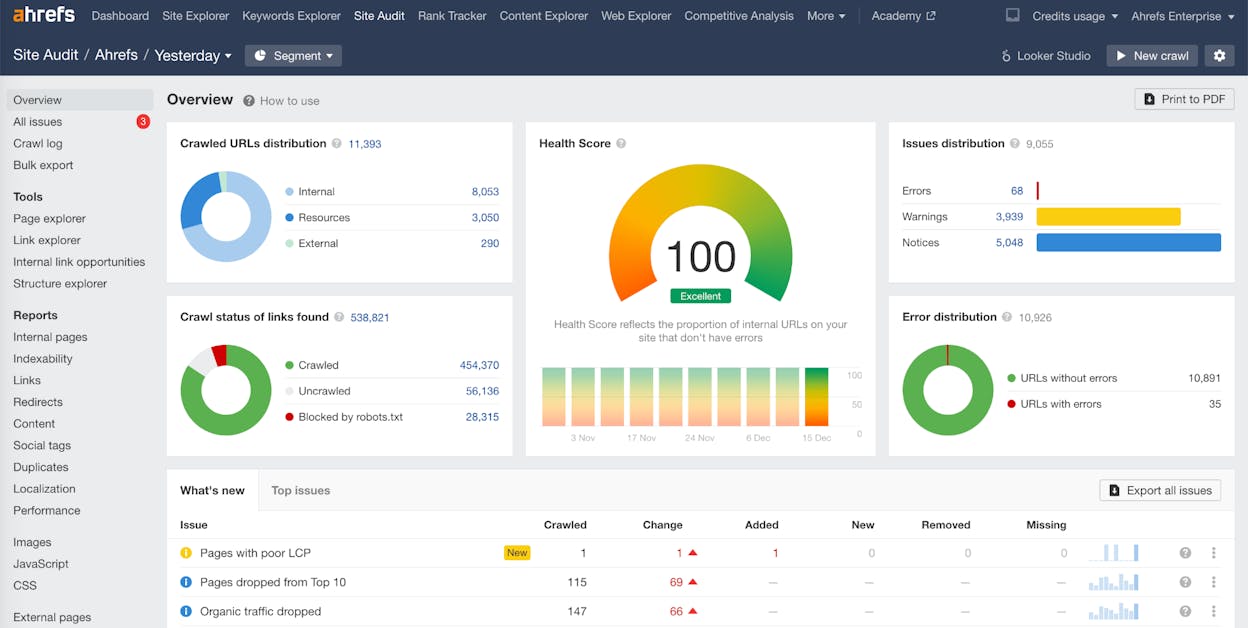
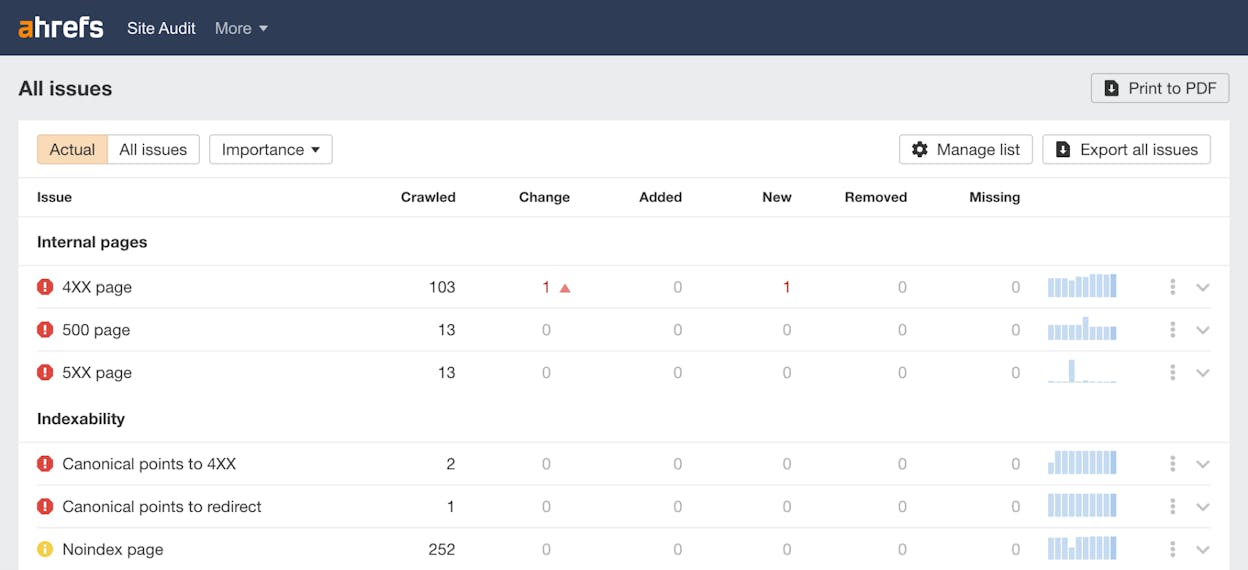
How to run a useful Ahrefs audit. Add your domain and enable JavaScript rendering if your site uses Next.js, React, Vue, or any client-rendered framework. Run a fresh crawl, open the Health Score view, then filter Issues to “errors” and the All issues view. Fix indexability issues before chasing meta tags. Cross-reference with Site Explorer. Find pages with strong backlink profiles and weak internal linking. Those are the highest-leverage fixes you can make. Connect Google Search Console to enable Page Inspection, which shows which pages Google has actually indexed.
Ahrefs pricing in 2026 starts at $129/month for Lite, $249/month for Standard, $449/month for Advanced, and $1,499/month for Enterprise. There is also a $29/month Starter plan without rank tracking. Extra seats are roughly $49 each on Standard. The full suite makes sense if you want backlinks, keywords, and audits in one place. If you only need a crawler, the price is hard to justify.
Sitebulb
Sitebulb sits between the raw-data depth of Screaming Frog and the friendly cloud reports of Semrush or Ahrefs. It crawls like a bot but presents results in a visual, prioritized format that surfaces what matters most without forcing you to learn the platform first.
What Sitebulb catches better than the alternatives is the cognitive load of doing technical SEO. The interface gives every issue a hint card with a short explanation of why it matters, what to look for, and how to fix it. For a team without a dedicated technical SEO on staff, this turns the audit from a backlog into a teaching tool.
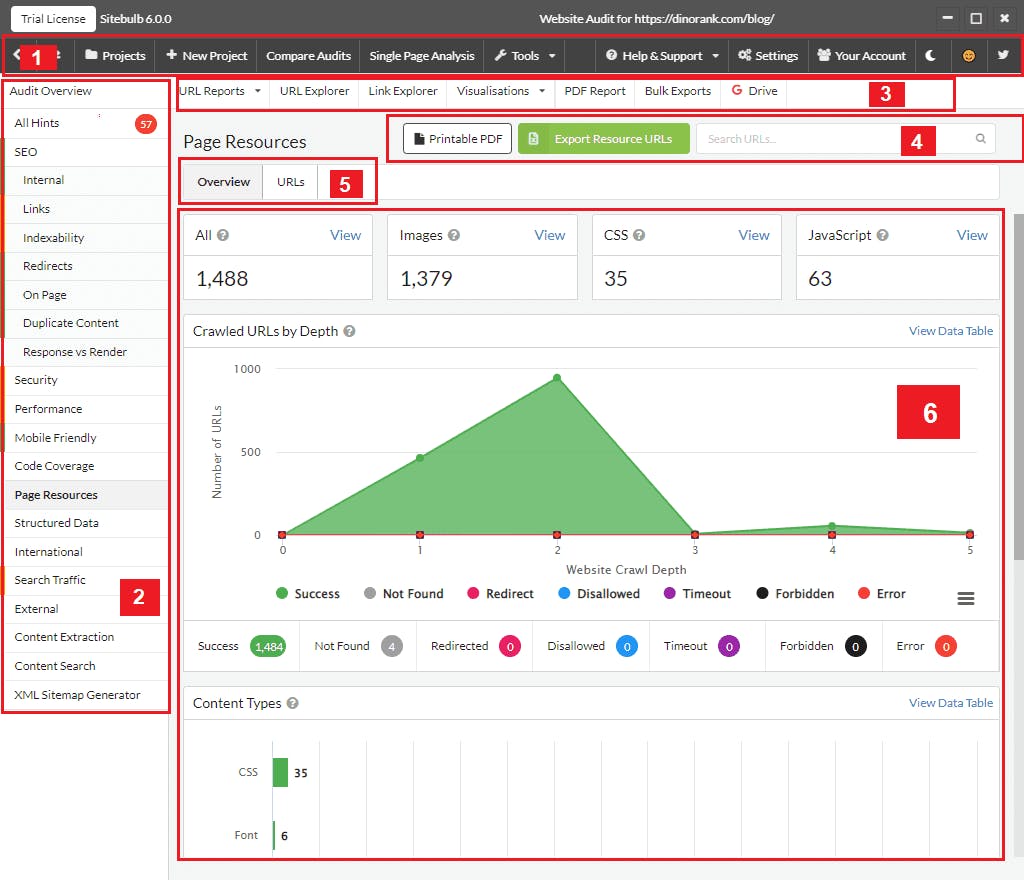
How to use Sitebulb. Start a new project and pick desktop for sites under 10,000 URLs, cloud for anything bigger. Run the crawl with default settings on the first pass. Open the Hints view, where the tool ranks each issue category by priority. Click into any hint to see the explanation and affected URLs, then export the list to your dev team. Pricing ranges from $18/month at the entry level to $245/month for the cloud business plan.
Moz Pro
Moz Pro is the SEO suite that includes a site crawl alongside keyword and link tools. The audit is not as deep as the others, but for smaller sites that want one tool covering audits, rank tracking, and basic backlinks, it works.
What Moz catches well is basic SEO hygiene. It scans for crawlability issues, broken pages, missing metadata, and duplicate content, and pairs that with rank tracking so you do not need a second tool to monitor whether your fixes are working.
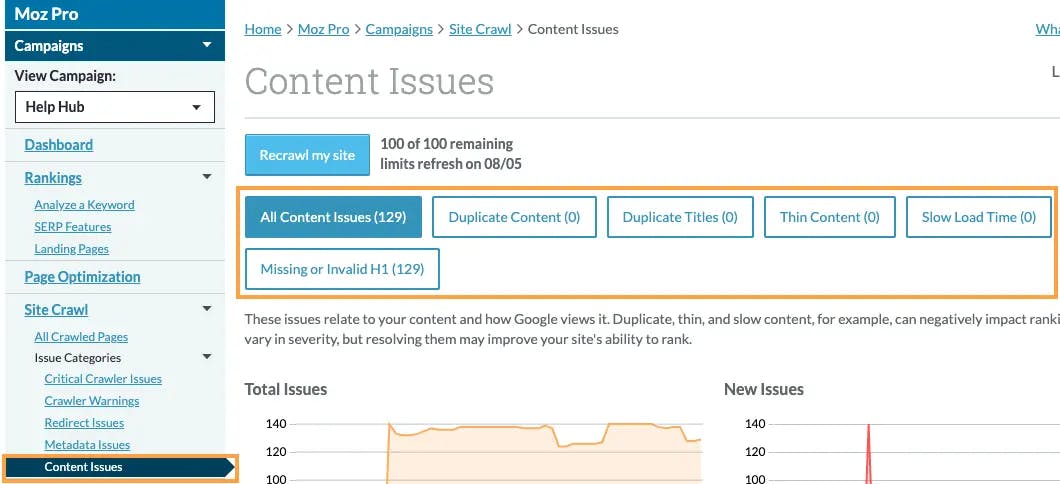
What Moz misses is the structural depth you get with Semrush or Screaming Frog. Complex redirect chains, JavaScript rendering issues, and deep internal linking analysis are not its strength. For a small business site with a few hundred pages, this does not matter. For a 5,000-page site with a recent migration, it does. Moz Pro pricing sits at $49/month for Starter, $99 for Standard, $179 for Medium, and $299 for Large, with roughly 20% off on annual billing.
The audit layer most teams skip in 2026
So far this article has covered audits that look at your website. Crawlers, structural scans, broken links, metadata, internal linking. All five tools above do that.
There is a second audit your competitors are starting to run, and almost no one we talk to has caught up yet. It is the audit of how AI engines like ChatGPT, Perplexity, Gemini, Claude, and Copilot perceive your brand, what they say about you when someone asks, which of your pages they cite, and which answers actually drive traffic and revenue.
We do not believe AI search has killed SEO. We believe AI search is another organic channel sitting alongside it. SEO is still the foundation because LLMs lean on the same retrieval signals search engines do. But buyers now ask AI engines questions they used to type into Google, and your brand either shows up or it does not. The five audit tools above will never tell you which is happening.
This is where Analyze AI sits. Most teams know us as the AI search visibility platform. The platform is bigger than that. Underneath the dashboards is an agentic substrate with 180+ nodes, 34 pre-built data recipes, and three trigger modes that connects to GA4, GSC, DataForSEO, Semrush, HubSpot, Notion, WordPress, Slack, and the major LLMs. Analyze AI is the agentic platform for SEO, AEO, content, and GTM operations. AI search visibility is the most visible thing you can do with it.
Audit which prompts AI engines answer without you
The first audit question is simple. For the prompts your buyers are actually typing into AI engines, are you showing up at all? Analyze AI’s Prompts dashboard runs your tracked prompts across ChatGPT, Perplexity, Claude, Copilot, and Gemini on a continuous schedule, then reports visibility percentage, position, sentiment, and which competitors appear next to you in each answer.
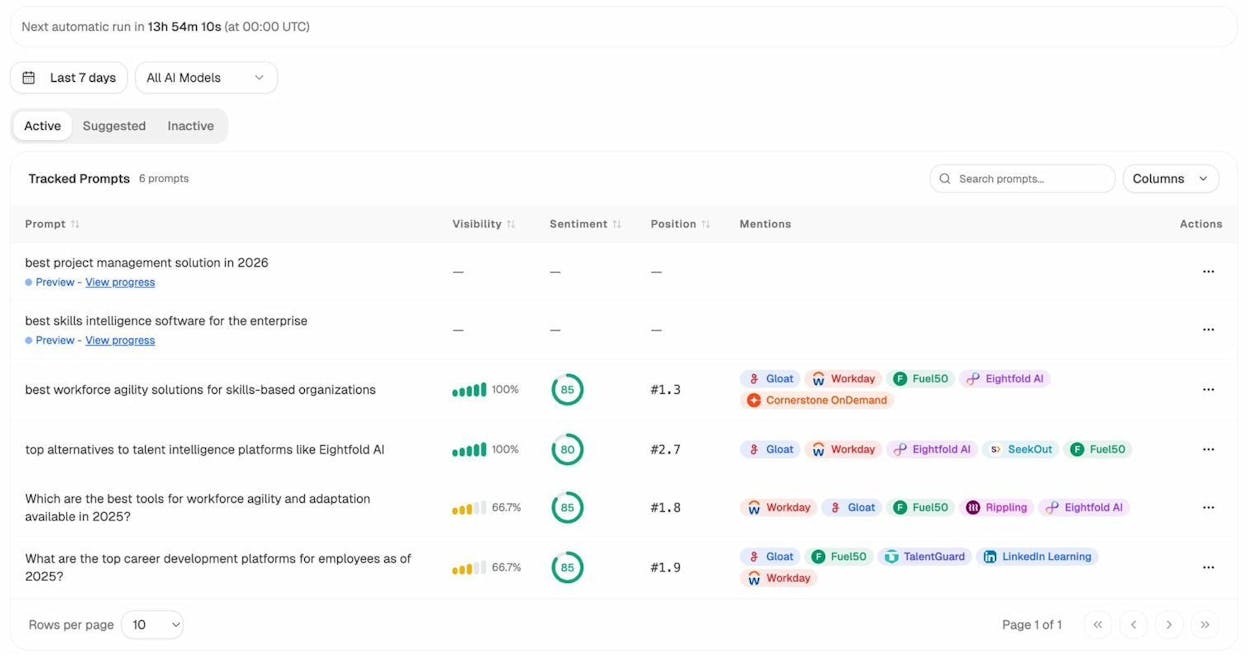
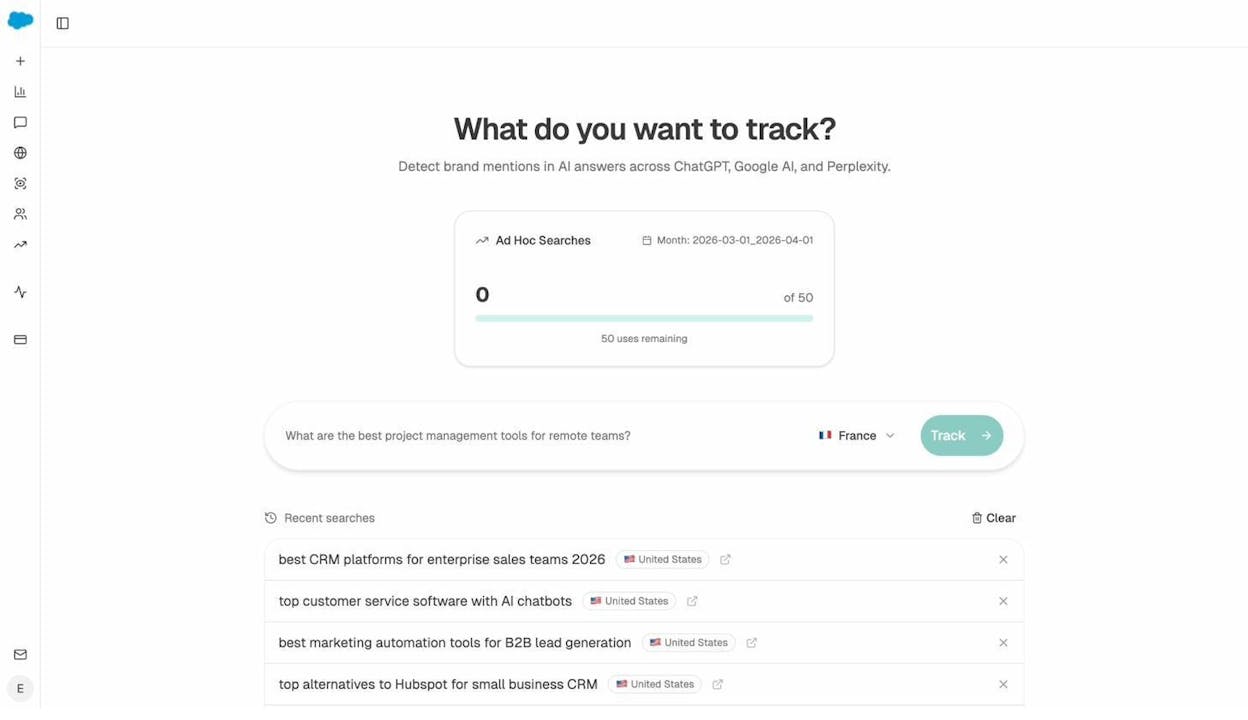
If you do not know which prompts to track, the platform suggests them based on your category, your competitors, and the questions models already answer in your space. There is also an ad-hoc search for testing a new prompt without adding it to ongoing tracking.
Audit which sources AI engines trust
The second audit question is which domains and URLs models cite when they answer questions in your category. Models build trust the way search engines do, through repeated citations from specific sources. The Sources dashboard shows you exactly which domains AI engines pull from most often, what content types they prefer, and where your own URLs sit in that list.
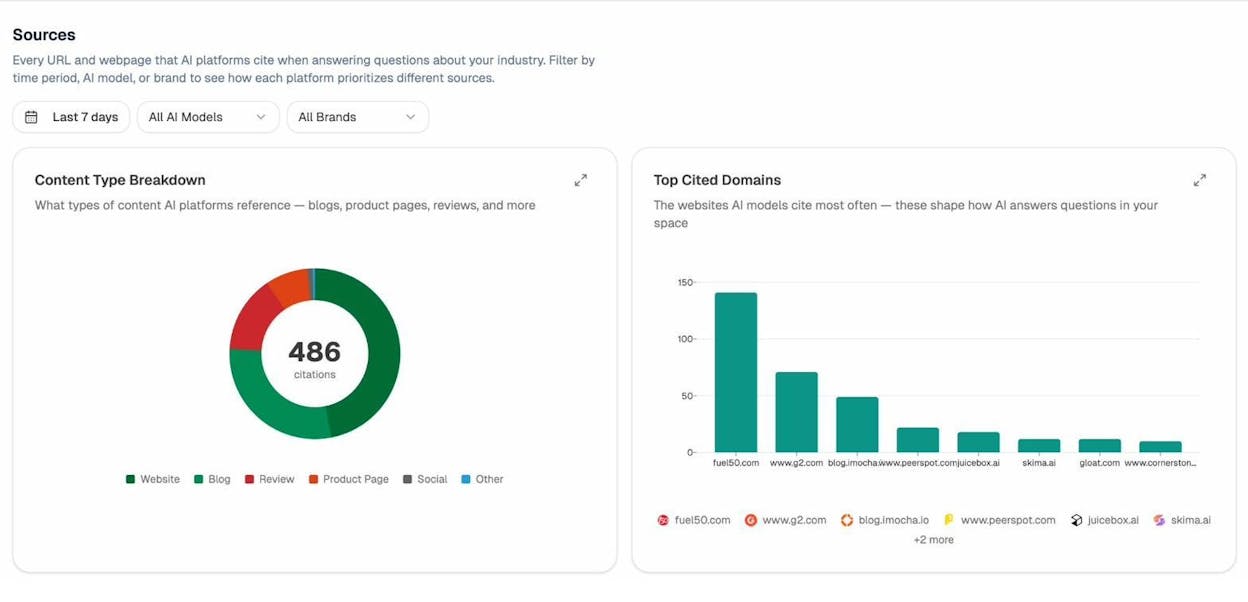
You stop doing generic link building. You target the specific sources that models already trust in your category, you write to fill gaps in their coverage, and you watch your citation frequency rise.
Audit which pages convert AI traffic
The third audit question is which of your pages actually receive AI-referred traffic and what those visitors do once they land. AI Traffic Analytics attributes every session from ChatGPT, Perplexity, Claude, Copilot, and Gemini to its source, ties each session to the landing page, and tracks engagement and conversions through to revenue.
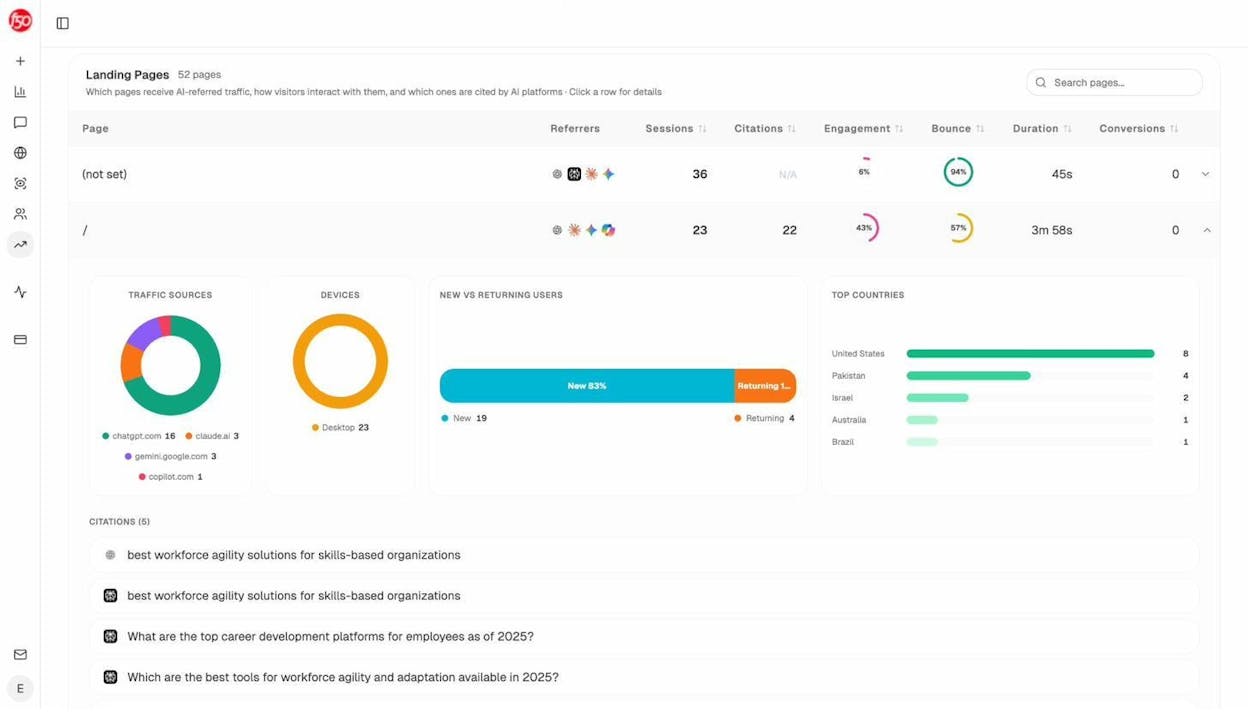
This is the audit nobody else runs. You see that your comparison page is getting 50 sessions a week from Perplexity at a 12% trial conversion rate, while an old blog post is getting 40 sessions from ChatGPT with zero conversions. You know what to double down on and what to deprioritize.
Audit where competitors win and where you sit
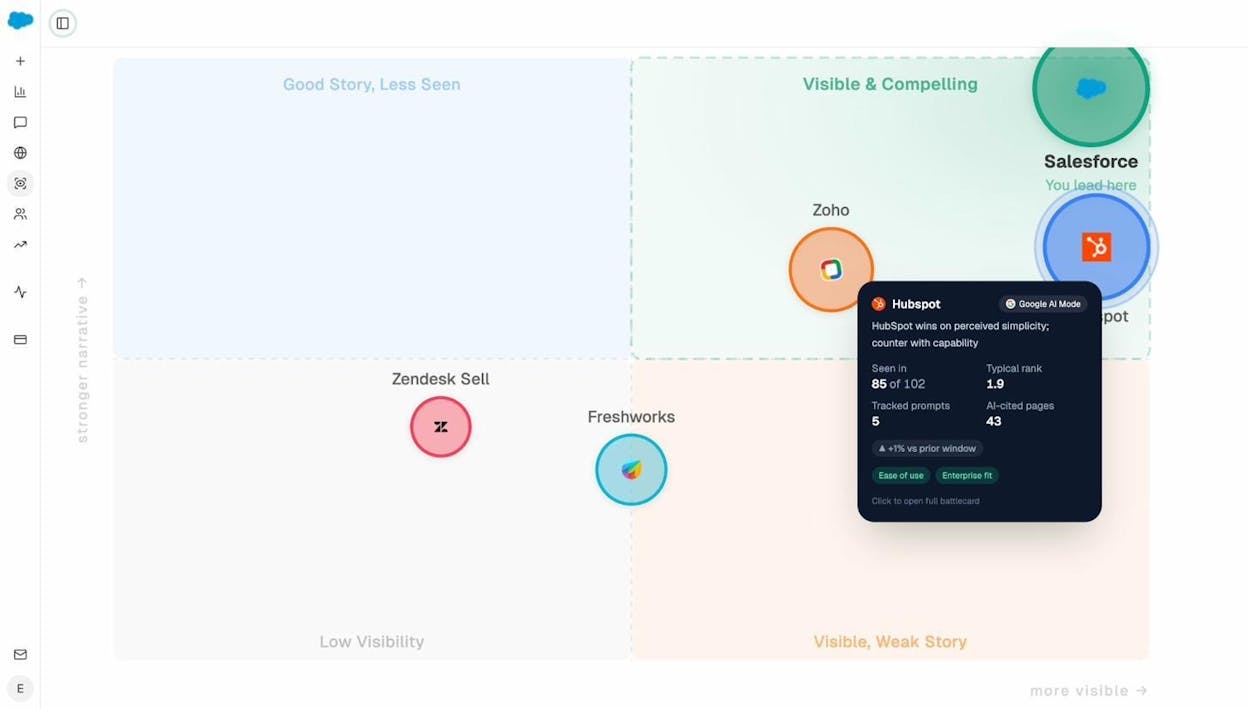
The fourth audit question is positional. Where do you sit in the AI conversation relative to your competitors, and on which themes are they pulling ahead. The Perception Map plots all tracked brands on a visibility vs narrative-strength quadrant so you can see at a glance whether you are visible and compelling, visible but weak, or invisible.
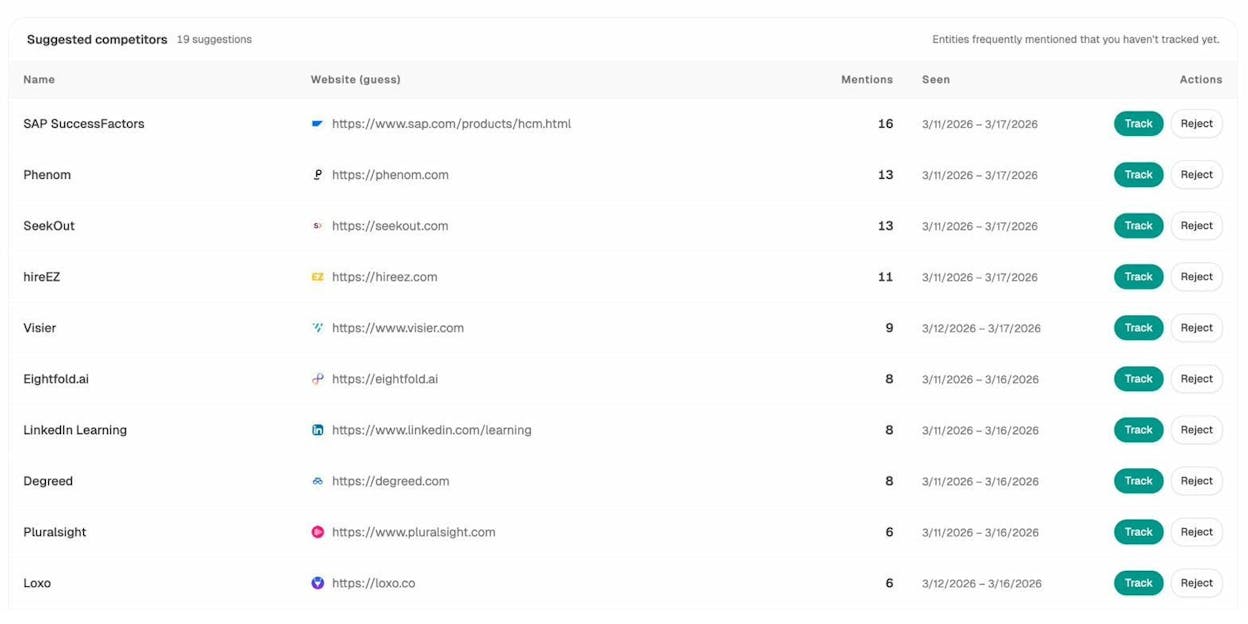
For tactical work, the Competitors dashboard surfaces brands that appear in AI answers in your space that you have not added to tracking, so you find out about new threats before they take share.
Fix what the audit surfaces
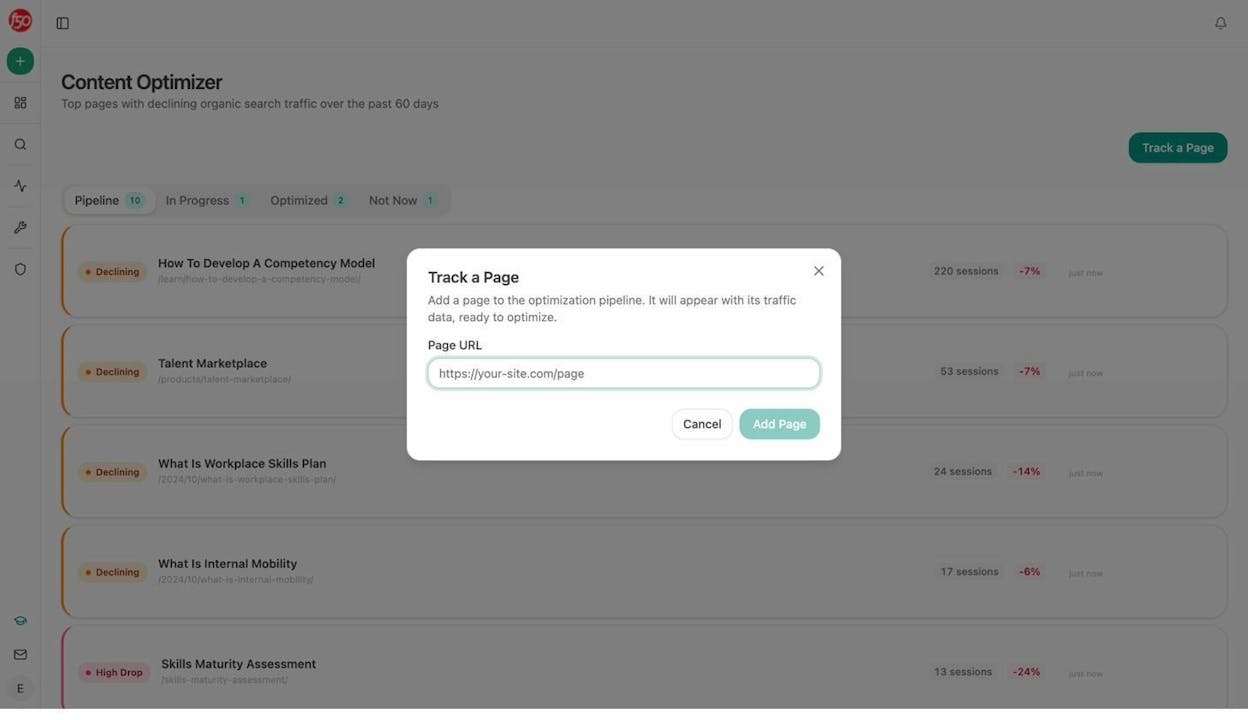
An audit that does not lead to fixes is a report. Analyze AI closes the loop with two writing tools. The AI Content Optimizer takes a URL that is losing traffic, audits its content against AEO standards and the gap to pages winning the prompts you care about, and rewrites the page with the fixes inline. The AI Content Writer generates new pages built from the same audit data, with your brand voice injected from a Brand Vault.
Run audits as scheduled or webhook-triggered agents
The piece that pulls everything together is the Agent Builder. Every other tool on this list audits your site on demand or on a schedule the vendor decided. With Analyze AI, you compose your own audits.
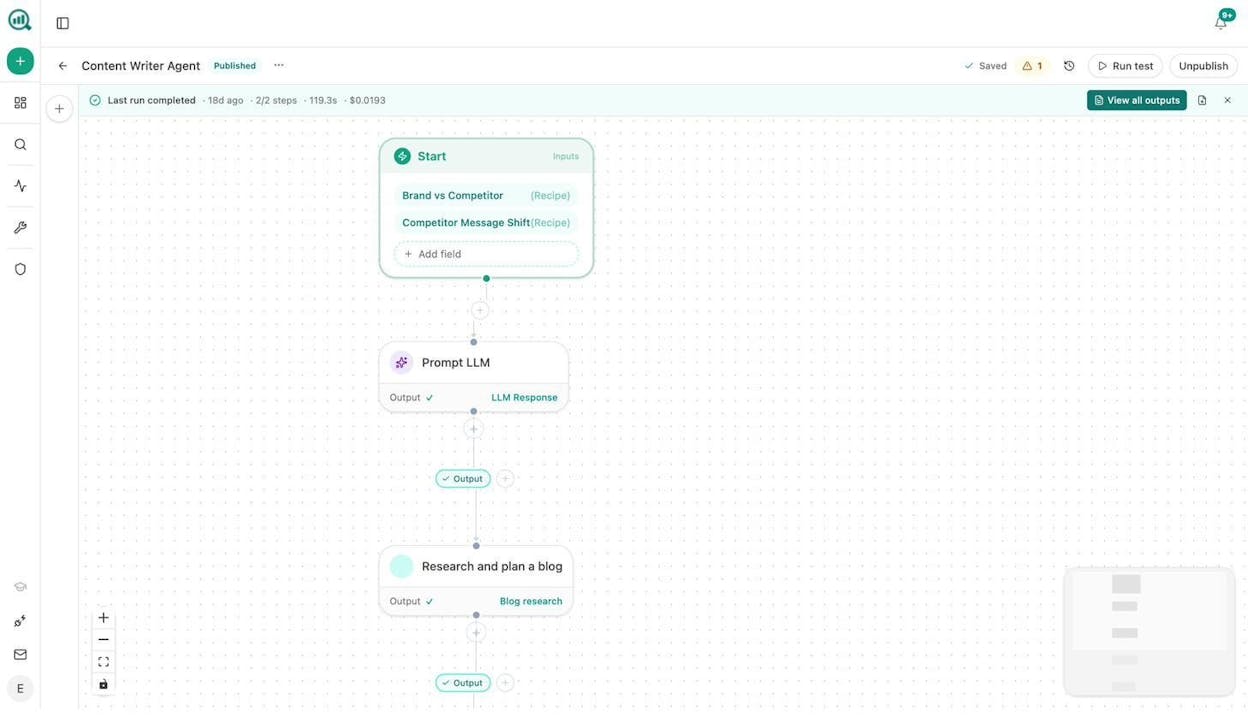
The substrate has 180+ nodes covering web research, DataForSEO, Semrush, GSC, GA4, AI visibility, citation analytics, content generation, content optimization, HubSpot, Notion, WordPress, Slack, and exports to CSV, DOCX, and PDF. There are 34 pre-baked data recipes like visibility-losers, competitor-gaps, citation-decay-alert, and prompt-cluster-brief that drop one-line data inputs into any agent. There are three trigger modes, manual, scheduled, and webhook, so you can build agents that run on demand, every Monday at 7am, or whenever a HubSpot deal closes.
Agencies build a weekly client audit pipeline that pulls a client’s AI visibility delta, GA4 AI traffic, GSC top pages, new backlinks, and competitor SERP movement, assembles it as a branded DOCX, and emails it to the client every Monday morning. Work that used to take an analyst half a day runs in 90 seconds, every account. For an SEO and AEO team, you build a daily visibility-loss alert that fires when a tracked prompt drops below a threshold and drafts a counter-content brief in the same run. For a content team, you build a refresh fleet that scans for stale or declining pages weekly, rewrites them with brand voice injected, scores them against AEO standards, and only publishes the ones that clear a quality gate.
Every other tool on this list audits one thing. The Agent Builder lets you audit anything you want, on the cadence you want, with the data sources you already pay for, and ship the output to the place your team already works.
How to pick the right combination
One tool is rarely enough for a site serious about growth. Most teams who run clean audits run two or three of these in combination.
If you are a small business or solo SEO with a site under 500 pages, start with the free Screaming Frog crawl plus Moz Pro Standard. Add Analyze AI when you start seeing AI referrers in your analytics. Use our free SEO tools like the website authority checker, broken link checker, and website traffic checker for the basics without a subscription.
If you are an in-house team at a mid-size B2B, run Screaming Frog for the deep crawl, Semrush Site Audit for weekly health and competitor data, and Analyze AI for the AI search visibility audit.
If you are an agency, the question is leverage. Most agencies we work with pair Ahrefs Advanced or Semrush Business with the Analyze AI Agent Builder, because the Agent Builder turns the Monday client briefing pack into a 90-second background process instead of an analyst’s morning.
If you are a content-heavy site, you care about internal linking, freshness, and which pages convert. Semrush Site Audit for the linking analysis, Analyze AI for AI traffic and citation data, and the Analyze AI Content Optimizer to rewrite declining pages.
What to do next
Pick one audit you have been putting off. Run it this week. If you do not have a technical SEO audit cadence yet, start there. If your site is healthy and you want to add the layer your competitors do not have, run an AI visibility audit and see which prompts in your category are answering without you.
The teams that win this year are not the ones running more audit tools. They are the ones running the right audits on a cadence that catches problems before traffic drops.

Moïse

Ernest


