Analyze - AI Search Analytics Platform

6 Best Ad Intelligence Software to Outsmart the Competition

Written by

Ernest Bogore

Ernest Bogore

CEO

Reviewed by

Ibrahim Litinine

Ibrahim Litinine

Content Marketing Expert

6 Best Ad Intelligence Software to Outsmart the Competition

Sometimes the first sign that a competitor is pulling ahead isn’t in your ad account at all — it’s in the places your tools never look. You see stable numbers inside Google Ads or Meta, yet performance shifts outside your line of sight: new angles spreading on publishers you don’t monitor, budgets moving into channels your dashboards don’t track, or funnels scaling before you even realize the test started. That blind spot grows quietly until the gap shows up in pipeline, not in CPMs.

  • You spot a wave of competitor creatives across the open web, but your stack can’t tell you which networks or publishers fueled the lift.

  • You hear from prospects that “everyone is seeing your competitor lately,” yet none of your platforms highlight where that attention actually came from.

  • You notice their funnels getting copied in your niche, but you can’t tell which variations are scaling and which ones already burned out.

We reviewed the ad intelligence tools that go beyond ad screenshots and surface the signals that actually move outcomes. We focused on platforms that reveal spend shifts, publisher patterns, cross-channel rollouts, funnel structures, and long-running creative strategies — the data that helps you adjust early instead of reacting late.

This guide breaks down the six tools that give you the clearest advantage depending on how you buy traffic: native, display, Shopping, PPC, CTV, or mixed-channel. You’ll see where each tool is strong, where it falls short, and how to choose based on real workflows rather than feature lists. But it doesn’t stop there.

And at the end, you’ll get a bonus software that fills a gap every ad platform leaves open — the part of the buyer journey that happens before anyone ever sees an ad, and that most software can’t measure at all.

Table of Contents

TL;DR

ToolBest forMain focus / channelsWhat it does bestKey watch-outsIdeal when…
AdPlexityNative and “non-standard” traffic buyersNative; mobile; pop; push; other harder-to-see sourcesShows full funnels (ad + lander) on channels most tools ignore; great for seeing what top affiliates and media buyers really runModule-based pricing; can be expensive if you need many traffic types; thinner data in small GEOs; still need your own strategy and testingYou run native; push; pop or mobile traffic and want to copy the shape of winning funnels instead of guessing
SimilarwebCross-channel competitive visibilityDisplay; traffic sources; SEO; referrals; multi-market viewCombines ad intel with traffic and SEO data so you see where competitors get visitors and how channels work togetherHigh price; steep learning curve; weaker accuracy for low-traffic sites; can feel heavy if you only care about adsYou work in a mid-size or enterprise team and need one place to see ads; traffic; and market share across many countries
Semrush Advertising ToolkitPPC-heavy teams that want research + launch in one placeGoogle Ads; Google Shopping/PLA; Meta; plus AdClarity for display/social/videoCovers the whole PPC flow: keyword and ad research; Shopping intel; cross-channel insight; and direct campaign management in Google + MetaAdvanced AdClarity data lives on higher tiers; suite can feel complex and bloated if you only need adsYou live in Google and Meta Ads and want one stack to research competitors; launch campaigns; and track results
AdbeatDisplay and native buyers who care about publisher-level detailOpen-web display; native networks (Taboola; Outbrain; etc.)Reveals which publishers and networks carry real volume; shows creatives + landers + spend trends so you can see how big advertisers scaleLimited search/social view; best data in big GEOs; pricing tends to fit agencies or mid-market teamsYou buy a lot of display or native and want to know exactly where competitors spend and which funnels they keep running
Pathmatics by Sensor TowerEnterprise teams needing cross-channel spend + creative transparencyDisplay; social; video; CTV; mobile; retail mediaMaps ad spend and creatives across many channels; great for planning; buying; and high-level benchmarking in big organizationsEnterprise pricing; more complex setup; does not track conversions or revenue on its ownYou manage large; multi-channel budgets and need strong data to guide media mix; publisher choice; and reporting
SpyFuTeams that want deep Google Ads intel without enterprise costGoogle search PPC + some SEOGives long-term Google Ads history with keywords; CPC; spend; and ad copy; unlimited searches make deep research easyGoogle-only focus; light SEO/analytics features; not a full cross-channel or technical SEO suiteMost of your budget is in Google search and you want affordable; detailed PPC intelligence to shape campaigns
Analyze (bonus)Tracking how AI answer engines drive traffic and revenueAI search / GEO across ChatGPT; Perplexity; Claude; Copilot; GeminiConnects AI visibility to real sessions; conversions; and revenue; shows prompt-level performance; sentiment; and citation sourcesNot an ad tool; needs pairing with your analytics and ad stack; focused on AI engines rather than classic paid mediaYou want to see how AI answers shape demand before the ad click and which engines; prompts; and pages truly drive pipeline

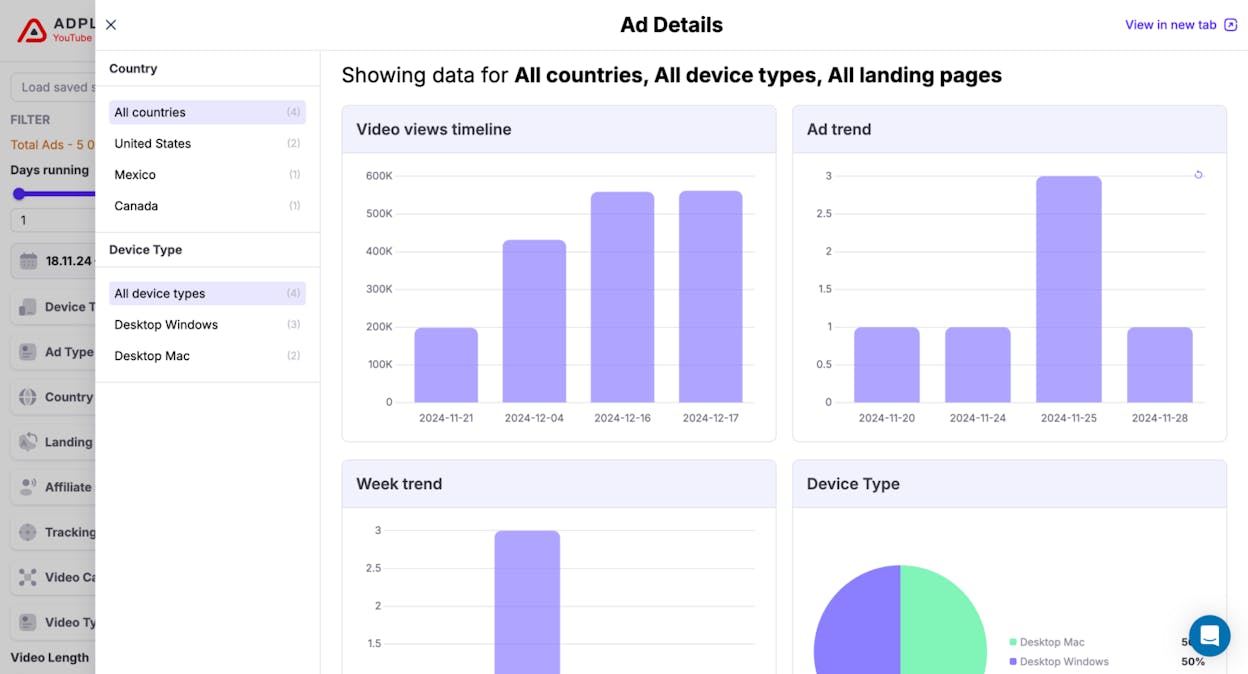
AdPlexity: best ad intelligence software for native and non-standard traffic sources

ad spying tools

Key AdPlexity standout features

  • Tracks ads across many traffic types, including native, mobile, desktop, pop, and push

  • Lets you search ads with strong filters like network, device, GEO, keyword, and traffic source

  • Shows full creatives and landing pages and lets you download them for deeper study

  • Sends alerts when new campaigns appear so you can react fast

  • Stores live and past ads so you can spot trends over time

AdPlexity focuses on the traffic that many teams struggle to see clearly. When you run native ads, push ads, or pop traffic, the larger, brand-oriented intelligence tools often give you only surface-level insight, which leaves you guessing about how top affiliates and media buyers shape their funnels. AdPlexity fills this gap by showing you real creatives, placements, publisher paths, and landing pages across these less standard channels, which makes it far easier to understand how winning campaigns work without starting from scratch.

competitor ad analysis

Because you can download full landing pages, you are never stuck trying to guess how the funnel looked. You see the headline, layout, social proof blocks, form fields, redirects, and scripts used by top spenders, which helps you copy the structure of proven funnels in a more informed way. Strong filtering then lets you break down results by device, GEO, traffic type, or network, so you can compare what works in a mobile push environment in Mexico against what works on a native desktop flow in France, all inside one dashboard.

That strength comes with a few meaningful trade-offs. AdPlexity gives you visibility, but it does not make strategic decisions for you, so you still need clear thinking, strong offers, and real testing discipline. Data only tells part of the story, and success depends on how well you translate that story into new ideas that fit your niche.

marketing intelligence software

Pricing can also become a barrier for smaller teams because each module—native, mobile, push, or desktop—sits behind a separate paid tier. This creates pressure to choose modules based on where you actually run campaigns, rather than buying the entire suite. In very small GEOs or niche verticals, you may also find thinner data, which means you should pair AdPlexity with your own testing or another intelligence source when operating in markets with low volume.

How AdPlexity helps with ad intelligence and staying ahead

AspectDetailsWhy it matters for ad intelligenceHow it helps outsmart the competition
What AdPlexity isA spy tool for ads on native; mobile; pop; and push trafficGives clear views on channels that many tools ignoreYou see offers and funnels others keep “secret” and can act before they spread
Main channel focusNative networks; mobile web and in-app; pop and push formatsThese channels move fast and shift many times per weekYou spot new angles and funnels early and adjust faster
Creative and funnel viewFull creatives plus downloadable landing pagesLets you study not only the ad; but the entire path behind itYou design smarter; data-backed tests instead of guessing
Targeting and filtersGEO; device; network; keyword; language filtersHelps you find the exact setups that match your marketYou avoid copying broad concepts and copy only what fits your niche
Historical data and alertsTracks past ads and sends real-time alertsShows which ideas last and which fade fastYou double down on proven concepts and skip short-lived trends
Main watch-outsModule-based pricing and variable depth in small GEOsReminds you to combine visibility with smart testingYou treat it as a radar; not a shortcut; and win with better decisions

Bottom line

AdPlexity gives you the clearest view into native, mobile, pop, and push ads, which are channels most intelligence tools fail to cover with real depth. It becomes a strong advantage when you want to study full funnels, track fast-moving angles, and pull proven ideas from top affiliates before those ideas spread. The tool does not replace strategy, however it gives you the visibility you need to make better decisions and stay ahead in channels where small edges compound fast.

Similarweb: best ad intelligence software for cross-channel competitor visibility

paid media analytics tools

Key Similarweb standout features

  • Shows competitors’ display creatives, landing pages, publishers, ad networks, and placements

  • Offers a huge ad database with hundreds of millions of display ads for deep research

  • Breaks down traffic sources, media mix, referral paths, and audience behavior

  • Combines ad intel with SEO, market data, and industry benchmarks to give full context

  • Lets you export charts, tables, and reports for deeper analysis and team sharing

Similarweb is built for teams that want one place to understand how competitors win across the entire digital landscape. The ad-intelligence module shows the ads competitors run, but the real value appears when you pair these ads with the traffic and SEO data sitting beside them. You see where users come from, how they behave after clicking, which publishers send the most volume, and how channel mix shifts over time. That blend of ad activity and traffic patterns helps you understand not just that a competitor is spending more, but why their digital presence feels stronger.

creative intelligence platforms

Because Similarweb tracks many markets and industries, you can study global patterns in a way most ad-spy tools cannot match. The platform helps you compare countries, devices, channels, and competitors in one step, which is useful when you manage paid campaigns across different markets or report to clients that expect clear, data-backed answers. The large creative database also allows long-span research, so you can see how a competitor changed its ads, which angles lasted, and which publishers kept running those creatives past their first flight.

The same depth that makes Similarweb powerful also makes it heavy when you only need simple ad insights. The platform covers SEO, market intelligence, traffic analytics, audience behavior, and app data, which can slow you down if your use case is narrow or if you prefer a cleaner workflow focused only on ads. Many users mention a learning curve because the dashboard has many sections and because interpreting cross-channel signals takes training for smaller teams.

facebook ad intelligence

Pricing is another real trade-off. Full ad-intelligence data sits behind higher tiers, and most of the value — market benchmarks, historical views, deeper exports — becomes available only when you purchase enterprise-level access. This can make the platform harder to justify for small brands or low-budget teams. Some reviewers also note that accuracy can drop on low-traffic or niche websites because Similarweb relies on sampling and estimates rather than direct tracking.

How Similarweb helps with ad intelligence and staying ahead

AspectDetailsWhy it matters for ad intelligenceHow it helps outsmart the competition
What Similarweb isA cross-channel digital intelligence toolLinks ads to traffic; SEO; and audience behaviorLets you see full patterns; not isolated placements
Creative and placement viewShows display ads; creatives; landers; publishers; and networksHelps you map where and how competitors scaleLets you target high-value publishers fast
Traffic and media-mix analysisBreaks down referral paths; sources; and engagementShows which channels work for competitorsHelps you shift budgets toward winning channels
Global and multi-market coverageTracks many countries and industriesUseful for multi-market planning and benchmarkingHelps you find gaps competitors miss in new markets
Export and reporting toolsDashboards; charts; and exports for teamsMakes insights shareable and repeatableGives leaders and clients clearer direction
Main watch-outsHigh price; learning curve; weaker data for low-traffic sitesReminds you to use the tool for broad strategyHelps you pair it with simpler tools when needed

Bottom line

Similarweb gives you a wide view of competitor ads, traffic patterns, publishers, and audience behavior in one place, which makes it far more than a simple ad-spy tool. It works best when you want clear visibility across markets and channels, and when you need context behind why a competitor is gaining ground. The cost and complexity push it toward mid-size and enterprise teams, but when you can use the full platform, it becomes one of the strongest ways to understand digital competition at scale.

Semrush Advertising Toolkit: best ad intelligence software for PPC-heavy teams that want research and execution in one place

google ads competitor analysis

Key Semrush standout features

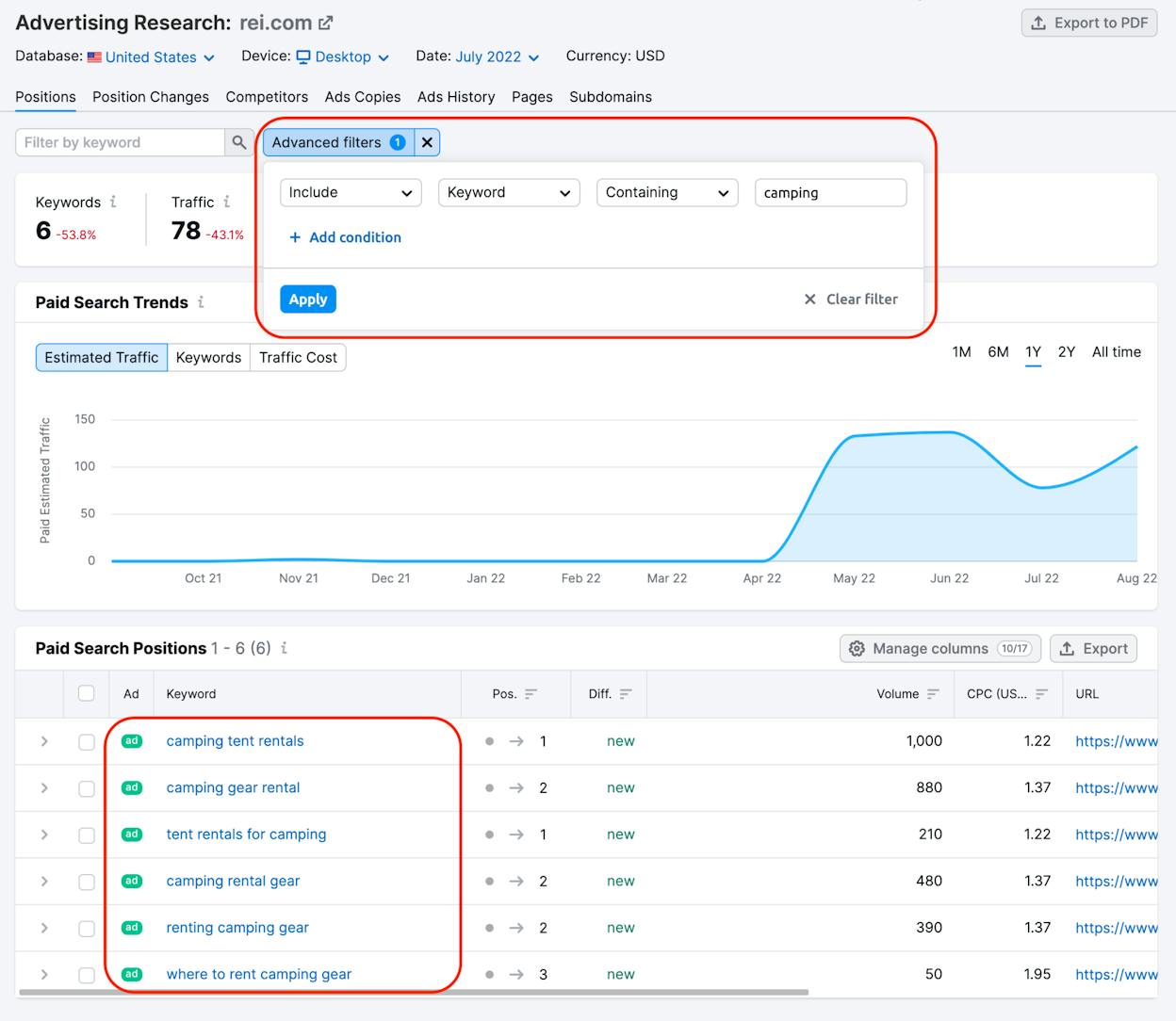
  • Shows competitors’ paid keywords, ad copies, CPC, estimated traffic, and long-term PPC trends

  • Gives deep insights on Google Shopping and PLA ads, including product positions and pricing

  • Adds cross-channel ad intelligence through AdClarity with display, social, and video visibility

  • Lets you manage Google Ads and Meta Ads directly from the same interface

  • Tracks campaign performance so you can move from research to launch without switching tools

Semrush’s Advertising Toolkit is built for teams that want a full PPC workflow under one roof. Instead of using one tool to spy on competitors, another to plan ads, and a third to launch campaigns, you can do all of that inside Semrush. The platform lets you start with keyword and ad-copy research, study which ads competitors keep running, and then turn those insights into campaigns in Google or Meta without leaving the dashboard. That tight loop helps you move faster because you can test angles, compare PPC histories, and shape new campaigns while the insights are still fresh.

ad campaign benchmarking

The PLA and Shopping data adds another layer that many ad-spy tools do not offer. If you run e-commerce, being able to see competitor product listings, prices, and Shopping creatives gives you a clearer sense of which product mixes perform well and how brands position themselves. When you add AdClarity, the toolkit grows even stronger through display, social, and video intel. Seeing spend estimates, top publishers, and creative patterns across 50+ markets helps larger teams understand how media mixes shift as brands scale.

Those strengths also create some complexity. Semrush covers SEO, content, local search, competitive analysis, ads, and reporting, which means the interface carries more options than a focused ad-intel tool. Teams with less PPC experience may need more time to understand what each view means or how to connect search data with Shopping or cross-channel insights. Teams that want a simple creative-spy tool may find the broader platform heavier than they need for daily work.

competitive advertising insights

Many teams notice the real jump in capability happens only when you unlock the higher tiers, because that’s where the full AdClarity dataset sits. The advanced display, social, and video insights are not part of the base plan, so smaller advertisers may feel pressure to upgrade sooner than expected. The suite can also feel heavier when your work revolves only around ads, since you’re paying for SEO, content, and competitor modules that may never enter your workflow. Semrush delivers the strongest return when you use several parts of the platform together, and the value thins when your use case touches only a narrow slice of the tool.

How Semrush helps with ad intelligence and staying ahead

AspectDetailsWhy it matters for ad intelligenceHow it helps outsmart the competition
What Semrush isA full PPC and ad workflows suiteCovers research; launch; and tracking in one stackYou ship campaigns faster and learn faster
PPC ad researchPaid keywords; ad copies; CPC; volume trendsShows what competitors buy and when strategies shiftYou avoid guesswork and shape winning angles
PLA and Shopping insightsProduct ads; prices; positions; creativesHelps e-commerce teams track real retail competitionYou adjust prices; feeds; and listings with data
Cross-channel intel (AdClarity)Display; video; social spend and publishersGives a wide view of media mixes across marketsYou find channels and placements others ignore
Execution + trackingGoogle + Meta ads managementLets you turn insights into campaigns without tools switchingYou react quicker to competitor moves
Main watch-outsComplexity; higher-tier AdClarity costs; broad featuresReminds you to match tools to your actual needsYou avoid paying for unused modules

Bottom line

Semrush Advertising Toolkit is strongest when you want one place to research competitors, plan PPC and Shopping campaigns, launch ads, and track results. It fits teams that live inside Google and Meta Ads and want deeper insight into how rivals buy keywords, shape product listings, and scale spend across markets. The full power comes with higher-tier pricing and a learning curve, but when you use the entire stack, Semrush becomes a fast, central hub for building smarter campaigns with tighter competitive intelligence.

Adbeat: best ad intelligence software for display and native buyers who need publisher-level clarity

competitor media tracking

Key Adbeat standout features

  • Tracks display and native ads across 90+ ad networks, including Taboola, Outbrain, and major open-web networks

  • Breaks down publishers and traffic sources so you can see exactly where competitors buy traffic

  • Shows creatives and landing pages together so you can study full funnels rather than single ads

  • Provides historical spend estimates and trend analysis across display and video campaigns

  • Lets you build custom reports so you can package insights for stakeholders or clients

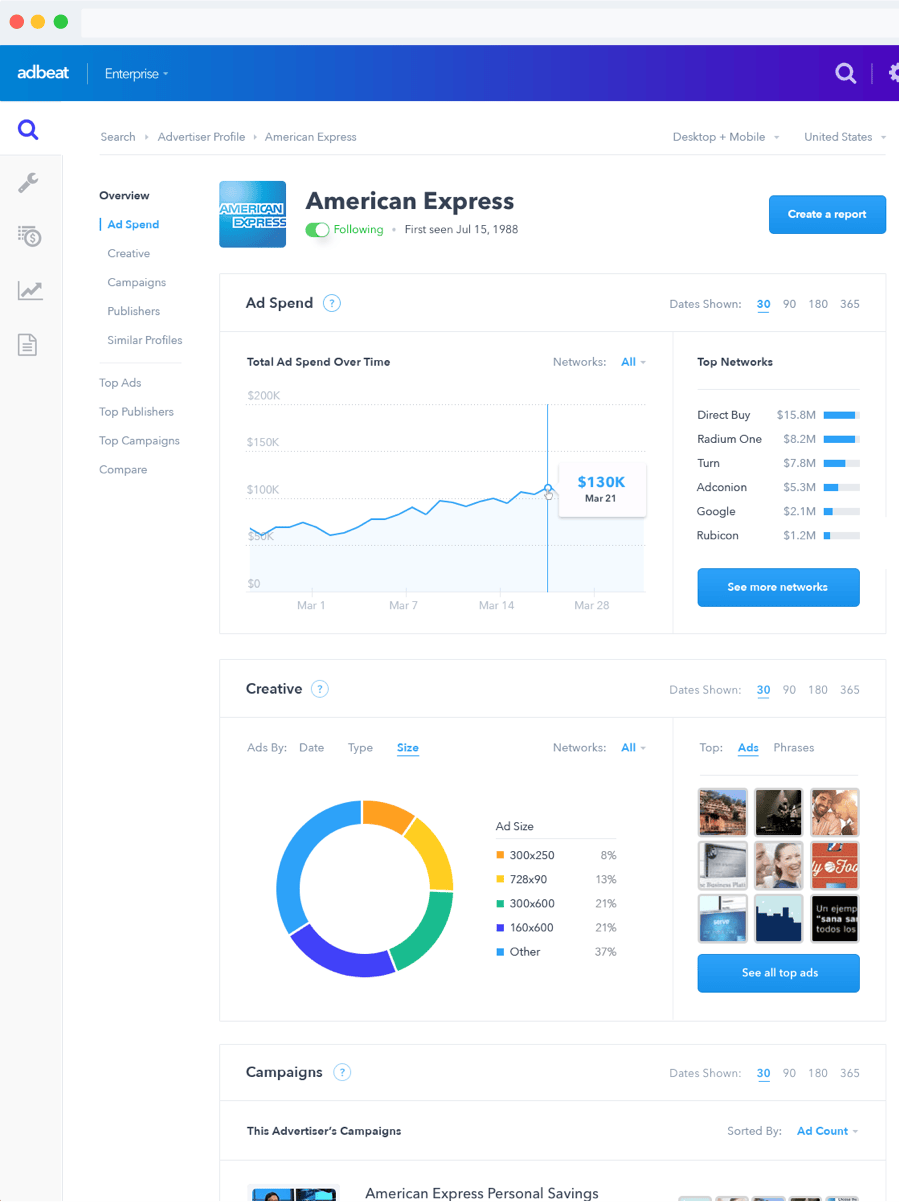
Adbeat focuses on the open-web side of advertising, where display and native placements move fast and budgets spread across many networks. Instead of only showing a banner or a headline, the platform reveals which publishers ran those ads, how often they appeared, and how competitors spread their budgets across networks. This helps you understand how big advertisers scale, because you can see which publishers carry the most volume, which networks get the most spend, and which placements stay live longest. When you manage display or native at scale, these patterns matter more than any single creative.

competitor PPC research

It also helps you understand the full funnel behind the ads. You can open an ad, jump directly into the landing page, and study the hooks, layouts, redirects, and offer pages that high-spend advertisers use. Combined with trend data, you can see which creatives keep running month after month and which angles competitors abandon quickly. This view is useful for performance teams because it shortens the path between research and testing. Instead of guessing which angles work, you can pull ideas from advertisers already spending on the same networks you plan to use.

Adbeat does not cover every channel, and that creates a gap for teams with broader media mixes. Search, social, and short-form video do not get the same depth as display and native, so you will need other tools if those channels drive most of your spend. When your focus sits on Google Ads or social-heavy campaigns, the insight inside Adbeat will feel incomplete. Its value grows when display and native channels make up a real part of your budget or your experimentation system.

digital advertising analytics

Another thing to keep in mind is how coverage shifts by market size. Reviews often note that Adbeat is strongest in major GEOs and high-volume verticals, where more data flows through open-web networks. In smaller markets, you may see fewer campaigns, fewer publishers, or thinner patterns. Pricing can also feel geared toward agencies or mid-market advertisers rather than small teams. The tool works best when you run multi-network campaigns, handle many accounts, or need data you can package for clients or leadership.

How Adbeat helps with ad intelligence and staying ahead

AspectDetailsWhy it matters for ad intelligenceHow it helps outsmart the competition
What Adbeat isA display + native ad intelligence platformFocuses on open-web networks others ignoreHelps you uncover publisher strategies hidden from PPC/social tools
Network + publisher insightsTracks 90+ networks and publisher pathsShows where volume and spend really flowLets you shift budgets toward proven; high-impact publishers
Creative + lander visibilitySee ads and landing pages in one viewGives insight into funnels; not just creativesHelps you model offers and flows with less wasted testing
Historical spend & trendsLong-term spend and placement patternsReveals when competitors scale or drop networksLets you react early to shifts and find openings
Custom reportsExportable visuals and summariesSupports agencies and cross-functional teamsHelps you justify media plans with real data
Main watch-outsThin coverage in small GEOs; limited search/social; higher pricingShows where to pair Adbeat with other toolsLets you use Adbeat where it’s strongest without overextending

Bottom line

Adbeat gives you a clear, publisher-level view of how display and native campaigns really operate across the open web. It highlights where competitors buy traffic, which creatives survive over time, and how budgets move between networks, which gives you an edge when you want to design smarter tests or scale campaigns with fewer guesses. It is not built for PPC or social, and its strength depends on market size, but when your work relies on display or native channels, Adbeat becomes one of the most useful intelligence tools you can add to your stack.

Pathmatics by Sensor Tower: best ad intelligence software for teams that need cross-channel spend and creative transparency at enterprise scale

media buying intelligence

Key Pathmatics standout features

  • Tracks ad spend across desktop, mobile, social, video, and connected TV with detailed breakdowns

  • Covers display, video, programmatic, and emerging channels like retail media

  • Shows creatives, placements, publishers, and flight dates so you can study full cross-channel strategy

  • Supports media planning and buying teams with visualizations and exportable reports

  • Integrates with Sensor Tower’s broader ecosystem for deeper data and workflow support

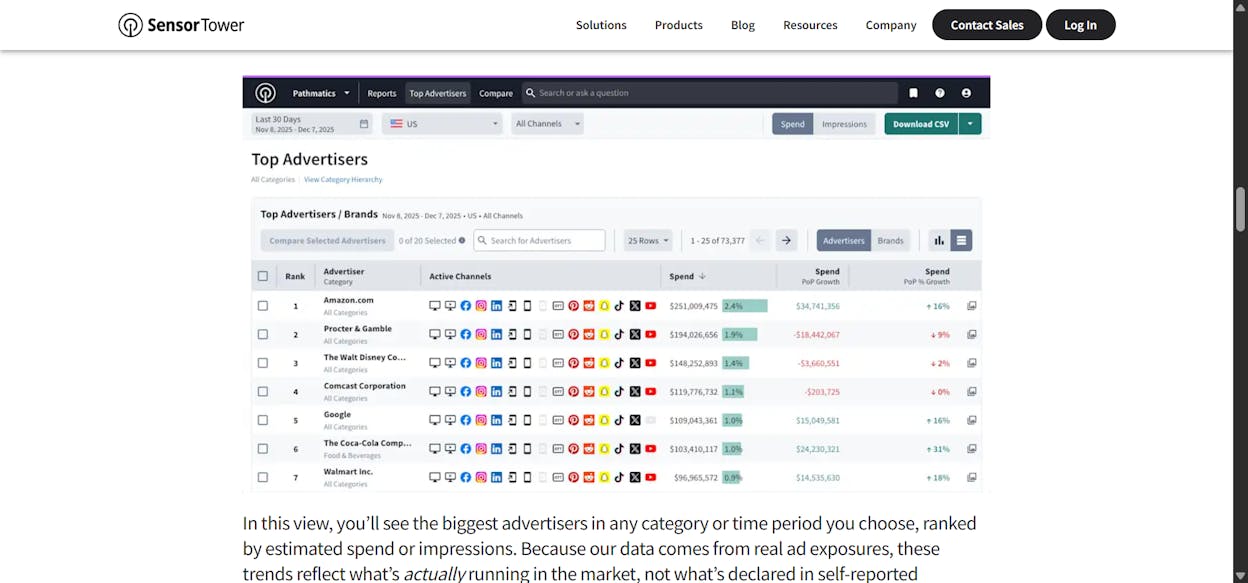
Pathmatics is built for advertisers that run serious cross-channel campaigns and need clarity on how budgets move across platforms. Instead of giving you a snapshot of isolated ads, the tool highlights how much competitors spend, which channels receive the most budget, and how that spend shifts as campaigns scale. You get a unified view of desktop, mobile, social, video, and CTV in the same interface, which helps large teams understand how their market behaves across the full ad landscape. When your media mix is wide, this kind of transparency becomes far more valuable than creative-only spy tools.

ad strategy monitoring

The creative and publisher views add another layer by showing placements, publishers, and flighting. You can see which ads ran, where they ran, how long they stayed live, and how that aligns with spend estimates. This gives strategy and buying teams a clearer way to benchmark performance, because you can tell when a competitor invests heavily in a channel, tests a new creative angle, or shifts budget to a new publisher set. Combined with enterprise-ready reporting and exports, Pathmatics fits into workflows where teams need to manage many markets, share intelligence across stakeholders, and back decisions with strong data.

Because Pathmatics is designed for larger advertisers, the workflow comes with some complexity. The depth of spend data, cross-channel coverage, and visualization options requires time to set up and interpret, which can feel heavy if your campaigns are simple or your budget is small. Teams often need onboarding or internal processes to get the full value, especially when integrating the data with planning or buying systems. When you want a lightweight or fast creative-spy workflow, Pathmatics may feel slower than tools built for quick inspiration rather than strategic decisions.

competitive intelligence platforms

Another thing to know is that Pathmatics does not try to connect ad activity to downstream outcomes like conversions or revenue. It focuses on spend, reach, creatives, and placements, but you need your own analytics or attribution tools to understand how those impressions translated into performance. Pricing is also custom and tends to favor enterprise budgets, which makes it harder to justify for small organizations or solo buyers. The tool fits best when you run campaigns across many channels and markets and need data that scales with your organization.

How Pathmatics helps with ad intelligence and staying ahead

AspectDetailsWhy it matters for ad intelligenceHow it helps outsmart the competition
What Pathmatics isAn enterprise-grade cross-channel ad intelligence platformCovers spend + creatives across many channelsHelps you see full strategy instead of isolated ads
Spend visibilityTracks budgets across display; social; video; mobile; CTVShows where competitors invest at scaleHelps you shift budget early when spend patterns change
Creative + publisher insightShows creatives; placements; publishers; and flight datesReveals how campaigns run across the webHelps you benchmark angles and placements with precision
Multi-channel coverageDesktop; mobile; social; video; CTV; retail mediaSupports complex; multi-market media mixesLets you find strong channels before they saturate
Enterprise workflowsVisualizations; exports; planning supportFits large teams with complex reporting needsHelps you align strategy across departments
Main watch-outsHigh pricing; complexity; no downstream performancePoints to the need for attribution toolsHelps you combine Pathmatics with performance data to complete the picture

Bottom line

Pathmatics gives large advertisers a clear view of where competitors spend, which creatives they use, and how campaigns evolve across channels like social, video, CTV, and programmatic. It works best when your media mix is broad and you need strong data to guide planning, buying, and reporting. The platform carries enterprise pricing and complexity, and it does not track conversions or revenue on its own, but when you use it inside a mature workflow, it becomes one of the strongest ways to understand cross-channel competitive behavior at scale.

SpyFu: best ad intelligence software for teams that want deep Google Ads insights without enterprise pricing

ad creative benchmarking

Key SpyFu standout features

  • Shows historical Google Ads data, including every keyword a competitor has bought and the estimated clicks, CPC, and spend behind those choices

  • Offers unlimited searches and exports on many plans, which removes the row caps common in larger suites

  • Includes PPC overlap tools like “Kombat,” which compare your keyword set against competitors and flag shared, missed, and waste keywords

  • Combines organic and paid data so you can see how search strategies work together rather than in isolation

  • Gives clear visibility into ad-copy history, keyword-level changes, and long-running PPC patterns

SpyFu is designed for advertisers who live inside Google Ads and need a clear, historical view of how competitors buy search traffic. Instead of only showing you what keywords are live today, the platform pulls forward years of PPC history so you can see which terms competitors kept bidding on, which ones they dropped, and when they scaled up or down. This historical depth helps you understand not only what works, but what has worked for a long time, which matters when you build campaigns meant to compete at the keyword level. Because the data includes CPC estimates, click volume, and ad copies, you can shape your early tests with a stronger sense of competitive pressure.

multi-channel ad insights

The unlimited search and export options make SpyFu easier to use than tools that charge more as you pull more data. You can dig through large keyword sets, compare many competitors, and explore different ad histories without feeling restricted by caps or paywalls. The PPC overlap tools then help you see where you stand relative to competitors by labeling keywords you share, keywords they win, and keywords you could add. The mix of organic and paid data helps you understand when a brand’s SEO presence supports or conflicts with its paid presence, which is useful for shaping integrated search strategies.

SpyFu focuses almost entirely on Google search, and that creates gaps for teams with broader media mixes. If your campaigns depend on display, social, video, or native ads, SpyFu cannot give you the same depth that tools like Adbeat or Pathmatics provide. It works best as a Google Ads intelligence engine, not as a cross-channel platform. When you run blended campaigns across multiple networks, you will need additional tools to get a full picture.

ad competitor tracking tools

Another thing to know is that SpyFu is not a full SEO or analytics suite. It gives you rankings and keyword visibility, but it does not go deep on backlinks, technical SEO, or real-time rank tracking. Many teams use it alongside a full SEO platform for daily optimization. The tool shines when you want affordable, deep PPC insight without the complexity or cost of larger suites, but it will not replace your technical SEO or analytics tools.

How SpyFu helps with ad intelligence and staying ahead

AspectDetailsWhy it matters for ad intelligenceHow it helps outsmart the competition
What SpyFu isA PPC-focused competitive intelligence toolShows long-term Google Ads patternsHelps you learn from years of real spend decisions
Historical PPC dataKeywords; CPC; clicks; spend; ad-copy historyReveals how rivals shape campaigns over timeLets you target proven; stable keywords with confidence
Unlimited searchesNo row caps or query limitsSupports deep research without extra costLets you analyze competitors at scale
PPC overlap tools“Kombat” and portfolio comparisonsExposes gaps; misses; and wasted spendHelps you fix weaknesses before they cost you money
Organic + paid dataCombined search viewShows when brands win both sides of searchHelps you align SEO and PPC for better results
Main watch-outsGoogle-only focus; limited SEO depthPoints to the need for other tools for non-search channelsHelps you keep SpyFu where it’s strongest: Google Ads

Bottom line

SpyFu is a strong choice when you want deep Google Ads intelligence without enterprise cost or complexity. It reveals long-term PPC patterns, shows how competitors buy traffic, and highlights gaps in your keyword coverage. It will not give you cross-channel insight or full SEO depth, but when your budget leans toward Google Ads and you want clean, historical data to guide your next campaigns, SpyFu offers one of the best value profiles in the category.

Analyze: Bonus software to track AI-driven buyer journeys you can’t see in ad platforms

display ad intelligence

Analyze is not an ad intelligence platform, and it is not trying to be. While the rest of this list helps you see where paid impressions run and how competitors buy media, Analyze focuses on a different blind spot entirely: the buyer journeys that start inside AI answer engines long before anyone ever lands on an ad or a search result.

Most GEO tools stop once they confirm your brand appeared in a ChatGPT or Perplexity response. You get a visibility score, maybe a sentiment score, and a list of prompts where you showed up, yet there is still no connection to what happened next. 

A mention in Perplexity gets treated the same as a citation in Claude, even though one might quietly drive qualified traffic and pipeline while the other sends nothing of value.

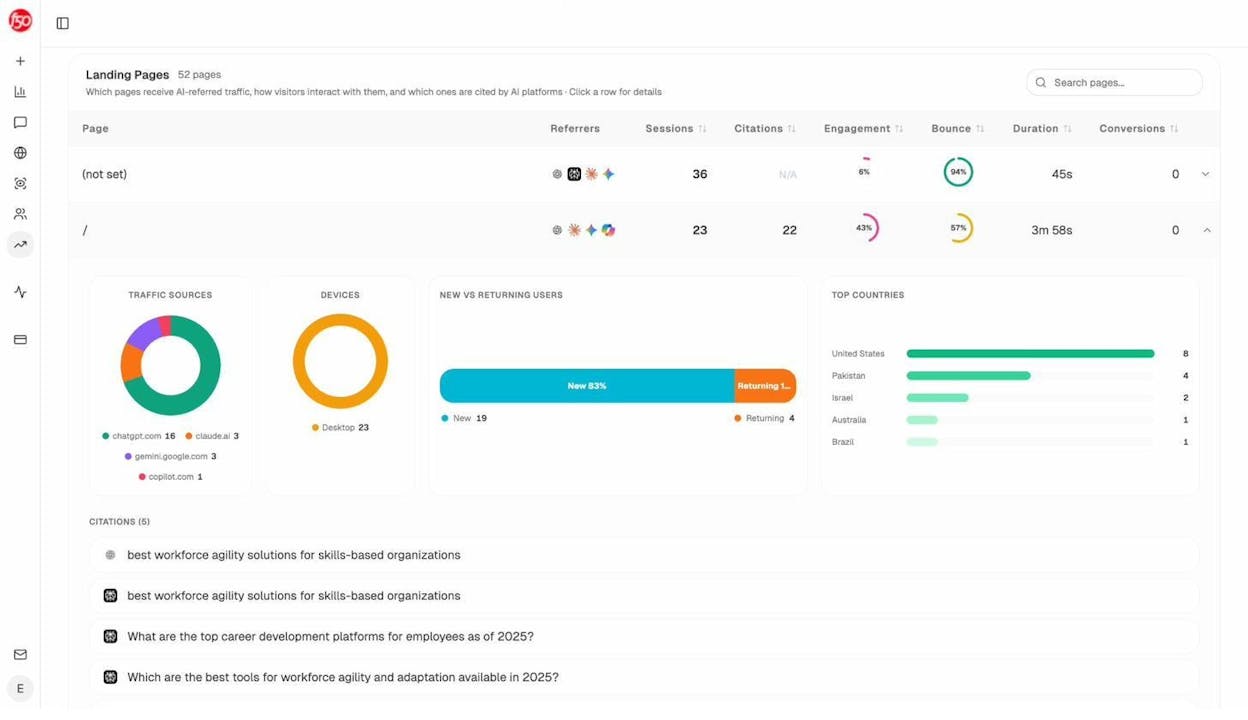
Analyze closes that gap by tying AI visibility to real sessions, conversions, and revenue. It tracks which answer engines send visitors to your site (Discover), which pages those visitors land on, what actions they take, and how much revenue they influence (Monitor). You see prompt-level performance across ChatGPT, Perplexity, Claude, Copilot, and Gemini, along with conversion rates, assisted revenue, and ROI by referrer instead of vanity visibility alone. 

From there, Analyze helps you act on those insights (Improve), while keeping a running view of how your brand’s sentiment and positioning evolve across the AI landscape over time (Govern).

Your team then stops treating “AI visibility” as a vague brand metric and starts proving which engines deserve investment, which prompts truly move revenue, and where GEO work actually turns into pipeline.

Key Analyze features

  • See actual AI referral traffic by engine and track trends that reveal where visibility grows and where it stalls.

  • See the pages that receive that traffic with the originating model, the landing path, and the conversions those visits drive.

  • Track prompt-level visibility and sentiment across major LLMs to understand how models talk about your brand and competitors.

  • Audit model citations and sources to identify which domains shape answers and where your own coverage must improve.

  • Surface opportunities and competitive gaps that prioritize actions by potential impact, not vanity metrics.

Here are in more details how Analyze works:

See actual traffic from AI engines, not just mentions

social ad monitoring tools

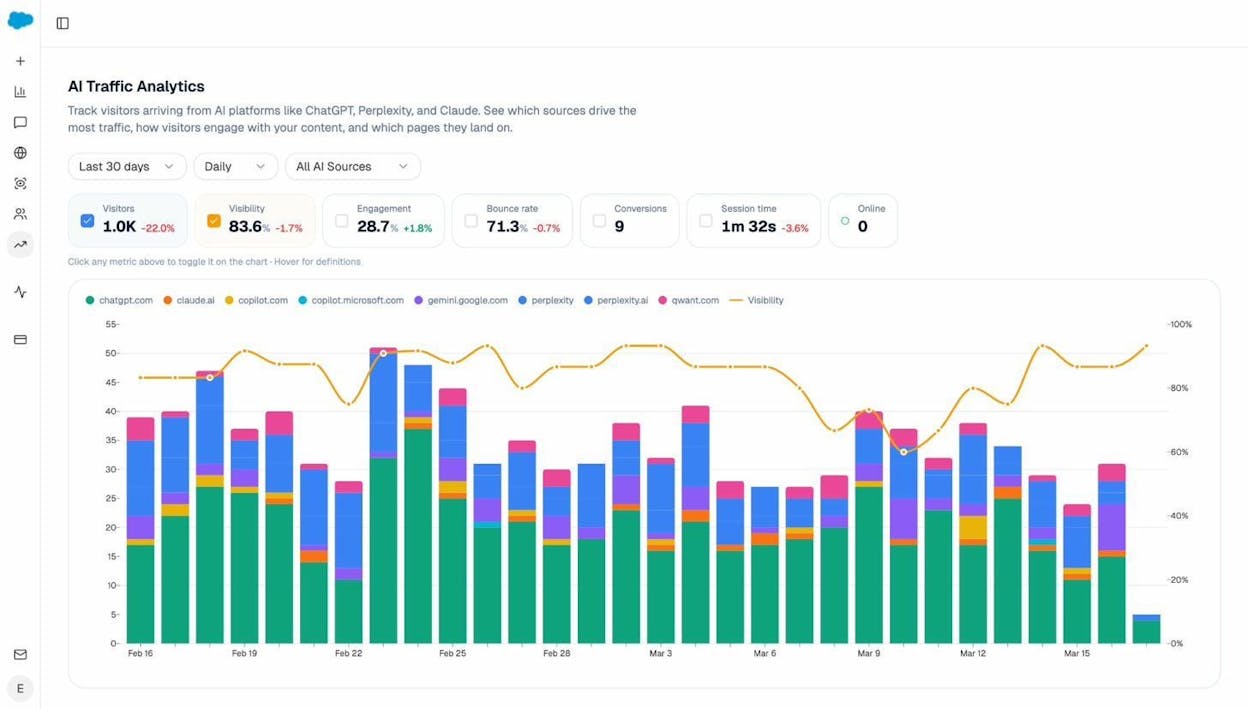
Analyze attributes every session from answer engines to its specific source—Perplexity, Claude, ChatGPT, Copilot, or Gemini. You see session volume by engine, trends over six months, and what percentage of your total traffic comes from AI referrers. When ChatGPT sends 248 sessions but Perplexity sends 142, you know exactly where to focus optimization work.

PPC intelligence software

Know which pages convert AI traffic and optimize where revenue moves

competitive ad data tools

Most tools stop at "your brand was mentioned." Analyze shows you the complete journey from AI answer to landing page to conversion, so you optimize pages that drive revenue instead of chasing visibility that goes nowhere.

The platform shows which landing pages receive AI referrals, which engine sent each session, and what conversion events those visits trigger. 

For instance, when your product comparison page gets 50 sessions from Perplexity and converts 12% to trials, while an old blog post gets 40 sessions from ChatGPT with zero conversions, you know exactly what to strengthen and what to deprioritize.

Track the exact prompts buyers use and see where you're winning or losing

programmatic ad intelligence

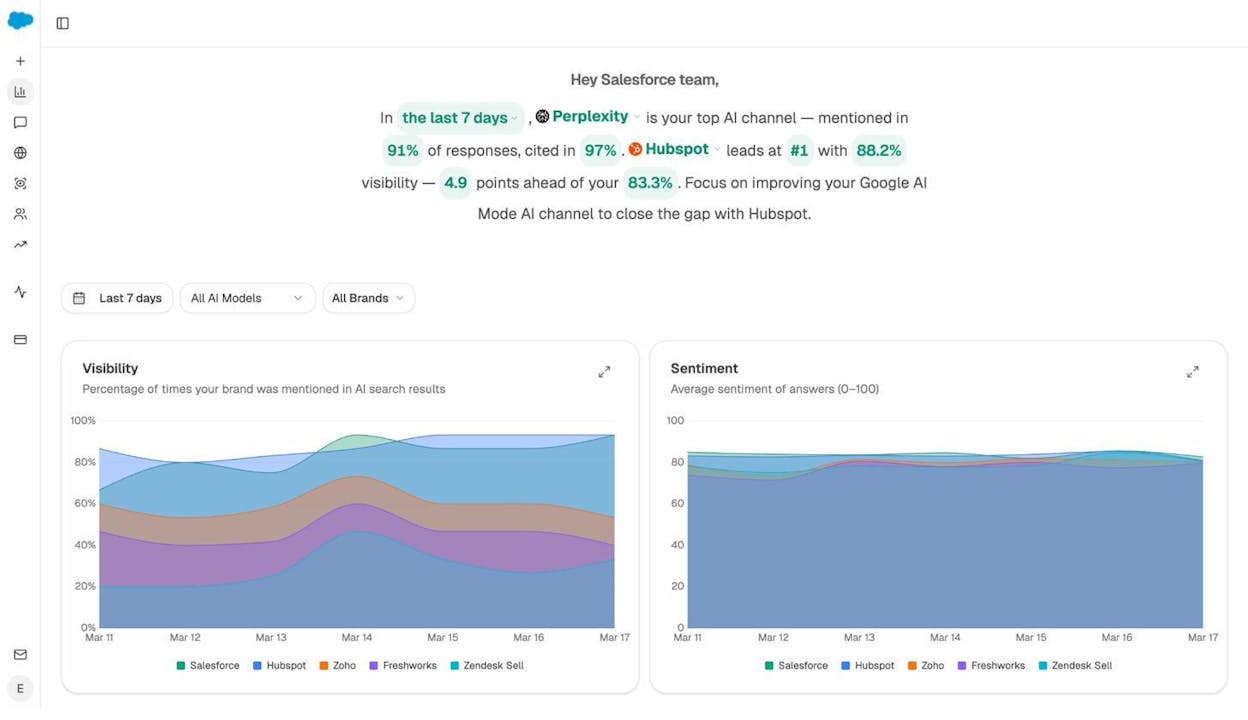
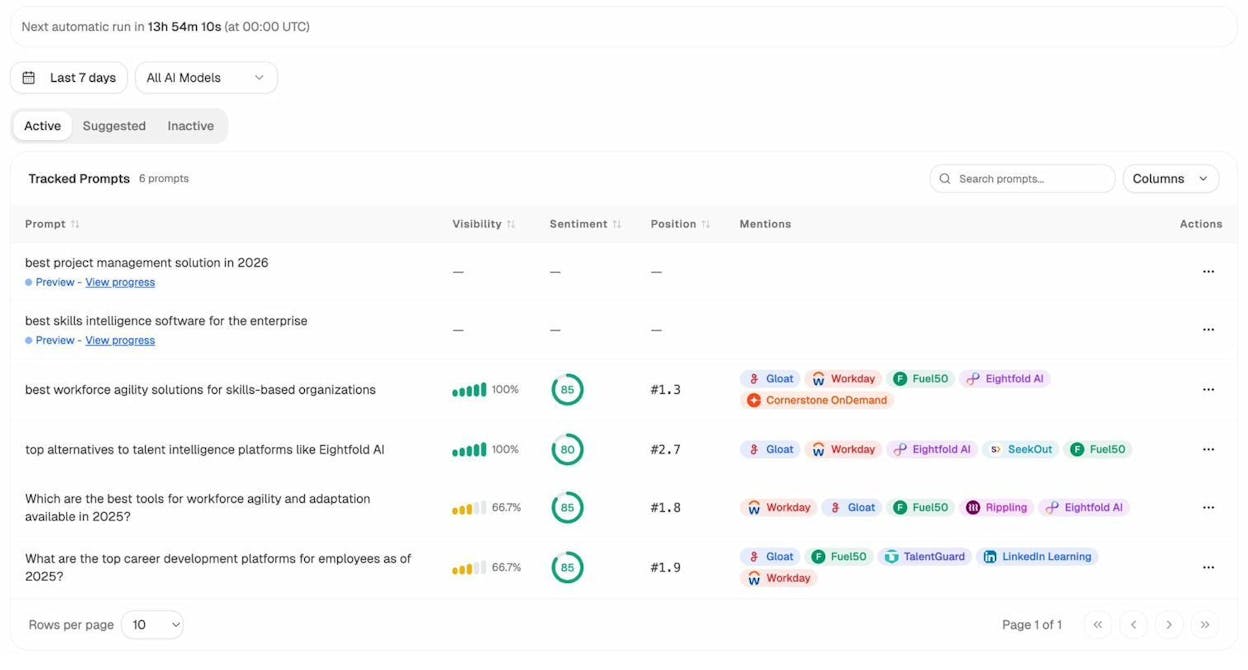
Analyze monitors specific prompts across all major LLMs—"best Salesforce alternatives for medium businesses," "top customer service software for mid-sized companies in 2025," "marketing automation tools for e-commerce sites."

ad market research platforms

For each prompt, you see your brand's visibility percentage, position relative to competitors, and sentiment score.

You can also see which competitors appear alongside you, how your position changes daily, and whether sentiment is improving or declining.

keyword and ad spying tools

Don’t know which prompts to track? No worries. Analyze has a prompt suggestion feature that suggests the actual bottom of the funnel prompts you should keep your eyes on.

Audit which sources models trust and build authority where it matters

cross-platform ad analytics

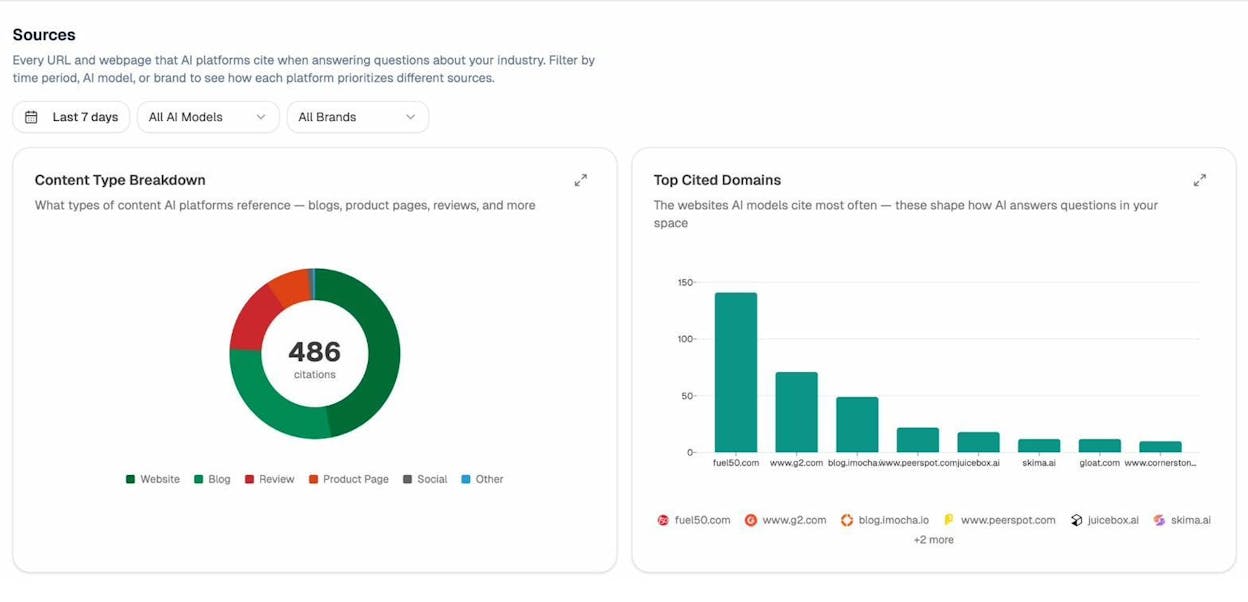
Analyze reveals exactly which domains and URLs models cite when answering questions in your category. 

You can see, for instance, that Creatio gets mentioned because Salesforce.com's comparison pages rank consistently, or that IssueTrack appears because three specific review sites cite them repeatedly.

ad campaign intelligence

Analyze shows usage count per source, which models reference each domain, and when those citations first appeared.

ad strategy optimization tools

Citation visibility matters because it shows you where to invest. Instead of generic link building, you target the specific sources that shape AI answers in your category. You strengthen relationships with domains that models already trust, create content that fills gaps in their coverage, and track whether your citation frequency increases after each initiative.

Prioritize opportunities and close competitive gaps

competitor creative research

Analyze surfaces opportunities based on omissions, weak coverage, rising prompts, and unfavorable sentiment, then pairs each with recommended actions that reflect likely impact and required effort. 

For instance, you can run a weekly triage that selects a small set of moves—reinforce a page that nearly wins an important prompt, publish a focused explainer to address a negative narrative, or execute a targeted citation plan for a stubborn head term.

Tie AI visibility toqualified demand.

Measure the prompts and engines that drive real traffic, conversions, and revenue.

Covers ChatGPT, Perplexity, Claude, Copilot, Gemini

Similar Content You Might Want To Read

Discover more insights and perspectives on related topics

© 2025 Analyze. All rights reserved.