Analyze AI - AI Search Analytics Platform

9 Keyword Research Tools to Try (Free & Paid)

Written by

Ernest Bogore

Ernest Bogore

CEO

Reviewed by

Ibrahim Litinine

Ibrahim Litinine

Content Marketing Expert

9 Keyword Research Tools to Try (Free & Paid)

Keyword research fails when you choose ideas based on volume instead of viability. You’ve seen it happen: a keyword looks promising on paper, yet the SERP is unwinnable, the search intent is wrong, or the traffic never materializes. The real challenge isn’t finding keywords — it’s choosing the ones that actually move your business forward.

  • A keyword shows “good volume,” but every ranking page has authority far above yours.

  • A long-tail keyword looks easy, until you check the SERP and see that the clicks go to snippets, videos, or product boxes.

  • A tool surfaces hundreds of suggestions, but none help you pick the topics that fit your resources, competition level, or growth goals.

We reviewed the most useful keyword research tools through a practical lens by looking at how well they help you judge difficulty, spot real opportunities, cluster topics, validate demand, and rule out keywords that waste time. And if you want to go further and prepare for an AI-first search world, we added a small bonus at the end to help you track your visibility across major LLMs.

Table of Contents

TL;DR

Tool

What it is

Best for

Key strengths

Why it matters for keyword research

Moz Keyword Explorer

Beginner-friendly keyword planner with KD, CTR & priority scoring

New SEOs, small businesses, simple workflows

Clear metrics, priority score, long-tail ideas, clean SERP analysis

Great when you want simple, quick decisions about which keywords are realistic, without needing advanced data or heavy tools.

Semrush

Full-suite SEO platform with deep keyword & competitive insights

Agencies, teams, high-volume publishers

Huge database, intent labels, SERP-feature data, keyword clustering, strong competitive research

Ideal when keyword research must drive full SEO strategy — from content planning and link building to reporting and multi-country campaigns.

Ubersuggest

Budget all-in-one tool for fast keyword and SEO basics

Beginners, solo bloggers, low-budget SEO

Simple metrics, fast idea generation, content ideas, low cost

Useful as an entry-level tool to build keyword lists and learn basics before upgrading to deeper, more precise platforms.

Ahrefs

Premium SEO suite with deep keyword, backlink & competitor analysis

Competitive niches, content teams, multi-site managers

Traffic potential, click data, content gap analysis, strong link index

Best when your research relies on serious competitive insight and link data, and when picking the right battles in tough SERPs matters.

Google Keyword Planner

Free keyword-volume data directly from Google Ads

Budget users, early planning, local SEO

Free volume ranges, URL-based ideas, geo filters, fast exports

A key baseline source of demand data; perfect for validating whether topics are searched at all, especially in specific locations.

Soovle

Free multi-platform autocomplete idea generator

Cross-platform creators, early brainstorming

Google/Bing/YouTube/Amazon/Wikipedia suggestions, instant ideas, zero cost

Great for idea generation across channels (blog, YouTube, Amazon) and spotting long-tail topics traditional keyword tools may miss.

WordStream Free Keyword Tool

Free suggestion + PPC metric tool (CPC, competition, volume est.)

Quick ideas, PPC-aware content planning

Fast, free, industry/country filters, Opportunity Score

Helpful for prioritizing commercially valuable keywords, especially when you care about leads, ad costs, or monetization potential.

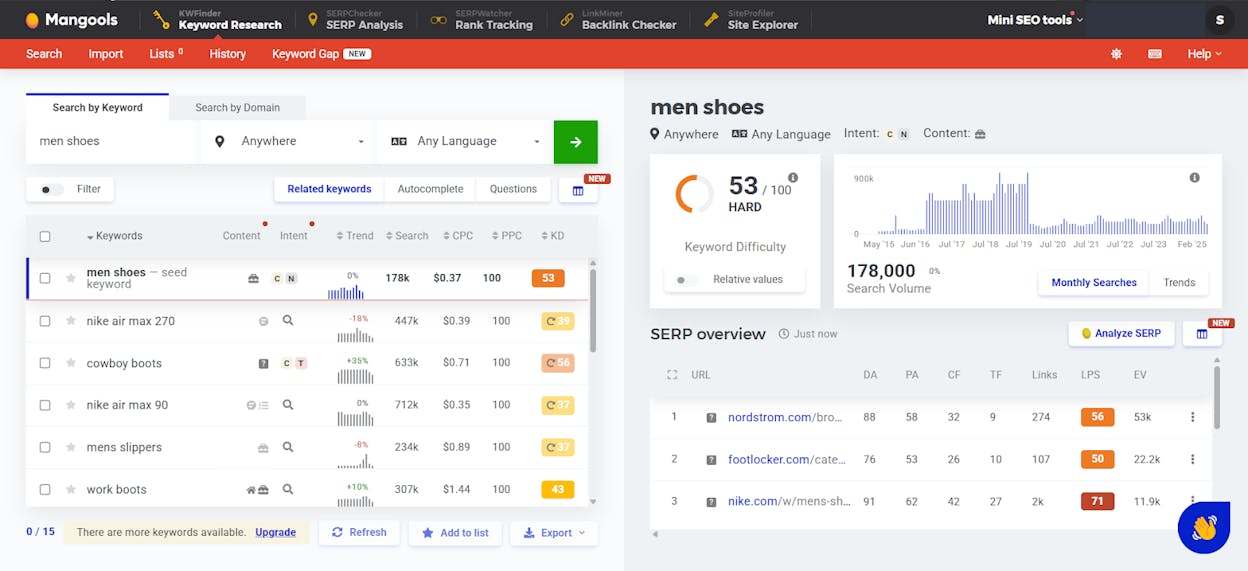
KWFinder (Mangools)

Affordable keyword tool with simple UI & strong local filters

Local SEO, niche sites, small teams

Easy interface, long-tail discovery, 50k+ geo filters, good basics

Strong choice when your keyword research needs local focus and clarity more than huge datasets or complex enterprise features.

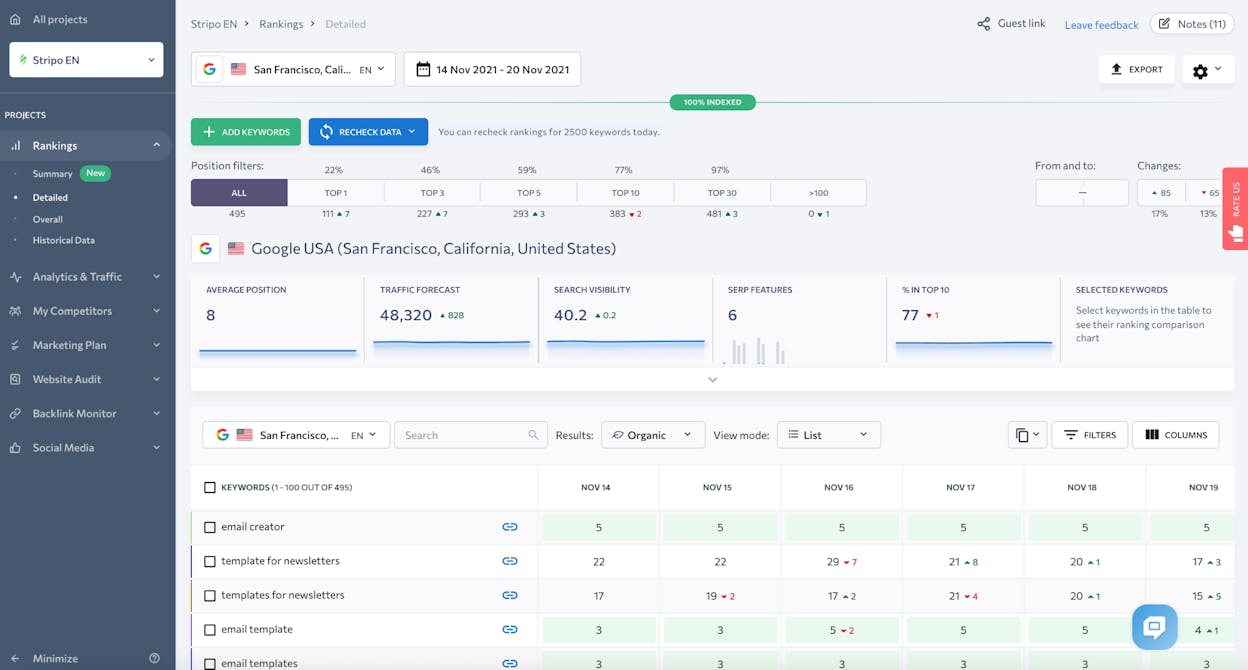
SE Ranking

Budget-friendly full SEO toolkit (research, audit, tracking)

Small agencies, growing sites, niche markets

Keyword metrics, daily rank tracking, audits, backlink monitoring

Useful when you want keyword research tied directly to rankings, tech health, and backlinks in one affordable platform.

AnswerThePublic

Question-focused idea generator based on autocomplete data

Content ideation and search-intent discovery

Real user questions, visual maps, long-tail and conversational queries, freemium access

Powerful for turning keyword research into question-driven, intent-aligned content ideas like FAQs, guides, and tutorials.

Analyze AI

AI-engine visibility + traffic + conversion attribution

Teams focused on AI search (ChatGPT, Perplexity, Claude, etc.)

Tracks AI-driven sessions, conversions, revenue; prompt-level visibility; citation audits; opportunity governance

Critical when you want to connect AI search presence to real traffic, conversions, and revenue, going beyond classic keyword-based SEO.

Moz Keyword Explorer: best keyword research tool for straightforward, beginner-to-intermediate SEO

keyword research software

Key Moz Keyword Explorer standout features

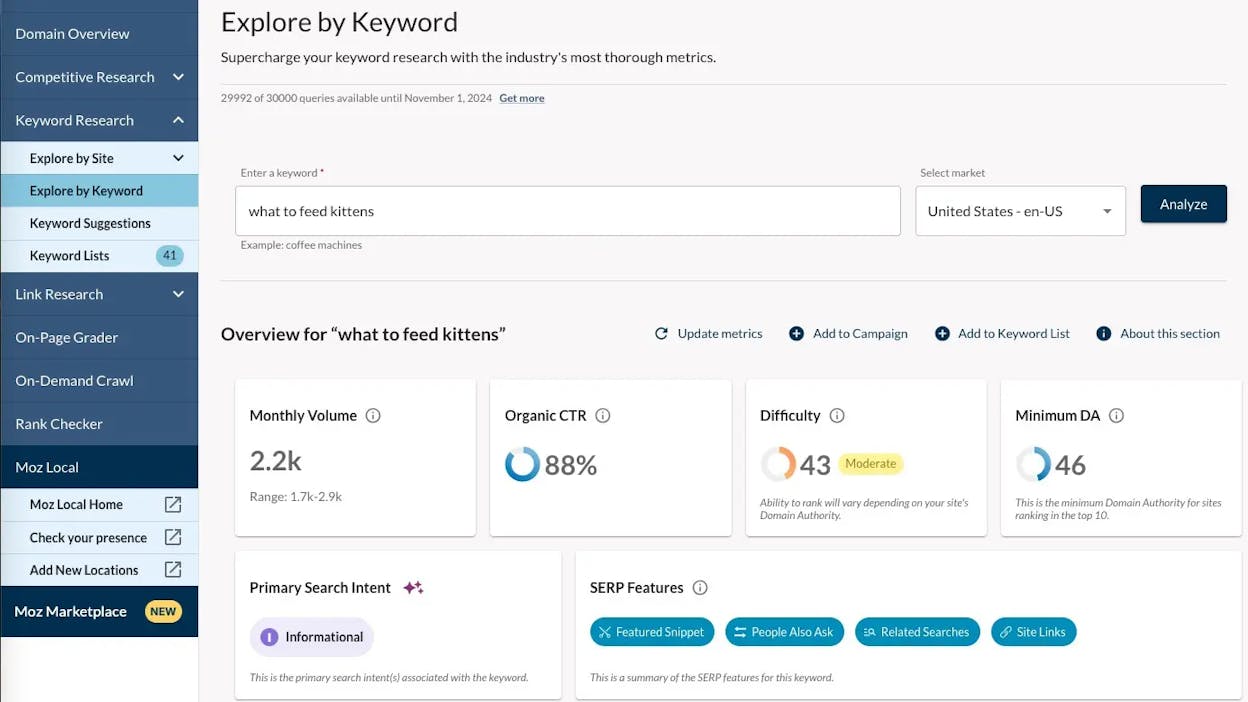
  • Easy-to-use Keyword Explorer showing search volume, keyword difficulty (KD), organic CTR, and a combined “priority” score that helps you spot strong opportunities quickly

  • Related keyword suggestions and long-tail ideas grouped into questions, closely related topics, and semantic variations

  • Built-in SERP analysis that reveals current ranking pages, plus domain and page authority metrics to judge competition strength

  • Keyword list management that lets you save ideas, filter by metrics, and export to CSV for planning

  • Part of a broader SEO suite including backlink analysis, rank tracking, site audits, and domain authority tools

Moz Keyword Explorer is built for users who want keyword research to feel simple and fast. Instead of overwhelming you with dozens of metrics, it focuses on the data that truly matters when choosing keywords: volume, difficulty, click potential, and priority. The “priority” score becomes especially helpful when you’re working with many possible topics and need a quick way to filter for the best opportunities without spending hours comparing numbers.

The keyword suggestions engine also adds real value. It reveals long-tail variations, semantic keywords, and related questions that you might not think to search for. This helps you build content clusters, optimize for search intent, and find low-competition ideas that can rank faster. When you want to check if a keyword is realistic, Moz’s SERP analysis shows which pages rank today and how strong they are. Seeing domain authority and page authority makes it easy to tell if you’re facing heavy competition or if you have a chance to win the keyword with a well-written page.

free keyword research tools

Moz also helps teams that want to move from research to execution inside the same tool. The broader Moz suite connects keyword research to backlink checks, audits, and rank tracking. That workflow helps you fix problems, publish better content, and monitor results without switching tools. If you manage multiple small projects or publish content often, this saves time and keeps your strategy organized.

Moz Keyword Explorer does have limits. Its keyword database is smaller than top-tier tools, so for competitive niches, non-English keywords, or tiny long-tail queries, the tool may not surface enough ideas. This makes it less useful for advanced SEO campaigns or markets that require very deep data. Free and entry plans also limit the number of keyword searches per month, which can slow you down if you manage many sites or perform heavy research each week.

Some of Moz’s metrics, like search volume and CTR, are broad estimates rather than highly precise values. For advanced SEO or competitive niches, you may need to validate numbers in other tools to avoid chasing terms that look promising but lack real potential. Moz is best when you need clarity and simplicity — not when you need exhaustive data depth.

Moz Keyword Explorer for keyword research at a glance

Aspect

What Moz Keyword Explorer offers

Why it matters for keyword research

Keyword metrics

Search volume, keyword difficulty (KD), organic CTR, and “priority” score

Helps you quickly identify keywords with realistic ranking chances

Keyword discovery

Long-tail ideas, semantic variations, and question-based suggestions

Expands your keyword list and uncovers low-competition topics

SERP analysis

Shows top-ranking pages and their authority levels

Lets you judge competition before deciding to target a keyword

Workflow management

Lists, filters, and CSV export

Keeps research organized for content planning and editorial calendars

Broader SEO tools

Backlink analysis, audits, rank tracking, domain authority

Connects research to full SEO execution and performance monitoring

Best use cases for Moz Keyword Explorer

  • Bloggers, small businesses, and creators who need reliable keyword ideas without complex tools

  • Beginner or intermediate SEOs learning to evaluate keywords with clear, simple metrics

  • Small to mid-size sites publishing consistently but not at enterprise scale

  • Projects focused on long-tail, niche, or low-competition topics

Takeaway

Moz Keyword Explorer delivers simple, helpful keyword insights with clear metrics and an easy workflow. It is ideal when you want strong keyword planning without heavy complexity or cost. While it cannot match premium tools in depth, for many growing sites it offers exactly the right balance of clarity, speed, and usefulness.

Semrush: best keyword research tool for data-rich, all-in-one SEO strategy

paid keyword research tools

Key Semrush standout features

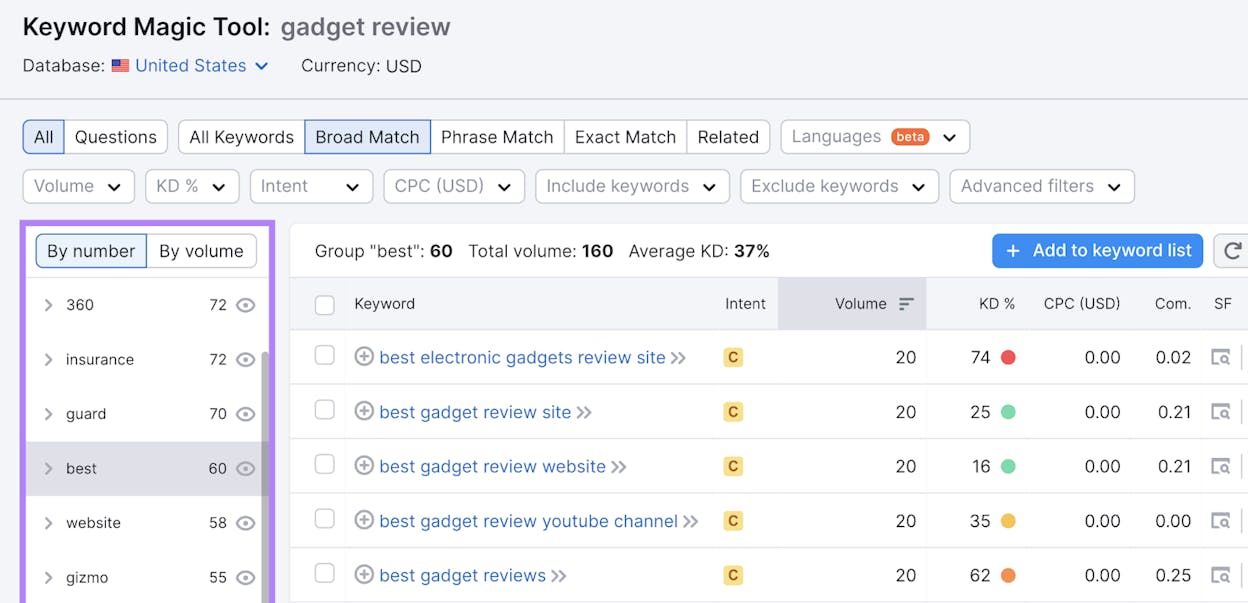
  • Massive Keyword Magic Tool database that turns one seed term into thousands of related keywords, groups, and long-tail ideas

  • Detailed metrics for each keyword, including search volume, difficulty, CPC, competition, and search intent labels

  • SERP-feature data that shows if a keyword has featured snippets, People Also Ask, video results, or local packs

  • Extra SEO tools beyond keyword research, including site audits, backlink analysis, rank tracking, and content optimization tools

  • Strong project and list management with saved keyword lists, CSV export, and a Keyword Strategy Builder for mapping pillar pages and clusters

Semrush stands out because it does not just give you keyword ideas; it gives you a complete picture around every idea. You see volume trends, ranking difficulty, and which pages already win that keyword, so you can decide if it fits your plan before you spend time on content. The Keyword Magic Tool also groups related keywords into clear clusters, which makes it easier to plan topics, subtopics, and whole content hubs in a structured way.

The platform also connects keyword research with the rest of your SEO work. You can move from a keyword list into content templates, technical audits, and backlink checks without jumping between different tools. This flow matters when you run real campaigns, because the keywords you pick must match content quality, technical health, and link strength, and Semrush helps you see those pieces side by side.

SEO keyword tools

From there, Semrush becomes helpful for teams that need to report results. You can track how chosen keywords move over time, see which pages gained or lost positions, and link those changes to updates you made. These reports help you learn which types of keywords work best for your site, and which ideas looked good in theory but did not perform in real searches. Over time, that feedback loop makes your keyword choices much smarter.

Because Semrush does so much, it also shows where it may not fit every user. The tool has many menus, charts, and settings, and new users can feel lost during the first days if they only wanted a simple list of ideas. The depth is a strength for advanced teams, but it can slow down beginners who just need quick answers.

The second trade-off is cost and plan limits. Entry plans cap the number of projects, tracked keywords, and reports, and extra users or add-ons push the price higher. This makes Semrush a big investment for solo bloggers or very small sites, and they may pay for features they barely use. For these teams, a lighter tool plus a free option like Google Keyword Planner may cover most needs without such a high monthly bill.

Finally, Semrush can be overkill if your keyword research is very simple. If you only publish a few posts per month on one topic, you may not need content templates, large backlink modules, and deep PPC data. In that case, the time spent learning the platform might not match the value you gain, especially if budget is tight and you do not plan to scale content or run campaigns in many channels.

Semrush for keyword research at a glance

Aspect

What Semrush offers

Why it matters for keyword research

Keyword depth

Huge Keyword Magic Tool with billions of keywords and grouped topics

You can find main keywords, long-tails, and related ideas in one place instead of stitching lists from many tools

Quality of metrics

Search volume, difficulty, CPC, competition, and intent for each keyword

You can judge how hard a keyword is, how valuable it might be, and what kind of content fits it

SERP understanding

Data on snippets, People Also Ask, video, local packs, and more

You can avoid keywords where the SERP is crowded or unwinnable and target ones where a blog or landing page can still win clicks

Competitive insight

Domain overview, keyword gap reports, and top ranking pages

You can see what competitors rank for, where they get traffic, and which gaps you can fill with smarter keyword picks

Workflow and scale

Projects, saved lists, strategy builder, rank tracking, and reports

You can turn raw keyword lists into real plans, track results over time, and manage many sites or clients from one platform

Best use cases for Semrush

  • Building full keyword and content strategies for agencies or in-house teams that publish often

  • Running competitive research to find keyword gaps and opportunities against strong rivals

  • Managing multi-language or multi-country SEO where you need solid data and SERP detail

  • Reporting keyword and ranking performance to clients, managers, or stakeholders who want clear proof of progress

Takeaway

Semrush is a powerful choice when you want keyword research that plugs into your full SEO and content workflow, not just a basic list of ideas. It makes the most sense for serious teams and projects where depth of data and long-term strategy matter more than keeping costs as low as possible.

Ubersuggest: best keyword research tool for budget-friendly SEO and quick keyword ideas

best keyword tools

Key Ubersuggest standout features

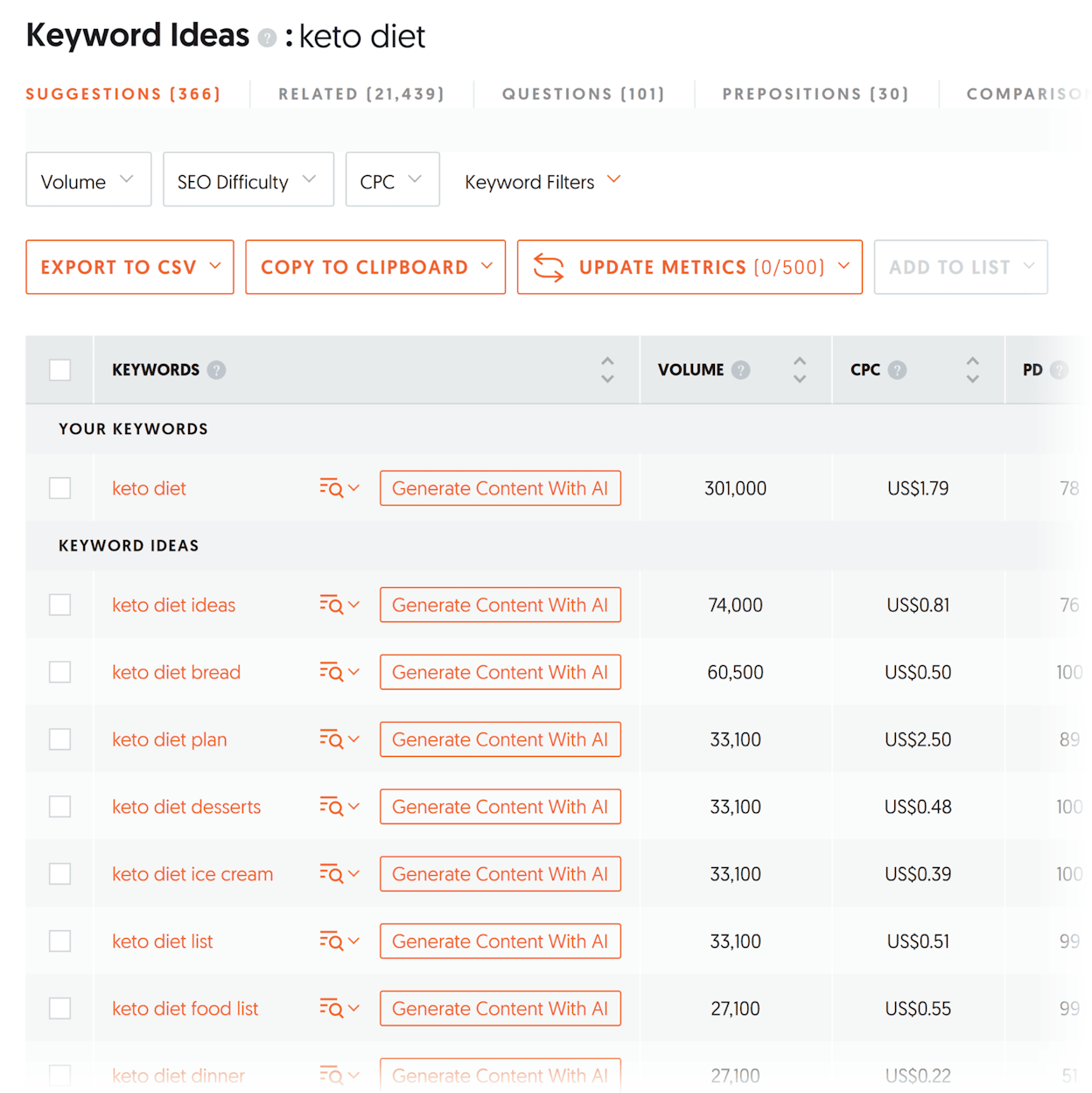
  • Keyword Ideas tool that turns seed keywords or competitor URLs into long-tail suggestions, with metrics like search volume, CPC, and SEO difficulty

  • SERP overview and traffic estimates that show how competitive a keyword is and how much traffic top pages get

  • Backlink analysis and basic site-audit tools that give quick insight into domain strength and technical issues

  • Content ideas and “top pages” insights that reveal what topics perform well right now

  • Freemium pricing with low-cost upgrades, making it accessible for beginners and small sites

Ubersuggest focuses on speed and simplicity, and this is what makes it appealing to new SEOs and small websites. When you type in a keyword or even a competitor’s URL, the tool returns a wide list of long-tail ideas with basic metrics you can understand easily. Search volume, SEO difficulty, and CPC ranges appear in one clear view, allowing you to scan for opportunities without digging through complex dashboards. This helps creators who want to start publishing fast and need keyword ideas that are simple to evaluate.

Its SERP overview adds a layer of reality to the process. You see the top-ranking pages and the traffic they get, which helps you decide whether you should chase the keyword or move to another option. The backlink and site audit features give extra context, showing you if your site might struggle against stronger competitors. This all helps you make smarter decisions without needing advanced SEO knowledge.

keyword analysis tools

Ubersuggest also helps with ideation. The “content ideas” and “top pages” sections highlight themes that already perform well across the web. Instead of guessing what readers want, you can start with what is already working and adapt it to your niche. This is especially useful for solo bloggers or creators who need weekly content but do not have time for deep keyword analysis.

The trade-offs reflect the tool’s budget nature. Its data is lighter and less detailed than what premium SEO tools offer. In competitive niches, the keyword difficulty and backlink numbers may not be accurate enough for serious strategy. Limits on daily searches and reports in the free plan can affect users who do many keyword checks. For advanced users, the tool can feel too simple or lacking depth.

Because Ubersuggest tries to offer many different features at a cheaper price, some reports are basic. Backlink analysis may miss important signals, and technical audits may not catch deeper issues. For large websites or growth-focused SEO teams, this might not be enough. Ubersuggest works best at the early stages or in low-competition markets where deep precision is not critical.

Ubersuggest for keyword research at a glance

Aspect

What Ubersuggest offers

Why it matters for keyword research

Keyword ideas & metrics

Search volume, CPC, SEO difficulty, long-tail suggestions

Helps you build keyword lists fast and filter ideas by real opportunity

Keyword discovery & content ideas

Long-tails, related terms, content suggestions, top-pages data

Reveals topics that match real interest and low-competition angles

SERP & competition overview

Traffic estimates, SERP layout info, competitive pages

Let you see if a keyword is realistic to target before writing

Workflow flexibility & affordability

Free plan + budget paid tiers, simple reports

Makes keyword research possible even for small budgets or solo creators

Basic SEO & backlink context

Backlink overview, site audit tools, domain analysis

Offers a surface-level look at site strength before choosing hard keywords

Best use cases for Ubersuggest

  • Solo bloggers or small businesses needing quick keyword ideas with low learning curve

  • Beginners or early-stage websites learning SEO without complex tools

  • Content creators targeting niche or long-tail topics with lower competition

  • Sites focusing on simple SEO workflows or local markets where extreme data depth isn’t required

Takeaway

Ubersuggest is a simple, affordable tool that delivers fast keyword ideas and basic SEO support. It works best for small sites and beginner SEOs who want easy wins. As your site grows or your needs become more advanced, you may outgrow its limits — but for early stages, it offers solid value without heavy cost or complexity.

Ahrefs: best keyword research tool for deep competitor insights and content gap discovery

search intent analysis

Key Ahrefs standout features

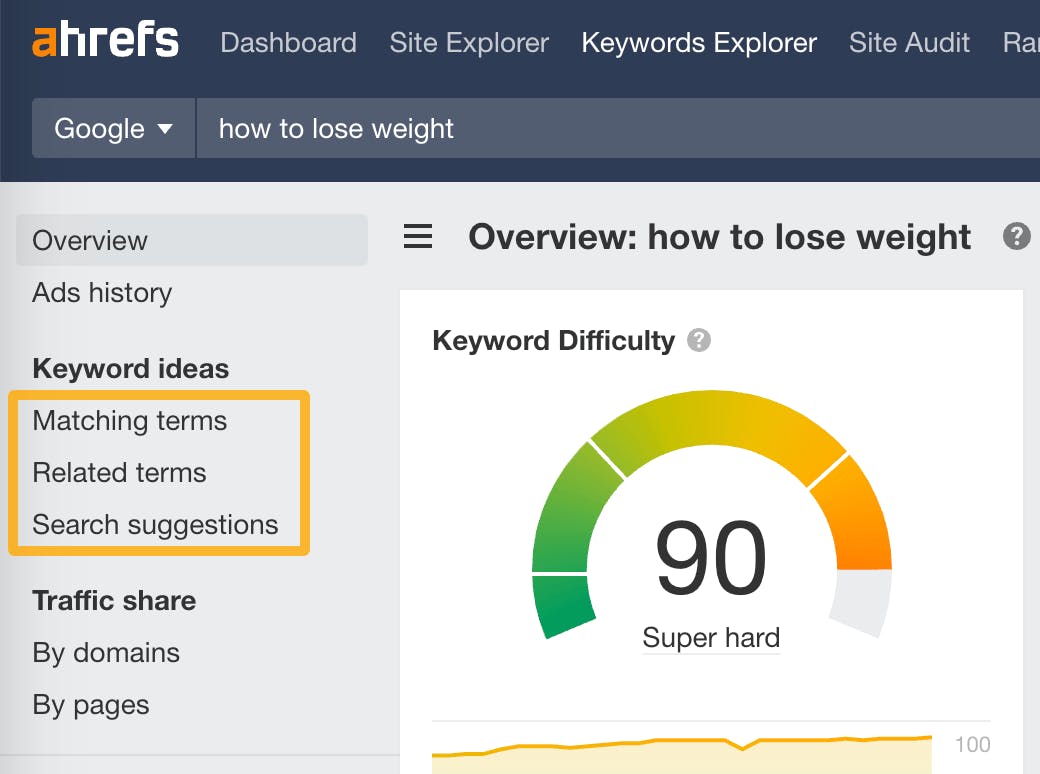
  • Keyword Explorer with large keyword databases, showing search volume, difficulty, traffic potential, and click-through estimates

  • Site Explorer that reveals any site’s backlinks, organic pages, paid keywords, and overall SEO health

  • Content Explorer and Content Gap tools that surface topics and keywords your competitors rank for but you do not

  • Rank Tracker, Site Audit, and technical SEO modules for long-term monitoring and fixing weak spots

  • Full-suite SEO workflow that covers research, validation, optimization, and performance tracking in one place

Ahrefs stands out because it shows the whole picture behind a keyword, not just a list of ideas. When you enter a seed keyword, you see volume, difficulty, estimated traffic, and which pages already win the keyword. Ahrefs also tells you how many clicks those rankings usually get, which helps you avoid terms that look popular but deliver almost no visits. That level of detail gives you a clearer idea of which keywords match your site’s real chances to rank and grow.

Where Ahrefs becomes even more powerful is in its competitor tools. Site Explorer shows you what pages bring a competitor traffic, which backlinks support those pages, and what keywords drive their results. Content Gap goes deeper by showing you the exact topics they rank for that you don’t. This turns competitive research into a clear content plan, letting you target gaps, build clusters, and capture traffic you are currently missing. The mix of keyword metrics plus competitor insight gives you a strong foundation for smart, long-term SEO planning.

Ahrefs supports growth by bundling technical tools as well. Rank Tracker helps you follow how target keywords move over time, while the Site Audit tool scans your site for technical problems that might limit rankings. This makes Ahrefs helpful not only at the “planning” stage but also at the “improve and maintain” stage. When you produce content often or manage multiple projects, this full workflow saves time because you don’t need separate platforms to check links, fix issues, or track outcomes.

keyword discovery tools

This depth also brings trade-offs. Because Ahrefs contains many advanced tools, beginners may feel overwhelmed at first. Keyword difficulty, backlink quality, SERP features, and content gap logic all require some understanding of SEO to interpret. Without that skill, the data may look confusing, and even strong keywords may be misjudged. Teams with limited SEO experience may need time before they unlock the platform’s full value.

Another trade-off is cost. Ahrefs sits on the higher end of SEO pricing, even for entry plans. This makes it less ideal for small sites or blogs that publish only a few posts per year. When budgets are tight, the investment may not match the scale of content being produced. Some features may also feel unnecessary if you only need simple keyword ideas, since lighter or free tools can handle basic research without the same cost.

Finally, like most SEO platforms, Ahrefs tends to offer stronger data in major markets and languages. While it still works for global research, some users report weaker coverage for highly niche or non-English keywords, especially in regions with very low search volume. If your market is small or local, you may need to double-check certain metrics before making decisions.

Ahrefs for keyword research at a glance

Aspect

What Ahrefs offers

Why it matters for keyword research

Keyword metrics

Search volume, difficulty, traffic potential, CTR, and parent-topic insights

Helps you choose keywords with real ranking potential, not just high volume

Competitor visibility

Site Explorer + Content Gap to study rival pages and keywords

Shows exactly where competitors win, so you can target their gaps

SERP understanding

Keyword Explorer reveals SERP features, top ranking pages, and traffic share

Lets you avoid unwinnable SERPs and pick keywords with space for new content

Backlink analysis

Large link index + link quality insights

Helps you understand which keywords need backlinks to rank and how strong competitors are

SEO workflow

Site Audit, Rank Tracker, content tools

Keeps your site healthy and tracks success as your content grows

Best use cases for Ahrefs

  • You want to find content gaps and build topic clusters based on what competitors rank for

  • You manage a content-heavy website or multiple sites and need reliable keyword + backlink + traffic data

  • You work in a competitive niche where detailed SERP and link information makes a real difference

  • You need a full SEO workflow — research, optimization, tracking, backlinks, and audits — in one place

Takeaway

Ahrefs is one of the strongest tools for keyword research when you want deep competitor insight and accurate SEO data. It delivers power and clarity for serious SEO teams, but its cost and complexity make it best for users who plan to publish often and compete at a meaningful scale.

Google Keyword Planner: best keyword research tool for free, quick keyword volume data

long tail keyword tools

Key Google Keyword Planner standout features

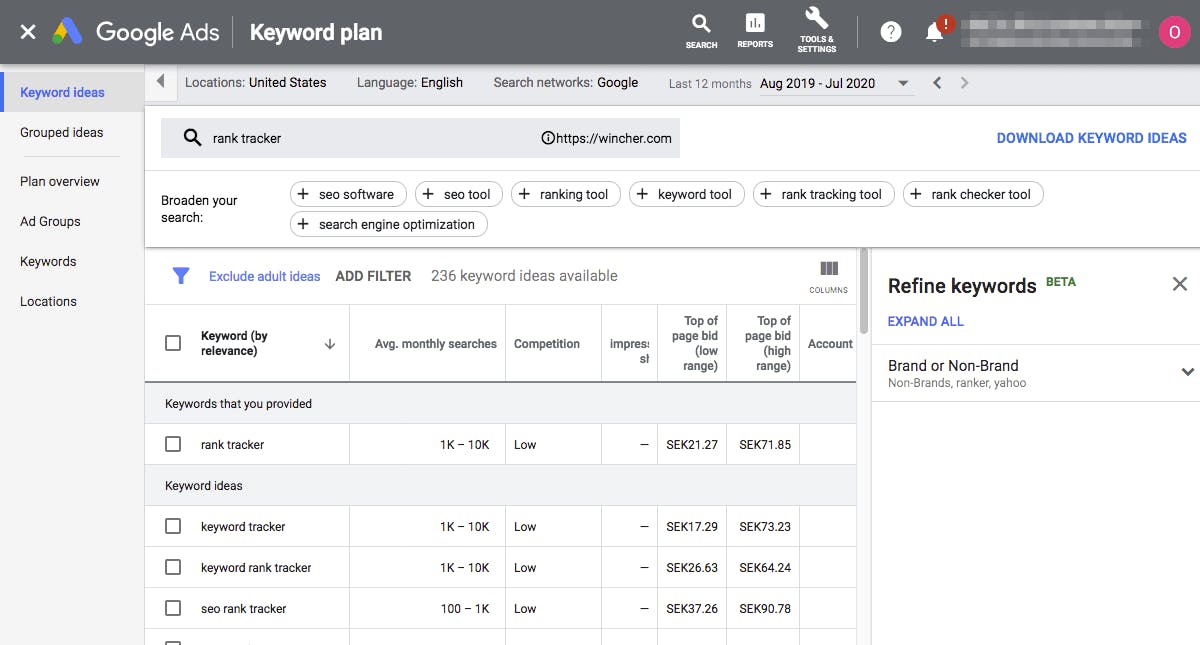
  • Free access (with a Google Ads account) to keyword data such as search volume, competition level (for ads), and suggested CPC ranges

  • Ability to discover new keywords by entering seed terms or scanning a website URL for long-tail ideas

  • Forecasting and trend data that show how keyword volume changes over time

  • Localization and filtering tools to segment data by country, language, and time period

  • Easy CSV export so you can move keyword lists into your planning workflow

Google Keyword Planner stands out because it gives you real search-volume data directly from Google at no cost. This makes it an ideal starting point when you want a quick look at how many people search for something and how competitive it might be from a paid-ads point of view. If you are launching a new site, working with a tight budget, or building your first keyword list, this tool gives you dependable numbers without needing to pay for premium software.

The tool’s keyword discovery feature is simple but powerful. You can type a seed term or paste a URL, and Google will show related keywords and long-tail ideas in seconds. This helps you expand your content ideas fast, especially if you publish in multiple languages or niche markets. The trend and seasonality data help you plan ahead and avoid publishing content at the wrong time. If you work on local SEO or regional content, Google’s location filters make it easy to get country-specific or city-level keyword estimates.

The tool also fits well into simple workflows. Since it is fast and easy to export, you can pull keyword lists and bring them into any content calendar or SEO tool you already use. For many small websites, this becomes the foundation of the entire keyword research process.

keyword difficulty tools, GSC

But Google Keyword Planner also has clear limits. Because it is built for Google Ads, its “competition” and “bid” metrics reflect paid advertising, not organic SEO difficulty. This means a keyword with low ad competition may still be hard to rank for organically, which can mislead beginners who rely on Planner alone.

The tool also lacks classic SEO features like backlink data, SERP-feature analysis, authority scoring, or competitive insights. If you want to understand who ranks today, how strong those pages are, or which keywords have featured snippets or videos, you must use other tools. It shows keyword demand, but not the SEO landscape around each keyword.

Another big limitation is that Google often gives ranges instead of precise search-volume numbers, especially for accounts without active ad spend. This reduces accuracy when deciding between similar keywords. Low-volume or niche keywords also may not appear at all, which can hide good opportunities in smaller markets or languages.

Google Keyword Planner for keyword research at a glance

Aspect

What Google Keyword Planner offers

Why it matters for keyword research

Keyword data & metrics

Monthly search volume ranges, ad competition levels, CPC bids, trend history

Helps you gauge search demand and cost signals without paying for a tool

Keyword discovery & breadth

Related keywords and long-tail ideas from seed terms or URLs

Helps you build broad topic lists and uncover new angles quickly

Localization & filtering

Filters by country, language, and time period

Essential for regional SEO, niche markets, and multilingual content

Budget & accessibility

Fully free with a Google Ads account

Makes keyword research possible for small budgets or new websites

Simplicity & speed

Fast retrieval and clean interface

Ideal for quick checks, early-stage research, and lightweight workflows

Best use cases for Google Keyword Planner

  • Beginner bloggers, small businesses, or creators needing free keyword volume data

  • Early-stage keyword research when planning out a new content strategy

  • Local or regional sites wanting location-specific keyword ideas

  • Anyone validating or cross-checking ideas discovered in other tools

  • Projects with limited budgets where paid SEO tools are not an option

Takeaway

Google Keyword Planner is a strong free entry point for keyword research. It gives trustworthy search-volume data and fast keyword ideas, especially useful for early planning and local markets. But because it was built for PPC—not SEO—it lacks the organic difficulty, SERP insights, and competitor data you need for deeper analysis. For full SEO strategy, it works best when paired with more specialized tools.

Soovle: best keyword research tool for brainstorming broad, cross-platform keyword ideas

SEO research platforms

Key Soovle standout features

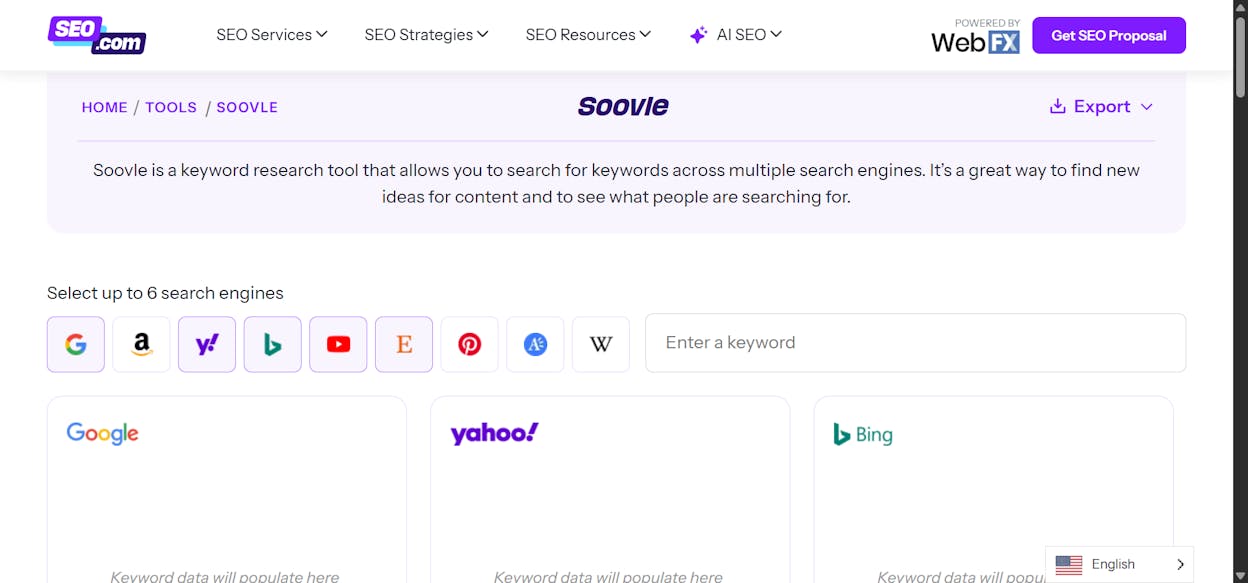
  • Aggregates autocomplete and suggestion data from multiple platforms — Google, Bing, YouTube, Amazon, Wikipedia, and more

  • Real-time keyword suggestions as you type, showing long-tail ideas instantly

  • Multi-engine coverage that captures searches from web search engines, e-commerce platforms, and video sites

  • Fully free — no signup, no subscriptions, and no usage limits

  • Quick export or saving of keyword suggestions for easy brainstorming and list building

Soovle stands out because it shows you how people search across different platforms at the same time. Instead of pulling ideas from one search engine, it gathers suggestions from Google, YouTube, Amazon, Bing, and others — giving you a wide snapshot of search behavior in seconds. This makes Soovle especially useful when you want to discover long-tail or niche topics that big SEO tools often miss. It is an excellent way to see content opportunities from multiple angles, whether you create blog posts, YouTube videos, or even product-related content.

The tool is also extremely fast and simple. There is no account to create, no learning curve, and no settings you need to configure. You type a seed keyword, and suggestions appear instantly from each platform. For early brainstorming or when you need raw, unfiltered keyword ideas, Soovle can give you dozens of directions in less than a minute. This makes it ideal for creators who publish in multiple formats or languages and want a quick way to explore fresh ideas.

Because Soovle is free and easy, it works well for small websites, early-stage blogs, and anyone working with limited resources. It can also complement premium tools: you use Soovle to generate the raw ideas, then validate them with Google Keyword Planner or other data-driven SEO platforms. This two-step workflow helps you avoid missing hidden opportunities that regular keyword databases overlook.

keyword planning tools

Of course, Soovle comes with clear limits. It does not provide metrics such as search volume, keyword difficulty, CPC, SERP layout, or competitive strength. You only get the autocomplete suggestions themselves. That means you cannot judge how valuable or realistic a keyword is without sending it to another tool afterward. For serious SEO planning — or highly competitive niches — Soovle is only the first step.

Another drawback is that because Soovle focuses only on suggestions, large keyword lists can become messy or hard to organize. Some users find saving and exporting ideas less smooth than in dedicated SEO platforms. While this is fine for brainstorming, it is not ideal for managing large batches of keywords or building structured keyword databases.

Soovle for keyword research at a glance

Aspect

What Soovle offers

Why it matters for keyword research

Keyword discovery & breadth

Autocomplete suggestions across many platforms

Helps reveal long-tail, niche, or cross-platform keywords big tools overlook

Free & accessible

No payment, no account required

Perfect for new bloggers, small budgets, or early brainstorming

Multi-platform coverage

Suggestions from Google, YouTube, Amazon, Bing, Wikipedia, etc.

Supports ideas for articles, videos, products, and cross-channel content

Speed & simplicity

Instant suggestions with zero setup

Ideal for rapid ideation or multilingual content exploration

Ideation & inspiration

Large lists of raw search queries

Gives you creative angles when you don’t yet have SEO data or traffic

Best use cases for Soovle

  • Solo bloggers, beginners, and small businesses needing quick, fresh keyword ideas

  • Early-phase keyword research when exploring many possible directions

  • Multi-platform content strategies (blog + YouTube + Amazon + social content)

  • Niche or long-tail content that mainstream tools often miss

  • Multilingual or regional SEO where you want to surface varied queries fast

Takeaway

Soovle is a fast, free, and flexible tool for brainstorming keyword ideas across multiple platforms. It’s perfect for discovering creative, cross-channel opportunities — but because it lacks metrics, it should be paired with data-driven tools to validate the keywords you want to target.

WordStream Free Keyword Tool: best keyword research tool for quick, budget-friendly keyword ideas & PPC data

competitive keyword research, wordstream

Key WordStream Free Keyword Tool standout features

  • Free tool that generates hundreds or thousands of keyword suggestions with search volume estimates, CPC, competition level, and an “Opportunity Score”

  • Keyword suggestions from seed keywords or competitor URLs, with filters for country and industry to refine relevance

  • Simple, fast interface that returns results quickly with no steep learning curve

  • Ability to group keywords and export full lists as CSV for easy planning and organization

  • Useful mix of PPC-focused data (CPC + competition) and basic SEO signals for early decision-making

WordStream’s Free Keyword Tool stands out because it gives you a wide list of keyword ideas with useful PPC-oriented metrics — without requiring a paid account or technical expertise. You can enter a seed keyword or competitor URL and instantly get a list of ideas that show estimated volume, CPC, and competition, making it easier to judge how commercially valuable the keyword might be. For new sites, freelancers, or small businesses, this makes it a practical starting point for keyword planning.

The tool’s filters for industry and country increase relevance, helping you narrow lists so they match your niche or target audience. Exporting the results is simple, making it easy to bring these keywords into your content workflows or use them in other tools. Because WordStream provides CPC and competition data, even users who don’t run ads can benefit — these metrics often signal user intent and keyword value, helping you target terms likely to convert rather than just generate traffic.

However, WordStream comes with limitations. Its metrics are primarily geared toward paid advertising, not organic SEO, which means it does not give you deeper insights such as backlink data, organic ranking difficulty, SERP-feature analysis, or competitor strength. If your goal is long-term organic SEO planning, you will still need another tool to evaluate whether you can realistically rank for the keywords WordStream suggests.

keyword volume checker

Another limitation is that while WordStream draws from a large keyword database, the free version can sometimes return broad or low-relevance results — especially for niche or non-English markets. Without filtering and validation, you risk spending effort on keywords that may not fit your audience or content goals. The tool’s “Opportunity Score,” while helpful, is also a simplified metric and should not be treated as a final ranking factor.

Overall, WordStream is fast, easy, and accessible — but it is only the first step in a full keyword research workflow. Treat its output as a starting list you validate with a more data-rich tool afterward.

WordStream Free Keyword Tool for keyword research at a glance

Aspect

What WordStream Free Keyword Tool offers

Why it matters for keyword research

Keyword ideas & metrics

Search volume estimates, CPC, competition level, Opportunity Score

Helps build initial keyword lists fast and judge commercial potential

Keyword discovery & breadth

Suggestions from seeds and competitor URLs + industry & country filters

Surfaces relevant long-tails and niche options without manual searching

Ease of use & speed

Fast interface, simple workflow, easy CSV exports

Great for quick brainstorming and small-site planning

Budget-friendly accessibility

Completely free and easy to use

Ideal for small businesses, new blogs, and budget-limited teams

PPC + SEO data mix

CPC + competition + volume = insight into demand & value

Useful when evaluating which keywords may convert or attract business-driven traffic

Best use cases for WordStream Free Keyword Tool

  • Solo bloggers, small businesses, or early-stage websites needing keyword ideas with no cost

  • Creators looking to build initial keyword lists before validating deeper

  • Local or niche projects where quick keyword generation is needed

  • Situations where you want to understand CPC/value signals without running ads

  • Early-stage content planning or PPC-aware keyword selection

Takeaway

WordStream Free Keyword Tool gives fast, free keyword ideas with helpful PPC-oriented metrics. It’s excellent for quick brainstorming and early planning, especially when budgets are tight. But it lacks deeper SEO insight, so use it as your starting point — then refine with a more advanced SEO tool for final keyword decisions.

KWFinder (by Mangools): best keyword research tool for affordable, easy-to-use SEO

SERP analysis tools

Key KWFinder standout features

  • Keyword research with clear metrics like search volume, keyword difficulty, and CPC

  • Long-tail and related-keyword suggestions to find easier topics

  • Local keyword support with filters for countries, cities, and regions

  • Simple, clean interface designed for beginners

  • Optional rank tracking, SERP analysis, and competitor-keyword lookup when using the Mangools bundle

KWFinder stands out because it gives you the core data you need without overwhelming you. The tool shows search volume, difficulty, and CPC in a simple layout, which makes it easy to judge which keywords you can rank for. For small or medium-sized websites, local businesses, or niche blogs, this clarity helps you make smart choices faster.

Its long-tail discovery and strong local-SEO filters also help uncover keywords that big tools sometimes miss. If you target local markets, specific cities, or less-competitive niches, KWFinder gives you precise results and helps you find realistic ranking opportunities. The interface is clean and simple, so even new SEOs can run meaningful research without a steep learning curve.

SEO keyword finder, Mangools

Because KWFinder is part of the Mangools suite, it integrates with tools like SERP analysis and rank tracking. This lets you move from keyword research to performance tracking without switching platforms. The bundle keeps things organized and supports you as your website grows.

But KWFinder does have trade-offs. Its keyword database is smaller than what enterprise-level tools offer. This means the tool may be less reliable for very competitive niches, global markets, or high-volume keywords. If your strategy depends on deep data across many countries, you may hit limits.

It also lacks some advanced SEO features like backlink analysis, technical SEO audits, and detailed competitor intelligence. For large teams or aggressive SEO strategies, this may feel too basic. And because the tool is bundled with the full Mangools suite, you pay for more than just keyword research, even if you don't need every feature.

KWFinder for keyword research at a glance

Aspect

What KWFinder offers

Why it matters for keyword research

Keyword data & metrics

Search volume, difficulty, CPC

Helps you judge if a keyword is realistic and worth the effort

Keyword discovery & breadth

Long-tail and related keywords

Surfaces niche, low-competition ideas

Localization support

Filters for 50,000+ locations

Strong for local SEO or country-specific targeting

Ease of use

Clean UI and simple workflow

Great for beginners and small teams

Optional SEO tools

SERP checks, rank tracking, competitor insights

Connects keyword choices with real performance data

Best use cases for KWFinder

  • Solo bloggers or small businesses that need simple, affordable keyword research

  • Creators targeting local or niche markets

  • Beginner to intermediate SEOs who want clarity without complexity

  • Websites with moderate publishing volume

  • Projects where budget matters but you still need accurate keyword basics

Takeaway

KWFinder gives you the core keyword data you need in a clean, easy-to-use package. It’s ideal for small to mid-size sites, niche topics, and local SEO. It may not match large platforms in depth, but for many use cases, it delivers the perfect mix of price, simplicity, and useful keyword insights.

SE Ranking: best keyword research tool for budget-friendly full SEO workflows

content keyword research

Key SE Ranking standout features

  • Keyword research with search volume, difficulty, CPC estimates, and related keyword suggestions

  • Rank tracking across search engines, locations, and devices

  • Website audit and on-page SEO checker to fix technical issues and improve content quality

  • Backlink monitoring and competitor analysis to see how your site compares

  • Affordable pricing with flexible plans for small to medium websites or agencies

SE Ranking stands out because it packs the major SEO tasks into one simple platform at a price most small teams can afford. It gives you keyword data you can act on — volume, difficulty, CPC — and lets you build lists that match your goals. Once your content is live, the rank tracker shows how your keywords move every day. This makes it easy to see what is working and what needs improvement.

The tool also includes a website audit and backlink monitor. The audit helps you fix technical problems before they hurt your rankings. The backlink section shows which links help or hurt your performance, and how your competitors build authority. For small teams or growing websites, having all this in one place saves time and avoids switching between many tools.

SE Ranking hits a helpful middle ground: it has more features than budget tools, but it costs far less than big enterprise SEO suites. This makes it ideal for sites with steady growth goals, niche targets, or regional markets.

PPC keyword tools, SE ranking

Still, there are limits to consider. SE Ranking’s keyword database is not as deep as the biggest SEO platforms. This means it may miss some ideas in very competitive niches or global markets. For users working in fast-changing industries, the data may not feel as strong or detailed.

The platform also has fewer advanced options. Deep backlink audits, large-scale content-gap research, and very granular SERP tracking are not as strong here as in top-tier tools. If you manage huge sites or need heavy competitor research, SE Ranking may not be enough. And because pricing depends on usage, you may hit keyword or project limits as your work grows, which increases costs.

SE Ranking for keyword research at a glance

Aspect

What SE Ranking offers

Why it matters for keyword research & SEO

Keyword data & metrics

Search volume, difficulty, CPC, suggestions

Helps you choose keywords based on real numbers, not guesses

Rank tracking

Daily ranking updates by engine, device, and location

Shows progress and alerts you when content rises or drops

Site audit & on-page tools

Technical audit and optimization checks

Keeps pages healthy, fast, and ready to rank

Backlink & competitor analysis

Monitor links and compare competitor profiles

Helps you improve authority and spot link-building gaps

Affordability

Lower cost than many full-suite SEO tools

Makes strong SEO possible for small teams and agencies

Best use cases for SE Ranking

  • Small to mid-size websites needing a full SEO toolkit at a low cost

  • Niche or regional sites where local and long-tail keywords matter

  • Content-heavy blogs needing keyword research plus daily rank tracking

  • Agencies or freelancers managing multiple small or medium clients

  • Teams wanting keyword research, optimization, tracking, and reporting in one tool

Takeaway

SE Ranking offers a budget-friendly way to run serious SEO. It brings keyword research, rank tracking, audits, and backlink monitoring together in a simple platform that fits small teams and growing sites. It may not match the depth of top-tier tools, but for many projects, it gives the right mix of features, price, and ease of use.

AnswerThePublic: best keyword research tool for uncovering real user questions and content ideas

organic keyword research

Key AnswerThePublic standout features

  • Generates question-style and long-tail keyword ideas based on a seed keyword

  • Uses autocomplete data from real search engines to show what people actually ask

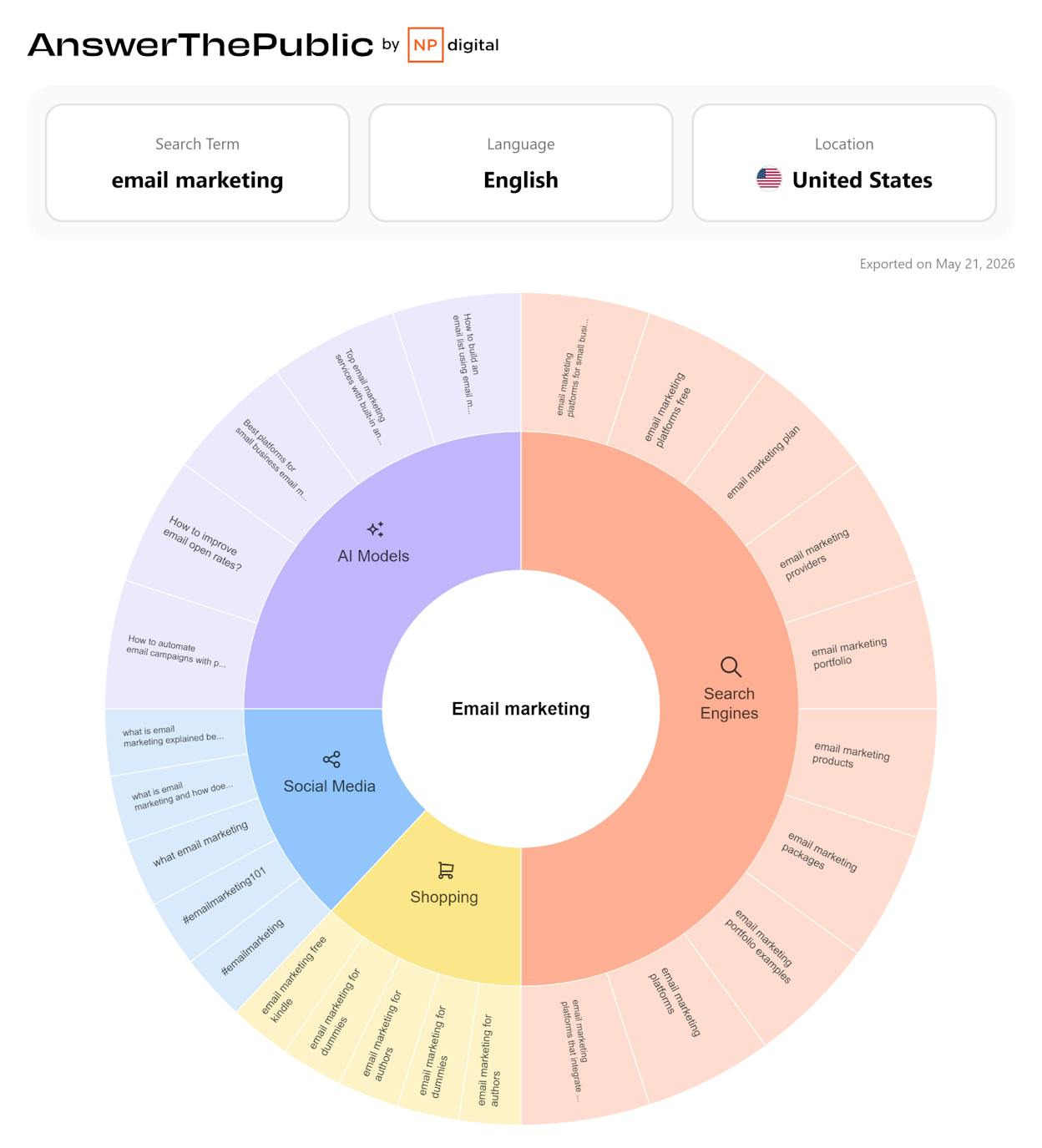
  • Visual displays (question wheels, clouds, lists) make brainstorming fast and easy

  • Freemium pricing makes it accessible for small sites or tight budgets

  • Helps identify content gaps, FAQ topics, and user-intent questions

AnswerThePublic stands out because it shows you what people really want to know. Instead of giving you broad keyword lists, it surfaces the exact questions users type into search engines. This helps you build content that matches real needs, not guesses. For bloggers, small businesses, or any website trying to answer user questions, this tool gives a clear view of search intent in a simple way.

Its autocomplete-based data is powerful for uncovering long-tail, conversational, and niche queries. These are often the keywords big research tools miss. The visual format also makes brainstorming enjoyable and fast — you can scroll through “who,” “what,” “why,” “how,” comparisons, and prepositions to find new angles for articles, FAQs, tutorials, or guides.

For early-stage websites or creators working on small budgets, AnswerThePublic delivers a lot of value without requiring expensive subscriptions. You can build an entire content calendar using only the questions the tool generates. It helps you think like your audience and create content that connects.

keyword opportunity analysis

But AnswerThePublic has important limits. It does not include core SEO metrics such as search volume, keyword difficulty, CPC, or competition levels. This means the tool gives you ideas — but not the data to judge if those ideas are worth targeting. To avoid wasting time, you’ll need to validate promising keywords using another tool that provides metrics.

Another challenge is that autocomplete data can be messy. Some results may be too broad, odd, outdated, or extremely low volume. Without filtering, it’s easy to choose topics with little or no actual search traffic. Careful selection is essential.

The free plan also includes usage limits, which may slow down your research if you need many ideas or manage several projects. For creators producing content at scale, these limits may feel restrictive.

AnswerThePublic for keyword research at a glance

Aspect

What AnswerThePublic offers

Why it matters for keyword research / content strategy

Question & user-intent keywords

Real questions and long-tail queries

Helps you create content that answers real user needs

Content ideas & brainstorming

Many related queries, comparisons, prepositions

Makes it easy to build blog topics, FAQs, or tutorial ideas

No cost barrier

Free or low-cost access

Great for beginners or small budgets

Search-intent focus

Shows what users want to know, not just top keywords

Helps create relevant, high-engagement content

Fast ideation

Visual layouts and large idea sets

Speeds up planning and uncovers content angles fast

Best use cases for AnswerThePublic

  • Bloggers, small businesses, and niche sites needing fresh content ideas

  • Creators building FAQ sections, how-to posts, guides, or informational articles

  • Early-stage websites without access to expensive SEO tools

  • Multi-platform content strategies (blog, YouTube, social, etc.)

  • Writers and marketers who want to understand search intent quickly

Takeaway

AnswerThePublic is one of the best tools for discovering the real questions people ask. It’s perfect for content ideation and understanding search intent. Just remember: it gives ideas, not metrics — so always validate your chosen keywords with a data-driven tool before creating content.

Analyze AI: Best AI-search prompt research and tracking tool (beyond keywords)

keyword trends tools

Analyze AI is not a keyword research tool. Keyword research platforms help you discover search terms, estimate volume, and judge competition inside traditional SERPs. Analyze AI covers the layer keyword tools cannot reach: how your category is discovered inside AI answer engines, which prompts buyers actually use, and what those answers produce in real traffic, conversions, and revenue.

That matters because “keywords” and “AI prompts” do not behave the same way. A term can have clear search demand in Google, yet the buying journey may now start with a prompt inside ChatGPT or Perplexity, where the output is a ranked set of recommendations, citations, and comparisons. If you want to win that new discovery layer, you need prompt-level intelligence, not just keyword lists.

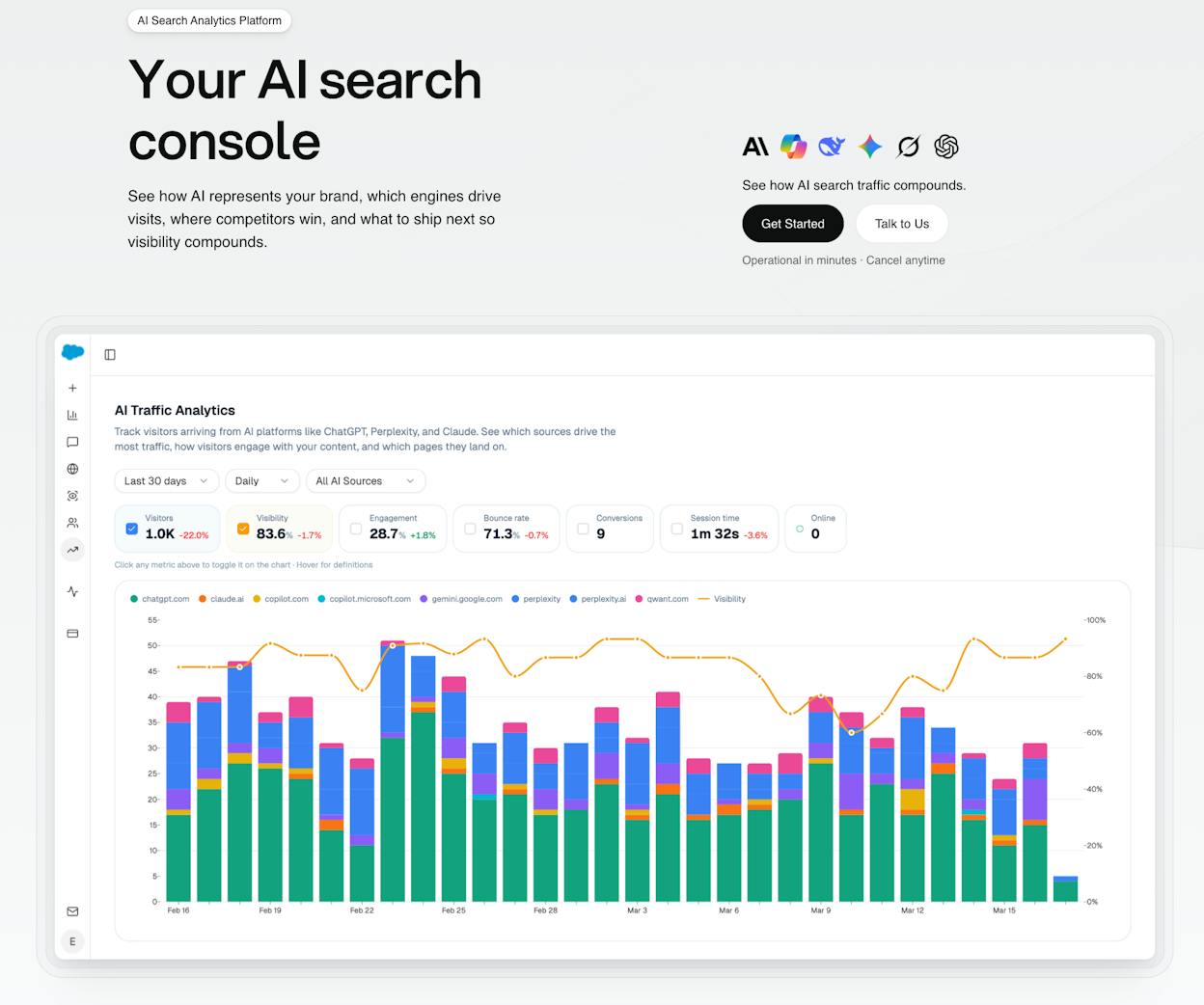
Analyze AI connects AI visibility to actual outcomes. You see which answer engines send sessions to your site (Discover), which pages those visitors land on, what actions they take, and how much revenue they influence (Monitor). You get prompt-level tracking across ChatGPT, Perplexity, Claude, Copilot, and Gemini, then you see downstream performance through conversion rates, assisted revenue, and ROI by referrer.

And because visibility alone is not a strategy, Analyze AI helps you act. You can improve your AI-search performance with prioritized recommendations and prompt workflows, including prompt suggestions you can adopt and monitor through our prompt suggestion feature (Improve). You can also track market movement over time—brand sentiment, positioning shifts, and competitive visibility trends—so you do not get surprised when the narrative changes (Govern).

Key Analyze AI features

  • See actual AI referral traffic by engine and track trends that reveal where visibility grows and where it stalls.

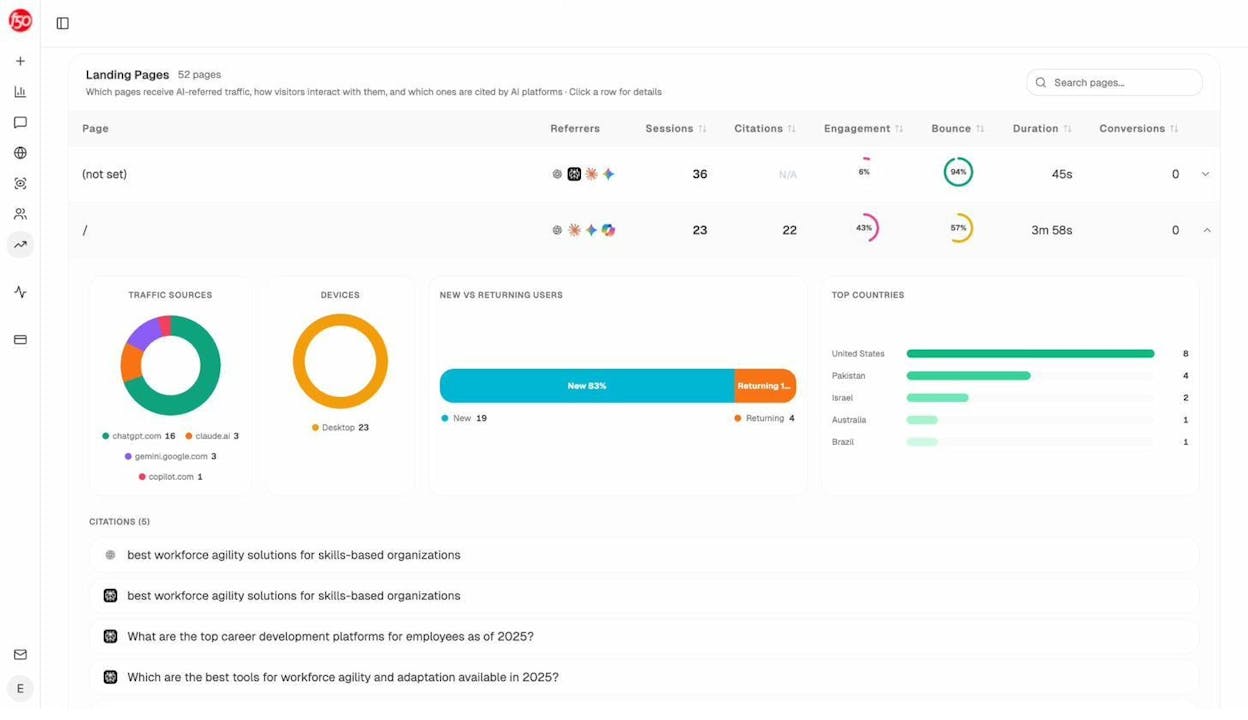
  • See the pages that receive that traffic with the originating model, the landing path, and the conversions those visits drive.

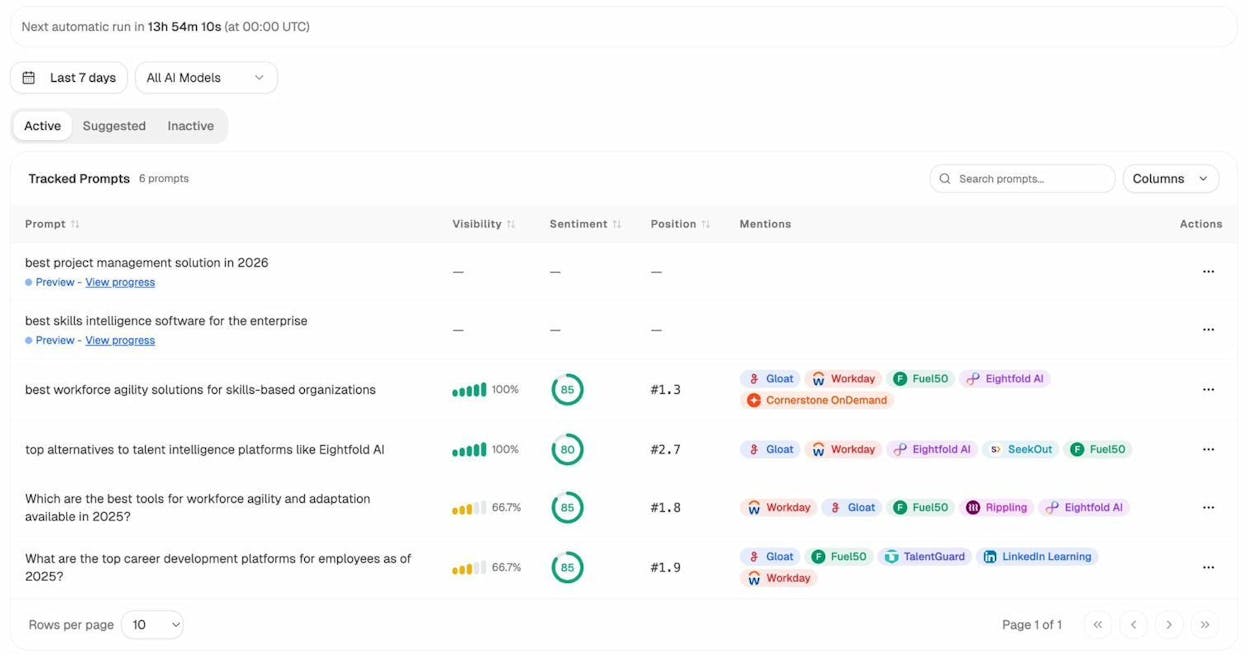
  • Track prompt-level visibility and sentiment across major LLMs to understand how models talk about your brand and competitors.

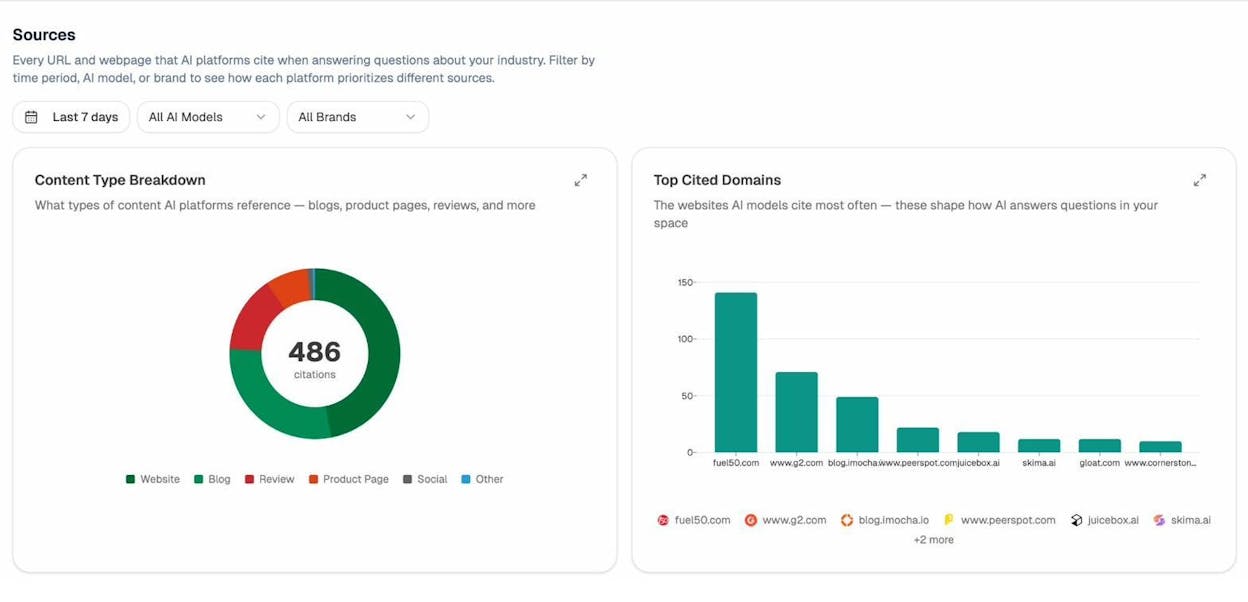
  • Audit model citations and sources to identify which domains shape answers and where your own coverage must improve.

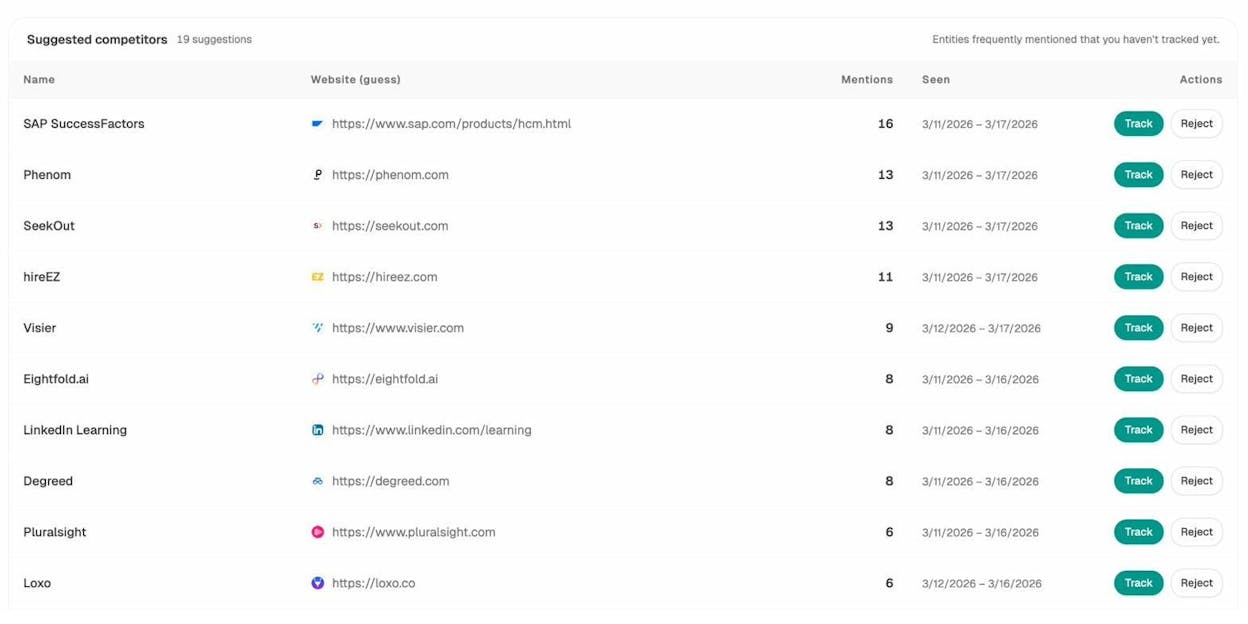
  • Surface opportunities and competitive gaps that prioritize actions by potential impact, not vanity metrics.

Here are in more details how Analyze AI works:

See actual traffic from AI engines, not just mentions

Google keyword alternatives

Analyze AI attributes every session from answer engines to its specific source—Perplexity, Claude, ChatGPT, Copilot, or Gemini. You see session volume by engine, trends over six months, and what percentage of your total traffic comes from AI referrers. When ChatGPT sends 248 sessions but Perplexity sends 142, you know exactly where to focus optimization work.

keyword clustering tools

Know which pages convert AI traffic and optimize where revenue moves

AI keyword research tools

Most tools stop at "your brand was mentioned." Analyze AI shows you the complete journey from AI answer to landing page to conversion, so you optimize pages that drive revenue instead of chasing visibility that goes nowhere.

The platform shows which landing pages receive AI referrals, which engine sent each session, and what conversion events those visits trigger. 

For instance, when your product comparison page gets 50 sessions from Perplexity and converts 12% to trials, while an old blog post gets 40 sessions from ChatGPT with zero conversions, you know exactly what to strengthen and what to deprioritize.

Track the exact prompts buyers use and see where you're winning or losing

keyword ranking insights

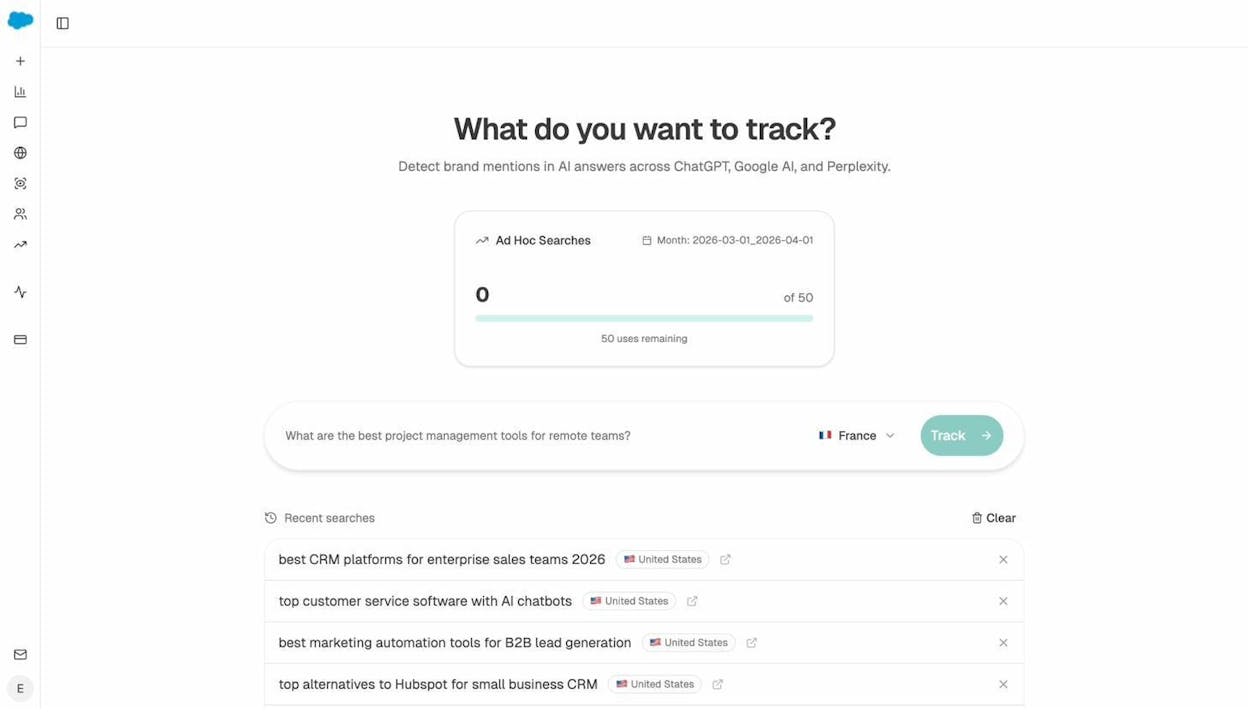
Analyze AI monitors specific prompts across all major LLMs—"best Salesforce alternatives for medium businesses," "top customer service software for mid-sized companies in 2026," "marketing automation tools for e-commerce sites." 

keyword gap analysis, Analyze

For each prompt, you see your brand's visibility percentage, position relative to competitors, and sentiment score.

You can also see which competitors appear alongside you, how your position changes daily, and whether sentiment is improving or declining.

SEO planning tools

Don’t know which prompts to track? No worries. Analyze AI has a prompt suggestion feature that suggests the actual bottom of the funnel prompts you should keep your eyes on.

Audit which sources models trust and build authority where it matters

content SEO keywords

Analyze AI reveals exactly which domains and URLs models cite when answering questions in your category. 

You can see, for instance, that Creatio gets mentioned because Salesforce.com's comparison pages rank consistently, or that IssueTrack appears because three specific review sites cite them repeatedly. 

keyword research for blogs

Analyze AI shows usage count per source, which models reference each domain, and when those citations first appeared.

keyword tools for marketers

Citation visibility matters because it shows you where to invest. Instead of generic link building, you target the specific sources that shape AI answers in your category. You strengthen relationships with domains that models already trust, create content that fills gaps in their coverage, and track whether your citation frequency increases after each initiative.

Prioritize opportunities and close competitive gaps

keyword tools for startups

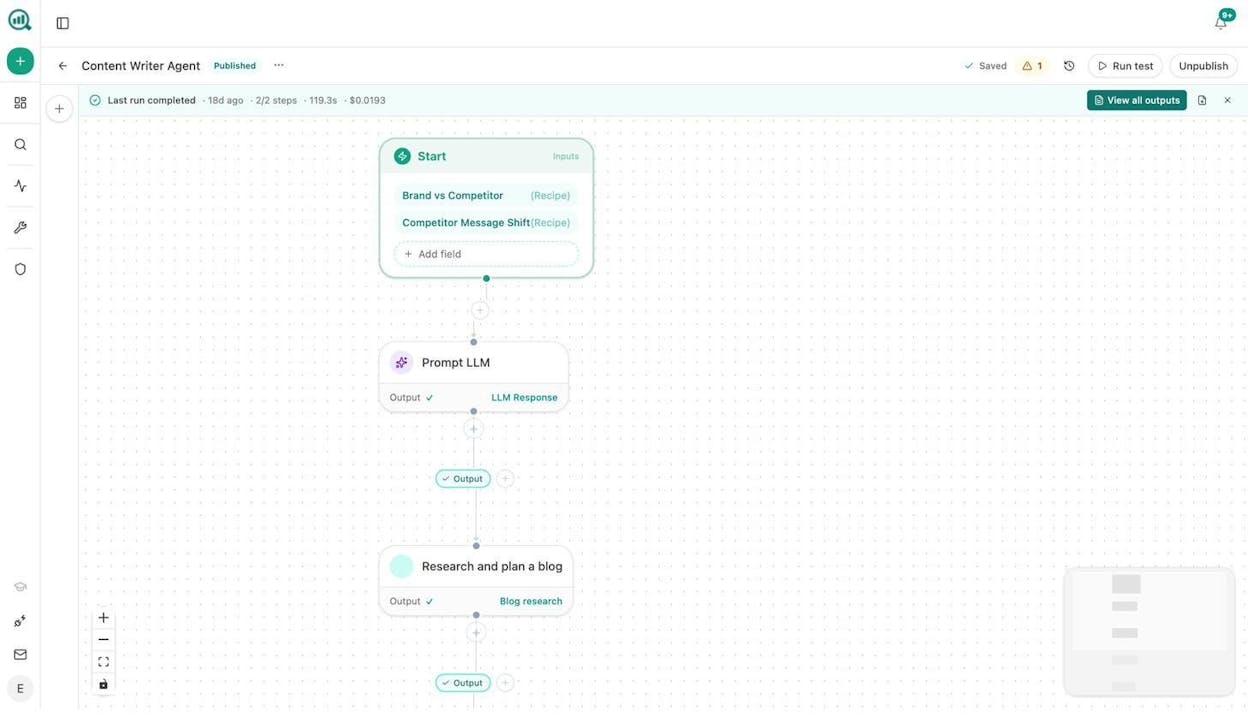
Analyze AI surfaces opportunities based on omissions, weak coverage, rising prompts, and unfavorable sentiment, then pairs each with recommended actions that reflect likely impact and required effort. 

For instance, you can run a weekly triage that selects a small set of moves—reinforce a page that nearly wins an important prompt, publish a focused explainer to address a negative narrative, or execute a targeted citation plan for a stubborn head term. 


Tie AI visibility toqualified demand.

Measure the prompts and engines that drive real traffic, conversions, and revenue.

Covers ChatGPT, Perplexity, Claude, Copilot, Gemini

Similar Content You Might Want To Read

Discover more insights and perspectives on related topics

© 2026 Analyze AI. All rights reserved.