



Summarize this blog post with:


In this article, you’ll learn what Google’s Knowledge Graph is, how it stores and connects information about real-world entities, and why it matters for both traditional search rankings and AI-generated answers. You’ll also learn how the Knowledge Graph influences what shows up in Knowledge Panels, voice search results, and AI answers from tools like ChatGPT, Gemini, and Perplexity. Finally, you’ll get a step-by-step process for getting your brand into the Knowledge Graph, checking whether you’re already in it, and editing your Knowledge Panel when the information is wrong.
Table of Contents
What Is Google’s Knowledge Graph?
Google’s Knowledge Graph is a massive database of facts about real-world things and the relationships between them. Google launched it in 2012 to move beyond simple keyword matching and start understanding what searchers actually mean.
Instead of just indexing web pages, the Knowledge Graph stores structured information about entities. An entity is anything that can be distinctly identified. People, companies, places, movies, songs, concepts, and even colors all count as entities.
The Knowledge Graph organizes this information using three building blocks.
Nodes represent individual entities. “Apple,” “Tim Cook,” and “iPhone 16” are all separate nodes. Each node has a unique identifier called a Machine ID (MID) that distinguishes it from other entities with the same name. This is how Google tells Apple the company apart from apple the fruit.
Edges are the connections between nodes. They describe how entities relate to each other. An edge from “Tim Cook” to “Apple” might be labeled “CEO of.” An edge from “iPhone 16” to “Apple” might be labeled “manufactured by.” These relationships let Google follow chains of meaning across the graph.
Attributes are the specific properties attached to each entity. For the “Apple” node, attributes include the founding date (April 1, 1976), the headquarters (Cupertino, California), and the stock ticker (AAPL). For a person, attributes might include birth date, occupation, and notable works.
![[Screenshot of a Google Knowledge Panel for a well-known brand showing entity attributes like founding date, CEO, headquarters]](https://www.datocms-assets.com/164164/1777065731-blobid1.png?auto=format,compress&w=1248&fit=max)
When you search for something like “who founded Apple,” Google doesn’t just scan web pages for that phrase. It looks up the “Apple” entity in the Knowledge Graph, follows the “founded by” edge, and returns “Steve Jobs, Steve Wozniak, and Ronald Wayne” directly in the search results.
This is why the Knowledge Graph changed search fundamentally. Google went from matching strings of text to understanding things and the connections between them.
Where Does the Knowledge Graph Get Its Data?
The Knowledge Graph pulls information from many sources. Understanding where the data comes from helps you figure out how to get your own brand included.
Wikidata is one of the largest contributors. Wikidata is an open-source, structured database that powers Wikipedia and other Wikimedia projects. It stores facts in a machine-readable format that Google can directly ingest. If you have a Wikidata entry with accurate, well-sourced information, Google is far more likely to recognize you as a distinct entity.
Wikipedia is another major source. Google extracts facts, descriptions, and images from Wikipedia articles to populate Knowledge Panels. The descriptions you see in branded Knowledge Panels often come directly from Wikipedia.
Licensed data from trusted databases also feeds into the graph. This includes government records, medical databases, sports statistics providers, and similar authoritative sources that cover specific domains.
Schema markup on websites gives Google structured information about entities directly from site owners. When you add Organization, Person, or Product schema to your site, you’re telling Google exactly what your entity is and how it relates to other entities. Google has confirmed that structured data helps its systems understand content.
Google Business Profile listings contribute local business data, including name, address, phone number, business hours, and categories. This is especially important for physical businesses trying to establish entity presence.
The CIA World Factbook and similar public reference databases provide factual data about countries, demographics, and geographic entities.
User feedback also plays a role. When verified representatives suggest edits to Knowledge Panels, Google reviews and sometimes incorporates those changes.
The key takeaway is that the Knowledge Graph doesn’t rely on any single source. It cross-references multiple sources to build confidence in the facts it stores. The more consistent your information is across these sources, the more confident Google becomes that you represent a real, notable entity.
How the Knowledge Graph Influences SEO
The Knowledge Graph changes how Google processes queries, displays results, and distributes clicks. Some of these effects help your SEO. Others create challenges you need to plan around.
Google Understands Search Intent Better
Before the Knowledge Graph, Google relied heavily on keyword matching. If someone searched for “small green character with lightsaber,” Google would try to match those exact words to pages in its index.
With the Knowledge Graph, Google can recognize that this description maps to the entity “Yoda” from “Star Wars.” It doesn’t need the searcher to type “Yoda” because it understands the relationships between attributes (small, green, lightsaber) and the entity they describe.
![[Screenshot of Google SERP showing a Knowledge Panel result for an entity-based query like “Apple CEO” or a similar entity-relationship query]](https://www.datocms-assets.com/164164/1777065751-blobid2.png?auto=format,compress&w=1248&fit=max)
This matters for SEO because it means Google evaluates your content based on how well it covers entities and their relationships, not just whether it contains the right keywords. Pages that thoroughly cover an entity, including its attributes, relationships, and context, tend to rank better than pages that simply repeat a target keyword.
For example, if you’re writing about CRM software, mentioning specific entities like Salesforce, HubSpot, and Pipedrive along with their attributes (pricing, features, integrations) signals to Google that your content has depth. This is entity-based SEO in practice.
Knowledge Panels and SERP Features Give Brands More Visibility
Google uses Knowledge Graph data to power several SERP features.
Knowledge Panels appear on the right side of desktop results (or at the top on mobile) when Google identifies a clear entity behind the query. These panels show key facts, images, social profiles, and related entities.
Knowledge Cards are smaller boxes that answer factual questions directly. Searching “height of Eiffel Tower” triggers a card with the answer pulled straight from the Knowledge Graph.
Entity Carousels appear when Google identifies a set of related entities. Searching “Marvel movies” triggers a horizontal carousel of movie entities, each linked to its own Knowledge Panel.
If your brand has a Knowledge Panel, you occupy significant SERP real estate for branded searches. Your logo, description, social links, and key facts appear prominently. This builds trust with searchers before they even click a result.
Your brand can also appear in entity carousels for non-branded queries. For example, if someone searches “best project management tools,” Google might show a carousel of recognized entities in that category, and brands with strong Knowledge Graph presence are more likely to appear.
Voice Search and Conversational Queries Rely on Entity Understanding
Voice search queries tend to be longer and more conversational than typed queries. Someone might type “weather NYC” but say “What’s the weather going to be like in New York City this weekend?”
The Knowledge Graph helps Google parse these natural language queries by identifying entities (“New York City”) and their attributes (“weather”) within conversational phrasing. Google can also handle follow-up questions by maintaining entity context. If you ask “How old is Beyoncé?” and then ask “What’s her most recent album?”, Google knows “her” refers to Beyoncé because it maintains the entity context from your previous query.
For brands, this means your entity needs to be well-defined in the Knowledge Graph with accurate attributes. When someone asks their Google Assistant about your company, the answer comes from Knowledge Graph data, not from crawling your website in real time.
Zero-Click Searches Can Reduce Organic Traffic
The Knowledge Graph enables Google to answer many queries directly in the search results without the searcher needing to click through to a website. When someone searches “population of France” or “Jeff Bezos net worth,” Google pulls the answer from the Knowledge Graph and displays it right on the SERP.
This creates a challenge for SEO. If Google can answer a query entirely from the Knowledge Graph, fewer people click through to organic results.
You can work around this by checking the organic click-through rate before targeting a keyword. Tools like Analyze AI’s SERP Checker show you what SERP features appear for a keyword, so you can assess whether organic clicks are available. If a keyword triggers a Knowledge Card that fully answers the query, the remaining organic CTR may be too low to justify targeting it.
That said, many Knowledge Graph queries still generate clicks. Someone searching “what is SEO” might see a Knowledge Card, but most searchers want a deeper explanation and click through to a full article. The key is distinguishing between queries that the Knowledge Graph answers completely (like “age of Tom Hanks”) and queries where the Knowledge Graph answer is just a starting point (like “how does SEO work”).
How the Knowledge Graph Influences AI Search
Here’s where things get interesting for marketers in 2026. The Knowledge Graph doesn’t just power Google’s traditional search results. It also shapes how AI models understand and talk about your brand.
The Knowledge Graph Is the “Trusted Encyclopedia” for AI
When an AI assistant like ChatGPT, Google Gemini, or Microsoft Copilot generates an answer about your brand, it draws on three sources of information.
Training data is the content the model learned from during training. This includes web pages, documents, and other text the model processed before its knowledge cutoff.
The Knowledge Graph (and similar structured databases like Wikidata) acts as a verified fact layer. AI platforms cross-reference Knowledge Graph data when they want to state something as confirmed fact rather than a guess. A strong Knowledge Graph presence is the difference between an AI saying your company “is” a leader in its category versus saying it “claims to be.”
Live search results are what the AI finds when it queries the web in real time. Perplexity, Gemini, and ChatGPT with search all pull live web results to supplement their training data.
The implication is clear. If your brand has a well-defined Knowledge Graph entity with accurate attributes and strong relationship signals, AI models are more likely to cite you, reference you, and recommend you in their answers. If your entity signals are weak or inconsistent, AI models will hedge, use qualifiers like “reportedly” or “according to some sources,” and may favor competitors whose entity profiles are stronger.
Entity Signals Affect Whether AI Recommends You
AI models rely on entity understanding to resolve ambiguity. When someone asks ChatGPT “What are the best CRM platforms for small businesses?”, the model needs to identify which entities qualify as “CRM platforms” and how they relate to the attribute “small businesses.”
Brands with strong entity signals, meaning clear category classification, well-defined attributes, and many verified relationships in structured databases, are more likely to appear in these answers. This is because the model has higher confidence in what the brand is and what it does.
This connects directly to your Knowledge Graph strategy. The same structured data (schema markup, Wikidata entries, consistent naming) that helps you get into Google’s Knowledge Graph also helps AI models understand your brand. Optimizing for one channel reinforces the other.
How to Track Your Brand’s Entity Presence in AI Search
In traditional SEO, you can check your rankings in Google Search Console. But how do you know whether AI models are recommending your brand, how they describe it, and whether their descriptions are accurate?
This is where AI visibility tracking becomes essential. Tools like Analyze AI let you monitor how AI engines represent your brand across ChatGPT, Gemini, Perplexity, Copilot, and other platforms.
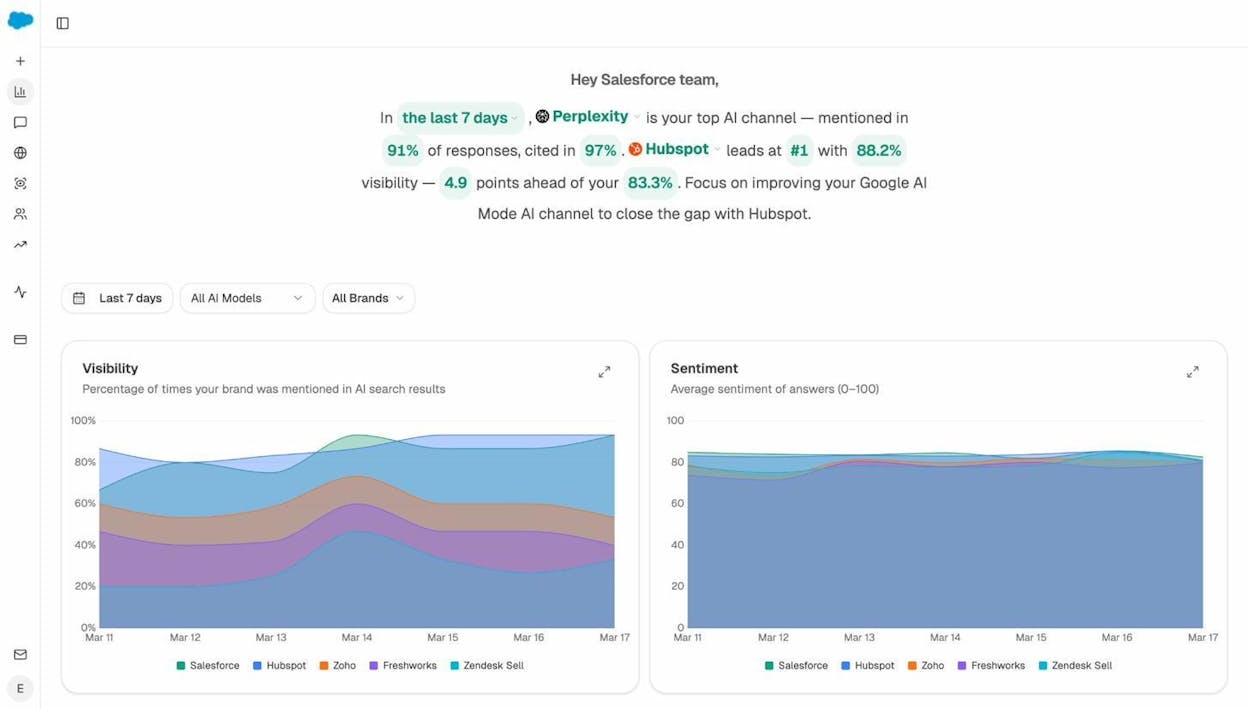
With Analyze AI, you can track your visibility score across different AI engines, see how your brand sentiment trends over time, and compare your presence against competitors. This gives you a clear picture of whether your entity signals are working.
You can also use the AI Search Explorer to run ad hoc prompts across multiple AI engines and see who shows up. This is useful for testing whether your Knowledge Graph improvements are translating into better AI visibility.
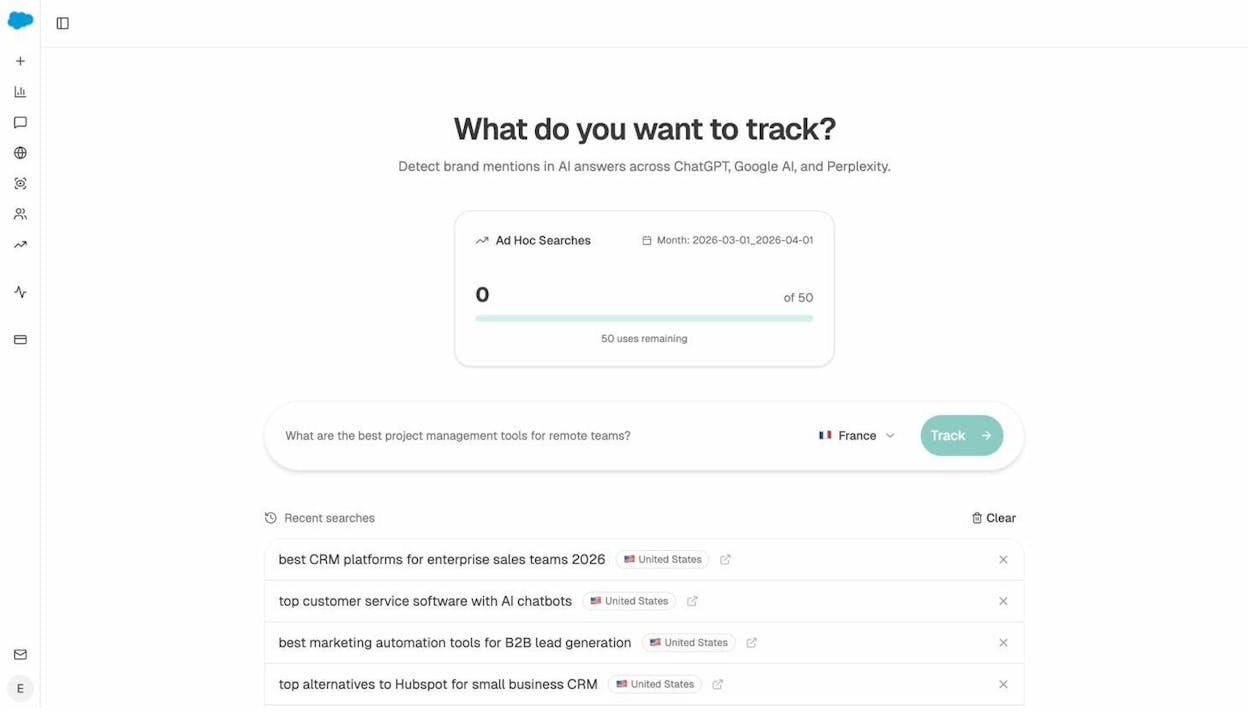
For example, you could type “best [your category] tools for [your target audience]” and instantly see whether AI engines mention your brand, what position you appear in, and which competitors show up alongside you.
How to Get in Google’s Knowledge Graph
There’s no single action that guarantees inclusion in the Knowledge Graph. But there are several steps you can take to increase your chances significantly.
1. Add Schema Markup to Your Website
Schema markup is how you communicate structured entity data directly to Google. At minimum, add Organization schema to your homepage with these properties: name, url, logo, description, founder, foundingDate, and sameAs (linking to your social profiles, Wikidata, and Wikipedia pages).
Here’s an example of well-structured Organization schema:
{
"@context": "http://schema.org",
"@type": "Organization",
"name": "Your Company",
"description": "A clear, factual description of what your company does.",
"url": "https://yourcompany.com",
"logo": "https://yourcompany.com/logo.png",
"founder": {
"@type": "Person",
"name": "Founder Name",
"jobTitle": "CEO"
},
"foundingDate": "2020-01-15",
"sameAs": [
"https://www.wikidata.org/wiki/Q12345",
"https://en.wikipedia.org/wiki/Your_Company",
"https://twitter.com/yourcompany",
"https://www.linkedin.com/company/yourcompany",
"https://www.crunchbase.com/organization/yourcompany"
]
}
The sameAs property is especially important. It tells Google that these profiles all refer to the same entity, which helps Google build a unified entity profile across sources.
After adding schema, validate it using Google’s Rich Results Test or the Schema Markup Validator.
![[Screenshot of Google Rich Results Test showing validated Organization schema markup]](https://www.datocms-assets.com/164164/1777065768-blobid5.png?auto=format,compress&w=1248&fit=max)
2. Create a Wikidata Entry
Wikidata is arguably the most impactful step for Knowledge Graph inclusion that most brands overlook. A significant portion of Knowledge Graph data comes from Wikidata, and creating an entry is far easier than getting a Wikipedia page.
Here’s how to do it:
Step 1: Go to wikidata.org and create an account.
Step 2: Click “Create a new item” and fill in the basic fields: label (your company name), description (a short factual description), and aliases (any alternate names).
Step 3: Add statements. These are the structured facts about your entity. Important statements include: instance of (Q4830453 for “business”), country (where you’re headquartered), official website, founding date, founder, industry, and product or service.
Step 4: Add references for each statement. Wikidata requires verifiable sources. Link to press coverage, official filings, or authoritative databases that confirm each fact.
![[Screenshot of a Wikidata entity page showing structured statements and references for a company]](https://www.datocms-assets.com/164164/1777065771-blobid6.png?auto=format,compress&w=1248&fit=max)
Step 5: Link your Wikidata entry in your schema markup using the sameAs property (as shown in the code example above).
One important note. Wikidata has a notability policy. Your entity must have at least one external reference from a reliable source. If you can point to a news article, a Crunchbase profile, or a business directory listing, you’re likely fine. But entries without references may get flagged for deletion.
3. Get a Wikipedia Page
Wikipedia feeds directly into the Knowledge Graph, and having a page significantly increases your chances of getting a Knowledge Panel. But creating a Wikipedia page for your own company is one of the hardest steps on this list.
Wikipedia has strict notability guidelines. Your company needs significant coverage in reliable, independent sources. Company blog posts, press releases, and paid media don’t count. You need genuine editorial coverage from recognized publications.
The honest advice: don’t try to game Wikipedia. Editors flag self-promotional pages quickly, and a deleted page can be harder to recreate later. Instead, focus on building genuine media coverage through PR, industry events, and thought leadership. The best-case scenario is that someone unaffiliated with your company creates the page because your company is genuinely notable.
If you do decide to create a page yourself, follow Wikipedia’s conflict of interest guidelines and disclose your affiliation. Use only verifiable, third-party sources. Keep the tone neutral and factual, avoiding promotional language entirely.
4. Set Up Google Business Profile
If you operate a physical business or have a physical office, creating a Google Business Profile (formerly Google My Business) is essential. It provides Google with verified, structured data about your business entity directly from the source.
Make sure your profile includes: your exact legal business name, correct address and phone number, business category, business hours, a link to your website, and photos.
Use the same exact name, address, and phone number (NAP) that appears on your website and social profiles. Inconsistencies across sources make it harder for Google to connect the dots and build a unified entity profile.
![[Screenshot of a Google Business Profile listing in search results showing the local knowledge panel]](https://www.datocms-assets.com/164164/1777065780-blobid7.jpg?auto=format,compress&w=1248&fit=max)
Google Business Profile doesn’t guarantee Knowledge Graph inclusion on its own, but it gives Google verified entity data that reinforces signals from your other sources.
5. Invest in PR and Link Building
This is the hardest step, but it’s also one of the most effective. Mentions from authoritative, independent sources tell Google that your company is a notable entity worth including in the Knowledge Graph.
What counts as a strong signal:
-
Coverage in mainstream publications (TechCrunch, Forbes, industry-specific outlets)
-
Mentions in industry reports and analyst research
-
Citations in academic or government publications
-
Listings in authoritative directories (Crunchbase, G2, Capterra)
-
Backlinks from high-authority domains
The goal isn’t just to get backlinks for SEO purposes. It’s to build a pattern of independent, third-party sources that confirm your brand exists and describe what it does. This is what Google looks for when deciding whether to create an entity node for your brand.
For a detailed breakdown of building authoritative backlinks, see our guide on link building tools.
6. Be Consistent Across All Platforms
This step sounds simple, but inconsistency is one of the most common reasons brands fail to appear in the Knowledge Graph.
Use the exact same company name everywhere. If your brand is “Analyze AI,” don’t use “AnalyzeAI” on LinkedIn, “Analyze” on Twitter, and “Analyze AI Inc.” on your website. Each variation creates confusion about whether these are the same entity or different ones.
The same applies to your logo, description, founder information, founding date, and address. Every source Google checks should tell the same story about your entity.
Here’s a consistency checklist:
|
Signal |
What to Check |
|---|---|
|
Company name |
Exact same spelling and capitalization across website, social profiles, Wikidata, Wikipedia, and directories |
|
Logo |
Same image file used across Google Business Profile, social media, schema markup, and Wikidata |
|
Description |
Consistent factual description across all platforms (not necessarily identical, but telling the same story) |
|
Founding date |
Same date on Crunchbase, Wikidata, Wikipedia, and your website |
|
Founder/CEO |
Same person listed as founder across all sources with consistent name spelling |
|
Website URL |
Same URL in schema markup, social profiles, directories, and Wikidata |
|
Address |
Identical NAP (Name, Address, Phone) across Google Business Profile, website, and directories |
How to Check if You’re in the Knowledge Graph
Before you start optimizing, check whether Google already recognizes your brand as an entity.
Use the Knowledge Graph Search API
Google provides a free Knowledge Graph Search API that lets you look up entities directly. You can test it without writing code by visiting the API explorer and entering your brand name.
The API returns any matching entities along with their type (Organization, Person, etc.), a description, and a confidence score. If your brand appears with a high result score, Google recognizes you as a distinct entity.
![[Screenshot of the Google Knowledge Graph API explorer showing search results for a brand name]](https://www.datocms-assets.com/164164/1777065782-blobid8.png?auto=format,compress&w=1248&fit=max)
If your brand doesn’t appear, it means Google hasn’t built enough confidence to classify you as a distinct entity yet. That’s your signal to work through the steps in the previous section.
Search for Your Brand on Google
A simpler test is to search for your brand name on Google and look for a Knowledge Panel on the right side of the results (desktop) or at the top (mobile). If you see a panel with your logo, description, and structured facts, you’re in the Knowledge Graph.
If you don’t see a Knowledge Panel, it doesn’t necessarily mean you’re not in the Knowledge Graph at all. Google may recognize your entity but not have enough confidence or data to display a panel. The API test above gives you a more definitive answer.
Check How AI Search Engines Perceive Your Entity
Even if you’re in Google’s Knowledge Graph, AI models might describe your brand differently across platforms. ChatGPT might call you a “project management tool” while Gemini calls you a “collaboration platform.” These inconsistencies can hurt your positioning.
Using a tool like Analyze AI’s Perception Map, you can visualize how different AI engines perceive your brand relative to competitors. The Perception Map plots brands on two axes: visibility (how often you appear in AI answers) and narrative strength (how positively and consistently AI engines describe you).
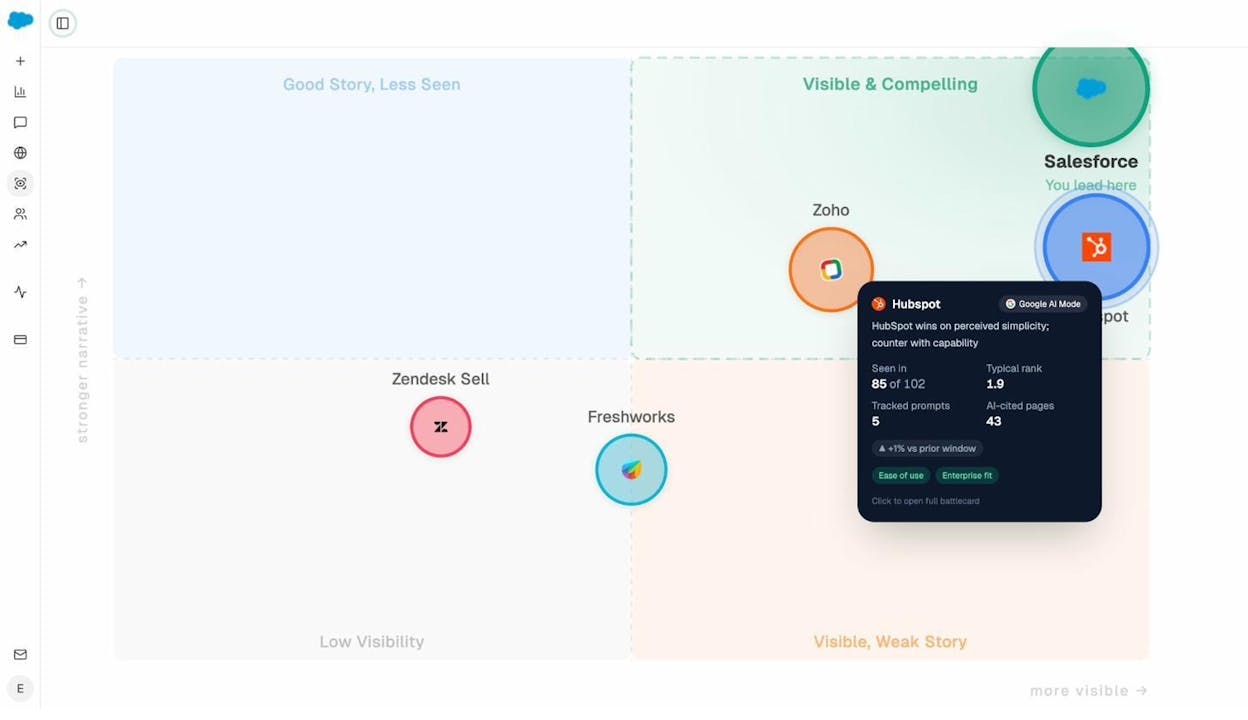
This gives you a bird’s-eye view of your entity’s standing across the AI landscape. A brand that appears in the “Visible and Compelling” quadrant has strong entity signals that translate into consistent, positive AI answers. A brand in the “Low Visibility” quadrant needs to strengthen its entity foundation through the Knowledge Graph steps described above.
You can also use AI Sentiment Monitoring to track the specific narratives AI engines build about your brand over time. This tells you whether your entity improvements are translating into better AI representation.
How to Monitor the Sources AI Engines Trust
Understanding which sources AI engines cite in your industry helps you prioritize where to build entity signals. If AI models consistently cite G2 reviews, Wikipedia, and specific industry blogs when answering questions about your category, those are the sources where your brand needs to be present and well-represented.
Analyze AI’s Citation Analytics shows you exactly which domains and content types AI engines reference most often in your space.
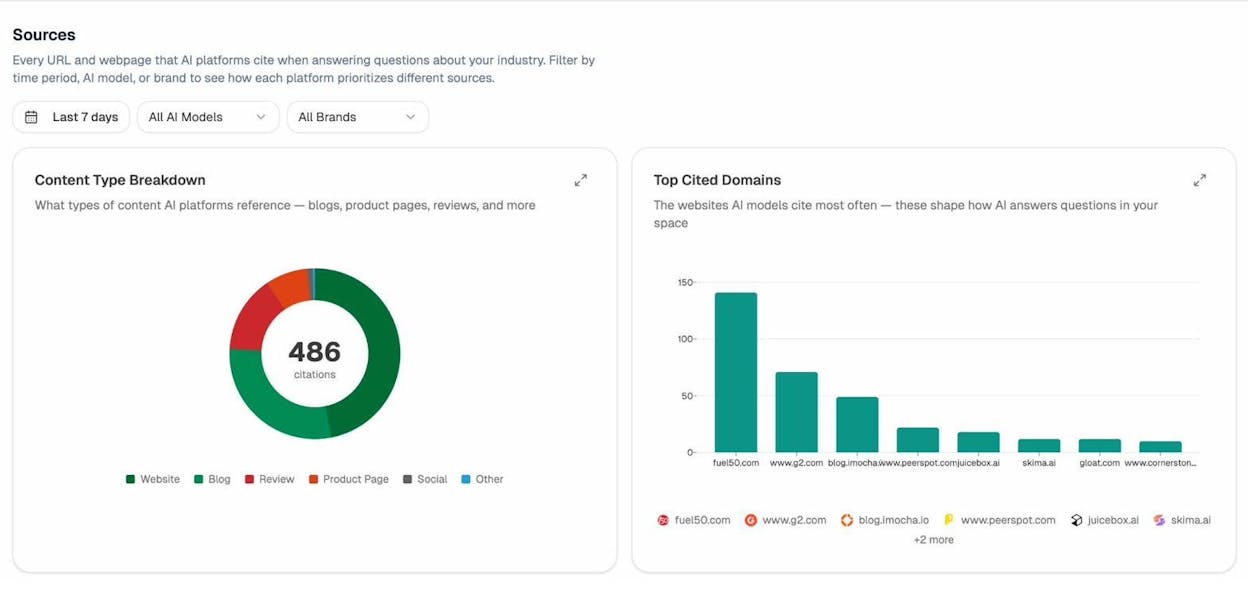
This data connects directly to your Knowledge Graph strategy. If AI engines heavily cite review sites like G2 and Capterra, earning a presence on those platforms reinforces both your entity signals and your AI visibility. If they cite Wikipedia frequently, that’s additional motivation to secure a Wikipedia page.
You can also track which of your own pages get cited by AI engines using AI Traffic Analytics. This shows you which content formats and topics already work well in AI search, so you can double down on what’s effective.
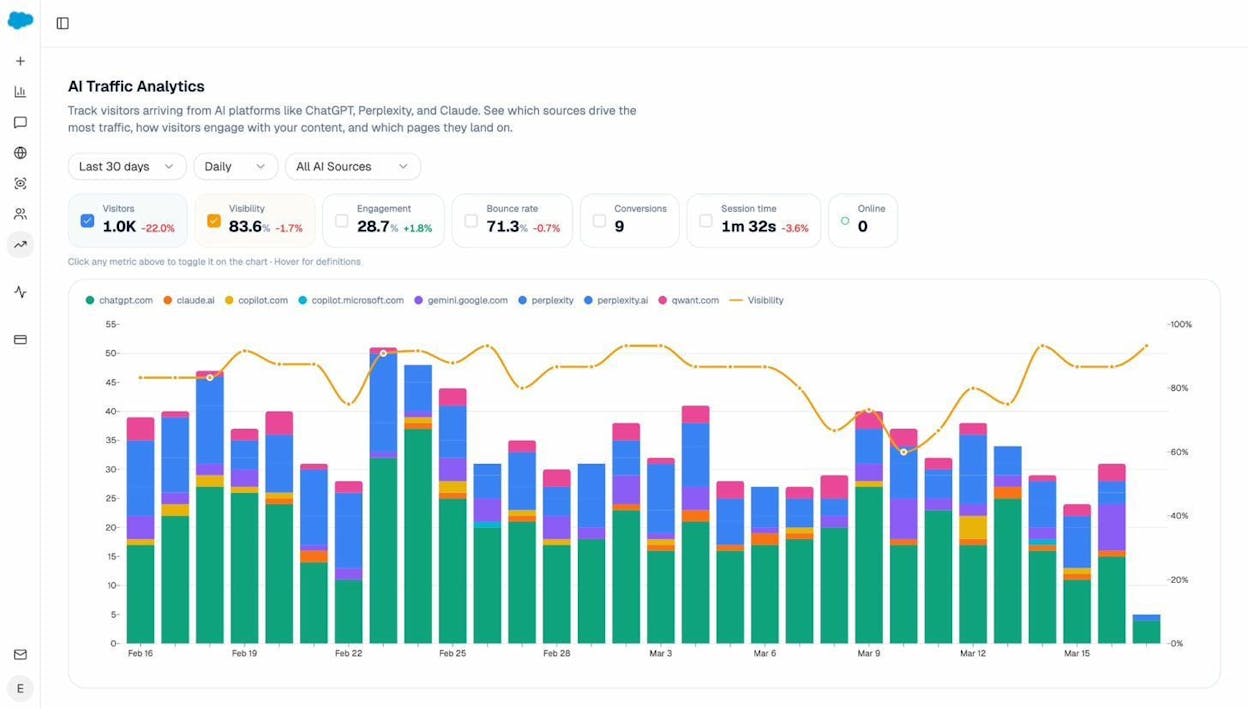
For a deeper analysis of how AI engines select sources, read our research on how LLMs cite sources based on 83,670 AI citations.
How to Suggest Changes to Your Knowledge Panel
Google’s Knowledge Panels sometimes display incorrect information. Maybe the wrong founding date appears, or the description is outdated. Here’s how to fix it.
Step 1: Claim Your Knowledge Panel
Search for your brand on Google. If you see a Knowledge Panel, scroll to the bottom and click “Claim this knowledge panel.” Google will ask you to verify your identity through an official channel (your website, Google Search Console, YouTube, or other connected accounts).
![[Screenshot of the “Claim this knowledge panel” button at the bottom of a Google Knowledge Panel]](https://www.datocms-assets.com/164164/1777065797-blobid12.png?auto=format,compress&w=1248&fit=max)
Step 2: Suggest Edits
Once verified, you’ll see a “Suggest an edit” option whenever you’re logged into the associated Google account. You can suggest changes to: the entity name, description, social media profiles, images, and other attributes.
Each suggestion needs supporting evidence. Link to authoritative sources that confirm the correct information. Google reviews each suggestion before applying changes, so changes aren’t instant.
Step 3: Fix the Upstream Sources
Suggesting edits through the Knowledge Panel is useful for quick fixes, but the most durable approach is to correct the information at the source. If your founding date is wrong in the Knowledge Panel, check whether it’s wrong in Wikidata, Wikipedia, or your own schema markup. Fixing the upstream source ensures the Knowledge Graph stays accurate even when Google refreshes its data.
Follow Google’s official documentation for detailed guidance on what types of changes you can suggest and what evidence Google requires.
How to Track Your Competitors in the Knowledge Graph and AI Search
One advantage of understanding the Knowledge Graph is that it applies to your competitors too. If a competitor has a strong Knowledge Panel, a well-developed Wikidata entry, and consistent entity signals, they have a structural advantage in both traditional search features and AI-generated answers.
You can identify competitors with strong entity presence by searching for them on Google and checking for Knowledge Panels. But this only shows you one dimension.
To understand how competitors appear across AI engines, use Analyze AI’s Competitor Intelligence. This shows you which competitors are mentioned most frequently in AI answers, which prompts they win on, and where gaps exist that you can fill.
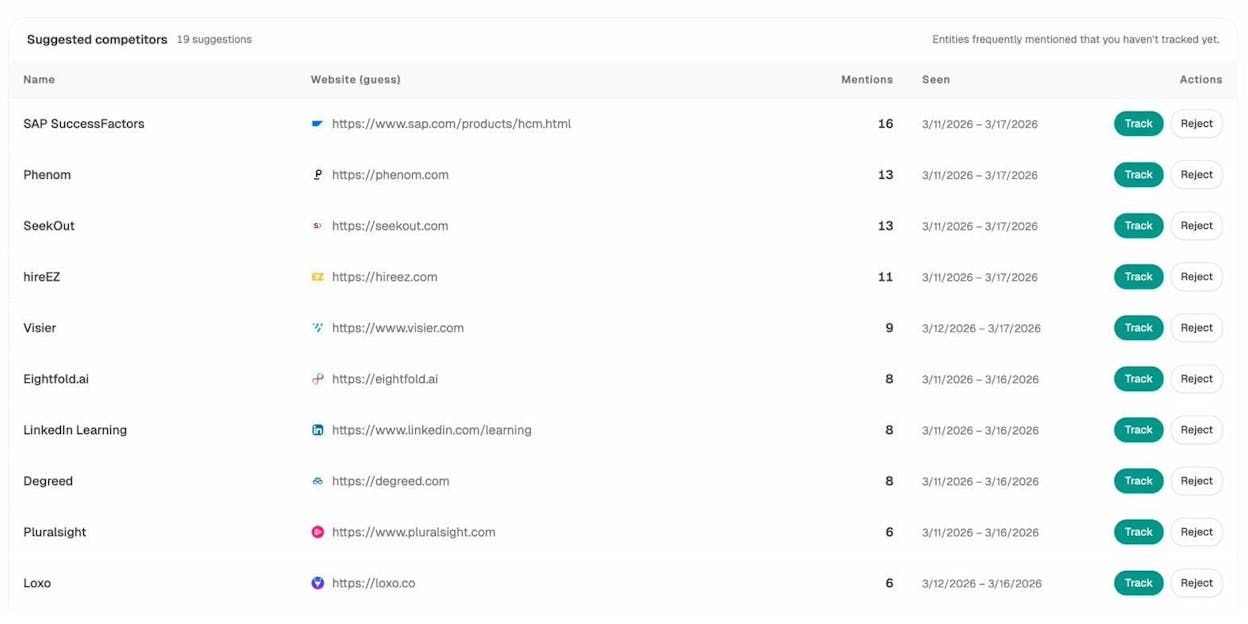
You can also set up Prompt Tracking to monitor specific queries that matter to your business. For each tracked prompt, you’ll see your visibility, sentiment, position, and which competitors appear alongside you across different AI engines.
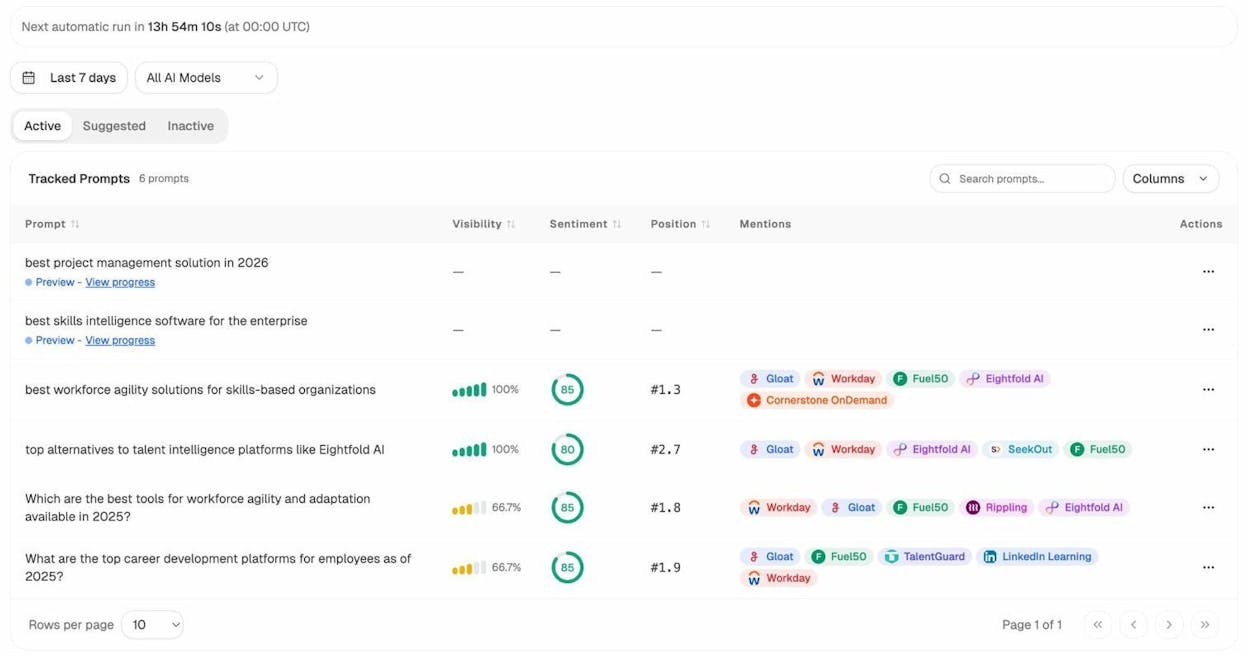
This gives you a competitive scorecard that goes far beyond traditional SERP rankings. You can see not just who ranks in Google, but who AI engines recommend and how they frame each brand. For a complete walkthrough, see our guide on SEO competitor analysis with AI search tracking.
Knowledge Graph Optimization Checklist
Here’s a summary of every action item from this article organized by priority.
|
Priority |
Action |
Why It Matters |
|---|---|---|
|
High |
Add Organization schema with sameAs links |
Directly tells Google what your entity is and connects your profiles |
|
High |
Create a Wikidata entry with references |
Major Knowledge Graph data source that most brands underuse |
|
High |
Ensure NAP consistency across all platforms |
Inconsistency is the most common reason brands fail to build entity presence |
|
Medium |
Set up Google Business Profile |
Provides verified entity data for local and branded queries |
|
Medium |
Earn coverage in authoritative publications |
Independent mentions build Google’s confidence in your entity’s notability |
|
Medium |
Track AI visibility with Analyze AI |
Shows whether your entity signals translate into AI recommendations |
|
Lower |
Get a Wikipedia page |
High impact but difficult to achieve without genuine notability |
|
Lower |
Claim and edit your Knowledge Panel |
Useful for fixing errors, but fixing upstream sources is more durable |
Why Knowledge Graphs Matter More Than Ever
When the Ahrefs team first wrote about the Knowledge Graph in 2020, the concept was primarily about Google Search features. Knowledge Panels, Knowledge Cards, and entity carousels were the main outputs.
In 2026, the picture is different. Knowledge graphs now serve as a foundation layer that shapes how both search engines and AI models understand, describe, and recommend brands. Google’s own AI Mode, ChatGPT, Perplexity, Gemini, and Copilot all rely on structured entity data to generate accurate, trustworthy answers.
This doesn’t mean SEO is dead. It means SEO is evolving. The brands that invest in clear entity signals (schema markup, Wikidata, consistent naming, authoritative mentions) are building an advantage that compounds across both traditional search and AI search.
If you want to monitor this advantage, Analyze AI tracks how AI engines portray your brand, which competitors appear alongside you, and which sources AI models trust most. You can run ad hoc searches to test any prompt across engines, track your visibility trends over time, and measure actual AI-referred traffic to your website.
The Knowledge Graph was Google’s first step toward understanding the world as entities, not keywords. AI search is the next step. The brands that optimize for both will be the ones that show up everywhere their customers are searching.

Ernest

Ibrahim


