



Summarize this blog post with:


In this article, you’ll learn what content hubs are, why they remain one of the most effective ways to drive organic traffic and earn backlinks, and how to build one from scratch. You’ll also learn how to extend content hubs beyond traditional search by making them work in AI search engines like ChatGPT, Perplexity, and Gemini — where well-structured, deeply interlinked content is increasingly being cited as a source in AI-generated answers.
Table of Contents
What Are Content Hubs?
A content hub is an interlinked collection of content about a single topic.
It has three parts:
-
Hub page (also called a pillar page): A high-level guide covering a broad topic. It gives readers an overview without going too deep on any one subtopic.
-
Subpages (also called cluster content): Individual, in-depth pages that each cover a specific subtopic within the broader theme.
-
Internal links: The hub page links to every subpage, and each subpage links back to the hub. This creates a tight web of semantic relationships that both users and search engines can follow.
![[Screenshot: A diagram showing the content hub structure — a central hub page in the middle connected by arrows to 6-8 surrounding subpages, with arrows going both directions between hub and subpages]](https://www.datocms-assets.com/164164/1777063394-blobid1.png?auto=format,compress&w=1248&fit=max)
Let’s look at a real example. Drift built a content hub around the topic of chatbots. Their hub page covers what chatbots are, the benefits of using them, and how to build one — but only at a surface level. Each of those subtopics has its own dedicated subpage with full detail.
![[Screenshot: Drift’s chatbot hub page showing the high-level overview content with links to subpages]](https://www.datocms-assets.com/164164/1777063401-blobid2.jpg?auto=format,compress&w=1248&fit=max)
Every subpage links back to the hub page. And the hub page links to every subpage. The result? Their chatbot hub has attracted over 500 backlinks and pulls in an estimated 6,400 organic visits per month.
That’s the power of organizing content around a clear structure instead of publishing scattered blog posts and hoping for the best.
Content Hubs vs. Pillar Pages vs. Topic Clusters: What’s the Difference?
These three terms get used interchangeably in most marketing conversations. They shouldn’t be, because they describe slightly different things — even though they overlap.
A content hub (or “hub and spoke”) is a structure where a central page acts as a table of contents. Its job is to route readers to the subpages, not to keep them on the hub page itself. The hub is relatively brief. The depth lives on the spokes.
A pillar page is a single, very long page that covers a topic in exhaustive depth. If you took a hub page and all of its spokes and folded them into one massive page, you’d have a pillar. Pillar pages keep the reader on one URL instead of distributing them across multiple pages.
A topic cluster is the overarching strategy. It describes the act of grouping related content together — whether you use a hub-and-spoke model, a pillar page, or a hybrid of both.
Here’s the practical difference:
|
Hub and Spoke |
Pillar Page |
Topic Cluster |
|
|---|---|---|---|
|
Structure |
One hub page + multiple subpages |
One long, comprehensive page |
The strategy that includes both approaches |
|
Where the depth lives |
On the subpages |
On the pillar page itself |
Depends on implementation |
|
Best for |
Topics with 5–20 distinct subtopics |
Topics you can cover on a single page |
Any topic with enough breadth |
|
SEO advantage |
Multiple pages ranking for multiple keywords |
One page concentrating all authority |
Topical authority across your site |
|
Link building |
Backlinks spread across hub + subpages |
All backlinks go to one URL |
Depends on structure chosen |
In practice, most content marketers use a hybrid. They write a hub page that covers each subtopic briefly (a few paragraphs), then link to separate subpages that go deep. That’s the approach we’ll focus on in this guide, because it tends to perform best for SEO — you get multiple pages with ranking potential, a strong internal linking structure, and a clear content architecture that search engines can follow.
Why Content Hubs Are Good for SEO
Content hubs don’t just organize your content. They create compounding advantages that isolated blog posts can’t match.
1. They Build Topical Authority
When Google sees a cluster of interlinked pages covering every angle of a single topic, it sends a strong signal: this site knows this subject deeply.
This is what SEOs call “topical authority.” Google’s own systems are designed to evaluate how comprehensively a site covers a topic. A site with one article about keto dieting will struggle to rank against a site with a hub page plus 15 subpages covering keto recipes, keto side effects, keto meal plans, keto supplements, and more.
The internal links between your hub and subpages reinforce this. They create semantic relationships between your content. Google’s John Mueller has confirmed that internal anchor text gives search engines additional context about what linked pages are about. When every subpage links back to the hub using relevant anchor text, Google better understands the hub page’s topic and its relationship to the cluster.
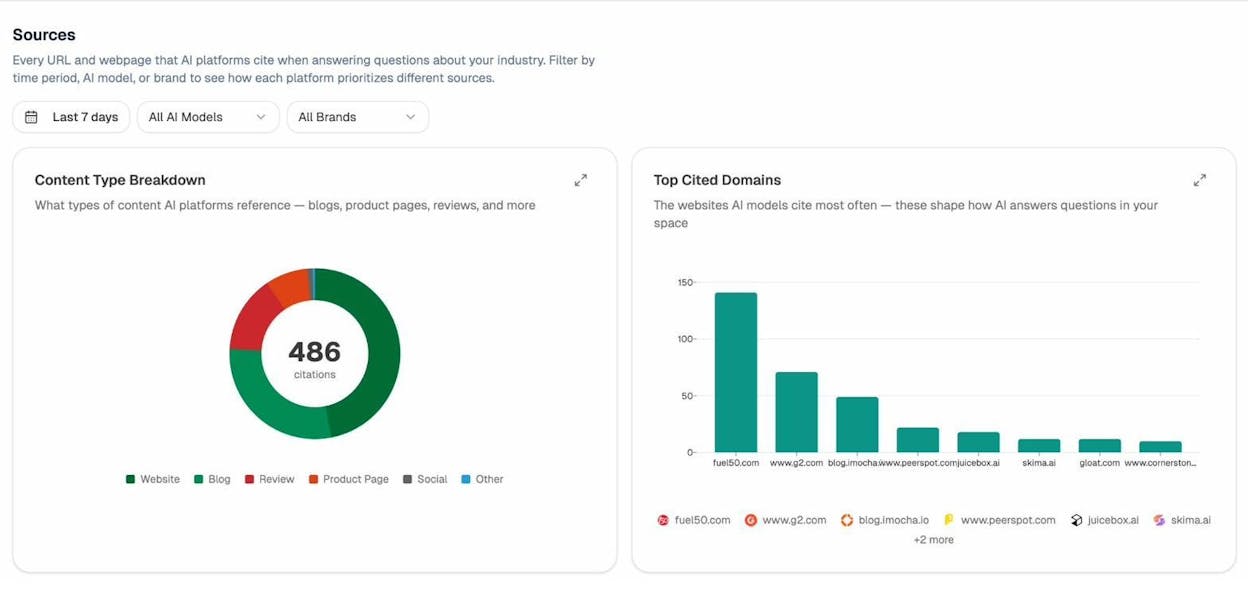
This is equally important in AI search. AI models like ChatGPT, Perplexity, and Gemini tend to cite sources that demonstrate depth and authority on a topic. A well-structured content hub — where every subtopic is covered in depth and interlinked logically — is more likely to be cited by AI engines than a disconnected collection of blog posts. If you want to track which of your pages are being cited by AI models and where gaps exist, tools like Analyze AI’s Sources dashboard let you see exactly which URLs and domains AI platforms reference when answering questions in your industry.
2. They Distribute Link Authority Across Your Site
Every page in a content hub benefits from the backlinks earned by other pages in the cluster. This is because of how PageRank works — link authority flows through internal links.
Here’s a simplified example: if your subpage about “keto meal plans” earns 50 backlinks, some of that link authority passes to the hub page (and to other subpages) through the internal links connecting them. The reverse is also true — backlinks pointing to the hub page distribute authority down to the subpages.
This creates a rising-tide effect. Instead of each blog post existing as an island, every page in the hub lifts the others. Google retired public PageRank scores in 2016, but SEO metrics like Domain Authority and URL Rating work on similar principles and correlate with organic traffic.
![[Screenshot: A chart or diagram showing how PageRank flows between hub page and subpages through internal links, demonstrating how backlinks to one page benefit the entire cluster]](https://www.datocms-assets.com/164164/1777063410-blobid4.png?auto=format,compress&w=1248&fit=max)
3. They Increase Engagement
Hubs make it easy for visitors to go down the rabbit hole. Someone who lands on your hub page about “types of wine” is very likely to click through to a subpage about Merlot, then to one about wine pairing, then to wine storage. You’ve created a self-contained learning path.
This matters for two reasons. First, it’s a better user experience. Second, engagement signals like time on site, pages per session, and low bounce rates may help rankings. The evidence is correlational rather than causal, but most SEOs who’ve built content hubs report improved engagement metrics across the cluster.
4. They Attract More Backlinks
A well-organized content hub has higher perceived value than a loose collection of blog posts. People prefer linking to the single best resource on a topic. If you’ve built the definitive guide to chatbots — complete with a hub page and dedicated subpages on every subtopic — link prospects are more likely to reference your hub than a competitor’s standalone article.
This effect compounds over time. More links lead to higher rankings, which lead to more visibility, which leads to more links. Content hubs create flywheels.
5. They Signal Depth to AI Search Engines
This advantage is new, but it’s becoming increasingly important. AI answer engines — ChatGPT, Perplexity, Claude, Gemini, and Google AI Mode — crawl and cite sources when generating responses. They prioritize content that demonstrates comprehensive coverage of a topic.
A content hub is exactly the kind of structure that performs well here. When an AI model evaluates sources to cite for a query like “how do chatbots work,” it’s more likely to pull from a site that has a hub page about chatbots plus dedicated subpages about chatbot technology, chatbot benefits, and chatbot use cases — rather than a site with a single blog post that skims the surface.
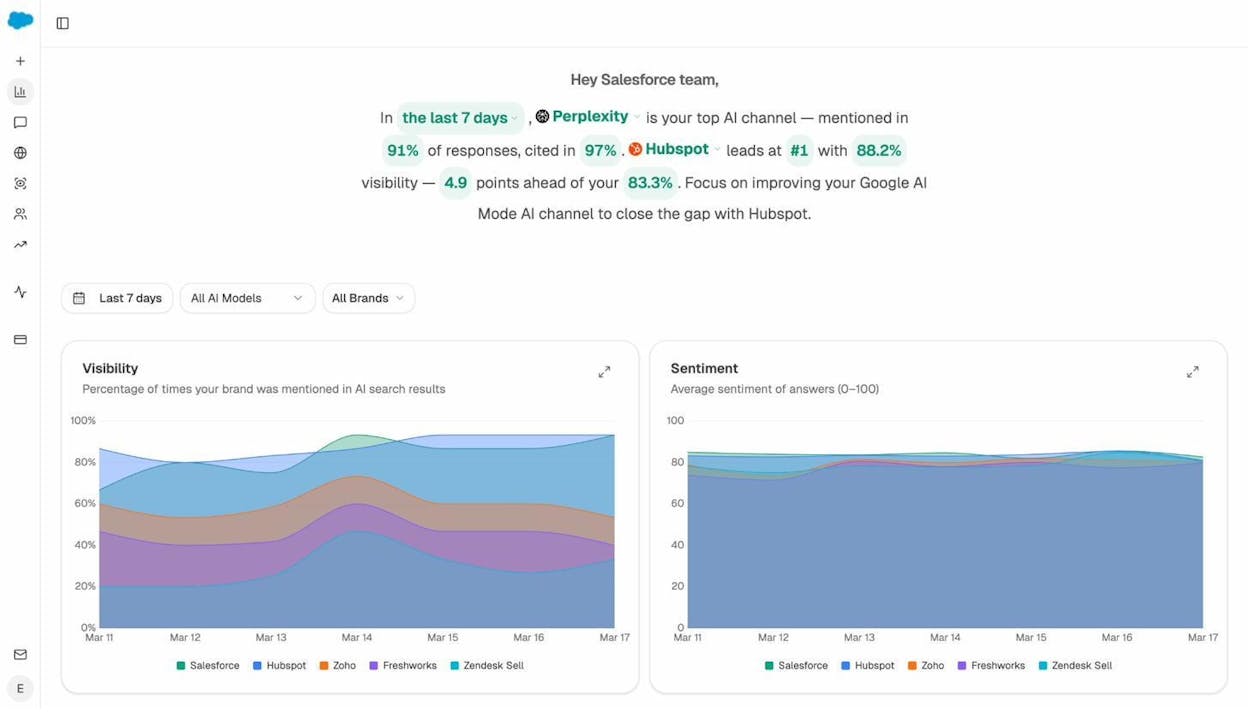
The key takeaway: building content hubs is no longer just an SEO play. It’s an AI visibility play. The same structure that helps you rank on Google also helps you get cited by LLMs. If you want to track whether your content is showing up in AI answers, Analyze AI monitors your brand’s visibility across every major AI engine and shows you exactly which prompts mention you and which don’t.
How to Create a Content Hub
Building a content hub follows a clear, repeatable process. Here’s how to do it step by step.
Step 1: Find a Topic for Your Hub Page
Your hub page topic needs to pass three tests. It must have informational intent, search traffic potential, and enough breadth to support multiple subpages.
Check for Informational Intent
Since you’re building a content hub, you need a topic where searchers want to learn — not buy.
The easiest way to check is to look at the current top 10 search results. If the results are dominated by blog posts, guides, and informational articles, the topic has informational intent. If they’re dominated by product pages, ecommerce stores, or local business listings, it doesn’t work for a content hub.
For example, search “wine and spirits” and you’ll see ecommerce homepages. Searchers want to buy, not learn. That’s not a hub topic.
Now search “types of wine.” You’ll see blog posts and informational guides. People want to learn. That’s a potential hub topic.
![[Screenshot: Google SERP for “types of wine” showing informational blog posts and guides from wine education sites]](https://www.datocms-assets.com/164164/1777063419-blobid6.png?auto=format,compress&w=1248&fit=max)
You can do this for any niche. If you sell project management software, search “project management methodologies” and check whether the results are informational. If you’re in marketing, search “content marketing strategy” and see what comes back.
Verify Traffic Potential
Creating a content hub is a significant investment. You’ll write one hub page and potentially a dozen or more subpages. Make sure the topic has enough search volume to justify that effort.
Start by searching your broad topic in a keyword research tool. You can use Analyze AI’s free Keyword Generator to find related keyword ideas, or a free Keyword Difficulty Checker to gauge how hard it would be to rank.
![[Screenshot: A keyword research tool showing search volume and keyword difficulty for a hub-worthy topic like “types of wine” or “content marketing strategy”]](https://www.datocms-assets.com/164164/1777063426-blobid7.png?auto=format,compress&w=1248&fit=max)
But don’t rely on search volume alone — it can be misleading. A keyword with 3,900 monthly searches might only send 500 visits to the top-ranking page if the SERP has many featured snippets, ads, or “People Also Ask” boxes consuming clicks. Check the estimated organic traffic to the top-ranking pages for your keyword using a tool like the SERP Checker to get a more realistic picture.
![[Screenshot: A keyword tool showing estimated traffic to top-ranking pages, revealing the gap between search volume and actual traffic potential]](https://www.datocms-assets.com/164164/1777063429-blobid8.png?auto=format,compress&w=1248&fit=max)
Confirm the Topic Has Breadth
A hub page topic needs enough subtopics to justify multiple subpages — but not so many that the hub becomes unwieldy.
As a rule of thumb, look for topics with five to twenty clear subtopics. Fewer than five and you’re better off writing a single comprehensive blog post. More than twenty and the hub becomes difficult to manage and navigate.
“Types of red wine” has about eight major subtopics (Merlot, Cabernet Sauvignon, Pinot Noir, etc.) — good for a hub. “Types of wine” has hundreds of varieties — too broad unless you narrow it to the most popular ones. “Malbec wine” might only have two or three angles to cover — too narrow for a hub.
![[Screenshot: A SERP or existing article showing a list of 8-12 subtopics under a broad topic, demonstrating appropriate hub breadth]](https://www.datocms-assets.com/164164/1777063435-blobid9.png?auto=format,compress&w=1248&fit=max)
Brainstorm Hub Topics
If you’re struggling for ideas, here are practical ways to brainstorm:
Start with your product or service categories. If you sell CRM software, your hub topics might be “CRM best practices,” “types of CRM,” or “CRM implementation.” Every product category maps to at least one potential hub.
Look at what you already publish. If you’ve already written 15 articles about email marketing scattered across your blog, that’s a strong signal you should organize them into a hub. We’ll cover how to do this in the “How to Speed Up This Process” section below.
Check competitor sites. Look at the table of contents of your competitors’ most popular guides. If a competitor has a definitive guide on a topic with 10+ sections, that structure is essentially a hub page with its subpages embedded — and you can break it apart into a proper hub-and-spoke model.
Step 2: Find Subtopics for Your Subpages
Once you’ve chosen a hub topic, you need to identify the subtopics that will become your subpages. Each subpage should cover a single, distinct aspect of the broader hub topic.
There are several reliable ways to find these.
Method 1: Analyze the Top-Ranking Pages
Search Google for your hub topic and study the top-ranking pages. Most of them will already be organized into sections or chapters that map directly to potential subtopics.
For example, if you’re building a hub about “how to make wine,” the top-ranking results will likely walk through the winemaking process step by step: harvesting, crushing, fermentation, aging, and bottling. Each of those steps is a natural subpage.
![[Screenshot: A top-ranking page for “how to make wine” showing 5-6 clearly defined sections/steps that could become subpages]](https://www.datocms-assets.com/164164/1777063440-blobid10.png?auto=format,compress&w=1248&fit=max)
Method 2: Use the “Also Rank For” Report
Paste your main hub keyword into a keyword research tool and look at what other keywords the top-ranking pages rank for. Many of these will be subtopics worth creating subpages for.
For “how to make wine,” this report might show related keywords like “wine fermentation process,” “winemaking equipment,” “wine aging in oak barrels,” and “wine bottling at home.” Each of these is a candidate for a subpage.
![[Screenshot: A keyword tool “Also Rank For” or “Related Keywords” report showing subtopic keywords with their search volumes]](https://www.datocms-assets.com/164164/1777063443-blobid11.png?auto=format,compress&w=1248&fit=max)
Before committing to a subtopic, check its traffic potential. There’s little point in creating a dedicated subpage about “wine de-stemming” if only 30 people search for it each month. Prioritize subtopics with meaningful search demand.
Method 3: Search for a List
If your hub topic lends itself to a list format — like “types of wine,” “yoga poses,” or “project management methodologies” — find an existing list and use it as your starting point.
Search Google for “list of [your topic]” and pull the most popular items. Paste them into a keyword tool to compare search volumes, then select the five to twenty most popular ones for your subpages.
![[Screenshot: A Wikipedia or authoritative list page showing items that could become subpages, along with a keyword tool showing their relative search volumes]](https://www.datocms-assets.com/164164/1777063448-blobid12.png?auto=format,compress&w=1248&fit=max)
Method 4: Check Wikipedia
Wikipedia organizes topics with a table of contents that essentially maps out the subtopic landscape. Search for your hub topic on Wikipedia and scan the table of contents for section headings that work as subpages.
![[Screenshot: A Wikipedia article’s table of contents showing well-organized subtopics under a broad topic]](https://www.datocms-assets.com/164164/1777063456-blobid13.png?auto=format,compress&w=1248&fit=max)
For a hub about winemaking, Wikipedia’s table of contents might include sections on grape varieties, fermentation, malolactic fermentation, aging, fining, and bottling — giving you a ready-made list of subtopics to validate.
Method 5: Use AI Search to Find Subtopics
This is a method most guides miss. Ask ChatGPT, Perplexity, or Claude a question like “what are the main subtopics someone should understand about [your hub topic]?” AI models are good at mapping the conceptual territory of a subject because they’ve processed massive amounts of content on it.
Use the output as a starting point — not a final answer. Cross-reference the suggested subtopics against search volume data and existing SERP results to confirm there’s demand and ranking opportunity.
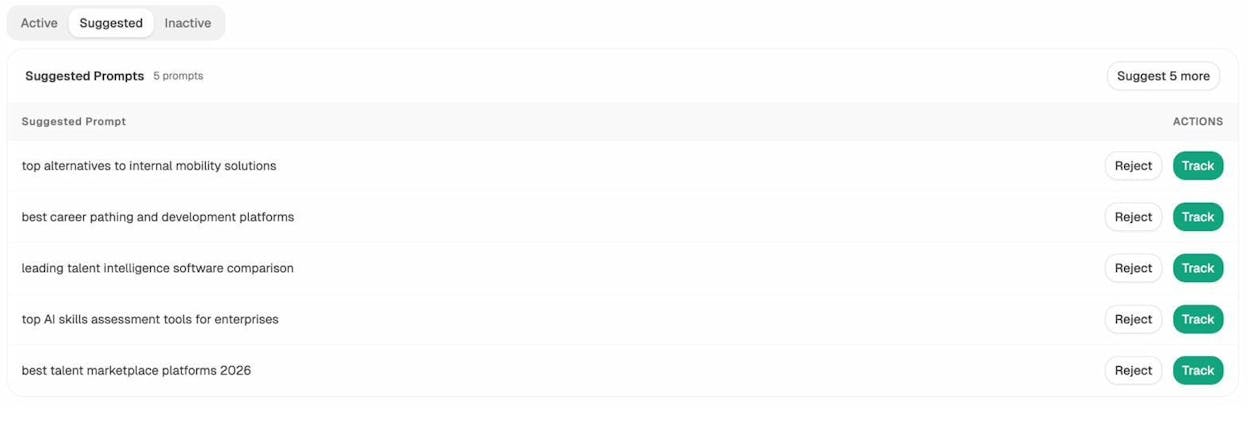
If you’re already using Analyze AI, you can use the Suggested Prompts feature to see what questions people are actually asking AI engines about your topic. These prompts often reveal subtopics you wouldn’t find through traditional keyword research alone.
Step 3: Create Your Hub Page and Subpages
Now you know your hub topic and your subtopics. It’s time to create the content.
Write the Subpages First
This is counterintuitive, but it works better than starting with the hub page. When you write the subpages first, you develop a deep understanding of each subtopic. By the time you sit down to write the hub page, you know exactly what each subpage covers — which makes the hub page easier to write, because you know precisely how much to say about each subtopic before linking out.
Each subpage should be a thorough, standalone article that could rank on its own for its target keyword. Think of them as full blog posts, not thin summaries. They need the same level of depth, examples, and actionable advice you’d put into any SEO content strategy piece.
Write the Hub Page Last
Your hub page serves as the entry point and navigation layer. It should cover each subtopic briefly — a few paragraphs at most — and then link to the corresponding subpage for more detail.
Think of the hub page as a concierge. Its job is to orient the reader, give them enough context to understand what each subtopic is about, and then send them to the right subpage. It should not try to be the deepest resource on every subtopic. That’s what the subpages are for.
A good hub page typically includes:
-
An introduction explaining what the topic is and why it matters
-
A brief section on each subtopic (2-4 paragraphs) with a link to the relevant subpage
-
A logical order that makes sense for someone learning the topic from scratch
-
Clear headings that help both readers and search engines understand the structure
Consider Custom Design (But Don’t Require It)
Many successful content hubs use custom-designed layouts with visual navigation elements — chapter cards, progress indicators, or interactive tables of contents. This increases perceived value and makes the hub more link-worthy.
But custom design is not required. Yoga Journal built a highly effective yoga poses hub using nothing but regular text links. Zapier’s remote work hub is essentially a well-organized blog post with contextual links.
![[Screenshot: Yoga Journal’s yoga poses hub page showing simple text-based links to subpages — no custom design, just clean organization]](https://www.datocms-assets.com/164164/1777063462-blobid15.png?auto=format,compress&w=1248&fit=max)
Start with a well-structured text hub. You can always add a custom design later once the hub is generating traffic and you’ve validated the topic.
Step 4: Interlink Everything Strategically
The linking structure is what separates a content hub from a random collection of blog posts. Get this right and the hub works. Get it wrong and you’ve just written a bunch of articles that don’t reinforce each other.
Hub-to-Subpage Links
Your hub page should link to every subpage. These links should appear contextually within the hub page’s content — not just in a list at the bottom. When you write a paragraph about fermentation on your winemaking hub page, link the word “fermentation” to your fermentation subpage.
Use descriptive anchor text. “Learn more about the wine fermentation process” is better than “click here.” Google uses internal anchor text to understand what the linked page is about.
![[Screenshot: An example hub page showing contextual inline links to subpages, with descriptive anchor text highlighted]](https://www.datocms-assets.com/164164/1777063463-blobid16.png?auto=format,compress&w=1248&fit=max)
Subpage-to-Hub Links
Every subpage should link back to the hub page. This is usually done with a breadcrumb, a contextual link in the introduction or conclusion, or a sidebar navigation element.
Drift does this with a persistent sidebar on their chatbot subpages that always links back to the main chatbot hub. You can accomplish the same thing with a simple text link at the top of each subpage: “This is part of our complete guide to [hub topic].”
Subpage-to-Subpage Links
Don’t forget to link subpages to each other where it makes sense. If your subpage about “wine aging” mentions that the type of grape affects aging potential, link to your subpage about grape varieties. These cross-links strengthen the cluster’s interconnectedness and help users navigate between related topics.
How to Extend Content Hubs for AI Search Visibility
Everything above applies to traditional SEO. But content hubs have a second dimension now: AI search.
AI engines — ChatGPT, Perplexity, Claude, Gemini, Microsoft Copilot — are becoming a meaningful traffic source. They generate answers by synthesizing content from across the web. The content they cite tends to share specific characteristics: it’s comprehensive, well-structured, authoritative, and semantically clear.
Content hubs check all of those boxes. A properly built hub is a ready-made structure that AI models can reference confidently — because the depth is there, the organization is there, and the internal links create a clear semantic map.
Here’s how to make your content hub work specifically for AI search visibility.
Structure Content for Citability
AI models tend to cite content that directly answers questions. Structure your hub page and subpages with clear headings, definitions, and concise answer paragraphs that an AI model can extract and cite.
For each subtopic in your hub, make sure there’s a clear, self-contained paragraph that directly answers the core question. If your subpage is about “wine fermentation,” include a paragraph near the top that cleanly defines what wine fermentation is and why it matters. This makes it easy for an AI model to cite your page when a user asks that question.
Monitor Which Hub Pages AI Engines Are Citing
You can’t improve what you don’t measure. Once your content hub is live, track whether AI engines are actually citing your pages — and which pages in the cluster are getting cited versus which are being ignored.
Analyze AI lets you do this. The Prompts dashboard shows the exact prompts where your brand appears (and doesn’t appear) in AI-generated answers, along with your visibility score, sentiment, and position for each prompt.
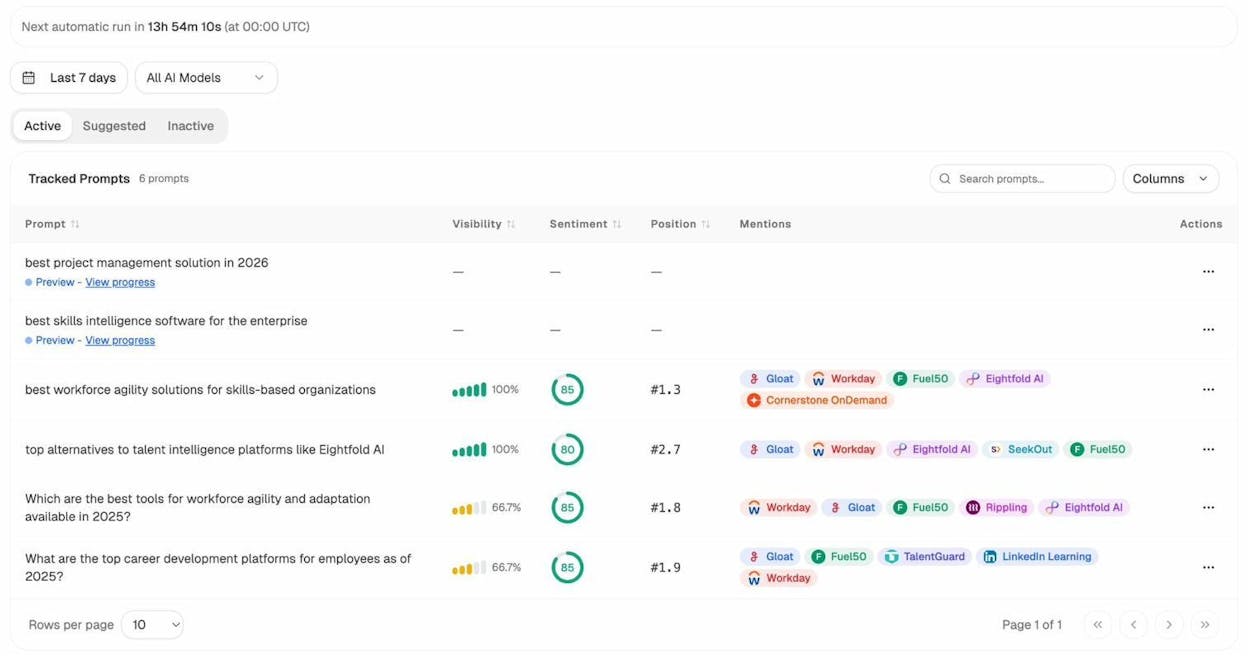
If your hub page about “types of wine” is getting cited by ChatGPT but your subpage about Merlot isn’t showing up at all, that’s a signal to improve the Merlot subpage — add more depth, clearer definitions, better structure, or more authoritative external sources.
Identify Gaps Where Competitors Win in AI Answers
One of the most powerful uses of AI search monitoring for content hubs is competitive gap analysis. You can see exactly which competitors are showing up for prompts related to your hub topic — and which specific pages they’re getting cited for.
The Competitors dashboard in Analyze AI shows you which brands appear alongside yours in AI answers, how many mentions they have, and whether they’re trending up or down. The Suggested Competitors feature even surfaces brands you might not be tracking yet — entities that AI models frequently mention in your topic area.
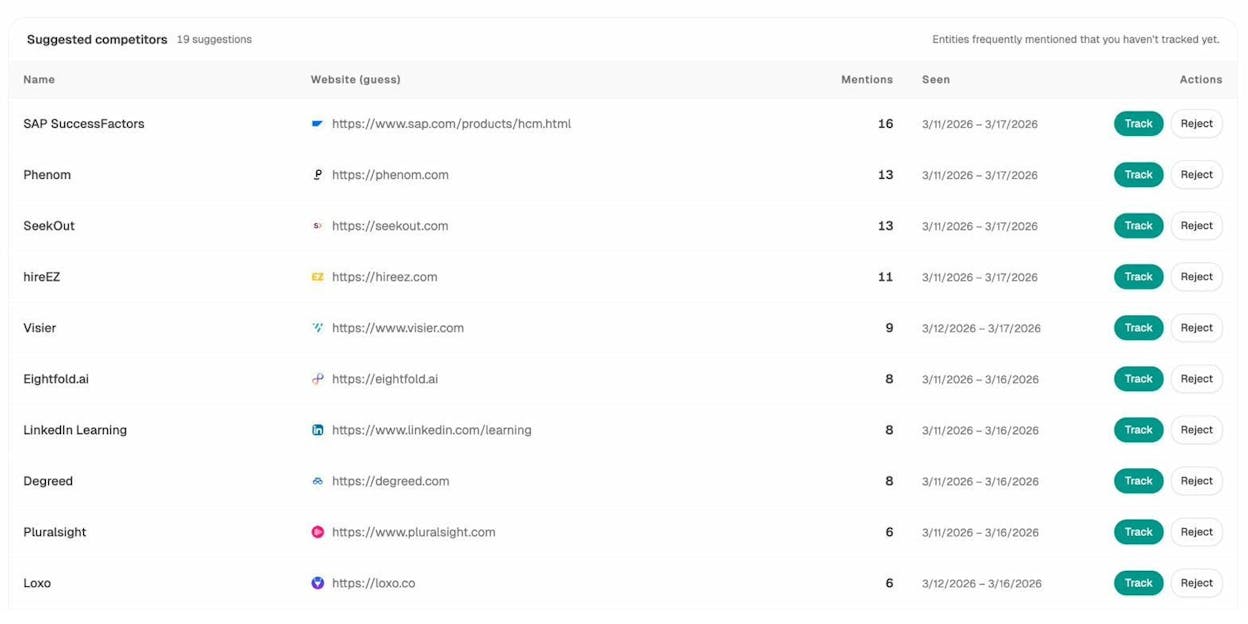
If a competitor’s subpage about “wine storage” is consistently cited by Perplexity and your wine storage subpage isn’t, you can study their page to understand what makes it more citable — then improve yours.
Track AI-Referred Traffic to Hub Pages
Beyond visibility, you want to know whether AI search is actually sending traffic to your content hub. The AI Traffic Analytics dashboard in Analyze AI connects to your GA4 data and shows which pages receive AI-referred sessions, broken down by engine (ChatGPT, Perplexity, Claude, Gemini, Copilot, and more).
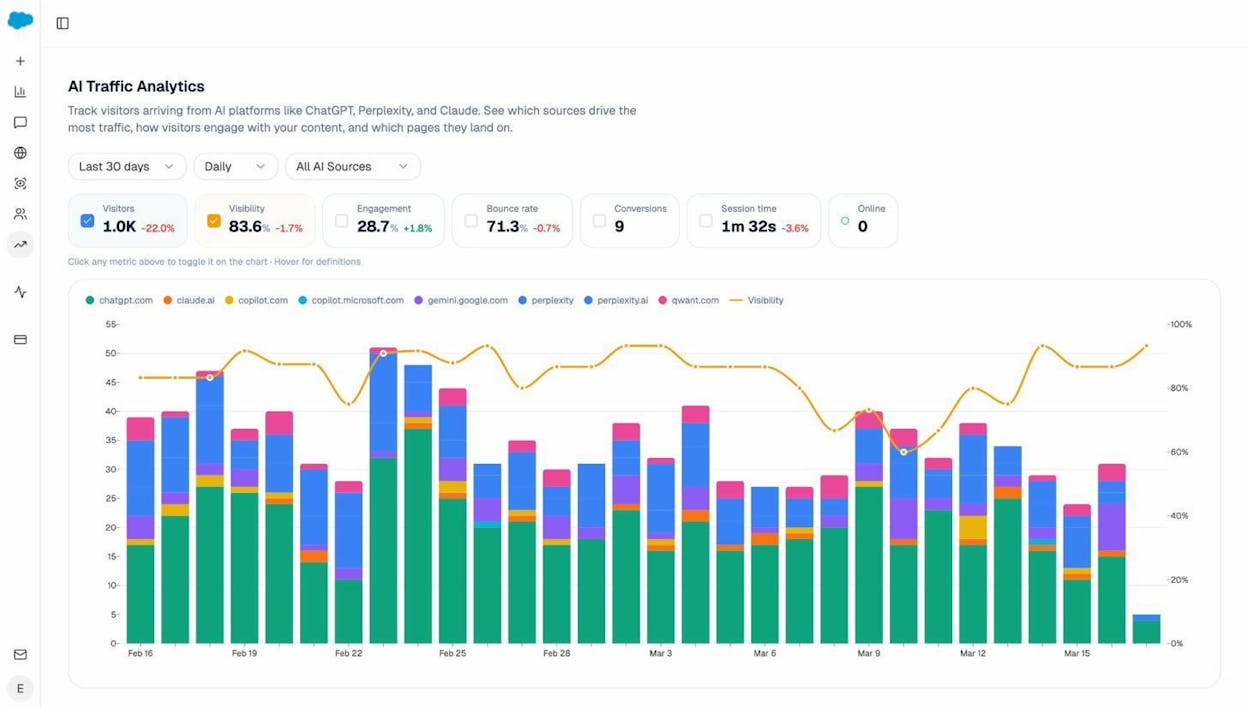
The Landing Pages report goes even deeper. It shows which specific pages in your content hub receive AI-referred traffic, along with engagement metrics like bounce rate, session duration, and conversions. This tells you which hub pages are actually converting AI traffic — so you can double down on what works.
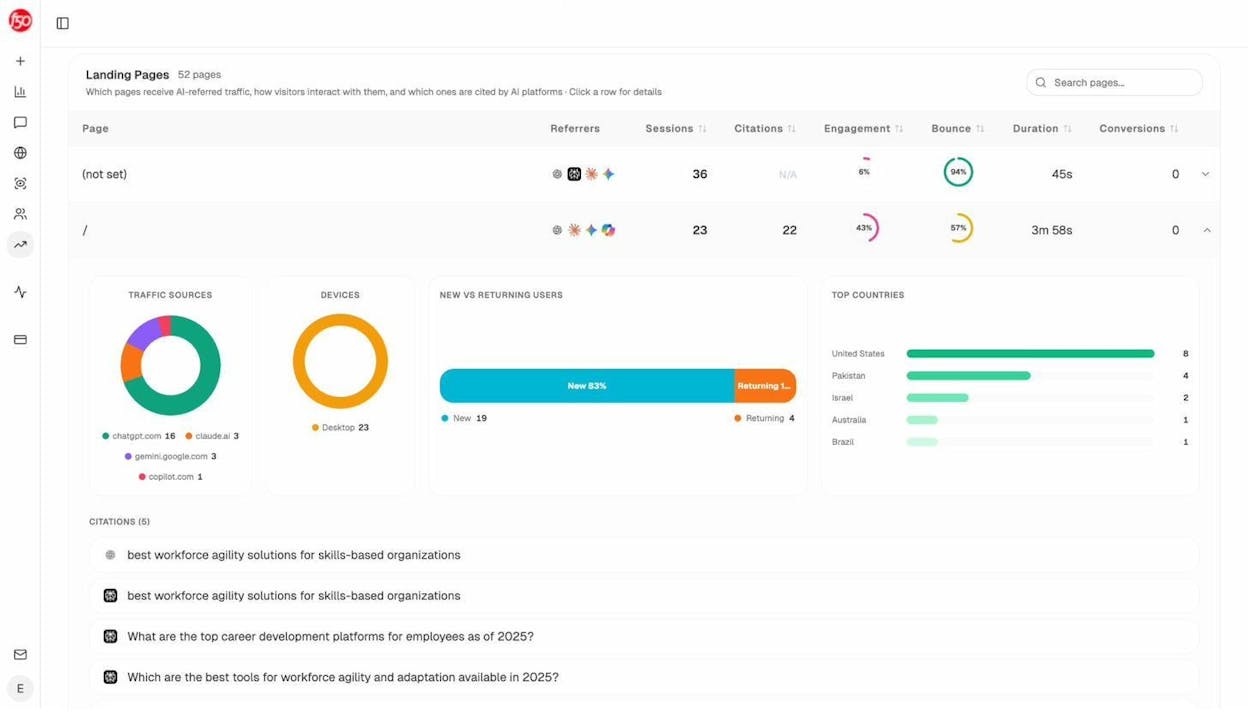
For example, if your subpage about “keto meal plans” is driving 50 AI-referred sessions per month with a 5% conversion rate, and your subpage about “keto side effects” is driving 10 sessions with a 0% conversion rate, you know where to invest more content depth and where to improve your on-page conversion elements.
How to Measure Content Hub Performance
Most guides skip this, but it’s essential. You need to know whether your content hub is actually working — and where to invest further effort.
SEO Metrics to Track
Organic traffic to the hub page: Is traffic growing over time? Content hubs typically take 3-6 months to gain momentum as Google indexes and ranks the cluster pages.
Organic traffic to subpages: Track each subpage individually. Some will perform immediately; others will need optimization. The subpages driving the most traffic are often the best candidates for deeper content investment.
Keyword rankings across the cluster: Monitor which keywords each page in the hub ranks for. Use a Keyword Rank Checker to track positions over time. As the hub matures, you should see rankings improve across the entire cluster — not just the hub page.
Backlinks earned: Track backlinks to both the hub page and subpages. Content hubs tend to earn backlinks to the hub page first (because it’s the most linkable asset), but over time subpages earn links too. You can use a Website Authority Checker or the Broken Link Checker to audit your link profile.
Internal link structure health: Periodically audit the hub to make sure all internal links are working, no subpages are orphaned (missing links from the hub page), and new subpages have been properly linked into the cluster.
AI Search Metrics to Track
Traditional metrics don’t capture the full picture anymore. If your content hub is performing well in AI search, you’ll also want to track:
AI visibility rate: What percentage of relevant AI prompts mention your brand or cite your content? The Analyze AI Overview dashboard tracks this across all major AI engines.
Citation sources: Which specific URLs in your hub are being cited by AI models? The Sources dashboard breaks this down by content type (blog, website, review, product page) and by domain, so you can see exactly which hub pages AI engines trust most.
AI-referred sessions: How many visits are AI search engines sending to your content hub? This is the ultimate proof that your hub is working in AI search — real traffic that you can attribute to specific AI platforms.
Competitive share of voice: What share of AI answers in your topic do you own versus your competitors? This is the AI equivalent of keyword rankings in traditional SEO.
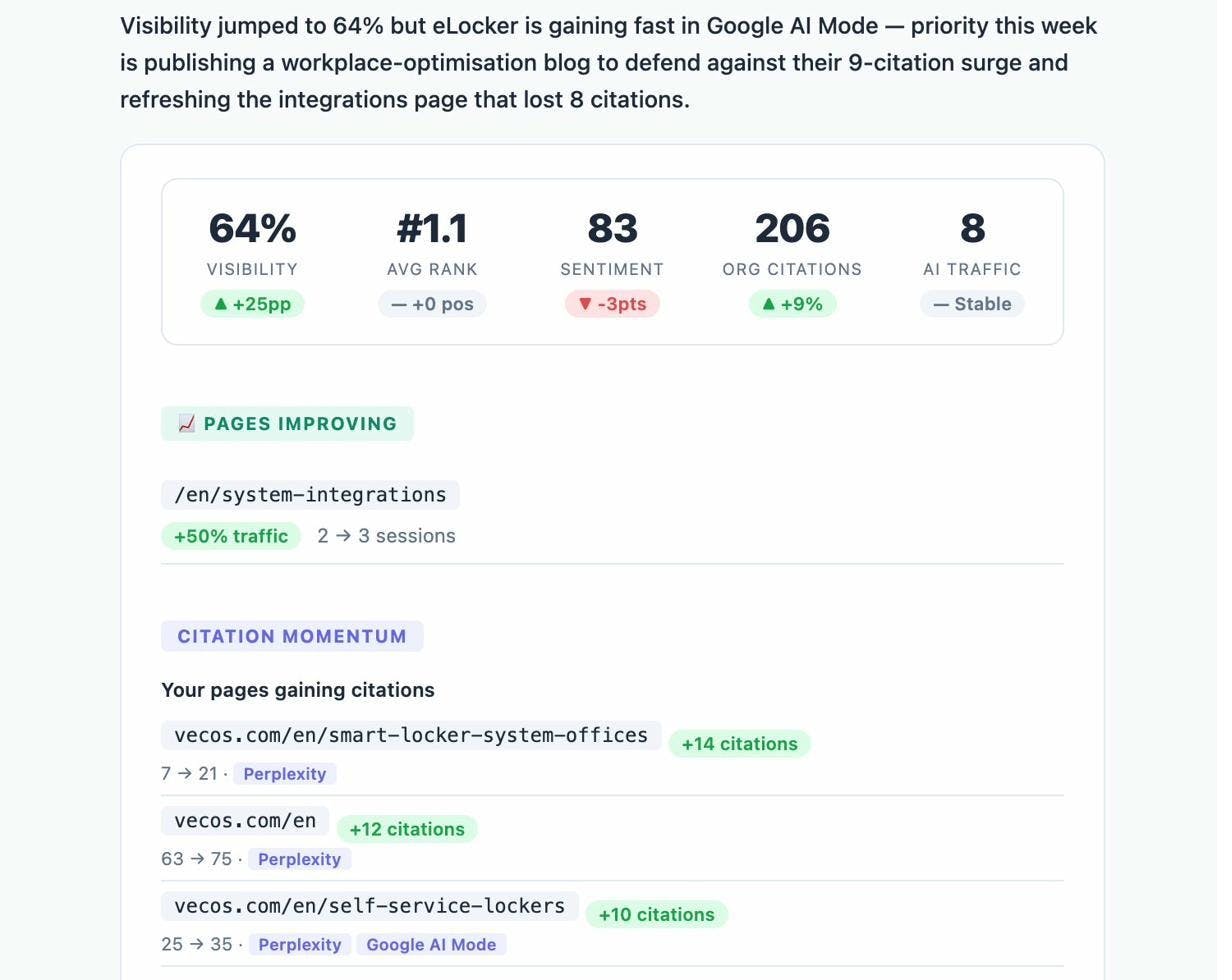
Analyze AI’s Weekly Emails make this monitoring effortless. Every week, you receive a digest showing your visibility changes, pages that are gaining or losing citations, competitor movements, and specific actions to take.
How to Speed Up the Content Hub Process
The biggest barrier to building content hubs is the sheer volume of content required. If your hub has 12 subtopics, you’re looking at 13 pieces of content (the hub page plus 12 subpages). That’s a lot of writing.
But there’s a shortcut: leverage content you’ve already published.
Reorganize Existing Content Into Hubs
If your blog has been active for any length of time, you probably already have clusters of related articles scattered across your site. You just haven’t organized them.
Look through your existing blog posts and group them by topic. If you’ve written 8 articles about email marketing — one about subject lines, one about open rates, one about drip campaigns, one about list segmentation — you already have most of a content hub. You just need to:
-
Write a hub page that covers “email marketing” at a high level
-
Link the hub page to each of your existing articles
-
Link each existing article back to the hub page
-
Fill in any subtopic gaps with new content
This approach lets you create a content hub with just one or two new pieces of content instead of thirteen.
![[Screenshot: A before/after diagram showing scattered blog posts being reorganized under a new hub page — similar to the diagram in the Ahrefs article but more detailed, showing how existing URLs get restructured]](https://www.datocms-assets.com/164164/1777063488-blobid22.png?auto=format,compress&w=1248&fit=max)
Audit Your Content Before Reorganizing
Before you reorganize existing content into a hub, audit each piece for quality. Some of your older articles may be outdated, thin, or poorly written. Adding a hub page on top of low-quality subpages won’t produce good results.
For each potential subpage, ask:
-
Is this content still accurate?
-
Does it cover the subtopic thoroughly enough to stand as a dedicated resource?
-
Is it targeting the right keyword?
-
Does it need a major rewrite or just minor updates?
Be willing to rewrite weak subpages before linking them into the hub. The strength of a content hub depends on the quality of every page in it. One thin subpage can undermine the authority of the entire cluster.
Use AI Search Data to Prioritize Subtopics
Here’s where Analyze AI adds a strategic advantage that traditional SEO tools can’t offer. Before deciding which subtopics to build next, check which questions people are actually asking AI engines about your hub topic.
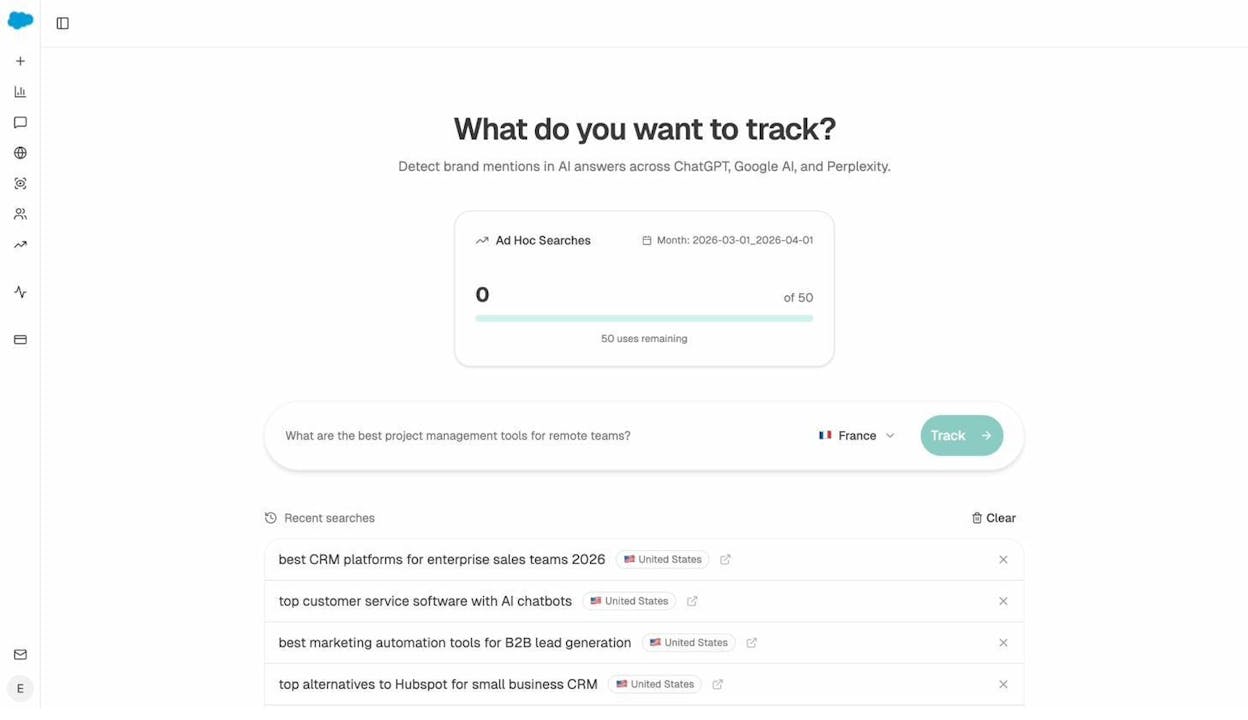
The Ad Hoc Prompt Searches feature in Analyze AI lets you run any prompt through multiple AI engines and see which brands and sources get cited in real time. Test prompts like “what are the best types of red wine for beginners” or “how does wine fermentation work” and see who’s currently winning those AI answers. If no one is producing great content on a subtopic, that’s a gap you can own.
Common Content Hub Mistakes (and How to Avoid Them)
Building content hubs is straightforward in theory but easy to get wrong in practice. Here are the mistakes I see most often.
Choosing a Topic That’s Too Narrow
If your topic only has two or three subtopics, you don’t need a content hub — you need a long-form blog post. Content hubs create their advantage through the volume and interconnection of multiple pages. A hub with three subpages isn’t a hub; it’s a small blog series.
Before committing to a hub, make sure you can identify at least five meaningful subtopics, each with enough search demand and depth to justify a standalone page.
Choosing a Topic That’s Too Broad
Going too broad is equally problematic. A hub about “marketing” would require hundreds of subpages to cover adequately. You’d be spreading your resources too thin and creating a hub that’s impossible for users to navigate.
Keep your hub focused. “Content marketing strategy” is better than “marketing.” “Types of red wine” is better than “wine.” If you later want to expand, you can create additional hubs on adjacent topics and link between them.
Writing Thin Subpages
Each subpage needs to be a legitimate resource that could stand on its own. If your subpage about “Merlot” is 300 words with no examples, no tasting notes, no pairing recommendations, and no production details, it’s not going to rank and it’s not going to make your hub more authoritative.
Invest in depth. Every subpage should be the best resource available on its specific subtopic. That’s what creates the compound effect — when every spoke in the wheel is strong, the hub becomes the definitive destination for the entire topic.
Neglecting the Internal Link Structure
The internal links are the engine that makes a content hub work. Without them, you’ve just written a bunch of blog posts. Audit your links regularly:
-
Does the hub page link to every subpage?
-
Does every subpage link back to the hub?
-
Are there logical cross-links between related subpages?
-
Is the anchor text descriptive and relevant?
Missing links break the hub structure and prevent authority from flowing between pages. Make internal link auditing a recurring task — especially when you add new subpages.
Never Updating the Hub
Content hubs are not “set it and forget it” assets. Topics evolve. New subtopics emerge. Existing subpages become outdated. Your competitors publish better content on specific subtopics.
Schedule periodic reviews of your content hub — at least quarterly for competitive topics. Update subpages with new information, add new subpages as relevant subtopics emerge, and refresh the hub page to reflect any changes to the cluster.
You can use Analyze AI’s Weekly Emails to stay on top of changes in your competitive landscape. If a competitor starts gaining citations in AI answers for a subtopic you cover, you’ll know about it immediately — and you can update your content before losing ground.
Ignoring AI Search Entirely
This is increasingly a missed opportunity. If you build a content hub that ranks well on Google but doesn’t appear in any AI-generated answers, you’re leaving a growing channel on the table.
AI search traffic is still a fraction of total search traffic for most sites. But it’s growing fast. Early adopters who optimize their content hubs for AI citability — clear structure, direct answers, semantic completeness — will have a significant advantage as AI search volume increases.
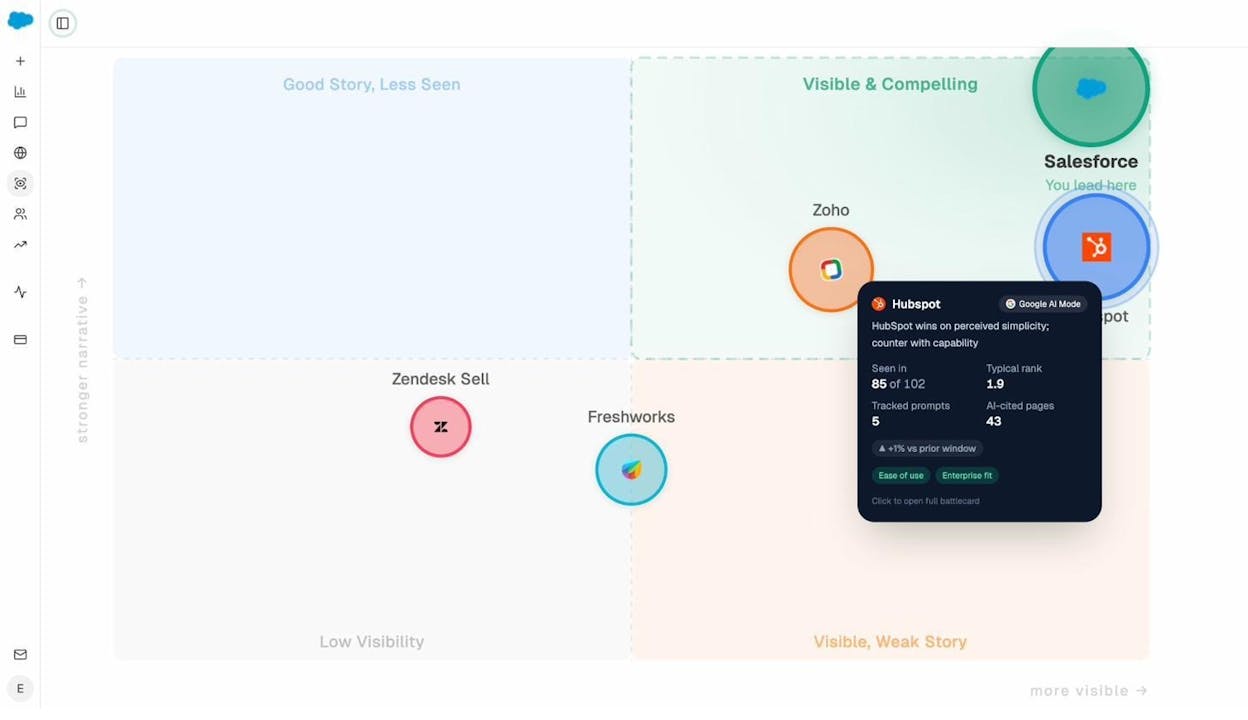
The Perception Map in Analyze AI gives you a visual overview of where your brand stands relative to competitors in AI search — plotted by visibility and narrative strength. It’s a fast way to understand your competitive position and identify where you need to invest.
Content Hub Examples Worth Studying
Before wrapping up, let’s look at a few content hubs that demonstrate the principles above.
Drift: Chatbot Learning Center
Drift built one of the most cited content hub examples. Their hub page provides a high-level overview of chatbots, then links to dedicated subpages covering how chatbots work, benefits of chatbots, chatbot use cases, and more. Every subpage links back to the hub. The result: 500+ backlinks and thousands of monthly organic visits.
What makes it work: Custom design with clear visual navigation, each subpage is genuinely in-depth (not a thin summary), and the topic is perfectly scoped — broad enough for 8-10 subpages but not so broad that it loses focus.
DietDoctor: Keto for Beginners
DietDoctor’s keto hub covers the broad topic of ketogenic dieting and links to subpages about keto recipes, meal plans, side effects, foods to eat and avoid, and more. It’s a comprehensive resource that effectively captures traffic across dozens of keto-related keywords.
What makes it work: The hub covers a topic with massive search demand and natural breadth. Each subpage targets a distinct, high-volume keyword. The internal linking is tight — every subpage connects back to the hub and to related subpages.
WineFolly: Wine 101 Beginners Guide
WineFolly’s wine guide acts as a hub page linking to subpages about different wine types, tasting techniques, wine regions, and food pairing. The custom visual design makes it more engaging and shareable than a text-only guide.
What makes it work: Strong visual design increases perceived value and earns more backlinks. The breadth is perfectly scoped for the beginner audience. Each subpage is detailed enough to rank independently.
Yoga Journal: Yoga Pose Finder
Yoga Journal’s pose finder is a hub page linking to individual subpages for each yoga pose. No custom design — just well-organized text links. But the structure creates a massive content cluster covering hundreds of long-tail keywords.
What makes it work: The hub leverages a list-based format, which is perfect for topics with many distinct items. Even without fancy design, the sheer breadth and quality of the subpages create a powerful topical authority signal.
Final Thoughts
Content hubs work because they align with how both search engines and AI models evaluate content: they reward depth, structure, and interconnection. A well-built content hub doesn’t just rank for one keyword — it captures traffic across an entire topic while building authority that compounds over time.
But the landscape is shifting. Content hubs that only optimize for Google miss a growing channel. AI search engines are increasingly driving referral traffic, and they favor the same qualities that make content hubs effective: comprehensive coverage, clear structure, and authoritative sourcing.
The smartest approach is to build content hubs that work for both. Structure your content for traditional SEO. Interlink strategically. Write with depth and clarity. And then layer in AI search monitoring to track where your hub pages show up in AI-generated answers, where competitors are winning, and where you have gaps to fill.
SEO isn’t dying. It’s evolving. Content hubs are one of the strategies that bridge the gap between traditional search and AI search — because the fundamentals of quality content, logical structure, and topical authority remain constant regardless of which engine is serving the answer.
If you want to see how your content performs across both channels, Analyze AI gives you the full picture — from AI visibility and citation tracking to competitive intelligence and AI traffic attribution. Start tracking your AI rankings to see where your content hubs stand today.

Ernest

Ibrahim


