



Summarize this blog post with:


In this article, you’ll learn whether Wix has the SEO features you need, what its real limitations are, who should (and shouldn’t) use it, and how to optimize a Wix site for both traditional search engines and AI answer engines like ChatGPT, Perplexity, and Gemini. You’ll walk away with a step-by-step playbook you can follow right after reading.
Table of Contents
Does Wix Have Everything You Need for SEO?
Short answer: for most website owners, yes.
Wix had a rough reputation for years. From its launch in 2006 until a major platform overhaul in 2016, it lacked basic SEO capabilities. You couldn’t add alt text to images. You couldn’t customize URL structures. You couldn’t edit meta tags properly. It was, by most accounts, a poor choice for anyone who cared about search rankings.
That is no longer the case. Wix now supports virtually every on-page SEO task a typical website owner needs. You can customize title tags and meta descriptions. You can set canonical URLs. You can add structured data markup. You can edit robots.txt directives. You can submit sitemaps to Google Search Console.
Wix also hired experienced SEO professionals like Mordy Oberstein and Crystal Carter, who pushed for better SEO features and more transparent communication with the search community. The result is a platform that has closed most of the gap with WordPress on core SEO functionality.
Google’s own search team has confirmed this. John Mueller, Google’s senior search analyst, has publicly stated that Wix is a solid platform for SEO and that the negative reputation from its early years no longer reflects reality. He specifically noted that Wix has made it easy to build fast sites with strong Lighthouse scores — and while speed is only one piece of the SEO puzzle, it matters.
![[Screenshot: Google’s John Mueller quote about Wix SEO from Search Engine Journal]](https://www.datocms-assets.com/164164/1777064535-blobid1.png?auto=format,compress&w=1248&fit=max)
The data backs this up too. While studies have shown that more WordPress sites receive organic traffic than Wix sites on average, the difference is almost certainly driven by the users, not the platforms. WordPress tends to attract more technical users who invest heavily in SEO. Wix tends to attract business owners who want a simple website and may not optimize it at all. The tool isn’t the bottleneck — the operator is.
What About AI Search?
Here is something almost no Wix SEO guide will tell you: search is splitting into two channels.
Traditional search engines like Google still drive the majority of organic traffic. But AI answer engines — ChatGPT, Perplexity, Gemini, Copilot — are increasingly sending visitors to websites too. When someone asks ChatGPT “what’s the best website builder for a small bakery?” and it recommends your business by name, that is a new kind of organic visibility.
The good news is that the fundamentals are the same. The content that ranks well in Google tends to get cited by AI engines too. Clear, original, well-structured content wins in both channels. The difference is that AI search adds a layer you need to monitor: which prompts mention your brand, how AI engines describe your business, and which sources they cite when answering questions in your industry.
This matters for Wix users specifically because many Wix sites are small business websites — exactly the kind of site that benefits when an AI engine recommends them by name in a conversational answer.
We will cover how to track and improve your AI search visibility later in this guide. For now, the key takeaway is that Wix handles the technical SEO basics well enough that your content can show up in both traditional and AI search results.
Wix SEO Limitations You Should Know About
Wix has no deal-breaking SEO problems. But it does have a few limitations that matter if you are serious about search performance. Understanding these upfront will help you decide whether Wix is the right fit or whether you should consider WordPress or another CMS instead.
1. Code Bloat and Page Speed
Website builders add code you will never use. Wix loads JavaScript and CSS for features — animations, app widgets, built-in analytics — even if your site doesn’t need them. This creates heavier pages that load slower than a custom-coded site or a lean WordPress setup.
That said, Wix has invested heavily in performance. Its Core Web Vitals scores are competitive with other website builders and better than many WordPress sites running bloated themes like Elementor or Divi. If you are comparing Wix to a hand-coded static site, Wix will lose. If you are comparing it to other drag-and-drop builders, Wix holds up well.
What this means for you: Page speed is a ranking factor, but a minor one. Unless your site is extremely slow, speed alone won’t tank your rankings. Focus on content quality first.
2. Limited Multilingual Support
If you plan to publish content in multiple languages, Wix’s multilingual tools are not ideal. You do not have full control over URL structures for different language versions. Hreflang implementation — the technical markup that tells Google which version to show to which audience — is limited compared to what you can do with WordPress plugins like WPML or Polylang.
What this means for you: If multilingual SEO is a core part of your strategy, Wix may create friction. For single-language sites, this limitation is irrelevant.
3. Restricted Advanced SEO Control
Wix autogenerates sitemaps, and you have limited ability to customize them. Image filenames are auto-generated with cryptic strings (like 09a0ab7~mv2.jpg), which hurts your chances of ranking in Google Images. Server-side rendering options are limited compared to WordPress, which can affect how search engine crawlers process your content.
You also cannot install custom plugins the way you can with WordPress. If you need a specific SEO tool — a custom schema generator, an advanced redirect manager, a granular crawl-control plugin — you are limited to what Wix’s app marketplace offers or what its built-in tools support.
What this means for you: For most sites, Wix’s built-in SEO tools are sufficient. But if your SEO strategy involves heavy technical optimization — programmatic SEO, complex redirect chains, custom structured data at scale — WordPress gives you more control.
4. Limited AI Search Optimization Tools
This is a limitation most guides skip entirely, but it matters increasingly in 2026. Wix does not natively provide tools to monitor how your site appears in AI search results. You cannot see whether ChatGPT, Perplexity, or Gemini mention your business. You cannot track which AI engines cite your pages or how your competitors are positioned in AI answers.
This is not a Wix-specific problem — WordPress doesn’t have this built in either. But it is something you need to solve separately if you want full visibility into how your site performs across all search channels. Tools like Analyze AI fill this gap by tracking your brand’s visibility, sentiment, and citations across every major AI engine.
What this means for you: Whether you use Wix or WordPress, you need a separate solution for AI search analytics. This is a new channel, and no CMS has built-in support for it yet.
Who Should Use Wix? (And Who Should Not)
The right CMS depends on your situation. Here is a straightforward breakdown:
|
Type of Website |
Is Wix a Good Fit? |
Why |
|---|---|---|
|
Personal website or portfolio |
Yes |
Wix provides everything you need. Quick setup, easy editing, no coding required. |
|
Local business (restaurant, salon, contractor) |
Yes |
Wix handles local SEO well. You can optimize for local keywords, add business info, and connect to Google Business Profile. |
|
Small blog or content site |
Yes, with caveats |
Wix works for small blogs. But if you plan to scale to hundreds of posts with complex internal linking, WordPress offers more flexibility. |
|
Affiliate website |
Maybe |
Wix can handle affiliate content, but large affiliate sites benefit from WordPress’s plugin ecosystem and more granular URL/redirect control. |
|
E-commerce store |
Maybe |
Wix has solid e-commerce features for SMBs. For larger stores, Shopify or WooCommerce may be better fits depending on your needs. |
|
SaaS or services business |
Maybe |
Depends on complexity. If you need a simple marketing site, Wix works. If you need custom integrations, gated content, or complex lead funnels, consider WordPress or a headless CMS. |
|
Enterprise website |
No |
Enterprise sites need advanced permissions, version control, custom workflows, and deep integrations that Wix does not support. |
|
Programmatic SEO site |
No |
Wix lacks the templating, database, and automation features needed for programmatic content at scale. |
One practical note: switching CMS platforms later is painful. URL migrations, redirect mapping, content reformatting, design rebuilds — it takes significant time and risks temporary traffic loss. Whatever platform you choose, plan to stick with it for a while. Pick the one that fits where you expect to be in two to three years, not just where you are today.
Seven Tips to Make Your Wix Website SEO-Friendly
If you are staying with Wix, here is exactly how to optimize your site for search. These tips cover both Google and AI search, because in 2026, you need to be visible in both.
1. Complete the Wix SEO Setup Checklist
Wix has a built-in SEO Setup Checklist that walks you through the basics. To find it, go to Marketing & SEO in your Wix dashboard, then click Get Found on Google.
The checklist asks you a few setup questions: your business name, your location (if applicable), and the three to five keywords you want to rank for. Then it gives you a step-by-step list of tasks to complete.
![[Screenshot: Wix SEO Setup Checklist showing the list of optimization steps]](https://www.datocms-assets.com/164164/1777064550-blobid2.jpg?auto=format,compress&w=1248&fit=max)
These tasks include updating your homepage title tag and meta description, verifying your site with Google Search Console, making sure your site is mobile-friendly, and connecting your social profiles.
Go through every item on the checklist. It takes about 30 minutes, and it ensures your site’s technical foundation is solid before you start creating content.
One thing the checklist gets wrong: It asks you to pick three to five keywords upfront. But keyword research is an ongoing process, not a one-time setup task. Use the checklist to set your initial targets, but plan to revisit your keyword strategy regularly as you learn what your audience actually searches for.
2. Set Up Google Search Console, Google Analytics, and AI Traffic Tracking
Your Wix site needs three layers of analytics to give you full visibility into search performance.
Layer 1: Google Search Console
Google Search Console (GSC) is non-negotiable. It shows you which queries drive impressions and clicks, which pages are indexed, and which technical issues Google finds on your site.
Wix makes this easy. The SEO Setup Checklist includes a one-click GSC connection. Once connected, you can monitor your search performance directly from Google Search Console.
![[Screenshot: Google Search Console Performance report showing clicks, impressions, CTR, and position data]](https://www.datocms-assets.com/164164/1777064557-blobid3.png?auto=format,compress&w=1248&fit=max)
Pay attention to three things in GSC:
First, the Performance report. This shows which queries bring people to your site. Sort by impressions to find queries where your site appears but doesn’t get clicked — these are opportunities to improve your title tags and meta descriptions.
Second, the Coverage report (now called “Pages”). This shows which pages are indexed and which are not. If important pages are missing from Google’s index, you need to fix that.
Third, the Core Web Vitals report. This flags pages with speed or usability issues that could hurt your rankings.
Layer 2: Google Analytics
Google Analytics (GA4) tells you what happens after someone arrives on your site. How long do they stay? Which pages do they visit? Do they convert?
To connect GA4 to your Wix site, go to Marketing & SEO > Marketing Integrations and click Connect on the Google Analytics card.
![[Screenshot: Wix Marketing Integrations page showing the Google Analytics connection option]](https://www.datocms-assets.com/164164/1777064560-blobid4.png?auto=format,compress&w=1248&fit=max)
Once connected, you can track traffic sources, user behavior, and conversions. This data helps you understand which content is working and which pages need improvement.
Layer 3: AI Traffic Tracking
This is the layer most Wix SEO guides skip entirely — and it’s becoming critical.
AI answer engines like ChatGPT, Perplexity, and Gemini are now sending measurable traffic to websites. But this traffic shows up differently in your analytics. It comes from referral domains like chatgpt.com, perplexity.ai, and gemini.google.com, and it’s easy to miss if you’re not looking for it.
Analyze AI tracks this automatically. Connect your GA4 account, and you can see exactly how many visitors arrive from each AI engine, which pages they land on, how they engage, and whether they convert.
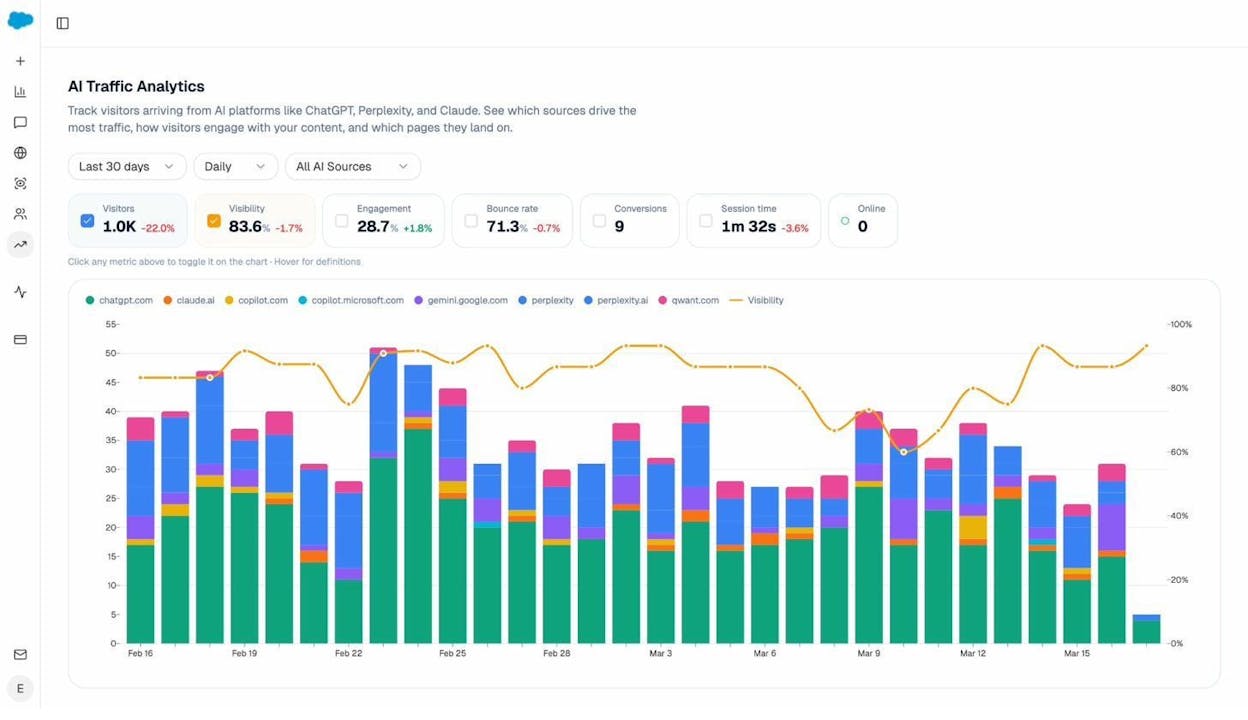
This is not a vanity metric. Businesses using Analyze AI have found that AI search traffic converts at rates of 5–8% — significantly higher than typical blog traffic. The visitors arriving from AI engines are further down the purchase funnel because they asked a specific question and got your business as the answer.
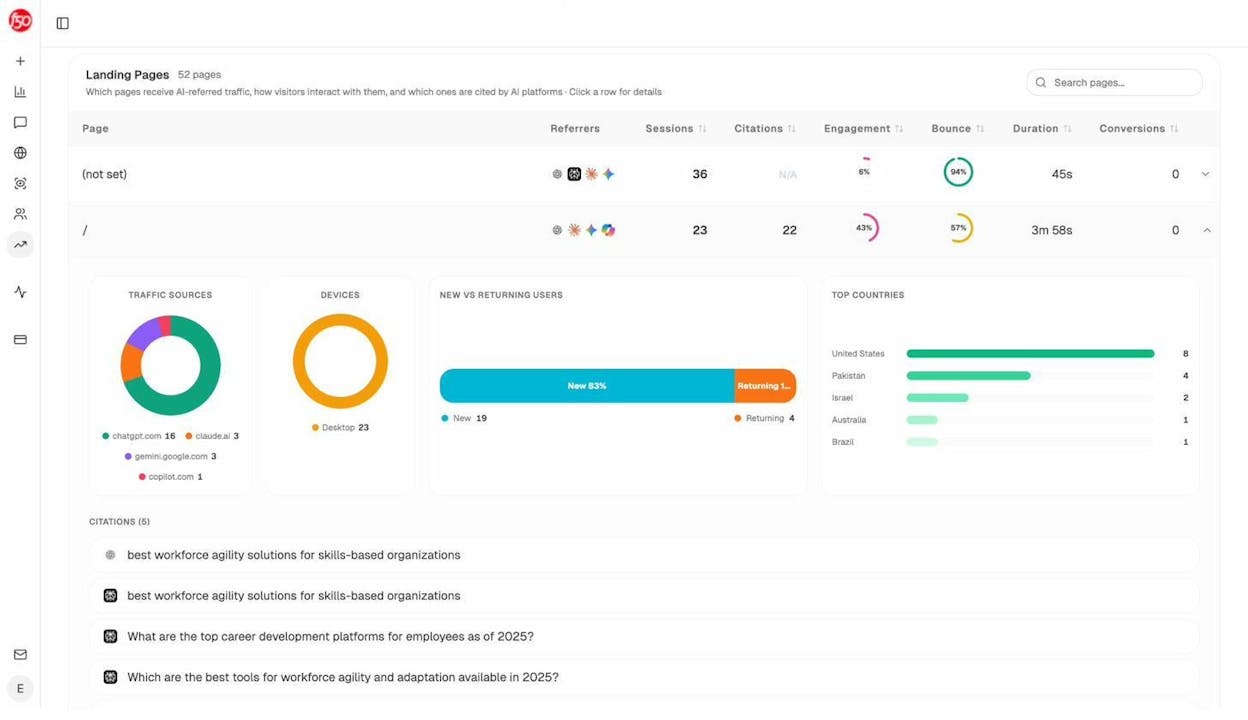
The Landing Pages report shows you exactly which pages on your Wix site receive AI-referred traffic. This tells you what’s working. If your pricing page gets traffic from ChatGPT but your blog doesn’t, that’s a signal to create more content that answers the questions AI engines are fielding in your industry.
3. Do Keyword Research (Properly)
The Wix SEO Checklist asks you to pick keywords, but it doesn’t teach you how to find good ones. This is where most Wix users go wrong. They pick broad, competitive keywords they’ll never rank for, or they target keywords with no search volume.
Here is a practical process:
Step 1: Start with seed keywords. These are the obvious terms related to your business. If you run a bakery in Austin, your seeds are “bakery Austin,” “custom cakes Austin,” “wedding cakes near me,” and similar.
Step 2: Expand your list. Use the Analyze AI Keyword Generator to find related keywords. Type in your seed keyword and get a list of variations, long-tail terms, and question-based queries that people actually search for.
![[Screenshot: Analyze AI Keyword Generator showing keyword suggestions for a seed keyword]](https://www.datocms-assets.com/164164/1777064578-blobid7.png?auto=format,compress&w=1248&fit=max)
You can also use Google’s own tools for free. Type your seed keyword into Google and look at three things:
-
Autocomplete suggestions: Start typing your keyword and see what Google suggests. These are real queries people search for.
-
People Also Ask: The expandable questions in search results show related queries. Each one is a potential blog post or FAQ entry.
-
Related Searches: Scroll to the bottom of the search results page for more keyword ideas.
![[Screenshot: Google search showing Autocomplete suggestions, People Also Ask section, and Related Searches]](https://www.datocms-assets.com/164164/1777064581-blobid8.png?auto=format,compress&w=1248&fit=max)
Step 3: Check keyword difficulty. Not every keyword is worth targeting. Use the Analyze AI Keyword Difficulty Checker to see how hard it would be to rank for each term. New Wix sites should start with low-difficulty, long-tail keywords and work up from there.
![[Screenshot: Analyze AI Keyword Difficulty Checker showing difficulty score for a keyword]](https://www.datocms-assets.com/164164/1777064587-blobid9.png?auto=format,compress&w=1248&fit=max)
Step 4: Check current SERP competition. Use the Analyze AI SERP Checker to see who currently ranks for your target keyword. If the first page is dominated by massive sites like Wikipedia, Forbes, and Amazon, you’ll want to find a less competitive variation.
![[Screenshot: Analyze AI SERP Checker showing the top-ranking pages for a keyword]](https://www.datocms-assets.com/164164/1777064589-blobid10.png?auto=format,compress&w=1248&fit=max)
Step 5: Map keywords to pages. Each page on your site should target one primary keyword and a handful of related secondary keywords. Your homepage targets your main brand keyword. Your service pages target service-specific keywords. Your blog posts target informational keywords.
For a deeper walkthrough, read our full guide on SEO keywords and how to find them.
What About Keywords for AI Search?
Traditional keyword research focuses on what people type into Google. But people phrase things differently when talking to ChatGPT or Perplexity. They use full sentences and conversational language instead of fragmented search queries.
For example, a Google searcher might type “best bakery Austin TX.” A ChatGPT user might ask “What’s the best bakery in Austin for custom wedding cakes under $500?”
You do not need a separate keyword strategy for AI search. But you do need to make sure your content answers these conversational questions clearly and directly. Write in a way that addresses the full question — not just the keyword — and AI engines are more likely to cite your content.
You can use Analyze AI’s Ad Hoc Search feature to test whether AI engines currently mention your business for specific prompts. Type in a question your potential customers might ask, and see which brands AI recommends.
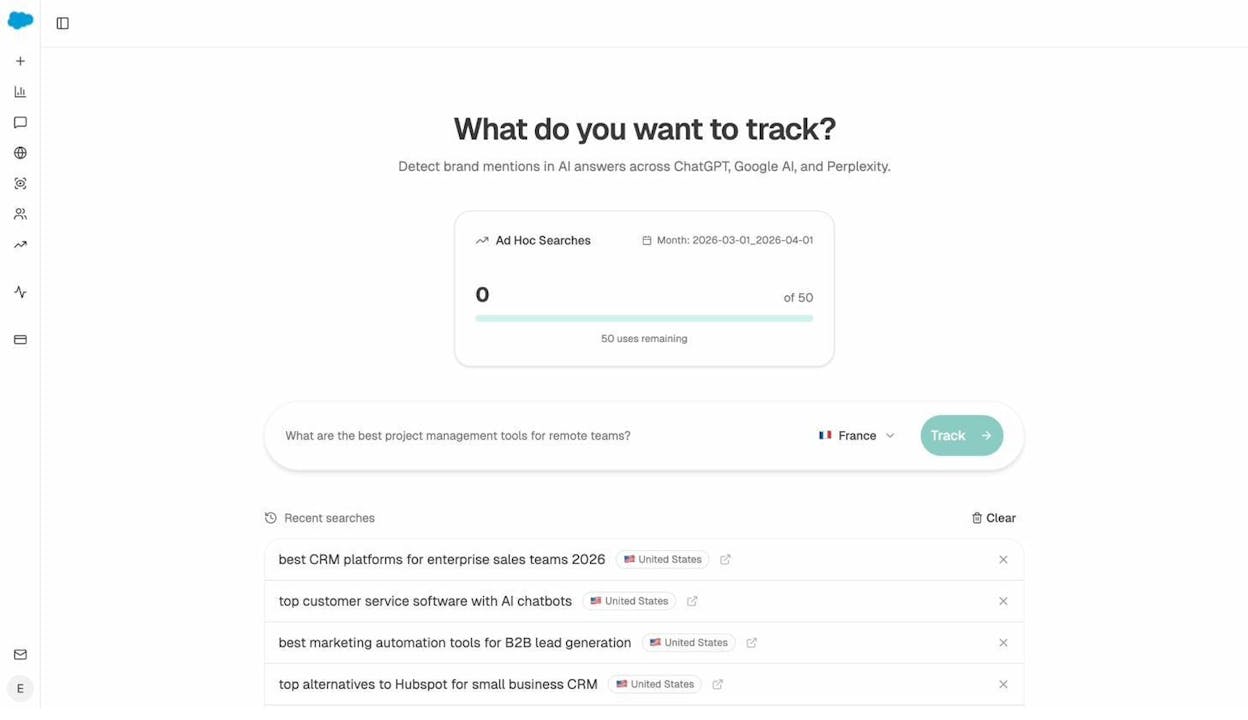
If your competitors show up and you don’t, that’s a content gap you need to fill. If no one in your local market is being cited, that’s an opportunity to be first.
4. Create Search-Optimized Content
Having a Wix site with a homepage, an about page, and a contact page is not enough to rank for anything meaningful. You need content — and not just any content. You need content that is better than what currently ranks for your target keywords.
Here is what search-optimized content looks like in practice:
Match search intent. Before writing anything, search your target keyword in Google and look at what ranks. If the top results are all “how-to” guides, write a how-to guide. If they’re all comparison lists, write a comparison list. Don’t write a product page when Google is showing informational content.
Structure your content clearly. Use H2 and H3 headings to organize your content into logical sections. Each section should cover one clear subtopic. This helps both readers and search engines understand your content’s structure.
Lead with the answer. Put your most important information at the top of each section, not buried at the bottom. This writing pattern — called BLUF (Bottom Line Up Front) — makes your content easier to scan and more likely to be picked up by featured snippets and AI answer engines.
Use original examples and data. The biggest differentiator between content that ranks and content that doesn’t is specificity. Anyone can write a generic guide about “how to improve your website’s SEO.” What ranks is the guide with real screenshots, specific numbers, step-by-step instructions, and examples from actual businesses.
Add images that earn their place. Every image should either explain something (like a screenshot of a process) or provide evidence (like a chart showing results). Decorative stock photos don’t help your SEO. Instructional images do.
Write for AI citation too. AI engines prefer content that states claims clearly, provides evidence, and attributes information to specific sources. Structure your content with clear topic sentences, factual claims backed by data, and well-organized sections. This makes it easier for AI models to extract and cite your content. Our research on how LLMs cite sources found that blog content is the most-cited content type across all major AI engines — so if you’re blogging on Wix, you’re already creating the format AI engines prefer.
For a complete content framework, check out our SEO content strategy guide.
5. Build a Strong Internal Linking Structure
Internal links — links from one page on your site to another page on your site — are one of the most underused SEO tactics, especially on Wix sites.
Internal links do three things:
First, they help Google discover and crawl your pages. If a page has no internal links pointing to it, Google may never find it.
Second, they pass authority between pages. When your highest-authority page links to a newer, less authoritative page, it passes some of that authority along and helps the newer page rank.
Third, they help visitors navigate your site. A well-placed internal link keeps someone on your site longer and guides them toward the pages that matter — your service pages, your pricing page, your contact form.
How to add internal links in Wix:
In the Wix editor, highlight the text you want to link. Click the chain link icon in the toolbar. Select the page on your site you want to link to. Done.
![[Screenshot: Wix text editor showing the internal link dialog with the page selection dropdown]](https://www.datocms-assets.com/164164/1777064600-blobid12.png?auto=format,compress&w=1248&fit=max)
Internal linking best practices for Wix sites:
-
Link from every blog post to at least two or three other relevant pages on your site.
-
Link from your highest-traffic pages to the pages you most want to rank. Your homepage should link to your most important service pages and content.
-
Use descriptive anchor text. Instead of linking the word “here,” link a phrase that describes what the target page is about. For example, link “our guide to keyword research” instead of “click here to learn more.”
-
After publishing a new page, go back to two or three existing pages and add links to the new page. This ensures the new page gets discovered quickly.
For more depth, read our full guide on internal linking for SEO.
6. Schedule Regular SEO and AI Visibility Audits
Setting up your Wix site for SEO is not a one-time task. Things break. Pages return 404 errors. Meta descriptions get deleted during redesigns. Blog posts fall out of the index because of a sitemap issue. You need a regular audit schedule to catch these problems before they cost you traffic.
SEO audit basics:
Use a crawling tool to check your site for technical issues on a monthly basis. The Analyze AI Broken Link Checker can scan your site and flag broken links, which are one of the most common (and easiest to fix) SEO issues.
![[Screenshot: Analyze AI Broken Link Checker results showing broken links found on a website]](https://www.datocms-assets.com/164164/1777064604-blobid13.png?auto=format,compress&w=1248&fit=max)
Check Google Search Console at least once a week for new coverage errors, security issues, or manual actions. Set up email alerts in GSC so you get notified when something breaks.
Use the Analyze AI Website Authority Checker to monitor your site’s domain authority over time. This gives you a rough sense of how Google perceives your site’s overall trustworthiness.
![[Screenshot: Analyze AI Website Authority Checker showing domain authority score]](https://www.datocms-assets.com/164164/1777064606-blobid14.png?auto=format,compress&w=1248&fit=max)
AI visibility audits:
This is new territory for most website owners, but it is increasingly important. You need to know how AI engines describe your business, whether they recommend you or your competitors, and whether the information they share about you is accurate.
Analyze AI’s Prompts dashboard lets you track specific prompts over time. Set up the prompts your potential customers are likely to ask — things like “best [your service] in [your city]” or “what is [your product category]” — and monitor your visibility, position, and sentiment across ChatGPT, Perplexity, Gemini, and Copilot.
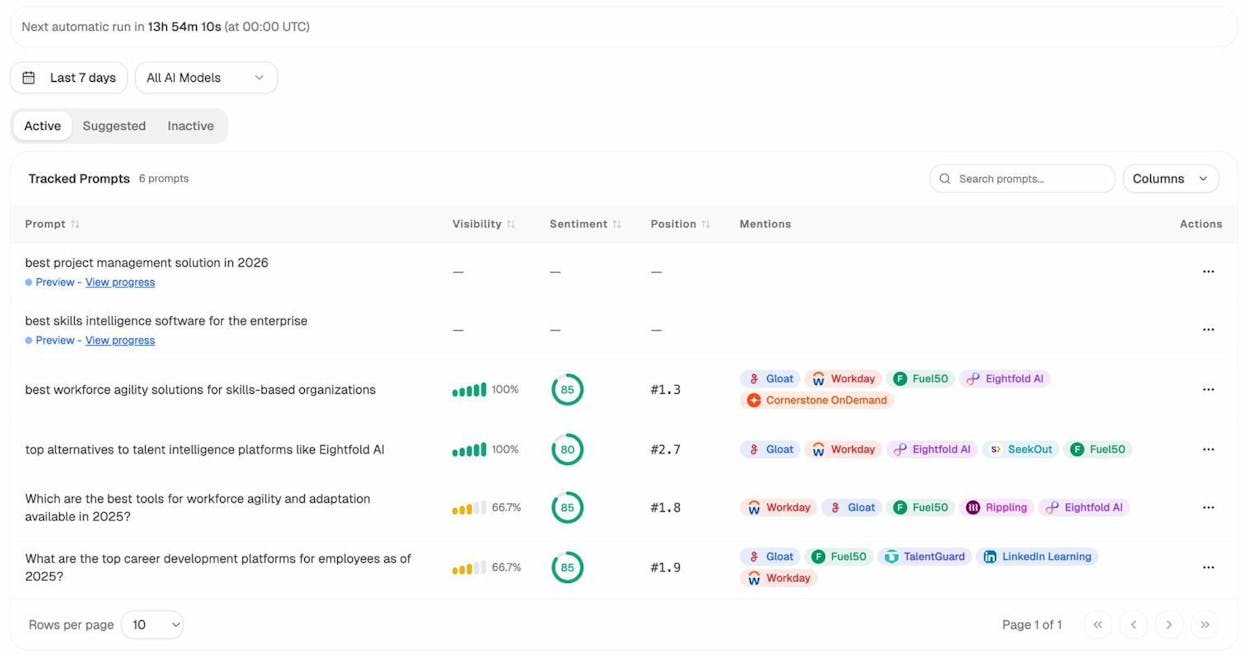
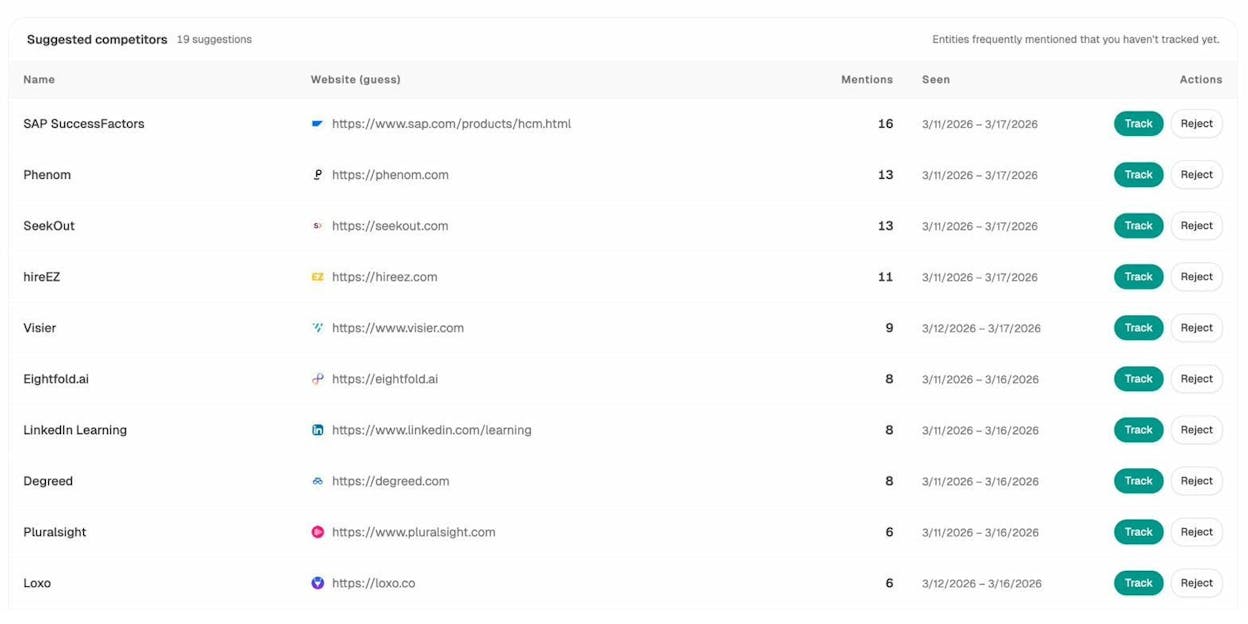
The Competitors view shows you which brands AI engines mention alongside yours, how often they appear, and where they outrank you. This is the AI equivalent of checking who ranks above you in Google — except the results change based on how AI models are updated and which sources they cite.
And the Sources dashboard shows you which websites and content types AI engines cite most often in your industry. If review sites like G2 dominate the citations, that tells you to invest in getting more reviews. If competitor blog posts are getting cited and yours aren’t, that tells you where to improve your content.
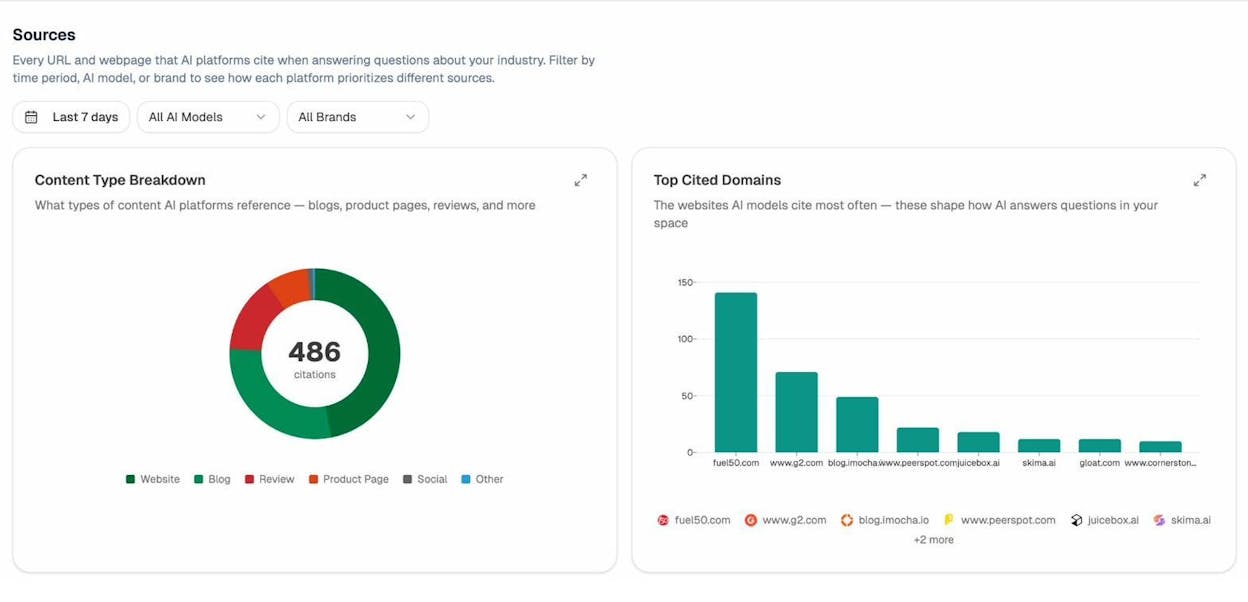
Schedule a monthly AI visibility audit using these dashboards. Look for three things:
-
Visibility drops: Are you appearing in fewer AI answers than last month?
-
Competitor gains: Is a competitor showing up in prompts where they weren’t before?
-
Sentiment issues: Is an AI engine describing your business negatively based on outdated or inaccurate information?
Catch these early and you can fix them before they affect your traffic.
7. Monitor Your Brand Perception Across AI Engines
This tip goes beyond basic SEO, but it matters for every Wix site owner — especially local businesses and service providers.
AI engines don’t just list your website. They describe your business. They summarize your reviews. They compare you to competitors. And they do this based on the information available about you across the web.
If an AI engine says your bakery is “known for affordable wedding cakes but inconsistent quality,” that narrative shapes how potential customers perceive you before they ever visit your site. Unlike Google search results — where you control your meta description — AI answers are generated from aggregated sources you may not even know about.
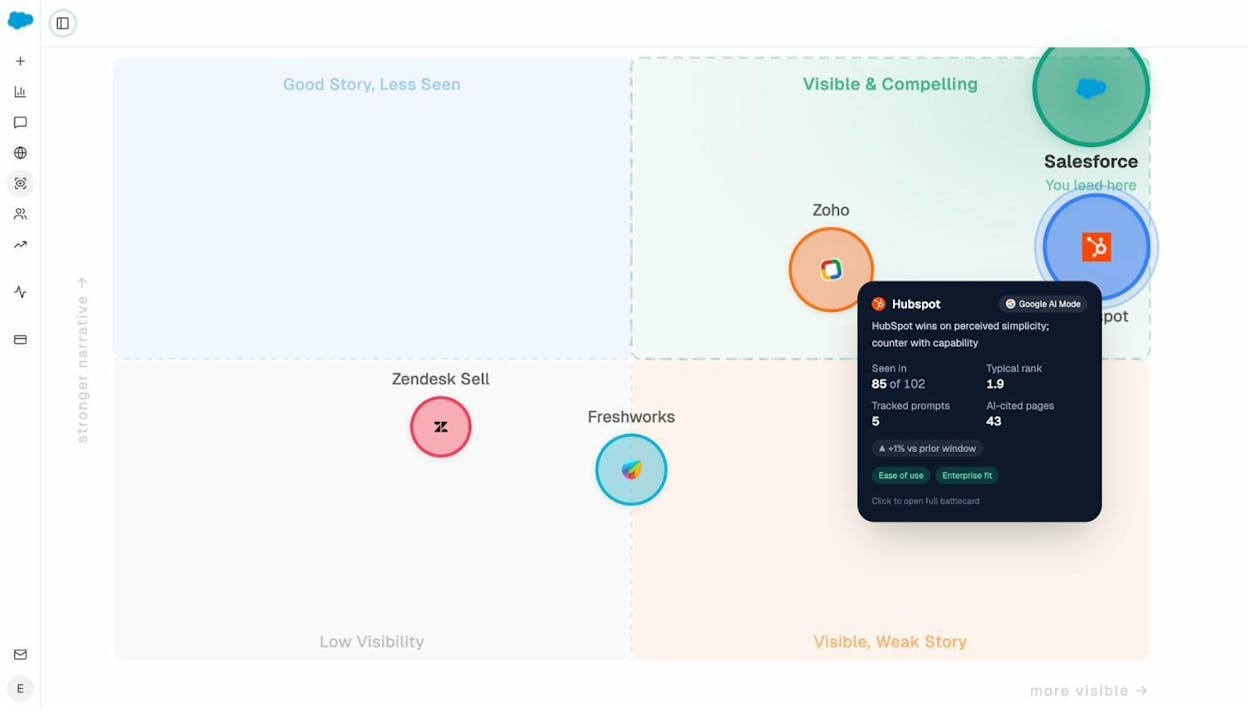
Analyze AI’s Perception Map shows you exactly how each AI engine frames your brand. You can see the sentiment (positive, neutral, or negative), the specific language AI uses to describe you, and the sources behind those descriptions.
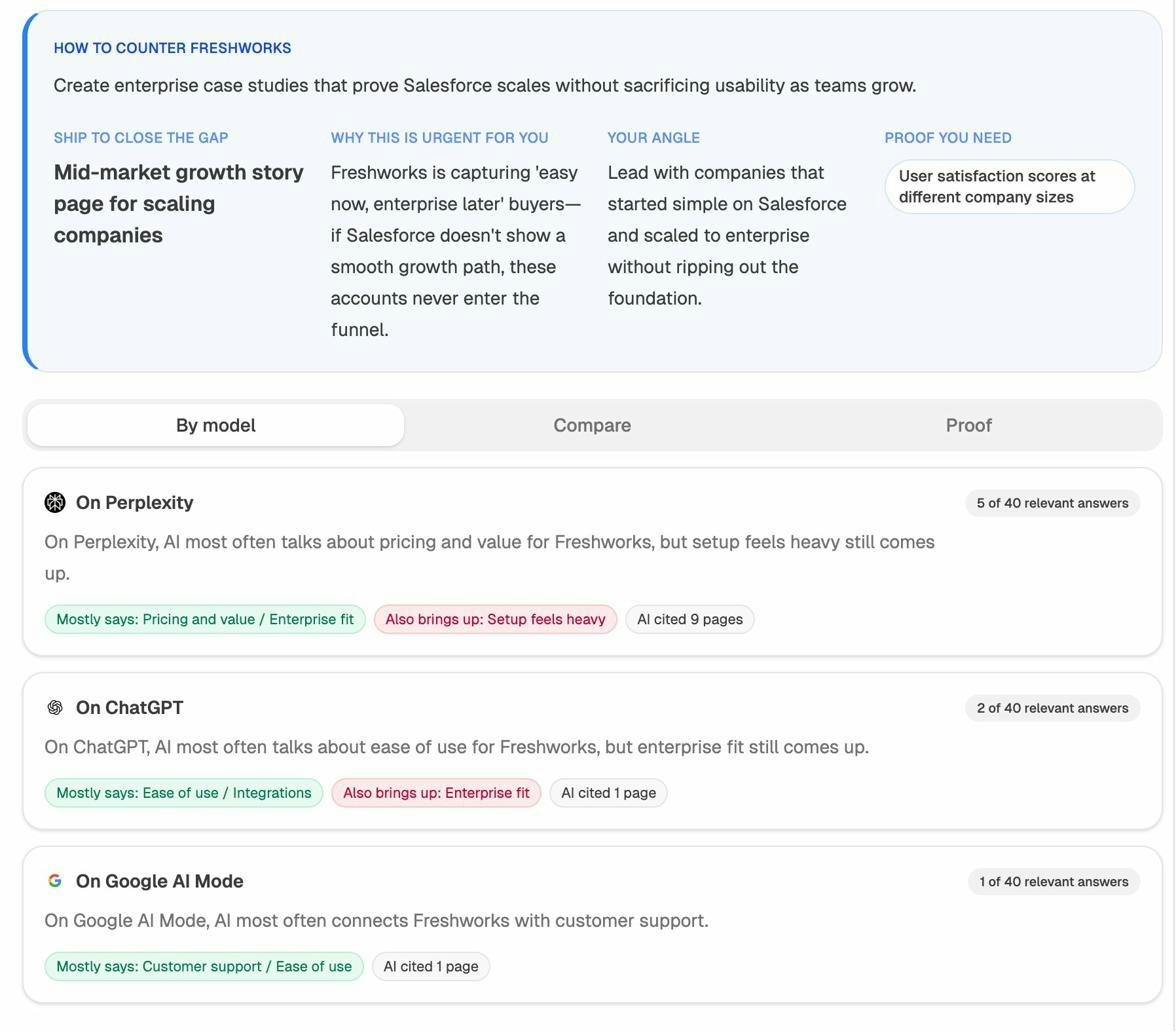
If you find inaccurate or negative narratives, you can address them by:
-
Updating the content on your own website to provide clearer, more accurate information
-
Earning positive reviews on platforms that AI engines cite (G2, Yelp, Google Reviews)
-
Creating content that directly addresses the concern — if AI says your pricing is unclear, publish a transparent pricing page
-
Monitoring the Weekly Email digest from Analyze AI, which surfaces priority issues and competitor shifts without requiring you to log in
Wix SEO vs. WordPress SEO: A Quick Comparison
This question comes up constantly, so here is a direct comparison:
|
Feature |
Wix |
WordPress |
|---|---|---|
|
Ease of setup |
Very easy, no coding needed |
Moderate, requires hosting setup and plugin configuration |
|
Title tags and meta descriptions |
Built-in |
Via plugin (Yoast, Rank Math) |
|
Sitemap control |
Auto-generated, limited customization |
Full control via plugins |
|
Page speed |
Good (improving), some code bloat |
Varies widely depending on theme and plugins |
|
Custom structured data |
Limited |
Full control via plugins or code |
|
Internal linking tools |
Basic (manual) |
Advanced plugins available |
|
Multilingual SEO |
Limited |
Excellent (WPML, Polylang) |
|
Plugin ecosystem |
App marketplace (limited) |
Thousands of plugins |
|
AI search monitoring |
Not built-in (use Analyze AI) |
Not built-in (use Analyze AI) |
|
Cost |
$17–$159/month (includes hosting) |
Free software + $5–50/month hosting + plugin costs |
|
Maintenance |
Managed by Wix |
You manage updates, security, backups |
Bottom line: Wix is the better choice if you want a working website with solid SEO features and minimal technical maintenance. WordPress is the better choice if you need advanced customization, extensive plugin support, or plan to scale a large content operation.
Neither platform has a built-in advantage for AI search visibility. Both require separate tooling to monitor and optimize your presence in AI answer engines.
How to Check If Your Wix Site Is Visible in AI Search
Even if you have done everything right with traditional SEO, your Wix site might be invisible to AI engines. Here is how to check.
Step 1: Test manually. Open ChatGPT, Perplexity, and Gemini. Ask the kinds of questions your potential customers would ask. Do any of the answers mention your business? Do they link to your website? Do they recommend your competitors instead?
Step 2: Check your referral traffic. In Google Analytics, go to Acquisition > Traffic acquisition and filter by source. Look for traffic from chatgpt.com, perplexity.ai, gemini.google.com, and copilot.microsoft.com. If you see traffic from these sources, AI engines are already sending visitors your way.
Step 3: Set up systematic tracking. Manual checks are fine for a quick gut check, but they don’t scale. Analyze AI lets you set up tracked prompts that run automatically every day, so you can see your visibility trend over time without manually checking each engine.
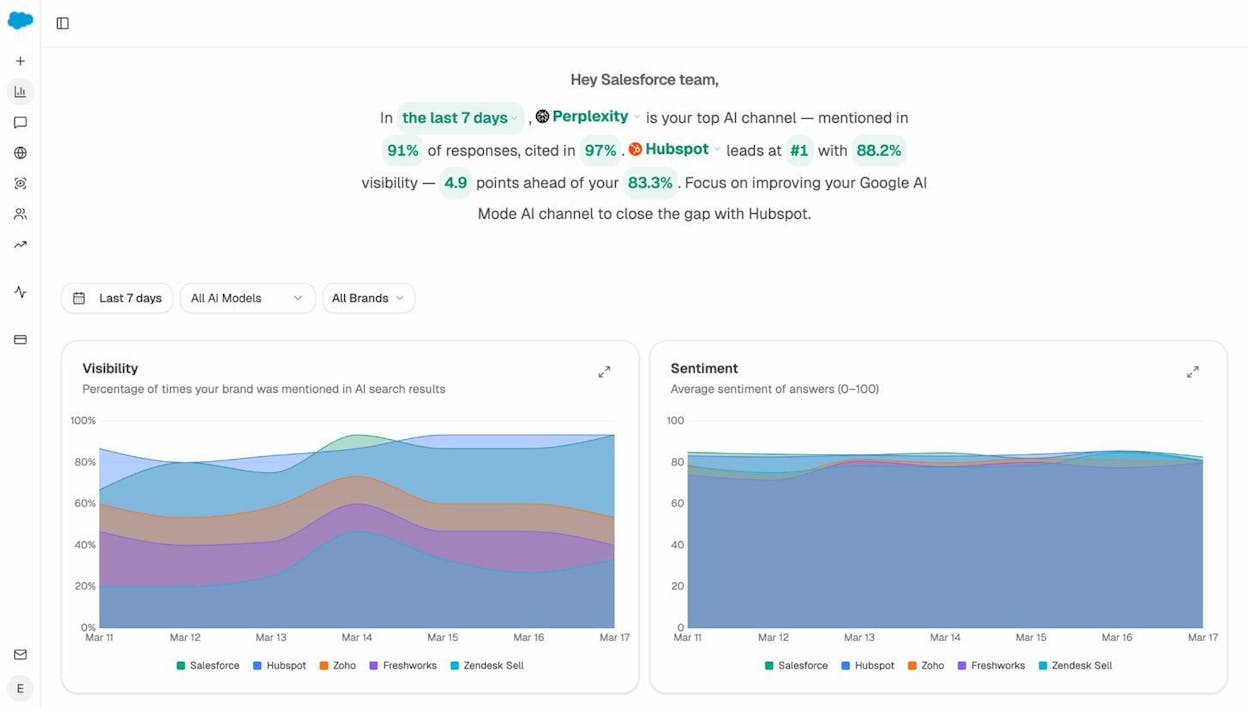
Step 4: Identify gaps. Use the Competitors dashboard to see where your competitors appear and you don’t. These gaps are your highest-priority content opportunities. If a competitor gets cited for “best wedding cakes in Austin” and you don’t, you need better content targeting that topic.
Step 5: Track which content types AI prefers. The Sources dashboard shows whether AI engines in your space tend to cite blog posts, product pages, review sites, or documentation. Create more of whatever content type gets cited most. Our research found that blog content accounts for 42% of AI citations across ChatGPT, Claude, and Perplexity — another reason to keep your Wix blog active.
Common Wix SEO Mistakes (and How to Fix Them)
After reviewing hundreds of Wix websites, these are the mistakes we see most often:
Mistake 1: Not customizing page titles and meta descriptions. Wix auto-generates these, but the defaults are generic. Every page should have a unique, keyword-rich title tag and a compelling meta description that encourages clicks. Go to each page’s SEO settings and write them manually.
Mistake 2: Using auto-generated URL slugs. Wix sometimes creates URLs like /post/9a8b7c6d. Change these to clean, readable URLs that include your target keyword. Instead of /post/9a8b7c6d, use /blog/wedding-cakes-austin.
Mistake 3: Ignoring image optimization. Every image on your site needs alt text that describes what the image shows. This helps Google understand your images and can drive traffic from Google Images. It also makes your site more accessible. In Wix, click on any image and look for the alt text field in the settings panel.
Mistake 4: Publishing thin content. A blog post with 200 words isn’t going to rank for anything competitive. If you’re going to create content, make it thorough enough to be genuinely useful. That doesn’t mean every post needs to be 3,000 words — it means every post needs to fully answer the question it targets.
Mistake 5: Ignoring mobile optimization. More than half of all web traffic is mobile. Check your Wix site on a phone. Make sure text is readable, buttons are tappable, and images resize properly. Wix’s mobile editor lets you customize the mobile version of your site separately from the desktop version — use it.
Mistake 6: Not tracking performance. If you are not checking Google Search Console, Google Analytics, and your AI search visibility regularly, you are flying blind. You cannot improve what you do not measure. Set a weekly reminder to check your dashboards.
Mistake 7: Never building backlinks. Backlinks — links from other websites pointing to yours — remain one of the strongest ranking signals. Wix sites often have weak backlink profiles because their owners don’t actively build links. Look for opportunities: local business directories, industry associations, guest posts on relevant blogs, and partnerships with complementary businesses.
Final Thoughts
Wix is a perfectly capable platform for SEO. It handles the technical fundamentals well, it’s easy to use, and it continues to improve. If you are a small business owner, a freelancer, or anyone who wants a website without the complexity of WordPress, Wix is a solid choice.
The real question in 2026 is not “can Wix do SEO?” but “are you doing SEO?” The platform gives you the tools. You have to use them.
And whether you use Wix, WordPress, or any other CMS, add AI search to your monitoring stack. The brands that track their visibility across both Google and AI answer engines have a compounding advantage over those that don’t. Traditional SEO is not dead — it is evolving. AI search is not a replacement — it is an additional organic channel that rewards the same fundamentals: clear, original, useful content.
Start with the seven tips in this guide. Set up your analytics. Do your keyword research. Create content that actually helps your audience. Audit your site regularly. And track how AI engines talk about your business.
If you want to see where your Wix site stands in AI search right now, try Analyze AI and run your first visibility check in minutes.

Ernest

Ibrahim


