



Summarize this blog post with:


In this article, you’ll learn eight reliable methods to find someone’s email address — from dedicated lookup tools and clever guesswork to social media mining and direct outreach. You’ll also learn how to verify addresses before you hit send, how to find emails at scale for outreach campaigns, and how to use AI search data to identify the right people to contact in the first place.
Whether you’re building links, pitching journalists, or reaching out to potential partners, these are the exact methods that work in 2026.
Table of Contents
1. Use an email lookup tool
Email lookup tools are the fastest way to find someone’s email address. You give them a name and a domain, and they return the most likely email in seconds.
![[Screenshot: Hunter.io homepage showing the email finder interface with a name and domain field]](https://www.datocms-assets.com/164164/1777056944-blobid1.png?auto=format,compress&w=1248&fit=max)
There are dozens of these tools on the market. Some are free with limited searches. Others charge per result. I tested six of the most popular options against a list of 50 known email addresses to see which ones actually deliver.
Here are the tools I tested:
|
Tool |
Free tier |
Paid pricing |
Cost per result |
|---|---|---|---|
|
25 searches/month |
$49/month for 500 searches |
$0.098 |
|
|
50 free trial searches |
$49/month for 1,000 results |
$0.049 |
|
|
50 searches/month |
$49/month for 1,000 results |
$0.049 |
|
|
10 searches/month |
$49/month for 1,000 searches |
$0.049 |
|
|
50 searches/month |
$39/month for 1,000 results |
$0.039 |
|
|
Unlimited (Chrome extension) |
Free |
$0.00 |
VoilaNorbert and Findymail consistently lead in accuracy. Name2Email is a strong free option, though it only works one address at a time inside Gmail — no bulk searches.
A few things to keep in mind when using these tools. No tool is 100% accurate. Even the best services miss addresses for people at smaller companies, personal domains, or organizations that use unusual email formats. Always verify before sending (more on that below).
If the tool doesn’t find an address, don’t stop here. The methods below cover what to do next.
2. Guess the email format and verify it
Most business email addresses follow a predictable pattern. If you know someone’s first name, last name, and company domain, you can often guess the right format on your first or second try.
About 70% of professional email addresses use one of these formats:
|
Format |
Example |
|---|---|
|
firstname + first initial of last name |
|
|
first initial + [email protected] |
|
Trying every combination manually takes time. Instead, use an email permutator tool to generate all possible variations at once.
Mailmeteor’s Email Permutator is a free option. Enter the first name, last name, and domain, and it builds a list of every likely email format in seconds.
![[Screenshot: Mailmeteor Email Permutator interface showing the three input fields (first name, last name, domain) and the generated list of permutations]](https://www.datocms-assets.com/164164/1777056954-blobid2.png?auto=format,compress&w=1248&fit=max)
Once you have your list, you need to figure out which one is the real address. Here are three ways to check:
Check in Gmail. Click “Open in Gmail” from the permutator tool, and it will create a new draft with all the permutations in the “To” field. Hover over each address one by one. If the address is connected to a Google account, you’ll see a profile pop-up with the person’s name and photo.
![[Screenshot: Gmail compose window showing email permutations in the To field, with a Google profile pop-up visible on one of them]](https://www.datocms-assets.com/164164/1777056962-blobid3.png?auto=format,compress&w=1248&fit=max)
Check in Google Sheets. Paste the permutations into a Google Sheet. Type each one into a cell, and if the address belongs to a Google account, you’ll see a suggestion chip or a profile indicator appear when you hover.
![[Screenshot: Google Sheets with email addresses in a column, showing a profile indicator appearing on hover]](https://www.datocms-assets.com/164164/1777056964-blobid4.jpg?auto=format,compress&w=1248&fit=max)
Search Google for an exact match. If neither method works, try pasting your best guess in quotes into Google (e.g., "[email protected]"). If the address has been published anywhere online — a conference page, a press release, a comment on a forum — Google will surface it.
3. Search social media profiles
People share their email addresses on social media more often than you’d expect. Sometimes it’s in their bio. Other times it’s buried in an old post.
X (formerly Twitter)
People often share their email in tweets, but disguise it to avoid spam bots. They’ll write “nick at acme dot com” instead of the actual address. You can find these with X’s Advanced Search.
Go to Advanced Search and fill in these fields:
-
All of these words: email, contact, or reach
-
From this account: the person’s X handle
![[Screenshot: X Advanced Search form with the fields filled in — “email contact reach” in the “All of these words” field and a sample handle in the “From these accounts” field]](https://www.datocms-assets.com/164164/1777056970-blobid5.png?auto=format,compress&w=1248&fit=max)
If the person has ever shared their email publicly, this search will find it.
Some people skip the disguise entirely and post their email address in plain text. Either way, Advanced Search surfaces it.
LinkedIn is one of the most overlooked sources for email addresses. Here’s where to look:
-
Contact info section. Go to the person’s profile, click “Contact Info” below their headline, and check if they’ve listed an email address. Most people restrict this to connections only, but some leave it public.
-
Export your connections. If you’re already connected, you can export your LinkedIn connections as a CSV file. About 7–10% of connections include their email address in the export. That’s a small percentage, but for a list of 2,000 connections, it’s still 150–200 email addresses.
![[Screenshot: LinkedIn “Contact Info” pop-up on a profile showing a visible email address field]](https://www.datocms-assets.com/164164/1777056976-blobid6.jpg?auto=format,compress&w=1248&fit=max)
![[Screenshot: LinkedIn data export settings page showing the “Connections” checkbox selected]](https://www.datocms-assets.com/164164/1777056982-blobid7.png?auto=format,compress&w=1248&fit=max)
Other social profiles
Don’t overlook Facebook (check the “About” section), Instagram (check the bio), and personal websites. Freelancers and consultants almost always list their email on their portfolio site.
4. Use Google search operators
Google indexes millions of pages that contain email addresses — conference speaker bios, press releases, guest author profiles, academic papers, podcast show notes. You can use search operators to find them fast.
Here are a few search strings that work:
-
"nick smith" + "@acme.com" — searches for the person’s name alongside their domain.
-
"nick smith" + email + acme.com — broader search for any page mentioning their name, email, and company.
-
site:acme.com + "nick smith" + email — limits results to their company’s own website.
-
"nick smith" + "contact me" OR "reach me" OR "get in touch" — finds pages where they’ve invited contact.
This method works especially well for people who speak at conferences, contribute to publications, or participate in podcasts. Their contact details are often listed on event pages, author bios, and show notes.
Pro tip: Try searching for the person’s name on archive.org to find older versions of their website. Many people used to display their email address prominently and later removed it. The Wayback Machine often still has it cached.
5. Subscribe to their newsletter
If the person you’re trying to reach runs a blog or a newsletter, subscribe to their mailing list. Many newsletters are sent from the person’s actual email address rather than a generic no-reply address.
This gives you two things at once: the email address you needed, and a natural way to start a conversation.
Reply to one of their newsletter emails with something specific and useful. Mention something they wrote that you found valuable, ask a question, or share a relevant resource. This kind of reply stands out because almost no one does it.
Sometimes you’ll see a newsletter come from an address like [email protected] or [email protected]. That’s fine. Reply anyway. In many cases, the person monitoring that inbox will forward your message or respond from their personal address.
6. Check the website’s contact page or author bio
Before you reach for any tool, check the obvious places first. Many people put their email address right on their website — you just have to know where to look.
-
Contact page. The company’s contact page sometimes lists individual team members with their email addresses, especially at smaller companies and agencies.
-
Author bio. If the person writes blog posts, scroll to the bottom. Many author bios include an email address or at least a link to their social profile, which you can use to make contact.
-
Team page. Some companies list their team with direct email addresses. Startups and professional services firms do this most often.
-
Footer. Some websites include a contact email in the site footer.
-
Privacy policy or legal pages. These pages often list a compliance or legal contact email, which sometimes belongs to a real person.
![[Screenshot: An example website author bio section at the bottom of a blog post, showing the author’s name, photo, short description, and a visible email address]](https://www.datocms-assets.com/164164/1777056985-blobid8.png?auto=format,compress&w=1248&fit=max)
7. Ask directly on social media
If you’ve tried everything and still can’t find the email address, ask for it directly. This is simpler than it sounds, and most people respond.
Find the person on X, LinkedIn, or Instagram, and send a short message like:
“Hey [Name], I’m working on [specific thing] and wanted to reach out about [specific reason]. Would you mind sharing the best email to reach you at?”
Be specific about why you want their email. People ignore vague requests. But when someone explains why they want to connect and it’s relevant to the recipient, the response rate is high.
Make sure your own profile is complete and clearly explains who you are and what you do. People check your profile before deciding whether to respond.
8. Use a company’s generic email to request a personal connection
Most companies have a generic contact email ([email protected], [email protected]) or a contact form on their website. These inboxes are usually monitored by a support team or an assistant.
Send a short, polite message explaining who you’re trying to reach and why:
“Hi there — I’m trying to reach [Name] about [specific topic]. Could you forward this message or share the best way to contact them directly? Thanks!”
![[Screenshot: A website contact form filled out with a short, polite message requesting a personal connection to a specific team member]](https://www.datocms-assets.com/164164/1777056991-blobid9.png?auto=format,compress&w=1248&fit=max)
This works best when your email signature clearly states who you are, your role, and your company. If you’re sending from a personal email with no context, the message is more likely to be ignored.
Pro tip: If you’re using a virtual assistant to collect email addresses for outreach, make sure their email signature explains the relationship — something like “Research Assistant to [Your Name], [Your Company].”
How to verify an email address before you send
Finding an email address is only half the battle. If you send to an invalid address, you’ll hurt your sender reputation and your deliverability will suffer over time.
Before you add any email to your outreach list, verify it using one of these tools:
|
Tool |
Free tier |
What it checks |
|---|---|---|
|
25/month |
Format, domain, MX records, SMTP check |
|
|
1,000 free |
Format, domain, catch-all detection |
|
|
100 free/month |
Format, domain, spam trap detection |
|
|
Trial available |
Automated list cleaning |
![[Screenshot: Hunter Email Verifier results page showing a verified email with green checkmarks for format, domain, and SMTP checks]](https://www.datocms-assets.com/164164/1777056995-blobid10.png?auto=format,compress&w=1248&fit=max)
Run every email through a verification tool before adding it to your outreach list. A bounce rate above 2% signals to email providers that you’re sending to bad addresses, and they’ll start routing your emails to spam.
How to find email addresses at scale for outreach
If you’re running a link building or PR campaign, finding emails one by one isn’t practical. You need to find prospects and their contact information in bulk.
Here’s a workflow that works for outreach campaigns:
Step 1: Build your prospect list
Start with the type of content you want to target. If you’re promoting a piece of content about, say, email marketing tools, search for relevant articles using a content research tool.
![[Screenshot: A content research tool (e.g., BuzzSumo or Ahrefs Content Explorer) showing search results for “email marketing tools” with article titles, authors, and domain names visible]](https://www.datocms-assets.com/164164/1777057000-blobid11.png?auto=format,compress&w=1248&fit=max)
Export the results and pull out two columns: the author’s name and the website domain. Most content research tools include the author name in the export.
Step 2: Extract domains
If the export doesn’t include a clean domain column, pull it from the article URL using this formula in Google Sheets:
=REGEXEXTRACT(A2,"^(?:https?:\/\/)?(?:[^@\n]+@)?(?:www\.)?([^:\/\n]+)")
![[Screenshot: Google Sheets with article URLs in column A, the REGEXEXTRACT formula in column B, and extracted domains in column B’s results]](https://www.datocms-assets.com/164164/1777057003-blobid12.png?auto=format,compress&w=1248&fit=max)
Step 3: Upload to an email finder
Now that you have names and domains, upload the list to a bulk email finder. Hunter, Findymail, and Snov.io all support CSV uploads.
If you use Google Sheets, Hunter for Sheets lets you find and verify emails directly in your spreadsheet without leaving the tab.
Step 4: Verify before sending
Run the found emails through a verification tool to remove invalid addresses. This step is non-negotiable. Even the best email finders have error rates, and sending to bad addresses at scale will tank your sender reputation fast.
How to find the right people to contact first
Finding an email address is easy once you know who to reach. The harder question is figuring out who is worth reaching out to in the first place.
This matters most for link building, PR outreach, and content promotion. If you send 200 outreach emails to random bloggers, you’ll get a handful of replies. But if you send 50 emails to the right people — the ones who already write about your topic, cite relevant sources, and have an engaged audience — your response rate jumps significantly.
Use SEO data to find outreach targets
SEO tools make it straightforward to find people writing about your topic. Search for your target keyword in a content research tool, filter by domain authority and recent publication date, and you’ll have a clean list of prospects who are actively covering your space.
You can also use Analyze AI’s Website Authority Checker to vet domains before adding them to your outreach list. There’s no point emailing someone whose site has no authority.
Use AI search data to find high-value targets
Here’s an angle most people miss: AI search engines like ChatGPT, Perplexity, and Claude are now a major discovery channel. The sites that AI engines cite in their answers are, by definition, authoritative sources in your space. These are exactly the kind of sites you want links from.
Analyze AI’s Sources dashboard shows you every URL and domain that AI platforms cite when answering questions about your industry. Filter by AI model, time period, or brand to see which sites are getting the most AI citations.
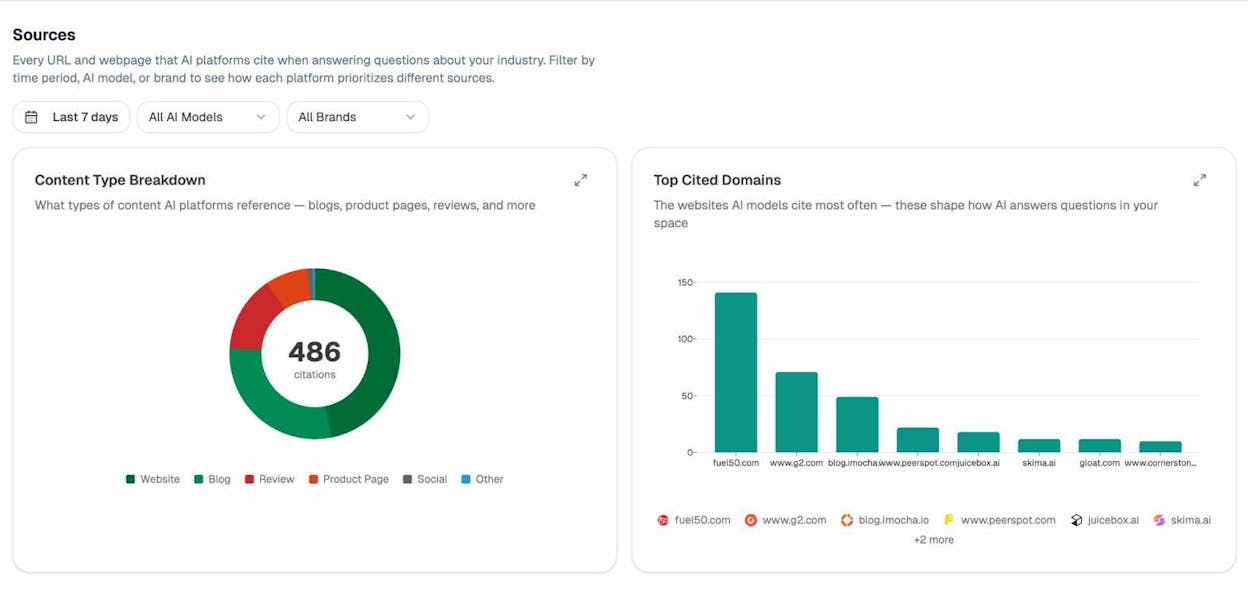
The sites at the top of this list are your highest-value outreach targets. They’re trusted by both search engines and AI models, which means a link from them carries extra weight.
You can also use the Competitors view to see which brands AI models mention most frequently alongside yours. If a competitor is getting cited on domains that you’re not — that’s a gap you can close with outreach.
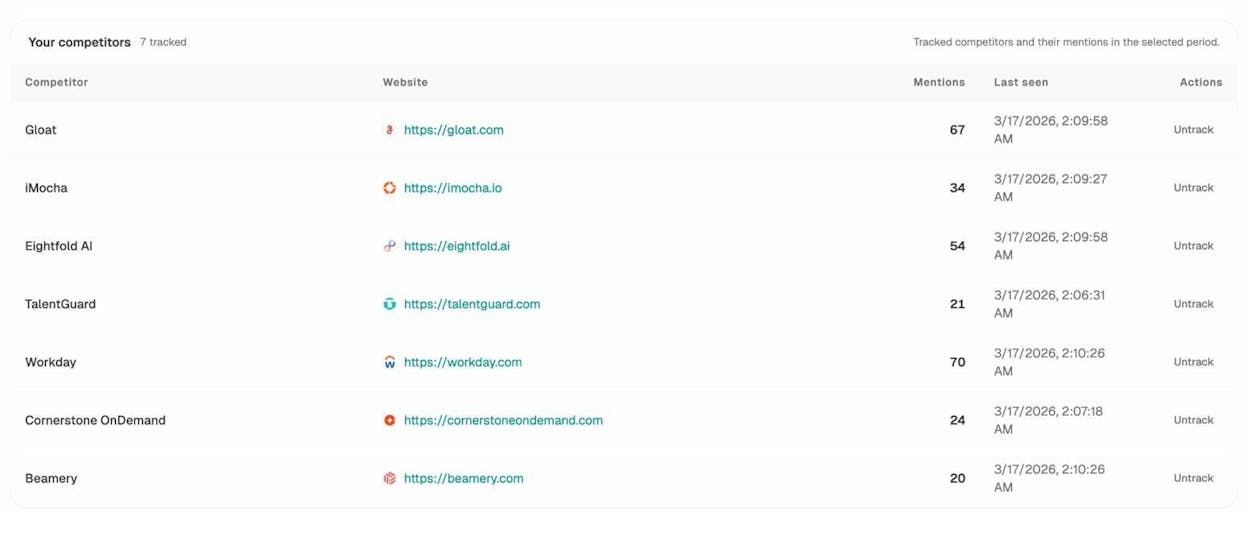
This approach flips traditional outreach on its head. Instead of guessing which blogs matter, you let the data show you which sources AI engines already trust. Then you find the right person at those domains using the methods in this article.
For a deeper look at how to track which sources AI engines reference, check out How Do LLMs Cite Sources? What 83,670 AI Citations Tells Us.
What to do after you find the email address
Finding the email is step one. Sending a message that gets a response is step two. Here are a few principles that improve outreach reply rates:
Personalize the first line. Reference something specific the person has written, built, or said publicly. Generic opening lines like “I came across your website” get deleted immediately.
Make the ask clear and small. Don’t ask for three things at once. Ask for one specific thing — a link, a quote, a share — and make it easy to say yes.
Keep it short. Outreach emails should be 3–5 sentences. If your email needs scrolling to read on a phone, it’s too long.
Follow up once. A single follow-up email 3–5 days after your first message increases reply rates by 30–50%. Don’t send more than one follow-up. Two or more follow-ups cross the line from persistent to annoying.
Use a real email address. Send from a professional email that matches your domain. Don’t use a free Gmail or Yahoo address for business outreach.
GDPR and email privacy: what to know
If you’re reaching out to people in the European Union or the United Kingdom, you need to be aware of data privacy laws like GDPR.
Under GDPR, you can email someone for legitimate business purposes without their prior consent — this is called “legitimate interest.” But you still need to follow a few rules:
-
Only contact people when you have a clear business reason for doing so.
-
Give recipients an easy way to opt out of future communication.
-
Don’t add people to marketing email lists without their explicit consent.
-
Don’t buy email lists from third parties.
The safest approach is to treat every outreach email as a one-to-one business communication, not a marketing blast. If you’re sending personalized emails to specific people about a relevant topic, you’re almost always fine.
Key takeaways
Email lookup tools like VoilaNorbert and Findymail are the fastest option, with accuracy rates above 85%. For free searches, Name2Email is hard to beat. Guessing the format and verifying through Gmail or Google Sheets catches many of the addresses that tools miss. Social media, Google operators, and newsletters cover the rest.
Before you send, always verify. And before you even start looking for email addresses, make sure you’re targeting the right people. Use SEO and AI search data to identify the domains and people that matter most in your space — then find their emails using the methods above.
Finding someone’s email address is rarely the hard part. The hard part is having something worth saying when you reach them.

Ernest

Ibrahim


