



Summarize this blog post with:


In this article, you’ll learn the real difference between a subdomain and a subdirectory, why the SEO debate around them has been mostly misleading for years, and how to decide which one fits your situation. You’ll also see how AI search engines like ChatGPT and Perplexity treat each setup when they cite sources, and how to track your performance on both channels after you make the call.
Table of Contents
What is a subdomain vs a subdirectory?
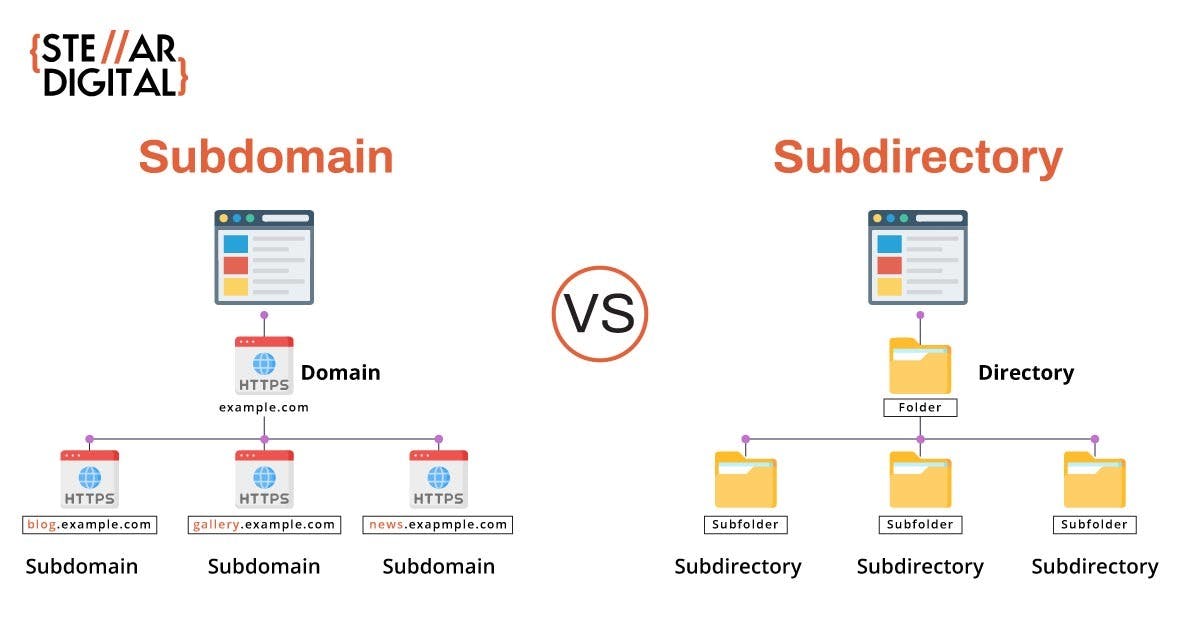
A subdomain sits to the left of the root domain. It looks like this: blog.example.com. The word blog is the subdomain.
A subdirectory (sometimes called a subfolder) sits to the right of the root domain. It looks like this: example.com/blog. The /blog part is the subdirectory.
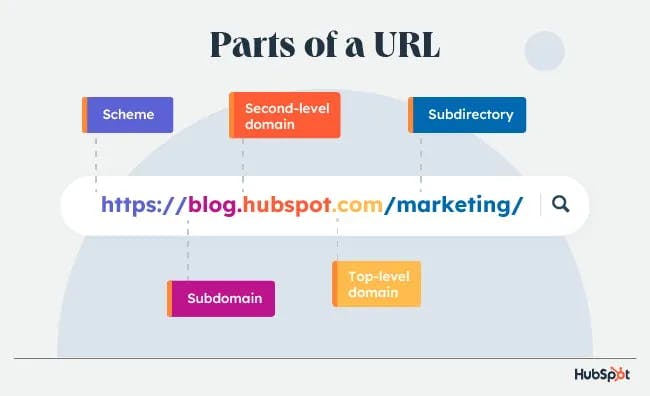
That single positional difference is the whole technical story. Everything else in this debate is about how search engines and AI models interpret that difference.
Subdomain vs subdirectory: which one is better for SEO?
Neither, in most cases. The path on the left or the right of your domain is not, on its own, a ranking factor.
This has been the official line from Google for over a decade. Matt Cutts, then head of webspam at Google, said it in 2012:
They’re roughly equivalent. I would basically go with whichever one is easier for you in terms of configuration, your CMSs, all that sort of stuff.
John Mueller of Google repeated it in 2017:
Google websearch is fine with using either subdomains or subdirectories. Making changes to a site’s URL structure tends to take a bit of time to settle down in search so I recommend picking a setup that you can keep for longer.
![[Screenshot of a tweet from John Mueller responding to the subdomain vs subdirectory debate, with a sarcastic tone]](https://www.datocms-assets.com/164164/1778270167-blobid3.png?auto=format,compress&w=1248&fit=max)
The myth that subdomains are always treated as separate sites is half-true at best. A subdomain that is internally linked from your main site, shares a similar template, and feels like a natural extension of your brand will almost always be treated as part of the same site. A subdomain that lives in isolation, with no internal links, no shared navigation, and a totally different look, can be treated as separate.
The same logic applies in reverse. A subdirectory that is orphaned, hidden behind authentication, or sitting on a different language version with no hreflang signals can also be treated as separate. Gary Illyes from Google confirmed this at Pubcon in 2023, saying it is uncommon on the English web but does happen.
You can see this in practice with sitelinks. Search any large brand and you’ll find subdomains showing up directly underneath the main result. GitHub, LinkedIn, Amazon, and Microsoft all have subdomains that Google treats as integral parts of the brand.
![[Screenshot of Google search results for a major brand showing subdomains like docs.example.com or shop.example.com appearing as sitelinks]](https://www.datocms-assets.com/164164/1778270168-blobid4.png?auto=format,compress&w=1248&fit=max)
So the real factor is not the URL structure itself. It is whether you treat that section as part of your main site or as a separate property.
Subdomain vs subdirectory at a glance
Here is how the two structures compare across the dimensions that actually influence your decision.
|
Factor |
Subdomain (blog.example.com) |
Subdirectory (example.com/blog) |
|---|---|---|
|
Ranking signals consolidation |
Treated as part of the same site if internally linked |
Always treated as part of the same site |
|
Setup complexity |
Often requires separate hosting, DNS, and SSL config |
Lives on the same hosting and codebase |
|
CMS flexibility |
You can run a different CMS or platform on each subdomain |
All sections share the same CMS |
|
Analytics tracking |
Requires cross-domain tracking setup in GA4 to merge sessions |
Tracks natively as one property |
|
Cookie scope |
Cookies can be isolated per subdomain |
Cookies are shared by default |
|
Best fit for |
Distinct products, regional sites, support hubs, user-generated platforms |
Blogs, resource centers, and content tied to the main brand |
The setup choice is mostly an engineering and brand decision. The SEO consequences are downstream of that decision, and they depend on how you handle internal linking and crawl signals afterward.
When a subdomain makes more sense
A subdomain is the right call when the section you’re building is genuinely separate from your main site in product, audience, or infrastructure. Here are the situations where it tends to win.
Different product lines or business units. Disney runs parks.disney.com, shop.disney.com, and disneyplus.com as distinct properties because each one has a different team, a different revenue model, and a different audience. Lumping all of that into one codebase and one navigation would create more friction than any link equity benefit could solve.
Different languages or regional sites. When you serve multiple countries with significantly different content, subdomains like uk.example.com or de.example.com make ownership and hosting easier to manage. The alternative of subdirectories like /uk/ or /de/ works too, but only if your platform supports clean hreflang tagging and your editorial workflow can handle a single codebase across languages.
A help center, docs site, or community forum. Tools like Zendesk, Discourse, and Intercom typically run on their own infrastructure. Hosting them as support.example.com or community.example.com keeps the engineering surface area smaller and avoids forcing your main site to inherit their templates and dependencies.
User-generated content or marketplaces. Platforms like Tumblr, WordPress.com, and Shopify give every user their own subdomain. This is a deliberate isolation pattern. It limits the SEO blast radius if any single user publishes thin or spammy content.
A blog you want to spin out or sell later. If there’s a real chance you’ll separate the property in the future, starting on a subdomain makes the eventual split much cleaner.
When a subdirectory makes more sense
A subdirectory is the right call when the section is part of the same brand promise, the same content team, and the same growth motion. Here are the situations where it tends to win.
A blog or resource hub built to support your main offering. If your blog exists to drive traffic to your product, putting it at example.com/blog consolidates internal links, shared navigation, and crawl frequency around one property. Most modern SaaS companies do this for exactly that reason.
Smaller sites where every link matters. If you’re not at the scale where you can afford parallel SEO investment in multiple properties, keeping everything in one place concentrates your authority. Splitting a 50-page site across two subdomains rarely makes sense.
Glossaries, comparison hubs, or programmatic landing pages. When you’re building a large set of pages that should inherit the topical authority of your homepage, a subdirectory like /glossary/ or /compare/ makes that inheritance more direct and predictable.
If you’re working through this decision and want to think more carefully about how internal links shape ranking, our guide to SEO internal linking walks through the practical patterns that work.
How AI search engines treat subdomains vs subdirectories
This is where the conversation gets interesting, and where most articles on this topic go silent. AI search engines like ChatGPT, Perplexity, Gemini, and Copilot retrieve and cite content differently than Google does in a traditional results page.
The short version is this. AI engines cite both subdomains and subdirectories. The URL structure does not appear to be a filtering factor. What matters is whether the page contains the answer the model is looking for.
Looking at AI citation data across thousands of prompts, you can see this play out. AI engines regularly cite root domains, deep subdirectories, and subdomains side by side in the same response.
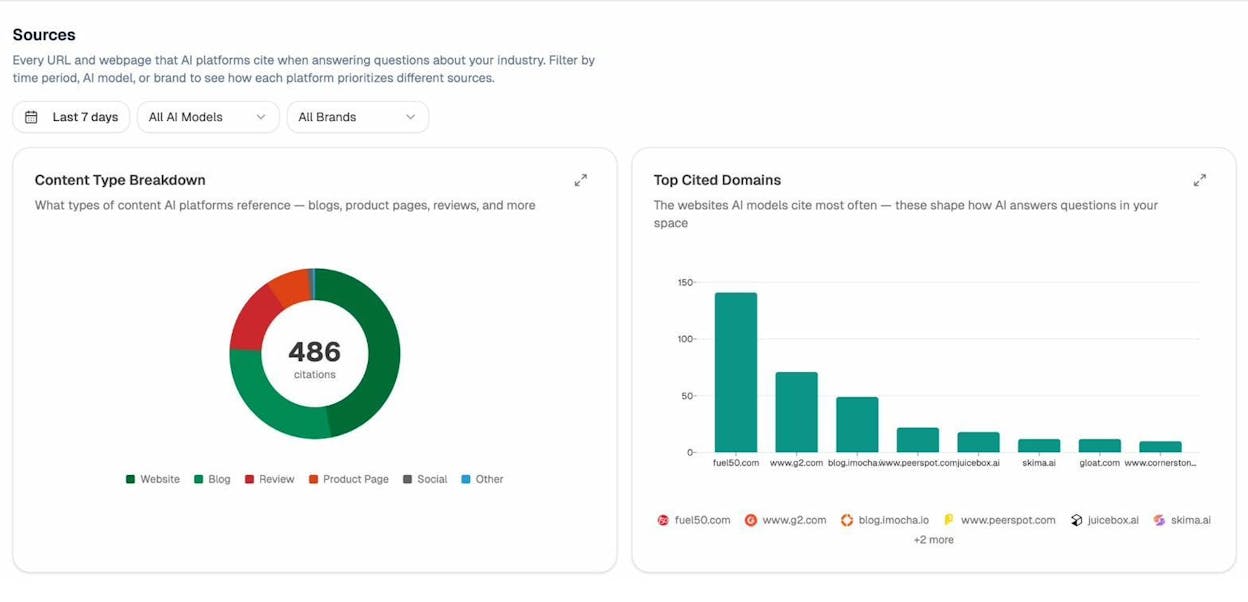
In the screenshot above, taken from the Analyze AI Sources dashboard, you can see blog.imocha.io cited alongside fuel50.com and www.g2.com. The subdomain shows up next to root domains without any visible penalty for being a subdomain.
The same pattern appears at the URL level. AI models cite product pages on subdirectories, blog posts on subdomains, and homepages on root domains, all within the same answer.
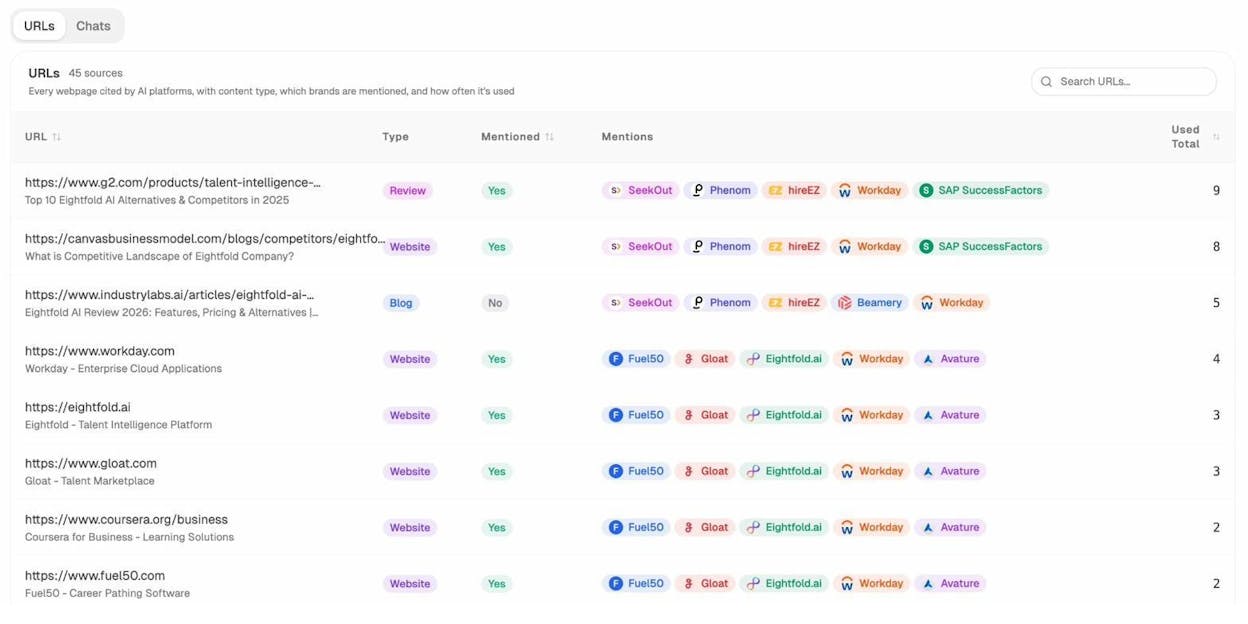
There are a few practical implications worth pulling out.
First, if you already run a subdomain for your blog or docs, you do not need to migrate it just to be cited by AI engines. The citation behavior we see in the data does not punish that structure.
Second, AI engines tend to cite whichever page contains the answer, which is often a deep subdirectory page rather than a homepage. This means the page-level quality of your content matters more than where it sits in your URL hierarchy.
Third, you do need to track citations across all of your subdomains separately, because most analytics tools and SEO platforms still treat them as different properties. If you publish on example.com and blog.example.com, you’ll want to monitor both.
For a deeper view of what we know about citation patterns across AI engines, our analysis of how LLMs cite sources breaks down the data across 83,670 citations.
Real case studies: when migrations did and did not move the needle
The clearest way to test the URL-structure-as-ranking-factor theory is to look at sites that actually migrated.
Mention.com moved from a subdomain to a subdirectory in January 2016. When you look at the period immediately around the migration, traffic stayed flat. The growth that came later was driven by additional content published on the new structure, not by the structural change itself.
![[Screenshot of mention.com top pages chart showing flat organic traffic during the migration period from subdomain to subdirectory]](https://www.datocms-assets.com/164164/1778270181-blobid7.png?auto=format,compress&w=1248&fit=max)
The pages that lost traffic on the old subdomain had their equivalents on the new subdirectory regain roughly the same amount. The traffic shifted location. It did not multiply.
GitHub has migrated its blog three times. It started at github.com/blog (subdirectory), moved to blog.github.com (subdomain), and finally moved to github.blog (a separate domain). Each transition created some short-term flux, but no version of the URL clearly outperformed the others on its own merit.
![[Screenshot of GitHub blog traffic over time showing three migration points with no dramatic ranking shift attributable to the URL change alone]](https://www.datocms-assets.com/164164/1778270185-blobid8.png?auto=format,compress&w=1248&fit=max)
These are the case studies most often cited in the subdomain vs subdirectory debate, and both of them show the same conclusion. The URL change did not drive the ranking change. Other factors did.
Why migrations show traffic changes (when the URL is not the cause)
If the structure itself is not the lever, why do so many migration case studies report a traffic uplift after the move? Usually one of these six things is happening underneath.
Internal linking changes. A subdomain that was not linked from the main navigation suddenly gets linked from every page after the migration. That alone explains most of the lift. The URL change is the visible event, but the linking change is the actual cause.
Temporary signal inheritance. When pages are new or moved, Google may have them inherit some temporary signals at a folder or site level until it has enough crawl data to score them on their own. This causes short-term ranking fluctuations that often get attributed to the URL change.
Tracking and analytics gaps. Subdomain analytics setups frequently miss sessions that the new subdirectory captures cleanly. The reported uplift is sometimes just better measurement.
Blocked or noindexed pages. If pages were quietly blocked in robots.txt or marked noindex on the old subdomain, signals never consolidated correctly. Removing those blocks during the migration recovers ranking that was being suppressed all along.
Redesign or platform changes that shipped at the same time. Migrations often coincide with new templates, faster page speed, better headings, and updated content. Any of those can drive the ranking change.
Content removed or updated. If thin or outdated content was pruned during the migration, traffic to the surviving pages can climb because the site looks more focused.
When you’re evaluating someone else’s migration story, ask which of these six things changed alongside the URL. In most published cases, at least three of them did.
How to track your decision across SEO and AI search
Once you’ve picked a structure, the work shifts to monitoring whether your choice is paying off across both traditional search and AI search. Here is a practical workflow.
Step 1: Track keyword rankings on the new URL structure. Watch your most important keywords for at least 90 days after any migration. You can use a free tool like the Analyze AI keyword rank checker for spot checks, or set up continuous tracking on the URLs that matter most. The point is to spot meaningful drops early, not to react to normal week-to-week fluctuation.
Step 2: Check that your authority signals carried over. If you migrated, run a quick audit using a website authority checker on both the old and new URLs. If you did the redirects properly, authority should follow. If it did not, you have a redirect chain to fix.
Step 3: Monitor AI citations across all your subdomains. This is the step most teams miss. AI search platforms cite content based on URL, and if your blog lives on a subdomain, your main site visibility tracker will not pick those citations up. With the AI visibility tracking inside Analyze AI, you can monitor mentions and citations across every subdomain in one view.
Step 4: Watch which URL paths drive AI-referred traffic. Beyond citations, you’ll want to see which specific pages get visits from AI assistants. The Analyze AI Traffic Analytics view breaks this down by landing page, so you can see whether your subdomain or subdirectory pages are converting AI-referred visitors.
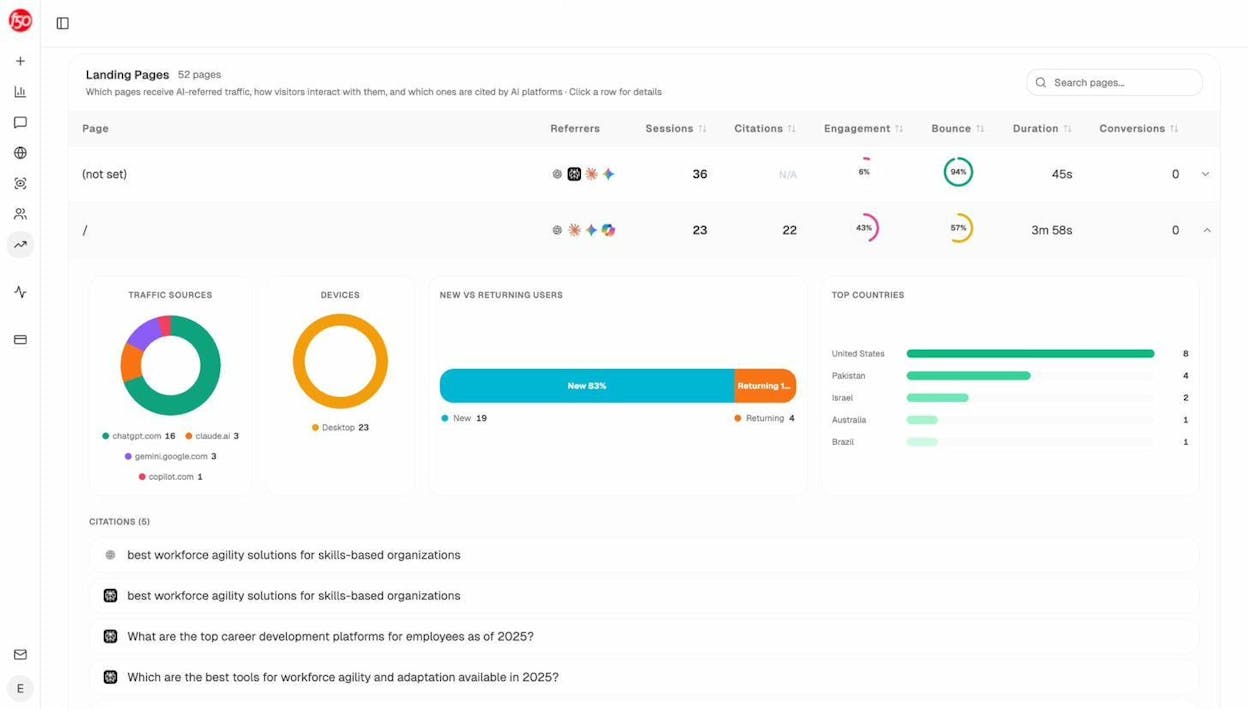
This view is useful for a specific reason. If you’re debating whether to move your blog from a subdomain to a subdirectory, the right input to that decision is which pages are actually getting AI traffic now and how those visitors behave. That data beats any general advice.
Step 5: Watch what your competitors are doing. Some competitors will run their content on subdomains, some on subdirectories. Tracking which ones get cited most often, and on which URL structure, gives you a real-world signal for your space.
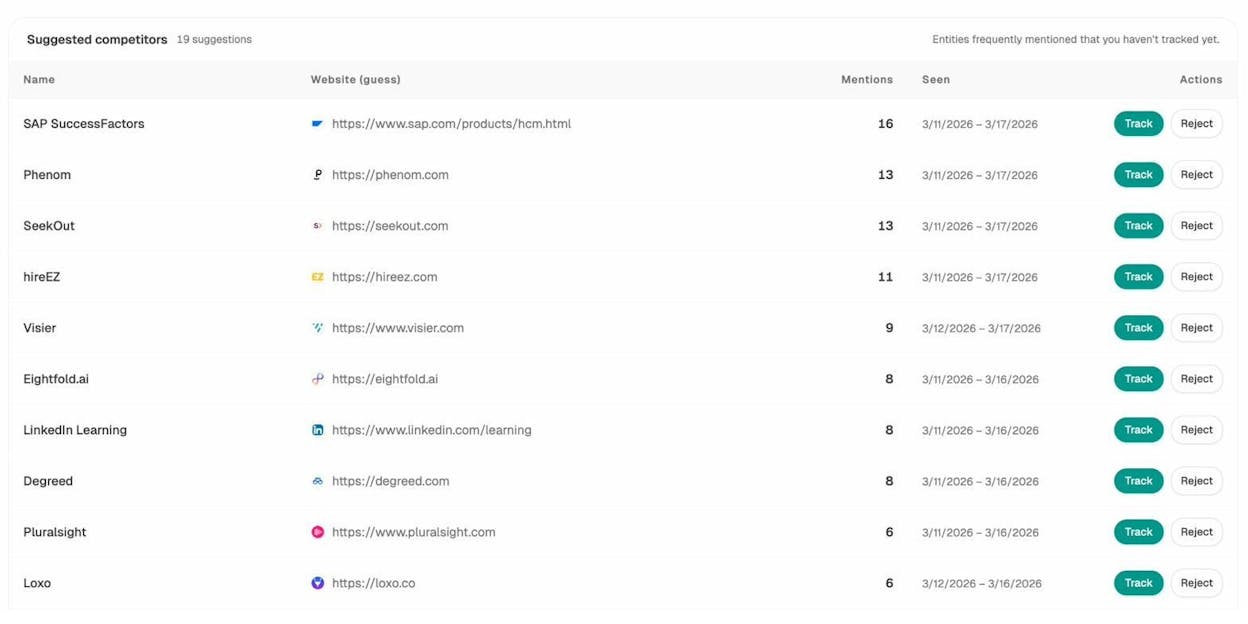
The Analyze AI competitor intelligence view shows you which brands are getting mentioned most in AI responses, along with the URLs being cited. If a competitor on a subdomain is winning, that tells you something. If they’re winning despite the subdomain, that tells you something different. Either way, the data settles the question for your specific market.
For a broader view of how to think about SEO and AI search together, our breakdown of GEO vs SEO covers the differences and overlaps in detail.
Final thoughts: pick once, and treat it as one decision
The subdomain vs subdirectory debate has consumed a lot of SEO bandwidth for very little practical payoff. Both structures can rank. Both structures can get cited by AI engines. The URL position is not the lever that moves your visibility.
The lever is everything else. How well your content answers the query. How strongly your internal links connect the section to your main site. Whether your tracking is set up to see what is actually happening across both Google and AI engines.
If you’re starting fresh, default to a subdirectory unless you have a clear reason to use a subdomain. The reasons that count are the ones in the use cases section above, not vague claims about SEO benefit.
If you already have a subdomain that is working, do not migrate it on the basis of an SEO theory alone. Migrations introduce risk. The reported uplifts in migration case studies are almost always explained by other changes that shipped at the same time.
And if your goal is to build durable visibility across both traditional search and AI search, the structural question matters less than the tracking question. Pick once, set up monitoring across both channels, and let the data tell you what to adjust.
For a deeper read on how to build a search strategy that holds up in the AI era, our piece on the 4 pillars of an effective SEO strategy for AI search is a good next step.

Ernest

Ibrahim


