



Summarize this blog post with:


Pick the wrong method and one of three things happens. The page stays in the index. The page leaves the index but you lose the link equity. Or the page leaves Google but keeps showing up in AI answers for months.
In this article, you’ll learn five ways to remove a URL from Google’s search results, when to pick each one, how long each takes, and how to confirm the page actually disappeared. You’ll also learn why removing a page from Google is no longer enough, since the same URL may still be cached and cited inside ChatGPT, Perplexity, Gemini, and Google’s AI Mode.
Table of Contents
How to Check if a URL Is Indexed in Google
Before you remove anything, confirm the URL is actually in Google’s index. People waste hours trying to remove pages that were never indexed in the first place.
The fastest way is the URL Inspection tool inside Google Search Console. Paste the full URL into the search bar at the top of the dashboard. Google tells you whether the URL is on Google, what canonical it picked, and when it was last crawled.
![[Screenshot of the URL Inspection tool in Google Search Console showing the “URL is on Google” state with Coverage and Last crawl information]](https://www.datocms-assets.com/164164/1778179822-blobid1.png?auto=format,compress&w=1248&fit=max)
A site: search (for example, site:example.com/page-url) is a useful sanity check, but not a definitive answer. The site: operator can return URLs that Google knows about but does not actually serve in normal results. Treat it as a discovery tool, not a verdict.
If you do not have Google Search Console access, search Google for the exact URL inside quotation marks. If the page appears, it is indexed.
Then Check if AI Search Engines Are Citing the URL Too
Here is the part most URL-removal guides still ignore. Removing a page from Google does nothing about the same page appearing inside ChatGPT, Perplexity, Claude, or Google’s AI Mode. LLMs ingest content on a different schedule and keep referencing pages long after the original is gone.
Before you remove a URL, check whether AI engines are pulling from it. If they are, plan a parallel removal on the AI side, otherwise you keep getting traffic and brand exposure from a URL you thought was dead.
Open the Sources dashboard in Analyze AI to see every URL on your domain that AI platforms have cited in the last 7, 30, or 90 days, broken down by which model surfaced it and which prompts triggered it.
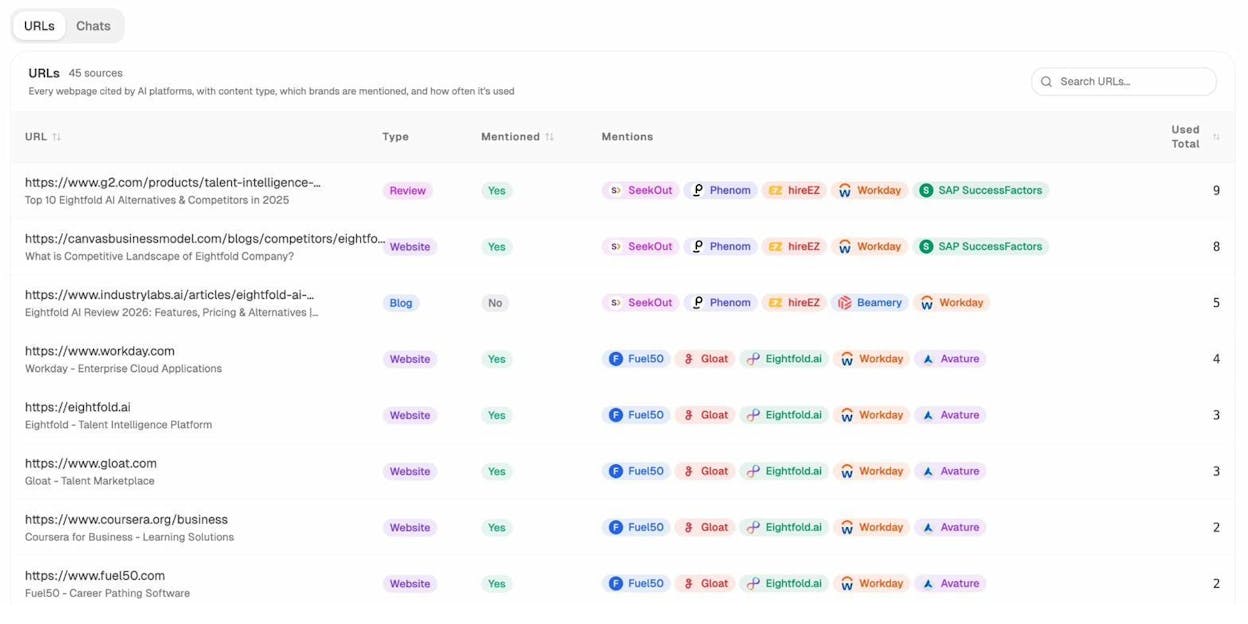
If the URL you want to remove appears here, treat it as a two-front job. We cover the AI search side later in the article.
The 5 Methods at a Glance
|
Method |
Speed |
Permanence |
Preserves link equity? |
Best for |
|---|---|---|---|---|
|
Delete the page (404 / 410) |
Days to weeks |
Permanent |
No |
Pages with no value to keep |
|
Noindex meta tag |
Days after recrawl |
Permanent (while tag stays) |
No (over time) |
Pages users still need to see |
|
Restrict access |
Immediate for new requests |
Permanent |
No |
Staging, internal, member content |
|
Google Removals Tool |
Within 24 hours |
Temporary (about 6 months) |
Yes (if used alone) |
Emergencies, PII, security incidents |
|
Canonicalize to another URL |
Days to weeks after recrawl |
Permanent (signal-preserving) |
Yes |
Duplicate or near-duplicate pages |
The further down the table you go, the more signal you preserve. Almost every removal request deserves a moment of “would canonicalization solve this without losing the backlinks” before you reach for delete.
Method 1: Delete the Page (Return a 404 or 410)
Removing the file and serving a 404 (Not Found) or 410 (Gone) status code is the simplest permanent removal. Google drops the URL from the index after re-crawling and seeing the error response.
A 404 tells Google “I could not find this page, maybe try later.” A 410 tells Google “this page is gone on purpose.” 410 gets pages out of the index slightly faster because Google does not need to keep checking back. For a planned, permanent removal, 410 is the better choice.
Set the status code on the server. On Apache, edit .htaccess:
Redirect 410 /old-page-url
On Nginx, inside your server block:
location = /old-page-url {
return 410;
}
In WordPress, the Yoast SEO Premium plugin and Redirection plugin both set 410 status codes through a UI without touching server files.
![[Screenshot of the Redirection plugin in WordPress showing how to add a 410 Gone status for a specific URL]](https://www.datocms-assets.com/164164/1778179833-blobid3.png?auto=format,compress&w=1248&fit=max)
Timeline: A few days to a few weeks. Speed it up by submitting the URL through the URL Inspection tool and clicking “Request indexing,” which forces Google to look again.
When you might need a different method: - You want users to keep accessing the page → use noindex. - You want to keep the backlinks → use canonicalization. - You need the URL out of the SERP today → start with the Google Removals Tool while you wait for the recrawl.
Method 2: Add a Noindex Meta Tag
A noindex tag tells search engines to drop the page from the index but keep crawling it. Use this when the page still serves users (so you cannot delete it) but should not appear in search results.
The standard meta robots tag goes in the page’s <head>:
<meta name="robots" content="noindex">
For non-HTML files like PDFs, where you cannot add a meta tag, use the X-Robots-Tag in the HTTP response header. On Apache:
<Files "private-doc.pdf">
Header set X-Robots-Tag "noindex"
</Files>
In WordPress, most SEO plugins surface a per-page checkbox. In Yoast, it is under Advanced → “Allow search engines to show this page in search results” → set to “No”. In Rank Math, it is under Advanced → Robots Meta → check “No Index”.
![[Screenshot of Yoast SEO Advanced settings showing the “Allow search engines to show this page in search results” toggle set to No]](https://www.datocms-assets.com/164164/1778179836-blobid4.jpg?auto=format,compress&w=1248&fit=max)
The single most common mistake here is blocking the page in robots.txt at the same time. If Google cannot crawl the page, it cannot see the noindex tag, so the page can stay in the index forever based on external link signals alone. Always leave noindex pages crawlable.
Timeline: A few days after Google’s next crawl. For high-priority pages, request a recrawl from the URL Inspection tool.
When you might need a different method: - Users should not access the page either → see Restrict Access. - The page is a duplicate of another → use canonicalization so you keep the link signals.
Method 3: Restrict Access
If the page should be hidden from search engines and from the public web, restrict access at the server level. Three patterns work.
A login system handles member content, customer dashboards, and gated documentation. Search engines cannot crawl what they cannot reach.
HTTP basic authentication is the right choice for staging, dev, and pre-launch sites. A two-line .htpasswd setup keeps the entire environment out of Google.
AuthType Basic
AuthName "Restricted"
AuthUserFile /path/to/.htpasswd
Require valid-user
IP whitelisting works when the audience is a fixed group. Allow only the relevant IP ranges and crawlers will be blocked along with everyone else.
This is the cleanest method for staging environments. A staging site that is publicly accessible with a noindex tag is one bug away from being indexed (a missing tag on a single template, an accidental commit). HTTP auth removes that risk entirely.
Timeline: Pages already in the index drop out within days to weeks once Google tries to recrawl and gets blocked. Pair with the Removals Tool if you need them gone faster.
Method 4: Google’s Removals Tool
The Removals tool inside Google Search Console temporarily hides URLs from search results within about 24 hours. The catch is “temporarily.” The block lasts about six months. After that, if you have not also applied a permanent method, the URL comes back.
Use this for emergencies. Leaked PII, exposed customer data, security incidents, accidentally published drafts. It is also useful when you have just deleted a page but Google has not re-crawled it yet.
Here is the exact path:
Step 1. Open Google Search Console and pick the property that contains the URL.
Step 2. In the left sidebar, expand “Indexing” and click “Removals.”
![[Screenshot of Google Search Console sidebar with Indexing → Removals highlighted]](https://www.datocms-assets.com/164164/1778179838-blobid5.png?auto=format,compress&w=1248&fit=max)
Step 3. Click the red “New Request” button at the top of the page.
![[Screenshot of the Removals dashboard with the New Request button visible]](https://www.datocms-assets.com/164164/1778179842-blobid6.png?auto=format,compress&w=1248&fit=max)
Step 4. Pick “Temporarily remove URL” in the dialog that opens.
![[Screenshot of the New Request dialog showing the Temporarily remove URL and Clear cached URL tabs]](https://www.datocms-assets.com/164164/1778179847-blobid7.png?auto=format,compress&w=1248&fit=max)
Step 5. Paste the full URL. Choose “Remove this URL only” for a single page, or “Remove all URLs with this prefix” to remove an entire directory (for example, /staging/). Click Next, then Submit.
![[Screenshot of the URL input field with the Remove this URL only and Remove all URLs with this prefix radio options]](https://www.datocms-assets.com/164164/1778179848-blobid8.png?auto=format,compress&w=1248&fit=max)
Step 6. The request shows up in the Removals dashboard with a “Processing request” status. Most resolve to “Approved” within a few hours.
For Bing, the equivalent lives in Bing Webmaster Tools under Configure My Site → Block URLs. Bing’s block lasts about three months.
Timeline: Usually within 24 hours. The hide lasts about six months.
Critical: This tool by itself is not a removal. It is a curtain. Pair every Removals Tool request with a delete, noindex, or restrict-access action so the page actually leaves the index when the curtain lifts.
Method 5: Canonicalize to Another URL
When the URL exists because of duplication (a print version, a parameter variant, an old slug, a tracking-tagged copy), removal is the wrong frame. You want consolidation. Pick the version that should stay and canonicalize everything else into it.
Three options:
A canonical tag in the <head> of the duplicate, pointing to the version you want to keep:
<link rel="canonical" href="https://example.com/preferred-url" />
A canonical is a hint, not a directive. Google can ignore it if the two pages are too different. Use it for true duplicates and very close variants.
A 301 redirect is the strongest signal. The user and the bot land on the new URL and Google consolidates link equity from the old URL into the new one. Use 301 when you want the old URL gone for users too.
Redirect 301 /old-page /new-page
A 302 redirect is the temporary version. Use 302 only when the move really is temporary.
A canonicalized page leaves the index the same way a deleted one does, except link signals follow the canonical to the destination URL. For any duplicate-content removal, this is the option that keeps your SEO equity intact.
Timeline: Days to weeks after Google’s next crawl.
When you might need a different method: - The page is genuinely worthless and has no good destination → delete it. - Users still need the page but it should not appear in search → noindex.
How to Remove a URL From AI Search Engines
Removing a URL from Google does not remove it from ChatGPT, Perplexity, Gemini, Claude, or Microsoft Copilot. LLMs work on different ingestion schedules, cache content for long periods, and surface URLs the moment a relevant prompt comes up.
The fix is a parallel two-track removal. Apply your Google method (above) and apply an AI-search method (below).
Block AI crawlers in robots.txt. Each major AI platform crawls with its own user agent. Adding the right Disallow rules stops new content from being ingested.
User-agent: GPTBot
Disallow: /
User-agent: ClaudeBot
Disallow: /
User-agent: PerplexityBot
Disallow: /
User-agent: Google-Extended
Disallow: /
User-agent: CCBot
Disallow: /
To block specific URLs only, replace the / with the path you want hidden, for example Disallow: /private-page/. This stops future crawling but does not retroactively remove cached content from the model.
Use llms.txt for finer control. llms.txt is an emerging standard for telling AI systems what content on your site they may use. It is not yet universally honored, but the major platforms have committed to reading it.
Track the URL’s disappearance from AI citations. This is the only way to confirm the removal worked on the AI side. Open the Sources view in Analyze AI, search for the removed URL, and watch the citation count over the next 30 to 90 days. If new citations keep appearing, the model is still pulling from a cached version.
The AI Traffic Analytics dashboard is the second confirmation. If the removed URL stops appearing in your landing-page table, AI engines have stopped sending users to it.
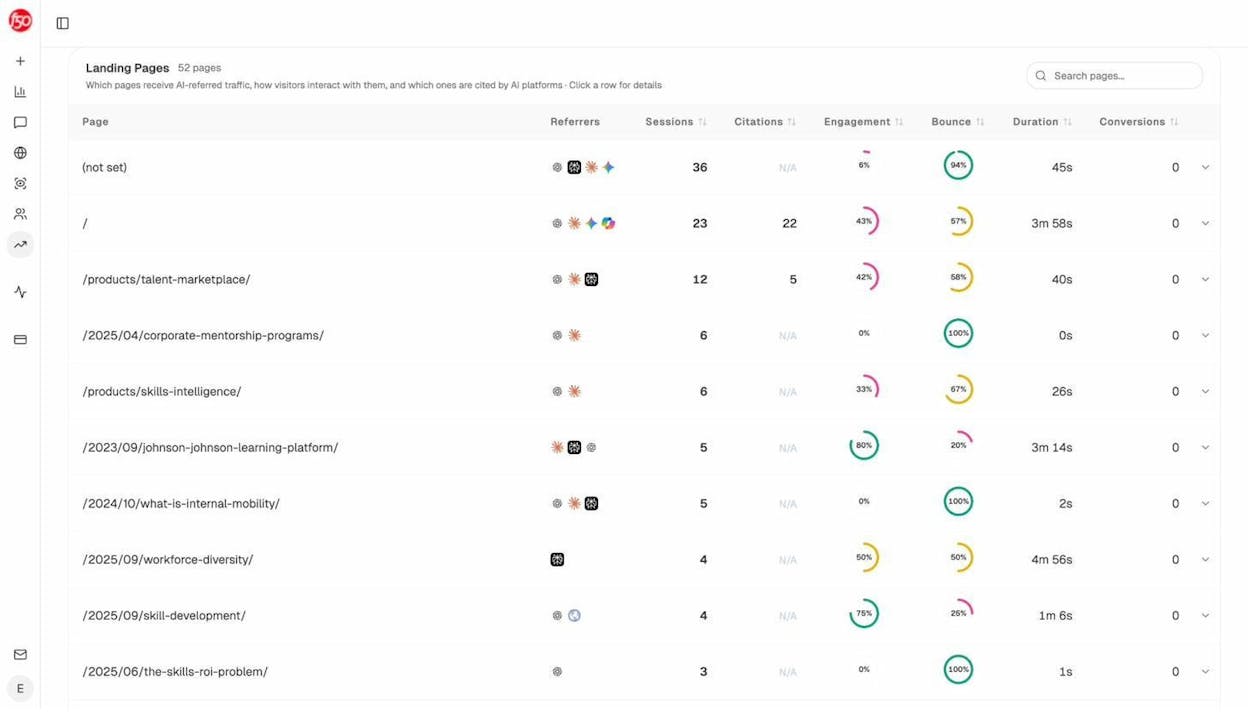
For more on AI crawler behavior, see our guides on how to rank on ChatGPT and how to rank on Perplexity.
How to Prioritize When You Have Many URLs to Remove
When the removal list is long, work in this order.
Highest priority is anything tied to security, compliance, or personal data. Leaked customer records, exposed staging URLs with real data, accidentally published draft contracts, employee PII. Use the Removals Tool first for the immediate hide, then apply a permanent method.
Medium priority is content that should be private but is not actively dangerous. Internal company pages that ended up indexed, member-only resources, expired campaign landing pages.
Low priority is duplicate content. Parameter URLs, print versions, faceted-navigation traps, abandoned subdirectories, old slugs. Almost all of these should be canonicalized rather than deleted.
A good audit cadence is to run a website audit quarterly, pull every indexed URL, then sort by priority and process top-down.
5 Common Mistakes That Will Undo Your Removal
Blocking the page in robots.txt instead of using noindex. Robots.txt blocks crawling, not indexing. If Google already knows the URL exists (from internal links, external links, or a previous crawl), it can keep the URL in the index based on those signals alone, and it will never see your noindex tag because it is not allowed to crawl.
Combining noindex with a non-self canonical. These signals conflict. Noindex says “drop this page.” Canonical says “consolidate signals into the destination.” Google usually picks one and the result is unpredictable. Pick noindex (for removal) or canonical (for consolidation) and stick with one.
Adding noindex, then blocking robots.txt before Google recrawls. The classic two-step trap. You add noindex. You wait two days. You block the URL in robots.txt to be safe. Google never re-crawls (because you blocked it), never sees the noindex, and the URL stays in the index permanently.
Confusing nofollow with noindex. Nofollow was originally a hint to not crawl a link. It does not stop a page from being indexed. Putting nofollow on a page does nothing for removal.
Forgetting to verify the page actually left. Setting up the removal is half the job. Checking is the other half, which we cover next.
What if the URL Isn’t on a Site You Own?
Two paths exist for content you do not control.
If you own the content but someone else republished it, file a DMCA takedown through Google’s Copyright Removal tool. You will need the original URL where the content first appeared, the infringing URL, and a sworn statement of ownership. Google reviews and removes the URL from search results if the claim is valid.
If the content is about you (not by you) and you live in the EU or UK, the right-to-be-forgotten request form lets you ask Google to delist results that contain personal information. Google evaluates each request on public-interest grounds.
For other situations (defamation, doxxing, non-consensual imagery), Google maintains a legal removals troubleshooter that walks you through the right form.
How to Remove Images From Google
The fastest way to remove an image from Google Image search is robots.txt. Unlike pages, image disallow directives in robots.txt actually deindex images.
To remove a single image:
User-agent: Googlebot-Image
Disallow: /images/dogs.jpg
To remove every image on the site:
User-agent: Googlebot-Image
Disallow: /
If you also want the image removed from web search snippets and AI image previews, delete the image from the server entirely so the URL returns a 404.
How to Verify the Removal Actually Worked
A removal that is not verified is a removal you cannot trust. Build a short check into your workflow.
On the Google side, run the URL through the URL Inspection tool. The expected state is “URL is not on Google” with the reason listed (404, noindex, blocked). Cross-check with a site: search and a verbatim search.
You can also use a free keyword rank checker to confirm the URL no longer ranks for the queries it used to surface for, and a SERP checker to inspect what is in the SERP now.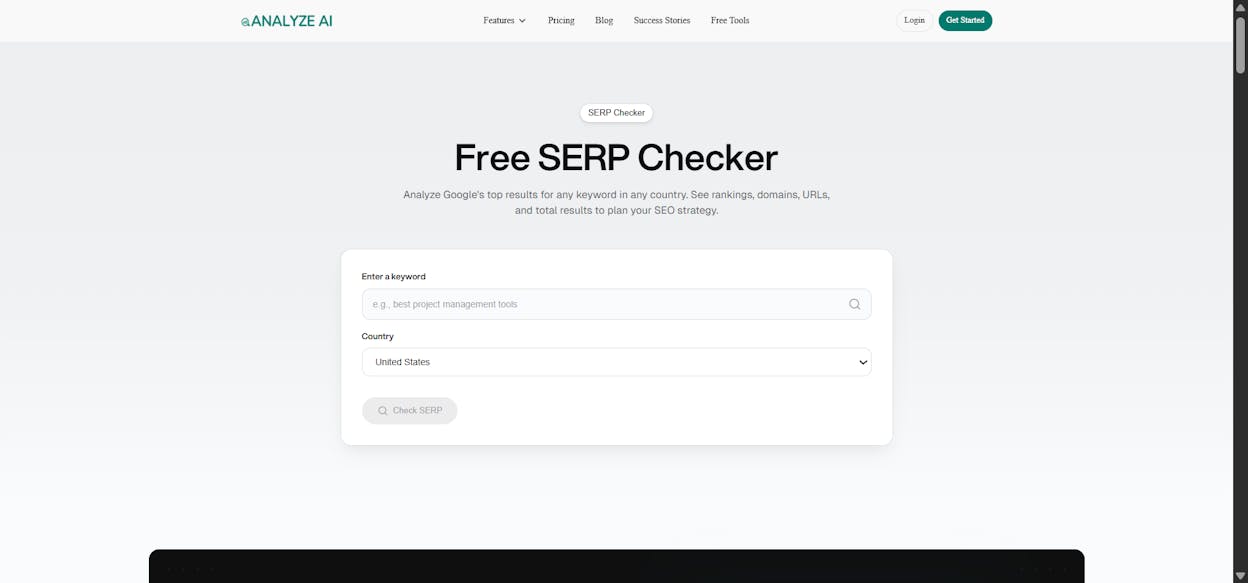
On the AI search side, open the Sources dashboard in Analyze AI and search for the removed URL. If citations stop accumulating in the next 30 days, the AI surfaces have moved on. If the page also disappears from the AI Traffic Analytics landing-page table, no real users are arriving from AI engines anymore.
A successful Google removal can mask a continued AI presence. A URL with zero impressions in Google Search Console can still be cited 50 times a week in ChatGPT and pulling Perplexity traffic. Confirm the two channels separately.
For ongoing visibility, Analyze AI’s monitor alerts you the moment a removed URL reappears in either channel.
Final Thoughts
Picking a removal method comes down to three questions. Do users still need the page? Do you want to keep the link equity? How fast does it need to disappear?
If users still need the page, use noindex or restrict access. If you want the link equity, canonicalize. If you need it gone today, use the Removals Tool first and pair it with a permanent method.
And in 2026, finish every removal job with the second check. Google is one search channel. ChatGPT, Perplexity, Gemini, Claude, and Copilot are the others. A URL gone from Google but still cited by AI engines is not actually removed. It is hidden in one place and visible in four others.
Removing a URL is a technical task. Removing it everywhere is a workflow.

Ernest

Ibrahim


