



Summarize this blog post with:


Product pages are where the buying decision actually happens. A lot of them don’t rank and don’t convert because teams treat them like brochures instead of pages that have to satisfy three audiences at once. Those audiences are search engines, AI engines, and the buyer who landed there.
In this article, you’ll learn the 16 elements that make up a well-optimized product page, the specific checks each one needs, and how to extend the same page so it also shows up in answers from ChatGPT, Perplexity, Gemini, and Google’s AI Overviews.
We’ll go element by element, then end with a short audit you can run on any page in under an hour.
Table of Contents
What makes a great product page?
Buyers expect to see the same handful of elements on a product page, and search engines and AI engines have learned to look for them. When all of them are present and well-executed, the page tends to rank, get cited, and convert.
Here is the anatomy.
1. Crawlable by search engines and AI bots
A blocked page cannot rank, and a page blocked from AI crawlers cannot be cited. Confirm both before you optimize anything else.
Run these four checks first.
-
The page is not blocked in robots.txt.
-
The page has no noindex tag in the HTML head.
-
The page has a self-referencing canonical tag.
-
The page is included in sitemap.xml.
![[Screenshot of a browser showing view-source on a product page with <meta name="robots"> and <link rel="canonical"> highlighted]](https://www.datocms-assets.com/164164/1778268992-blobid1.png?auto=format,compress&w=1248&fit=max)
For AI search, also check that the bots feeding AI engines can reach the page. The main ones are GPTBot and OAI-SearchBot (OpenAI), ClaudeBot (Anthropic), PerplexityBot, and Google-Extended. Some stores discover after months of low AI visibility that their robots.txt blocks one or more by default.
Open yourdomain.com/robots.txt and search for those user-agent strings. If any are disallowed, decide intentionally whether to allow them. Blocking them protects content but makes you invisible in that engine’s answers.
2. Clear, intent-matching title tag
Your title tag is the headline Google shows in the SERP. It’s also a strong signal AI engines use to decide what a page is about.
A good title says exactly what the product is, includes the keyword the way buyers actually phrase it, and adds a differentiator if you have room. The pattern that almost always works is [Product Name] [Key Attribute] | [Brand].
![[Screenshot of a Google SERP showing a product result with the title tag highlighted]](https://www.datocms-assets.com/164164/1778269000-blobid2.png?auto=format,compress&w=1248&fit=max)
If buyers search by SKU, model number, or part number, include it in both the title and the URL. A buyer searching 10317 for the Lego Land Rover Defender expects to land on that exact product. Stores that include the SKU win those searches without effort. You can sanity-check whether SKU searches exist for your category with our SERP checker and keyword rank checker.
3. Simple, readable URL
A clean URL helps both humans and crawlers understand what the page is about before they load it. Google’s own guidance is to keep URLs simple and intelligible.
The rules are short.
-
Use hyphens to separate words, never underscores or spaces.
-
Keep the slug to the product name and one or two key attributes.
-
Avoid query parameters in the canonical URL whenever possible.
-
Stay consistent across the catalog. Either every product sits at /products/[slug] or every product sits at /shop/[category]/[slug]. Pick one.
A URL like /products/merino-wool-crew-neck-sweater tells the buyer and the crawler what to expect. A URL like /p?id=8842&v=2 tells them nothing.
4. Breadcrumbs
Breadcrumbs are internal links showing the buyer where they are in the site. They help users backtrack to a category page if the product isn’t quite right, which keeps them on your site instead of bouncing back to Google.
Marked up with BreadcrumbList schema, they also reinforce the site’s hierarchy for crawlers and replace the URL in the SERP with a cleaner path. The same schema gives AI engines a quick read on category context, so a page that announces itself as Home > Men > Sweaters > Merino Crew Neck is easier to file under the right intent than a bare slug.
5. H1 tag
The H1 is the on-page headline. Unlike the title tag, it doesn’t appear in search results. It sits at the top of the page and is the first thing the buyer reads.
Two rules cover almost every case.
-
One H1 per page.
-
The H1 should match buyer intent and contain the product name.
The title tag can carry the long-tail descriptor while the H1 carries the human-readable name. What you cannot afford is a missing H1 or three competing H1s.
6. Product images
Images influence both conversion and image search traffic, and they feed AI shopping experiences that lean heavily on visual product cards.
Optimize four things on every image.
-
File names. Use descriptive filenames like merino-crew-neck-charcoal-front.jpg, not IMG_4892.jpg.
-
Alt text. Describe what’s in the image in one short sentence. Screen readers read it, and it’s one of the few text signals image crawlers can use.
-
Format and size. Serve modern formats like WebP or AVIF, with JPG fallbacks. Keep individual files under 200 KB where possible.
-
Responsive delivery. Use srcset so mobile devices download smaller files than desktop.
![[Screenshot of an image inspector showing a product image with alt text, dimensions, and file size highlighted]](https://www.datocms-assets.com/164164/1778269000-blobid3.jpg?auto=format,compress&w=1248&fit=max)
For a deeper walkthrough including lazy-loading patterns and EXIF data, see our ecommerce SEO guide.
7. Product video
Video earns its place when the product is hard to evaluate from photos alone. Apparel benefits from a fit clip. Furniture benefits from a 360 turntable. A garden hose does not need video.
If you do add video, host it where it can rank. YouTube videos can show up in Google’s video tab and in Discover. Self-hosted videos with VideoObject schema can earn the video rich result on the SERP itself.
8. Pricing, availability, ratings, and reviews
This cluster does much of the heavy lifting for both conversion and ranking. Buyers scan for it before they read anything else.
Most ecommerce platforms render price and availability automatically, so the work here is on schema and reviews. Mark up Product schema with offers (price, currency, availability) and aggregateRating (average rating, review count). When this is in place, Google can show the rich snippet in the SERP.
Ratings and reviews matter for AI search in a way that surprises a lot of teams. We analyzed 83,670 AI citations across ChatGPT, Claude, and Perplexity and found that 82.9% of AI citations come from third-party sources, with review platforms making up a big share. If your product has thin reviews on your own page and zero presence on G2, Trustpilot, or category review sites, AI engines have nothing third-party to corroborate your claims, and your competitors get cited instead.
9. Call to action
The CTA button is small and easy to ignore as an SEO concern. It’s also a high-leverage UX element, and weak CTAs damage rankings indirectly through bounce.
Three rules.
-
Use a verb. Add to cart, Buy now, Get a quote. Not Submit and not Continue.
-
One primary CTA above the fold, in a contrasting color.
-
Sticky CTAs on mobile so the button is reachable without scrolling.
Open every page on a mid-range Android, scroll halfway down, and confirm the buy button is reachable in one tap. If not, you’re losing conversions.
10. Delivery details
Buyers won’t complete checkout if they can’t answer two questions. When will it arrive, and how much will shipping cost. Burying this at the bottom sends them back to Google to find a competitor that puts it up front.
Show three things near the price.
-
Estimated arrival window for the buyer’s location.
-
Shipping cost or a clear Free over $X threshold.
-
Return policy in one short sentence.
If you sell internationally, geo-detect the country and show the right currency and shipping window automatically.
11. Product description
This is where many brands fall down. The default move is to paste the manufacturer’s description and add a sentence about free shipping. Every retailer carrying that product runs the same paragraph, search engines treat it as duplicate content, and AI engines have no reason to cite you over the manufacturer.
Write your description from scratch. Three things make it work.
-
Lead with the job the product does. Not the spec sheet. Not the brand story. The single sentence that explains what problem it solves for the buyer.
-
Add specifics no other retailer has. A note from a buyer who stress-tested it. The exact use case it failed at. A comparison to a similar SKU you also stock.
-
Use buyer language. Pull phrases from your reviews and support tickets. If buyers consistently call something “the strap one,” put “the strap one” in the copy alongside the official name.
Generic descriptions get skipped. Specific descriptions get cited and converted. Our AI content optimizer surfaces gaps based on what AI engines are already pulling from your category, so you can see what they reward before you publish.
12. Product specifications
Specs are the section AI engines parse aggressively, because they are clean, factual, and structured. A buyer looking up does the [model] support 240Hz refresh rate is asking a question with a binary answer that lives on the spec table.
Format specs as a list of attribute-value pairs, not as paragraphs. If you sell electronics or anything with technical attributes, render them as an HTML table or dl list and mark them up with the additionalProperty field of Product schema. A page that lists 30 specifications can rank for 30 long-tail queries, each with low competition.
13. FAQs
Buyers ask the same questions about a product over and over. Answering them on the page reduces support load and increases the chance of ranking for question-style queries.
Three good places to mine these questions.
-
Your own customer support tickets. Search for the SKU and pull every recurring question.
-
The People Also Ask box on Google for the product name. We covered the full PAA workflow in this guide.
-
AI search itself. Ask ChatGPT and Perplexity questions a buyer would ask, and see which they answer with confidence and which they hedge on. The hedged ones are usually gaps you can fill.
Mark up the FAQ section with FAQPage schema. Google has reduced FAQ rich results in standard search, but the same schema still feeds AI engines and shows up in some AI Overviews.
14. Related products
Related product blocks keep buyers on your site if the current product isn’t quite right, and they pass internal link equity through the catalog.
Two patterns work better than the default Customers also bought block.
-
Same-category alternatives. If a buyer is looking at a 12-inch chef’s knife, link to the 10-inch and 14-inch versions.
-
Genuine accessories. If you sell a camera, link to the lens, the strap, and the memory card you actually recommend. Three relevant links beat twelve random ones.
Use descriptive anchor text. Stainless steel chef's knife, 10 inch beats View product. For more, see our internal linking guide.
15. User-generated content
UGC is a strong trust signal a product page can carry, and it’s hard to fake, which is why AI engines weight it heavily.
Three formats are worth pursuing.
-
Photo and video reviews. Buyers showing the product in their own context. Especially valuable for apparel, furniture, and anything where fit matters.
-
Question-and-answer threads. Buyers asking buyers. These often surface objections your description does not address.
-
Imported review feeds. If your products are sold on Amazon or Shopify with their review apps, syndicate the reviews back so the same content lives at your URL.
A blank review section is worse than an honest mix of four-star and five-star reviews. Buyers and AI engines both treat the absence of reviews as a signal the product has no track record.
16. Schema markup, consolidated
We’ve referenced specific schema types throughout the elements above. Here is the complete set worth adding.
|
Schema type |
What it does |
|---|---|
|
Product |
Core product data with name, image, description, brand, and SKU |
|
Offer (nested in Product) |
Price, currency, availability, valid-from dates |
|
AggregateRating (nested in Product) |
Average rating and review count |
|
Review |
Individual review content, author, rating |
|
BreadcrumbList |
Hierarchy from home to product |
|
VideoObject |
Product video with thumbnail and transcript |
|
FAQPage |
The FAQ section |
Validate everything in the Rich Results Test before you ship. A typo in a schema field can hide an entire rich snippet.
How to make your product page show up in AI search
The 16 elements above are most of the work. The new question, the one nobody had to answer two years ago, is whether the same page is showing up in ChatGPT, Perplexity, Gemini, and AI Overviews.
We don’t think AI search is replacing SEO. SparkToro’s data shows that 95% of Americans still use traditional search engines every month. AI search is an additional organic channel buyers move between fluidly. A buyer might ask Perplexity for a merino sweater for travel, then check Google for prices, then check Reddit for sizing notes. Your page needs to show up in all three.
Here is a four-step workflow to extend the SEO work you’ve already done into AI search.
Step 1. Find the prompts buyers use to research your category.
Start with questions a buyer would ask before they know your brand. Best [category] for [use case], [competitor] alternatives, is [your product] worth it. Tools like our free keyword generator and Bing keyword tool build the seed list. Then expand it with prompt discovery, which surfaces the actual prompts users send to AI engines in your category.
Step 2. Check which of your product pages are already getting AI traffic.
Before you change anything, look at what’s working. The Landing Pages view in Analyze AI shows which pages are receiving AI-referred sessions, which AI engines they came from, and how engaged those visitors were.
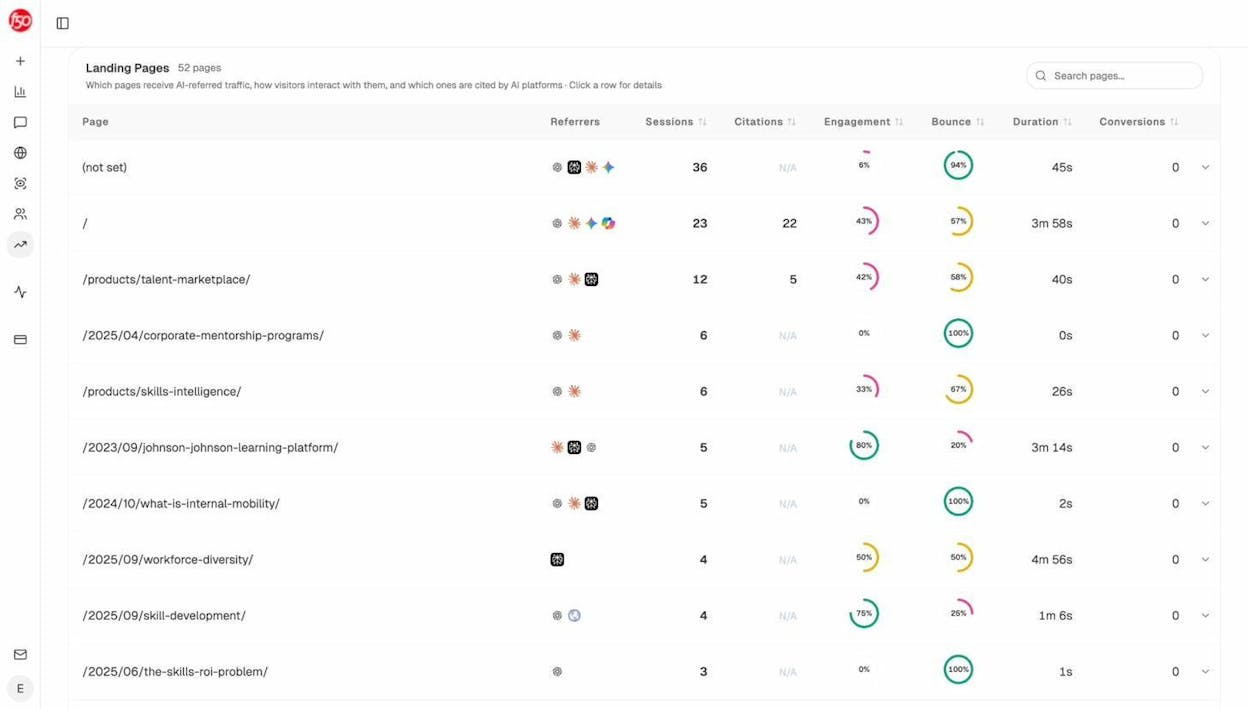
Sort by sessions to see your top AI-traffic pages. Sort by citations to see which pages AI engines reference most. The pages already doing well are templates for the ones that are not. Look at what the winners share, then apply the pattern to the laggards.
Step 3. See what AI engines actually cite in your category.
This is the step that usually changes how teams write product copy. Open the Sources view to see the breakdown of content types AI engines cite, and the specific domains they pull from most often.
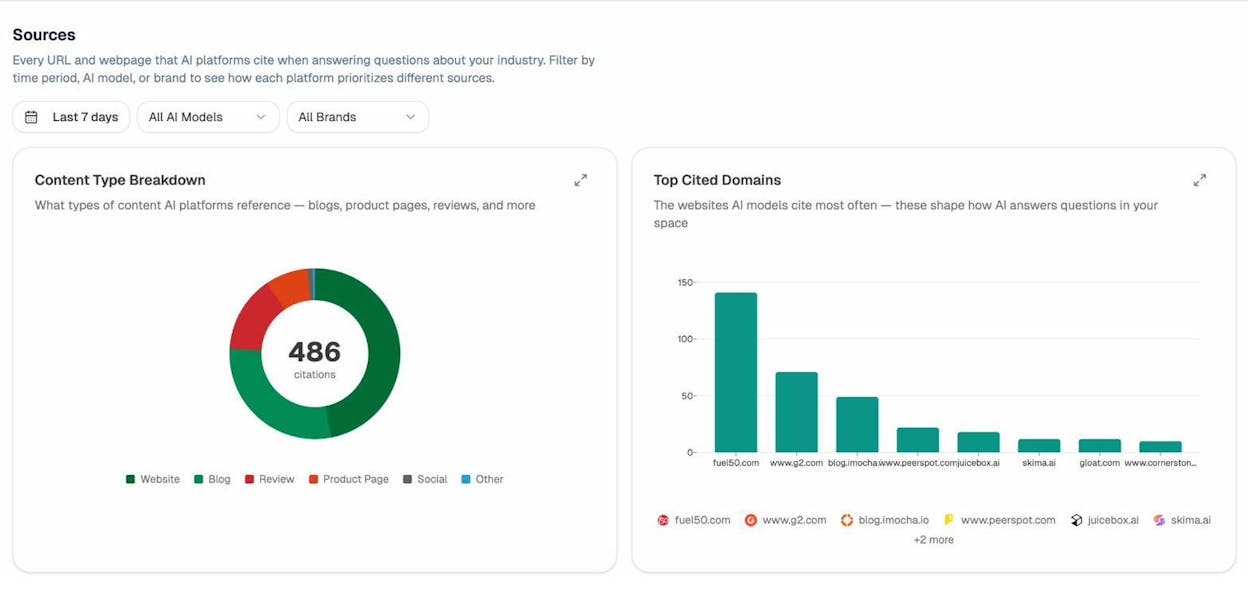
The breakdown almost always shows the same pattern from our 83,670-citation study. Third-party sources dominate. Blog content and review platforms get cited heavily. Product pages get cited only when they have substantive original content. If your category leans on review platforms, show up there. If it leans on blog content, publish (or sponsor) in-depth comparison content.
Step 4. Identify which competitors are winning the citations you’re missing.
Open the Competitors view. Analyze AI auto-suggests competitors based on which brands are co-mentioned with yours in AI answers, including ones you might not have considered.
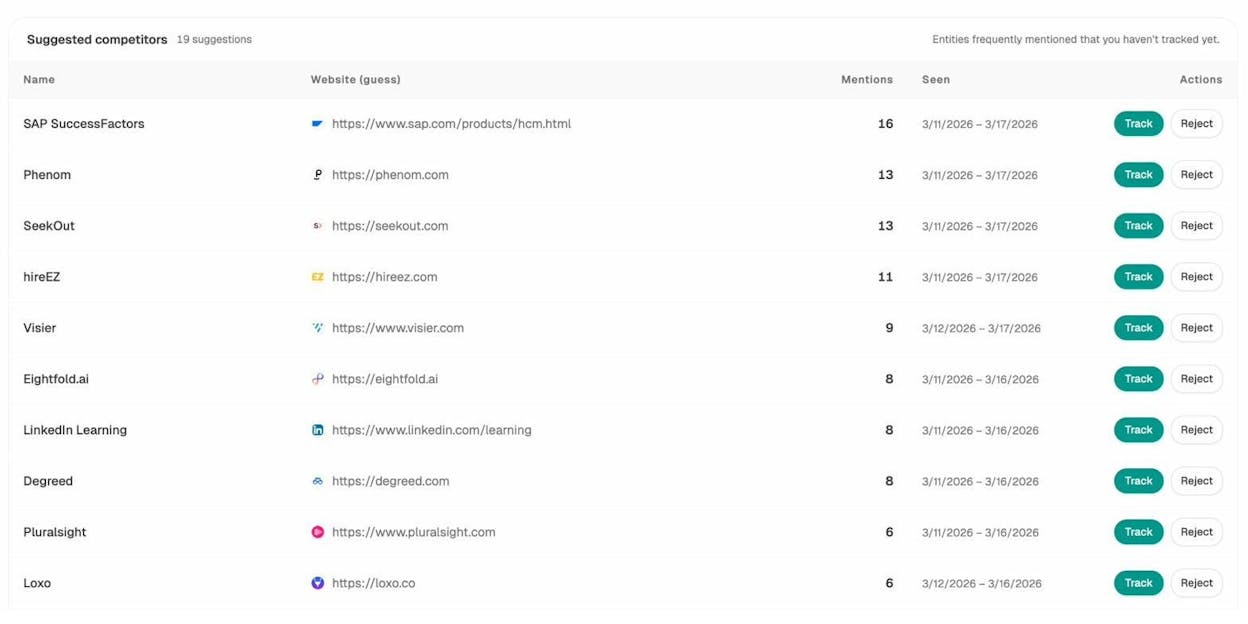
Track the ones that matter, then look at the specific pages AI engines cite from each. If a competitor’s product page is cited and yours isn’t, the gap is almost always one of three things. Weaker on-page schema. No third-party reviews. Or a thinner description. Fix the gap and citation share usually shifts within four to six weeks.
For the full citation-tracking workflow, see how to get mentioned in AI search and how to rank on ChatGPT.
How to audit a product page in under an hour
The 16 elements above are the checklist. Here is how to actually run the audit.
1. Quick spot check on a single page.
Open the page in a browser, then open developer tools and check the four crawlability items, the title tag, the H1, and the canonical. Run the URL through the Rich Results Test to confirm schema validates. Pull up the page on a phone and confirm the price, the buy button, and shipping details are visible without scrolling more than once.
![[Screenshot of Google’s Rich Results Test showing a validated product page with detected Product, Offer, and AggregateRating schema]](https://www.datocms-assets.com/164164/1778269015-blobid7.png?auto=format,compress&w=1248&fit=max)
This takes about 10 minutes per page.
2. Site-wide scan with a crawler.
Run a free crawl tool against the full catalog. Free options include Screaming Frog (free up to 500 URLs) and the audit features in our free SEO tool stack. Filter URLs to your product directory (typically /products/ or /shop/) and look for patterns affecting every page. Missing canonicals. Duplicate titles. Missing schema. Broken images.
Product pages share a template, so a problem on one usually means a problem on all of them. The fix is one engineering ticket, not 500.
3. AI visibility audit.
For every product page that matters, check whether it’s currently cited in AI answers and whether competitors are dominating instead. The Content Optimizer view in Analyze AI flags pages losing organic traffic over the last 60 days, so you know which to refresh first.
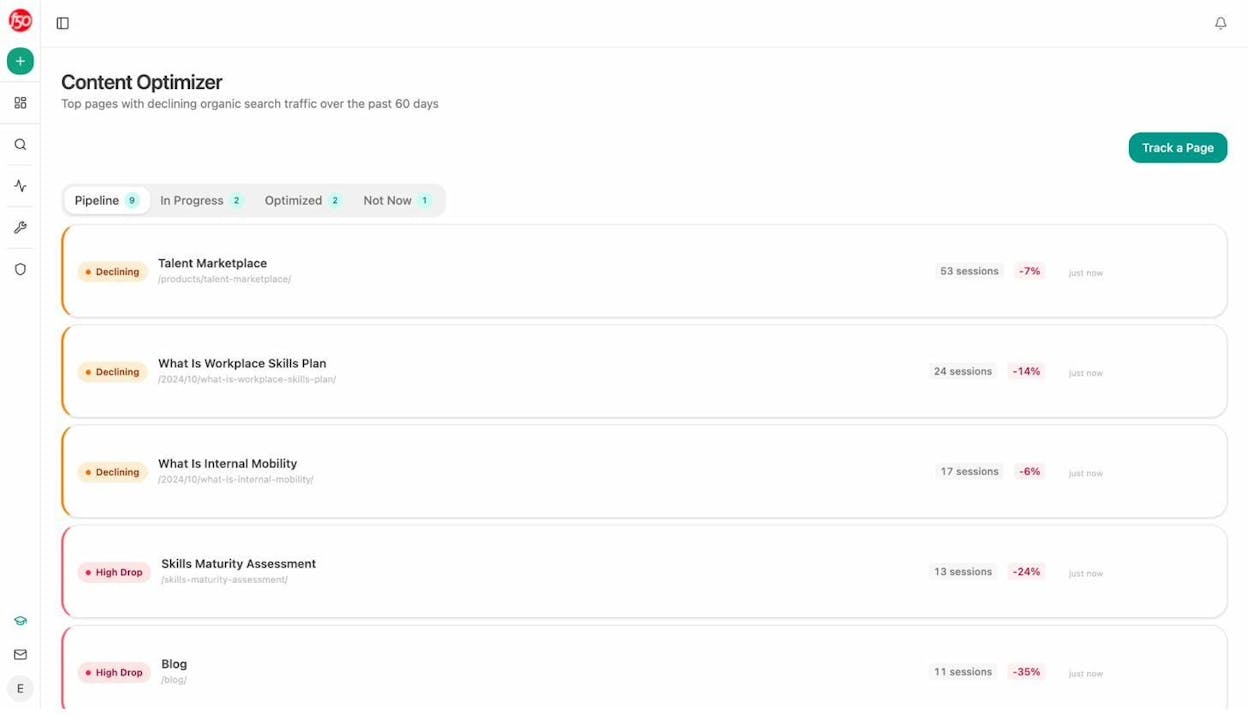
A page that was getting traffic and is now declining is usually a faster win than a brand new page. The infrastructure is in place. The links exist. You just need to refresh the description, strengthen the schema, and rebuild third-party signals.
Final thoughts
The 16 elements above are the same ones product pages have needed for years. The difference now is that the same page has to satisfy two layers of discovery instead of one.
Get the on-page work right, then extend it into AI search. The teams that do both, instead of treating AI search as a separate project competing for SEO budget, are the ones still growing organic traffic.
If you want to see which prompts your buyers are using, which pages are already cited, and which competitors are eating your citations, start with Analyze AI and have a baseline by the end of the day.

Ernest

Ibrahim


