



Summarize this blog post with:


In this article, you’ll learn what llms.txt is, how it works, who proposed it, and why no major LLM provider actually supports it yet. You’ll also see real examples, learn how to create one in minutes, understand the risks of manipulation, and discover what actually drives AI search visibility today.
Table of Contents
What Is llms.txt?
llms.txt is a proposed standard for giving large language models (LLMs) a curated, structured entry point to your website’s most important content.
The idea was proposed in September 2024 by Jeremy Howard, the co-founder of Answer.AI and creator of fast.ai. You can read the full proposal on llmstxt.org.
Here’s the problem it tries to solve: LLMs increasingly rely on website content to generate answers, but their context windows are too small to process an entire site. Converting complex HTML pages with navigation menus, ads, JavaScript, and sidebars into clean, usable text is messy and imprecise. Important pages like API documentation, product guides, or policy pages can get buried or ignored entirely.
llms.txt addresses this by giving LLMs a curated map. It’s a Markdown-formatted text file hosted at your root domain (yourdomain.com/llms.txt) that lists your most valuable pages with brief descriptions. Think of it as a table of contents built specifically for AI systems.
![[Screenshot of the llmstxt.org homepage showing the proposal overview]](https://www.datocms-assets.com/164164/1776676558-blobid1.png?auto=format,compress&w=1248&fit=max)
The concept draws obvious parallels to robots.txt and sitemap.xml, which help search engines understand what’s on your site and where to look. The reasoning goes: if we built these standards for Google’s crawlers, why not build something similar for ChatGPT, Claude, and Perplexity?
But there’s a critical distinction. Robots.txt and sitemap.xml are established web standards with near-universal adoption. Search engines committed to respecting them. No major LLM provider has made that commitment for llms.txt. Not OpenAI. Not Anthropic. Not Google. Not Meta.
As of now, llms.txt remains a proposal. An interesting one, but a proposal nonetheless.
How llms.txt Works
The format itself is simple. An llms.txt file is a Markdown document that uses a specific structure:
-
An H1 heading at the top with the site name or title
-
A brief description of what the site does
-
H2 sections that group links by category (docs, policies, products, guides)
-
Links to individual pages, each with a short, plain-language description
The entire point is brevity and clarity. LLMs have limited context windows, so the file needs to communicate maximum value in minimum space. No HTML. No JavaScript. Just clean Markdown that any language model can parse immediately.
The proposal also suggests that websites create Markdown versions of their pages (.md appended to the existing URL), so LLMs can access a clean, stripped-down version of any page without needing to parse complex HTML. For example, yourdomain.com/docs/api would have a companion version at yourdomain.com/docs/api.md.
This is a thoughtful idea. One of the biggest challenges for AI systems is extracting useful content from web pages cluttered with navigation, footers, pop-ups, and tracking scripts. A clean Markdown version removes that friction entirely.
llms.txt vs. Robots.txt vs. Sitemap.xml
It’s easy to conflate llms.txt with existing web standards because they seem to serve a similar purpose. They don’t. Here’s how they differ:
|
Feature |
robots.txt |
sitemap.xml |
llms.txt |
|---|---|---|---|
|
Purpose |
Controls which pages search engine crawlers can access |
Lists all pages for search engine discovery and indexing |
Curates high-value pages for LLM comprehension |
|
Format |
Plain text with directives |
XML |
Markdown |
|
Audience |
Search engine crawlers (Googlebot, Bingbot) |
Search engine crawlers |
LLMs and AI agents |
|
Action |
Restricts access (“don’t crawl this”) |
Suggests pages to index (“here’s everything”) |
Highlights priority content (“start here”) |
|
Standardization |
Established web standard (1994) |
Established web standard (2005) |
Proposal only (2024) |
|
Provider support |
Respected by all major search engines |
Respected by all major search engines |
No major LLM provider has committed |
|
Enforcement |
Voluntary but widely honored |
Widely honored |
No enforcement mechanism |
|
Location |
/robots.txt |
/sitemap.xml |
/llms.txt |
The key difference is in the third column. Robots.txt and sitemap.xml succeeded because search engines actively agreed to honor them. Google, Bing, and others built their crawlers to check for these files and act on their contents. That mutual agreement is what turned a good idea into a web standard.
llms.txt doesn’t have that agreement. It’s a one-sided proposal. You can create the file and host it on your site, but there’s no guarantee that any AI system will ever read it, let alone act on it.
llms.txt Example
Here’s what an llms.txt file looks like in practice. This is Anthropic’s actual llms.txt file, hosted at docs.anthropic.com/llms.txt:
![[Screenshot of Mistral’s llms.txt file showing the Markdown structure with H2 sections for Docs and links to API documentation pages]](https://www.datocms-assets.com/164164/1776676565-blobid2.png?auto=format,compress&w=1248&fit=max)
Notice the structure. It opens with an H1 title, includes a description of the documentation, and then uses H2 headers to organize links to specific resources. Each link includes a brief description.
Here’s a sample structure you can adapt for your own site:
# Your Company Name
Brief description of your company and what this documentation covers.
## Docs
- [API Reference](/docs/api.md): Complete API documentation with authentication, endpoints, rate limits, and examples.
- [Quick Start Guide](/docs/quickstart.md): Get up and running in under 10 minutes.
- [SDK Documentation](/docs/sdk.md): Client libraries for Python, Node.js, and Go.
## Products
- [Product Catalog](/products/catalog.md): Full list of products with pricing, specs, and availability.
- [Sizing Guide](/products/sizing.md): Measurement reference across all product categories.
## Policies
- [Terms of Service](/legal/terms.md): Service usage terms and conditions.
- [Return Policy](/legal/returns.md): Eligibility, timelines, and processing for returns and exchanges.
- [Privacy Policy](/legal/privacy.md): How we collect, store, and use customer data.
## Resources
- [Blog](/blog/index.md): Industry insights, product updates, and company news.
- [Case Studies](/resources/case-studies.md): Real customer results and implementation stories.
A few things to note about this format. The descriptions are short but specific. Instead of “our API docs,” it says “Complete API documentation with authentication, endpoints, rate limits, and examples.” That specificity helps an LLM understand whether the linked page is relevant to a given query.
The links point to Markdown versions of pages (.md files) rather than HTML, following the proposal’s recommendation for LLM-friendly content formats.
How to Create an llms.txt File
Creating an llms.txt file takes minutes. Here’s how to do it manually, step by step.
Step 1: Identify your most important pages.
Start by listing the pages that contain your most valuable, structured content. These typically include API documentation, product pages, help center articles, pricing pages, return policies, and key blog posts. Don’t try to include everything. The goal is curation, not comprehensiveness.
![[Screenshot of a site’s page hierarchy or sitemap to illustrate identifying key pages]](https://www.datocms-assets.com/164164/1776676565-blobid3.png?auto=format,compress&w=1248&fit=max)
Step 2: Open a text editor and create a Markdown file.
Use any text editor (VS Code, Sublime Text, or even Notepad). Start with an H1 heading containing your site or company name, followed by a one-to-two sentence description.
Step 3: Organize pages into logical H2 sections.
Group your links into categories that make sense for your content. Common groupings include Docs, Products, Policies, Resources, and Guides. Each section gets an H2 header.
Step 4: Add links with descriptions.
Under each H2, list the relevant pages. Each entry should follow this format:
- [Page Title](/path/to/page.md): A brief, specific description of what the page covers.
Keep descriptions under 20 words. Be specific. “Product catalog with 500+ SKUs, pricing, and availability by region” is better than “Our products.”
Step 5: Save and host the file.
Save your file as llms.txt and upload it to your website’s root directory. The file should be accessible at https://yourdomain.com/llms.txt.
Step 6: Test accessibility.
Open a browser and navigate to https://yourdomain.com/llms.txt. You should see the raw Markdown content. If you get a 404 error, check your server configuration to make sure .txt files are being served from the root directory.
Using a Generator Tool
If you’d rather not build the file manually, several tools can generate one for you. Analyze AI offers a free llms.txt generator that crawls your site and creates a structured llms.txt file automatically. Firecrawl also offers a similar tool.
![[Screenshot of Analyze AI’s llms.txt generator interface]](https://www.datocms-assets.com/164164/1776676571-blobid4.png?auto=format,compress&w=1248&fit=max)
CMS plugins are catching up too. Yoast SEO now includes a one-click llms.txt generator in its WordPress plugin, which automatically pulls your most important pages and formats them correctly. Webflow provides a system for uploading llms.txt to your root directory. For a detailed comparison of all available generators, see our guide to the best llms.txt generator tools.
Related Files: llms-full.txt and Markdown Versions
The llms.txt proposal doesn’t stop at a single file. It introduces two additional concepts worth understanding.
llms-full.txt
Some implementations expand the standard llms.txt into a “full” version that includes the actual content of linked pages, not just links to them. The idea is to provide LLMs with a single, self-contained document that bundles all your key content into one place.
The FastHTML project (maintained by Answer.AI, the same company behind the llms.txt proposal) generates two expanded files: llms-ctx.txt, which includes content from required links, and llms-ctx-full.txt, which includes content from all links, including optional ones. Both use an XML-based structure designed specifically for consumption by LLMs like Claude.
This approach has obvious benefits for AI agents that need to process documentation quickly. Instead of following 50 links and parsing 50 HTML pages, the agent can read a single file.
But it also introduces risks. A full-text file gives the site owner complete control over what the LLM sees, which opens the door to manipulation (more on that below).
Markdown Page Versions (.md)
The proposal also recommends creating Markdown versions of your web pages at the same URL with .md appended. So yourdomain.com/docs/getting-started would have a companion at yourdomain.com/docs/getting-started.md.
This solves a real problem. When LLMs process HTML pages, they need to strip out navigation, scripts, styles, and other non-content elements to get to the actual text. That conversion process is lossy. Important formatting, tables, and code blocks can get mangled. A clean Markdown version bypasses that entirely.
One advantage: these .md files won’t interfere with your traditional SEO. Search engine crawlers don’t index .md files by default, so there’s no risk of duplicate content.
Who Is Using llms.txt?
You can browse a community-maintained directory of public llms.txt files at directory.llmstxt.cloud.
Some notable adopters include:
-
Anthropic: Publishes a full Markdown map of its Claude API documentation.
-
Mintlify: A developer documentation platform that co-developed the llms-full.txt format.
-
Cloudflare: Lists its performance and security documentation.
-
Tinybird: Provides structured access to its real-time data API docs.
-
Stripe: Makes its payment API documentation accessible via llms.txt.
But adoption data tells a sobering story. According to Sistrix, fewer than 0.005% of websites worldwide have implemented llms.txt. That’s an extremely small fraction, even for a relatively new proposal.
The pattern is clear: adoption is concentrated among developer-focused companies and documentation platforms. These are sites where the content is already structured, technical, and easy to convert to Markdown. For e-commerce sites, media publishers, and most B2B companies, llms.txt is barely on the radar.
Do LLM Providers Actually Support llms.txt?
This is the most important question, and the answer is straightforward: no.
Here’s where each major provider stands:
|
LLM Provider |
Crawler |
llms.txt Support |
|---|---|---|
|
OpenAI (ChatGPT) |
GPTBot |
Honors robots.txt for crawl control. No stated support for llms.txt. |
|
Anthropic (Claude) |
ClaudeBot |
Publishes its own llms.txt, but has not stated that its crawler uses the standard for discovery. |
|
Google (Gemini) |
Google-Extended |
Uses robots.txt (via User-agent: Google-Extended) for AI crawl behavior. No mention of llms.txt support. |
|
Meta (LLaMA) |
No public crawler |
No public crawler documentation or guidance. No indication of llms.txt usage. |
|
Perplexity |
PerplexityBot |
Honors robots.txt. No stated support for llms.txt. |
|
Microsoft (Copilot) |
Bingbot |
Uses Bing’s existing crawler infrastructure. No separate llms.txt support. |
Note the gap: Anthropic publishes its own llms.txt file but has not said its crawler actually reads llms.txt files on other websites. Publishing a file and supporting a standard are two different things.
Server log analysis confirms this gap. When site owners check their access logs for requests to /llms.txt, they rarely see any AI crawlers making those requests. The bots are crawling pages, but they’re not checking for llms.txt.
Google’s John Mueller addressed this directly, comparing llms.txt to the keywords meta tag, a self-declared signal that search engines ultimately chose to ignore because site owners could too easily game it.
The Manipulation Problem
One concern that doesn’t get enough attention: llms.txt creates a surface for manipulation.
With traditional web crawling, search engines and LLMs see the same content that users see. The page is the page. But llms.txt introduces a separate layer of content that only AI systems are meant to consume. This separation creates a trust problem.
Consider the possibilities. A company could put misleading descriptions in their llms.txt that don’t match their actual page content. They could highlight promotional pages while burying negative reviews or policy limitations. They could use specific language designed to influence how LLMs describe their products in generated answers.
Research backs up this concern. A study titled “Adversarial Search Engine Optimization for Large Language Models” demonstrated that carefully crafted content-level prompts can make LLMs significantly more likely to recommend targeted content. If llms.txt gives websites a dedicated channel to feed instructions to LLMs, the abuse potential is significant.
This is fundamentally different from robots.txt, which only controls access (crawl or don’t crawl). llms.txt tries to influence interpretation, and that’s a much harder problem to police.
For this reason alone, LLM providers have good reason to be cautious about adopting the standard. Any system that relies on self-reported information from website owners needs robust verification mechanisms, and those mechanisms don’t exist yet.
Should You Implement llms.txt?
Given everything above, here’s a practical framework for deciding.
The case for implementing it:
The file takes five minutes to create. There’s zero risk. It won’t hurt your SEO, your site performance, or your existing crawler behavior. If LLM providers do eventually adopt the standard, early adopters might see a small advantage. And the exercise of identifying your most important pages and writing clear descriptions for them is useful in its own right.
The case against prioritizing it:
There’s no evidence that llms.txt improves your visibility in AI-generated answers. No LLM provider has committed to parsing it. Server logs show AI crawlers aren’t requesting it. And the time you spend building and maintaining an llms.txt file could be spent on things that demonstrably drive results.
Our recommendation:
Create a basic llms.txt file if you have structured content like documentation, product pages, or a help center. It takes minutes, costs nothing, and keeps you positioned if the standard gains traction. But don’t treat it as a strategy. Don’t let it distract you from the work that actually drives AI search visibility.
The standard is gaining attention because marketers want to influence how LLMs represent their brands, and right now, there aren’t many established tools for doing that. llms.txt feels like control. But feeling like control and having control are different things.
What Actually Drives AI Search Visibility
If llms.txt isn’t the answer, what is? Here’s what the data shows.
AI search engines like ChatGPT, Perplexity, Claude, Gemini, and Copilot don’t use a single file to decide which brands and sources to cite. They pull from their training data, live web searches, and a range of signals that look a lot like traditional SEO fundamentals, including content depth, authority, structured data, and topical relevance.
The brands that show up consistently in AI-generated answers tend to have three things in common:
-
Deep, well-structured content that directly answers the questions people ask. LLMs are trained on and retrieve content that is comprehensive, clearly organized, and genuinely useful. This is the same principle that drives traditional SEO, just applied to a different surface.
-
Citations from authoritative sources. When LLMs cite your brand, they’re often pulling from third-party sources like review sites (G2, Capterra), Wikipedia, industry publications, and comparison pages. The more frequently your brand is cited across high-authority domains, the more likely LLMs are to surface you in their answers.
-
Measurable presence across multiple AI engines. Visibility in ChatGPT doesn’t guarantee visibility in Perplexity or Gemini. Each model has its own retrieval behavior and source preferences. Winning in AI search means showing up consistently across all of them.
How to Track Your AI Search Visibility
The challenge with AI search is measurement. Unlike traditional SEO where you can check your Google rankings in seconds, there’s no equivalent “rank checker” for ChatGPT or Perplexity. You can’t just search a keyword and see where you appear.
This is where AI search analytics comes in. Tools like Analyze AI let you track which prompts mention your brand across all major LLM platforms, how your visibility compares to competitors, and which sources AI models are citing.
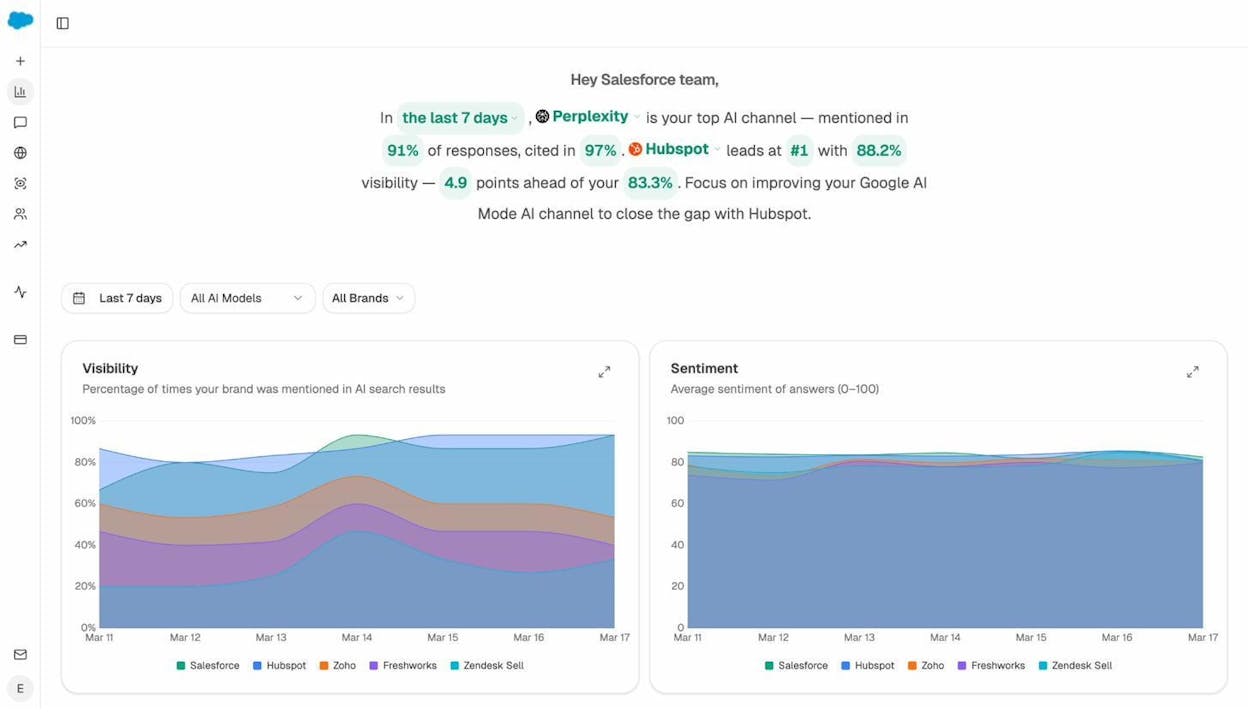
For example, the overview dashboard shows your brand’s visibility score across AI search engines over time, broken down by competitor. You can see which AI engine is your strongest channel and where competitors are leading.
Understanding Which Sources AI Models Cite
One of the most actionable things you can do for AI search visibility is understand which sources LLMs are pulling from when they generate answers in your industry.
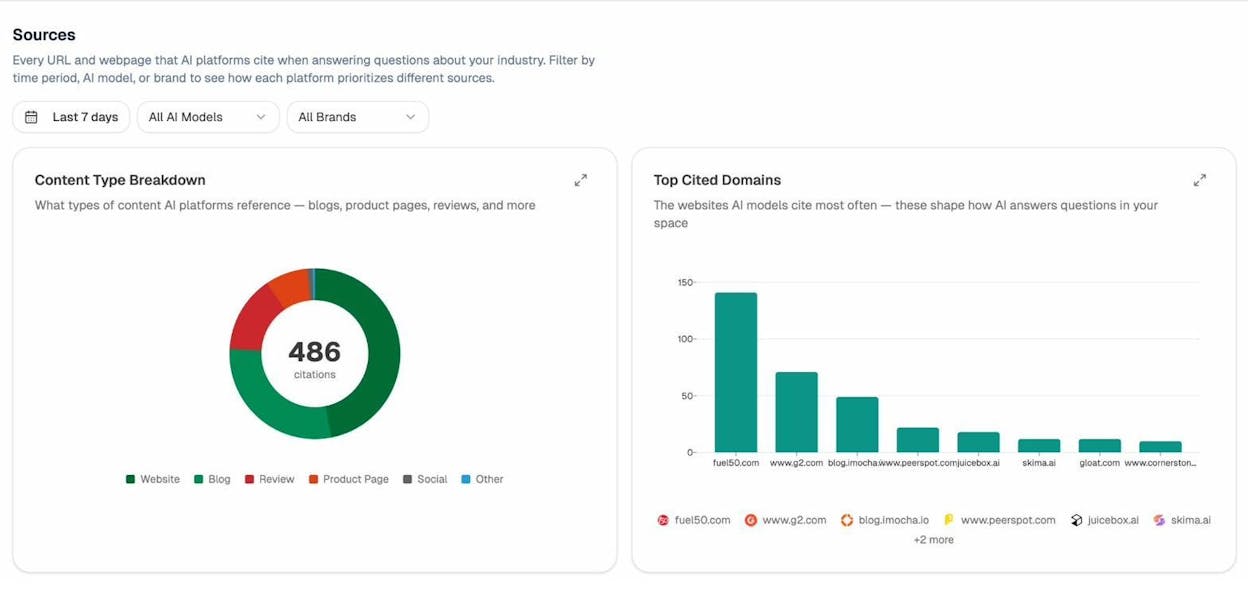
The Sources dashboard in Analyze AI shows exactly this: every URL and domain that AI platforms cite when answering questions about your industry. You can filter by time period, AI model, and brand to see how each platform prioritizes different sources.
This is more useful than llms.txt because it tells you where LLMs are actually getting their information, not where you wish they would. If G2 reviews and Wikipedia are the most-cited sources in your space, your priority should be building presence on those platforms, not creating a Markdown file that no AI crawler checks for.
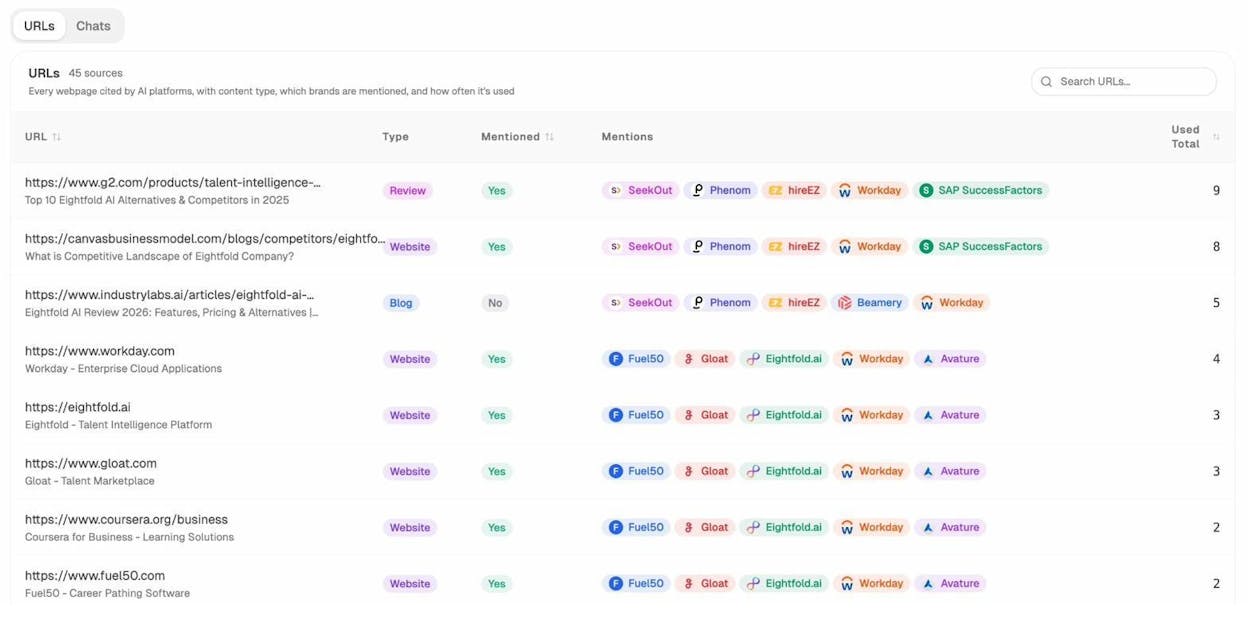
You can drill down to the URL level to see every individual page that AI models cite, including the content type (blog, review, product page), which brands are mentioned alongside yours, and how frequently each source appears. This gives you a concrete list of citation targets to pursue.
Tracking AI-Driven Traffic to Your Site
Beyond visibility tracking, you need to know whether AI search is actually sending traffic to your site, and which pages are capturing it.
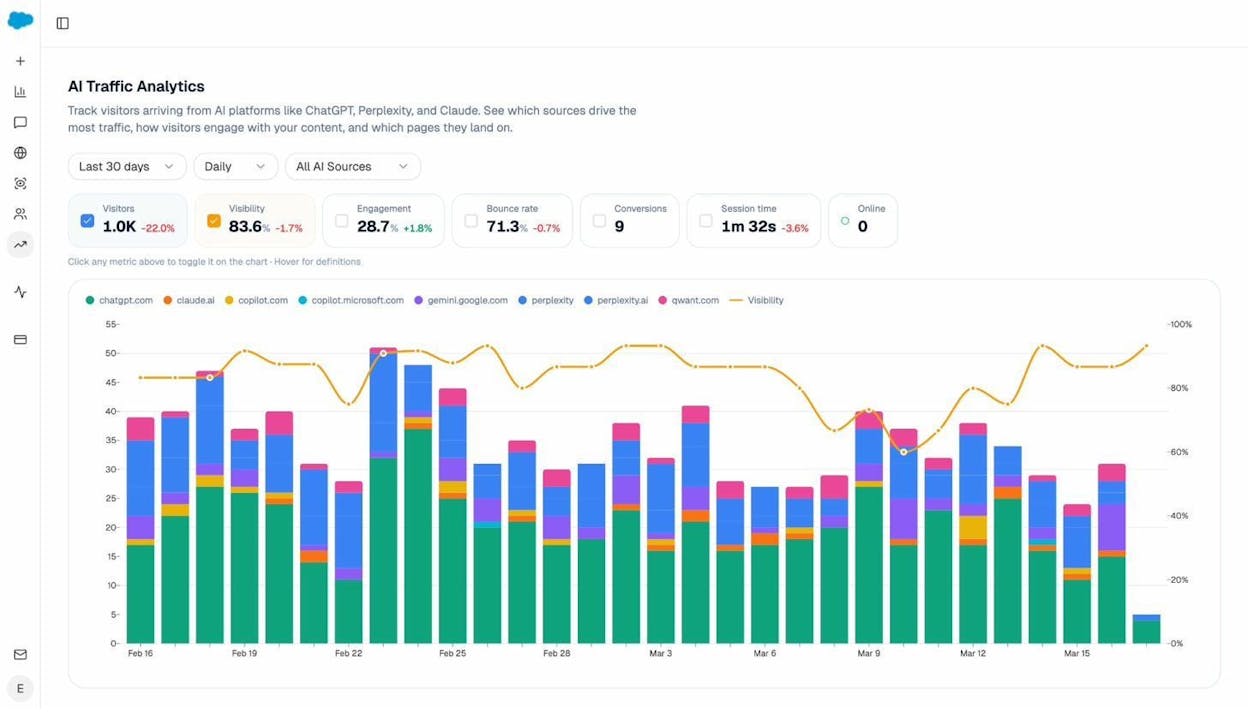
The AI Traffic Analytics dashboard connects to your GA4 data and shows exactly how many visitors arrive from AI platforms like ChatGPT, Claude, Copilot, Gemini, and Perplexity. You can see daily trends, bounce rates, engagement metrics, and conversions from AI-driven traffic specifically.
This solves one of the biggest problems with AI search optimization: attribution. Without this data, you’re optimizing blind. With it, you can see which pages convert AI traffic, which engines send the most sessions, and whether your AI visibility efforts are translating into real business outcomes.
Identifying Where Competitors Win
Another practical approach is tracking where competitors appear in AI answers and you don’t. This is more actionable than llms.txt because it tells you exactly where to focus your content and authority-building efforts.
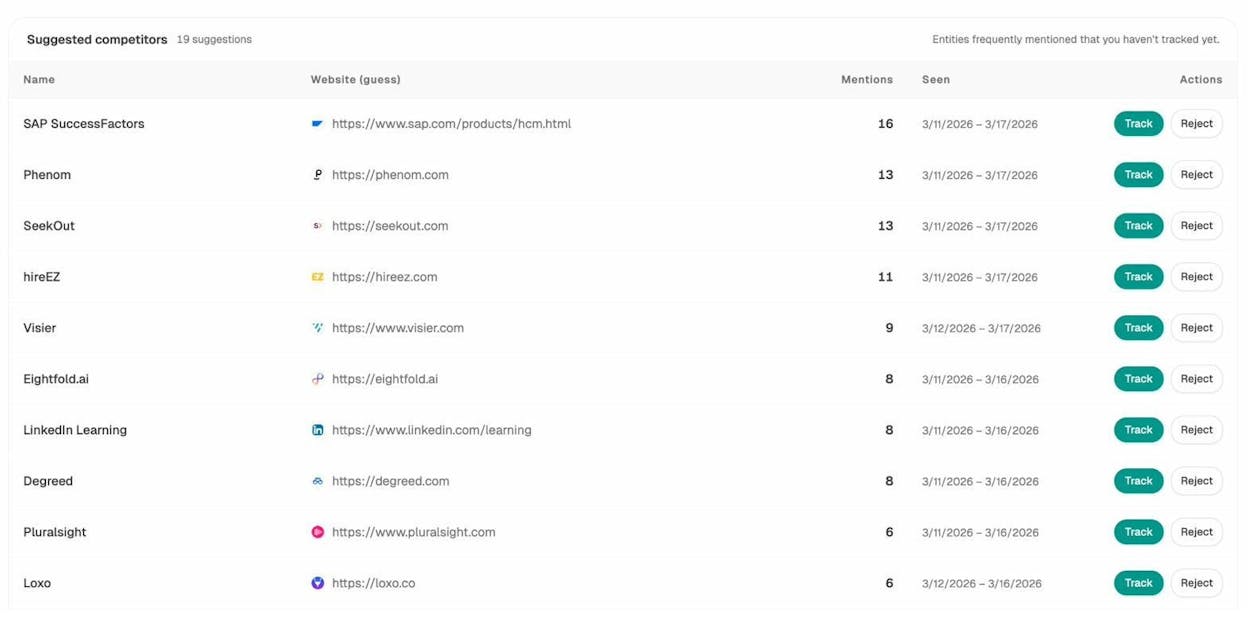
The Competitors view in Analyze AI surfaces brands that frequently appear alongside yours in AI-generated answers. You can see how many times each competitor is mentioned, which prompts trigger those mentions, and where your brand is absent from conversations where competitors appear. For a deeper guide on this, see how to outrank competitors in AI search.
The Bottom Line on AI Search Strategy
SEO is not dead. It’s evolving. AI search is an additional organic channel that operates alongside traditional search, not a replacement for it. The brands that win are the ones that treat AI search as a new surface for the same fundamentals: quality content, strong authority signals, and measurable, data-driven optimization.
llms.txt might eventually become part of that toolkit. But today, the highest-leverage actions you can take are building content that LLMs want to cite, earning presence on the sources they already trust, and measuring your visibility across every AI engine that matters.
For a deeper look at how traditional SEO and AI search work together, read our guide on GEO vs. SEO. And if you want to understand how to rank on ChatGPT or rank on Perplexity specifically, we’ve analyzed 65,000 prompt citations to find out what works.
Key Takeaways
llms.txt is a Markdown file hosted at your root domain that gives LLMs a curated map of your most important content. It was proposed by Jeremy Howard of Answer.AI in September 2024 and draws parallels to robots.txt and sitemap.xml.
No major LLM provider currently supports it. Not OpenAI, not Anthropic, not Google, not Meta. Server logs confirm that AI crawlers aren’t requesting the file. Fewer than 0.005% of websites have implemented it.
The file is trivial to create and carries no risk. If you have structured content, spend five minutes building one. But don’t mistake it for a strategy.
What actually drives AI search visibility is the same thing that has always driven search visibility: deep, authoritative content that answers real questions, presence on the sources AI models trust, and consistent measurement across every engine that matters. Those fundamentals haven’t changed. The surface has.

Ernest

Ibrahim


