
Are zero-search-volume topics worth writing about?
Short answer
Usually yes, because "zero" almost always means "too small for the tool to report" rather than "nobody searches this". The check is cheap. Look for the term in your own Search Console, and ask it as a question in ChatGPT, Perplexity and Google AI Mode. If either one shows something real, the demand exists and the tool simply cannot see it.
Understand why the tool says zero
Three things create a zero that is not really a zero.
Google reports an average over 12 months and lumps close variants together, so a term people search in bursts can average down to nothing. Other tools guess from panels of browsing data, which barely cover specialist B2B searches. And every tool has a floor below which it just prints zero instead of a small number.
So the number describes the tool, not the world. Our piece on why accurate search volume does not exist walks through the gap, and the Search Console versus Keyword Planner comparison shows how far the two disagree on the same words.
Check the terms against your own data
Twenty minutes settles it for your list.
- Collect 20 terms your tool calls zero.
- Open Search Console, Performance, last 16 months, and filter for each term or its most distinctive words.
- Write down impressions, clicks and average position for anything that appears.
- For terms with no history, ask them as questions in ChatGPT, Perplexity and Google AI Mode.
- Note whether each assistant gave a real answer or asked you what you meant.
Then read the result off this table.
| Search Console | AI answers | Verdict |
|---|---|---|
| Some impressions | Real answer | Real demand, the tool is blind. Write it |
| Some impressions | Vague answer | Real demand, weak competition. Write it |
| Nothing | Real answer that names tools | New demand. Write a short one |
| Nothing | Asks you to clarify | No demand. Skip it |
The last row is the only true zero, and it is rarely more than a handful of your list, because the terms you write down by hand come from conversations that already happened.
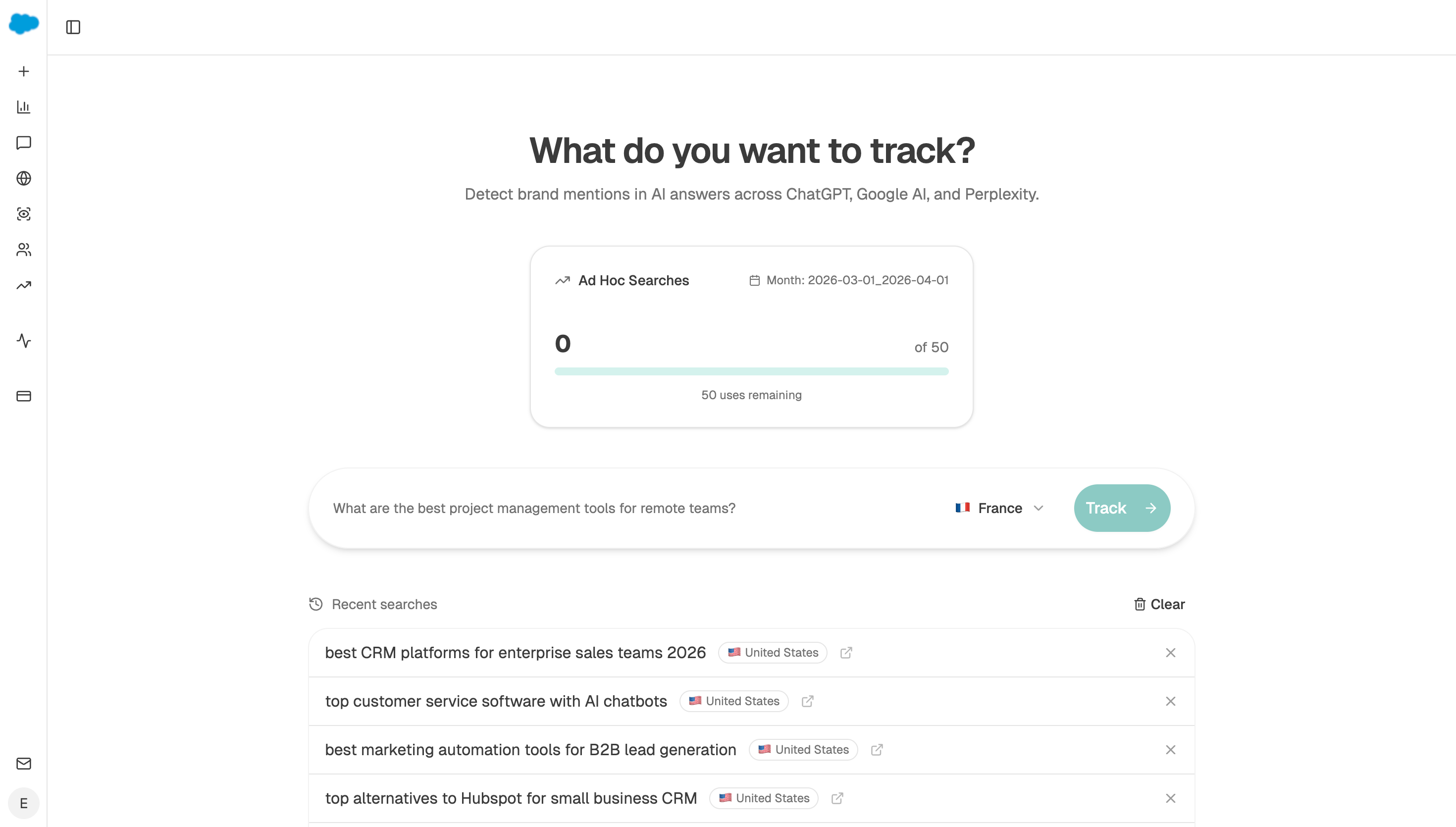 An ad hoc run settles whether anyone actually asks this, in seconds, without adding the term to anything you track.
Make one page carry several terms
A page built for one 30-search term is a bad trade. A page that answers that term and nine neighbours is a good one, because long-tail traffic arrives spread across wordings nobody on your team predicted. That is the case made in long-tail keywords.
The second payoff is who shows up. Someone typing a very specific phrase about a very specific problem has described themselves exactly. Those readers convert at rates that make the traffic number beside the point, which is the sum in which low-volume keywords are most likely to drive revenue.
Group the survivors before you brief anything
Sort what is left by the thing each term acts on, not by how the words look.
"Export Search Console to Sheets", "Search Console API limits" and "why does Search Console show fewer clicks than GA4" all act on the same thing, which is getting data out of Search Console. That is one page with three sections, not three thin pages fighting each other.
The test for whether a group is really one page is simple. Would one reader want all of it? If two terms belong to different people, split them even when the words overlap.
Analyze AI does this grouping for you with the prompt-cluster-brief recipe, which takes questions nobody has covered and turns them into editorial groups. Grouping is the step teams skip by hand, and skipping it is how you end up with forty orphan pages instead of six good ones.
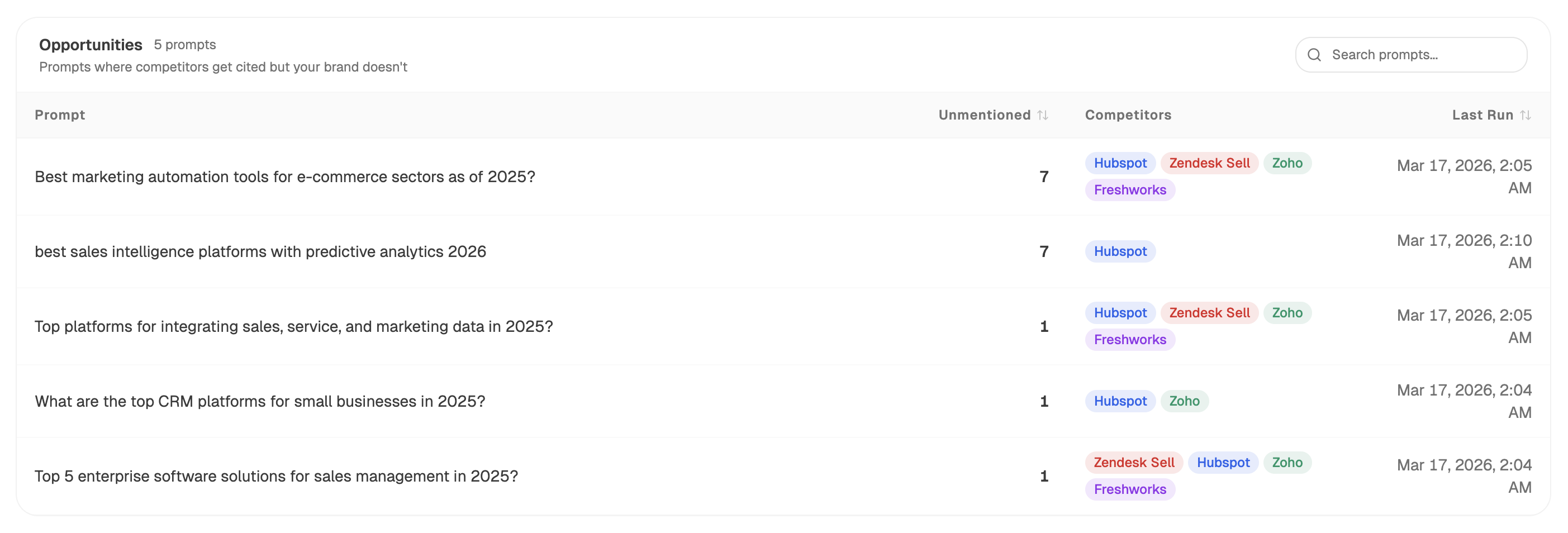 The Opportunities table is a ready-made source of uncovered questions to group into briefs.
Ask what a small page is worth in assistants
More findable, with one honest catch.
There is no volume data for AI questions at all, so by keyword tool standards every prompt is a zero. Yet our own state of AI search research counted 115,843 citations across 22,295 answers, spread over 7,055 different sites, with the top ten sites holding only 11% to 13% depending on the assistant. Specific pages answering specific questions do get picked.
The catch is that being cited is not a visit. We measure whether a page was used as a source and how the brand was described. We do not publish click figures, because we do not have them. Treat a small page's AI upside as reach, and use the Citation Pages view in Analyze AI to see which of your pages assistants actually pull from.
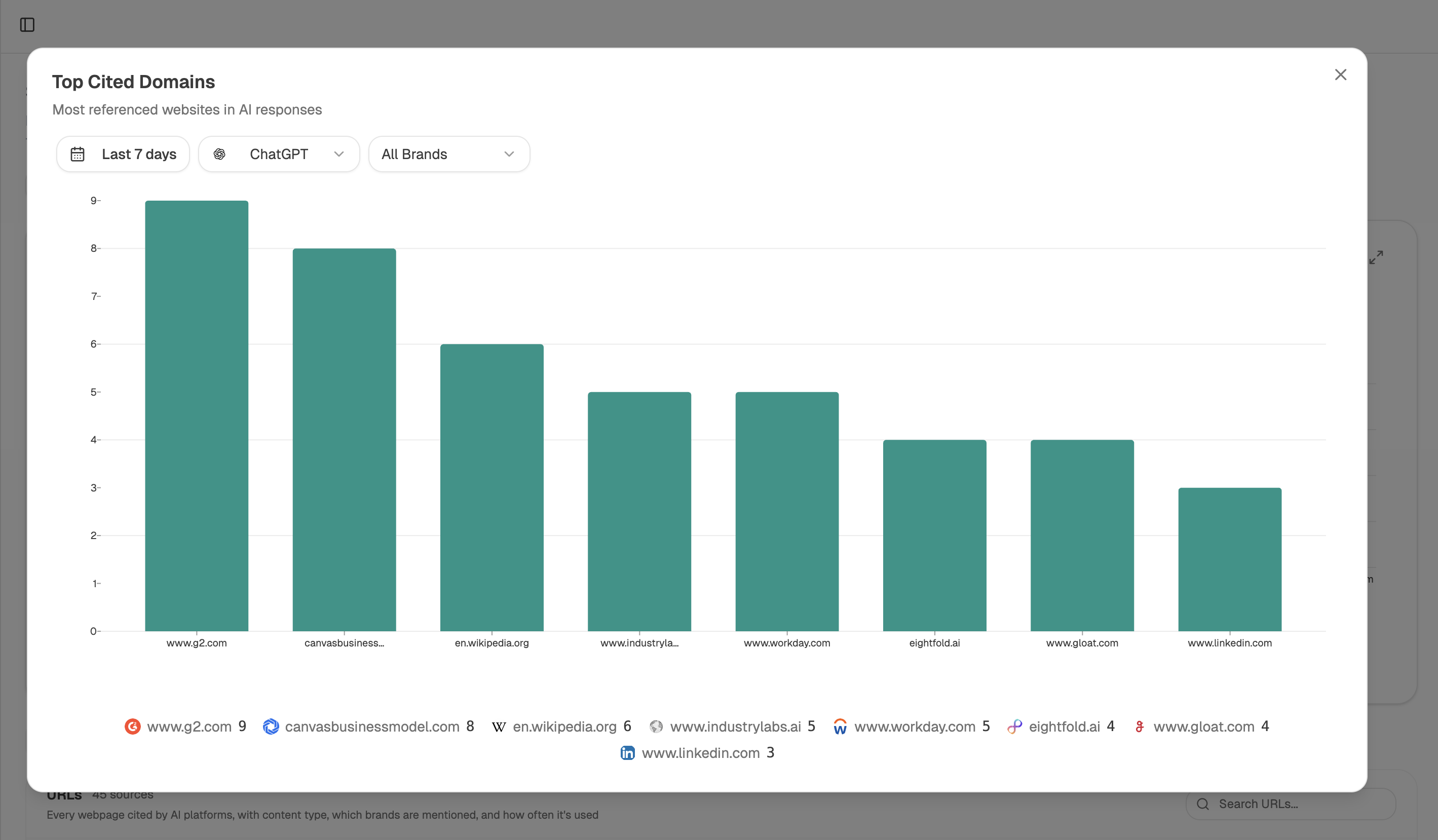 Sources names the exact pages assistants pulled from, which is how a small page earns credit when no visit is recorded.
Turn the check into a monthly pass
Start (manual, your candidate terms as a file-csv) → GSC Top Keywords for Site filtered to the distinctive words in your list → Prompt Responses executing each surviving term across providers → Query Fanout Estimator sizing how many neighbouring questions each one could answer → prompt-cluster-brief recipe grouping the survivors → Export Markdown ready to brief.
The Query Fanout Estimator is what changes the maths here. It tells you a term is not really a 30-search term, it is the front door to twelve questions, and that is usually the difference between a page you skip and a page you write.
FAQ
Related answers
- How do I find high-intent AI prompts when there's no search-volume data for prompts?
- Which low-volume keywords are most likely to drive revenue?
- When does a buyer question deserve its own article instead of an answer on an existing page?
- How do I tell if a topic is relevant to my product or just adjacent?
Find the demand your keyword tool cannot see
Analyze AI checks your terms against your own impressions and live assistant answers, then groups what survives into briefs.
Start your free trial