



Summarize this blog post with:


In this article, you’ll get a clear look at what Am I On AI does well, where it falls short, how its pricing stacks up, and why most teams outgrow it the moment they try to act on the data it surfaces. You’ll also see how Analyze AI handles the same workflows and where it goes further with attribution, content creation, optimization, and a programmable agent builder that turns insights into executed work.
Table of Contents
What Am I On AI Does
Am I On AI is a visibility tracking tool that shows whether your brand appears in AI-generated answers across ChatGPT, Gemini, Perplexity, and Copilot. You pick your brand, the platform generates long-tail prompts relevant to your space, runs them against supported AI engines, and captures the results.
Each result includes the full AI-generated answer, your brand’s position (or absence), the sources the model cited, and a sentiment classification. Over time, you can watch trends, compare your coverage to competitors, and see which prompt categories you dominate or miss entirely.
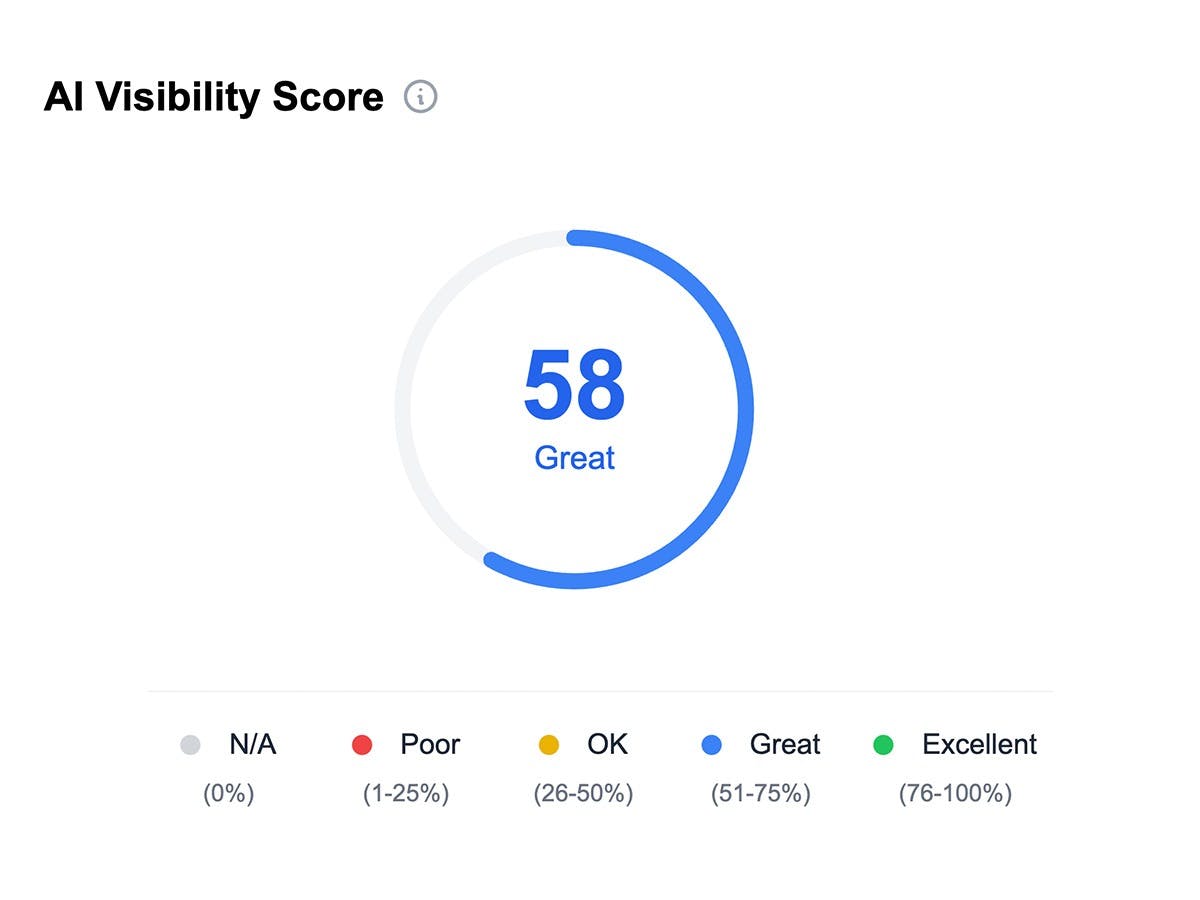
The tool also provides recommendations. It surfaces on-site fixes (clarify comparison pages, tighten FAQs) and off-site actions (target the domains models already trust) tied to specific prompts where your brand underperformed. That feedback loop is useful for teams just starting to think about AI visibility.
Three Things Am I On AI Does Well
1. Auto-Generated Prompt Libraries
You do not need to guess which prompts to track. Am I On AI generates long-tail variants from your product, competitors, and use cases, then organizes them into thematic clusters like “alternatives,” “pricing,” and “implementation.” This saves you the upfront research that most teams skip entirely.
2. Citation and Source Tracking
The platform follows AI answers back to their source pages. You can see which domains models cite most often in your category, which is valuable for understanding where to focus your content and digital PR efforts. Slicing by engine reveals behavioral differences, like one model leaning on Reddit threads while another favors vendor docs.
3. Structured Recommendations
Am I On AI converts findings into a prioritized task queue tied to specific failure modes. Each task links back to the originating prompt, engine, and citation. When you complete work and rerun scans, the queue reshuffles based on fresh results. This closed-loop approach is better than the “here’s your score, good luck” output from most GEO tools.
Three Limitations That Hold Teams Back
1. Snapshot Scans, Not Continuous Monitoring
Am I On AI runs scans on a set schedule (weekly on the base plan). Your view updates after a scan finishes, not when a change happens. A new press hit, a competitor page update, or a model retrain can sit unseen until the next pass rolls through. Teams that need to react to visibility shifts in hours, not weeks, will need a second tool for alerts and end up using Am I On AI only for retrospective trend analysis.
2. No Traffic Attribution
This is the gap that matters most. Am I On AI tells you that your brand appeared in a ChatGPT answer. It does not tell you whether anyone clicked through, which page they landed on, or whether they converted. You get visibility data with no connection to business outcomes.
For a CMO trying to justify investment in AI search, “we were mentioned 47 times” is not a budget defense. Sessions, conversions, and pipeline impact are. Without attribution, you cannot prove ROI, and without ROI proof, the budget disappears at the next quarterly review. This is the reason most teams that start with visibility-only tools eventually need a platform that connects the entire chain from AI search to revenue.
3. No Content Creation or Optimization Tools
Am I On AI identifies what to fix but gives you no way to fix it inside the platform. Every recommendation requires you to open a separate tool, write the content somewhere else, optimize it somewhere else, and then come back to check if it worked. That workflow gap is where most teams stall. The insight is only as valuable as your ability to ship the response.
Am I On AI Pricing
Am I On AI offers a simple pricing structure. The Pro plan starts at $100/month and includes tracking for one product, up to 100 prompts, weekly scans, personalized recommendations, unlimited team seats, and international monitoring. A 14-day free trial requires no credit card.
For teams managing multiple products, the Business plan uses custom pricing and scales to more prompts and products. Agencies get their own tier starting around $250/month with white-label dashboards and API access.
The pricing is transparent and the entry point is low. But the value ceiling is also low. Weekly scans mean you are always behind. No traffic attribution means you cannot tie the data to revenue. And no content tools mean every action item creates work outside the platform. You end up paying $100/month for a dashboard that tells you what to do but never helps you do it.
|
Feature |
Am I On AI ($100/mo) |
Analyze AI |
|---|---|---|
|
AI engine coverage |
ChatGPT, Gemini, Perplexity, Copilot |
ChatGPT, Gemini, Perplexity, Copilot, Claude, Google AI Mode, DeepSeek, Grok |
|
Prompt tracking |
Up to 100, weekly scans |
25-35 daily tracked prompts + 50-100 ad hoc prompts/month |
|
Scan frequency |
Weekly |
Daily |
|
AI traffic attribution (GA4) |
No |
Yes |
|
Landing page performance |
No |
Yes |
|
Content Writer |
No |
Yes |
|
Content Optimizer |
No |
Yes |
|
Agent Builder (automation) |
No |
Yes (180+ nodes, 34 data recipes) |
|
Sentiment monitoring |
Basic |
Advanced with Perception Map |
|
Citation analytics |
Yes |
Yes, with citation share tracking |
|
Weekly email digests |
No |
Yes |
|
Competitor battlecards |
No |
Yes |
|
Free trial |
14 days |
Yes |
What Changes When You Connect Visibility to Revenue
Most AI visibility tools stop at the dashboard. They tell you whether you appeared in an answer, but they never connect that appearance to what happened next. Did the mention drive a session? Did that session convert? Was the effort worth the spend?
This is the core difference with Analyze AI. It is not an AI search layer. It is the agentic platform for SEO, AEO, content, and GTM ops, built to take you from visibility data to shipped work to measured outcomes.
See Which AI Engines Actually Send You Traffic
Connect your GA4 and Analyze AI attributes every session from AI engines to its specific source. You see session volume by engine, trends over time, and what percentage of your total traffic comes from AI referrers. When ChatGPT sends 248 sessions but Perplexity sends 142, you know where to double down.
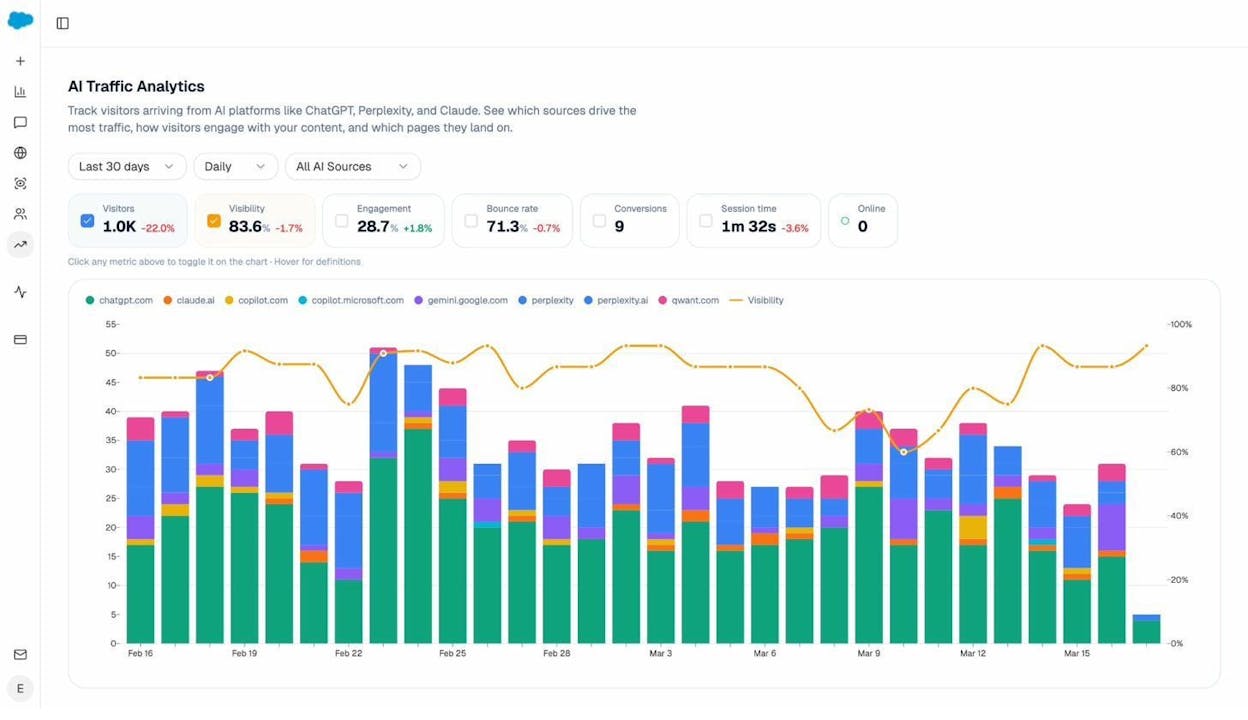
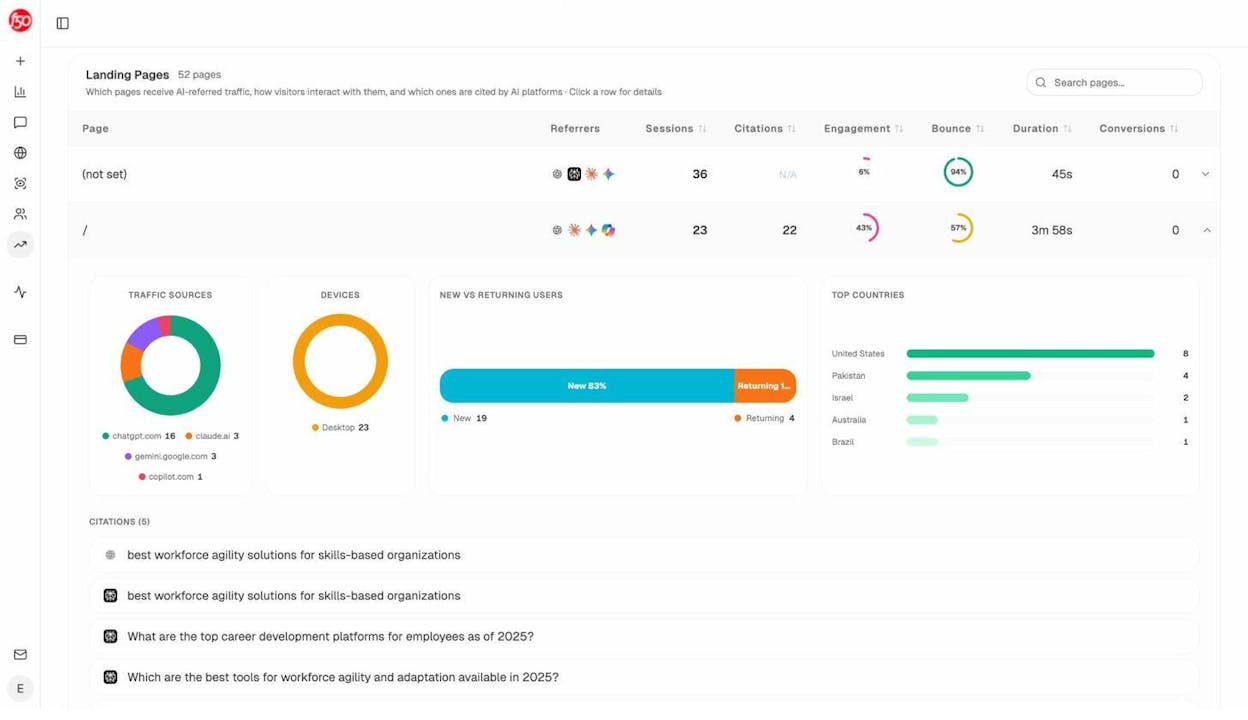
The Landing Pages report takes this further. You see which pages receive AI traffic, which engine sent each session, and what conversion events those visits trigger. A product comparison page getting 50 sessions from Perplexity with a 12% trial conversion rate is a signal to reinforce. An old blog post getting 40 sessions from ChatGPT with zero conversions is a signal to deprioritize or optimize.
Track Prompts Daily and Know Exactly Where You Stand
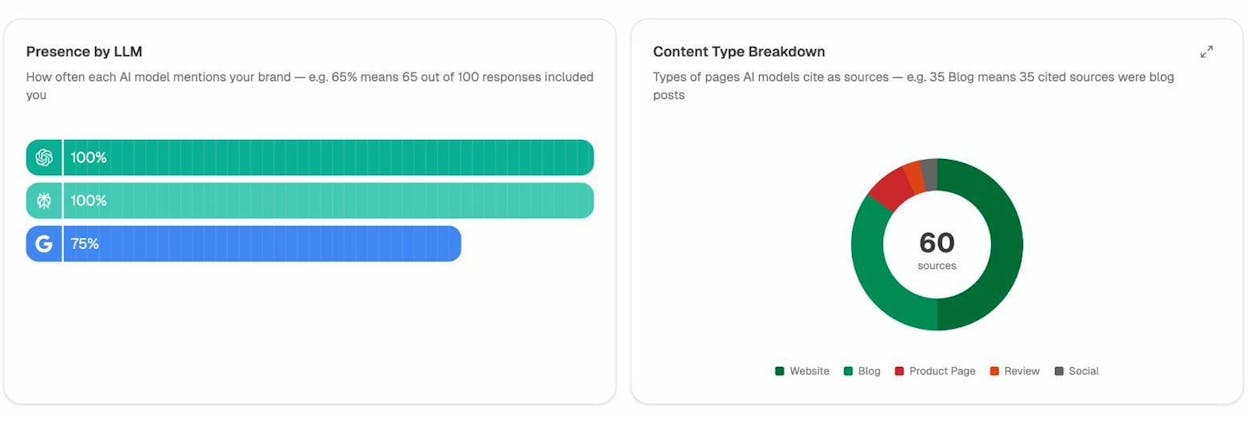
Analyze AI monitors specific prompts across all major LLMs with daily scans, not weekly. For each prompt, you see your visibility percentage, position relative to competitors, and sentiment score. You can see which competitors appear alongside you, how your position changes day to day, and whether sentiment is improving or declining.
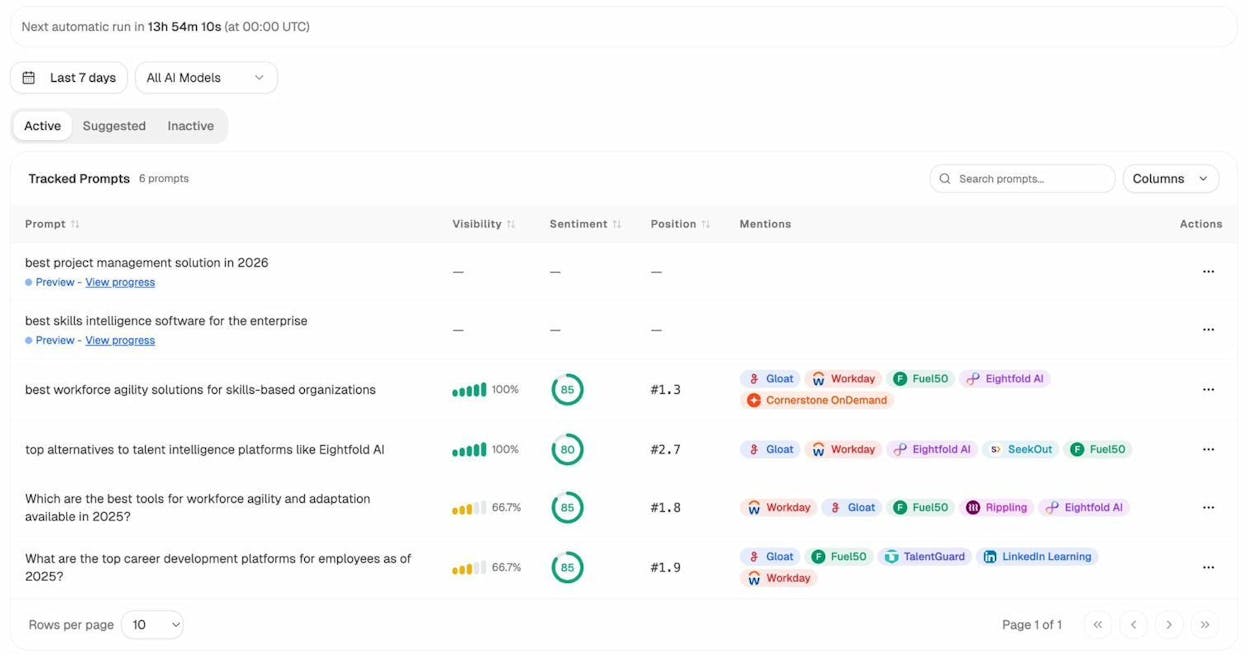
Not sure which prompts to track? The Prompt Discovery feature suggests bottom-of-funnel prompts you should keep your eyes on. And if you want to test a phrasing before committing to tracking it, the Ad Hoc Prompt Search runs a one-time check across all engines.
Audit the Sources AI Models Trust
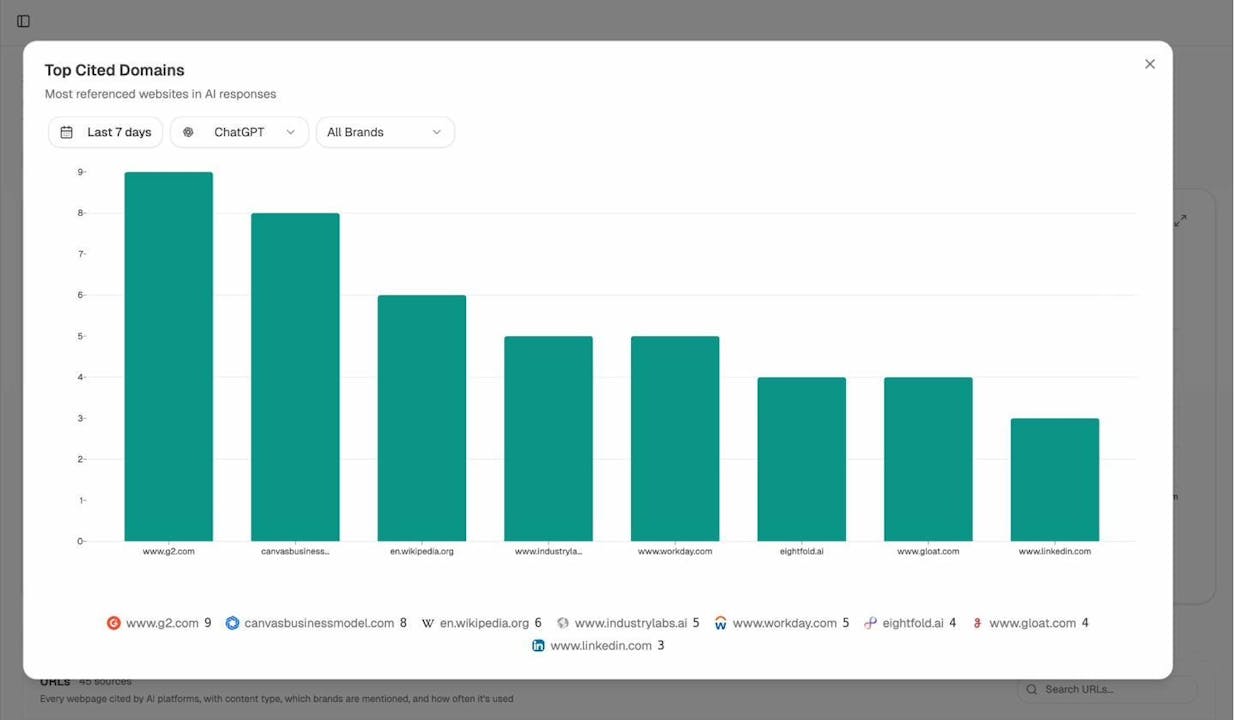
The Citation Analytics dashboard shows which domains and URLs models cite when answering questions in your category. You see usage count per source, which models reference each domain, and when those citations first appeared. Instead of generic link building, you target the specific sources that shape AI answers in your space.
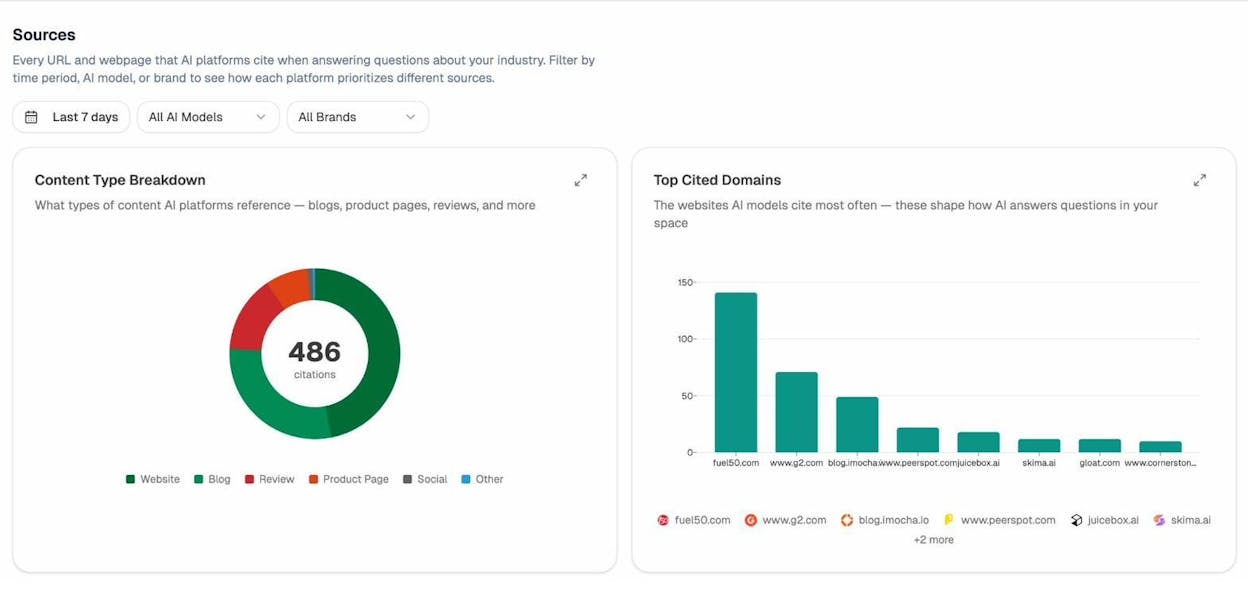
This changes how you think about content strategy. If G2 review pages drive 34 citations in your category but your own blog drives 12, the next move is clear. You either earn a better placement on G2, or you create content that models prefer to cite over the review site. You can also check competitor intelligence to see which sources cite your competitors but never mention you, then close those gaps one by one.
Monitor How AI Frames Your Brand
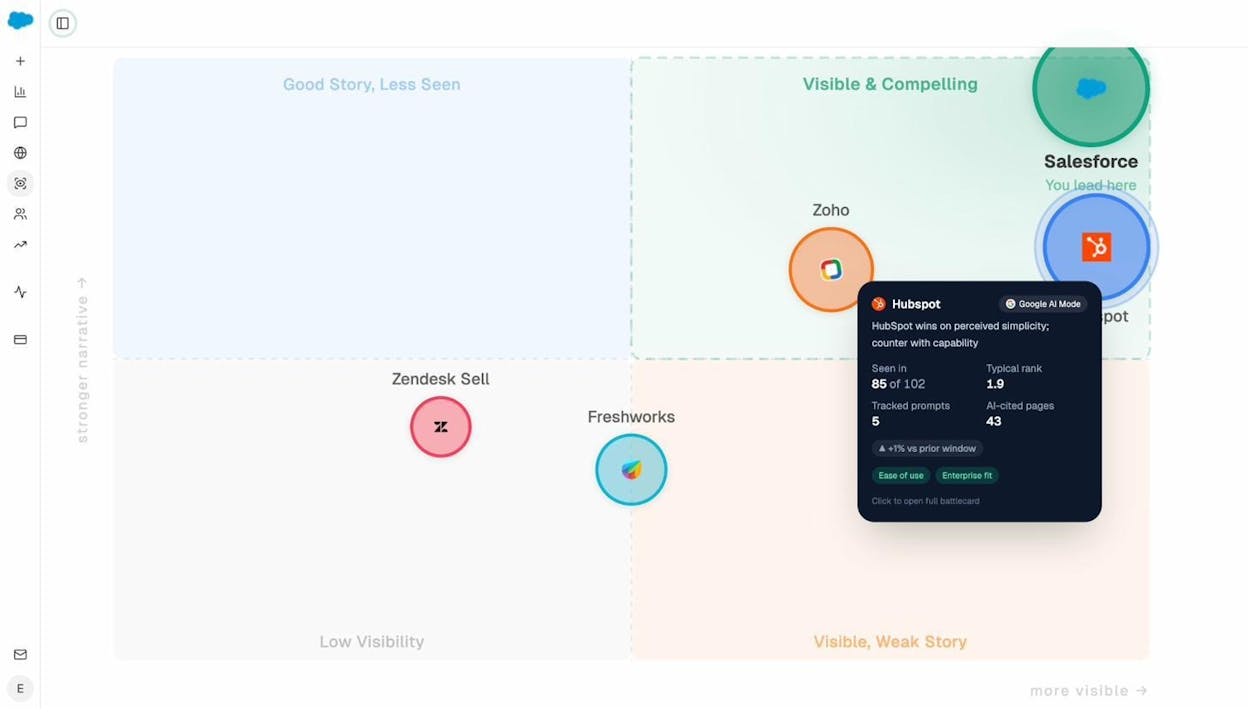
The Perception Map plots every brand in your category on a 2D quadrant. Presence on one axis, narrative strength on the other. If you are visible with a weak story, fix the story. If your story is strong but you are invisible, fix distribution. This is the difference between knowing you were mentioned and knowing what was said about you.
AI Sentiment Monitoring captures portrayal at the prompt level (supportive, neutral, critical) and surfaces risk terms so your comms team can respond with evidence before a negative narrative spreads. AI Battlecards give you the competitive context to respond.
Write and Optimize Content Inside the Platform
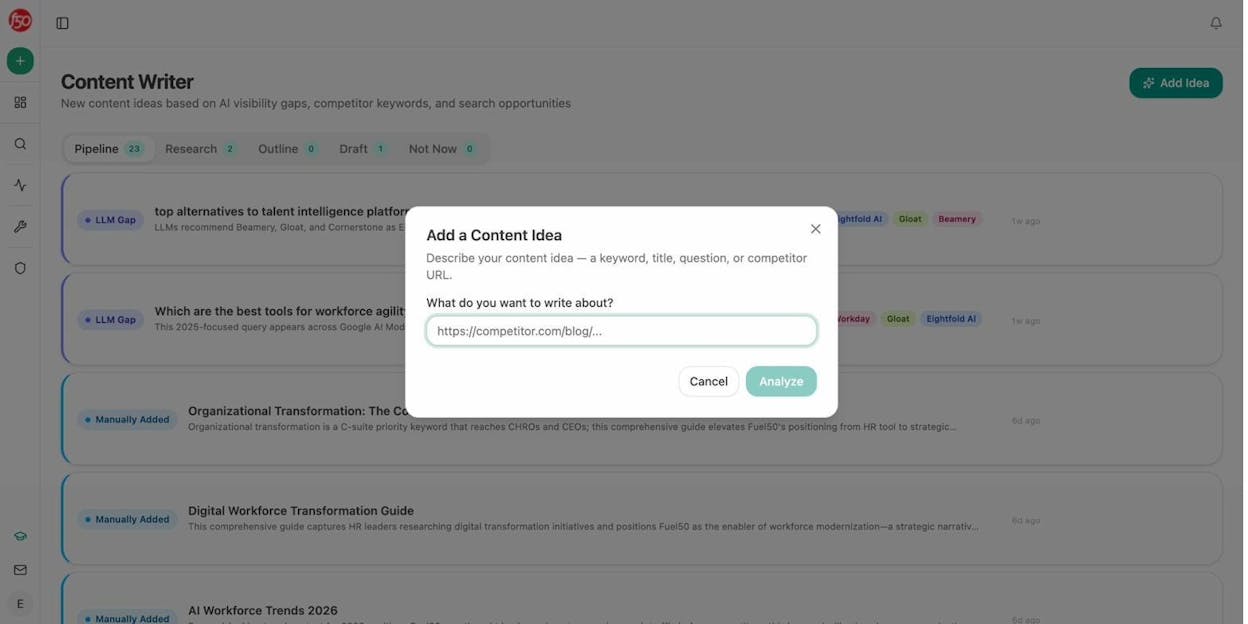
This is where the workflow gap disappears. The AI Content Writer takes you from idea to research to outline to draft, with AI visibility gaps, competitor analysis, and editorial comments baked into every step. Each stage compounds context for the next. By the time the draft generates, the model is working with researched facts, your brand voice rules, your competitor contrast, and the keywords you want to rank for.
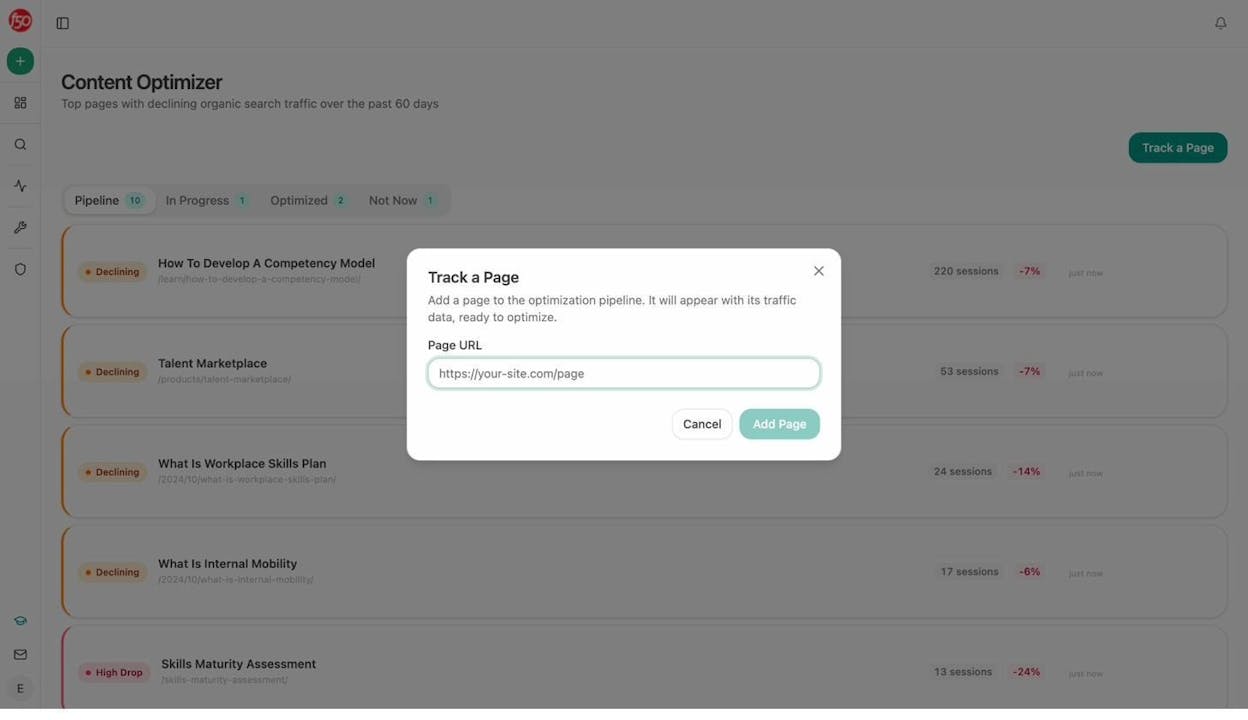
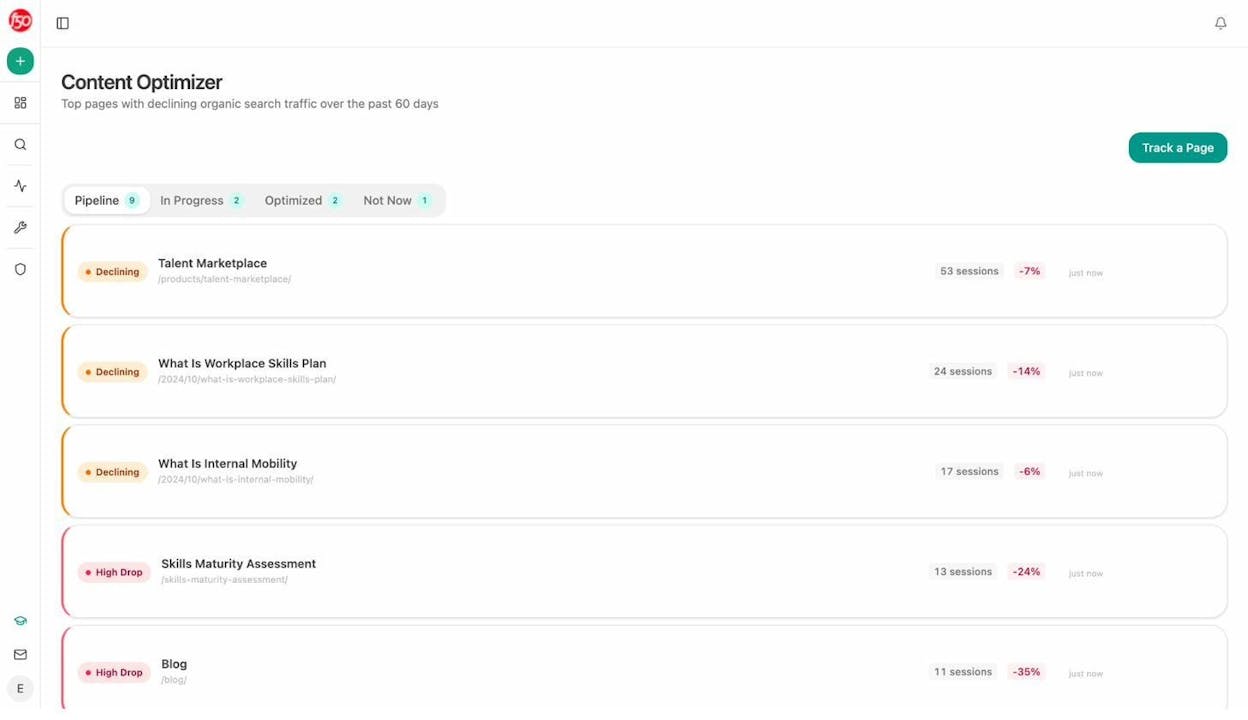
The AI Content Optimizer handles existing pages. Paste a URL and it scores structure, freshness, claim density, and information gaps against the SERP and AI search competitors. It then surfaces specific optimization ideas based on gaps it detects, with editorial comments at the paragraph level.
The reason these tools produce better output than standalone AI writers is the multi-step structure. Research feeds the outline. The outline feeds the draft. Your brand vault injects tone, messaging rules, and proof points. The result reads like it was written by someone who studied your category, not someone who summarized a Google search.
Automate the Entire Loop with the Agent Builder
Most teams hear “agent builder” and think “workflow automation.” The Analyze AI Agent Builder is that, but it goes much further. It is a programmable substrate with 180+ nodes, 34 pre-built data recipes, 13 input primitives, and three trigger modes (manual, scheduled, webhook) that connects directly to GA4, Google Search Console, DataForSEO, Semrush, HubSpot, Notion, WordPress, Slack, and every major LLM.
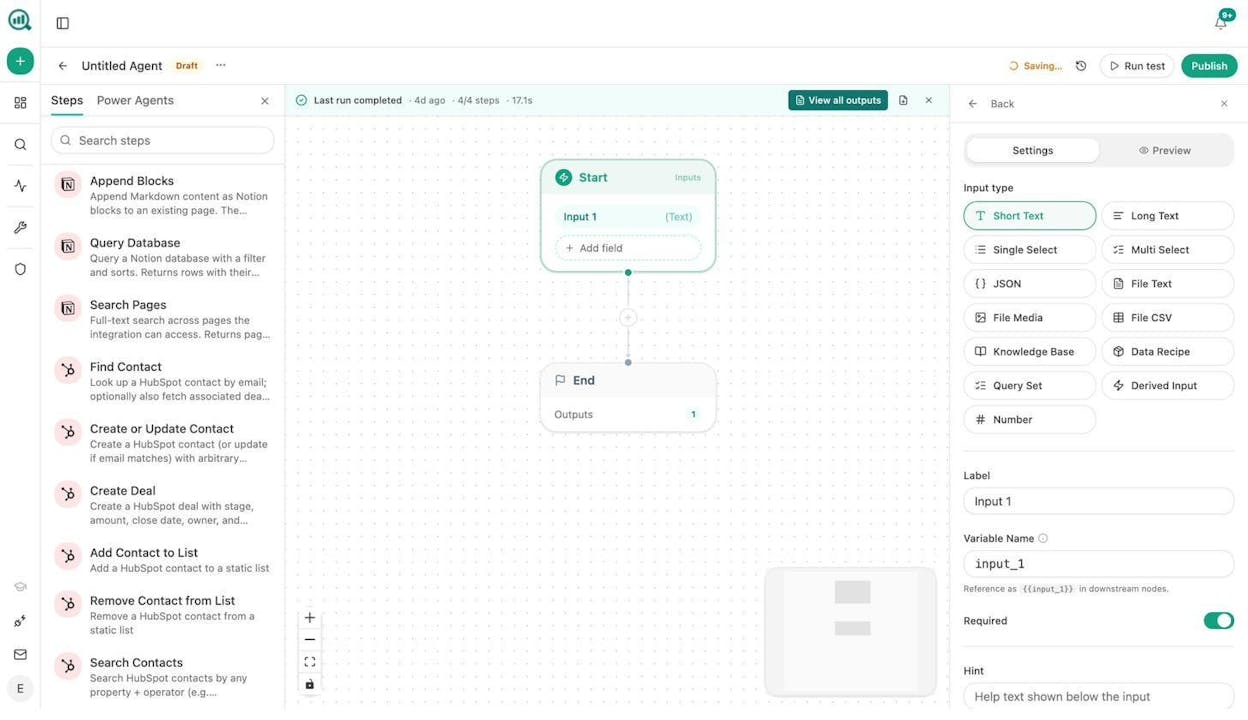
Here is what that means in practice. A CMO schedules a Monday morning agent that pulls last week’s AI visibility data, GA4 traffic, HubSpot deals, and competitive intelligence, then generates an executive summary in brand voice and emails it to leadership. No analyst needed. A content team sets a webhook that fires when a brief moves to “approved” in Notion, generates research, builds an outline, writes a full draft with brand vault injected, scores it for AEO readiness, and publishes to WordPress if it passes. No manual handoff. An agency loops one agent across every client to generate Monday briefing packs, turning reporting day into a background process.
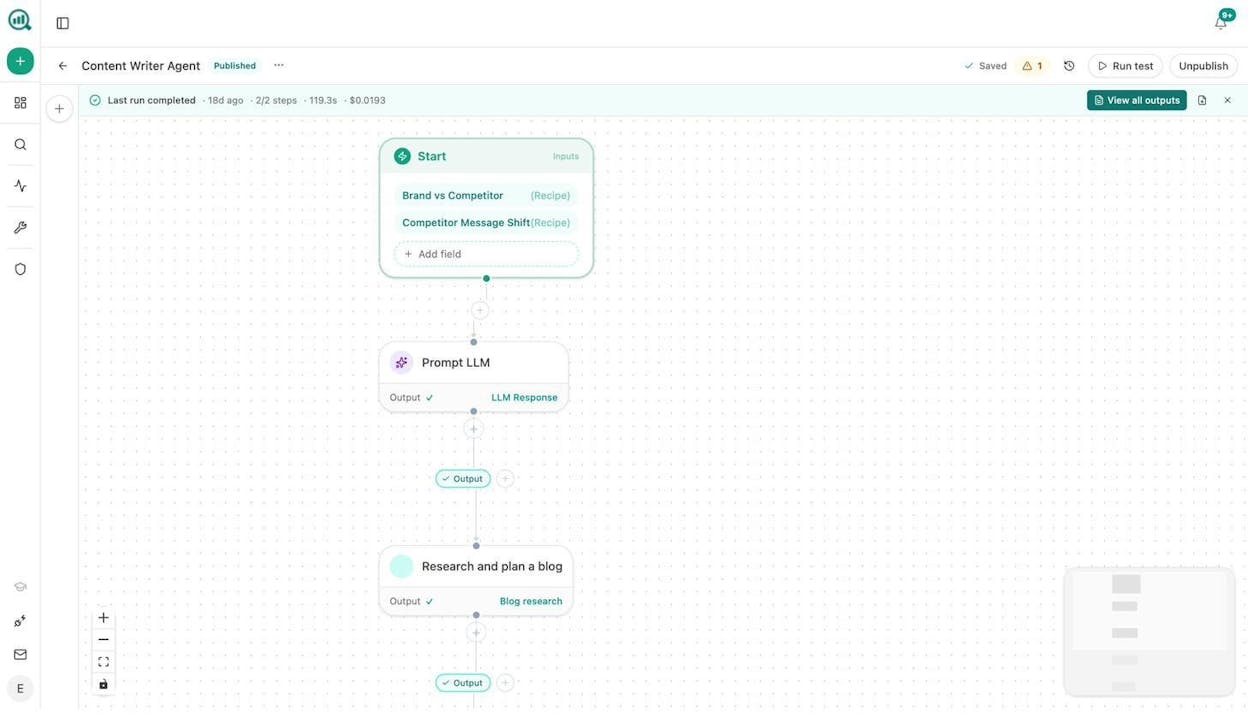
The Agent Builder is not a glorified Zapier integration. It has nodes for domain research, keyword analysis, SERP audits, backlink analysis, Lighthouse audits, email finding, CRM operations, and content generation, all wired to data that already lives inside the platform. A PR team can set an agent to scan for negative brand mentions every 15 minutes, find the journalist behind the article, and draft three response options in Slack before anyone on the team has read the article. A sales team can trigger an agent when a HubSpot deal stage changes, run a full prospect research brief, and attach it to the deal automatically.
The point is not the node count. The point is that the things you used to do after seeing a dashboard (research, plan, write, publish, distribute, report) now happen inside the same platform that showed you the data. That collapses the gap between insight and action from days to seconds.
Wake Up to a Plan Every Monday
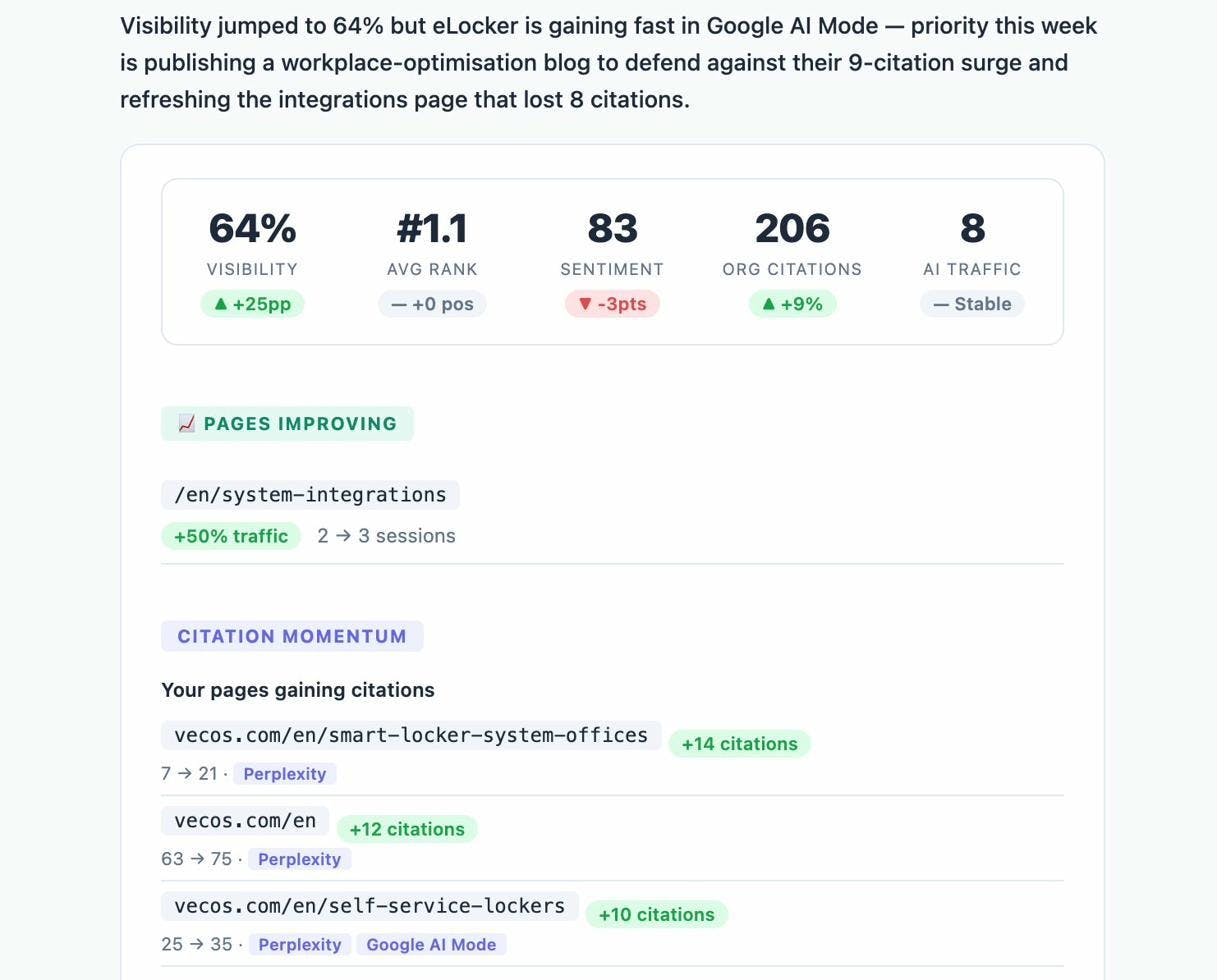
Weekly Email Digests deliver prioritized actions, citation changes, and competitor shifts to your inbox. You do not need to log in to know what happened. You wake up, read the email, and start executing.
The Bottom Line
Am I On AI does one thing and does it reasonably well. It tracks whether your brand appears in AI answers and gives you a starting point for improving that presence. For a team that has never measured AI visibility before, $100/month is a fair entry point.
But the moment you need to tie visibility to traffic, traffic to conversions, or insights to shipped content, the tool stops. You end up exporting data, opening other tools, and manually connecting dots the platform should connect for you. That workflow gap is the difference between a reporting tool and an operating system for AI search.
Analyze AI starts where Am I On AI stops. It tracks visibility across more engines with daily scans, connects that visibility to real sessions and revenue through GA4, gives you tools to write and optimize content inside the platform, and lets you automate the entire loop with an agent builder that runs on your schedule, your triggers, and your data.
The platform also includes free tools like a Keyword Generator, Keyword Difficulty Checker, SERP Checker, and a Broken Link Checker, so you can handle traditional SEO research without leaving the ecosystem.
SEO is not dead. AI search is an additional organic channel sitting alongside Google. The teams that win treat it that way, and they use tools that help them compound what works instead of chasing what is new. That is the Analyze AI manifesto, and it is the lens through which every feature in the platform was built.
If you want to see where your brand stands across every AI engine and what to do about it, start with Analyze AI.

Ernest

Ibrahim


![7 seoClarity Alternatives That Won’t Lock You Into $2,500/mo Enterprise Contracts [2026]](/_next/image?url=https%3A%2F%2Fwww.datocms-assets.com%2F164164%2F1779457139-blobid0.png&w=3840&q=75)


