



Summarize this blog post with:


In this article, you’ll learn what content pruning actually is, why removing pages from your site can improve the performance of the pages you keep, and how to run a content pruning exercise from start to finish. You’ll also learn how to factor AI search into your pruning decisions, because a page that gets zero organic traffic from Google might still be generating visits from ChatGPT, Perplexity, or Gemini.
Table of Contents
What Is Content Pruning?
Content pruning is the process of removing, consolidating, or updating pages on your website that are dragging down its overall performance. Think of it the way a gardener thinks about a tree. Dead branches don’t just sit there doing nothing. They pull nutrients away from the branches that are growing. Your website works the same way.
Pages that are outdated, thin, irrelevant, or duplicative don’t just take up space. They can actively hurt the content that should be ranking. Google’s systems evaluate your website as a whole, and carrying too much dead weight can suppress the pages you actually care about.
The types of pages that typically get pruned include pages with outdated information that no longer reflects reality, thin pages with barely any substance, duplicate pages that target the same search intent as other pages on the site, pages that never attracted traffic and never will, and pages built for the wrong audience entirely.
Content pruning is sometimes confused with a content audit, but they’re different things. A content audit is the evaluation process. Pruning is the action you take on the results.
How Content Pruning Works (With Real Examples)
Content pruning sounds appealing on the surface. Delete a bunch of pages and watch your traffic go up. But it’s not magic. There are specific mechanisms through which pruning improves performance, and understanding them will help you decide whether pruning is right for your site.
Pruning Can Free Up Your Crawl Budget
Google allocates a limited amount of time and resources to crawling any given website. This is known as your crawl budget. On large websites, it’s possible that some of your best pages aren’t getting crawled because Google is spending its budget on pages that don’t matter.
When SEO consultant Francesco Baldini audited a vehicle valuation platform, he found that most of the site’s crawl budget was being consumed by low-quality programmatic pages. These pages generated no search visits and no conversions.
His team deleted almost 5 million pages, going from 4,860,000 pages down to just 1,500. The result was a 160% increase in organic visits and a 105% increase in conversions within weeks.
This matches what Victor Pan experienced at HubSpot after removing 3,000 pages from their sitemap. In his own words, the team was able to submit content, get it indexed, and start driving traffic from Google in minutes rather than hours or days.
It’s worth noting that both of these are extremely large websites. If your site has a few hundred pages, crawl budget is almost certainly not your problem.
Removing Low-Quality Pages Helps the Rest Rank Better
Some of Google’s ranking systems evaluate your website as a whole. The Helpful Content system is the most notable example.
As Google’s own documentation states, having relatively high amounts of unhelpful content might cause other content on the site to perform less well in Search. Removing unhelpful content might contribute to other pages performing better.
Eugene Zatiychuk, SEO Lead at Belkins, put this into practice. He identified three categories of content to prune. First, duplicates that targeted the same search intent as other pages on the site. Second, low-quality writing, including both cheap freelancer content and AI-generated content. Third, content written for the wrong target audience entirely.
One example was an AI-generated article about sales lead job descriptions that didn’t actually include a job description anywhere on the page. Pages like that were actively hurting the site.
After pruning 400 pages of low-quality content (almost two-thirds of the entire site), traffic climbed from 3,000 organic visits per month to nearly 10,000.
![[Screenshot: Belkins organic traffic chart showing growth after content pruning]](https://www.datocms-assets.com/164164/1777586870-blobid1.png?auto=format,compress&w=1248&fit=max)
Eugene was transparent that he started other improvements alongside the prune, including reducing the site’s reliance on JavaScript rendering about a month after the prune began. But he’s confident that pruning contributed significantly to the performance lift.
Simpler Navigation Creates a Better Visitor Experience
Content pruning isn’t just about search engines. It also directly improves the experience people have on your site.
Bryan Casey led an initiative to prune over 1,000 pages from IBM’s main site navigation. These pages represented a small percentage of their traffic and overall site footprint, but they were responsible for a large percentage of the site’s complexity.
The team consolidated entire page types. They eliminated dedicated detail pages and FAQs. They merged product pages, going from five separate pages per product down to one.
![[Screenshot: Before and after navigation path at IBM, showing 5-page journey reduced to 2 pages]](https://www.datocms-assets.com/164164/1777586891-blobid2.png?auto=format,compress&w=1248&fit=max)
The result wasn’t a traffic increase. Bryan’s team was happy to simply maintain traffic levels. What changed was the visitor experience. The Net Promoter Score for IBM’s navigation improved by 30% immediately. Even more interesting, experience scores around content quality improved by the same amount, even though the content itself hadn’t changed. The structure of the site had changed how visitors perceived everything on it.
Content Pruning Also Affects AI Search
Most content pruning guides focus exclusively on traditional SEO. But AI search engines like ChatGPT, Perplexity, Gemini, and Claude are now a real source of traffic and brand visibility. And that changes the pruning calculus in two important ways.
A “Dead” Page in Google Might Be Alive in AI Search
Before you prune a page, check whether AI platforms are citing it. A blog post that gets zero clicks from Google could still be showing up in AI-generated answers, driving visitors to your site through a completely different channel.
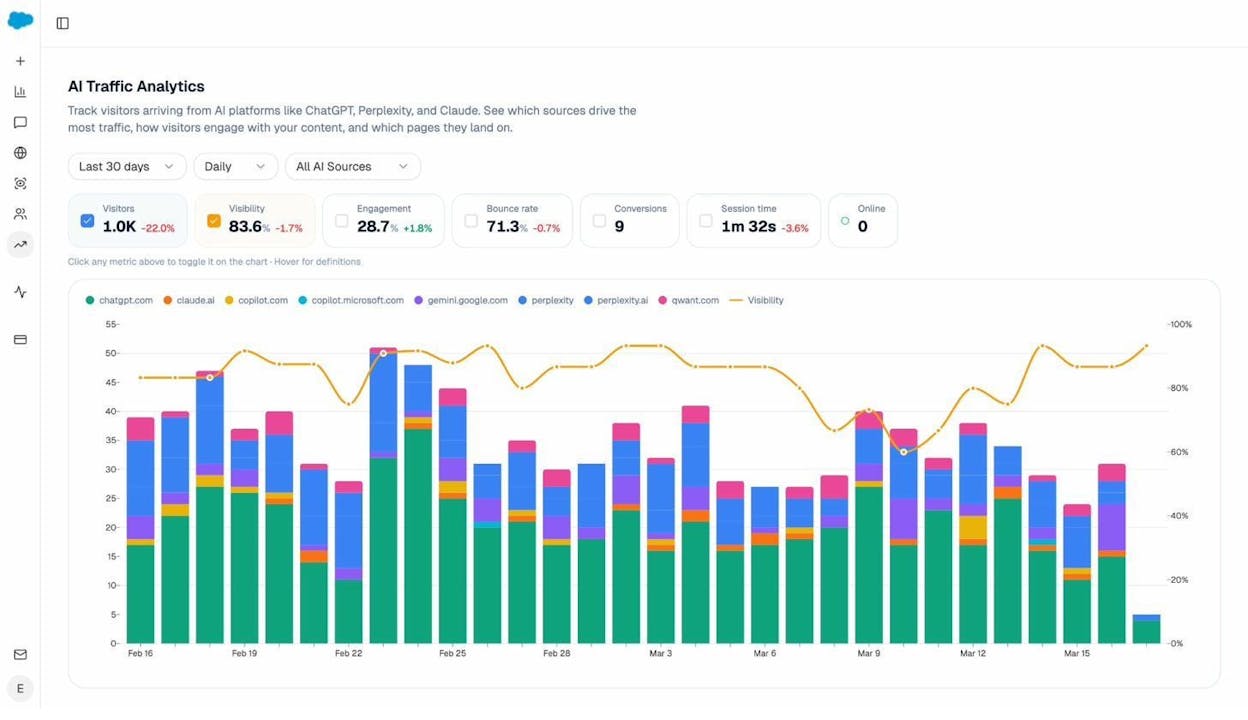
With Analyze AI’s AI Traffic Analytics, you can see exactly which pages on your site receive AI-referred traffic, broken down by source. A page that looks like a pruning candidate in Google Search Console might be one of your top-performing pages in ChatGPT or Perplexity.
The Landing Pages view goes even deeper. You can see which specific pages receive sessions from AI platforms, how many citations each page gets, and even the exact prompts that led AI models to cite your content.
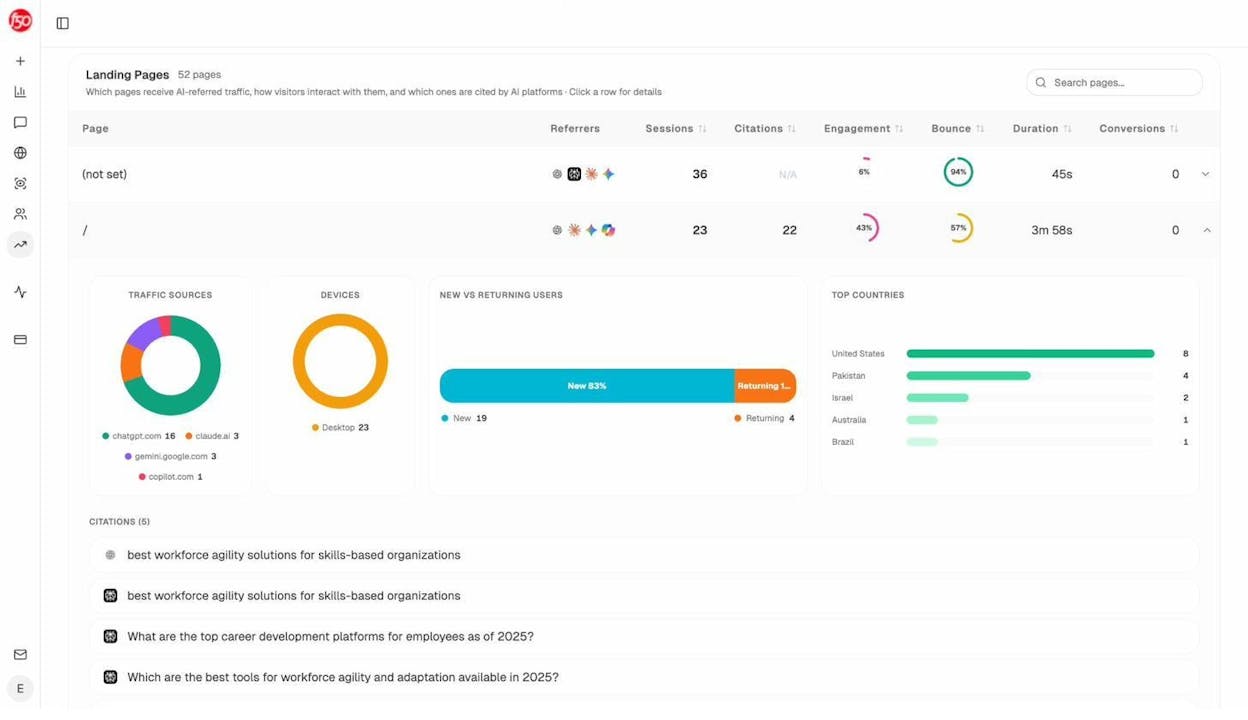
This data is critical for pruning decisions. If a page is generating AI traffic and citations, pruning it means losing a source of visibility you can’t see in traditional SEO tools.
Pruning Can Improve Your AI Visibility Too
The same logic that applies to Google’s quality signals applies to AI models. If your site is packed with thin, outdated, or irrelevant content, AI crawlers may waste their budget on those pages instead of your best content. And AI models may form a weaker overall impression of your brand authority.
By removing low-quality pages and consolidating your strongest content, you make it easier for AI crawlers to find and cite the pages that actually represent your expertise.
You can track whether your pruning efforts move the needle on AI visibility using Analyze AI’s prompt tracking. Set up prompts relevant to your topic areas and monitor whether your brand gets mentioned more frequently after a prune.
How to Decide What to Prune
The hard part of content pruning isn’t the act of deleting pages. It’s deciding which pages deserve to stay and which need to go. Rushing this step is how teams accidentally delete pages that have backlinks, generate revenue, or rank for keywords they didn’t realize mattered.
Here’s how to approach the decision.
Step 1: Build Your Content Inventory
Start by creating a complete list of every indexable page on your site. Export your sitemap, crawl your site with a tool like Screaming Frog, and cross-reference with your CMS to make sure nothing is missing.
![[Screenshot: Screaming Frog crawl export showing a list of URLs with status codes, word count, and indexability status]](https://www.datocms-assets.com/164164/1777586906-blobid5.png?auto=format,compress&w=1248&fit=max)
For each URL, you’ll want to collect page traffic from organic search over the last 12 months, total traffic from all sources, the number of backlinks pointing to the page, whether the page is currently indexed, and the date the page was last updated.
Pull organic traffic and click data from Google Search Console. Pull backlink data from an SEO tool of your choice. And pull total traffic from your analytics platform.
![[Screenshot: Google Search Console performance report filtered by page, showing clicks and impressions for individual URLs]](https://www.datocms-assets.com/164164/1777586910-blobid6.png?auto=format,compress&w=1248&fit=max)
Step 2: Add AI Search Data
This is where most pruning guides stop. But if you’re only looking at traditional SEO metrics, you’re making decisions with incomplete information.
Add a column for AI-referred traffic. In Analyze AI, go to AI Traffic Analytics and export the Landing Pages data. This tells you which pages are receiving sessions from AI platforms. Cross-reference this with your inventory spreadsheet.
Also check your citation analytics. A page that gets cited frequently by AI models has value that won’t show up in Google Analytics or Search Console.
Step 3: Score Each Page Against Pruning Criteria
With all your data assembled, evaluate each page against these criteria:
|
Criteria |
What to look for |
Pruning signal |
|---|---|---|
|
Organic traffic |
Fewer than 10 clicks/month over 12 months |
Weak. But check other criteria first. |
|
AI traffic |
Any sessions from ChatGPT, Perplexity, etc. |
If yes, think twice before pruning. |
|
Backlinks |
External domains linking to the page |
If links exist, redirect before deleting. |
|
Relevance |
Does the topic match your current product and audience? |
If no, strong candidate for pruning. |
|
Quality |
Is the content thin, outdated, or AI-generated slop? |
Strong candidate for pruning. |
|
Cannibalization |
Does this page compete with another page for the same keyword? |
Consolidate rather than delete. |
|
Business value |
Does the page support sales, onboarding, or customer education? |
If yes, keep regardless of traffic. |
|
Age |
Has the page been live long enough to perform? |
Give new pages at least 6 months. |
Step 4: Assign an Action to Every Page
For each page in your inventory, assign one of four actions.
Keep. The page is performing well, relevant, and high quality. No action needed.
Update. The page has potential but needs work. Maybe the information is outdated, the writing is thin, or it could be strengthened with better examples and data. Use Analyze AI’s Content Optimizer to identify specific gaps and generate an improved draft. The Content Optimizer fetches your existing page, scores it on argument structure, flow, clarity, and polish, and produces AI editorial comments pointing to exact areas for improvement.
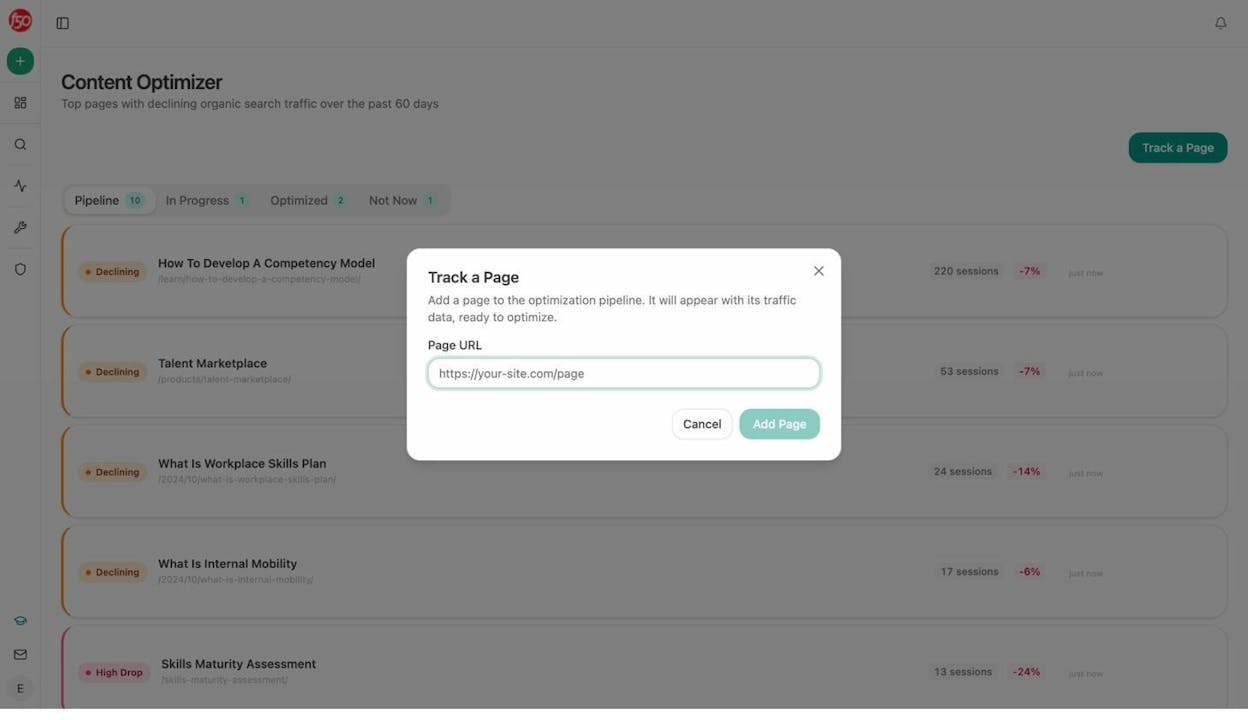
Consolidate. Two or more pages cover the same topic. Merge the best parts into one stronger page and redirect the others.
Prune. The page adds no value. It gets no traffic from any source, has no backlinks worth preserving, and is irrelevant to your current audience. Delete it and set up a redirect.
How to Prune Content (Step by Step)
Once you’ve made your decisions, here’s how to execute the prune without breaking anything.
1. Get Buy-In From Stakeholders
Content pruning is easy to mess up, and it touches pages that different teams care about. Before you start deleting anything, share your plan and reasoning with every team that has a stake in the site.
Bryan Casey at IBM took this seriously. His team scheduled a full week of meetings with every impacted team. His mental model was to go into every meeting and aim for 80% of what they wanted in terms of simplification. They never pushed for 100% because it was more important that stakeholders felt their priorities were protected.
If you push for total simplification, people push back. If you give ground on 20% of the decisions, you keep everyone at the table and the project moves forward.
The key to getting buy-in is data. Don’t walk into a meeting saying “we should delete these pages.” Walk in saying “these 200 pages collectively got 47 visits last quarter, have zero backlinks, and target keywords we stopped caring about 18 months ago. Here’s what we recommend.”
2. Delete in Batches
Never prune everything at once. Delete in batches and monitor the impact before making the next round of changes.
Eugene at Belkins deleted one subfolder per week from January to March 2023, watching traffic closely after each batch.
![[Screenshot: Timeline showing Belkins’ batch deletion schedule, one subfolder per week across January to March]](https://www.datocms-assets.com/164164/1777586919-blobid8.png?auto=format,compress&w=1248&fit=max)
This approach gives you a safety net. If something goes wrong after batch three (organic traffic drops unexpectedly, or important pages become orphaned), you can pause, investigate, and roll back changes before the damage compounds.
A reasonable batch size depends on your total site size, but somewhere between 10% and 20% of your pruning list per batch is a good starting point.
3. Set Up 301 Redirects
If a pruned page has backlinks or any residual traffic, redirect the old URL to the closest matching page on your site. “Closest matching” means a page on a similar topic, something that wouldn’t feel disorienting to a visitor who clicked the old URL.
![[Screenshot: Example of a 301 redirect setup, showing a pruned article URL being redirected to a related article on the same topic]](https://www.datocms-assets.com/164164/1777586919-blobid9.png?auto=format,compress&w=1248&fit=max)
A few rules for redirects. Always redirect to a topically related page, not your homepage. Redirecting everything to the homepage wastes the link equity you’re trying to preserve. Make sure the destination page is actually live and indexed. And use Analyze AI’s free Broken Link Checker to verify your redirects are working correctly after implementation.
4. Consolidate Where Possible
Even bad pages can contain good information. Before you delete a page, check whether any of its content could strengthen another page on your site.
There are two ways to consolidate.
The first is merging. Take related information from multiple pruned pages and combine them into a single, stronger page. This is especially effective when you have three blog posts that all cover slight variations of the same topic. Merge the best parts into one comprehensive piece.
The second is repurposing. Turn the information into a different format. The content from a pruned blog post might work as a section in an email sequence, a social media thread, or a downloadable resource.
When you consolidate, you also make your redirect strategy much easier. Each pruned page redirects to the new consolidated piece, which is a much closer topical match than a random other page on the site.
5. Update the Pages You’re Keeping
Pruning creates a natural opportunity to strengthen the content that remains. After you’ve removed the dead weight, look at the pages you decided to update rather than prune.
Analyze AI’s Content Optimizer makes this step significantly faster. It surfaces pages with declining organic search traffic over the past 60 days and organizes them into a pipeline. You add a page URL, and the tool fetches the existing content, analyzes it against top-ranking competitors for the same keyword, and generates editorial comments pointing to specific gaps in your argument, flow, clarity, and polish.
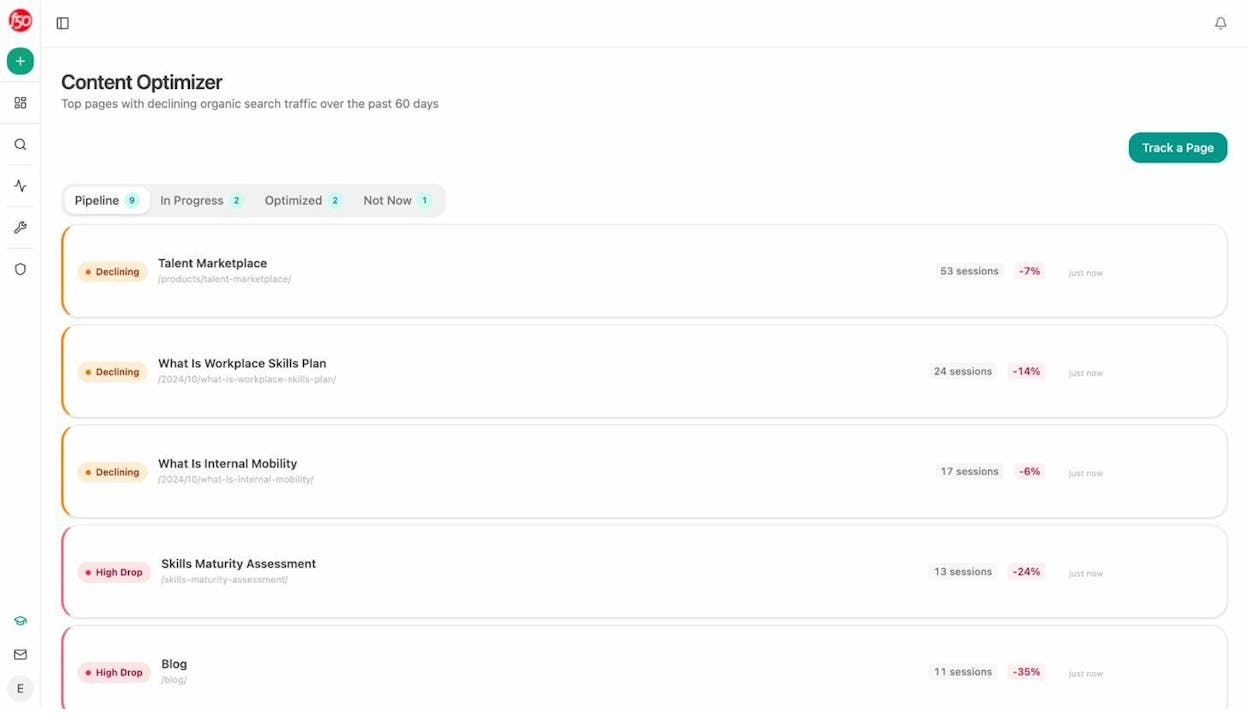
From there, the tool produces an optimized draft with tracked changes so you can see exactly what was added, removed, or rewritten.
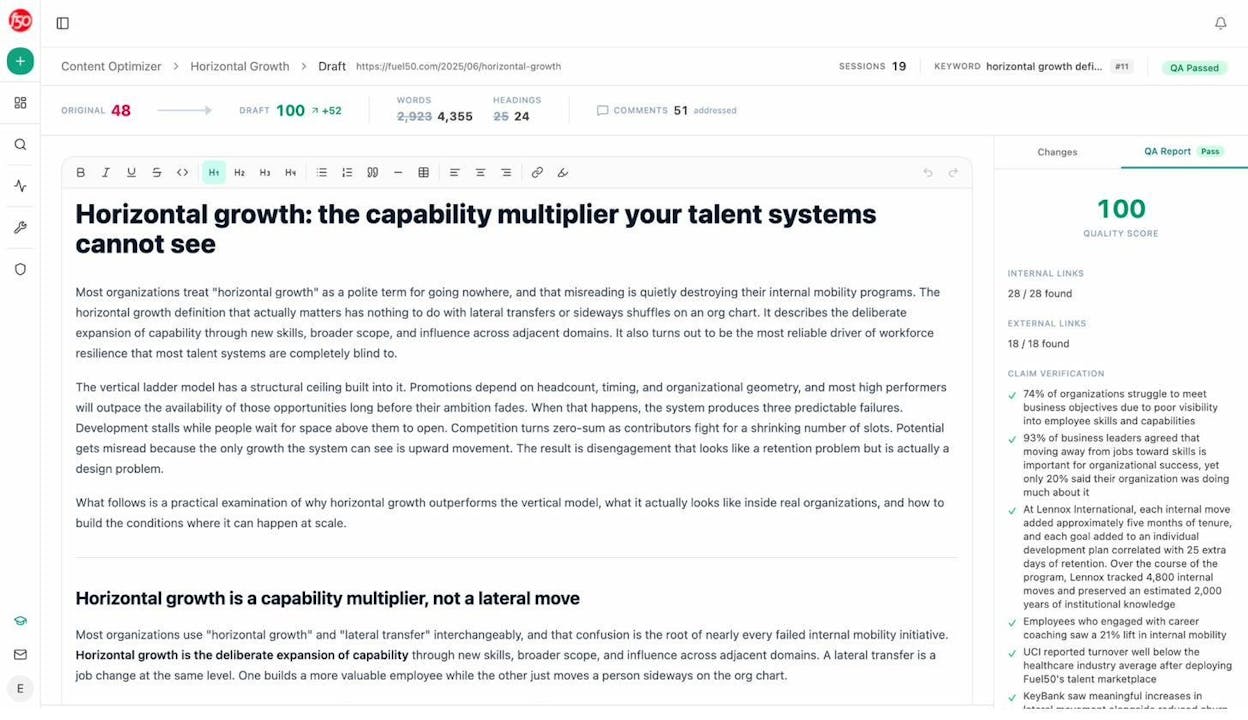
This turns the “update” decision from your content audit into immediate action rather than a task that sits on a backlog for six months.
6. Measure the Impact
You pruned for a reason, so track whether the reason was addressed.
Depending on your goals, measure these metrics before and after your prune.
For crawl budget improvements: Are your important pages getting indexed faster? Check Google Search Console’s Page Indexing report for changes in the number of indexed pages and indexing speed.
![[Screenshot: Google Search Console Page Indexing report showing the number of indexed vs. not indexed pages over time]](https://www.datocms-assets.com/164164/1777586933-blobid12.png?auto=format,compress&w=1248&fit=max)
For organic traffic improvements: Is traffic to the remaining pages improving? Compare the 90 days before pruning to the 90 days after, controlling for seasonality.
![[Screenshot: Google Search Console performance report showing a before/after traffic comparison around the pruning date]](https://www.datocms-assets.com/164164/1777586940-blobid13.png?auto=format,compress&w=1248&fit=max)
For AI search improvements: Is your brand getting cited more frequently? Use Analyze AI’s visibility tracking to monitor how often your brand appears in AI responses before and after pruning.
For visitor experience: Are engagement metrics improving? Look at bounce rate, time on site, and pages per session in your analytics tool.
It’s important to be realistic about attribution. Pruning rarely happens in isolation. Most teams are also publishing new content, fixing technical issues, and building links at the same time. You don’t need to prove that pruning caused the improvement. You need to see directional changes that align with your hypothesis and can’t be easily explained by other initiatives.
When Content Pruning Isn’t the Right Move
Content pruning is a powerful tool, but it’s not the right answer for every site.
Small sites with fewer than 100 pages. If your site is small, you probably don’t have a crawl budget problem. And every page you prune is a significant percentage of your total content. Focus on improving what you have rather than deleting it.
Sites where traffic is declining for other reasons. If your traffic dropped after a core algorithm update, pruning won’t necessarily fix the underlying issue. Diagnose the actual problem first.
Pages with backlinks you can’t afford to lose. Even with 301 redirects, you lose some link equity in the redirect. If a page has strong backlinks from authoritative sites, think hard about whether pruning is worth the tradeoff.
Pages that serve non-SEO purposes. Some pages exist for customer onboarding, investor relations, or internal documentation. They’ll never rank, and that’s fine. They still serve a purpose.
How Often Should You Prune?
Content pruning isn’t a one-time project. It should be a regular part of your content maintenance workflow.
For sites with fewer than 1,000 pages, a full pruning assessment every six months is reasonable. For larger sites with 10,000 or more pages, quarterly assessments are recommended. And in between those formal assessments, build a habit of flagging underperforming content as you encounter it.
The best way to prevent massive pruning exercises is to be more deliberate about what you publish in the first place. Every piece of content you create should have a clear purpose, a defined audience, and a target keyword or topic. If you can’t articulate why a page should exist, don’t publish it.
This applies to AI search too. Use Analyze AI’s Content Writer to research topics before you commit to writing them. The tool analyzes search intent, competitor coverage, and AI search gaps before you write a single word. That upfront research prevents you from creating the kind of content you’ll end up pruning six months later.
A Content Pruning Checklist
Before you start, here’s a quick checklist to keep you on track.
|
Step |
Action |
Done? |
|---|---|---|
|
1 |
Build a complete content inventory with traffic, backlinks, and indexation data |
☐ |
|
2 |
Add AI search traffic and citation data from Analyze AI |
☐ |
|
3 |
Score each page against pruning criteria (traffic, relevance, quality, cannibalization) |
☐ |
|
4 |
Assign an action to every page (keep, update, consolidate, prune) |
☐ |
|
5 |
Get buy-in from all stakeholders |
☐ |
|
6 |
Set up 301 redirects for pruned pages with backlinks or residual traffic |
☐ |
|
7 |
Execute deletion in batches (10-20% of pruning list per batch) |
☐ |
|
8 |
Consolidate related pages into stronger single pages |
☐ |
|
9 |
Run Content Optimizer on pages you’re keeping to improve them |
☐ |
|
10 |
Verify redirects with Broken Link Checker |
☐ |
|
11 |
Measure before/after metrics (organic traffic, AI visibility, engagement) |
☐ |
|
12 |
Schedule next pruning assessment (6 months for small sites, 3 months for large) |
☐ |
Final Thoughts
Content pruning is one of the few SEO strategies where doing less leads to better results. But it only works when you’re methodical about what you cut.
The biggest mistake teams make is treating pruning as a spring cleaning exercise. They pick an arbitrary number of pages to delete, rush through the process, and wonder why nothing improved or why traffic dropped.
The right approach is slower but more effective. Build a complete inventory. Gather data from every relevant channel, including AI search. Make individual decisions about every page. Execute in batches. Measure the results.
And if your site is in a category where AI search matters (which increasingly includes almost every category), make sure you’re not accidentally pruning pages that AI models are actively citing. A page with zero Google clicks and ten ChatGPT citations is not a pruning candidate. It’s an optimization opportunity.
The goal isn’t a smaller site. The goal is a stronger one.

Ernest

Ibrahim


