



Summarize this blog post with:


In this article, you’ll learn what duplicate content is, why it hurts your rankings in both Google and AI search, whether Google actually penalizes it, the 15 most common causes (with a fix for each one), how to audit your site for duplicates, and how to make sure duplicate content problems aren’t silently killing your visibility in AI answer engines like ChatGPT, Perplexity, and Gemini.
Table of Contents
What Is Duplicate Content?
Duplicate content is content that appears in more than one place on the web. That place can be two different URLs on the same website, or two different websites entirely.
The key word here is “substantially.” The pages don’t need to be 100% identical to count. If the core body content is the same and only the surrounding template differs, that’s duplicate content.
Here’s a simple example. Imagine a nutrition blog that uses tags like “protein powder” and “whey” on the same single article. The CMS generates two tag pages, one at /tag/protein-powder/ and another at /tag/whey/. Because there’s only one article with those tags, both pages show the exact same list. Two URLs. Same content.
This kind of duplication is more common than most people realize. Google has acknowledged that 25 to 30 percent of the web consists of duplicate content.
That statistic matters because it means your site almost certainly has some level of duplication. The question is whether it’s causing real problems or whether Google (and now AI search engines) are handling it fine on their own.
Why Is Duplicate Content Bad for SEO?
Google has said there is no formal duplicate content penalty. But that doesn’t mean duplicate content is harmless. It can hurt your organic performance in four concrete ways, and a fifth that most guides miss entirely.
1. Google May Show the Wrong URL in Search Results
When the same content lives at multiple URLs, Google has to pick one to display. Sometimes it picks the wrong one.
Say the same page is accessible at all three of these URLs:
-
domain.com/page/
-
domain.com/page/?utm_content=buffer&utm_medium=social
-
domain.com/category/page/
The first URL is the one you want ranking. But Google might choose the parameterized version with UTM tags, or the category subfolder version. If the URL that shows up in search results looks unfriendly or confusing, fewer people will click. That means lower CTR and less organic traffic from a page that otherwise ranks well.
2. Backlinks Get Spread Across Multiple URLs
If the same content is accessible at two different URLs, the backlinks you earn will split between them. Instead of one page with 250 referring domains, you end up with two pages that have 106 and 144 referring domains each.
Google says it handles this through canonicalization, a process where it groups duplicate URLs into a cluster and consolidates link equity to a single representative URL. In theory, this means the split doesn’t matter.
In practice, it doesn’t always work cleanly. Google sometimes indexes both versions and ranks them for different queries. When that happens, neither version has the full link authority it could have.
3. It Wastes Your Crawl Budget
Google discovers new and updated content by crawling your site. Every duplicate page it has to crawl is a page of new content it didn’t get to.
For small sites with a few hundred pages, this rarely matters. Google can crawl fast enough that a handful of duplicates won’t cause delays.
For large sites with thousands of pages, though, especially ecommerce sites with faceted navigation, the math changes. Tens of thousands of duplicate parameter URLs can slow Google’s discovery of your new product pages and updated content significantly.
4. Scraped Content Can Outrank You
Sometimes another website copies your content (with or without permission) and publishes it on their domain. If their site has stronger domain authority than yours, Google may treat their version as the original.
This is rare for established websites. But if you’re a newer site with fewer backlinks, it’s a real risk. A stronger domain republishing your content can sometimes rank above you for the very queries your content was designed to target.
5. AI Search Engines Compound the Problem
Here’s what most duplicate content guides miss entirely. AI answer engines like ChatGPT, Perplexity, Gemini, and Copilot are now driving real traffic to websites. And when your content exists in multiple versions across the web, these AI models face the same challenge Google does. They have to decide which version to cite.
The difference is that AI models typically cite fewer sources per answer than a Google SERP shows results. A Google results page has 10 blue links. A ChatGPT answer might cite three or four sources. That means the cost of confusion is higher. If an AI engine can’t confidently attribute content to your domain because it sees the same text on three different URLs or two different domains, it may cite a competitor instead.
This is especially relevant for syndicated content. If you let a larger publication republish your article, AI models may learn to associate that content with the publisher’s domain, not yours. You lose the citation, and with it, the AI search traffic that comes from being recommended.
Does Google Penalize Duplicate Content?
No. Google does not have a duplicate content penalty. Multiple Google representatives have confirmed this over the years. John Mueller, Gary Illyes, and others have all said the same thing clearly. There is no penalty for having duplicate content on your site.
But there’s an important caveat.
If Google believes that duplicate content is being used deliberately to manipulate rankings or deceive users, it can take action. Google’s documentation makes this clear. Intentionally creating multiple pages, subdomains, or entire domains with duplicate content. Publishing large volumes of scraped content. Republishing affiliate product descriptions without adding any original value. These are the kinds of practices that cross the line from accidental duplication into manipulative behavior.
For the vast majority of sites, though, duplicate content is accidental. It’s a technical issue caused by CMS defaults, URL parameters, or server configuration. Google’s systems are designed to handle these cases automatically through canonicalization, and they usually do.
The real risk isn’t a penalty. It’s the four problems outlined above. Diluted link equity, wasted crawl budget, wrong URLs in search results, and the growing problem of lost AI search visibility.
Common Causes of Duplicate Content (and How to Fix Each One)
There is no single cause of duplicate content. Most sites have multiple sources of duplication happening at the same time. Here are the 15 most common causes, each with a clear fix.
Faceted and Filtered Navigation
Faceted navigation is the set of filters on category pages that let users narrow results by size, color, price, brand, and other attributes. Ecommerce sites use these heavily.
The problem is that each combination of filters usually generates a unique URL with parameters appended to it. A URL like store.com/shoes?color=black&size=10 shows nearly the same products as store.com/shoes?size=10&color=black, but they’re treated as different pages.
With dozens of filter options across multiple categories, a single ecommerce site can easily generate tens of thousands of duplicate or near-duplicate pages.
How to fix it. Faceted navigation is one of the most complex duplicate content problems to solve well. The short answer is to use a combination of canonical tags (pointing all filter variations to the clean category URL), noindex directives on low-value filter combinations, and careful management of which filter pages Google is allowed to crawl via robots.txt. For a deep dive, Builtvisible’s guide to faceted navigation remains one of the best resources available.
Tracking Parameters (UTM Tags)
If you use UTM parameters to track marketing campaigns in Google Analytics, every tagged link creates a new URL for the same page.
For example, sharing a blog post on social media might generate a URL like:
example.com/blog-post?utm_source=twitter&utm_medium=social&utm_campaign=launch
The content at that URL is identical to example.com/blog-post. But to a search engine, they’re two different pages.
How to fix it. Add a canonical tag on every page that points to the clean, parameter-free URL. Most CMS platforms and SEO plugins handle this automatically, but it’s worth verifying. Check a few parameterized URLs on your site by viewing the page source and searching for rel="canonical" to confirm it points to the right place.
![[Screenshot: Browser view-source showing a canonical tag pointing from a parameterized URL to the clean version]](https://www.datocms-assets.com/164164/1777121978-blobid1.png?auto=format,compress&w=1248&fit=max)
Session IDs
Some older web applications append session IDs to URLs to track visitor activity. The result is URLs like:
example.com/product?sessionId=abc123def456
Every new visitor gets a unique session ID, which means every visitor creates a new URL for the same page. This can generate massive amounts of duplicate content very quickly.
How to fix it. Implement canonical tags pointing to the clean URL without the session ID parameter. Better yet, switch to cookie-based session tracking, which doesn’t modify the URL at all. Most modern web frameworks use cookies by default.
HTTPS vs. HTTP and WWW vs. Non-WWW
Every website has four possible URL variations:
-
https://www.example.com
-
https://example.com
-
http://www.example.com
-
http://example.com
If your server doesn’t redirect all variations to a single canonical version, your entire site could be duplicated across two or more of these. That’s not just a handful of duplicate pages. It’s every single page on your site duplicated.
How to fix it. Set up 301 redirects so that all variations point to your preferred version. If you’re using HTTPS (which you should be), redirect all HTTP URLs to HTTPS. Then redirect either the www or non-www version to whichever one you’ve chosen as your primary domain.
![[Screenshot: Server redirect configuration showing 301 redirect from HTTP to HTTPS and non-www to www]](https://www.datocms-assets.com/164164/1777121984-blobid2.png?auto=format,compress&w=1248&fit=max)
Test this by typing each of the four variations into your browser. You should end up at the same URL every time.
Case-Sensitive URLs
Google treats URLs as case-sensitive. That means these three URLs are all technically different:
-
example.com/about-us
-
example.com/About-Us
-
example.com/ABOUT-US
If your server serves the same page at all three, you have duplicate content.
How to fix it. Use lowercase URLs consistently across your entire site. Update your internal links to always use lowercase. If mixed-case URLs already exist and have been indexed, set up redirects from the uppercase variations to the lowercase canonical version.
Trailing Slashes vs. No Trailing Slashes
Google treats these as two separate URLs:
-
example.com/blog/
-
example.com/blog
If both versions load the same content without one redirecting to the other, you have duplicate content.
How to fix it. Pick one format (trailing slash or no trailing slash) and stick with it. Set up 301 redirects from the version you don’t want to the version you do. Then audit your internal links to make sure they all use the consistent format. Inconsistent internal links are one of the most common sources of this issue.
Print-Friendly Page URLs
Some sites generate print-friendly versions of pages at separate URLs, like:
-
example.com/article (standard version)
-
example.com/print/article (print version)
The content is the same. Only the template differs.
How to fix it. Add a canonical tag on the print-friendly version pointing to the standard URL. Alternatively, use CSS print stylesheets instead of separate print URLs. A CSS print stylesheet lets you control how a page looks when printed without creating a separate URL at all.
Mobile Subdomains (m.example.com)
If your site serves mobile users on a separate subdomain:
-
example.com/page (desktop)
-
m.example.com/page (mobile)
Then you have two URLs for every page on your site.
How to fix it. The best long-term solution is responsive design, which serves the same URL to all devices and adapts the layout with CSS. If you need to keep the mobile subdomain for now, add a canonical tag on every mobile page pointing to the desktop version. Also add a rel="alternate" tag on the desktop version pointing to the mobile version so Google understands the relationship.
The broader trend in web development has moved away from separate mobile URLs entirely. Responsive design eliminates this problem at the root.
AMP Pages
Accelerated Mobile Pages (AMP) create a second version of each page at a separate URL:
-
example.com/article
-
example.com/amp/article
How to fix it. Canonicalize the AMP version to the standard version. Use rel="amphtml" on the standard page to indicate the AMP alternative. If you only have AMP pages (no standard counterpart), use a self-referencing canonical tag.
Worth noting that AMP has significantly declined in relevance since Google stopped giving AMP pages preferential treatment in Top Stories. Many publishers have moved away from AMP entirely, which eliminates this source of duplication.
Tag and Category Pages
Most CMS platforms automatically create tag and category pages. When tags overlap, the resulting pages can be identical.
For example, if you tag a single blog post with both “email marketing” and “marketing automation,” and that post is the only one with those tags, both tag pages will show the exact same content. Same article, two different URLs.
Category pages can have the same problem. If two categories have no products listed under them, both pages show nothing but the same boilerplate template.
How to fix it. The simplest fix is to stop using tags, or use them far more sparingly. Most sites get no SEO value from tag pages. If you do use them, noindex the tag pages to keep them out of Google’s index.
For categories, use a reasonable number and make sure each category has enough unique content to justify its existence. Empty or near-empty category pages should be noindexed or removed.
Image Attachment Pages
WordPress and some other CMS platforms create a dedicated page for every image you upload. These pages typically show just the image and some boilerplate text. Because the boilerplate is the same across all attachment pages, they create large volumes of thin, duplicate content.
How to fix it. Disable attachment pages in your CMS. In WordPress, SEO plugins like Yoast and Rank Math can redirect attachment URLs to either the parent post or the media file itself. Turn this on and the problem goes away.
Paginated Comments
If your blog has comment pagination enabled, WordPress creates separate URLs for each page of comments:
-
example.com/post/
-
example.com/post/comment-page-2/
-
example.com/post/comment-page-3/
Each of these URLs serves the full post content. Only the comments section changes. That’s duplicate content.
How to fix it. Turn off comment pagination in your WordPress settings (Settings > Discussion > uncheck “Break comments into pages”). If you have a post with hundreds of comments, consider loading them asynchronously with JavaScript instead.
Localized Content for Same-Language Regions
If you serve content to multiple regions that share a language, like the US, UK, and Australia, the pages across those regions will be near-duplicates. The content is the same English text with minor differences like currency symbols, spelling variations, or local phone numbers.
How to fix it. Use hreflang tags to tell Google about the relationship between regional versions. Hreflang tags signal that these are localized variations of the same content, not duplicates. Google will then serve the appropriate version based on the searcher’s location.
Note that translated content, pages in genuinely different languages, is not duplicate content. Google treats translations as unique pages.
Internal Search Results Pages
If your site has a search box, every search query generates a unique URL:
example.com/search?q=keyword
These pages typically offer little value to search engine users. Google’s former Head of Webspam, Matt Cutts, noted that search results within search results generally don’t add value.
How to fix it. Block search results URLs from being indexed. You can do this with a noindex meta tag on your search results template, or by blocking the search results path in your robots.txt file. Also make sure you’re not internally linking to search results pages from your navigation or sitemaps.
Staging and Development Environments
A staging environment is a copy of your live site used for testing. If it’s publicly accessible and Google indexes it, you suddenly have a full duplicate of your entire website.
How to fix it. Protect your staging environment behind HTTP authentication, IP whitelisting, or VPN access. If it’s already been indexed, add a noindex directive and wait for Google to drop the pages. Prevention is better than cleanup here, so always lock down staging environments before content goes live.
How to Check for Duplicate Content on Your Site
Knowing the causes is useful. But you also need a way to find existing duplicate content so you can fix what’s already there.
Use Google Search Console
Google Search Console flags several duplicate content issues directly. In the “Pages” report (under Indexing), look for these status reasons:
-
“Duplicate without user-selected canonical”
-
“Duplicate, Google chose different canonical than user”
-
“Duplicate, submitted URL not selected as canonical”
![[Screenshot: Google Search Console Pages report showing duplicate content status messages]](https://www.datocms-assets.com/164164/1777121988-blobid3.png?auto=format,compress&w=1248&fit=max)
Each of these tells you something specific. “Duplicate without user-selected canonical” means Google found duplicate pages and you haven’t told it which one to prefer. “Google chose different canonical than user” means you set a canonical tag, but Google disagreed and picked a different URL.
Click into any of these groups to see the affected URLs. Then investigate why the duplication exists and apply the appropriate fix from the list above.
For individual URLs, use the URL Inspection tool. Enter a URL and Google will tell you whether it considers that page the canonical or a duplicate.
![[Screenshot: Google Search Console URL Inspection tool showing canonical status for a specific URL]](https://www.datocms-assets.com/164164/1777121989-blobid4.png?auto=format,compress&w=1248&fit=max)
Run a Site Audit
SEO audit tools like Screaming Frog, Sitebulb, and Ahrefs Site Audit crawl your entire site and flag duplicate content automatically. They typically group pages into clusters of exact duplicates and near-duplicates, which makes it much easier to find patterns.
Look specifically for clusters of duplicates that don’t have canonical tags. These are the highest-priority fixes because Google has no guidance on which version to prefer.
![[Screenshot: SEO audit tool showing clusters of duplicate pages without canonical tags]](https://www.datocms-assets.com/164164/1777121993-blobid5.png?auto=format,compress&w=1248&fit=max)
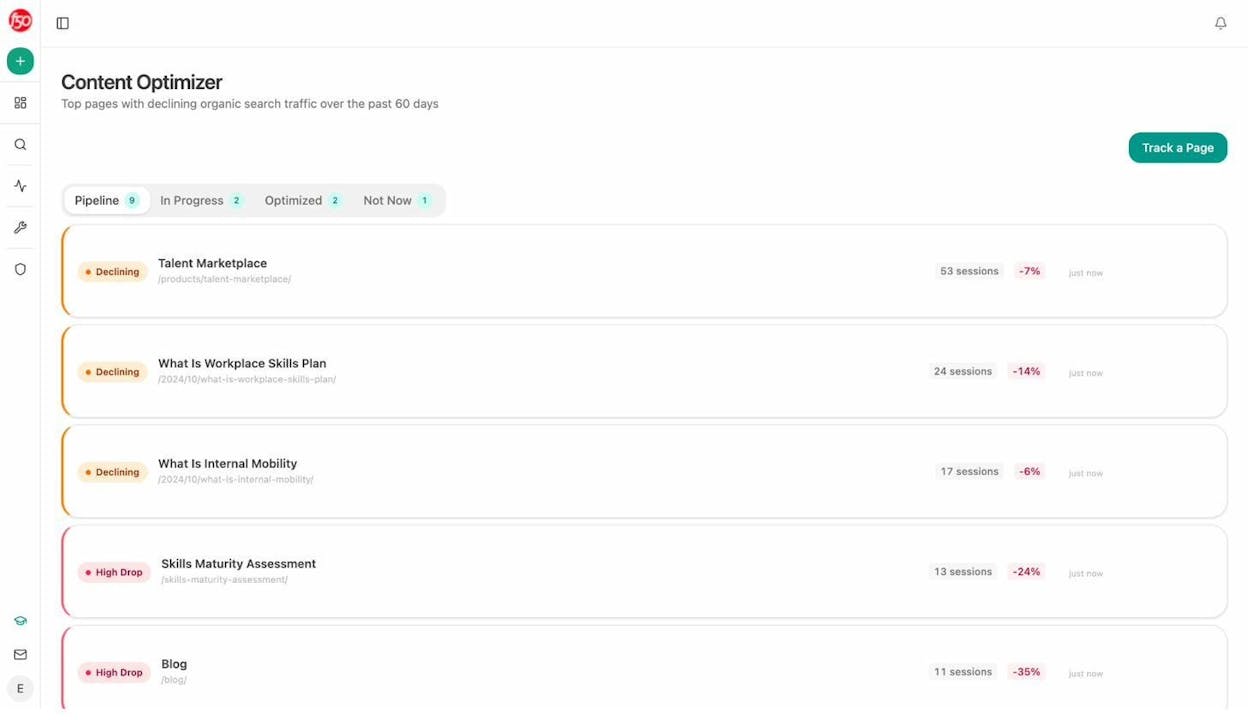
If you’re already using Analyze AI, the Content Optimizer surfaces pages with declining organic search traffic over the past 60 days. Duplicate content is one of the most common reasons a page loses traffic over time, since Google may have shifted its preferred canonical to a different URL.
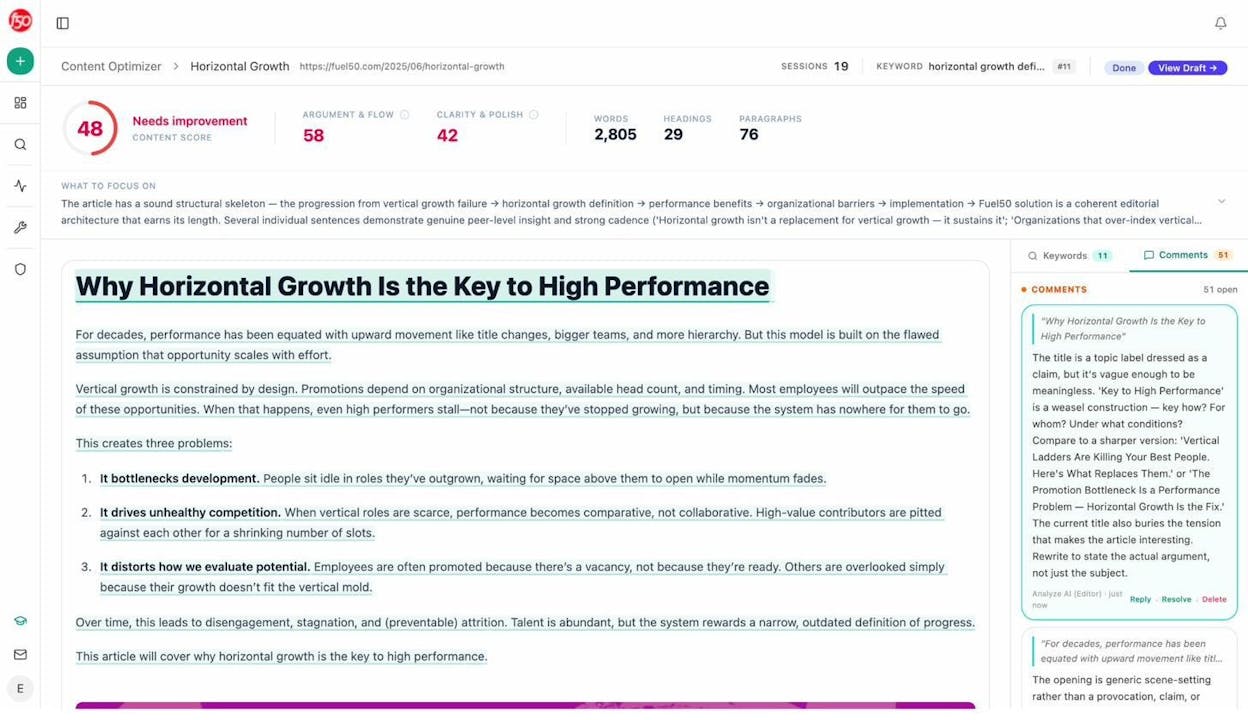
When you click into a declining page, the Content Optimizer fetches the content and generates AI editorial comments that flag quality issues. These comments can surface problems like thin content, missing structure, or overlap with other pages on your site that may be causing cannibalization.
Check for Duplicate Title Tags, Meta Descriptions, and H1s
Duplicate meta tags are a strong signal that you have duplicate (or near-duplicate) content. If two pages share the same title tag, there’s a good chance their content overlaps too.
Run a crawl with any SEO audit tool and filter for duplicate titles. Then review the affected pages manually. Sometimes the fix is as simple as writing unique title tags. Other times, the pages genuinely overlap and need to be consolidated or canonicalized.
![[Screenshot: SEO audit tool report filtered to show pages with duplicate title tags]](https://www.datocms-assets.com/164164/1777121999-blobid8.png?auto=format,compress&w=1248&fit=max)
How to Check for Duplicate Content Across the Web
Internal duplication is only half the picture. Your content might also be duplicated on other websites because of scraping or syndication.
Find Scraped Content
For individual pages, copy a distinctive sentence from your article and search for it in Google using quotation marks. If other sites have republished your content, they’ll show up in the results.
![[Screenshot: Google search results for an exact phrase in quotes, showing the original site and a scraper site]](https://www.datocms-assets.com/164164/1777122004-blobid9.png?auto=format,compress&w=1248&fit=max)
For larger sites, tools like Copyscape automate this process. Paste in a URL and Copyscape searches the web for matching content.
Most results will be from low-quality scraper sites. These are usually harmless. Google is good at identifying them and ignoring them.
The cases to worry about are when a legitimate, high-authority site has copied your content and is outranking you for it. If that’s happening, you have three options. Reach out and ask them to remove the content. Ask them to add a canonical tag pointing back to your original. Or file a DMCA takedown request through Google.
Handle Syndicated Content Properly
If you intentionally syndicate content to other publications, ask them to include a rel="canonical" tag pointing back to your original. This tells Google (and AI models) that your version is the source.
If you’re the one republishing content from another source, do the same in reverse. Canonicalize back to the original, or noindex the syndicated version on your site.
How Duplicate Content Affects Your Visibility in AI Search
Everything covered above applies to traditional Google search. But there’s a growing dimension that deserves its own treatment, since AI answer engines now account for a meaningful and fast-growing share of website traffic.
AI models like ChatGPT, Gemini, Perplexity, and Copilot don’t just index pages. They build internal representations of which domains are authoritative for which topics. When the same content exists on multiple domains (through syndication, scraping, or aggregation), the model has to decide which domain to credit in its answer. If your original content is widely duplicated, the model may associate the expertise with someone else.
This matters because AI search citations work differently from Google rankings. On Google, 10 results share the page. In an AI answer, you’re either cited or you’re not. There’s no position seven that still gets a few clicks. If the AI engine chooses the scraper or the syndication partner instead of you, you get zero visits from that prompt.
How to Monitor and Protect Your AI Search Visibility
The first step is knowing where you stand. If you’re not tracking how AI engines cite your domain, you won’t know when duplicate content is costing you citations.
Analyze AI shows you every URL and domain that AI platforms cite when answering questions in your space. You can see which content types get cited most often, like blogs, product pages, reviews, and documentation, and which domains dominate the citation landscape.
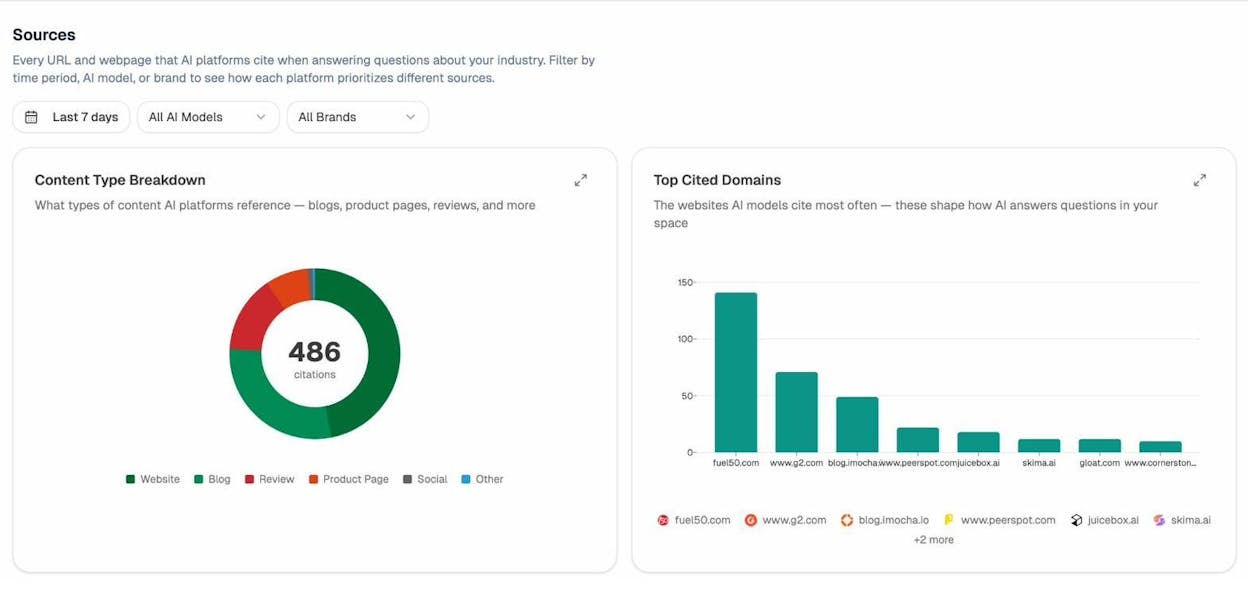
If you notice that a competitor’s domain is getting cited for content that originated on your site, that’s a strong signal that duplicate content across the web is costing you AI visibility.
Use AI Traffic Data to Spot Duplicate Content Damage
Analyze AI’s AI Traffic Analytics connects to your GA4 account and shows you exactly which pages receive traffic from AI search engines. It breaks down the traffic by referring engine (ChatGPT, Claude, Gemini, Copilot) and shows engagement metrics like bounce rate and time on page.
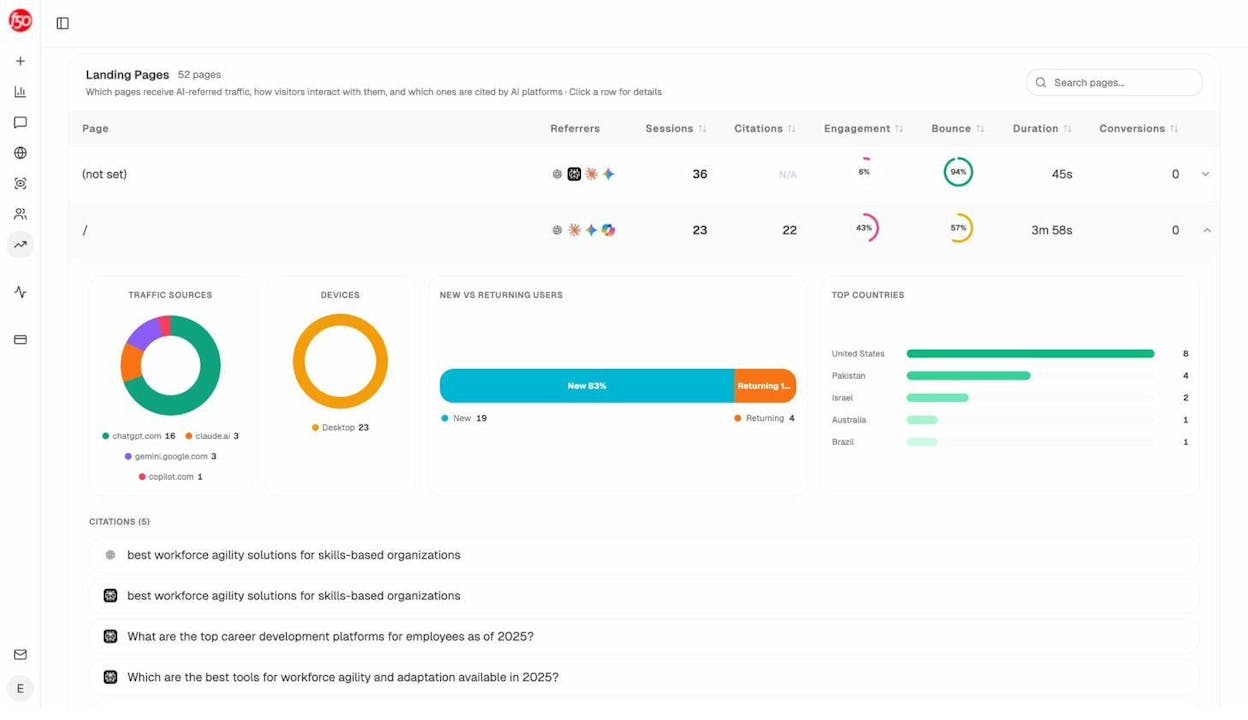
If a page that should be receiving AI traffic shows zero sessions from AI engines, but a competitor or syndication partner is getting cited for the same topic, duplicate content may be the cause. The fix is the same as for Google. Consolidate, canonicalize, or request takedowns. The monitoring is what’s new.
Protect Syndication Agreements in the AI Era
If you syndicate content to other publications, the canonical tag arrangement that worked for Google may not be enough for AI models. AI engines don’t always respect canonical tags the way Google does. They learn from training data, and if the syndicated version gets more links, more shares, and more visibility, the AI model may treat that version as the primary source.
The practical implication is that syndication agreements need to be evaluated more carefully now. If a publication republishes your content and it consistently gets more distribution than your original, you may be training AI models to credit them instead of you.
Consider whether the syndication partnership is worth the long-term cost to your AI search visibility. In some cases, an exclusive publishing approach, where the content only lives on your domain, will compound better over time.
Quick-Reference Table of Fixes
|
Cause |
Fix |
Priority |
|---|---|---|
|
Faceted navigation |
Canonical tags + noindex on low-value filters + robots.txt |
High (ecommerce) |
|
UTM tracking parameters |
Canonical to clean URL |
Medium |
|
Session IDs |
Canonical to clean URL or switch to cookie-based tracking |
Medium |
|
HTTP/HTTPS and www/non-www |
301 redirects to single version |
High |
|
Case-sensitive URLs |
Lowercase redirects + consistent internal linking |
Medium |
|
Trailing slashes |
301 redirect to preferred version |
Low |
|
Print-friendly URLs |
Canonical or CSS print stylesheet |
Low |
|
Mobile subdomains (m.) |
Canonical + rel=“alternate,” or migrate to responsive |
Medium |
|
AMP pages |
Canonical + rel=“amphtml” |
Low |
|
Tag pages |
Noindex or remove tags |
Low |
|
Category pages |
Consolidate or noindex empty categories |
Medium |
|
Image attachment pages |
Redirect to parent post via SEO plugin |
Low |
|
Paginated comments |
Disable comment pagination |
Low |
|
Localized same-language content |
Hreflang tags |
High (international sites) |
|
Internal search results |
Noindex or robots.txt block |
Medium |
|
Staging environments |
HTTP auth, IP whitelist, or VPN |
High |
|
Cross-domain scraping |
DMCA takedown or canonical request |
Case-by-case |
|
Syndicated content |
Canonical back to original + monitor AI citations |
Medium |
Final Thoughts
Duplicate content is one of those SEO problems that sounds scarier than it usually is. A few duplicate pages on your site won’t tank your rankings. Google has been dealing with web-scale duplication for decades, and its systems handle the vast majority of cases automatically.
Where duplicate content becomes a genuine problem is at scale. Thousands of duplicate parameter URLs from faceted navigation. An entire staging site indexed by Google. Content scraped and republished by a higher-authority domain.
And now there’s a new dimension. AI search engines are driving real, attributable traffic to websites. When duplicate content confuses these models about which domain to credit, the cost is binary. You either get cited or you don’t. There’s no middle ground.
The fix is the same as it has always been. Audit regularly. Canonicalize properly. Redirect cleanly. The only change is that the stakes now include a channel that didn’t exist a few years ago, and that channel is growing fast.
If you want to see how AI answer engines are treating your content today, which pages get cited, which competitors show up instead of you, and where your duplicate content might be costing you visibility, Analyze AI gives you that picture across ChatGPT, Perplexity, Gemini, Copilot, and more.

Ernest

Ibrahim


