



Summarize this blog post with:


In this article, you’ll learn 17 practical ways to check your competitor’s website traffic, from quick free lookups to deep competitive analysis across organic search, paid ads, and AI search engines like ChatGPT and Perplexity. Each method includes step-by-step instructions, tool recommendations, and clear guidance on what to do with the data once you have it.
Table of Contents
The Quickest Way to Check Competitor Website Traffic
The fastest way to get a snapshot of a competitor’s traffic is with a free traffic checker tool.
For instance, Analyze AI’s Website Traffic Checker lets you enter any domain and see estimated monthly organic traffic, top-performing keywords, and the pages driving the most visits. No signup needed.
![[Screenshot: Analyze AI’s free Website Traffic Checker showing traffic estimates for a sample domain, with top keywords and top pages visible]](https://www.datocms-assets.com/164164/1777067142-blobid1.png?auto=format,compress&w=1248&fit=max)
This gives you a directional answer in seconds. But a single number won’t help you make decisions. To actually use competitor traffic data to improve your own marketing, you need to go deeper.
The rest of this article covers 17 specific methods for doing that, organized by traffic source: organic search, paid search, AI search, and overall traffic.
How to Analyze Competitor Organic Search Traffic
Organic search traffic refers to the clicks a website gets from search engine results pages, excluding ads. It’s the most common type of competitor traffic to analyze, and the one with the most mature tooling.
Here are twelve methods for analyzing it, each with a specific use case and detailed instructions.
1. Identify Your Top Organic Competitors
Your organic competitors are not always your business competitors. A SaaS company selling project management software might compete with a blog like Monday.com’s resource center for organic traffic, even though Monday.com’s product targets a different market segment.
By identifying all of your organic competitors (not just the ones you already know about), you unlock a much larger pool of keyword ideas. Here’s how.
Step 1: Open an SEO tool like Analyze AI’s SERP Checker or another site explorer. Enter your domain.
Step 2: Navigate to the organic competitors report.
![[Screenshot: An SEO tool’s organic competitors report showing a list of competing domains, shared keywords count, and traffic overlap]](https://www.datocms-assets.com/164164/1777067157-blobid2.png?auto=format,compress&w=1248&fit=max)
Step 3: Look at the “shared keywords” column. This tells you how much keyword overlap exists between your site and each competitor. Higher overlap means a closer competitor.
Step 4: Click through to see which specific keywords each competitor ranks for that you don’t. This is your starting point for content gap analysis (covered in more detail in Method 5).
Why this matters: If you only analyze the competitors you already know, you’ll miss keyword opportunities that adjacent sites have already validated. A competitor you’ve never heard of might rank for dozens of keywords that are perfect for your business.
2. See Which Parts of the Site Attract the Most Traffic
Not all traffic goes to the blog. Some competitors drive more organic traffic through free tools, resource libraries, template galleries, or product pages. Understanding this changes how you allocate your own content resources.
Step 1: In your SEO tool, enter a competitor’s domain and navigate to the site structure report.
![[Screenshot: A site structure report showing traffic distribution across subfolders like /blog/, /tools/, /templates/, /resources/, with traffic percentages for each]](https://www.datocms-assets.com/164164/1777067171-blobid3.png?auto=format,compress&w=1248&fit=max)
Step 2: Compare the traffic share of their blog versus other sections.
For example, you might discover that a competitor’s “/tools/” subfolder generates three times the organic traffic of their entire blog. That’s a signal that investing in free tools could be a more efficient growth strategy than writing more blog posts.
Step 3: Check if any unexpected sections drive traffic. Product pages, comparison pages, or glossary sections sometimes attract significant search traffic that’s easy to overlook.
This analysis is fast and can fundamentally reshape your content strategy. If a competitor built a keyword generator or a website authority checker and it drives more traffic than their blog, that’s a data point worth acting on.
3. Analyze Top-Performing Pages
Once you know where traffic goes at the folder level, drill down to individual pages.
Step 1: Enter your competitor’s domain in a site explorer tool and open the Top Pages report.
![[Screenshot: A top pages report showing a list of URLs sorted by estimated traffic, with columns for top keyword, traffic, and traffic value]](https://www.datocms-assets.com/164164/1777067172-blobid4.png?auto=format,compress&w=1248&fit=max)
Step 2: Sort by traffic to see which specific pages drive the most visits. Note the “top keyword” column, which tells you the primary keyword each page ranks for.
Step 3: Look at the traffic trend for each page. If traffic to a page spiked recently, the competitor likely updated the content. If it’s declining, the page may be losing rankings, which means an opportunity for you.
![[Screenshot: A top pages report with a “Compare pages” view toggled on, showing traffic trend lines for multiple pages over time]](https://www.datocms-assets.com/164164/1777067184-blobid5.png?auto=format,compress&w=1248&fit=max)
Step 4: For pages where traffic recently increased, use a tool with a content change detection feature (like the Wayback Machine or a tool with page inspection). Compare the before-and-after versions to see what they changed: new sections, updated data, restructured headings, or added media.
What to do with this: Build a shortlist of your competitor’s top 10 pages by traffic. For each one, evaluate whether you can create a better version targeting the same keyword. This is the core of pain-point SEO: finding keywords with validated demand and creating content that serves the searcher better than what currently ranks.
4. Browse Through Keywords to Find Traffic Opportunities
Your competitor’s keyword profile is like looking at their keyword research, done for free.
Step 1: Enter your competitor’s domain in a site explorer and open the Organic Keywords report.
![[Screenshot: An organic keywords report showing a list of keywords with columns for position, volume, keyword difficulty (KD), traffic, and URL]](https://www.datocms-assets.com/164164/1777067185-blobid6.jpg?auto=format,compress&w=1248&fit=max)
Step 2: Use the filters to find specific types of keywords:
|
Filter |
What it Finds |
Why it Matters |
|---|---|---|
|
KD < 20 |
Low-difficulty keywords |
Faster to rank for, especially for newer sites |
|
Volume > 1,000 |
High-demand keywords |
Validates that the topic has enough search interest |
|
Position 2-10 |
Keywords they rank for but don’t dominate |
May be easier to outrank them than a #1 result |
|
Include “how to” |
Tutorial keywords |
Typically high-intent and good for building authority |
|
Include “best” |
Comparison keywords |
Often bottom-of-funnel with purchase intent |
|
Include “vs” |
Versus keywords |
Great for capturing buyers actively comparing solutions |
Step 3: For each keyword that looks promising, check the SERP using a SERP Checker to see who else ranks for it and how strong the competition is.
Step 4: Track the ranking history of your competitor’s top keywords. If you see a sudden jump in position, it usually means they updated the content. That tells you both that the keyword matters to them and that the current SERP rewards content freshness.
5. Find Keywords That Bring Traffic to Competitors but Not You
This is content gap analysis, and it’s one of the highest-leverage competitive research methods available. The idea is simple: identify the keywords your competitors rank for that you don’t rank for at all.
Step 1: Open a competitive analysis tool and enter your domain as the target.
Step 2: Add two to four competitor domains.
Step 3: Run the comparison and navigate to the content gap report.
![[Screenshot: A content gap report showing keywords that multiple competitors rank for but the target site does not, with columns for keyword, volume, and difficulty]](https://www.datocms-assets.com/164164/1777067195-blobid7.png?auto=format,compress&w=1248&fit=max)
Step 4: Filter to show only keywords where at least two competitors rank. If multiple competitors rank for a keyword and you don’t, the keyword is almost certainly relevant to your market.
Step 5: Prioritize using an effort-to-reward framework. Look for keywords with high traffic potential and low keyword difficulty. You can use a Keyword Difficulty Checker to quickly assess difficulty before committing.
What most people get wrong: They run a content gap analysis, export thousands of keywords, and never act on them. Instead, pick the top 10 to 20 keywords from your gap analysis and create a content calendar around them. Quality execution on a focused list beats a spreadsheet of 5,000 keywords that never gets touched.
6. Analyze Short-Term and Long-Term Traffic Performance
Tracking a competitor’s traffic over different time horizons tells you different things.
Short-term analysis (last 24 hours to last 30 days) answers questions like: Did the latest Google core update hurt them? Are any of their new pages already picking up traffic? Did they lose rankings on specific keywords this week?
Step 1: In a site explorer, enter the competitor’s domain and set the date range to the last 7 or 30 days.
![[Screenshot: A site explorer overview showing traffic changes over the last 30 days, with daily traffic data points and annotations for Google algorithm updates]](https://www.datocms-assets.com/164164/1777067216-blobid8.png?auto=format,compress&w=1248&fit=max)
Step 2: Look at day-to-day traffic changes. If traffic dropped sharply on a specific day, cross-reference that with known Google algorithm updates. A drop that aligns with an update date tells you their site was affected.
Long-term analysis (6 months to several years) answers different questions: Is this competitor growing or declining overall? Are they gaining or losing market share? Should I invest more aggressively to catch them, or are they a fading force?
Step 3: Switch the traffic graph to a multi-year view. If their organic traffic has been flat or declining for two years, their SEO strategy may not be worth emulating. If it’s been climbing steadily, study what they’re doing.
Step 4: Export the data if you need to build a business case for investment. Showing your leadership team that a competitor’s traffic grew 3x in 18 months is a concrete way to justify budget for content or SEO.
7. Compare Traffic Across Multiple Competitors on One Graph
Seeing several competitors on a single chart makes trends immediately visible: who’s leading, who’s catching up, and who’s falling behind.
Step 1: In a site explorer tool, enter your domain and add competitors using a comparison feature.
![[Screenshot: A multi-site traffic comparison chart showing organic traffic trends for four competing websites over the past 12 months, with one line clearly rising above the others]](https://www.datocms-assets.com/164164/1777067217-blobid9.png?auto=format,compress&w=1248&fit=max)
Step 2: Look for crossover points. If a competitor’s line recently crossed above yours, figure out why. Did they publish a batch of new content? Did they earn a wave of backlinks? Did a Google update favor their site structure?
Step 3: Look at the overall trajectory. If all competitors are growing but you’re flat, the market is expanding and you’re losing share. If everyone is declining, there may be a structural shift in how people search for your topics (which is where AI search comes in, covered later in this guide).
8. Compare Organic Share of Voice
Share of voice (SOV) goes beyond raw traffic numbers. It measures what percentage of total clicks for a set of tracked keywords goes to your site versus your competitors. If your SOV is 15% and a competitor’s is 40%, they’re getting 2.5x your visibility for the same keywords.
Step 1: Choose the keywords you want to track. These should be your most important keywords: the ones that drive revenue, not just traffic. Include a mix of branded terms, product keywords, and key blog topics.
Step 2: Set up a rank tracker project with those keywords and add your competitors.
![[Screenshot: A rank tracker setup screen showing tracked keywords, selected competitors, and location settings]](https://www.datocms-assets.com/164164/1777067225-blobid10.png?auto=format,compress&w=1248&fit=max)
Step 3: After the tool collects data, view the SOV report. This shows each competitor’s share of the total clicks for your tracked keywords.
![[Screenshot: A share of voice dashboard showing competitor SOV percentages as a stacked bar chart over time, with one competitor clearly dominating]](https://www.datocms-assets.com/164164/1777067238-blobid11.png?auto=format,compress&w=1248&fit=max)
Step 4: Track SOV monthly or weekly. A rising SOV means your strategy is working. A declining one means competitors are gaining ground.
Why SOV matters more than raw traffic: A competitor might have more total traffic than you, but if their traffic comes from keywords outside your market, it’s irrelevant. SOV focuses on the keywords that actually matter for your business.
9. Find Pages Sending Referral Traffic to Competitors
Some of your competitors’ traffic comes from links on other websites (referral traffic). If you can identify which pages link to your competitors, you can pursue the same links or similar opportunities.
Step 1: Enter your competitor’s domain in a backlink analysis tool and open the Backlinks report.
![[Screenshot: A backlinks report showing referring pages sorted by the referring page’s own organic traffic, with columns for anchor text, link type, and page traffic]](https://www.datocms-assets.com/164164/1777067239-blobid12.png?auto=format,compress&w=1248&fit=max)
Step 2: Sort by the referring page’s traffic. Pages with high traffic that link to your competitor are likely sending real referral visits.
Step 3: Filter the referring page titles to find specific types of opportunities. Try filtering for words like “best,” “top,” “review,” “tools,” “alternatives,” or “vs.” These are often listicle or roundup posts where your product or content could be added.
Step 4: Reach out to the authors of those pages and pitch your product or content as an addition. Use a Broken Link Checker to find broken links on those pages. If a link on a roundup post is broken, offering your page as a replacement is one of the most effective link-building tactics available.
10. Track Traffic for Multiple Competitors as One Portfolio
Instead of analyzing competitors one at a time, group them together to see combined trends. This is useful for benchmarking your growth against the market as a whole, not just a single rival.
Step 1: Use a portfolio or project feature in your SEO tool to create a group of competitor domains.
Step 2: View the aggregated traffic data. This shows you the combined organic traffic and ![[Screenshot: A filtered backlinks report showing only referring pages with “best” or “tools” in the title, revealing link placement opportunities]](https://www.datocms-assets.com/164164/1777067256-blobid13.png?auto=format,compress&w=1248&fit=max) trends for all competitors in the group.
trends for all competitors in the group.
What this unlocks: You can detect industry-wide shifts. If your competitors’ combined traffic drops during a specific month, a Google algorithm update may have affected the entire niche, not just one site. If their combined traffic is growing while yours is flat, you’re losing market share. If all sites in the portfolio are declining, the search landscape for your keywords may be changing structurally, and it may be time to look into diversifying to AI search channels.
11. Monitor Competitors in AI Search Results
Here’s where most competitor analysis guides stop. But they shouldn’t.
AI search engines like ChatGPT, Perplexity, Google AI Mode, Gemini, Claude, and Microsoft Copilot now generate answers to user queries and cite websites in those answers. These citations drive real traffic. And your competitors may already be getting it.
In an Analyze AI study of over 83,000 citations, the data showed that AI engines cite certain types of content more often than others. If a competitor’s content is consistently cited and yours isn’t, they’re building visibility in a channel that’s growing fast.
Here’s how to track it.
Step 1: Open Analyze AI and set up a project. Add your brand and your competitors.
Step 2: Navigate to the Competitors tab. This shows all your tracked competitors, how many times they’ve been mentioned in AI-generated answers, and when they were last seen.
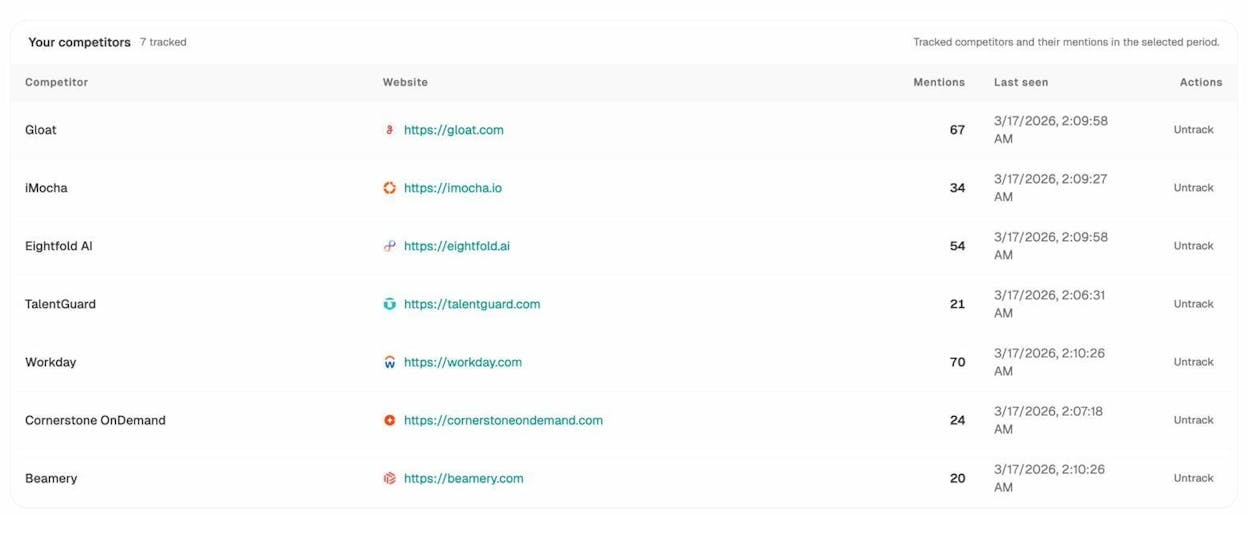
Step 3: Review the Suggested Competitors section below. Analyze AI automatically surfaces entities that appear frequently in AI answers for your industry but that you haven’t tracked yet. This is the AI search equivalent of discovering organic competitors you didn’t know about.
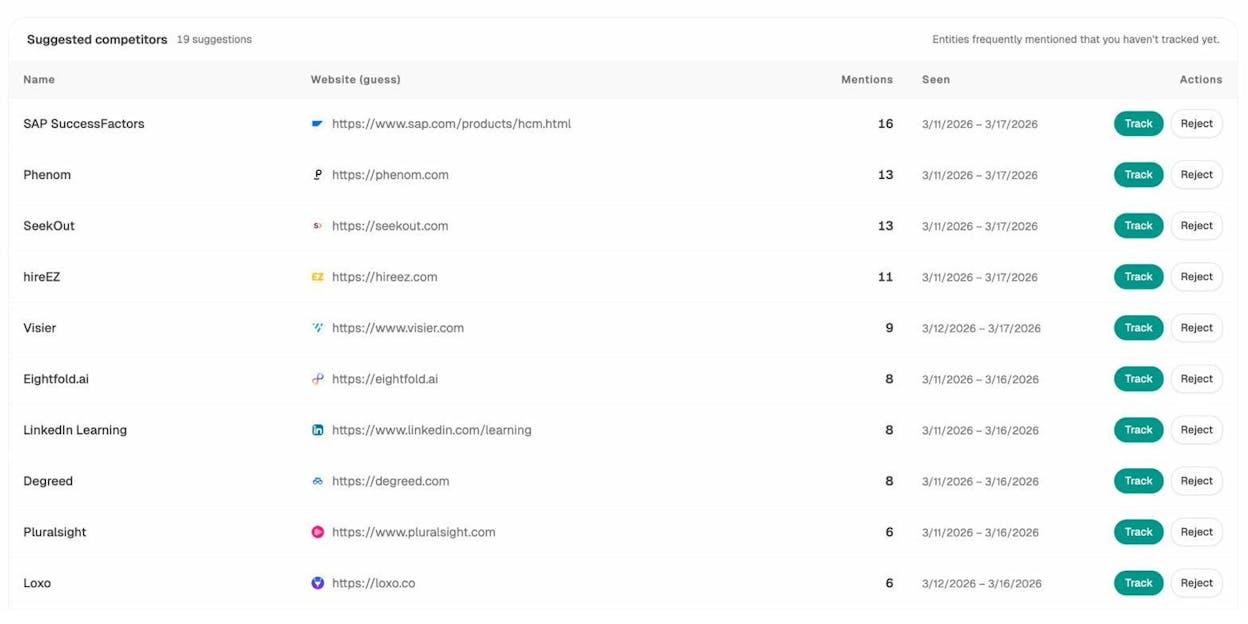
Step 4: Click Track on any suggested competitor to start monitoring their AI visibility alongside your own.
Why this is a blind spot for most teams: Traditional SEO tools don’t track AI search. If a competitor is appearing in ChatGPT’s answer to “best project management software” and you’re not, you’re missing traffic you didn’t even know existed. The only way to find out is to monitor AI answers directly.
12. See Which AI Prompts Your Competitors Win (And You Don’t)
Organic search has keywords. AI search has prompts. And just like you can run a content gap analysis for keywords, you can run one for prompts.
Step 1: In Analyze AI, go to the Prompts tab. Here you’ll see your tracked prompts with data on visibility, sentiment, position, and which competitors are mentioned in each AI response.
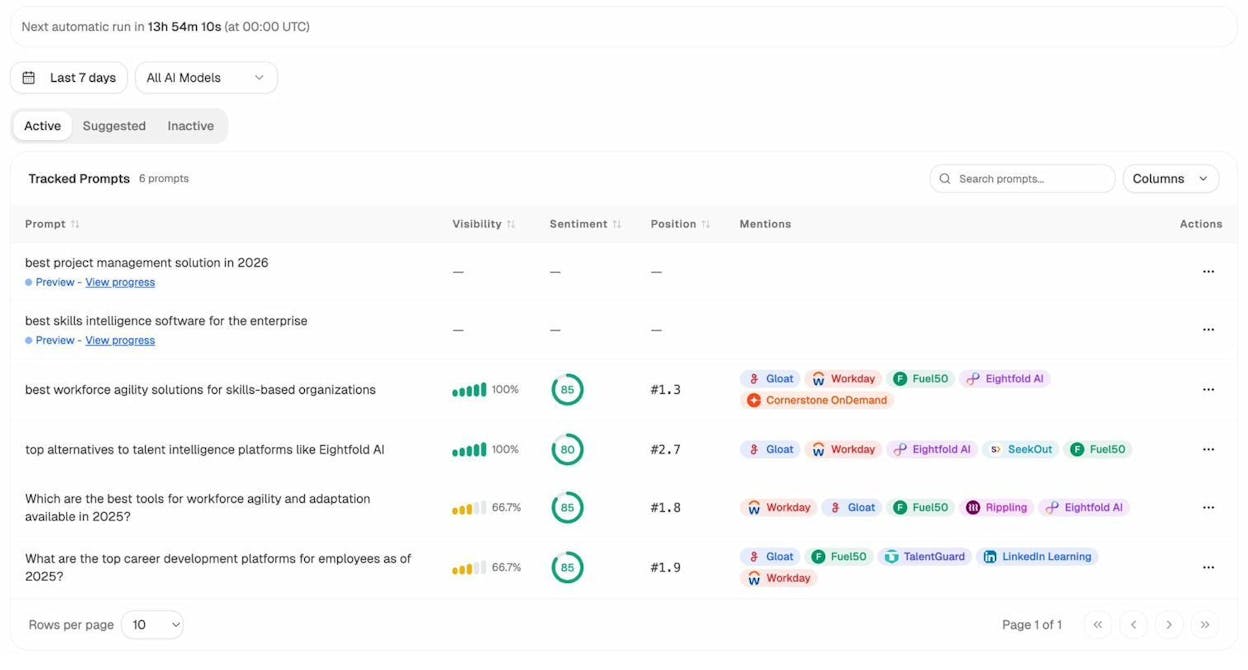
Step 2: Look at the Mentions column. This shows which competitors appear alongside you in AI answers. If a competitor appears in a response and you don’t, that’s a prompt-level gap. It’s the AI search equivalent of a keyword you don’t rank for.
Step 3: Click the Suggested tab. Analyze AI recommends new prompts to track based on your industry and existing coverage. One-click track to start monitoring.
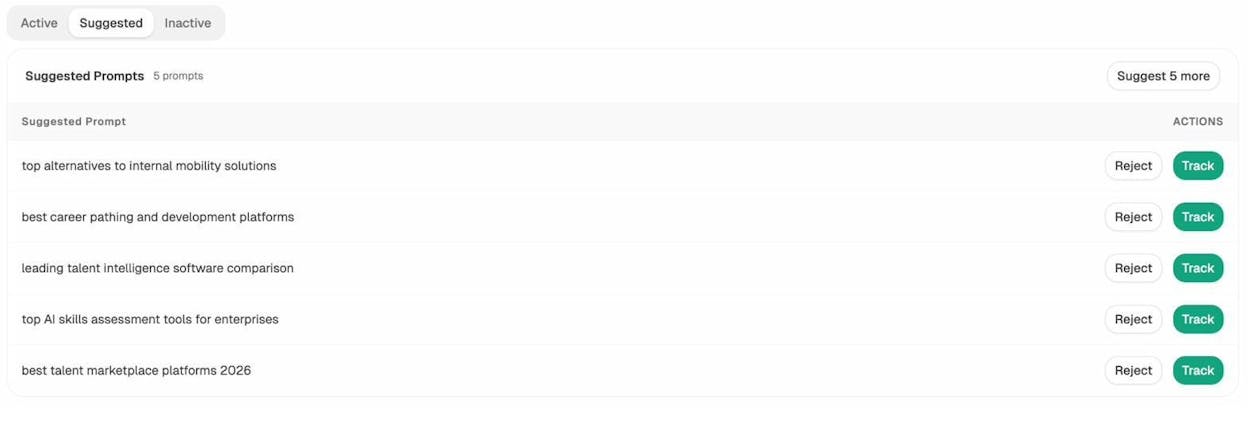
Step 4: For any prompt where you’re missing and competitors are present, investigate why. Check the Sources tab to see which URLs the AI engines cited in their answers. This tells you exactly what content you need to create or improve to earn a mention.
What makes this different from keyword gap analysis: AI search answers are generated on the fly. The sources they cite can change daily. Tracking prompts over time shows you not just where you stand today, but how your AI visibility trends week over week, and whether specific content improvements are working.
How to Analyze Competitor Paid Search Traffic
Paid search traffic refers to the clicks a website gets from search ads on Google, Bing, or other search engines. Even if you’re not running ads yourself, analyzing a competitor’s paid traffic reveals which keywords they’re willing to pay for, which is a strong signal of commercial intent and profitability.
13. Find Competitor Paid Keywords, Ads, and Landing Pages
If a competitor has been paying for a keyword for six months straight, that keyword almost certainly converts. That insight is valuable whether you use it for your own ads or your organic content strategy.
Step 1: Enter your competitor’s domain in a site explorer and open the Paid Keywords report.
![[Screenshot: A paid keywords report showing keywords the competitor is bidding on, with columns for keyword, CPC, estimated paid traffic, ad position, and the landing page URL]](https://www.datocms-assets.com/164164/1777067303-blobid18.png?auto=format,compress&w=1248&fit=max)
Step 2: Sort by traffic to see which keywords drive the most paid visits. Pay attention to the paid-to-organic traffic ratio: if a competitor ranks organically for a keyword and also runs ads on it, that keyword is extremely important to them. Consider targeting it too.
Step 3: Check the ad copy. Navigate to the Ads report to see the exact ad headlines and descriptions your competitor uses. This reveals their messaging angles and unique selling propositions.
![[Screenshot: An ads report showing actual ad copy, landing page URLs, and the keywords triggering each ad, with location filters visible]](https://www.datocms-assets.com/164164/1777067309-blobid19.png?auto=format,compress&w=1248&fit=max)
Step 4: Visit the landing pages linked from their ads. These pages are optimized for conversion. Study their layout, copy, calls to action, and offer structure. A landing page that’s been running for months has likely been tested and refined.
Step 5: Check ad position history. A keyword with a long, consistent ad history is a validated money keyword. A keyword with a short or intermittent history might be an experiment.
14. Estimate Competitor Ad Spend
Knowing how much competitors spend on ads helps you benchmark your own budget and negotiate internally for resources.
Step 1: In a site explorer, go to the Paid Pages report for your competitor’s domain.
Step 2: Set the performance view to show paid traffic cost over time. This gives you an estimated daily, weekly, and monthly ad spend.
Step 3: Use this data to set realistic expectations. If your top competitor spends $50,000/month on Google Ads and you’re spending $5,000, you know the competitive intensity you’re up against. This can justify either increasing your ad budget or, more strategically, focusing on organic and AI search channels where you can compete without matching their ad spend dollar-for-dollar.
How to Track Competitor Visibility in AI Search
AI search is not replacing SEO. But it is adding a new layer of competition. The methods below are specific to tracking how competitors appear in AI-generated answers and how much traffic AI engines send to competitor sites.
If you’re already using the methods above for organic and paid search, adding AI search tracking gives you a complete picture of your competitive landscape.
15. Check Which AI Engines Send Traffic to Competitor Pages
Different AI engines behave differently. ChatGPT might cite a competitor’s blog post, while Perplexity might cite their product page. Understanding the engine-level breakdown helps you prioritize which AI platforms to optimize for.
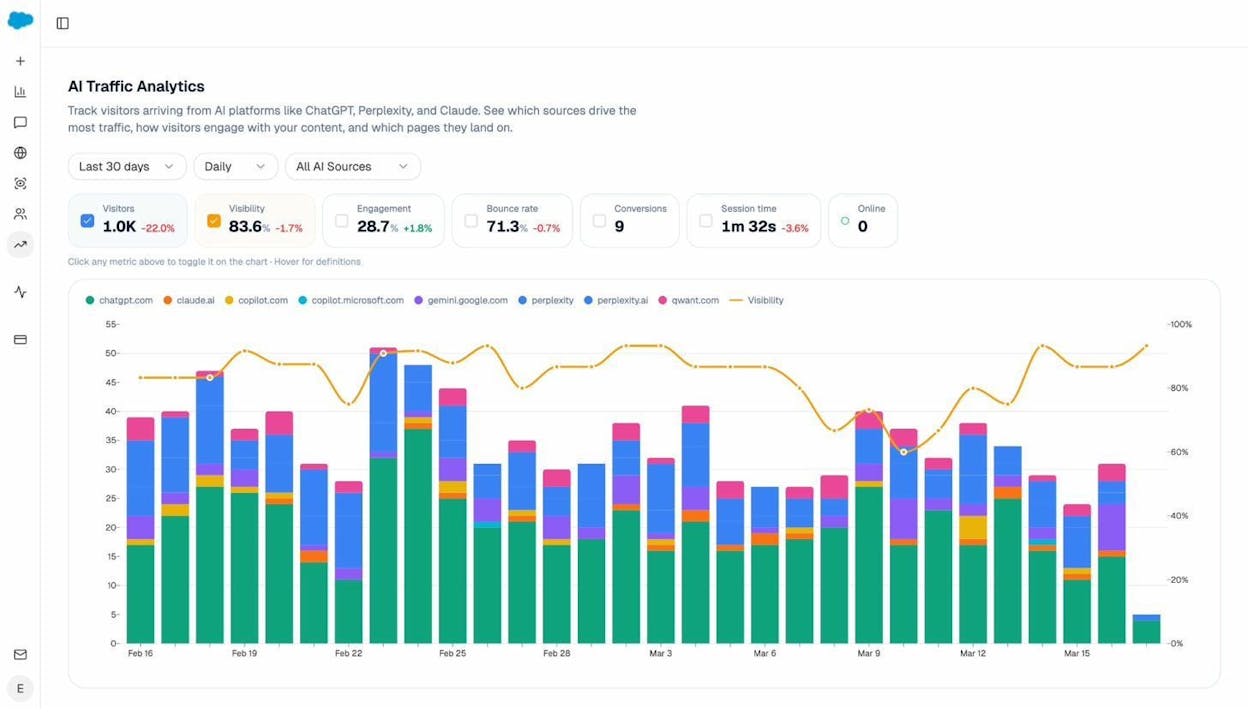
Step 1: In Analyze AI, go to the AI Traffic Analytics dashboard. This connects to your Google Analytics 4 data and shows AI-referred visits broken down by engine: ChatGPT, Perplexity, Claude, Copilot, Gemini, and others.
Step 2: Scroll down to the Landing Pages section. This shows which of your pages receive AI-referred traffic, which engines sent the traffic, and how those visitors behave (engagement rate, bounce rate, session duration, conversions).
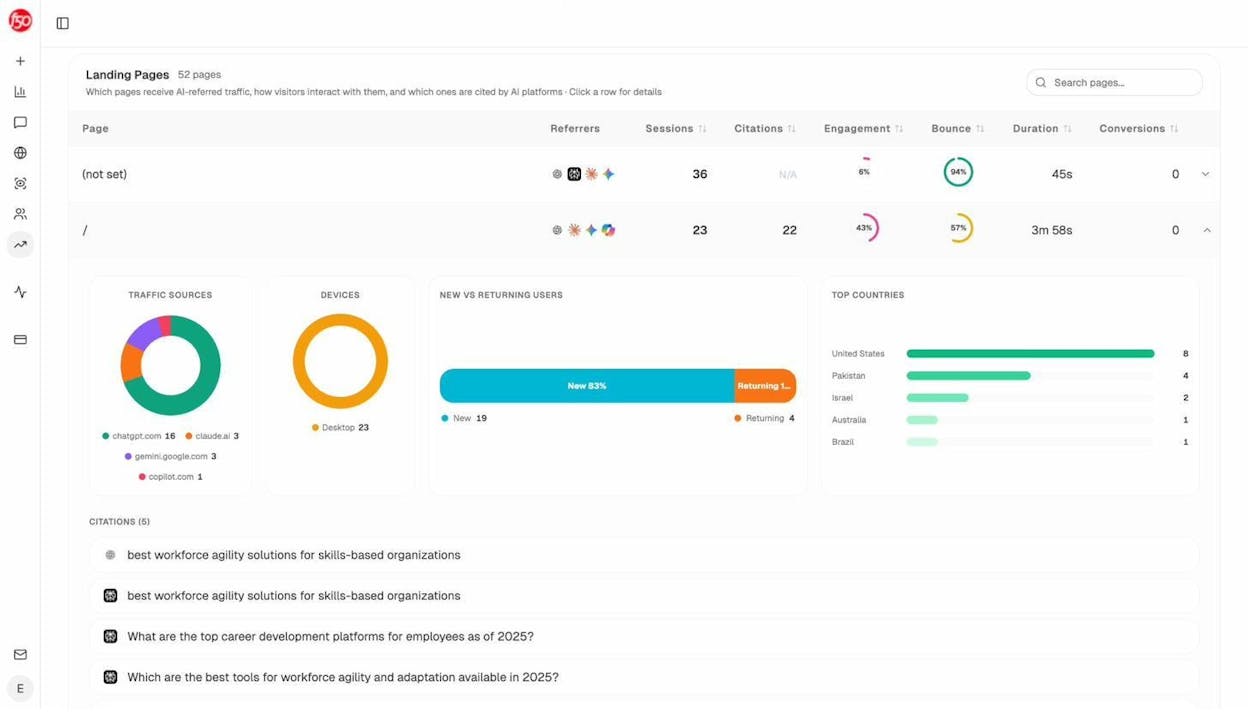
Step 3: Click into a specific landing page to see a detailed breakdown: which AI platforms sent visitors, which country those visitors came from, device type, and new versus returning visitors.
Step 4: For competitors, use the Prompts and Sources tabs to see which of their pages are being cited. If you see a competitor’s page cited 20 times across different AI prompts while your equivalent page gets zero citations, that tells you exactly where to focus your content improvement efforts.
What to do with this: Identify the pages that receive the most AI traffic and study what makes them citable. Often, it’s clear structure, original data, direct answers to common questions, and comprehensive coverage. Then apply those same principles to your own content targeting the same topics.
16. Audit the Sources AI Engines Cite in Your Industry
Beyond tracking your own brand and your competitors’ brands, you can see which sources shape AI answers in your entire industry.
Step 1: In Analyze AI, go to the Sources tab. This shows every URL and domain that AI engines cite when answering questions related to your tracked topics.
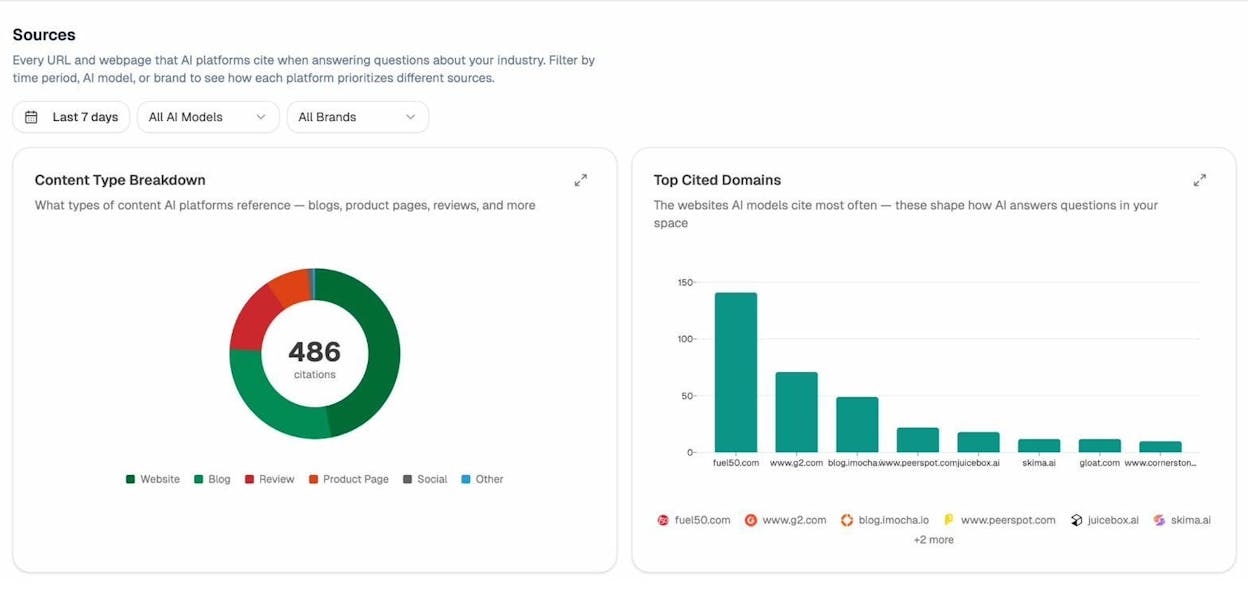
Step 2: Look at the Top Cited Domains chart. This reveals which websites AI engines trust the most in your space. If a review site or a niche blog consistently gets cited more than your competitor’s own website, that’s a signal about what types of content AI engines prefer to reference.
Step 3: Filter by AI model (ChatGPT, Perplexity, Google AI Mode) to see if different engines prefer different sources.
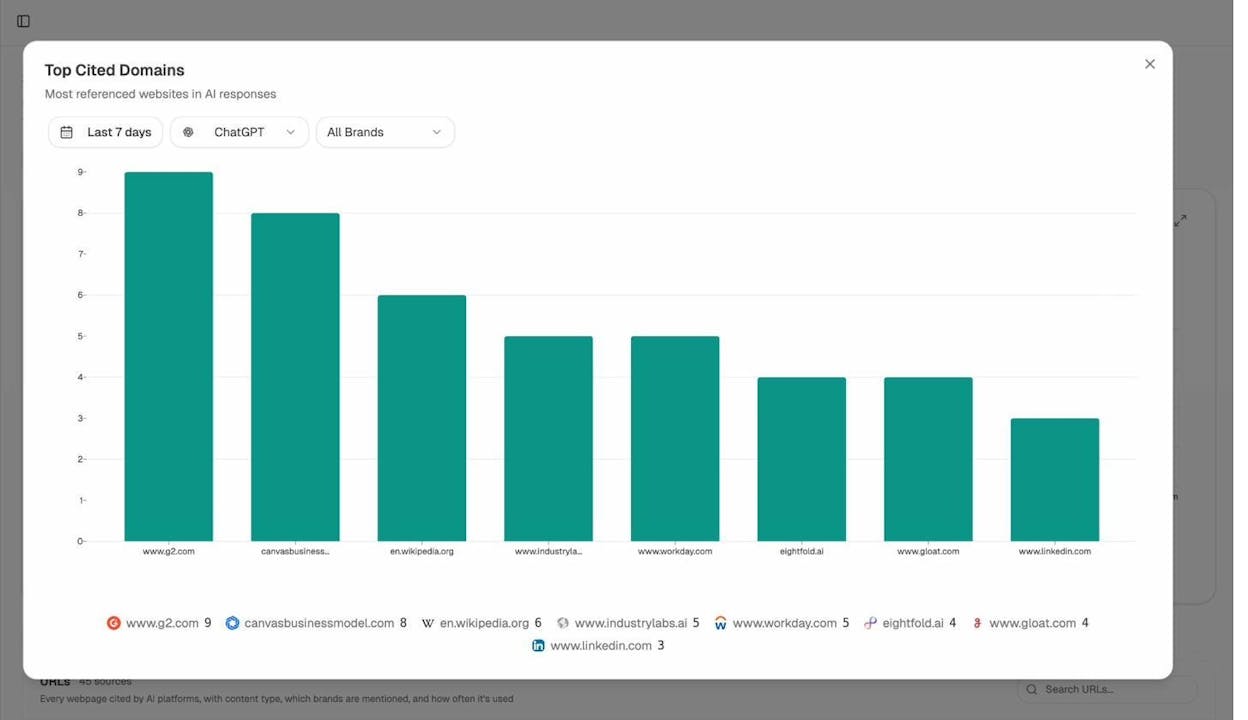
Step 4: Use this data to build your citation strategy. If the top-cited domains are review sites, invest in getting reviews. If they’re comparison blogs, create better comparison content. If they’re your competitor’s blog, study what makes their posts citable and improve on it.
This is the AI search equivalent of backlink analysis. Instead of asking “who links to my competitors?”, you’re asking “who does AI cite in my industry?” Both questions lead to actionable insights about where to invest your content and outreach efforts.
17. Map How AI Perceives Your Brand vs. Competitors
This goes beyond traffic and into brand perception. AI search engines don’t just list websites. They describe brands, sometimes favorably, sometimes not. Understanding how AI models position your brand relative to competitors helps you shape your narrative.
Step 1: In Analyze AI, navigate to the Perception Map. This is a visual map that plots your brand and your competitors across two axes: visibility (how often you’re mentioned) and narrative strength (how positively and compellingly you’re described).
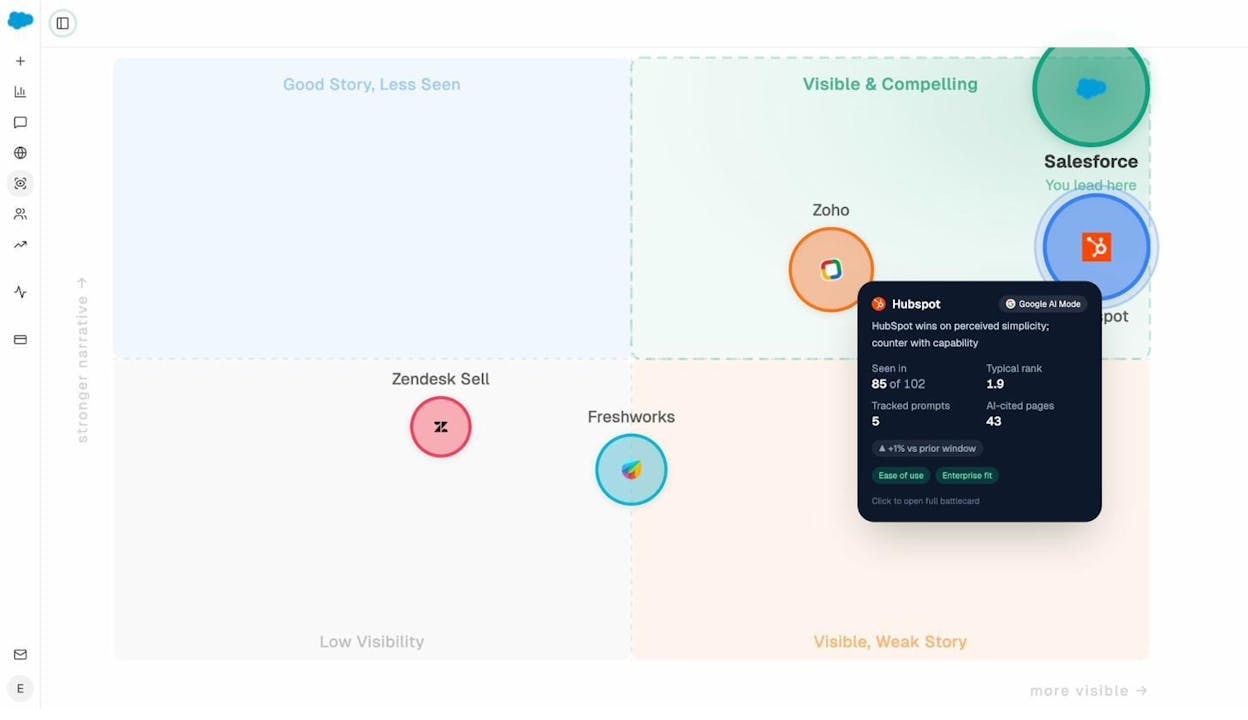
Step 2: Identify your quadrant. If you’re in “Visible & Compelling,” your AI positioning is strong. If you’re in “Visible, Weak Story,” AI mentions you often but the narrative isn’t favorable. If you’re in “Good Story, Less Seen,” your content is high quality but not getting cited enough.
Step 3: Click on a competitor’s bubble to see their battlecard: how often they’re seen, their typical rank, the prompts they appear in, and the pages AI engines cite for them.
Step 4: Use the insights to adjust your content strategy. If a competitor lands in “Visible & Compelling” while you’re in “Good Story, Less Seen,” the problem isn’t content quality. It’s distribution and citation authority. Focus on earning more mentions from the sources AI engines trust.
How to Analyze Other Competitor Traffic Sources
Organic search and AI search are the channels most closely tied to your content strategy. But competitors also get traffic from social media, email, direct visits, and display ads. Here’s how to get a sense of the full picture.
Get a Sense of Overall Competitor Traffic (and Compare It to Yours)
To estimate a competitor’s total traffic across all channels (not just search), use Similarweb. The free version shows total visits, traffic by channel, and engagement metrics like bounce rate and pages per visit.
Step 1: Create a free Similarweb account and enter your competitor’s domain.
![[Screenshot: Similarweb website performance report showing total visits, channel breakdown (direct, referral, organic search, paid search, social, email, display), and engagement metrics]](https://www.datocms-assets.com/164164/1777067346-blobid25.png?auto=format,compress&w=1248&fit=max)
Step 2: Use the comparison mode to see your site next to your competitors. This is Similarweb’s most useful feature. Even if the absolute numbers are imprecise, the relative differences between sites are directionally accurate. If Similarweb shows your competitor getting 3x your referral traffic, the exact number may be off, but the gap is real.
![[Screenshot: Similarweb comparison view showing two or three websites side by side with traffic and engagement metrics compared]](https://www.datocms-assets.com/164164/1777067357-blobid26.png?auto=format,compress&w=1248&fit=max)
Step 3: Look at the channel breakdown. If a competitor gets 30% of their traffic from social media and you get 5%, that’s a signal that social could be an untapped channel for you. If they get significant referral traffic, identify which sites are sending it.
Understand Audience Demographics and Interests
Knowing who visits your competitors’ sites helps you refine your own messaging and targeting. SparkToro is a tool that shows the audience behind the traffic: their social media habits, the websites they visit, the podcasts they listen to, and the YouTube channels they watch.
Step 1: Enter your competitor’s domain in SparkToro with the “Visit the website” filter.
![[Screenshot: SparkToro overview report showing audience demographics, top social networks, frequently visited websites, and common job titles for visitors to a competitor’s site]](https://www.datocms-assets.com/164164/1777067362-blobid27.png?auto=format,compress&w=1248&fit=max)
Step 2: Check the demographics tab for gender, age, and geographic distribution.
Step 3: Look at the social accounts tab for influencers and thought leaders your competitor’s audience follows. These are potential partnership or advertising targets for you.
Step 4: Review the YouTube and podcast tabs for media channels where you could reach the same audience through ads, sponsorships, or guest appearances.
Where Does the Data Come From? Is It Accurate?
All competitor traffic tools work with estimated data. None of them have access to your competitors’ Google Analytics. The data comes from a combination of sources: web crawlers that index the internet, clickstream data collected from browser panels, Google’s own public data (like Keyword Planner), and social media APIs.
This means you should never treat the numbers as exact. Instead, treat them as directional indicators.
Here’s a practical framework for using estimated data:
|
Data Type |
Best Used For |
Accuracy Level |
|---|---|---|
|
Organic traffic estimates |
Comparing competitors to each other, tracking trends |
Directionally accurate within the same tool |
|
Keyword rankings |
Identifying which keywords a competitor targets |
Highly accurate (verifiable by searching yourself) |
|
Paid search data |
Understanding competitor ad strategy and budget |
Moderately accurate; misses some ad networks |
|
Total traffic estimates |
Getting a rough sense of overall competitor size |
Least accurate; best used comparatively |
|
AI search mentions |
Knowing which competitors appear in AI answers |
Highly accurate when tracked directly by an AI monitoring tool |
The key insight: use a single tool consistently rather than comparing numbers across tools. If Tool A says a competitor gets 50,000 visits/month and Tool B says 80,000, neither is “right.” But if Tool A shows that competitor’s traffic grew 40% this quarter, that trend is reliable.
For AI search data specifically, tools like Analyze AI work differently. Instead of estimating traffic from clickstream panels, they actually query the AI engines and record which brands and URLs appear in the answers. This makes AI visibility data more precise than traditional traffic estimates because it’s based on observed responses, not statistical models.
How to Turn Competitor Traffic Data into Action
Collecting competitor traffic data is only useful if you act on it. Here’s a simple framework for turning analysis into execution:
For organic search: Run a content gap analysis (Method 5), prioritize keywords by traffic potential and difficulty, then build a content calendar to cover those keywords. Check the keyword difficulty before committing to a keyword. Track your keyword rankings monthly to measure progress.
For paid search: Identify the keywords competitors have been bidding on consistently (Method 13). Test those keywords in your own campaigns, or create organic content targeting those same keywords to capture traffic without paying for each click.
For AI search: Monitor which competitors appear in AI answers (Method 11), audit which sources get cited (Method 16), and create content that matches what AI engines prefer to cite: well-structured, original, and directly useful. Track your progress with an AI search monitoring tool.
For overall traffic: Use total traffic comparisons (Similarweb) as a quarterly health check, not a daily metric. The trends matter more than the absolute numbers.
The smartest competitor analysis approach combines all three search channels. Your competitors are (or will be) optimizing for Google, for AI search, and for paid acquisition. If you only track one, you’re seeing a third of the picture.
Final Thoughts
Competitor traffic analysis has always been a core part of marketing strategy. What’s changed is the number of channels where competitors show up.
Ten years ago, you only needed to check organic rankings and maybe paid ads. Today, your competitors might be getting traffic from ChatGPT, appearing in Perplexity answers, showing up in Google AI Mode, and earning citations from Claude and Copilot, all without you knowing about it.
The solution isn’t to panic or abandon what works. SEO still drives the majority of search traffic for most businesses. But AI search is a growing channel that’s worth monitoring alongside your traditional competitive analysis.
Start with the free methods in this guide: use a Website Traffic Checker for quick lookups, a SERP Checker for keyword-level analysis, and Analyze AI to see what’s happening in AI search. From there, pick the methods that match your priorities, and build competitive intelligence into a regular cadence rather than a one-time project.
Want to go deeper? Check out these related guides:

Ernest

Ibrahim


