



Summarize this blog post with:


In this article, you’ll learn a step-by-step process for running a fast, useful PPC competitive analysis using AI tools like ChatGPT or Claude, and how to extend that analysis into AI search so you understand the full picture of where buyers are finding your competitors.
Table of Contents
What a good PPC competitive analysis should answer
Before you open a single tool, write down the questions you want answered. A useful analysis tells you:
-
Which competitors are bidding against you, in which countries
-
The keywords they bid on that you do not
-
The keywords you both bid on, and how your ads compare
-
Their landing page strategy and the offers they push hardest
-
Their estimated spend and any seasonal patterns in it
-
A short list of changes you can make to your campaigns next week
Most PPC reports stop at the first three bullets. The point of using AI is to push past data dumps and get to opinionated, actionable findings.
The 6-step process for a PPC competitive analysis using AI
Here are two examples of what the finished output looks like when you follow this process.
The first is an executive summary the AI produces from your uploaded files. It compresses everything into a one-page brief.
![[Description: Screenshot of a one-page ChatGPT executive summary output. Shows headers like “Your position vs competitors,” “Top 3 keyword gaps,” “Landing page observations,” and “Recommended actions next 30 days.”]](https://www.datocms-assets.com/164164/1778270378-blobid1.png?auto=format,compress&w=1248&fit=max)
The second is a keyword gap table showing the keywords your competitors bid on that you do not, sorted by traffic potential.
We will use a paid keyword research tool of your choice to pull the data and ChatGPT (or Claude) to do the analysis. If you do not have a paid tool, the free Analyze AI keyword rank checker and SERP checker can get you part of the way there.
Step 1. Identify your real paid traffic competitors
Most teams already have a mental list of competitors. That list is usually wrong. The companies bidding against you in Google Ads are not always the ones your sales team talks about in pipeline reviews.
Start by listing every competitor you can think of. Then add three more sources to that list:
-
The brands your sales team hears most often in deals
-
The brands appearing in the top three positions for your top 10 commercial keywords
-
The brands AI models recommend when buyers ask category questions
The third source is the one most teams miss. If ChatGPT recommends five tools when a buyer asks for “best [your category] software,” those five are your real competitive set, regardless of whether your sales team has heard of them. We will use this list again in Step 5.
To gather this list quickly, run your top three commercial keywords through your paid keyword tool’s organic competitors report and your SERP checker. Note every domain in the top five for any of those terms.
![[Screenshot of an SERP results page for a commercial keyword like “best CRM software,” with the top five organic results highlighted.]](https://www.datocms-assets.com/164164/1778270385-blobid2.png?auto=format,compress&w=1248&fit=max)
For the AI search side, run the same kind of queries as ad-hoc searches in Analyze AI to capture which brands AI models surface when buyers ask category questions.
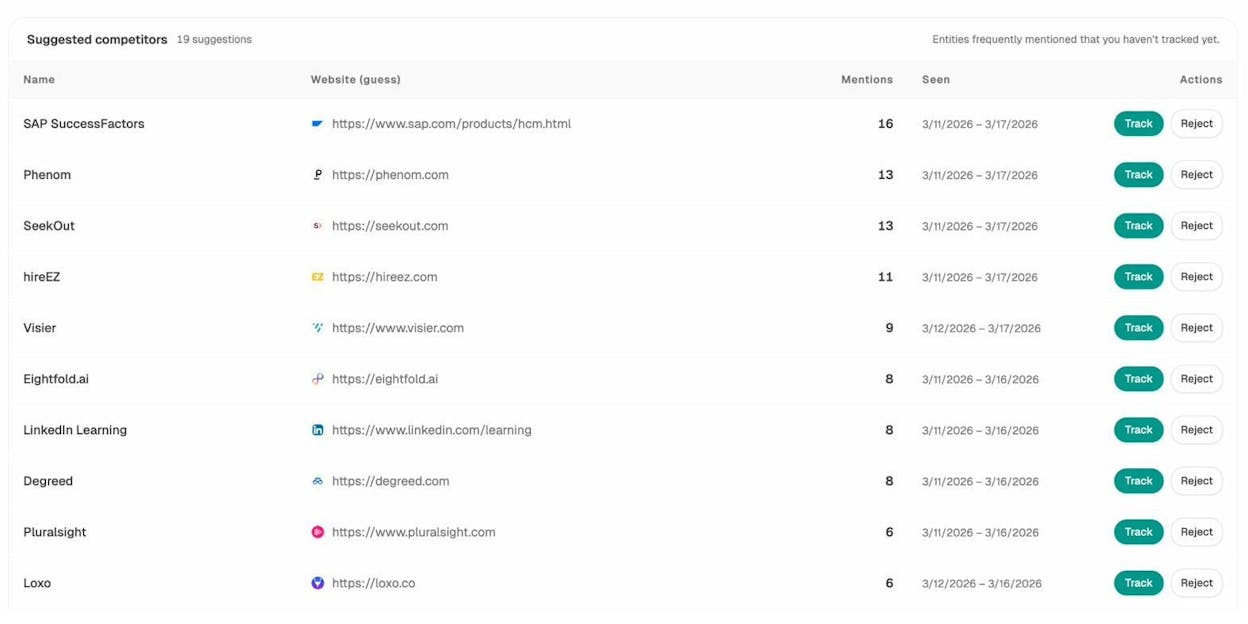
The “Suggested competitors” view picks up brands that show up alongside yours in AI answers. Track the ones you did not already have on your list. They are competing for the same buyer attention even if they have not been on your radar.
Step 2. Pull competitor keywords, ads, and spend
Now go into your paid keyword research tool and export, for each competitor:
-
All paid keywords they bid on (with country, position, CPC, and traffic estimates)
-
All ad variations and ad copy
-
All paid landing pages and the keywords driving traffic to each
Repeat this for every country you want to compete in. Country matters more than people think. A competitor running aggressive ads in the US may not be running anything in the UK, and the inverse is also true.
While you have these files open, do one thing manually before passing to AI. Look at each competitor’s monthly paid traffic chart and write down what jumps out. Patterns like “spend doubled in Q4 for the last two years” or “stopped bidding on brand terms in March” are easy for a human to spot in a chart and harder for an LLM to extract from a screenshot. Add those notes to a text file you will upload alongside the data.
![[Description of a screenshot of a paid traffic timeline chart showing monthly ad spend over the past 18 months for one competitor, with seasonal spikes visible.]](https://www.datocms-assets.com/164164/1778270391-blobid4.png?auto=format,compress&w=1248&fit=max)
Then export your own paid keyword data, either from your keyword research tool or directly from Google Ads, so the AI has both sides of the comparison ready in one place.
Step 3. Capture competitor landing pages as PDFs
Your AI assistant cannot click through a live page. It can read a PDF.
For each competitor, identify the pages they actually send paid traffic to. The Paid Pages report in your keyword tool is the fastest way to spot them. Look for URLs containing “lp,” “landing,” random alphanumeric slugs, or UTM tags. Those are the dedicated PPC pages, and they hold the strongest insights.
Open each page in Chrome, hit Cmd+P (or Ctrl+P), and select “Save as PDF” as the destination.
![[Screenshot of the Chrome print dialog with “Save as PDF” selected as the destination, showing a competitor landing page in the preview pane.]](https://www.datocms-assets.com/164164/1778270394-blobid5.jpg?auto=format,compress&w=1248&fit=max)
You do not need every page. Five to ten well-chosen pages per competitor is enough to give the AI a clear pattern. Skip homepage and pricing page captures unless they receive significant paid traffic.
For your own landing pages, do the same. The AI compares like with like.
Step 4. Set up a project, upload everything, and run the prompt
ChatGPT’s Projects (and Claude’s Projects) give you a workspace where files persist across messages. That matters for this kind of analysis because you will iterate on the same dataset for hours.
Create a new project called something like “PPC Analysis Q1.” Upload the four file types you gathered:
|
File type |
Source |
What it tells the AI |
|---|---|---|
|
Competitor keyword exports |
Paid keyword tool |
What they target and how aggressively |
|
Competitor ad copy exports |
Paid keyword tool |
The hooks and offers they lead with |
|
Landing page PDFs |
Browser save-as-PDF |
Their conversion strategy and offers |
|
Your own keyword and ad exports |
Paid keyword tool or Google Ads |
The benchmark for the comparison |
|
Your manual observations |
Text file |
Anything the data alone misses |
Use the most capable reasoning model you have access to. As of writing, that is GPT-5 reasoning, Claude Opus 4.7, or Gemini 2.5 Pro. Lighter models will miss patterns and hallucinate metrics.
Then run a structured prompt. Here is a skeleton you can copy and adapt:
You are a senior PPC analyst. I have uploaded:
- Paid keyword exports for [Competitor A], [Competitor B], [Competitor C]
- Ad copy exports for the same competitors
- Landing page PDFs for the same competitors
- My own paid keyword export for [Your Brand]
- A notes file with manual observations
Produce four outputs:
1. EXECUTIVE SUMMARY (300 words max). Where I am winning, where I am
losing, and the single biggest opportunity.
2. KEYWORD GAP TABLE. Top 30 keywords my competitors bid on that I
do not. Include estimated CPC, monthly traffic, and one-line note
on why it matters.
3. AD COPY ANALYSIS. Cluster competitor headlines and descriptions
by angle (price, urgency, social proof, feature-led, outcome-led).
Tell me which angle dominates per competitor and which I am
underusing.
4. LANDING PAGE TEARDOWN. For each competitor, list the value
proposition above the fold, the primary CTA, the secondary CTA,
the social proof used, and one weakness I could exploit.
End with a 30-day action plan of no more than seven recommendations,
ranked by expected impact.
![[Screenshot of ChatGPT or Claude with a project view open, showing the uploaded files in the sidebar and the prompt above pasted into the chat input.]](https://www.datocms-assets.com/164164/1778270396-blobid6.png?auto=format,compress&w=1248&fit=max)
Do not stop at the first response. Push the model with follow-ups like:
-
“Which of these keyword gaps would be cheapest to test first?”
-
“Rewrite my best three ads using the angle Competitor B uses most.”
-
“If I were going to copy one landing page pattern from these PDFs, which one and why?”
Most teams stop at output one and miss most of the value.
Step 5. Layer in AI search competitive intelligence
This is the step the standard PPC playbook does not cover yet. It is also the one that compounds over time.
A growing share of buyers research category questions in ChatGPT, Perplexity, Gemini, and Google AI Mode before they ever type a query into Google. According to recent research analyzing 83,670 AI citations, the top 10 brands in any given category capture roughly 30% of all AI mentions. If your competitors are in that top 10 and you are not, your paid ads are competing against an answer the buyer already trusts.
We are not saying paid search is going away. SEO and PPC are still the workhorses of organic and paid demand. AI search is a third channel that runs alongside them and changes the mental model your buyer brings to the SERP.
Here is what a PPC team should pull from the AI search side.
Which prompts your competitors win that you do not.
Track the same buyer questions you build campaigns around (best [category] tool, [category] for [use case], [competitor] alternative). Note which AI models cite which competitors and which models leave you out entirely.
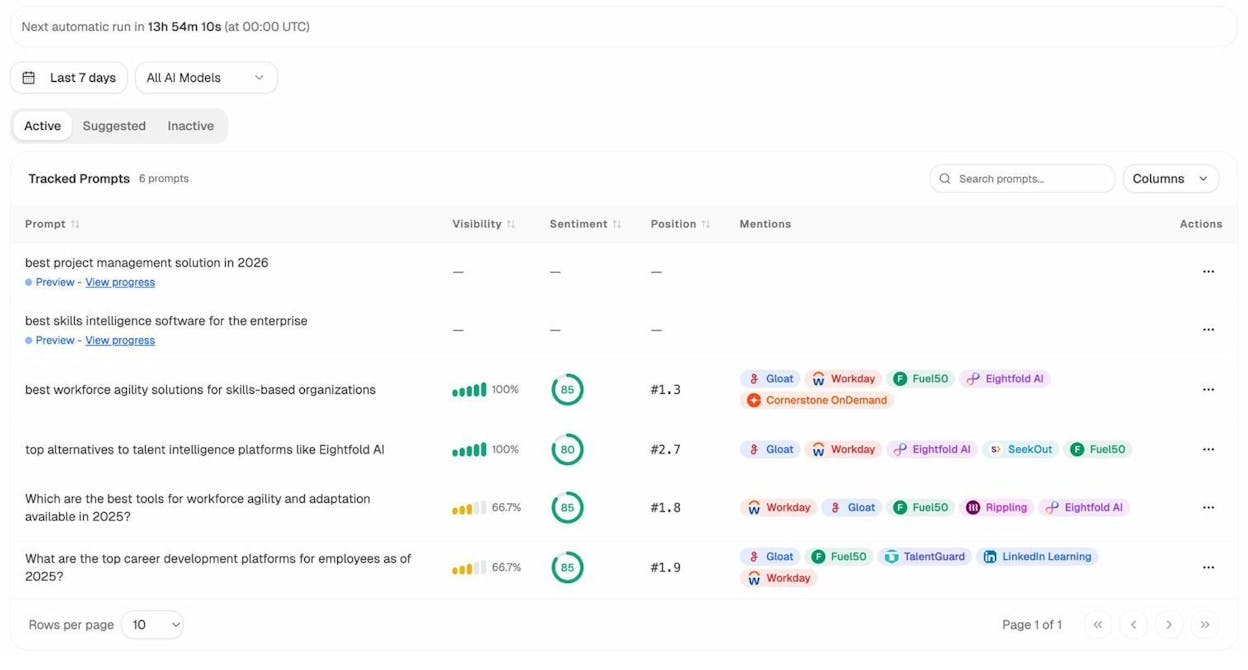
Each row tells you whether you appear in AI answers for that buyer question, the average position you get, the sentiment in those mentions, and which competitors share the answer with you. Prompts where competitors appear and you do not are direct equivalents of paid keyword gaps. They are AI gaps.
Analyze AI’s prompt discovery feature suggests new prompts to track based on your industry, so you do not have to guess at the buyer queries that matter.
How your visibility trends compare on a single buyer question.
For any one prompt, you can see how all tracked brands perform side by side over time.
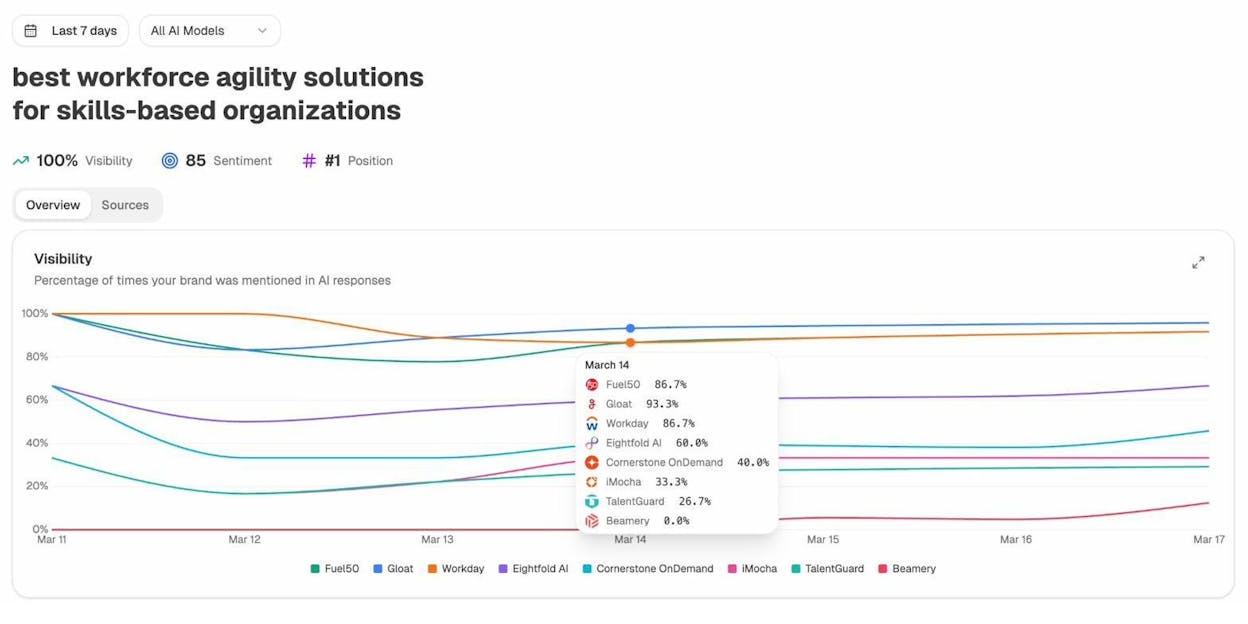
If a competitor’s line is climbing while yours is flat, something they did, content, PR, partnerships, is working. That is a signal you can act on inside your PPC strategy. If a competitor is dominating a buyer question in AI search, the cheapest counter is to bid hard on the same query in Google Ads while you fix the AI gap. Your paid ad becomes the bridge.
Which sources AI engines actually cite in your category.
Sources matter because they tell you what AI models trust. If G2 and Wikipedia appear on every answer in your category, those become priority placements for your earned media work.
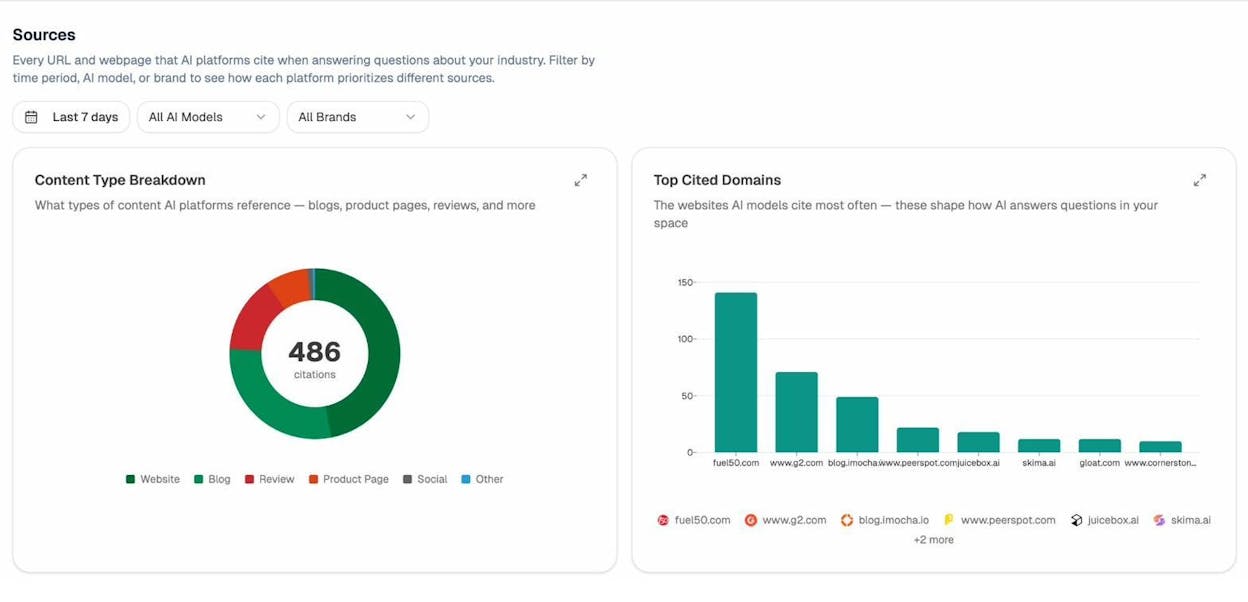
This is a competitive intelligence input that is hard to get from any traditional SEO or PPC tool. It is also useful when you brief your PR team.
Which of your own pages AI actually sends traffic to.
The same way you study competitor landing pages in Step 3, you should know which of your pages already win AI search traffic so you can double down. The Landing Pages view in Analyze AI shows AI-referred sessions per page, which AI models referred them, the citations the page earned, and how visitors engaged.
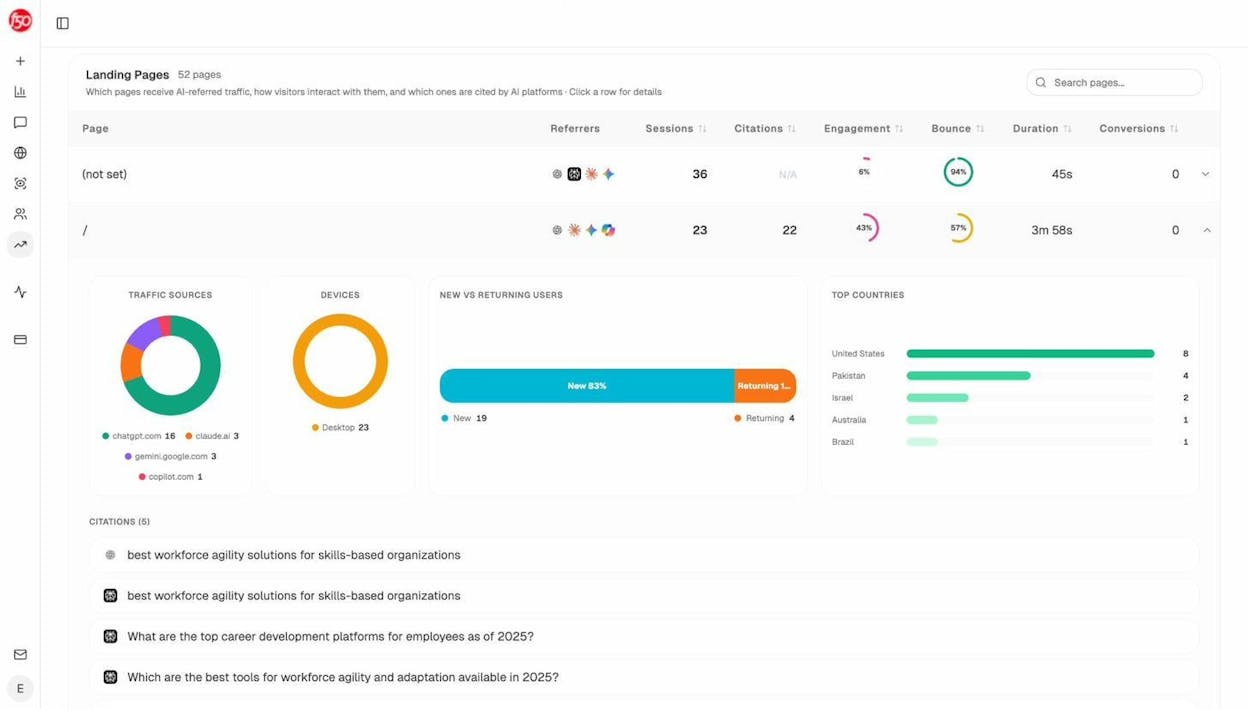
Pages with high citation counts and decent engagement are your highest-leverage assets. If a page is already cited by ChatGPT and Perplexity for a buyer question your PPC campaigns target, send paid traffic to that page rather than to a generic landing page. The page already has trust signals AI has validated.
Where competitors are perceived more strongly than you.
Position alone is not the whole story. AI engines repeat themes about brands. If a competitor consistently shows up tagged “ease of use” while you show up tagged “enterprise fit,” that is the messaging buyers absorb in their AI conversations.
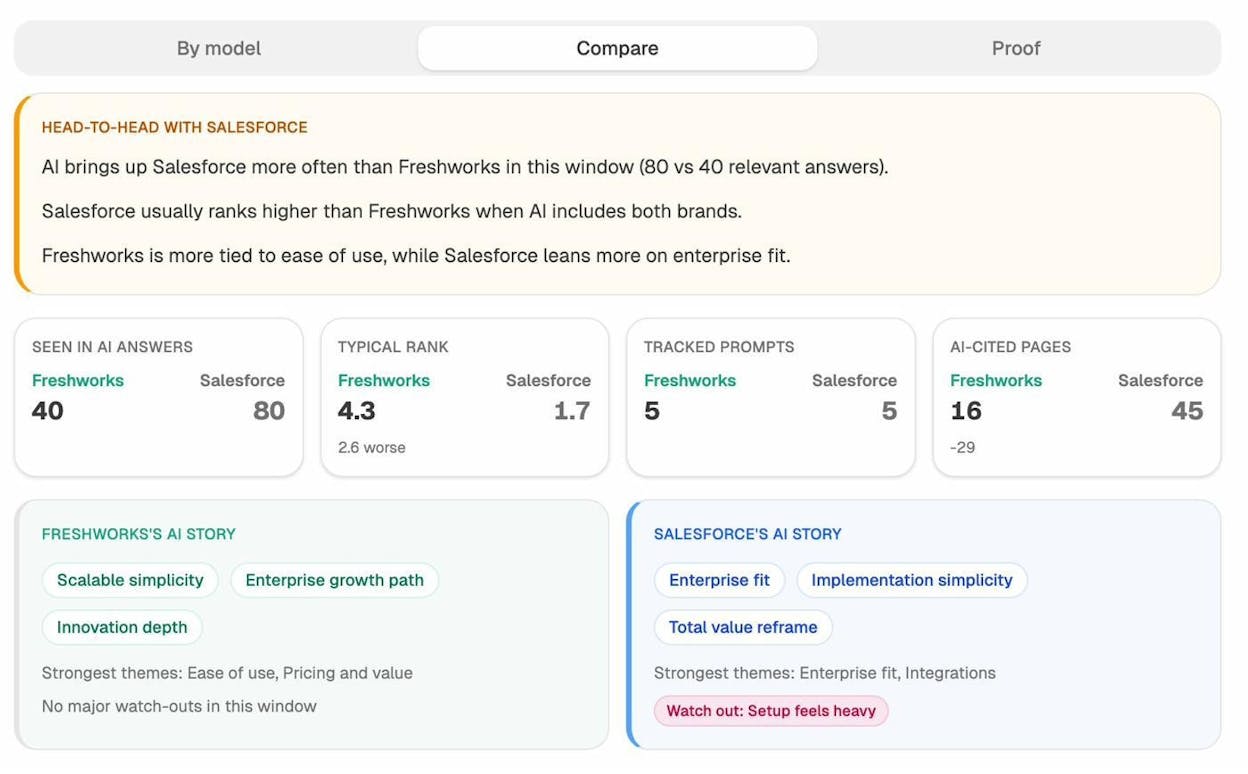
This view tells you what story AI is telling about each brand. Use it to refine your own ad copy. If your competitor is winning on “ease of use” themes in AI answers, leaning harder on your “ease of use” angle in paid ads is wasted spend. Pick a different wedge.
To go deeper on this layer, the Analyze AI competitor intelligence feature pulls all of these views into one workflow.
Step 6. Translate findings into a 30-day action plan
A PPC competitive analysis is only useful if it changes what you do in your account this week. Before you close the file, force yourself to write down five things in this format:
|
Action |
Source insight |
Owner |
Test by |
|---|---|---|---|
|
Add 8 negative keywords from competitor brand bids |
Step 2 keyword gap table |
PPC manager |
Friday |
|
Test “money-back guarantee” hook in 3 ad groups |
Step 4 ad copy clustering |
Copywriter |
Next Tuesday |
|
Build a /vs page for [Competitor B] |
Step 5 AI prompt opportunities |
Content |
2 weeks |
|
Send paid traffic to /resources/[high-citation-page] |
Step 5 landing pages report |
PPC manager |
This week |
|
Pause campaigns targeting [low-intent kw] |
Step 4 LLM recommendation |
PPC manager |
Friday |
Five concrete actions in five days is more valuable than a 40-page report no one reads.
Quick word on social and display ad analysis
Search ads are the easiest paid channel to analyze because the data is structured. Social and display are messier, but the same AI workflow still helps.
For social, pull your competitors’ active and historical ads from the public ad libraries:
Save the relevant pages as PDFs the same way you saved landing pages, and feed them to your AI assistant with a prompt like:
For these competitor ads, group by visual theme (faces, product UI,
illustration, text-only). Cluster headlines by copy angle (benefit,
urgency, social proof, fear of missing out). Tell me which combination
appears most often and which appears to be working hardest.
For display networks, third-party ad intelligence platforms can show you the publishers, formats, and creatives a competitor uses across the open web. We have a separate guide on the best ad intelligence software that compares the main options.
A note on what AI is good at and what it is not
LLMs cluster ad copy by angle, summarize landing page strategies, and generate action lists from messy data. They struggle with reading metrics out of charts, calculating exact dollar spend from screenshots, and ranking insights by business impact when they do not know your business.
Two implications follow:
-
Pair the AI output with your own pattern recognition. The model is faster, you are sharper.
-
Sense-check raw AI numbers (CPC, spend, traffic estimates) against your tool’s actual exports. The model will round, smooth, and occasionally invent.
The point is not to replace the analyst. The point is to take a process that used to take five days down to two hours so you can run it monthly instead of quarterly.
Wrapping up
Running a PPC competitive analysis with AI is no longer a once-a-year exercise. With the workflow above, you can rerun it every month and track how your competitors’ strategies evolve in real time.
The teams pulling ahead right now are doing two things at once. They are using AI to speed up traditional paid search competitive analysis, and they are watching how their competitors win the AI search conversation that happens before the click.
If you want to dig deeper into the AI search side, our 6-step SEO competitor analysis guide covers the organic side of the same workflow, and our guide to outranking competitors in AI search breaks down what 65,000 AI citations told us about why some brands win those answers.
Run the analysis once. Pick five actions. Run it again next month.

Ernest

Ibrahim


