



Summarize this blog post with:


In this article, you’ll learn how to rank your videos in YouTube search and get those same videos cited by AI search engines like ChatGPT, Perplexity, and Gemini. You’ll get the keyword workflow, the on-page setup, the editing principles that protect watch time, and the post-publish analysis that tells you what to do next.
Table of Contents
What is YouTube SEO?
YouTube SEO is the practice of optimizing your videos, channel, and playlists so they rank for relevant search queries inside YouTube. It also covers how those videos surface in Google’s video results and in AI answer engines that pull from YouTube transcripts.
This guide focuses on YouTube search rankings, with notes on Google video carousels and AI citations where they apply.
How YouTube’s algorithm actually works
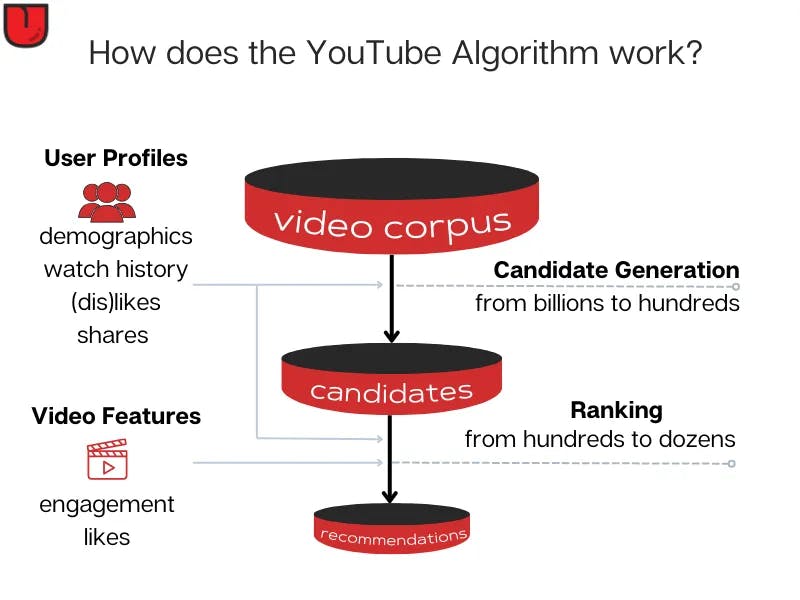
YouTube ranks videos using two signals working together. The first is relevance, which YouTube measures by matching the title, description, tags, and spoken content to the viewer’s query. The second is engagement, which YouTube tracks through click-through rate, watch time, audience retention, likes, and comments.
If you write a relevant title but lose 70% of viewers in the first 30 seconds, the video will not rank. If your retention is strong but your title does not match the query, you will not get clicks in the first place. You need both.
One additional signal matters now that did not five years ago. AI engines like Perplexity and ChatGPT pull text from YouTube transcripts when answering “how to” questions, which means a well-optimized video can earn citations in AI answers even when the user never visits YouTube.
Here are the eight steps to rank your videos.
Step 1: Do proper keyword research
If your video is not built around a keyword people search for, it will not get search traffic. Find a topic with real demand, confirm it has video intent on YouTube, then create the video.
YouTube does not give you an official keyword research tool, so you have to triangulate from a few sources.
Use YouTube autocomplete
Type a seed keyword into the YouTube search bar and write down the suggestions. These are real queries that real people type. Add an asterisk before or after your seed to use it as a wildcard and pull more variations.
![[Screenshot: YouTube search bar showing autocomplete suggestions for a seed keyword like “youtube seo”]](https://www.datocms-assets.com/164164/1777920070-blobid2.png?auto=format,compress&w=1248&fit=max)
This gives you topic ideas, not volume. For volume, you’ll need a tool.
Use a YouTube keyword tool
You can use the free YouTube Keyword Tool from Analyze AI to pull keyword ideas with monthly search estimates. Paste a seed term, and you’ll get a list of related queries you can sort by volume.
![[Screenshot: Analyze AI YouTube Keyword Tool results page showing keyword suggestions and search volumes]](https://www.datocms-assets.com/164164/1777920070-blobid3.png?auto=format,compress&w=1248&fit=max)
If you want to think bigger and pull in suggestions you would never have brainstormed yourself, our full guide on how to find new keywords walks through six different methods.
Steal keyword ideas from ranking videos
Search your seed keyword on YouTube, click into a top-ranking video, and read the description. Most creators stuff related keywords into the first three or four lines. Those are the queries they’re targeting.
You can also browse their other videos to see the topic clusters they’ve built around the same theme. If a competing channel has 12 videos on different angles of one topic, that’s a roadmap for you.
Run the AI search version of keyword research
Many of the people who used to type “how do I edit a podcast” into YouTube now type the same question into ChatGPT or Perplexity, and those engines often cite YouTube videos in their answer.
To find the prompts AI engines are answering in your space, use Prompt Discovery inside Analyze AI. It surfaces the questions buyers in your category are asking AI engines, then shows which videos and pages get cited for each one.
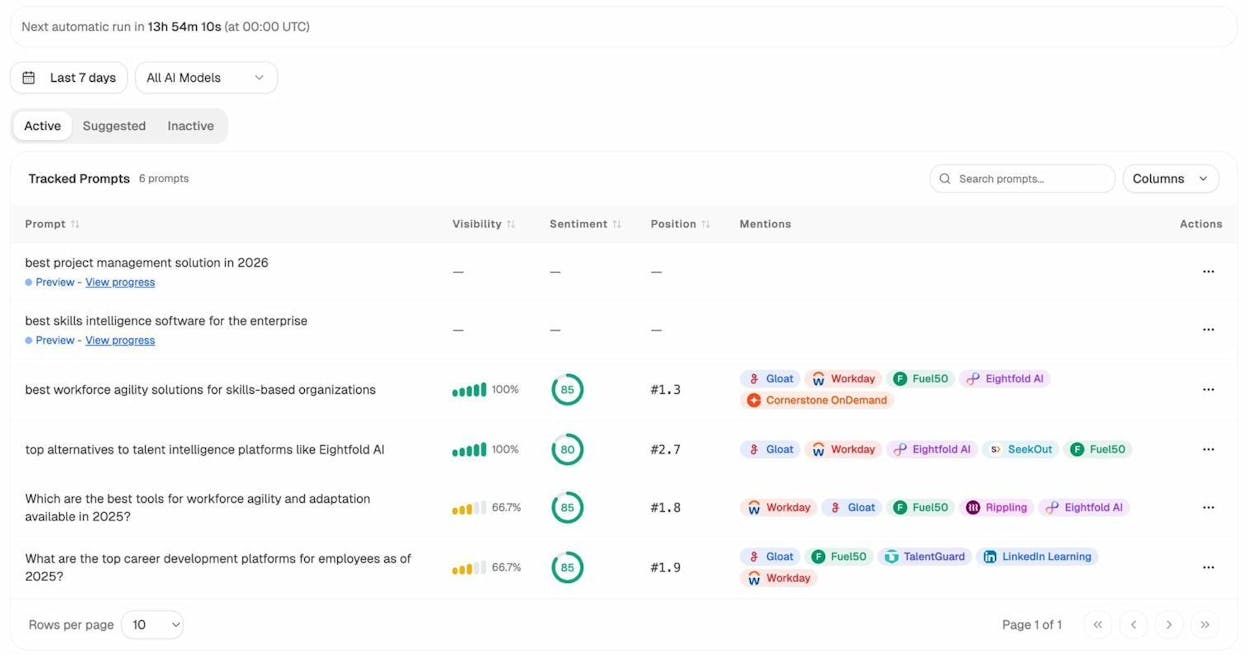
Use that list the same way you’d use a keyword list. If a prompt has high search volume in AI engines and the cited videos are weak, that’s a video you should make.
You can also paste a single prompt into Ad Hoc Searches to see live what AI engines return before you commit to a tracking campaign.
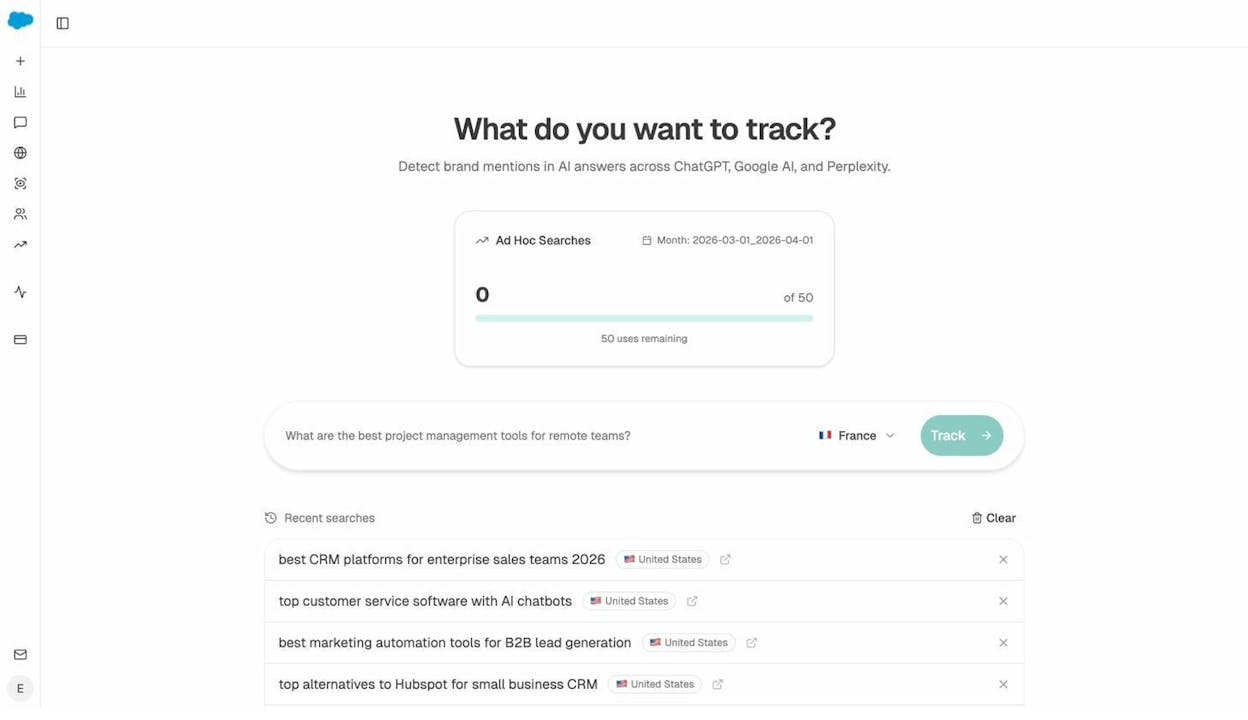
Move your YouTube keywords and AI prompts into one sheet and rank by volume and competition. That sheet becomes your editorial calendar.
Step 2: Match search intent before you record
A keyword tells you what people typed. Search intent tells you what they actually wanted. Get this wrong and your video flops, no matter how clean the on-page optimization is.
The fastest way to read intent is to search the keyword on YouTube and look at the top five results. The format YouTube ranks is the format YouTube has decided viewers want.
If you search “how to tie a tie,” every top result is a tutorial filmed from the wearer’s chest down. If you search “best Nintendo Switch games,” every top result is a numbered listicle with B-roll. If you search “viola,” every top result is about the instrument, not the plant or the actress, which means you should pick a different keyword.
Do this incognito and ideally through a VPN set to the country you want to rank in, since YouTube personalizes results based on your watch history. For broader keyword and SERP research methods that apply to YouTube too, see our guide on how to use keywords in SEO.
Add an “intent” column to your keyword sheet and write down the dominant format for each keyword. That column drives every decision after this one.
Step 3: Create a video that holds attention
Audience retention is the engagement signal that matters most. High retention drives every other engagement metric, and YouTube uses it to decide whether to show your video to more people.
Four things move retention more than anything else.
Plan and script the video
A scripted video keeps you on point and stops you from rambling. If you’re doing tutorials, the script is non-negotiable. Write it the way you’d write a blog post, then read it out loud and cut anything that sounds clunky. If you don’t want to write the full script yourself, the free Video Script Generator from Analyze AI will produce a first-draft outline you can edit.
Open with a strong hook
You have about 15 seconds before the average viewer decides whether to stay or click off. Your hook needs to do three things in those 15 seconds.
|
What the hook does |
Why it works |
|---|---|
|
Names the problem the viewer has |
Confirms they’re in the right place |
|
Promises a specific outcome |
Gives them a reason to keep watching |
|
Hints at the unique angle of your video |
Stops them from clicking to a competitor |
A good template is “If you’re trying to [outcome] but you keep [problem], this video shows you [unique approach]. Let’s get into it.”
![[Screenshot: YouTube audience retention graph showing a strong start with no drop in the first 30 seconds] ### Edit to remove dead air](https://www.datocms-assets.com/164164/1777920087-blobid6.png?auto=format,compress&w=1248&fit=max)
A talking head with no cuts, no B-roll, and no visual variation will lose viewers regardless of how interesting your content is. Cut every pause, every “um,” and every moment where nothing is happening on screen. Add jump cuts to compress the spoken track, then layer screen recordings, callout text, and zoom-ins to keep the visual track moving.
For tutorial videos, draw the viewer’s eye to the part of the screen you’re talking about. Highlight the cell, circle the button, fade out the rest. If the viewer has to hunt for what you’re describing, they leave.
Build feedback loops before you publish
Send the script to one person on your team and ask them to be honest. Then send the rough cut to a different person and ask the same question. The first draft is never the final draft.
Step 4: Optimize the title, thumbnail, description, and tags
On-page optimization on YouTube comes down to four things. The title and thumbnail decide whether someone clicks. The description and tags help YouTube understand what the video is about and surface it for related queries.
Write a title that includes your keyword and earns the click
Put your target keyword as close to the start of the title as you can without making it awkward. Keep the whole title under 60 characters so it does not get cut off in mobile feeds.
Then make sure the title would actually make someone click. “How to tie a tie” describes the video. “How to tie a tie in 11 seconds” earns the click. Both contain the keyword, but only one stands out in the results.
If you’re stuck, the free YouTube Video Title Generator will give you 10 starting options you can edit.
Design a thumbnail that complements the title
The thumbnail is the visual half of your title. The two should work together. If your title says “how to tie a tie in 11 seconds,” your thumbnail should show a tied tie with a stopwatch overlay. The two answer the same question from two angles.
Three rules apply to almost every thumbnail. Use a strong facial expression or a clear object as the focal point. Add no more than three words of text, sized large enough to read on a phone screen. Use bold colors that contrast with YouTube’s white interface.
![[Screenshot: side-by-side comparison of two video thumbnails, one cluttered and one with a single clear focal point]](https://www.datocms-assets.com/164164/1777920090-blobid7.jpg?auto=format,compress&w=1248&fit=max)
Write a description that helps YouTube and the viewer
The first two lines of your description appear in search results, so put your keyword and a one-sentence pitch there. Below that, write 150 to 300 words that summarize the video, include related keywords naturally, and link to relevant resources.
Long descriptions help with two things. They give YouTube more context for ranking, and they give AI engines more context when they read the page, since AI engines parse the description and the auto-generated transcript when deciding whether to cite a video.
You can speed this up with the free YouTube Video Description Generator, then edit for accuracy.
Add tags that reflect your topic
Tags are a smaller signal than they used to be, but they still help YouTube understand context for niche topics where your title alone is ambiguous. Add your primary keyword first, then five to eight related variations. Don’t stuff irrelevant tags. YouTube ignores them at best and downranks your video at worst.
Step 5: Optimize what’s inside the video
Three settings inside the video itself influence both retention and ranking.
Upload an accurate transcript
YouTube auto-generates captions, but the auto-version misses brand names, technical terms, and anything you mumbled. Upload the script you wrote in Step 3 instead.
This matters more now than it used to. Roughly 16% of YouTube views happen with captions on, and AI engines also read transcripts when deciding what a video is about. A clean transcript with your brand name spelled correctly is the difference between getting cited and getting skipped. For a deeper view of what AI engines look at when they cite content, see our guide to answer engine optimization.
Add cards at moments where viewers want more
Cards are the small “i” notifications that pop up during playback. Use them sparingly. Add a card when you mention a related topic the viewer might want to explore, and one before a known drop-off point to keep them on your channel.
Build a deliberate end screen
End screens hold viewers on YouTube after your video finishes. Use one to recommend the next video in a series and one to surface the subscribe button. Bake them into the final 20 seconds of your edit so they don’t appear over content the viewer is still watching.
Step 6: Publish and promote
The first 24 to 48 hours decide a video’s trajectory. YouTube uses early performance to decide how widely to distribute it. Strong early CTR and watch time get you suggested to more viewers. Weak early performance buries the video.
Publish at the right time
The right time is when your audience is online. Use YouTube Studio’s real-time analytics to find your audience peaks, then publish two to three hours before that peak so the video is indexed and ready when traffic shows up. If you don’t have data yet, default to Tuesday through Thursday between 2 and 4 p.m. Eastern, and adjust as you collect your own.
Reply to every comment in the first week
Comments are an engagement signal, and replying drives more comments. Hearting a comment also sends a notification, which YouTube reports gets clicked at three times the rate of normal notifications. Spend 20 minutes a day for the first week replying to every comment.
Promote to the channels you already own
Email your list with a direct link on the day of publish. Embed the video in any blog post that covers the same topic. If your product has an in-app notification system and the video helps users, push it there too.
For social, native videos rarely outperform a teaser clip with a link. A 30-second highlight on LinkedIn or X with “full video here” tends to drive more YouTube watch time than uploading the full thing as native social content.
Earn external links to the video
Embedded videos and external links to your YouTube URL help with ranking on Google’s video carousels, a second source of evergreen traffic. The simplest way to earn embeds is to write a blog post on the same topic and embed your own video in it. Then pitch the post to two or three publications that cover your space. Our SEO competitor analysis guide covers the broader competitor research workflow.
Step 7: Analyze what worked and apply it to the next video
You cannot edit a published video. You can only learn from it and apply that to the next one.
Read the audience retention graph
Open YouTube Studio, pick the video, and click into the audience retention chart. Look for two things. Sharp drops tell you where viewers left, so watch those moments and figure out what bored or confused them. Bumps are where viewers rewound or rewatched, which is content you should do more of.
![[Screenshot: YouTube Studio audience retention graph with annotated drop-off and re-watch sections]](https://www.datocms-assets.com/164164/1777920095-blobid8.png?auto=format,compress&w=1248&fit=max)
Check which keywords you ranked for
Inside YouTube Studio, the Reach tab shows you the search terms that brought viewers to the video. Sort by impressions and look at average view duration per query. Queries with high impressions and high view duration are the ones to lean into for future videos. Queries with high impressions and low view duration are the ones where your video does not match intent.
Track AI search performance for the same video
YouTube Studio tells you how the video did inside YouTube. It does not tell you whether ChatGPT, Perplexity, or Gemini are sending viewers to your video page or your channel.
This is where AI Traffic Analytics inside Analyze AI comes in. It shows which AI engines drove sessions to your site, which landing pages they hit, and how those visitors behaved.
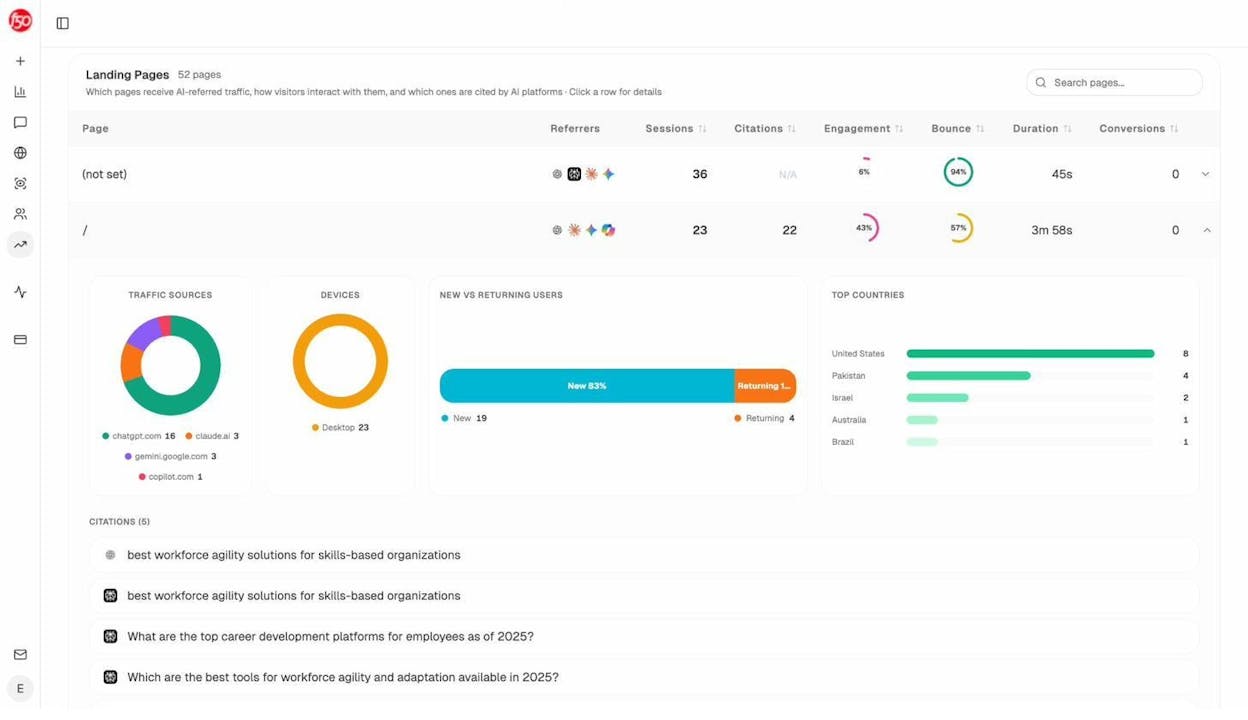
If a video earned a citation in a Perplexity answer, you’ll see traffic from perplexity.ai land on the page where you embed it. That tells you the video is doing double duty as an AI search asset, and you should make more like it.
You can also use Citation Analytics to see which YouTube URLs in your space get cited most often by AI engines, broken down by domain and engine.
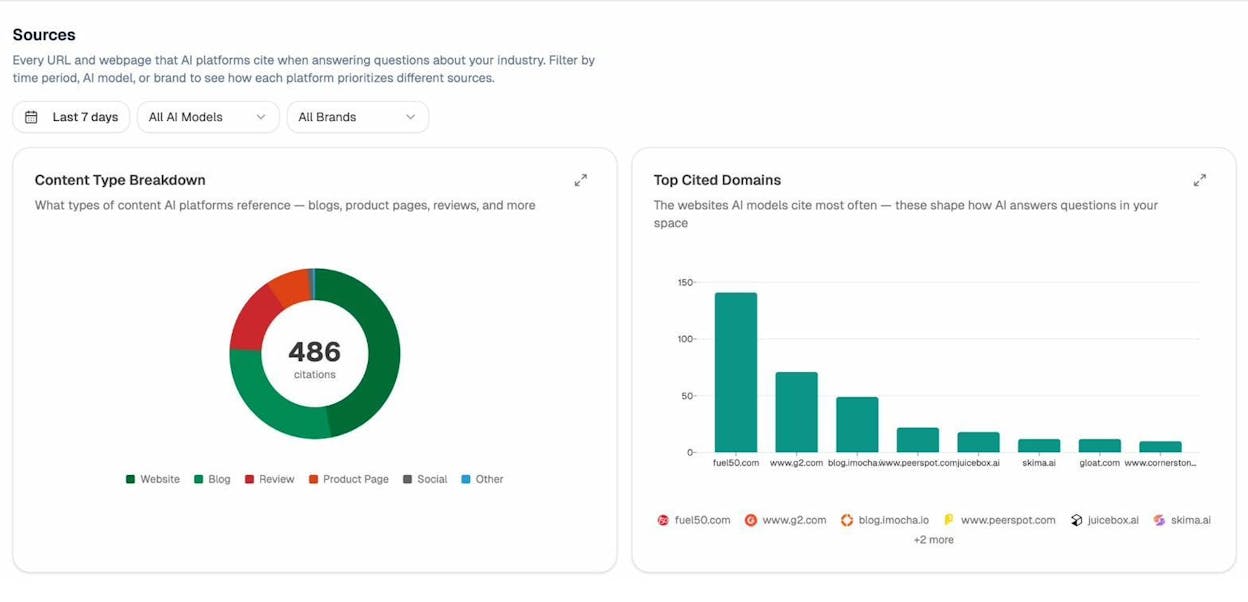
If competitor YouTube videos are getting cited and yours are not, the gap is usually in the transcript and description. Re-upload a cleaner transcript and rewrite the description with the entities and questions the AI engines are answering. The same content now reaches two audiences from one production cost.
Step 8: Build session watch time
Session watch time is the total time a viewer spends on YouTube after starting your video, including videos they watch on other channels. YouTube has confirmed it as a ranking factor since 2012, and it rewards videos that keep viewers on the platform.
Two tactics move it.
Build a series and link it with playlists
If you publish three videos on related subtopics, group them into a series playlist. A series playlist tells YouTube these videos belong together and should auto-play in order. The next video in the series becomes the suggested “Up Next,” and viewers keep watching.
Send viewers to the next episode, not a random video
Most channels send viewers to whatever video the algorithm picks. Send them to the next episode of the series instead. Predictable continuity beats random suggestions for retention.
The compound effect is real. A viewer who lands on Episode 1 and watches three episodes in a session signals to YouTube that your channel earns watch time. Future videos get suggested more often because of that pattern.
A note on AI search and YouTube
We don’t believe AI search is replacing YouTube SEO or SEO in general. Read our manifesto for the full position. AI search is a second organic channel that uses much of the same content infrastructure you’ve already built, including your YouTube videos.
The best-optimized YouTube videos in 2026 are the ones that rank in YouTube search and get cited in AI answers. The work to do both is mostly the same. A clean transcript, a clear title, a description that includes the entities and questions in your space, and a video that actually answers the query.
Treat YouTube SEO and AI visibility as one project and every video you publish compounds on two channels at once. Treat them as separate and you do twice the work for half the result.
Wrap-up
The technical part of YouTube SEO is straightforward. Pick a keyword with real demand, match the dominant intent, write a title and design a thumbnail that earn the click, hold attention with strong editing, and analyze what worked so the next video does better.
The harder part is making the video genuinely worth watching. That’s the part no tool can do for you. Focus on retention, replicate what works, and the rankings follow.

Ernest

Ibrahim


