



Summarize this blog post with:


In this article, you’ll find 10 ChatGPT SEO tools that turn the chat window into a real SEO workspace. Each one plugs into your workflow through a custom GPT or an MCP server, pulls live data from a platform you already trust, and replaces an hour of spreadsheet work with a five-minute prompt.
Table of Contents
1. Aleyda Solis’ Content Helpfulness and Quality SEO Analyzer
Pricing: ChatGPT Plus or Team plan ($20+/mo)
Aleyda Solis built the Content Helpfulness and Quality SEO Analyzer so SEOs can evaluate how well a page meets Google’s helpfulness criteria and how it stacks up against the pages already ranking for the same query.
You give it a URL and a target keyword. It returns a structured assessment across helpfulness, expertise, content depth, and presentation, then suggests the fixes most likely to lift the page.
![[Screenshot: The Content Helpfulness and Quality SEO Analyzer in ChatGPT, showing the URL and query input fields]](https://www.datocms-assets.com/164164/1777799595-blobid1.png?auto=format,compress&w=1248&fit=max)
The output reads like a brief from a senior editor. It tells you which sections feel thin, where you lack first-hand experience signals, and which competitor pages cover ground you don’t.
If you want to extend this work, take the same URL and run it through our AI content optimizer, which scores the page on argument-and-flow plus clarity-and-polish and produces an optimized draft. The two tools work as a pair. One judges quality against the SERP, the other rewrites the content to close the gaps.
The same checklist also helps in AI search. ChatGPT and Google AI Mode pull from pages with clear answers, real expertise, and tight structure. A page that scores well here is the kind of page AI assistants quote.
2. Ahrefs MCP
Pricing: ChatGPT Plus or Team plan ($20+/mo) plus an Ahrefs subscription
The Ahrefs MCP gives ChatGPT direct access to live SEO data. Instead of exporting CSVs and building pivot tables, you ask a question in plain English and get an answer pulled from the Ahrefs API in real time.
That changes the kind of work you can do in ChatGPT. You can ask things like:
-
“Which pages on my site rank in positions 4 to 10 for keywords with over 1,000 monthly searches?”
-
“Show me 20 pages losing traffic where the top keyword does not trigger an AI Overview.”
-
“Cluster these competitor keywords by topic and rank the clusters by traffic potential.”
![[Screenshot: ChatGPT with the Ahrefs MCP connected, showing a prompt about ranking opportunities and a structured response with keyword data]](https://www.datocms-assets.com/164164/1777799610-blobid2.png?auto=format,compress&w=1248&fit=max)
The strongest workflow we have seen is the one Chris Long shared on LinkedIn. He fed competitor keyword exports into Claude with the Ahrefs MCP, asked it to “make sense of everything,” and got back a clustered topic map with traffic potential and a difficulty distribution. The same exercise used to take an afternoon. With the MCP it takes ten minutes.
![[Screenshot: Chris Long’s LinkedIn post showing the Ahrefs MCP keyword clustering output]](https://www.datocms-assets.com/164164/1777799615-blobid3.jpg?auto=format,compress&w=1248&fit=max)
Tip: Start every prompt with “Please use the Ahrefs MCP to…”. Without that nudge, ChatGPT often guesses from training data instead of calling the API.
You can run the same kind of question-answer workflow against your AI search data. Open our prompt tracking and you can see, for any prompt your buyers actually run, which competitors get cited, which AI engines mention you, and where the gap is widest.
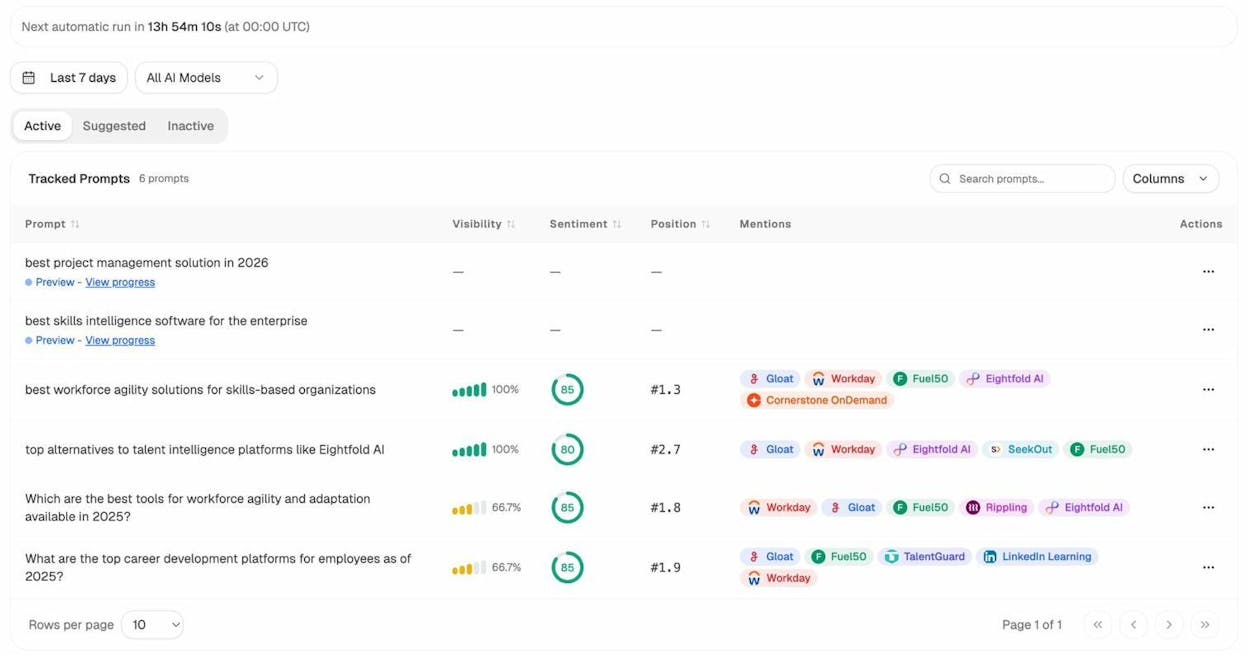
The two views complement each other. Ahrefs MCP tells you which keywords to chase in Google. Analyze AI shows you which prompts to win in ChatGPT, Perplexity, Gemini, and Copilot.
3. Steve Toth’s LLM Info Page Generator
Pricing: ChatGPT Plus or Team plan ($20+/mo)
Steve Toth built the LLM Info Page Generator to help brands publish pages that AI assistants can read, parse, and quote accurately.
You send it your domain. It returns a structured brand information page covering company facts, services, customer types, competitive positioning, leadership, and key claims, plus a set of explicit instructions written for AI assistants to follow.
The output is essentially a machine-readable about page. The theory is straightforward. AI assistants reach for content they can interpret without ambiguity. A page that lays out your brand in a clean structure raises the odds you get cited correctly when the model writes about you.
The Info Page Generator pairs well with our free LLMs.txt Generator, which builds the equivalent file at your site root. One handles the visible brand page, the other handles the file LLMs look for at /llms.txt. Both serve the same goal of making your brand easier to cite by answer engines.
4. Ryan Law’s Brief Bot, 30% Bot, and 90% Bot
Pricing: ChatGPT Plus or Team plan ($20+/mo)
Ryan Law from Ahrefs built three custom GPTs that mirror a complete content workflow. The Brief Bot interrogates you about your idea and writes the brief. The 30% Bot turns the brief into an outline. The 90% Bot turns the outline into a first draft.
The value isn’t speed. The value is the questioning. Brief Bot asks the questions a senior editor would ask, like “what is the main argument” and “what would surprise the reader,” and refuses to write anything until you have an answer. Most underperforming SEO content fails at this exact step.
![[Screenshot: Ryan Law’s Brief Bot in ChatGPT asking the user for the target keyword, working title, and article goal]](https://www.datocms-assets.com/164164/1777799623-blobid5.png?auto=format,compress&w=1248&fit=max)
If you want a deeper version of this workflow that runs against your live AI search data, our AI Content Writer takes you from idea to research to outline to draft inside one tool, with each stage informed by the prompts your category actually gets in ChatGPT and Perplexity.
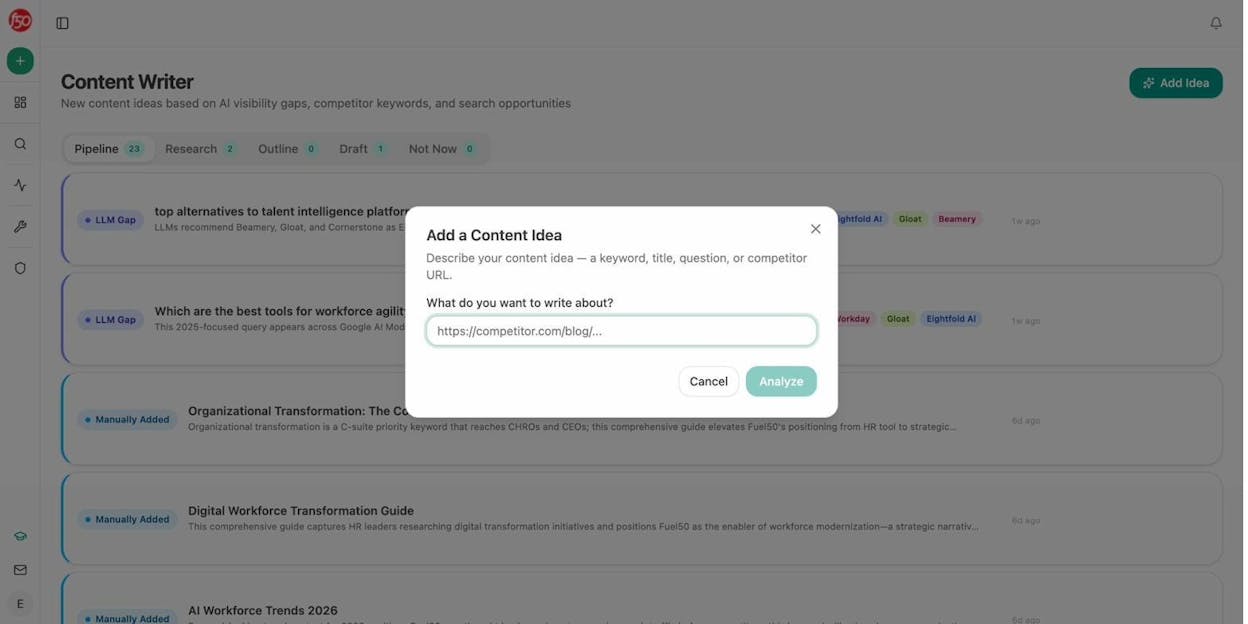
The same questions Brief Bot asks (who is this for, what makes this different, what is the one-sentence thesis) are the questions an LLM is trying to answer when it picks a page to cite. Tighter briefs make better content, and better content gets quoted more often.
5. Amanda Jordan’s Schema Advisor
Pricing: ChatGPT Plus or Team plan ($20+/mo)
The Schema Advisor is a custom GPT trained on Schema.org and respected technical SEO documentation. You hand it a URL. It identifies the right Schema type for the page (Article, Product, FAQPage, SoftwareApplication, and others) and returns clean, validated JSON-LD you can drop into your <head>.
![[Screenshot: The Schema Advisor in ChatGPT showing a URL input and the generated JSON-LD output, with a brief explanation of each field]](https://www.datocms-assets.com/164164/1777799629-blobid7.png?auto=format,compress&w=1248&fit=max)
The reason structured data matters for AI search is simple. It gives AI crawlers an unambiguous reading of what your page is. When ChatGPT pulls a product page and quotes the price, the schema is often what made the price recognizable. Same for ratings, FAQs, how-tos, and author information.
For a quick complementary check on the technical health of any page, run the same URL through our SERP Checker to see what the live SERP looks like for the page’s target keyword, and through our Website Authority Checker to weigh how much trust the page is starting from.
6. AlsoAsked MCP by Metehan Yeşilyurt
Pricing: ChatGPT Plus or Team plan ($20+/mo) plus AlsoAsked Developer access ($49+/mo)
Metehan Yeşilyurt built an MCP integration for AlsoAsked that gives ChatGPT live access to People Also Ask trees. You ask one question and get back the related questions, the follow-ups underneath them, and the deeper branches that show how a topic actually unfolds in real searches.
![[Screenshot: The AlsoAsked MCP returning a People Also Ask tree inside ChatGPT, with parent questions and nested follow-ups]](https://www.datocms-assets.com/164164/1777799634-blobid8.png?auto=format,compress&w=1248&fit=max)
The mechanic is more useful than it looks. PAA data tells you what a person searching for your topic is also trying to figure out. That makes it a clean input for FAQ sections, support pages, and content hubs that mirror real user journeys. Our guide on People Also Ask walks through five ways to use this signal.
The natural extension is to look at the prompts your category gets inside ChatGPT, which often diverge from PAA. Our Prompt Discovery feature surfaces the AI prompts your buyers actually run, and our Ad Hoc prompt searches let you test any prompt on demand and see who shows up.
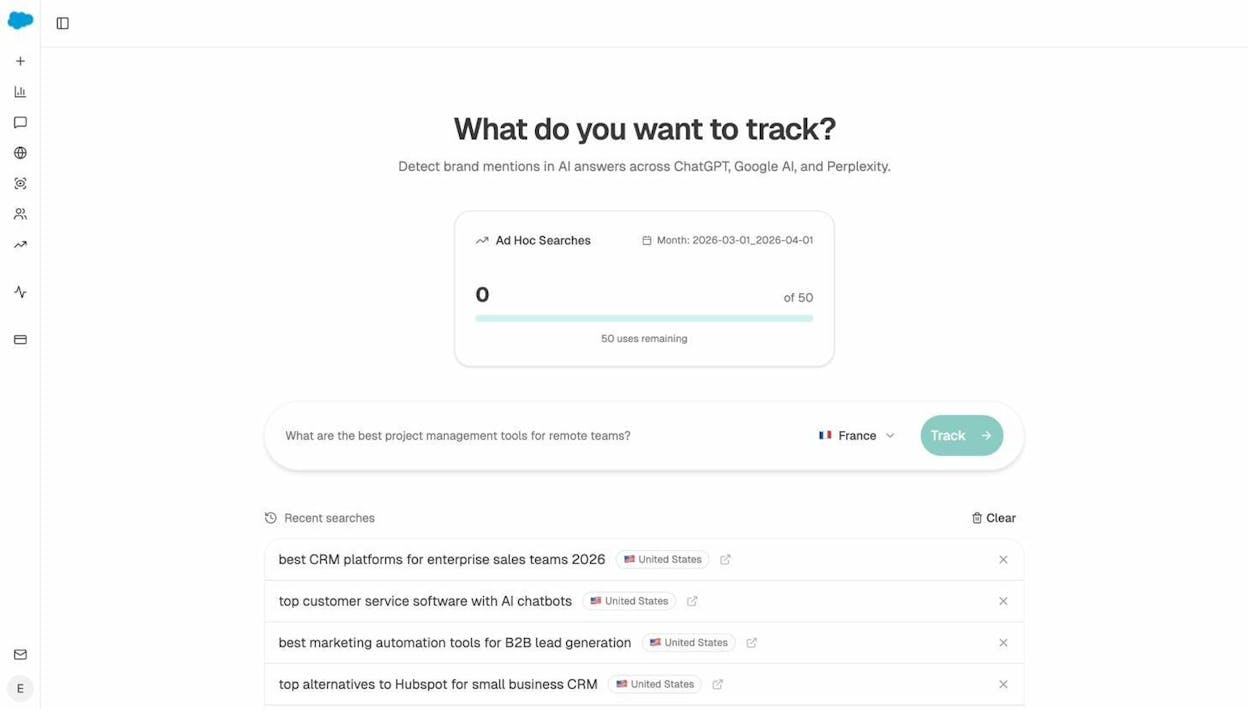
PAA tells you what people search. AI prompt data tells you what they ask AI directly. Both belong in the brief.
7. Findable’s Technical SEO MCP
Pricing: ChatGPT Plus or Team plan ($20+/mo) plus a Findable subscription (from $49/mo)
The Technical SEO MCP automates the parts of a technical audit nobody enjoys. It crawls a site, runs Core Web Vitals checks, validates sitemaps and robots.txt, inspects schema, and checks whether AI crawlers can reach your pages. It returns a clean summary inside ChatGPT.
![[Screenshot: A Technical SEO MCP output inside ChatGPT showing crawl results, Core Web Vitals scores, and AI crawler accessibility status]](https://www.datocms-assets.com/164164/1777799640-blobid10.png?auto=format,compress&w=1248&fit=max)
The use case that pays for it is client onboarding. You can audit a new site in the time it takes to make coffee instead of half a day. The use case that justifies it for in-house teams is the post-deploy check, where you confirm a release didn’t break canonical tags or block an AI crawler.
|
Use case |
Prompt example |
|---|---|
|
New-client audit |
“Run a full crawl on example.com, check Core Web Vitals, and summarize the top five technical issues.” |
|
Post-deploy regression check |
“Compare crawl results from last week and this week. Flag anything new.” |
|
AI crawler visibility |
“Which AI crawlers can reach example.com, and which key pages are blocked?” |
|
Sitemap and schema validation |
“Validate the XML sitemap at example.com/sitemap.xml and list all pages with missing or invalid schema.” |
The AI crawler accessibility check is the one to pay attention to. If your site is invisible to GPTBot, ClaudeBot, or PerplexityBot, no amount of work on Google rankings will help you show up in their answers. For a faster check on dead links alone, our free Broken Link Checker works without any MCP setup.
8. Google Analytics MCP
Pricing: ChatGPT Plus or Team plan ($20+/mo). GA4 is free.
The Google Analytics MCP lets ChatGPT and Claude pull live GA4 data on demand. Instead of building yet another GA4 exploration with the wrong dimensions, you ask a question and get the answer in plain English.
GA4 stops being a tool you tolerate and starts behaving like an analyst sitting next to you.
|
Use case |
Prompt example |
|---|---|
|
Find weak landing pages |
“Which landing pages get the most organic traffic but have the highest bounce rates?” |
|
Compare channels |
“Show me trends in organic search traffic compared to paid over the last quarter.” |
|
Spot retention winners |
“Which blog posts keep users on site longest, and what do they have in common?” |
|
Track international growth |
“Which countries contributed the most to organic traffic growth this year?” |
|
Find conversion bottlenecks |
“Where do organic visitors drop off in the conversion funnel?” |
![[Screenshot: Google Analytics MCP returning a structured answer in ChatGPT to a question about top-converting landing pages]](https://www.datocms-assets.com/164164/1777799642-blobid11.png?auto=format,compress&w=1248&fit=max)
There is a gap GA4 cannot fill. It does not show you visitors arriving from ChatGPT, Perplexity, or Claude in a way that makes the channel meaningful, because referrer headers from these tools are inconsistent and often missing. To see that traffic clearly, you need a tool built for it.
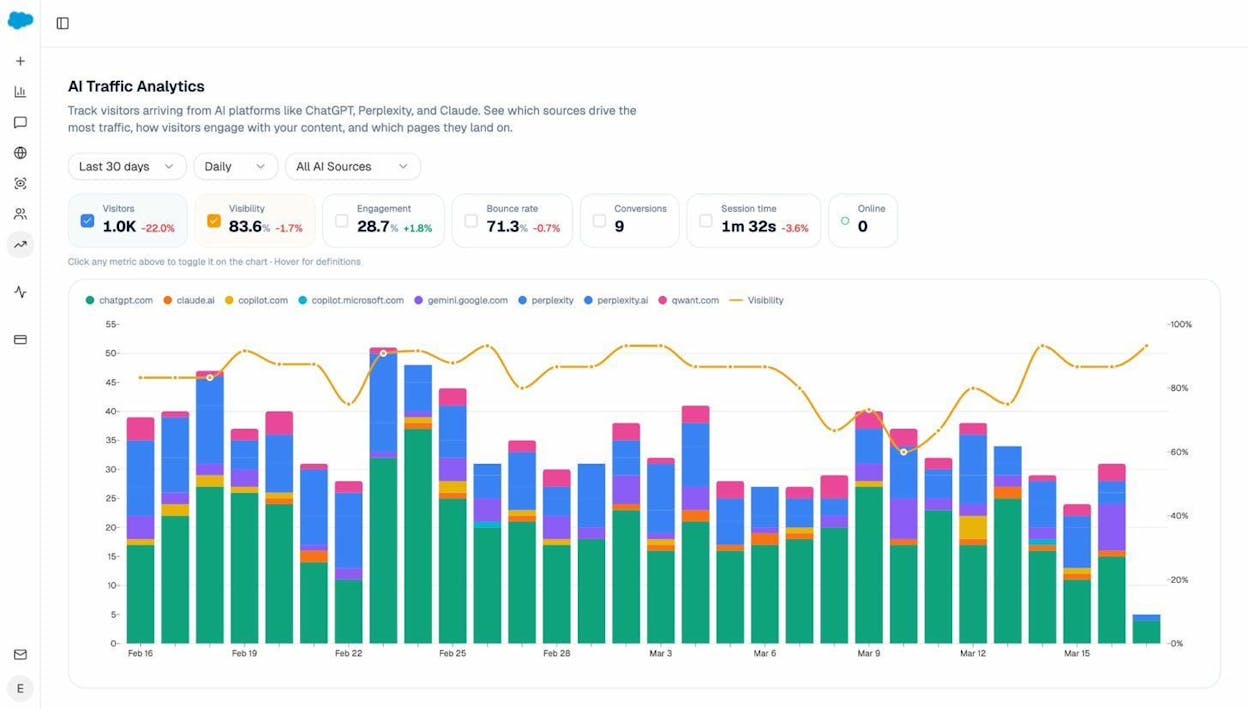
Pair the GA MCP with AI traffic analytics and you have a full picture. GA covers Google. The other view covers the AI assistants Google does not yet report on.
9. Steve Toth’s Watch Time Optimizer
Pricing: ChatGPT Plus or Team plan ($20+/mo)
YouTube is one of the most-cited domains in AI Overviews and ChatGPT answers. Watch time is the metric that decides whether a video stays visible across all of those surfaces.
The Watch Time Optimizer is a custom GPT that takes a YouTube transcript, finds the spots where viewers are most likely to drop off, and rewrites them. It tightens openings, adds intrigue loops, and reshapes slow sections so viewers stay longer.
![[Screenshot: The Watch Time Optimizer in ChatGPT showing a transcript input and an annotated rewrite with stronger hooks]](https://www.datocms-assets.com/164164/1777799650-blobid13.png?auto=format,compress&w=1248&fit=max)
YouTuber Matt Diggity says he runs every video through it. Stronger watch time pushes a video higher on YouTube, which raises its odds of being embedded in Google search results and cited inside an AI assistant’s answer. If video is part of your strategy, this is the rare custom GPT that pays for itself in a single use.
10. Google Search Console MCP
Pricing: ChatGPT Plus or Team plan ($20+/mo). Search Console is free.
A Google Search Console MCP (community implementations are widely available on GitHub) gives ChatGPT direct access to your GSC data. You can ask about queries, pages, impressions, clicks, and CTR without ever opening the Search Console interface.
The point isn’t to replace GSC. The point is that you stop building the same five reports every Monday morning. Instead you ask:
-
“Which queries lost the most clicks in the last 28 days?”
-
“Show me pages where impressions are growing but clicks are flat. What is the average position?”
-
“Which queries are we ranking for in positions 8 to 15 with over 500 monthly impressions?”
![[Screenshot: A Google Search Console MCP output inside ChatGPT showing a structured table of declining queries with impression and CTR change columns]](https://www.datocms-assets.com/164164/1777799652-blobid14.jpg?auto=format,compress&w=1248&fit=max)
Position 8-to-15 queries with high impressions are the strongest update opportunities on most sites. The MCP surfaces them in seconds.
To round out the same workflow for AI search, our Citation Analytics shows the equivalent picture for ChatGPT and Perplexity. Instead of queries and clicks, it shows you the prompts your category gets and which of your pages are pulled as sources.
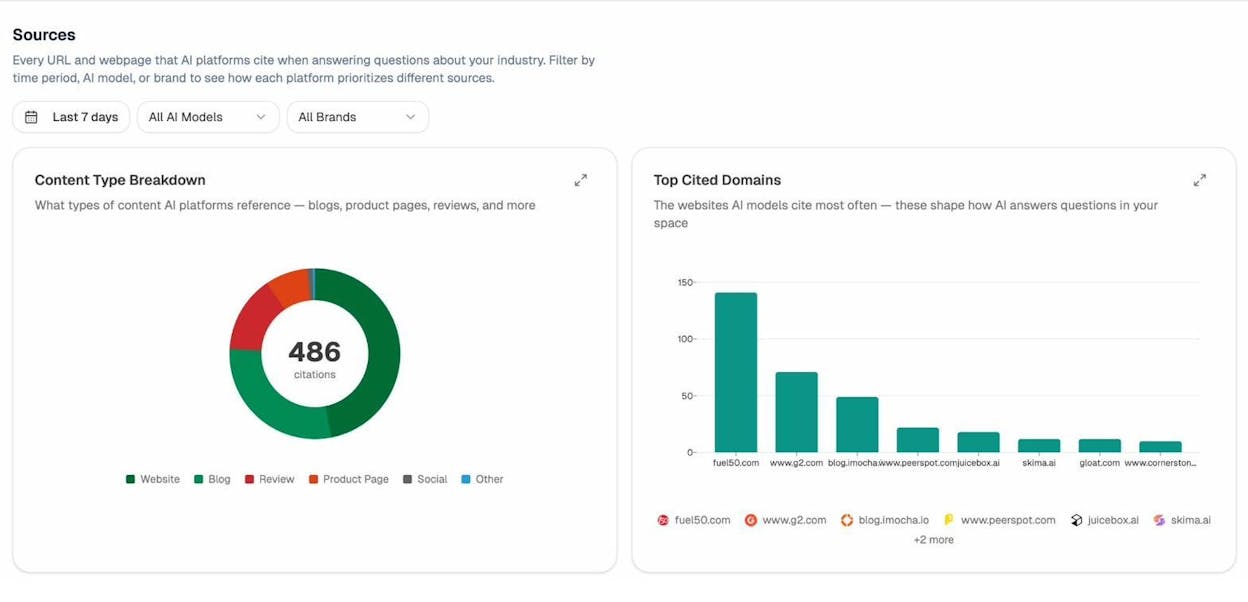
GSC tells you which Google queries you should fight for. Citation analytics tells you which AI prompts you should fight for. Same workflow, two channels.
How to know your ChatGPT-powered SEO work is actually moving rankings
Every tool above improves an input. None of them measures the output. To know whether your briefs, schema, audits, and rewrites are working, you need a measurement layer that covers both Google and AI search.
For Google, that is GSC plus your rank tracker of choice. We have a free Keyword Rank Checker for quick lookups when you don’t want to log into a paid tracker.
For AI search, the measurement is different. You are not tracking position one to ten on a SERP. You are tracking three things:
-
Visibility on the prompts your buyers run. Are you mentioned at all when someone asks an AI assistant “best [your category]” or “alternatives to [competitor]”?
-
The pages getting cited. Which of your URLs are AI assistants pulling from, and what do they have in common?
-
The traffic those citations send back. Are visitors arriving from ChatGPT, Perplexity, Claude, and Copilot, and what do they do once they land?
Analyze AI covers all three. You set up the prompts your category gets in ChatGPT, and the platform tracks which mention you, where competitors win and you lose, which of your pages get cited, and how much traffic those citations send back. Without that layer, you are improving content and hoping it works. With it, you can see whether the brief you wrote in Brief Bot, the schema you generated with Schema Advisor, and the info page you built with Steve Toth’s tool actually moved your visibility in the assistants your buyers use. For a deeper read, see our guide on how to rank on ChatGPT and our overview of AI search monitoring tools.
Pick one and start
The fastest way to get value from this list is to pick the tool that maps to the bottleneck slowing you down right now.
If your problem is content quality, start with the Helpfulness Analyzer. If it is a backlog of underperforming posts, start with the Ahrefs MCP and a question about your position-eight-to-fifteen pages. If it is structured data, start with Schema Advisor. If it is a feeling that your brand is invisible inside ChatGPT itself, start with our AI search visibility tracking and find out for sure.
Whichever one you pick, the goal is the same. Spend less time wrangling data and more time writing the page that wins both the SERP and the AI answer.

Ernest

Ibrahim


