



Summarize this blog post with:


In this article, you’ll see five AI sentiment analysis tools ranked by what each one catches first in the narrative-formation chain, the buyer signals each is built to surface, and a clear rubric for picking the one that fits your team. You’ll also see how AI search adds a new sentiment surface that traditional social-listening tools were not built to handle, and how to fold both into one workflow without doubling your stack.
Table of Contents
TL;DR
|
Tool |
What it catches first |
Pricing transparency |
Connects sentiment to revenue |
Best for |
|---|---|---|---|---|
|
Analyze AI |
Prompt-level sentiment inside AI answers, tied to GA4 sessions and conversions |
Public, self-serve |
Yes, by engine, page, and prompt |
Growth, SEO, AEO, content, agencies, RevOps |
|
Brandwatch |
Long-arc shifts in public mood across 1M+ sources |
Quote-only, reported $800 to $15,000+ per month |
No |
Enterprise PR, research, comms |
|
Talkwalker |
Sarcasm, emotion, and tone nuance across 180+ languages |
Quote-only, reported from $500 per month |
No |
Crisis, comms, global insights |
|
Sprout Social |
Mood shifts inside the social inbox, in real time |
Public seats, listening is a paid add-on |
Indirect |
Social teams running campaigns |
|
Meltwater |
Narrative changes across news, podcasts, and broadcast |
Quote-only, reported median $25k per year |
Indirect |
PR, comms, media-first enterprises |
Each one watches a different stretch of the same pipeline. Public chatter shifts, news reports it, social amplifies it, AI models learn from it, and answer engines repeat it. The earlier you can detect a meaningful change, the more time you have to ship a response.
That is the lens we used for the ranking below.
How we evaluated these tools
We score AI sentiment tools on five criteria that map to how buyer perception forms in 2026.
Prompt-level depth. Generic brand sentiment is a moving average. We weight tools that can score sentiment on the exact buyer prompts that matter, not just the brand name.
Engine coverage. A tool that only listens to social media misses half the story. We weight coverage across ChatGPT, Claude, Perplexity, Gemini, Copilot, and Google AI Mode.
Behavior linkage. Sentiment that does not connect to a session, a page, or a conversion is hard to act on. We weight tools that close the loop with GA4 or equivalent attribution.
Pricing transparency. Most enterprise sentiment platforms force a sales call before you see a number. We flag that.
Actionability. Knowing tone is half the work. We weight tools that surface the next move, not just the next chart.
The first tool below is the one we built, so we will lead with the bias on the table and let the rubric do the talking.
1. Analyze AI: best for prompt-level sentiment tied to real revenue
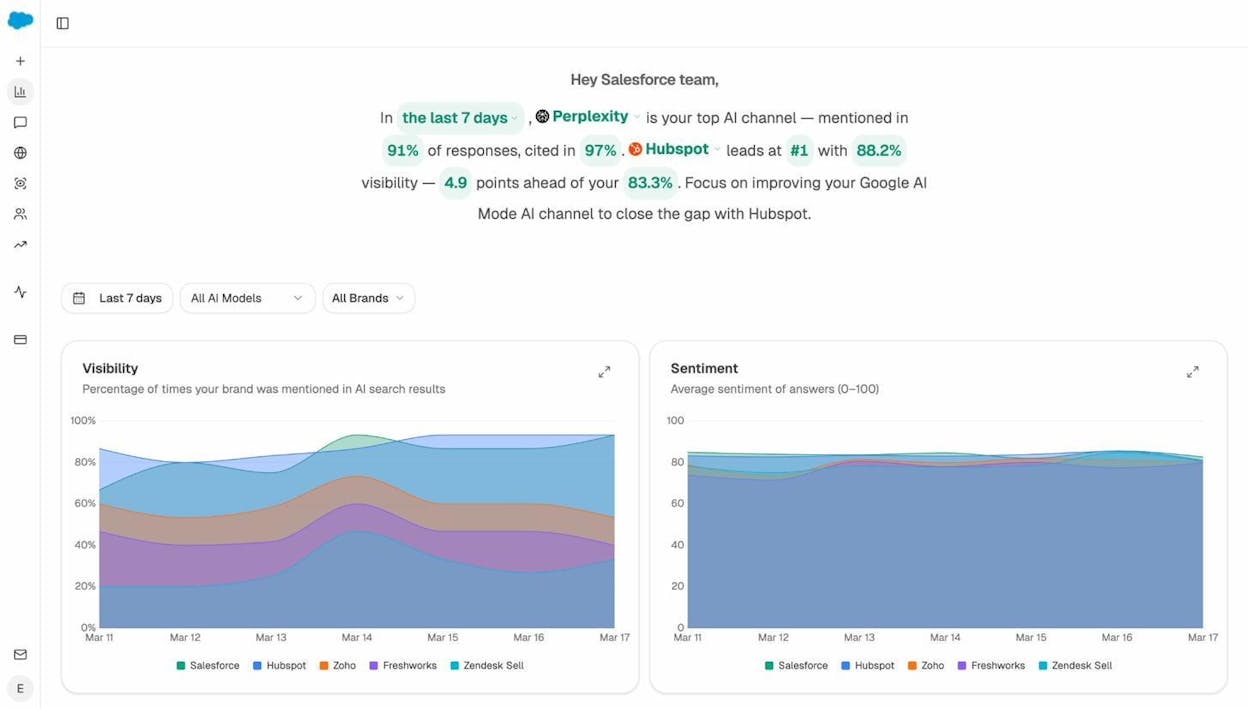
Analyze AI is the agentic platform for SEO, AEO, content, and GTM operations. The brand-visibility dashboard is where most teams start, but the substrate underneath is a programmable agent builder with 180+ nodes wired into GA4, Google Search Console, Semrush, DataForSEO, HubSpot, Notion, WordPress, Slack, and the major LLMs. That means sentiment is not the deliverable. The next action is.
Most GEO tools stop at “you were mentioned in a ChatGPT answer.” Some add a sentiment score. Almost none can tell you that the prompt is sending traffic to a specific landing page converting at 7%, and that a competitor just overtook you on a related prompt. Analyze AI does, and then it can write the brief to fix it, or kick off a Content Optimizer run on the page that lost ground.
Here is what that looks like in practice.
Prompt-level visibility, sentiment, and rank in one view
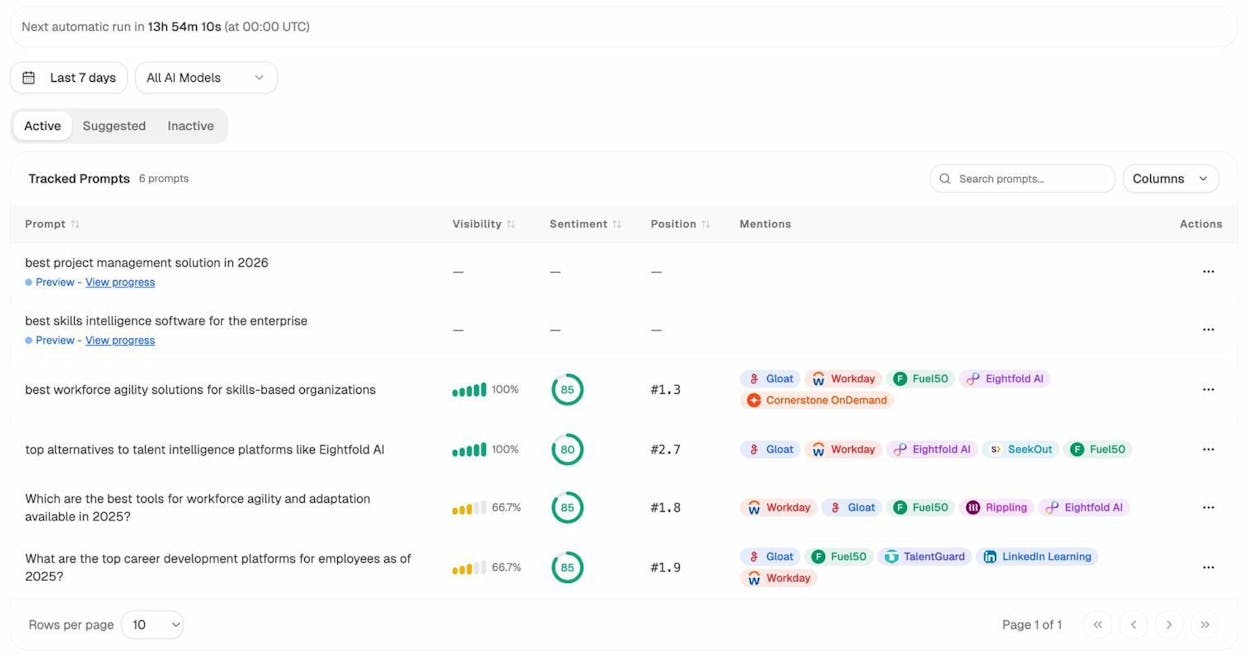
Analyze AI tracks specific buyer prompts. For each one, you see the percentage of answers that mention your brand, an average sentiment score from 0 to 100, your typical rank versus competitors, and which competitors appear alongside you. The tool refreshes daily across ChatGPT, Perplexity, Claude, Gemini, Copilot, and Google AI Mode.
You can also let the platform suggest prompts. It looks at the answers your category is generating, the prompts buyers in your space are firing, and it surfaces the bottom-of-funnel queries worth tracking. You do not need to think of them yourself.
AI sentiment, but tied to behavior
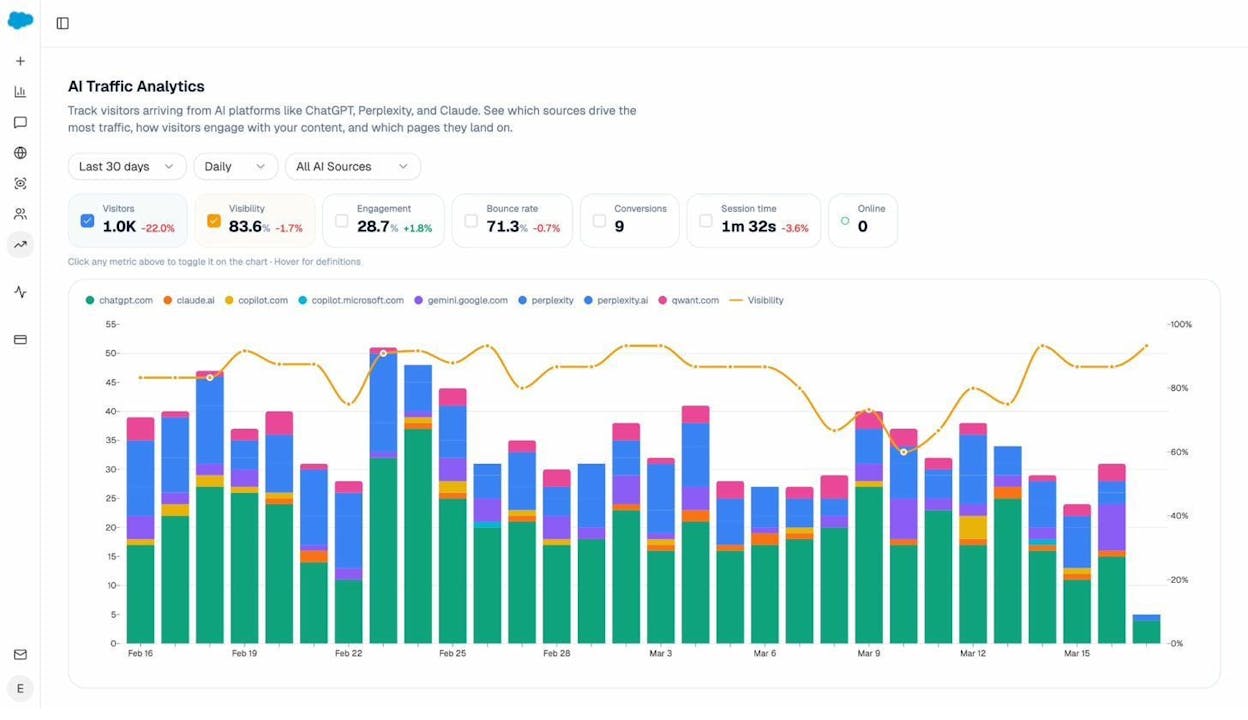
The Sentiment Monitoring layer (Govern) tracks not just whether tone is positive or negative, but whether tone is changing, which engines are diverging, and what theme is driving the shift. When you connect GA4, the platform also tells you which AI engines are sending sessions, which landing pages are receiving them, how long visitors stay, and how often they convert.
That closes a loop most sentiment tools cannot. You can tell that Perplexity sentiment about your category dropped 4 points last week, the prompts driving the drop are pricing-related, and the landing page that handles those visitors is also seeing a 22% bounce-rate increase. The diagnosis and the action are in the same screen.
The Perception Map: where AI puts you in the category
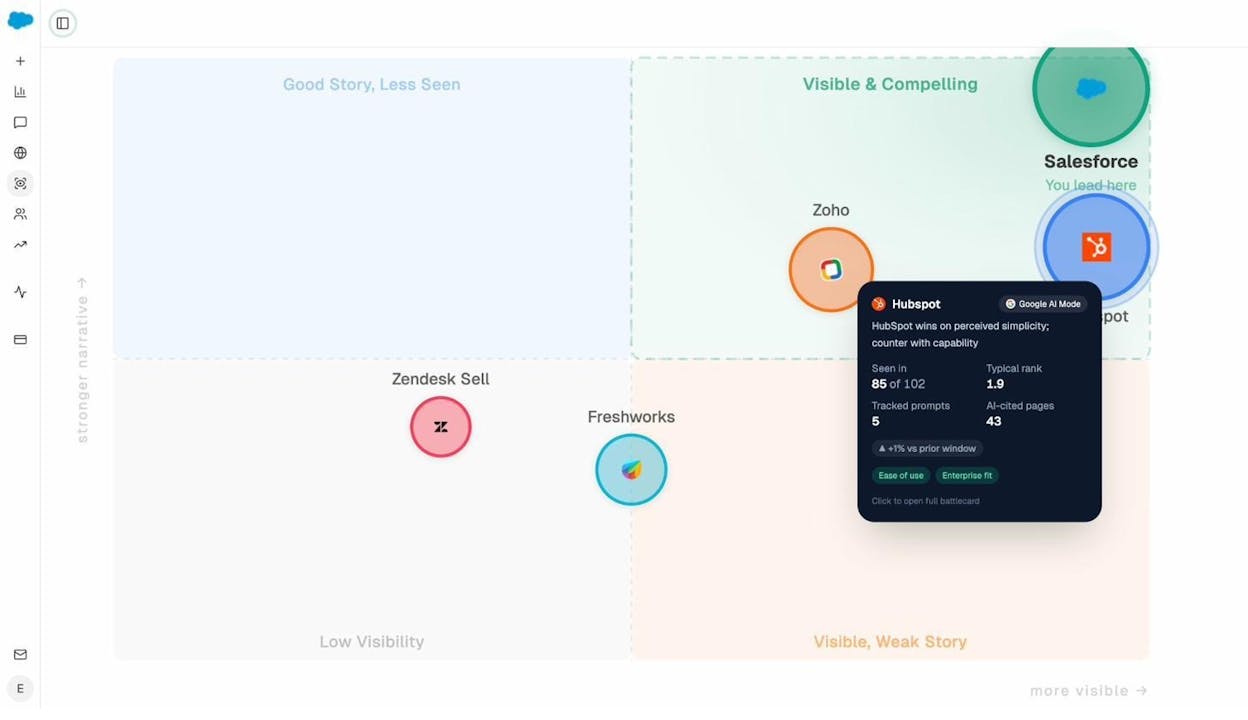
The Perception Map plots every tracked brand on two axes. The horizontal axis is how often AI mentions them. The vertical axis is how strong the narrative is. The four quadrants are Good Story, Less Seen / Visible & Compelling / Low Visibility / Visible, Weak Story.
This is the view your CMO will ask for. It answers “where do we actually sit?” in one image. Click on any brand and you get a battlecard with the themes AI keeps repeating about them, the pages AI cites, and a recommended counter-move.
Citation Analytics: which sources shape the narrative
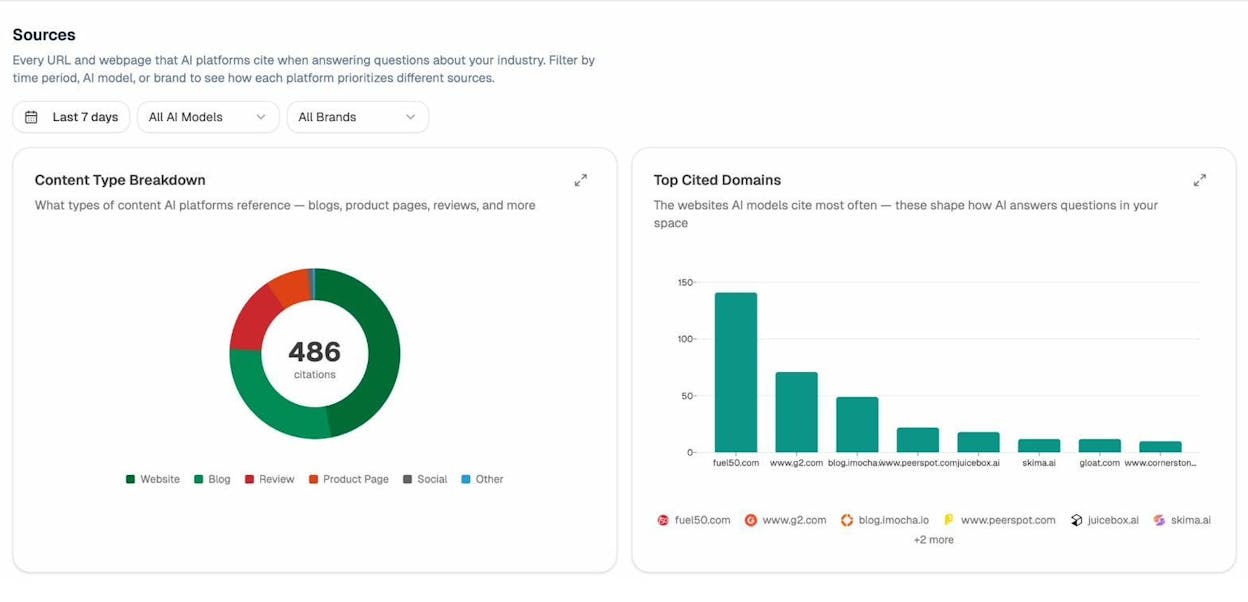
Sentiment does not appear from nowhere. AI models cite specific domains and specific pages. Citation Analytics tells you which ones. You can see, for example, that competitor A is winning a category prompt because two industry review sites and a single G2 page keep getting cited, and that your equivalent comparison page never appears in the citation set. That tells you exactly what to fix.
Agent Builder: the substrate that turns insight into action
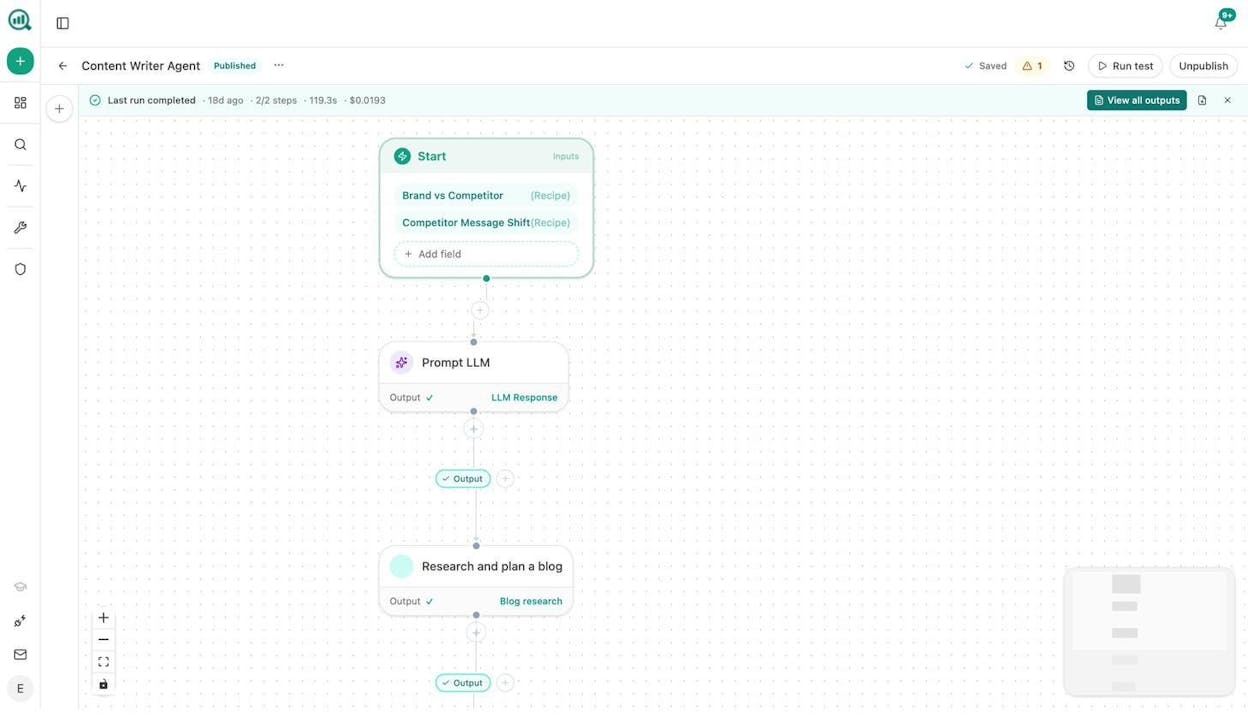
The Agent Builder is where this stops being a dashboard and starts being an operating system for your marketing org. It ships with 34 pre-built data recipes (share of voice, visibility losers, competitor sources, sentiment alerts, prompt cluster briefs, citation decay alerts, and more), 13 input primitives, and three trigger modes (manual, scheduled, and webhook).
You can build a scheduled agent that runs every Monday at 7am, pulls the prompts where your sentiment dropped, drafts a counter-brief, generates a featured image, and pushes the result to a Notion database your content team is already working out of. You can build a webhook agent that fires when a competitor publishes a new piece, scrapes it, scores it against your existing coverage, and Slacks you the gaps. None of this needs an engineering hire.
The Content Writer and Content Optimizer pipelines are part of the same substrate. The Writer produces drafts that pass an AEO scorecard before they ship. The Optimizer can audit any existing page, identify gaps that AI models care about, and rewrite the page to close them.
Analyze AI at a glance
|
Criterion |
What you get |
|---|---|
|
Prompt-level depth |
Sentiment, visibility, and rank per tracked prompt across six engines |
|
Engine coverage |
ChatGPT, Claude, Perplexity, Gemini, Copilot, Google AI Mode |
|
Behavior linkage |
Native GA4 integration with sessions, landing pages, conversions, and revenue |
|
Pricing transparency |
Public, self-serve plans on the pricing page |
|
Actionability |
Battlecards, content optimizer, weekly digests, and a full Agent Builder |
Best fit. Marketing, SEO, AEO, and RevOps teams that need to prove AI visibility is driving pipeline. Agencies that want to scale reporting and brief-generation across clients. Content teams that want sentiment work to feed directly into the editorial calendar.
Takeaway. If your sentiment tool stops at “you appeared in 41% of answers with neutral tone,” you are doing half the job. Analyze AI catches the prompt-level shift, names the engine, links it to the page, and hands you the next action.
2. Brandwatch: best for long-arc public sentiment
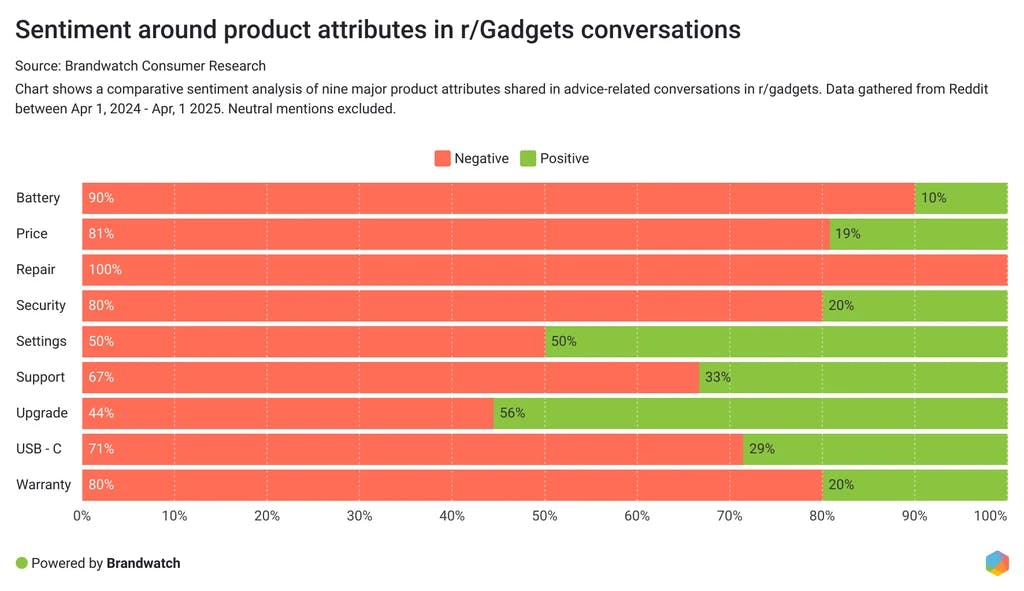
Brandwatch’s strength is depth and history. The platform pulls from over a million sources across social, blogs, forums, news, and reviews, and it gives you years of archive to compare against. If you need to see how public mood shifted across a 24-month product launch arc, this is the tool that has the data.
The AI sentiment layer handles slang, basic sarcasm, and emotion classification, and it lets you slice by region, audience segment, or theme. The dashboards are clean and the alert system is solid.
The trade-offs are real. Setup is heavy. The platform rewards a dedicated owner configuring queries, themes, and alerts. Pricing is quote-only and reportedly starts around $800 to $1,000 per month and scales into five figures monthly for enterprise configurations. Annual contracts are standard, and implementation can run from $5,000 into the $50,000 range depending on scope.
Brandwatch also does not tie sentiment to your site behavior. You get the public-mood arc but not the AI-answer arc, and not the conversion arc. That is why most teams pair it with something else.
Best fit. Enterprise PR, brand research, and global comms teams that need a deep historical record across many languages.
Takeaway. Brandwatch catches long-cycle mood shifts before they crystallize into recommendation language. It is the historical backbone, not the action layer.
3. Talkwalker: best for sarcasm, emotion, and crisis detection
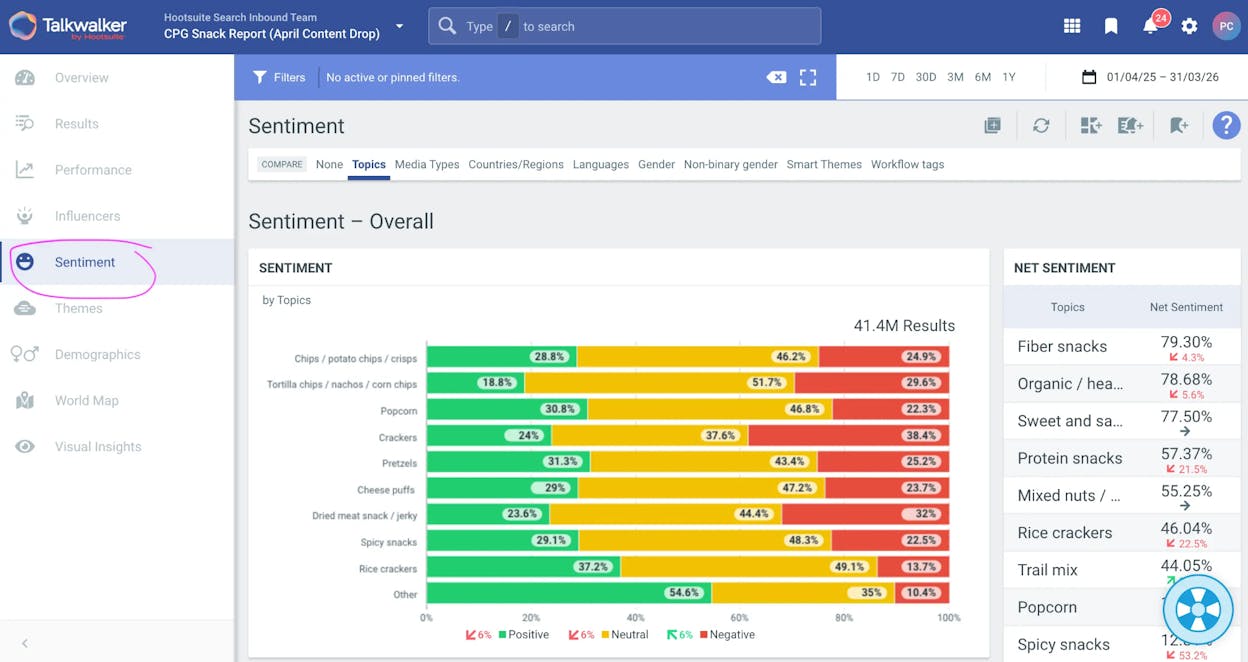
Talkwalker is the one we reach for when nuance matters. The platform’s NLP models claim around 90% sentiment accuracy and detect sarcasm, irony, and tone shifts, and the image-recognition layer tracks more than 40,000 brand logos, objects, and scenes inside social images and videos. That means you can pick up brand mentions that never used your name.
Talkwalker was acquired by Hootsuite in April 2024, and the platform now also powers Hootsuite Listening. The Yeti AI Agent layer is interesting. It is an agentic interface that lets you ask the platform questions in plain language, drafts crisis-response briefs when sentiment trips a threshold, and surfaces emerging themes without you writing Boolean queries.
For AI sentiment specifically, Talkwalker’s value is upstream of AI answers. It catches public emotion before the news cycle picks it up and before models retrain on the next batch of public text. The earlier you spot a tone shift here, the more time you have to ship a response before the narrative hardens.
The friction points are familiar. Setup is non-trivial. Pricing reportedly starts at $500 per month for the Core plan and climbs to $26,400 a year or more for Corporate. The platform rewards teams that invest in the workflow.
Best fit. Communications, crisis response, and global insights teams that need early warning on tone shifts and multilingual coverage.
Takeaway. Talkwalker catches the emotional spike first. It is the smoke alarm. Pair it with an AI-search tool to see when the spike becomes a recommendation.
4. Sprout Social: best for campaign-linked social sentiment
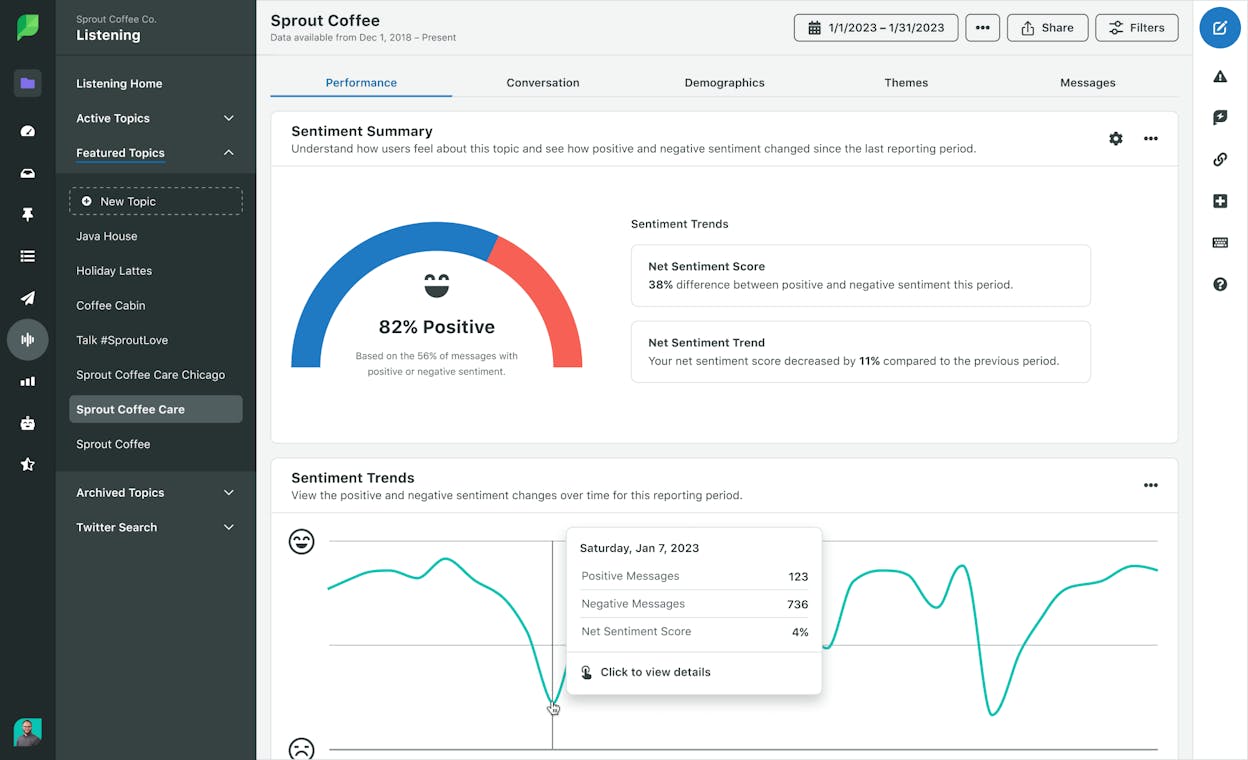
Sprout Social is built for the team that lives inside the social inbox. The sentiment widget tracks positive, neutral, and negative mentions in real time, and it reads emoji, casual language, and short-form posts with accuracy that holds up for most B2C and mid-market B2B brands. Because Sprout combines publishing, inbox management, listening, and analytics in one place, your team can adjust messaging and reply in the same surface where they spotted the shift.
That tight loop is the real value. Launch a campaign, see sentiment dip on day three, adjust the creative, and watch sentiment recover. All in one tool. Few platforms in this category make that workflow this clean.
There are two things to budget for. Core seats start at $249 per month per user on the Standard plan, and most B2B teams end up on Professional at $299 per seat per month or Advanced at $499 per seat per month, billed annually. Then there is the catch. Social Listening is a paid add-on that starts at $999 per month, which means a 10-person team on the Advanced plan with Listening will cross $60,000 a year. Build that into your model.
Sprout is also more social-first than enterprise-grade. The data pool is narrower than what Brandwatch, Talkwalker, or Meltwater offer, and the sentiment work does not connect to AI search visibility or to site conversion. You will still need a tool downstream of it.
Best fit. Social and comms teams running active campaigns, mid-market B2B brands that prioritize fast feedback over deep archives.
Takeaway. Sprout catches the campaign-level sentiment swing fastest. It is the steering wheel, not the radar.
5. Meltwater: best for news, broadcast, and emerging AI-search coverage
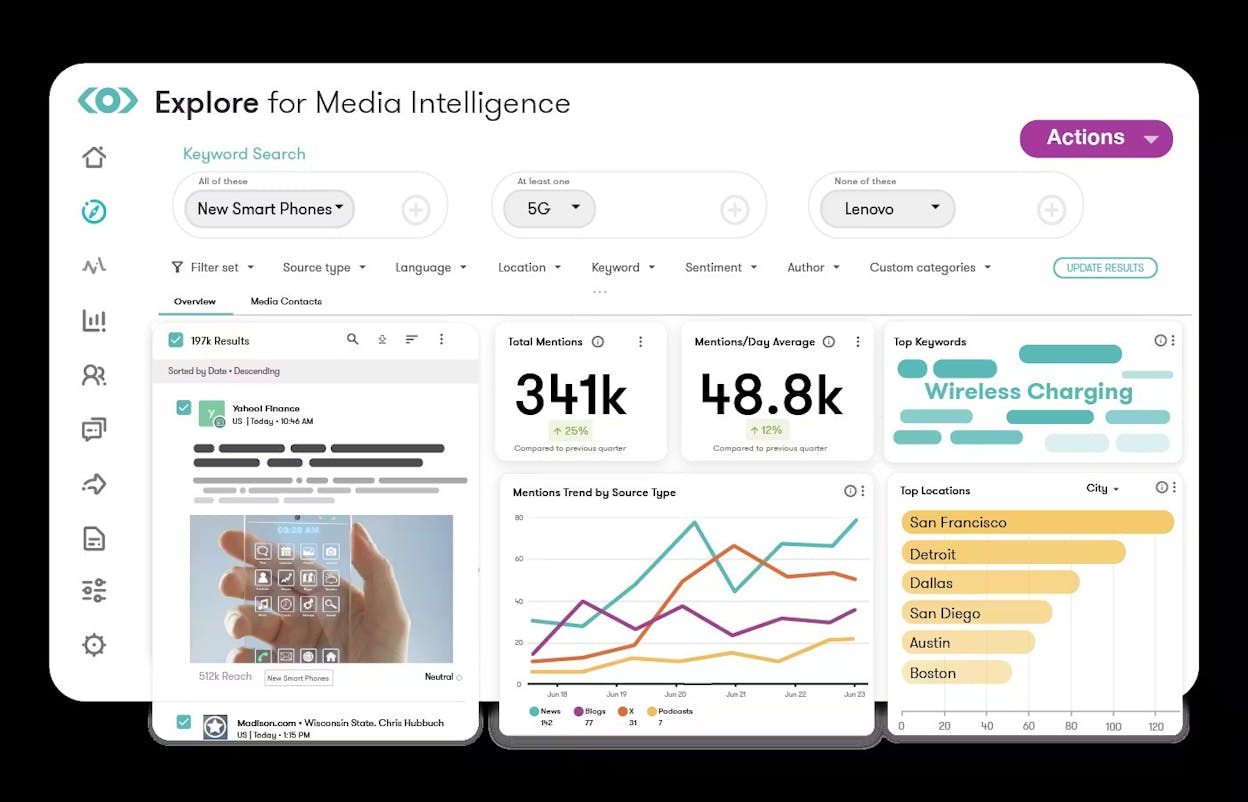
Meltwater is the media intelligence platform most enterprise PR teams already pay for. The reach is hard to match. The platform monitors over six million media sources, 200 billion social conversations, and 300 million social profiles, and the sentiment models support 100+ languages. The 2025 platform update added real-time podcast transcript sentiment, video analysis, and explicit LLM tracking via the GenAI Lens product.
Mira is Meltwater’s agentic layer. It is a chat-style interface that summarizes coverage, drafts executive briefs, and surfaces narrative shifts without requiring you to build dashboards. The new Mira API exposes the underlying data through a chat-completion format, so technical teams can wire it into internal tools.
Meltwater earns its place in this list because of the news and broadcast coverage. News stories train AI answer engines. A narrative that lands in TechCrunch or Reuters on Monday can show up in a ChatGPT answer two weeks later. Meltwater is where you see that story before it gets picked up.
The trade-offs sit where you would expect. Pricing is quote-only with a reported median of $25,000 per year. Onboarding takes time. Sentiment can over-fire on sarcasm in long-form text. None of these are dealbreakers for a comms-led enterprise, but they are real.
We are listing Meltwater in the slot some other guides give to MonkeyLearn. MonkeyLearn was acquired by Medallia in February 2022, and the standalone product was wound down. We do not recommend tools that no longer ship.
Best fit. Enterprise PR, brand reputation, and analyst-relations teams that need a single platform for news, social, podcasts, and broadcast.
Takeaway. Meltwater catches the editorial signal first. It is the input that AI models will be reading next.
How to choose one (or two) of these
A single tool rarely covers the full chain. Here is the decision frame we give teams.
If the question is “how do AI engines describe us today, and is that costing us pipeline?”, you need a tool that lives inside AI answers and connects to your conversion data. That is Analyze AI’s lane.
If the question is “what is the public saying about us this quarter, and how is that mood changing?”, you need a wide-source listening tool with history. Brandwatch or Talkwalker.
If the question is “is the campaign we launched working?”, you need a social-first tool that closes the loop with the inbox. Sprout Social.
If the question is “what is the media saying about us, and are we ahead of the narrative?”, you need news and broadcast coverage. Meltwater.
Most enterprise teams run two tools. The most common pairing is one upstream tool (Brandwatch, Talkwalker, or Meltwater) that catches mood and news, and one downstream tool (Analyze AI) that catches the shift inside AI answers and ties it to revenue. The substrate underneath Analyze AI can pull Brand Mentions via DataForSEO, News Research, and your GA4 data, so you can often consolidate the second tool into the first.
Whatever stack you pick, the test is simple. Can you point at a sentiment shift, name the engine or surface that drove it, identify the page that handles the related traffic, and ship a fix without leaving the tool? If yes, you are set. If not, you are still buying the chart.
If you want to see how prompt-level sentiment plus revenue attribution looks for your category, start a free Analyze AI workspace. Your first baseline lands inside the dashboard within minutes.

Ernest

Ibrahim


