33 Top Digital Marketing Tools for Every Budget
Written by
Ernest Bogore
CEO
Reviewed by
Ibrahim Litinine
Content Marketing Expert

We watched a team plan a quarter’s worth of campaigns using five spreadsheets, three dashboards, and a pile of browser tabs. Everyone moved fast, but no one could answer the simplest question: which tool actually helps them grow?
-
Their analytics tool is free, yet still couldn’t tell them where conversions truly came from.
-
Their content tools looked powerful, but slowed the team because no one agreed on which metrics mattered.
-
Their social stack was “good enough,” until they tried to report on performance and saw missing data everywhere.
That’s why we tested and compared the tools teams rely on most. We focused on what improves results: clear attribution, simpler workflows, accurate tracking, and features that push work forward instead of adding friction.
Table of Contents
SEO and GEO (Generative Engine Optimization) Tools
Among all digital marketing tools, the ones that impact visibility—SEO and GEO—often drive the biggest results. Here’s the tool that leads that category.
Analyze AI: The best and most comprehensive digital marketing tool for AI search visibility tracking

Key Analyze features
-
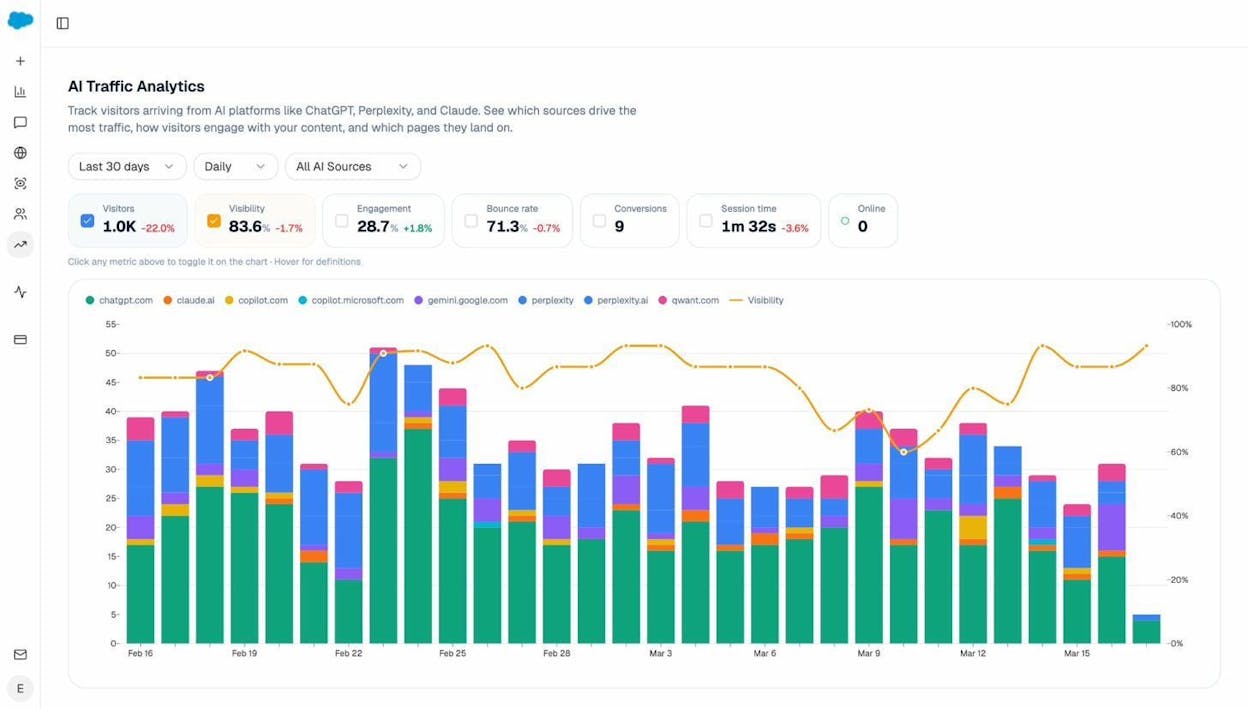
See actual AI referral traffic by engine and track trends that reveal where visibility grows and where it stalls.
-
See the pages that receive that traffic with the originating model, the landing path, and the conversions those visits drive.
-
Track prompt-level visibility and sentiment across major LLMs to understand how models talk about your brand and competitors.
-
Audit model citations and sources to identify which domains shape answers and where your own coverage must improve.
-
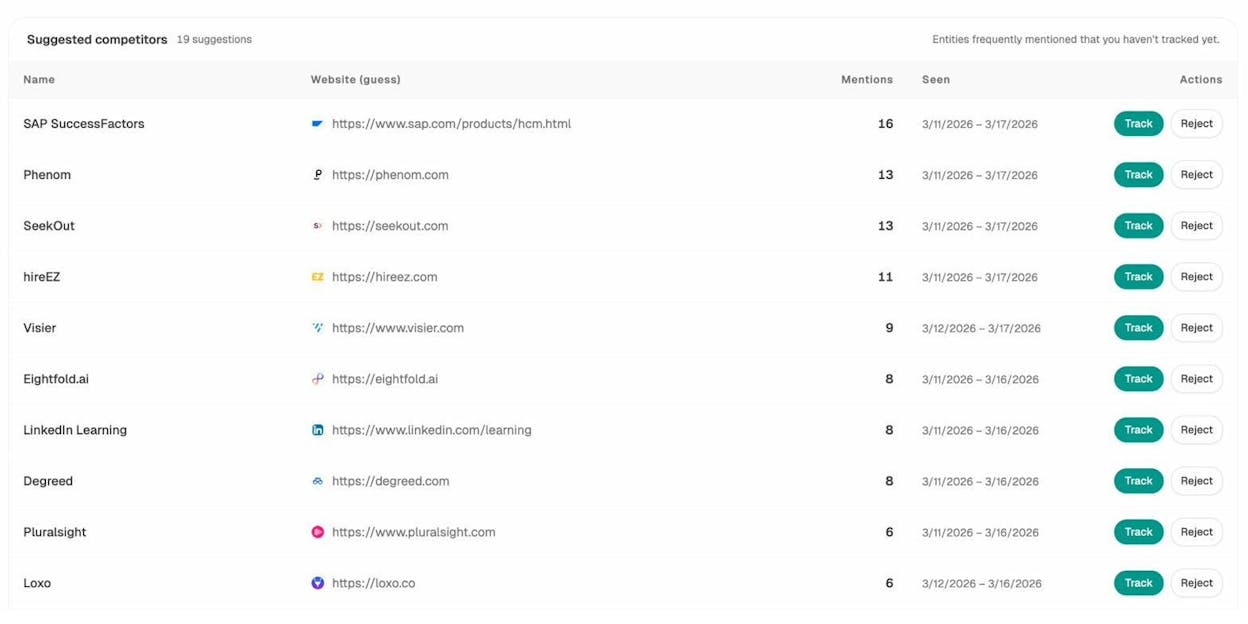
Surface opportunities and competitive gaps that prioritize actions by potential impact, not vanity metrics.
Here are in more details how Analyze works:
See actual traffic from AI engines, not just mentions

Analyze attributes every session from answer engines to its specific source—Perplexity, Claude, ChatGPT, Copilot, or Gemini. You see session volume by engine, trends over six months, and what percentage of your total traffic comes from AI referrers. When ChatGPT sends 248 sessions but Perplexity sends 142, you know exactly where to focus optimization work.

Know which pages convert AI traffic and optimize where revenue moves

Most tools stop at "your brand was mentioned." Analyze shows you the complete journey from AI answer to landing page to conversion, so you optimize pages that drive revenue instead of chasing visibility that goes nowhere.
The platform shows which landing pages receive AI referrals, which engine sent each session, and what conversion events those visits trigger.
For instance, when your product comparison page gets 50 sessions from Perplexity and converts 12% to trials, while an old blog post gets 40 sessions from ChatGPT with zero conversions, you know exactly what to strengthen and what to deprioritize.
Track the exact prompts buyers use and see where you're winning or losing

Analyze monitors specific prompts across all major LLMs—"best Salesforce alternatives for medium businesses," "top customer service software for mid-sized companies in 2026," "marketing automation tools for e-commerce sites."

For each prompt, you see your brand's visibility percentage, position relative to competitors, and sentiment score.
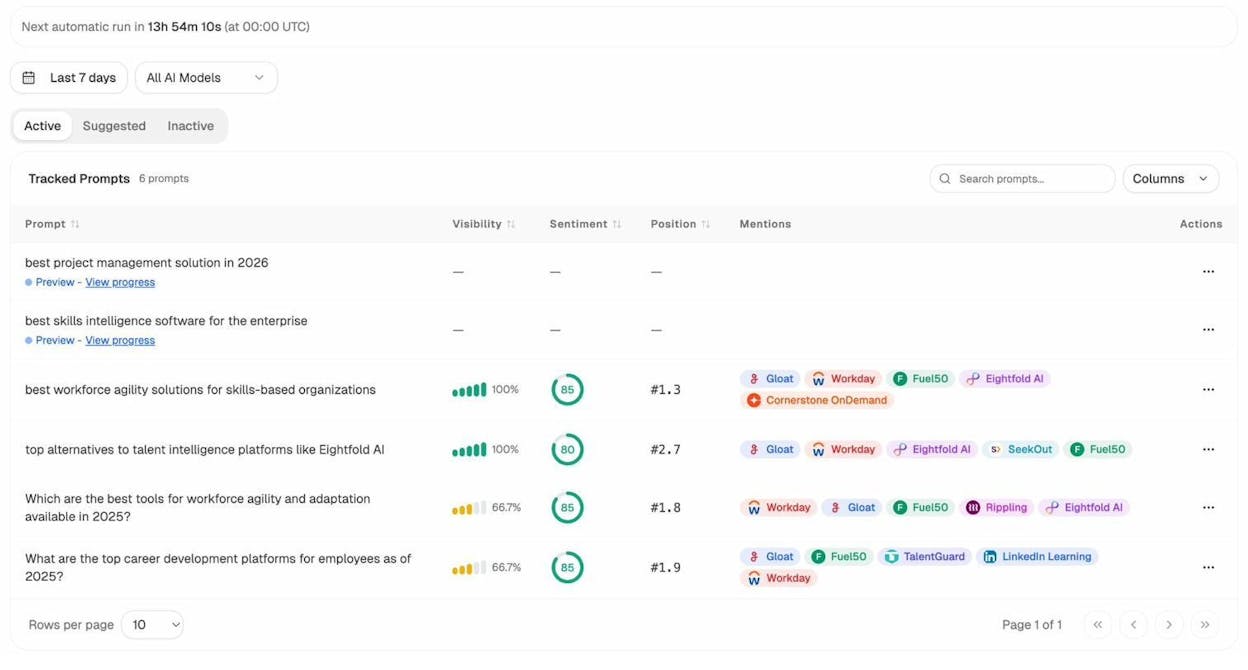
You can also see which competitors appear alongside you, how your position changes daily, and whether sentiment is improving or declining.

Don’t know which prompts to track? No worries. Analyze has a prompt suggestion feature that suggests the actual bottom of the funnel prompts you should keep your eyes on.
Audit which sources models trust and build authority where it matters

Analyze reveals exactly which domains and URLs models cite when answering questions in your category.
You can see, for instance, that Creatio gets mentioned because Salesforce.com's comparison pages rank consistently, or that IssueTrack appears because three specific review sites cite them repeatedly.

Analyze shows usage count per source, which models reference each domain, and when those citations first appeared.

Citation visibility matters because it shows you where to invest. Instead of generic link building, you target the specific sources that shape AI answers in your category. You strengthen relationships with domains that models already trust, create content that fills gaps in their coverage, and track whether your citation frequency increases after each initiative.
Prioritize opportunities and close competitive gaps

Analyze surfaces opportunities based on omissions, weak coverage, rising prompts, and unfavorable sentiment, then pairs each with recommended actions that reflect likely impact and required effort.
For instance, you can run a weekly triage that selects a small set of moves—reinforce a page that nearly wins an important prompt, publish a focused explainer to address a negative narrative, or execute a targeted citation plan for a stubborn head term.
Google Search Console: best digital marketing tool for search performance and technical SEO
Key Google Search Console standout features
-
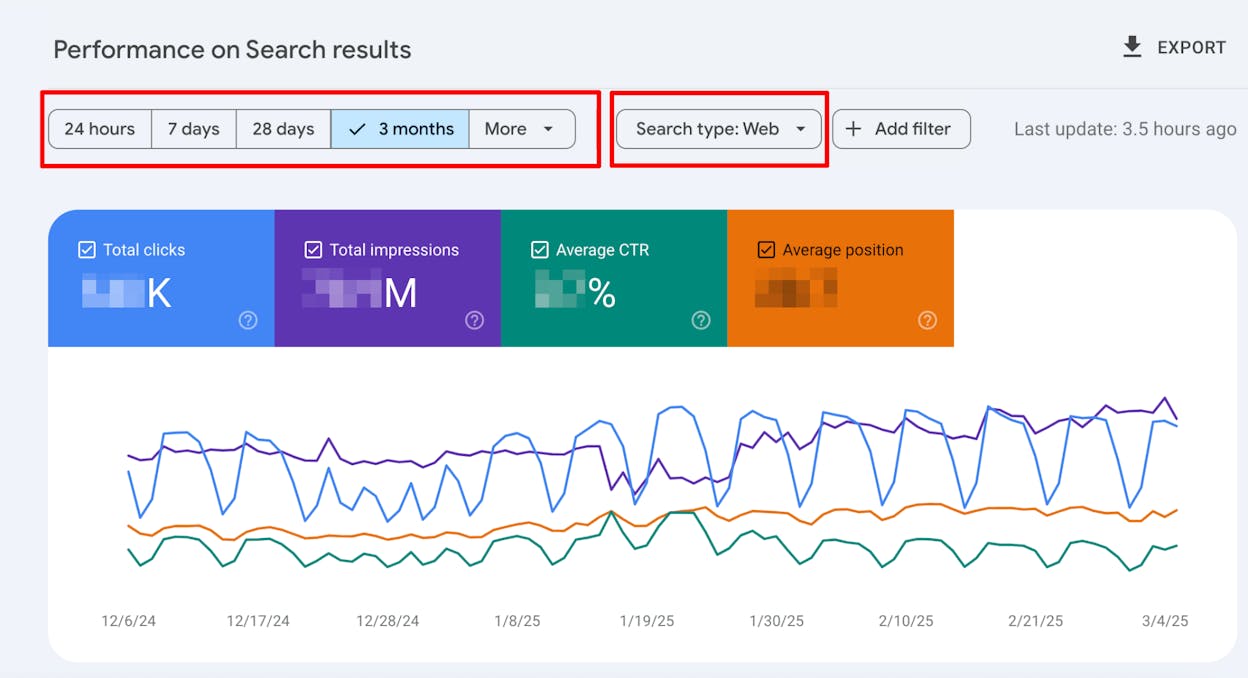
Shows real data on impressions, clicks, CTR, and average position for every page and query
-
Lets you inspect any URL to see index status, coverage issues, and crawl errors
-
Tracks Core Web Vitals so you can spot speed, layout, and interaction problems on key pages
-
Highlights mobile usability, rich result, and security issues that can hurt how you appear in search
-
Connects cleanly with other Google tools so you can link search data with traffic and revenue data
Google Search Console gives your team a clear window into how Google sees your site, which removes guesswork from many SEO talks. Instead of arguing about which keywords matter, you can see the exact search terms that bring people to your pages, along with how often those terms show your site and how often people actually click. This makes it much easier to spot pages that earn many impressions but weak clicks, and those pages often become the fastest wins in your content backlog.

Beyond the core reports, the URL inspection and coverage views help you move faster when you ship new content or large site changes. You can see when Google picked up a page, which version it chose as canonical, and whether any technical issue blocks proper indexing, which gives both writers and developers much clearer feedback than high level traffic graphs. When you pair that with Core Web Vitals and mobile usability reports, you get one simple place where content, product, and engineering can agree on which search problems deserve attention this month.
When teams lean only on Google Analytics or other analytics tools, they often miss the step between publishing and traffic growth, which is search discovery. Google Search Console fills this gap by showing how many pages actually appear in search and which of them struggle to move past low positions. This makes the tool a key part of any digital marketing workflow that wants to connect content ideas with real search demand and technical health. Over time, you can use it to track how fixes, new pages, and site speed work influence impressions, clicks, and click-through rate on the terms that matter most to your business.
On the other hand, Google Search Console has clear limits that shape how you use it and where it fits in your stack. It does not show any competitor data, which means you still need separate tools for backlink research, market share tracking, and broader SERP analysis. It also only shows queries where your site already appears, so it will not replace keyword research tools that help you discover new topics or search terms you do not yet reach.

The interface can also feel heavy for people who do not live in SEO dashboards every day, because reports use terms like coverage, enhancement, and Core Web Vitals that need some base knowledge. The data exports and row limits can slow work for very large sites, so serious teams often pull data into Looker Studio or a warehouse to get deeper trend lines. For post-click behavior, you still need tools like Google Analytics, Hotjar, or product analytics, since Search Console stops at the moment someone reaches your page.
Pricing plans
Google Search Console is completely free to use for any verified site, which means your only real cost comes from the time your team spends setting it up, checking reports, and acting on the issues and insights it shows each week.
How Google Search Console fits in your digital marketing stack
|
Aspect |
Why it matters for digital marketing |
How Google Search Console helps |
|
Search visibility |
You need to know whether people even see your pages in search |
Shows impressions, clicks, CTR, and average position for queries and pages |
|
Content performance |
You want to see which topics and pages earn real demand |
Reveals which queries trigger each page and where those pages rank |
|
Technical SEO and site health |
Hidden errors can block pages from ranking or even appearing |
Flags coverage errors, crawl issues, and security or manual action problems |
|
User experience signals |
Slow or unstable pages scare users and hurt search performance |
Reports Core Web Vitals and mobile usability problems on key templates |
|
Launch and migration checks |
Big site changes can break search traffic quietly if you miss issues |
Lets you test and re-submit URLs, sitemaps, and see how new structures index |
|
Analytics and reporting stack |
You need one source of truth for search data in reports and dashboards |
Integrates with GA4 and exports data to feed BI tools and custom dashboards |
Best use cases
-
Checking which pages earn many impressions but low click-through rate, then improving titles and descriptions
-
Finding pages that dropped in clicks after a site change and tracing the issue back to coverage or indexing problems
-
Tracking how Core Web Vitals and mobile fixes impact search performance for high value landing pages
-
Giving writers, SEOs, and developers one shared view of how Google reads the site before and after big releases
Bottom line: Google Search Console is the base layer for serious search work, because it shows how Google itself sees your site and where that view breaks. Use it as your search performance and health source of truth, then layer other tools on top when you need deeper research or competitor insight.
Ahrefs: best digital marketing tool for SEO & competitive research
Key Ahrefs standout features
-
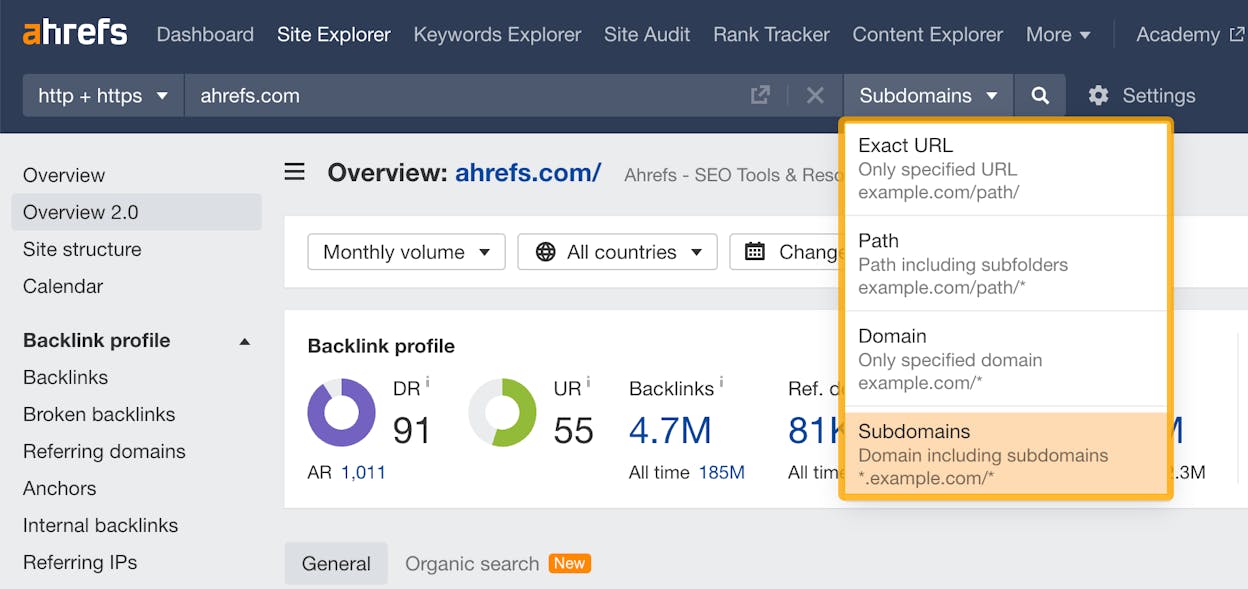
Site Explorer gives you a deep look at your backlink profile, competitor backlinks, organic traffic, paid traffic, and top-performing pages across any domain.
-
Keywords Explorer shows keyword volume, difficulty, clicks, traffic potential, search intent, and full SERP breakdowns across many search engines.
-
Site Audit crawls your site and surfaces 170+ technical issues, including slow pages, duplicate content, Core Web Vitals, broken links, redirect chains, and indexability problems.
-
Rank Tracker monitors keyword positions over time across countries, devices, and search engines so you can measure the impact of SEO work.
-
Content Explorer finds top-performing content, uncovers link-building opportunities, and lets you run content gap analysis across entire industries.
Ahrefs gives teams one place to run the full SEO lifecycle, from research to analysis to monitoring. Its strength comes from a massive proprietary crawler and index that powers deep backlink data and competitor intelligence, so you can see which sites link to your rivals and how those links help them rank. This makes it easy to find gaps where your site needs more authority, and it gives you a clear plan for link-building that is based on real data rather than guesswork.

The platform also gives you rich keyword research data so you can choose the right terms for your content plan. You see search demand, search intent, click behavior, and how hard it will be to rank. When you combine this with content gap analysis, you can quickly see which topics competitors rank for that you don’t. That helps you build content that fills actual holes in your visibility, instead of writing broad posts that do not drive traffic.
Fine-grained technical insight is another core strength. Site Audit gives you a fast view of the issues that hold your rankings back, and the health score helps teams track improvements over time. You can check Core Web Vitals, broken links, index issues, and multiple on-page errors, which helps developers fix the most important problems first. When you pair Site Audit with Rank Tracker and Keyword Explorer, you get a very complete picture of how technical fixes impact search performance.

Despite all this power, Ahrefs brings a few drawbacks you should understand before you adopt it. The tool is expensive, especially when you scale projects, tracked keywords, or user seats, so smaller teams sometimes struggle with price. The platform also can feel overwhelming for beginners because backlink metrics, keyword difficulty, SERP features, and audit reports all require some SEO knowledge to interpret correctly. Without that knowledge, people can chase the wrong opportunities or misread trends.
Ahrefs is also not the strongest choice for certain specialized workflows. Some teams prefer more advanced technical crawlers, deeper local SEO tools, or platforms built for PPC management, which Ahrefs does not specialize in. Lastly, Ahrefs has no free plan, and its limited trial options mean you often must commit before seeing how the data fits your workflow. This makes it a higher-risk purchase for teams without prior SEO experience.
Pricing plans
Ahrefs offers four main pricing tiers. Lite ($129/mo) fits small sites with a few projects and basic data needs. Standard ($249/mo) works for freelancers and consultants who need richer keyword, content, and competitor tools. Advanced ($449/mo) is built for in-house teams that want more projects, more keywords, and deeper historical data. Enterprise ($1,499/mo) adds API access, security controls, unlimited history, and large-scale limits for big teams with heavy data needs.
How Ahrefs fits in your digital marketing stack
|
Aspect |
Why it matters for digital marketing |
How Ahrefs helps |
|
Competitive research |
You need to see where competitors win traffic and links |
Shows backlinks, top pages, paid/organic traffic, and keyword overlaps |
|
Keyword and content planning |
You need topics that match demand and ranking potential |
Offers traffic potential, difficulty, intent, SERP features, content gaps |
|
Technical SEO |
Technical issues can silently block rankings |
Crawls site for 170+ errors and health checks |
|
Link building |
High-quality links drive authority and rankings |
Finds backlink gaps and top link sources in your niche |
|
Performance trends |
You need to measure impact of SEO changes |
Tracks rankings over time across locations and devices |
Best use cases
-
Finding backlink opportunities and competitive gaps that shape your link-building strategy
-
Running keyword and content research for large content programs that need to scale
-
Auditing technical issues and tracking improvements over time
-
Tracking how rankings move after content updates, link acquisition, or site changes
Ahrefs is a powerful all-in-one SEO suite for teams that want deep data, strong competitive insights, and reliable technical audits. It fits best when you need a serious SEO engine, and less when your budget or experience level makes a large tool overwhelming.
Semrush: best digital marketing tool for SEO, PPC & competitive intelligence
Key Semrush standout features
-
Keyword research & Keyword Magic Tool — gives access to one of the largest keyword databases online so you can find long-tail terms, see keyword difficulty, check CPC estimates, and plan content with real data.
-
SEO & site audit tools — scan your site for broken links, duplicate content, meta issues, slow pages, and structural problems so you can fix issues that hurt rankings.
-
Competitive & domain analysis (organic + paid) — lets you inspect any domain to see its organic traffic, paid ads, backlinks, top-performing pages, and keyword portfolio.
-
PPC & advertising research tools — show competitor ad keywords, ad copy, landing pages, and spend patterns so you can model high-performing paid campaigns.
-
Content marketing & content gap analysis — helps you find topics your competitors rank for but you don’t, plus optimization ideas for on-page and semantic improvements.
Semrush brings all core digital marketing tasks into one platform so your team can build SEO and PPC strategies with clear, data-backed insight. Its keyword tools make it easier to find ideas that match real search demand, because you see search volume, difficulty, and cost data in one clean workflow. This helps writers and strategists build content plans that can rank and convert instead of guessing which topics will work.

Its competitor data goes even deeper. You can look at any domain and understand where their organic traffic comes from, how they get clicks in paid search, and which pages give them the most reach. This context makes strategy work much easier because you can target gaps that matter instead of chasing broad, low-value keywords. With content gap analysis, you can also see which topics you are missing, which helps you grow visibility in the places your competitors already win.
The platform also gives teams strong technical insight. The Site Audit tool checks for slow pages, missing tags, duplicate content, broken links, Core Web Vitals problems, and many other issues that block search performance. When your team fixes these problems and pairs them with strong keyword and content planning, you usually see improvements across many pages at once. This is why Semrush works well for content-heavy sites; it helps you maintain technical quality while expanding your content footprint.
Where Semrush stands out even more is in PPC and ad research. You can see ads competitors run, the keywords they bid on, and the landing pages they use. This helps paid teams reduce wasted spend, shape better copy, and plan campaigns with real market signals instead of assumptions. Having SEO and PPC data in one place reduces tool switching and makes reporting more cohesive.

The tool does come with limitations that matter when you choose it. Semrush has many modules, and the interface can feel dense when you first start. If your team is new to SEO or PPC, the number of reports may slow things down until you learn which ones matter most. Some parts of the tool also feel lighter than dedicated platforms focused on one discipline, especially when you need very advanced technical audits or high-depth backlink analysis.
Price is another important factor. Semrush becomes expensive when you scale projects, users, tracked keywords, or add modules like advanced traffic analytics. Smaller teams might struggle to justify the cost unless they use several features every week. Mid-size and large teams often see clear value, but they still must plan their usage so they do not pay for tools they rarely touch.
Pricing plans
Semrush offers three AI-powered plans. Starter ($165.17/mo billed annually) gives new teams core SEO and AI visibility tools, including keyword research, the AI Visibility Toolkit, and tracking for up to five websites. Pro+ ($248.17/mo billed annually) adds historical data, content optimization, cannibalization analysis, and higher limits for prompts, keywords, and monitored sites. Advanced ($455.67/mo billed annually) is built for teams that need scale and automation, with share-of-voice reporting, API access, and support for up to forty monitored websites.
How Semrush fits in your digital marketing stack
|
Aspect |
Why it matters for digital marketing |
How Semrush helps |
|
Keyword research |
You need accurate data to plan content that ranks and converts |
Shows search volume, difficulty, CPC, long-tail variants, and intent |
|
Competitive research |
You want to understand where rivals get traffic |
Reveals organic keywords, paid keywords, backlinks, ads, and top pages |
|
Technical SEO |
Technical issues can quietly block visibility |
Crawls site for broken links, duplicate content, speed issues, meta problems |
|
PPC planning |
Paid search works better with market insights |
Gives competitor ad data, keyword costs, landing pages, and copy ideas |
|
Content strategy |
You need to fill gaps in your niche |
Finds topics competitors rank for that you don’t and gives optimization tips |
|
Performance tracking |
You need to measure progress over time |
Tracks rankings daily and helps connect fixes to results |
Best use cases
-
When you want one platform that manages SEO, PPC, content, and competitor intelligence
-
Building content and keyword strategies for growing or multi-team organizations
-
Running paid search and organic search campaigns side-by-side
-
Mapping competitor strengths and spotting gaps you can win quickly
Semrush gives digital marketing teams a powerful mix of SEO, PPC, and competitive intelligence in one system. It offers data depth and strong planning tools, but it works best when teams have the budget and time to use its wide feature set consistently.
Surfer SEO: best on-page optimization platform for data-driven content that ranks
Key Surfer SEO standout features
-
SERP Analyzer that benchmarks top-ranking pages for any keyword.
-
Content Editor with real-time SEO scoring and semantic keyword suggestions.
-
Keyword research, topic clusters, and topical-map tools for planning.
-
Content Audit to improve and refresh existing articles.
-
AI-assisted writing, outlines, and optimization features.
How Surfer SEO supports content creation & optimization workflows
Surfer SEO replaces guesswork in on-page SEO with data from real search results. When you target a keyword, Surfer analyzes the top-performing pages and extracts the structures, word counts, entities, subtopics, and semantics that correlate with rankings. This benchmark becomes the blueprint inside the Content Editor, where you write or paste your content and receive live feedback on how well it aligns with competitive signals. For teams producing a high volume of SEO articles, this creates a consistent and repeatable optimization workflow that prevents under-optimized content from shipping.
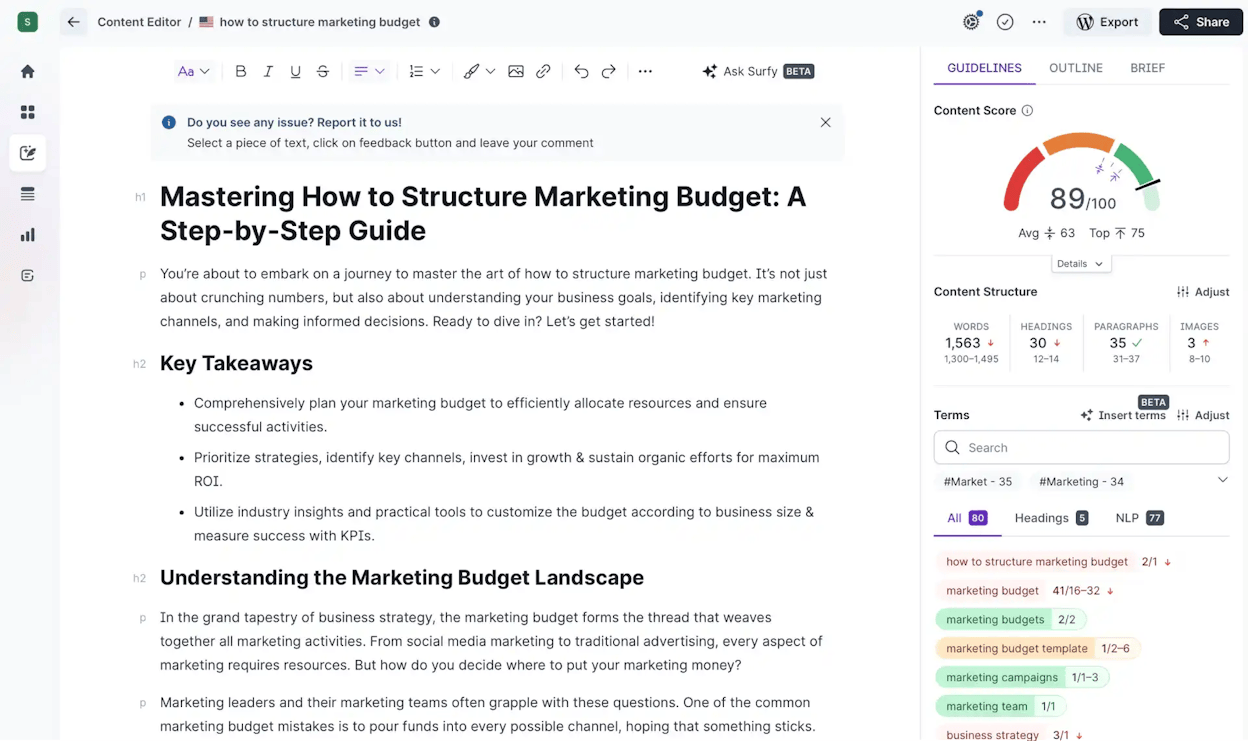
The platform works equally well for new content and existing content. The Content Audit feature identifies gaps in older articles—missing keywords, thin sections, weak internal linking, or outdated structures—making refresh cycles more strategic. Beyond single pages, Surfer’s keyword research and topical maps help build clusters, discover content gaps, and plan a broader strategy that supports topical authority. AI-assisted features then accelerate outlines, rewrites, and optimization tasks, reducing time spent on manual SEO tuning.
Surfer does come with boundaries. Because it focuses heavily on on-page signals, it doesn’t replace technical SEO, backlinks, performance optimization, or site architecture improvements. Over-optimizing purely by Surfer’s score can make content formulaic if used without editorial judgment. Keyword research and competitive data are helpful but not as deep as full SEO suites built for large-scale keyword analysis. And like most SaaS content tools, usage caps and AI-assisted features require higher-tier plans.

Pricing & access
Surfer’s Essential plan starts at $99/month (discounted to $79/month when billed annually), offering core optimization, AI-assisted writing, and collaboration features. The Scale plan begins at $219/month (or $175/month annually) and raises limits significantly while adding 25 AI prompts, AI-search visibility tracking, and performance monitoring. Enterprise plans begin at $999/month with SSO, API access, advanced reporting, 16+ months of data, priority support, and strategic SEO advisory services. Costs rise with content volume and team size, making higher tiers best for teams producing content at scale.
How Surfer SEO fits in your SEO & content stack
|
Aspect |
Why it matters |
How Surfer helps |
|
Data-driven SEO |
Ranking factors aren’t obvious |
SERP benchmarks guide structure, keywords, and depth |
|
Content creation |
You want SEO built in from draft to publish |
Real-time scoring ensures optimization as you write |
|
Content refresh |
Older pages lose competitiveness |
Audits show what to update to regain rankings |
|
Topical authority |
Clusters outperform isolated posts |
Keyword + topical maps guide cluster planning |
|
High-volume workflows |
Many articles need consistency |
AI + editor + audits create repeatable SEO processes |
Best use cases
-
Teams producing SEO-driven articles, guides, or service pages
-
Content refresh cycles that need structured audits
-
Writers creating content clusters or topical authority strategies
-
Marketers who want real-time optimization while drafting
-
Small teams needing structured SEO without complex tools
Surfer SEO is a strong on-page optimization platform that brings structure and competitive data into every piece of content you publish. It’s ideal for teams who want clear SEO guidance and repeatable workflows, though it works best when paired with broader SEO strategy and human editorial judgment.
Google Keyword Planner: best free keyword research tool for demand sizing & early-stage SEO planning
Key Google Keyword Planner standout features
-
Seed-based and URL-based keyword discovery for expanding topic ideas.
-
Search-volume and trend data to estimate demand and seasonality.
-
Competition levels and bid suggestions for paid search strategy.
-
Forecasts to predict impressions, clicks, and CPC based on budgets.
-
Location, language, and network filters for localized keyword research.
How Google Keyword Planner supports keyword research & content strategy
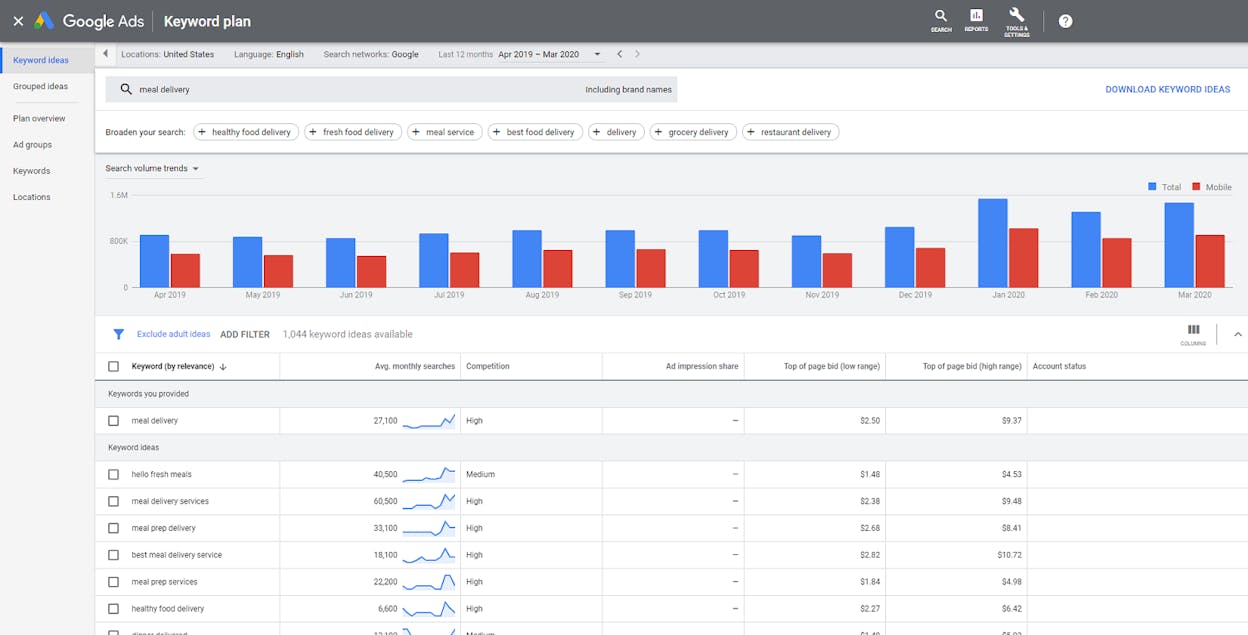
Google Keyword Planner operates as a foundational layer for discovering and evaluating keyword opportunities because it draws directly from Google’s own search data. When you input seed terms or a website, the tool returns related keywords, variations, and long-tails, giving you a broad view of demand around a topic. For early content planning, this helps outline what people actually search and how interest fluctuates over time. The volume and trend indicators become an initial filter for judging whether a topic is worth producing content for.

GKP also informs competitive context through ad-focused metrics such as bid ranges and competition level. While these metrics were designed for paid search, they help signal whether a keyword is saturated or relatively accessible. For teams that combine SEO with paid acquisition, forecasts provide an additional layer of insight by estimating traffic outcomes based on budget, geography, and device distribution. This makes GKP especially valuable when switching between organic content planning and paid advertising campaigns.
The tool is free and easy to access, but it has structural constraints. Search-volume data is often presented as wide ranges unless your account has ad spend, which limits precision for SEO prioritization. Long-tail and low-volume keywords can be under-reported or truncated, which may hide valuable opportunities. And because GKP was built for advertising, it provides little organic SEO context—no SERP difficulty, no competitor analysis, and no content-quality signals. As a result, it works best as a starting point rather than a full SEO solution.

Pricing & access
Google Keyword Planner is free for anyone with a Google Ads account, even if no campaigns are active. Search volume, keyword suggestions, competition levels, and forecasts remain accessible at no cost, though certain data becomes more precise when linked to active ad spend. For most small businesses, marketers, and content teams, the free tier is sufficient for initial keyword discovery and demand sizing.
How Google Keyword Planner fits in your research & SEO stack
|
Aspect |
Why it matters |
How GKP helps |
|
Keyword discovery |
You need topic ideas fast |
Seed + URL search expands topic clusters |
|
Demand sizing |
You want to prioritize content based on interest |
Volume ranges and trends estimate real search behavior |
|
Paid + organic alignment |
Many teams combine SEO + ads |
Bid ranges and forecasts help plan dual strategies |
|
Regional targeting |
Localized SEO requires geo-specific data |
Filters refine keywords by country, region, or language |
|
Low-cost research |
Early-stage teams need free tools |
GKP provides essential insights at zero cost |
Best use cases
-
Early-stage keyword discovery for content planning
-
Localized SEO for specific countries, regions, or languages
-
Building initial keyword pools before using paid tools
-
Aligning SEO and Google Ads campaigns
-
Prioritizing topics based on estimated intent and demand
Google Keyword Planner is a reliable, free starting point for keyword discovery and demand estimation. It’s excellent for expanding topic ideas and sizing interest, but it needs to be paired with deeper SEO tools for competitive analysis, SERP insights, and long-tail precision.
Social media management
Social media is a core part of any digital marketing stack, and the right tool keeps everything consistent. We start this section with the platform built to handle it at scale.
Hootsuite: best digital marketing tool for social media management & scheduling
Key Hootsuite standout features
-
Unified social dashboard & scheduling — manage and publish across Facebook, Instagram, X/Twitter, LinkedIn, YouTube, and more from one place.
-
Calendar, bulk scheduler & automation — drag-and-drop calendar, bulk upload, and automated posting for steady content flow.
-
Unified inbox & social listening — monitor DMs, comments, mentions, and conversations across platforms from a single inbox.
-
Analytics, reporting & best-time recommendations — track reach, clicks, engagement, follower growth, and get data-backed posting times.
-
Team collaboration & workflow tools — roles, approvals, asset libraries, and routing tools built for agencies and multi-user teams.
Hootsuite is built to turn social media management from a scattered, multi-tab routine into a streamlined system you run from one dashboard. Instead of hopping between every network to post or respond, you control your entire social presence from one place. The scheduling tools help you maintain a steady posting rhythm, especially if you run dozens of accounts or manage content for multiple brands. Bulk scheduling and automation remove daily manual work while keeping content consistent.

The unified inbox and listening tools give you a clear view of conversations around your brand. Comments, mentions, and DMs across networks show up in one feed, which helps teams respond fast and avoid missing important messages. This matters for brand trust, community management, and customer support. The social listening layer adds another dimension by spotting trends, sentiment shifts, and competitor mentions early.
On the measurement side, Hootsuite gives you cross-channel analytics so you can see what actually works. Instead of guessing, you know which posts drive reach and engagement, which networks grow fastest, and when your audience is most active. These insights guide smarter content and better editorial planning. For teams with multiple stakeholders, collaboration tools — roles, workflows, approvals — make production smoother and protect brand quality.

But Hootsuite is not always the perfect fit. Its pricing sits closer to mid- and enterprise-level tools, so small creators or single-operator brands might find it expensive compared to simpler apps. The feature set is broad and deep, which makes the interface feel heavier than lightweight alternatives. And while powerful, some advanced modules require learning time, which may be more than very small teams can commit to.
Pricing plans
Hootsuite offers three tiers. Standard ($99/user per month billed annually) includes up to ten social accounts, unlimited scheduling, AI captioning, best-time-to-post insights, and a unified inbox. Advanced ($249/user per month billed annually) adds unlimited accounts, custom analytics, bulk scheduling up to 350 posts, approval workflows, deeper listening windows, and advanced routing/reporting. Enterprise (custom) includes SSO, Talkwalker-powered listening, advanced analytics, AI chatbots, compliance tools, Salesforce integration, and full multi-user governance.
How Hootsuite fits in your social media stack
|
Aspect |
Why it matters for digital marketing |
How Hootsuite helps |
|
Multi-platform management |
Managing several social platforms separately wastes time and increases errors |
Centralizes publishing and account management in one dashboard |
|
Consistent posting cadence |
Social reach drops when posting becomes irregular or reactive |
Calendar, automation, and bulk scheduling ensure steady output |
|
Real-time engagement & support |
Fragmented DMs/comments cause slow replies and missed messages |
Unified inbox + listening bring all interactions into one feed |
|
Cross-channel performance tracking |
Marketers need aggregated ROI across networks |
Built-in analytics, reports, and best-time insights |
|
Team collaboration |
Multi-role teams need approvals and structure to protect brand voice |
Roles, permissions, workflows, and shared libraries |
|
Coordinating paid + organic |
Paid and organic teams often lack unified reporting |
Supports planning and monitoring of both in one workspace |
Best use cases
-
Agencies managing high-volume client accounts
-
Brands needing unified scheduling, engagement, and analytics
-
Teams that rely on social listening to monitor sentiment and competitor activity
-
Organizations wanting structured workflows and approvals for social content
Hootsuite is ideal for brands that treat social as a multi-platform, multi-team responsibility. It gives you scheduling, listening, analytics, and collaboration tools in one system — powerful when used fully, but heavier than needed for small or simple workflows.
Later: best digital marketing tool for visual-first social media scheduling
Key Later standout features
-
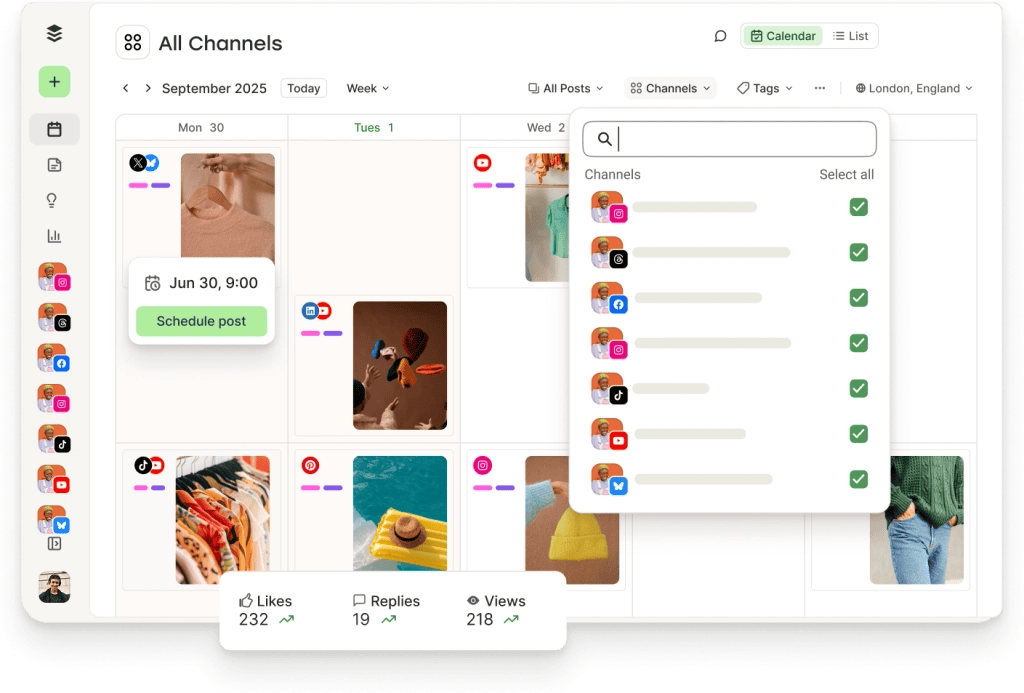
Visual scheduler & content calendar — a drag-and-drop planner and feed preview that lets you map out your social grid before it goes live.
-
Multi-network scheduling — supports Instagram, Facebook, TikTok, Pinterest, LinkedIn, Twitter/X, YouTube, and more from one streamlined dashboard.
-
“Link in Bio” mini-site — creates a branded landing page that turns Instagram/TikTok traffic into clicks, store visits, or conversions.
-
Content library & media management — one place to store, tag, and organize images and videos so content is easy to repurpose.
-
Auto-publishing for supported posts — schedule images, videos, reels, and TikToks in advance so your content stays consistent without daily manual publishing.
Later is built for marketers who think visually and plan their social presence like an editorial calendar. The drag-and-drop planner and feed preview make it easy to design a cohesive aesthetic, which is especially important for brands on Instagram, TikTok, and Pinterest. Instead of guessing how posts will look together, teams can shape full campaigns in advance and maintain a consistent style frame by frame.

Cross-platform scheduling helps small teams and creators save time by publishing to several networks from the same workspace. The content library keeps all assets in one place so you can reuse media across campaigns or brands without digging through folders. This keeps production organized and supports a steady posting rhythm even when marketing bandwidth is limited.
Its “Link in Bio” mini-site adds a simple conversion layer to social content. Rather than relying on a single static link, marketing teams can create a multi-link hub that directs visitors to product pages, sign-ups, or blog posts. For creators or small brands, that feature gives social engagement a clear path toward traffic and revenue.

Still, Later is intentionally lightweight — which means it has limits. It does not offer deeper social listening, multi-inbox support, or enterprise-grade permissions like Hootsuite or Sprout Social. Analytics remain basic and may feel too shallow for brands that require advanced reporting or multi-year trend data. Some users note that auto-publishing to certain formats or platforms is not always reliable, which can be challenging during tight posting windows.
Pricing plans
Later offers three simple tiers. Starter ($18.75/month billed yearly) is built for basic scheduling and includes one Social Set, one user, Link in Bio, basic analytics, and up to 30 scheduled posts per profile. Growth ($37.50/month billed yearly) adds two Social Sets, collaboration and approvals, smart scheduling with trend insights, a social inbox, up to 180 posts per profile, and expanded analytics. Scale ($82.50/month billed yearly) is designed for brands that need deeper visibility, offering six Social Sets, four users, custom analytics, competitive benchmarking, industry trend insights, unlimited posts, and priority support.
How Later fits in your social media stack
|
Aspect |
Why it matters for digital marketing |
How Later helps |
|
Visual planning & aesthetic |
Grid design and brand cohesion influence engagement on visual platforms |
Feed preview + drag-and-drop layout let you design posts before publishing |
|
Cross-platform posting |
Managing many networks manually wastes time and creates inconsistency |
One scheduler handles Instagram, TikTok, Pinterest, LinkedIn, and more |
|
Content reuse & asset management |
Teams often lose time hunting for images or re-creating assets |
Media library stores and organizes everything in one place |
|
Social-to-site conversions |
Instagram/TikTok allow only one link, limiting funnel paths |
Link in Bio creates a multi-link landing page to drive traffic |
|
Lightweight workflows |
Small teams need a simple, fast posting rhythm without complexity |
Easy scheduling, auto-publishing, and minimal setup keep things simple |
Best use cases
-
Visual-centric brands and creators focused on Instagram, TikTok, Pinterest, or lifestyle content
-
Solo marketers or small teams wanting easy cross-platform scheduling
-
Product brands and influencers who care about feed design and aesthetic consistency
-
Creators needing a simple “plan, schedule, and publish” workflow without enterprise overhead
Later is the best fit when you need a clean, visual-first scheduler that simplifies planning, keeps your feed consistent, and helps you maintain a steady posting rhythm across networks. It won’t replace heavy-duty enterprise tools, but for creators and small brands, it nails exactly what matters.
Buffer: best digital marketing tool for lightweight social media scheduling
Key Buffer standout features
-
Simple scheduler & multi-channel support — lets you connect Facebook, Instagram, X/Twitter, LinkedIn, Pinterest, and more, then schedule or queue posts across platforms from one clean dashboard.
-
Visual content calendar & post queue — organize posts in a calendar or queue, drag and drop content, and set publishing times far in advance.
-
Post composer & media support — supports text, links, images, GIFs, and videos so you can create rich media posts without extra tools.
-
Lightweight analytics & performance tracking — see likes, clicks, shares, and basic engagement trends to understand which posts resonate.
-
Free forever plan + scalable pricing — includes up to 3 channels and 10 scheduled posts per channel, with paid plans that scale by channel and unlock more features.
Buffer focuses on doing the basics extremely well: simple scheduling, clean publishing, and clear content organization. Its interface is one of the easiest to learn in the social media space, which makes it ideal for solo creators, freelancers, or small brands that need consistent posting but don’t want the complexity of enterprise tools. The onboarding is quick — connect your accounts, write your posts, and drop them into the queue — which removes friction from your daily workflow.

Because Buffer supports all major social platforms, it simplifies cross-posting without forcing you into a bulky, multi-feature dashboard. The composer handles most media types, and the visual calendar helps you batch content ahead of time. This lets you build out a full week or month of posts in one session and trust Buffer to publish everything automatically. That “set-and-forget” rhythm is one of the main reasons smaller teams love the tool.
Buffer’s analytics are intentionally lightweight. You get enough data to see what works — likes, clicks, reach patterns, posting times — without drowning in charts or dashboards. For many small brands, that level of insight is enough to adjust strategy and keep improving. And because Buffer runs a generous free plan with real scheduling power, you can stay consistent even on a tight budget.

But Buffer is lightweight for a reason, and that comes with clear trade-offs. Its analytics are basic compared to more advanced tools, so it’s not ideal for brands needing deep reporting or multi-year historical data. It also lacks social listening, advanced engagement inboxes, and enterprise workflow controls — features teams often rely on when they manage high-volume conversations or multiple stakeholders. For agencies or larger teams, these gaps can become limiting.
Pricing plans
Buffer offers three simple pricing tiers. Free includes three channels, up to 10 scheduled posts per channel, basic analytics, an AI assistant, and a community inbox — great for small creators. Essentials ($5/month per channel, billed yearly) unlocks unlimited scheduling, advanced analytics, a hashtag manager, and first-comment scheduling. Team ($10/month per channel, billed yearly) adds unlimited users, access levels, content approval workflows, and all Essentials features for collaborative teams.
How Buffer fits in your social media stack
|
Aspect |
Why it matters for digital marketing |
How Buffer helps |
|
Lightweight, fast scheduling |
Small teams need simple tools that don’t slow them down |
Clean dashboard + simple queues make posting frictionless |
|
Multi-platform publishing |
Posting separately on each network wastes time |
One dashboard schedules posts across all major platforms |
|
Consistent posting cadence |
Engagement drops when posting is inconsistent |
Queue + calendar help you batch and automate content |
|
Simple solo/team workflows |
Not every brand needs advanced approvals or governance |
Designed for one-person or small-team management |
|
Basic performance insights |
Small brands need enough data to improve, not overwhelm |
Engagement metrics show what works without complexity |
|
Budget-conscious marketing |
New creators and small businesses need low-cost tools |
Free plan + low-cost upgrades keep budgets in check |
Best use cases
-
Freelancers and solopreneurs who need a fast, simple posting workflow
-
Small brands with a few social channels but no need for deep analytics
-
Teams focused on publishing frequency rather than heavy community management
-
Content creators who want a clean interface and a low-cost scheduling tool
Buffer won’t replace full-scale social media platforms with deep analytics or listening features — but for small teams and solo creators who want simple, reliable scheduling, it delivers exactly what matters: consistency, ease of use, and affordability without unnecessary complexity.
Sprout Social: best digital marketing tool for enterprise social media & listening
Key Sprout Social standout features
-
Full social publishing & scheduling across networks — plan, draft, queue, and publish to Facebook, Instagram, X/Twitter, LinkedIn, YouTube, Pinterest, and more from one unified dashboard.
-
Smart Inbox + engagement & customer-care tools — consolidates all comments, DMs, mentions, and reviews into one inbox so teams never miss a conversation.
-
Advanced analytics & cross-network reporting — detailed dashboards show engagement, reach, conversion trends, and channel comparisons for data-driven planning.
-
Social listening & sentiment analysis — monitors keywords, hashtags, conversations, competitor moves, and audience sentiment to help brands understand how people feel and why.
-
Collaboration & workflow controls — roles, approvals, tagging, case management, saved replies, and auto-moderation support agencies and large multi-person teams.
Sprout Social works as a full social operations platform, not just a scheduler. It combines publishing, engagement, listening, analytics, and customer care in one place, which helps teams stop switching between apps. The Smart Inbox gives brands a single source of truth for conversations, which reduces missed messages and speeds up responses — a big advantage for businesses where reputation and customer interactions matter.

Its analytics make social performance measurable. Instead of guessing what drives engagement, teams see clear data on campaigns, content types, audience behavior, and growth trends. When paired with social listening, Sprout helps you catch sentiment shifts early, monitor emerging conversations, and understand what competitors are doing — which is critical for brand awareness and risk management.
Sprout also scales smoothly inside bigger teams. Approvals improve quality control. Roles prevent errors. Shared asset libraries speed content creation. Case management supports customer-care teams. These workflow features make Sprout ideal for enterprise environments where multiple people contribute to content, engagement, and reporting.

But because of this depth, Sprout comes with trade-offs. Its price is high compared to lightweight tools, which can make it hard for small businesses or solo creators to justify. The platform also requires onboarding time and a learning curve because it offers many modules and customization options. For smaller teams, that complexity might outweigh the benefit.
Pricing plans
Sprout Social offers four tiers. Essentials ($79 per seat/month) includes advanced scheduling, optimal send times, profile performance, and AI alt text. Standard ($199 per seat/month) adds the Smart Inbox, collaboration tools, keyword monitoring, review moderation, and case management. Professional ($299 per seat/month) unlocks unlimited profiles, deeper analytics, digital asset library, message tagging, and competitive/keyword insights. Advanced ($399 per seat/month) adds AI enhancements, sentiment in the inbox, helpdesk integrations, productivity reporting, and message spike alerts. A 30-day free trial is available, with annual billing.
How Sprout Social fits in your social media stack
|
Aspect |
Why it matters for digital marketing |
How Sprout Social helps |
|
Multi-network publishing |
Managing many profiles across platforms becomes messy and time-consuming |
Unified scheduler + multi-platform publishing |
|
Engagement & customer care |
Missed messages damage trust and customer experience |
Smart Inbox centralizes all comments, DMs, and mentions |
|
Cross-channel analytics |
Marketers need to prove ROI and optimize strategy using real data |
Robust analytics track reach, engagement, conversions, and content impact |
|
Social listening & sentiment |
Brands must monitor reputation and industry conversations in real time |
Listening dashboards track keywords, sentiment, topics, and competitors |
|
Team governance & workflow |
Larger teams need structure to avoid mistakes and maintain consistency |
Approvals, roles, tagging, saved replies, and case management |
|
High-volume content operations |
Agencies and enterprise teams handle large-scale publishing |
Automation, moderation, asset libraries, and streamlined workflows |
Best use cases
-
Medium and large businesses managing many profiles or brands
-
Agencies handling clients’ publishing, engagement, and reporting
-
Teams that rely on listening and sentiment analysis
-
Organizations needing approvals, permissions, and structured workflows
Sprout Social is built for teams that need deep social management, listening, and analytics. It’s powerful and scalable, but best suited for organizations that truly need enterprise-level capabilities.
Loomly: best digital marketing tool for simple, calendar-based social planning
Key Loomly standout features
-
Visual calendar & content planner — a drag-and-drop calendar that makes planning and scheduling posts simple, visual, and intuitive.
-
Multi-platform publishing — connect Facebook, Instagram, X/Twitter, LinkedIn, Pinterest, YouTube, TikTok and more, and publish from a single, unified dashboard.
-
Collaboration & approval workflows — roles, permissions, approvals, and review steps help teams and clients work together smoothly without confusion.
-
Media library & post drafting tools — centralized storage for images and videos plus drafting tools that streamline content creation and reuse across platforms.
-
Basic analytics + scheduled reports — performance metrics for each platform, with weekly or monthly scheduled reports that reduce manual reporting work.
Loomly is built for marketers and creators who need an easy, visual workflow for planning and posting content. Instead of handling posts one by one, you plan everything on a calendar, preview upcoming content, and publish across channels from one organized place. This calendar-first design helps teams maintain structure, rhythm, and consistency without complexity.

Because it supports many networks and provides a built-in media library, Loomly reduces the need for extra tools. Small teams and creators can draft posts, store assets, manage campaigns, and review performance inside one platform. The approval workflows also help when clients or teammates must review content, preventing guesswork and making collaboration straightforward.
Its analytics — while simpler than enterprise tools — still deliver enough insight to help you understand which posts work and when. Scheduled reporting is especially useful for small agencies or freelancers who need to share performance updates but don’t want to build reports manually. Loomly gives you just enough data to guide decisions without overwhelming you with dashboards.

However, Loomly’s simplicity also creates limits. It does not offer deep social listening, advanced customer-care inboxes, or enterprise-grade reporting. For teams that rely on sentiment tracking, multi-step workflows, or heavy analytics, this can feel restrictive. Some users also report occasional issues with posting or account connectivity, especially when handling more complex formats across networks.
Loomly fits best when your goals are consistent posting, simple collaboration, and a clean publishing workflow — not heavy analytics or reputation monitoring.
Pricing snapshot
Loomly’s Base plan starts at about $32/month (billed annually) and supports 2 users with up to 10 social accounts. Higher plans expand user seats, social accounts, and collaboration features as teams grow.
How Loomly fits in your social media stack
|
Aspect |
Why it matters for digital marketing |
How Loomly helps |
|
Visual content planning |
Marketers need to see the full content plan to stay consistent |
Drag-and-drop calendar + preview tools create a clear publishing map |
|
Cross-platform scheduling |
Managing posts in different apps wastes time |
One scheduler publishes to all major platforms in a single flow |
|
Light team collaboration |
Small teams need simple approvals without complex workflows |
Built-in approvals, roles, and media library streamline teamwork |
|
Staying consistent without daily posting |
Consistency drives visibility and engagement |
Schedule posts ahead and let Loomly automate publishing |
|
Basic performance insight |
Teams still need to know what’s working |
Built-in analytics + scheduled reports provide enough clarity without complexity |
Best use cases
-
Small businesses, freelancers, or solo creators who want simple, visual planning
-
Agencies needing an easy approval system for clients
-
Brands prioritizing feed consistency and calendar-based planning
-
Teams that want scheduling + basic analytics without enterprise-level depth
Loomly is a clean, easy planner for teams that want a visual, straightforward way to schedule and review social content. It delivers consistency and collaboration without the weight of enterprise platforms.
Sprinklr: best digital marketing tool for unified CX, social media & ads at enterprise scale
Key Sprinklr standout features
-
Unified-CXM platform for social, ads, care & insights — brings publishing, advertising, customer service, listening, and analytics into one AI-native system across 30+ digital channels.
-
Broad channel coverage & large-scale publishing — lets teams schedule, publish, and manage content across dozens of social networks and messaging platforms from one dashboard.
-
Enterprise-grade listening & real-time market intelligence — tracks brand mentions, sentiment, competitor activity, customer conversations, and market signals across many channels.
-
Omnichannel analytics & unified reporting — merges paid, owned, and earned data into one reporting layer so teams see how campaigns perform across the full funnel.
-
Governance, compliance & workflow controls — role-based access, audit trails, approvals, and strict governance suited for global teams and regulated industries.
Sprinklr works very differently from simple social schedulers. It is built for large organizations that need one system to manage social, ads, customer care, and insights at scale. Instead of keeping these functions in separate tools, Sprinklr unifies them, giving teams a single place to plan content, run ads, respond to customers, monitor conversations, and analyze performance. For global brands with many markets or product lines, this consolidation reduces tool sprawl and makes operations more efficient.

Its social publishing module is built for scale. Brands with hundreds of profiles can manage calendars, publish to multiple regions, and route customer messages in one environment. This is especially helpful for large teams, agencies, or enterprises that handle high-volume posting or customer inquiries across multiple time zones. Everything stays organized and traceable.
Sprinklr’s listening tools add another layer: teams can track sentiment, keywords, competitor moves, customer trends, and industry conversations across 30+ channels in real time. This turns social into a source of insights for marketing, PR, customer service, and even product development. Companies can react faster to feedback, spot risks early, and stay ahead of competitors.
Because Sprinklr merges paid, owned, and earned performance into a unified analytics view, teams can see the whole customer journey. Instead of switching between dashboards for ads, organic posts, and brand mentions, marketers get one report showing what works and why. For enterprise teams that rely on data, this unified visibility is a major advantage.

But Sprinklr’s power also means more complexity. The platform has a large feature set, which requires training, setup, and ongoing management. Smaller businesses may find it too heavy for their needs. Some users note that the interface can feel dense and that advanced modules take time to master. And because Sprinklr is built for enterprise teams, pricing aligns with that scale, making it less accessible to small teams or simple use cases.
Pricing snapshot
Sprinklr does not publish fixed pricing because plans vary by modules, team size, channels, and use cases. Costs reflect enterprise scale, making it most suitable for large brands, agencies, or global operations rather than small businesses.
How Sprinklr fits in your marketing & customer experience stack
|
Aspect |
Why it matters for digital marketing |
How Sprinklr helps |
|
Enterprise-scale operations |
Large brands need one place to manage social, ads, support, and insights |
Unified-CXM platform brings all channels into one system |
|
Multi-region or multi-brand management |
Separate tools create silos and confusion |
Broad channel coverage + scalable publishing supports huge account structures |
|
Listening & brand reputation |
Enterprises must track sentiment, risks, and competitor moves |
Real-time listening across 30+ channels reveals trends quickly |
|
Cross-channel analytics |
Marketing teams need a full-funnel view |
Unified reporting merges paid, owned, and earned data |
|
Governance & compliance |
Large teams need strict controls |
Roles, approvals, audit trails, and compliance workflows |
|
High-volume customer care |
Social often doubles as a support channel |
Built-in case management + routing + monitoring |
Best use cases
-
Global enterprises operating across many markets, languages, or brands
-
Agencies managing high-volume social, ads, and support for many clients
-
Companies requiring unified customer experience across marketing, care, and insights
-
Organizations in regulated industries needing strong governance and compliance
-
Teams needing deep social listening, sentiment tracking, and competitive intelligence
Sprinklr gives large organizations a unified system for social, ads, customer care, and insights at global scale. It’s powerful and comprehensive, but best suited for enterprises that need deep control and cross-channel visibility — not small teams looking for simple scheduling.
Analytics, behavior & listening
Analytics tools show what users actually do, not just where they come from. This category starts with the platform most teams rely on for web and app insight.
Google Analytics 4 (GA4): best digital marketing tool for web & app analytics
Key GA4 standout features
-
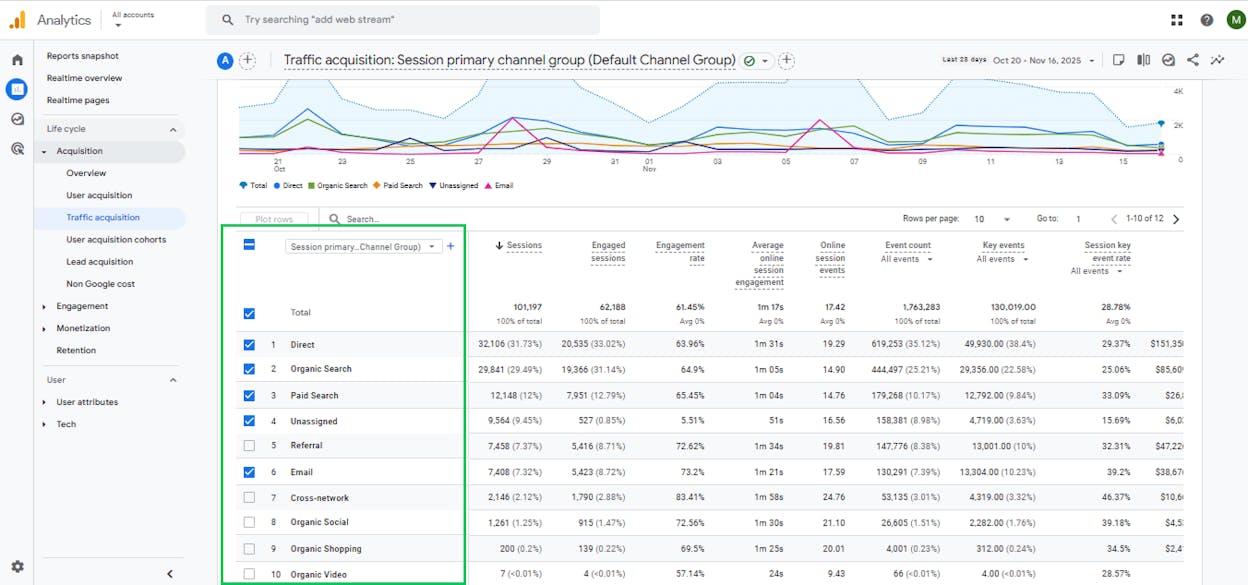
Free, unified analytics for web and app — GA4 lets you track user behavior, traffic sources, pageviews/screens, conversions, and custom events for websites and mobile apps in one property.
-
Event-based data model (funnels, cohorts, custom events) — every interaction is logged as an event, enabling flexible funnels, cohort analyses, lifetime-value tracking, and deeper behavior segmentation.
-
Traffic source & attribution tracking — shows which channels (search, social, paid, referral, email, etc.) drive users and conversions, helping you understand marketing performance across all channels.
-
Integrations with Google Ads, Search Console & BigQuery — connects ad spend, search visibility, and raw data analysis into one analytics ecosystem.
-
Customizable reports & exploration tools — you can create custom funnels, define your own events, run explorations, and tailor metrics to your business goals.
GA4 gives marketers a single place to understand how people find their site or app and what they do once they arrive. Because it collects data through events instead of sessions, it captures more detailed actions — like form submissions, video plays, scroll depth, outbound clicks, and custom behaviors that matter for growth. This event-based flexibility makes GA4 a better fit for modern websites, SaaS products, ecommerce stores, and mobile apps.

The attribution and traffic-source reporting show which marketing channels actually drive results. Teams running SEO, content, social, or paid campaigns can see how users move through pages or screens, where they drop off, and which messages or campaigns bring the most engaged visitors. When connected with Google Ads, GA4 lets teams compare spend against conversions, giving paid campaigns clear ROI visibility.
GA4 is also built for customization. You’re not locked into default reports — you can create your own events, funnels, segments, and audience definitions. This makes GA4 adaptable whether you’re tracking purchases, leads, onboarding steps, or product actions. The BigQuery export option unlocks raw data for teams with deeper analytics needs.

Still, GA4 introduces challenges. The interface and terminology require a learning curve, especially for anyone used to Universal Analytics. Some users note that event setup can be confusing without proper tagging. GA4 also applies data sampling and privacy thresholds in some reports, which can limit granularity for small segments or long time ranges. For businesses needing fine-grained user-level tracking, GA4’s privacy model can feel restrictive.
These constraints mean GA4 works best when you have a clear measurement plan and a thoughtful event setup. Without that structure, teams may misread data or miss critical insights.
How GA4 fits in your marketing analytics stack
|
Aspect |
Why it matters for digital marketing |
How GA4 helps |
|
Understanding website & app traffic |
Teams need to know where users come from to optimize spend and content |
Tracks source, medium, campaign, and channel performance |
|
Monitoring user behavior |
Helps identify what engages users and what causes drop-off |
Event-based tracking captures clicks, scrolls, views, actions |
|
Conversion & goal tracking |
Marketers need visibility into what drives revenue or leads |
Custom events allow tracking of signups, sales, submissions |
|
Multi-channel attribution |
Modern marketing spans many platforms and campaigns |
GA4 unifies web, app, and ad data into cross-channel attribution |
|
Content & UX optimization |
Teams need to improve user paths and content performance |
Funnels, cohorts, and engagement metrics reveal friction points |
|
Data-driven insights at zero cost |
Many businesses need analytics without paying for a tool |
GA4 is free and works for both small and large teams |
Best use cases
-
Blogs, content sites, ecommerce stores, SaaS products, and apps needing clear user and conversion tracking
-
Teams running both paid and organic campaigns wanting unified attribution
-
Small-to-medium businesses needing a free but robust analytics solution
-
Marketers who want behavior insights, funnels, retention tracking, and custom event measurement
GA4 gives you a powerful, free way to understand traffic, behavior, and conversions across websites and apps. It has a learning curve and some limits around sampling and privacy, but its flexibility and deep Google integrations make it the core analytics tool for most modern digital marketing teams.
Hootsuite Analytics: best digital marketing tool for social performance & ROI tracking
Key Hootsuite Analytics standout features
-
Unified social-performance dashboard — aggregates reach, engagement, clicks, follower growth, and paid-performance data across all connected social networks.
-
Cross-network reporting for organic + paid — consolidates organic and boosted post results so you can compare campaigns across platforms.
-
Best-time-to-post insights, benchmarking & competitor comparisons — highlights optimal posting times and provides historical or competitor benchmarks where available.
-
Custom report builder & scheduled exports — allows teams to assemble tailored reports and automate weekly or monthly delivery.
Hootsuite Analytics centralizes performance data from all your social accounts, removing the need to toggle between native dashboards and giving teams a consistent, unified view of metrics. This consolidated approach helps marketers recognize patterns, identify successful content, and quickly diagnose underperformance across networks.

Because it blends both organic and paid insights, the tool makes it easier to understand ROI. You can see which boosted posts provide the strongest lift, how organic content performs across platforms, and where to direct future budget. This supports smarter planning and more efficient use of resources.
Its reporting features also streamline workflows. Customizable templates and automated exports allow agencies and in-house teams to send recurring updates without manual extraction or copy-paste work. This makes social reporting more consistent, predictable, and aligned with stakeholder expectations.
But Hootsuite Analytics does carry limitations. It is not available as a standalone analytics product — access requires a Hootsuite subscription.

And because it focuses solely on social data, it cannot replace tools that track website behavior, product usage, or deeper funnel activity. For that, you will still need platforms like GA4, attribution tools, or product analytics.
For granular segmentation or multi-touch attribution, the platform’s insights may feel high-level. Hootsuite Analytics works best as the social-layer analytics engine within a broader performance stack.
Pricing plans
Hootsuite Analytics is bundled within Hootsuite’s main plans. Pricing starts at $99 per user/month for the Standard tier and increases to $249 per user/month for the Advanced tier, with custom-priced Enterprise plans available. Higher tiers offer deeper analytics, more profiles, enhanced collaboration, and expanded reporting features.
How Hootsuite Analytics fits in your social media stack
|
Aspect |
Why it matters for digital marketing |
How Hootsuite Analytics helps |
|
Cross-channel tracking |
Prevents inconsistent metrics from scattered dashboards. |
Centralizes reach, engagement, clicks, and growth into one view. |
|
Organic vs. paid clarity |
Helps optimize spend by highlighting what performs without boosting. |
Combines paid + organic metrics to show true ROI. |
|
Optimal posting times |
Posting at the wrong time can kill reach. |
Recommends time slots based on real audience activity. |
|
Benchmarking & competitive context |
Marketers need performance context, not isolated numbers. |
Provides historical benchmarks and competitor comparisons. |
|
Stakeholder reporting |
Efficient reporting supports alignment and accountability. |
Custom and scheduled reports remove manual work. |
|
Workflow efficiency |
Switching platforms wastes time and adds friction. |
Places all analytics in a single workspace. |
|
Team collaboration |
Multiple contributors need shared insights. |
Shared dashboards unify strategy across teams or clients. |
Best use cases
-
Agencies handling multiple client accounts
-
Brands running both organic and paid campaigns
-
Teams wanting a uniform, cross-platform reporting system
-
Organizations with recurring reporting cycles
-
Social teams that need clear, high-level ROI visibility
Hootsuite Analytics provides a unified, high-clarity view of social performance and ROI across channels. It works best when paired with the full Hootsuite suite, offering strong reporting, consistent metrics, and actionable insights. While not a replacement for deeper analytics, it provides dependable value as the social-data layer in your marketing stack.
Talkwalker: best digital marketing tool for social listening, media monitoring & brand intelligence
Key Talkwalker standout features
-
Enterprise-grade social listening & media monitoring — scans social networks, news outlets, blogs, forums, and review sites across 150M+ sources to capture every relevant mention.
-
AI-powered insights with Blue Silk™ AI / GPT — automates sentiment analysis, conversation clustering, logo detection, multimedia monitoring, and generates readable summaries and predictive insights.
-
Wide channel & format coverage (text, image, video, audio, print, broadcast) — monitors 30+ social platforms and integrates traditional media to capture signals beyond social posts.
-
Custom dashboards, real-time alerts & brand benchmarking — builds KPI-driven dashboards, sends alerts on spikes or sentiment changes, and tracks competitive share-of-voice and reputation metrics.
-
Audience insights, trend spotting & crisis detection — segments audiences, surfaces emerging topics, and identifies risks or opportunities early across markets.
Talkwalker is built for brands that need comprehensive visibility into how conversations unfold across regions, platforms, and media formats. It extends far beyond social listening by combining digital, traditional, and visual media into one intelligence layer. This helps teams understand narrative shifts, sentiment changes, and how different audiences respond to emerging issues or campaigns.

The Blue Silk™ AI engine elevates this by transforming raw, fragmented signals into structured insights. Conversation clusters reveal how topics evolve, visual recognition captures logo use across images and video, and predictive insights highlight early indicators of brand risk or market opportunity. This makes Talkwalker especially effective for global brands, PR leaders, and insights teams who depend on fast, trustworthy intelligence.
Its ability to analyze multimedia matters because modern mentions often live outside text. From broadcast segments to TikTok clips, Talkwalker detects brand presence and sentiment regardless of format. That breadth offers a level of coverage smaller or lightweight monitoring tools cannot match.

Pricing plans
Talkwalker uses custom, quote-based pricing based on data volume, markets, and feature depth. Public references indicate starting costs of around USD 9,600 per year, with higher tiers for broader coverage or advanced AI capabilities. Smaller teams may find this scope and investment larger than their needs.
How Talkwalker fits in your digital marketing & brand intelligence stack
|
Aspect |
Why it matters for digital marketing |
How Talkwalker helps |
|
Global brand reputation & sentiment monitoring |
Brands need visibility across markets and media ecosystems |
Tracks 150M+ sources across social, news, forums, broadcast, and print |
|
Crisis detection & issue escalation |
Sentiment shifts can spread quickly and damage trust |
Real-time alerts, sentiment scoring, and clustering spot risks early |
|
Visual & multimedia brand presence |
Mentions often appear in photos, videos, or audio, not text |
Logo detection + image/video/audio recognition capture non-text signals |
|
Competitive intelligence & benchmarking |
Share-of-voice and brand perception shape strategic positioning |
Benchmarks sentiment, SOV, narrative trends, and campaign impact |
|
Trend discovery & consumer insights |
Early signals guide content, product, and market decisions |
AI-driven forecasting + audience insights highlight emerging patterns |
|
Campaign analytics & PR reporting |
Teams need cross-channel, defensible reporting |
Custom dashboards turn multi-format data into structured insights |
Best use cases
-
Global brands with multi-region presence and multilingual monitoring needs
-
Agencies managing PR, crisis monitoring, competitive intelligence, or brand research
-
Organizations needing real-time alerts and deep media coverage across formats
-
Product, marketing, or insights teams focused on trend discovery and audience behavior
-
Companies with strong visual presence or sponsorship exposure that text-only tools miss
Talkwalker stands out when brands need full-spectrum intelligence across social platforms, news sites, forums, print, broadcast, images, video, and audio. Its AI-driven clustering, sentiment insights, and trend detection make it a strong fit for enterprises and agencies operating in complex, fast-moving media environments. For smaller teams or simple tracking needs, its depth and pricing may exceed what’s necessary.
Hotjar: best digital marketing tool for behavior analytics & UX feedback
Key Hotjar standout features
-
Visual heatmaps for clicks, scrolls, and attention hotspots — quickly highlights which elements draw attention and which users ignore.
-
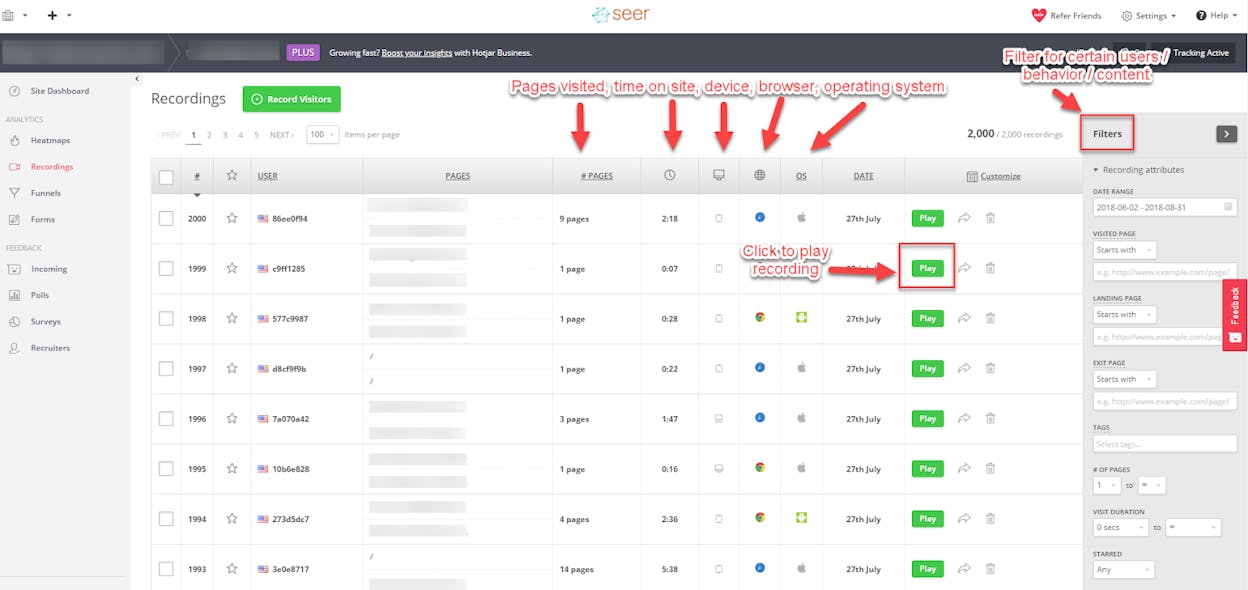
Session recordings of real user journeys — lets you replay navigation paths to identify friction, confusion, or drop-off moments.
-
Surveys and feedback widgets for qualitative insights — simple prompts capture user motivations, objections, or expectations.
-
Funnels and form-analysis for drop-off detection — reveals where users abandon steps inside your conversion flow.
-
Lightweight setup that complements analytics tools — installs easily and adds behavioral context to your existing quantitative data.
Hotjar brings together behavior analytics and user feedback to show both how visitors interact with your site and why they behave as they do. Heatmaps surface engagement patterns, recordings expose UX friction, and surveys add context by collecting direct feedback tied to user actions. This combination helps teams understand the root causes behind drop-offs, hesitation, or disengagement.

Recordings add critical depth to standard analytics by showing the lived experience behind performance metrics. Instead of guessing why a page underperforms, you see real sessions that reveal confusion, missed CTAs, or content placement issues. Surveys reinforce these findings with qualitative input, making Hotjar especially useful for optimization, messaging refinement, and UX decision-making.
Because Hotjar is lightweight and easy to integrate, it fits well into most web stacks. It works best for marketers, UX designers, and product teams looking for quick, actionable insights rather than heavy enterprise analytics. Its main constraints are its web-only focus — no native mobile app tracking — and slight performance overhead on high-traffic sites due to session recording.

Pricing plans
Hotjar offers four tiers: a Free plan with heatmaps, session replay, and up to 20k monthly sessions; Growth ($40/month) adds AI features, advanced filters, and longer data retention; Pro (custom) introduces zone-based heatmaps, journey analysis, and extensive integrations for higher-volume sites; and Enterprise (custom) expands into experience monitoring, data feeds, and unlimited projects.
How Hotjar fits in your web-marketing & UX stack
|
Aspect |
Why it matters for digital marketing / UX |
How Hotjar helps |
|
Understand page engagement & layout |
You need visibility into attention patterns to optimize CTAs and content placement |
Heatmaps highlight clicks, scroll depth, and interaction hotspots |
|
Diagnose conversion drop-offs |
Many funnel issues stem from hidden UX friction |
Recordings and funnel analysis show hesitation, confusion, and abandonment |
|
Combine quantitative + qualitative data |
Metrics explain what happened but not why |
Surveys reveal user reasoning, objections, and expectations |
|
Validate design or content updates |
Teams need proof that changes improve clarity or flow |
Before–after heatmaps and recordings measure actual user impact |
|
Add behavior context to analytics |
Traditional analytics lack usability insight |
Hotjar uncovers behavior patterns that explain shifting metrics |
Best use cases
-
Small to mid-size websites and e-commerce stores improving conversions
-
UX and product teams validating redesigns or identifying friction
-
Marketers optimizing landing pages or content structure
-
Agencies performing UX or CRO audits for clients
-
Teams wanting simple, fast behavior intelligence without enterprise overhead
Hotjar gives teams clear visibility into how visitors behave and why they struggle, making it ideal for improving site experience and conversions. It’s easy to adopt and highly actionable, but its web-only focus and script-based overhead may limit its usefulness for mobile-first or enterprise-scale environments.
AI & content / creative
AI has become a core part of content workflows. We begin with the tool that gives marketers the widest range of creative leverage.
ChatGPT: best digital marketing tool for general-purpose content, research & automation
Key ChatGPT standout features
-
Generative content creation & drafting — produces blogs, ads, emails, scripts, and social posts from simple prompts.
-
Content ideation, outlines & brainstorming — quickly generates ideas, angles, and structured outlines for campaigns or articles.
-
Research assistance & summarization — delivers fast explanations, summaries, and background information to speed up prep work.
-
Coding, data analysis & workflow automation — creates code snippets, assists with logic tasks, and supports automation setups.
-
Flexible usage tiers for individuals & teams — offers free access plus paid plans with advanced models, collaboration, and integrations.
ChatGPT gives marketers a versatile assistant capable of handling content creation, research, planning, and automation. Instead of starting from a blank page or spending hours gathering information, teams can rely on ChatGPT to produce first drafts, explore concepts, or break down complex ideas. This reduces production bottlenecks and frees time for strategic work.

For small teams or solo marketers, ChatGPT acts as an always-available partner that accelerates ideation, supports campaign planning, and helps with repetitive or technical tasks. It can refine messaging, generate variations, or simplify data-heavy work, making it valuable across channels and content types.
Oversight remains essential. ChatGPT can hallucinate or generate inaccurate information, which means human review and fact-checking are required before publishing. It also lacks native analytics or attribution features, so teams must pair it with measurement tools to track performance and impact.
Pricing plans

ChatGPT offers several tiers: Free grants basic access with limited reasoning and uploads; Go ($5/month) unlocks extended access to GPT-5, image generation, and data tools; Plus ($20/month) adds advanced reasoning, expanded limits, deep research, agent mode, and custom GPTs; Pro ($200/month) offers full GPT-5.1 access, unlimited usage, priority speed, advanced agents, and early features; Business ($25/user/month annually) adds secure workspaces, company knowledge, SSO, admin controls, compliance, and integrations; Enterprise expands privacy, security, context length, data residency, and provides SLAs and priority support.
How ChatGPT fits in your marketing & content stack
|
Aspect |
Why it matters for marketing / content work |
How ChatGPT helps |
|
Rapid content output |
Content needs to ship fast across many channels |
Generates drafts, ads, captions, and blog sections quickly |
|
Idea generation & planning |
Campaigns rely on strong concepts and hooks |
Produces ideas, outlines, angles, and variations instantly |
|
Research & background work |
Good content depends on accurate context |
Summaries, explanations, and topic breakdowns speed up prep |
|
Flexibility & automation |
Workflows often mix creative + technical tasks |
Generates code, logic steps, templates, and automation snippets |
|
Budget-constrained teams |
Teams need leverage without new hires |
Free and low-cost tiers provide always-on support |
Best use cases
-
Bloggers, creators, and small agencies needing fast content production
-
Marketing teams building outlines, scripts, ads, and email sequences
-
Startups writing pitches, landing pages, or prototypes quickly
-
Teams needing light coding or workflow automation alongside creative work
-
Research-heavy projects, brainstorming, or multilingual content pipelines
ChatGPT is a flexible, always-ready assistant for content creation, research, planning, and automation—ideal for teams needing speed and scale without adding headcount. It requires editing and fact-checking and must be paired with analytics, but as a productivity engine, it delivers outsized value for marketers.
Jasper: best digital marketing tool for brand-aware AI content creation & marketing automation
Key Jasper standout features
-
AI-driven content generation for multiple formats — produces blogs, landing pages, ads, social posts, and product descriptions from simple inputs.
-
Brand voice, style-guide & knowledge-base alignment — stores tone, messaging rules, and product details so all outputs stay on-brand.
-
50+ templates for blogs, ads, emails & social posts — accelerates production with ready-made structures that remove blank-page moments.
-
Team collaboration & workflow integration — supports shared workspaces, multi-seat access, role-based workflows, and SEO/CMS integrations.
-
SEO optimization & scalable content workflows — built for marketing teams needing high-volume production aligned with SEO best practices.
Jasper is built for marketers who need consistent, brand-aligned content across many channels. Instead of generating standalone pieces, Jasper anchors every output to your predefined voice, style rules, and product knowledge, reducing editing work and keeping messaging uniform. This makes it especially useful for teams producing content at scale, where tone drift and inconsistency can quickly multiply.

Its templates and collaboration tools streamline production for blogs, ads, emails, and social assets. Marketing teams and agencies can centralize workflows, assign tasks, and maintain shared visibility across assets, reducing bottlenecks and removing the need to juggle separate drafts or guidelines. Jasper acts as a unified workspace where ideation, drafting, and revision happen in the same environment.
There are trade-offs. Jasper is a paid, workspace-oriented tool, and its value is highest when used consistently across teams — which makes it more expensive than lightweight AI tools for occasional use. It also takes time to set up brand voices, knowledge assets, templates, and workflows before the platform performs at full strength.
Pricing plans

Jasper offers two main tiers: Pro ($59/seat/month) with the core Canvas editor, essential apps, and limited brand voice and knowledge customization; and Business (custom pricing), which includes advanced apps, unlimited brand customization, AI app builder, marketing agents, API access, enterprise governance, priority support, and deployment flexibility. Larger teams typically choose Business for cross-channel orchestration and scale.
How Jasper fits in your marketing & content stack
|
Aspect |
Why it matters for marketing / content work |
How Jasper helps |
|
Brand consistency across content types |
Multiple channels require different formats but unified messaging |
Enforces brand voice, style rules, and positioning across all content |
|
Speed & volume of content output |
Teams must produce large quantities without overloading writers |
AI + templates generate high-quality drafts quickly |
|
Multi-channel content demands |
Marketers create blogs, ads, emails, product pages, and social posts |
Templates and workflows simplify cross-channel production |
|
SEO & scaling requirements |
Frequent, optimized content drives traffic and growth |
Supports SEO workflows and accelerates high-volume publishing |
|
Team collaboration & workflow |
Teams need shared spaces, roles, and hand-offs |
Multi-seat workspaces and workflow tools centralize production |
Best use cases
-
Marketing teams producing high volumes of on-brand content across blogs, ads, and product pages
-
Agencies managing multiple clients with distinct tone, voice, and positioning requirements
-
E-commerce brands needing frequent product descriptions, promotional emails, and social content
-
Startups or SMBs scaling content production without hiring full-time writers
-
Companies running multilingual content programs or SEO-driven publishing at scale
Jasper is a brand-aware AI platform built for teams that need consistent, scalable, multi-channel content. It excels in environments where tone control, workflow efficiency, and repeatable processes matter. For lightweight or occasional content needs, it may be more than necessary — but for marketing teams aiming to scale output responsibly, Jasper is a powerful and reliable engine.
OwlyWriter AI: best digital marketing tool for social-specific AI content creation & scheduling
Key OwlyWriter AI standout features
-
Social-first caption & post generation — creates captions and platform-ready social copy for Instagram, Facebook, LinkedIn, X, and more.
-
Content-idea generation & post repurposing — turns blogs, URLs, or past posts into fresh social content and fills your calendar with new ideas.
-
Automatic rewriting of top-performing posts — refreshes high-performing posts into new variations without starting from scratch.
-
Platform-optimized copy & hashtag suggestions — adapts tone, length, and hashtags to each platform to improve reach.
-
Integrated into Hootsuite’s full workflow — works inside Hootsuite for writing, approvals, scheduling, and analytics in one place.
OwlyWriter AI is built specifically for social media teams that need fast, platform-optimized copy without juggling multiple tools. Instead of using a standalone AI writer and then switching to a scheduler, OwlyWriter generates posts where you publish them — directly inside Hootsuite. That integration makes it easy to create consistent copy, adapt it for each platform, and maintain a steady posting rhythm.

Because it leverages Hootsuite’s publishing and performance data, OwlyWriter can suggest ideas, repurpose strong posts, and tune captions for reach. It removes guesswork around tone, length, or hashtags, helping teams stay active across many networks without burning creative energy. For brands with heavy social workloads, this saves time and keeps content aligned with real engagement patterns.
Still, OwlyWriter works only inside Hootsuite, so its value depends on already using the platform. It also focuses on short-form, social-specific content. For long-form work like blogs, landing pages, or scripts, teams will still need other tools. Its strength is speed and optimization for social—not general-purpose writing.
Pricing & access
OwlyWriter AI is bundled with Hootsuite subscriptions rather than sold separately. Access depends on your Hootsuite plan, number of users, and account limits, making it best suited for teams already managing scheduling and publishing inside Hootsuite. Casual users seeking occasional AI writing may find the platform commitment heavier than needed.
How OwlyWriter AI fits in your social-media content stack
|
Aspect |
Why it matters for social media marketing |
How OwlyWriter AI helps |
|
Fast, platform-ready content |
Frequent posting drives visibility and engagement |
Generates captions tailored to each network instantly |
|
Overcoming idea fatigue |
Social teams need steady creativity |
Suggests ideas and repurposes blogs or old posts into new content |
|
Efficient workflow across accounts |
Switching tools slows production |
Creates, edits, schedules, and approves inside Hootsuite |
|
Consistent voice across channels |
Inconsistent tone weakens brand identity |
Uses templates and AI patterns to keep tone uniform |
|
Scaling small teams |
Social managers often lack bandwidth |
Produces variations quickly without hiring more copywriters |
Best use cases
-
Social media managers handling multiple platforms daily
-
Small teams or SMEs needing fast, consistent social posting
-
Agencies managing multiple client accounts with different tones
-
Brands repurposing blogs or updating high-performing posts
-
Campaigns requiring dozens of caption variations quickly
OwlyWriter AI is ideal for teams already using Hootsuite who want fast, platform-optimized social copy built directly into their scheduling workflow. It streamlines ideation and posting, but its social-only scope and reliance on Hootsuite make it less suitable for teams needing broader content creation or standalone AI tools.
Vidyo.ai: best digital marketing tool for auto-repurposing long video into social-ready shorts
Key Vidyo.ai standout features
-
Automatic clipping & short-form generation — transforms long videos into short, social-ready clips for Reels, TikTok, and YouTube Shorts.
-
Auto captions, resizing & smart formatting — adds subtitles, resizes to vertical/square formats, and uses scene detection for cleaner cuts.
-
Templates & brand-ready design tools — offers layouts, overlays, and presets to keep clips polished and on-brand with minimal editing.
-
Easy import via URL or file upload — paste a YouTube link or upload a video without needing editing software.
-
Free tier + affordable paid plans — provides a usable free plan and accessible upgrade tiers for creators and small teams.
Vidyo.ai is built for marketers, creators, and social-media teams who rely on long-form videos but need short-form output at scale. Instead of spending hours scrubbing through footage, you can upload or link a video and let Vidyo.ai automatically detect highlights, generate multiple clips, and format them for different social platforms. It dramatically reduces the time needed to turn webinars, podcasts, tutorials, or interviews into shareable snippets.

By handling subtitles, resizing, and design templates, Vidyo.ai lowers the barrier for video-heavy workflows. Even teams without editing expertise can produce clean, vertical clips that match their brand identity. Templates ensure consistency across dozens of clips, while automated formatting keeps everything platform-ready without manual tweaking.
Still, Vidyo.ai does not fully eliminate editing. AI clipping can miss context or produce awkward cuts, so human review remains essential to ensure quality. And if your content strategy isn’t video-heavy, the value naturally decreases — its best results appear when teams repurpose long-form video frequently.

Pricing & access
Vidyo.ai offers four tiers. The Free plan includes 75 monthly credits, 720p renders, AI clips and captions, YouTube chapters, and direct TikTok publishing (with watermark). Lite ($24/month) adds AI video generation, resizing for major aspect ratios, and unlimited 1080p exports. Essential ($32/month) expands into premium AI tools like filler removal, influencer and writer features, an AI content planner, and 1-click scheduling to seven platforms. Growth ($40/month) unlocks unlimited scheduling, bulk publishing, advanced analytics, custom templates, brand kits, and priority support — making it the strongest option for high-volume repurposing workflows.
How Vidyo.ai fits in your video-marketing & content stack
|
Aspect |
Why it matters for social video marketing |
How Vidyo.ai helps |
|
Repurposing long content for social reach |
Short-form platforms reward frequent, bite-sized content |
Auto-clips, resizes, captions, and formats social-ready videos |
|
Saving editing time & cost |
Manual editing is slow and requires skill |
AI-driven trimming and formatting reduce workload significantly |
|
Consistent branding across clips |
Multiple clips must look cohesive for brand trust |
Templates, overlays, and brand kits ensure uniform identity |
|
Multi-platform short-form publishing |
Each platform prefers different sizes and styles |
Outputs vertical/square formats optimized for TikTok, Reels, Shorts |
|
Supporting small teams & solo creators |
Not everyone has editors or production staff |
Quick uploads + automated processing allow self-managed creation |
Best use cases
-
Creators, podcasters, and educators extracting multiple clips from long videos
-
Brands repackaging webinars, tutorials, or interviews for social reach
-
Social-media managers producing frequent short-form videos
-
Agencies repurposing long-form assets into many social-ready clips
-
Teams maximizing ROI on long-form content across platforms
Vidyo.ai makes turning long-form videos into polished, social-ready clips fast and accessible, making it an excellent fit for creators and teams who depend on short-form output. It saves hours of editing, but quality still benefits from human review — and its value is greatest when video content is a core part of your strategy.
Murf AI: best digital marketing tool for AI voice-overs & scalable audio content
Key Murf AI standout features
-
Realistic text-to-speech with 200+ voices in 20+ languages — a wide library of natural-sounding voices with multiple accents and tones.
-
Advanced customization & studio controls — fine-tune pitch, speed, emphasis, pauses, and pronunciations, including brand-specific terms.
-
Multi-format support across videos, podcasts, ads & training — ideal for explainer videos, product demos, e-learning, social clips, and global content.
-
Team collaboration & enterprise-ready workflow — shared workspaces, permissions, and commercial licensing support for agencies and larger teams.
Murf AI helps marketers and creators generate high-quality voiceovers without hiring voice actors or setting up recording studios. You simply paste your script, pick a voice, adjust tone or timing, and export narration ready for use. This makes it a strong solution for product videos, tutorials, ads, social clips, and multilingual projects.

Its extensive voice library and language support make Murf especially valuable for brands with global audiences. Customization tools help maintain a consistent tone, and pronunciation controls ensure accuracy across repeated content. Smaller teams also benefit, as Murf eliminates the cost and complexity of studio production.
Still, AI narration can sound slightly artificial if the script is stiff, and full commercial usage requires upgrading to a paid tier — something occasional creators may find limiting.
Pricing & access

Murf AI has four tiers. The Free plan includes 10 projects, 10 minutes of voice generation, and core features without downloads or commercial rights. Creator ($19/month) adds all voices, unlimited downloads, commercial rights, and 24 annual hours of generation. Business ($66/month) expands into advanced controls, audio-to-text, PowerPoint integration, and 96 annual hours. Enterprise (custom) unlocks unlimited generation, collaboration, SSO, translation, enterprise security, and optional custom voice clones.
How Murf AI fits in your content & marketing stack
|
Aspect |
Why it matters for marketing / content creation |
How Murf AI helps |
|
Producing professional voiceovers without studios |
Recording narration is expensive and slow |
Generates natural-sounding speech from text — no studio needed |
|
Scaling video, podcast, and multilingual content |
High output and localization require strong voice tools |
Wide voice and language library supports global content |
|
Consistent voice & tone across materials |
Brand identity relies on uniform audio |
Customizable voice settings and pronunciation controls keep tone consistent |
|
Rapid turnaround for videos, ads, training, social clips |
Fast content cycles require quick audio |
Turns scripts into voiceovers in minutes |
|
Small teams or solo creators needing studio-quality audio |
Limited budgets or no voice talent |
Affordable plans provide professional results in-house |
Best use cases
-
Video creators, YouTubers, and educators needing quick, polished narration
-
Marketers producing explainers, demos, or social video content
-
Agencies creating multilingual campaigns or large content volumes
-
Podcasters and e-learning teams wanting consistent voiceovers
-
Small businesses creating audio without professional voice actors
Murf AI offers a fast, affordable way to generate realistic voiceovers at scale, making it ideal for video-heavy brands, agencies, and creators. It delivers strong quality and multilingual reach, though commercial rights require a paid plan and stiff scripts may still produce slightly AI-toned results.
Email & lifecycle
HubSpot Email Template Builder: best digital marketing tool for easy email design & CRM-linked outreach
Email still drives conversions when the message matches the moment. Here are the tools that bring both together.
Key HubSpot Email Template Builder standout features
-
Drag-and-drop email builder with prebuilt modules — create responsive, professional emails without coding using easy blocks for text, images, CTAs, and layouts.
-
Reusable templates & team-wide sharing — save email designs and share them across sales and marketing teams to keep messaging consistent.
-
CRM integration + inbox compatibility (Gmail, Outlook, Office 365) — use templates directly inside your CRM or connected inbox to streamline outreach.
-
Personalization using CRM fields — pull dynamic contact data (name, company, lifecycle stage, etc.) to deliver tailored messages at scale.
-
Free access without full Marketing Hub — template building and email sending work even on HubSpot’s free plan.
HubSpot’s Email Template Builder allows teams to produce polished emails quickly, without relying on designers or HTML skills. You can assemble layouts visually, plug in content, and personalize messages using live CRM data — a major productivity boost for teams running frequent campaigns or outreach sequences.

Because templates are stored inside HubSpot and shareable across teams, sales and marketing stay aligned on tone, format, and messaging. This reduces inconsistencies, eliminates one-off versions, and ensures every user draws from the same approved library. For fast-moving teams juggling many contacts, this consistency and reuse can dramatically speed up execution.
With integrations for Gmail, Outlook, and Office 365, the tool blends seamlessly into daily workflows. Sales reps can send templated follow-ups directly from their inbox, while marketers can push newsletters or sequences from HubSpot — making it a bridge between marketing and sales operations.

However, the builder focuses on template creation and basic sending. Advanced automation, segmentation, and personalization workflows still require paid HubSpot tiers. And for companies not centered around HubSpot CRM, the integrated value is naturally lower.
Pricing & access
HubSpot’s email template builder is available for free. You can design, save, and send template-based emails from the CRM or integrated inboxes without paying. Advanced automation, segmentation, and deep personalization require upgrading to a paid HubSpot plan.
How HubSpot Email Template Builder fits in your marketing & sales stack
|
Aspect |
Why it matters for marketing / sales work |
How HubSpot helps |
|
Fast, professional email creation |
Teams often lack designers or coding resources |
Drag-and-drop builder produces clean, responsive emails easily |
|
Consistent messaging across teams |
Uniformity reduces errors and strengthens brand identity |
Shared templates ensure everyone uses approved messaging |
|
CRM-linked personalization |
Personalization boosts engagement & response rates |
Dynamic CRM fields tailor each email automatically |
|
Smooth marketing-to-sales handoff |
Outreach often overlaps across teams |
Templates usable from CRM inboxes for marketing & sales |
|
Low-cost entry for small teams |
Many teams need simple tools without big budgets |
Free access covers core email design and sending needs |
Best use cases
-
Teams sending newsletters, outreach, or drip emails without needing developers
-
Sales teams relying on consistent, proven templates for follow-up
-
Marketing teams standardizing brand voice across multiple email senders
-
Agencies or freelancers managing many clients who need reusable frameworks
-
Any business already using HubSpot CRM or planning deeper CRM + email alignment
HubSpot’s Email Template Builder is a fast, free, and accessible way to create clean, branded emails across marketing and sales teams. It shines in ease, consistency, and CRM-linked personalization — though advanced automation requires upgrading, and teams outside the HubSpot ecosystem may find less value.
Mailchimp: best digital marketing tool for all-round email & automation for SMBs
Key Mailchimp standout features
-
Drag-and-drop email builder + rich template library — create polished, responsive emails without coding.
-
Email marketing + basic automation & CRM tools — run campaigns, manage contacts, segment audiences, and build simple journeys.
-
Landing pages, signup forms & lead-capture tools — collect subscribers and onboard users without relying on extra software.
-
Free tier + affordable starter plans — accessible pricing makes it friendly for beginners and small lists.
Mailchimp gives small businesses and growing teams a simple, dependable way to design emails, capture leads, and automate basic customer journeys. Its drag-and-drop builder and strong template library make campaign creation fast even for non-designers, while built-in signup forms and landing pages help expand your audience. Basic segmentation and automation flows support welcome sequences, drip campaigns, and targeted outreach — giving teams a way to nurture contacts without manual follow-ups.

Because Mailchimp bundles email marketing, lightweight CRM features, and lead-capture tools into one platform, it eliminates the need for multiple tools. This keeps workflows lean and minimizes the complexity that often overwhelms small teams. Freelancers, e-commerce owners, and early-stage businesses especially benefit from Mailchimp’s all-in-one simplicity.
However, Mailchimp’s strengths also define its limits. Automation and segmentation remain simpler than what you’ll find in specialist platforms, and pricing scales quickly as your list grows. For teams with advanced customer journeys, deep behavioral triggers, or large databases, Mailchimp may eventually feel restrictive or costly.
Pricing & access

Mailchimp offers four tiers. Free covers basic email creation, 1,000 monthly sends, and simple contact tools. Essentials (starting around $13/month) unlocks scheduling, testing features, and more templates. Standard (from ~$20/month) adds enhanced automation, personalization, and optimization tools. Premium (from ~$350/month) delivers enterprise-level features, priority support, advanced segmentation, and dedicated onboarding — best for scaling teams.
How Mailchimp fits in your marketing stack
|
Aspect |
Why it matters for marketing & business |
How Mailchimp helps |
|
Simple, attractive email campaigns |
Engagement improves with clean, visually strong emails |
Drag-and-drop builder + templates make design easy |
|
Lead capture + list building |
Email lists drive repeat engagement and revenue |
Built-in landing pages and signup forms streamline growth |
|
Low barrier to entry for small teams |
Startups need affordable tools that “just work” |
Free + low-cost plans reduce upfront investment |
|
Email automation for nurturing & follow-ups |
Manual follow-up doesn’t scale |
Automation flows send timely, targeted sequences |
|
Centralized email + contact management |
Reduces the need for multiple tools |
Email, CRM basics, and analytics live in one platform |
Best use cases
-
Small businesses, freelancers, or startups launching newsletters or drip campaigns
-
E-commerce stores or blogs marketing to subscribers and past customers
-
Agencies handling email marketing for several small clients
-
Brands wanting a simple platform that includes landing pages + email
-
Teams starting with email marketing before scaling into more complex automation
Mailchimp is a strong all-round email platform for small teams that need simplicity, affordability, and speed. It makes designing, sending, and managing email campaigns easy — but as lists grow or automation needs mature, its limitations in segmentation and scalability may prompt a switch to more advanced tools.
Klaviyo: best digital marketing tool for ecommerce-focused email & SMS automation
Key Klaviyo standout features
-
Omnichannel email + SMS + push marketing — unifies email, SMS, and push notifications so brands can engage customers across multiple touchpoints.
-
Deep ecommerce & platform integrations — plugs directly into Shopify, WooCommerce, BigCommerce, and more, pulling in real purchase and browsing data for smarter segmentation.
-
Advanced segmentation & lifecycle automation — supports behavioral triggers (browse abandonment, cart recovery, win-back, reorder flows) that adapt messages to customer intent.
-
Customer Data Platform (CDP) & unified profiles — consolidates customer activity (purchases, browsing, engagement) to power hyper-personalized recommendations and predictions.
-
Free tier + scalable pricing — lets new stores start free with email + SMS credits, then upgrade as their list grows.
Klaviyo gives ecommerce brands a lifecycle marketing engine built around real customer behavior. Instead of sending generic blasts, it tailors messages based on product views, browsing patterns, past purchases, and cart activity. That behavioral depth is what helps online stores increase conversions, boost retention, and drive more revenue per customer. For Shopify and other ecommerce platforms, the tight integrations make setup smooth, and the system becomes smarter as it absorbs more customer data.

Because Klaviyo blends omnichannel messaging with unified profiles, teams can run email, SMS, and push campaigns from one place — without stitching together multiple tools. This makes lifecycle flows easier to build and scale, whether you’re running welcome sequences, cart recovery, post-purchase upsells, reorder reminders, or subscriber win-backs.
Still, Klaviyo is most valuable when you have strong ecommerce data to feed it. If you’re a B2B service business, a publisher, or a site with light transactional data, its advanced flows may be more power than you need. And since pricing increases with list size and SMS usage, scaling can become costly without careful list management.
Pricing & access
Klaviyo offers a free plan for up to ~250 active profiles, including 500 monthly email sends and 150 SMS/MMS credits, plus access to its AI tools and segmentation. Paid plans start around $45/month for email-only and $60/month for email + mobile messaging, with pricing scaling based on list size and SMS volume. As your store grows, you can tap into advanced automation and multichannel features.
How Klaviyo fits in your ecommerce marketing stack
|
Aspect |
Why it matters for ecommerce marketing |
How Klaviyo helps |
|
Omnichannel messaging (email + SMS + push) |
Customers engage across multiple devices and channels |
Consolidates messaging so you can coordinate outreach across email, SMS, and push |
|
Behavioral & lifecycle automation |
Higher conversions come from reacting to customer behavior |
Flows adapt to browsing, cart activity, purchase history, and lifecycle stages |
|
Data-driven personalization & recommendations |
Personalized content increases order value & retention |
CDP unifies data to power product recommendations and targeted promos |
|
Integrated ecommerce platform connection |
Accurate data syncing is essential for online stores |
Native integrations with Shopify, WooCommerce, BigCommerce, etc. |
|
Scalable marketing as you grow |
Larger stores need complex flows & segmentation |
Plans scale with volume while offering advanced features as you expand |
Best use cases
-
Ecommerce stores on Shopify, WooCommerce, BigCommerce, or similar platforms
-
Brands running cart abandonment, post-purchase, win-back, or personalized promo flows
-
Teams using email + SMS + push to boost retention and LTV
-
Stores with enough customer activity to benefit from rich segmentation
-
Fast-growing ecommerce brands needing a scalable, data-driven automation system
Klaviyo is one of the strongest platforms for ecommerce lifecycle marketing, combining behavioral data, automation, and omnichannel messaging in one place. It’s ideal for online stores needing personalized, revenue-driven flows. But if you’re not ecommerce-focused — or your list grows quickly — costs and complexity can become limiting factors.
Landing pages & lead capture
Lead capture improves when people know exactly where to click. These tools make that path simple.
Linktree: best “Link in Bio” mini-site for creators, influencers & small brands
Key Linktree standout features
-
Single “link in bio” landing page for all your links — consolidates website, store, social profiles, and content into one URL so you never need to swap your Instagram/TikTok bio link.
-
Fast setup with no technical skills — go live in minutes with drag-and-drop link management and simple styling.
-
Supports links, embeds, videos & commerce integrations — depending on plan, can display videos, products, forms, and more alongside regular links.
-
Free plan with broad access — zero-cost starting point that works well for creators and small brands.
-
Basic analytics on paid tiers — click-tracking helps you see which links actually drive interest and conversions.
Linktree gives creators, influencers, and small businesses a clean, centralized hub to route followers from a single bio link to any destination. Rather than constantly swapping links in your social profile, you maintain one Linktree page that lists your website, store, socials, videos, lead forms, or other resources. This makes it especially useful for anyone juggling multiple channels or monetization paths who wants something professional but easy to manage.

Its simplicity is a major advantage: choose a layout, add your links or embedded content, publish instantly, and update as needed. For solo creators, freelancers, or early-stage teams, it’s a practical alternative to building a full website. Paid tiers then unlock branding options, richer analytics, scheduling, email integrations, and monetization features — letting you scale Linktree as your audience grows without a heavy upfront investment.
Because Linktree is intentionally lightweight, it won’t replace a full website or advanced landing-page builder. Customization on lower tiers is limited, and many free pages can look similar. For brands needing deeper branding control or funnel-specific features, a dedicated landing-page tool may eventually be more suitable.

Pricing & access
Linktree’s pricing is simple: the Free plan ($0/month) gives you unlimited links, embeds, and essential analytics; the Starter plan ($6 annually or $8 monthly) adds custom themes, subscriber tools, and redirect links; the Pro plan ($12 annually or $15 monthly) unlocks advanced analytics, branding options, IG auto-replies, and email integrations; and Premium ($30 annually or $35 monthly) adds concierge onboarding, unlimited posting, team workflows, and 0% seller fees — making it the most complete option.
How inktree fits in your social-media & content stack
|
Aspect |
Why it matters |
How Linktree helps |
|
Many channels but only one bio link |
Social platforms allow just one outbound link |
Aggregates all destinations into a single, shareable landing page |
|
Quick setup with no design skills |
Creators often lack web development resources |
Drag-and-drop setup gets pages live in minutes |
|
Promote content, store, socials simultaneously |
Followers need easy navigation to your ecosystem |
Supports embeds, product links, videos, social icons, and forms |
|
Low-cost entry |
Early-stage creators have limited budgets |
Free plan is robust; upgrades add optional power |
|
Understand follower behavior |
Click insights help refine what to promote |
Paid tiers include detailed analytics and traffic insights |
Best use cases
-
Creators, influencers, freelancers needing a polished home base for social bios
-
Small brands without a full website but needing to route followers to multiple destinations
-
Multichannel creators promoting blog, YouTube, TikTok, podcast, store, or services
-
Campaigns, product drops, and launches requiring fast, flexible landing hubs
-
Anyone wanting a no-code, lightweight solution for top-of-funnel traffic routing
Linktree is a simple, flexible, and affordable way to centralize all your important links — ideal for creators and small brands that need a fast, polished mini-site without touching code. It solves the one-link limitation across social platforms elegantly, though teams needing deeper customization or advanced landing-page functionality may eventually outgrow its simplicity.
Unbounce: best landing-page builder for conversion-focused campaigns
Key Unbounce standout features
-
Drag-and-drop landing-page builder — build fully custom layouts without coding.
-
100+ conversion-optimized templates — skip blank-page work with proven designs.
-
Popups & Sticky Bars — add overlays, offers, and lead-capture elements to boost conversions.
-
Dynamic Text Replacement (DTR) — personalize page copy automatically based on visitor intent or keyword.
-
A/B testing + Smart Traffic AI — test variants or let AI route visitors to the version most likely to convert.
Unbounce is built for marketers and growth teams who need high-converting landing pages without relying on developers. Instead of static CMS pages, you get a flexible editor, conversion-ready templates, and on-page enhancements that help squeeze more value from every click — especially useful for PPC, paid social, or time-sensitive campaigns. Its optimization layer is where it stands out: A/B testing lets you iterate quickly, while Smart Traffic uses real-time data to predict the best variant for each visitor.

These strengths make it ideal for high-stakes campaigns, product launches, or lead-generation funnels where conversion lift has direct ROI. Dynamic Text Replacement amplifies relevance by aligning page copy with ad keywords or targeting segments, which is a major edge for performance marketers. Together, these tools create a controlled environment where every campaign can improve with data.
Pricing & access
Unbounce’s pricing starts around $99/month, giving access to landing-page creation, templates, and basic traffic allowances. Higher tiers unlock A/B testing, Smart Traffic, and increased visitor capacity, while top plans support heavy ad spend, advanced experiments, and enterprise integrations. Pricing rises as performance and traffic scale, making it best suited for teams running active, ROI-driven campaigns.
How Unbounce fits in your marketing & conversion stack
|
Aspect |
Why it matters |
How Unbounce helps |
|
High-impact landing pages |
Ad traffic converts best on dedicated pages |
Conversion-optimized templates + full layout control |
|
Testing & optimization |
Small UX changes drive big performance differences |
A/B & multivariate tests reveal high-performing variants |
|
Message match from ads to page |
Better relevance = higher conversion |
Dynamic Text Replacement aligns copy with keywords |
|
High-traffic or time-sensitive campaigns |
Reliability matters during spikes |
Supports large volumes with fast, stable hosting |
|
Fast iteration without devs |
Marketers need agility |
Visual editor removes dev bottlenecks |
Best use cases
-
PPC, paid social, or retargeting campaigns needing high-converting landing pages
-
Agencies managing multiple client funnels and rapid A/B testing
-
Product launches, promotions, or limited-time offers
-
Marketers optimizing headline, layout, or offer variations
-
Businesses needing quick builds without developer support
Unbounce is a conversion-focused landing-page platform designed for performance campaigns, giving marketers the tools to build, test, and optimize without developers. It’s more expensive than basic builders, but for teams where conversions drive revenue, the optimization power is worth it.
Leadpages: best landing-page builder for fast, no-code campaign launches
Key Leadpages standout features
-
Drag-and-drop landing-page builder — create pages visually, no coding required.
-
200+ conversion-optimized templates — launch fast with ready-made designs.
-
Popups, alert bars & opt-in forms — capture leads beyond the landing page.
-
Integrations with email, CRM & payment tools — plug into your existing stack.
-
A/B testing & analytics (Pro+) — test versions and optimize performance.
Leadpages focuses on helping marketers and small businesses publish high-converting pages quickly without developer support. Its template library and visual editor keep setup fast, while built-in popups and forms allow complete lead-capture flows inside one tool. For teams that prioritize execution speed over deep design control, Leadpages offers a streamlined, no-friction way to build pages that convert.

Even with its simplicity, Leadpages still supports key conversion tools — like A/B testing (on higher tiers), form integrations, and mobile-optimized templates — which makes it reliable for quick launches, promos, and local campaigns where time-to-market matters most.
Pricing & access
Leadpages offers three tiers built to scale with campaign needs: the Standard plan ($37/month or $49 when billed annually) gives you five landing pages, unlimited traffic and leads, one custom domain, and core integrations; the Pro plan ($74/month or $99 annually) expands to unlimited pages, A/B testing, payments, blog monetization, and three domains; and for agencies or larger teams, a Custom plan adds options like sub-accounts, discounted add-ons, additional domains, and advanced integrations. This setup keeps entry costs low while leaving room to grow as campaigns become more sophisticated.
How Leadpages fits in your marketing & conversion stack
|
Aspect |
Why it matters |
How Leadpages helps |
|
Fast campaign launches |
Speed is critical for promos & lead gen |
Templates + drag-and-drop editor remove dev/design delays |
|
Lead capture workflows |
Strong funnels rely on smooth data collection |
Popups, forms & alert bars integrate with email/CRM tools |
|
Conversion-ready design |
Better layouts drive higher conversions |
200+ optimized templates reduce guesswork |
|
Simple funnels for small teams |
Most SMEs lack dev resources |
Pages + popups + simple checkout in one tool |
|
Easy for non-technical users |
Marketers need independence |
WYSIWYG editor keeps creation intuitive |
Best use cases
-
Small businesses launching lead-gen pages, signups, or promos
-
Marketers needing fast pages without developer involvement
-
Webinar registrations, eBooks, checklists, or service-quote pages
-
Teams wanting simple funnels with built-in forms and popups
-
Businesses prioritizing speed rather than pixel-perfect control
Leadpages is a fast, no-code landing-page builder designed for marketers who need to launch campaigns quickly and convert traffic without technical hurdles. It’s accessible, lightweight, and reliable for small teams — though advanced customization or complex funnels may push growing businesses toward more flexible platforms.
Design & video
Design and video shape how your brand is perceived across every channel. The tools below make that work easier and quicker.
Canva: best all-purpose visual design tool for fast, on-brand marketing content
Key Canva standout features
-
Drag-and-drop editor for graphics, videos, presentations, and ads
-
Huge template and asset library across all major content formats
-
Multi-format exports (social posts, reels, PDFs, presentations, short videos…)
-
AI-assisted creation tools (Magic Design, auto-resize, AI copy/video helpers)
-
Brand kits and real-time team collaboration (Pro+)
Designing marketing visuals becomes significantly easier when the creation process is built around simplicity and speed. With Canva’s drag-and-drop editor and enormous template library, teams can spin up campaign creatives, social posts, or videos in minutes, even without traditional design skills. That quick turnaround is especially helpful when content volume is high and deadlines are tight.
This ease of use extends across formats. Whether the task is a social post, a PDF brochure, a video snippet, a presentation deck, or an ad graphic, everything lives inside the same unified workspace. Because templates cover nearly every scenario, marketers spend less time starting from scratch and more time refining ideas. The result is a faster, smoother workflow that supports day-to-day marketing rhythms.

Brand consistency also becomes easier to maintain. With brand kits storing logos, fonts, and color palettes, teams don’t need to chase guidelines or rebuild assets each time. Even as multiple contributors work together, shared folders and collaborative editing keep visuals aligned and reduce design drift. As a team grows or scales content production, this structured consistency becomes a real advantage.
The simplicity does come with boundaries. The platform’s design flexibility is intentionally limited compared to professional tools, which means intricate layouts, advanced typography, or custom animations may require alternatives like Figma or Adobe. And because so many users rely on templates, visuals can look generic unless care is taken to customize layouts, imagery, and brand elements.
Pricing & access
Canva offers a generous Free plan with access to core tools, basic templates, and standard exports. Stepping up to Pro unlocks premium assets, advanced AI features, unlimited brand kits, Magic Resize, and fuller collaboration options. For growing companies, Business and Enterprise tiers add workflow controls, permissions, shared libraries, brand governance, and team-wide collaboration features. The pricing structure keeps entry costs low while providing room to scale as brand and production needs expand.
How Canva fits in your marketing & content stack
|
Aspect |
Why it matters |
How Canva helps |
|
Fast creative production |
High-volume content requires speed |
Templates + drag-and-drop editor reduce build time |
|
Consistent brand presence |
Teams need aligned visuals across formats |
Brand kits lock in colors, fonts, and reusable layouts |
|
Multi-format content needs |
Campaigns span social, print, video, and presentations |
Canva covers nearly all formats in one tool |
|
Lean teams & limited budgets |
Many teams lack design resources |
Free + low-cost tiers cover most everyday needs |
|
Collaboration & sharing |
Multiple contributors need alignment |
Shared folders, real-time editing, team libraries |
Best use cases
-
Small businesses or startups producing social posts, ads, flyers, or presentations
-
Creators needing fast, consistent visuals across multiple channels
-
Agencies handling templates or recurring creative for clients
-
Teams without designers who still need polished, on-brand assets
-
Businesses scaling educational content, ads, or short video content
Canva delivers a fast, intuitive, and cost-effective way to produce on-brand visuals across nearly every marketing format. It shines for teams that value speed and versatility, though advanced design needs may eventually require more specialized tools.
CapCut: best video-editing tool for fast, social-ready content
Key CapCut standout features
-
All-in-one video editor for mobile, desktop, and web — supports short-form and general editing.
-
Advanced + beginner-friendly tools: trimming, timeline editing, transitions, chroma key, overlays.
-
Pre-made templates & stock assets for fast creation of Reels, TikToks, and Shorts.
-
AI automation: auto-captions, background removal, voiceovers, text-to-speech, AI images/videos.
-
Cross-platform sync and direct export to TikTok, Instagram, and YouTube.
What CapCut is and how it helps creators
CapCut works as a complete editing environment for modern marketing teams and solo creators, offering drag-and-drop editing, template-driven workflows, and AI features that remove much of the manual friction from video production. Instead of relying on expensive, complex NLEs, you can assemble polished short-form content quickly, which is especially helpful for campaigns, social marketing, testimonials, or product promos that need constant iteration.
Editing across phone, desktop, and browser keeps production flexible, letting you start on mobile, refine on a laptop, and publish directly to social platforms. AI accelerates the process further: automatic subtitles, background cleanup, instant scene templates, and intelligent cleanups reduce editing time substantially. This balance of simplicity and power is what makes CapCut effective for businesses or creators producing frequent video content without a dedicated editor.

Some constraints remain. The free version restricts premium effects, templates, and high-resolution exports, and watermarks may appear depending on plan. Long-form or highly complex projects still require professional editors. And because advanced tools and cloud features sit behind the Pro tier, teams publishing at scale may outgrow the free plan quickly.
Pricing & access
CapCut’s free plan covers core editing, templates, AI basics, and cross-device use. To unlock premium effects, advanced AI tools, watermark-free exports, and higher-quality rendering, the Pro plan starts at $9.99/month or $89.99/year (limited-time pricing). The subscription is cancellable anytime and targets creators who publish frequently or need higher production polish.
How CapCut fits in your social-video workflow
|
Aspect |
Why it matters |
How CapCut helps |
|
Fast social video creation |
Short-form platforms reward speed |
Templates + AI tools accelerate edits |
|
Team agility & accessibility |
Content often made across devices |
Works on desktop, mobile, and web |
|
High posting frequency |
Consistency drives reach |
Quick editing removes friction |
|
No dedicated video editor |
Many small teams lack specialists |
Beginner-friendly UI + free tier |
|
Multi-platform publishing |
Formats differ across platforms |
Export presets match TikTok/IG/YouTube |
Best use cases
-
Reels, TikToks, Shorts, and other short-form content
-
Small businesses producing promos, ads, or client testimonials
-
Marketing teams publishing high-volume social content
-
Beginners needing pro-looking edits without complexity
-
Creators who edit across phone and computer
CapCut makes it easy to produce polished social videos at speed. It’s perfect for everyday marketing content, though not built for complex or long-form editing.
Adobe Express: best lightweight design & content-creation tool for fast, branded visuals
Key Adobe Express standout features
-
Drag-and-drop editor for graphics, social posts, short videos, flyers, and documents.
-
Large template, stock image, icon, and media library integrated with Adobe’s ecosystem.
-
Adobe Firefly generative-AI for creating images, styles, and effects from prompts.
-
Photo-editing quick actions such as background removal, resizing, and color fixes.
-
Multi-format output: social graphics, PDFs, posters, ads, short videos, and animations.
How Adobe Express helps teams create visual content
Adobe Express focuses on simplifying design work so non-designers can produce polished visuals quickly. The interface blends a clean drag-and-drop workflow with templates, stock media, and one-click editing tools that reduce the time normally spent sourcing assets or adjusting visuals manually. Firefly’s generative AI enhances this further by letting you create backgrounds, images, and text effects from simple prompts, which significantly accelerates experimentation and creative iteration.

The tool also works well across different content categories: from social graphics and ads to presentations, simple videos, marketing PDFs, or event flyers. This versatility allows teams to centralize many design tasks in a single tool instead of juggling multiple apps. When consistency is important, brand kits and shared templates help keep visual identity aligned across posts, documents, and campaigns — without the complexity of Adobe’s full Creative Cloud suite.
There are still trade-offs: while easier than professional Adobe tools, Express has more depth than ultra-simple apps, so beginners may need a short learning period. Some premium templates, stock assets, and advanced AI capabilities sit behind paid tiers, and relying too heavily on templates can lead to generic visuals if not customized enough. For high-end design or complex video editing, you’d still outgrow Express and move to tools like Photoshop, Illustrator, or Premiere.
Pricing & access
Adobe Express offers a free tier that includes core editing tools, templates, basic media, and standard Firefly features. The Premium plan, which unlocks advanced AI tools, the full stock library, brand kits, collaboration features, and higher-quality exports, is available via monthly or annual subscription through Adobe. Pricing varies slightly by region but generally remains accessible for individuals and small teams that need more power than the free plan provides.
How Adobe Express fits in your content-creation workflow
|
Aspect |
Why it matters |
How Adobe Express helps |
|
Rapid creation of marketing visuals |
Campaigns need frequent, high-quality assets |
Templates + quick actions speed up production |
|
AI-enhanced creativity |
Custom visuals help you stand out |
Firefly generates images, styles, and effects |
|
Brand consistency |
Teams need aligned visuals |
Brand kits + reusable templates maintain identity |
|
Multi-format content |
Marketing spans social, print, and video |
Supports graphics, videos, PDFs, and animations |
|
Easy collaboration |
Teams share and improve assets together |
Cloud-based editing and shared libraries |
Best use cases
-
Small businesses producing social content, ads, flyers, or promotional materials
-
Marketers needing quick turnaround for visuals across multiple channels
-
Teams using brand kits for consistent, repeatable design
-
Creators who want AI-assisted design without complex tools
-
Businesses needing mixed media (graphics + short videos + PDFs) in one place
Adobe Express makes designing fast, polished visuals easy for non-designers. It’s ideal for teams that need versatile, branded content without the complexity of full Adobe apps, though advanced templates and AI tools may require a paid plan.
Collaboration & comms
Marketing teams move quickly when feedback and discussion happen in real time. This tool makes that easier.
Discord: best communication platform for real-time community building & flexible team interaction
Key Discord standout features
-
Text, voice, and video channels for persistent, real-time communication.
-
Multi-channel servers that segment conversations by topic, project, or group.
-
Roles and granular permissions that control access, moderation, and visibility.
-
Cross-platform availability via desktop app, browser, or mobile.
-
Free core usage with unlimited servers, channels, and members.
How Discord supports communication & community workflows
Discord organizes conversations inside servers made of text, voice, and video channels, allowing teams or communities to keep discussions structured while staying accessible. Channels behave like persistent rooms — some for quick chat, others for announcements, others for voice-based collaboration — making the environment more dynamic than traditional chat tools. Real-time voice rooms enable spontaneous syncs, drop-in conversations, and ad-hoc brainstorming, which is valuable when teams rely on fast coordination or operate across time zones.

Because roles and permissions can be customized deeply, it becomes possible to manage internal teams, sub-groups, or external audiences within the same server while controlling what each group can see or do. That flexibility opens the door to hybrid setups — internal collaboration on one side, customer-facing channels on the other — without needing separate tools. The free plan already supports servers, channels, voice/video calls, screen sharing, and file sharing, which keeps operating costs low for small teams, startups, or growing communities.
There are trade-offs to consider. The platform leans more toward community-style communication than corporate workflows, meaning formal project management or advanced business integrations require external tools. The UX feels casual by design and may not suit organizations that prefer a strict professional aesthetic. As servers grow, managing channels, permissions, and moderation takes deliberate structure. For teams needing enterprise-grade compliance or integrations, Discord may fall short of tools built specifically for workplace communication.
Pricing & access
Discord’s core functionality — servers, channels, voice/video calls, direct messages, and most moderation features — is entirely free. Optional paid upgrades (like Nitro) add perks such as higher upload limits, enhanced video quality, custom emojis, and server boosts, but none are required for functional team or community operation. For most small businesses, creators, and brands, the free tier is more than sufficient to run both internal collaboration and external community spaces.
How Discord fits in your communication & community stack
|
Aspect |
Why it matters |
How Discord helps |
|
Real-time team coordination |
Fast decisions need quick communication |
Voice rooms enable spontaneous or scheduled syncs |
|
Community engagement |
Brands benefit from user interaction |
Servers allow organized, topic-driven discussions |
|
Budget-friendly communication |
Early-stage teams want low cost |
Core platform is free with generous capabilities |
|
Flexible structure |
Different groups need different access levels |
Roles + permissions support segmented workflows |
|
Hybrid internal + external use |
Some teams manage clients & communities |
Private + public channels coexist in one environment |
Best use cases
-
Brands or creators building active customer or fan communities
-
Small teams or startups that prefer low-cost, real-time collaboration
-
Groups running workshops, events, Q&A sessions, or informal co-working
-
Businesses wanting separate spaces for internal work and external engagement
-
Teams that rely on quick voice-based collaboration rather than formal workflows
Discord is a flexible, always-on communication platform that blends team chat with community building. It’s ideal for small teams, creators, and brands that value real-time interaction and low cost, though less suited to organizations needing deep business integrations or a highly formal workspace.
Slack: best communication hub for organized team collaboration & integrated workflows
Key Slack standout features
-
Channels that organize conversations by project, team, or topic.
-
Direct messages for quick or private chats.
-
File sharing with support for documents, images, and storage integrations.
-
Voice and video calls (including Huddles) with screen sharing.
-
Large ecosystem of app integrations and workflow automations.
-
Searchable message history for continuity and fast context retrieval.
How Slack supports team communication & workflow structure
Slack structures conversations into channels that map to projects, clients, workflows, or departments, reducing the friction and clutter common in email-based communication. Each channel acts as a persistent space where updates, files, approvals, and discussions accumulate, making information easier to find and revisit. Direct messages complement channels for fast, private back-and-forth when a full thread isn’t necessary.
Its deep integration ecosystem brings external workflows into the same workspace: CRM alerts, analytics updates, project tasks, docs, reminders, approvals, and automation triggers can all surface directly in channels. This turns Slack into a central operating layer where communication and workflows blend, speeding up alignment and reducing tool-switching.

Teams working remotely or across time zones benefit from Slack’s hybrid mode: real-time discussions through Huddles or quick calls, paired with asynchronous chat for flexible coordination. Even on the free tier, teams can run essential operations with channels, file sharing, and communication features at no cost. As organizations scale, the structure and integrations help maintain clarity — provided channel organization and notification boundaries are managed intentionally.
There are trade-offs. Slack’s free plan caps history at 90 days, and advanced admin controls, compliance features, and unlimited history require paid tiers. Costs scale per user, which can grow quickly in larger teams. Without thoughtful channel structure, conversations can become noisy or fragmented. And while Slack orchestrates communication, it doesn’t replace project management — its power depends on how well it’s integrated into the wider toolstack.
Pricing & access
Slack follows a freemium model: the Free plan costs $0/month and includes 90 days of message history and basic AI features. The Pro tier starts at $8.75 per user/month (currently discounted to $4.38), while Business+ begins at $18 per user/month (discounted to $9). Enterprise+ uses custom pricing for organizations that need tighter admin controls and enterprise-grade AI. Costs scale with team size and reliance on unlimited history, making higher tiers more relevant for teams using Slack as a daily operational hub.
How Slack fits in your communication & operations stack
|
Aspect |
Why it matters |
How Slack helps |
|
Organized team communication |
Clear structure prevents message chaos |
Channels segment discussions by purpose |
|
Workflow integration |
Teams want alerts, tasks, and data in one place |
Integrations pull external tools directly into Slack |
|
Remote & async collaboration |
Distributed teams need flexible communication modes |
Huddles + chat + mobile access support all workflows |
|
Fast decision-making |
Slow email loops delay alignment |
Real-time chat accelerates cross-team decisions |
|
Lean-team efficiency |
Smaller teams need affordable structure |
Free tier covers essentials until scale demands more |
Best use cases
-
Small teams or startups coordinating daily operations
-
Remote or distributed groups across time zones
-
Marketing, content, or technical teams relying on tool integrations
-
Businesses wanting a central communication hub without heavy onboarding
-
Teams that mix structured channels with fast, real-time syncs
Slack delivers an organized, integration-ready communication environment that blends structured channels with real-time collaboration. It’s ideal for teams that need clarity, speed, and tool consolidation — though costs rise as teams scale and workflows become more complex.
Automation & workflows
IFTTT: best lightweight automation tool for simple trigger-action workflows
Key IFTTT standout features
-
Simple “If This Then That” automations built through Applets.
-
Trigger → action workflow model for connecting apps and devices.
-
Support for both consumer apps and basic business tools.
-
Extremely easy setup with no-code Applet creation.
-
Free plan plus affordable paid tiers for more Applets and faster execution.
How IFTTT supports automation & cross-app workflows
IFTTT works on a straightforward idea: when something happens in one service, it automatically triggers an action in another. Applets make this simple by letting you pair a single trigger to a single outcome, allowing you to automate notifications, backups, cross-posting, device actions, and other repetitive tasks with minimal setup. This simplicity makes automation accessible even for people with no technical background.
Because IFTTT connects both apps and smart devices, it bridges personal and business workflows. A single environment can power social media cross-posting, file backups, CRM notifications, calendar reminders, smart-home triggers, or even safety-related device actions. For small businesses or individuals juggling multiple tools, this creates a low-effort automation layer that quietly keeps small tasks moving without oversight.

The platform is especially helpful when workflows are simple and repetitive rather than complex or data-heavy. Tasks like “new blog post → share on social media,” “new form submission → send notification,” or “save attachments to storage” work reliably with minimal configuration. For users who want lightweight automation without the overhead of managing advanced logic or multi-step systems, IFTTT offers the right balance of ease and utility.
There are limitations, especially as workflows become more ambitious. IFTTT is designed for single-step automations, so it lacks the branching logic, data transformation, and multi-step orchestration found in more advanced platforms. Its app ecosystem is broad but not as deep in B2B SaaS or marketing tools, and free-plan constraints limit the number of Applets you can run. Trigger delays may occur, making it less suitable for critical or time-sensitive business workflows.
Pricing & access
IFTTT starts with a Free plan at $0/month, offering 2 Applets and standard execution speeds. The Pro plan costs $2.99/month, enabling 20 Applets, faster execution, multi-action Applets, webhooks, and expanded rate limits. The Pro+ tier is $8.99/month, giving access to unlimited Applets, AI services, multiple account connections, filter code, and priority support. Pricing remains low compared with heavier automation platforms, making IFTTT attractive for small teams and lightweight automation needs.
How IFTTT fits in your automation & productivity stack
|
Aspect |
Why it matters |
How IFTTT helps |
|
Simple automation |
Small tasks still waste time when done manually |
Applets automate repetitive trigger → action workflows |
|
Lightweight setup |
Non-technical users need easy tools |
No-code builder makes automation effortless |
|
Cross-platform utility |
Teams use a mix of apps and devices |
Connects web apps, mobile apps, and smart devices |
|
Budget-friendly |
Lean teams need cost-effective solutions |
Free and low-cost tiers keep automation affordable |
|
Low-maintenance workflows |
Small operations need minimal overhead |
Applets run quietly without complex setup or monitoring |
Best use cases
-
Simple social media cross-posting or content notifications
-
Basic file backups or data-sync tasks
-
Lightweight lead alerts or form-to-notification workflows
-
Blending personal automation (smart home) with small business needs
-
Small teams or solo operators who need easy, low-cost automation
IFTTT is a simple, accessible automation platform ideal for lightweight trigger-action workflows. It’s perfect for individuals and small teams who need easy automation without complexity, though it isn’t suited for multi-step or mission-critical business processes.
Tie AI visibility toqualified demand.
Measure the prompts and engines that drive real traffic, conversions, and revenue.
Similar Content You Might Want To Read
Discover more insights and perspectives on related topics

The 9 Best Backlink Building Tools in 2026

Conductor AI Review: Is This Enterprise SEO Platform Worth the Investment in 2026

9 Best Blogging Platforms for Different Needs

Top 17 Competitor Analysis Tools