



Summarize this blog post with:


People claim all kinds of things are Google ranking factors. Keyword density. Domain age. Social signals. Word count.
The problem? Google has never confirmed most of them. That makes it easy to waste time on things that don’t move the needle.
So instead of listing 200 speculative factors, this guide focuses on seven that Google has publicly acknowledged. For each one, you’ll get the evidence behind it, a clear way to check where you stand, and specific steps to improve. Where it makes sense, we’ll also show how the same factor affects your visibility in AI search — because SEO and AI search aren’t competing channels. They’re two sides of the same organic visibility strategy.
Table of Contents
1. Backlinks
Backlinks are links from one website to another. When another site links to your page, it acts as a vote of confidence — a signal to Google that your content is worth referencing.
In 2016, Google’s Andrey Lipattsev confirmed in a live Q&A that backlinks are one of Google’s top three ranking factors, alongside content and RankBrain.
But not all backlinks carry equal weight. A single link from a well-known, topically relevant site will do more for your rankings than dozens of links from random directories. Google’s own documentation says you should earn links from “prominent” sites that cover the same subject area as yours.
How to check your backlink profile
Use a backlink analysis tool to see how your profile compares to competitors ranking above you. Look at three things specifically:
-
Referring domains. How many unique websites link to your page? More unique domains generally means a stronger signal.
![[Screenshot: Ahrefs or similar tool showing referring domains count for a URL]](https://www.datocms-assets.com/164164/1777061536-blobid1.png?auto=format,compress&w=1248&fit=max)
-
Quality of linking sites. Are the sites linking to you authoritative in your space? A link from a niche industry blog often outweighs a link from a random guest post network. You can use the Analyze AI Website Authority Checker to quickly gauge the authority of any domain linking to you.
-
Anchor text distribution. The clickable text in a backlink tells Google what the linked page is about. A natural profile has a mix of branded anchors (“Analyze AI”), generic anchors (“click here”), and keyword-rich anchors (“AI search analytics”). If your profile is dominated by exact-match keyword anchors, that’s a red flag.
How to earn more high-quality backlinks
The most reliable way to earn links is to publish content that people genuinely want to reference. That means original research, unique data, comprehensive guides, or free tools — things that are hard to replicate and genuinely useful. Analyze AI’s free tools suite is a good example. Tools like the Keyword Generator, SERP Checker, and Broken Link Checker naturally attract links because they solve real problems.
Other tactics that consistently work: publishing original studies that journalists and bloggers cite, creating visual assets (infographics, diagrams) that others embed, guest posting on reputable industry publications, and building relationships with editors and writers in your space.
![[Screenshot: Example of a backlink analysis tool showing referring domains, DR distribution, and anchor text breakdown for a sample URL]](https://www.datocms-assets.com/164164/1777061549-blobid2.png?auto=format,compress&w=1248&fit=max)
How backlinks affect AI search visibility
Here’s something most guides on ranking factors miss entirely: backlinks also influence whether AI engines cite you.
ChatGPT, Perplexity, Gemini, and other AI models pull their training data and live retrieval results from the web. Pages that are heavily linked to across the web are more likely to appear in training datasets and more likely to be surfaced by retrieval systems. Our analysis of 83,670 AI citations shows that the domains AI engines cite most frequently are also the ones with the strongest backlink profiles.
That doesn’t mean you need a separate link building strategy for AI search. It means the links you earn for SEO also compound your visibility in AI answers. You can track which domains AI models are citing in your space using Analyze AI’s Sources dashboard — and then work to earn links from those same domains.
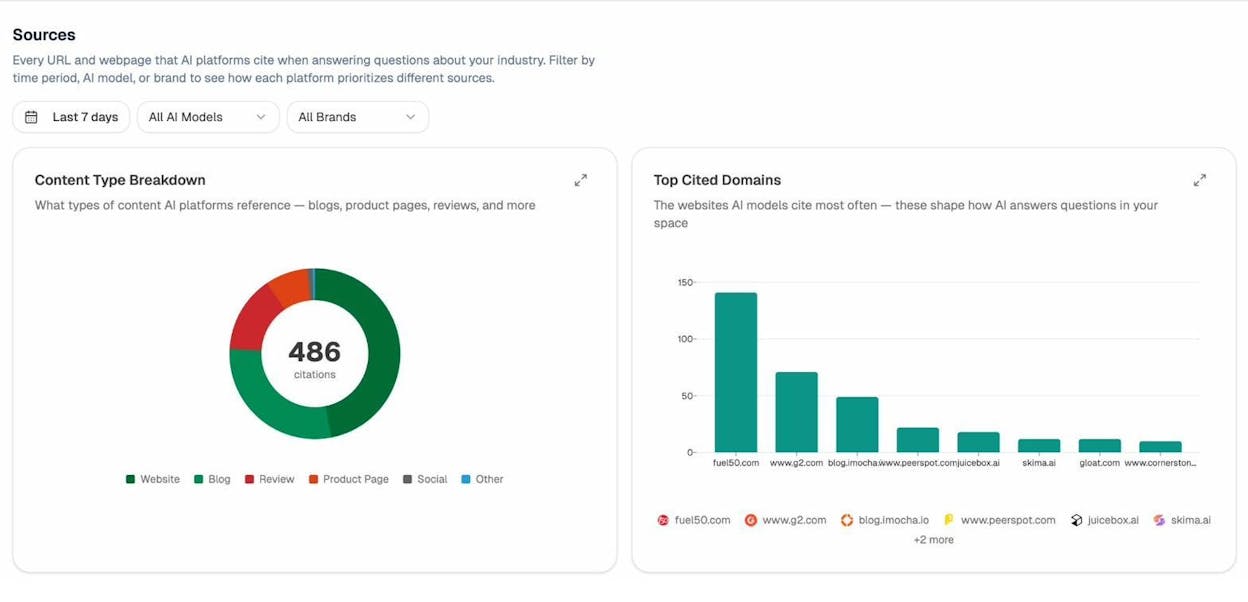
The Sources dashboard breaks down every URL and domain that AI platforms cite when answering questions in your industry. You can filter by AI model and time period to see which sources each engine trusts most. If a domain like G2 or a major industry blog shows up frequently as a cited source, getting a backlink (or a mention) from that domain has double value: it helps your Google rankings and increases your chances of being cited in AI answers.
2. Relevance (Search Intent)
Google has publicly stated that its systems are designed to understand what searchers actually want — not just match keywords. If your content doesn’t align with what people expect to find, it won’t rank, regardless of how well you’ve optimized it technically.
This is what SEOs call “search intent,” and it’s one of the most important ranking factors to get right.
The four types of search intent
Every search query falls into one of four categories:
|
Intent Type |
What the Searcher Wants |
Example Query |
|---|---|---|
|
Informational |
Learn something |
“what are google ranking factors” |
|
Navigational |
Find a specific page |
“google search console login” |
|
Commercial |
Compare options before buying |
“best SEO tools 2026” |
|
Transactional |
Complete an action or purchase |
“buy ahrefs subscription” |
The top-ranking results for any keyword reveal the dominant intent. If you create the wrong type of content for the intent, you won’t rank — no matter how good the content is.
How to analyze search intent for any keyword
Open an incognito browser window and search for your target keyword. Look at the top 10 results and note three things:
-
Content type. Are the results blog posts, product pages, landing pages, or something else? If the top 10 are all blog posts, publishing a product page for that keyword won’t work.
-
Content format. Are they how-to guides, listicles, comparison pages, or definitions? If seven out of 10 results are “best X” listicles, that’s the format Google thinks best serves the intent.
-
Content angle. What’s the dominant perspective? Results for “CRM software” might emphasize “for small businesses” or “free options” — that angle tells you what searchers care about most.
![[Screenshot: Google SERP for “google ranking factors” showing the mix of content types in top results]](https://www.datocms-assets.com/164164/1777061567-blobid4.png?auto=format,compress&w=1248&fit=max)
Use the Analyze AI SERP Checker to see the current top-ranking pages for any keyword without the influence of your personal search history. This gives you a clean view of what Google considers the ideal match for that query.
Going deeper: subtopic analysis
Matching the broad intent is the baseline. To outrank competitors, you need to cover the subtopics searchers also expect.
Here’s a practical way to find them: look at the “People Also Ask” boxes on Google. Each question represents a subtopic that searchers commonly want answered alongside their original query. If your article on “Google ranking factors” doesn’t address questions like “how many ranking factors does Google have?” or “what is the most important ranking factor?” — you’re leaving relevance signals on the table.
You can also check what questions people are asking about your topic using the Keyword Generator, which surfaces related queries, long-tail variations, and question-based keywords.
![[Screenshot: Google “People Also Ask” box for “google ranking factors” showing common subtopics]](https://www.datocms-assets.com/164164/1777061573-blobid5.png?auto=format,compress&w=1248&fit=max)
How relevance works in AI search
AI search engines don’t display ten blue links. They synthesize a single answer from multiple sources. But the principle is the same: the content that most directly and completely answers the prompt is the content that gets cited.
The difference is that AI engines respond to prompts, not keywords. A Google searcher types “best CRM software.” A ChatGPT user might type “I’m a 15-person startup looking for a CRM that integrates with Slack and costs less than $50/user/month. What are my best options?” The prompt is far more specific, and the AI’s answer will favor content that addresses that exact level of specificity.
This is where Analyze AI’s Prompts dashboard becomes useful. It tracks the actual prompts people use in your industry and shows you where your brand appears (or doesn’t) in the AI response for each one.
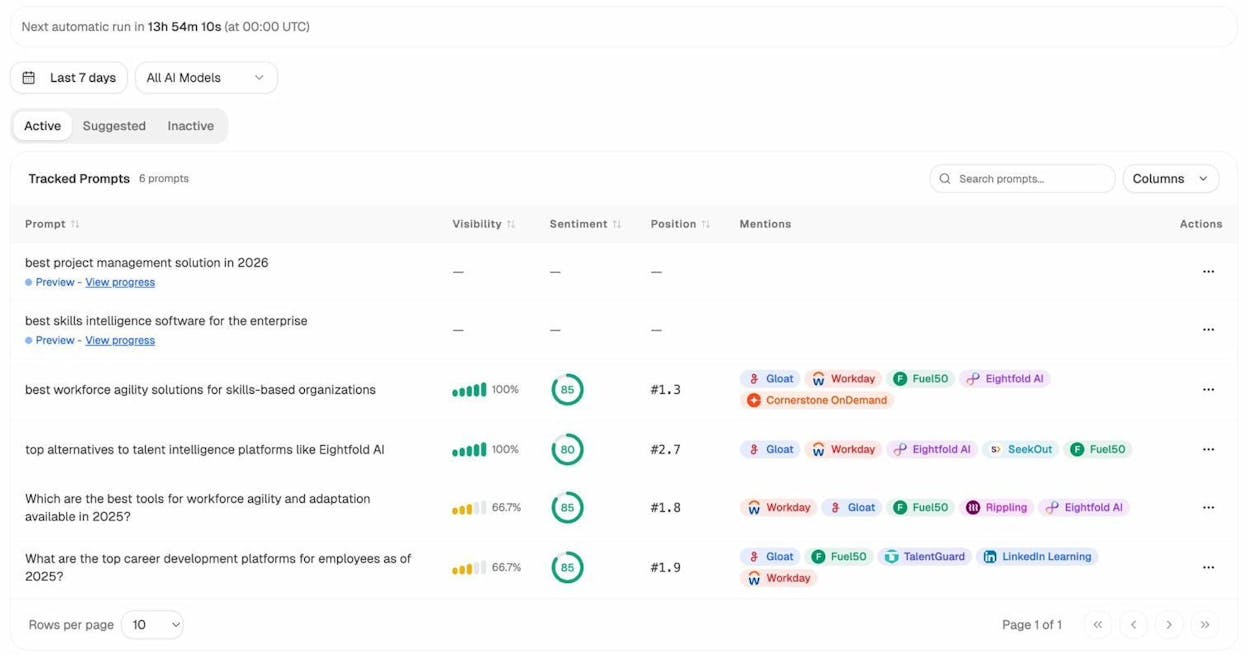
In the screenshot above, you can see each tracked prompt, your visibility percentage, sentiment score, average position, and which competitors are mentioned alongside you. If you’re invisible on prompts that directly match your product, that’s a gap in your relevance — not just for AI search, but likely for Google too.
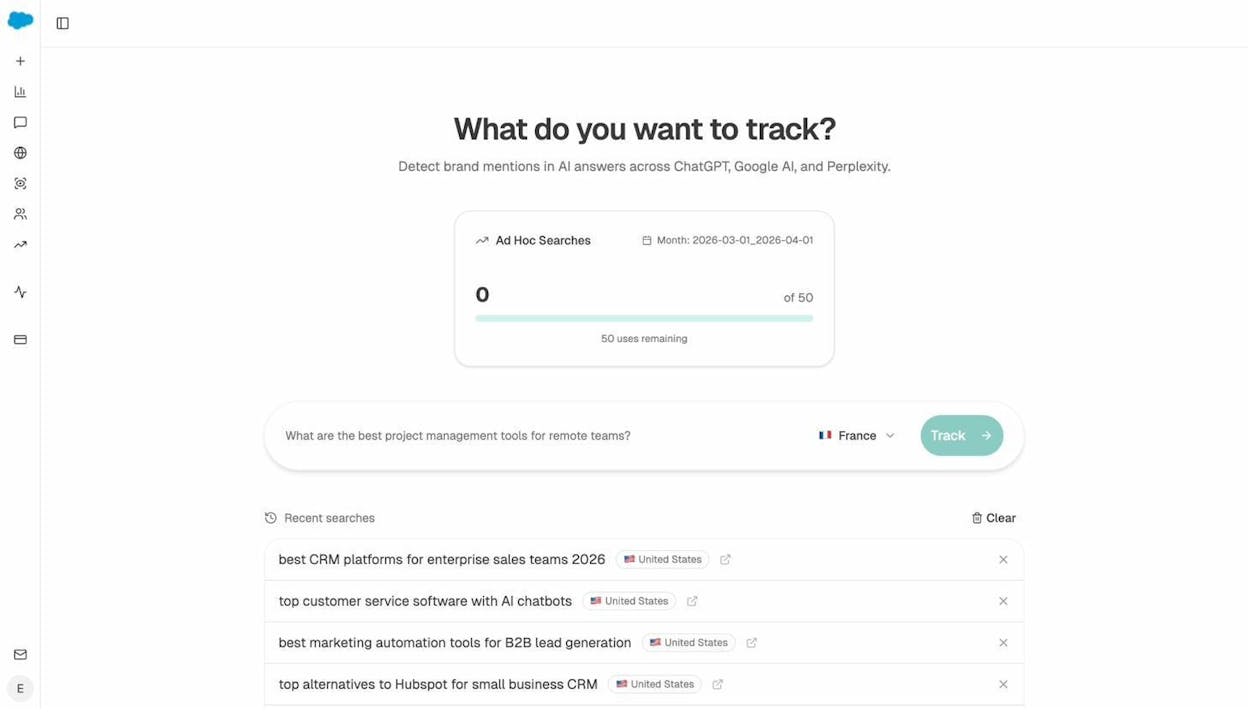
You can also use the Ad Hoc Prompt Search feature to test any prompt across multiple AI engines in real time and see who gets recommended.
3. Freshness
Freshness is a query-dependent ranking factor. That means it matters a lot for some queries and almost not at all for others.
Search for “Netflix new shows” and the top results will be from the last few days. Search for “how to tie a tie” and the top results might be years old. Google understands the difference because it can detect when a query implies a need for recent information.
How to tell if freshness matters for your keyword
Look at the dates on the current top-ranking results. If most of them are from the last 3-6 months, freshness is a strong signal for that query. If top results are 2-3 years old and still ranking, freshness matters less.
Queries where freshness typically matters most:
-
Topics tied to a specific year (“best SEO tools 2026”)
-
News-related queries (“Google algorithm update”)
-
Product comparisons that change as features evolve
-
Statistical or data-driven topics where numbers change regularly
-
Industry trends and predictions
![[Screenshot: Google SERP showing date stamps on results for a time-sensitive query like “best SEO tools 2026” vs. an evergreen query like “what is SEO”]](https://www.datocms-assets.com/164164/1777061588-blobid8.png?auto=format,compress&w=1248&fit=max)
How to use freshness as a competitive advantage
If you already have an article ranking for a keyword where freshness matters, updating it regularly is often more effective than publishing a new one. Google tracks when a page was meaningfully updated — not just when the date was changed. A genuine update means adding new information, removing outdated sections, refreshing screenshots, and updating any data points or statistics.
Here’s a practical workflow:
-
Set a quarterly review schedule for your highest-traffic content.
-
Check whether the information is still accurate — prices, features, statistics, and recommendations all change.
-
Add any new developments or subtopics that have emerged since you last published.
-
Update your title tag and meta description if the year is part of the keyword.
-
Avoid the temptation to just change the date. Google’s systems can detect superficial updates, and they won’t help.
How freshness works in AI search
AI models have a training data cutoff, but the major ones now use retrieval-augmented generation (RAG) to pull in recent web content. Perplexity, for example, crawls the web in real time. Google’s AI Overviews pull from the current index. ChatGPT with browsing enabled fetches live results.
This means freshness matters in AI search too — especially for queries where the answer changes over time. If your content is outdated, AI engines will pull from a competitor whose content is current.
You can monitor this in Analyze AI’s AI Traffic Analytics dashboard. If you see AI traffic to a specific page declining, it may be a sign that AI engines have started favoring more recent content from a competitor. That’s your cue to update.
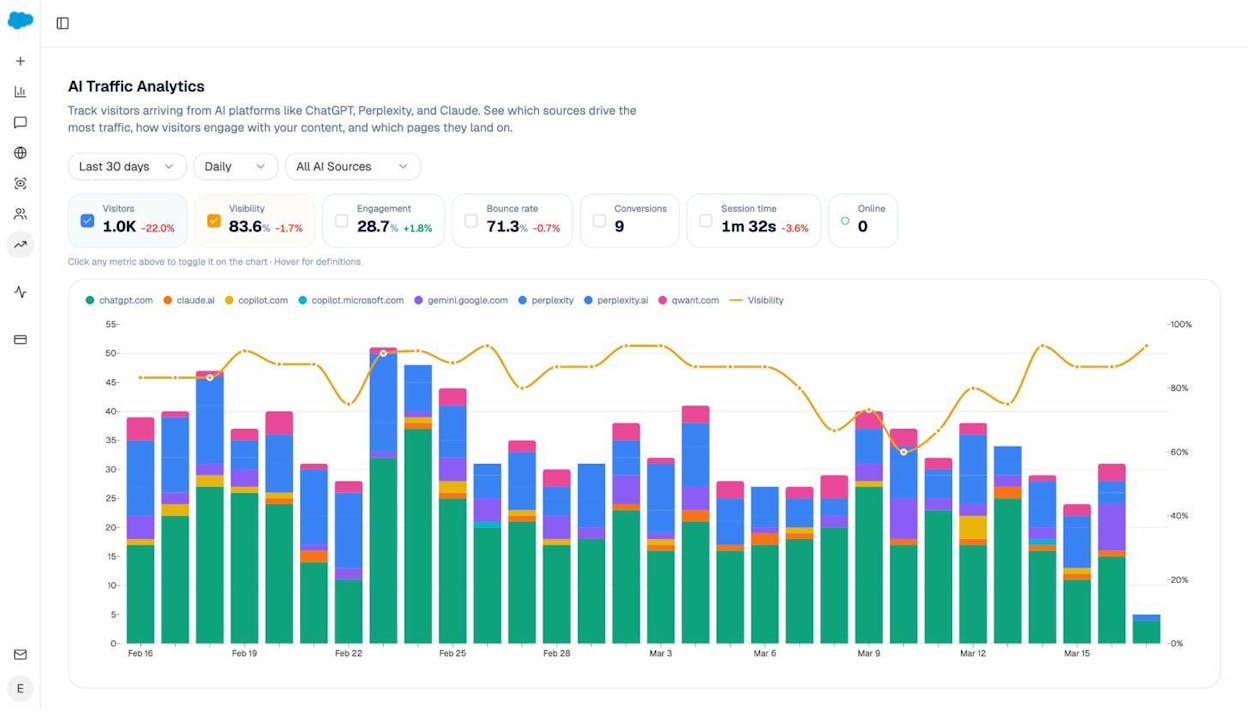
The dashboard breaks down traffic by source — ChatGPT, Claude, Perplexity, Gemini, Copilot, and more — so you can see which engines are sending traffic and whether that traffic is growing or shrinking. A sudden drop from one engine often means your content has been replaced in that engine’s responses.
4. HTTPS
HTTPS encrypts the connection between a visitor’s browser and your website. Google announced it as a ranking signal in 2014, calling it a “lightweight” factor at the time. It has since become a baseline expectation.
If your site doesn’t use HTTPS, browsers display a “Not Secure” warning. That warning alone can increase bounce rates and destroy trust — which indirectly hurts your rankings even beyond the direct signal.
![[Screenshot: Chrome browser showing “Not Secure” warning on an HTTP page]](https://www.datocms-assets.com/164164/1777061598-blobid10.jpg?auto=format,compress&w=1248&fit=max)
How to check and fix HTTPS issues
Most sites today use HTTPS, but implementation issues are common. Here are the things to check:
-
Mixed content. Your page loads over HTTPS, but some resources (images, scripts, CSS) are loaded over HTTP. This triggers a mixed content warning and weakens the security signal. Most browsers will flag these in the developer console.
-
Certificate expiration. TLS certificates expire. If yours lapses, visitors see a full-page security warning and most will leave immediately. Set a calendar reminder to renew your certificate, or use a provider that auto-renews (most modern hosting platforms do).
-
HTTP-to-HTTPS redirects. If your site is accessible on both HTTP and HTTPS, set up 301 redirects from HTTP to HTTPS. Otherwise, Google may index the insecure version.
-
HSTS headers. HTTP Strict Transport Security tells browsers to only use HTTPS for your domain. It prevents downgrade attacks and ensures consistent secure connections.
HTTPS is a table-stakes factor. It won’t give you a competitive edge, but not having it will hold you back.
5. Mobile-Friendliness
Google has used mobile-friendliness as a ranking factor since 2015. When Google moved to mobile-first indexing in 2019, it started using the mobile version of your site for indexing and ranking on all devices — including desktop.
That means if your site works perfectly on desktop but is broken on mobile, your desktop rankings will suffer too.
How to check your mobile-friendliness
The Mobile Usability report in Google Search Console shows you exactly which pages have mobile usability issues. Common problems include:
-
Text too small to read. If users have to pinch-to-zoom, your font size is too small for mobile.
-
Clickable elements too close together. Buttons and links need enough spacing that users can tap the right one without accidentally hitting the wrong one.
-
Content wider than screen. Horizontal scrolling on mobile is a usability failure. This usually happens when images or tables aren’t responsive.
-
Viewport not set. Without a proper viewport meta tag, your page renders at desktop width on mobile screens.
![[Screenshot: Google Search Console Mobile Usability report showing pages with and without issues]](https://www.datocms-assets.com/164164/1777061599-blobid11.jpg?auto=format,compress&w=1248&fit=max)
Practical steps to improve mobile-friendliness
Start by testing your key pages on an actual phone, not just a browser resize tool. Emulators miss real-world issues like slow touch response, viewport quirks, and font rendering differences.
Then prioritize fixes based on traffic. Use Google Search Console to identify which pages with mobile issues get the most impressions. Fix those first.
For most sites, the core fixes are:
-
Use a responsive CSS framework or ensure your existing CSS uses relative units (%, em, rem, vw) instead of fixed pixel widths.
-
Set images to max-width: 100% so they scale within their container.
-
Use a readable base font size (16px minimum) without requiring zoom.
-
Add <meta name="viewport" content="width=device-width, initial-scale=1"> to every page.
-
Make tap targets at least 48x48 CSS pixels with adequate spacing between them.
Why mobile-friendliness matters for AI search too
More than half of AI search interactions happen on mobile. ChatGPT, Perplexity, and Gemini all have mobile apps, and users increasingly ask AI questions on their phones. When an AI engine cites your page and a user clicks through, a poor mobile experience means they’ll bounce — which hurts your engagement metrics and, over time, your credibility as a cited source.
AI engines with retrieval capabilities also evaluate page quality signals when choosing which sources to cite. While the exact signals vary by engine, a site that renders poorly on mobile is less likely to be considered a high-quality source.
6. Page Speed (Core Web Vitals)
Page speed has been a Google ranking factor on desktop since 2010 and on mobile since 2018.
Google now measures page speed through Core Web Vitals (CWV) — a set of three metrics that capture loading performance, interactivity, and visual stability:
|
Metric |
What It Measures |
Good Threshold |
|---|---|---|
|
Largest Contentful Paint (LCP) |
How quickly the main content loads |
Under 2.5 seconds |
|
Interaction to Next Paint (INP) |
How quickly the page responds to user input |
Under 200 milliseconds |
|
Cumulative Layout Shift (CLS) |
How much the page layout shifts during loading |
Under 0.1 |
Note: Google replaced First Input Delay (FID) with Interaction to Next Paint (INP) in March 2024. INP is a stricter metric that measures responsiveness throughout the entire page lifecycle, not just the first interaction.
How to check your Core Web Vitals
Three places to look:
-
Google Search Console → Core Web Vitals report. This gives you a site-wide view of which URLs pass or fail, grouped by issue type.
![[Screenshot: Google Search Console Core Web Vitals report showing URL groups by status]](https://www.datocms-assets.com/164164/1777061604-blobid12.png?auto=format,compress&w=1248&fit=max)
-
PageSpeed Insights (pagespeed.web.dev). Enter any URL to see its field data (real user metrics from the Chrome User Experience Report) and lab data (simulated test results). Field data is what Google uses for ranking.
![[Screenshot: PageSpeed Insights results page for a sample URL showing CWV scores]](https://www.datocms-assets.com/164164/1777061607-blobid13.png?auto=format,compress&w=1248&fit=max)
-
Chrome DevTools → Performance tab. For detailed debugging, this shows exactly what’s happening during page load — which resources are blocking rendering, what’s causing layout shifts, and where interactivity lags.
Practical steps to improve Core Web Vitals
For LCP (loading speed): - Optimize your largest above-the-fold image. Compress it, serve it in WebP or AVIF format, and add a fetchpriority="high" attribute. - Eliminate render-blocking CSS and JavaScript. Inline critical CSS and defer non-essential scripts. - Use a CDN to serve content from servers geographically closer to your users. - Implement server-side caching and ensure your Time to First Byte (TTFB) is under 800ms.
For INP (interactivity): - Break up long JavaScript tasks. Any task that takes more than 50ms blocks the main thread and delays user interactions. - Reduce the amount of JavaScript on your page. Audit your third-party scripts — analytics, chat widgets, and ad scripts are common culprits. - Use requestIdleCallback for non-urgent work and requestAnimationFrame for visual updates.
For CLS (visual stability): - Always include width and height attributes on images and video elements so the browser can reserve space before they load. - Avoid inserting content above existing content after the page has started rendering. Dynamic banners and late-loading ads are the most common cause. - Use CSS aspect-ratio for responsive media containers.
One important caveat: Google’s page speed ranking factor works as a demotion signal, not a boost. You don’t get bonus points for being exceptionally fast. You lose ground if your site is exceptionally slow. The goal isn’t to be the fastest site on the web — it’s to clear the threshold so speed isn’t holding you back.
7. Intrusive Interstitials
Interstitials are overlays that appear on top of page content. Google considers them intrusive when they block a user from accessing the content they came to see.
Google made intrusive interstitials a negative ranking factor in 2017, and they’re now part of the broader Page Experience signals.
What counts as intrusive
Google specifically flags three types of interstitials as problematic:
-
Full-screen popups that appear immediately when a user arrives from search. These block the content entirely and force the user to dismiss them before they can read anything.
-
Standalone interstitials that must be dismissed before the user can access the page. These include email signup modals, app download prompts, and consent walls that aren’t legally required.
-
Above-the-fold layouts where the interstitial IS the above-the-fold content and the user has to scroll past it to reach the actual page.
What’s NOT considered intrusive
Some interstitials are fine and won’t hurt your rankings:
-
Legally required interstitials. Cookie consent banners, age verification gates, and login walls for paywalled content are all acceptable.
-
Small banners that don’t take up an unreasonable amount of screen space. A thin banner at the top or bottom of the page is fine.
-
Interstitials that appear after user engagement, not on page load. If someone has scrolled through 60% of your article and you show a newsletter signup modal, Google doesn’t penalize that.
How to fix intrusive interstitial issues
Replace full-screen popups with inline CTAs or small banners. If you need an email signup prompt, place it within the content flow — between sections or at the end of the article — rather than as a modal that blocks the page.
If you do use a modal, delay it. Wait until the user has engaged with the page (scrolled past a certain point, spent at least 30 seconds reading) before triggering it. This respects the user’s intent and avoids the ranking penalty.
The Factor Nobody’s Tracking: AI Search Visibility
The seven factors above determine where you rank on Google. But there’s now an eighth channel that’s growing fast and most brands aren’t tracking at all: AI search.
When someone asks ChatGPT “what’s the best project management tool for startups?” — that’s organic traffic you could be getting. When Perplexity answers a question about your industry and cites a competitor instead of you — that’s a missed opportunity.
The fundamentals are the same. AI engines favor content that is high-quality, relevant, well-structured, and from authoritative sources. The same content that earns Google rankings tends to earn AI citations. But there are differences in how AI engines select and present sources that are worth understanding.
What AI engines look for when choosing sources to cite
Based on our analysis of 65,000 prompt citations, AI engines tend to favor:
-
Pages with clear, structured information. Well-organized headings, tables, and direct answers to specific questions make it easier for AI models to extract and cite your content.
-
Authoritative domains. Sites with strong backlink profiles and established credibility in their niche get cited more often.
-
Comprehensive coverage. Pages that address a topic thoroughly — not just the primary question, but related questions and edge cases — get cited for a wider range of prompts.
-
Freshness. For time-sensitive topics, AI engines with retrieval capabilities (Perplexity, ChatGPT with browsing, Gemini) prioritize recently updated content.
If this list sounds familiar, it should. These are the same qualities that earn Google rankings. The difference is that in AI search, you can directly monitor where you stand.
How to track your AI search visibility
Analyze AI is purpose-built for this. Here’s what the workflow looks like in practice:
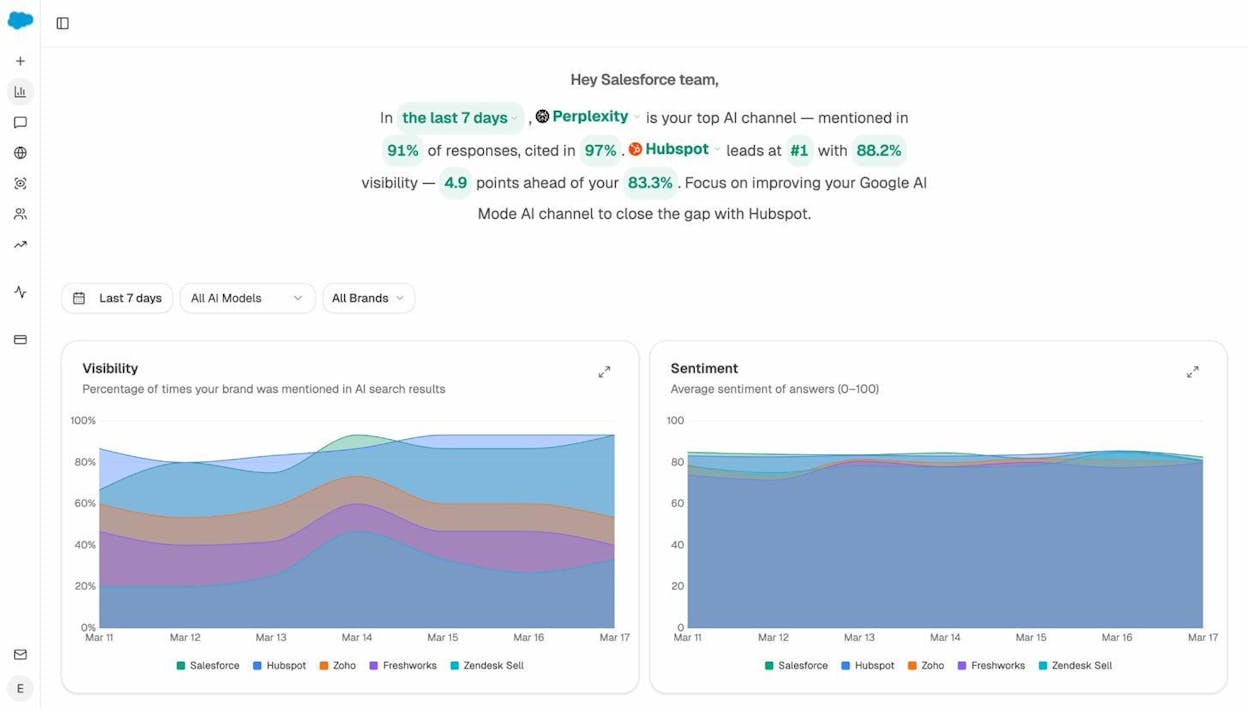
Step 1: See where you stand. The Overview dashboard gives you a snapshot of your visibility across AI engines, your average position, sentiment, and how you compare to competitors.
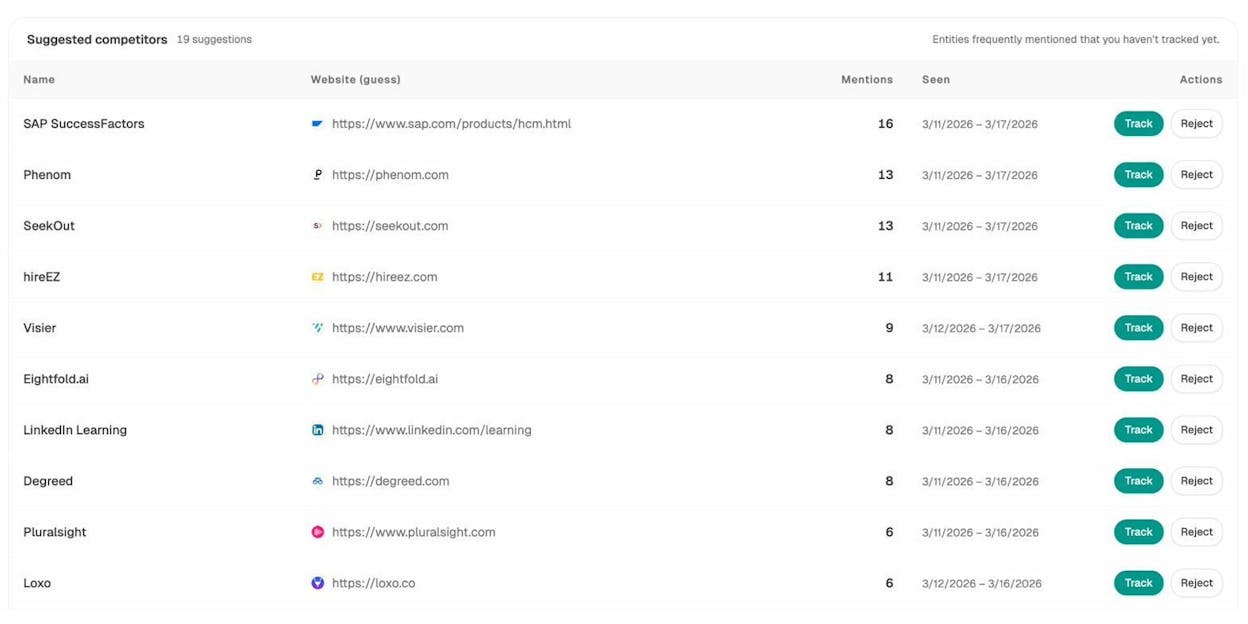
Step 2: Identify gaps. The Competitors dashboard shows you exactly which brands AI engines recommend instead of you — and on which prompts. If a competitor appears on prompts where you don’t, that’s a content gap you can fill.
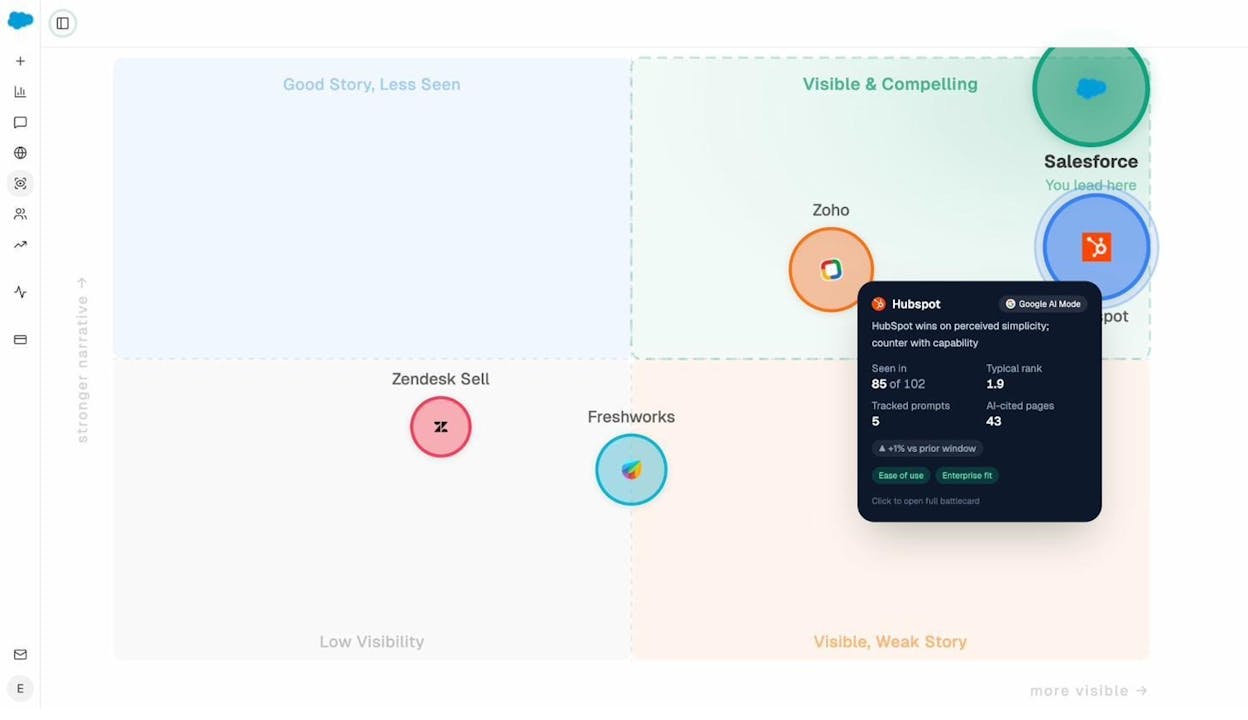
Step 3: Understand how AI frames your brand. The Perception Map shows the narrative AI builds about your brand — what it says about your strengths, weaknesses, and positioning relative to competitors.
Step 4: Track AI traffic. Connect your GA4 account, and Analyze AI shows you exactly how many visitors come from each AI engine, which pages they land on, and whether they convert.
This isn’t a replacement for Google Search Console. It’s the AI equivalent of it. SEO isn’t dead, and AI search isn’t replacing Google. They’re parallel organic channels, and tracking both gives you a more complete picture of how people find your brand.
What About E-E-A-T?
E-E-A-T stands for Experience, Expertise, Authoritativeness, and Trustworthiness. Google uses it as part of its Quality Rater Guidelines — the manual that human evaluators use to assess search quality.
Here’s the nuance: E-E-A-T is not a direct ranking factor. Google has said this explicitly. It’s a framework that informs how Google’s algorithms are designed and evaluated. You can’t optimize for an “E-E-A-T score” because there is no score.
But the principles behind E-E-A-T absolutely affect your ability to rank. Content written by someone with genuine expertise tends to be more accurate, more detailed, and more useful — which means it naturally satisfies the ranking factors that ARE confirmed (relevance, backlink-worthiness, user satisfaction).
Practical things that demonstrate E-E-A-T:
-
Author bylines with real credentials. A page about tax law written by a CPA is more credible than one with no author attribution.
-
First-hand experience. Original data, case studies, screenshots, and personal insights signal that the author actually knows what they’re talking about — not just summarizing other articles.
-
Consistent topical coverage. A site that publishes regularly on a specific subject builds topical authority over time. Google’s systems can recognize when a domain has deep coverage of a topic area.
-
Transparent about-pages and contact information. Users (and quality raters) trust sites that clearly state who they are and how to reach them.
For AI search, E-E-A-T matters even more. AI models are designed to surface trustworthy information, and they prioritize sources that demonstrate clear expertise. First-hand data, original analysis, and expert perspectives are exactly the kind of content that gets cited in AI answers — because AI engines are specifically trying to avoid surfacing generic, regurgitated content.
How to Prioritize: A Practical Ranking Factors Checklist
If you’re looking at this list and wondering where to start, here’s a priority order based on impact:
|
Priority |
Factor |
Why It Matters Most |
|---|---|---|
|
1 |
Relevance (Search Intent) |
If your content doesn’t match intent, nothing else matters |
|
2 |
Backlinks |
Still the strongest differentiator between otherwise equal pages |
|
3 |
Freshness |
Critical for time-sensitive keywords; easy win if competitors are outdated |
|
4 |
Page Speed (CWV) |
Won’t boost you, but will hold you back if slow |
|
5 |
Mobile-Friendliness |
Table stakes — fix any issues, then move on |
|
6 |
HTTPS |
If you don’t have it, fix it today. If you do, move on |
|
7 |
Intrusive Interstitials |
Remove any that block content on load |
Then add AI search visibility as your eighth priority. It won’t replace any of the above, but it compounds the results of everything you’re already doing. If your content is good enough to rank on Google, it’s good enough to appear in AI answers — you just need to track whether it actually does.
Start tracking your AI visibility for free and see exactly where your brand shows up across ChatGPT, Perplexity, Gemini, Claude, and Copilot.
Keep Learning
-
What Is Generative Engine Optimization (GEO)? — A complete breakdown of how to optimize your content for AI search engines.
-
How to Rank on ChatGPT — Based on analysis of 65,000 prompt citations.
-
How to Rank on Perplexity AI — What citation data reveals about Perplexity’s source preferences.
-
GEO vs SEO: Key Differences & Similarities — Why these aren’t competing strategies.
-
18 Types of SEO — A comprehensive overview of every SEO discipline and 40+ techniques.
-
2026 SEO Content Strategy: 10-Step Breakdown — How to build a content strategy that works for both Google and AI search.
-
How to Use Keywords in SEO: 14 Practical Tips — Keyword placement strategies that still work.
-
Off-Page SEO: 11 Strategies That Work — Building authority beyond your own site.

Ernest

Ibrahim


