



Summarize this blog post with:


Everyone’s SEO strategy works the same way at the basic level. You find keywords people search for, create optimized content, and build authority over time.
But “find keywords and write content” is like saying “buy low, sell high.” True in theory. Useless in practice.
The real question is: how do you decide which keywords to target, how do you create content that actually ranks, and what do you do when you’re stuck on page one but not in the top three?
That’s what this guide answers. We’ll walk through a four-step strategy called the Orchard Method, and we’ll show you how to apply each step to both Google and the growing wave of AI search engines that now send real, measurable traffic.
In this article, you’ll learn the exact SEO strategy we use at Analyze AI to grow organic traffic from both traditional search and AI search engines. You’ll get a step-by-step process for finding keywords, creating content, finding low-hanging fruit opportunities, and re-optimizing pages that are close to ranking. You’ll also learn how to extend your strategy to AI search platforms like ChatGPT, Perplexity, and Google AI Mode, so you capture traffic from every organic channel available in 2026.
Table of Contents
What is an SEO strategy?
An SEO strategy is an action plan for improving your website’s visibility in search engines. It outlines the specific steps you’ll take to find keyword opportunities, create and optimize content, and build authority so you earn more organic traffic over time.
Most SEO strategies focus only on Google. That made sense five years ago. But in 2026, people also search through ChatGPT, Perplexity, Claude, Gemini, Google AI Mode, and Copilot. These platforms pull information from the web, cite sources, and send real traffic to websites.
A modern SEO strategy should account for both channels. Not because SEO is dead (it isn’t), but because AI search is an additional organic channel that compounds alongside your existing SEO work. The content that ranks well in Google often performs well in AI answers too. Good strategy serves both.
Here’s the four-step Orchard Method we’ll walk through:
|
Step |
Name |
What you do |
|---|---|---|
|
1 |
Plan |
Benchmark your current performance and set a measurable goal |
|
2 |
Plant |
Find keywords with traffic and business potential, then create content |
|
3 |
Pick |
Find low-hanging fruit keywords where small improvements unlock big traffic gains |
|
4 |
Press |
Re-optimize underperforming pages to squeeze more results from existing content |
Each step builds on the last. You plant seeds, wait for them to grow, pick the fruit that’s ready, and press it for maximum value.
How to create your SEO strategy (by filling in the template)
Follow the four steps below, filling in the SEO strategy template as you go.
1. Plan: Benchmark your SEO performance and set a goal
The broad goal of any SEO strategy is to increase traffic. But “increase traffic” is too vague to act on. You need to define how much you want to grow, over what time period, and how you’ll measure progress.
We use the SMART framework for this:
-
Specific: A concrete number, not “more traffic.”
-
Measurable: You can track it in a tool.
-
Attainable: Ambitious but realistic given your starting point.
-
Relevant: Tied to a business outcome like leads or revenue.
-
Time-bound: Has a deadline.
Here’s what a SMART SEO goal looks like in practice:
“Increase organic search traffic by 25% in 6 months, measured in Google Search Console clicks, to drive an estimated 150 additional monthly leads.”
This goal works because 25% is a specific target, GSC clicks are measurable, the timeframe creates urgency, and it’s tied to a business outcome (leads).
How to figure out what’s realistic for you: Consider your current traffic level. If you get 500 visits per month, a 50% increase (250 extra visits) is achievable with consistent content production over 6 months. If you get 50,000 visits per month, a 50% increase requires a fundamentally different level of effort. For most small-to-mid-size sites, aim for 15–30% growth over 6 months. For very new sites, 50–100%+ is realistic because you’re starting from a small base.
How to check your current organic traffic
You need a baseline before you can set a target.
Option 1: Google Search Console (most accurate, free)
-
Log in to Google Search Console
-
Go to the Search results report
-
Set the date range to the last 28 days
-
Look at the “Total clicks” number
![[Screenshot: Google Search Console Search Results report showing total clicks over the last 28 days, with the date range selector and clicks number circled]](https://www.datocms-assets.com/164164/1777047827-blobid1.png?auto=format,compress&w=1248&fit=max)
This number represents your actual organic traffic from Google in the last 28 days. It’s the most accurate source because it comes directly from Google.
Option 2: Use a free traffic checker
If you haven’t set up Google Search Console yet, you can get an estimate using Analyze AI’s Website Traffic Checker. Enter your domain and you’ll see estimated monthly organic visits.
![[Screenshot: Analyze AI Website Traffic Checker tool showing estimated monthly organic traffic for a sample domain]](https://www.datocms-assets.com/164164/1777047837-blobid2.png?auto=format,compress&w=1248&fit=max)
Keep in mind that third-party estimates are approximations. They’re useful for ballpark figures, but GSC is always more accurate for your own site.
How to check your AI search traffic (most people skip this)
Here’s where most SEO strategies fall short in 2026: they ignore AI search traffic entirely.
AI engines like ChatGPT, Perplexity, Claude, and Google AI Mode already send measurable traffic to websites. If you’re not tracking this channel, you’re flying blind on a growing slice of your organic pie.
In Analyze AI, you can see exactly how much traffic AI platforms are sending to your site, broken down by engine, landing page, and engagement metrics:
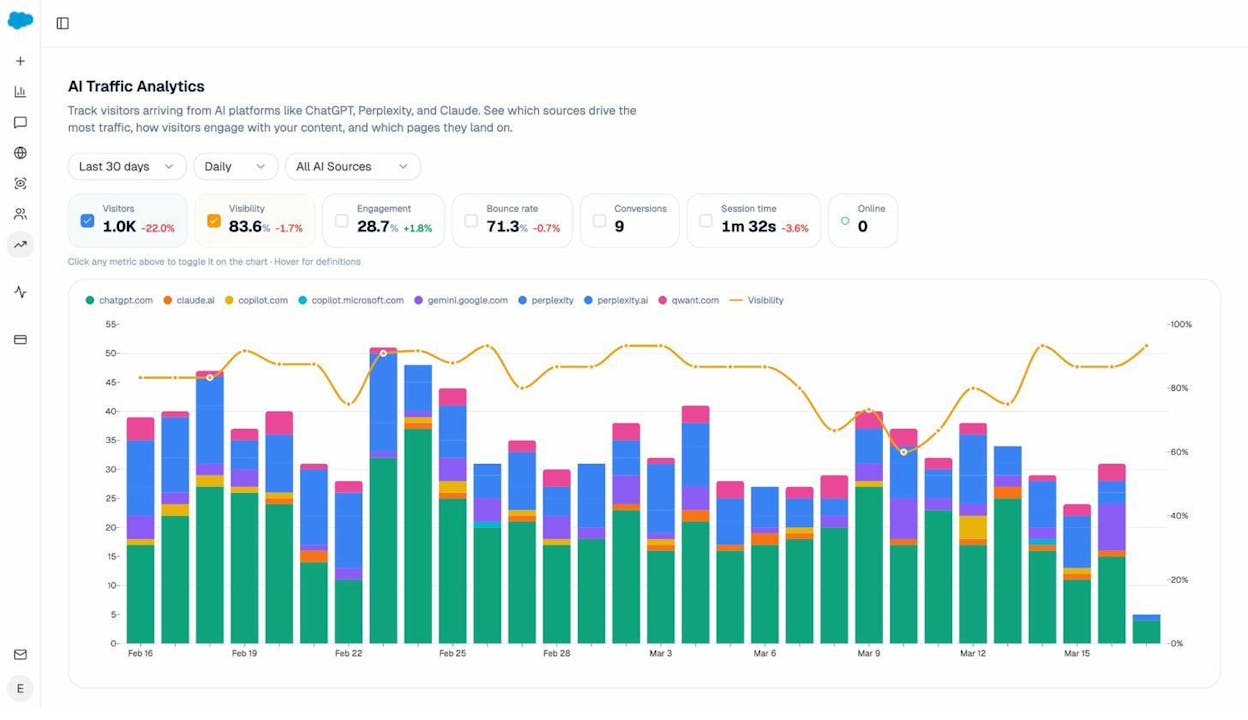
The dashboard above shows daily AI-referred visitors alongside your AI visibility score. You can filter by AI source (ChatGPT, Claude, Perplexity, etc.) and see which engines drive the most sessions.
This matters for your strategy because it gives you a second baseline. Your SMART goal might be: “Increase organic traffic by 25% and AI referral traffic by 40% in 6 months.”
Record your SMART goal in the SEO strategy template. Include both your traditional SEO target and, optionally, an AI search traffic target.
2. Plant: Use “seeds” to find and target winning keywords
You can’t grow traffic without targeting keywords people actually search for. This step is about finding the right keywords, validating them, and creating content that ranks.
a) Find and record keyword ideas
Start with broad “seed” words related to your business. These are the basic terms your customers would use to describe what you do.
For example, if you run a coffee shop, your seeds might be “coffee,” “espresso,” and “latte.” If you sell project management software, your seeds might be “project management,” “task tracking,” and “team collaboration.”
Here’s how to generate keyword ideas from those seeds:
Method 1: Use a keyword research tool
Enter your seed terms into a keyword research tool. You can use Analyze AI’s free Keyword Generator to start. Enter a seed term, choose your target country, and the tool will return related keywords with search volume and difficulty data.
![[Screenshot: Analyze AI Keyword Generator tool showing keyword suggestions for a seed term, with columns for search volume, keyword difficulty, and CPC]](https://www.datocms-assets.com/164164/1777047848-blobid4.png?auto=format,compress&w=1248&fit=max)
Method 2: Google Autocomplete
Go to Google and start typing your seed term. Google will suggest completions based on what people actually search. These suggestions are free, real-time keyword ideas straight from Google’s data.
![[Screenshot: Google search bar showing autocomplete suggestions for a seed term like “project management” with multiple long-tail suggestions visible]](https://www.datocms-assets.com/164164/1777047875-blobid5.png?auto=format,compress&w=1248&fit=max)
Type your seed, note the suggestions, then add a letter after it (e.g., “project management a,” “project management b”) to uncover more ideas. Do this for each letter of the alphabet.
Method 3: “People Also Ask” and “Related Searches”
Search for your seed term in Google and scroll down. You’ll find “People Also Ask” boxes with questions real users ask, and “Related Searches” at the bottom with variations of your query. Both are excellent sources of keyword ideas.
![[Screenshot: Google SERP showing “People Also Ask” section expanded with related questions, and “Related Searches” section at the bottom]](https://www.datocms-assets.com/164164/1777047876-blobid6.png?auto=format,compress&w=1248&fit=max)
Method 4: Look at what competitors rank for
Enter a competitor’s domain into a SERP Checker or use a competitor analysis tool to see which keywords drive traffic to their site. This reveals keywords you might have missed in your own brainstorm.
Now, from all these sources, you’ll have a large list of keyword ideas. You need to narrow it down. Filter for keywords that meet two criteria:
Criteria 1: Traffic potential. Check the estimated monthly search volume. Keywords with zero or very low volume won’t move the needle. Focus on keywords with at least a few hundred monthly searches, unless they have very high business value.
Criteria 2: Realistic difficulty. Use a Keyword Difficulty Checker to estimate how hard it will be to rank. If your site is new or has low authority (check with a Website Authority Checker), focus on keywords with lower difficulty scores. A brand-new site probably shouldn’t chase keywords with difficulty scores above 30–40.
Record 10–20 promising keywords in the SEO strategy template. Don’t worry about the “Search Intent” or “Status” columns yet.
b) Check search intent
Before you commit to a keyword, you need to understand what type of content Google rewards for that query. This is called search intent, and it’s one of the most important (and most overlooked) parts of keyword research.
To check search intent, Google your target keyword and look at the top 5–10 results. Ask yourself:
-
Are the results blog posts, product pages, category pages, tools, or videos?
-
What format are the blog posts in? Listicles, how-to guides, comparisons, or tutorials?
-
How long are the top results? Are they 500-word overviews or 3,000-word deep dives?
The answers tell you what you need to create. If the top results for “best project management tools” are all listicle-style blog posts comparing tools, you need to write a listicle. If the top results for “project management software” are product landing pages, a blog post won’t rank.
Example of matching intent correctly:
Search “best espresso machine.” The top results are all roundup-style blog posts with reviews. That means the intent is informational/commercial, and you need to write a comparison post.
Search “buy espresso machine.” The top results are all e-commerce category pages from Amazon, Target, and specialty stores. That means the intent is transactional, and you need a product page, not a blog post.
If you can’t create the type of content that matches search intent, tag that keyword as “Rejected” in your template. There’s no point targeting “buy espresso machine” if you don’t sell espresso machines.
Record the search intent for each keyword in your template. Tag each keyword as either “Not started” (you can create the right content type) or “Rejected” (you can’t match intent).
c) Check AI search prompt opportunities
Here’s where you go beyond traditional SEO.
Millions of people now ask questions through AI platforms instead of (or in addition to) Google. They type natural-language prompts like “What’s the best project management tool for remote teams?” or “How do I improve my website’s SEO?”
These prompts are the AI equivalent of keywords. And just like with Google, you can track whether your brand shows up in the answers.
In Analyze AI, the Prompts dashboard shows you exactly which prompts your brand appears in, your visibility percentage, sentiment score, position, and which competitors appear alongside you:
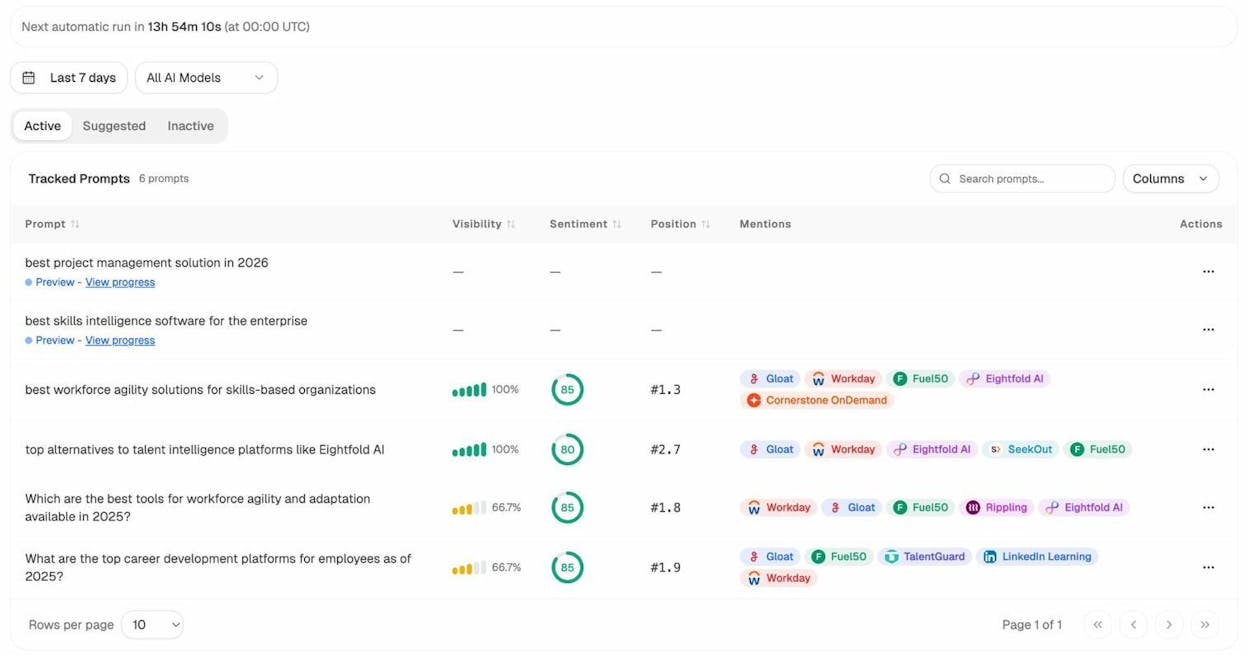
The platform also suggests new prompts you should track based on your industry and competitors:
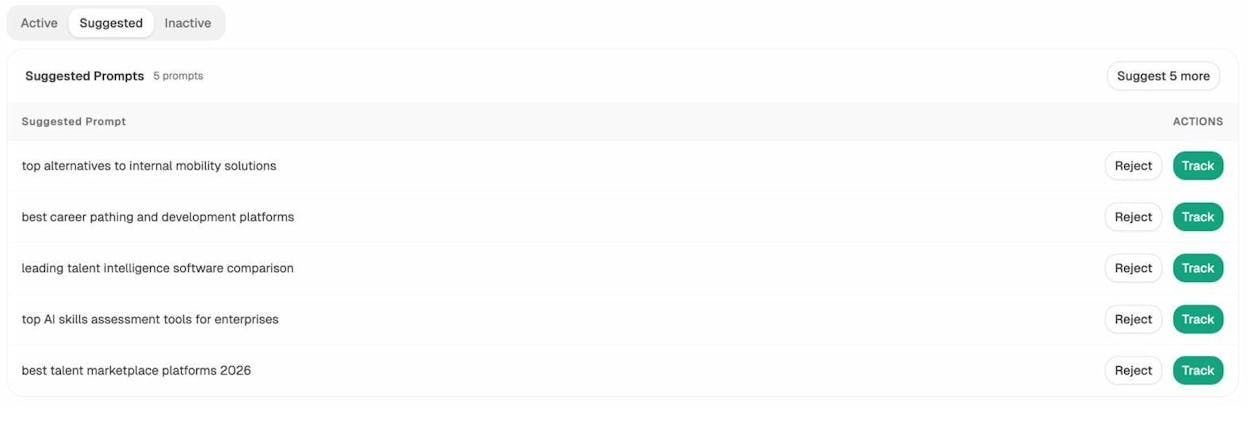
This is valuable for your SEO strategy because it reveals opportunities you’d never find through traditional keyword research. A prompt like “best workforce agility solutions for skills-based organizations” doesn’t have a Google search volume, but real people are asking AI platforms this question and getting answers that include (or exclude) your brand.
How to use this in your strategy:
-
Track 10–20 prompts that relate to your core keywords
-
Note which prompts you appear in and which you don’t
-
For prompts where competitors appear and you don’t, add a note in your template: this is a content gap
You don’t need a separate section in your template for AI prompts. Just add a column called “AI Prompt Opportunity” next to your keywords and note whether AI platforms surface your content for related queries.
d) Create and optimize content
With your keywords selected and search intent verified, it’s time to create content.
Here’s the on-page SEO checklist we follow for every piece of content:
Title tag: Include your primary keyword. Keep it under 60 characters so it doesn’t get cut off in search results. Make it compelling enough that someone would click it over the other results.
Meta description: Write a 150–160 character summary that includes your keyword and gives a clear reason to click. This doesn’t directly affect rankings, but it affects click-through rate, which affects traffic.
URL slug: Keep it short, readable, and include your keyword. /seo-strategy is better than /the-ultimate-guide-to-creating-an-seo-strategy-in-2026.
H1 tag: Use one H1 per page. It should contain your primary keyword and closely match your title tag.
Header structure (H2s, H3s): Use H2s for main sections and H3s for subsections. Include related keywords and variations naturally. Your headers should create a logical outline that a reader could scan and understand the full article.
Content depth: Cover the topic thoroughly. Look at the top-ranking pages and make sure you address every major subtopic they cover, plus add original insights they missed. This is where most content fails. People write surface-level overviews when Google rewards depth.
Internal links: Link to other relevant pages on your site within the content. This helps users navigate and passes authority between your pages. Use descriptive anchor text. We’ll cover internal linking in more detail in Step 4.
Images: Use relevant images, charts, or screenshots throughout. Add descriptive alt text that includes your keyword where natural. Compress images so they don’t slow down your page.
Readability: Use short paragraphs. Vary sentence length. Write at a reading level your audience can easily digest. Avoid jargon unless your audience expects it. Use simple, precise language.
One critical point about content depth: The difference between a page that ranks #12 and a page that ranks #3 is almost never on-page SEO. It’s almost always content depth and quality. The page that ranks higher covers more subtopics, provides more original examples, and gives the reader more actionable information. Spend 80% of your time on making the content better and 20% on the technical SEO checklist.
How to make your content work for AI search too: Content that ranks well in Google tends to perform well in AI answers because AI engines cite high-quality, well-structured web pages. But there are a few additional things that help:
-
Use clear, factual statements that AI can easily extract and quote. If your article says “The best time to send marketing emails is Tuesday at 10am, based on a study of 4 billion emails,” that’s the kind of sentence AI engines pull into their answers.
-
Structure content with clear headers and direct answers. AI engines scan for headers that match user queries and pull the text directly below them. If someone asks “What is keyword difficulty?” and your H2 says “What is keyword difficulty?” with a clear definition underneath, you’re more likely to be cited.
-
Include data, statistics, and original research. AI engines favor sources that provide specific numbers, studies, and data points. Generic advice gets passed over in favor of specific evidence.
-
Keep your content fresh. AI engines prefer recent, up-to-date content. Include publication dates and update regularly.
For more on how to optimize for AI search engines, see our guide to answer engine optimization.
In the template, tag each keyword as “In progress” when you start working on it and “Done” once the content is published.
3. Pick: Find low-hanging fruit keywords to optimize for
Give your content some time to index and settle. Within a few weeks to a few months, some of your pages will start ranking on the first page of Google. The problem is that ranking on the first page isn’t enough if you’re sitting at position #7 or #8.
The data is clear on this. The top three results in Google get roughly 55–70% of all clicks. Results at positions #6–10 typically get less than 3% each. So a page ranking #8 for a keyword with 10,000 monthly searches might only get 200–300 visits. Move that same page to #2, and you could get 2,000–3,000 visits.
That’s 10x more traffic from the same page with no new content required.
How to find low-hanging fruit keywords
Method 1: Google Search Console
-
Go to the Search results report in GSC
-
Toggle on “Average position”
-
Filter for positions between 4 and 15
-
Sort by impressions (highest first)
![[Screenshot: Google Search Console Search Results report filtered for average position between 4-15, sorted by impressions, showing keywords with high impressions but low clicks]](https://www.datocms-assets.com/164164/1777047892-blobid9.jpg?auto=format,compress&w=1248&fit=max)
The keywords at the top of this list are your biggest opportunities. They have high impressions (meaning lots of people search for them) but you’re not ranked high enough to capture many clicks.
Method 2: Use a rank tracking tool
If you use a rank tracking tool, filter for keywords where you rank in positions 2–10. These are the keywords where a small ranking improvement could mean significant traffic gains.
You can also use Analyze AI’s free Keyword Rank Checker to check where specific pages rank for your target keywords.
![[Screenshot: Analyze AI Keyword Rank Checker showing ranking position for a target keyword with SERP features and competitor positions visible]](https://www.datocms-assets.com/164164/1777047893-blobid10.png?auto=format,compress&w=1248&fit=max)
Keep business potential in mind. Not every low-hanging fruit keyword is worth optimizing. A keyword that drives traffic to your pricing page or product page is more valuable than one that drives traffic to a glossary entry. Prioritize keywords where the traffic has a clear path to conversion.
Use this framework to score business potential:
|
Score |
Description |
Example |
|---|---|---|
|
3 |
Your product is the solution |
“AI search analytics tool” |
|
2 |
Your product is helpful but not the only solution |
“how to track brand visibility” |
|
1 |
Your product is tangentially related |
“content marketing strategy” |
|
0 |
No connection to your product |
“what is machine learning” |
Focus on keywords scoring 2 or 3. Keywords scoring 1 are worth targeting only if search volume is high enough to justify the effort.
Record 10–20 low-hanging fruit keywords in the template. Include their current ranking position.
Find AI search low-hanging fruit too
Low-hanging fruit doesn’t just exist in Google. It exists in AI search too.
In Analyze AI, the Competitors dashboard shows you which brands appear in AI answers for your tracked prompts, and how often. If a competitor appears in 90% of AI answers for prompts in your space and you appear in only 40%, that gap is an opportunity.
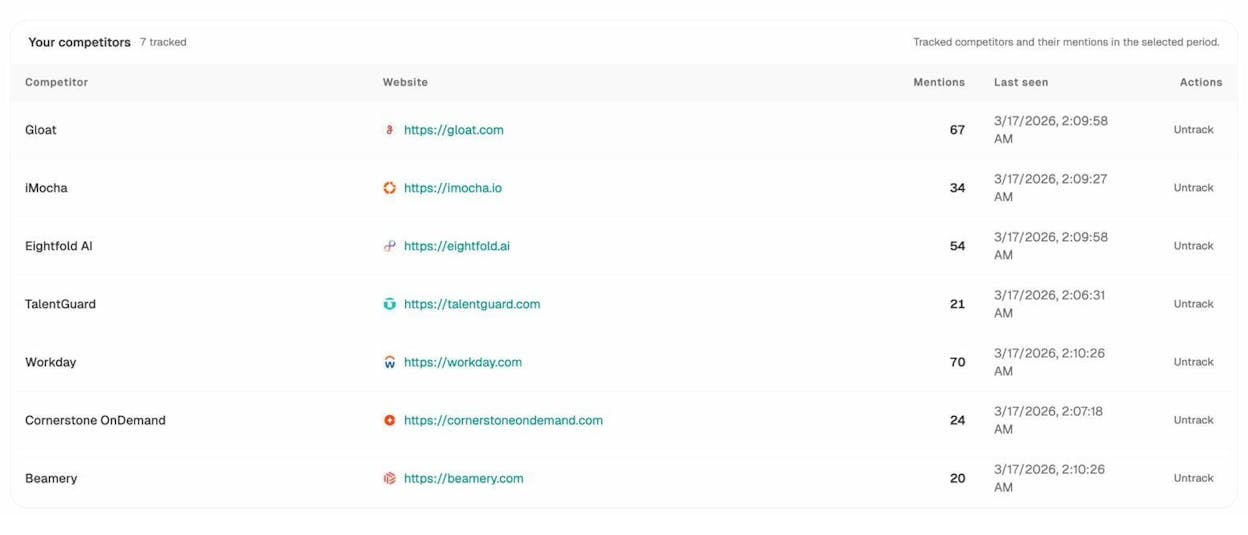
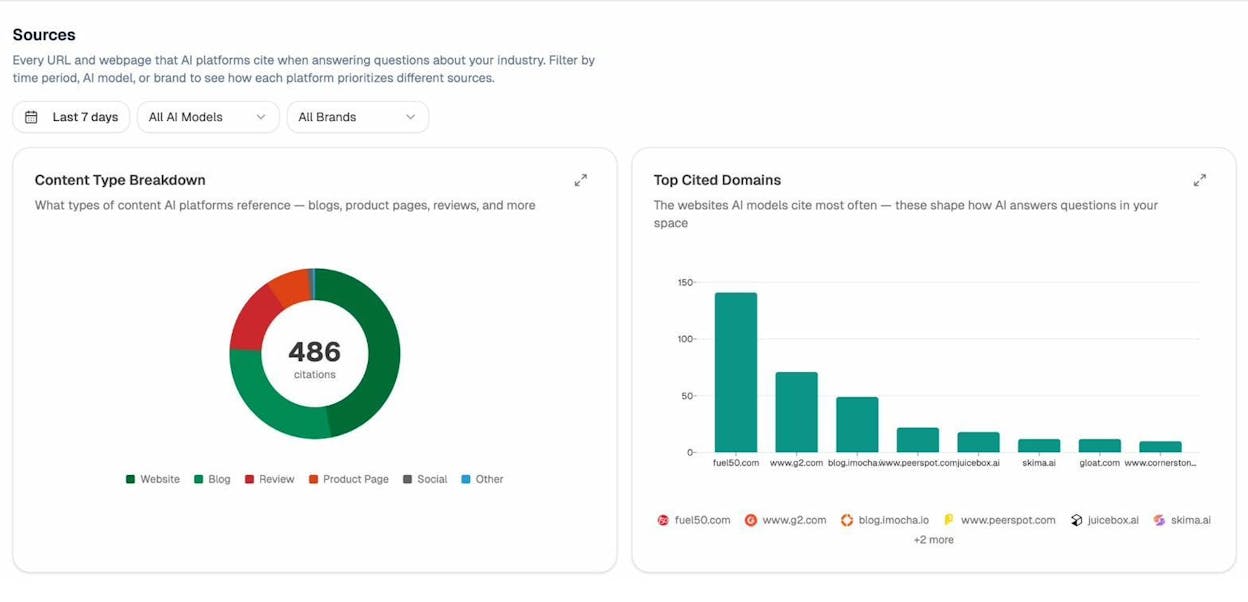
The Sources dashboard goes deeper. It shows which URLs and domains AI engines cite most often in your industry. If a competitor’s blog post is cited 50 times across AI answers and your equivalent page is cited 3 times, you now know exactly which content to improve.
And the Landing Pages report in AI Traffic Analytics shows which of your pages actually receive AI-referred traffic, along with engagement metrics like bounce rate and session duration:
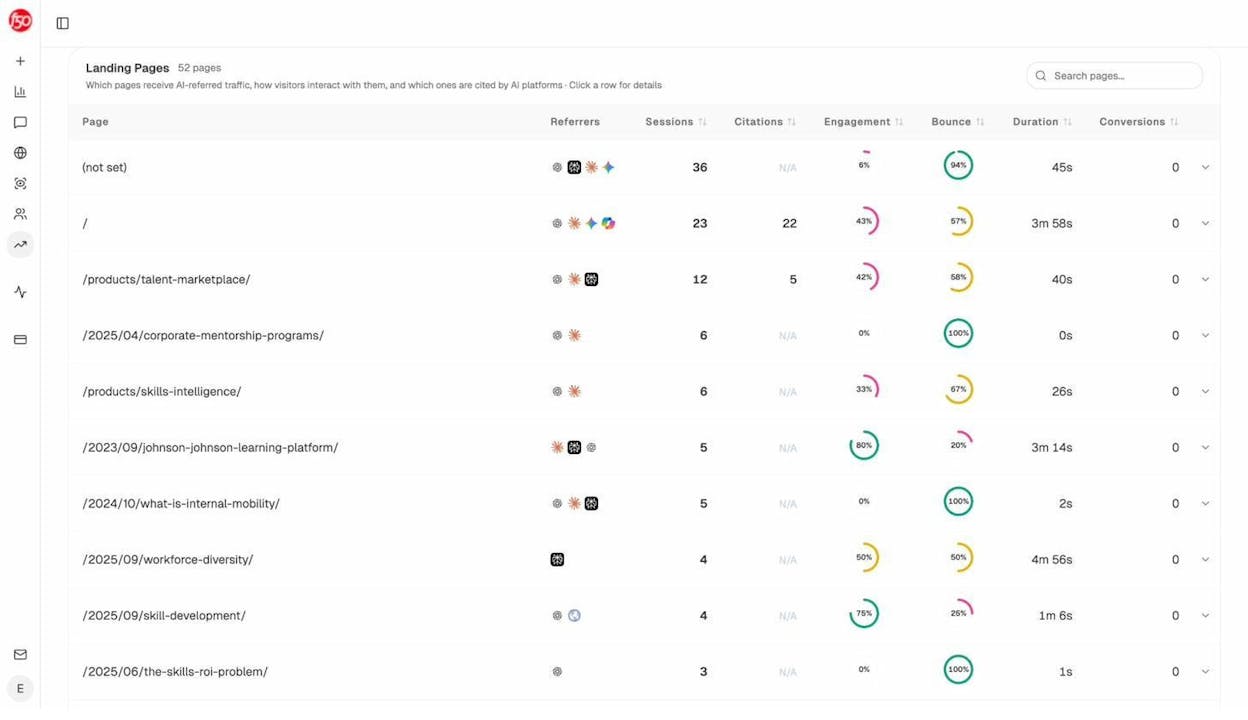
This data is your AI search equivalent of the GSC low-hanging fruit report. Pages that receive some AI traffic but have low engagement are candidates for optimization. Pages that receive zero AI traffic despite covering relevant topics need structural improvements to become citable.
4. Press: Make optimizations to boost rankings
Low-hanging fruit keywords identified, the next step is to figure out why those pages aren’t ranking higher and fix the issues. Start with the easiest fixes first. If those don’t move the needle, escalate to more challenging optimizations.
Here’s the process:
a) Make sure your page covers the topic in full
Your page is already ranking for its target keyword, so it’s a reasonable match for search intent. But there are likely subtopics you missed. Adding them often boosts rankings because Google (and AI engines) reward comprehensive content.
Here’s how to find missing subtopics:
-
Google your target keyword
-
Open the top 3–5 ranking pages
-
Scan their H2 and H3 headers
-
Note any sections they cover that your page doesn’t
For example, say you’re targeting “email marketing strategy” and your page ranks #7. The top-ranking pages all have sections about “email segmentation” and “A/B testing subject lines,” but your page doesn’t cover either topic. Adding those sections would make your content more comprehensive and could improve rankings.
Another method: Use the “People Also Ask” section in Google. Search for your keyword and click through the PAA questions. Each question represents a subtopic that searchers care about. If your page doesn’t answer those questions, consider adding sections that do.
Check your template column “Fully covers the topic?” and mark Yes or No for each keyword. For any No entries, add a comment noting which subtopics are missing.
b) Make sure your on-page SEO is on point
You should have handled basic on-page SEO when you published your content. But there may be room for improvement, especially with your title tag and meta description.
Ask yourself:
-
Is your title tag truncating? If it’s over 60 characters, Google will cut it off. Rewrite it shorter.
-
Does your title match search intent? Look at competing titles. If everyone else mentions “2026” and you don’t, add it. If everyone includes “with examples” and you don’t, consider adding it.
-
Is your meta description compelling? It should give a specific reason to click your result over others. Generic descriptions like “Learn everything about X in this comprehensive guide” don’t differentiate.
-
Does your URL contain the primary keyword? If not, consider whether a URL change (with proper 301 redirect) is worth the effort.
![[Screenshot: Google SERP for a target keyword showing multiple results with their title tags and meta descriptions, highlighting examples of good vs. truncated titles]](https://www.datocms-assets.com/164164/1777047908-blobid14.png?auto=format,compress&w=1248&fit=max)
Use Analyze AI’s SERP Checker to see how your page appears in search results alongside competitors. This gives you a side-by-side comparison that makes on-page issues obvious.
Check the “On-page SEO on point?” column in your template. Add comments for anything that needs fixing.
c) Make sure your page has all relevant internal links
Internal links are links from one page on your site to another. They serve two purposes: helping users find related content and passing authority (PageRank) between your pages.
Most sites have dozens of missed internal linking opportunities. Here’s how to find them:
-
Google site search method: Go to Google and search site:yoursite.com "target keyword". This shows all pages on your site that mention your target keyword. Any page that mentions the keyword but doesn’t link to the page targeting it is a missed opportunity.
![[Screenshot: Google search results for site:yoursite.com “target keyword” showing pages that mention the term but may not link to the target page]](https://www.datocms-assets.com/164164/1777047910-blobid15.png?auto=format,compress&w=1248&fit=max)
-
Manual content audit: Open your most popular blog posts and check whether they link to the page you’re trying to boost. High-traffic pages that link to your target page pass more authority than low-traffic pages.
-
Use a site crawler: Tools like Screaming Frog or similar crawlers can map your internal link structure and find orphan pages (pages with few or no internal links pointing to them).
When adding internal links, use descriptive anchor text. “Learn more about keyword research” is better than “click here.”
Check the “All relevant internal links added?” column in your template.
d) Make sure your backlink profile is strong enough
Backlinks are links from other websites to your page. They remain one of Google’s most important ranking factors. If the pages outranking you have significantly more backlinks from quality websites, you’ll struggle to outrank them without closing that gap.
Here’s how to evaluate your backlink situation:
-
Use Analyze AI’s Website Authority Checker to check your site’s domain authority
-
Compare it to the sites outranking you
-
Use a Broken Link Checker to find broken backlink opportunities on competitor sites
If your domain authority is 30 and the sites in positions #1–3 have authority scores of 80+, you’ll need a different approach. Focus on less competitive keywords where you can realistically win, or invest heavily in link building.
If you’re within striking distance (your authority is 40 and the top results are at 50–60), a few high-quality backlinks could make the difference.
Common link building approaches that work in 2026:
-
Create original research and data. Studies, surveys, and data analyses attract links naturally because other writers cite your findings.
-
Write definitive guides. If your page is the most comprehensive resource on a topic, other sites will link to it as a reference.
-
Digital PR. Pitch newsworthy stories, data, or expert commentary to journalists and bloggers.
-
Guest posting. Write valuable content for other sites in your industry with a link back to your page.
-
Broken link building. Find broken links on other sites that point to content similar to yours, and suggest your page as a replacement.
Check the “Strong enough backlink profile?” column in your template.
e) Optimize your content for AI citations
This is the step most SEO strategies in 2026 leave out entirely. And it’s becoming increasingly valuable.
When AI engines like ChatGPT, Perplexity, or Google AI Mode answer a question, they cite sources. Those citations drive real traffic. A page that gets cited in an AI answer for a high-volume prompt can receive hundreds of visits per month from that single citation.
Here’s how to optimize for AI citations:
1. Check which of your pages AI engines currently cite.
In Analyze AI, the Sources dashboard shows every URL that AI platforms cite when answering questions in your industry. You can filter by your own brand to see which of your pages get cited, how often, and by which engines:
2. Identify citation gaps.
Compare your citations to your competitors’. If a competitor’s page on “email marketing best practices” gets cited 40 times and yours gets cited twice, your content probably lacks the depth, structure, or authority that AI engines look for.
3. Structure your content for easy extraction.
AI engines pull specific passages from web pages. They favor content that:
-
Answers questions directly. Start sections with a clear, concise answer before elaborating.
-
Uses structured data and clear formatting. Tables, numbered lists, and definition-style paragraphs make it easy for AI to extract information.
-
Includes specific data points. “Email open rates average 21.33% across industries” is more citable than “email open rates vary.”
-
Has a strong E-E-A-T signal. Author bios, publication dates, cited sources, and original research all increase trustworthiness in the eyes of AI engines.
4. Track your AI visibility over time.
Use the Analyze AI Overview dashboard to monitor your visibility across AI platforms. The dashboard shows your brand’s mention rate, sentiment, and position across all tracked prompts:
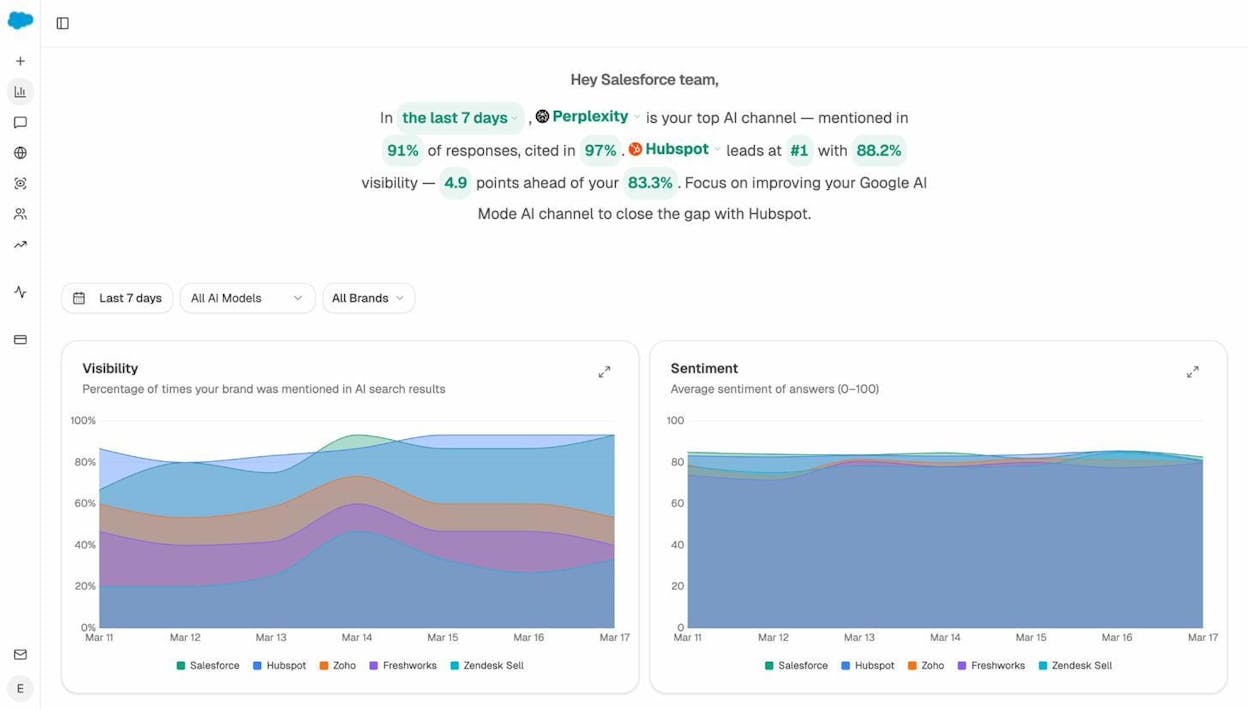
If your visibility is trending up, your content optimizations are working. If it’s flat or declining, look at the Competitors dashboard to see who’s gaining ground and study what they’re doing differently.
The Perception Map gives you a visual overview of where your brand stands relative to competitors across AI platforms. It plots brands by visibility and narrative strength so you can see at a glance who dominates your space:
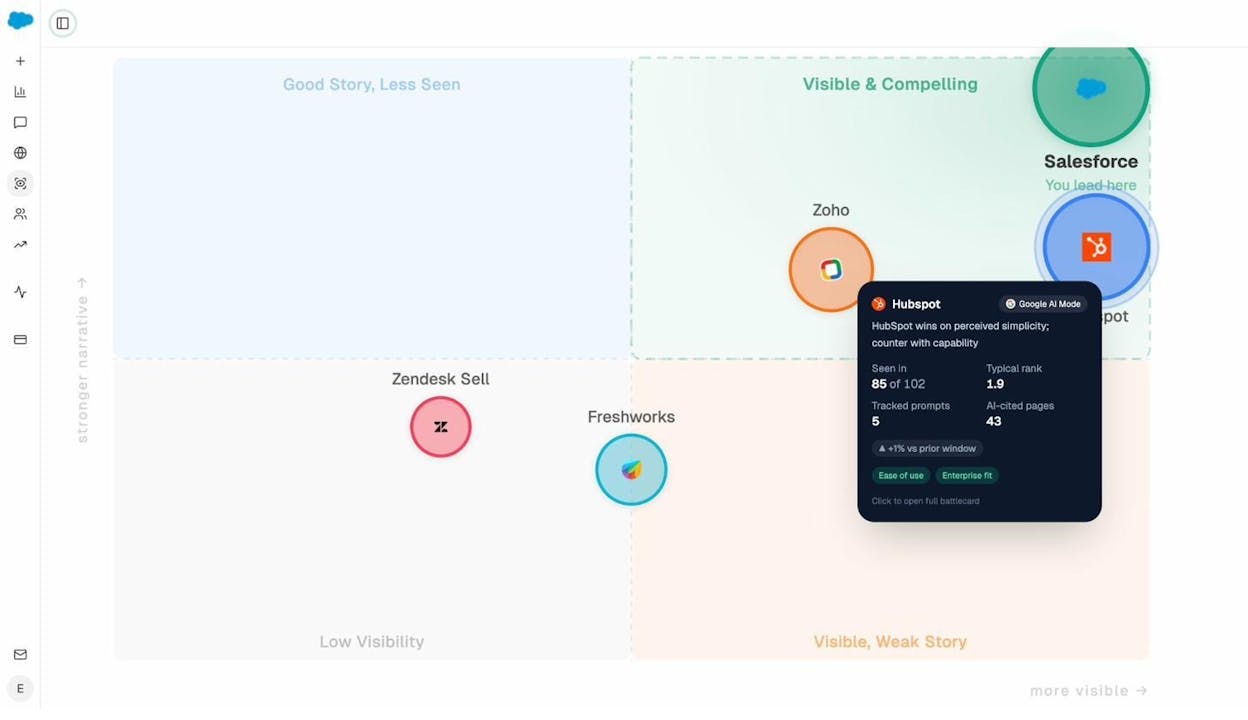
This isn’t a vanity metric. It’s a strategic map that tells you whether your content strategy is moving you toward the top-right quadrant (high visibility, strong narrative) or leaving you stuck.
Bonus SEO strategy: The Middleman Method
People don’t usually link to commercial content. If your most valuable page is a product page or pricing page, you’ll struggle to build backlinks directly to it. Journalists and bloggers don’t link to sales pages because there’s no value for their audience.
The Middleman Method solves this:
-
Identify a “money” page you want to boost. This is a page with business value (product page, comparison page, pricing page) that ranks on the first page but isn’t in the top 3.
-
Create a related informational resource. This is a blog post, study, or guide on a closely related topic. It should be the kind of content that people naturally want to link to.
-
Build links to the informational resource. Use any link building method that works: original research, guest posting, digital PR, etc.
-
Add a strong internal link from the informational resource to your money page. The authority that flows to the informational page through backlinks will pass through to your money page via the internal link.
Example: Say you want to rank higher for “keyword research tool.” That’s a product page, and nobody wants to link to it. So you create a blog post called “We Analyzed 10 Million Keywords: Here’s What We Learned About Keyword Difficulty.” This data study attracts links from marketing blogs, news sites, and other writers. You then add a contextual internal link from the study to your keyword research tool page. The authority flows through, boosting the tool page’s rankings.
The Middleman Method works because it separates the “link attraction” problem from the “ranking” problem. You build links to content that’s easy to link to, then transfer that authority to the page you actually want to rank.
How to extend your strategy to AI search (without starting over)
If you’ve followed the four steps above, you already have a solid foundation for AI search visibility. The content you create for Google also serves as the source material that AI engines cite.
But there are a few additional steps that can accelerate your AI search performance:
Track the prompts that matter for your business
AI search visibility starts with knowing which prompts people use. In Analyze AI, you can run Ad Hoc Prompt Searches to test whether your brand appears in AI answers for specific queries:
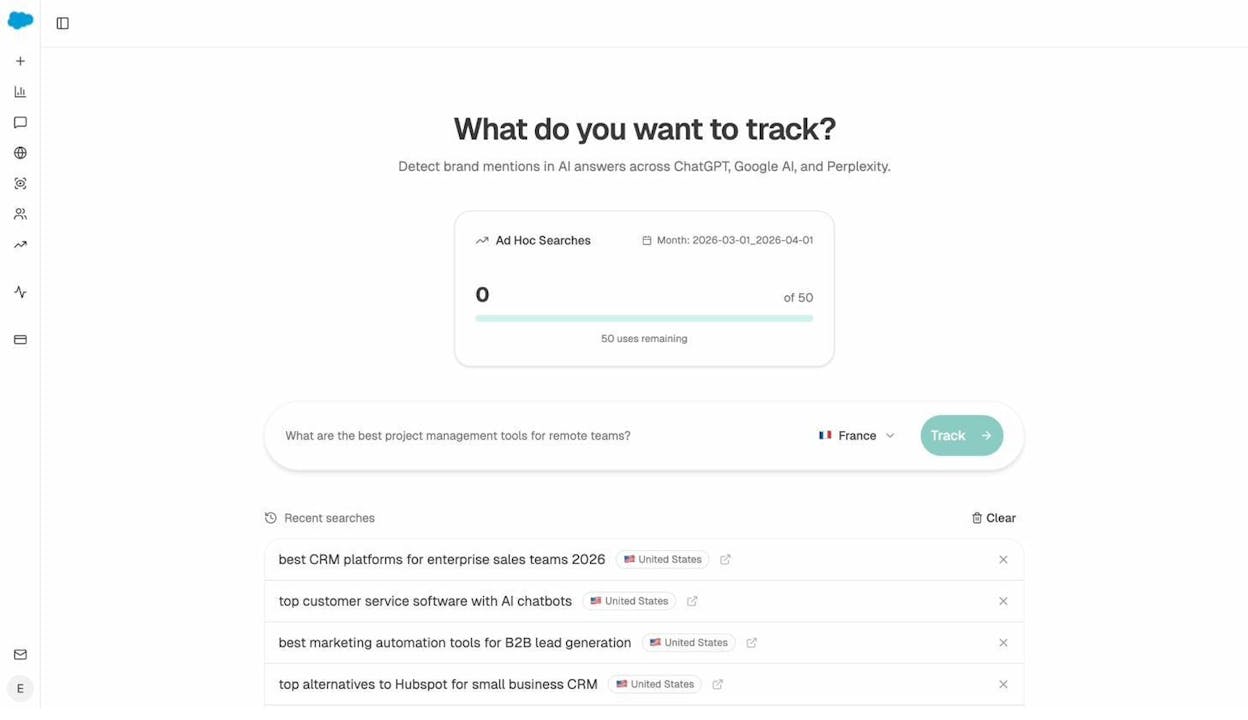
Type any prompt, select a region, and hit “Track.” Analyze AI will query ChatGPT, Perplexity, Google AI Mode, and other platforms, then show you whether your brand appeared, which competitors were mentioned, and which sources were cited.
Start by testing prompts that map to your highest-value keywords. “Best [your product category] for [your audience]” is a good starting point. Then expand to long-tail, conversational prompts that your customers might ask.
Monitor competitor movement in AI search
The Competitors dashboard in Analyze AI shows which brands AI engines mention most often in your space. It also suggests new competitors you may not have considered:
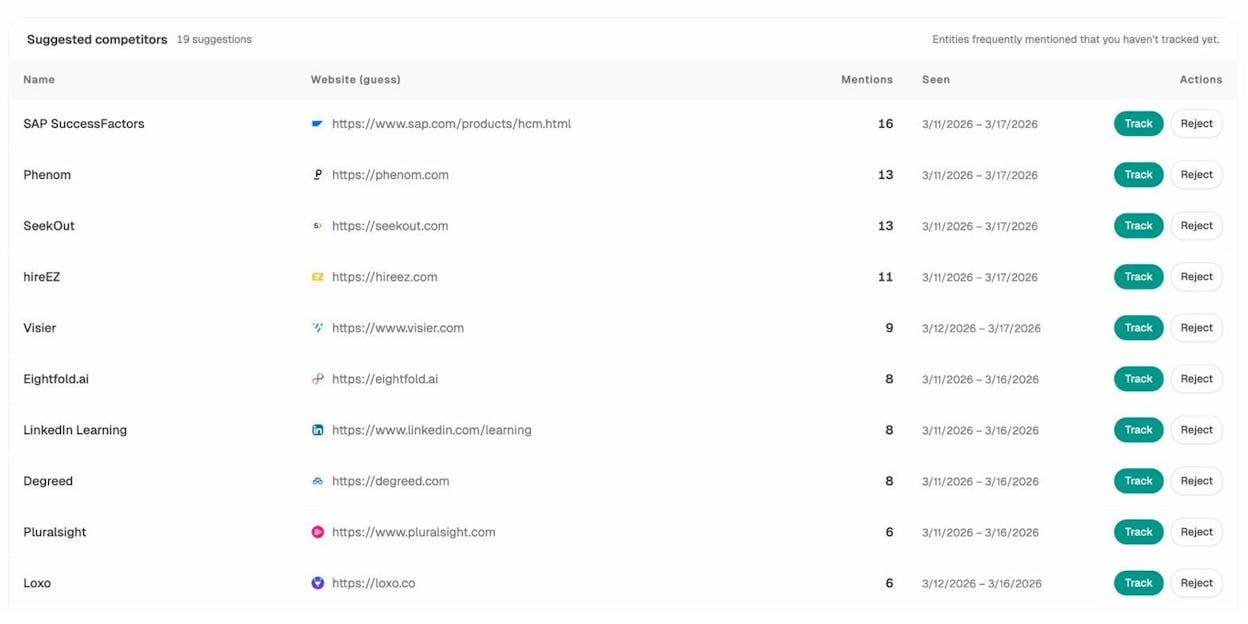
This is valuable because AI search has a different competitive landscape than Google. A competitor who ranks #15 in Google might dominate AI answers because their content is more structured, more authoritative, or more frequently cited by the sources that AI engines rely on.
Use AI traffic data to double down on what works
The AI Traffic Analytics dashboard shows which of your pages actually receive AI-referred traffic. Sort by sessions to find your AI traffic winners:
Pages that receive consistent AI traffic share common characteristics: they tend to be comprehensive, well-structured, frequently updated, and authoritative. Study your AI traffic winners and replicate their patterns across other pages.
Pages that receive AI citations but zero traffic may have structural issues. The AI engine cites your page but doesn’t include a clickable link, or the link goes to a page that doesn’t match what the user asked. In either case, optimizing the page’s structure and relevance can convert citations into clicks.
Get weekly competitive intelligence delivered
Analyze AI sends weekly email digests with your visibility score, pages gaining or losing citations, and competitor movements:
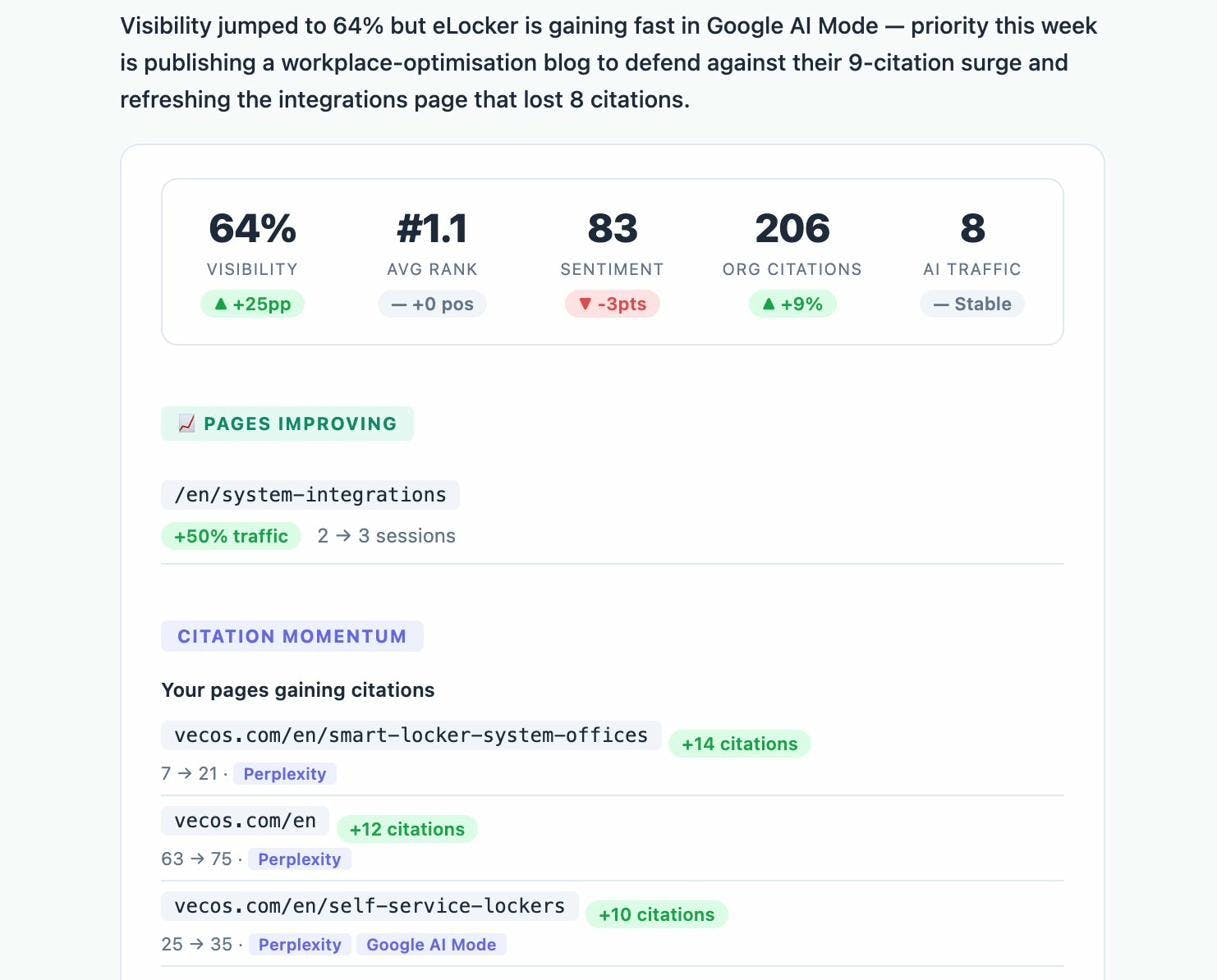
These emails tell you exactly what changed in the last week: which of your pages gained or lost AI citations, which competitor pages are rising, and what content you should prioritize next. It turns AI search from something you check once a month into a weekly operational loop that integrates with your broader SEO strategy.
Repetition is the key to success
SEO isn’t a one-time project. It’s an ongoing cycle of planting new content, finding low-hanging fruit opportunities, and re-optimizing existing pages.
Here’s what a sustainable cadence looks like:
-
Monthly: Publish 2–4 new pieces of content targeting keywords from your research (Step 2)
-
Quarterly: Run a low-hanging fruit analysis to find new optimization opportunities (Step 3)
-
Ongoing: Re-optimize pages based on performance data and competitive changes (Step 4)
-
Weekly: Review AI search visibility trends and respond to competitor movements
The best SEO strategies aren’t the most complex. They’re the most consistent. A team that publishes two well-researched, well-optimized articles per month will outperform a team that publishes twenty mediocre ones.
Focus your energy on the juiciest opportunities. In SEO terms, the juiciest opportunities are keywords with both high traffic potential and high business potential. Targeting “blue widgets” when you sell blue widgets is worth more than targeting “history of widgets” even if the latter has higher search volume.
And remember: in 2026, “organic traffic” isn’t just Google traffic. AI search is an additional organic channel that grows alongside your SEO work. The same content, structure, and authority that help you rank in Google also help you get cited in AI answers. Building for both channels with a single, cohesive strategy is how you create compounding, durable growth.

Ernest

Ibrahim


