



Summarize this blog post with:


In this article, you’ll learn what a content outline is, why every piece of content you publish should start with one, and how to build an outline step by step—for both traditional SEO and AI search visibility. You’ll also get a reusable template you can copy and start using today.
Table of Contents
What Is a Content Outline?
A content outline is a structured plan for an article that maps out every section before the actual writing begins. It includes the headings and subheadings (H2s, H3s), notes on what each section should cover, the target keyword, the search intent, and the angle that will differentiate the piece from what’s already ranking.
Think of it as the blueprint for a building. No contractor starts pouring concrete without blueprints, and no writer should start drafting without knowing the structure of the piece.
A good content outline typically contains:
-
Target keyword and secondary keywords — the terms the article is optimized around.
-
Search intent — what the searcher actually wants when they type that query.
-
Content angle — what makes your article different from the top results.
-
Headings and subheadings — the skeleton of the article, in order.
-
Section notes — brief descriptions of what each section should contain, including data points, examples, or screenshots to include.
-
Internal and external links — pages to reference within the article.
The outline is not the article. It’s the plan that makes the article possible. And the more detailed you make it, the better the final draft will be—especially if you’re working with other writers, freelancers, or an AI writing assistant.
Why You Should Always Outline Your Content
There are three practical reasons to outline every article before you write it.
1. Outlines guarantee you don’t miss what matters for SEO
Without an outline, it’s easy to forget a semantically important subtopic, skip a “People Also Ask” question that your competitors are answering, or bury your target keyword in the wrong heading level. An outline makes these problems visible before you’ve spent hours writing.
When you sit down to outline, you’re forced to look at the SERP, study the competing pages, and identify gaps. That research gets baked into the outline, so the writer doesn’t have to do it again.
2. Outlines improve article flow before a word is written
Writing without an outline is like driving without directions. You might eventually get where you’re going, but you’ll take wrong turns and waste time. Worse, you might end up with an article where the “how to” section comes before the “what is” section, or where the same point gets made twice in different places.
An outline lets you rearrange sections, merge overlapping ideas, and spot logical gaps while the cost of change is zero. Moving a bullet point in an outline takes two seconds. Moving a 300-word section in a finished draft takes twenty minutes and usually breaks the transitions around it.
3. Outlines let you scale content production with quality control
If you’re the only writer, outlines keep you consistent. If you’re managing a team of writers or working with freelancers, outlines are how you maintain quality without micromanaging every draft.
A detailed outline gives a writer everything they need: the structure, the angle, the key points, and the supporting evidence. Even a writer who isn’t deeply familiar with your product or industry can produce a strong draft from a strong outline. Without one, you’re hoping the writer guesses correctly—and they usually don’t.
This is especially true when working with AI writing tools. A clear outline makes the difference between a generic AI draft and one that’s actually useful. Analyze AI’s Content Writer, for example, generates outlines based on SERP research and AI visibility gaps, which gives you a structured starting point grounded in real competitive data rather than guesswork.
How to Outline Your Content in Seven Steps
Here’s the process I follow for every article. Each step builds on the previous one, so don’t skip ahead.
Step 1: Define the goal of your article
Before you research a single keyword, answer this question: why does this article exist?
Your content can serve different goals, and the goal shapes everything that follows—the keyword you target, the angle you take, and the depth you go into.
Common content goals include:
-
Drive organic traffic — You’re targeting a high-volume keyword and want to rank on page one.
-
Generate leads — The article is designed to attract potential customers who are evaluating solutions.
-
Build topical authority — You’re covering a topic comprehensively to signal expertise to both Google and AI models.
-
Support sales enablement — The article answers a question that prospects frequently ask during the buying process.
-
Earn backlinks — You’re creating something original (data, a framework, a tool) that other sites will want to reference.
Write down the goal at the top of your outline document. It keeps you honest. If you’re writing a lead generation article, every section should connect back to the problem your product solves. If you’re writing for organic traffic, you need to make sure you’re matching the search intent precisely.
For example, say you’re writing an article about how to find new keywords. If your goal is traffic, you’ll want to cover every major method and tool. If your goal is lead generation, you’ll want to focus on the methods that naturally involve your product and show how it solves the keyword research problem better than alternatives.
Step 2: Choose your target keyword
Every article needs a target keyword. Even if SEO isn’t the primary goal, optimizing for a keyword builds good habits and often brings in traffic you didn’t expect.
Keyword research doesn’t need to be complicated. Here’s the basic process:
Start with a seed term. Type a broad term related to your topic into a keyword research tool. You can use Analyze AI’s free Keyword Generator to get ideas based on search volume and difficulty.
![[Screenshot: Analyze AI Keyword Generator showing keyword suggestions for a seed term]](https://www.datocms-assets.com/164164/1776983586-blobid1.png?auto=format,compress&w=1248&fit=max)
Evaluate volume and difficulty. You want a keyword that has enough search volume to be worth targeting, but not so much competition that you have no chance of ranking. Use the Keyword Difficulty Checker to assess how hard a keyword will be to rank for.
![[Screenshot: Keyword Difficulty Checker results showing difficulty score and SERP analysis]](https://www.datocms-assets.com/164164/1776983598-blobid2.png?auto=format,compress&w=1248&fit=max)
Check the SERP. Before committing to a keyword, look at what’s currently ranking. Use the SERP Checker to see who holds the top positions and what kind of content they’ve published.
![[Screenshot: SERP Checker results showing top-ranking pages for a keyword]](https://www.datocms-assets.com/164164/1776983599-blobid3.png?auto=format,compress&w=1248&fit=max)
If the top results are all massive authority sites with comprehensive guides and your domain is relatively new, you might want to target a longer-tail variation instead. On the other hand, if you see weaker domains ranking with thin content, that’s an opportunity.
Check your current rankings. Before writing something new, make sure you’re not already ranking for the keyword with an existing page. Use the Keyword Rank Checker to see if you already have a page in the results. If you do, you might be better off updating that page rather than creating a new one.
![[Screenshot: Keyword Rank Checker showing current ranking positions for a domain]](https://www.datocms-assets.com/164164/1776983606-blobid4.png?auto=format,compress&w=1248&fit=max)
Add your target keyword to the outline, along with any secondary keywords you plan to work in naturally.
Step 3: Analyze search intent and decide on your angle
Search intent is what the searcher actually wants when they type a query. Getting this wrong means your article won’t rank, no matter how well it’s written.
There are four types of search intent:
|
Intent Type |
What the Searcher Wants |
Example |
|---|---|---|
|
Informational |
Learn something |
“what is a content outline” |
|
Commercial |
Compare options before buying |
“best content outline tools” |
|
Transactional |
Complete a purchase or action |
“buy content outline template” |
|
Navigational |
Find a specific page or brand |
“Analyze AI content writer” |
Most blog articles target informational or commercial intent. Navigational and transactional intent are better served by product pages, landing pages, or pricing pages.
But intent alone isn’t enough. You also need to determine the angle—what specific approach the top-ranking content takes.
Here’s how to figure it out. Open the SERP for your target keyword and read through the titles and descriptions of the top five to ten results. Ask:
-
Are they how-to guides, listicles, or opinion pieces?
-
Do they target beginners or experienced practitioners?
-
What specific promise do the titles make (easy, fast, step-by-step, comprehensive)?
-
What subtopics do they all cover?
![[Screenshot: Google SERP showing top results for “content outline” with various angles visible in titles]](https://www.datocms-assets.com/164164/1776983609-blobid5.png?auto=format,compress&w=1248&fit=max)
For instance, if you’re targeting “content outline” and every top result is a step-by-step guide, writing an opinion piece about why outlines are important won’t rank. The SERP is telling you what format Google rewards for this query.
Your angle is how you differentiate within that format. Maybe you go deeper on the research phase. Maybe you include a template. Maybe you show the process using a real example with actual screenshots instead of hypothetical ones.
Write down the intent type and your chosen angle in the outline document.
Step 4: Determine your USP and craft the title
Your USP (unique selling proposition) is what makes a searcher click your result instead of the nine others on the page. Your title communicates that USP.
Study the competing titles. What promises are they making? What can you offer that they don’t?
Common USP approaches include:
-
Speed or simplicity — “How to Create a Content Outline in 15 Minutes”
-
Completeness — “The Complete Guide to Content Outlines (With Template)”
-
Authority — “Content Outlines: Lessons From Outlining 500+ Articles”
-
Specificity — “Content Outlines for SEO: A 7-Step Process That Works”
-
Recency — “Content Outlines in 2026: What’s Changed and What Still Works”
Brainstorm three to five title options. Don’t settle for the first one. Your title is the single biggest factor in whether someone clicks your result, so it’s worth spending a few extra minutes here.
A few title principles that work:
-
Include your target keyword as close to the beginning as possible.
-
Make a specific promise the reader can hold you to.
-
Avoid clickbait that the article can’t deliver on.
-
Keep it under 60 characters so it doesn’t get truncated in the SERP.
Write your chosen title and USP in the outline document.
Step 5: Build your heading structure
This is where the real work of outlining happens. Your headings and subheadings determine the structure, flow, and completeness of the article. Get this right, and the writing almost takes care of itself.
Here’s the process:
Study competitor headings. Open the top three to five ranking articles for your keyword. Skim their heading structures. What H2s do they all share? What subtopics does only one of them cover? What’s missing from all of them?
![[Screenshot: Browser tabs showing competitor articles with heading structures visible]](https://www.datocms-assets.com/164164/1776983617-blobid6.png?auto=format,compress&w=1248&fit=max)
You’re not copying their structure. You’re understanding what the SERP demands and then building something better.
Check “People Also Ask” boxes. Google’s PAA boxes reveal the questions searchers commonly ask about your topic. These make excellent H2s or H3s because they match natural language queries.
![[Screenshot: Google PAA box showing related questions for “content outline”]](https://www.datocms-assets.com/164164/1776983624-blobid7.png?auto=format,compress&w=1248&fit=max)
Click on a few PAA results to expand additional questions. Each one is a potential section in your article. The People Also Ask guide on the Analyze AI blog goes deeper into how to use PAA for content planning.
Check related searches. Scroll to the bottom of the Google results page. The related searches section shows you what other queries people commonly make around your topic. These can inspire additional sections or subsections.
![[Screenshot: Google related searches section at bottom of SERP]](https://www.datocms-assets.com/164164/1776983626-blobid8.png?auto=format,compress&w=1248&fit=max)
Organize your headings logically. Once you have a list of potential sections, arrange them in an order that makes sense for the reader. A few common structures:
-
Chronological — Steps in the order they should be performed (best for how-to guides).
-
Priority — Most important information first, supporting details after.
-
Problem-solution — Present the problem, then walk through the solution.
-
General to specific — Start with the big picture, then drill into details.
For a “how to” article like this one, chronological order is usually best. Each step should flow naturally from the previous one.
Add notes under each heading. Under every H2 and H3, write a few bullet points explaining what should go in that section. Be specific. Instead of writing “explain keyword research,” write “walk through how to use a keyword generator to find long-tail variations, include screenshot of tool, show how to evaluate keyword difficulty.”
The more specific your section notes, the better the draft will be. This is especially true if someone other than you is writing the article. Vague notes produce vague drafts.
Step 6: Plan your visuals and examples
Great content outlines don’t just plan the text—they plan the visuals too. Screenshots, diagrams, and tables make articles more scannable, more credible, and more useful.
For each section in your outline, ask:
-
Can I show this with a screenshot instead of just explaining it?
-
Is there a comparison that would work better as a table?
-
Would a diagram help the reader understand a process or concept?
Mark these in your outline with notes like “[Screenshot: SERP Checker results for keyword X]” or “[Table: comparison of informational vs. commercial intent].” Your editor or designer can source these later, but they need to be planned during the outline stage.
For step-by-step sections especially, aim for a screenshot at every major step. Readers who are following along need to see what the tool or interface looks like at each stage. An article that says “enter your keyword and click search” without showing the actual screen is incomplete.
Step 7: Plan for AI search visibility
Here’s the step most content outlines skip entirely—and it’s the one that separates content that works in 2026 from content that only worked in 2020.
Google is not the only place people search. ChatGPT, Perplexity, Gemini, and Copilot are now answering the same questions your articles target. If your content doesn’t show up in those AI answers, you’re leaving an entire organic channel on the table.
This doesn’t mean you need to write differently. It means you need to think about your outline differently.
Check how AI models answer your target query. Before you finalize your outline, type your target keyword into ChatGPT, Perplexity, and Gemini. Look at what sources they cite, what structure their answers follow, and what information they include.
If AI models are consistently citing a competitor for your target query and not mentioning you, that’s a gap. Your outline should address it by covering the same information more completely and more clearly.
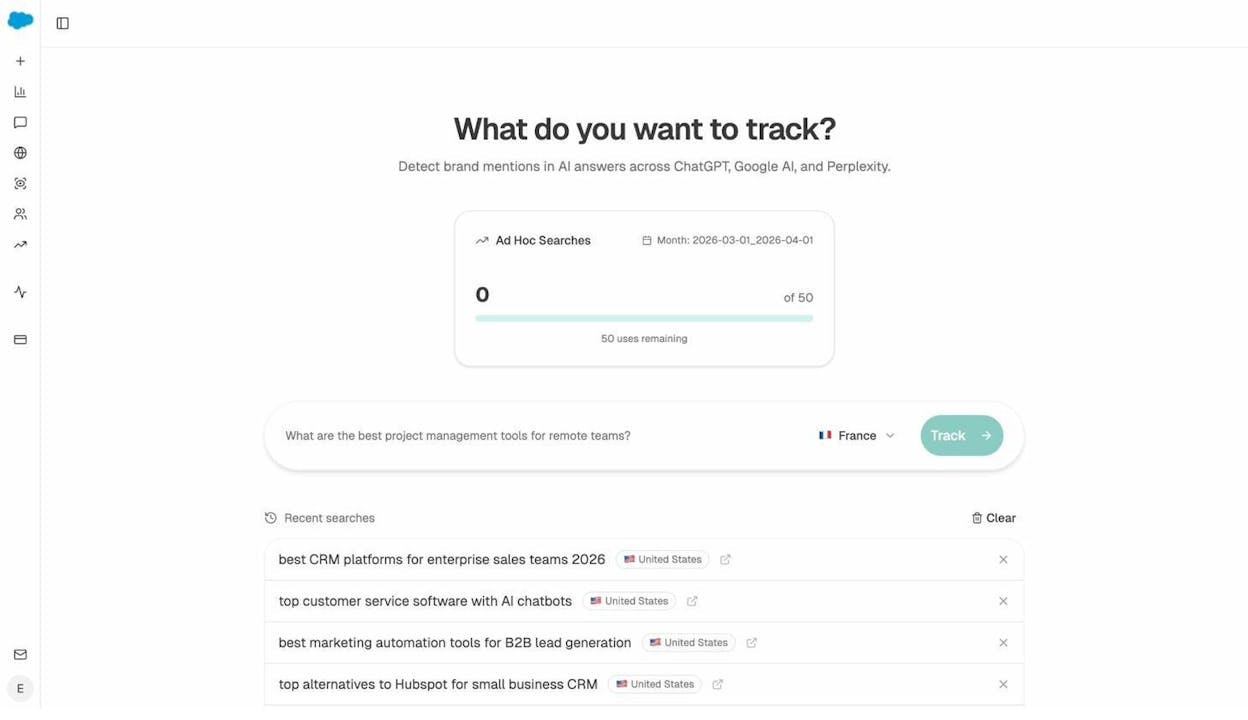
You can use Analyze AI’s Ad Hoc Searches to check this quickly without logging into each AI engine individually. Enter a prompt related to your keyword, and Analyze AI will show you which brands get mentioned across multiple AI models, along with their visibility scores and sentiment.
Review your tracked prompts for content gaps. If you’re already tracking prompts in Analyze AI, check the Prompts dashboard. It shows you which prompts your brand appears in, which it doesn’t, and which competitors are winning the mentions you’re missing.
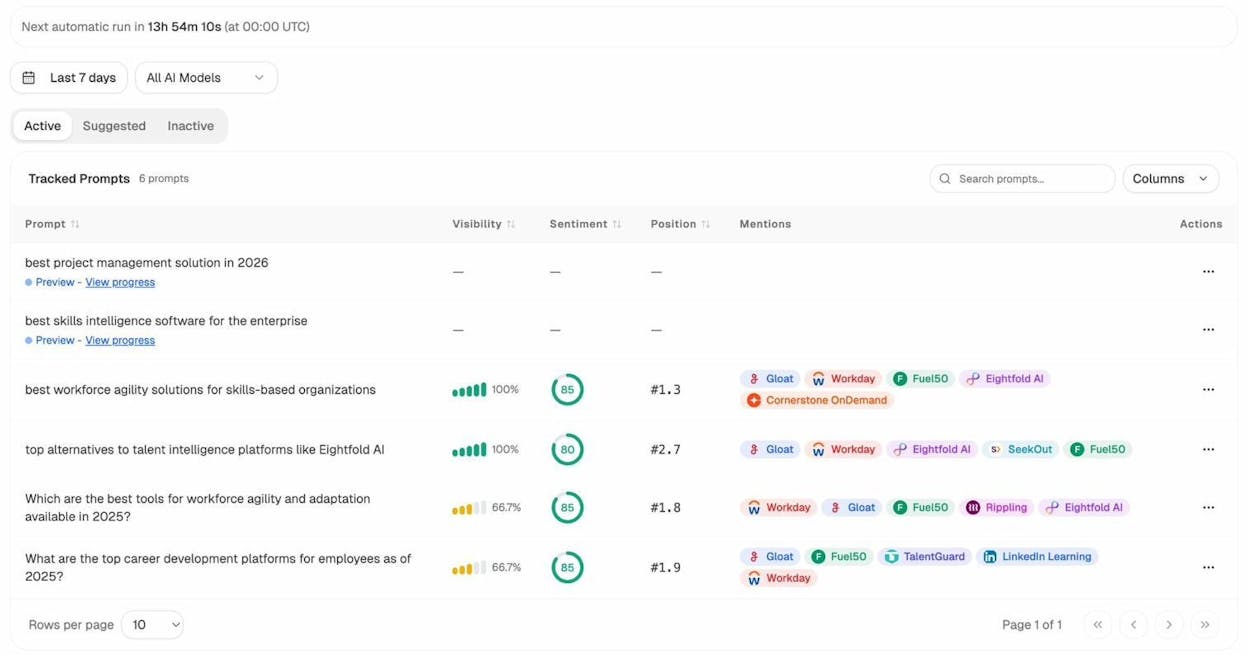
This data directly informs your outline. If AI models consistently mention a competitor’s guide on a subtopic you haven’t covered, that subtopic belongs in your outline.
Check what competitors are winning in AI search. The Competitors dashboard in Analyze AI shows you which brands get mentioned alongside yours in AI responses. If a competitor keeps appearing for prompts related to your keyword and you don’t, look at what content they have that you’re missing. That content gap should inform your outline.
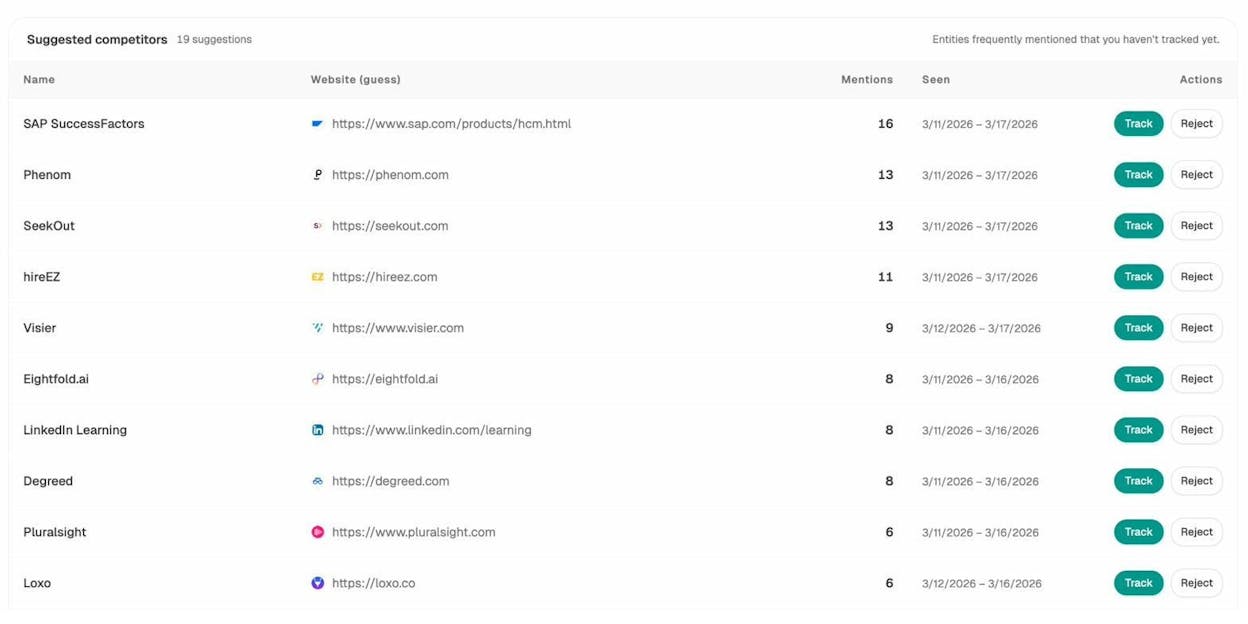
Structure your content for AI citability. AI models tend to cite content that’s clearly structured, directly answers a question, and doesn’t bury the key point under filler text. Your outline should follow these principles:
-
Lead each section with the answer or key takeaway (BLUF—bottom line up front).
-
Use descriptive headings that match how people phrase questions to AI.
-
Include definitions, steps, and comparisons in formats that AI models can easily extract and cite.
These aren’t special “AI SEO” tricks. They’re the same things that make content good for human readers. Clear structure, direct answers, and useful specifics. The difference is that AI models reward these qualities even more than Google does, because AI models need to extract and synthesize information rather than just rank a URL.
Use Analyze AI’s Sources dashboard for benchmarking. The Sources dashboard shows which websites get cited most often in AI responses for your tracked prompts. If you see a competitor’s blog consistently cited as a source, study what those cited pages do well—structure, depth, authority signals—and incorporate those qualities into your outline.
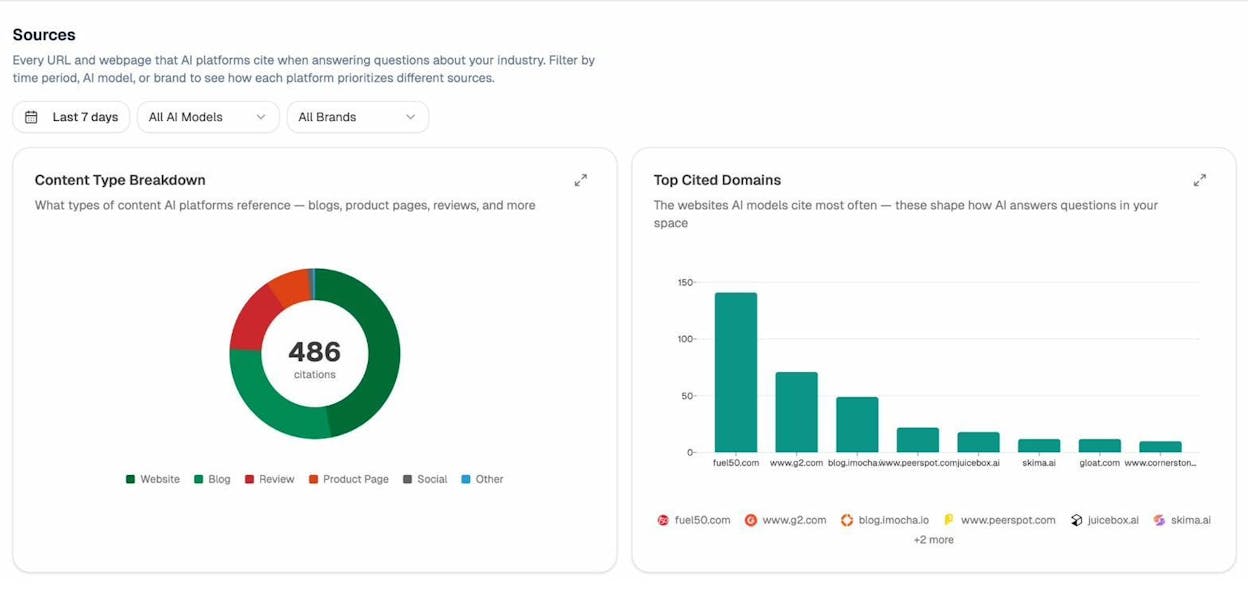
How to Use Analyze AI’s Content Writer for Faster Outlining
If you want to accelerate the outlining process, Analyze AI’s Content Writer automates much of the research and structuring work described above.
Here’s how it works:
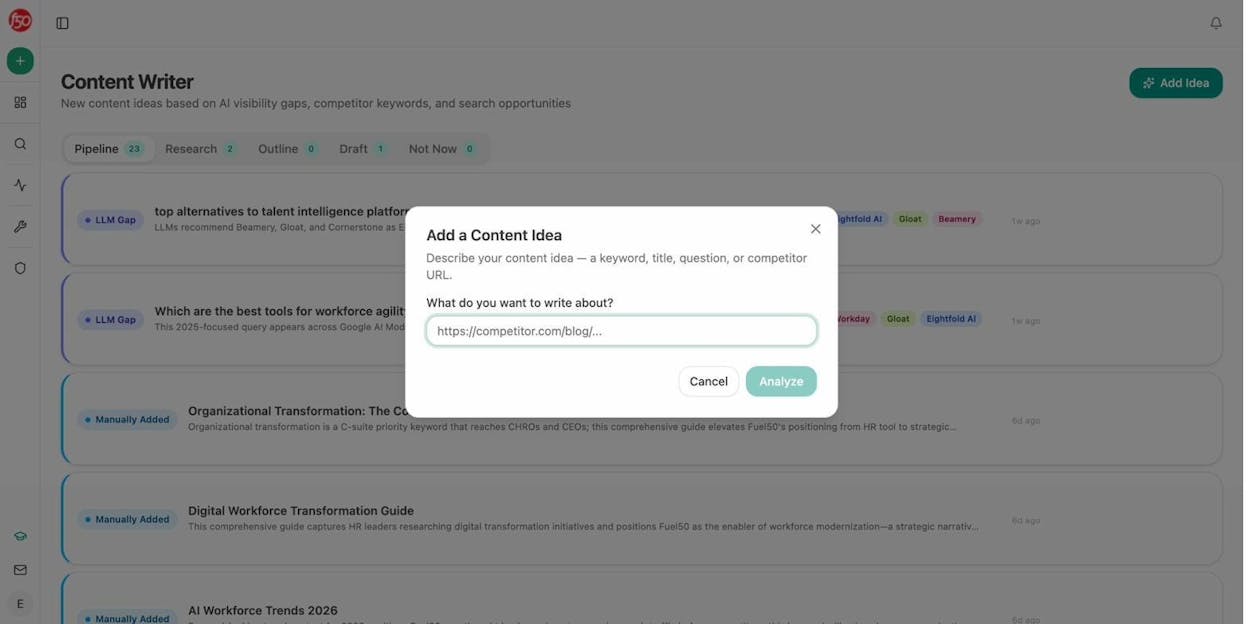
Add your content idea. Open the Content Writer and click “Add Idea.” You can enter a keyword, a title, a question, or even a competitor URL that you want to create a competing piece for.
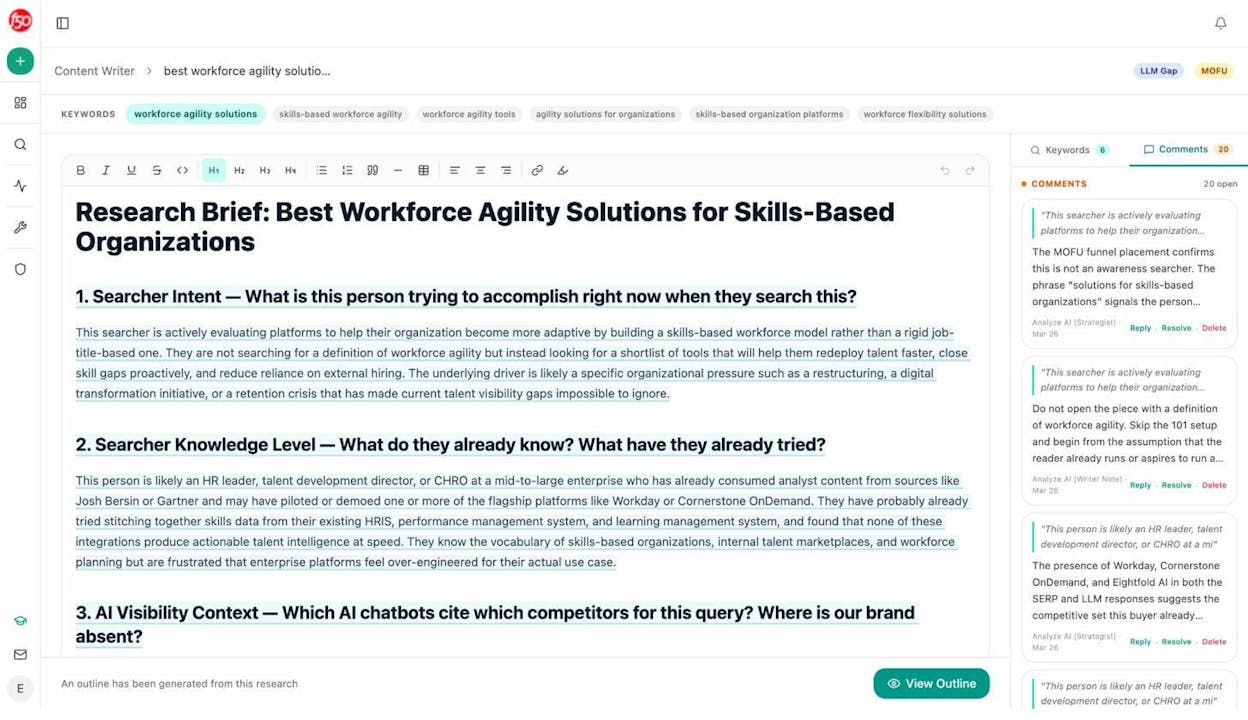
Review the research brief. Analyze AI generates a research brief that includes searcher intent analysis, searcher knowledge level, AI visibility context (which competitors AI chatbots cite for this query), and recommended positioning. The AI Strategist even leaves comments on key sections to help you refine your approach.
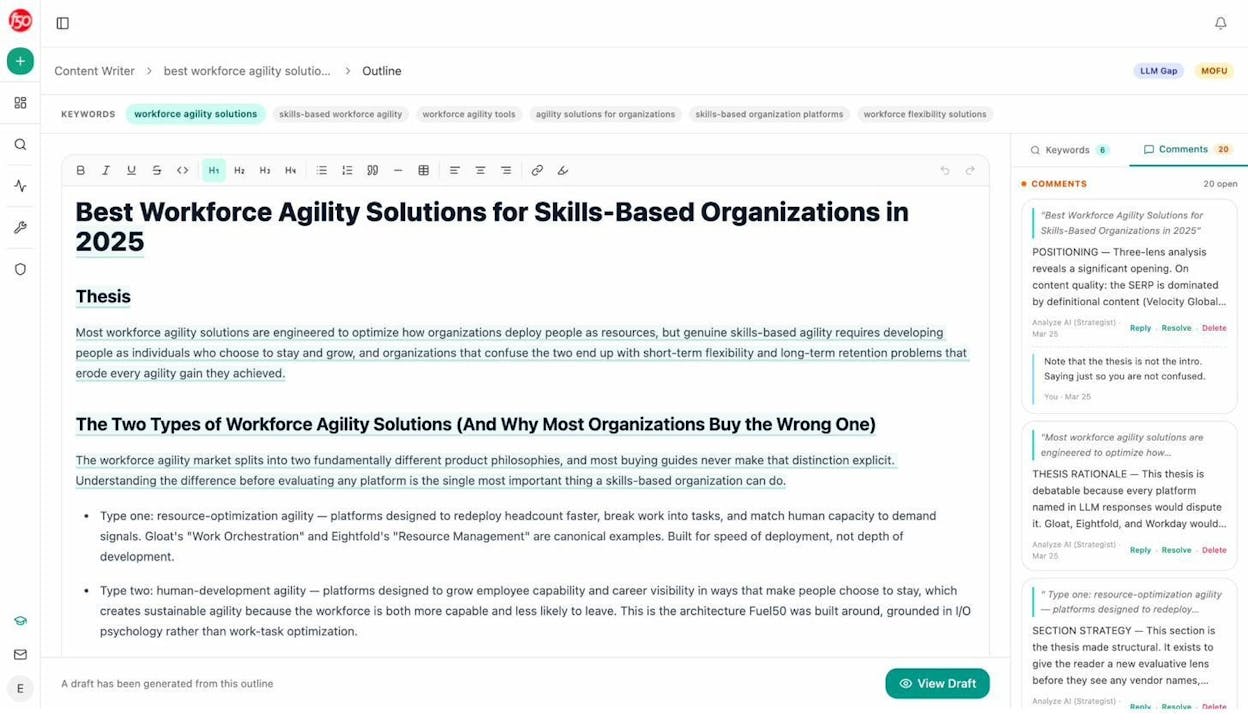
Move to the outline stage. From the research, Analyze AI generates a structured outline with a thesis, H2s, H3s, and section-level strategic guidance. Each section includes comments explaining the positioning strategy—why this section exists, what argument it should make, and how it serves the overall article.
Generate a draft. Once you’re satisfied with the outline, you can generate a draft directly from it. The draft follows the structure and strategic direction set in the outline, which means you’re editing and improving rather than starting from scratch.
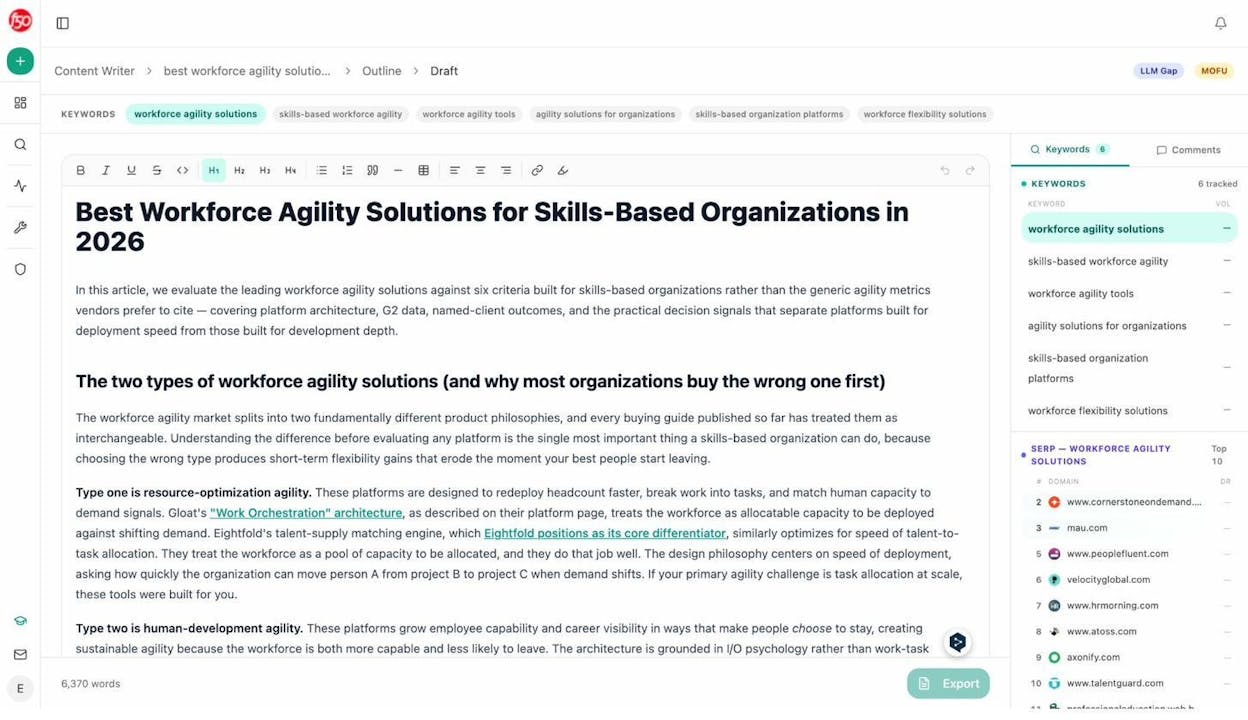
This workflow doesn’t replace the need to understand what makes a good outline. But it compresses the research phase from hours to minutes and ensures your outline is grounded in actual SERP and AI visibility data rather than assumptions.
How to Optimize an Existing Article Using Your Outline Process
Sometimes you don’t need to write a new article. You need to improve one that’s already published but underperforming.
The same outlining principles apply. The difference is that instead of starting from a blank outline, you start by reverse-engineering your existing article into an outline and then comparing it against what the SERP and AI models currently demand.
Here’s the process:
-
Pull your article’s current heading structure into an outline document.
-
Re-run the SERP analysis for your target keyword. Have the top results changed since you published? Are new subtopics being covered that you missed?
-
Check AI search visibility. Are AI models citing your article for relevant prompts? If not, which competitor are they citing instead, and what does that competitor’s content cover that yours doesn’t?
-
Identify gaps. Compare your existing outline to the competitive landscape. Mark sections that need to be added, expanded, or rewritten.
-
Update and republish. Make the changes, update the publication date, and resubmit to Google Search Console.
Analyze AI’s Content Optimizer can streamline this process. It fetches your existing content, identifies optimization gaps based on what top-ranking and AI-cited pages cover, and suggests specific improvements.
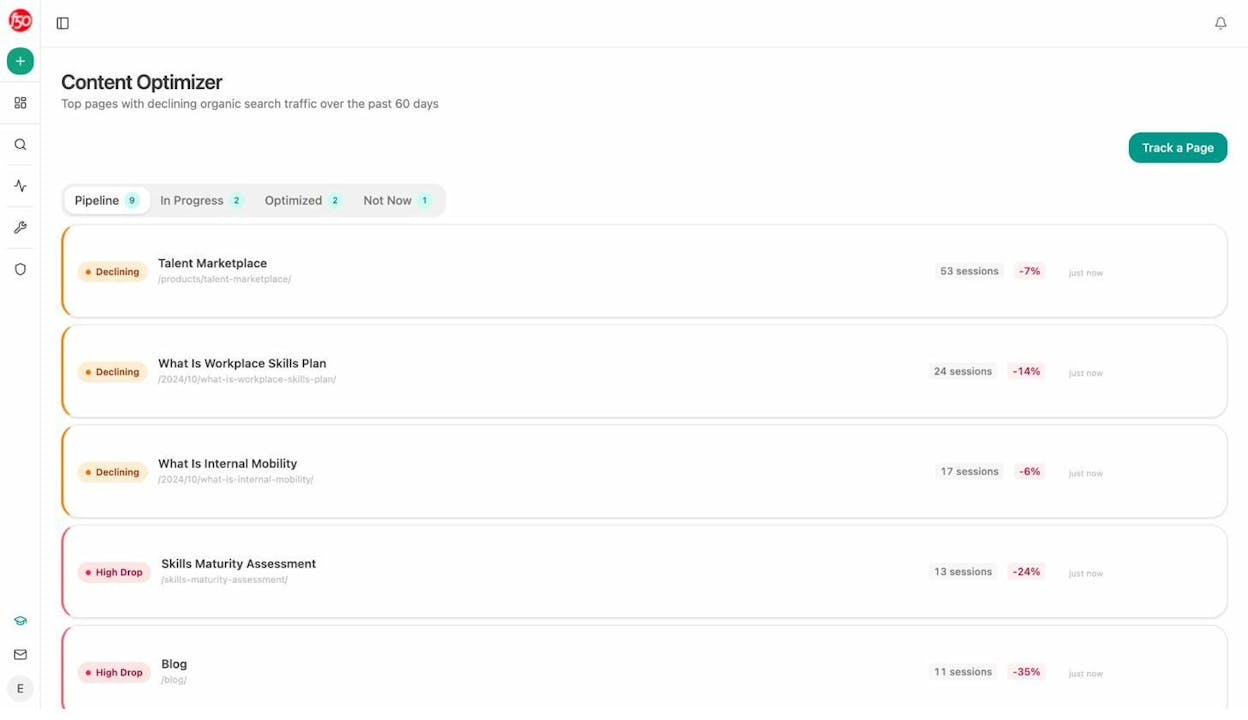
For more on republishing and updating content for SEO, check our SEO content strategy guide.
Content Outline Template
Here’s a reusable template you can copy into a Google Doc, Notion page, or wherever you plan your content. Fill in each section before you start writing.
|
Section |
What to Include |
|---|---|
|
Target keyword |
Your primary keyword and 2–3 secondary keywords |
|
Search volume and difficulty |
Monthly volume, difficulty score, and traffic potential |
|
Search intent |
Informational, commercial, transactional, or navigational |
|
Content angle |
How your article will differ from competing pages |
|
Goal |
What this article should achieve (traffic, leads, authority, etc.) |
|
USP |
Your unique selling proposition—what the reader gets here that they don’t get elsewhere |
|
Title options |
3–5 title ideas, with your top pick marked |
|
H2s and H3s |
The full heading structure, in order |
|
Section notes |
Under each heading, bullets explaining what to cover, examples to include, screenshots to add |
|
Internal links |
Pages on your site to link to from this article |
|
External links |
Authoritative sources to reference |
|
AI search notes |
What AI models currently say about this topic, which competitors get cited, gaps to address |
|
Visual plan |
Screenshots, tables, and diagrams needed for each section |
This template adds two sections that most outlines miss: AI search notes and a visual plan. Both save time during the writing and editing stages.
Common Outlining Mistakes (And How to Avoid Them)
Outlining before doing keyword research
If you pick your headings before you’ve analyzed the SERP, you’re guessing at what the article needs to cover. Always do the keyword research and SERP analysis first. The competitive landscape should inform your structure, not the other way around.
Making the outline too vague
“Write about keyword research” is not a useful outline note. “Walk through how to use a keyword research tool to find long-tail variations of the target keyword, show screenshot of entering seed term and filtering by difficulty under 30, link to keyword generator” is useful. The more specific you are, the less rework you’ll need later.
Ignoring AI search entirely
Google still drives the majority of organic traffic for most sites. But AI search is growing fast, and the brands that start optimizing for it now will have a significant advantage over the ones that wait. Your outline should include at least a brief check of what AI models say about your target topic. It takes five minutes and can reveal major content gaps.
Copying the competitor’s structure exactly
Studying competitors is essential. Copying their heading structure verbatim is not. If your article has the same sections in the same order as the top result, you’re creating a near-duplicate with no informational gain. Use the competitive research to understand what’s expected, then add your own angle, depth, and examples.
Skipping the visual plan
Articles without screenshots, diagrams, or tables are harder to read and less likely to earn featured snippets or AI citations. Plan your visuals during the outline stage so the writer and editor know what assets are needed.
Final Thoughts
A content outline is the single highest-leverage step in the content creation process. It takes 30 to 60 minutes up front and saves hours of writing, editing, and rewriting downstream. It makes every article more structured, more comprehensive, and more likely to rank—on both Google and in AI search results.
The process is straightforward:
-
Define your goal.
-
Choose your target keyword.
-
Analyze search intent and pick your angle.
-
Craft a differentiated title and USP.
-
Build your heading structure from competitive research.
-
Plan your visuals and examples.
-
Check AI search visibility and plan for citability.
If you want to automate the research-heavy parts of this process, Analyze AI’s Content Writer handles SERP analysis, AI visibility gap analysis, and outline generation in a single workflow. You still make the strategic decisions, but the tool does the data-gathering legwork.
Start your next article with an outline. You’ll write faster, publish better content, and rank more consistently—on every search surface that matters.

Ernest

Ibrahim


