



Summarize this blog post with:


In this article, you’ll get a hands-on breakdown of Geneo AI’s features, pricing, and limitations so you can decide whether it belongs in your stack or whether your budget is better spent elsewhere. You’ll also learn what separates a visibility-only tool from a platform that connects AI search data to traffic, content, and revenue.
Table of Contents
What Geneo AI Actually Does
Geneo is a generative engine optimization (GEO) platform that tracks how your brand appears in AI-generated answers across ChatGPT, Perplexity, Google AI Overviews, and Gemini.
You set up prompts (questions your buyers might ask), Geneo runs those prompts on a schedule, and it records whether your brand appeared, in what position, and what sources the AI cited. Over time, you get a visibility trend line.
That’s the core loop. Everything else in Geneo builds around it, from sentiment scoring and response archiving to citation tracking and competitive comparisons.
For teams that have never measured AI visibility before, Geneo gives you a starting point. The question is whether that starting point is enough to justify your spend as your program matures.
Three Things Geneo Does Well
Multi-Engine Visibility Monitoring
Geneo’s strongest feature is its ability to run identical prompts across multiple AI engines and compare results side by side. You can see whether ChatGPT mentions your brand while Perplexity ignores it, or whether Gemini cites a competitor that doesn’t appear in other engines.
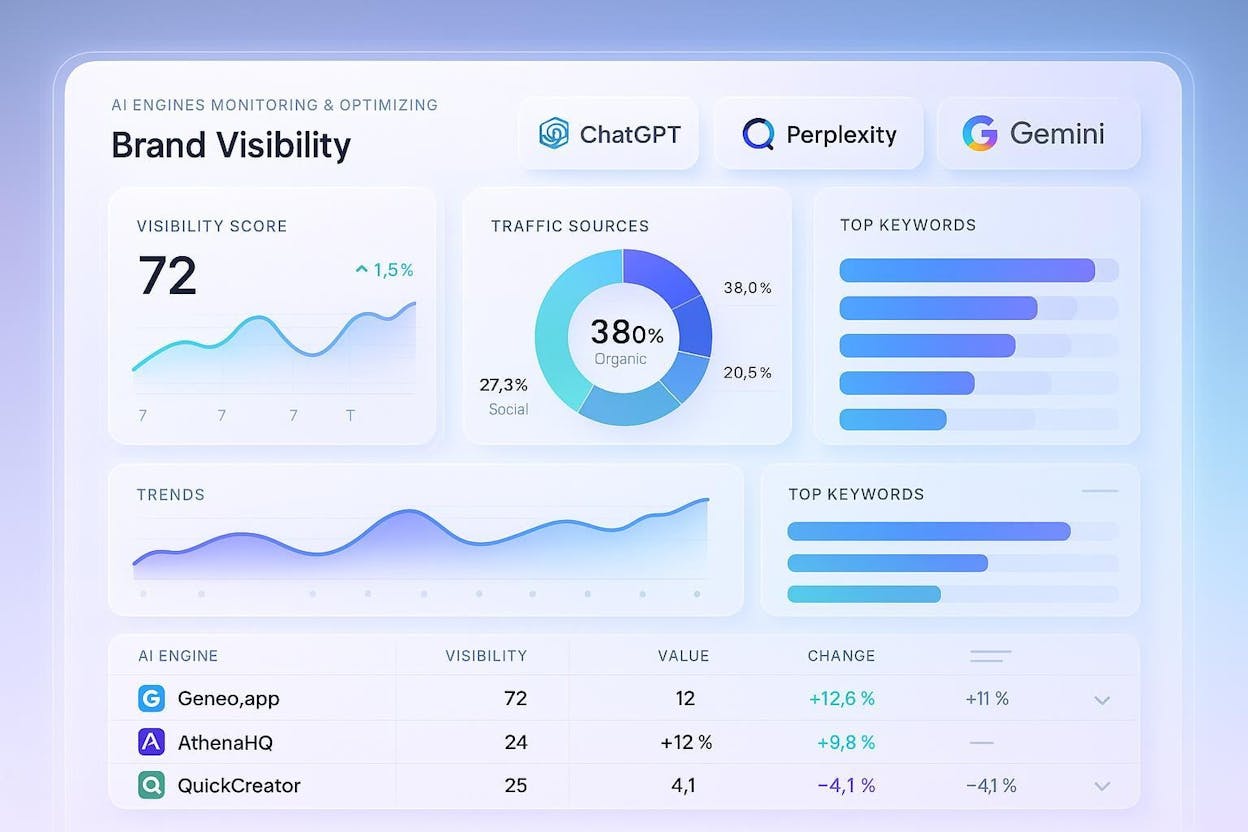
This matters because each AI engine weights sources differently. A page that earns a citation in Perplexity might get overlooked by ChatGPT entirely. Geneo lets you spot those gaps without manually querying each engine yourself.
The dashboards group results by engine, topic, or campaign, so you can filter down to the prompts that matter most to your business.
Prompt History and Response Archiving
Every time Geneo runs a prompt, it saves the full response text, citation list, and your brand’s position. These snapshots stack into a timeline that lets you trace exactly when your visibility changed and what triggered it.
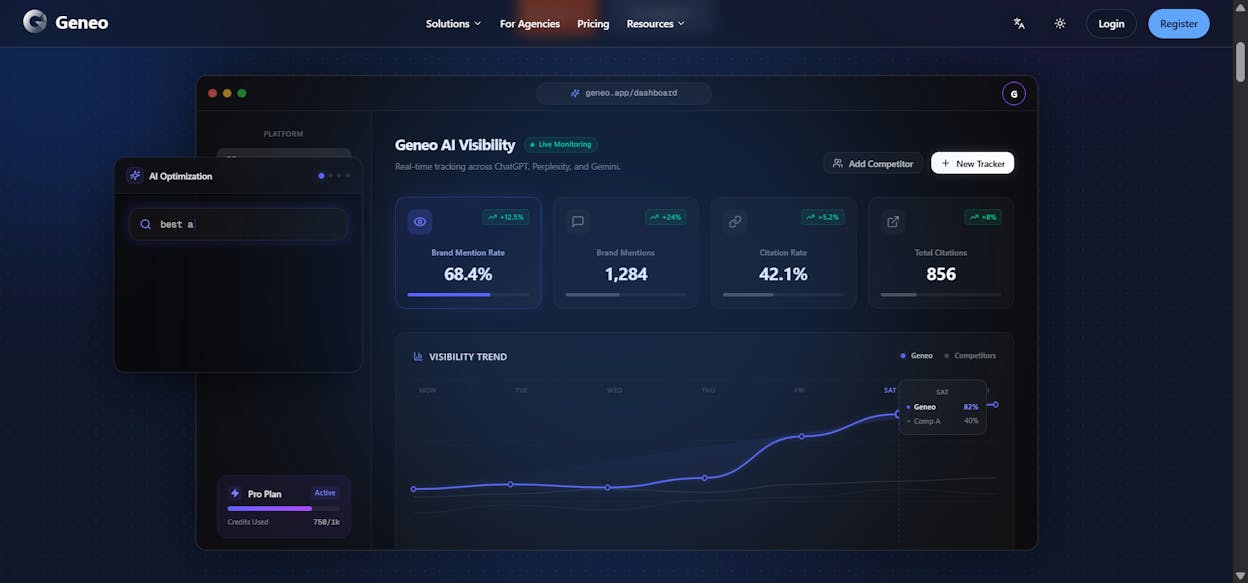
This is useful for diagnosing sudden drops. If your brand disappears from a prompt you previously won, you can open the before-and-after snapshots and check whether a new competitor source entered the picture, or whether the AI model’s behavior shifted on its own.
For agencies, these archives also solve a reporting problem. Instead of relying on screenshots or anecdotal evidence, you have a searchable record of every AI answer in your category.
Sentiment and Mention Analysis
Geneo layers tone classification on top of every mention it detects. Each instance gets tagged as positive, neutral, or negative, and you can see sentiment trends by engine or topic over time.
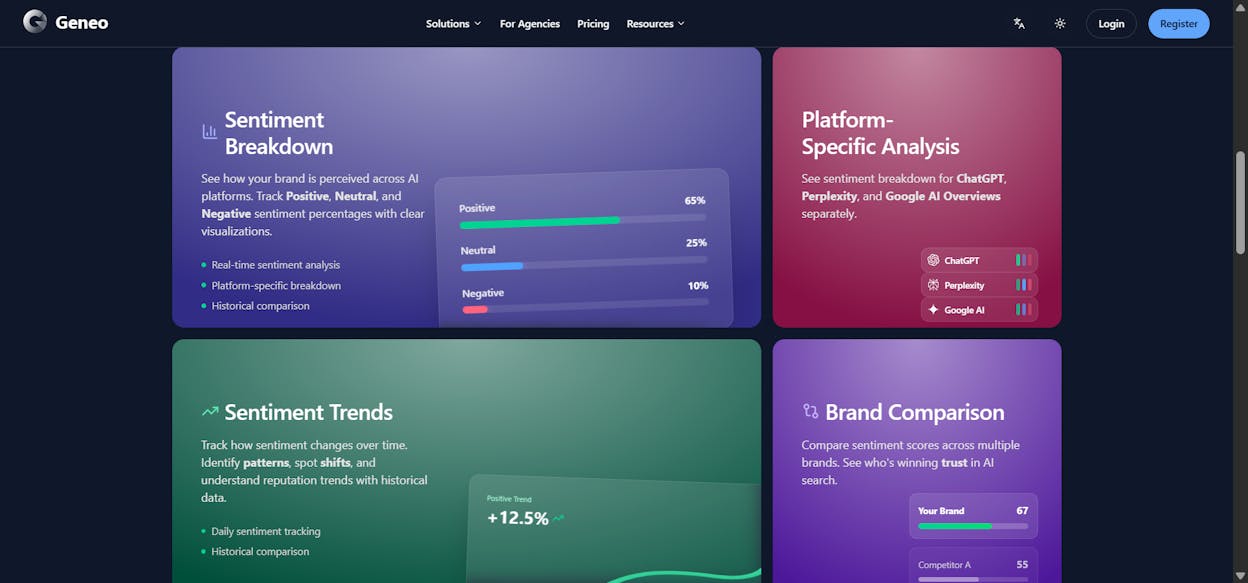
This helps you catch reputational problems early. If negative sentiment spikes on a specific prompt, you can trace it to the exact source or competitor page that triggered the shift, then decide how to respond.
Three Limitations That Slow Teams Down
Sparse Independent Validation
Geneo launched into a new category, and that newness shows in the evidence trail. Outside of Geneo’s own website, there are few independent case studies, detailed reviews, or verified before-and-after results from real teams. Product Hunt lists the product with zero reviews. G2 coverage is thin.
This forces buyers to run their own pilots without much guidance on what “good” looks like. Budget approvals stall because decision-makers want proof, and the proof isn’t publicly available yet.
Credit-Based Scaling Gets Expensive Fast
Geneo runs on a credit system. Every prompt, every engine, every refresh burns credits. What starts as an affordable experiment turns into a budgeting puzzle as soon as you expand coverage.
Here’s the math. If you track 50 prompts across 4 engines with daily refreshes, that’s 200 credits per day, or roughly 6,000 per month. At Pro tier (1,000 credits/month), you’d exhaust your allowance in five days.
The result is that teams start rationing. Instead of tracking your full keyword set, you cherry-pick a handful of “important” prompts and hope they represent the broader picture. That undermines the entire purpose of visibility monitoring.
For agencies managing multiple clients, the problem compounds. One active client can exhaust shared capacity before the month is halfway through.
No Traffic or Revenue Attribution
This is the biggest gap. Geneo tells you where your brand appeared in an AI answer, but it cannot tell you whether anyone clicked through, landed on your site, or converted. You get visibility data without business outcomes.
That creates a reporting problem. When your CMO asks “what’s the ROI of our AI search program,” a visibility score doesn’t answer the question. You need session data, landing page performance, and conversion metrics tied back to specific AI engines.
Without that connection, AI search remains a “we think it’s working” initiative instead of a channel you can prove and scale.
Geneo Pricing: The Full Breakdown
Geneo offers three tiers plus credit top-ups. Here’s what each one gives you:
|
Plan |
Price |
Credits/Month |
Brands |
Key Features |
|---|---|---|---|---|
|
Forever Free |
$0 |
50 |
1 |
Basic analytics, AI platform detection |
|
Pro |
$39.90/mo |
1,000 |
1 |
All engines, prompt history, sentiment |
|
Enterprise |
Custom |
Bulk purchase |
Unlimited |
Volume discounts, priority support |
Credit top-ups: 1,000 for $50, 5,000 for $200, 10,000 for $350, 30,000 for $900.
The free tier is really a guided trial. Fifty credits disappear after a few multi-engine test runs. It’s enough to learn the interface, not enough to draw conclusions.
The Pro plan is where most teams start, and where most teams hit friction. One brand, 1,000 credits, and no traffic analytics. For an in-house marketer monitoring a single domain with a small prompt list, it works. For anyone running a real monitoring program, you’ll be buying credit top-ups by week two.
The Enterprise plan removes brand limits and lets you buy credits in bulk (valid for a year), but costs are custom and can climb quickly depending on your monitoring scope.
The key question: At $39.90/month plus inevitable credit top-ups, you’re paying for visibility data without the ability to tie that data to revenue. Compare that against platforms that include traffic analytics, content tools, and automation at a similar or lower price point, and the value calculation shifts.
What You Should Actually Look for in an AI Visibility Platform
Before committing to any tool, here’s what separates platforms that deliver results from platforms that deliver dashboards.
Traffic attribution, not just mentions. You need to know which AI engines send actual visitors to your site, which pages they land on, and what those visitors do next. Without this, you’re optimizing in the dark. You can learn more about how AI traffic works and why it matters.
Content creation and optimization built in. Finding gaps is only half the job. You also need to close them. The best platforms let you go from “we’re invisible on this prompt” to “here’s a draft optimized for both search and AI engines” without leaving the tool.
Automation that scales with your team. Manual prompt checks and spreadsheet exports are fine when you’re tracking 10 prompts. At 100 or 500, you need scheduled reports, triggered alerts, and workflows that run without human intervention.
Competitor intelligence that goes beyond rankings. Knowing you’re #3 on a prompt matters less than knowing why the #1 brand is there. You need source-level data. Which URLs do AI models cite, which domains carry the most weight, and where are the gaps you can fill.
Analyze AI: What You Get When Visibility Connects to Revenue
Analyze AI is an agentic platform for SEO, AEO, content, and GTM operations. It doesn’t just track where your brand appears in AI answers. It connects that visibility to traffic, conversions, and pipeline, then gives you the tools to improve all three.
Here’s the core difference: Geneo shows you a visibility score. Analyze AI shows you that ChatGPT sent 248 sessions to your product page last month, 12% of those sessions converted, and here are the three prompts that drove them. It then helps you write, optimize, and automate the content that wins more of those prompts.
See Which AI Engines Drive Actual Traffic
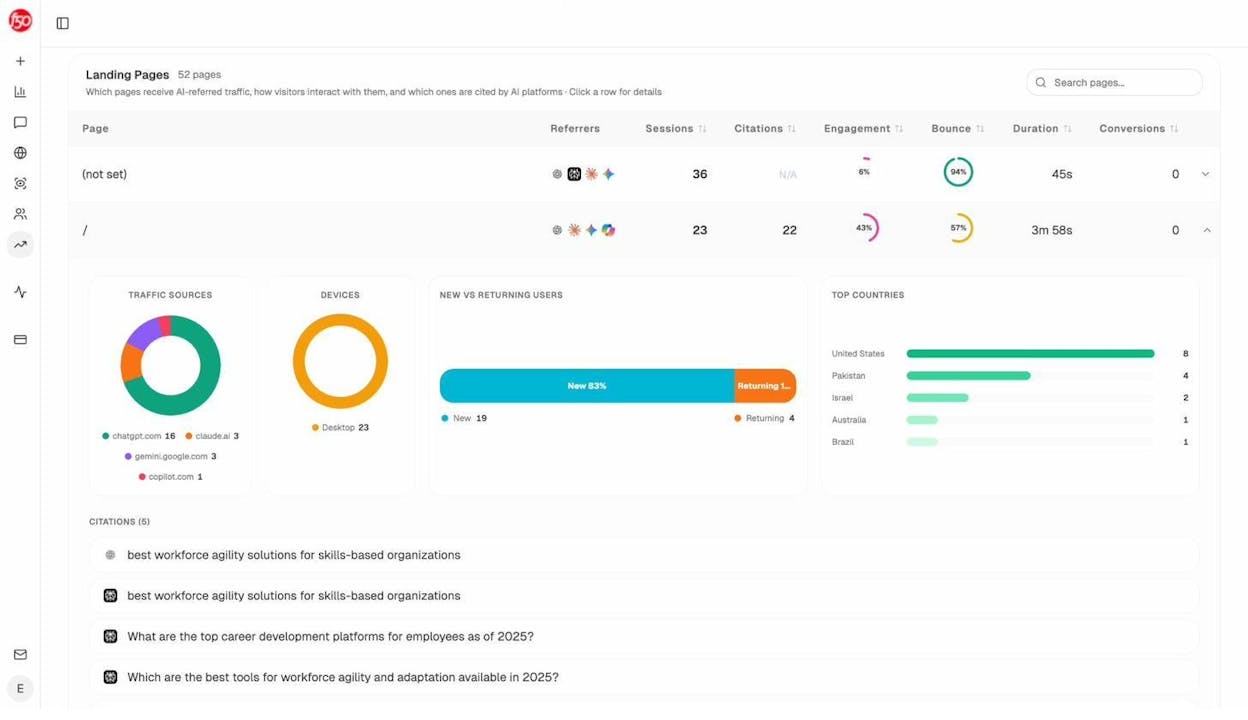
The AI Traffic Analytics dashboard attributes every session from ChatGPT, Perplexity, Claude, Copilot, and Gemini to its source. You see visitor volume by engine, engagement rates, bounce rates, and conversions, all trended over time.
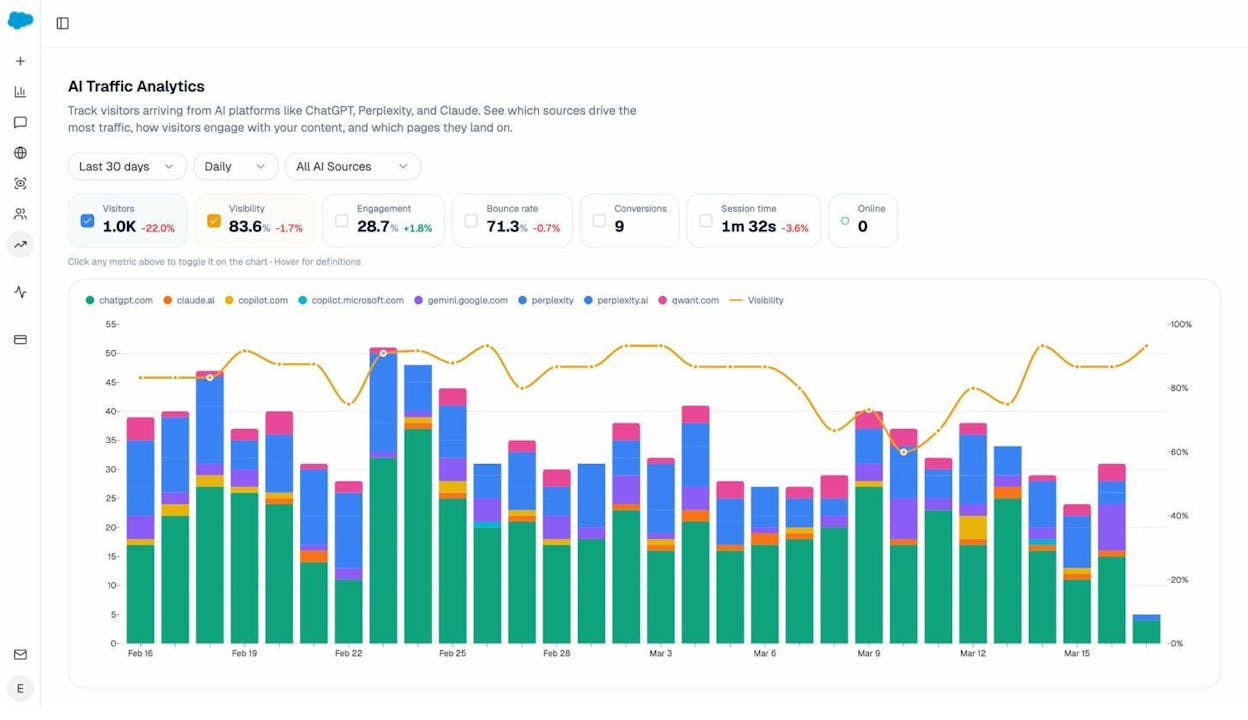
This is the layer Geneo doesn’t have. When your CMO asks which AI engine deserves more investment, you have a real answer backed by session and conversion data, not a visibility percentage.
The Landing Pages report takes it further. You see exactly which pages receive AI referral traffic, which engine sent each visit, and how those pages perform. If your comparison page converts at 12% from Perplexity but your blog post converts at 0% from ChatGPT, you know where to focus.
Track Prompts and Spot Competitive Gaps
Prompt tracking in Analyze AI works across ChatGPT, Perplexity, Claude, Copilot, and Gemini. For each tracked prompt, you see your visibility percentage, position, sentiment, and the competitors that appear alongside you.
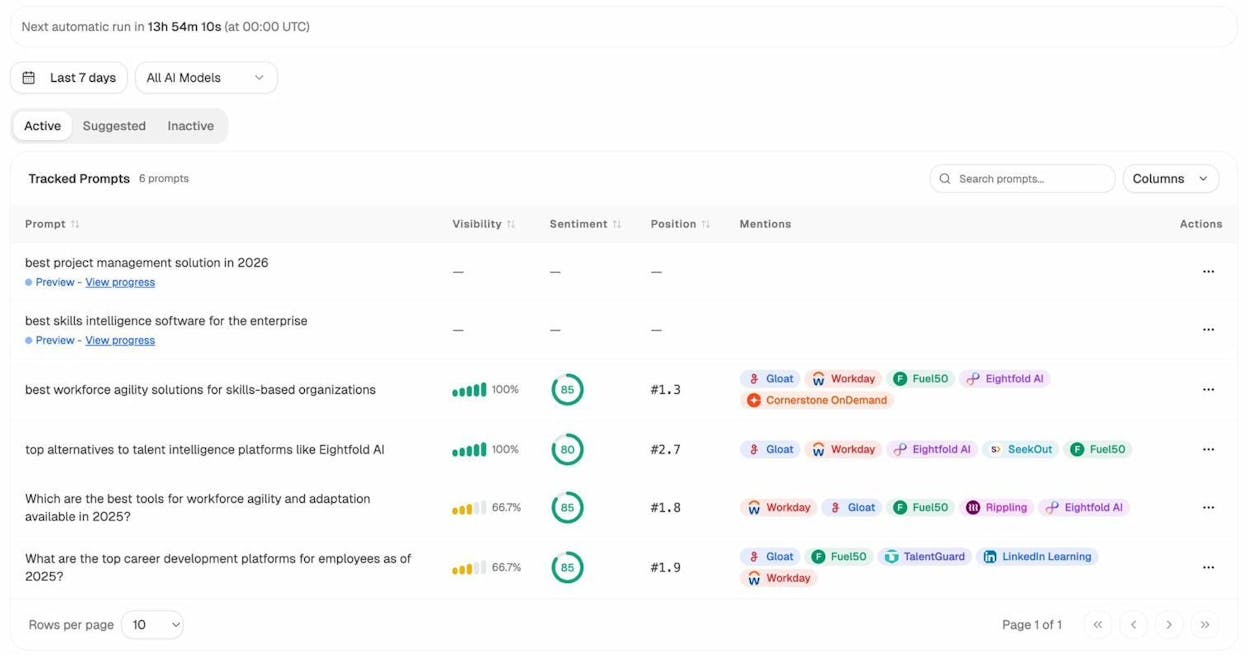
Not sure which prompts to track? The Prompt Discovery feature suggests bottom-of-funnel prompts based on your category and competitors. These aren’t generic keyword lists. They’re the actual questions buyers ask AI engines before making purchase decisions.
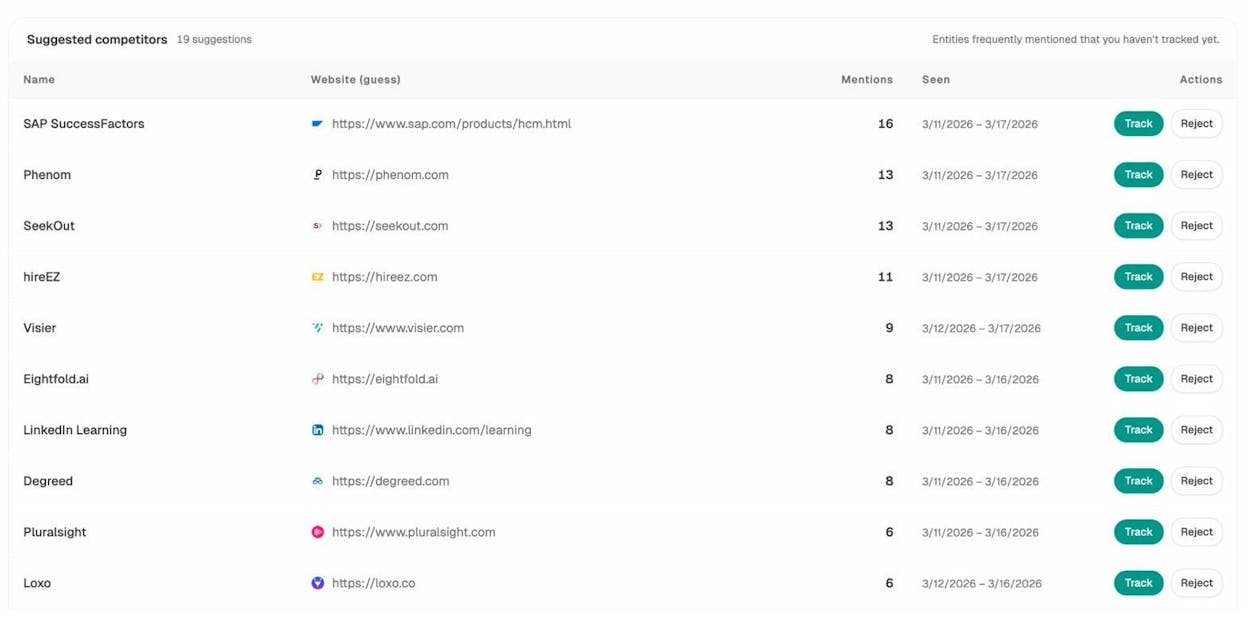
The Competitor Intelligence module surfaces competitors you might not even be tracking yet. It flags entities that AI models frequently mention alongside your brand, so you can decide whether to add them to your watch list.
Audit the Sources AI Models Trust
Citation Analytics shows which domains and URLs AI models cite when answering questions in your category. You see citation count per source, which engines reference each domain, and when those citations first appeared.
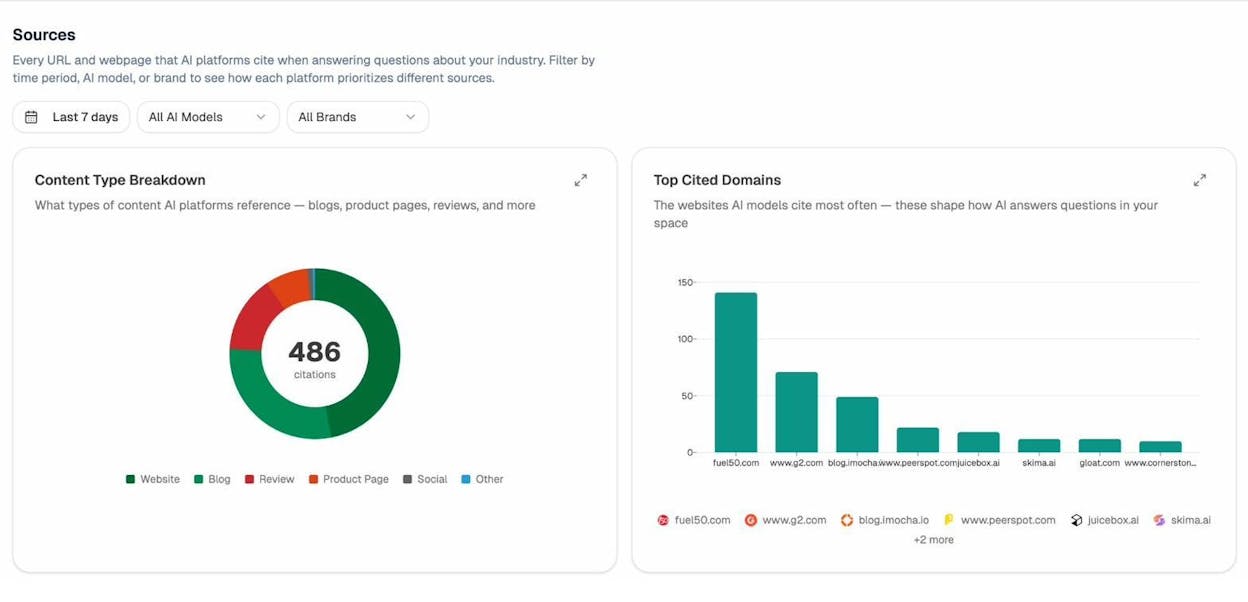
This turns link building from a generic exercise into a targeted one. Instead of chasing any backlink, you focus on the specific sources that shape AI answers in your space. You see where competitors get cited and you don’t, then close that gap.
Write and Optimize Content That Wins in Search and AI
This is where Analyze AI pulls ahead of every visibility-only tool, including Geneo.
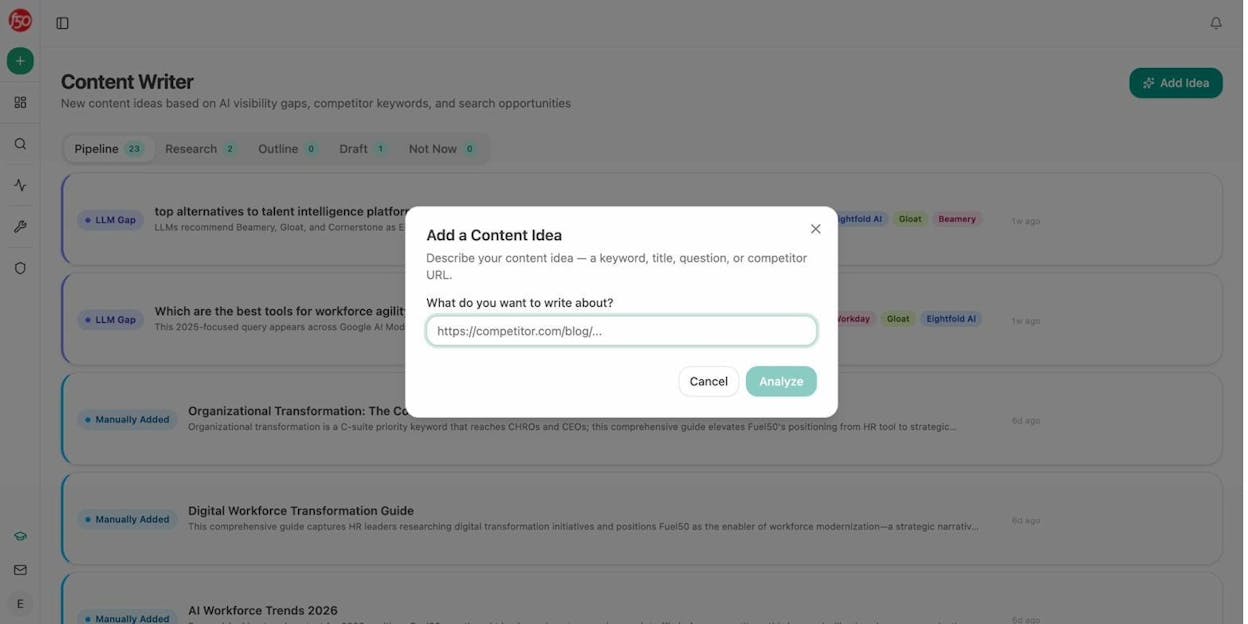
The AI Content Writer generates content ideas based on AI visibility gaps, competitor keywords, and search opportunities. Each idea comes with LLM gap analysis, SERP data, and a full research-to-draft pipeline. The writer runs competitive research, builds an outline with strategic comments from the AI editor, and produces a draft that’s optimized for both traditional search and AI engines.
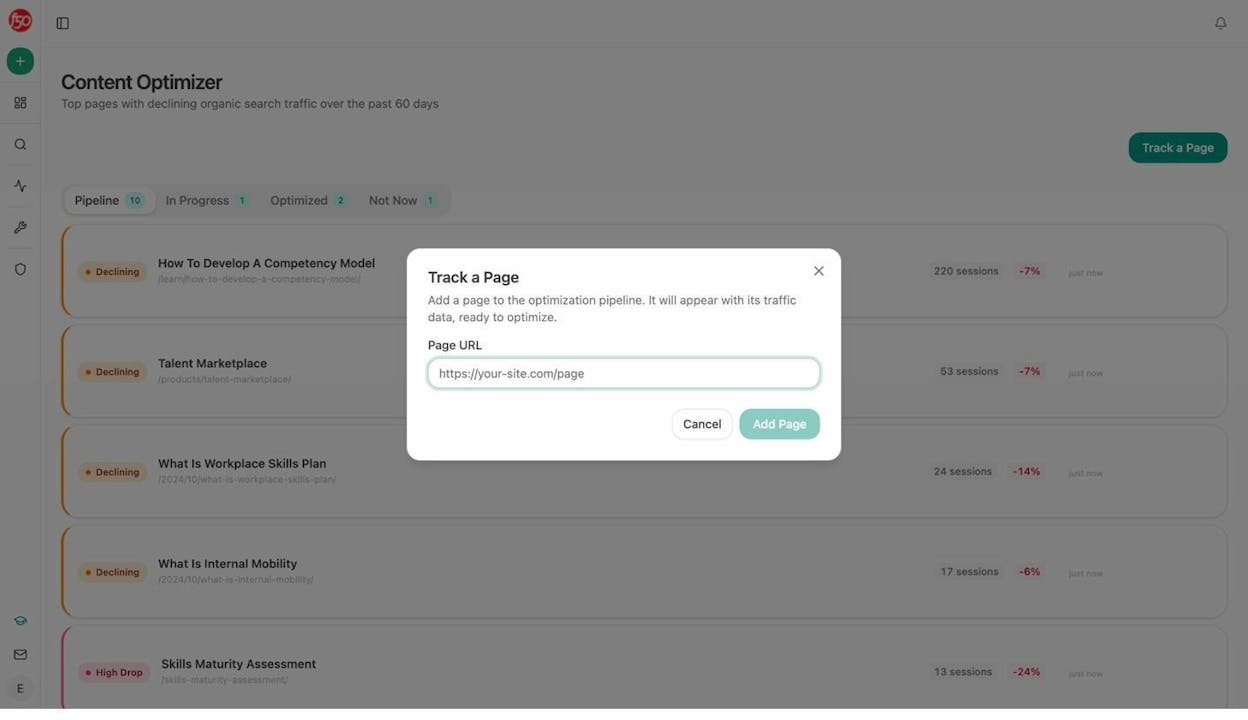
The AI Content Optimizer focuses on pages that already exist but are losing traffic. It surfaces your top declining pages, fetches the content, identifies gaps using AI and search data, and generates optimization recommendations. The output isn’t vague advice. It’s specific edits with before-and-after versions.
Geneo can tell you that you’re invisible on a prompt. Analyze AI helps you write the page that changes that.
Build Agents That Run Your Entire Workflow
The Agent Builder is the biggest differentiator, and the hardest to summarize because the scope is enormous.
It’s a visual workflow builder with 180+ nodes, 34 pre-built data recipes, 13 input primitives, and three trigger modes (manual, scheduled, webhook). It connects directly to GA4, GSC, Semrush, DataForSEO, HubSpot, Notion, WordPress, Slack, Mailchimp, and every major LLM.
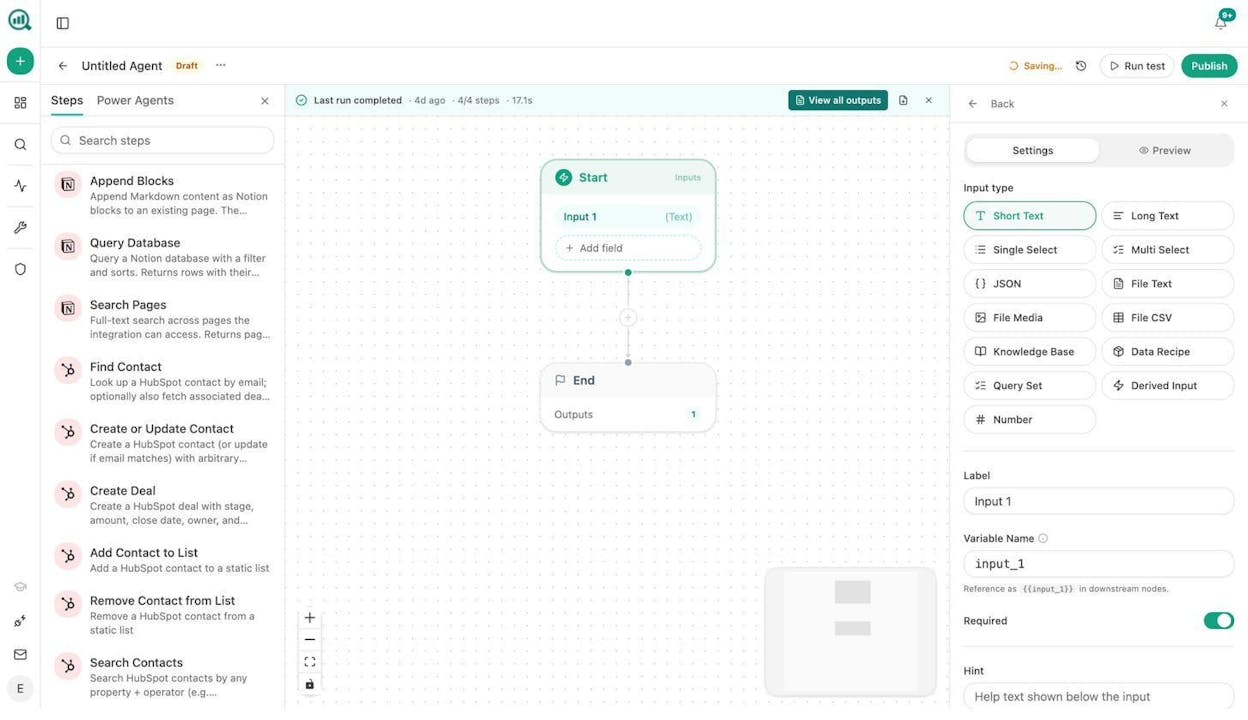
Here’s what that means in practice:
For content teams: Build an agent that runs every Monday, pulls your declining pages from GA4, cross-references them with AI visibility data, generates optimization briefs, and posts them to Notion. Your editorial calendar updates itself.
For agencies: Build an agent that loops over every client, assembles a weekly visibility report with competitive benchmarks and citation changes, formats it as a branded document, and emails each account team. Reporting day stops existing.
For PR and comms: Build an agent that monitors brand mentions every 15 minutes, filters for negative sentiment above a threshold, finds the journalist behind the coverage, and drafts three response options in Slack. You’re drafting a response before your CEO finds out.
For sales: Build an agent triggered by a HubSpot deal-stage change that researches the prospect’s domain, pulls their AI visibility data, generates a competitive audit, and attaches it to the deal. Discovery prep runs itself.
These are not hypothetical examples. They’re live workflows teams build with the node library that ships with Analyze AI. The platform is not an “AI search layer” bolted onto a dashboard. It’s the operations substrate that runs your SEO, AEO, content, and GTM functions continuously while your team focuses on judgment.
Monitor Perception and Protect Your Brand
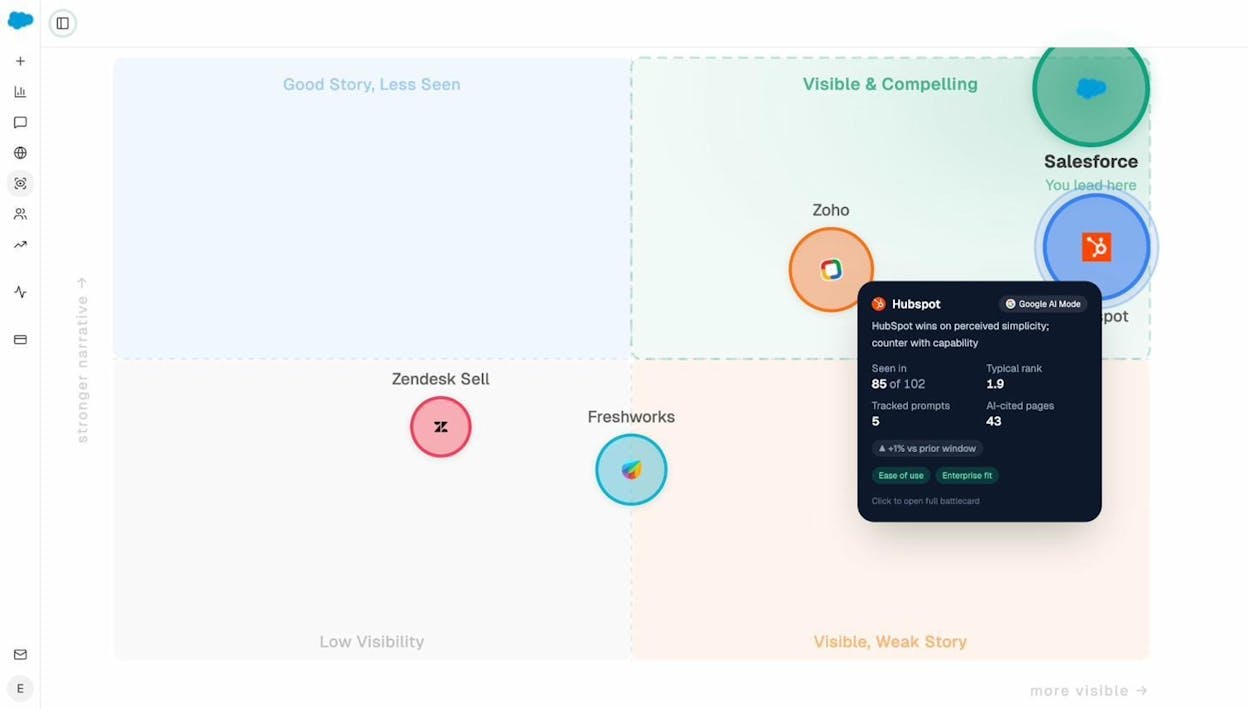
The Perception Map gives you a visual quadrant of how AI models position your brand versus competitors across key attributes. AI Sentiment Monitoring tracks how sentiment shifts over time, and AI Battlecards generate counter-narratives you can use when AI answers go off-brand.
Weekly Email Digests deliver priority actions, citation changes, and competitor shifts to your inbox every Monday without logging in.
Geneo vs. Analyze AI: Side-by-Side Comparison
|
Capability |
Geneo |
Analyze AI |
|---|---|---|
|
Multi-engine prompt tracking |
Yes (ChatGPT, Perplexity, Gemini, AIO) |
Yes (ChatGPT, Perplexity, Claude, Copilot, Gemini) |
|
Sentiment analysis |
Yes |
Yes, with Perception Map and Battlecards |
|
Response archiving |
Yes |
Yes |
|
Citation/source analysis |
Basic |
Full domain-level citation analytics |
|
AI traffic attribution |
No |
Yes, sessions by engine with landing pages |
|
Conversion tracking |
No |
Yes, tied to AI referral sources |
|
Content writer |
No |
Yes, research-to-draft pipeline |
|
Content optimizer |
No |
Yes, with gap analysis and AI editor |
|
Agent builder / automation |
No |
Yes, 180+ nodes, 34 recipes, 3 trigger modes |
|
GA4/GSC integration |
No |
Yes, native |
|
HubSpot/Notion/Slack integration |
No |
Yes, native in Agent Builder |
|
Weekly email digests |
No |
Yes |
|
Pricing model |
Credit-based, starts at $39.90/mo |
Flat pricing |
|
Free tools |
No |
Bottom Line
Geneo is a competent visibility-monitoring tool for teams that want a first look at how AI engines treat their brand. It does the core job of prompt tracking, response archiving, and sentiment scoring well enough to justify the Pro plan for small, single-brand teams.
But it stops at the dashboard. There’s no traffic attribution, no content creation, no optimization pipeline, no automation layer, and no connection between visibility data and business outcomes. At $39.90/month plus credit overages, you’re paying for a narrow slice of what modern AI search programs need.
If your goal is to measure, write, optimize, automate, and prove the value of AI search in one platform, Analyze AI covers the full loop. Track visibility. See actual traffic. Write content that wins prompts. Build agents that run your workflows. Report outcomes your leadership team cares about.
You can start with a free AI visibility check using the AI Visibility Checker or explore the full platform at tryanalyze.ai.

Ernest

Ibrahim
![7 seoClarity Alternatives That Won’t Lock You Into $2,500/mo Enterprise Contracts [2026]](/_next/image?url=https%3A%2F%2Fwww.datocms-assets.com%2F164164%2F1779457139-blobid0.png&w=3840&q=75)


