



Summarize this blog post with:


In this article, you’ll learn how to group keywords into clusters that map to one strong page instead of a dozen weak ones. You’ll get a step by step process for building a keyword list, grouping it into clusters, and turning those clusters into a content plan that earns rankings in Google and citations from ChatGPT, Perplexity, Claude, Gemini, and Copilot. You’ll also see where automated clustering gets it wrong and how to verify your clusters move traffic.
Table of Contents
How to Do Keyword Clustering (Step by Step)
First you build a keyword list. Then you group that list into clusters.
Step 1: Build a list of keyword ideas
Three ways to get raw material.
Method 1: Use a keyword research tool
Enter a few broad seed terms (“coffee maker,” “espresso machine,” “french press”) into a keyword research tool. You get hundreds of ideas with search volume, difficulty, and traffic potential.
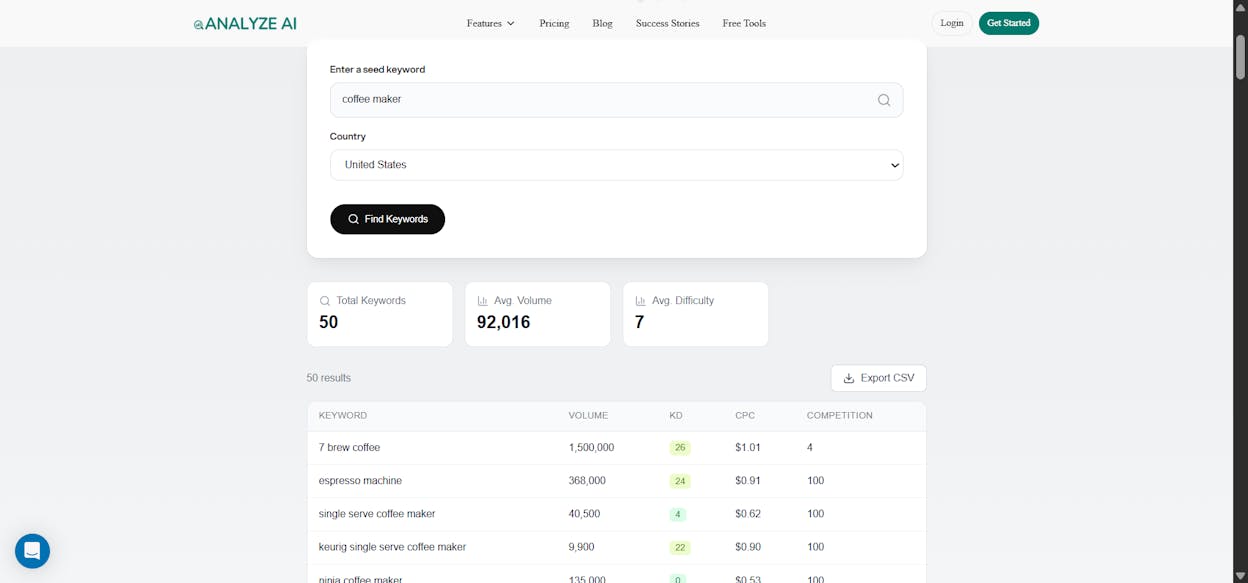
Three filters do the work:
-
Keyword difficulty under 30
-
Commercial or transactional intent (words like “best,” “review,” “vs,” “buy”)
-
Minimum search volume of 100 per month
You can do the same for free with the Analyze AI Keyword Generator, then check candidates with the Keyword Difficulty Checker.
Method 2: Mine your competitors’ rankings
Pull a competitor’s domain into a keyword research tool and export every keyword they rank for. Quick way to find topics worth covering.
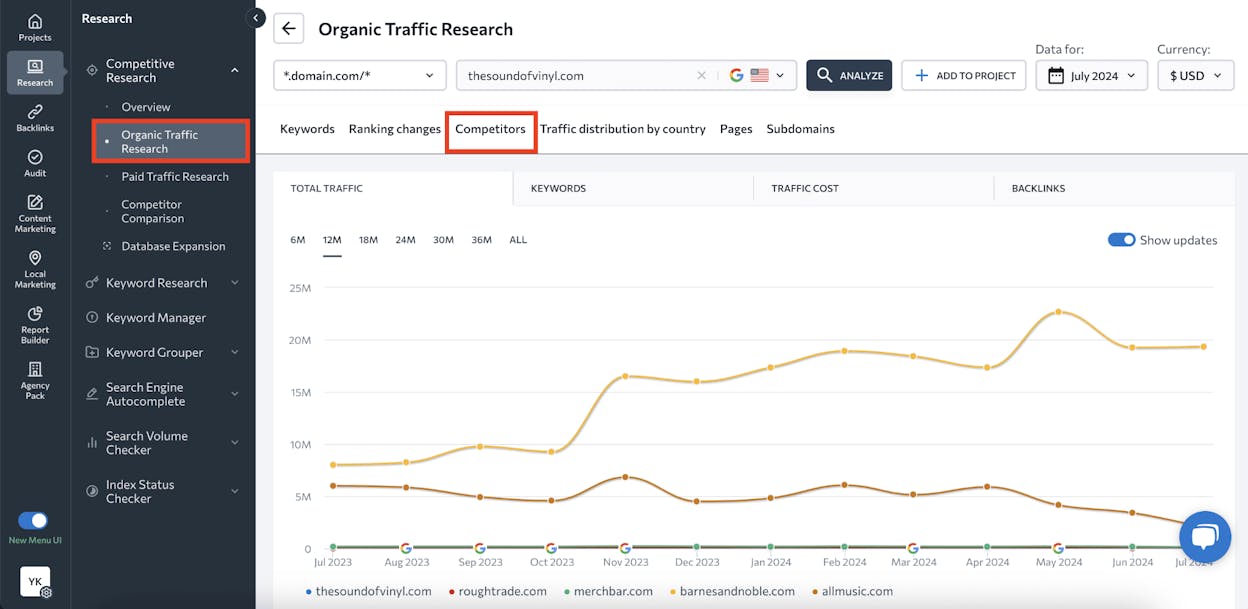
That covers half the picture. In 2026, your competitors compete in AI answers too, and that is where most clustering guides go silent.
Open Competitor Intelligence in Analyze AI and you see which brands get cited alongside yours across ChatGPT, Perplexity, Claude, Gemini, and Copilot. Suggested competitors appear automatically based on who keeps showing up in answers about your category.
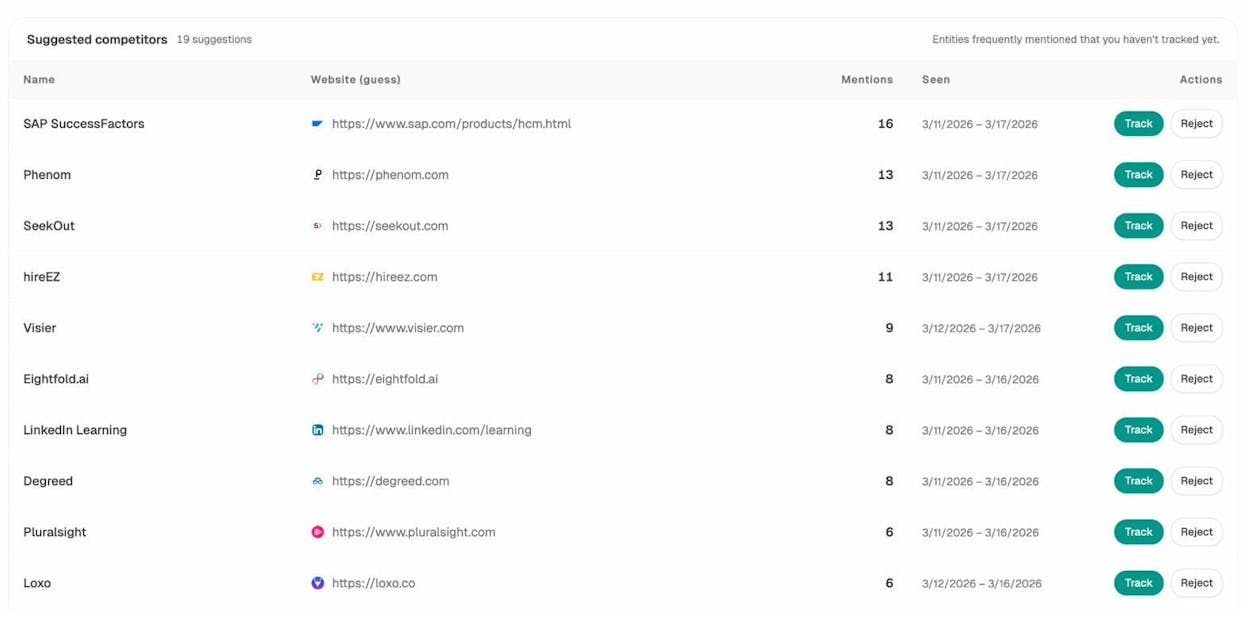
Track them, then export the keywords each one ranks for in Google. Where AI mentions and Google rankings overlap, you have your priority targets.
Method 3: Use Google’s free signals
Google Autocomplete, People Also Ask, and Related Searches give you keyword ideas at zero cost.
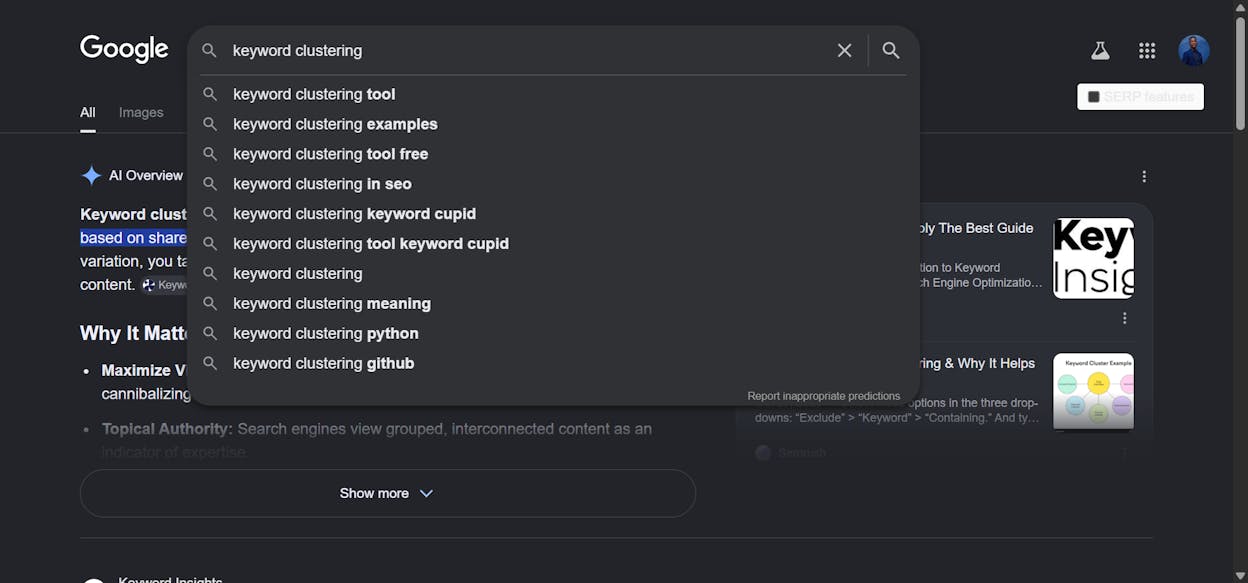
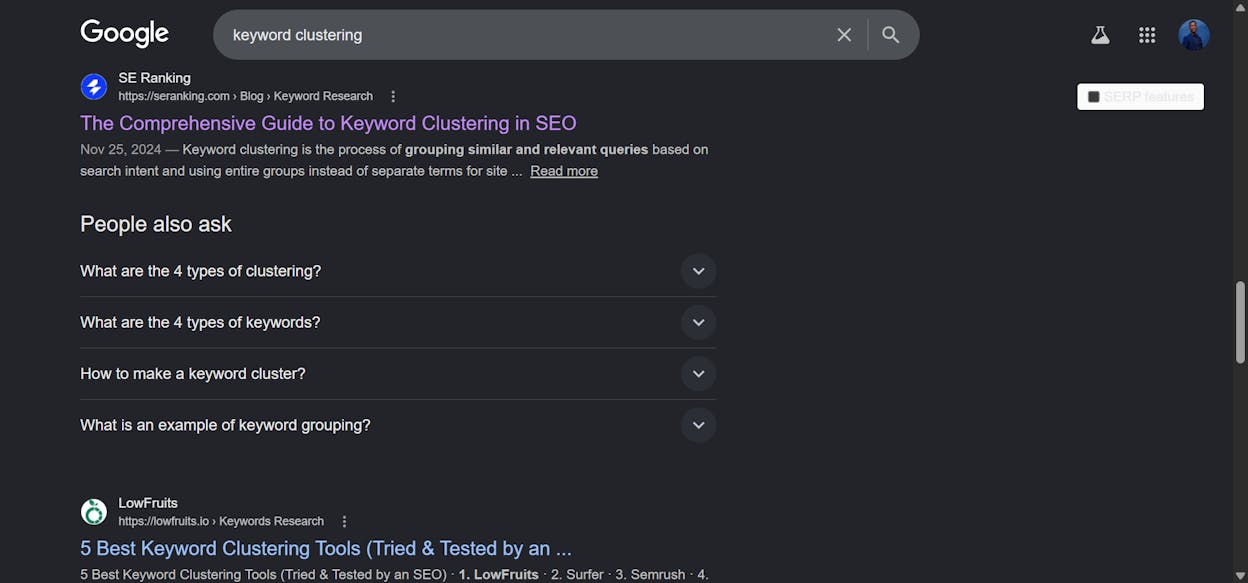
You will not get search volume, but you will get the exact phrasing your audience uses. That phrasing reveals long-tail variations you would never come up with on your own. For each promising keyword, run the Analyze AI SERP Checker to see what is already ranking.
Step 2: Group keywords into clusters
There are three approaches.
Approach 1: Automated clustering by SERP overlap
Most clustering tools compare the search results for each keyword in your list. If two keywords return many of the same pages in the top 10, the tool puts them in one cluster. Same intent, same cluster, same page on your site.
![Keyword Insights showing input list and clustered output with cluster names, total volume, and primary keyword per cluster]](https://www.datocms-assets.com/164164/1779203327-blobid6.png?auto=format,compress&w=1248&fit=max)
Set the SERP overlap threshold (3 out of 10 is standard), paste your list, and let the tool run. You get clusters with total volume, average difficulty, and a suggested primary keyword for each.
Approach 2: Clustering by Parent Topic
Some SEO platforms cluster by Parent Topic, the keyword that drives most of the traffic to the page ranking number one for any given keyword. If “best moka pot coffee” ranks at number one for a page that gets most of its traffic from “best coffee for moka pot,” then “best coffee for moka pot” is the Parent Topic. Every keyword that shares it lands in the same cluster. Instant and good for first-pass clustering.
Approach 3: Manual clustering by SERP comparison
For high-stakes keyword decisions, do it by hand:
-
Search the first keyword in Google.
-
Note the top 10 results.
-
Search the second keyword.
-
Compare the two SERPs.
-
If 3 or more pages overlap, the keywords belong in one cluster.
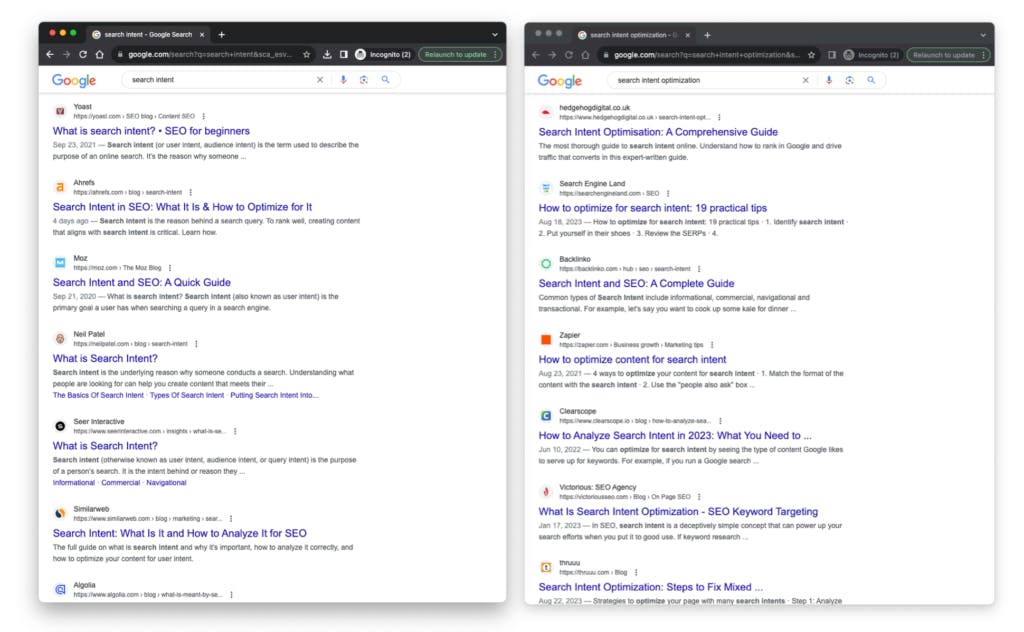
Never cluster 500 keywords this way. Reserve manual comparison for flagship pages where choosing wrong is expensive.
|
Approach |
Speed |
Accuracy |
Use it for |
|---|---|---|---|
|
Automated SERP-based |
Minutes for thousands |
High, with edge cases |
Site-wide content plans |
|
Parent Topic |
Instant |
Good for broad grouping |
First-pass clustering |
|
Manual SERP comparison |
Hours per dozen |
Very high |
Flagship pages |
How to Use Keyword Clusters in Your Content Strategy
Clustering is upstream of content. The plan is what you do with the clusters.
Assign each cluster to one URL. Walk through your clusters and decide whether an existing page already targets the topic. If yes, map the cluster to that URL and plan an update. If no, the cluster goes on the calendar as a new page. This is keyword mapping.
Use the secondary keywords as your H2s and H3s. The primary keyword is the one with the highest volume or clearest intent. The secondary keywords tell you which subtopics the page must cover. If your primary keyword is “best CRM software” and your cluster contains “easiest CRM to use” and “CRM for small business,” ease of use and small-business fit each become a section.
Treat uncovered clusters as content gaps. After mapping every cluster, the ones with no matching URL are your backlog. Prioritize by closeness to a buying decision first, then by search volume, then by difficulty.
Cluster the Prompts Behind Your Clusters
Most clustering guides stop at Google. That is a problem. Pew Research found AI summaries cut click-through rates on referenced links roughly in half. A page that ranks number one is no longer guaranteed to get the visit.
The fix is to extend each cluster into a prompt cluster. SEO is not dead and AI search is not replacing it. AI search is another organic channel alongside Google, and your keyword clusters are the foundation for both. Here is how to layer prompt clustering on top of keyword clustering in Analyze AI.
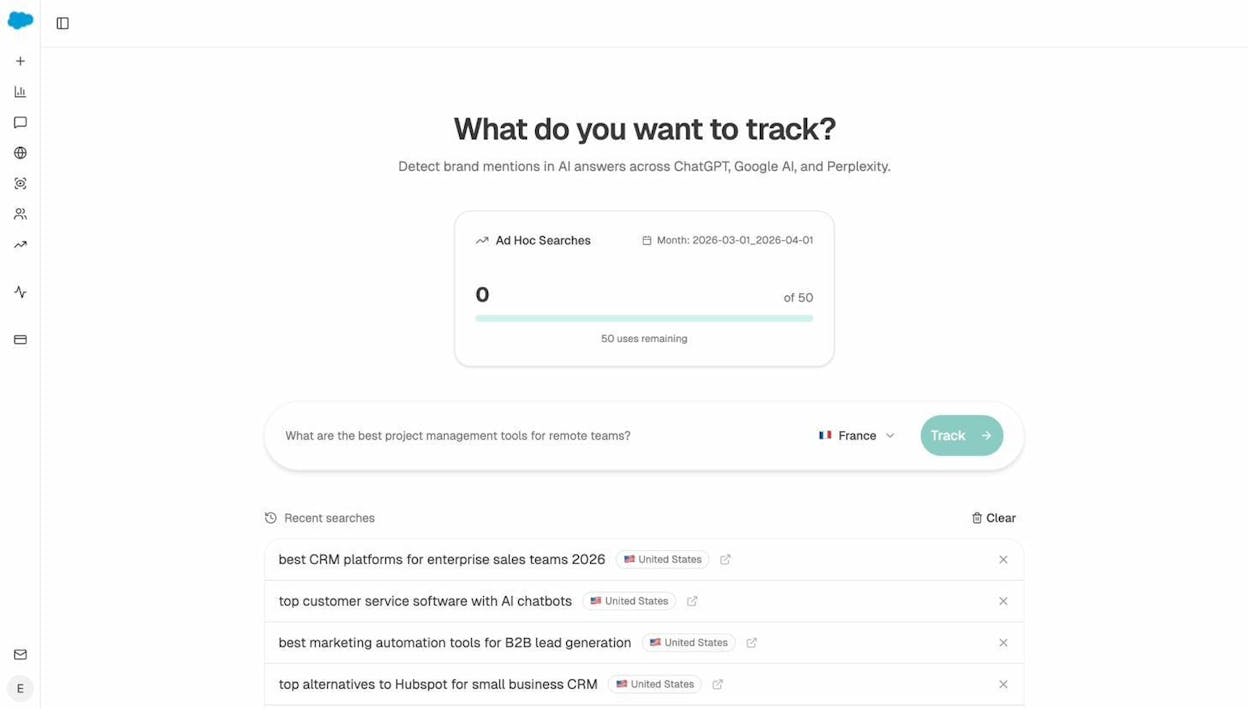
Convert each cluster into the prompts a buyer would type. A cluster around “best CRM for small business” becomes prompts like “what’s the best CRM for a 10-person team,” “which CRM is easiest for non-technical founders,” “alternatives to HubSpot for small companies.” Track them in Analyze AI and you see visibility, sentiment, position, and competitor mentions for each prompt across every major AI engine.
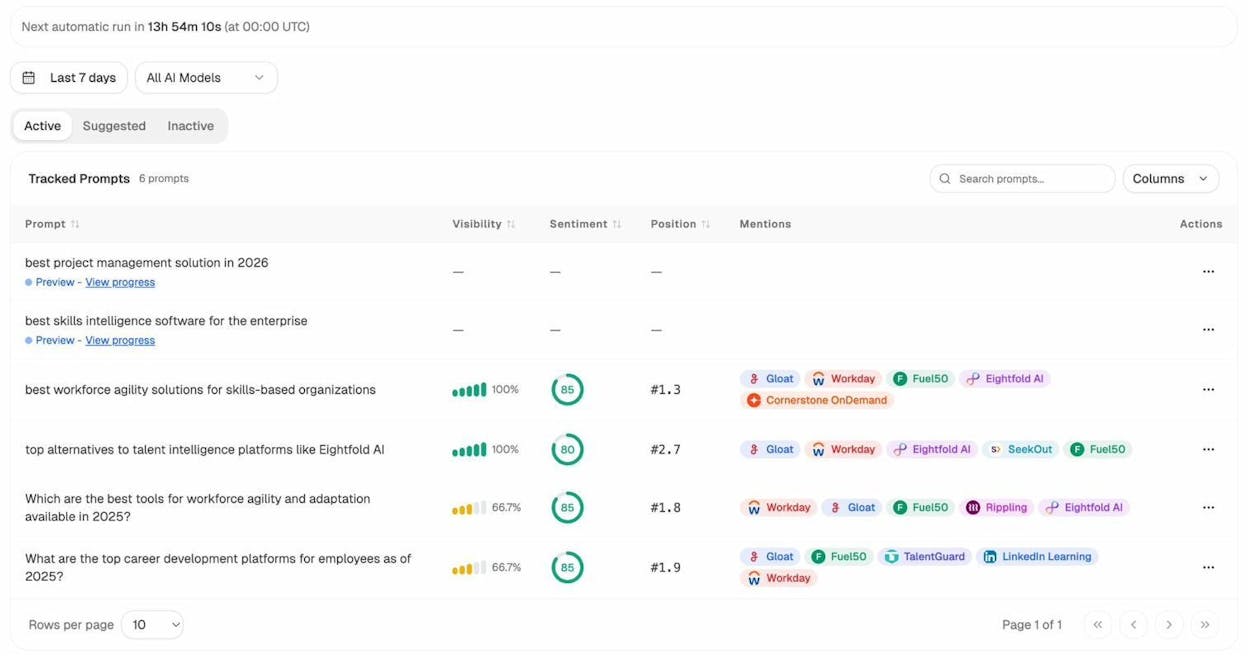
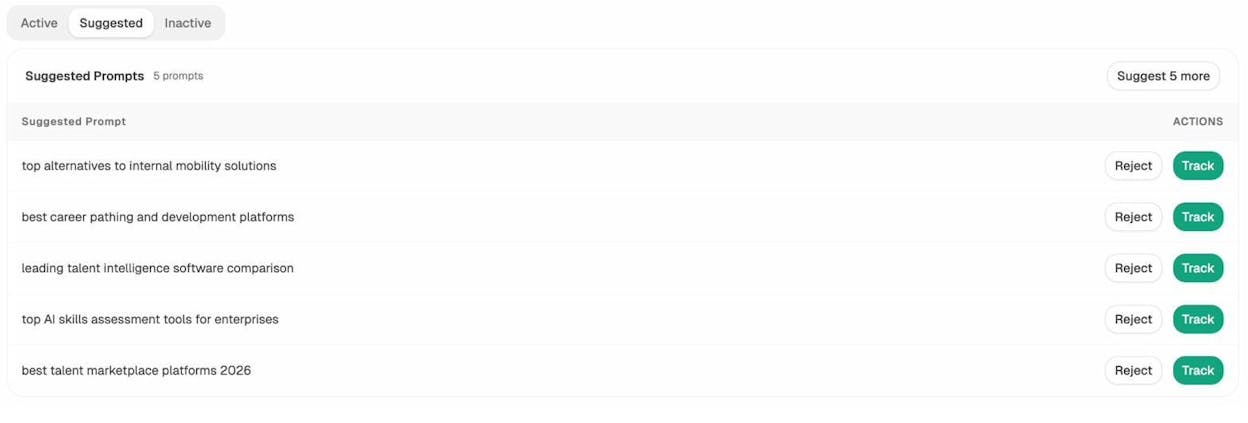
Let the platform suggest prompts you would never write. Analyze AI’s Prompt Discovery reads your industry, your competitors, and the language buyers use in AI engines, then surfaces prompts to track. Click Track on the ones that match your existing clusters.
Validate before you commit. Drop any prompt into the AI Search Explorer and see which brands AI models name, which sources they cite, and what sentiment they assign. If competitors dominate a prompt and you do not appear, that prompt becomes an immediate cluster priority.
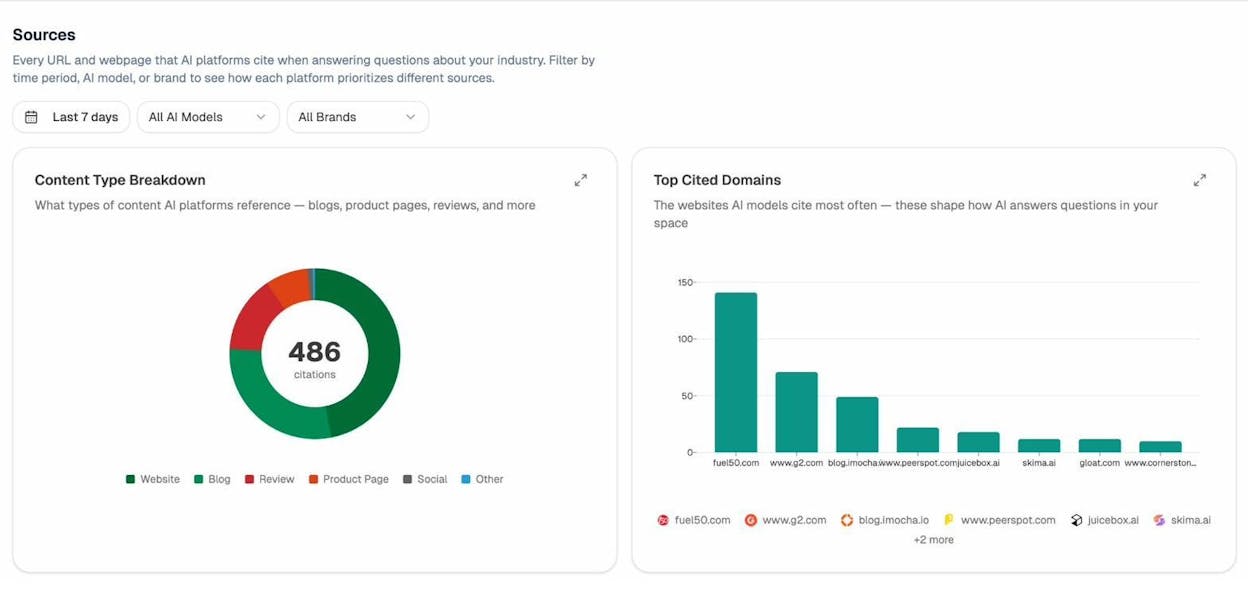
Earn the citations that decide AI answers. AI models cite from a small set of sources for any topic. Citation Analytics shows which URLs and domains those are. If a competitor blog keeps getting cited for the prompts in your cluster, you know which page to outwrite and which third-party sources you need a mention from.
Automate the Whole Pipeline With an Agent
Manual clustering scales to a few hundred keywords. After that, your team starts cutting corners. Analyze AI’s Agent Builder turns the entire clustering and brief-creation pipeline into a workflow that runs on a schedule or webhook trigger.
You get 180+ workflow nodes, 34 pre-built data recipes that pull from GA4, GSC, DataForSEO, Semrush, and Analyze AI’s own AI search data, plus 12 Brand Vault blocks that inject your tone into every output.
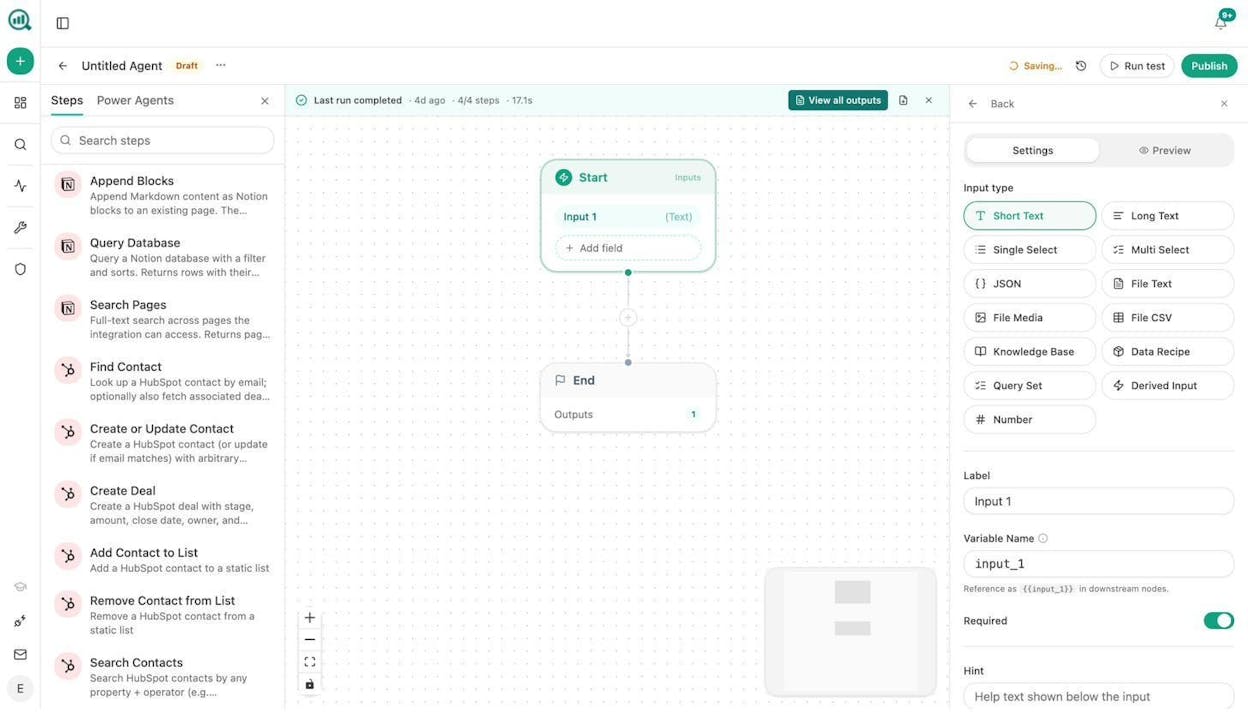
A working clustering agent takes four nodes:
-
Start node with a seed keyword input
-
DataForSEO Keyword Ideas node to expand the seed into a full keyword universe
-
Prompt LLM node that runs SERP-overlap clustering and outputs structured clusters in JSON
-
Generate Outline plus Generate Full Draft nodes to draft each cluster page
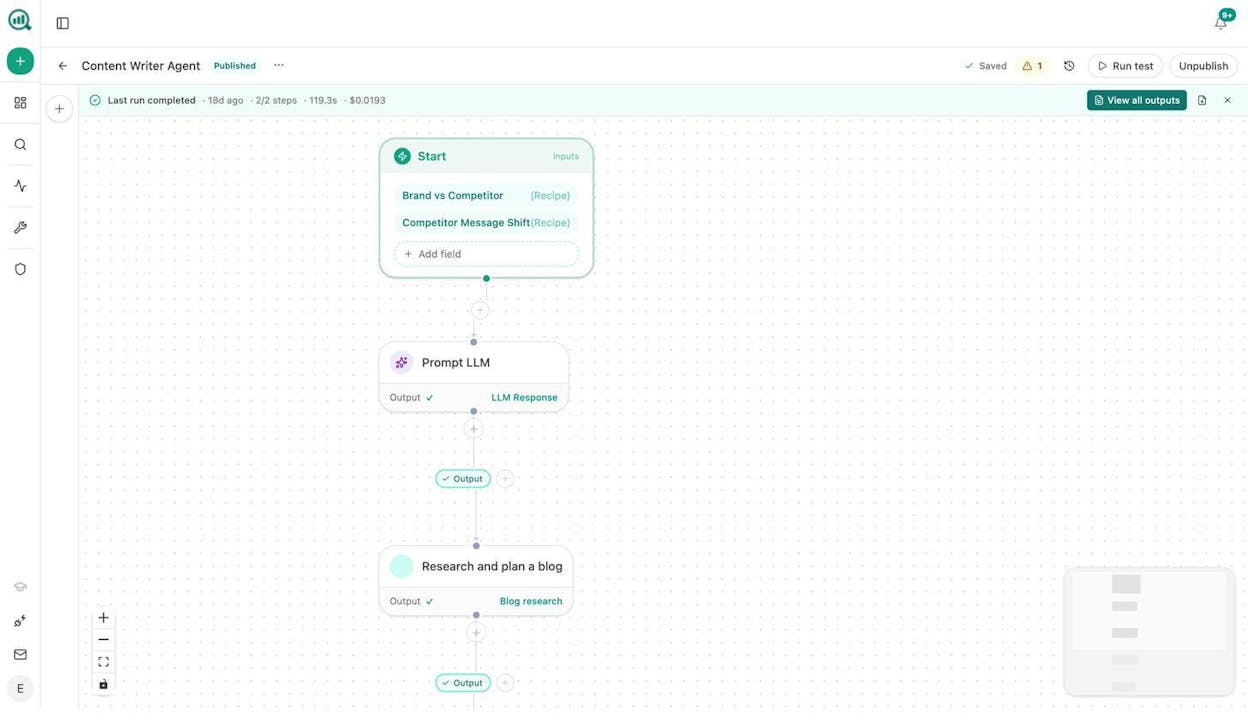
Schedule the workflow weekly and you have a pipeline that pulls fresh keywords, regroups them, and drafts a brief for each new cluster while you sleep. Wire it to a CMS webhook and the same pipeline fires the moment a page is published, keeping your cluster map and published content in sync without anyone touching a spreadsheet.
Verify Your Clusters Are Actually Working
Publishing a clustered page is not the end. You need proof the strategy compounds.
Track the entire cluster, not just the primary keyword. A page that ranks for the primary keyword but stalls on the secondary keywords did not cover the cluster fully. Use the Keyword Rank Checker to spot-check secondary keywords and find missing subtopics.
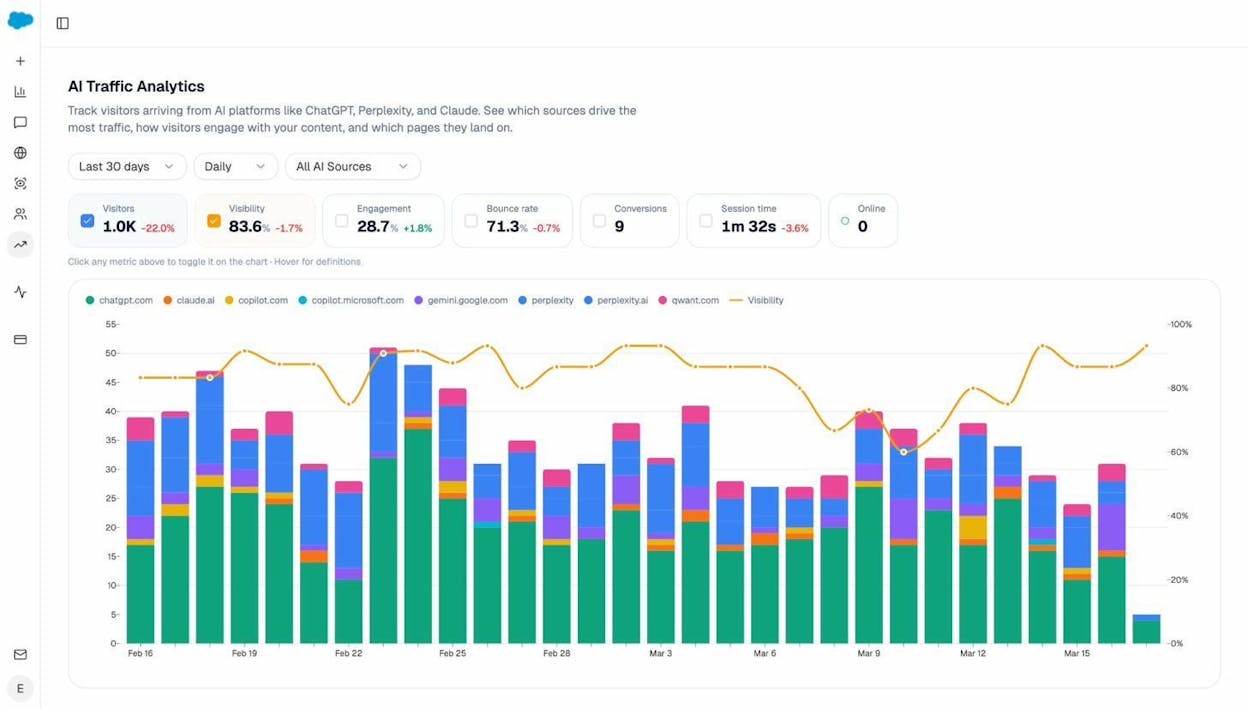
Watch AI traffic land on the right pages. AI Traffic Analytics connects to GA4 and shows which pages get visits from ChatGPT, Perplexity, Claude, Gemini, and Copilot. If a cluster page ranks well in Google but pulls zero AI sessions, that is a structural problem. The page is probably too long, too unstructured, or missing the entity coverage AI models look for.
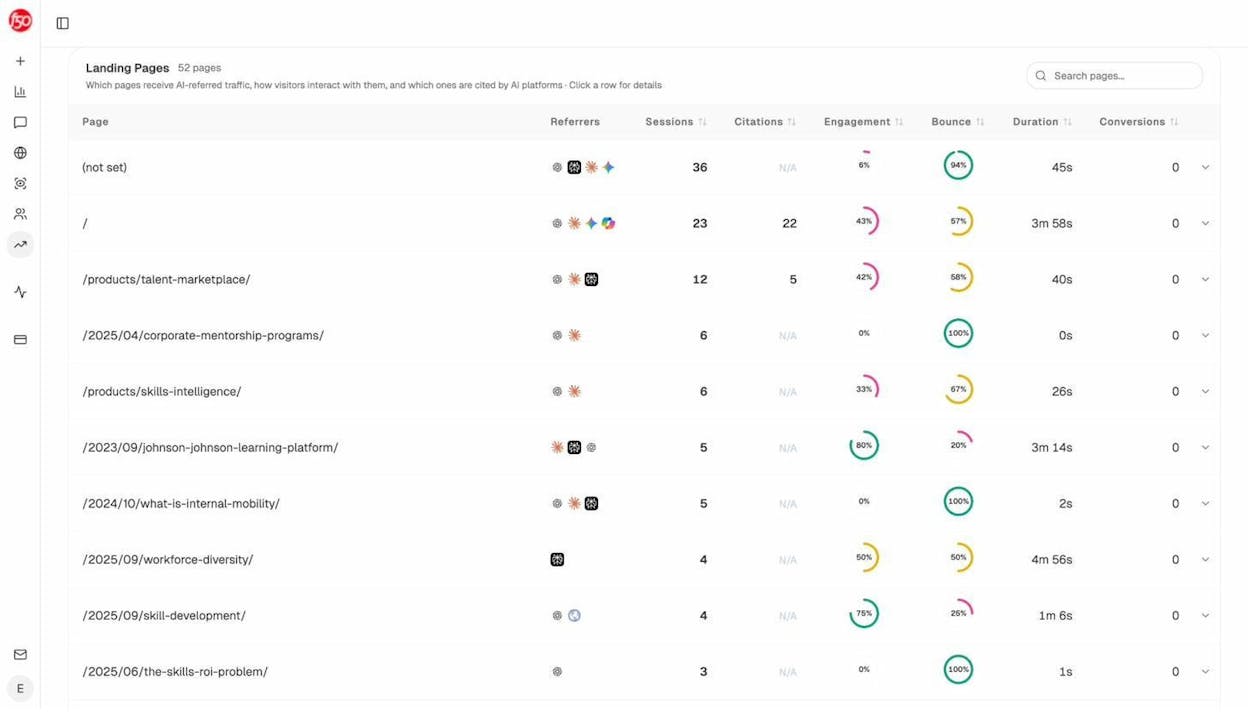
The Landing Pages report breaks every cluster page down by sessions, citations, engagement, bounce, and conversions, with the AI engines that drove each visit shown next to the URL.
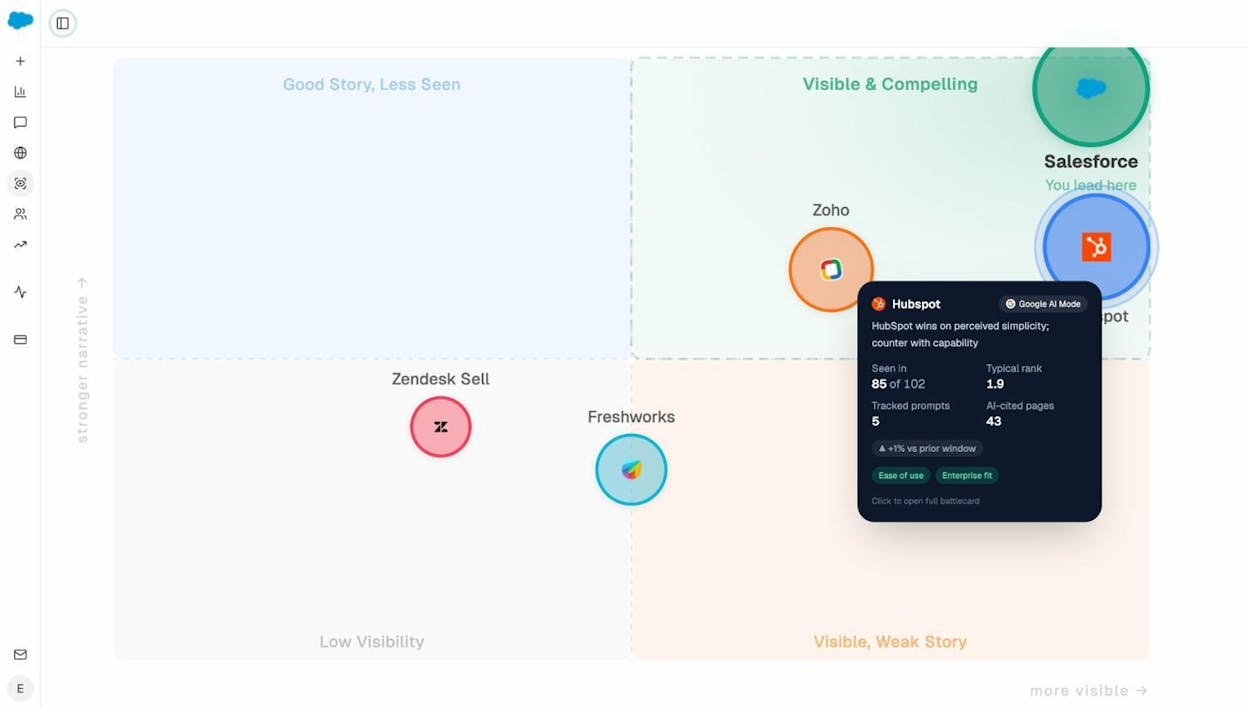
Check competitive position quarterly. The Perception Map plots every brand in your space on a visibility-by-narrative grid. If a competitor sits in the upper-right quadrant for the clusters you target and you sit in the lower-left, the cluster needs more depth, more proof, or both.
The Drawbacks of Keyword Clustering
Clustering tools produce confident output that is sometimes wrong.
SERP overlap can mislead you. A tool might cluster “chocolate cake recipe” and “chocolate cake recipe with coffee” together because some top results overlap. The competitive metrics tell a different story.
|
Keyword |
Avg DR of top results |
Avg referring domains |
|---|---|---|
|
chocolate cake recipe |
74 |
318 |
|
chocolate cake recipe with coffee |
33 |
11 |
The “with coffee” variation has 30x weaker competition. Targeting it on the same page as the broader keyword means you fight giants when you could rank instantly on its own page. Always check difficulty before you accept a cluster.
Some clusters are too broad. A 200-keyword cluster labeled “coffee” is useless. Break it into sub-clusters like “best coffee beans,” “coffee brewing methods,” “coffee maker reviews,” each its own piece of content.
Some clusters mix intents. A keyword with informational intent (“what is keyword clustering”) and one with commercial intent (“best keyword clustering tools”) rarely belong on the same page even if the SERPs overlap. The reader is in a different stage. Split them.
Term Clustering Helps You Find Niches Faster
A second clustering method works differently. Instead of grouping by ranking similarity, term clustering groups keywords by the words and phrases they contain.
Enter the seed “hotels” and group by terms:
-
near (hotels near me, hotels near the airport)
-
beach (beach hotels, beachfront hotels, oceanfront hotels)
-
cheap (cheap hotels, budget hotels, affordable hotels)
-
luxury (luxury hotels, 5-star hotels)
-
pet (pet-friendly hotels, hotels that allow dogs)
Each term cluster is a niche. Filter by low difficulty and you find under-served verticals. “Hotels with jacuzzis” or “pet-friendly hotels in [city]” print traffic for years because nobody big bothered to optimize for them.
This pairs well with Analyze AI’s Discover view, which surfaces topics AI models discuss in your category where your brand never appears. Combine the two and you find both the SEO niches and the AI search niches you can win.
Common Keyword Clustering Mistakes
Clustering too small a list. Under 50 keywords, clusters are too sparse to reveal patterns. Get to 200 first.
Trusting one method. Automated SERP clustering and Parent Topic clustering produce different results. Cross-reference both for high-value pages.
Ignoring intent inside clusters. SERP overlap is not the same as intent match. Always check that every keyword in a cluster wants the same kind of answer.
Never updating. SERPs shift. Recluster quarterly for competitive topics.
Treating it as SEO-only. If you cluster for Google but never check how those topics perform in AI search, you leave the second-largest organic channel untouched.
Recommended Tools for Keyword Clustering
You can start clustering for free and graduate as your list grows.
Free options. Google Search plus a spreadsheet works at low volume. The Analyze AI Keyword Generator expands seed terms into hundreds of variations. The Analyze AI SERP Checker compares two SERPs in one view to validate cluster decisions.
Paid options. Most major SEO platforms now offer clustering by Parent Topic or SERP similarity, which handles large lists in minutes. Dedicated tools like Keyword Insights specialize in SERP-based clustering at scale.
For SEO and AI search together. Analyze AI lets you cluster the keywords behind your Google strategy and the prompts behind your AI search strategy, then ties both back to GA4 traffic, citations, and conversions in one console. Add the Agent Builder and the entire pipeline runs as a workflow on a schedule, with no spreadsheet glue between steps.
Key Takeaways
Keyword clustering turns a chaotic list into a content plan that earns durable traffic. Group by shared intent, assign one URL per cluster, and use the secondary keywords as your section structure.
In 2026, you extend the same logic to AI search. Cluster the prompts behind your keyword clusters, track your visibility across ChatGPT, Perplexity, Claude, Gemini, and Copilot, and use traffic and citation data to verify your cluster pages compound in both channels.
The teams who win treat AI search as another organic channel alongside SEO. Cluster once. Win twice.
For more on building a keyword strategy that works across SEO and AI search, see:

Ernest

Ibrahim


![How to Analyze a Sudden Drop in Website Traffic [Step-by-Step]](/_next/image?url=https%3A%2F%2Fwww.datocms-assets.com%2F164164%2F1775602983-blobid0.png&w=3840&q=75)


