The 15 Best Marketing Automation Tools for 2026
Written by
Ernest Bogore
CEO
Reviewed by
Ibrahim Litinine
Content Marketing Expert

We reviewed 15 automation platforms through the lens of workflow depth, CRM alignment, channel coverage, and whether they tie activity to revenue instead of vanity metrics. We focused on how these tools perform when growth becomes real and teams need clarity, not more noise.
This breakdown will show which platforms fit different growth models—B2B, ecommerce, PLG, service—and where each one starts to shine or slow you down. And because automation now extends into how LLMs shape discovery, we added a bonus at the end: a more comprehensive, genuinely useful tool to track how your site or brand (and even competitors) show up across AI search.
Table of Contents
TL;DR
|
Tool |
Best For |
Core Strength |
Main Limitation |
Why It Matters for Automation |
|
HubSpot Marketing Hub |
Inbound teams wanting CRM + marketing in one system |
Unified contact record + deep workflows across email, ads, forms, CRM |
Pricing grows fast; requires process ownership |
Aligns marketing + sales with one data model powering automation, attribution, and lifecycle journeys |
|
ActiveCampaign |
Teams needing advanced behavior-driven journeys |
Powerful automation engine with branching, goals, and multi-channel steps |
No free tier; learning curve for beginners |
Automations adapt to real user actions, giving teams precision and revenue-focused targeting |
|
Mailchimp |
Small teams needing simple email + light automation |
Easy campaign builder, templates, and wide integrations |
Pricing increases sharply with list size; basic CRM |
Helps teams ship campaigns quickly without complex setup or deep logic |
|
Klaviyo |
Ecommerce brands needing personalization tied to purchase data |
Real-time ecommerce syncing + predictive segmentation |
Expensive at scale; steeper learning curve |
Automates messaging at key shopping moments, driving measurable ecommerce revenue |
|
Brevo (Sendinblue) |
SMBs needing multi-channel messaging on a budget |
Email, SMS, chat, WhatsApp, push in one tool |
Shallow automation logic; limited reporting |
Delivers broad communication coverage without enterprise cost or technical burden |
|
Adobe Marketo Engage |
Enterprise B2B teams running multi-touch programs |
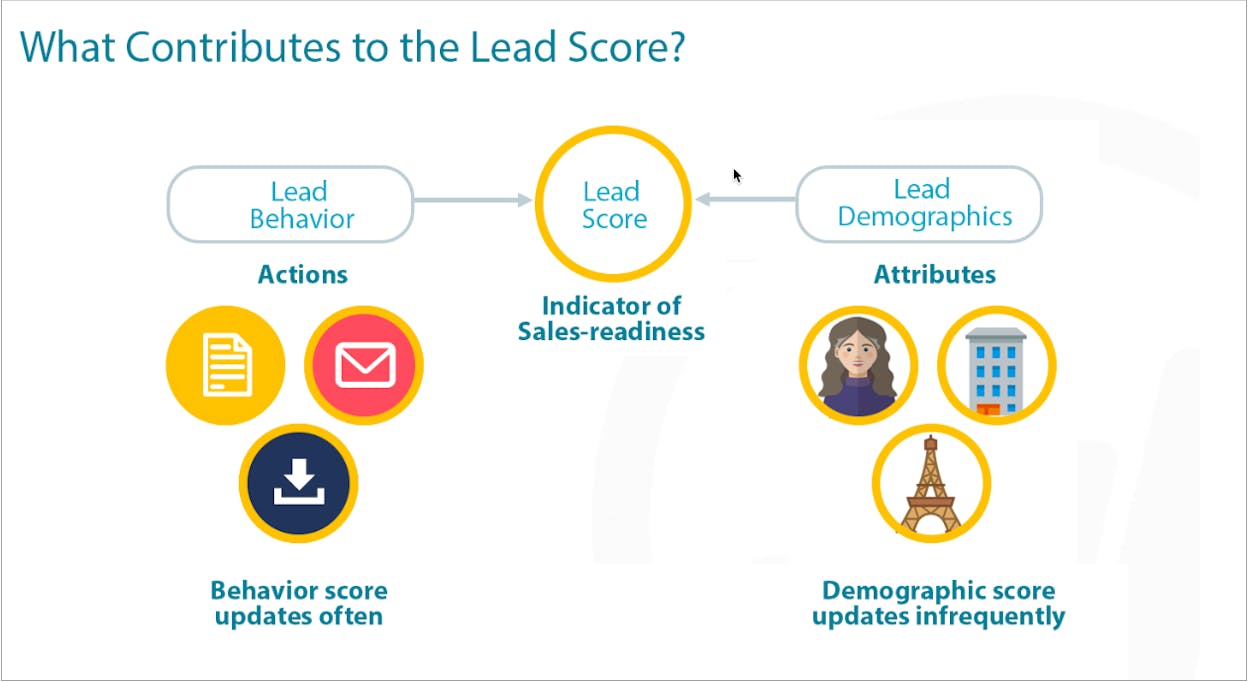
Deep scoring, ABM tools, and revenue attribution |
High cost, long onboarding, requires specialists |
Orchestrates complex B2B journeys aligned with sales, intent signals, and account data |
|
Salesforce Marketing Cloud Account Engagement (Pardot) |
Salesforce-centric B2B organizations |
Native CRM sync + structured scoring + attribution |
Expensive; complex; not ideal outside Salesforce |
Drives tight sales–marketing alignment with shared records and pipeline-connected automation |
|
Omnisend |
Ecommerce stores wanting fast revenue-focused email/SMS |
Prebuilt ecommerce flows + multi-channel messaging |
Narrow beyond ecommerce; limited integrations |
Makes it easy for stores to trigger revenue events like cart recovery and post-purchase |
|
GetResponse |
Teams wanting email + funnels + webinars in one platform |
All-in-one toolkit including funnels and webinars |
UI feels dated; reporting not best-in-class |
Replaces multiple tools, letting teams run email + funnels + webinars in one workflow |
|
Drip |
Ecommerce brands needing behavior-driven email without enterprise weight |
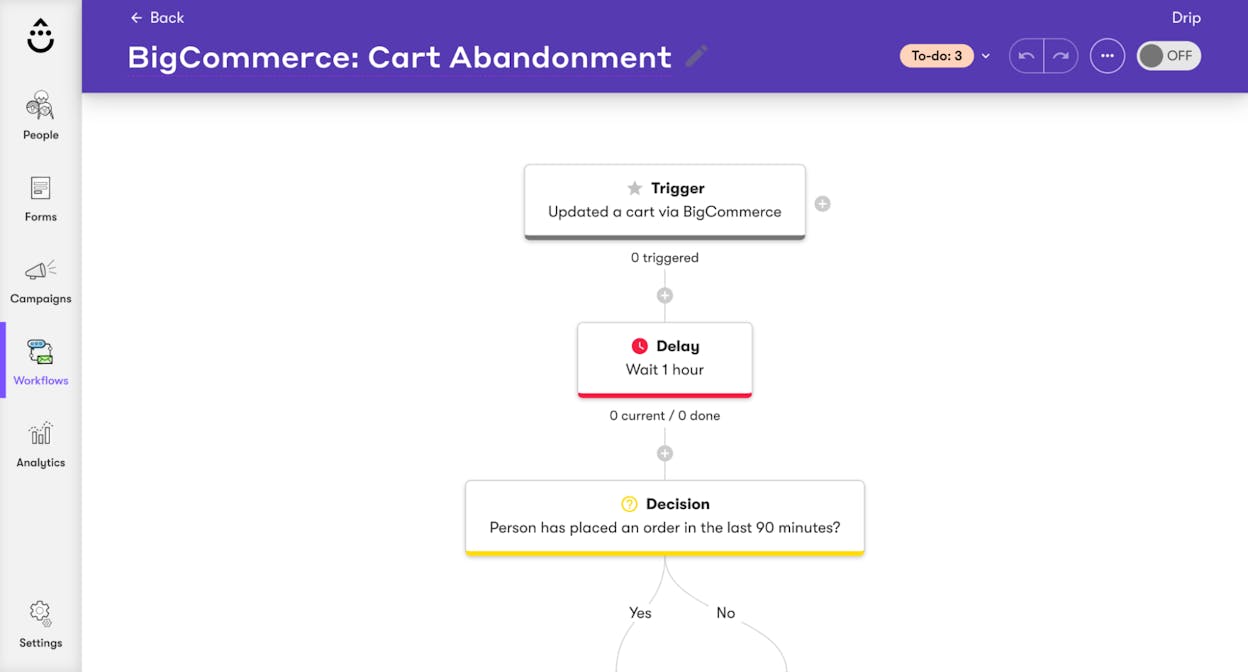
Strong segmentation + real-time ecommerce triggers |
UI can feel clunky; limited as full CRM |
Helps stores automate lifecycle emails tied directly to browsing and purchase activity |
|
Customer.io |
SaaS / PLG companies needing real-time event-driven messaging |
Event-based workflows + multi-channel orchestration + dev-first integrations |
Requires technical setup; pricey at scale |
Automates messaging based on live product behavior, powering PLG activation + retention |
|
Keap |
Small businesses needing CRM + sales + automation together |
CRM, pipelines, scheduling, invoicing, automation in one |
High starting price; learning curve |
Helps SMBs automate follow-ups and sales processes without juggling separate tools |
|
Iterable |
Enterprises running AI-driven, cross-channel personalization |
Multi-channel journey engine + AI timing/content optimization |
Enterprise pricing; requires mature data stack |
Supports large-scale orchestration across email/SMS/push with AI-powered personalization |
|
Oracle Eloqua |
Global enterprises with advanced ABM + scoring needs |
Multi-model scoring, segmentation, deep integrations |
Very steep learning curve; implementation-heavy |
Ideal for orchestrating long, global B2B sales cycles with granular data + enterprise workflows |
|
GoHighLevel |
Agencies needing one tool to run CRM, funnels, automation, and client accounts |
CRM, funnels, SMS/email, scheduling, white-label SaaS |
Feature overload; UI complexity |
Centralizes automation + funnels for agencies while enabling white-label revenue models |
|
Analyze AI (AI Search Visibility Tool) |
Brands wanting to measure AI search visibility → traffic → revenue |
Tracks AI referrals, prompt visibility, citations, and revenue influence |
Not a traditional marketing automation tool |
Not a marketing automation tool. But Shows which AI engines, prompts, and citations drive real sessions, conversions, and revenue |
HubSpot Marketing Hub: best marketing automation tool for all-in-one inbound growth

Key HubSpot Marketing Hub standout features
-
Visual workflow builder for email, lead nurturing, and scoring
-
Built-in CRM that shares one contact record across teams
-
Landing pages, forms, and chat that capture leads without code
-
Social media scheduling and ad tools inside the same platform
-
Reporting and dashboards that link campaigns to pipeline and revenue
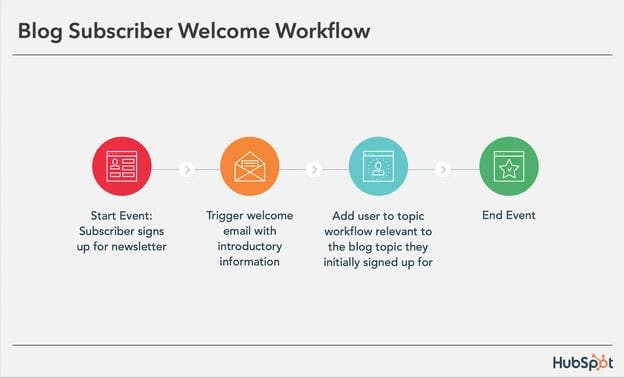
HubSpot Marketing Hub shines because it pulls every key marketing action into one shared system that uses the same contact data. Your emails, forms, ad campaigns, and sales notes sit on a single timeline, which makes it much easier to see how someone moved from first visit to closed deal. Instead of switching between five tools, your team works inside one place where they plan campaigns, build workflows, and track results with the same view.
The workflows go beyond simple date sends and basic triggers, which means you can build paths based on behavior, lifecycle stage, or deal status. A download can start a nurture sequence, a sales call outcome can switch someone into a new branch, and a deal stage change can trigger follow-up tasks inside the sales hub. The app marketplace adds even more reach, since you can plug in tools like Stripe, Zoom, and many others while still keeping HubSpot as the central brain.

The same strengths can create real trade-offs when you look at budget and team size. Pricing grows as your contact list grows, and serious use of automation, reporting, and extra hubs usually pushes you into higher plans. Smaller teams that send a few campaigns each month may pay for power they never use, which can hurt when budgets already feel tight.
The platform also demands attention from someone who owns it and shapes it. New users often need time to learn how objects, lists, workflows, and reports work together inside one system. If your team only wants quick email blasts, the number of options may slow things down instead of speeding growth, and advanced reports or custom objects will usually wait until you have both the right plan and someone who can model the data.
|
Core metric we track |
How HubSpot Marketing Hub scores |
Why it matters for marketing automation |
|
Automation depth |
Strong workflows with many triggers, branches, and goals |
Lets you match flows to real buyer behavior instead of simple date sends |
|
Ease of use at scale |
Clean UI with clear menus, but needs training and process |
Helps larger teams ship campaigns without building custom tools each time |
|
CRM and data alignment |
Native CRM shares one record for marketing and sales |
Reduces broken handoffs and keeps scoring, segmentation, and reporting in sync |
|
Channel coverage |
Email, ads, forms, chat, landing pages, and social tools |
Supports full journey campaigns without jumping through different platforms |
|
Reporting and revenue insight |
Dashboards link campaigns to deals and revenue |
Shows which workflows and channels move pipeline, not just open rates |
Best-fit use cases for HubSpot Marketing Hub
-
B2B or SaaS teams that run a serious inbound engine and need tight sales alignment
-
Content and demand gen teams that want email, forms, ads, and CRM inside one place
-
Growing companies that outgrew basic email tools and now need real workflows and reports
-
Teams ready to invest in one “main system” instead of a patchwork of smaller tools
HubSpot makes the most sense when you want one shared system that runs campaigns, powers workflows, and shows which marketing efforts actually turn into revenue.
ActiveCampaign: best marketing automation tool for advanced, behavior-driven workflows

Key ActiveCampaign standout features
-
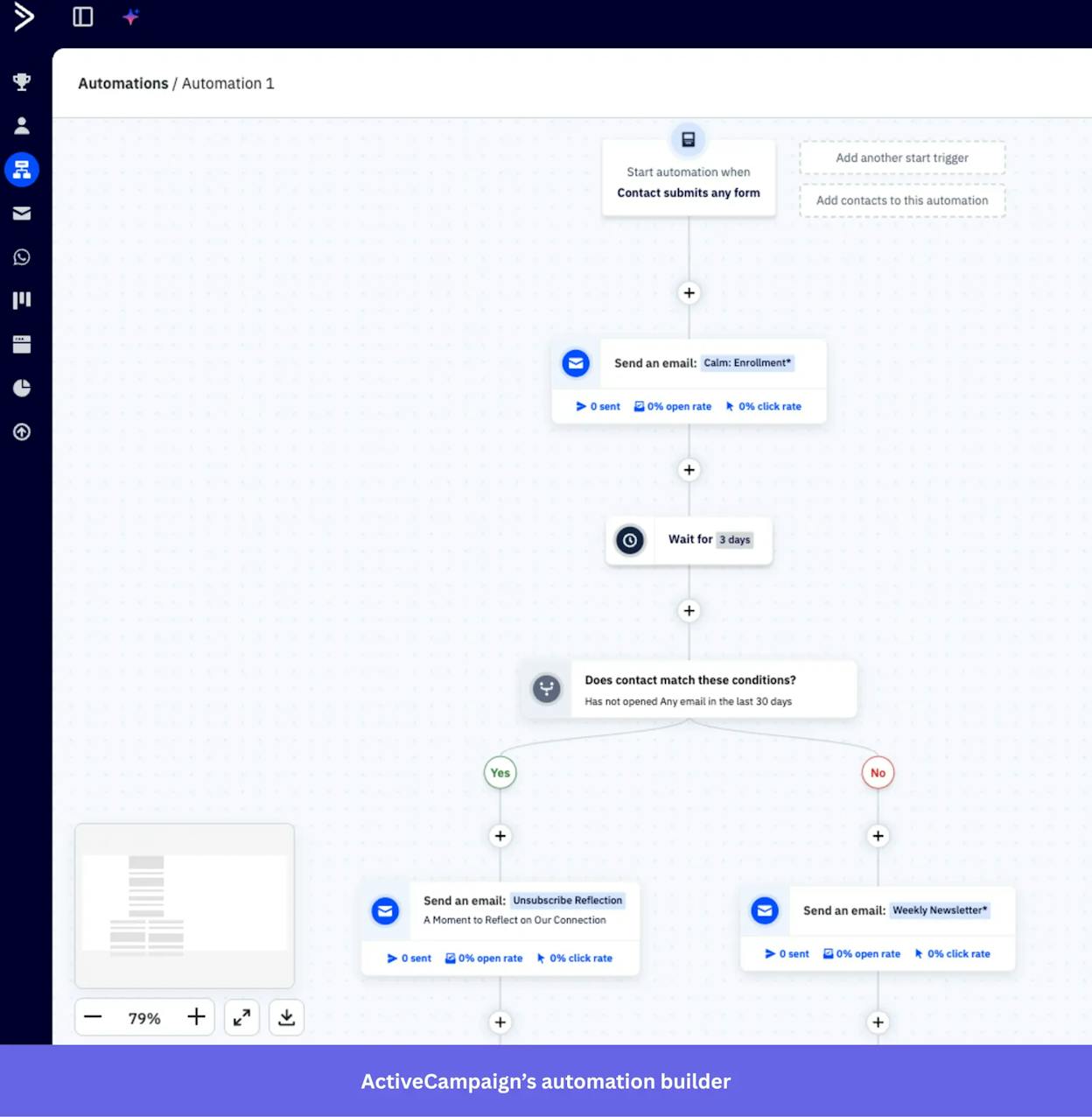
Visual automation builder with complex branching, goals, and conditional logic
-
Built-in CRM that connects sales pipelines with marketing sequences
-
Multi-channel automation that includes email, SMS, and WhatsApp
-
AI-powered campaign creation and optimization through Active Intelligence
-
Large integration ecosystem with deep event tracking and segmentation
ActiveCampaign is built for teams that want automation to respond to what users actually do rather than what a list says. The platform brings CRM data, event tracking, and messaging into one workflow engine, which allows marketers to shape each path based on behavior. A visit to a pricing page, an abandoned cart event, a pipeline update from sales, or a sudden rise in engagement can all shift someone into a more relevant sequence. The CRM sits inside the same system, which removes handoff gaps and makes every sales action part of the automation logic.
The platform also blends channels and AI in ways that speed execution and remove routine work. You can send email, SMS, and WhatsApp messages inside one journey, and each step pulls from real-time contact data. Active Intelligence agents support planning and testing by suggesting steps, generating copy, and refining flows as they run. This combination turns the tool into an engine that reduces manual decisions while still giving teams full control of strategy.

These strengths come with trade-offs. The depth of the automation builder requires clear planning and ongoing ownership, especially when workflows mix CRM actions, event triggers, and multi-branch logic. Small teams or beginners may need more time to understand how each element connects.
Pricing also raises a barrier for those who want to experiment before committing. Since there is no free tier and cost scales with contacts, users who only send a few campaigns or run simple newsletters often pay for power they never use. This makes the interface feel heavy when needs are limited and workflows remain basic.
How ActiveCampaign works and why it matters
|
Area |
How ActiveCampaign works |
Why it matters for marketing automation |
|
Workflow automation engine |
Uses real-time behavior triggers, conditional paths, deal actions, and goals in one visual builder |
Lets teams build journeys that follow what leads actually do rather than broad list rules |
|
CRM + automation link |
CRM pipelines sit inside the same system and update through workflow logic |
Removes sales–marketing gaps and keeps every follow-up tied to pipeline movement |
|
Multi-channel orchestration |
Sends email, SMS, and WhatsApp messages inside a single automation flow |
Helps teams engage users across channels without juggling separate tools |
|
Event and site tracking |
Captures actions such as page views, cart events, and engagement patterns |
Supports precise targeting, which makes automations more relevant and higher converting |
|
AI support |
Active Intelligence helps shape flows, craft messages, and refine results |
Reduces manual work and speeds execution while still supporting strategy and testing |
Best-fit use cases for ActiveCampaign
-
Teams that need workflows triggered by real user actions and event data
-
SMBs and midmarket companies that want CRM and automation in one shared platform
-
E-commerce brands that need revenue-linked journeys and multi-channel messaging
-
Businesses ready to design deeper workflows that grow with their pipeline
Choose ActiveCampaign when you want automation that adapts to behavior, guides sales steps, and builds journeys more intelligently than standard email tools.
Mailchimp: best marketing automation tool for simple, all-in-one email marketing

Key Mailchimp standout features
-
Drag-and-drop email builder with templates for fast campaign creation
-
Basic CRM that stores contacts, tags, segments, and simple activity timelines
-
Journey builder with behavior-based triggers for standard automations
-
Landing pages, forms, surveys, and ads inside one platform
-
AI-assisted writing, send-time optimization, and audience insights
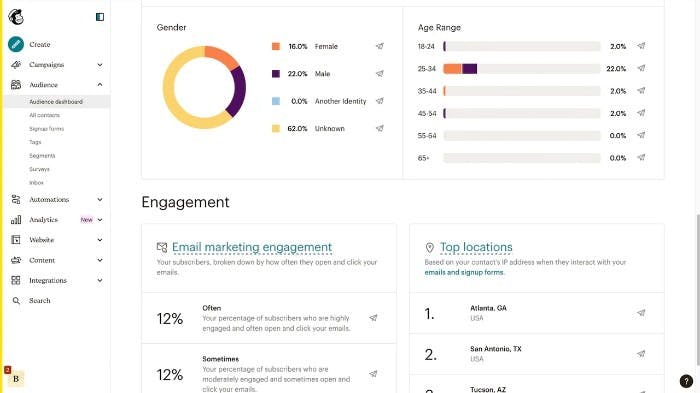
Mailchimp focuses on giving small teams one place to run email campaigns, build simple automations, and manage contacts without needing a complex system. Everything sits inside a familiar interface where emails, forms, landing pages, and basic CRM data share the same workspace. This approach helps teams ship campaigns without stitching together multiple tools or managing technical setups. The journey builder covers the essential behaviors small businesses rely on, such as welcome sequences, abandoned cart emails, and re-engagement flows.
Mailchimp also benefits from years of ecosystem growth. Hundreds of integrations link it to tools like Shopify, WordPress, Stripe, and Zapier, which means most teams can plug it into their stack with little friction. Its templates, tutorials, and onboarding guides reduce effort, allowing beginners to launch campaigns even when they lack design or automation experience. The platform’s expansion into SMS, ads, and AI-assisted content gives small organizations enough variety to handle common marketing tasks without leaving the dashboard.

Mailchimp’s simplicity, though helpful for beginners, creates limits when teams grow. Pricing rises quickly as the list expands, and charges for duplicates or cleaned contacts add unexpected cost. This becomes a challenge for teams that scale their audience and send more frequent multi-step journeys. The user experience can also feel cluttered because features were added across many years rather than shaped around a single automation model.
The CRM layer reflects a similar pattern. It works for tagging, segmenting, and storing basic information, but it lacks the depth needed for teams that depend on pipeline logic or advanced lifecycle management. Teams that need data-rich automations or deeper behavioral triggers usually outgrow Mailchimp and shift to platforms with stronger CRM foundations.
How Mailchimp works and why it matters for marketing automation
|
Area |
How Mailchimp works |
Why it matters for marketing automation |
|
Campaign and journey builder |
Uses a simple drag-and-drop interface with basic behavior triggers |
Helps small teams ship campaigns fast without learning complex logic |
|
CRM and audience tools |
Stores contacts, tags, and activity history in one basic workspace |
Supports simple segmentation and keeps all email data in one system |
|
Templates and integrations |
Offers hundreds of integrations plus many ready templates |
Reduces setup time and lets teams connect data without developers |
|
All-in-one features |
Includes landing pages, forms, surveys, and ads inside one tool |
Lets small organizations work in a single platform instead of several |
|
AI and optimization tools |
Provides send-time optimization and AI-generated content |
Helps teams improve performance without advanced analytics skills |
Best-fit use cases for Mailchimp
-
Small teams that want email, forms, and landing pages in one place
-
Creators, nonprofits, and SMBs that need simple, guided automations
-
Organizations with basic CRM requirements and light segmentation needs
-
Teams looking for fast setup without deep technical configuration
Mailchimp fits best when you want a simple, all-in-one system that sends campaigns and builds basic journeys without needing complex automation tools.
Klaviyo: best marketing automation tool for ecommerce personalization at scale

Key Klaviyo standout features
-
Deep integrations with Shopify, WooCommerce, BigCommerce, and other ecommerce platforms
-
Sophisticated segmentation based on behavior, purchase history, and predicted values
-
Prebuilt flows for abandoned carts, browse abandonment, welcome, and post-purchase
-
Multi-channel messaging with email, SMS, and mobile push
-
CDP-style customer data that supports attribution, lifecycle insights, and product-level targeting
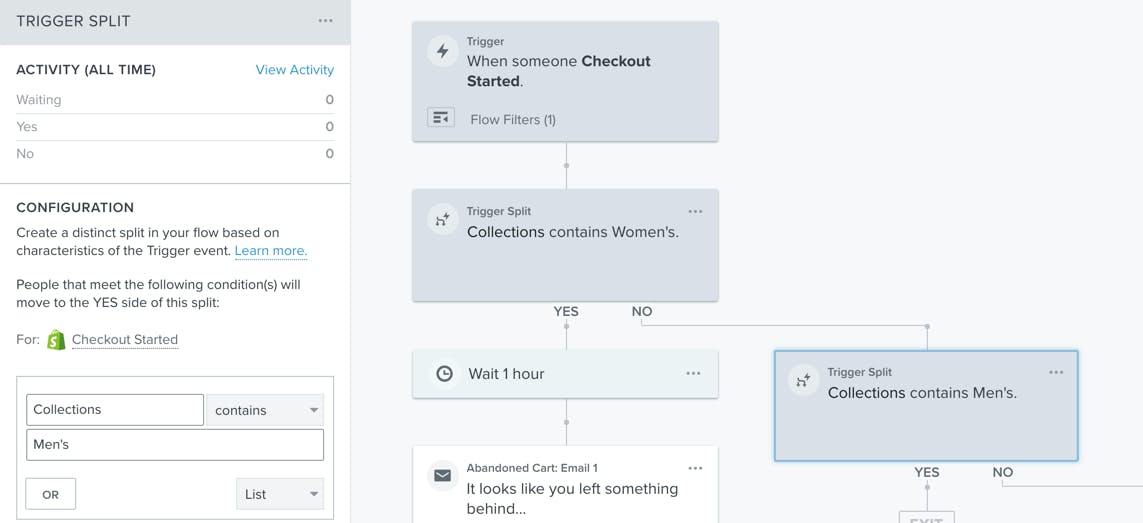
Klaviyo is built for brands that depend on tight control of customer data and revenue signals. The platform pulls product, checkout, and order data directly into its automation engine, which allows marketers to build journeys tied to real purchase behavior rather than broad audience segments. Each customer receives messaging aligned with browsing patterns, lifetime value, and past orders, which helps campaigns feel more relevant and often more profitable. The segmentation tools update in real time as customers act across a store, giving teams the agility to adjust their campaigns without rebuilding flows from scratch.
Klaviyo also helps teams move faster with a large library of ecommerce-ready templates and flows. Most essential journeys—abandoned carts, repeat purchase nurture, review requests, VIP invitations—can launch with minimal setup because the platform already knows how typical ecommerce funnels operate. Advanced analytics reveal how each message or flow contributes to revenue, which helps brands invest in campaigns that drive actual sales rather than vanity metrics. The combination of data depth, automation flexibility, and ecommerce-first integrations sets Klaviyo apart from generalist email tools.

These capabilities, however, come with a learning curve. Klaviyo’s segmentation, predictive analytics, and multi-trigger flows require more understanding than simple newsletter platforms. Users who are new to ecommerce data or personalized journeys may need time to learn how all the pieces connect. This complexity is not a barrier for growth-focused brands, but it can slow smaller teams who want to launch quickly.
Pricing is another factor to consider. Because the platform charges based on audience size and SMS usage, costs can rise as a store scales. Brands running both email and SMS at high volumes often find themselves on the upper tiers sooner than expected. Klaviyo’s depth also becomes unnecessary outside ecommerce; teams that only send newsletters or run content-led marketing will not use most of its capabilities, which makes lighter tools more suitable for their needs.
How Klaviyo works and why it matters for marketing automation
|
Area |
How Klaviyo works |
Why it matters for marketing automation |
|
Ecommerce data syncing |
Pulls product, checkout, and order data directly into the customer profile |
Helps teams send messages triggered by real buying signals, not generic segments |
|
Real-time segmentation |
Updates segments based on behavior, frequency, value, and predictions |
Ensures campaigns reach customers at moments when they are most likely to convert |
|
Prebuilt ecommerce flows |
Provides ready-made workflows for critical lifecycle moments |
Reduces setup time and supports revenue recovery through proven ecommerce sequences |
|
Multi-channel messaging |
Combines email, SMS, and push inside one automation engine |
Gives brands a unified way to reach users across preferred channels |
|
CDP-style customer data |
Stores detailed customer activity for attribution and insights |
Makes it easier to learn which products, flows, and segments drive sales over time |
Best-fit use cases for Klaviyo
-
Ecommerce brands that rely on purchase-driven journeys and personalization
-
Teams that need deep segmentation and real-time behavioral automation
-
Shopify, WooCommerce, or BigCommerce stores that want native data syncing
-
Brands focused on revenue attribution and lifecycle retention
Klaviyo excels when ecommerce brands want automation tied to real purchase behavior and product-level insights, not broad email lists.
Brevo: best marketing automation tool for multi-channel communication on a budget

Key Brevo standout features
-
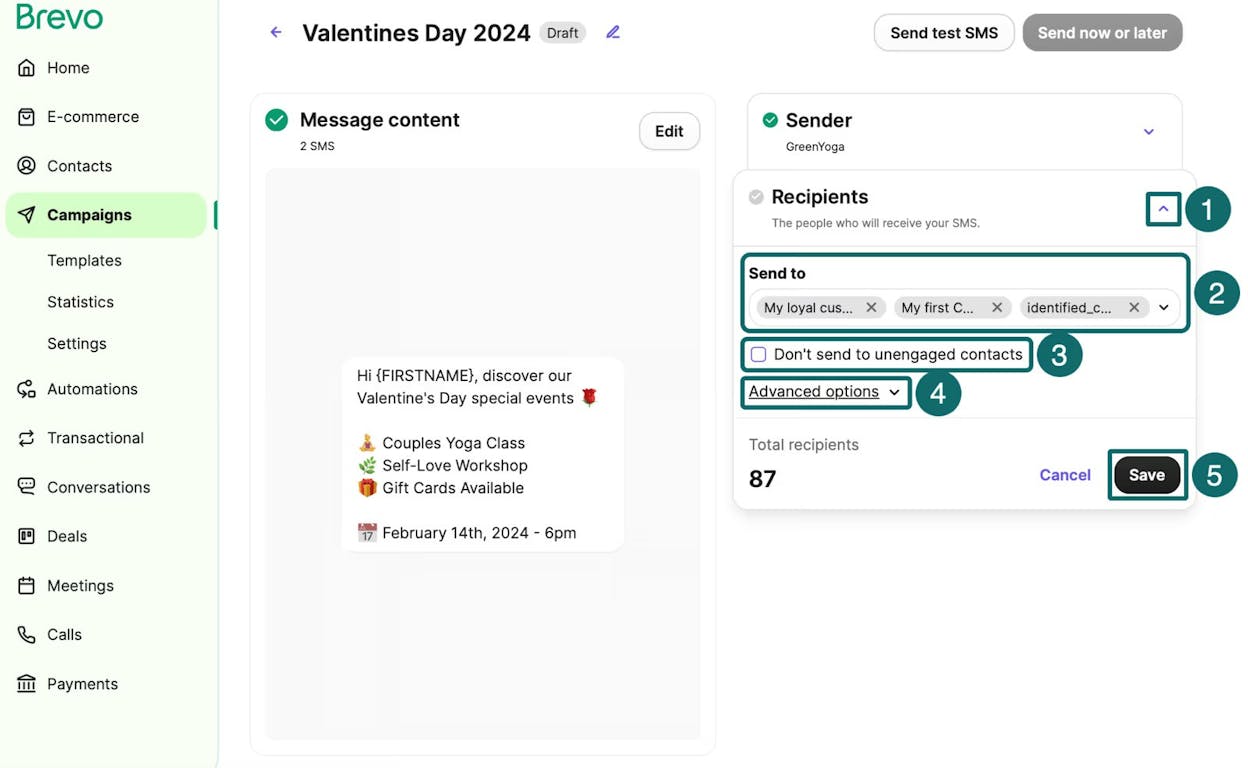
Central workspace for email, SMS, and WhatsApp campaigns
-
Visual journey builder that helps beginners map simple automations
-
Built-in CRM for basic contact management and segmentation
-
Live chat, push notifications, and meeting scheduling in one platform
-
Support for transactional email and loyalty-style messaging
Brevo focuses on giving small teams a wide range of communication channels without forcing them into a complex or expensive system. Email, SMS, chat, WhatsApp, and push notifications all sit inside one interface, which helps teams keep their messaging consistent and easy to manage. Its CRM stores contact data, tags, and behavior in a simple format, so teams can build lightweight journeys that follow predictable steps. The visual builder guides users through automations in a way that reduces setup challenges and keeps workflows clear even when someone is new to automation.
The platform’s strength also comes from its simplicity and price. Brevo covers enough ground to let a business run email marketing, nurture sequences, chat support, and transactional messages without buying separate tools. Its template library and basic reporting work well for everyday campaigns, while the lower cost structure helps teams experiment with new channels like SMS or WhatsApp without overspending. This makes Brevo a practical choice for SMBs that want reliable communication tools but do not need advanced segmentation or ecommerce depth.

These benefits come with limitations that become noticeable as a company’s automation needs grow. Brevo’s triggers and branching options are more limited than what you find in tools designed for ecommerce personalization or complex lifecycle automation. Teams that want to build flows based on purchase data, product interactions, or multi-condition logic may find it difficult to scale within the platform.
Reporting and segmentation also remain simple compared to mid-market or enterprise solutions. Teams that rely on granular insights or real-time behavioral data may outgrow Brevo once their campaigns demand more precision. Feedback on the user interface and deliverability varies, which suggests that results depend greatly on setup and list quality. While none of these issues affect basic use, they can impact teams with more advanced or specialized goals.
How Brevo works and why it matters for marketing automation
|
Area |
How Brevo works |
Why it matters for marketing automation |
|
Channel coverage |
Combines email, SMS, chat, WhatsApp, push, and transactional messages |
Lets small teams run all core communication from one tool without extra cost |
|
Automation builder |
Uses a visual, beginner-friendly journey designer |
Helps new users create simple flows without learning complex logic |
|
CRM and contact data |
Stores basic customer info, tags, and segments |
Supports straightforward targeting for routine campaigns |
|
All-in-one utility |
Includes forms, chat, meetings, and transactional tools |
Reduces tool sprawl and lowers overhead for SMBs |
|
Pricing model |
Offers competitive pricing across all channels |
Makes multi-channel automation accessible for budget-conscious teams |
Best-fit use cases for Brevo
-
SMBs that want email, SMS, chat, and transactional messaging in one place
-
Teams new to automation who need clear, simple workflows
-
Organizations running basic campaigns that do not require deep segmentation
-
Brands that want broad channel coverage without enterprise pricing
Brevo works best when you want a simple, multi-channel system that supports everyday marketing without the cost or complexity of advanced automation platforms.
Adobe Marketo Engage: best marketing automation tool for enterprise B2B orchestration

Key Adobe Marketo standout features
-
Multi-channel campaign automation across email, ads, events, and web personalization
-
Advanced lead and account scoring built for complex B2B funnels
-
Strong account-based marketing tools aligned with sales teams
-
Deep analytics, attribution modeling, and pipeline impact reporting
-
Native integrations with Adobe Experience Cloud and major CRMs
Marketo Engage is built for organizations that manage long, multi-step buying cycles and need automation that mirrors the complexity of B2B decision paths. It connects marketing campaigns, sales signals, and account-level data into a single orchestration engine, which helps teams run programs tailored to both individuals and buying committees. Scoring models track intent across many touchpoints, while its ABM tools make it possible to personalize journeys for high-value accounts without building everything manually.
Marketo’s analytics go beyond opens and clicks. Revenue attribution, pipeline velocity, and multi-touch reporting reveal how each campaign contributes to sales outcomes, which helps marketing teams justify spend and refine strategy. Integrations with Adobe Experience Cloud and enterprise CRMs give larger organizations flexibility to customize how data flows in and out of the system. This makes Marketo attractive for teams that already operate in Adobe’s ecosystem or need a highly configurable tool that can evolve with their processes.

This level of sophistication requires more investment than most marketing platforms. Marketo’s pricing fits mid-market and enterprise budgets, and ongoing maintenance often depends on specialists who can manage scoring models, data quality, and workflow logic. As a result, small teams or organizations with simple automation needs may find the platform overwhelming.
Marketo’s depth can also slow teams that only need basic nurture campaigns. The interface, while powerful, is built for scale rather than speed, and running even simple workflows may feel heavier than necessary. This makes the platform ideal for advanced B2B motions but less practical for environments where email marketing is the primary automation need.
How Adobe Marketo works and why it matters for marketing automation
|
Area |
How Marketo works |
Why it matters for marketing automation |
|
Lead and account scoring |
Tracks engagement, intent, and fit across many touchpoints |
Supports precise targeting and helps sales focus on high-intent accounts |
|
Multi-channel orchestration |
Automates email, ads, events, and web personalization within one engine |
Keeps messaging consistent across long B2B journeys |
|
ABM alignment |
Uses account-level data and personalization for high-value targets |
Helps marketing and sales run coordinated, account-focused campaigns |
|
Analytics and attribution |
Measures revenue impact, touchpoints, and pipeline movement |
Enables data-driven decisions instead of relying on vanity metrics |
|
Enterprise integrations |
Connects with Adobe Experience Cloud and CRMs like Salesforce |
Creates a unified ecosystem for scalable B2B operations |
Best-fit use cases for Adobe Marketo Engage
-
B2B companies with long buying cycles and multi-person decision groups
-
Teams running ABM programs that require account-level targeting
-
Enterprises needing customization, advanced scoring, and deep analytics
-
Organizations already using Adobe tools and wanting tight ecosystem integration
Marketo is the strongest fit when B2B teams need enterprise-level orchestration that maps to complex journeys and aligns tightly with sales.
Salesforce Marketing Cloud Account Engagement (Pardot): best marketing automation tool for Salesforce-centric B2B teams

Key Salesforce MCAE standout features
-
Lead scoring, grading, and nurturing paths tailored to long B2B buying cycles
-
Email automation, drip sequences, landing pages, and gated content capture
-
Native connection to Salesforce Sales Cloud and Service Cloud for unified data
-
ROI reporting, campaign influence models, and ABM-focused analytics
-
Higher-tier capabilities such as Einstein AI scoring, multi-touch attribution, and cross-object personalization
Salesforce Account Engagement is built for B2B companies that already operate inside the Salesforce ecosystem and need automation to follow complex, multi-step sales motions. Because MCAE shares the same data model as Salesforce CRM, every prospect action can update lead status, enrich contact records, and alert sales without building custom integrations. This alignment helps teams run coordinated plays where marketing warms the account while sales follows up based on real engagement, not guesswork. Lead scoring and grading sharpen this process by helping teams prioritize prospects whose behavior signals readiness.
The platform also gives B2B marketers deeper visibility into pipeline influence. MCAE tracks how campaigns, emails, forms, and content touchpoints shape opportunity creation and deal movement. These analytics help marketing teams justify investment and refine nurturing paths with confidence. Because MCAE is part of Salesforce’s broader cloud, companies with established sales processes can customize fields, routing logic, and permissions to match their internal workflow. This flexibility is one of the reasons MCAE becomes more valuable as organizations scale.

These strengths come with cost and complexity. MCAE sits firmly in the mid-market to enterprise category, with pricing that reflects its deep CRM integration and analytics capabilities. Plans escalate quickly, and large organizations often lean on Salesforce admins or certified consultants to configure scoring models, business units, automation rules, and attribution. Teams without this support may struggle to unlock the platform’s full potential.
MCAE also works best when Salesforce is already the operational backbone. Running the platform without Sales Cloud limits its usefulness, and companies outside the Salesforce ecosystem rarely adopt it as a standalone tool. Its channel mix and workflow options fit B2B engagement more than high-volume B2C marketing, so ecommerce or mass-send brands typically look to other tools.
How Salesforce MCAE works and why it matters for marketing automation
|
Area |
How MCAE works |
Why it matters for marketing automation |
|
Lead scoring & grading |
Measures fit and intent to surface qualified leads for sales |
Helps sales teams focus on prospects most likely to convert |
|
Salesforce CRM connection |
Shares data, objects, and automation with Sales Cloud |
Enables true sales–marketing alignment with one unified record |
|
Nurture & campaign tools |
Automates email journeys, drips, and engagement tracking |
Supports long B2B cycles where timing and intent signals matter |
|
ABM & attribution |
Tracks engagement at the account level and maps revenue influence |
Shows which programs move pipeline rather than relying on vanity metrics |
|
Enterprise customization |
Uses Salesforce metadata, custom fields, and admin tools |
Adapts the automation engine to unique processes and enterprise structures |
Best-fit use cases for Salesforce Account Engagement
-
B2B companies already using Salesforce as their CRM foundation
-
Teams that rely on structured lead scoring, grading, and sales handoff workflows
-
SaaS and enterprise organizations running long, multi-step deal cycles
-
Businesses needing attribution and campaign influence reporting tied to pipeline
Choose Salesforce MCAE when your sales team lives in Salesforce and your marketing needs automation that mirrors complex B2B journeys.
Omnisend: best marketing automation tool for fast, ecommerce-ready email + SMS

Key Omnisend standout features
-
Email and SMS automation built around ecommerce triggers and lifecycle stages
-
Native integrations with Shopify, WooCommerce, BigCommerce, Wix, and other store platforms
-
Prebuilt workflows for abandoned carts, product views, order follow-ups, and reactivation
-
Drag-and-drop campaign builder with signup forms, popups, and landing pages
-
Multi-channel messaging that includes email, SMS, push notifications, and ad channel syncing
Omnisend is built for online stores that want automation aligned with how ecommerce shoppers behave. It pulls product, cart, and order data directly into the platform, allowing teams to design flows that respond to browsing behavior, cart activity, purchase events, and repeat-buy patterns. This reduces setup time since most automations map naturally to common ecommerce milestones. The segmentation engine also uses shopping behavior as its core logic, which helps brands tailor messages based on order value, frequency, product interest, or customer lifecycle stage.
The platform’s value becomes clear in how quickly teams can start running coordinated email and SMS campaigns. Omnisend blends both channels into the same automation builder, so a cart recovery sequence can begin with an email, follow with a text reminder, and trigger a push notification if no action occurs. The interface is built for non-technical users, especially Shopify merchants, making it possible to launch high-performing flows within hours rather than days. Even lower-cost plans include automation, segmentation, forms, and SMS credits, which makes Omnisend competitive for stores that need results without stretching their budget.

These strengths also shape its limitations. Omnisend focuses on ecommerce rather than broad CRM use, which means it lacks the complexity required for long B2B cycles, deep lead scoring, or account-based work. SaaS or content-led businesses often need features the platform does not emphasize, such as detailed CRM objects or multi-stage qualification processes. This narrower design fits product-based businesses well but does not translate easily to other models.
Template options and non-commerce integrations can also feel limited when compared to larger platforms. Brands aiming for heavy customization or enterprise-level flexibility may run into ceiling points as their needs grow. Omnisend’s role is clear: it works best when the business sells products and wants email + SMS automation shaped around real shopping behavior rather than general marketing workflows.
How Omnisend works and why it matters for marketing automation
|
Area |
How Omnisend works |
Why it matters for marketing automation |
|
Ecommerce-triggered automation |
Uses cart, product, and order data to drive workflows |
Helps stores send messages at moments directly tied to revenue |
|
Multi-channel orchestration |
Combines email, SMS, push, and ad syncing in one builder |
Supports cohesive campaigns that meet shoppers across channels |
|
Segmentation |
Groups users by purchase behavior, browsing, and lifecycle |
Improves personalization by matching content to customer intent |
|
Store integrations |
Syncs with Shopify, WooCommerce, BigCommerce, Wix, and more |
Reduces setup time and keeps automation logic accurate and real-time |
|
Campaign tools |
Provides templates, forms, product pickers, and discount code tools |
Speeds up execution and supports end-to-end ecommerce growth |
Best-fit use cases for Omnisend
-
Ecommerce brands that want quick, revenue-focused automation
-
Shopify or WooCommerce stores needing email + SMS in one workflow
-
Teams with limited technical resources but clear ecommerce goals
-
Product-based businesses prioritizing abandoned cart, repeat purchase, and lifecycle flows
Choose Omnisend when you want ecommerce-ready automation that blends email and SMS into fast, revenue-focused journeys without enterprise complexity.
GetResponse: best marketing automation tool for teams that want funnels, email, and webinars in one place

Key GetResponse standout features
-
Drag-and-drop email creator with templates, segmentation, and autoresponders
-
Automation workflows with behavioral triggers, branching logic, and lead scoring
-
Prebuilt funnels for lead magnets, sales flows, webinars, and ecommerce promotions
-
Native webinar hosting for presentations, lead capture, and event-driven sequences
-
Landing page and form builders, plus a simple website builder and basic CRM tools
GetResponse is designed for teams that want several marketing tools under one roof rather than stitching them together manually. Email campaigns, landing pages, funnels, and even webinars operate within the same environment, which helps businesses keep their messaging, data, and follow-up steps aligned. The automation builder supports both simple autoresponders and more advanced journeys using events, actions, and branching rules, allowing marketers to create workflows that match customer behavior. For small to mid-sized teams, this all-in-one setup reduces the overhead of managing separate systems for funnels, webinars, and email.
Its built-in webinar tool creates a unique advantage. Many platforms require third-party apps for event hosting, but GetResponse can capture signups, host a session, and trigger automated follow-ups without leaving the platform. This approach helps educators, coaches, and B2B teams run lead-generation and nurture sequences that tie directly into sales flows. The funnel builder also speeds execution by offering ready-made templates for lead magnets, product promotions, and intro offers, which removes friction for teams that want to launch quickly but still need structure.

GetResponse’s broad toolset can feel less refined in certain areas. Its reporting, while functional, does not match the depth or clarity of more modern analytics platforms. Some users also mention that the interface feels dated compared to newer tools focused on UI simplicity. These issues do not stop teams from running campaigns but can slow power users who expect granular insights or a more streamlined workspace.
Pricing reflects the wide range of features offered. The free and entry-tier plans cover basic email needs, but costs rise once automation, funnels, or webinars become essential. For growing businesses with modest lists, this can still be cost-effective because GetResponse replaces multiple tools, but early-stage teams may feel pressure as their contact base expands. Integrations are solid but not as extensive as those found in platforms like Mailchimp, and ecommerce or B2B SaaS users may eventually want deeper specialization.
How GetResponse works and why it matters for marketing automation
|
Area |
How GetResponse works |
Why it matters for marketing automation |
|
Automation workflows |
Uses triggers, filters, and branching to guide customer journeys |
Helps teams nurture leads with paths tailored to real user behavior |
|
All-in-one marketing stack |
Combines email, funnels, webinars, pages, and basic CRM |
Reduces tool clutter and keeps campaigns aligned in one system |
|
Funnel builder |
Provides templates for lead magnets, sales flows, and promos |
Speeds launch times and gives structure to growth campaigns |
|
Webinar hosting |
Allows registration, live hosting, and post-event automation |
Supports event-driven acquisition without extra software |
|
Landing pages & forms |
Offers simple, template-based builders for capture points |
Makes it easier to create conversion assets without designers |
Best-fit use cases for GetResponse
-
Teams that want email, funnels, and webinars without buying separate tools
-
Educators, coaches, and marketers who run event-driven campaigns
-
SMBs that need automation and landing pages in one place
-
Businesses that value convenience and bundled features over heavy specialization
GetResponse fits when you need a full marketing toolkit—email, automation, funnels, and webinars—packed into one platform that’s easier to run than managing several separate apps.
Drip: best marketing automation tool for behavior-driven ecommerce email

Key Drip standout features
-
Automated workflows for welcome sequences, abandoned cart flows, post-purchase journeys, and win-back campaigns
-
Native integrations with Shopify, WooCommerce, Magento, BigCommerce, and other ecommerce platforms
-
Real-time segmentation based on browsing, purchase history, and engagement patterns
-
Prebuilt workflows and email templates that accelerate automation setup
-
Revenue attribution and analytics tailored for ecommerce performance
Drip is built for ecommerce and B2C brands that depend on timely, behavior-based communication to drive sales and nurture loyalty. It connects directly to storefronts and uses product, order, and engagement data to fuel dynamic messaging across the customer lifecycle. This makes it easier for teams to deliver emails that match what shoppers are actually doing—whether they view a product, abandon a cart, or make a repeat purchase. The automation builder supports both simple and multi-step flows, giving stores a clear way to guide customers from browsing to conversion.
The platform also focuses on speed and clarity for teams that want strong automation without the weight of enterprise systems. Prebuilt ecommerce workflows help users launch high-impact sequences quickly, and Drip’s segmentation engine updates audiences in real time as customer behavior shifts. This balance makes Drip appealing to brands that need more sophistication than lightweight email tools but do not want the deeper complexity of platforms like Klaviyo. Revenue reporting ties campaigns to sales outcomes, giving ecommerce teams clear insight into what drives growth.

These advantages are paired with usability challenges. Many users report that the interface feels less intuitive than competing tools, especially within the workflow builder. Pages can load slowly, and navigating between automation, analytics, and segments may require more steps than expected. Teams with limited time or technical comfort may feel friction during setup or while maintaining more elaborate journeys.
Drip is also focused tightly on email-first automation rather than acting as a full CRM or multi-channel suite. Businesses seeking sales pipelines, deep CRM objects, or omnichannel orchestration often outgrow the platform. Pricing can also become a concern for smaller stores that only send basic campaigns; the platform reveals its value when users take advantage of advanced segmentation and behavior-driven workflows. A narrower integration catalog compared to larger suites may also limit customization options for some teams.
How Drip works and why it matters for marketing automation
|
Area |
How Drip works |
Why it matters for marketing automation |
|
Behavior-driven workflows |
Sends emails based on browsing, cart activity, and purchase events |
Helps stores reach customers at moments tied directly to buying intent |
|
Ecommerce integrations |
Syncs real-time product and order data from Shopify, WooCommerce, and more |
Enables precise personalization without manual data imports |
|
Segmentation engine |
Updates segments automatically as customer behavior changes |
Improves targeting and relevance throughout the customer lifecycle |
|
Prebuilt templates & flows |
Provides ready-to-use ecommerce journeys |
Speeds execution, especially for smaller teams with limited resources |
|
Revenue analytics |
Tracks sales, conversions, and campaign influence |
Shows how email drives income, not just opens or clicks |
Best-fit use cases for Drip
-
Ecommerce brands that rely on lifecycle emails tied to real customer behavior
-
Shopify and WooCommerce stores needing deeper automation without enterprise weight
-
Teams wanting strong segmentation and fast-to-launch workflows
-
Businesses focused on revenue-driven email marketing rather than full CRM needs
Drip fits ecommerce brands that want automation shaped by customer actions and revenue—not just newsletters—with a balance of power and simplicity.
Customer.io: best marketing automation tool for real-time, event-driven product messaging

Key Customer.io standout features
-
Visual workflow builder with branching logic, delays, A/B tests, and event triggers
-
Event-based automation that reacts to real-time user behavior
-
Advanced segmentation built from live data, attributes, and custom events
-
Multi-channel orchestration: email, SMS, push, in-app messages, and webhooks
-
Strong developer ecosystem with APIs and integrations for data pipelines and analytics tools
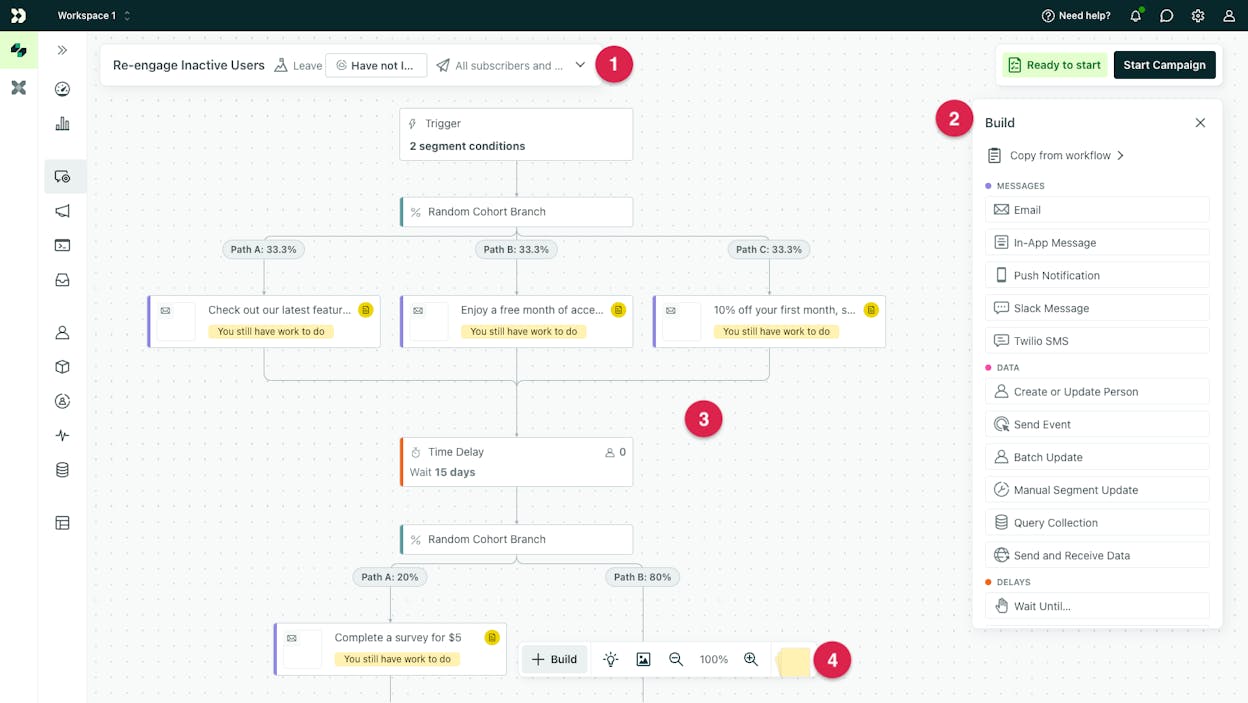
Customer.io is built for product-led teams that rely on granular user behavior to shape communication. Instead of depending on broad segments or static lists, the platform listens to real-time events—such as onboarding actions, feature usage, drop-offs, or conversion milestones—and uses them to fire highly personalized messages. This behavior-centric model works well for SaaS products, apps, and any business with rich user interaction data. Its workflow builder supports branching paths, experiments, and multi-step journeys that mirror how users move inside the product.
The platform’s developer-friendly foundation makes it stand out. APIs, SDKs, and native integrations with tools like Segment, Snowflake, Amplitude, Salesforce, and Twilio give teams the freedom to shape data flows and embed Customer.io directly into their stack. This allows engineering and growth teams to build sophisticated lifecycle messaging systems that pull from product events, database attributes, and analytics layers without needing a separate marketing cloud. With support for in-app and push messaging alongside email and SMS, Customer.io helps unify communication across the entire customer experience.

These strengths also create barriers for simpler teams. Customer.io expects users to understand event modeling and behavioral data, which increases the learning curve for marketers who do not work closely with developers. Setting up events, mapping attributes, and designing multi-path journeys typically requires technical involvement, which can slow onboarding. Pricing also rises quickly as customer profiles grow or as event volume increases, making it less accessible for very early-stage teams.
The platform also focuses heavily on messaging, not CRM. It does not include deep sales tools, account objects, or pipeline workflows, which means teams may need additional systems for customer management. Reporting is functional but less advanced than what enterprise marketing clouds offer, and the interface can feel dense when only basic campaigns are required. Customer.io excels when teams need real-time automation tied closely to product usage—not when they need general-purpose email marketing or all-in-one CRM capabilities.
How Customer.io works and why it matters for marketing automation
|
Area |
How Customer.io works |
Why it matters for marketing automation |
|
Real-time event triggers |
Fires campaigns based on live user actions streamed from the product |
Enables hyper-relevant, timely communication during key moments |
|
Multi-channel orchestration |
Runs email, SMS, push, in-app, and webhook messages in unified workflows |
Helps product-led teams guide users across the entire experience |
|
Advanced segmentation |
Builds dynamic segments from behavior, attributes, and custom events |
Ensures personalisation evolves as users interact with the product |
|
Developer ecosystem |
Integrates with Segment, Snowflake, Amplitude, Salesforce, and more |
Fits seamlessly into modern data stacks and supports PLG (product-led growth) |
|
Workflow builder |
Supports branching logic, experiments, and detailed paths |
Gives growth teams freedom to test and optimize journeys at a granular level |
Best-fit use cases for Customer.io
-
SaaS and product-led companies that rely on event-driven lifecycle messaging
-
Apps that need multi-channel communication tied to real-time behavior
-
Growth and engineering teams with strong data infrastructure
-
Businesses that need messaging automation, not a full CRM
Customer.io shines when communication must react instantly to user behavior and span multiple channels inside product-led experiences.
Keap: best marketing automation tool for small businesses that need CRM + sales + automation in one place

Key Keap standout features
-
CRM and contact management that stores communication history, tasks, tags, and lead details
-
Drag-and-drop automation builder for follow-ups, reminders, routing, and pipeline actions
-
Visual sales pipelines to track deals, forecast revenue, and automate sales tasks
-
Built-in appointment scheduling with calendar syncing and automated reminders
-
Native invoicing, quotes, and payment processing for service-based teams
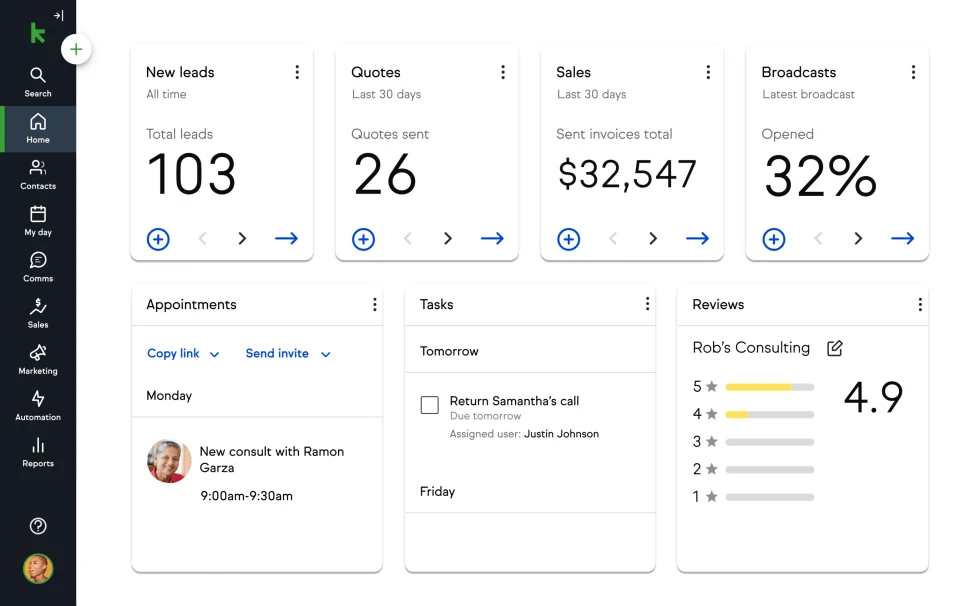
Keap is built for small businesses that want a single system to manage contacts, automate follow-ups, handle sales pipelines, and close deals. Instead of stitching together separate CRM, scheduling, and invoicing tools, Keap gives entrepreneurs one place to track every interaction. Its automation builder helps teams create workflows that respond to lead actions, assign tasks, send reminders, or update the pipeline without manual involvement. This makes it easier for service providers, consultants, and small teams to stay organized while keeping prospects moving toward a sale.
The platform also emphasizes day-to-day operational needs. Appointment scheduling, payment collection, quoting, and invoicing all sit directly in the system, which removes friction for teams that rely on consult calls or service bookings. Keap’s mobile app and integrations give teams flexibility to manage contacts on the go, while its onboarding and coaching resources are designed to support users who may not have technical backgrounds. These features help small businesses streamline both marketing and sales operations in one workflow.

These strengths come with complexity. The breadth of Keap’s features can overwhelm new users, especially those who only want email marketing or simple automation. Building pipelines, configuring automations, and using financial tools requires onboarding time and comfort with CRM processes. The learning curve is steeper than lightweight email tools and may feel heavy for teams that only need part of the platform.
Pricing also reflects Keap’s all-in-one approach. Plans start at a higher entry point than many SMB tools, and costs scale with contacts and users. Some customers report inconsistent support experiences and friction with billing or cancellation. Keap’s email features work well for follow-ups and nurture flows, but teams needing deep email personalization, ecommerce data, or advanced segmentation may find the platform limited compared to email-first automation tools.
How Keap works and why it matters for marketing automation
|
Area |
How Keap works |
Why it matters for marketing automation |
|
CRM + automation |
Connects CRM actions with automated workflows |
Helps small teams manage leads and follow-ups without manual tracking |
|
Pipeline management |
Tracks deals in visual stages with automated tasks |
Ensures sales activities stay consistent and organized |
|
Scheduling + payments |
Lets prospects book appointments and pay through the same system |
Reduces dependency on extra apps and speeds up the sales cycle |
|
Automation builder |
Creates follow-ups, reminders, and routing logic |
Supports predictable communication without adding admin work |
|
Mobile + integrations |
Enables on-the-go client management and flexible connectivity |
Keeps small teams responsive and aligned even outside the office |
Best-fit use cases for Keap
-
Service-based businesses, consultants, and coaches that run appointment-driven sales
-
Small teams that want CRM, scheduling, invoicing, and automation in one platform
-
Entrepreneurs who prefer a unified tool instead of several disconnected apps
-
Organizations that need structured follow-ups and pipeline visibility
Keap delivers the most value when small businesses want CRM, sales pipelines, scheduling, payments, and automation in one streamlined system.
Iterable: best marketing automation tool for large-scale, AI-driven cross-channel journeys

Key Iterable standout features
-
Cross-channel engagement across email, SMS, push, in-app, and web messaging
-
Visual journey builder for complex, multi-step automations with branching triggers
-
AI-powered personalization that adapts content, timing, and channel selection
-
Event-based and moments-based messaging using real-time behavioral data
-
Deep API integrations suited for data warehouses, CRMs, analytics tools, and engineering-led stacks
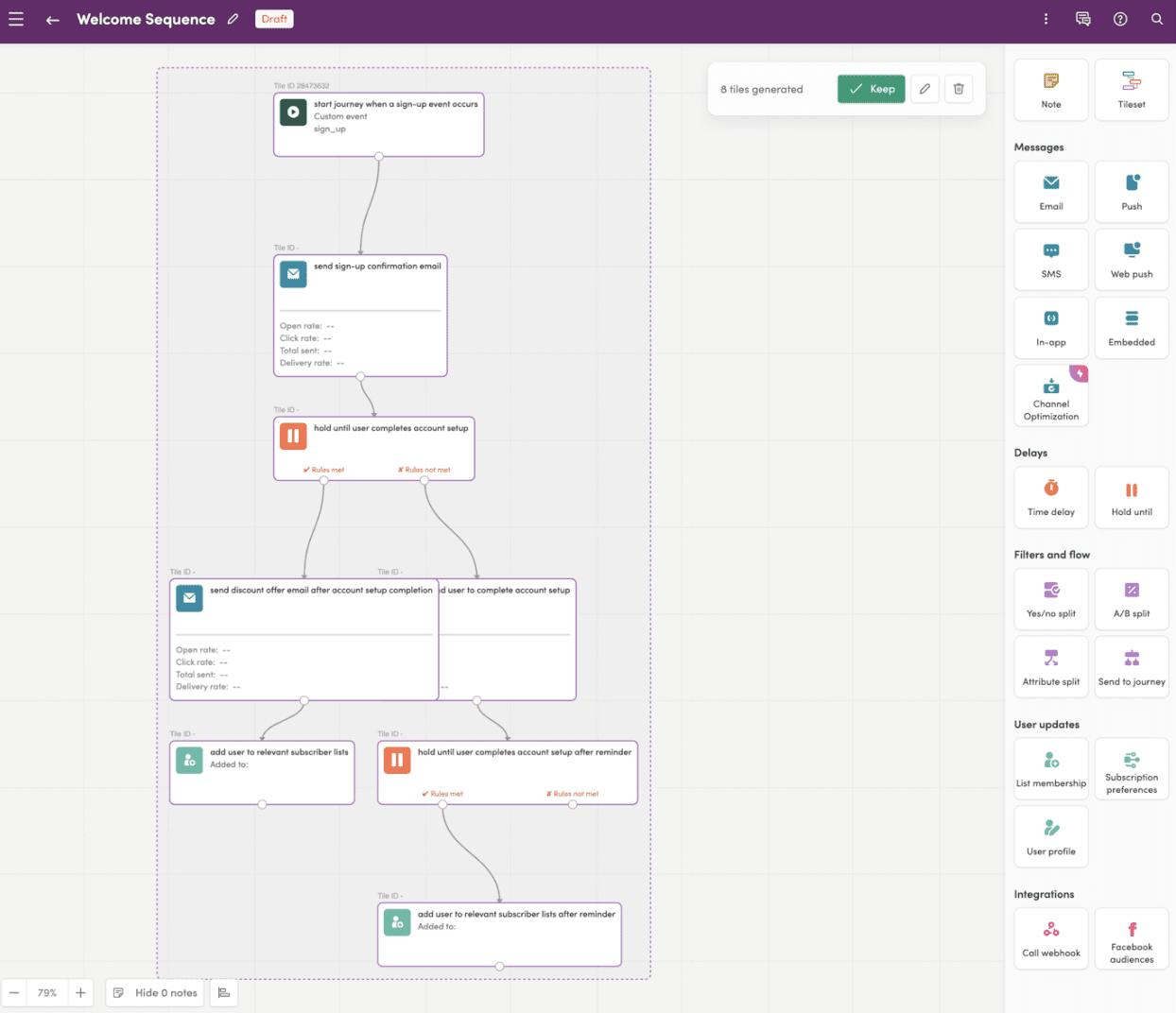
Iterable is engineered for companies that need to manage sophisticated, high-volume customer journeys across many touchpoints. Instead of treating channels separately, the platform lets teams coordinate email, SMS, push, and in-app experiences inside one workflow. This structure helps brands create cohesive user paths that evolve as behavior changes. The system draws on real-time events and AI predictions to adjust messaging on the fly, making personalization more dynamic than rule-based segments alone.
Its technical foundation makes Iterable a strong fit for organizations with large datasets or advanced analytics workflows. The platform integrates cleanly with modern data tools, enabling marketers and engineers to share unified customer profiles, event streams, and lifecycle metrics. This allows teams to build journeys that reflect both marketing intent and behavioral truth. For brands with millions of users, Iterable’s scalability and cross-channel orchestration become essential rather than optional.

Iterable’s capabilities come with complexity. The platform expects teams to understand data structures, event-based triggers, and cross-channel timing strategies. Without strong technical support or mature marketing operations, teams may struggle to use the platform beyond basic email. Its pricing is also tailored to enterprise buyers, and the lack of public plans signals a higher investment level. For organizations with limited budgets or simpler automation needs, this makes Iterable harder to justify.
Some operational trade-offs exist as well. Iterable does not include landing page builders or campaign assets that come standard in more all-in-one tools. Reporting is fast and useful but can feel less customizable than enterprise marketing clouds with dedicated analytics modules. And channels like SMS may require additional configuration that smaller tools handle more natively. Iterable excels when used as a flexible orchestration engine, but it is not meant to cover every component of a marketing stack.
How Iterable works and why it matters for marketing automation
|
Area |
How Iterable works |
Why it matters for marketing automation |
|
Cross-channel orchestration |
Coordinates email, SMS, push, web, and in-app messages in unified flows |
Creates consistent user experiences across multiple touchpoints |
|
Event & moments triggers |
Uses behavior, lifecycle events, and real-time data streams |
Supports highly relevant messaging that reacts instantly to user activity |
|
AI personalization |
Adjusts content, channels, and send times automatically |
Improves engagement without requiring manual optimization |
|
Data-stack integration |
Connects with warehouses, CRMs, and analytics tools via strong APIs |
Enables unified segmentation and lifecycle automation for large datasets |
|
Visual workflow builder |
Allows multi-branch journeys and sophisticated logic |
Gives enterprise teams the ability to design large-scale, adaptive campaigns |
Best-fit use cases for Iterable
-
Enterprises managing large user bases with multi-channel communication
-
Product-led teams that rely heavily on behavioral or event-driven data
-
Organizations with engineering support and mature data pipelines
-
Brands needing AI-driven personalization across many touchpoints
Iterable shines when you need large-scale, data-rich journeys powered by real-time behavior and AI—far beyond what basic email tools can deliver.
Oracle Eloqua: best marketing automation tool for global enterprises running complex, multi-touch B2B programs

Key Oracle Eloqua standout features
-
Visual campaign canvas for orchestrating multi-channel nurturing flows
-
Advanced lead and account scoring with support for multiple scoring models
-
AI-driven account insights and predictive analytics for prioritizing high-value opportunities
-
Dynamic segmentation based on firmographics, behavior, and multi-touch interactions
-
Enterprise-grade reporting, ROI measurement, and deep performance dashboards
-
Broad integration ecosystem spanning Oracle CX, Salesforce, and large data platforms
Oracle Eloqua was built for enterprise B2B teams managing sophisticated buying journeys across regions, business units, and long sales cycles. Its campaign canvas gives marketers full control over how prospects move through multi-step, multi-channel programs, enabling a level of orchestration suited for organizations with heavy segmentation requirements and complex internal processes. Lead scoring is equally advanced, supporting multiple models that help marketing and sales teams understand intent signals, prioritize accounts, and route high-value leads at scale.
Its ability to work within an enterprise data ecosystem is one of Eloqua’s defining strengths. Large companies often rely on several CRM systems, analytics tools, and data warehouses, and Eloqua’s integration options allow these environments to work together. For organizations running ABM motions, Eloqua combines account-level insights, historical engagement, and predictive scoring to shape tailored journeys across email, web personalization, and advertising. This combination of depth, scale, and data flexibility positions Eloqua as a strong fit for global teams that need tight alignment between marketing operations and sales strategy.

Those same strengths introduce complexity. Eloqua’s power comes with a steep learning curve, often requiring dedicated marketing operations specialists or IT support to manage scoring models, integrations, and custom workflows. Implementation timelines can be long, and ongoing optimization demands resources that smaller teams may not have. Pricing also aligns with enterprise expectations, typically requiring negotiations and additional costs for consulting and customization.
For organizations with simpler needs—like basic email nurturing or lightweight segmentation—Eloqua is far more tool than necessary. Its depth is designed for companies with multi-touch attribution requirements, intricate lead routing, and advanced ABM strategies. Integrations outside the Oracle ecosystem remain strong but may require additional development to achieve the same polish as native Oracle CX connections. Eloqua excels when enterprise complexity is the norm—not the exception.
How Oracle Eloqua works and why it matters for marketing automation
|
Area |
How Oracle Eloqua works |
Why it matters for marketing automation |
|
Campaign orchestration |
Uses a visual canvas to map multi-touch, multi-channel journeys |
Supports enterprise-level nurturing programs that mirror long B2B cycles |
|
Lead & account scoring |
Applies multiple scoring models to intent and engagement signals |
Helps sales prioritize the right accounts and focus effort effectively |
|
Account insights & AI |
Surfaces predictive signals and behavioral indicators |
Enables smarter ABM strategies powered by real-time data |
|
Segmentation engine |
Builds dynamic segments using firmographics + behavior |
Delivers precise personalization across global audiences |
|
Integration ecosystem |
Connects with Oracle CX, Salesforce, and enterprise data stacks |
Supports large organizations that rely on complex system architectures |
Best-fit use cases for Oracle Eloqua
-
Global B2B enterprises running multi-step, multi-touch nurture programs
-
Organizations with mature ABM strategies and complex scoring needs
-
Large teams that require deep CRM and data integrations
-
Companies with dedicated marketing operations or IT teams
Eloqua is the strongest choice when enterprise teams need rigorous, scalable orchestration across long B2B journeys—and have the resources to support an advanced platform.
GoHighLevel: best marketing automation tool for agencies that need an all-in-one, white-label growth platform

Key GoHighLevel standout features
-
CRM and pipeline management with tagging, staging, and forecasting
-
Drag-and-drop funnels, landing pages, and simple websites
-
Multi-channel automation for email, SMS, and outbound sequences
-
Built-in appointment scheduling, calendars, and payment processing
-
White-label SaaS mode for agencies wanting to resell the platform as their own
-
Reputation management and client communication hubs for ongoing service delivery
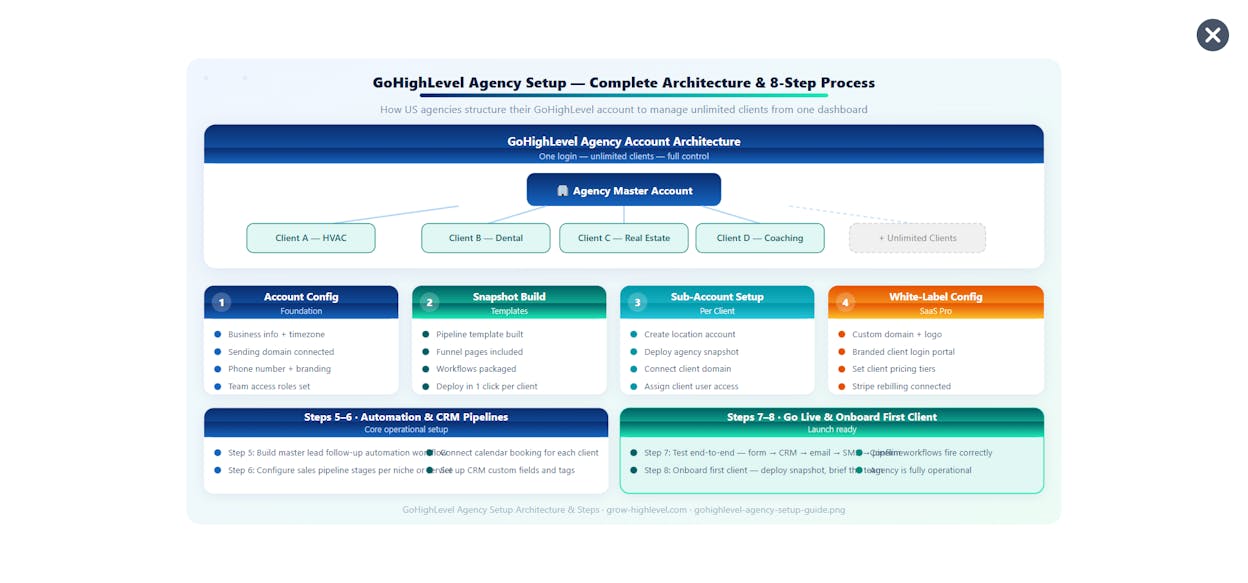
GoHighLevel is built for agencies and automation-focused teams that want to consolidate their entire tech stack into one system. Instead of using separate tools for CRM, funnels, email marketing, SMS outreach, scheduling, and client reporting, GoHighLevel merges these functions under one roof. This helps agencies manage multiple clients with consistent workflows, shared templates, and reusable automations. The platform’s pipeline tools and drag-and-drop builders give teams control over lead flow, conversion paths, and follow-up processes without needing extra integrations.
The system is also structured to support agency operations at scale. White-label capabilities allow agencies to launch their own branded SaaS offering, packaging automation, funnels, reporting, and CRM into a product they can sell. Multi-account management lets agencies switch between client portals quickly, while workflow automations can be cloned, modified, or deployed across accounts with minimal friction. With the addition of AI tools, GoHighLevel has expanded into a versatile platform for client delivery, retention, and recurring revenue.

Its comprehensive feature set introduces complexity. New users often face a steep learning curve because the platform tries to replace many standalone tools. Understanding pipelines, automations, funnels, calendars, and permissions requires time, and teams without a dedicated operations lead may struggle to configure everything efficiently. This makes GoHighLevel powerful in the hands of experienced operators but challenging for beginners.
The interface can also feel dense, and some workflows require more setup than comparable point solutions. Because GoHighLevel aims to serve agencies rather than single-use scenarios, it can feel like too much platform for teams that only need email automation or only need a simple CRM. Organizations that already have a well-established suite of tools may find GoHighLevel redundant unless they want to fully consolidate.
How GoHighLevel works and why it matters for marketing automation
|
Area |
How GoHighLevel works |
Why it matters for marketing automation |
|
CRM & pipelines |
Tracks leads, deal stages, and sales activity in a unified system |
Helps agencies manage client funnels and monitor conversions at scale |
|
Funnel & page builder |
Creates drag-and-drop landing pages and multi-step funnels |
Reduces reliance on external funnel builders and unifies lead capture |
|
Multi-channel automation |
Sends automated email, SMS, and outbound sequences |
Supports coordinated follow-ups that increase conversion opportunities |
|
Scheduling & payments |
Handles bookings, reminders, and payment collection |
Streamlines service delivery and reduces tool switching |
|
White-label & multi-account |
Lets agencies resell the platform and manage multiple clients |
Enables recurring revenue models and efficient client management |
Best-fit use cases for GoHighLevel
-
Agencies that want to centralize CRM, funnels, automations, and reporting
-
Consultants and service teams needing multi-client workspaces
-
Businesses seeking a white-label SaaS product they can resell
-
Organizations replacing multiple tools with one integrated system
GoHighLevel excels when agencies need a unified platform that powers funnels, automation, CRM, and client management—all scalable under their own brand.
Analyze AI: The best tool to track and prove how AI search fuels your marketing automation revenue

Most marketing automation tools are great at what happens after someone enters your funnel: emails, workflows, lead scoring, lifecycle journeys, and attribution across channels you already control. But they can’t tell you what’s happening before that—when buyers discover you through AI answer engines like ChatGPT, Perplexity, Claude, Copilot, or Gemini.
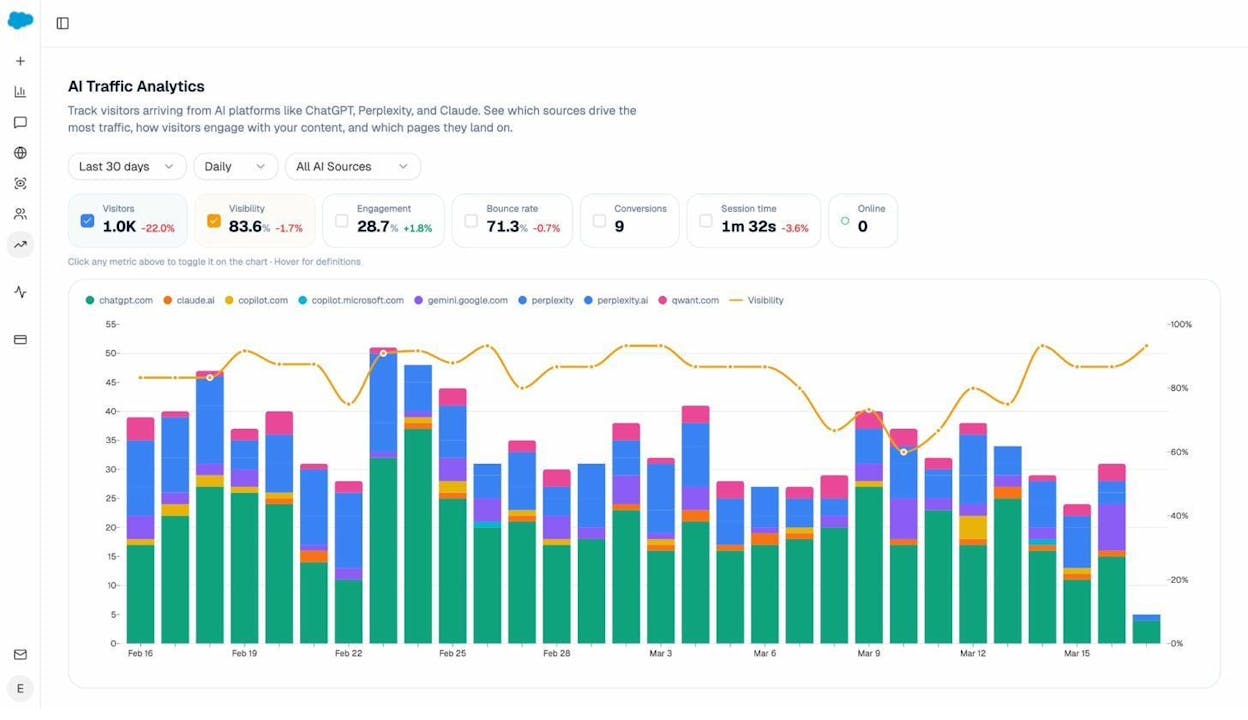
Analyze AI goes further by connecting AI visibility to real pipeline outcomes. It shows which answer engines actually send sessions to your site (Discover), where those visitors land and what they do(Monitor), and how much revenue those visits influence—down to conversion rate, assisted revenue, and ROI by referrer. You can even see prompt-level performance, so you know which questions are driving qualified traffic vs. empty impressions.
Then, instead of guessing what to optimize, Analyze AI helps you improve performance (Improve), while tracking how your brand positioning and sentiment shift over time (Govern).
The result: your team can prove which AI engines and prompts create demand—and align your automation workflows around what’s actually driving pipeline.
Key Analyze AI features
-
See actual AI referral traffic by engine and track trends that reveal where visibility grows and where it stalls.
-
See the pages that receive that traffic with the originating model, the landing path, and the conversions those visits drive.
-
Track prompt-level visibility and sentiment across major LLMs to understand how models talk about your brand and competitors.
-
Audit model citations and sources to identify which domains shape answers and where your own coverage must improve.
-
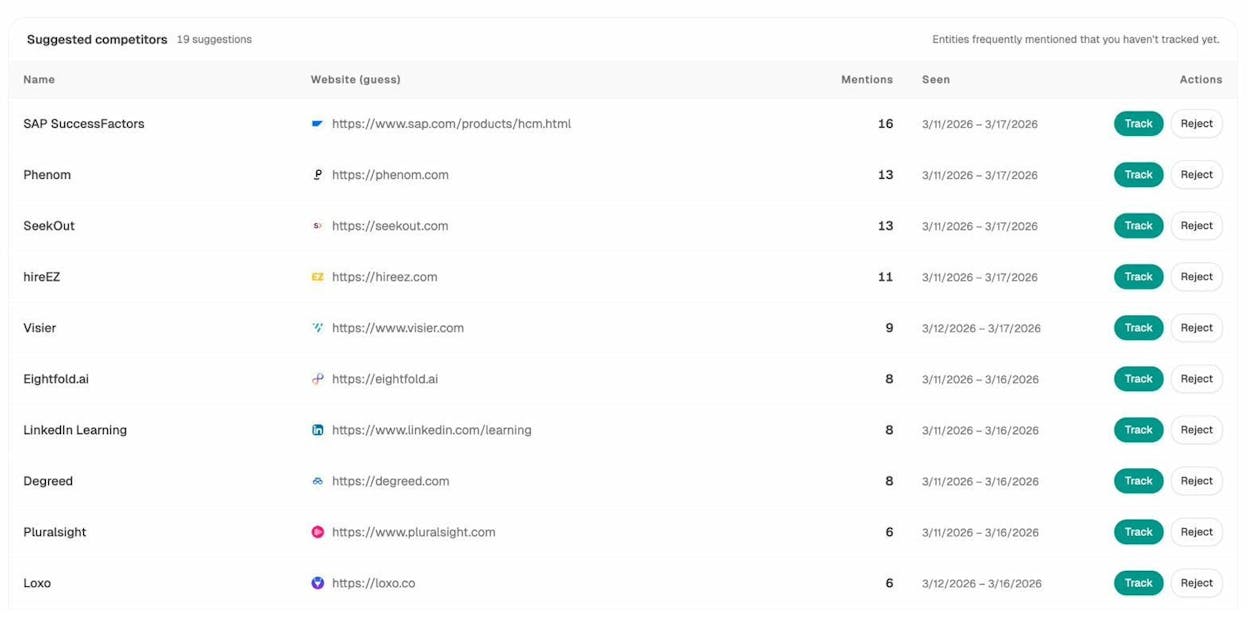
Surface opportunities and competitive gaps that prioritize actions by potential impact, not vanity metrics.
Here are in more details how Analyze AI works:
See actual traffic from AI engines, not just mentions

Analyze AI attributes every session from answer engines to its specific source—Perplexity, Claude, ChatGPT, Copilot, or Gemini. You see session volume by engine, trends over six months, and what percentage of your total traffic comes from AI referrers. When ChatGPT sends 248 sessions but Perplexity sends 142, you know exactly where to focus optimization work.

Know which pages convert AI traffic and optimize where revenue moves

Most tools stop at "your brand was mentioned." Analyze AI shows you the complete journey from AI answer to landing page to conversion, so you optimize pages that drive revenue instead of chasing visibility that goes nowhere.
The platform shows which landing pages receive AI referrals, which engine sent each session, and what conversion events those visits trigger.
For instance, when your product comparison page gets 50 sessions from Perplexity and converts 12% to trials, while an old blog post gets 40 sessions from ChatGPT with zero conversions, you know exactly what to strengthen and what to deprioritize.
Track the exact prompts buyers use and see where you're winning or losing

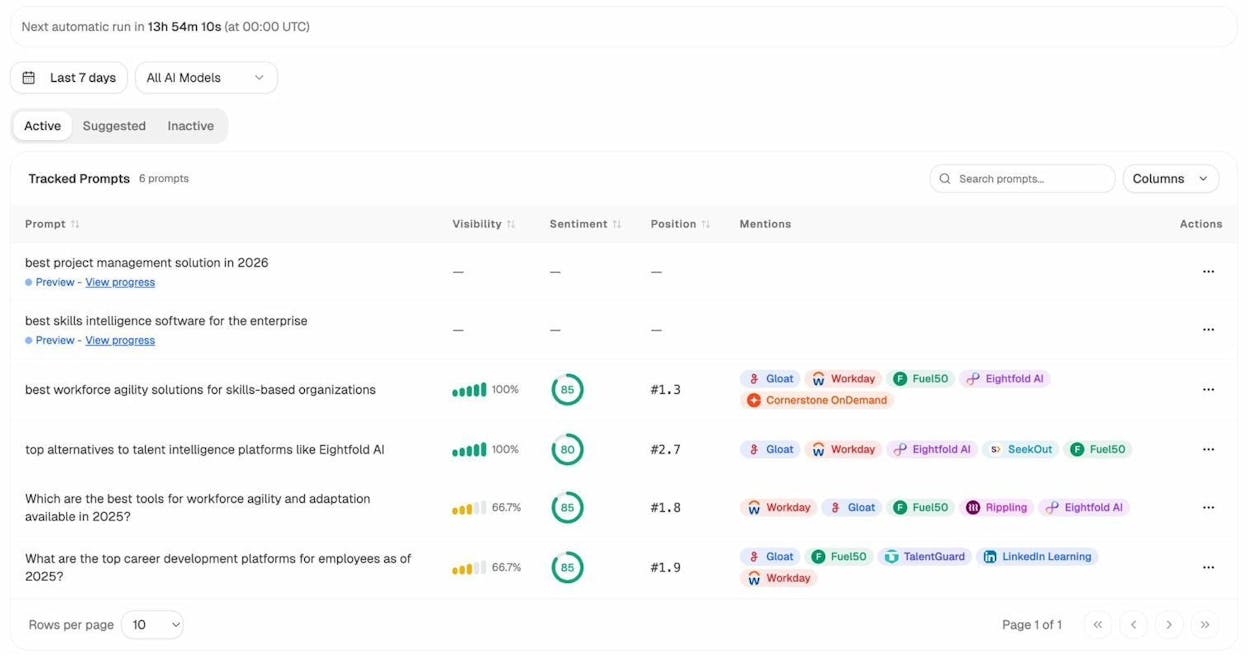
Analyze AI monitors specific prompts across all major LLMs—"best Salesforce alternatives for medium businesses," "top customer service software for mid-sized companies in 2026," "marketing automation tools for e-commerce sites."

For each prompt, you see your brand's visibility percentage, position relative to competitors, and sentiment score.
You can also see which competitors appear alongside you, how your position changes daily, and whether sentiment is improving or declining.

Don’t know which prompts to track? No worries. Analyze AI has a prompt suggestion feature that suggests the actual bottom of the funnel prompts you should keep your eyes on.
Audit which sources models trust and build authority where it matters

Analyze AI reveals exactly which domains and URLs models cite when answering questions in your category.
You can see, for instance, that Creatio gets mentioned because Salesforce.com's comparison pages rank consistently, or that IssueTrack appears because three specific review sites cite them repeatedly.

Analyze AI shows usage count per source, which models reference each domain, and when those citations first appeared.

Citation visibility matters because it shows you where to invest. Instead of generic link building, you target the specific sources that shape AI answers in your category. You strengthen relationships with domains that models already trust, create content that fills gaps in their coverage, and track whether your citation frequency increases after each initiative.
Prioritize opportunities and close competitive gaps

Analyze AI surfaces opportunities based on omissions, weak coverage, rising prompts, and unfavorable sentiment, then pairs each with recommended actions that reflect likely impact and required effort.
For instance, you can run a weekly triage that selects a small set of moves—reinforce a page that nearly wins an important prompt, publish a focused explainer to address a negative narrative, or execute a targeted citation plan for a stubborn head term.
Tie AI visibility toqualified demand.
Measure the prompts and engines that drive real traffic, conversions, and revenue.
Similar Content You Might Want To Read
Discover more insights and perspectives on related topics

The 17 Best Growth Hacking Tools for 2026

The 9 Best LLM Monitoring Tools for Brand Visibility in 2026

Use These 10 AI Tools to Scale Your Startup in 2026

10 AI Applications for Small Businesses to Try

16 Best Competitor Monitoring Tools & How to Use Them