



Summarize this blog post with:


In this article, you’ll learn what PPC spying is, why it gives you an unfair advantage, and eight practical ways to spy on your competitors’ paid ads—including free methods that most guides skip entirely. You’ll also learn how to extend competitive intelligence into AI search, where a growing share of buyer research now happens outside of Google.
Table of Contents
What Is PPC Spying, and Why Does It Matter?
PPC spying is the practice of using tools and publicly available data to study your competitors’ pay-per-click advertising campaigns. The goal is simple: learn what’s working for others so you can make smarter decisions about your own ads.
This means looking at their keywords, ad copy, landing pages, budgets, and bidding patterns—without spending a single dollar on your own tests first.
Here’s why it matters.
It saves you money. Every PPC campaign starts with unknowns. Which keywords convert? What ad angles resonate? What’s a reasonable cost per click in your space? Competitors who have been running ads for months (or years) have already answered these questions with real spend. PPC spying lets you learn from their investment instead of burning your own budget on trial and error.
It reveals strategic gaps. Competitors can’t cover every keyword, every angle, and every audience segment. When you study their campaigns, you’ll find keywords they’ve ignored, messaging angles they haven’t tested, and landing page formats they haven’t tried. These gaps are your opportunities.
It keeps you from falling behind. If a competitor starts bidding aggressively on your brand keywords or launches ads targeting your best-performing terms, you want to know about it before it eats into your traffic. PPC spying turns that from a surprise into something you can prepare for.
It gives you creative direction. Writing ad copy from a blank page is hard. Seeing what competitors have tested—which headlines they stuck with, which descriptions they changed, which calls-to-action they use—gives you a starting point that’s grounded in real market data.
With that context, here are eight ways to start spying on your competitors’ PPC campaigns today.
1. Start With Free Ad Libraries (No Tools Required)
Before you pay for any tool, start with the ad transparency libraries that platforms provide for free. Most PPC guides skip these entirely, but they’re one of the fastest ways to see exactly what your competitors are running right now.
Google Ads Transparency Center
Google’s Ads Transparency Center lets you search for any advertiser and see every ad they’ve run across Google Search, YouTube, and the Display Network.
![[Screenshot: Google Ads Transparency Center search page with a competitor’s brand name entered]](https://www.datocms-assets.com/164164/1776791974-blobid0.jpg?auto=format,compress&w=1248&fit=max)
How to do it:
-
Search for your competitor’s brand name or domain
-
Filter by date range, region, and ad format (text, image, video)
-
Click any ad to see its full creative and the landing page it links to
![[Screenshot: Google Ads Transparency Center results showing a competitor’s ad variations across formats]](https://www.datocms-assets.com/164164/1776791974-blobid1.png?auto=format,compress&w=1248&fit=max)
What to look for:
-
Ad volume. How many ads are they running at once? A high count suggests they’re testing aggressively. A low count suggests they’ve found what works and are scaling it.
-
Creative patterns. Do they lead with price, features, social proof, or urgency? Note recurring themes across their ads.
-
Landing page URLs. Click through to see where they’re sending traffic. This tells you which pages and offers they trust most.
-
Regional targeting. Filter by country to see if they run different ads in different markets.
The Transparency Center is especially useful for spotting brand bidding. Search for your own brand name and see if any competitors are placing ads on it—this happens more often than most businesses realize.
Meta Ad Library
If your competitors run ads on Facebook, Instagram, Messenger, or Threads, the Meta Ad Library shows you everything they’re currently running.
![[Screenshot: Meta Ad Library showing a competitor’s active ads with creative previews]](https://www.datocms-assets.com/164164/1776791985-blobid2.png?auto=format,compress&w=1248&fit=max)
How to do it:
-
Go to facebook.com/ads/library
-
Set the country and ad category
-
Search by advertiser name or keyword
-
Browse their active and inactive ads
What to look for:
-
How long each ad has been running. If an ad has been live for months, it’s likely profitable. Short-lived ads were probably tests that didn’t work.
-
Creative formats. Are they using video, carousel, or static images? Which format appears most often?
-
Ad copy length. Short and punchy, or long-form with detailed benefits? This tells you what resonates with their audience.
-
CTA buttons. “Learn More” suggests top-of-funnel awareness. “Sign Up” or “Get Offer” suggests bottom-of-funnel conversion campaigns.
Between Google and Meta, you can build a detailed picture of your competitor’s paid strategy without spending anything. Use these as your starting point before moving to paid tools for deeper data.
2. Spy on Your Competitor’s Paid Traffic and Ad Spend
Free ad libraries show you what competitors are running, but they don’t show you how much traffic those ads generate or what they cost. For that, you need a competitive intelligence tool.
Tools like SpyFu, Semrush, and SimilarWeb estimate your competitors’ paid search traffic and monthly ad spend. These estimates aren’t perfect—no third-party tool has access to actual Google Ads data—but they’re directionally useful for benchmarking.
![[Screenshot: SpyFu or Semrush showing a competitor’s estimated paid traffic and ad spend over time]](https://www.datocms-assets.com/164164/1776791988-blobid3.png?auto=format,compress&w=1248&fit=max)
How to Do It
-
Enter your competitor’s domain into your tool of choice
-
Navigate to the Paid Search or PPC overview
-
Look for estimated monthly paid traffic, estimated monthly ad spend, and the number of paid keywords
![[Screenshot: The paid search overview dashboard showing traffic, keywords, and spend estimates for a competitor domain]](https://www.datocms-assets.com/164164/1776791997-blobid4.png?auto=format,compress&w=1248&fit=max)
What to Look For
Traffic trends over time. A time-series chart reveals seasonality and strategy shifts. If a competitor’s paid traffic spikes every November, they’re likely running Black Friday campaigns—and you should plan for that competition.
Spend relative to traffic. High spend with low traffic means they’re targeting expensive, high-intent keywords. Low spend with high traffic suggests they’ve found efficient long-tail terms. Both are worth investigating.
Paid vs. organic overlap. Many tools let you overlay paid traffic with organic traffic. If a competitor reduces PPC spend while their organic traffic grows, they may be shifting budget as their SEO matures. If paid and organic both target the same keywords, it signals those terms are high-value.
Why This Matters
You need a baseline before you can make smart budget decisions. If your biggest competitor spends an estimated $50,000 per month on Google Ads, and you’re budgeting $5,000, you need to be more selective about which keywords you target. This data helps you set realistic expectations.
3. Uncover Your Competitor’s Paid Keywords and CPC
Knowing which keywords your competitors bid on—and how much they pay—is the most tactically useful data you can get from PPC spying.
![[Screenshot: A paid keywords report showing keywords, CPC, estimated traffic, and ad positions for a competitor]](https://www.datocms-assets.com/164164/1776792002-blobid5.png?auto=format,compress&w=1248&fit=max)
How to Do It
-
Enter your competitor’s domain in your SEO/PPC tool
-
Go to the Paid Keywords report
-
Sort by estimated traffic or CPC to find their most important terms
-
Use filters to narrow results (e.g., CPC above $5, keywords with more than 1,000 monthly searches)
![[Screenshot: CPC filter applied to the paid keywords report, showing only high-value keywords above $10 CPC]](https://www.datocms-assets.com/164164/1776792008-blobid6.png?auto=format,compress&w=1248&fit=max)
What to Look For
High-traffic keywords. These are the terms driving the bulk of your competitor’s paid visits. If they keep bidding on them month after month, those keywords are almost certainly profitable.
High-CPC keywords. A keyword with a $15 CPC means your competitor (and others) believe the return justifies the cost. These are worth investigating for your own campaigns—but also worth checking if you can target them organically instead.
Keywords you haven’t considered. This is where PPC spying pays for itself. Competitors often bid on terms you wouldn’t have found through standard keyword research. Long-tail variations, misspellings, competitor brand terms, and problem-aware queries can all appear in this data.
Brand terms. Check if competitors bid on your brand name. If they do, you may need to run brand defense campaigns. Also check if they bid on their own brand name—this is common for protecting SERP real estate from competitors who might do the same.
Use Analyze AI’s free Keyword Generator to expand any keyword you discover into related terms, and the Keyword Difficulty Checker to evaluate whether those terms are worth pursuing organically as well.
4. Spy on Your Competitor’s Ad Copy and Creatives
Keyword data tells you where competitors show up. Ad copy tells you how they position themselves once they’re there.
![[Screenshot: An ads report showing multiple ad variations from a single competitor, including headlines and descriptions]](https://www.datocms-assets.com/164164/1776792013-blobid7.png?auto=format,compress&w=1248&fit=max)
How to Do It
In Google Ads Transparency Center:
-
Search for the competitor
-
Filter by text ads
-
Read through their headlines, descriptions, and display URLs
In paid PPC tools:
-
Navigate to the Ads or Ad Copy report
-
Sort by estimated traffic or impressions
-
Look for ads that have been running the longest—these are the winners
![[Screenshot: A competitor’s top-performing ads sorted by traffic, showing headline and description copy]](https://www.datocms-assets.com/164164/1776792019-blobid8.png?auto=format,compress&w=1248&fit=max)
What to Look For
Value propositions. What benefit does the headline promise? Price savings, speed, quality, ease of use? This tells you what messaging resonates with your shared audience.
Calls to action. “Start free trial,” “Get a demo,” “Compare plans,” “Download now”—each CTA signals a different stage of the funnel and a different conversion goal.
Ad extensions. Look for sitelinks, callouts, structured snippets, and promotion extensions. These give you insight into which pages and offers the competitor deems most important.
Copy changes over time. If you check a competitor’s ads monthly, you’ll notice what they test and what they keep. A headline that stays the same for six months is a proven winner. One that changes every week is still being tested.
How to Use This
Don’t copy competitor ads word for word. That creates a race to the bottom where every ad in the SERP looks the same. Instead, use competitor copy to understand what the market expects—and then differentiate. If every competitor leads with “Free Trial,” you might stand out by leading with a specific result: “Grow organic traffic 3x in 90 days.”
5. Analyze Your Competitor’s Landing Pages
Ad clicks are expensive. Where competitors send that traffic tells you a lot about what converts.
![[Screenshot: A paid pages report showing the top landing pages by paid traffic for a competitor domain]](https://www.datocms-assets.com/164164/1776792023-blobid9.png?auto=format,compress&w=1248&fit=max)
How to Do It
-
In your PPC tool, navigate to the Paid Pages or Paid Landing Pages report
-
Sort by estimated paid traffic to see which pages receive the most ad spend
-
Click through to the actual pages and study their structure
What to Look For
Page type. Are they sending traffic to their homepage, a dedicated landing page, a product page, or a blog post? Dedicated landing pages signal mature PPC operations. Homepage traffic suggests a less optimized approach (or very broad targeting).
Above-the-fold content. What headline, sub-headline, and CTA appear before the user scrolls? This is what the competitor has determined converts best for that keyword.
Social proof. Look for customer logos, testimonials, review scores, case study numbers, and trust badges. Note which type of proof they prioritize—this tells you what their audience values.
Form length. A single-field email capture suggests top-of-funnel lead generation. A multi-field form with company size, role, and phone number suggests they’re qualifying leads for sales.
Page speed. Run the landing page through Google PageSpeed Insights. Slow pages leak conversions, and if a competitor has a slow landing page, you can gain an advantage by making yours faster.
Build a Swipe File
Create a folder (or spreadsheet) where you save screenshots of competitor landing pages alongside the keywords that drive traffic to them. Over time, this becomes a reference library of what works in your space—saving hours of design and copy decisions when you build your own landing pages.
6. Track Ad Position History for Any Keyword
Individual competitor analysis is useful, but sometimes you want to see everyone who has ever bid on a specific keyword. Ad position history reports do exactly that.
![[Screenshot: An ad position history chart showing multiple competitors’ bidding activity on a single keyword over 12 months]](https://www.datocms-assets.com/164164/1776792035-blobid10.png?auto=format,compress&w=1248&fit=max)
How to Do It
-
Enter a keyword into a keyword research tool that supports ad history (SpyFu and similar tools offer this)
-
Scroll to the ad position history or ad timeline chart
-
Hover over colored bars to see the actual ads each competitor ran
What to Look For
Who’s been bidding longest. Competitors who’ve run ads on a keyword for years likely have solid unit economics for that term. This is a strong signal that the keyword converts.
Seasonal patterns. If multiple competitors start and stop ads at the same time each year, you’re looking at seasonal demand. Plan your campaigns around these windows.
New entrants. A competitor that suddenly starts bidding on a keyword they never targeted before may be expanding their product line or entering your market. This is an early warning signal.
Brand bidding. Enter your own brand name and check if anyone else is bidding on it. If they are, you can see exactly what ads they ran and when—useful for deciding whether to file a trademark complaint or run brand defense ads.
Why This Matters
This report gives you a bird’s-eye view of the competitive landscape for any keyword. Before you commit budget to a new term, a quick check here tells you how crowded it is, who you’ll compete against, and how aggressive the bidding tends to be.
7. Use Google Ads Auction Insights (From Inside Your Account)
Every method so far uses external tools. But if you’re already running Google Ads, one of the most powerful spying tools sits inside your own account: Auction Insights.
![[Screenshot: Google Ads Auction Insights report showing impression share, overlap rate, and position above rate for competitors]](https://www.datocms-assets.com/164164/1776792040-blobid11.jpg?auto=format,compress&w=1248&fit=max)
How to Do It
-
Log into your Google Ads account
-
Click on a campaign, ad group, or keyword
-
Click Auction Insights (you’ll find it under the “Insights and reports” tab or in the reporting dropdown)
What to Look For
Impression share. This shows the percentage of total available impressions your ad captured versus each competitor. If a competitor has 90% impression share, they’re dominating that keyword.
Overlap rate. How often your ad and a competitor’s ad appeared in the same auction. A high overlap rate means you’re directly competing for the same searches.
Position above rate. How often a competitor’s ad appeared above yours. If one competitor consistently appears above you, they’re either bidding more or have a higher Quality Score.
Outranking share. The percentage of auctions where your ad ranked higher than a competitor’s, or where your ad showed and theirs didn’t. This is the clearest measure of competitive standing.
What Makes This Different
Auction Insights uses Google’s actual first-party data—not estimates. It’s the most accurate competitive data you’ll find anywhere. The limitation is that it only shows competitors for campaigns you’re actively running, so it won’t help you discover new competitors or keywords.
Combine Auction Insights with the third-party tools above: use external tools for discovery and research, and Auction Insights for real-time competitive monitoring of active campaigns.
8. Spy on Competitors in AI Search (The Emerging Frontier)
Here’s what most PPC spying guides miss entirely: a growing share of product research and buying decisions now happens outside of Google Search. Buyers ask ChatGPT, Perplexity, Google AI Mode, Claude, and Gemini for recommendations—and the brands that show up in those answers capture attention without paying per click.
This is not a replacement for PPC or SEO. It’s an additional channel. And just like PPC spying gives you insight into competitors’ paid strategies, AI search intelligence shows you which competitors appear in AI-generated answers—and how you stack up.
Analyze AI is built specifically for this. Here’s how to use it for competitive intelligence in AI search.
See Which Competitors AI Models Recommend
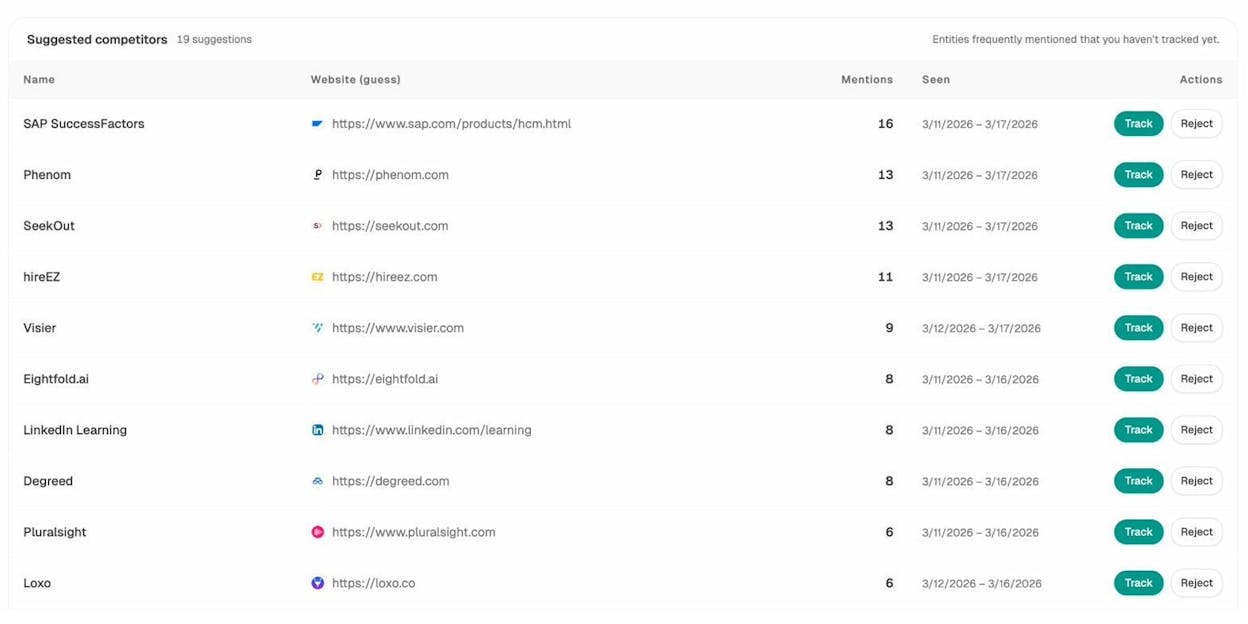
In Analyze AI, the Competitors dashboard shows you every brand that AI platforms mention alongside yours. You can see tracked competitors with their total mentions, and the platform also surfaces Suggested Competitors—brands that appear frequently in AI answers within your space that you may not even be tracking yet.
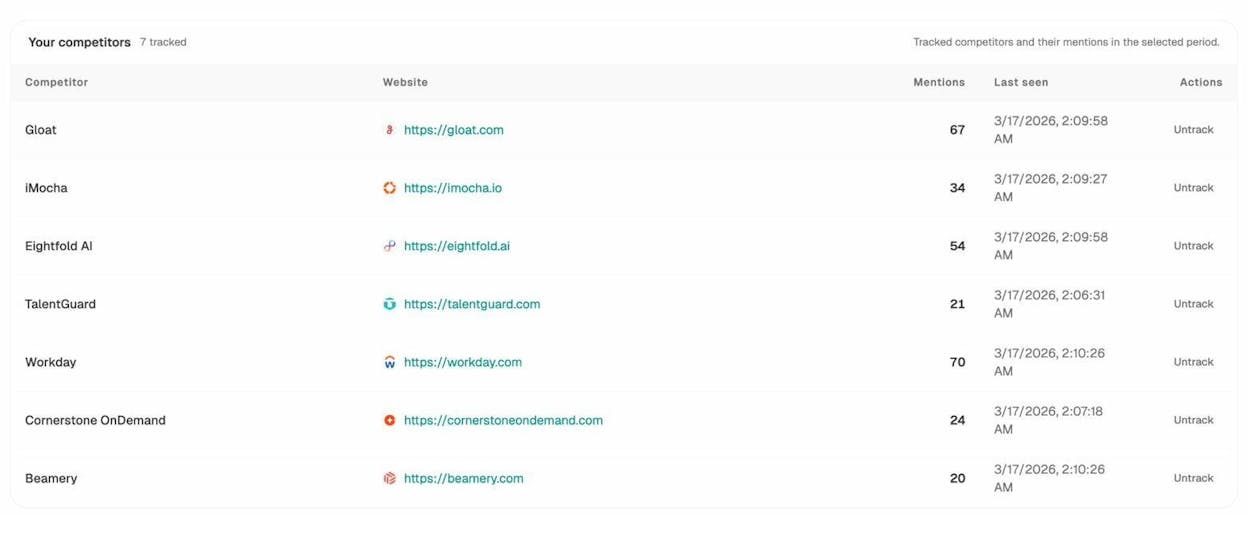
This is the AI search equivalent of checking who bids on your keywords. Except instead of paying for ad placements, these competitors earn their way into AI answers through content quality, brand authority, and citation patterns.
Track the Prompts That Mention Your Brand (and Your Competitors)
The Prompts dashboard in Analyze AI lets you track specific prompts—questions buyers ask AI models—and see which brands appear in the answers. You get visibility scores, sentiment scores, and the exact position where each brand is mentioned.
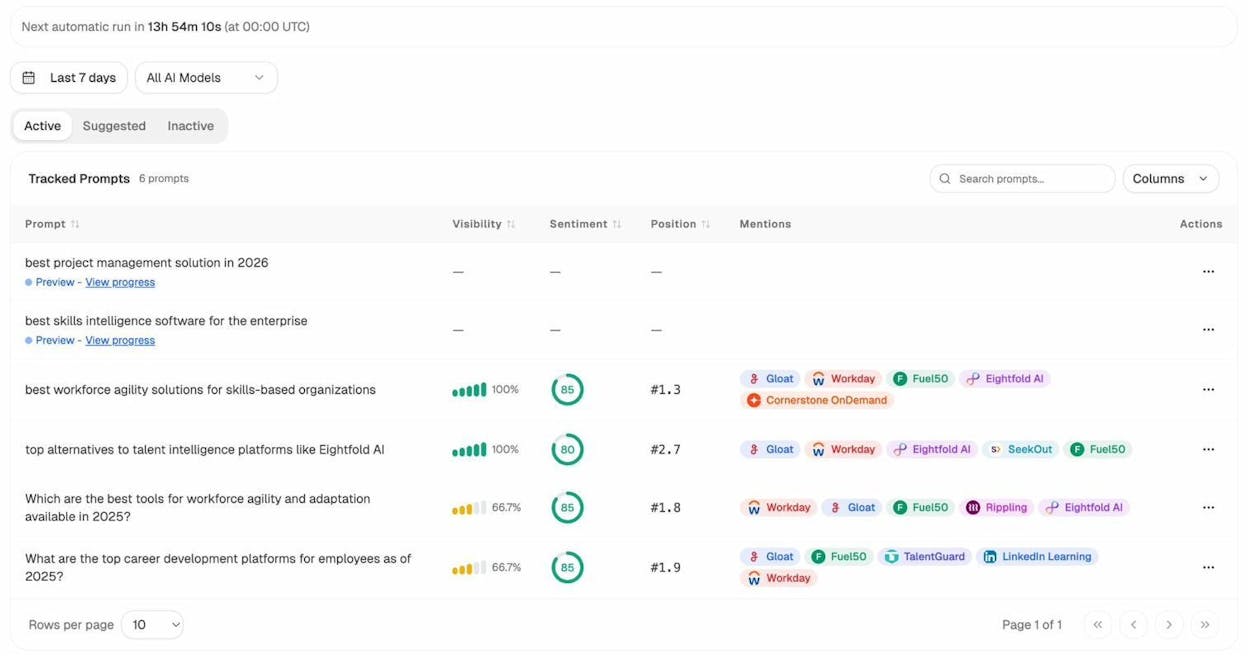
Think of this as the AI search version of tracking paid keyword positions. Instead of monitoring which ad position you hold for “best CRM software,” you’re monitoring where your brand appears when someone asks ChatGPT or Perplexity the same question.
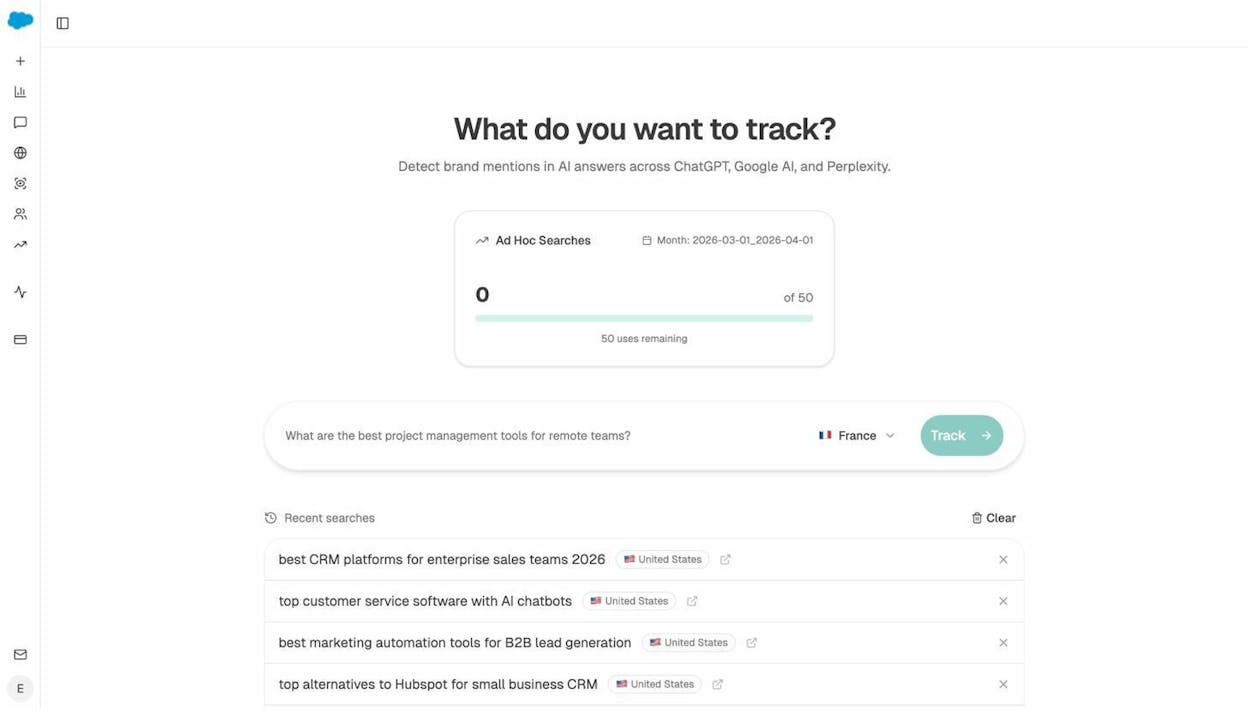
You can also run Ad Hoc Searches—one-off queries to any AI model—to quickly check how AI platforms respond to specific questions. This is the equivalent of doing a manual Google search to see which ads appear.
Understand How AI Perceives Your Brand vs. Competitors
The Perception Map plots your brand and competitors on a 2x2 grid based on visibility and narrative strength. Brands in the top-right quadrant (“Visible & Compelling”) have both strong presence and positive sentiment in AI answers. Brands in the bottom-left are barely mentioned.
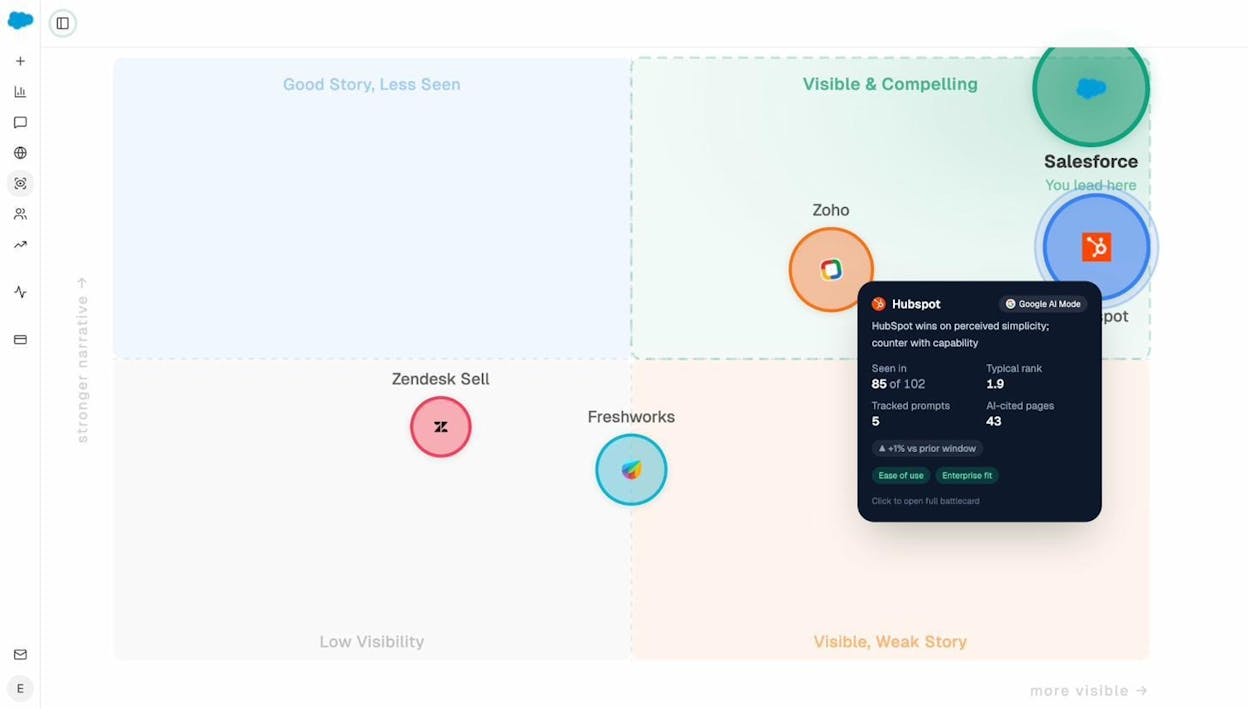
This is strategic-level intelligence. If your biggest PPC competitor is also dominant in AI search, you’re fighting on two fronts. If they’re absent from AI answers, that’s an opportunity to build visibility in a channel they’ve neglected.
Find Out Which Sources AI Models Cite
The Sources dashboard reveals which websites and content types AI platforms reference when answering questions in your industry. You can see top cited domains, content type breakdowns (blog, product page, review, etc.), and which sources each AI model favors.
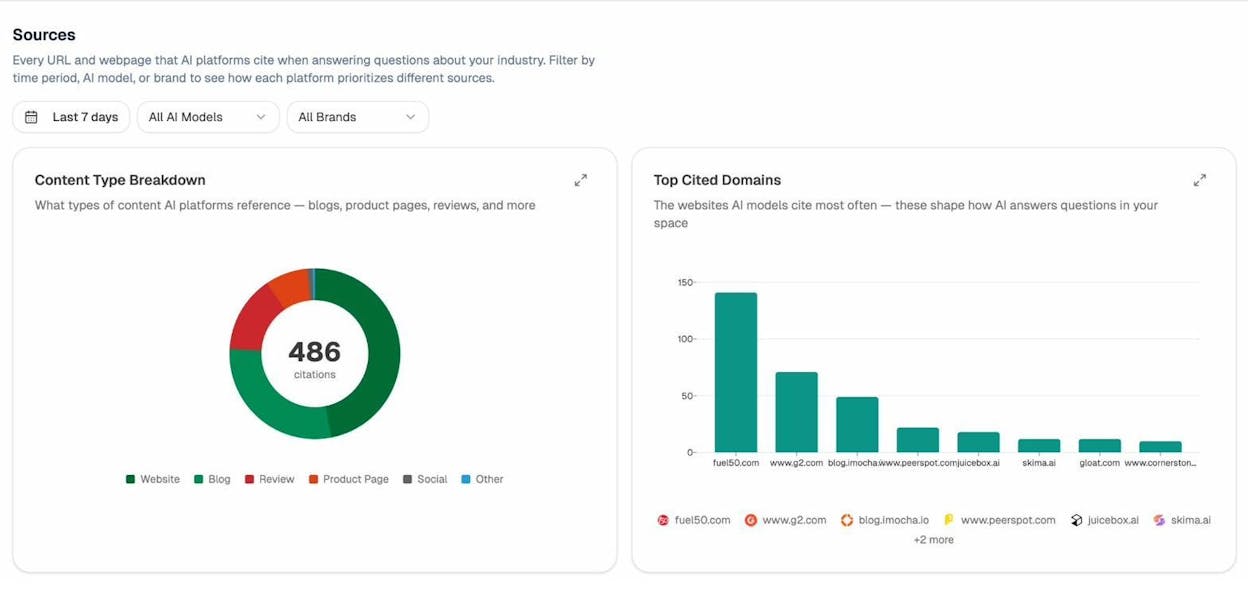
Why does this matter for PPC? Because the pages that AI models cite are the pages that build brand authority—which indirectly improves your Quality Score, organic rankings, and the trust signals that make your ads more clickable. If competitors get cited heavily and you don’t, that’s a content gap worth closing.
Monitor AI-Referred Traffic to Your Site
Analyze AI’s AI Traffic Analytics report connects to your website analytics and shows exactly how many visitors arrive from AI platforms. You can see which AI sources (ChatGPT, Claude, Perplexity, Gemini, Copilot) send traffic, which landing pages receive it, and how those visitors behave compared to other channels.
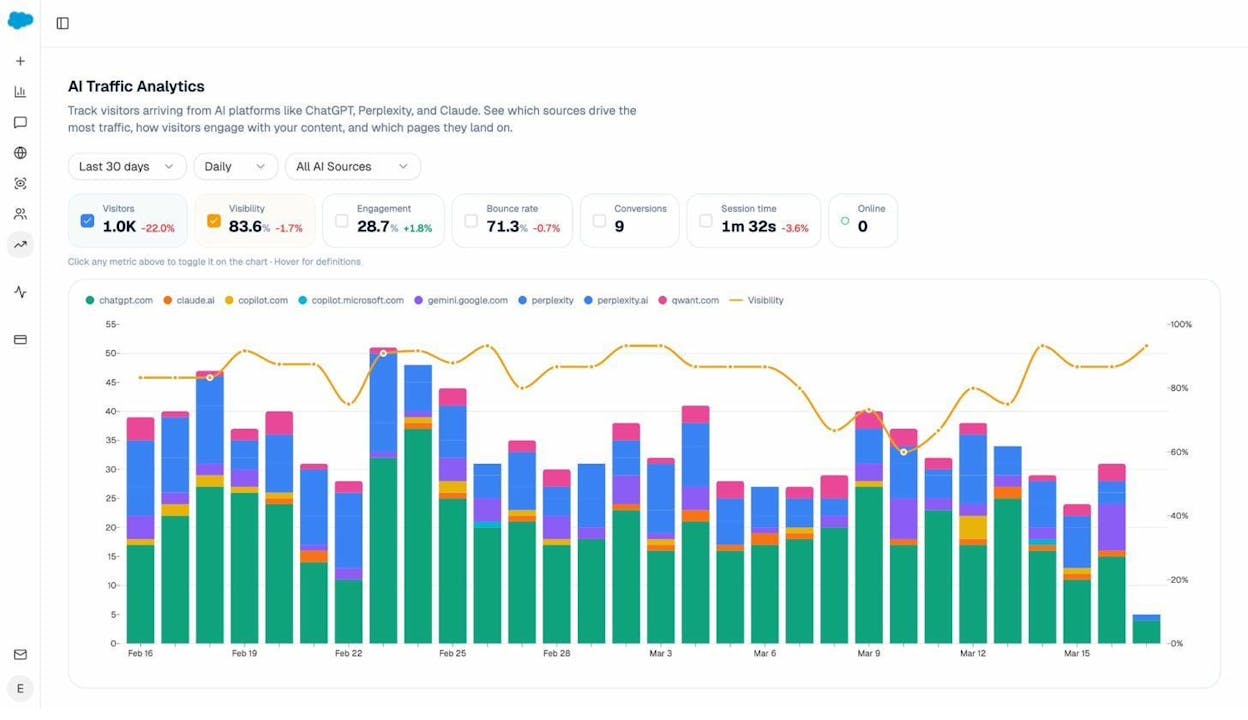
The Landing Pages view breaks this down by URL, so you can see which pages perform best with AI-referred traffic and double down on what works.
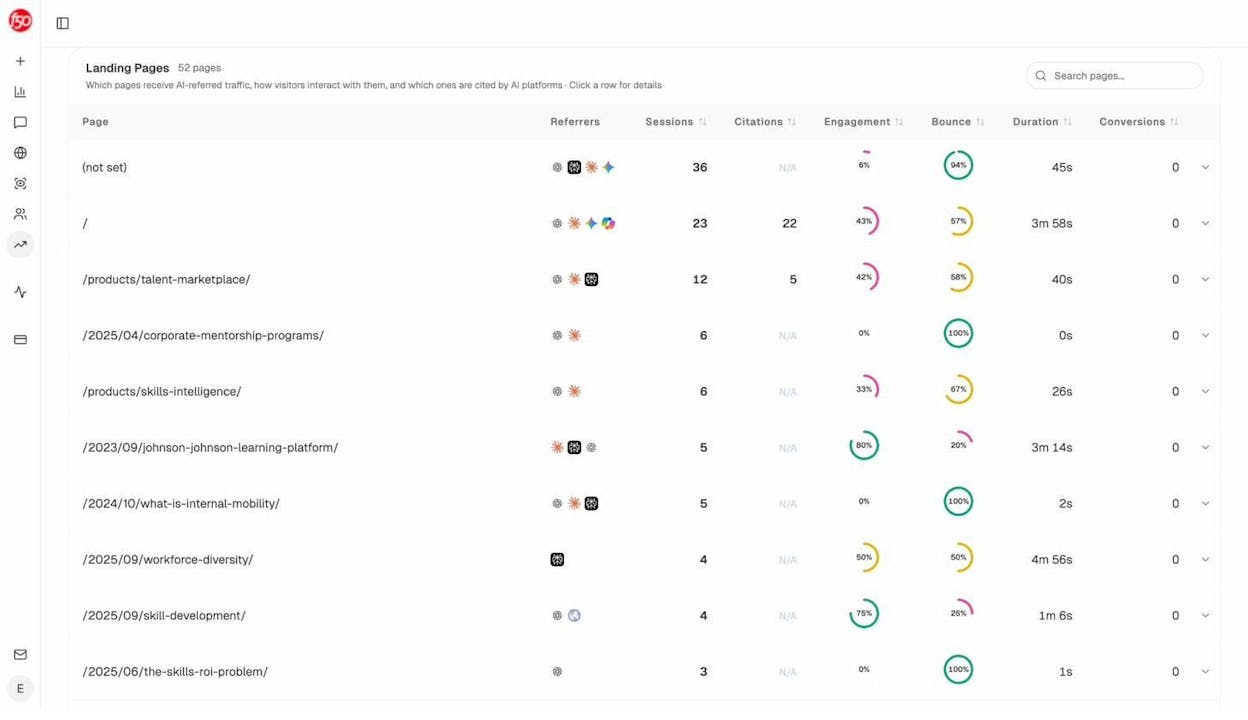
This data also feeds your PPC strategy. If a page already gets strong AI-referred traffic, it might not need paid support. And if AI traffic is growing for a keyword you currently spend on PPC, you might be able to reduce ad spend and let AI search fill the gap.
Why AI Search Intelligence Matters for PPC Teams
The relationship between PPC and AI search is not either/or. It’s about understanding the full picture of how buyers discover and evaluate your brand.
-
A prospect might see your Google ad first, then ask ChatGPT for a second opinion
-
Another might discover your competitor through Perplexity and never see your ad at all
-
A third might click your ad because they already saw your brand recommended by an AI engine
Monitoring both paid and AI search visibility gives you a complete view of the competitive landscape—one that most of your competitors don’t have yet.
Common Pitfalls of PPC Spying (and How to Avoid Them)
PPC spying is a powerful advantage, but only if you use it well. Here are the mistakes that trip up most teams.
Copying Instead of Learning
The point of PPC spying is not to clone your competitor’s campaigns. It’s to understand the landscape and find your own angle within it. Competitors don’t always know what they’re doing—their campaigns might be underperforming, and blindly following them could land you in the same hole.
Use competitor data as input, not as a blueprint. Take their best keywords and test them in your own context. Study their ad copy and write something better. Analyze their landing pages and build one that converts higher.
Mistaking Estimates for Facts
Third-party tools estimate paid traffic, CPC, and ad spend using their own crawling and modeling methods. These estimates are useful for directional insights and benchmarking, but they’re not exact. A tool might show a competitor spending $20,000/month when the real number is $12,000 or $35,000.
Use estimates to identify patterns and priorities—not to set your budget down to the dollar. Cross-reference data from multiple tools when precision matters.
Overreacting to Short-Term Moves
PPC teams run experiments constantly. A competitor might launch ads on a new keyword for two weeks, decide it doesn’t convert, and pull back. If you panic and launch your own campaign on that keyword without thinking it through, you’re reacting to a test that already failed.
Look for sustained patterns instead. A competitor who bids on a keyword for six months is telling you something meaningful. One who tries it for two weeks and stops is telling you something too—but it’s a different lesson.
Ignoring Your Own Data
Competitor intelligence supplements your own campaign data. It doesn’t replace it. Your first-party data—actual conversion rates, actual CPA, actual ROAS—is always more reliable and more relevant than estimates about what competitors might be experiencing.
Use PPC spying to generate ideas and hypotheses. Then test those hypotheses with your own campaigns and measure results against your own goals.
Neglecting AI Search Entirely
This is the newest pitfall, and it catches more teams every quarter. If you’re tracking competitors’ Google Ads but ignoring how they show up in ChatGPT, Perplexity, and Google AI Mode, you’re watching half the game. AI search visibility is an increasingly important part of competitive intelligence, and the teams that monitor it now will have a significant head start.
PPC Spying Checklist
Before you launch your next campaign, run through this checklist to make sure you’ve covered your bases:
|
Step |
What to Do |
Free or Paid |
|---|---|---|
|
1 |
Search competitors in Google Ads Transparency Center |
Free |
|
2 |
Check competitor ads in Meta Ad Library |
Free |
|
3 |
Estimate competitor paid traffic and monthly ad spend |
Paid (SpyFu, Semrush, SimilarWeb) |
|
4 |
Export competitor paid keywords and sort by CPC |
Paid |
|
5 |
Save competitor ad copy variations to a swipe file |
Free + Paid |
|
6 |
Visit and screenshot top competitor landing pages |
Free |
|
7 |
Check ad position history for your target keywords |
Paid |
|
8 |
Review Auction Insights for active campaigns |
Free (requires Google Ads account) |
|
9 |
Check competitor AI search visibility in Analyze AI |
|
|
10 |
Run ad hoc AI searches for your target prompts |
Use Analyze AI’s free Keyword Rank Checker and SERP Checker alongside your PPC research to see how competitors perform in organic search for the same keywords you’re bidding on.
Final Thoughts
PPC spying isn’t about obsessing over what competitors do. It’s about making better decisions faster by learning from the market around you.
Start with the free methods—Google Ads Transparency Center and Meta Ad Library give you more than enough to get started. Layer in paid tools when you need traffic estimates, CPC data, and keyword-level detail. And don’t forget to extend your competitor analysis into AI search, where a growing share of buyer discovery happens without a single click on a Google ad.
The teams that monitor both paid and AI search visibility will have a clearer picture of their competitive landscape than those watching only one channel. That’s the real advantage of modern PPC spying: seeing the full board, not just one corner of it.

Ibrahim
Ibrahim


