



Summarize this blog post with:


Nobody can guarantee first-page rankings. But you can dramatically improve your chances by following a logical process. Here it is:
-
Make sure your page aligns with search intent
-
Cover the topic in full
-
Optimize for on-page SEO
-
Build internal links
-
Earn enough backlinks
-
Track your visibility across Google and AI search
In this article, you’ll learn a step-by-step process for ranking on the first page of Google. You’ll understand how to align your content with what searchers actually want, how to cover your topic thoroughly, how to nail on-page SEO, how to build internal links and backlinks, and — because the search landscape is evolving — how to make sure your pages also show up in AI-powered search engines like ChatGPT, Perplexity, and Gemini.
Table of Contents
1. Make Sure Your Page Aligns with Search Intent
Google wants to rank pages that match what the searcher is actually looking for. If your page doesn’t align with that intent, it won’t make the first page — no matter how good your content or backlinks are.
You can’t read a searcher’s mind. But you can reverse-engineer their intent by analyzing the pages that already rank on page one. Look at three things: the content type, the content format, and the content angle.
Content Type
Open a private browser window and search your target keyword. The results on page one will typically be one of these:
-
Blog posts
-
Product or category pages
-
Interactive tools or calculators
-
Videos
-
Landing pages
For example, if you search “days between dates,” every first-page result is an interactive calculator. If you search “sweaters,” they’re all e-commerce category pages. If your page is the wrong type entirely, you’re fighting an uphill battle.
![[Screenshot: Google SERP showing calculator results for “days between dates”]](https://www.datocms-assets.com/164164/1776702522-blobid1.png?auto=format,compress&w=1248&fit=max)
Content Format
If the top results are blog posts, look more closely at the format. Are they:
-
Step-by-step tutorials?
-
Listicles?
-
Opinion or thought-leadership pieces?
-
Product comparisons?
-
Reviews?
For this very keyword — “how to get on the first page of google” — the first page is dominated by step-by-step tutorials. That’s why this article follows a numbered, tutorial-style format.
![[Screenshot: Google SERP for “how to get on the first page of google” showing tutorial-style titles]](https://www.datocms-assets.com/164164/1776702527-blobid2.png?auto=format,compress&w=1248&fit=max)
Content Angle
The angle is the unique selling proposition that the top-ranking pages share. It’s subtler than type and format, but just as important.
For example, search “best savings account” and you’ll notice that almost every result includes the current year in the title. That signals freshness — searchers want up-to-date recommendations. For “blogging tips,” the results skew toward beginners. That’s the angle Google is rewarding.
![[Screenshot: Google SERP for “best savings account” showing year-tagged results]](https://www.datocms-assets.com/164164/1776702531-blobid3.png?auto=format,compress&w=1248&fit=max)
What to do: Before you write anything, search your keyword. Note the dominant type, format, and angle. Then build your page to match — or intentionally differentiate with a stronger angle (more detail, better data, more actionable advice).
Can’t align your page with intent? Switch to a different keyword. Trying to force a product page to rank where Google wants blog posts is a losing strategy.
What About AI Search Intent?
AI search engines like ChatGPT, Perplexity, and Gemini don’t show a list of blue links. They synthesize a direct answer and cite the sources they pulled from.
But the underlying principle is the same: your content needs to match what people are actually asking.
The difference is that AI search queries tend to be longer, more conversational, and more specific. Someone might type “best running shoes” into Google but ask ChatGPT, “What are the best running shoes for someone with flat feet who runs 20 miles a week on pavement?”
This means your content should answer specific, detailed questions — not just target broad keywords. The more directly you answer real questions people ask, the more likely AI models will cite your page.
You can use Analyze AI to see which prompts people are actually asking AI engines about your topic. The Prompts dashboard shows tracked and suggested prompts along with your visibility, sentiment, and position for each one.
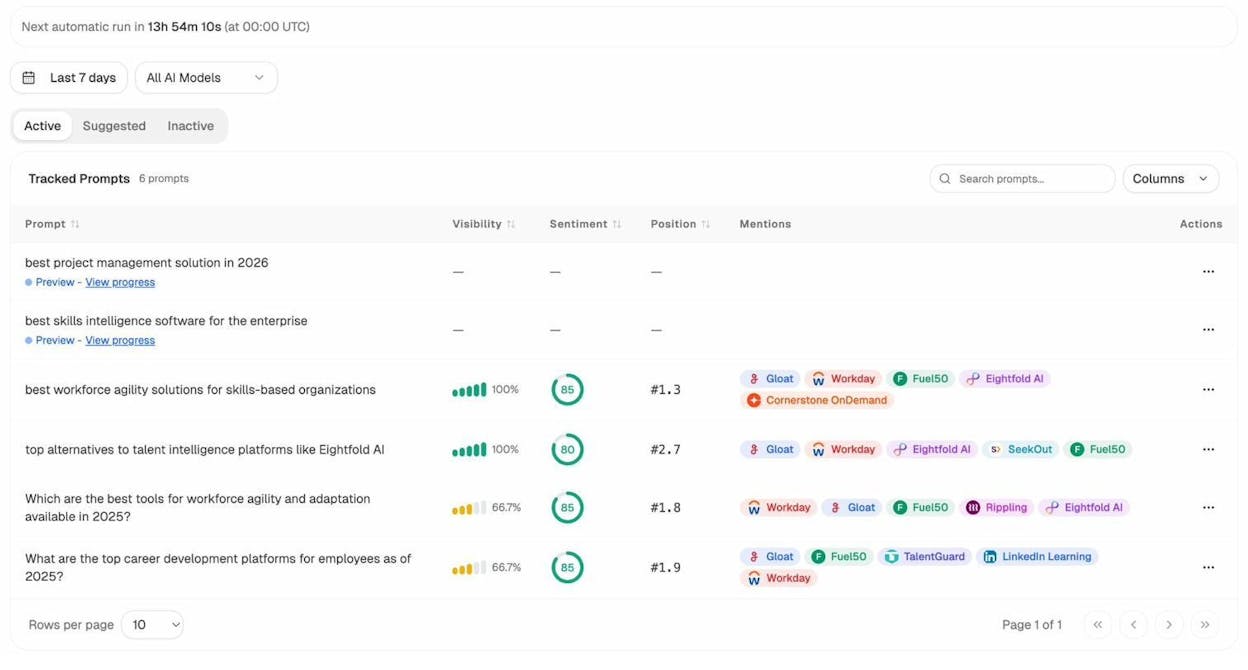
This gives you a clear picture of the actual questions people ask AI engines — so you can make sure your content answers them.
2. Cover the Topic in Full
Matching search intent gets your page in the conversation. Covering the topic thoroughly is what earns a top spot.
Google doesn’t reward thin content. If every other first-page result covers subtopic X and yours doesn’t, that’s a gap. Searchers will bounce back to try another result, and Google will notice.
Here are four ways to find what your page should cover.
Look for Commonalities Among First-Page Results
Open the top five results for your keyword and skim them. What subtopics do they all cover? What questions do they all answer?
For example, if you’re targeting “best running shoes for flat feet,” you’ll notice that every top result includes a section on the best budget option. If yours doesn’t, that’s a gap.
![[Screenshot: Multiple first-page results for a target keyword showing common subtopics]](https://www.datocms-assets.com/164164/1776702537-blobid5.png?auto=format,compress&w=1248&fit=max)
Check “People Also Ask” and Autocomplete
Google’s People Also Ask (PAA) box and autocomplete suggestions are goldmines for subtopics. They show you exactly what related questions searchers have.
![[Screenshot: Google PAA box for a target keyword]](https://www.datocms-assets.com/164164/1776702538-blobid6.png?auto=format,compress&w=1248&fit=max)
Type your keyword into Google and note the autocomplete suggestions. Then scroll down to the PAA box and expand a few questions — Google will generate more as you click.
You can also use Analyze AI’s free keyword generator to find related terms and long-tail variations of your target keyword.
Use a Content Gap Analysis
A content gap analysis compares the keywords that your competitors’ pages rank for against the keywords your page ranks for. The gaps are subtopics you should add.
Here’s how to do it:
-
Find the top three to five pages ranking for your keyword
-
Run them through a content gap tool (available in most SEO platforms)
-
Look for keywords that multiple competitors rank for but you don’t
For example, if three of the top results for “best running shoes for flat feet” also rank for “best brooks for flat feet,” that’s a signal to include Brooks in your recommendations.
![[Screenshot: Content gap analysis showing keywords competitors rank for]](https://www.datocms-assets.com/164164/1776702543-blobid7.png?auto=format,compress&w=1248&fit=max)
Check What AI Engines Are Citing
Here’s where AI search gives you an extra layer of insight that traditional SEO analysis misses.
AI engines don’t just look at keywords. They look at which sources provide the most comprehensive, authoritative answer to a question. You can see exactly which sources AI models cite for your topic using Analyze AI’s Sources dashboard.
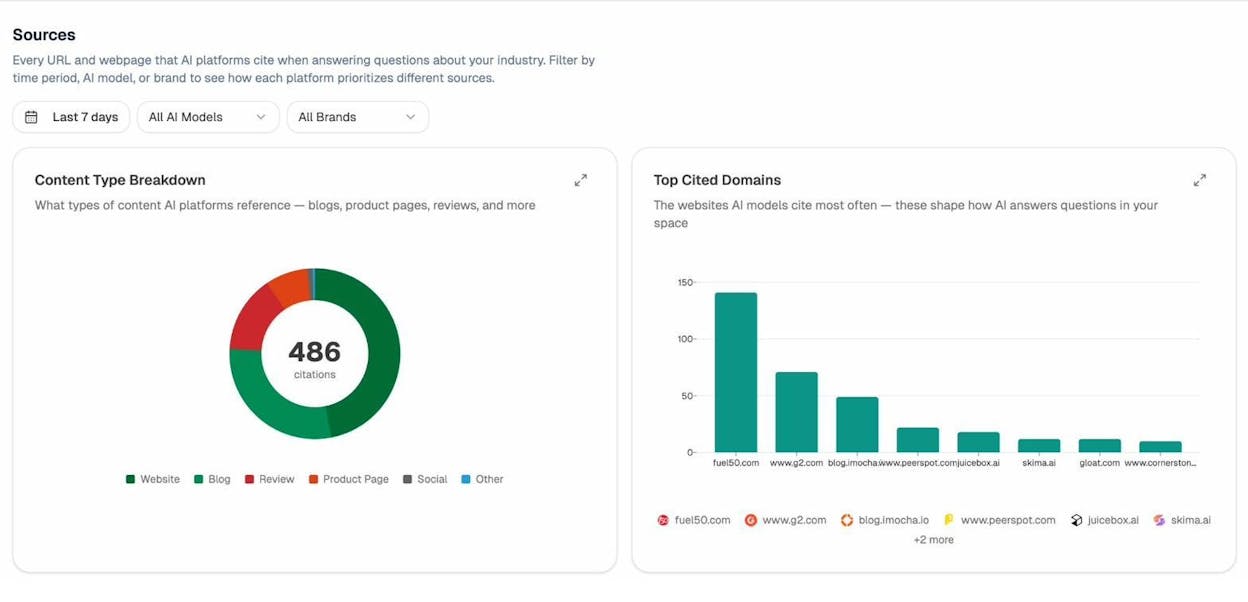
The Sources dashboard shows you every URL and domain that AI platforms cite when answering questions in your industry. This tells you two things:
-
What content types get cited — blogs, product pages, reviews, or something else
-
Which domains dominate — so you know who you’re really competing against in AI answers
If you notice that AI engines overwhelmingly cite in-depth how-to guides for your topic, that’s a signal to make your content more detailed and tutorial-oriented.
You can also use the Competitors view in Analyze AI to see which competitors appear alongside you in AI search results — and which ones show up where you don’t.
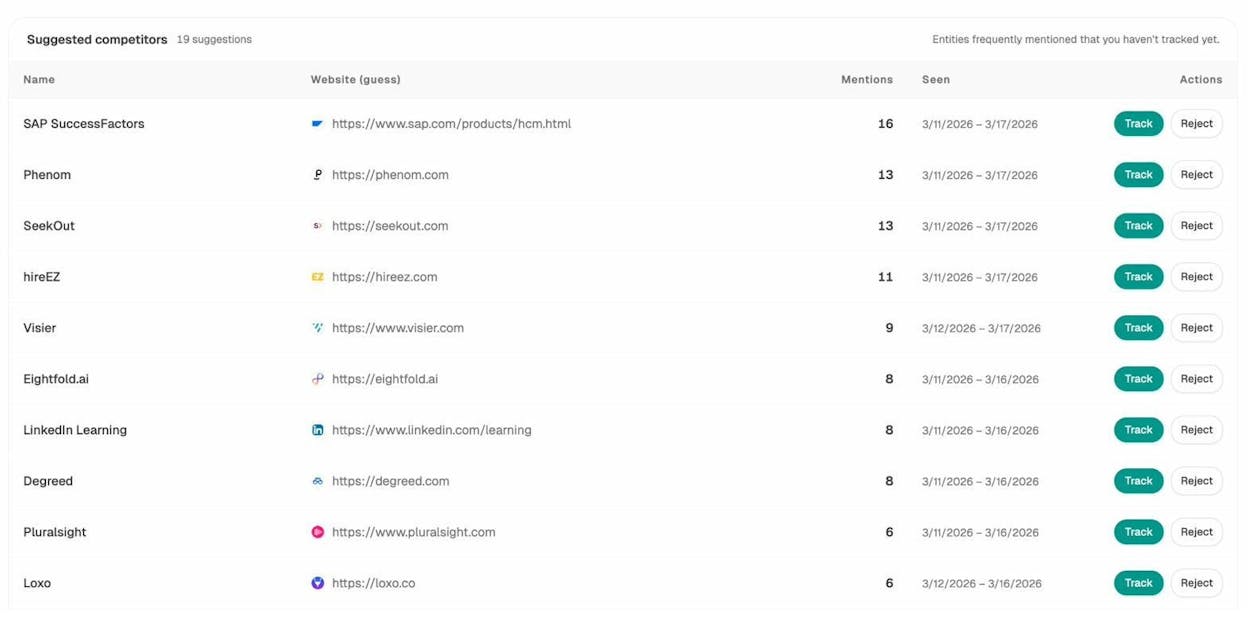
This competitor intelligence helps you spot gaps in your topical coverage. If a competitor keeps getting mentioned for a subtopic you haven’t covered, add it to your page.
3. Optimize for On-Page SEO
On-page SEO is about the signals on your page itself. Most of these are small ranking factors individually. But they’re fast to fix, entirely within your control, and they compound.
Here are the most important on-page elements to get right.
Use Your Keyword in the URL
Google recommends keeping URLs short and using words relevant to the page’s content. You don’t have to include your exact target keyword, but it’s a natural fit since the keyword describes your page.
For this post, the target keyword is “how to get on the first page of google,” so the URL is:
/blog/how-to-get-on-the-first-page-of-google
Keep it clean. Remove stop words if the URL gets too long. Avoid numbers, dates, or parameter strings that might change later.
Write a Compelling Title Tag
The title tag is the HTML element that appears in browser tabs and (usually) in Google’s search results. It’s a small ranking factor, but more importantly, it determines whether people click your result.
A few rules:
-
Include your target keyword naturally, ideally near the beginning
-
Keep it under 60 characters so it doesn’t get cut off
-
Make it specific and benefit-driven — not generic
For example, “How to Get on the First Page of Google (Step-by-Step)” is better than “Google Rankings Guide.”
Use One H1 Tag for the Page Title
The H1 tag wraps your visible page title. Google’s documentation recommends placing your article title in a prominent H1 tag above the body content.
Use one H1 per page. Include your keyword naturally. Then use H2s and H3s for subtopics to create a clear hierarchy.
Structure Content with Clear Subheadings
Google uses subheadings to understand the content on your page. Even if they’re not a direct ranking factor, subheadings make your content easier to skim and digest. That keeps readers on the page longer and reduces bounce rates — both indirect SEO signals.
Each major subtopic should get its own H2. Sub-sections under that H2 get H3s. Don’t skip heading levels.
Clear heading structure also helps AI engines parse your content. When ChatGPT or Perplexity crawls your page, well-organized headings make it easier for them to extract and cite specific sections. This is one of the simplest things you can do to improve your AI search visibility.
Write a Good Meta Description
Meta descriptions aren’t a ranking factor. But Google uses them in the search snippet about 37% of the time. A good meta description increases your click-through rate, which sends positive engagement signals back to Google.
Keep it under 160 characters. Expand on what the title promises. Include a reason to click — a specific number, a benefit, or a question that hooks the reader.
Showcase the Author’s Expertise
Google’s quality guidelines emphasize experience, expertise, authoritativeness, and trustworthiness (E-E-A-T). The easiest way to demonstrate expertise on the page:
-
Include a clear author byline with credentials
-
Add an author bio box with relevant background
-
Link to the author’s other published work or social profiles
-
Cite credible, primary sources throughout the article
-
Keep the content free of easily verified factual errors
This applies to AI search as well. AI engines tend to cite sources from domains and authors with established authority. If your page looks like it was written by nobody, both Google and AI models will prefer alternatives.
Add Schema Markup
Schema markup is structured data you add to your page’s HTML to help search engines understand your content more precisely. It can lead to rich results in Google — star ratings, FAQ dropdowns, or how-to steps displayed directly in search results.
Common schema types for blog content:
|
Schema Type |
What It Does |
|---|---|
|
Article |
Identifies the page as an article with author and date info |
|
FAQ |
Displays question-and-answer pairs directly in search results |
|
HowTo |
Shows step-by-step instructions with optional images |
|
Breadcrumb |
Displays your site’s hierarchy in the search result |
Schema markup also helps AI assistants understand and cite your content more accurately. AI search engines are built to parse structured data, so pages with clear schema signals tend to get cited more often.
4. Build Internal Links to the Page
Internal links are links from one page on your website to another. They help Google discover your content, understand your site’s structure, and pass authority (PageRank) between pages.
The more relevant internal links a page receives, the more authority it accumulates and the better it tends to rank.
Here are three ways to find internal linking opportunities.
Method 1: Search Your Own Site with Google
The simplest method: go to Google and search site:yourwebsite.com "target keyword".
This returns every page on your site that mentions your target keyword. Open each result and check whether there’s already an internal link to your target page. If not, add one.
![[Screenshot: Google site: search showing pages that mention a keyword]](https://www.datocms-assets.com/164164/1776702549-blobid10.png?auto=format,compress&w=1248&fit=max)
For example, if your target page is about keyword research, search site:yoursite.com "keyword research". Every page that mentions it without linking to your guide is a missed opportunity.
The downside: Google doesn’t tell you whether the link already exists. You have to check each page manually, which gets tedious on larger sites.
Method 2: Use a Site Audit Tool
Most SEO platforms have internal link analysis features that automate this. They crawl your entire site and flag pages that mention relevant keywords without linking to your target URL.
![[Screenshot: Internal link opportunities report in a site audit tool]](https://www.datocms-assets.com/164164/1776702555-blobid11.png?auto=format,compress&w=1248&fit=max)
This is faster and more thorough than the manual Google method, especially for sites with hundreds of pages.
Method 3: Audit Your Link Distribution
Some pages on your site have more authority than others — your homepage, your most-linked blog posts, your popular product pages. Make sure these high-authority pages link to the pages you’re trying to rank.
Check your site’s internal link distribution. If a high-value page has no internal link to your target page, that’s one of the quickest SEO wins available.
Internal Linking for AI Visibility
Internal links don’t just help Google. They also help AI crawlers navigate your site and understand the relationships between your pages.
AI engines like ChatGPT and Perplexity send their own crawlers (GPTBot, PerplexityBot, and others) to discover and index web content. A strong internal linking structure makes it easier for these bots to find your most important pages.
The same principles apply: link from high-authority pages to the ones you want visibility for. Use descriptive anchor text so both search engines and AI models understand what the linked page is about.
You can track which of your pages are actually receiving AI-referred traffic using Analyze AI’s AI Traffic Analytics dashboard. The Landing Pages report shows exactly which pages receive visits from each AI platform — along with engagement metrics like citations, bounce rate, and session duration.
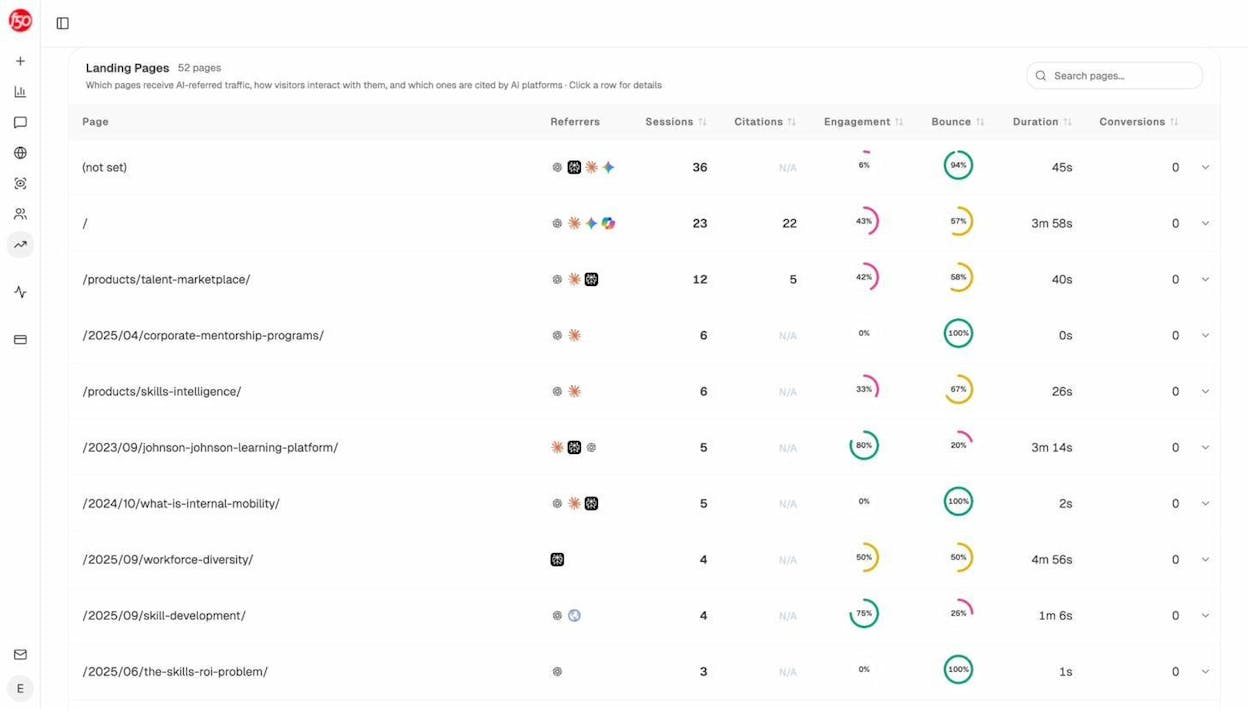
If you notice that certain types of pages consistently attract AI traffic (for example, in-depth guides versus short product pages), create more content like them and prioritize internal linking to similar pages across your site.
5. Earn Enough Backlinks
Backlinks — links from other websites to your page — remain one of Google’s strongest ranking factors. If your page isn’t on the first page yet, insufficient backlinks are often the reason.
How Many Backlinks Do You Need?
There’s no exact number. Some pages rank on the first page with two backlinks. Others need hundreds. It depends on the competition, the quality of the links, and your domain’s overall authority.
You can get a rough estimate using Analyze AI’s free keyword difficulty checker. Enter your target keyword and it’ll show you an estimated difficulty score along with how many referring domains the top-ranking pages have.
![[Screenshot: Keyword difficulty checker showing estimated difficulty and referring domain counts]](https://www.datocms-assets.com/164164/1776702561-blobid13.png?auto=format,compress&w=1248&fit=max)
Take these estimates directionally — not as gospel. A single backlink from a highly authoritative site (think major news outlets, industry-leading publications, or government domains) can be worth more than dozens of links from low-authority sites.
How to Check Where You Stand
Before building links, understand your current position. Use Analyze AI’s free website authority checker to see your domain authority score. Then compare it against the domains currently ranking on the first page for your keyword.
If your domain authority is significantly lower than the competition, you’ll need more backlinks — and higher-quality ones — to close the gap.
You can also check any competitor’s backlink profile to see which sites link to them. This tells you where to focus your outreach.
Proven Ways to Earn Backlinks
Building backlinks is the hardest part of SEO. There are no reliable shortcuts. Here are four approaches that consistently work:
Create link-worthy content. The most sustainable way to earn backlinks is to publish content others want to reference. Original research, proprietary data, comprehensive guides, and free tools tend to attract links organically over time. If your content doesn’t offer something unique — a new angle, original data, or a useful resource — there’s no compelling reason for other sites to link to it.
Guest posting. Write articles for authoritative sites in your industry that link back to your content. Focus on relevance and quality. A single guest post on a well-known industry blog is worth more than twenty posts on generic sites.
Broken link building. Find broken links on authoritative sites that previously pointed to content similar to yours. Reach out and suggest your page as a replacement. Use Analyze AI’s free broken link checker to scan any domain for broken outbound links.
Digital PR and original research. Publish original studies, surveys, or data analyses and pitch them to journalists and publishers. Newsworthy data generates coverage and backlinks at scale. For example, publishing a study about search behavior trends could earn links from dozens of marketing and tech publications.
Do Backlinks Help with AI Search Visibility?
Yes, but the mechanism is indirect. AI engines don’t use backlinks as a direct ranking signal the way Google does. But backlinks drive three things that AI engines do value:
Domain authority and brand recognition. AI models tend to cite sources from well-known, authoritative domains. A strong backlink profile builds the kind of reputation that AI engines recognize when selecting which sources to reference.
Crawling and discoverability. Pages with more backlinks get crawled more frequently by both Google and AI crawlers. More crawling means a higher chance of being included in AI training data and real-time citation databases.
Third-party mentions. The pages that link to you often mention your brand name alongside relevant topics. These co-mentions create entity associations that AI models pick up on when generating answers.
Research from Analyze AI’s analysis of 83,670 AI citations found that only 17% of citations come from a brand’s own website. The other 83% come from third-party sources — review sites, news outlets, industry blogs, and forums. That means the same outreach and relationship-building that earns backlinks also builds the third-party presence that AI engines rely on when formulating answers.
6. Track Your Rankings — in Google and in AI Search
Publishing and optimizing your page is not the finish line. You need to track performance so you know what’s working and what to adjust.
Track Your Google Rankings
Use a rank tracking tool to monitor your positions for target keywords over time. Check weekly rather than daily — rankings fluctuate naturally, and checking too often creates unnecessary anxiety.
You can use Analyze AI’s free keyword rank checker to see where your page currently ranks for any keyword. For a fuller picture, use the SERP checker to view the complete first page for your keyword along with SEO metrics for each competing result.
If your page sits on page two, look at the pages outranking you. Do they have more backlinks? Better topical coverage? A stronger domain? That tells you where to focus your next round of optimization.
Track Your AI Search Visibility
This is the step most guides skip — and it’s increasingly important. More people are getting answers from AI engines every month. If your content ranks on Google but never gets cited by ChatGPT, Perplexity, or Gemini, you’re missing a growing channel of organic traffic.
Analyze AI tracks your brand’s visibility across all major AI search engines in one dashboard. The Overview shows your visibility percentage, sentiment score, and how you stack up against competitors across every AI platform.
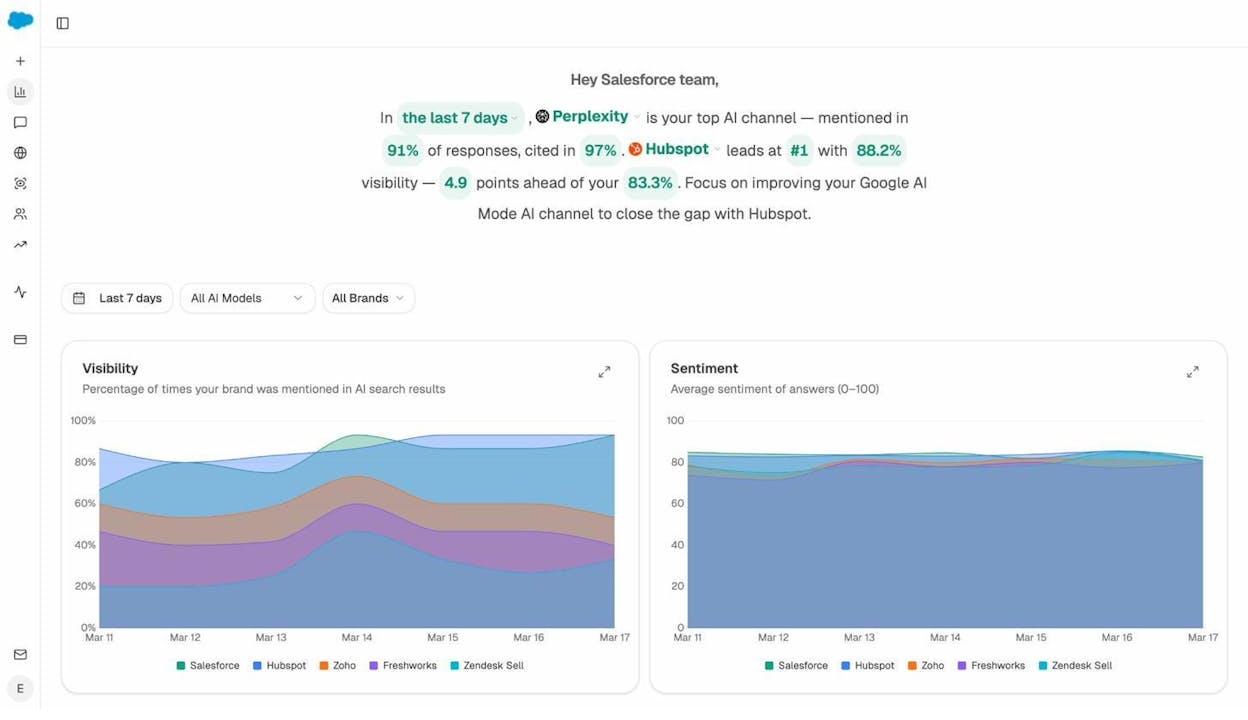
You can also track specific prompts — the actual questions people ask AI engines — and see whether your brand appears in the responses. The Prompts dashboard shows your visibility percentage, ranking position, and which competitors appear alongside you for each tracked prompt.
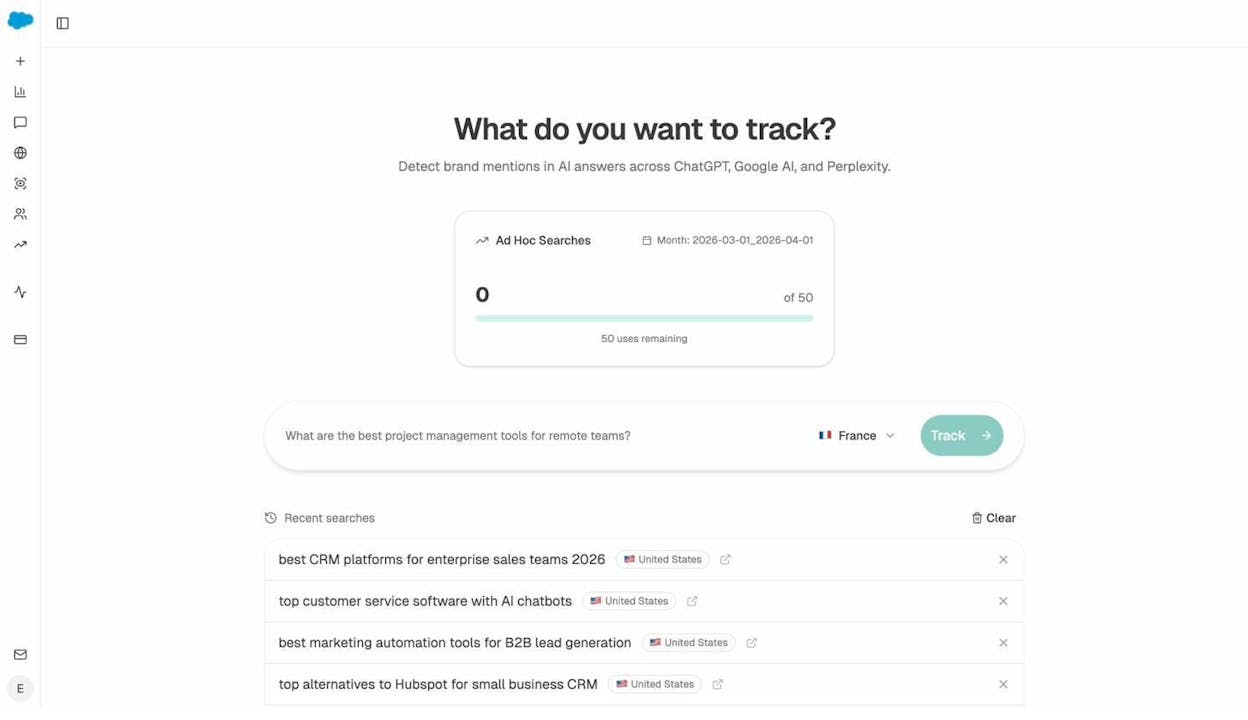
If you want to test a specific question on the spot, use the Ad Hoc Prompt Search feature. It lets you run any prompt through multiple AI engines simultaneously and see which brands get mentioned in real time.
Monitor AI-Referred Traffic to Your Site
Beyond brand mentions, track whether AI search is actually sending visitors to your pages. Analyze AI’s AI Traffic Analytics dashboard shows how many visitors arrive from each AI platform, which landing pages they hit, and how they engage with your site.
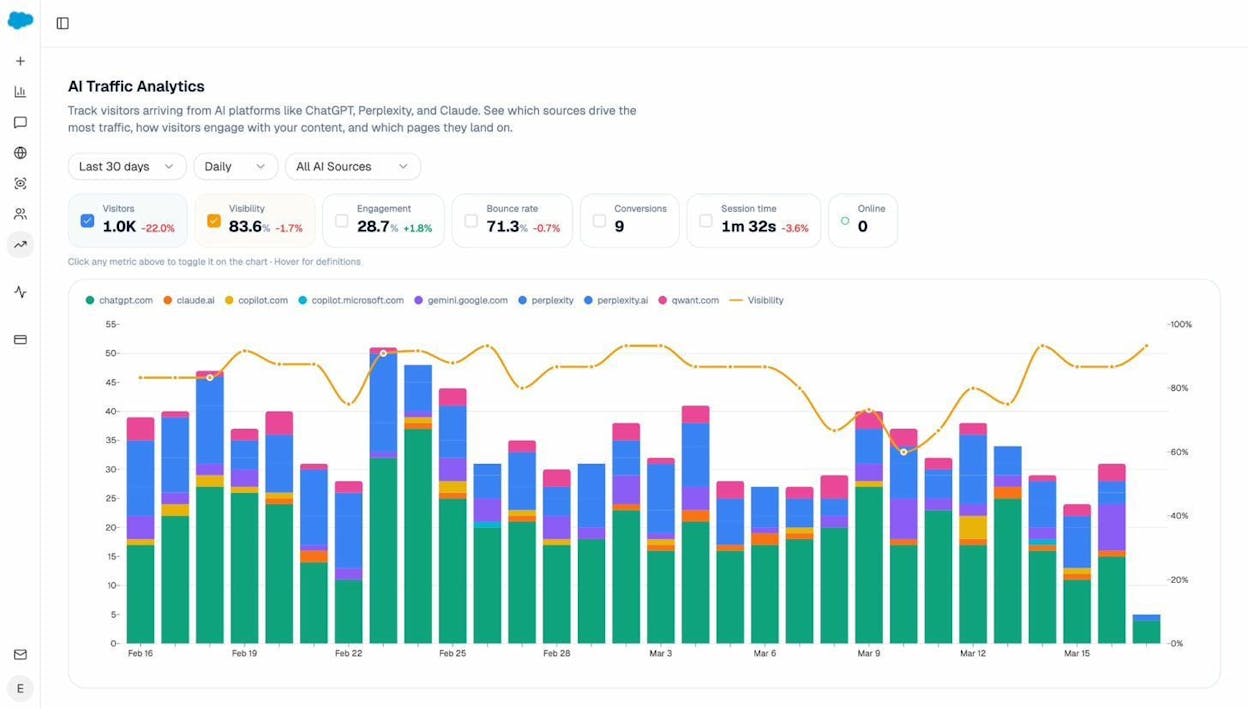
This data reveals which content resonates with AI users and where to focus. If certain page types consistently attract AI traffic with high engagement and low bounce rates, that’s a signal to create more content like them — and to prioritize those pages in your internal linking strategy.
Understand How AI Engines Perceive Your Brand
AI engines don’t just mention your brand. They form and express an opinion about it. Analyze AI’s Perception Map shows how each AI engine perceives your brand across different attributes, what language it uses to describe you, and how your sentiment compares to competitors.
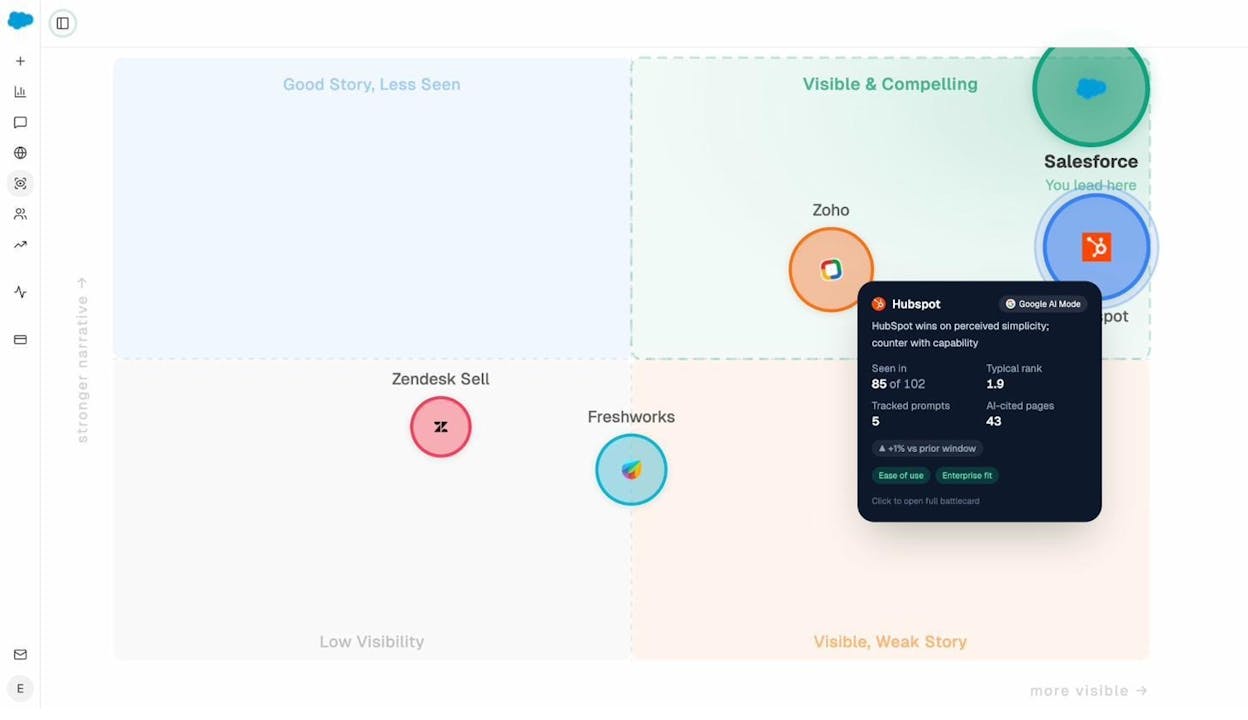
If AI engines associate your brand with negative sentiment or inaccurate information, you can take corrective action: update your website content, earn better reviews and press coverage, or create targeted content that directly addresses the misconception.
How Long Does It Take to Rank on the First Page?
The honest answer: it depends. Most SEO professionals agree it takes at least three to six months for a new page to rank on the first page for a moderately competitive keyword. Highly competitive keywords can take a year or more.
Several factors affect the timeline:
|
Factor |
Impact on Ranking Speed |
|---|---|
|
Domain authority |
Higher-authority sites tend to rank faster |
|
Keyword competition |
Less competitive keywords produce faster results |
|
Content quality and depth |
Thorough, well-structured content ranks sooner |
|
Backlink velocity |
Earning quality links faster accelerates ranking |
|
Technical site health |
Clean, fast-loading sites get indexed and ranked quicker |
|
Topical authority |
Sites with deep coverage of a topic rank faster for related terms |
The same factors affect how quickly you appear in AI search results. AI engines cite established, authoritative sources first. Newer sites typically need to build domain authority and topical depth before AI models begin referencing them.
One advantage of AI search: you don’t have to be position #1 on Google. AI engines can cite any source they deem relevant and authoritative, regardless of Google ranking position. A page sitting on Google’s second page might still get cited by ChatGPT if it provides the clearest, most direct answer to a specific question.
The Bottom Line: Google’s First Page Is Still Worth Fighting For
SEO is not dead. The fundamentals of ranking on Google’s first page — search intent, comprehensive content, on-page optimization, internal links, and backlinks — still work. They’ve driven the majority of organic traffic on the internet for over a decade and they continue to do so.
What’s changed is that Google’s first page is no longer the only first page. AI search is a growing organic channel. The brands that treat it as complementary to SEO — not a replacement for it — will compound their visibility over time.
The encouraging reality: what makes a page rank well on Google also makes it more likely to be cited by AI engines. Clear structure, authoritative content, strong backlinks, and deep topical coverage are the foundation for both channels. You don’t have to choose between optimizing for Google and optimizing for AI search. Do both.
If you want to track your visibility across both channels in one place, Analyze AI gives you the full picture: AI search mentions, citation sources, AI-referred traffic, competitor intelligence, and brand perception — all in a single dashboard.
Further reading:

Ernest

Ibrahim


