



Summarize this blog post with:


In this article, you’ll learn how to analyze a search engine results page (SERP) step by step — from assessing whether a keyword is worth targeting, to investigating who you’re up against, to spotting opportunities most people miss. You’ll also learn how to extend your SERP analysis to AI search engines like ChatGPT, Perplexity, and Gemini, because the results page is no longer the only place people find answers.
By the end, you’ll have a repeatable process you can use for every keyword you evaluate.
Let’s get into it.
Table of Contents
What Is a SERP Analysis?
A SERP analysis is the process of examining the search engine results page for a specific keyword to determine three things: whether you can rank for it, how hard it will be, and whether the effort is worth the reward.
It involves looking at the pages that already rank, the domains behind them, the type of content they’ve published, and the SERP features (like featured snippets, video carousels, and AI Overviews) that appear on the page.
Every keyword has a different competitive landscape. Some SERPs are dominated by massive publishers with thousands of backlinks. Others have clear gaps where a well-crafted piece of content from a smaller site can break through. The goal of a SERP analysis is to tell the difference — before you invest time writing content that has no realistic path to page one.
Here’s the thing most guides won’t tell you: in 2026, a SERP analysis that only looks at Google’s results page is incomplete. More than 20% of Google SERPs now include AI Overviews, and millions of people are getting answers directly from ChatGPT, Perplexity, and Gemini without ever visiting a traditional results page. A complete SERP analysis now needs to account for both channels.
We’ll cover both in this guide.
Why Is SERP Analysis Important?
Not all keywords are created equal. A keyword with 10,000 monthly searches sounds great until you realize every result on page one belongs to a DR 90+ site with hundreds of backlinks. Meanwhile, a keyword with 2,000 monthly searches might have a SERP full of thin content from low-authority sites — a far better opportunity.
SERP analysis prevents you from wasting resources on keywords you can’t win and helps you find the ones where you can.
Here’s what a proper SERP analysis tells you:
-
Whether the keyword is realistic for your site. By comparing your domain authority and backlink profile to the sites currently ranking, you can estimate your chances before writing a single word.
-
What type of content Google wants. If the top results are all product pages and you’re planning a blog post, you’re fighting search intent. SERP analysis shows you the format Google rewards for each query.
-
Where the gaps are. Thin content, outdated articles, missing SERP features — these are all opportunities you can only spot by studying the actual results page.
-
How buyers find answers beyond Google. If your competitors show up when someone asks ChatGPT or Perplexity a question in your space and you don’t, that’s a visibility gap you need to know about.
With that context, let’s walk through the process.
Step 1. Get a High-Level Overview of the SERP
The first step is to get a quick read on two things: how much traffic is available and how hard it will be to rank. This tells you whether a keyword is worth investigating further or whether you should move on.
Assess Keyword Difficulty and Traffic Potential
Most SEO tools provide two core metrics for this:
-
Keyword Difficulty (KD) estimates how hard it will be to rank on page one, usually on a 0–100 scale. It’s typically based on the backlink profiles of the current top-ranking pages.
-
Traffic Potential (TP) shows the estimated total monthly organic traffic going to the top-ranking page for that keyword — not just the search volume for the exact match. This is a better indicator of real opportunity because top pages usually rank for hundreds of related keywords.
Open your keyword research tool of choice and plug in the keyword you’re evaluating.
![[Screenshot: Keyword overview in a keyword research tool showing KD and TP for a sample keyword, e.g., “how to leash train a dog” — KD around 18, TP around 24K]](https://www.datocms-assets.com/164164/1776705807-blobid1.png?auto=format,compress&w=1248&fit=max)
What you’re looking for at this stage is a rough effort-to-reward ratio. You can think about it in four quadrants:
|
Low Difficulty |
High Difficulty |
|
|---|---|---|
|
High Traffic |
Golden opportunity — prioritize these |
Long-term play — worth it if you have resources |
|
Low Traffic |
Possible quick win — evaluate business value |
Avoid — unless the topic is highly lucrative |
A keyword with a KD of 73 and a TP of 3,200 falls in the “high effort, low reward” quadrant. Unless that topic directly drives revenue for your business, it’s probably not worth the investment.
A keyword with a KD of 18 and a TP of 24,000, on the other hand, is worth digging into.
The key principle here: always look for low-KD, high-TP queries first. These are the golden opportunities where a well-executed piece of content can generate meaningful traffic without requiring hundreds of backlinks.
You can use the Analyze AI Keyword Difficulty Checker to quickly assess difficulty for any keyword without needing a paid subscription.
Check Search Volume Trends
Before moving on, check whether search volume for your keyword is growing, stable, or declining. A keyword that looks great today but has been losing volume for 12 months straight might not be worth the effort.
Google Trends is free and gives you a quick directional signal. If the trend line is flat or rising, proceed. If it’s in clear decline, factor that into your decision.
![[Screenshot: Google Trends showing a sample keyword’s interest over time — ideally one that’s stable or rising]](https://www.datocms-assets.com/164164/1776705814-blobid2.png?auto=format,compress&w=1248&fit=max)
What About AI Search Volume?
Here’s where things get interesting. Traditional keyword tools only measure Google search volume. They don’t capture the growing number of people who ask the same questions directly to ChatGPT, Perplexity, or Gemini.
There’s no public “AI search volume” metric yet. But you can get a directional signal. If a keyword has strong search volume on Google, it’s very likely people are asking similar questions to AI engines too. Our analysis of 83,670 AI citations found that the topics AI engines answer map closely to high-volume informational queries on Google.
The practical takeaway: if a keyword passes your Google SERP analysis, it’s worth checking whether you show up in AI answers for the same topic. We’ll cover how to do that in a later section.
Step 2. Investigate If (and How) You Can Rank
Once you’ve confirmed the keyword has a reasonable effort-to-reward ratio, it’s time to look at the actual SERP. Open the SERP overview for your keyword and evaluate four things: domain strength, backlinks, search intent, and content quality.
1. Domain Rating (DR)
Domain Rating (or Domain Authority, depending on your tool) measures the relative strength of a website’s backlink profile on a 0–100 scale.
It’s not a Google ranking factor. Google has said this directly. But there are practical reasons why high-DR sites tend to rank more easily:
-
They have strong internal link networks. A DR 80 site with thousands of authoritative pages can pass significant link equity to a new article through internal links alone.
-
They often have brand recognition. People tend to click on brands they know in the search results, which can improve click-through rates.
-
They may have topical authority. A site that has published hundreds of articles on a topic signals deep expertise to Google.
When you look at the SERP overview, scan the DR column from top to bottom. What you’re looking for is outliers — sites with a significantly lower DR that have managed to rank alongside the big players.
![[Screenshot: SERP overview showing the top 10 results for a keyword with DR column visible — highlight one result with a much lower DR, e.g., DR 26 among DR 70+ sites]](https://www.datocms-assets.com/164164/1776705815-blobid3.jpg?auto=format,compress&w=1248&fit=max)
If the entire SERP is wall-to-wall DR 80+ sites, ranking will be difficult for a newer or smaller site. But if you spot a DR 26 site sitting at position six, that tells you the SERP is crackable. It means Google has decided that content quality, relevance, or some other factor outweighs raw domain authority for this keyword.
A good rule of thumb: look for pages ranking in the top 10 with a DR equal to or lower than yours. If they exist, the SERP is within reach.
One important caveat: that DR 26 site in position six might only be getting 850 monthly visits, not the 24,000 that the TP metric suggested. The traffic potential number reflects what the top-ranking page gets. Your realistic opportunity is closer to what sites at your DR level are currently receiving. Factor that into your calculations.
2. Backlinks
Backlinks remain one of Google’s confirmed ranking factors. The question in your SERP analysis isn’t whether backlinks matter — it’s how many you’ll need.
Look at the “Referring Domains” column in the SERP overview. This shows how many unique websites link to each ranking page.
![[Screenshot: SERP overview with Referring Domains column highlighted — showing a range from 500+ for position 1 down to single digits for lower positions]](https://www.datocms-assets.com/164164/1776705820-blobid4.png?auto=format,compress&w=1248&fit=max)
Here’s how to read this data:
-
If position #1 has 500+ referring domains, you’re probably not going to outrank it. Cross it off your list.
-
If positions #3–10 have fewer than 40 referring domains each, the lower half of the SERP is much more accessible.
-
If any result has fewer than 10 referring domains, that’s your target. Acquiring 10–15 quality backlinks is achievable for most businesses with a basic link building strategy.
The traffic picture changes as you move down the SERP, too. Don’t assume traffic declines linearly from position 1 to position 10. In many SERPs, position 8 gets more traffic than position 6 because of featured snippets, People Also Ask boxes, and other SERP features that push organic results around.
Look at the estimated traffic for each position and use that as your realistic projection — not the TP number from Step 1.
3. Search Intent
Search intent is the reason behind a query. It tells you what the searcher actually wants — and more importantly, what type of content Google rewards for that query.
Getting search intent wrong means your content will never rank, regardless of how many backlinks you build or how high your DR is. If Google has decided that “backlink checker” is a product page query and you write a blog post, you won’t rank. Period.
There are four main types of search intent:
|
Intent Type |
What the Searcher Wants |
Content Format |
|---|---|---|
|
Informational |
Learn something |
Blog posts, guides, how-to articles |
|
Navigational |
Find a specific site or page |
Brand pages, login pages |
|
Commercial |
Compare options before buying |
Comparison posts, review roundups, “best of” lists |
|
Transactional |
Make a purchase or take action |
Product pages, landing pages, pricing pages |
To identify the dominant intent on a SERP, look at the top 5 results and categorize each one:
![[Screenshot: Google SERP for a keyword like “best project management tools” showing a mix of blog posts and product pages — annotate or note the content type of each result]](https://www.datocms-assets.com/164164/1776705821-blobid5.png?auto=format,compress&w=1248&fit=max)
If 4 out of 5 results are blog posts, Google has decided this is an informational query. Write a blog post.
If the top results are a mix of blog posts and videos, the intent is mixed. Creating both a blog post and a video gives you the best chance of appearing on the SERP.
If every result is a product or category page, you need a product page — not an article.
Here’s one more thing to watch for: video intent. If a video carousel appears on the SERP, it means some searchers prefer video content for this query. Creating a YouTube video targeting the same keyword gives you a second shot at appearing on the SERP — potentially leapfrogging text-based results.
![[Screenshot: A SERP showing a video carousel result mixed in with organic text results]](https://www.datocms-assets.com/164164/1776705826-blobid6.png?auto=format,compress&w=1248&fit=max)
4. Content Quality
The final factor in your SERP analysis is the quality of the content currently ranking. This determines how good your content needs to be to compete.
Open each of the top 5 results and evaluate them:
-
Depth: Does the content cover the topic thoroughly, or does it skim the surface?
-
Freshness: When was it last updated? Content from 2021 in a fast-moving space is an opportunity.
-
Expertise: Is the content written or reviewed by someone with real credentials? For YMYL (Your Money or Your Life) topics like health, finance, or legal advice, Google expects content from qualified experts.
-
User experience: Is the page fast, well-designed, and easy to read? Or is it cluttered with ads, pop-ups, and poor formatting?
-
Completeness: Are there subtopics the top results miss entirely? These are your information gain opportunities.
If the top results are all comprehensive, well-written, recently updated guides from authoritative sites — you’re going to need exceptional content and a strong promotion plan to compete.
But if you find thin, outdated, or poorly structured content ranking on page one, that’s a clear signal: there’s a quality gap you can fill.
One approach we’ve seen work well is to read every top-ranking article for your keyword and make a list of questions they don’t answer. Then answer those questions in your content. This is information gain in action — giving Google a reason to rank your page because it adds something new to the conversation.
You can also use the Analyze AI SERP Checker to quickly pull the top 10 results for any keyword and assess the competitive landscape.
Step 3. Check for SERP Feature Opportunities
The top 10 organic results are not the only way to appear on a SERP. SERP features — the boxes, carousels, and panels that appear alongside traditional results — offer additional ways to capture visibility and clicks.
Winning a SERP feature can be more valuable than a standard organic result. A featured snippet appears above position #1. A video carousel gives you visual real estate that draws the eye. An AI Overview can replace multiple organic results entirely.
Here are the most common SERP features to look for and how to target them:
Featured Snippets
Featured snippets appear at the very top of the SERP and directly answer the searcher’s question. They pull content from one of the ranking pages and display it in a highlighted box.
To target a featured snippet:
-
Identify keywords where a featured snippet currently appears.
-
Look at the format of the current snippet — is it a paragraph, list, or table?
-
Structure your content to answer the same question in the same format, but more clearly and concisely.
The best candidates for featured snippets are question-based queries (what, how, why, when) and definition queries.
People Also Ask (PAA)
The People Also Ask box shows related questions that searchers commonly ask. Each question expands to show a short answer pulled from a ranking page.
Targeting PAA is one of the easiest ways to get additional SERP visibility. Write clear, concise answers to the questions that appear in the PAA box for your keyword, and include them in your content using a question-and-answer format.
For a deeper dive, read our guide on People Also Ask optimization.
Video Carousels
If a video carousel appears on the SERP, it means Google believes some searchers want video content. Creating a YouTube video that targets the same keyword gives you a second entry point to the SERP.
Check the videos currently ranking in the carousel. If they’re outdated (2017, 2019), a newer, higher-quality video has a strong chance of replacing them.
AI Overviews
This is the newest and most significant SERP feature. AI Overviews (AIOs) are Google’s AI-generated answers that appear at the top of the SERP for many informational queries. They synthesize information from multiple sources and can significantly reduce clicks to organic results.
Here’s what you need to know about AI Overviews for your SERP analysis:
-
AIOs appear on roughly 21% of all SERPs, primarily for informational queries.
-
If an AIO appears for your keyword, organic click-through rates for positions below it will drop. Factor this into your traffic estimates.
-
Being cited as a source in an AIO is valuable. It means Google’s AI trusts your content enough to reference it.
-
Content that’s clear, well-structured, and factually accurate is more likely to be cited in AI Overviews.
To check whether an AIO appears for your keyword, simply search for it on Google. If you see an AI-generated answer at the top, note which sources it cites and evaluate whether your content could earn a citation.
![[Screenshot: Google SERP showing an AI Overview at the top of results — note the cited sources underneath]](https://www.datocms-assets.com/164164/1776705831-blobid7.png?auto=format,compress&w=1248&fit=max)
How to Find SERP Feature Opportunities at Scale
Checking SERP features one keyword at a time is fine for spot checks. But if you’re doing SERP analysis across dozens or hundreds of keywords, you need a more systematic approach.
Most SEO tools let you filter your keyword list by SERP features. You can identify all keywords where a featured snippet exists but you don’t rank for it — these are your lowest-hanging opportunities.
![[Screenshot: SEO tool’s organic keywords report with SERP features filter applied — showing keywords with featured snippets the site doesn’t rank for]](https://www.datocms-assets.com/164164/1776705832-blobid8.jpg?auto=format,compress&w=1248&fit=max)
You can also use the Analyze AI Keyword Rank Checker to see where you currently rank for specific keywords and whether SERP features are present.
Step 4. Extend Your Analysis to AI Search
This is the step most SERP analysis guides skip entirely. And it’s the step that matters more every month.
Millions of people now search directly on ChatGPT, Perplexity, Gemini, and Copilot instead of — or in addition to — Google. When someone asks Perplexity “best project management tools for remote teams,” the answer they get shapes their buying decision the same way a Google SERP does.
The difference is that AI engines don’t return ten blue links. They return a synthesized answer that names specific brands, cites specific sources, and ranks options in a specific order. If your brand isn’t mentioned in that answer, you’re invisible to a growing segment of your audience.
This isn’t about replacing your traditional SERP analysis. It’s about adding a layer. SEO is not dead — but the surface area of search has expanded, and your analysis should expand with it.
Check Whether You Appear in AI Answers
Start with the same keyword you evaluated in Steps 1–3. Go to ChatGPT, Perplexity, or Gemini and ask the question your keyword represents.
For example, if your keyword is “best CRM for small business,” type that exact phrase (or a natural-language version of it) into each AI engine and look at the results.
Ask yourself:
-
Is your brand mentioned in the answer?
-
What position are you in? First? Third? Not mentioned at all?
-
Which competitors are named?
-
What sources does the AI engine cite?
-
What’s the sentiment — does it describe your brand positively, neutrally, or negatively?
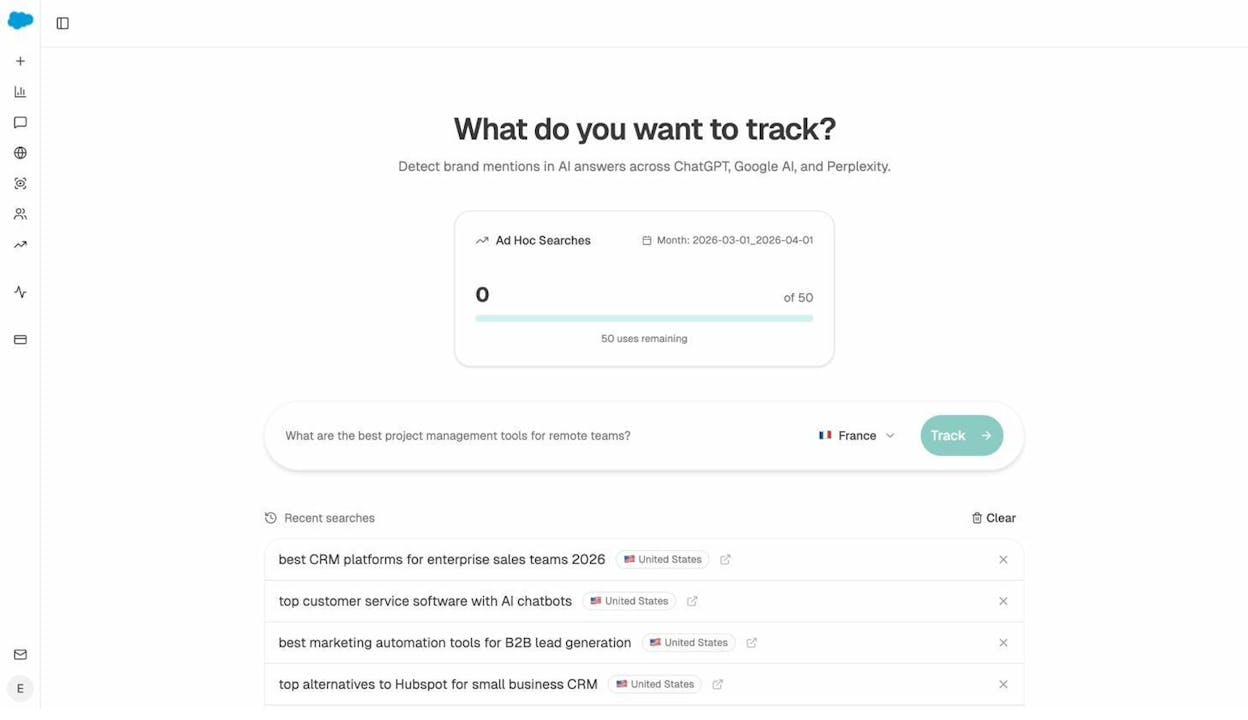
You can do this manually for a handful of keywords. But if you want to track your visibility across dozens of prompts and multiple AI engines systematically, Analyze AI was built for exactly this.
Track Your AI Visibility Over Time
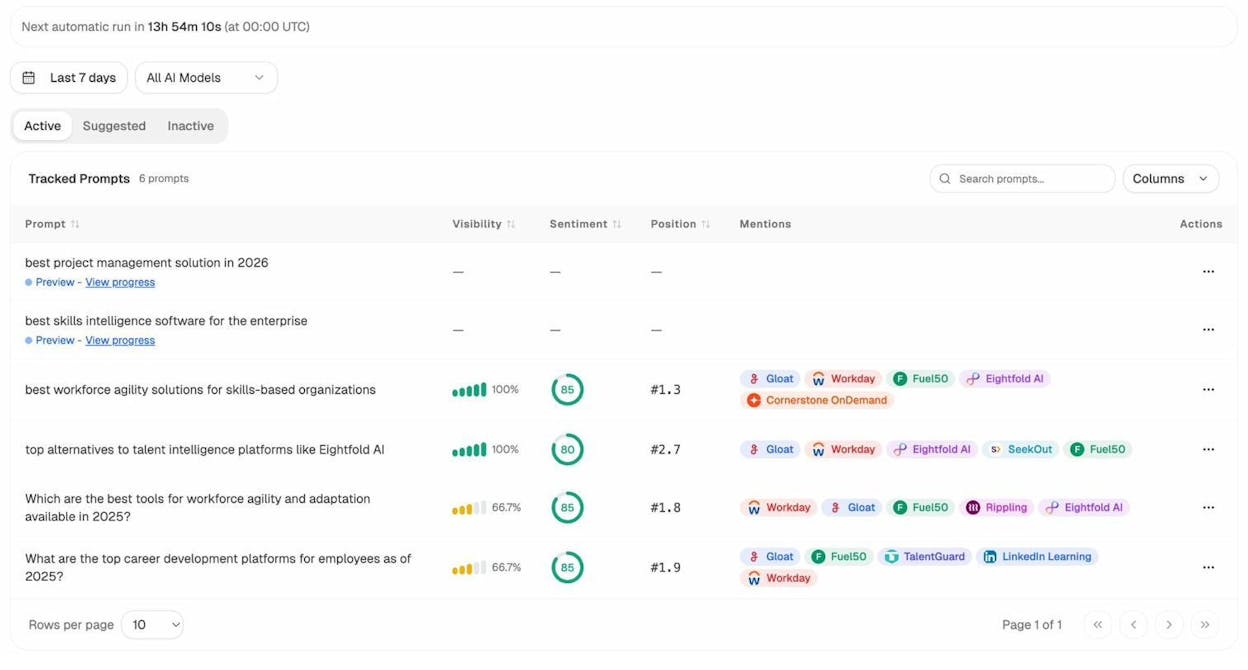
Manual spot checks are a starting point, but they don’t tell you whether you’re gaining or losing ground. AI answers change as models are updated and new content is published. What you need is a way to track your AI visibility the same way you track your Google rankings.
In Analyze AI, the Prompts dashboard lets you set up tracked prompts — the questions your buyers are asking AI engines. For each prompt, you can see your visibility score, sentiment, position, and which competitors are mentioned alongside you.
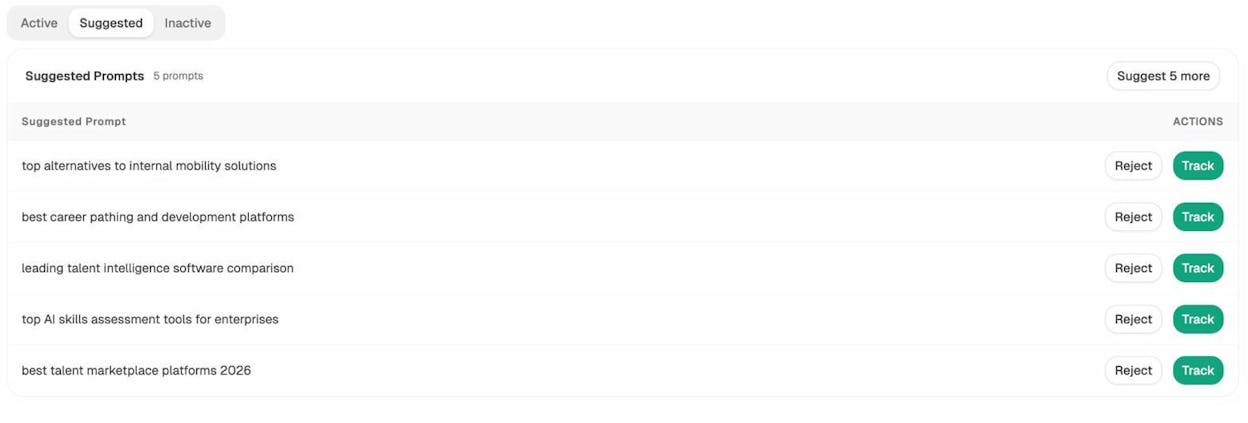
The Suggested tab even recommends prompts you should be tracking based on your industry and competitors — so you don’t have to guess which AI queries matter.
Find Where Competitors Win in AI and You Don’t
This is the AI search equivalent of a competitive gap analysis. In a traditional SERP analysis, you look for keywords where competitors rank and you don’t. In AI search, you look for prompts where competitors are recommended and you’re absent.
The Competitors view in Analyze AI shows you exactly which competitors are mentioned across AI engines, how many times they appear, and which prompts surface them.
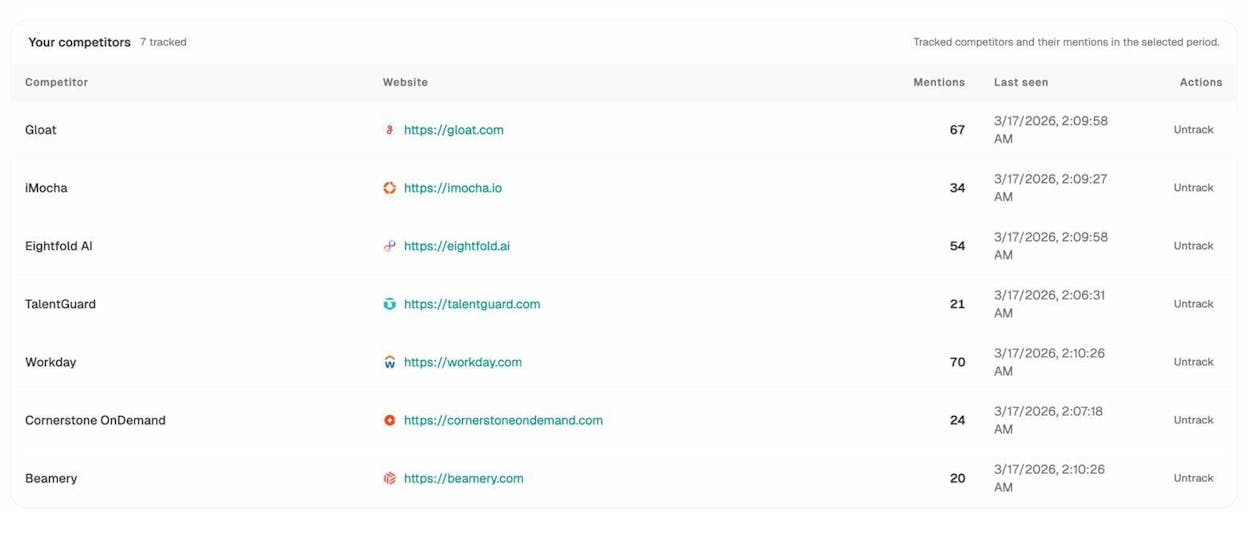
The platform also surfaces Suggested Competitors — brands that are frequently mentioned in AI answers in your space but that you haven’t started tracking yet. These are the ones you might be losing to without knowing it.
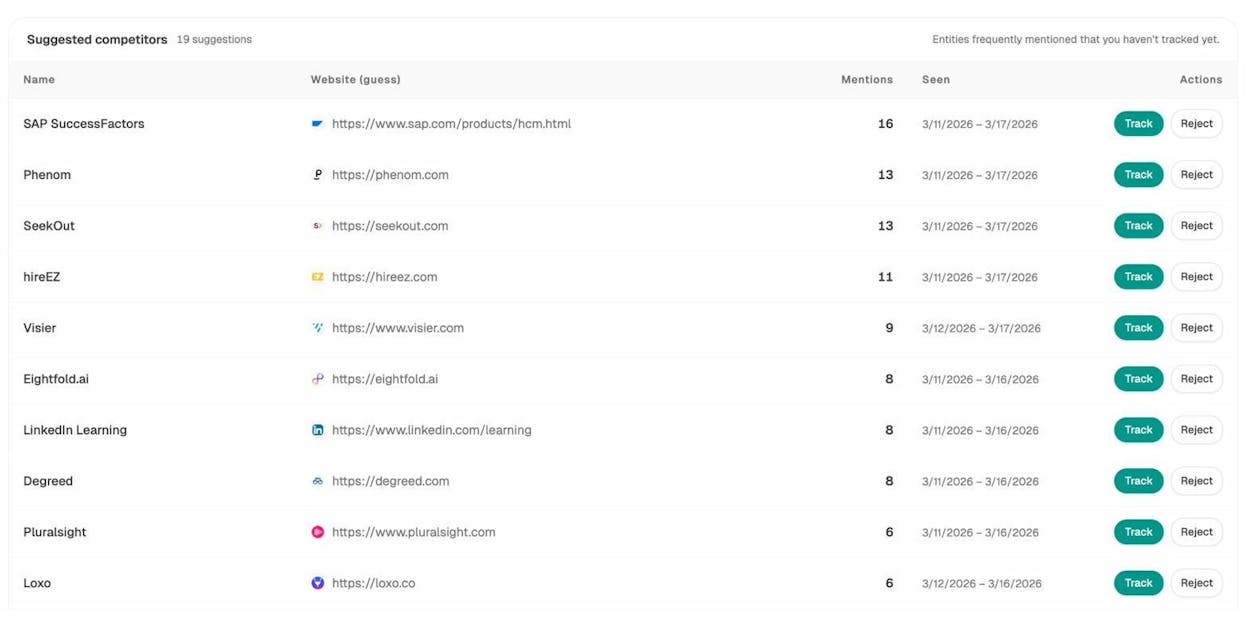
When you find prompts where a competitor is mentioned and you’re not, you’ve found an AI visibility gap. Closing that gap typically involves creating or improving content that directly addresses the question the prompt represents — with clear, factual, well-structured information that AI engines can reference.
Understand Which Sources AI Trusts
AI engines don’t pull answers out of thin air. They cite sources — and understanding which sources get cited most in your space tells you where to focus your off-page efforts.
The Sources dashboard in Analyze AI shows you every URL and domain that AI engines cite when answering questions in your industry. You can see the content type breakdown (blogs, product pages, reviews, social), the top cited domains, and where your site stands relative to the competition.
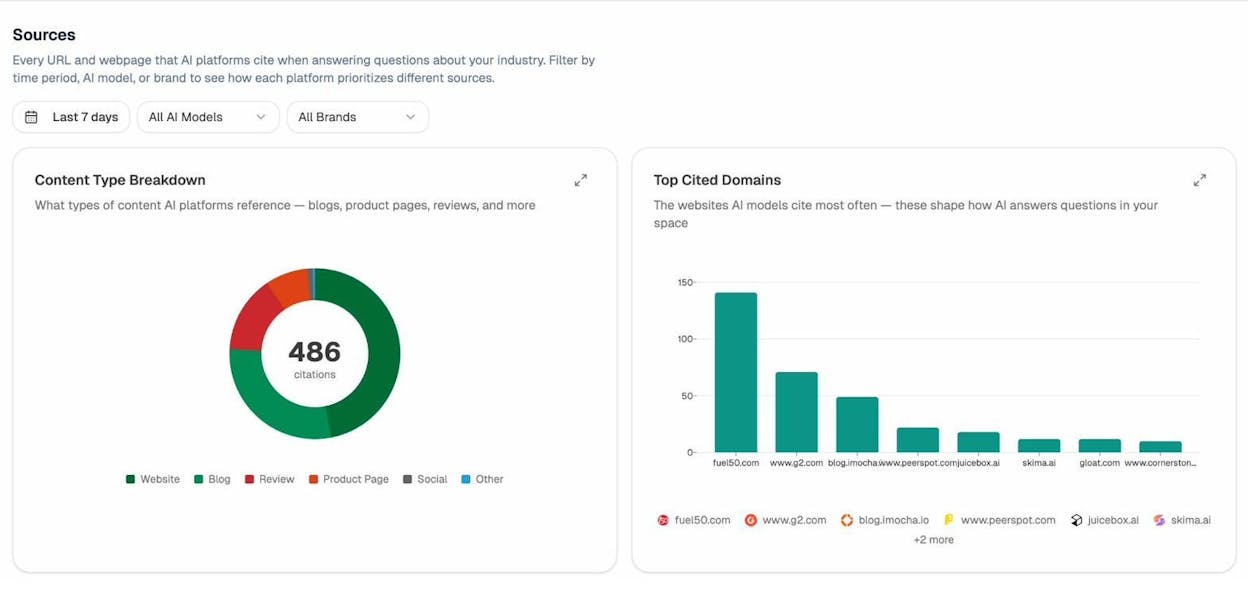
Our research on AI citations found that only 17% of citations come from a brand’s own website. The majority come from third-party sources like review sites, industry publications, and forums. This means your off-page presence matters enormously for AI visibility — just as backlinks matter for Google rankings.
If G2, Capterra, or an industry blog ranks high in your Sources dashboard but your brand has a weak presence on those sites, that’s a specific, actionable gap to close.
Measure AI-Referred Traffic
The final piece of your AI search analysis is traffic. Are people actually clicking through from AI engines to your website?
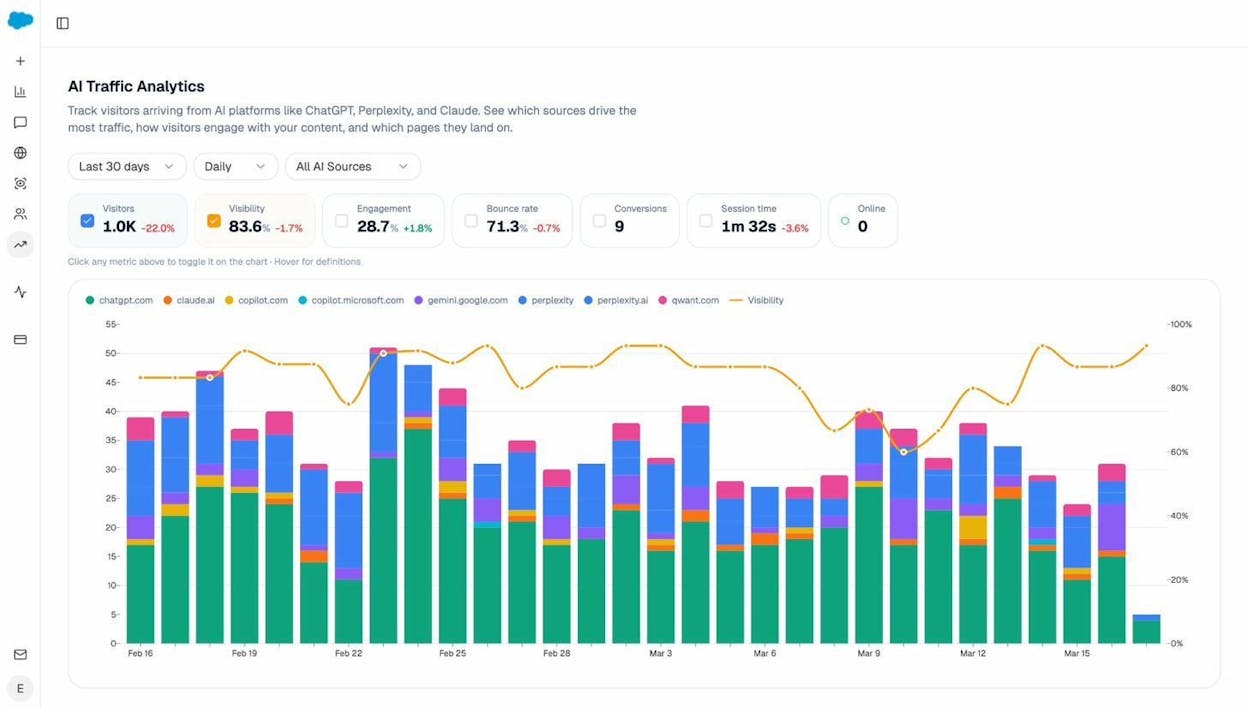
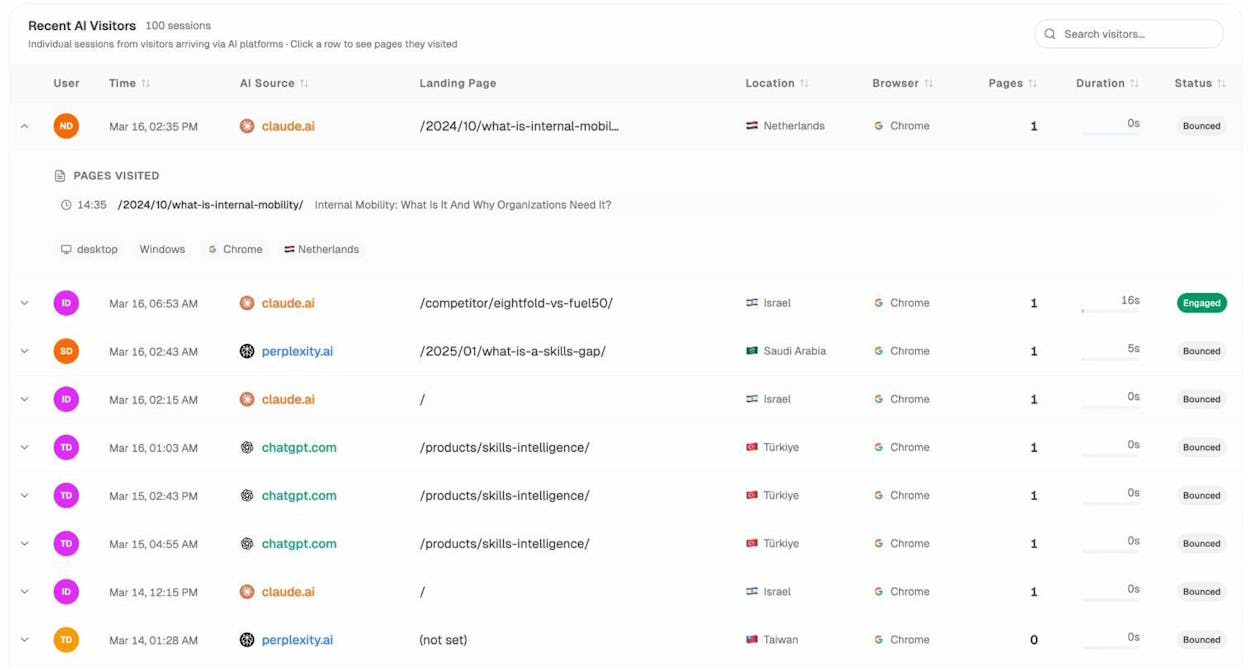
The AI Traffic Analytics dashboard in Analyze AI shows you exactly how many visitors arrive from ChatGPT, Perplexity, Claude, Gemini, and other AI platforms. You can see which pages they land on, how long they stay, and whether they convert.
The Landing Pages report goes deeper, showing you which specific pages on your site receive AI-referred traffic, along with session data, bounce rates, and the prompts that drove each visit.
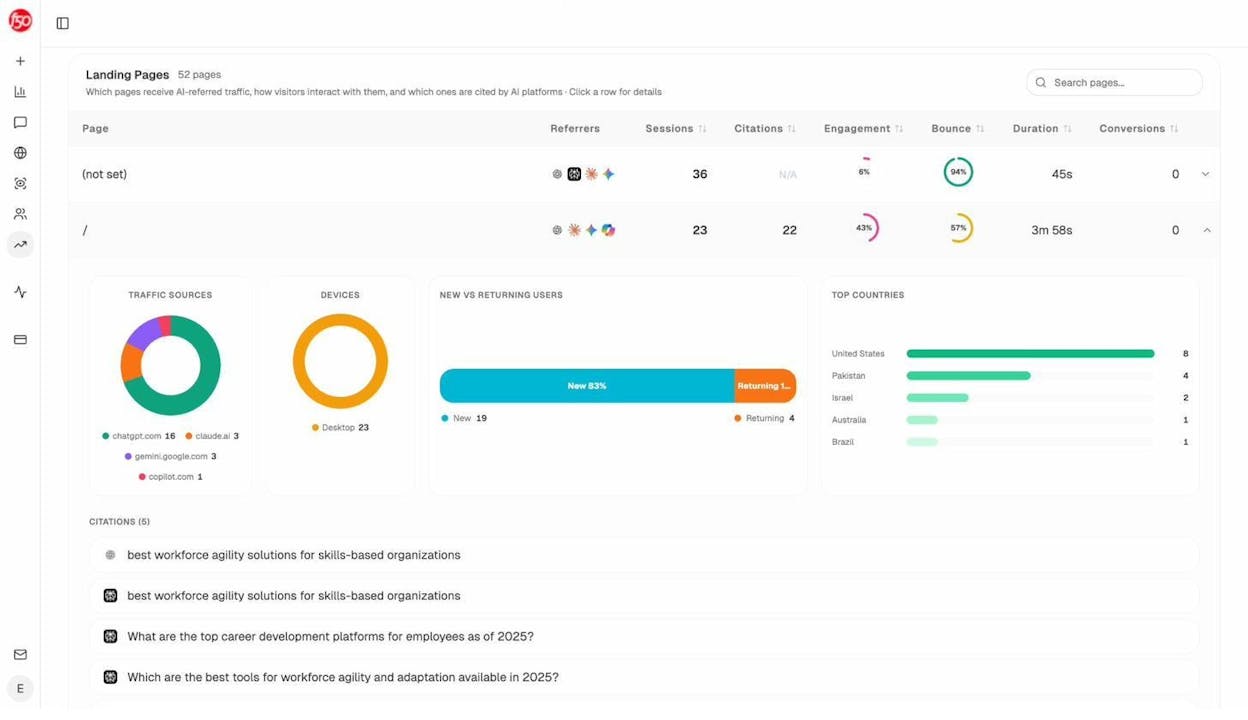
This data is invaluable for your SERP analysis because it tells you which pages are already working in AI search. When you find a page that consistently receives AI traffic, study it. What makes it get cited? What structure, depth, and format does it use? Then apply those patterns to the new content you create from your SERP analysis.
You can even see individual AI visitor sessions — which AI engine referred them, what landing page they hit, how long they stayed, and whether they engaged.
Step 5. Map the Competitive Landscape
At this point, you’ve evaluated the keyword from both the Google SERP and AI search perspective. The final step before you start creating content is to map the full competitive landscape.
Build a SERP Analysis Scorecard
Take everything you’ve learned and put it into a simple scorecard for the keyword. Here’s a template:
|
Factor |
Assessment |
Notes |
|---|---|---|
|
Keyword Difficulty |
Low / Medium / Hard |
KD score and estimated links needed |
|
Traffic Potential |
High / Medium / Low |
TP estimate and realistic projection based on your DR |
|
DR of Top 10 |
Are there outliers? |
Lowest DR site ranking and its position |
|
Backlinks Needed |
Achievable? |
Referring domains needed to match lower-ranked competitors |
|
Search Intent Match |
Yes / No |
Does your planned content format match the SERP? |
|
Content Quality Gap |
Yes / No |
Can you create something meaningfully better? |
|
SERP Features |
Opportunity? |
Which features are present and can you target them? |
|
AI Visibility |
Present / Absent |
Are you mentioned in AI answers for this topic? |
|
Competitor AI Gaps |
Identified? |
Prompts where competitors appear and you don’t |
If most of these factors are favorable, the keyword is worth pursuing. If the scorecard shows high difficulty, strong competition, no quality gap, and no AI opportunity, move on to the next keyword.
Assess Your Brand’s AI Perception
One thing traditional SERP analysis never covers is how AI engines perceive your brand overall. This matters because AI engines don’t just match keywords to pages — they build a narrative about your brand based on everything they’ve read.
The Perception Map in Analyze AI visualizes how your brand and competitors are positioned across two dimensions: visibility (how often you’re mentioned) and narrative strength (how compelling and positive the story AI tells about you).
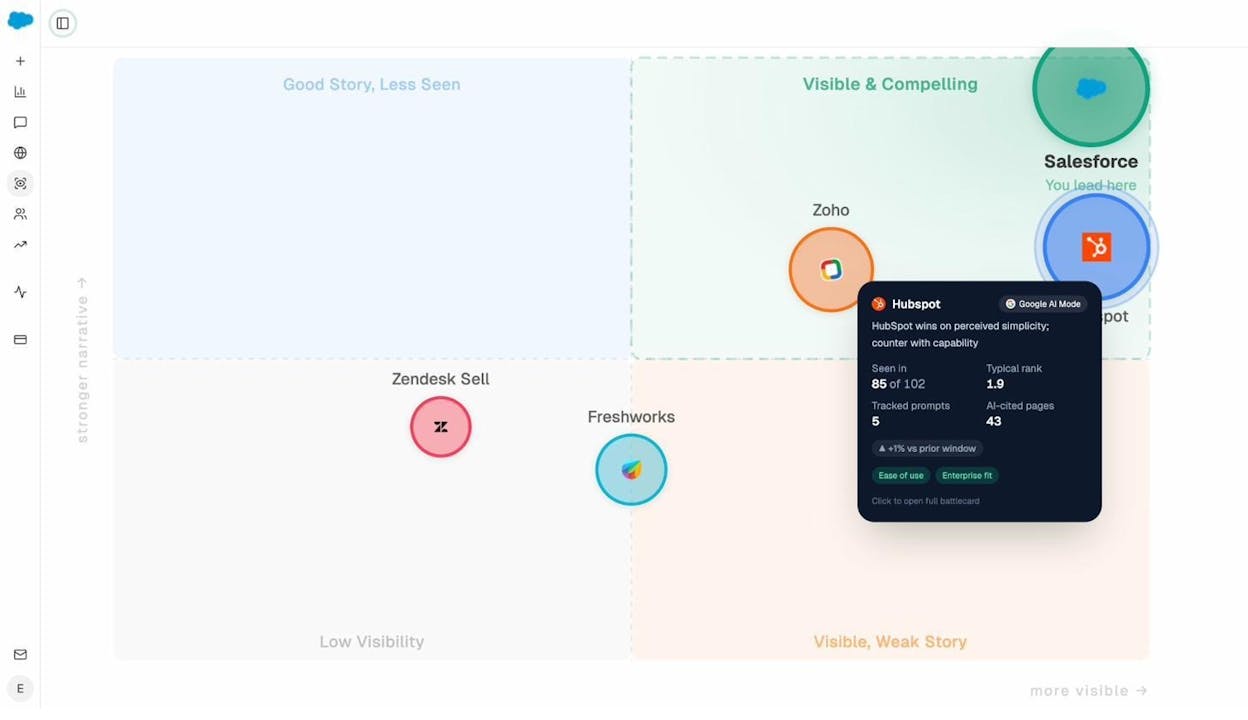
The ideal position is the upper right: “Visible & Compelling.” If you’re in the lower left (“Low Visibility”), you have work to do on both fronts. If you’re in the lower right (“Visible, Weak Story”), AI engines mention you but the narrative isn’t favorable — and that’s potentially worse than not being mentioned at all.
Understanding your perception helps you prioritize: should you focus on getting mentioned more (create more content), or should you focus on improving the narrative (improve existing content and earn better third-party coverage)?
Get Ongoing Alerts Without Logging In
SERP analysis isn’t a one-time exercise. Rankings shift. Competitors publish new content. AI answers change as models are retrained. You need a way to stay current without re-running the entire analysis every week.
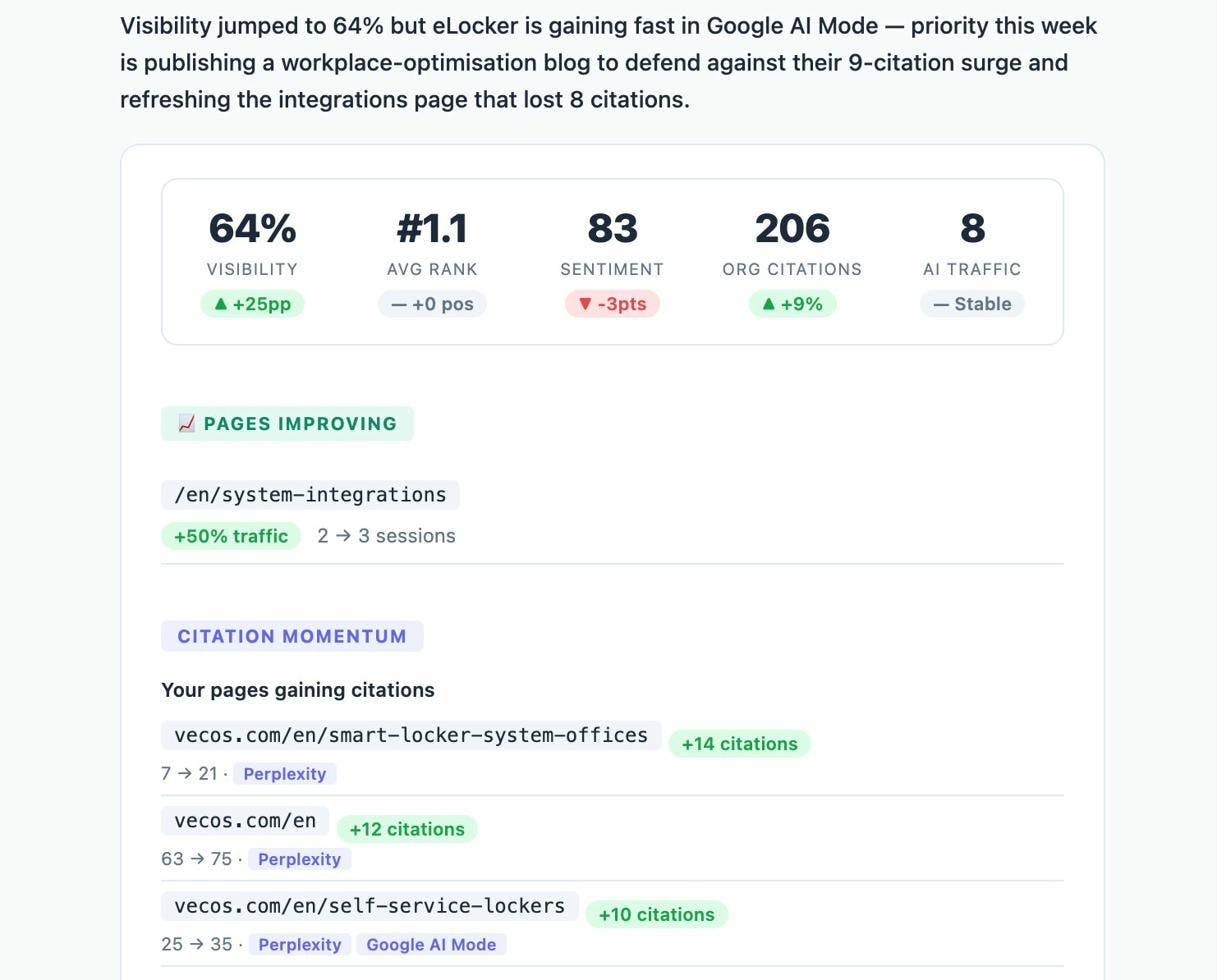
The Analyze AI Weekly Email digest delivers the most important changes to your inbox every Monday: citation changes, competitor shifts, new visibility opportunities, and priority actions. You can stay on top of both your Google and AI search performance without logging in.
How to Do a SERP Analysis With Free Tools
You don’t need expensive software to do a basic SERP analysis. Here’s how to do it using free tools:
-
Check keyword difficulty and search volume. Use the Analyze AI Keyword Difficulty Checker or the Keyword Generator to find keywords and assess their difficulty.
-
Pull the SERP. Use the Analyze AI SERP Checker to see the top 10 results for any keyword in 243 countries. It shows basic SEO metrics for each result.
![[Screenshot: Analyze AI SERP Checker tool showing top 10 results for a sample keyword with metrics]](https://www.datocms-assets.com/164164/1776705867-blobid20.png?auto=format,compress&w=1248&fit=max)
-
Check domain authority. Use the Website Authority Checker to compare your site’s authority against the sites currently ranking.
-
Check your current rankings. Use the Keyword Rank Checker to see where you currently rank for the keyword, if at all.
-
Analyze search intent manually. Open Google and search for your keyword. Look at the top 5 results. What type of content are they? Blog posts? Product pages? Videos? This is your intent signal.
-
Check for AI Overviews. While you’re on the Google SERP, note whether an AI Overview appears. If it does, note which sources are cited.
-
Spot-check AI search. Open ChatGPT or Perplexity and ask the question your keyword represents. Note which brands are mentioned and whether you’re among them.
-
Check your backlink profile. Use the Analyze AI Website Traffic Checker or the Broken Link Checker to understand your site’s link health.
This free approach works well for evaluating individual keywords. For ongoing tracking across many keywords and AI engines, you’ll want a dedicated platform.
Common SERP Analysis Mistakes to Avoid
After analyzing thousands of SERPs, here are the mistakes we see most often:
Focusing only on search volume. A keyword with 50,000 monthly searches is useless if you can’t crack page one. Traffic potential means nothing without a realistic ranking path. Always balance volume with difficulty.
Ignoring search intent. This is the #1 reason content fails to rank. If the SERP is full of product pages and you publish a blog post, you will not rank — no matter how good your content is. Always match the format Google rewards.
Overweighting Domain Rating. DR is a useful directional signal, not a law of physics. Sites with lower DR rank above higher-DR sites all the time. What matters more is page-level quality, relevance, and backlinks. Don’t disqualify a keyword just because the top results have high DR — look for the outliers.
Skipping the content quality assessment. Checking DR and backlinks is not enough. You need to actually open the ranking pages and read them. Many SERPs are dominated by mediocre content that ranks because nothing better exists yet. Those are your best opportunities.
Treating SERP analysis as a one-time task. SERPs change. New competitors enter. SERP features appear and disappear. AI Overviews roll out to new queries. A keyword that was too competitive six months ago might be crackable today. Revisit your analysis periodically.
Ignoring AI search entirely. This is the biggest blind spot in 2026. If you’re only analyzing Google SERPs, you’re only seeing part of the picture. Extend your analysis to AI engines, especially for commercial and informational queries.
Final Thoughts
A SERP analysis is the difference between content that ranks and content that sits on page five collecting dust. It tells you where to compete, how to compete, and whether competing is worth the effort in the first place.
The process itself is straightforward:
-
Get a high-level read on keyword difficulty and traffic potential.
-
Investigate the ranking sites: their domain strength, backlinks, and the intent they serve.
-
Evaluate the content quality gap — can you create something meaningfully better?
-
Check for SERP feature opportunities you can target.
-
Extend your analysis to AI search to capture the full picture of how buyers find answers.
-
Build a scorecard, make a go/no-go decision, and create content designed to win.
The SEO landscape has evolved. Google’s results page now competes with AI-powered answers from ChatGPT, Perplexity, Gemini, and others. The brands that win will be the ones that analyze and optimize for both — not one or the other.
If you want to track your visibility across both Google and AI search engines, Analyze AI gives you the data to do it. Start with the free tools and see where you stand.

Ernest

Ibrahim


