



Summarize this blog post with:


In this article, you’ll learn how to identify bad backlinks, remove the ones that are hurting your site, and decide whether you actually need to take action at all. You’ll get a step-by-step process for handling manual actions, a practical framework for situations where there’s no penalty but something still feels off, and a clear method for auditing, disavowing, and monitoring your link profile over time. You’ll also learn how your backlink profile affects your visibility in AI search engines like ChatGPT, Perplexity, and Google AI Mode — and what to do about it.
Table of Contents
What Are Bad Backlinks?
A bad backlink is any link pointing to your site that was created to manipulate search engine rankings rather than to genuinely reference your content.
Not every low-quality link is a bad link. The web is messy. Random directories, comment spam bots, and scraped content farms link to millions of sites every day. In most cases, Google ignores these automatically.
The links you need to worry about are the ones that fall into patterns Google considers link spam. Here’s what qualifies:
|
Type of Bad Backlink |
What It Looks Like |
Risk Level |
|---|---|---|
|
Paid links |
You paid for a link on a blog, directory, or sponsored post specifically to pass PageRank |
High |
|
Excessive link exchanges |
“Link to me and I’ll link to you” at scale |
Medium-High |
|
Private blog networks (PBNs) |
Links from sites that exist solely to link to other sites |
High |
|
Automated or programmatic links |
Links created by bots, scrapers, or automated tools |
Medium |
|
Keyword-stuffed anchor text |
Links with exact-match commercial anchors like “best cheap SEO tools 2026” from unrelated sites |
High |
|
Low-quality directory links |
Mass submissions to directories that accept any site with no editorial review |
Low-Medium |
|
Footer and sidebar links |
Site-wide links embedded in templates across hundreds of pages |
Medium |
|
Forum and comment spam |
Links dropped in forum signatures, blog comments, or guestbook pages |
Low |
The risk isn’t just about Google penalties. Search engines — both traditional and AI-powered — use link signals to evaluate a site’s trustworthiness. A link profile full of spammy, manipulative links can suppress your rankings in Google, and it can also affect whether AI models like ChatGPT, Perplexity, or Gemini reference your content when answering questions. More on that later.
First, let’s cover what to do if you’ve already been penalized.
How to Remove Backlinks If You Have a Manual Action
If Google has issued a manual action against your site for unnatural links, you need to act. This is not a situation where you can wait and hope the algorithm sorts it out.
Google’s official guidance is clear: first try to get the links removed from the source, then disavow any links you can’t get removed.
Here’s the full process, step by step.
Step 1: Check Google Search Console for a Manual Action
Log in to Google Search Console. In the left sidebar, expand Security & Manual Actions and click Manual actions.
If there’s a problem, you’ll see a message describing the issue — usually something like “Unnatural links to your site.”
![[Screenshot: Google Search Console showing the Manual Actions panel with an unnatural links warning]](https://www.datocms-assets.com/164164/1776709620-blobid1.png?auto=format,compress&w=1248&fit=max)
If the panel says “No issues detected,” you don’t have a manual action. Skip ahead to the section on whether you should still remove backlinks.
Step 2: Export Your Full Backlink Profile
Stay in Google Search Console. Navigate to Links in the left sidebar, then click Export External Links in the top right corner.
![[Screenshot: Google Search Console Links report showing the Export External Links button]](https://www.datocms-assets.com/164164/1776709627-blobid2.png?auto=format,compress&w=1248&fit=max)
Download this as a spreadsheet. This gives you every link Google has recorded pointing to your site — and since Google is the one who issued the penalty, their data is the right starting point.
You can supplement this with data from a third-party backlink tool for a more complete picture. Tools like Analyze AI’s Website Authority Checker can help you quickly assess the quality of the domains linking to you.
Step 3: Identify the Unnatural Links
This is the most important step, and the one most people rush through. You need to manually review the links and flag the ones that look unnatural.
You don’t have to evaluate every single link. Instead, look for patterns. If you received a manual action, something systematic caused it — usually paid links, a PBN, or an aggressive link exchange scheme. Your job is to find that pattern.
Here’s what to look for in your spreadsheet:
Over-optimized anchor text. If dozens of links all use the same exact-match commercial anchor (like “best project management software” or “cheap hosting deals”), that’s a red flag. Natural link profiles have a mix of branded anchors, URL anchors, and generic phrases like “click here” or “this article.”
![[Screenshot: Example of a backlink analysis tool showing an anchor text distribution report with obvious spam anchors highlighted]](https://www.datocms-assets.com/164164/1776709627-blobid3.jpg?auto=format,compress&w=1248&fit=max)
Clusters of links from the same type of site. If you see a batch of links all coming from sites that look the same — similar templates, thin content, no real audience — they’re likely from a PBN or link farm.
Links from completely unrelated niches. A link from a casino review site to your B2B SaaS blog is almost certainly paid or spammy.
Links from sites in languages you don’t operate in. If you run an English-language site and you’re getting dozens of links from sites in languages where you have no audience, investigate.
Links with no editorial context. Links buried in auto-generated content, widget embeds, or site-wide footers serve no legitimate purpose.
To speed up the review, sort your exported links by referring domain and look at the domains themselves. Open suspicious ones in a browser. Ask yourself: does this look like a real website with a real audience? Or does it exist solely to sell links?
Tip: If you aren’t confident running a backlink audit yourself, hire an experienced SEO consultant or agency. A botched audit — where you accidentally disavow good links — can do more damage than the bad links themselves.
Step 4: Contact Site Owners to Request Link Removal
Once you’ve identified the unnatural links, try to get them removed at the source. This means contacting the site owner or webmaster of every site that has a link you want removed.
Here’s how to find their contact information:
Look for a contact page, an “About” page, or a published email address on the site. If that fails, try the catch-all email format like [email protected] or [email protected]. You can also use an email finder tool like Hunter.io or search for the site owner on LinkedIn.
Keep your outreach email short. Site owners get a lot of email, and the ones running spammy sites get even more. Here’s a template that works:
Subject: Link removal request — [yourdomain.com]
Hi [Name],
I’m reviewing the link profile for [yourdomain.com] and need to request that you remove a link from your site.
Your page: [URL of their page containing the link]
Link pointing to: [URL of your page being linked to]
Could you please remove this link? If you’ve removed it, I’d appreciate a quick reply confirming.
Thank you, [Your name] [Your email at your domain]
A few practical tips on outreach:
Send the email from an address at your own domain (not a gmail.com address). It adds credibility. Track which site owners you’ve contacted, what you asked them, and whether they responded. You’ll need this documentation for your reconsideration request. Don’t pay for link removal. Google’s John Mueller has confirmed that links you can’t get removed can be disavowed instead — you’re not expected to pay for removals.
Some site owners will respond quickly. Others will ignore you. A few will offer to remove the link for a fee. Document everything and move on. You’re not going to get every link removed, and Google doesn’t expect you to.
Step 5: Disavow the Links You Can’t Remove
For links that you can’t get removed — because the site owner didn’t respond, the site is abandoned, or they want payment — you’ll need to use Google’s Disavow Tool.
The disavow tool tells Google to ignore specific links when evaluating your site. It’s effective, but it’s also risky if used carelessly. Google’s Gary Illyes has described the disavow tool as a very powerful instrument that can cause damage if used incorrectly.
How to create a disavow file:
The disavow file is a plain .txt file with a specific format. You can disavow individual URLs or entire domains. In most cases, disavowing at the domain level is more efficient — if a domain is spammy, all links from it are likely spammy.
Here’s what a properly formatted disavow file looks like:
# Links I contacted the owner about on 2026-03-15
# No response received after 3 follow-ups
http://spamsite.example.com/blog/post-with-my-link.html
http://spamsite.example.com/resources/links-page.html
# Domains identified as PBN sites
domain:fakeblog1.example.com
domain:fakeblog2.example.com
domain:linkfarm.example.com
# Paid link sites — contacted, asked for payment to remove
domain:paidlinksite.example.com
A few rules to follow: lines starting with # are comments (use them to document your reasoning), use domain: to disavow an entire domain, and list one URL or domain per line.
How to upload the disavow file:
Go to the Disavow Links page in Google Search Console. Select your property and upload your .txt file.
![[Screenshot: Google Search Console Disavow Links upload page]](https://www.datocms-assets.com/164164/1776709635-blobid4.jpg?auto=format,compress&w=1248&fit=max)
If you already have a disavow file uploaded, download it first and add your new entries to it. Uploading a new file replaces the old one entirely — it doesn’t append to it.
Important: Don’t disavow links you’re not sure about. If a link looks fine but comes from a low-authority site, leave it alone. Low-authority is not the same as spammy. Disavowing legitimate links can hurt your rankings.
Step 6: Submit a Reconsideration Request
After you’ve done the work — contacted site owners, documented your efforts, and uploaded your disavow file — go back to the Manual actions page in Google Search Console and click Request Review.
![[Screenshot: Google Search Console Manual Actions page showing the Request Review button]](https://www.datocms-assets.com/164164/1776709635-blobid5.jpg?auto=format,compress&w=1248&fit=max)
In your request, explain what you did. Google wants to see that you made a genuine effort. Include details like how many site owners you contacted, how many links were removed, and how many you disavowed. Attach your documentation if the form allows it.
Google typically reviews reconsideration requests within a few days to a few weeks. If they approve it, the manual action is lifted and your rankings should begin to recover. If they reject it, you’ll get feedback on what to fix — and you’ll need to repeat the process.
Step 7: Monitor Your Recovery
Once the manual action is lifted, your rankings won’t bounce back overnight. Recovery can take weeks or months, depending on how severely the penalty affected your site and how competitive your keywords are.
Set up a monitoring routine:
Track your keyword rankings weekly to watch for recovery trends. Check Google Search Console regularly for any new manual actions. Run a backlink check every month for the first six months to catch any new spammy links before they accumulate.
Use Analyze AI’s Broken Link Checker to make sure the links that were removed are actually gone and haven’t been replaced.
Should You Remove Backlinks Without a Manual Action?
If you don’t have a manual action, the question gets more nuanced. The SEO community is split on this, and there’s no universal right answer.
When a LinkedIn poll asked SEOs how they deal with low-quality links, the majority said they either do nothing or use the disavow tool. Only a small percentage actively try to remove links from the source.
This makes sense. Removing backlinks is time-consuming work with uncertain payoff. And there’s growing evidence that search engines are getting better at simply ignoring bad links on their own.
Bing retired its disavow tool entirely in 2023, with its Principal Program Manager explaining that Bing can now differentiate between natural and unnatural links without human intervention. Many SEOs expect Google to follow suit eventually.
But “eventually” isn’t “right now.” And specific situations still warrant action. Here are the five most common scenarios and what to do in each.
Scenario 1: No Manual Action, But a Significant Traffic Drop
A traffic drop can have many causes — algorithm updates, technical issues, content decay, increased competition. Links are just one possibility.
Before you start removing backlinks, rule out other causes first. Run a technical SEO audit to check for crawl errors, indexing issues, or site speed problems. Check whether the drop coincides with a Google algorithm update. Review your content to see if competitors have published better, more recent pages on the same topics.
If you’ve eliminated other causes and you have a history of paid links or link schemes, then a backlink audit is worth doing. Follow the same process described above — identify the unnatural links, try to remove them, and disavow what’s left.
But if your link profile looks normal and the drop happened after an algorithm update, the answer is almost certainly not links. Focus your energy elsewhere.
Scenario 2: A Third-Party Tool Says You Have “Toxic” Links
Google’s John Mueller has said publicly that the concept of “toxic” links — as defined by third-party tools — is essentially made up. He recommended moving on to more reliable SEO tools and approaches.
Third-party toxicity scores are calculated using proprietary algorithms that don’t match how Google actually evaluates links. A link flagged as “toxic” by one tool might be perfectly fine in Google’s eyes.
This doesn’t mean you should ignore your link profile entirely. But don’t panic-disavow every link a tool flags as toxic. Instead, manually review any links that look genuinely suspicious — sites that exist only to sell links, sites with no real content, sites in completely unrelated niches with exact-match anchor text.
The key difference: a tool’s toxicity score is not evidence of a problem. A pattern of clearly manipulative links is.
Scenario 3: Many Low-Authority Links You Don’t Recognize
Low Domain Rating (or Domain Authority) does not mean a link is bad. Plenty of legitimate websites — small blogs, niche forums, local business directories — have low authority scores simply because they’re small. That’s normal.
If you see a lot of low-authority links you don’t recognize, open a sample of the linking sites in your browser. If they look like real websites with real content and a real audience, leave them alone. If they look like auto-generated spam, you can disavow them — but only if there are enough of them to constitute a real concern.
In most cases, no action is required. Google handles this automatically.
Scenario 4: You Paid for Links But Haven’t Been Penalized
If you’ve paid for links in the past and haven’t received a manual action, the safest short-term move is usually to do nothing.
Here’s why: disavowing links can reduce your rankings, as Patrick Stox demonstrated when he tested the impact of disavowing links on the Ahrefs blog and saw a noticeable drop in organic traffic. If those paid links are actually helping your rankings (which they might be, penalty-free), disavowing them removes that benefit.
That said, the risk isn’t zero. Google could issue a manual action at any time if they detect the pattern. If the paid links are obvious — exact-match anchors from unrelated sites — the risk is higher.
A pragmatic approach: stop buying links going forward, focus on earning links through quality content, and monitor your link profile regularly. If a manual action ever arrives, you’ll have a cleaner starting point.
Scenario 5: You’re the Victim of Negative SEO
Negative SEO — where a competitor deliberately builds spammy links to your site to trigger a penalty — is real but rare, and Google has said their algorithms are designed to handle most cases automatically.
For basic negative SEO attacks (thousands of forum spam links or low-quality directory submissions), Google can usually identify and ignore the links without your intervention.
For more sophisticated attacks — where someone builds links with exact-match commercial anchor text from PBN-style sites to make it look like you did it — you may need to take action. In these cases, document the attack (take screenshots of the linking sites, note the dates the links appeared), disavow the attacking domains, and consider seeking advice from an SEO professional who specializes in penalty recovery.
How to Audit Your Backlink Profile (Step by Step)
Whether you have a manual action or you’re just doing routine maintenance, here’s a practical process for auditing your backlink profile.
Step 1: Gather Your Backlink Data
Start with Google Search Console. Export your full list of external links. This is the baseline — it’s the data Google actually uses.
Then supplement it with data from a backlink analysis tool. Different tools crawl the web independently, so they’ll often find links that Google Search Console doesn’t show. Using Analyze AI’s Website Authority Checker, you can quickly check the authority of any domain linking to your site.
![[Screenshot: Analyze AI Website Authority Checker showing domain authority metrics for a sample domain]](https://www.datocms-assets.com/164164/1776709640-blobid6.png?auto=format,compress&w=1248&fit=max)
Combine the data in a single spreadsheet. Remove duplicates. You should end up with a master list of every known backlink to your site.
Step 2: Sort and Filter for Red Flags
With your master list ready, sort by referring domain and start looking for patterns:
Anchor text analysis. Group your links by anchor text. A healthy link profile has mostly branded anchors (your company name, your URL) with some natural variation. If a large percentage of your anchors are exact-match commercial keywords, that’s a signal worth investigating.
Referring domain quality. Spot-check the domains linking to you. Open them in a browser. Ask: is this a real website with real content? Or does it exist solely to sell or exchange links?
Link velocity. Did you gain an unusual number of links in a short time? Sudden spikes can indicate paid link campaigns or negative SEO attacks. They can also indicate that something you published went viral — context matters.
Geographic and language patterns. If your site targets English-speaking audiences and you’re getting clusters of links from sites in unrelated languages, those links are worth reviewing.
Step 3: Categorize Each Link
Create three categories in your spreadsheet:
|
Category |
Action |
Examples |
|---|---|---|
|
Keep |
No action needed |
Legitimate editorial links, mentions from real publications, links from relevant industry sites |
|
Investigate |
Review manually before deciding |
Low-authority links from unfamiliar sites, links with generic anchors from borderline sites |
|
Remove/Disavow |
Contact for removal or add to disavow file |
Paid links, PBN links, links from sites that exist only to sell links, links with keyword-stuffed anchors |
The goal is not to remove every imperfect link. It’s to identify and address the links that are clearly manipulative or unnatural.
Step 4: Document Everything
For every link you flag for removal or disavowal, record the reason. This documentation serves two purposes: it helps you write a more effective reconsideration request if you need one, and it creates a reference for future audits so you don’t re-evaluate the same links.
How to Write and Submit a Disavow File
Google’s disavow file has a specific format. Getting it wrong can mean Google ignores your disavow entirely — or worse, you accidentally disavow the wrong links.
Format Rules
The file must be a plain text file (.txt) encoded in UTF-8 or 7-bit ASCII. Each entry goes on its own line. Comments start with #. To disavow an entire domain, prefix with domain:. To disavow a single URL, just list the full URL.
Here’s a complete, well-documented example:
# Disavow file for example.com
# Last updated: 2026-04-01
# Contact: [email protected]
# === PAID LINKS ===
# These links were purchased through a link broker in 2024
# Site owners contacted on 2026-02-15, no response received
domain:paidlinks-example.com
domain:seopackage-example.com
# === PBN LINKS ===
# Network identified by shared hosting IP and identical site templates
domain:blog-network-1.com
domain:blog-network-2.com
domain:blog-network-3.com
# === INDIVIDUAL SPAMMY PAGES ===
# Forum spam — automated comments with keyword-stuffed anchors
http://forum.example.com/thread/12345-cheap-seo-tools
http://forum.example.com/thread/67890-best-marketing-software
# === NEGATIVE SEO ===
# Links appeared 2026-01-20, 50+ links in one day from same IP range
domain:attack-site-1.example.com
domain:attack-site-2.example.com
Domain vs. URL Disavow
In most cases, disavow at the domain level. If a domain is spammy, individual URLs from that domain are spammy too. URL-level disavows make sense only when a legitimate site has one specific page with a problematic link — for example, a real blog where someone left a spammy comment linking to your site.
Common Mistakes
Disavowing too aggressively. Some site owners panic and disavow hundreds of domains, including legitimate ones. Every disavowed domain is a link signal you’re telling Google to ignore. If those links were helping your rankings, disavowing them will hurt.
Not downloading the existing disavow file first. If you already have a disavow file uploaded to Google Search Console, uploading a new one replaces the old one entirely. Always download the existing file, add your new entries, and upload the combined version.
Using the wrong file format. The file must be plain text (.txt). A .csv, .docx, or .xlsx file won’t work. Make sure your text editor isn’t adding hidden formatting.
Forgetting to include comments. Comments aren’t required, but they make your file maintainable. Six months from now, you’ll want to know why you disavowed a particular domain.
How Bad Links Affect Your AI Search Visibility
This is where things get interesting — and where most guides on removing backlinks stop short.
Traditional backlink cleanup focuses exclusively on Google’s search rankings. But search is evolving. AI answer engines like ChatGPT, Perplexity, Claude, Gemini, and Google AI Mode now generate answers by pulling from and citing web sources. The signals these models use to decide which sources to trust overlap significantly with the signals Google uses — including the quality and trustworthiness of a site’s backlink profile.
Here’s what that means in practice: if your site’s link profile is full of manipulative links, it can hurt your trustworthiness not just in Google’s eyes, but in the eyes of AI models deciding whether to cite you in their answers.
Why Link Quality Matters for AI Citations
AI answer engines don’t just check whether your content is relevant to a query. They evaluate whether your site is a trustworthy, authoritative source worth citing. Research on how LLMs cite sources shows that models favor pages from domains with strong authority signals — and link quality is a major component of domain authority.
A site drowning in PBN links, paid link schemes, and forum spam looks less trustworthy to both search algorithms and AI models. Cleaning up your link profile isn’t just about avoiding penalties anymore. It’s about maintaining the trust signals that make your content citable across all search channels.
How to Audit Your “Citation Profile” in AI Search
Just as you audit your backlink profile for traditional SEO, you should also monitor how AI platforms reference your brand. This is where a tool like Analyze AI comes in.
Analyze AI’s Sources dashboard shows you every URL and webpage that AI platforms cite when answering questions about your industry. You can see which of your pages are being cited, how often, and by which AI models.
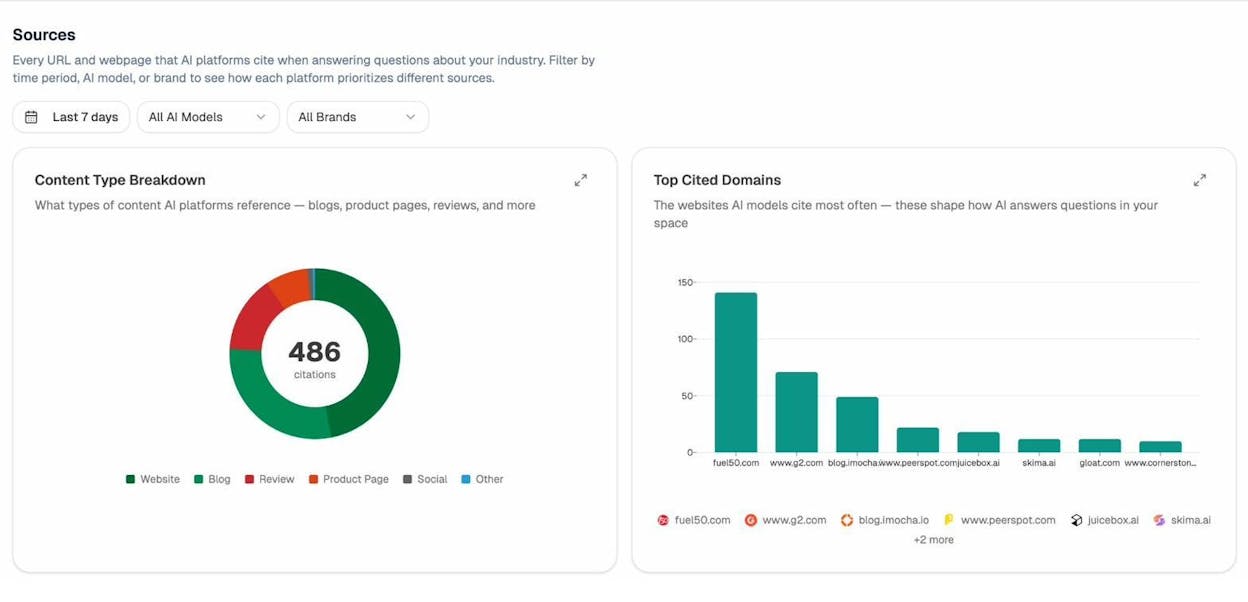
This matters for backlink cleanup because it gives you a parallel view of your site’s reputation. If you clean up your traditional link profile but your AI citation profile is weak, you’re only solving half the problem.
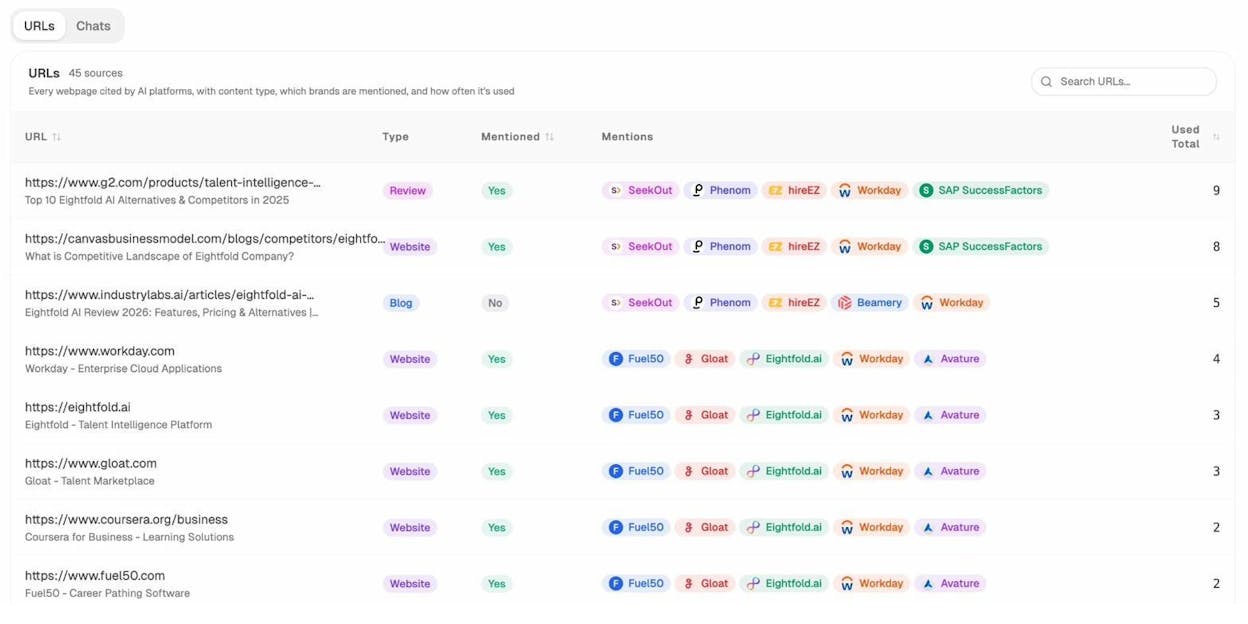
The Sources detail view goes deeper. It shows every URL cited by AI platforms, the content type (blog, website, review, product page), and which brands are mentioned alongside yours.
Practical Steps: Combining Link Cleanup with AI Citation Monitoring
Here’s how to integrate AI search monitoring into your backlink cleanup process:
Run both audits in parallel. While you’re auditing your backlink profile, also review your AI citation profile in Analyze AI. Are the pages that AI models cite the same pages with the strongest link profiles? If your highest-cited pages have clean backlink profiles, that’s a good sign.
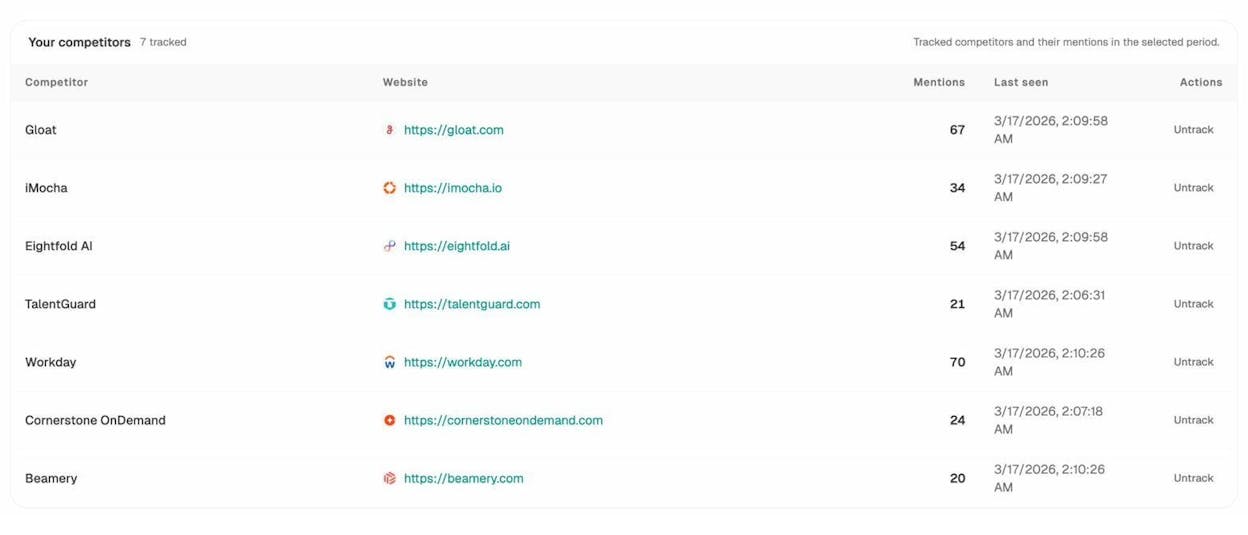
Check competitor citations. Analyze AI’s Competitors dashboard shows which competitors appear alongside your brand in AI answers and how often. If competitors with cleaner link profiles are getting more citations than you, your link profile might be part of the reason.
Monitor your AI traffic after cleanup. After you clean up your backlink profile, track whether your AI search traffic changes. Analyze AI’s AI Traffic Analytics dashboard shows exactly how many visitors arrive from each AI engine — ChatGPT, Perplexity, Claude, Copilot, Gemini — broken down by day.
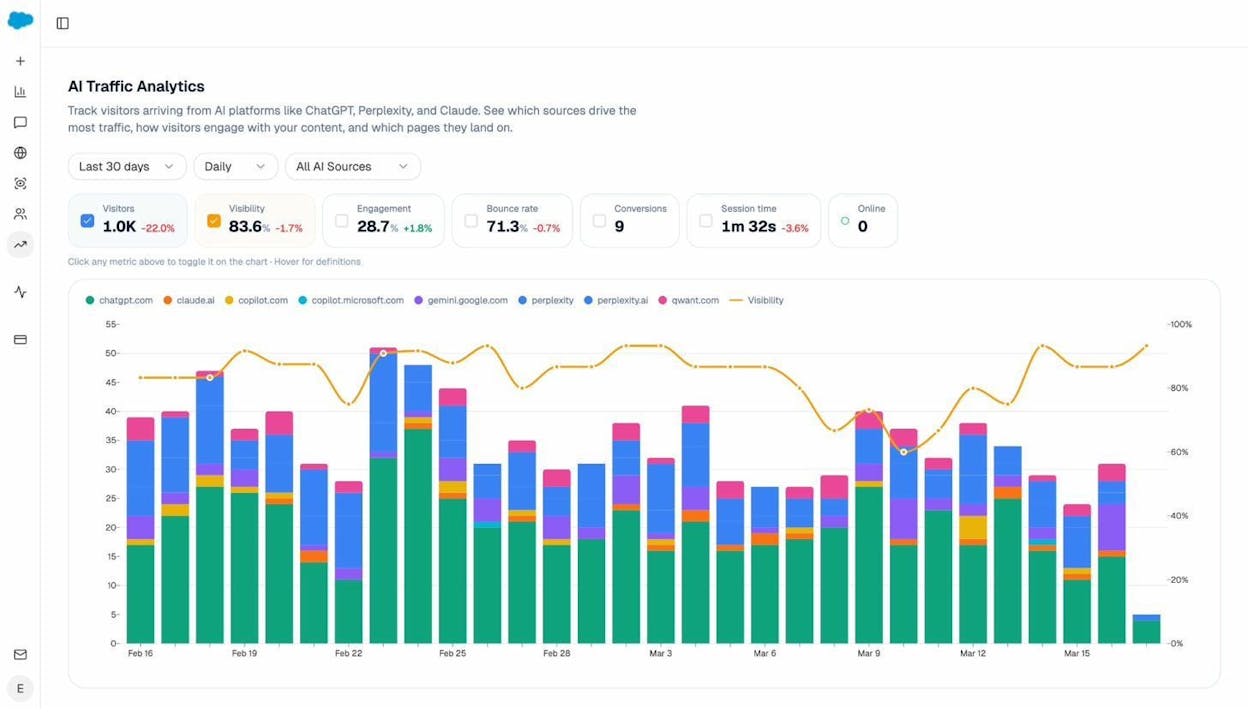
You can even see which specific landing pages receive AI-referred traffic, how those visitors engage, and whether they convert.
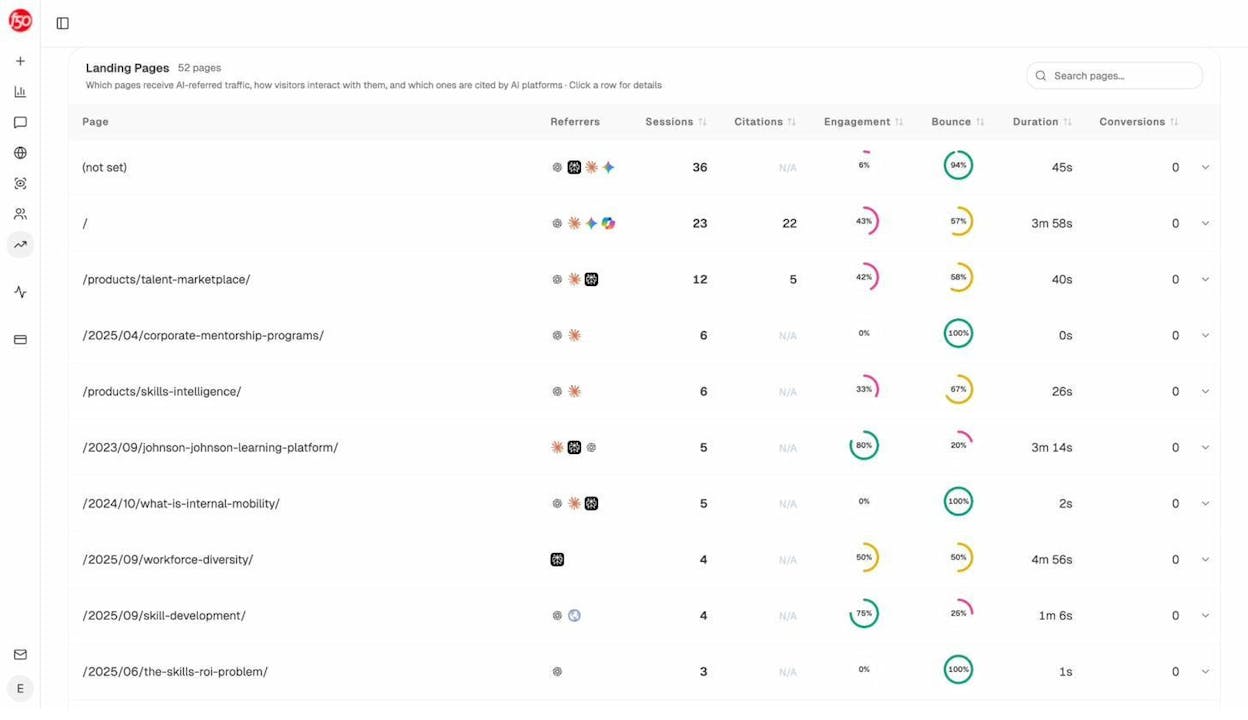
This is the kind of monitoring that separates modern SEO from legacy SEO. You’re not just watching your Google rankings recover — you’re tracking whether your cleanup improves your visibility across every search channel, including the AI-powered ones that are growing fastest.
How to Monitor Your Link Profile Going Forward
Backlink cleanup isn’t a one-time project. New spammy links will appear. Old links will break. Your competitors will change their strategies. You need a monitoring routine that catches problems before they escalate.
Set Up a Monthly Backlink Check
Once a month, export your latest backlink data and compare it to your previous export. Look for new domains linking to you that you don’t recognize. If your site is large, focus on links gained in the last 30 days.
Use Analyze AI’s Broken Link Checker as part of this routine. Broken inbound links — where someone links to a page on your site that no longer exists — are missed opportunities. If a legitimate site links to a dead page, set up a redirect to capture that link equity.
Use SERP and Rank Tracking Tools
Track your keyword rankings for your most important terms. Sudden drops can be an early warning of link-related issues. Cross-reference ranking drops with your backlink data to see if a spike in new spammy links coincides with the decline.
Analyze AI’s SERP Checker lets you see who’s ranking for your target keywords and how the competitive landscape is shifting.
Monitor AI Search Citations Alongside Backlinks
As AI search grows as a traffic channel, your monitoring routine should cover both traditional backlinks and AI citations. Use Analyze AI to track which of your pages are being cited by AI models, how your citation share compares to competitors, and whether your AI-referred traffic is trending up or down.
The brands that treat AI search as an additional organic channel — alongside traditional SEO — will have the most complete picture of their search health. Your backlink profile is one input. Your citation profile is another. Monitoring both gives you the full view.
Final Thoughts
Removing backlinks is tedious, unglamorous work. There’s no dopamine hit of watching a link go live on a high-authority domain. It’s the opposite — you’re undoing damage, cleaning up messes, and filling out disavow files.
But it matters. A clean link profile protects your Google rankings, supports your reconsideration requests, and — increasingly — strengthens the trust signals that AI answer engines use when deciding whether to cite your content.
If you have a manual action, the path is clear: audit, remove, disavow, request review. If you don’t have a manual action, be deliberate. Don’t panic-disavow based on a third-party tool’s toxicity score. Don’t ignore a pattern of clearly manipulative links either. Find the middle ground.
And whatever you do, don’t treat backlink cleanup as a one-time event. Build it into your regular SEO routine, right alongside your content audits and keyword research. The sites that win in both traditional search and AI search are the ones that maintain clean, trustworthy profiles across every signal that matters.

Ernest

Ibrahim


