



Summarize this blog post with:


In this article, you’ll learn what click-through rate is, why it matters more than ever in a search landscape shaped by AI Overviews and answer engines, how to find the exact pages on your site worth optimizing, and eleven specific techniques to turn impressions into clicks. You’ll also learn how to think about CTR beyond Google — because when ChatGPT, Perplexity, or Gemini recommend your brand, click-through still determines whether that mention turns into a visit.
Let’s start with the basics.
Table of Contents
What Is Click-Through Rate (CTR)?
Click-through rate (CTR) is the percentage of people who click on your listing after seeing it. The formula is simple:
CTR = (Clicks ÷ Impressions) × 100
If your page gets 1,000 impressions and 50 clicks, your CTR is 5%. That means 5 out of every 100 people who saw your listing chose to visit your page.
CTR applies to organic search results, paid ads, email campaigns, and social media posts. In this article, we’re focused on organic CTR — the metric that tells you how effective your search listings are at pulling traffic from the results page.
Why Is CTR Important?
High rankings don’t guarantee traffic. A page sitting in position three with a 1.5% CTR is leaving enormous value on the table. Here’s why CTR deserves your attention:
More clicks means more traffic. This is the obvious one. A higher CTR on the same number of impressions sends more visitors to your site without improving your ranking position at all.
CTR helps you prioritize. When you compare CTR across your top-ranking pages, you quickly see which listings are underperforming. That tells you where to spend your optimization time.
CTR may influence rankings. Google has never confirmed that CTR is a direct ranking factor. But there’s strong circumstantial evidence — and Google’s own patents — suggesting that user engagement signals play a role. A listing that consistently gets clicked sends a positive signal about relevance.
CTR is your first conversion. Before a visitor can buy, sign up, or read your content, they have to click. CTR is the top of the funnel for every organic interaction. Every percentage point you gain compounds across thousands of impressions.
What Is a Good CTR?
A “good” CTR depends heavily on your ranking position, your industry, and the type of SERP features present for a given query.
A 2021 study by seoClarity analyzed 17 billion keywords and found average CTRs by position:
|
SERP Position |
Desktop CTR |
Mobile CTR |
|---|---|---|
|
1 |
8.17% |
6.74% |
|
2 |
3.82% |
3.41% |
|
3 |
2.43% |
2.50% |
|
4 |
1.63% |
1.71% |
|
5 |
1.11% |
1.18% |
These numbers look low. And they are — because they’re averages across every industry and query type. Featured snippets, AI Overviews, knowledge panels, and ad blocks all push organic results down and eat into CTR.
The key takeaway: don’t compare your CTR to a generic benchmark. Compare it to your own averages by position. If your page ranks in position three and has a 1% CTR while your site average at position three is 3.2%, that page is underperforming. That’s where you focus.
How to Find Pages Worth Optimizing for CTR
You don’t want to optimize every page on your site. That’s a waste of time. You want to find the specific pages where a small improvement in CTR would deliver real traffic gains.
Here’s the step-by-step process.
Step 1: Open Google Search Console
Sign in to Google Search Console and go to the Performance > Search results report.
Set the date range to the last three months. This gives you enough data to spot patterns without being thrown off by seasonal spikes.
![[Screenshot: Google Search Console Performance report with date range selector and scorecard metrics visible]](https://www.datocms-assets.com/164164/1776705414-blobid1.png?auto=format,compress&w=1248&fit=max)
Step 2: Select the Right Metrics
Click to enable Total impressions, Average CTR, and Average position. You can leave Total clicks on too, but the three metrics above are what matter for this exercise.
Step 3: Filter Strategically
Add filters to narrow your data. Here’s what to filter:
Country: Focus on your primary target market. CTR varies by region, and mixing countries muddies the picture.
Query type: Exclude brand name queries. Branded searches naturally have higher CTRs because people are already looking for you specifically. They’ll skew your numbers and hide the opportunities.
![[Screenshot: Google Search Console with filters applied for country and excluding brand queries]](https://www.datocms-assets.com/164164/1776705424-blobid2.png?auto=format,compress&w=1248&fit=max)
Step 4: Find the Low-Hanging Fruit
Now filter for pages that rank in the top five (position smaller than 6) but have a CTR below your site average.
Sort by impressions, highest first. This surfaces the pages with the most potential impact — pages that already rank well, get seen often, but fail to earn clicks.
![[Screenshot: Google Search Console table filtered by position < 6 and low CTR, sorted by impressions]](https://www.datocms-assets.com/164164/1776705424-blobid3.png?auto=format,compress&w=1248&fit=max)
Look at the queries that appear. Ask yourself: is this a valuable keyword for our business? Does it align with a product, service, or content piece that matters?
If yes, it’s a candidate for CTR optimization.
Step 5: Validate the Opportunity
Before investing time, confirm that the keyword is worth optimizing. Check two things:
Search volume trend. Is this keyword stable or growing? A keyword with declining search volume won’t reward your effort. You can use Analyze AI’s Keyword Generator or SERP Checker to verify demand.
![[Screenshot: Using Analyze AI’s SERP Checker to check a keyword’s search landscape]](https://www.datocms-assets.com/164164/1776705430-blobid4.png?auto=format,compress&w=1248&fit=max)
Click distribution. Some queries have most clicks going to ads, knowledge panels, or AI Overviews. If organic results only capture a small slice of total clicks, CTR optimization has limited upside. Check the SERP yourself — search the keyword and count how many organic results are visible above the fold.
How AI Search Changes the CTR Equation
Here’s what most CTR guides miss entirely: search is no longer just Google.
When someone asks ChatGPT “what is the best CRM for small businesses?” and your brand gets mentioned but not clicked, that’s a missed CTR opportunity in AI search. When Perplexity cites your article but the user never visits because the answer was summarized inline, that’s a CTR problem too.
The fundamentals are the same — you need compelling reasons for people to click through — but the channels have expanded. And the data you need to track has expanded with them.
Analyze AI tracks your brand’s visibility across ChatGPT, Perplexity, Claude, Gemini, and Copilot. You can see which prompts mention you, which AI engines cite your content, and which landing pages actually receive AI-referred traffic.
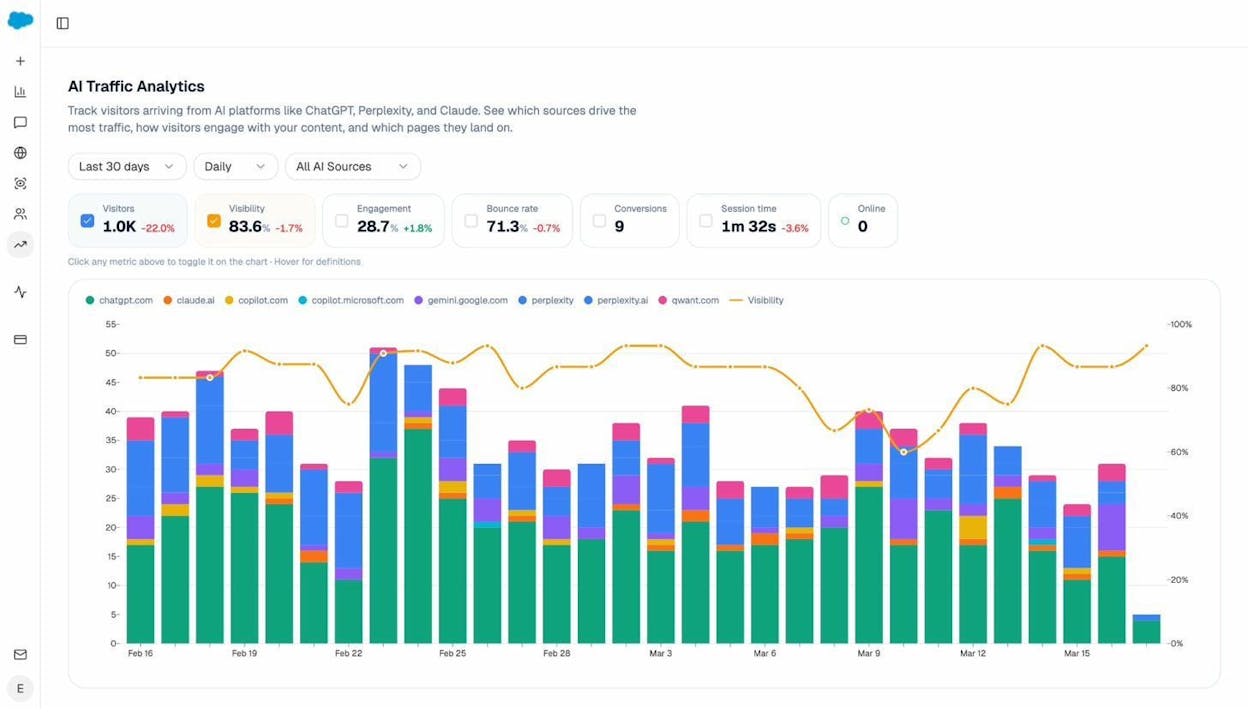
The AI Traffic Analytics dashboard in Analyze AI shows you exactly which AI platforms send visitors, how those visitors engage (bounce rate, session time, conversions), and which landing pages they land on.
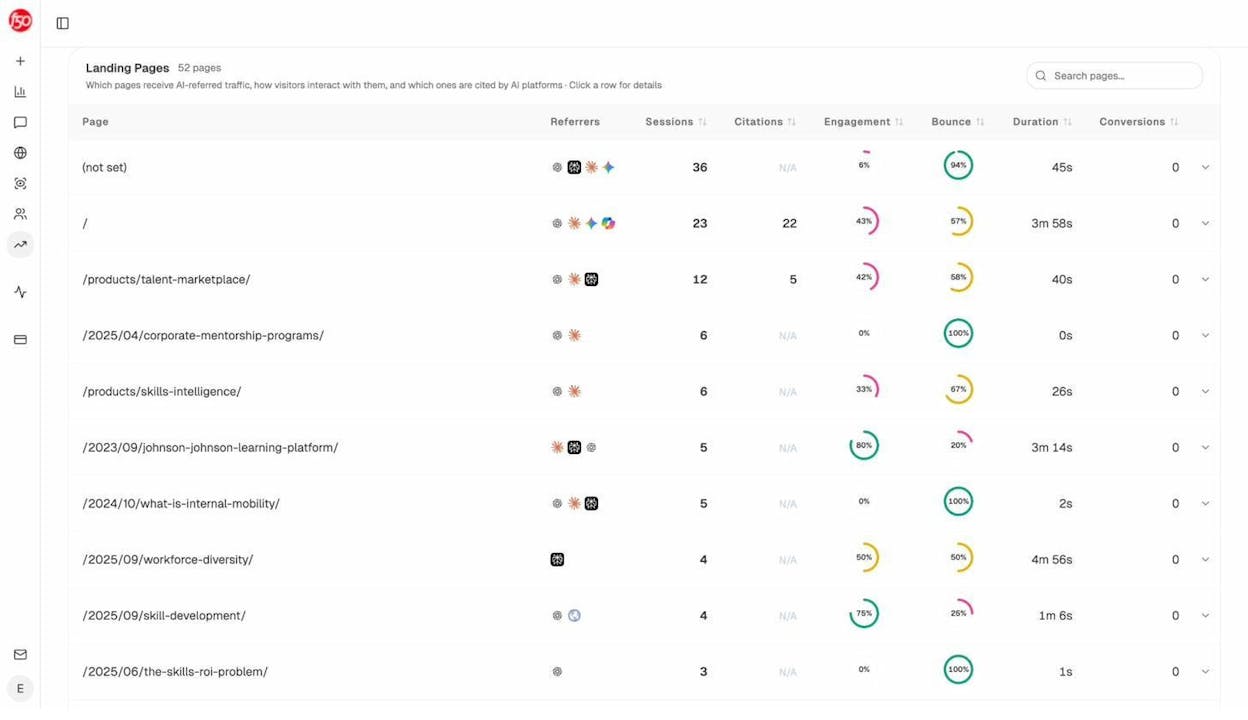
The Landing Pages report goes deeper. It tells you which specific pages on your site receive AI-referred traffic, which AI engines sent visitors, and how engaged those visitors are. This is the AI search equivalent of Google Search Console’s performance report — it shows you where AI traffic lands so you can double down on what’s working.
If a page gets mentioned by ChatGPT frequently but visitors bounce immediately, you have a CTR-to-engagement problem. The click happened, but the content didn’t deliver. That’s a signal to optimize both the AI mention (are expectations being set correctly?) and the landing page itself.
11 Tips to Improve Your Click-Through Rate
Now let’s get tactical. These tips are ordered from the most fundamental to the most advanced. Start with the first three — they address the most common CTR killers — then work through the rest.
1. Match Your Title Tag to Your H1 Tag
Google rewrites title tags roughly 33% of the time. One of the most common triggers for rewriting? When your title tag and H1 tag don’t match.
If your title tag says “10 Best CRM Tools” but your H1 says “Top CRM Software for Small Businesses,” Google may rewrite your title to something that better reflects the page content. The rewritten title may be less compelling than the one you carefully crafted.
The fix is simple: make your title tag and H1 tag match. They don’t have to be identical word-for-word, but they should convey the same message. If your H1 is “How to Sleep Train a Baby,” your title tag should be close to that — not “Baby Sleep Guide & Tips.”
How to check this at scale:
Use a site audit tool to crawl your site and flag pages where the title tag and H1 don’t match. Then review those pages and align them.
![[Screenshot: Site audit tool showing pages where title tags and H1s are mismatched]](https://www.datocms-assets.com/164164/1776705436-blobid7.png?auto=format,compress&w=1248&fit=max)
For each mismatched page, decide which version is stronger. Often, the H1 was updated during a content refresh but the title tag was left behind. Align them, then monitor CTR over the following weeks.
2. Write Click-Worthy Titles (Not Clickbait)
Your title tag is the single biggest lever you have for CTR. It’s the first thing a searcher sees. If it doesn’t compel them to click, nothing else matters.
But “click-worthy” is not the same as “clickbait.” Clickbait promises something the content doesn’t deliver. That erodes trust and increases bounce rate, which hurts you long term.
Here’s what makes a title click-worthy:
Specificity. “How to Improve CTR” is generic. “How to Improve CTR: 11 Proven Tips That Actually Work” tells the reader exactly what they’ll get — a specific number of actionable tips, with the added reassurance that they’ve been tested.
Relevance to intent. If someone searches “how to improve click-through rate,” they want a how-to guide. Your title should signal that immediately. Don’t bury the lead with brand names or vague adjectives.
Differentiation. Look at the other results on page one. If every title starts with “How to Improve CTR,” yours needs a hook that stands out. A number, a parenthetical benefit, or a qualifying phrase (“for SaaS,” “without paid ads”) can be enough.
Accuracy. The title must reflect what’s on the page. If your title promises “11 tips” and the article has eight, you’ll lose trust and earn a quick back-button click.
Here are examples of weak titles transformed into stronger ones:
|
Weak Title |
Stronger Title |
Why It’s Better |
|---|---|---|
|
Ways to Improve CTR |
11 Proven Ways to Improve CTR (With Examples) |
Specific number + proof |
|
Improve Your Click-Through Rate |
How to Double Your CTR in 30 Days |
Concrete outcome + timeline |
|
CTR Tips |
CTR Optimization: The Low-Hanging Fruit Most Sites Miss |
Curiosity + specificity |
|
Best Practices for CTR |
How We Increased CTR by 47% on One Page (Step-by-Step) |
Case study format + specificity |
3. Keep Titles Under 580 Pixels (About 50–60 Characters)
If your title is too long, Google truncates it with an ellipsis. The reader sees half your message and the most compelling part — which you probably put at the end — gets cut off.
Page titles should be less than 580 pixels wide. That translates to roughly 50–60 characters, depending on the characters used. Wider letters like “W” and “M” eat up more space than “i” or “l.”
Use a SERP preview tool to visualize how your title and description will appear in search results before publishing. This takes 30 seconds and prevents a common mistake.
If your title is too long, cut from the middle or end — never from the beginning. The first few words should contain your primary keyword and the main promise of the page.
4. Write Meta Descriptions That Sell the Click
Google rewrites meta descriptions even more often than titles. But when your meta description does appear, it’s a 150–160 character ad for your page.
A good meta description does three things:
Confirms relevance. It restates or expands on the title’s promise. If the title says “11 Tips to Improve CTR,” the description might say “Learn how to find underperforming pages, write better titles, and add schema markup to win more clicks from search.”
Creates curiosity. Without being misleading, hint at something specific the reader will learn. “Tip #7 alone increased our CTR by 23%” makes people want to know what tip #7 is.
Includes a soft call to action. Phrases like “Learn how,” “Find out,” or “See the full breakdown” gently nudge the reader toward clicking.
What to avoid: stuffing keywords awkwardly, repeating the title verbatim, or writing generic descriptions like “Read this article to learn about CTR.” That tells the searcher nothing about why your page is better than the nine other results on the page.
5. Align Your Listing with Search Intent
Search intent is the reason someone typed a query. Understanding intent — and reflecting it in your title and description — is the difference between a click and a scroll-past.
The four main types of search intent are informational (wanting to learn), navigational (looking for a specific site), commercial (comparing options), and transactional (ready to buy or act).
If someone searches “sleep training methods,” they want to learn about different approaches. They’re in informational mode. A title like “Buy Sleep Training Course — 50% Off” mismatches intent completely and will get zero clicks regardless of how “optimized” it is.
How to identify intent: Search your target keyword in Google. Look at the top five results. What kind of content dominates? Blog posts? Product pages? Videos? Lists? The dominant content type tells you what Google has determined the intent to be. Match it.
Then look at the language in those top-ranking titles. What patterns do you see?
For “sleep training,” you might notice titles that answer “when to start,” “how to do it,” and “what methods exist.” These are the sub-intents within the query. Your title and description should address the most compelling of these.
Example: Instead of “Sleep Training Tips,” try “Sleep Training Your Baby: When to Start, What Method to Use, and How to Stay Consistent.”
That title matches the intent precisely. It tells the searcher: this page answers all three questions you have.
6. Convey What Makes Your Content Unique
Every SERP is a competition. Ten organic results, maybe some ads, maybe an AI Overview. Why would someone click on yours instead of the nine others?
Your title and description need to answer that question. Here are angles you can use:
Freshness. If your content is more recent, call it out. “2026 CTR Benchmarks” signals that your data is current when competing pages show 2023 data.
Depth. If your article is the most comprehensive resource, signal that. “The Complete Guide” or a specific number of tips/steps indicates thoroughness.
Credibility. If your content is backed by data, experience, or a recognizable brand, mention it. “Based on 83,670 AI Citations Analyzed” is more compelling than “Our Thoughts on CTR.”
Simplicity. If competing content is complex or technical, position yours as the accessible alternative. “A Beginner’s Guide to CTR Optimization (No Jargon)” appeals to a different — and often larger — audience.
Unique angle. If you’ve taken a contrarian or unusual approach, highlight it. “Why Most CTR Advice Is Wrong (And What to Do Instead)” immediately stands out from a page of “How to Improve CTR” titles.
7. Use a Counter-Narrative to Stand Out
One of the most reliable ways to grab attention on a SERP is to go against the conventional wisdom.
When every result says “do X,” and your result says “actually, X is overrated — here’s what works better,” the contrast alone drives clicks. People are naturally curious about dissenting views, especially when they come from credible sources.
Examples:
-
“Forget CTR — Here’s the Metric That Actually Predicts Traffic” (challenges the premise)
-
“How to Sleep Train Your Baby (Without Crying It Out)” (offers an alternative to the dominant method)
-
“We Stopped Optimizing Title Tags and Our Traffic Went Up” (counterintuitive claim)
The catch: your content must deliver on the promise. If you claim a counter-narrative, you need evidence to back it up. Original data, case studies, or expert opinions give your contrarian angle credibility.
8. Add Brackets or Parentheses for Extra Information
This is a small formatting trick that works surprisingly well. Adding a parenthetical to your title gives the reader bonus information at a glance.
Examples:
-
“How to Improve CTR (With Real Examples)”
-
“11 CTR Optimization Tips (2026 Update)”
-
“Sleep Training Guide (Pediatrician-Approved)”
The brackets draw the eye because they break the visual pattern of the title. And the content inside them usually addresses a secondary concern — freshness, credibility, format — that tips the reader toward clicking.
9. Use Numbers in Your Headlines
Headlines with numbers consistently outperform headlines without them. This isn’t new advice, but it works because numbers do two things:
Set expectations. “11 Tips” tells the reader exactly how much content they’re getting. There’s no ambiguity about scope.
Signal structure. A numbered list implies organized, scannable content. Readers know they can skim headings and jump to the tips most relevant to them. That lowers the perceived effort of engaging with your page.
Odd numbers tend to perform slightly better than even numbers in studies, but don’t overthink this. The bigger win is using a number at all versus not using one.
10. Add Schema Markup for Rich Results
Schema markup (structured data) is code you add to your page that helps search engines display extra information in your listing. This can include star ratings, FAQ accordions, how-to steps, product prices, or event dates.
Rich results stand out visually on the SERP. They take up more space, display more information, and look more credible than a plain blue-link listing. All of which drives higher CTR.
The most impactful schema types for CTR include:
FAQ schema. Adds expandable questions and answers directly in the search result. This is especially useful for informational queries where you can preview the answer but require a click for the full context.
How-to schema. Displays step-by-step instructions with optional images. Great for tutorial content.
Review/rating schema. Shows star ratings. Particularly powerful for product and service pages — a 4.8-star rating catches the eye immediately.
Breadcrumb schema. Replaces the raw URL in your listing with a clean, readable breadcrumb trail. This looks more professional and helps the searcher understand where the page sits within your site.
To implement schema, you can use Google’s Structured Data Markup Helper or a WordPress plugin like Yoast SEO or Rank Math. After implementation, test your markup with Google’s Rich Results Test to confirm it’s valid.
![[Screenshot: Google SERP showing a result with rich snippets including star ratings and FAQ accordion compared to a plain listing]](https://www.datocms-assets.com/164164/1776705442-blobid8.jpg?auto=format,compress&w=1248&fit=max)
11. Optimize Your URL Structure
URLs appear in search results. They’re a subtle but real factor in whether someone clicks. A clean, descriptive URL builds trust. A messy one raises doubts.
Compare:
-
yoursite.com/blog/how-to-improve-ctr ✅
-
yoursite.com/blog/p?id=48271&cat=seo&v=2 ❌
The first URL tells the searcher exactly what the page is about. The second looks automated and untrustworthy.
Best practices for CTR-friendly URLs:
-
Include your target keyword
-
Keep URLs short (3-5 words after the domain)
-
Use hyphens, not underscores
-
Avoid parameter strings, session IDs, and unnecessary folders
-
Match the URL to the title’s topic
If you’re changing existing URLs, set up proper 301 redirects to preserve any existing link equity.
How to Improve CTR in AI Search
Everything above applies to traditional search. But search is evolving, and AI search is now an additional organic channel that demands its own optimization approach.
When ChatGPT, Perplexity, or Gemini answer a user’s query, your brand might get mentioned — but that mention doesn’t always turn into a visit. The “CTR” in AI search is the rate at which an AI mention converts into an actual click to your website.
Here’s how to improve it.
Understand Where You’re Visible (and Where You’re Not)
Before you can optimize, you need data. The Prompts dashboard in Analyze AI tracks how different AI engines answer prompts relevant to your business.
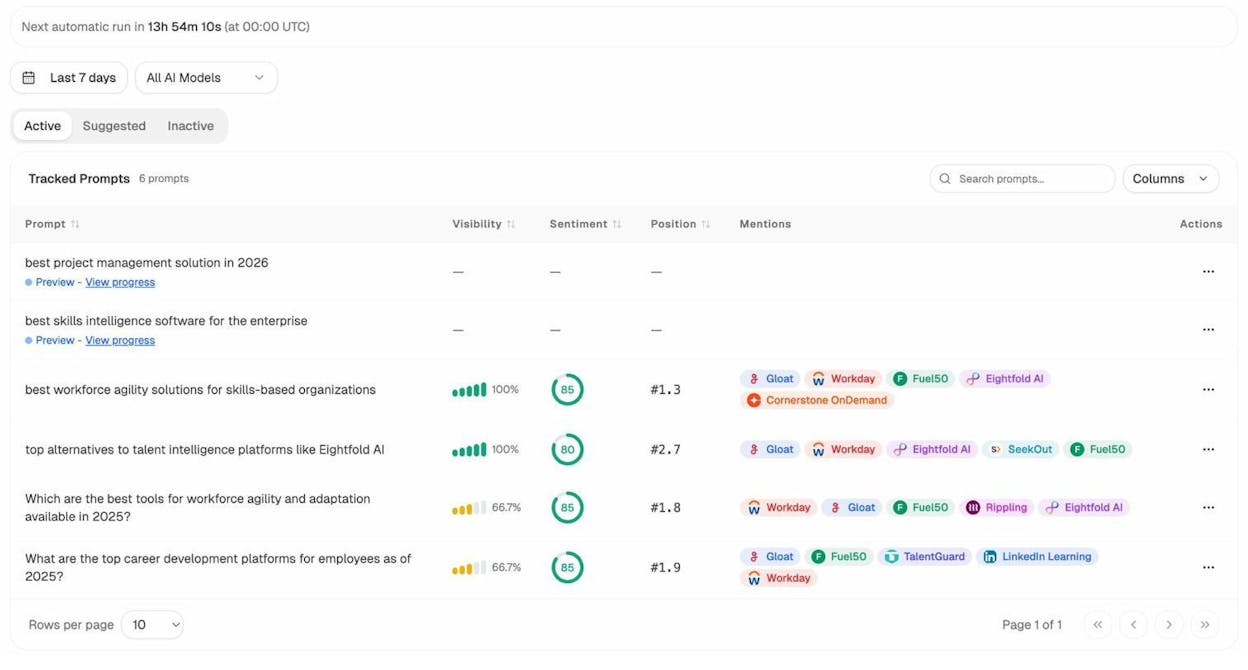
For each tracked prompt, you can see your visibility percentage, sentiment score, average position, and which competitors are mentioned alongside you. This is the AI search equivalent of checking your ranking position in Google — it tells you where you stand.
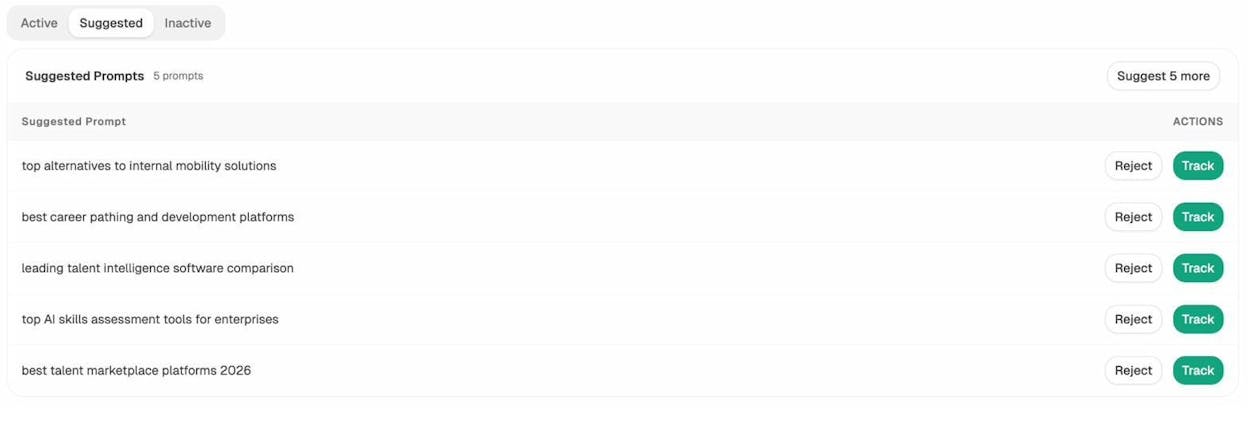
If you’re mentioned in only 2 out of 6 AI engines for a key prompt, that’s a visibility gap. The Suggested Prompts tab surfaces new prompts that Analyze AI recommends tracking based on your industry and competitive landscape.
Find Out Who’s Beating You
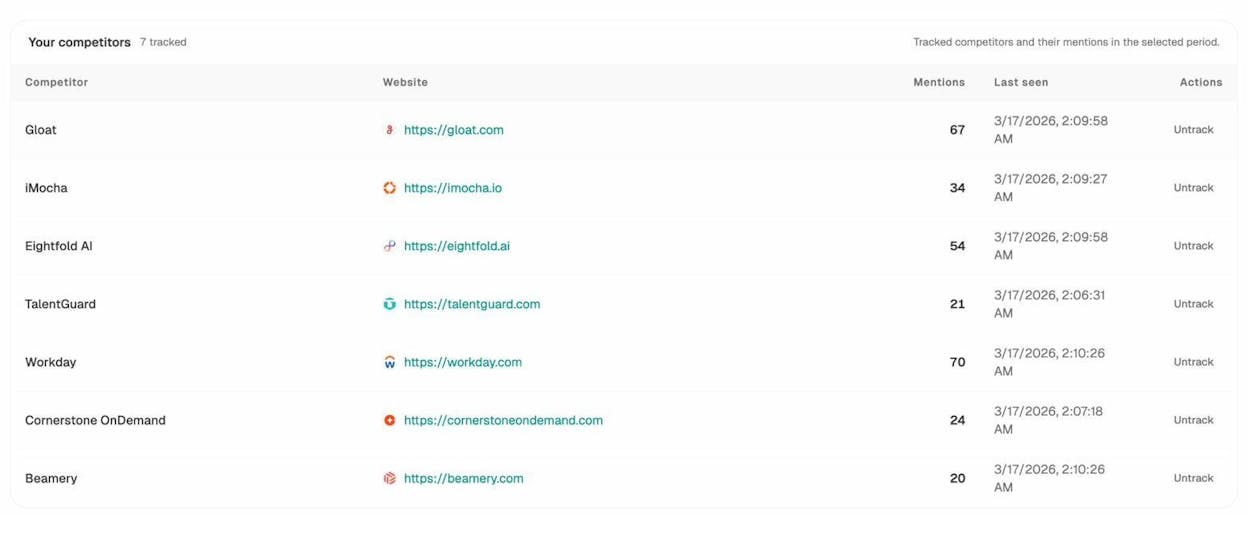
The Competitors view in Analyze AI shows entities that AI engines frequently mention in your space — including brands you may not have considered competitors in traditional SEO.
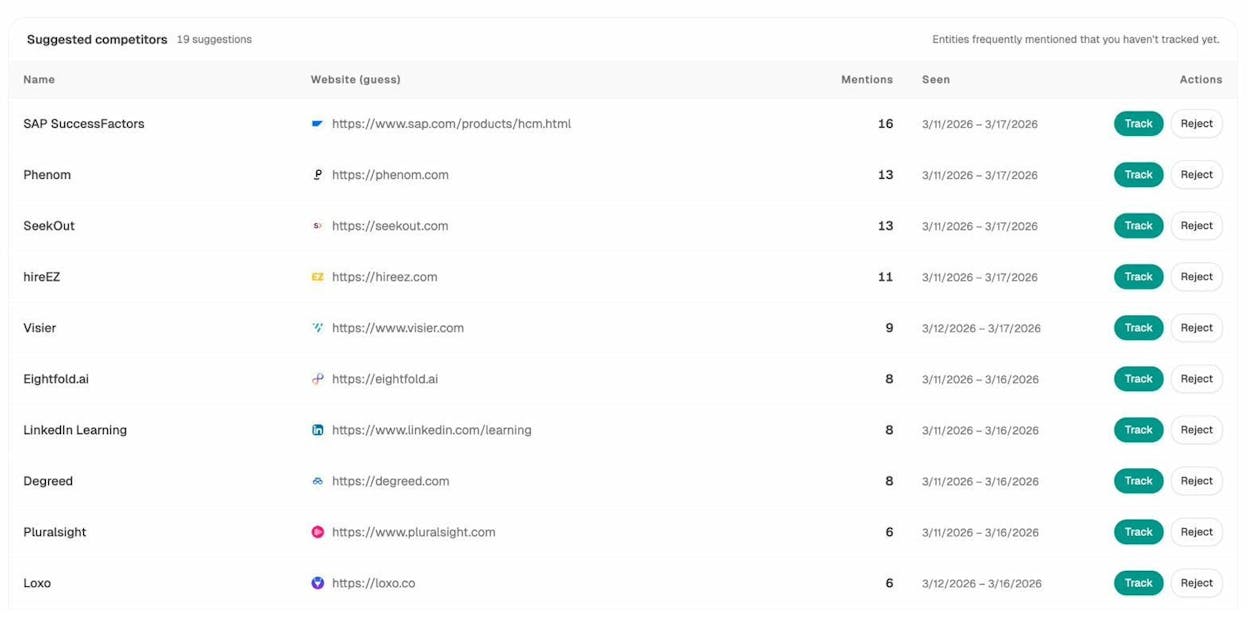
AI engines pull from different sources than Google. A competitor who barely ranks on Google might dominate ChatGPT responses because they have strong coverage on Reddit, review sites, or industry publications. This competitive intelligence helps you understand the AI search landscape and prioritize your content strategy accordingly.
Earn Citations From the Sources AI Trusts
AI engines don’t just rank content — they cite sources. And the sources they trust shape whose brands get mentioned.
The Sources dashboard in Analyze AI shows which domains and content types AI engines cite most in your space.
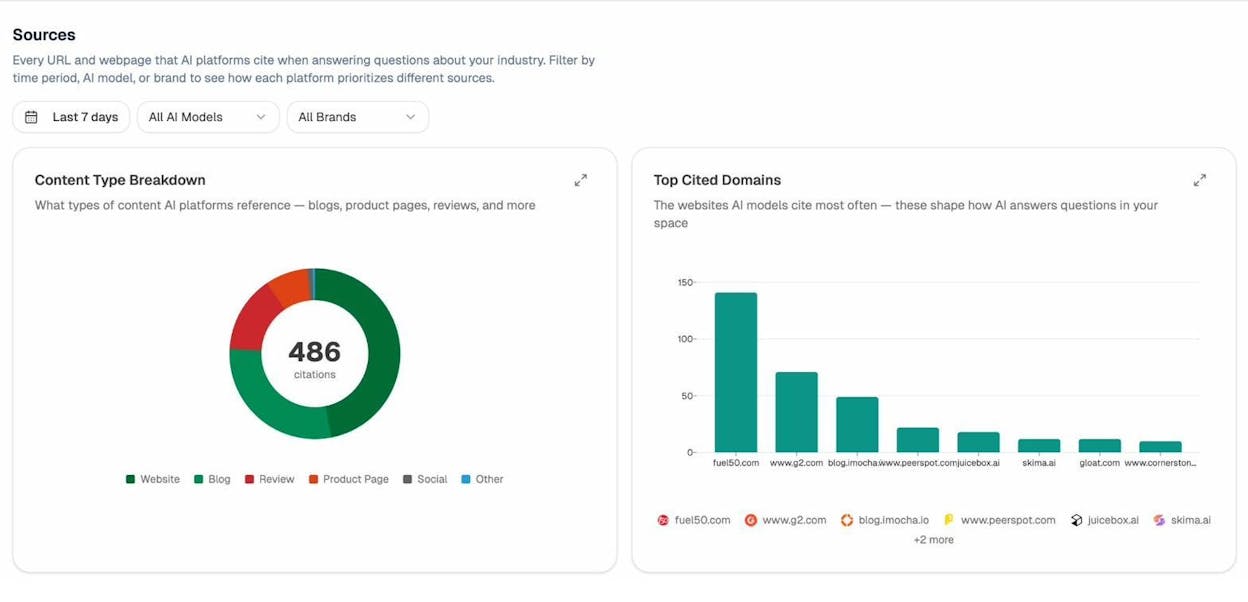
If review sites like G2 or Capterra dominate the citations in your industry, that tells you where to focus your off-site content efforts. Getting mentioned and reviewed on those platforms isn’t just good for traditional SEO — it directly influences whether AI engines recommend your brand.
Monitor How AI Perceives Your Brand
CTR doesn’t just depend on being mentioned. It depends on how you’re described. If an AI engine mentions your brand but frames it negatively — “limited features,” “expensive compared to alternatives” — users won’t click through even when they see your name.
The Perception Map in Analyze AI shows the narrative AI engines build about your brand, including sentiment breakdowns and the specific language AI associates with you.
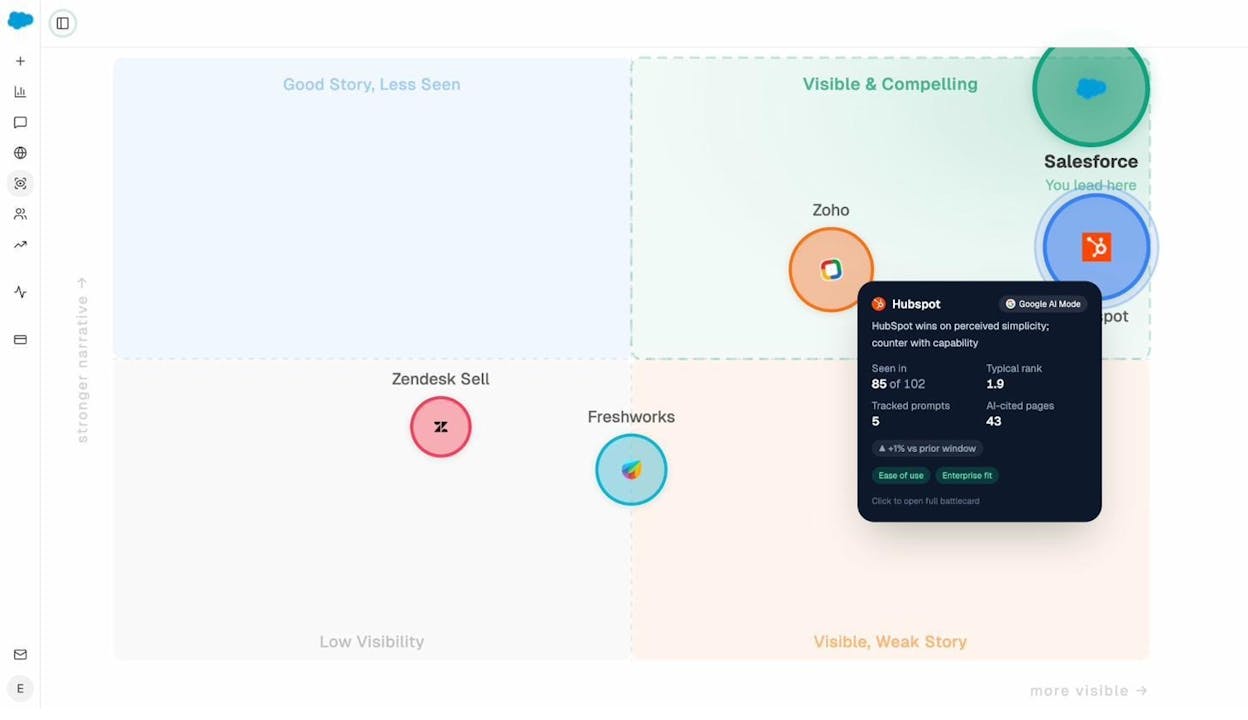
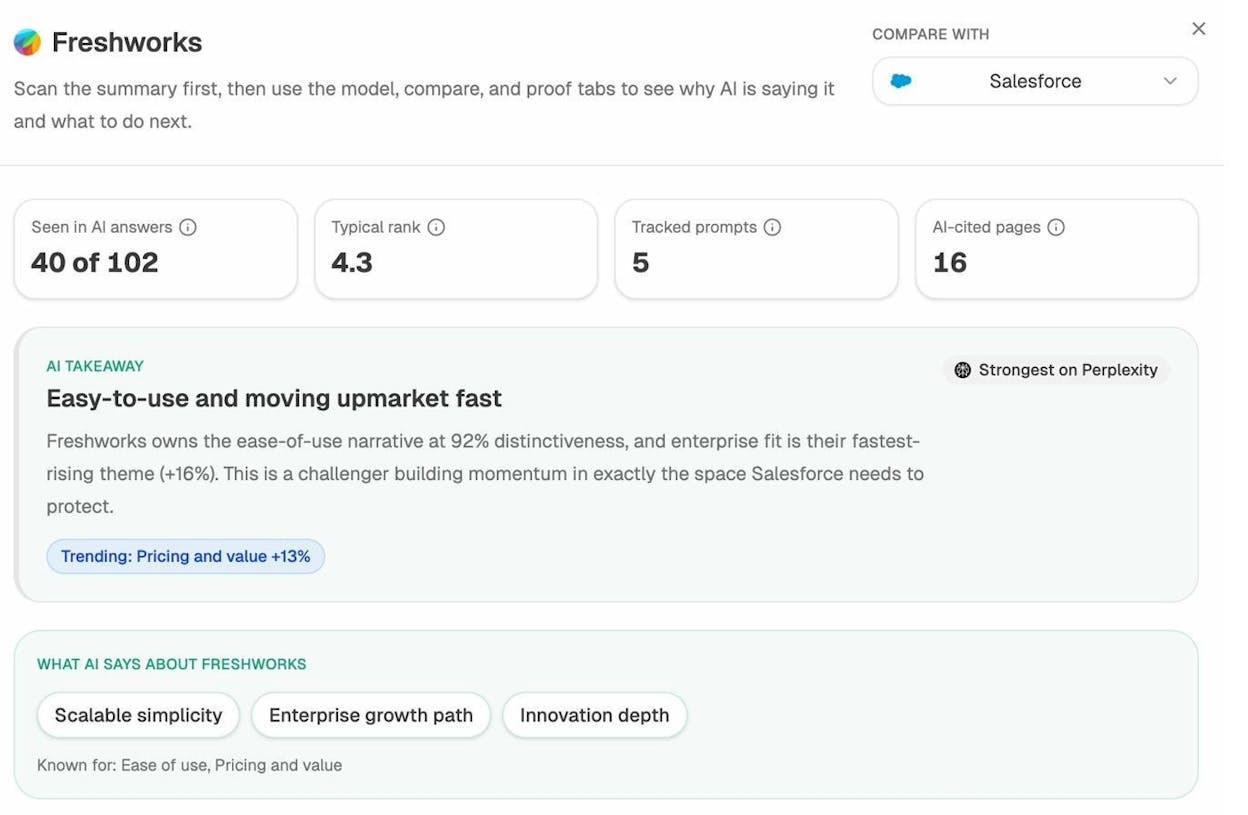
If you spot a negative narrative forming — say, AI engines consistently describe your product as “hard to set up” — you can create content that directly addresses and counters that perception. A detailed setup guide, customer testimonials about easy onboarding, or a comparison post showing your setup time versus competitors’ can shift the narrative over time.
Double Down on Pages That Already Get AI Traffic
The Landing Pages report in Analyze AI’s AI Traffic Analytics shows which pages on your site receive visitors from AI platforms. Look for patterns:
-
Which content types attract AI traffic? (Blog posts? Product pages? Case studies?)
-
Which AI engines send the most engaged visitors?
-
Which pages have high AI traffic but high bounce rates?
Pages with high AI traffic and strong engagement are winning. Study what makes them work — the content format, the depth of coverage, the way they answer questions directly — and replicate that approach across other pages.
Pages with high AI traffic but poor engagement signal a mismatch between what the AI engine promises and what the page delivers. Fix the content to match user expectations.
Use Ad Hoc Searches to Test Your Visibility in Real-Time
Analyze AI’s Ad Hoc Prompt Searches let you test any prompt across multiple AI engines simultaneously to see if and how your brand appears.
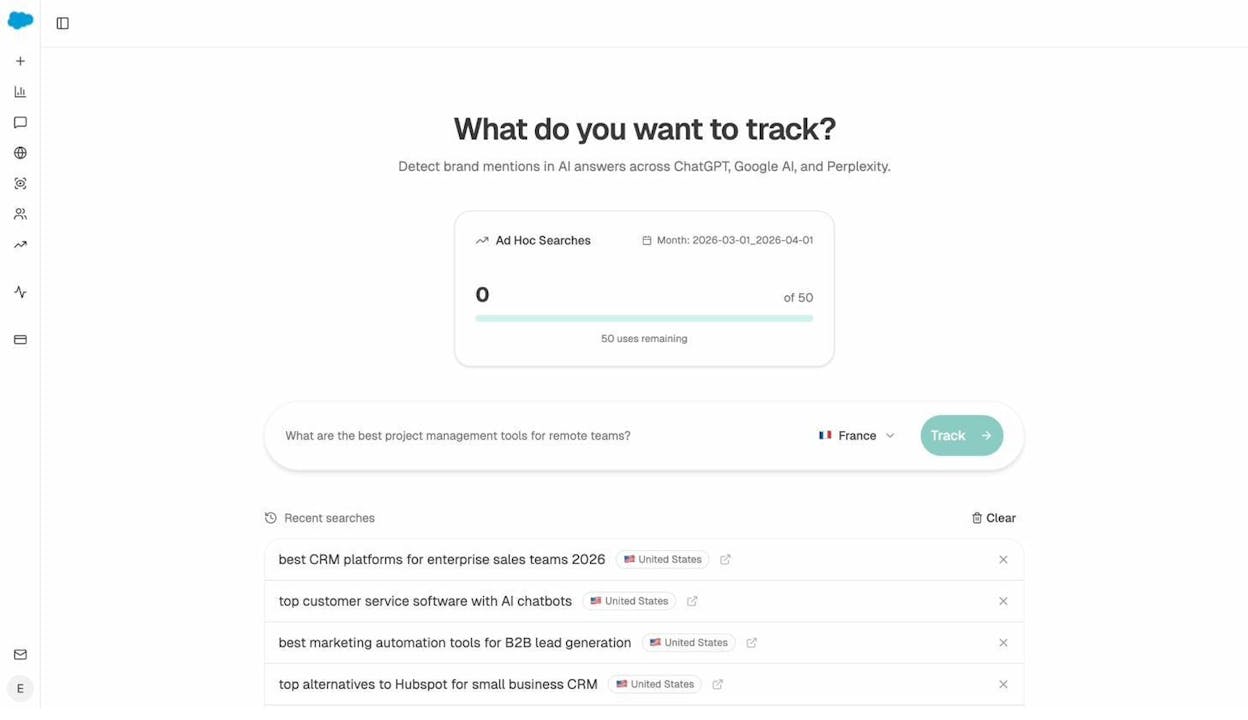
This is useful for quick checks before publishing new content, validating whether a content update improved your AI visibility, or researching how competitors are positioned for specific queries.
Stay Ahead With Weekly Digests
CTR optimization isn’t a one-time project. Your rankings shift, competitors update their content, and AI engines recalibrate their responses regularly.
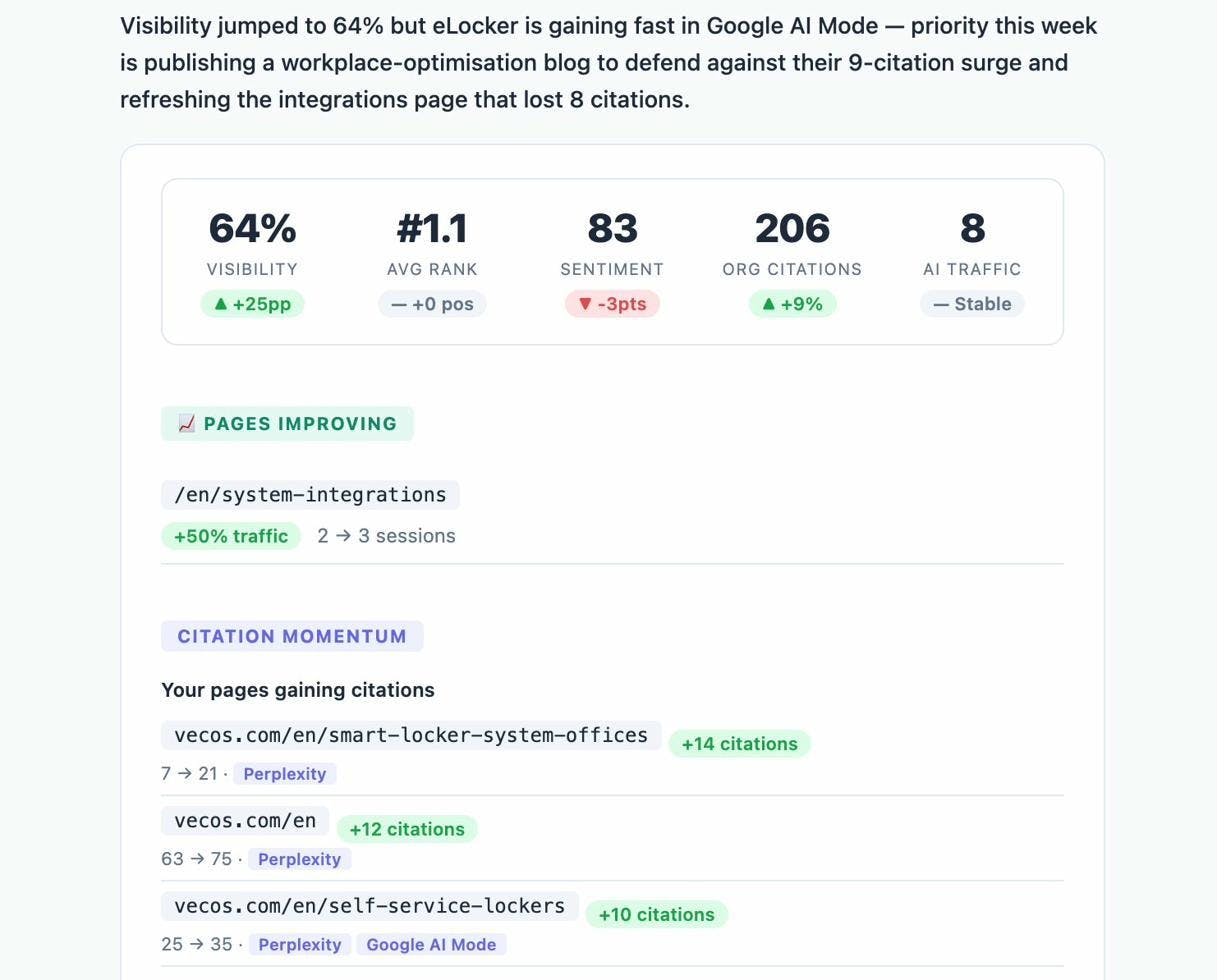
Analyze AI sends automated Weekly Email Digests with prioritized actions, visibility changes, and competitor movements. This keeps you informed without needing to log in daily.
Measuring Your CTR Improvements
After implementing these changes, track your results. Here’s how to measure what’s working.
In Google Search Console: Compare CTR by page and by query over time. Use the date comparison feature to see before-and-after performance. Give changes at least 2–4 weeks to take effect — Google’s index needs time to reflect your updates.
In Analyze AI: Monitor your AI Traffic Analytics for changes in visitors, engagement, and conversions from AI platforms. Check whether your visibility scores and sentiment have shifted after content updates.
Create a tracking spreadsheet. For each page you optimize, log the change you made (title update, schema added, meta description rewritten), the date, and the before/after CTR. This discipline helps you learn which types of changes produce the biggest gains for your site specifically.
Final Thoughts
CTR optimization sits at the intersection of SEO, copywriting, and user psychology. It rewards attention to detail and punishes laziness.
The good news: most of your competitors aren’t doing this. They rank, they celebrate, and they move on. They don’t go back to optimize titles, add schema markup, or check how their brand appears in AI search results.
That’s your advantage.
Start with Google Search Console. Find the pages that rank well but underperform on CTR. Apply the tips above — match your title to your H1, write click-worthy descriptions, align with search intent, and add schema where it makes sense.
Then go further. Use Analyze AI to track how your brand appears in AI search engines, identify the prompts where competitors outrank you, and optimize the content that already drives AI traffic to your site.
SEO isn’t dead. It’s evolving. And click-through rate — whether from Google, ChatGPT, or Perplexity — remains the metric that separates visibility from actual visits.
Recommended tools and resources:
Related reading:

Ernest

Ibrahim


