



Summarize this blog post with:


In this article, you’ll learn what rich snippets are, how they differ from other search result enhancements, the most common types you should know about, and how to implement them on your site step by step. You’ll also learn why structured data matters beyond traditional Google results—and how it shapes the way AI search engines like ChatGPT, Perplexity, and Gemini reference your content.
Table of Contents
What Are Rich Snippets?
Rich snippets are enhanced search results that display extra information pulled from structured data (also called schema markup) in your page’s HTML. While a standard Google result shows a title, URL, and meta description, a rich snippet adds details like star ratings, pricing, cooking times, or event dates directly in the search results.
![[Screenshot: Side-by-side comparison of a standard Google search result vs. a rich snippet result with star ratings and price]](https://www.datocms-assets.com/164164/1774966105-blobid1.png?auto=format,compress&w=1248&fit=max)
That extra visual information does two things. First, it makes your listing physically larger on the page, which catches the eye. Second, it gives searchers useful context before they click, which can increase your click-through rate.
One important clarification: rich snippets are not a Google ranking factor. Google’s Danny Sullivan has confirmed on X (formerly Twitter) that structured data does not directly influence rankings. But the indirect benefits—higher CTR, better user engagement, clearer content signals to search engines—make rich snippets well worth implementing.
Rich Snippets vs. Rich Results vs. SERP Features
These three terms get used interchangeably by SEOs, which creates confusion. Here’s how they actually differ.
Rich snippets are the original term for search results enhanced with structured data. Google’s own glossary now says rich snippets are known as “rich results.”
Rich results is Google’s current umbrella term. It covers any search experience that goes beyond the standard blue link, including carousels, images, and other non-textual elements. You can test your pages using Google’s Rich Results Test.
SERP features is the broadest term. It includes everything that appears on a search results page beyond the organic blue links: the local pack, knowledge panels, videos, People Also Ask boxes, AI Overviews, and more. Rich results are a subset of SERP features, not the other way around.
|
Term |
Definition |
Examples |
|
Rich snippets |
Search results enhanced by structured data markup on your page |
Star ratings, product prices, recipe info |
|
Rich results |
Google’s umbrella term for non-standard search experiences |
Rich snippets + carousels + image packs |
|
SERP features |
All non-organic elements on a search results page |
Rich results + knowledge panels + local pack + AI Overviews + PAA |
The practical takeaway: when someone says “rich snippets,” they almost always mean search results that have been enhanced because the page uses schema markup. That’s the definition we’ll use throughout this article.
Why Rich Snippets Matter (Beyond Traditional SEO)
Before diving into the types and how-to sections, it’s worth understanding exactly what rich snippets do for your site.
They increase click-through rates
Rich snippets make your listing more visually prominent. A search result with star ratings, pricing, and availability information takes up more real estate than a plain blue link. Multiple studies have found that rich results can improve CTR by 20–30% compared to standard listings, depending on the snippet type and industry.
For e-commerce sites, product rich snippets showing price and availability can be the difference between a user clicking your result or choosing a competitor with more information visible upfront.
They help search engines understand your content
Schema markup is essentially a translation layer between your content and search engines. When you add structured data, you’re telling Google (and Bing, and other engines) exactly what your page is about in a language they parse perfectly. Instead of relying on Google’s algorithms to infer that your page contains a product priced at $49.99, you’re stating it explicitly.
This matters because it removes ambiguity. And the cleaner your data signals, the better search engines can match your pages to relevant queries.
They influence how AI search engines cite your content
Here’s something most articles about rich snippets miss entirely: structured data doesn’t just affect Google’s traditional results. It also affects how AI search engines process and reference your content.
AI models like ChatGPT, Perplexity, Claude, and Gemini rely on structured, well-organized content to generate accurate answers. When your pages include schema markup, you’re providing machine-readable context that helps these models understand your content more precisely. A product page with proper Product schema (including price, availability, and reviews) gives AI models structured data points they can cite confidently in their responses.
This doesn’t mean schema markup alone will get you cited by AI engines. But it’s one piece of a larger picture. Structured data helps your pages become more “parseable”—both for traditional crawlers and for the large language models powering AI search.
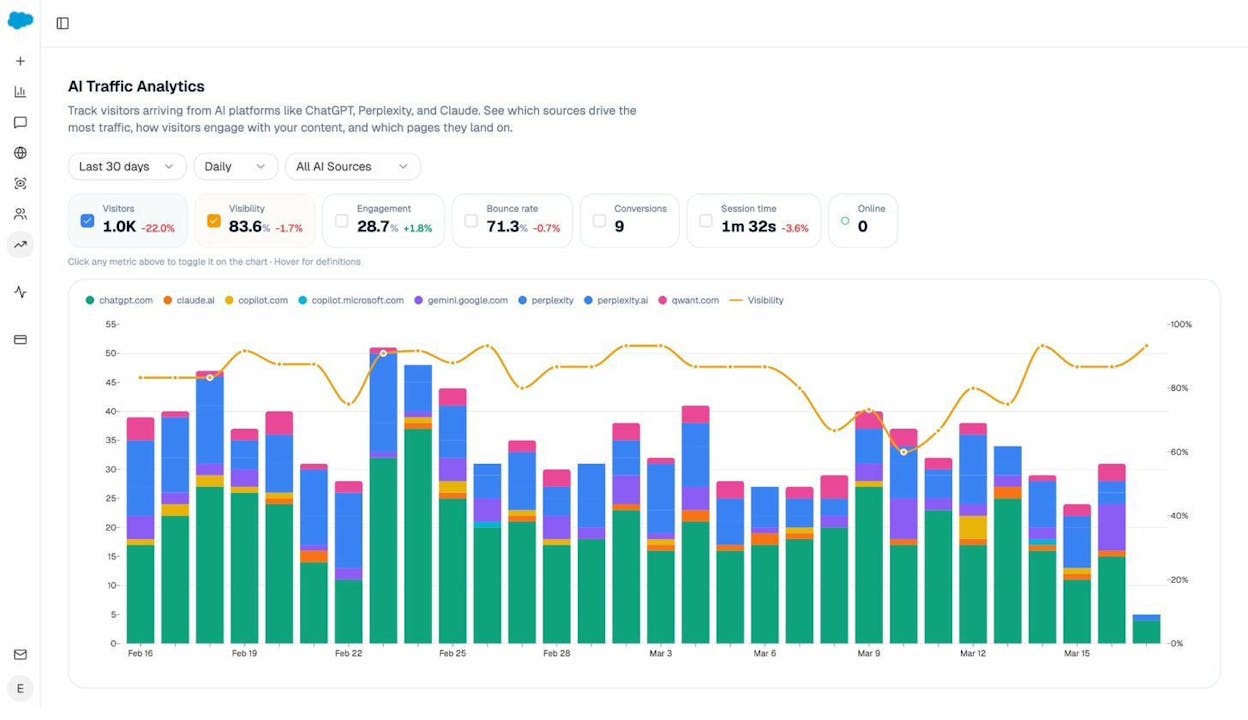
You can track whether AI search engines are actually driving traffic to your structured pages using Analyze AI’s AI Traffic Analytics. The dashboard shows which AI platforms (ChatGPT, Perplexity, Claude, Copilot, Gemini) send visitors to your site, broken down by landing page and source.
Types of Rich Snippets (With Examples)
Google supports dozens of rich result types, but many only apply to very specific websites (like flight information or job postings). Here are the most common types that are relevant to a broad range of sites.
Review Snippets
Review snippets add a yellow star rating to your search result, along with the number of reviews and sometimes the reviewer’s name. They’re one of the most recognizable and impactful rich snippet types.
![[Screenshot: Google search result showing a review snippet with star ratings highlighted]](https://www.datocms-assets.com/164164/1774966114-blobid3.png?auto=format,compress&w=1248&fit=max)
Review snippets can appear for a wide range of content types, including: books, courses, events, how-to guides, local businesses, movies, products, recipes, and software applications.
There are two variations. An individual review is a single person’s assessment, while an aggregate review shows the combined rating from multiple reviewers (e.g., “4.5 stars based on 238 reviews”).
If you run a local business, review snippets are especially powerful. A search result showing “4.8 stars from 312 reviews” stands out dramatically from competitors without any rating displayed.
Product Snippets
Product snippets show additional details like price, availability, and shipping information directly in the search results. If you run an e-commerce website, these are essential.
![[Screenshot: Google search result showing a product snippet with price and availability highlighted]](https://www.datocms-assets.com/164164/1774966121-blobid4.png?auto=format,compress&w=1248&fit=max)
Product snippets help potential customers evaluate your offering before they even visit your site. When someone searches for “wireless noise-canceling headphones,” a result showing “$279 – In Stock – Free Shipping” provides instant decision-making information that a plain blue link can’t match.
Google’s product structured data supports fields including: name, image, description, SKU, brand, price, currency, availability, review rating, and shipping details.
Recipe Snippets
Recipe snippets display cooking times, calorie counts, ratings, and sometimes ingredient previews. They appear both in standard search results and in Google’s dedicated Recipes carousel.
![[Screenshot: Google search result showing a recipe snippet in the Recipes carousel with cooking time, rating, and image]](https://www.datocms-assets.com/164164/1774966121-blobid5.png?auto=format,compress&w=1248&fit=max)
Recipe markup is one of the richest schema types available. It supports fields like prep time, cook time, total time, yield (number of servings), nutrition information, ingredients, and step-by-step instructions.
If you publish recipe content, implementing this schema is essentially non-negotiable. The Recipes carousel is one of the most visually dominant SERP features, and pages without recipe markup are effectively invisible within it.
Event Snippets
Event snippets highlight dates, times, locations, and sometimes ticket pricing for upcoming events. They’re useful for concert venues, theaters, conferences, sports organizations, and any business that hosts ticketed events.
![[Screenshot: Google search result showing an event snippet with date, location, and ticket information]](https://www.datocms-assets.com/164164/1774966127-blobid6.png?auto=format,compress&w=1248&fit=max)
Event schema supports both physical and online events. For recurring events (like a weekly open mic night), you can mark up each individual occurrence so each one can appear in search results separately.
FAQ Snippets
A note on FAQ and HowTo schema: Google announced in August 2023 that it was significantly reducing the visibility of FAQ and HowTo rich results. FAQ results now only show for well-known, authoritative government and health websites. HowTo results no longer appear on desktop and are limited on mobile.
This doesn’t mean you should remove existing FAQ or HowTo markup from your pages. The structured data still helps search engines understand your content, even if it no longer triggers visible rich results for most sites. But it does mean you shouldn’t invest significant effort in adding new FAQ or HowTo schema specifically to win rich snippets.
Other Notable Rich Snippet Types
Beyond the most common types above, Google supports structured data for several other content categories:
|
Schema Type |
Best For |
Key Data Displayed |
|
Video |
Video publishers, tutorials |
Thumbnail, duration, upload date |
|
Course |
Online education platforms |
Provider, description, cost |
|
Software App |
App developers, SaaS companies |
Rating, price, OS compatibility |
|
Book |
Publishers, bookstores |
Author, rating, availability |
|
Local Business |
Brick-and-mortar businesses |
Address, hours, phone, rating |
|
Job Posting |
Recruiters, job boards |
Title, company, salary, location |
|
Article |
News sites, blogs |
Headline, author, date, image |
You can find the complete list of supported schema types in Google’s search gallery.
How to Get Rich Snippets for Your Pages
Getting rich snippets requires three phases: checking your current state, adding schema markup, and validating and monitoring the code. Let’s walk through each one.
Step 1: Check Whether Your Pages Already Have Schema Markup
Before adding any code, check whether your CMS or theme has already added structured data to your pages. Many modern WordPress themes and e-commerce platforms (like Shopify and WooCommerce) include basic schema markup out of the box.
Option A: Use Google’s Rich Results Test
Go to Google’s Rich Results Test, select “URL,” and enter the page you want to check.
![[Screenshot: Google Rich Results Test with a URL entered in the URL field]](https://www.datocms-assets.com/164164/1774966127-blobid7.png?auto=format,compress&w=1248&fit=max)
If structured data is present and valid, you’ll see a green checkmark under “Detected items” along with the schema types found. If no markup is found, you’ll see a “No items detected” message. That means you need to add schema yourself.
![[Screenshot: Rich Results Test showing green checkmarks and detected items OR “No items detected” message]](https://www.datocms-assets.com/164164/1774966132-blobid8.png?auto=format,compress&w=1248&fit=max)
Option B: Use Google Search Console
If you already have Google Search Console set up for your site, check the “Enhancements” section in the left sidebar. It lists each schema type detected across your site, along with the count of valid items, items with warnings, and items with errors.
![[Screenshot: Google Search Console Enhancements section showing structured data types with valid/warning/error counts]](https://www.datocms-assets.com/164164/1774966132-blobid9.png?auto=format,compress&w=1248&fit=max)
Option C: View the page source
For a quick manual check, right-click on any page, select “View Page Source,” and search for application/ld+json (the format Google recommends for schema markup). If you find a JSON-LD script block, your page already has some structured data.
![[Screenshot: Browser view-source showing a JSON-LD script block highlighted]](https://www.datocms-assets.com/164164/1774966138-blobid10.png?auto=format,compress&w=1248&fit=max)
Step 2: Choose the Right Schema Type
Match your schema type to your page content. Here’s a decision framework:
-
Selling products? Use Product schema with price, availability, and reviews.
-
Publishing recipes? Use Recipe schema with ingredients, cook time, and nutrition.
-
Hosting events? Use Event schema with date, location, and ticket info.
-
Running a local business? Use LocalBusiness schema with address, hours, and reviews.
-
Publishing articles or blog posts? Use Article schema with author, date, and headline.
-
Offering courses? Use Course schema with provider, description, and cost.
-
Publishing software or apps? Use SoftwareApplication schema with rating and OS info.
Only add schema markup for content that’s actually visible on the page. Google explicitly prohibits marking up content that users can’t see—it’s considered spammy structured data and can result in a manual action.
Step 3: Generate the Schema Markup Code
There are three main approaches to adding schema markup, depending on your technical comfort level and CMS setup.
Approach A: Use a CMS Plugin (Easiest)
If you use WordPress, a schema plugin is the simplest path. Popular options include Rank Math (built-in schema support for most content types), Schema Pro (a dedicated schema plugin that automatically applies structured data based on rules), and Yoast SEO (basic schema markup automatically, with advanced types in premium).
![[Screenshot: Rank Math’s schema settings panel in the WordPress editor showing Product schema fields being filled out]](https://www.datocms-assets.com/164164/1774966139-blobid11.png?auto=format,compress&w=1248&fit=max)
If you use Shopify, WooCommerce, or another e-commerce platform, check whether your theme or an existing plugin already handles Product schema. Many do.
Approach B: Use a Schema Generator Tool (Intermediate)
If your CMS doesn’t support plugins, or if you want more control, you can use a free schema generator to create the JSON-LD code manually. Two recommended tools: Merkle’s Schema Markup Generator (technicalseo.com/tools/schema-markup-generator/) and Google’s Structured Data Markup Helper (google.com/webmasters/markup-helper/).
![[Screenshot: Merkle’s Schema Markup Generator showing Product schema fields being filled in with JSON-LD output on the right]](https://www.datocms-assets.com/164164/1774966144-blobid12.png?auto=format,compress&w=1248&fit=max)
Approach C: Write the Code Manually (Advanced)
If you’re comfortable with code, you can write JSON-LD directly using the Schema.org documentation as your reference. This gives you the most flexibility and control.
The three structured data formats are:
|
Format |
Recommendation |
How It Works |
|
JSON-LD |
Google’s recommended format |
A script block in the <head> or <body>, separate from HTML content |
|
Microdata |
Supported but less preferred |
HTML attributes added inline to your page elements |
|
RDFa |
Supported but less preferred |
HTML attributes added inline, similar to Microdata |
JSON-LD is the clear winner for most implementations. It’s the format Google recommends, it keeps your structured data separate from your HTML (so it’s easier to maintain), and it’s the format that most schema tools generate.
Step 4: Validate Your Markup Before and After Implementation
Validation is a two-step process. Test the code before you deploy it, and then test it again once it’s live on your site.
Before deploying:
Go to Google’s Rich Results Test, select the “Code” tab, paste your JSON-LD code snippet, and click “Test Code.”
![[Screenshot: Rich Results Test with “Code” tab selected and JSON-LD code pasted in]](https://www.datocms-assets.com/164164/1774966144-blobid13.png?auto=format,compress&w=1248&fit=max)
If the code is valid, you’ll see a green checkmark under “Detected items.” If there are errors, the tool will flag them with specific details about what’s wrong.
After deploying:
Once the code is live on your site, run the same test again—but this time, select “URL” and enter the page URL. This confirms the code is actually rendering correctly in your live environment, not just valid in isolation.
Common issues that only surface in the live URL test include: the script block being stripped by your CMS, caching plugins serving a version without the script, or conflicting schema from your theme or other plugins.
Also validate with Schema Markup Validator:
Google’s Rich Results Test only checks for Google-specific issues. For more thorough validation, also run your code through the Schema Markup Validator, which checks against the full Schema.org specification.
Step 5: Monitor Your Structured Data Over Time
Implementing schema markup isn’t a one-and-done task. Code breaks. CMS updates can remove or modify structured data. New pages might not have schema applied. You need ongoing monitoring to keep everything healthy.
Use Google Search Console
Google Search Console’s “Enhancements” section is your primary monitoring dashboard. It shows the total count of valid, warning, and error items for each schema type on your site. When new errors appear, GSC sends you an email alert.
![[Screenshot: Google Search Console showing structured data errors in the Enhancements section with a trend graph]](https://www.datocms-assets.com/164164/1774966150-blobid14.png?auto=format,compress&w=1248&fit=max)
Use an SEO audit tool
For proactive monitoring (catching errors before Google does), run regular site audits using a tool like Screaming Frog, Sitebulb, or one of the platforms in our best SEO audit tools roundup. These crawlers can detect invalid schema, missing required fields, and markup that doesn’t match the visible page content.
Schedule audits at least monthly. If your site publishes content frequently or has dynamic product pages, weekly audits are better.
Track rich snippet appearances in SERPs
Monitoring your structured data for errors tells you whether your markup is valid, but it doesn’t tell you whether Google is actually showing rich snippets for your pages. Use the Analyze AI SERP Checker to check whether your pages display rich results in Google for your target keywords.
You can also use Analyze AI’s keyword rank checker to track your positions for the keywords where you’re targeting rich snippets.
Common Rich Snippet Mistakes (And How to Avoid Them)
Even with the right tools, implementation mistakes are common. Here are the ones to watch for.
Marking up content that isn’t visible on the page
Google’s structured data guidelines require that marked-up content be visible to users on the page. If you add Product schema with a price of $49.99 but the price isn’t displayed anywhere on the page, Google can flag this as spammy markup—and issue a manual action.
The fix: Every data point in your schema should correspond to content the user can see.
Using the wrong schema type
Adding Review schema to a page that doesn’t contain reviews, or Recipe schema to a page that isn’t a recipe, won’t just fail to generate rich snippets—it can erode trust with Google’s quality systems.
The fix: Match the schema type to the actual content on the page. Use Google’s search gallery to find the right type for your content.
Adding self-serving reviews
If you’re a business, you can’t add Review schema to reviews you’ve written about yourself. Google explicitly prohibits this.
The fix: Only use review markup for legitimate, third-party reviews. For your own products, use aggregateRating from a genuine review platform.
Forgetting required fields
Each schema type has required and recommended properties. If you skip a required field, your markup won’t be eligible for rich results. If you skip recommended fields, you’ll be eligible but less likely to be selected.
The fix: Check the required and recommended fields for your chosen schema type in Google’s documentation. Fill in every required field and as many recommended fields as possible.
Not testing after CMS updates
CMS updates, theme changes, and plugin updates can silently break your structured data.
The fix: After any CMS, theme, or plugin update, re-test a sample of your pages using Google’s Rich Results Test. If you catch issues immediately, they’re fast to fix.
Rich Snippets and AI Search: Why Structured Data Matters for the Next Layer of Discovery
Most guides about rich snippets stop at Google’s traditional search results. But structured data plays an increasingly important role in how AI search engines discover, interpret, and cite your content.
AI models use structured data as machine-readable context
When ChatGPT, Perplexity, or Gemini crawl or reference a web page, they process both the visible content and the underlying code. Schema markup provides explicit, unambiguous signals about what a page contains. A page with Product schema tells an AI model exactly what the product is, its price, its availability, and what customers think of it. Without that schema, the model has to infer all of those details from unstructured text—which introduces opportunities for misinterpretation.
This is particularly relevant for e-commerce brands. When someone asks an AI assistant “what’s the best wireless headphone under $300?”, the models drawing on pages with clean product schema can provide more accurate pricing and availability data in their responses.
Pages with structured data tend to be cited more often
In our analysis of how LLMs cite sources, we found that AI models disproportionately cite pages that are well-structured, authoritative, and easy to parse. Schema markup contributes to all three of those qualities.
How to check whether AI search engines are citing your structured pages
You can use Analyze AI to see exactly which of your pages are being referenced by AI search engines, and which models are doing the referencing.
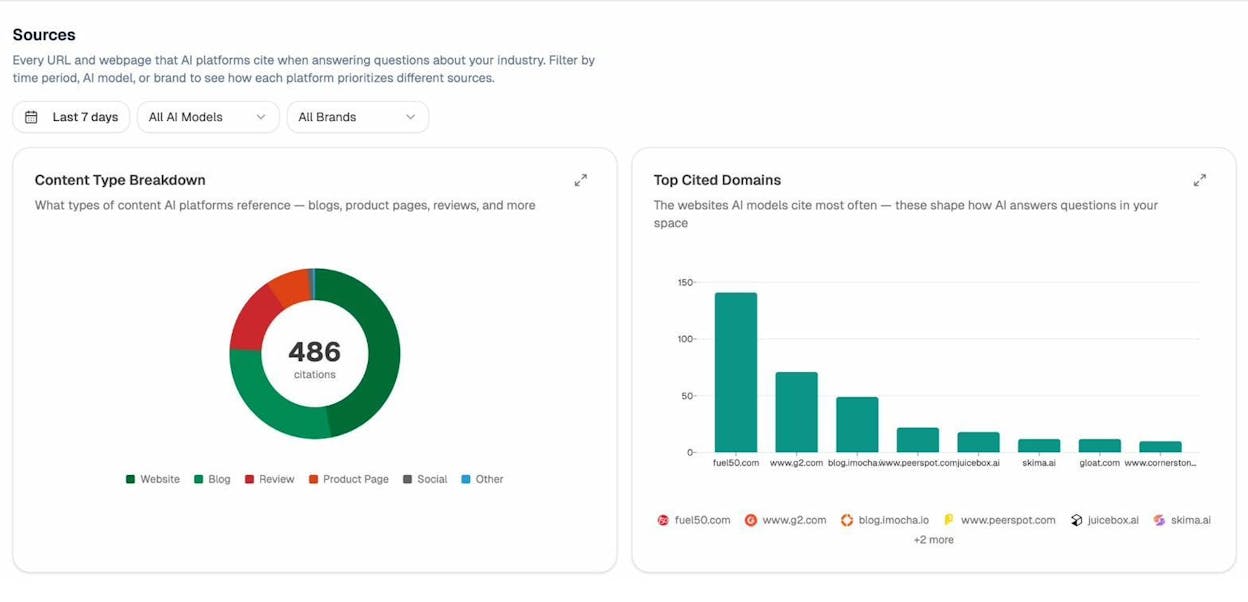
In the Sources dashboard, you’ll see the domains and specific URLs that AI platforms cite when answering questions in your industry. This tells you which content types AI models prefer to reference—and whether your structured, schema-marked pages are among them.
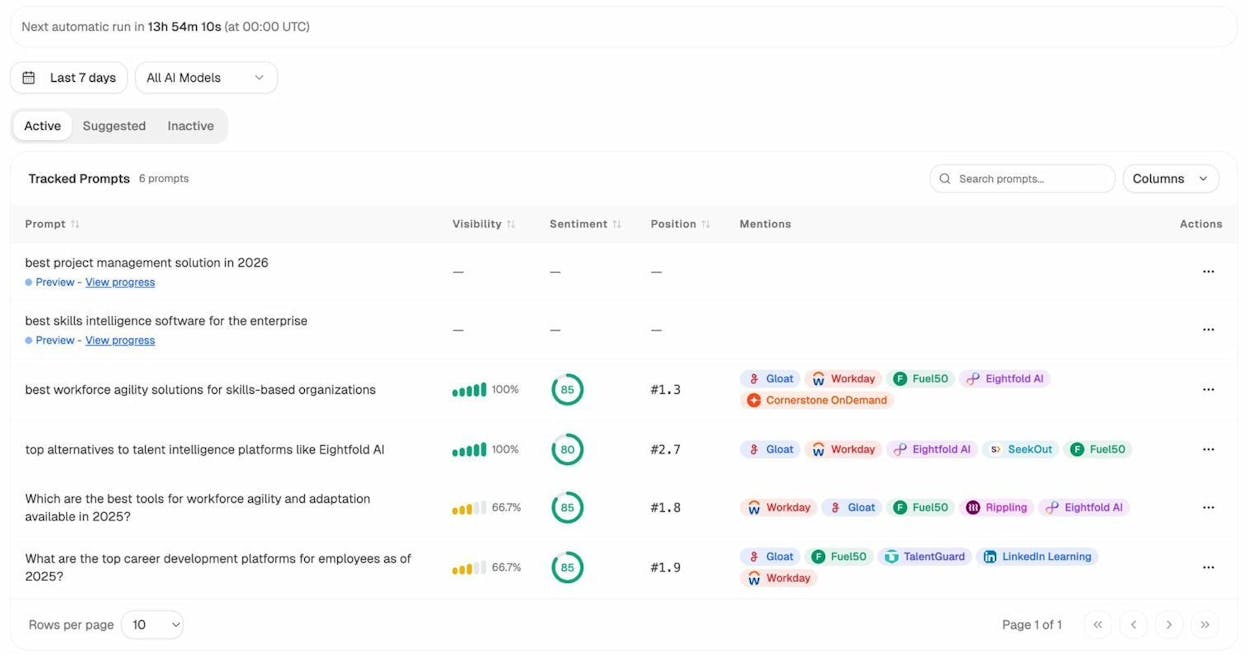
To dig deeper, use the Prompts dashboard to see the specific questions people are asking AI engines in your space. This reveals whether the prompts AI users are entering align with the content you’ve marked up with structured data.
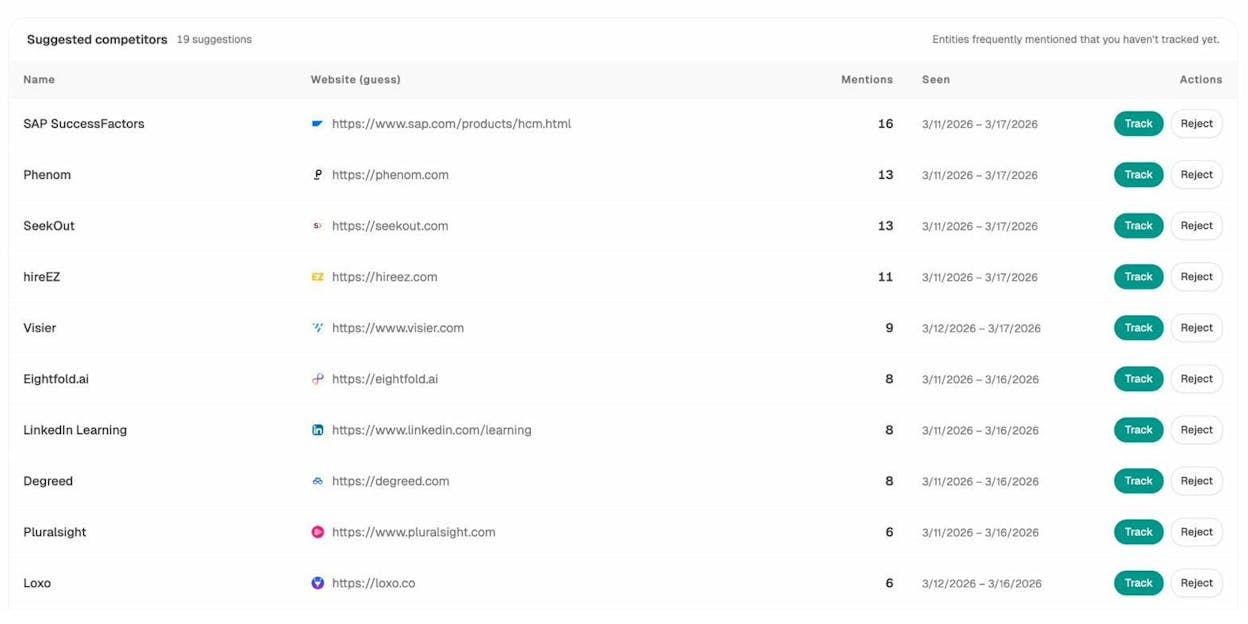
And to see the competitive picture, the Competitors dashboard shows which brands appear alongside you in AI search results. If a competitor’s product pages are getting cited but yours aren’t, it may be because their structured data is cleaner or more comprehensive than yours.
The key insight here: rich snippets and structured data are no longer just about earning visual enhancements in Google’s traditional results. They’re about making your content legible and citable across the entire discovery ecosystem—Google, Bing, and every AI search engine that references web content.
This doesn’t mean SEO is dead. It means SEO is evolving. The same fundamentals that make your pages eligible for rich snippets in Google—clean structure, explicit data, adherence to standards—also make your pages easier for AI models to understand and cite. Investing in structured data pays dividends across both channels.
How to Prioritize Which Pages to Mark Up First
If your site has hundreds or thousands of pages, you can’t mark up everything at once. Here’s how to prioritize.
Start with pages that already rank on page one
Rich snippets only appear for pages that Google already trusts enough to rank on the first page. Adding schema to a page buried on page five won’t generate a rich snippet. So begin with your highest-ranking pages that match a supported schema type.
Use the Analyze AI keyword rank checker to identify which of your pages currently rank in the top 10 for their target keywords. Those are your first candidates.
Focus on pages with the highest business value
Not all pages benefit equally from rich snippets. A product page for your best-selling item will drive more incremental revenue from a rich snippet than a blog post on an obscure topic. Prioritize pages where increased CTR directly translates to business results.
Target keywords where competitors already have rich snippets
If your competitors’ search results show rich snippets for a keyword you’re targeting, adding schema markup to your own page levels the playing field. Without it, their enhanced listing will draw clicks away from your plain blue link.
Use the Analyze AI SERP checker to see which SERP features (including rich results) currently appear for your target keywords.
Check what AI search engines reference in your space
Beyond traditional SERP prioritization, check which content types AI search engines prefer in your industry. If AI models are heavily citing product comparison pages and you have a strong comparison page without schema markup, that’s a high-priority opportunity.
Use Analyze AI’s Sources dashboard to see the content types (blogs, product pages, reviews, etc.) that AI platforms reference most in your space, and cross-reference that with your own pages that lack structured data.
Structured Data Best Practices Checklist
Here’s a quick-reference checklist to make sure your implementation is solid:
-
Use JSON-LD format (Google’s recommended format)
-
Place the JSON-LD in the <head> or <body> of your page
-
Only mark up content that’s visible to users on the page
-
Fill in all required fields for your schema type
-
Fill in as many recommended fields as possible
-
Test your code using Google’s Rich Results Test before deploying
-
Test the live URL after deploying
-
Also validate using the Schema Markup Validator (validator.schema.org)
-
Monitor for errors in Google Search Console’s “Enhancements” section
-
Schedule regular site audits to catch broken schema early
-
Re-test sample pages after any CMS, theme, or plugin update
-
Avoid marking up self-serving reviews
-
Check competitors’ SERPs to see if they have rich snippets you should match
-
Track which pages with structured data are cited by AI search engines
Key Takeaways
Rich snippets give your search results more visual prominence, provide useful context to searchers, and can meaningfully improve your click-through rate. But they also serve a larger purpose: they make your content more structured and machine-readable, which matters increasingly as AI search engines become a significant traffic source.
The implementation process is straightforward. Check whether your pages already have markup, choose the right schema type, generate the code (using a plugin, a generator tool, or manual JSON-LD), validate it, and monitor it over time.
Don’t stop at Google. The same structured data that makes your pages eligible for rich snippets in traditional search also helps AI models like ChatGPT, Perplexity, and Claude understand and cite your content. Tools like Analyze AI let you track whether that AI visibility is translating into real traffic and conversions—so you can tie your structured data investment to measurable results.
The brands that win are the ones treating structured data not as a one-time SEO task, but as a foundation for visibility across every discovery channel—traditional and AI-powered alike.

Ernest

Ibrahim


