



Summarize this blog post with:


In this article, you’ll learn exactly how search engines discover, organize, and rank the billions of pages on the web. You’ll also learn how AI search engines like ChatGPT, Perplexity, and Google’s AI Mode use many of the same underlying systems—and why understanding both gives you a real edge in getting found online.
Table of Contents
Search Engine Basics
Before diving into the mechanics, let’s get the fundamentals right. Search engines are not magic. They’re software systems built to solve one problem: help people find the best answer to their question, fast.
What Is a Search Engine?
A search engine is a searchable database of web content. It has two main parts:
-
A search index. A massive digital library of information about web pages. Think of it as the catalog that stores everything the search engine knows about the web.
-
Search algorithms. The computer programs that sift through that index and decide which results best match what you searched for—and in what order to show them.
Google, Bing, Yahoo, and other search engines all work on this same basic model. The difference is in how well they execute each step.
What Is the Goal of a Search Engine?
Every search engine has one job: return the most relevant, useful results for every query. Google says this explicitly in its documentation—its systems are designed to present information that is most relevant and useful.
This isn’t just altruism. Better results mean more users. More users mean more ad revenue. Quality drives the entire business model.
How Do Search Engines Make Money?
Search engines show two types of results:
-
Organic results. These come from the search index. You can’t pay to appear here. You earn your spot through SEO.
-
Paid results (ads). Advertisers bid on keywords and pay each time someone clicks their ad. This is called pay-per-click (PPC) advertising.
![[Google SERP showing paid ads at the top and organic results below, with labels pointing to each section]](https://www.datocms-assets.com/164164/1774874756-blobid1.jpg?auto=format,compress&w=1248&fit=max)
Google generated over $307 billion in ad revenue in 2024 alone. That money comes from one thing: people clicking ads on search results pages. More users searching means more clicks. More clicks means more revenue. That’s why Google obsesses over result quality—it’s directly tied to market share.
Here’s the key insight for marketers: organic results get roughly 70–80% of all clicks, while paid results get the rest. So even though ads drive Google’s revenue, most users prefer and trust organic results.
What About AI Search Engines?
Traditional search engines like Google show you a list of links. AI search engines like ChatGPT, Perplexity, Claude, and Google’s AI Mode do something different: they read the web, synthesize information, and give you a direct answer in natural language.
But here’s what most people miss: AI search engines still depend on the same web content that traditional search engines index. ChatGPT’s search feature pulls from Bing’s index. Perplexity crawls the web and cites its sources. Google’s AI Mode draws from its own search index.
This means the fundamentals of how search engines work—crawling, indexing, and ranking—apply to both traditional and AI search. The difference is in what happens after the results are retrieved. Traditional search engines show you a list. AI search engines read those results and generate a synthesized answer.
Understanding both systems is no longer optional. AI search is not replacing traditional SEO—it’s a new layer on top of it. Brands that optimize for both will compound their visibility across every channel where people look for answers.
How Search Engines Build Their Index
Before a search engine can rank anything, it needs to know what’s out there. That’s where crawling and indexing come in. Below is a simplified version of how Google—the dominant search engine with over 90% market share—builds its search index.
The process has four steps: discovering URLs, crawling those URLs, processing what it finds, and adding the information to its index.
![[Flowchart showing URLs → Crawling → Processing/Rendering → Indexing, with arrows between each step]](https://www.datocms-assets.com/164164/1774874761-blobid2.png?auto=format,compress&w=1248&fit=max)
Step 1: Discovering URLs
Everything starts with URLs. Google needs to know a page exists before it can crawl it. There are three main ways it discovers new URLs:
From backlinks. When an existing page in Google’s index links to a new page, Google’s crawler can follow that link and discover the new URL. This is the most common way new pages get found. It’s also why backlinks matter so much for SEO—they serve as both a discovery mechanism and a ranking signal.
From sitemaps. A sitemap is an XML file that lists all the important URLs on your website. You submit it through Google Search Console, and it tells Google which pages exist on your site, when they were last updated, and how important they are relative to each other.
From manual URL submissions. Google Search Console lets you submit individual URLs for crawling using the URL Inspection tool. This is useful for new pages you want indexed quickly, or pages you’ve recently updated.
Here’s a practical detail most guides skip: Google doesn’t crawl every URL it discovers. It prioritizes based on several factors, including how authoritative the site is, how often its content changes, and how many other pages link to it. A new blog post on a high-authority site will get crawled within minutes. The same post on a brand-new domain might take days or weeks.
Step 2: Crawling
Crawling is when a bot (called a spider or crawler) visits a URL and downloads the page’s content. Google’s crawler is called Googlebot. Bing’s is called Bingbot.
Here’s what actually happens during a crawl:
-
The crawler sends an HTTP request to the URL’s server.
-
The server responds with the page’s HTML code (and a status code like 200 for success, 404 for not found, or 301 for a redirect).
-
The crawler downloads the HTML and stores it for processing.
Two important things to know about crawling:
Crawl budget is real. Google allocates a certain amount of crawling resources to each website. Large sites with millions of pages need to think carefully about which pages they want Google to prioritize. Pages blocked by robots.txt, pages buried deep in site architecture, and pages with thin content are less likely to get crawled frequently.
Not everything gets crawled. Google respects robots.txt directives, which let site owners specify which pages or sections should not be crawled. You can also use the noindex meta tag to tell Google not to index a specific page, even if it has been crawled.
![[Example robots.txt file showing how to block specific directories from crawling]](https://www.datocms-assets.com/164164/1774874768-blobid3.png?auto=format,compress&w=1248&fit=max)
Step 3: Processing and Rendering
After crawling, Google needs to understand what the page actually says and looks like. This happens in two phases:
Processing is where Google extracts key information from the page’s HTML—the title tag, headings, body text, links, meta descriptions, structured data, and more. It also looks at the page’s canonical tag to determine which version of a URL should be indexed (important for sites with duplicate content).
Rendering is where Google executes the page’s JavaScript code to see how the page looks to a real user. This matters because many modern websites load content dynamically with JavaScript. If Google doesn’t render the page, it might miss important content.
Here’s the catch: rendering is expensive. Google renders pages in a queue, and JavaScript-heavy pages may experience a delay between crawling and rendering. This is why server-side rendering (SSR) is generally better for SEO than client-side rendering—it ensures Google can see all your content immediately.
Step 4: Indexing
Indexing is where Google takes the processed information and stores it in its search index. The search index is a massive database—Google’s index contains hundreds of billions of web pages.
When a page is indexed, Google stores the page’s content (text, images, videos), metadata (title tag, meta description, structured data), information about the page’s links, technical signals (page speed, mobile-friendliness, HTTPS status), and the page’s relationship to other pages (canonical URLs, hreflang tags).
Getting indexed is not guaranteed. Google may choose not to index a page if it considers the content low-quality, duplicate, or not useful enough. You can check whether your pages are indexed using Google Search Console’s Index Coverage report, or by searching site:yourdomain.com in Google.
![[Google Search Console showing index coverage report with indexed, excluded, and error pages]](https://www.datocms-assets.com/164164/1774874774-blobid4.png?auto=format,compress&w=1248&fit=max)
Here’s one more thing most guides don’t mention: AI assistants rely on search indexes too. ChatGPT’s search feature uses Bing’s index. Google’s AI Mode uses Google’s index. Perplexity runs its own web crawler (PerplexityBot) and builds its own index. So when your content is properly crawled and indexed by major search engines, you’re also positioning yourself to appear in AI-generated answers.
This is why answer engine optimization and traditional SEO are deeply connected. The foundation is the same: get your content discovered, crawled, and indexed.
How Search Engines Rank Pages
Getting into the index is just step one. The real question is: where do you rank? When someone types a query into Google, the search engine has to decide which of the millions of matching pages to show first.
This is the job of search algorithms.
What Are Search Algorithms?
Search algorithms are the formulas (or more accurately, sets of machine learning models) that evaluate every page in the index against a given query and decide which results are most relevant, useful, and trustworthy.
Google’s algorithm is not a single formula. It’s a collection of systems—RankBrain, BERT, MUM, and others—that work together to understand queries, evaluate content, and rank results. Each system handles a different aspect of the ranking process.
Key Google Ranking Factors
Backlinks
Backlinks are links from one website to another. They remain one of Google’s strongest ranking signals. Google has repeatedly confirmed that links are a key factor in determining a page’s authority and relevance.
Think of backlinks as votes of confidence. When a reputable website links to your page, it’s telling Google that your content is worth referencing. Studies consistently show a strong correlation between the number of linking domains and organic traffic.
But it’s not just about quantity. Quality matters more than volume. A single backlink from a trusted, relevant site can outweigh dozens of links from low-quality directories.
You can check your backlink profile using Analyze AI’s Website Authority Checker, which shows you domain strength and referring domain counts—useful for benchmarking your link profile against competitors.
![[Analyze AI Website Authority Checker showing domain authority score and referring domains for a sample website]](https://www.datocms-assets.com/164164/1774874780-blobid5.png?auto=format,compress&w=1248&fit=max)
Relevance
Relevance measures how well a page matches the intent behind a search query. Google determines this through keyword matching (understanding synonyms and intent, not just exact match), search intent alignment (categorizing queries as informational, navigational, transactional, or commercial), and topical depth (pages that comprehensively cover a topic tend to rank better). Learn more in our guide on SEO content strategy.
Content Quality and E-E-A-T
Google evaluates content quality through a framework called E-E-A-T: Experience, Expertise, Authoritativeness, and Trustworthiness.
-
Experience. Content written by someone who has actually done the thing they’re writing about carries more weight.
-
Expertise. The author should demonstrate deep knowledge of the subject.
-
Authoritativeness. The website and author should be recognized as a go-to source in their field.
-
Trustworthiness. The most important factor. The content should be accurate, transparent, and published on a secure (HTTPS) website.
Freshness
Freshness is a ranking factor, but only for queries where recency matters. Google calls this a “query-dependent” factor. For a search like “best laptops 2026,” freshness is critical. But for “how to tie a bowline knot,” a page published five years ago works just as well.
Page Speed and Core Web Vitals
Page speed has been a Google ranking factor since 2010 for desktop and 2018 for mobile. Core Web Vitals measure real-world user experience through three metrics: Largest Contentful Paint (LCP, target under 2.5s), Interaction to Next Paint (INP, target under 200ms), and Cumulative Layout Shift (CLS, target under 0.1).
Page speed is more of a negative factor than a positive one. Having a blazing-fast site won’t rocket you to #1, but having a slow site can definitely hurt you.
Mobile-Friendliness
Google uses mobile-first indexing, meaning it primarily uses the mobile version of your content for indexing and ranking. This has been the default since 2019.
How AI Search Engines Decide What to Cite
Traditional search engines rank pages on a SERP. AI search engines generate an answer and decide which sources to cite within that answer. The factors overlap significantly, but there are important differences:
|
Factor |
Traditional Search |
AI Search |
|
Backlinks |
Strong ranking signal |
Indirectly important (authoritative sources get cited more) |
|
Content quality |
Important for rankings |
Critical—AI models prefer comprehensive, well-structured content |
|
Brand authority |
Influences click-through |
Directly influences whether your brand gets mentioned by name |
|
Freshness |
Query-dependent |
Models may lag; real-time search features help |
|
Citation patterns |
N/A |
AI models develop trust patterns for frequently cited domains |
The practical takeaway: content that ranks well in traditional search is more likely to get cited by AI search engines. But AI search adds another layer—brand mentions, sentiment, and whether your content is structured in a way that AI models can easily parse and cite.
This is where tools like Analyze AI become valuable. While traditional SEO tools show you where you rank on Google, Analyze AI shows you where your brand appears in AI-generated answers across ChatGPT, Perplexity, Claude, Gemini, and Copilot.
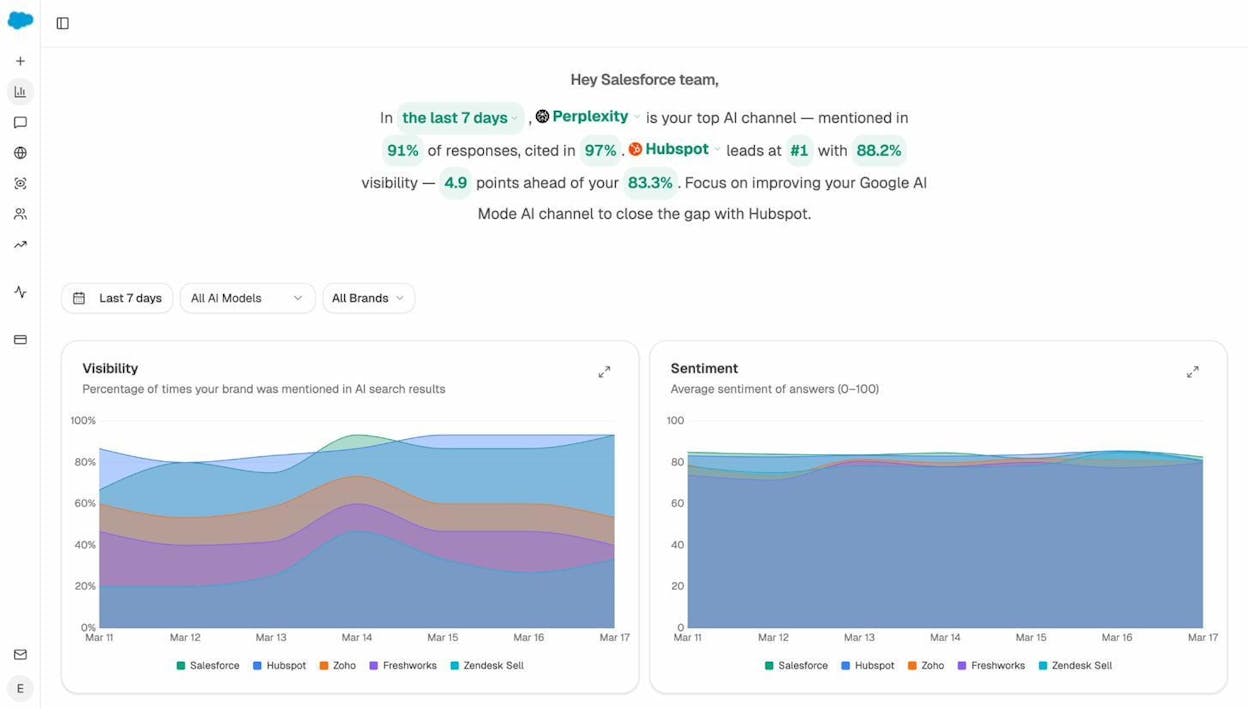
With Analyze AI’s prompt-level analytics, you can see exactly which prompts mention your brand, what sentiment they convey, and where competitors are winning instead of you. This is the AI search equivalent of checking your Google rankings—but for a channel that most marketers aren’t tracking yet.
How Search Engines Personalize Results
If you and a friend search for the exact same thing on Google at the same time, you might see slightly different results. That’s because Google personalizes search results based on several factors.
Location
Location is the biggest driver of personalization. Google uses your IP address and device location to customize results for queries with local intent. Search “coffee shop” and you’ll see nearby coffee shops—not ones in another city.
Language
Google serves results in the language of the searcher. If you search in Spanish, you’ll see Spanish-language results—even if the English version of a page has more backlinks and higher authority.
Search History
Google uses your past searches and browsing behavior to subtly adjust your results. If you frequently visit a particular website, Google may rank that site slightly higher in your personal results.
Device Type
Google also considers the device you’re searching on. Mobile searches may show more map packs and local results. Desktop searches may show more knowledge panels. Voice searches tend to return single, direct answers.
How AI Search Handles Personalization
AI search engines personalize differently. Most don’t yet personalize based on your location or search history the way Google does. Instead, AI search personalization happens at the prompt level. The way you phrase your question directly shapes the answer.
This is why tracking the actual prompts people use to find brands in your category matters. With Analyze AI’s prompt tracking, you can monitor the specific prompts where your brand appears—and the ones where it doesn’t.
 .
.
How to Check If Search Engines Can Find Your Site
Understanding how search engines work is useful. But the real value comes from applying that knowledge to your own website. Here are the practical steps.
Check Your Indexing Status
-
Google Search Console. Go to the “Pages” report (under Indexing) to see how many pages are indexed, and which are excluded and why.
-
Site search. Type site:yourdomain.com into Google to see all indexed pages.
-
Analyze AI’s SERP Checker. Use the free SERP Checker to see where your pages rank for specific keywords.
Fix Crawlability Issues
-
Robots.txt blocking important pages. Check your robots.txt file to make sure you’re not accidentally blocking Googlebot.
-
Noindex tags on pages you want indexed. A noindex meta tag will prevent a page from appearing in search results.
-
Broken internal links. Use Analyze AI’s free Broken Link Checker to find and fix them.
-
Slow server response times. Monitor in Google Search Console if your server is too slow.
Make Sure AI Crawlers Can Access Your Content
Traditional search engine crawlers aren’t the only bots you need to think about. AI search engines have their own crawlers: GPTBot (OpenAI/ChatGPT), PerplexityBot (Perplexity), ClaudeBot (Anthropic/Claude), and Google-Extended (Gemini).
Check your robots.txt to see if you’re blocking any of these. You can also create an llms.txt file using Analyze AI’s free LLM.txt Generator to provide AI crawlers with a structured summary of your site.
How to Track Your Visibility Across Search and AI
Once your site is crawlable and indexed, you need to track where it actually shows up. This means monitoring both traditional search rankings and AI search mentions.
Tracking Traditional Search Rankings
-
Google Search Console (free): Shows your actual search impressions, clicks, and average position.
-
Analyze AI’s Keyword Rank Checker (free): Check rankings for specific keywords.
-
Analyze AI’s Keyword Generator (free): Discover new keyword opportunities.
Tracking AI Search Visibility
Traditional SEO tools can’t tell you whether your brand appears when someone asks ChatGPT or Perplexity a question in your industry. Analyze AI fills this gap.
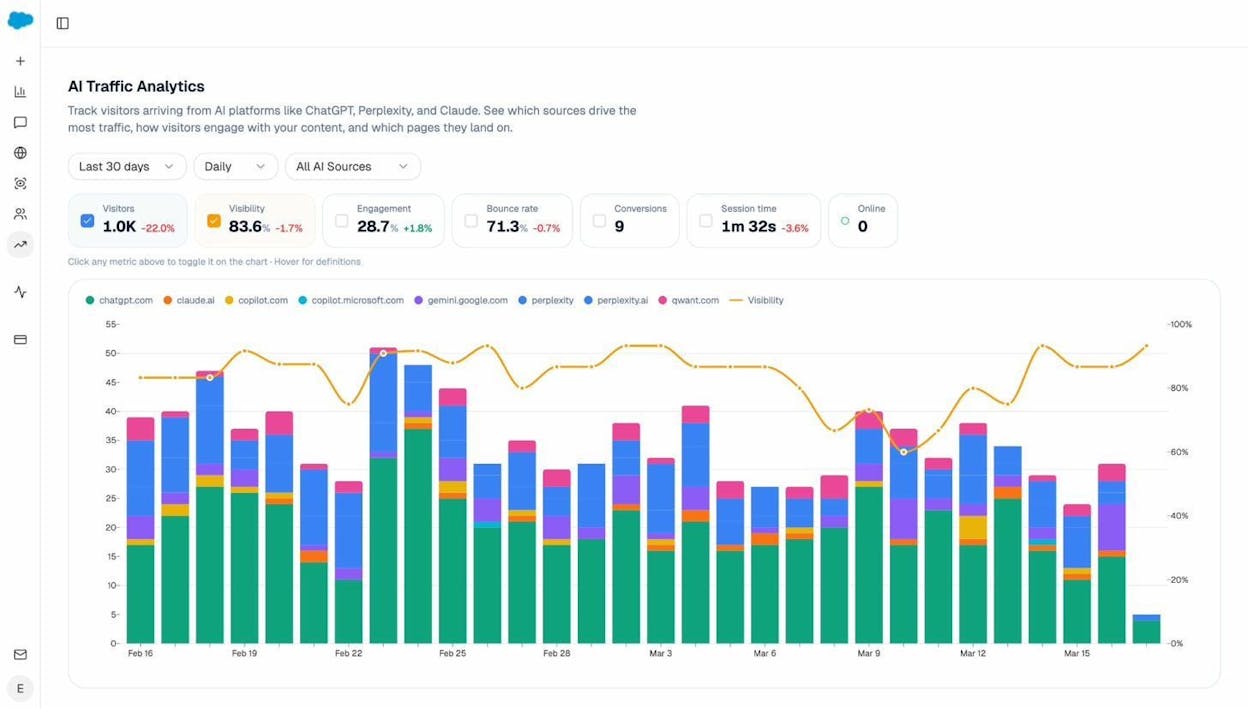
1. Track which AI engines send you traffic. Analyze AI connects to your GA4 account and shows you exactly how many sessions come from each AI platform.
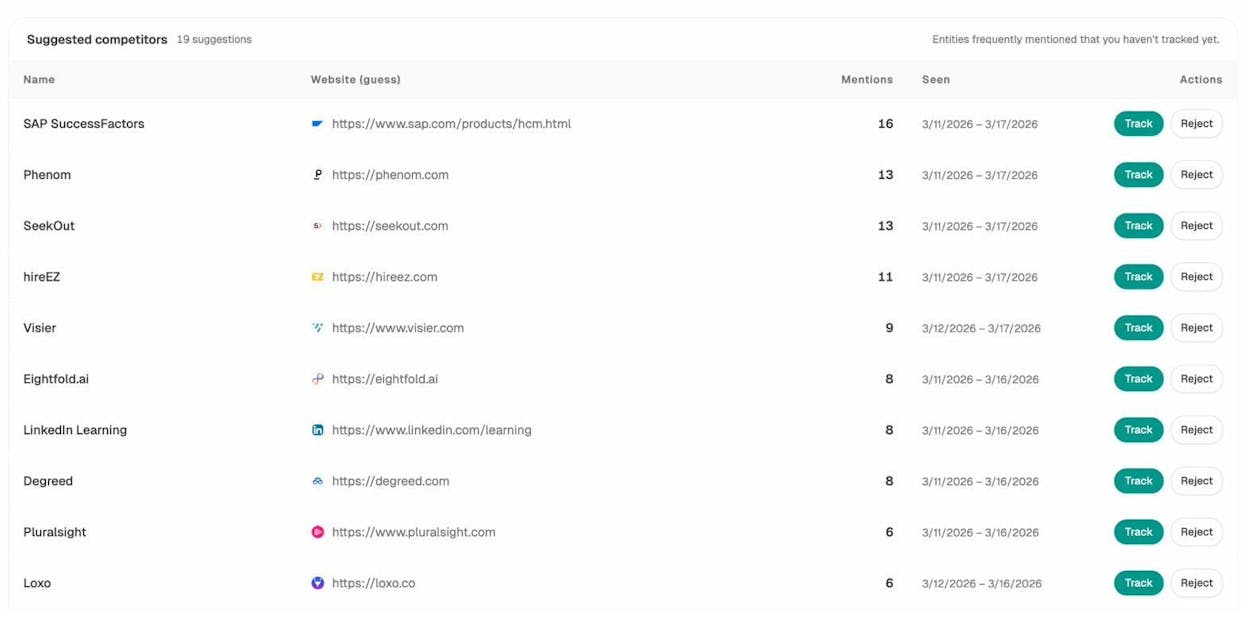
2. Monitor competitor visibility in AI answers. The Competitor Overview shows which brands appear alongside yours in AI-generated answers.
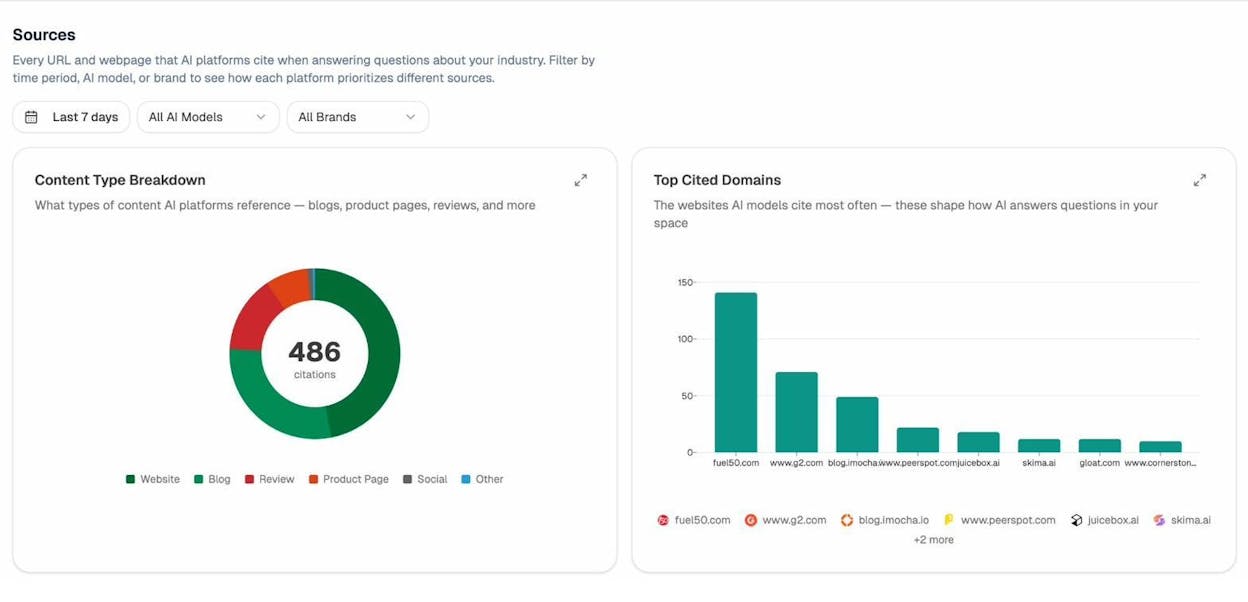
3. Audit the sources AI models cite. The Sources dashboard reveals which domains AI models reference most in your industry.
What’s Changing: The Convergence of Search and AI
The search landscape is shifting. Google’s AI Mode, OpenAI’s SearchGPT, and Perplexity’s answer engine are blurring the line between traditional search and AI-powered answers.
Search Engines Are Adding AI Layers
Google’s AI Mode generates AI-powered answers directly in search results. When activated, it summarizes information from multiple web sources and presents it above the traditional results. This means your content can now surface in two places: the AI-generated summary and the organic results below.
AI Assistants Are Adding Search Capabilities
ChatGPT now has real-time web search, pulling live results from Bing and citing sources with links. Perplexity has always been search-first, crawling the web with its own bot. Claude is also expanding its web search capabilities.
What This Means for Your Strategy
The practical implication is straightforward: SEO and AI search optimization are converging, not competing. Content that performs well in traditional search is more likely to be cited by AI engines. And AI search is sending a growing percentage of referral traffic to websites—traffic you can measure and attribute with the right tools.
At Analyze AI, we believe that generative engine optimization (GEO) isn’t a replacement for SEO—it’s the next transformation of it. Search is expanding from ten blue links to multi-modal, prompt-shaped answers. Quality still governs visibility. Authority still comes from depth, originality, structure, and usefulness.
Key Takeaways
-
A search engine has two parts: an index (where content is stored) and algorithms (which decide what to show).
-
Search engines build their index through a four-step process: discovering URLs, crawling pages, processing/rendering content, and indexing it.
-
AI search engines rely on the same underlying web indexes, so getting indexed by Google and Bing also positions you for AI search visibility.
-
The most important ranking factors include backlinks, relevance, content quality (E-E-A-T), freshness, page speed, and mobile-friendliness.
-
AI search engines use many of the same signals, but also consider brand authority, content structure, and citation patterns.
-
Track your traditional search performance with Google Search Console and Analyze AI’s free SEO tools. Track your AI search visibility with Analyze AI.
-
SEO is not dead. It’s evolving. AI search is a complementary organic channel—not a replacement.
Further Reading
Ready to go deeper? Here’s where to go next:

Ernest

Ibrahim


